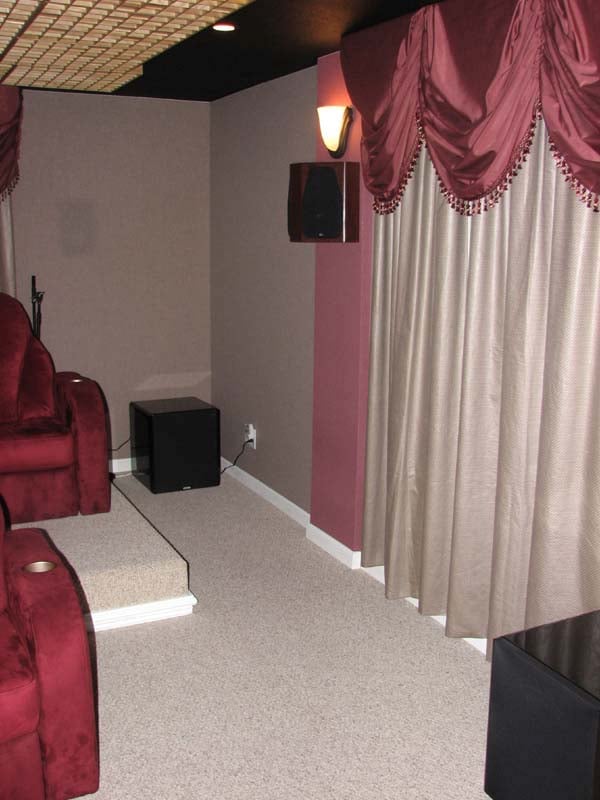
Velodyne Digital Drive DD-15+ Subwoofer Review
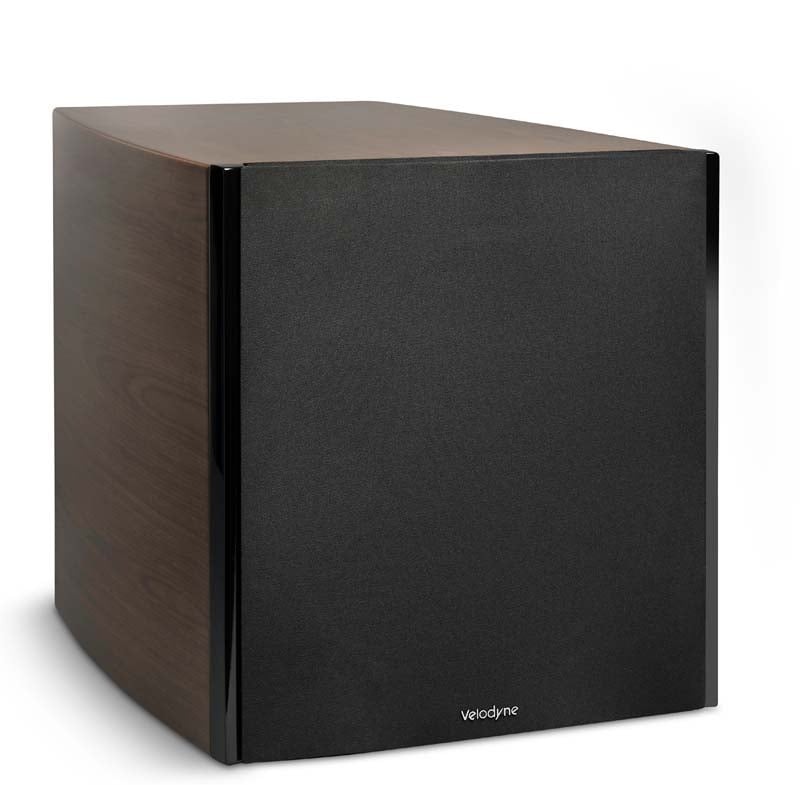
Velodyne DD-15+ Subwoofer
- Product Name: DD-15+ Subwoofer
- Manufacturer: Velodyne
- Performance Rating:


- Value Rating:
- Review Date: June 09, 2011 16:05
- MSRP: $ 3999 (sold direct)
Velodyne DD-15+ Specifications
- Driver: 15” forward-firing
- Amplifier (ClassD): 3000 watts Dynamic, 1250 watts RMS Power
- Frequency Response: Overall 9.0 – 300 Hz (+/- 3 dB) 14.6 – 120 Hz
- THD: <0.5% (typical)
- High Pass Xover: 80 or 100 Hz at 6 dB/octave
- Low Pass Xover: 40 Hz to 199 Hz (variable in 1 Hz crossover increments) selectable slope Default: 80 Hz @ 24 dB/Octave
- Phase: 0 to 180 degrees (variable in 15 degree increments)
- Polarity Adjustable: (+/-)
- Magnet Structure: 39.7 lbs.
- Voice Coil: Six-layer, 75mm
- Cone: Fiberglass Rohacell Laminate
Inputs/Outputs
- LFE (Mono) Line level (RCA), Nominal Impedance 47K,
- Balanced (XLR), Nominal Impedance 10K
- Input (L&R) Line level (RCA & XLR)
- Microphone Balanced (Mini-XLR, cable included)
- Speaker Bare wire, banana plugs, or spade lugs Level (L&R)
- Thru (L&R) Line level (RCA & XLR) outputs
- Output (L&R), High-Pass Line level (RCA & XLR)
- Included Full feature remote control, DD+ accessory Accessories kit and video cable
- Finishes: Black gloss ebony, satin cherry or walnut
Physical
- Dimensions (H/W/D): 20” x 18.1” x 22.5” (includes feet (51 x 46 x 57 cm) and connectors)
- Shipping Weight: 120 lbs.(approx)
- Warranty: Three years (electronics) / (parts/labor) Five years (drivers)
Pros
- Superb performance in a moderate box size
- Excellent aesthetics
- Tons of configurability options to ease installation
Cons
- Pricey
- Coarse resolution of included setup software limits its usefulness
Velodyne DD-15+ Introduction
 Velodyne
has been producing their flagship Digital Drive series since 2003. We were fortunate to have two of their
DD-15's integrated into the Audioholics
Showcase Home
reference system for the last few years.
When introduced, the DD series of subs marked a first of many features
not found in competing products including a fully digital interface with an
onboard adjustable 8 band parametric EQ, adjustable crossover and subsonic
filter slopes, phase and volume level.
We found the configurability and interface of these subs to be
excellent, sans the included measurement system which proved too coarse to make
precision adjustments. Since the
introduction of the DD subs, some of Velodyne's direct competition have
surpassed their products in sheer output and extension for the same given box
size. It was time for Velodyne to raise
the bar again. Enter the new Digital
Drive Plus series of subwoofers - the successor to the venerable Digital Drive
series. We wanted to establish if the
new DD+ series offered significant performance advantages over the original DD
series to truly accomplish this goal.
This review directly compares the DD-15 to the DD-15+ sub to make that
determination.
Velodyne
has been producing their flagship Digital Drive series since 2003. We were fortunate to have two of their
DD-15's integrated into the Audioholics
Showcase Home
reference system for the last few years.
When introduced, the DD series of subs marked a first of many features
not found in competing products including a fully digital interface with an
onboard adjustable 8 band parametric EQ, adjustable crossover and subsonic
filter slopes, phase and volume level.
We found the configurability and interface of these subs to be
excellent, sans the included measurement system which proved too coarse to make
precision adjustments. Since the
introduction of the DD subs, some of Velodyne's direct competition have
surpassed their products in sheer output and extension for the same given box
size. It was time for Velodyne to raise
the bar again. Enter the new Digital
Drive Plus series of subwoofers - the successor to the venerable Digital Drive
series. We wanted to establish if the
new DD+ series offered significant performance advantages over the original DD
series to truly accomplish this goal.
This review directly compares the DD-15 to the DD-15+ sub to make that
determination.
Design Overview
In the tradition of most of Velodyne's upper tier subwoofer products, the DD-15+ is a single driver sealed active servo design. The driver size is directly related to the model#, so in our case, the DD-15+ sports a 15" driver. The servo feedback mechanism compares the input signal to the amplifier versus the cone motion and helps reduce distortion, which often plagues subwoofers in small enclosures. The amplifier in the DD-15+ features an overload protection circuitry. The driver is digitally controlled with a current limiting driver servo to reduce distortion by preventing clipping and over-excursion. The amplifier section has thermal protection as well as protection against excessive voltage drops. As you will see in our measurements section, this sub, like all Velodyne Servo controlled subs we've tested, is unbreakable.
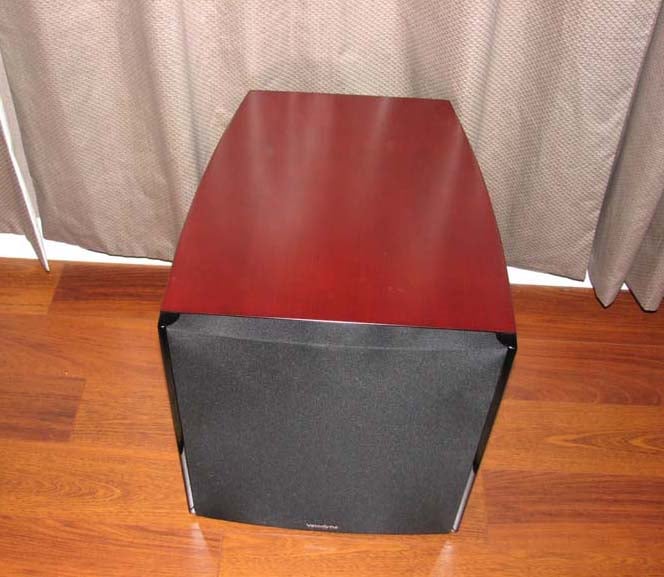
The new DD+ series come in three finish options (black gloss ebony, satin cherry and walnut). Make no mistake, their so-called "black gloss ebony" is nothing like the black gloss from the original DD series. Instead it's much more bland and incorporates a wood grain. Velodyne claims it’s a man-made ebony and the most expensive veneer used on DD+ they can get in China. Natural ebony is not available. I personally prefer the original black gloss, but Velodyne, like many manufacturers, are moving away from this finish option claiming negative feedback on a high gloss finish in light controlled rooms is why they went to semi-gloss and added a subtle ebony grain to the look. My review units came in satin cherry, which I felt was the nicest finish they currently offer. The contrast between the subwoofer cabinet and the wood flooring in our theater room was gorgeous and quite stunning.
Velodyne is all about maximizing output and minimizing distortion in the smallest possible enclosure size. This takes two things: a driver with lots of excursion and an amplifier with lots of power. The DD-15+ has both in droves. This fact is quite apparent when taking a closer look at the new DD+ driver.
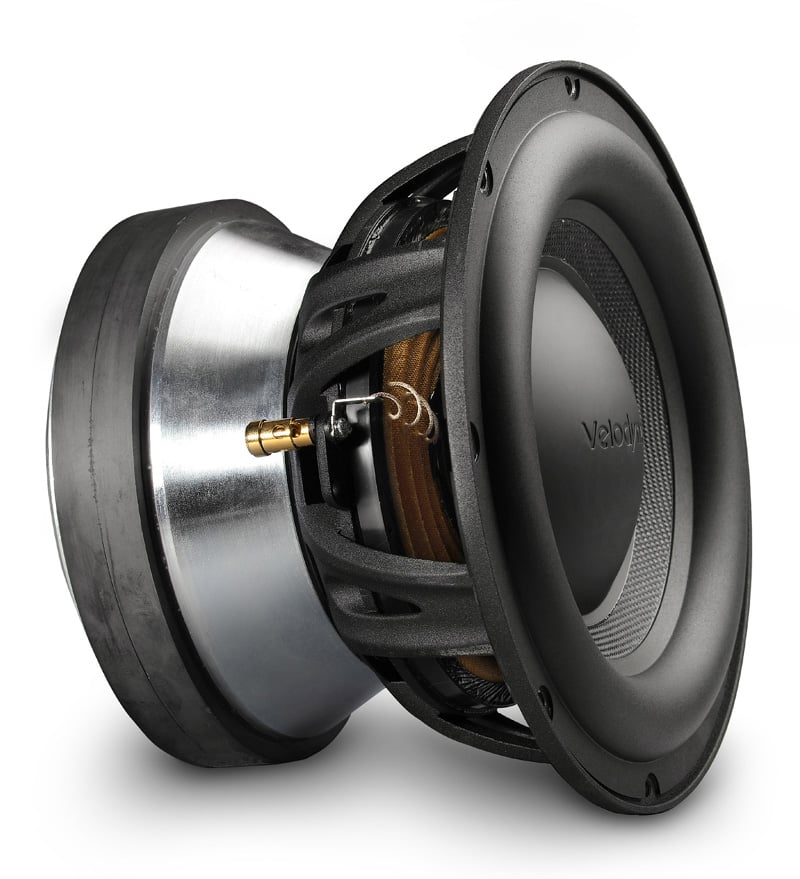 DD-15+ driver advantages over the original DD-15 Driver:
- Magnet motor structure weight increased from 24lbs to 39.7lbs
- Basket design went from conventional design to underhung design
- Increased electrical and magnetic linearity with greater Xmax, higher compliance (Cms) and 20-30% increase in Bl while maintaining the same Mass (Mms) and resistance (DCR) which dropped the resonant frequency (Fs)
- Driver material upgraded from Kevlar reinforced resign to fiberglass Rohacell laminate
The benefit of an underhung designed motor structure allows the usage of a shorter voice coil compared to the top plate of the motor structure. This is done in order to reduce harmonic distortion, since voice coil is held in a constant magnetic field throughout the entire XMAX of the driver. This is quite an expensive driver type, but it shows how Velodyne spared no expense to ensure the lowest possible distortion out of their flagship DD+ series of products. Velodyne claims their DD+ line of subs have between 4-5dB more output for each comparable model to the original DD series of subs. Based on the driver differences between the two products (and the fact that the new DD-15+ box volume has increased nearly 25%) we have little reason to doubt this claim, but of course we measured to confirm the results as you will read later in this review.
The DD-15+ is not video-shielded but this is an ever-diminishing problem in this era of post-CRT display technologies.
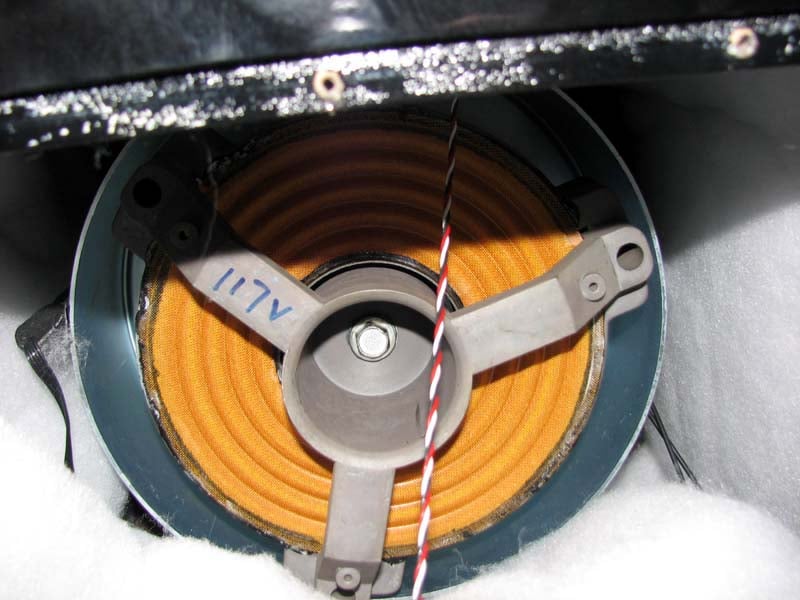
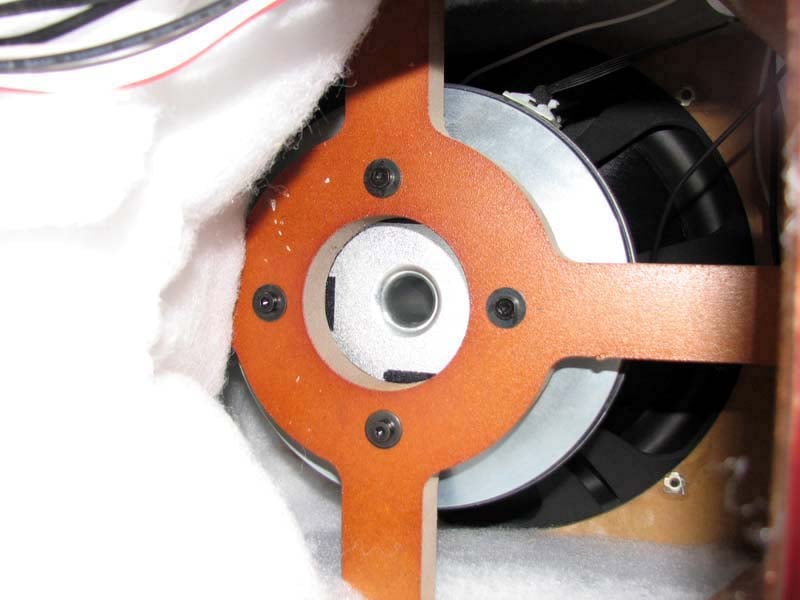
Inside View of the DD-15 (left pic) & DD-15+ (right pic)
Inside the box, we see some big differences between the original DD-15 and DD-15+ subs. The DD-15 has no internal bracing baffles whereas the DD-15+ has a clearly implemented baffle brace that is also bolted to the heavy driver for further reinforcement. A quick knuckle tap on both cabinets reveals the DD-15+ produces a solid thud while the DD-15 has a more hollow or resonant sound character. This alone in my opinion is a marked improvement that I am glad to see in a product of this caliber.
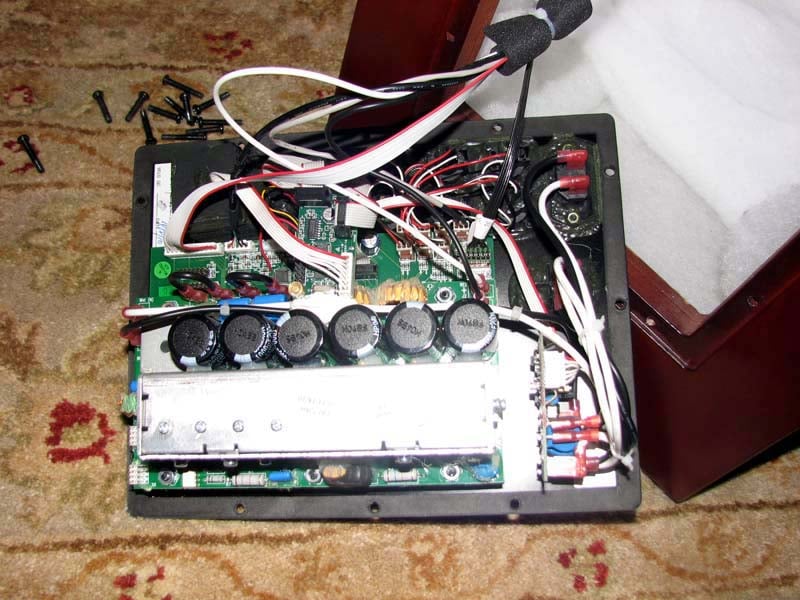
Velodyne DD-15+ Amplifier
The Velodyne DD-15+ boasts a digitally controlled class D amplifier section (up to 95% claimed efficiency at full load) that is said to deliver 1250 watts rms power and 3000 watts dynamic power (same as the original DD-15). The amplifier, which is separated into two sections, occupies the entire back plate. One board is dedicated to the power supply supporting the transformer and main fuses. The second tiered board supports the preamp functions and six power supply capacitors. There is a small heat sink to the side of the capacitors while the majority of the circuitry lives under a grilled metal housing to reduce radiated RFI noise inherent in high frequency switching amp designs. Based on the power consumption rating of 12 amperes listed on the back of the unit at the standard 120 volts we get a power rating of P = 0.95(12A * 120V) = 1368 watts which exceeds the 1250 watt power rating that with a slo-blow fuse leaves little to suspect the rated power of the amplifier.
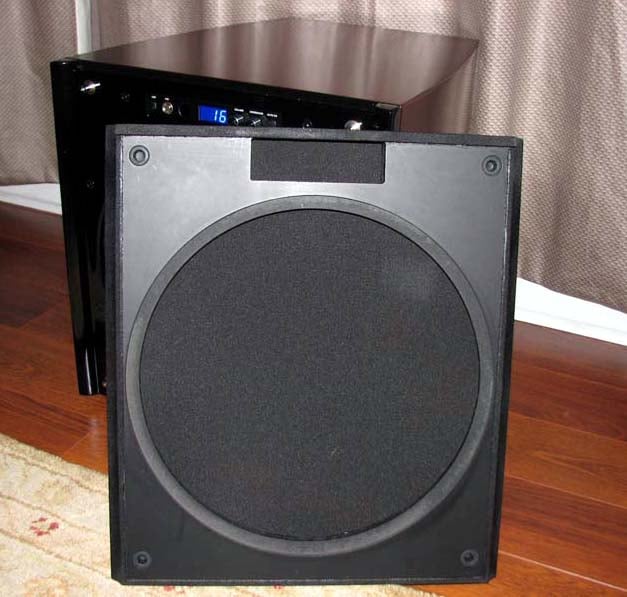
Velodyne DD-15+ Grille Cover (notice no flimsy plastic here)
The build quality of the Velodyne DD+ series of subs is obviously raised considerably compared to their predecessors, not only in driver mechanics and cabinetry, but in the actual grille cover, too. I don't think I've ever encountered a sturdier or heavier grille cover on a subwoofer before. The grille is actually constructed of 1" thick MDF (no flimsy plastic) and finished and stained satin black with cloth wrapped on the outside which looks and feels great. It looks very clean installed on the sub since it recesses into the front baffle for a nice flush look. Velodyne knows the driver in these subs have a lot of stroke and require not only a rigid cabinet but a grille cover as well. You don't typically get this type of build quality in less costly subwoofers - which, in my mind, helps partly justify its rather hefty price tag.
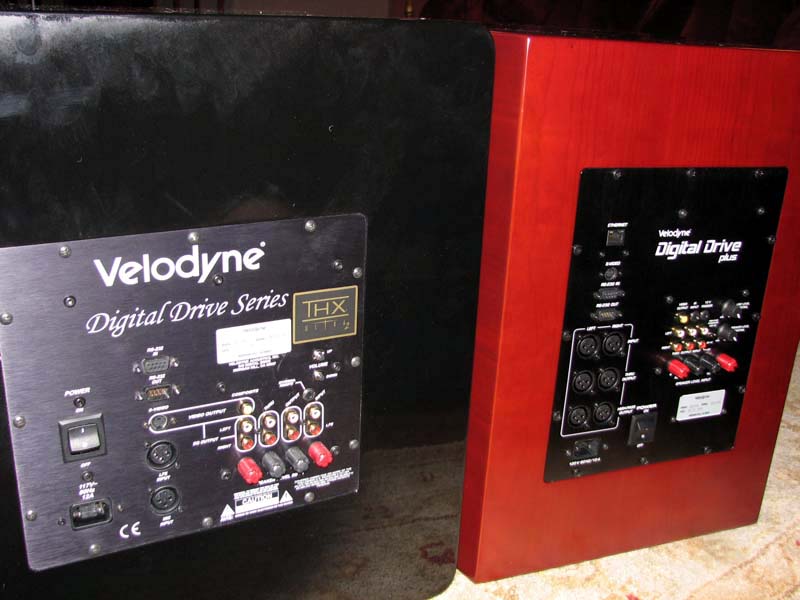
Backpanel view of DD-15 (left pic) & DD-15+(right pic)
What is most interesting is the original DD-15 and DD-18 subs were THX Ultra2 certified. The new DD+ replacements no longer carry the THX logo or certification. This is an obvious cost cutting savings for a company that can undoubtedly pass THX spec without the sheet of paper by now. As indicated in our measurements, the DD-15+ walks all over the DD-15 and you don't need a THX stamp of approval to acknowledge it. We've noticed a trend with numerous manufacturers that THX certify their first generation of new products but not the successor products. This allows the manufacturers to offer a next generation product that exceeds the performance of the original while keeping the retail price the same (or sometimes less) by not expending margin for the THX stamp of approval.
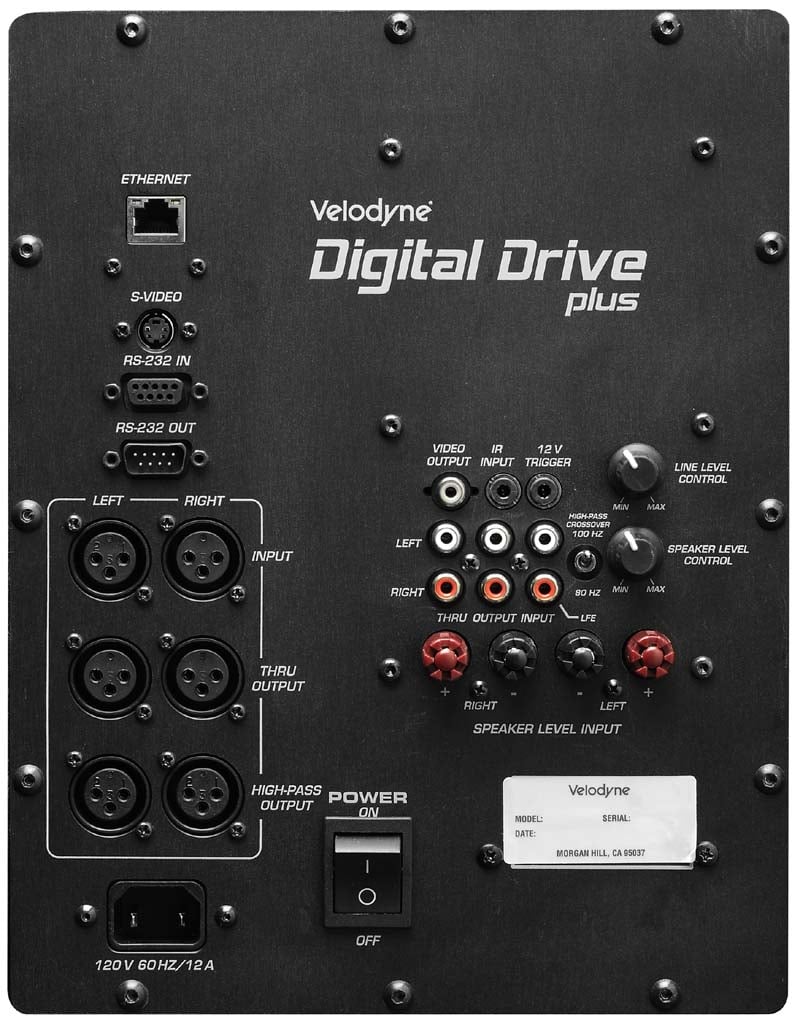
Velodyne DD-15+ Backpanel View
Like the DD-15, the DD-15+ has one of the most comprehensive connection panels we've ever seen on a subwoofer. The DD-15+ takes it up a few notches with the inclusion of all balanced connectors (nice touch) and an Ethernet connection for firmware updates. The only connections missing are speaker level outputs, but I can't imagine anyone buying a sub of this caliber would be hooking it up speaker level and using the bass management of the sub for their satellite speakers no less.
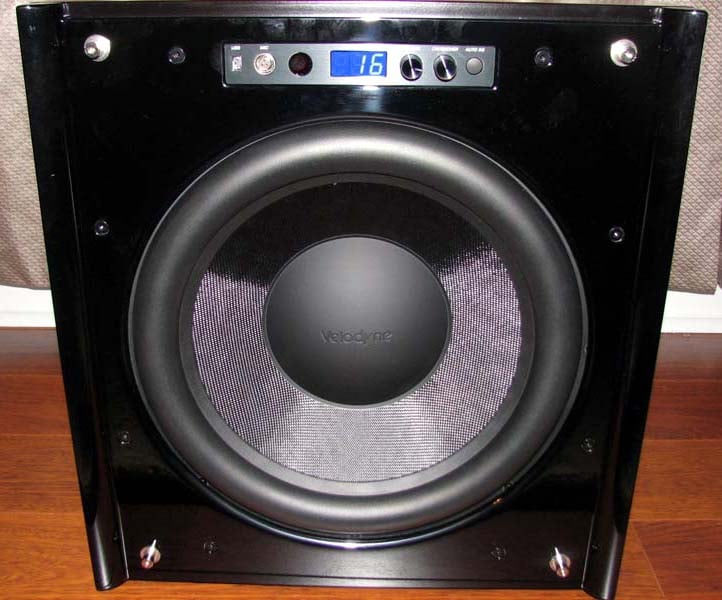
Velodyne DD-15+ Frontpanel View (with grille removed)
The front of the DD15+ is where the microphone and USB connections are made to run auto setup and self-EQ options. There are also a volume and crossover potentiometers adjustable in 1dB and 1Hz increments, respectively. Velodyne claims the volume adjustments are actually .4 to .5dB incremental depending on the actual output level setting. Gone is the backlit Velodyne logo that illuminated anytime a DD series sub was powered up. I really missed this feature and wish Velodyne would have at least incorporated some indication when the DD+ sub goes active other than simply listening for it (although it's hard to miss). This is especially handy in situations where users are employing multiple subs in their theater room and want to give a quick spot-check around the room to ensure all of the subs are powered on before playing a demo to a first-time listener. There is an option via the remote called "light" which turns the front panel display on, indicating volume level, but it stays on all the time rather than just when the sub is active with a signal present. Perhaps they will consider changing this in a future firmware update.
Velodyne DD-15+ Setup & Installation
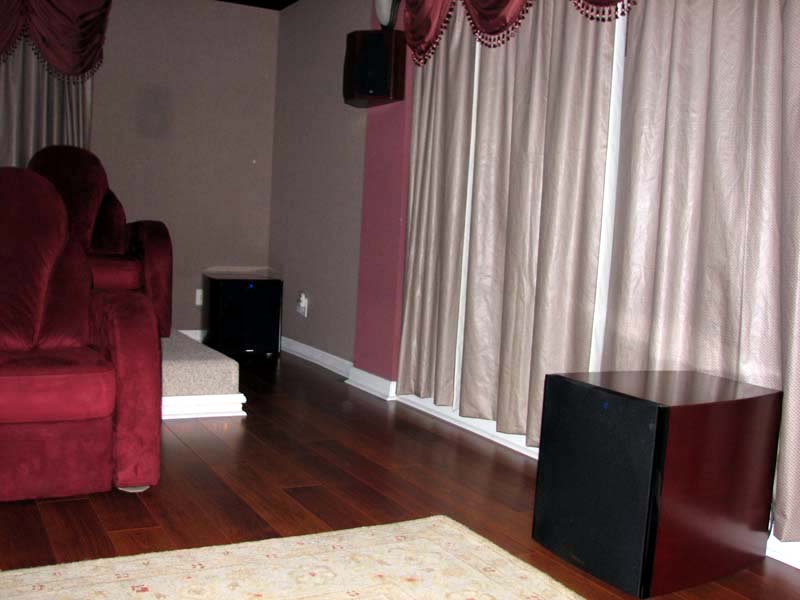 Moving the DD-15+ subs around was no easy task. At nearly 120lbs each, it was challenging
carrying these babies up two flights of steps into my main theater room. Velodyne recommends having two able-bodied
people move these subs and I wholeheartedly agree.
Moving the DD-15+ subs around was no easy task. At nearly 120lbs each, it was challenging
carrying these babies up two flights of steps into my main theater room. Velodyne recommends having two able-bodied
people move these subs and I wholeheartedly agree.
I placed the pair of DD-15+ subwoofers in the exact spots my DD-15's were occupying for the last few years in the Audioholics Showcase Home theater system. One of the subs was placed on the left rear corner of the room while the other sub was placed about mid-wall on the left side of the room. Since my room is "L" shaped, finding the best locations to place subs isn't an exact science, but I used the techniques discussed in our Home Theater Setup Guide for a Multi Subwoofer System article (to help achieve the best possible results. The dual DD-15+ subs were connected to my Denon AVP-A1HDCI A/V Pre/Pro in mono and in conjunction with the dual subs integrated into my RBH Signature T30-LSE system. For the majority of my listening tests, I ran direct comparisons between having the original DD-15 and new DD-15+ subs integrated into my system and level matched appropriately. I also conducted listening tests with just one DD-15+ in place which is noted in the Listening Tests portion of the review.
Velodyne ships each DD+ sub with a calibrated microphone and connection cables, USB cable, the Digital Drive+ PC software (sorry Mac users) the user manual via CD Rom and a remote control. The user manual is quite comprehensive providing suggested subwoofer placements and setup. It's definitely worth a once-over even if you are familiar with operating prior Velodyne DD subwoofers.
 Since we've already covered Velodyne's EQ and auto
set-up system to death in prior reviews, I will only discuss what's new and
encourage the reader to check out our review of Velodyne's
SMS-1 EQ system.
Since we've already covered Velodyne's EQ and auto
set-up system to death in prior reviews, I will only discuss what's new and
encourage the reader to check out our review of Velodyne's
SMS-1 EQ system.
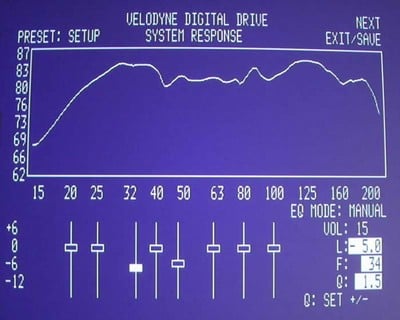
In the original DD series of subs, the user was able to connect their sub via composite or S-video to their display to obtain a graphical interface for adjusting the various parameters such as level, phase, EQ, subsonic filter, crossover slopes, etc. This system displayed measurement sweeps real time using the subs internal sweep generator. The new DD-15+ does all of this, but also adds a refresh to the interface by allowing the user to instead connect their DD+ sub to their laptop. Instead of manually tweaking EQ bands, you can literally shape the curve to your desired output while watching the results real time via the measurement sweeps displayed on your screen.
The user is given three options:
- Auto EQ - when used in conjunction with the included sweeptone CD, sweeps system response and attempts to adjust crossover, slope, phase and EQ.
- Self EQ - uses the internal sweep tones and attempts to calibrate the sub similar to the Auto-EQ option but without factoring in contribution of the satellite speakers or other subs connected to the system
- Manual EQ - fully adjustable by the user
None of these EQ modes attempts to adjust subsonic slope, which I found quite necessary when mating multiple DD+ subs to my system, most especially since the other two subs in my system are vented and have different roll off slopes than the sealed DD-15+'s.
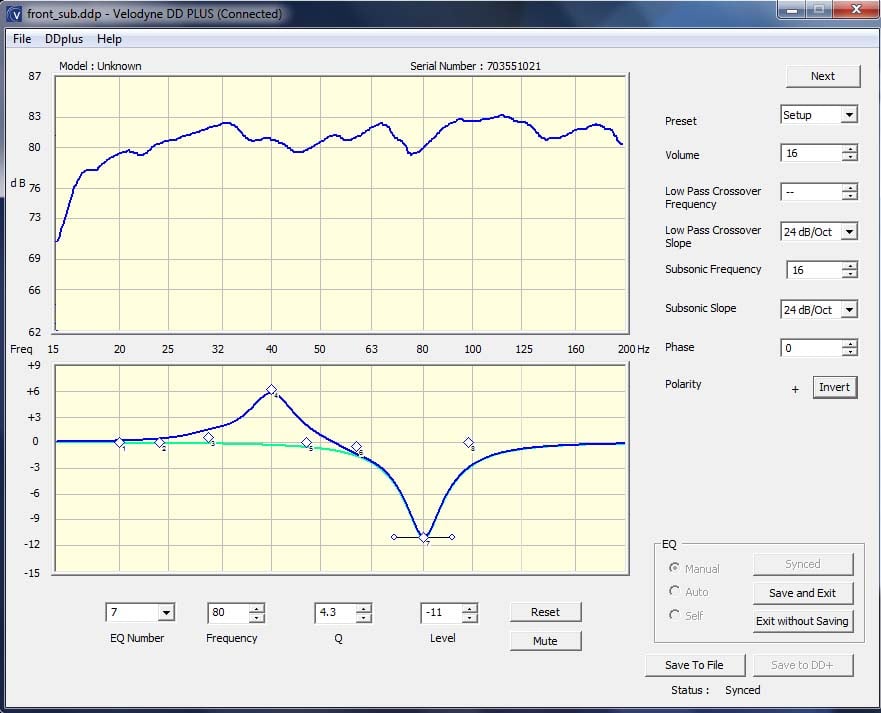
Velodyne DD+ PC Interface Software Display
While this new interface software is cool, Velodyne really missed the boat by not incorporating a higher resolution display output to actually produce usable measurements (something we've been requesting for many years now). Once again we are limited to virtually useless 1/3 octave smoothed graphs. While these graphs look impressive by giving bragging rights to fellow DD+ owners on the forums, they do little to actually show you what's going on in the room. Velodyne acknowledges this tool is meant to assist setup and not serve as a measurement device, but my argument is, why not go all the way and provide better ability for installers and more tech savvy consumers?
The blue curve below in my LMS plot is the actual in-room response measured after the DD+ software ran auto-EQ for just one DD-15+. As you can see this looks much different than the extremely smoothed and prettier curve above generated by Velodyne.
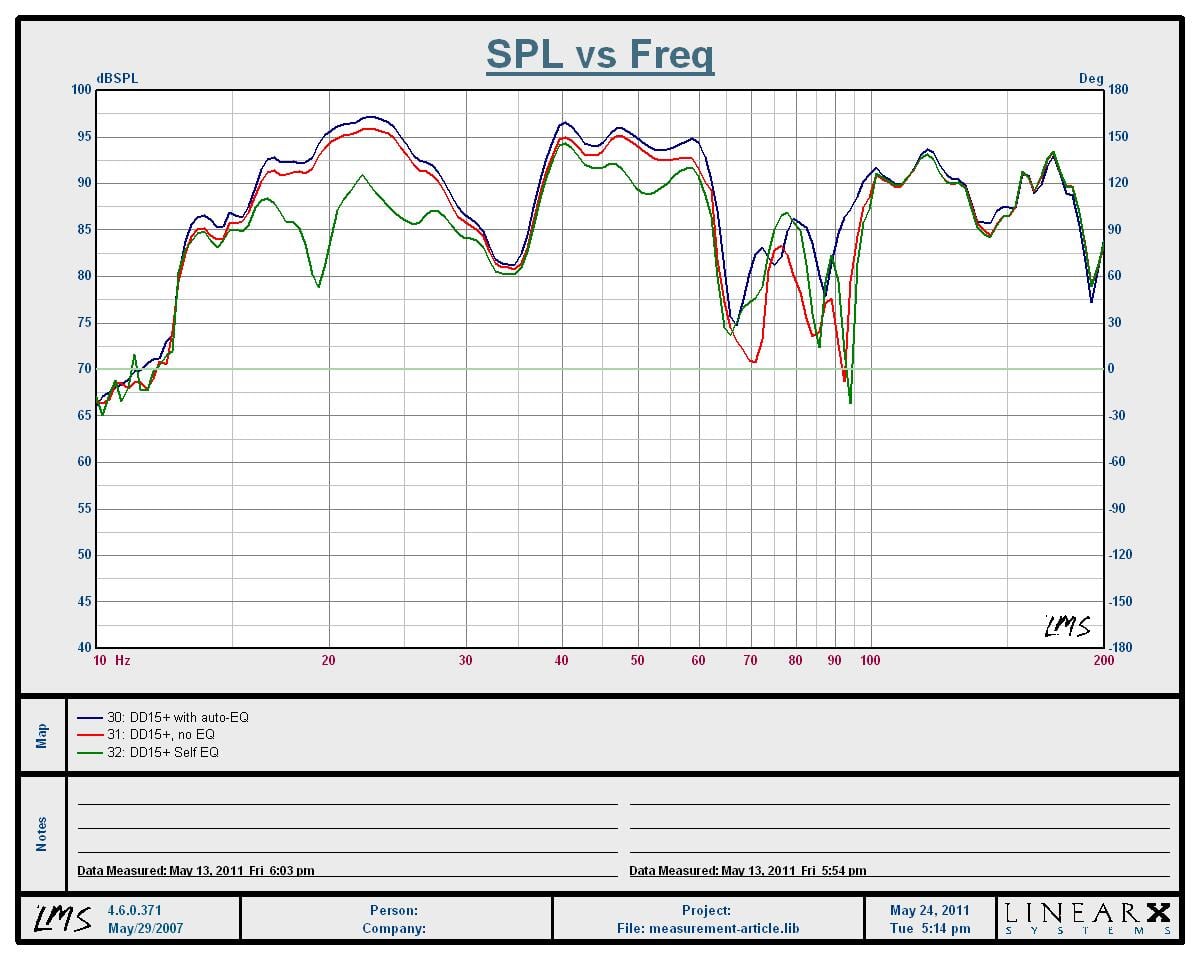
In-Room EQ Results for DD-15+
Red - no EQ, Blue - auto-EQ, Green - self-EQ
I wasn't able to produce beneficial results using Velodyne's auto-EQ system. I attempted to run it twice and both times it did NOT adjust EQ settings, just level, phase and crossover settings seemed to be affected. Self-EQ actually came closer to giving a better "after" result by taming a room mode in the 20-30Hz range.
I found the manual EQ to be the best option for my setup and proceeded accordingly for integrating both DD-15+ subs into my reference system.
I initially attached my portable LG DVD player to a DD-15+ to begin setting it up only to find the sub kept resetting itself every few seconds. I confirmed with Velodyne this was normal behavior if you didn't have a microphone plugged in while simultaneously playing sweep tones. I found this both perplexing and annoying since the old DD-15's didn’t exhibit this behavior. It basically makes using the old method of manually EQing these subs impossible, unless you are willing to plug in a mic and make constant noise while trying to fiddle with the EQ settings. Velodyne is looking into offering a manual calibration mode without the CD sync for legacy users based on our feedback. However, I wanted to try their new PC interface so I instead opted to use the USB interface to customize the settings for each sub. Just like the old DD series, you can store customized settings in up to 5 user presets. I setup a different calibration file for each sub and saved them in separate folders on my laptop. This ensured, I didn’t accidentally override the stored results of a calibrated sub with a file meant for the other sub. I recommend closing the program down each time you connect to a different sub in the system to again ensure you don't unintentionally override the calibration file of the wrong sub.
Editorial Note on Why Velodyne Offers CD Calibration
The idea here was to address one big objection installers had in that they had to connect L+R outputs from the sub into an available input channel in their electronics. Not only was the L+R cable a pain to run (and later remove), the setup technician must switch to that input channel, which usually exhibits a whole different set of setup parameters than either their DVD or 2 channel music inputs. By playing a CD, we can get the sub to adjust more accurately to the mains and the room since they are using inputs they actually use during playback. This also means we must “sync” the sweep tone cursor on the screen with the CD.
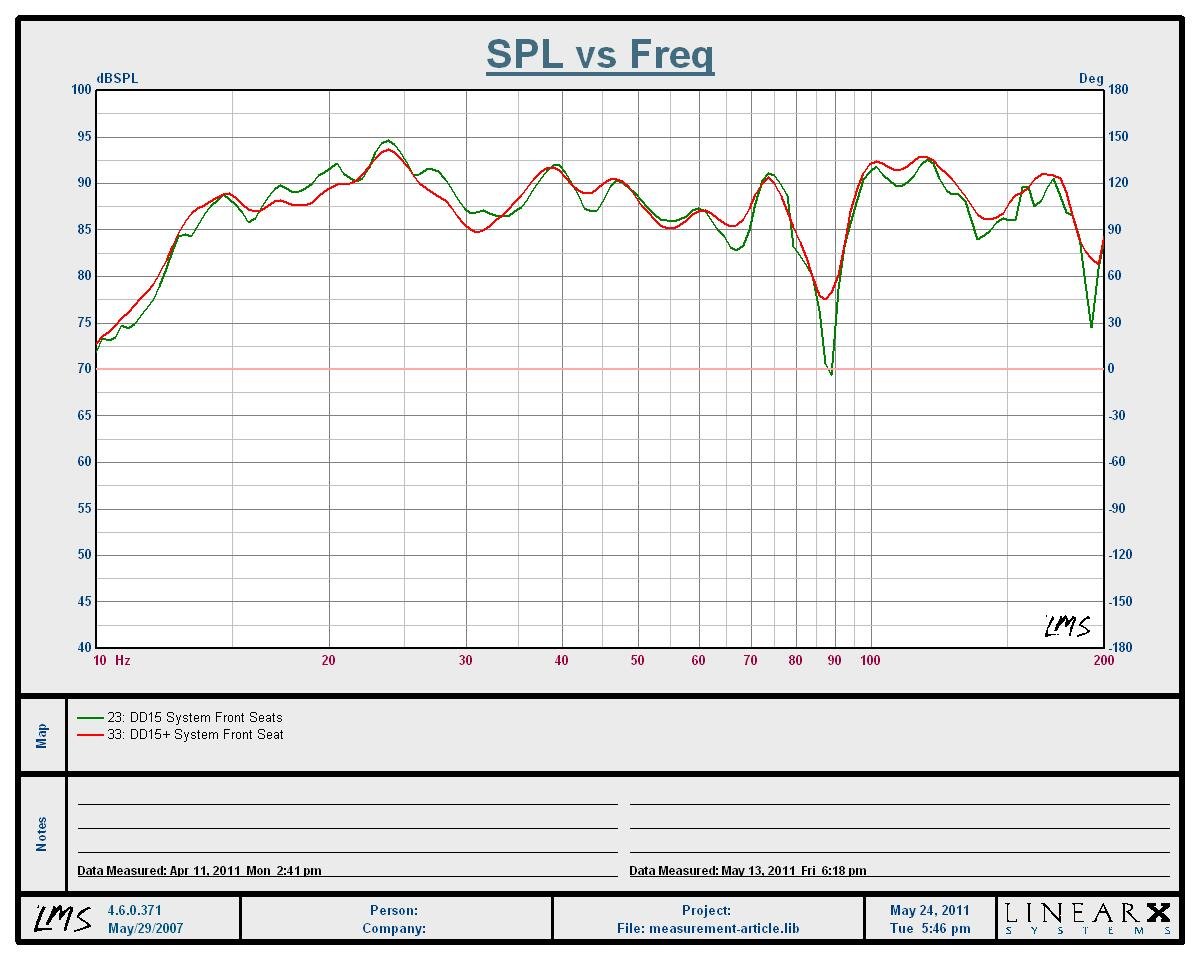
In-Room Frequency
Response Comparison (DD-15s - Green trace) and (DD-15+ Red trace)
I took comparative in-room measurements of my system at the front seat with the DD-15s (green trace) and DD-15+s (red trace) using the manual EQ functions of both subs to optimize the response for my listening area. As you can see the overall measured response for both subs is similar with minor differences likely attributed to slightly different microphone positions. In both cases, I achieved bass output from 12Hz to 80Hz within +-5dB which is quite extraordinary for a high resolution in-room measurement at the listening area. You really don't see the benefit of the DD+ subs until you crank the drive levels up as we did with our outdoor groundplane measurements. Hence why a single steady state measurement at low SPL like most manufacturers publish on their websites or product literature never gives you a full picture of product performance.
Velodyne DD-15+ Listening Tests
Now it was time to see if the new DD-15+ sounded as good as it measured. I queued up some music first. I feel if a sub can’t do music justice, then why bother using it at all?
Blu-ray: Porcupine Tree - Anesthetize
 I’ve been a
fan of Porcupine Tree since they
first came on the music scene in the late 90s.
Like a fine wine, their musicianship gets better with age, especially in
an era where no talent ass clowns like EMINEM thrive in pop culture. I was thrilled when Porcupine Tree released a
Blu-ray concert disc of their fabulous 2008 concert tour called Anesthetize. Mastered in 5.1 DTS-HD, the sound quality of
this disc is benchmark. There is plenty
of bass to wake up the Velodyne’s and let them shine. I cued up the first song “Fear of a Blank
Planet” to get things going. Gavin
Harrison’s bass drums immediately kicked as evident by the hard hitting bass I
was feeling as the song really started to drive. The DD-15+’s presented a very full bodied
sound while preserving the detail and decay of the drums and bass
instruments. “My Ashes” was next which
is just a fabulous song that really transforms you into the moment. The DD-15+s’s were able to keep up with the
extremely high output that my RBH Sound speaker system is capable of producing.
“Anesthetize”, arguably the best song Porcupine Tree has ever written is a
sonic marvel. There are lots of long
sustained bass notes which the DD-15+’s had no issues belting out. Although it’s a 20+ minute song, it certainly
didn’t feel like it, likely because I was experiencing sonic nirvana.
I’ve been a
fan of Porcupine Tree since they
first came on the music scene in the late 90s.
Like a fine wine, their musicianship gets better with age, especially in
an era where no talent ass clowns like EMINEM thrive in pop culture. I was thrilled when Porcupine Tree released a
Blu-ray concert disc of their fabulous 2008 concert tour called Anesthetize. Mastered in 5.1 DTS-HD, the sound quality of
this disc is benchmark. There is plenty
of bass to wake up the Velodyne’s and let them shine. I cued up the first song “Fear of a Blank
Planet” to get things going. Gavin
Harrison’s bass drums immediately kicked as evident by the hard hitting bass I
was feeling as the song really started to drive. The DD-15+’s presented a very full bodied
sound while preserving the detail and decay of the drums and bass
instruments. “My Ashes” was next which
is just a fabulous song that really transforms you into the moment. The DD-15+s’s were able to keep up with the
extremely high output that my RBH Sound speaker system is capable of producing.
“Anesthetize”, arguably the best song Porcupine Tree has ever written is a
sonic marvel. There are lots of long
sustained bass notes which the DD-15+’s had no issues belting out. Although it’s a 20+ minute song, it certainly
didn’t feel like it, likely because I was experiencing sonic nirvana.
DTS CD: Diana Krall - Love Scenes
I rather enjoy this CD not just for Diana's sultry voice but because the musical content is good and the sound quality is excellent. Tracks #2 "Peel Me a Grape" and #3 "I Don't Know Enough about You" had plentiful doses of chest pounding bass. This was particularly true for track #3 during the solo part where the Velodyne DD-15+'s were effortlessly producing a concise reproduction of the stand up bass where all the decay and sonics were preserved giving me that "better than being there experience" I often write about when reviewing truly high performance gear such as these Velodyne subs.
DTS CD: Sting - Ten Summoner's Tales
 This is another oldie but goodie in terms of multi
channel music mixes. Track #1 "If I Ever Lose My Faith in You" produced a higher degree of floor moving bass
I previously never experienced on my DD-15 subs. I had the same experience with Track #3
"Fields of Gold". It was
almost like I was re-experiencing these songs on a whole new system. The DD-15+ subs truly added a tactile element
to the music I didn't realize was lacking prior. There is no need for bass shakers as these
subs provide plenty of that on their own.
This is another oldie but goodie in terms of multi
channel music mixes. Track #1 "If I Ever Lose My Faith in You" produced a higher degree of floor moving bass
I previously never experienced on my DD-15 subs. I had the same experience with Track #3
"Fields of Gold". It was
almost like I was re-experiencing these songs on a whole new system. The DD-15+ subs truly added a tactile element
to the music I didn't realize was lacking prior. There is no need for bass shakers as these
subs provide plenty of that on their own.
I finished off my music listening tests with a Blue Man Group demo CD I had on hand courtesy of Brian Ding of Rythmik Audio. A particular track that caught my attention was called "Club Nowhere". This song was chock full of prodigious amounts of deep sustained bass (up to 4 seconds long at a time) that would break any weakly designed sub if pushed to its limits. I was happy to report the Velodyne's gave me no troubles on this track. In fact, I was able to hit above reference levels in my 6,000 ft^3 listening space with no signs of distress. You can try as hard as you might, but you can't break these subs.
Blu-ray: Taken
I can't tell you how much I love this movie. I'm a BIG Liam Neeson fan and this film exemplifies his ability to kick ass like no other. I've seen Taken probably 5-6 times now and wasn't planning on using it as reference material. I had guests over our home one night that wanted to watch it, so I put it on. What I didn’t expect was a whole new tactile experience watching this film. This was most notable during the scene where Neeson breaks into a brothel and starts messing the place up. The hard-hitting explosions were dynamically so lifelike that you could almost feel their heat. Every blow Neeson threw had a very tangible feel to them. The Velodyne's moved the experience of this excellent film up a notch in my book.
 Blu-ray: Transformers 2
Hate this movie all you like, but true Transformers fans like me do find some redeeming qualities in it. Sans the ghetto bots and stupid parents, there is plenty of robot crushing, missile shooting action scenes and humor to prod you along for two hours or so. EMP blasts from the Decepticon weapons are lived, not just felt. The scene where the secret navy ship fires a prototype weapon on Devastator had me ducking and cheering as his body blew into pieces. I suspect if Optimus Prime were a home theater aficionado, he'd want a couple of these new Velodyne DD+ subs in his theater especially when Transformers 3 hits the rental market. The WOW factor these subs delivered was truly awe inspiring capable of igniting the AllSpark of even the most anhedonic lifeform.
Velodyne DD-15+ Measurements & Analysis
Using my antiquated, yet accurate, LMS measurement system, I took a DD-15 and DD-15+ outdoors to run some 1 meter groundplane measurements to discover the true performance differences between these subs. My objective was to validate Velodyne's claim that the DD+ series of subs have a 4-5 dB output advantage over their respective replacement models throughout the entire bandwidth the sub would be used (20Hz to 80Hz).
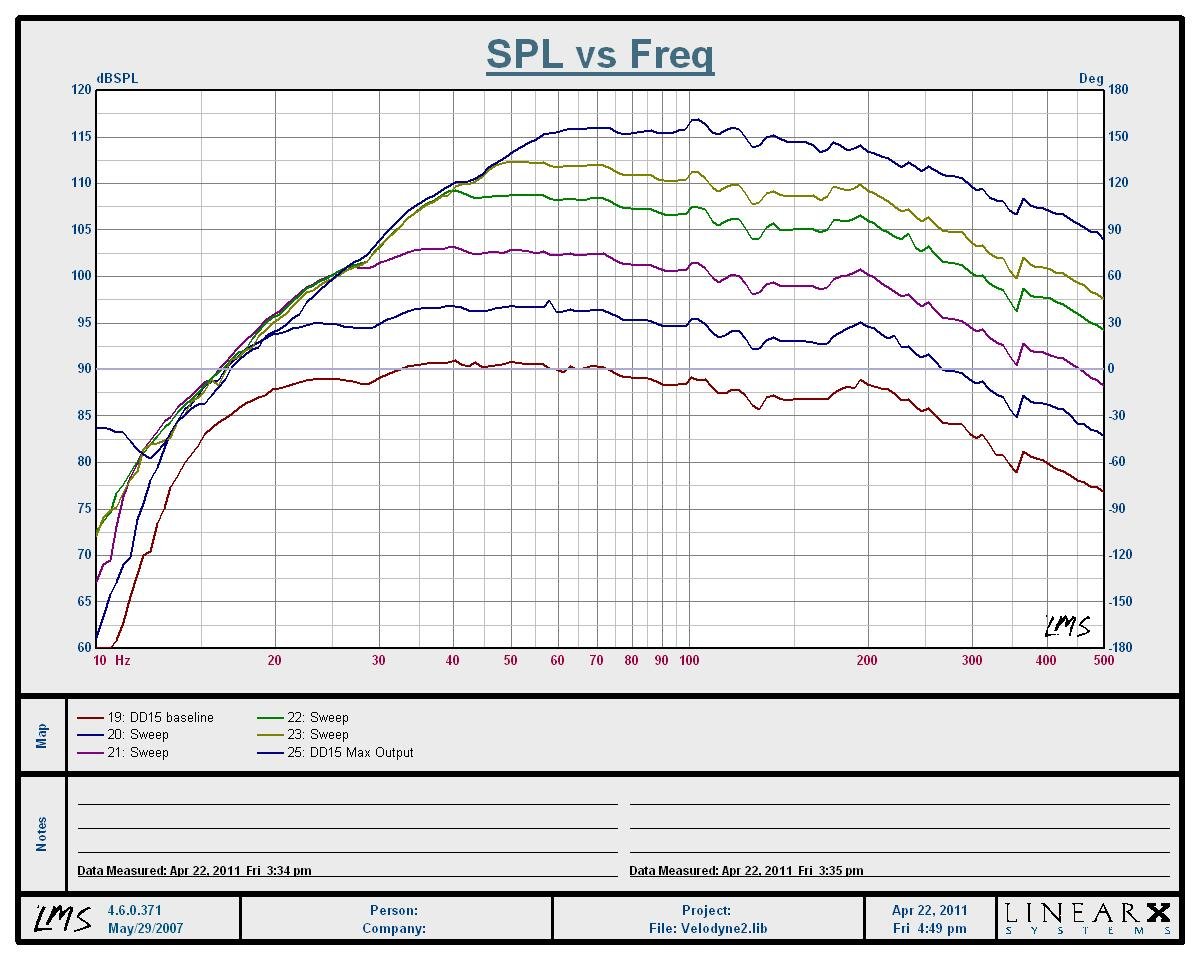
Velodyne DD-15 SPL vs Frequency (1 meter groundplane)
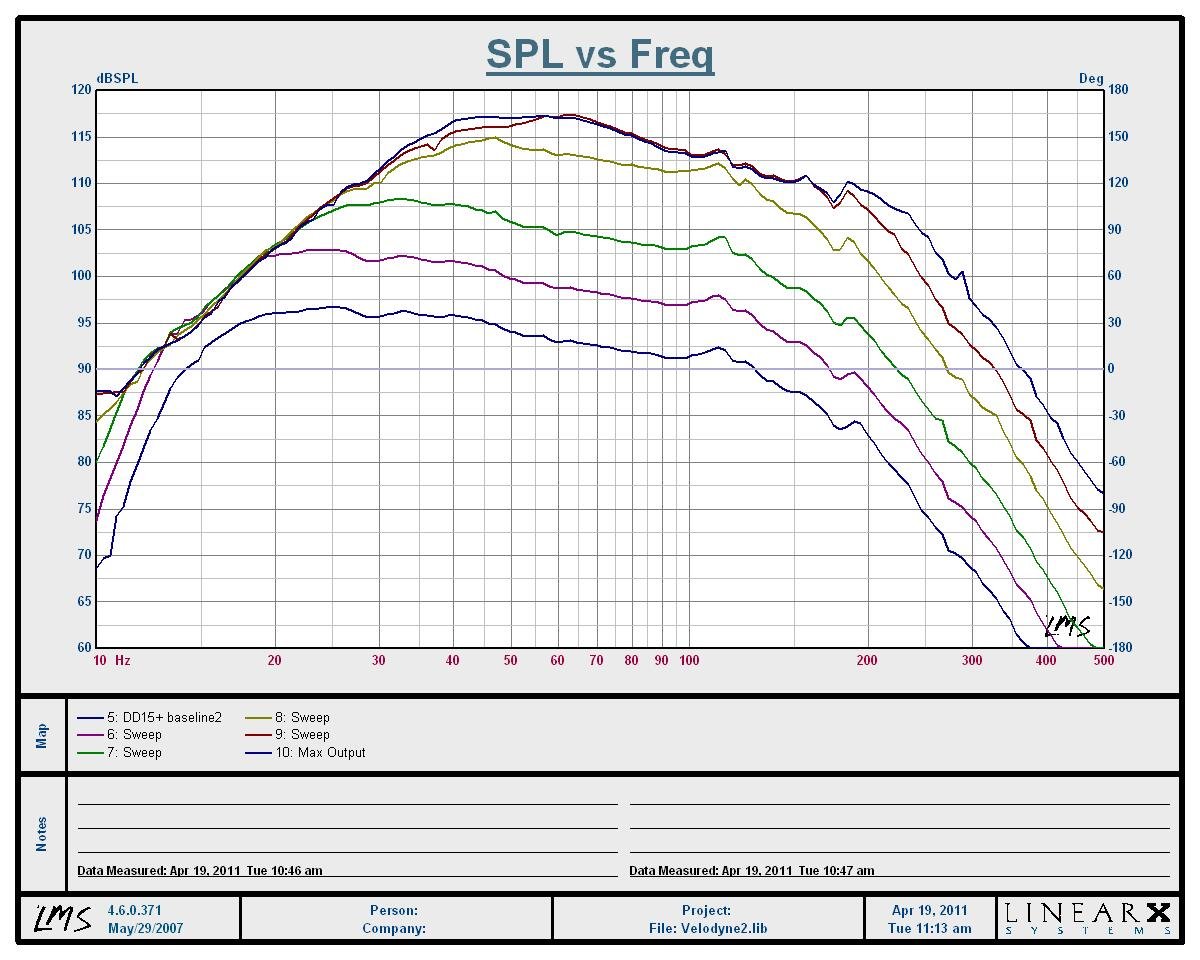
Velodyne DD-15+ SPL vs Frequency (1 meter groundplane)
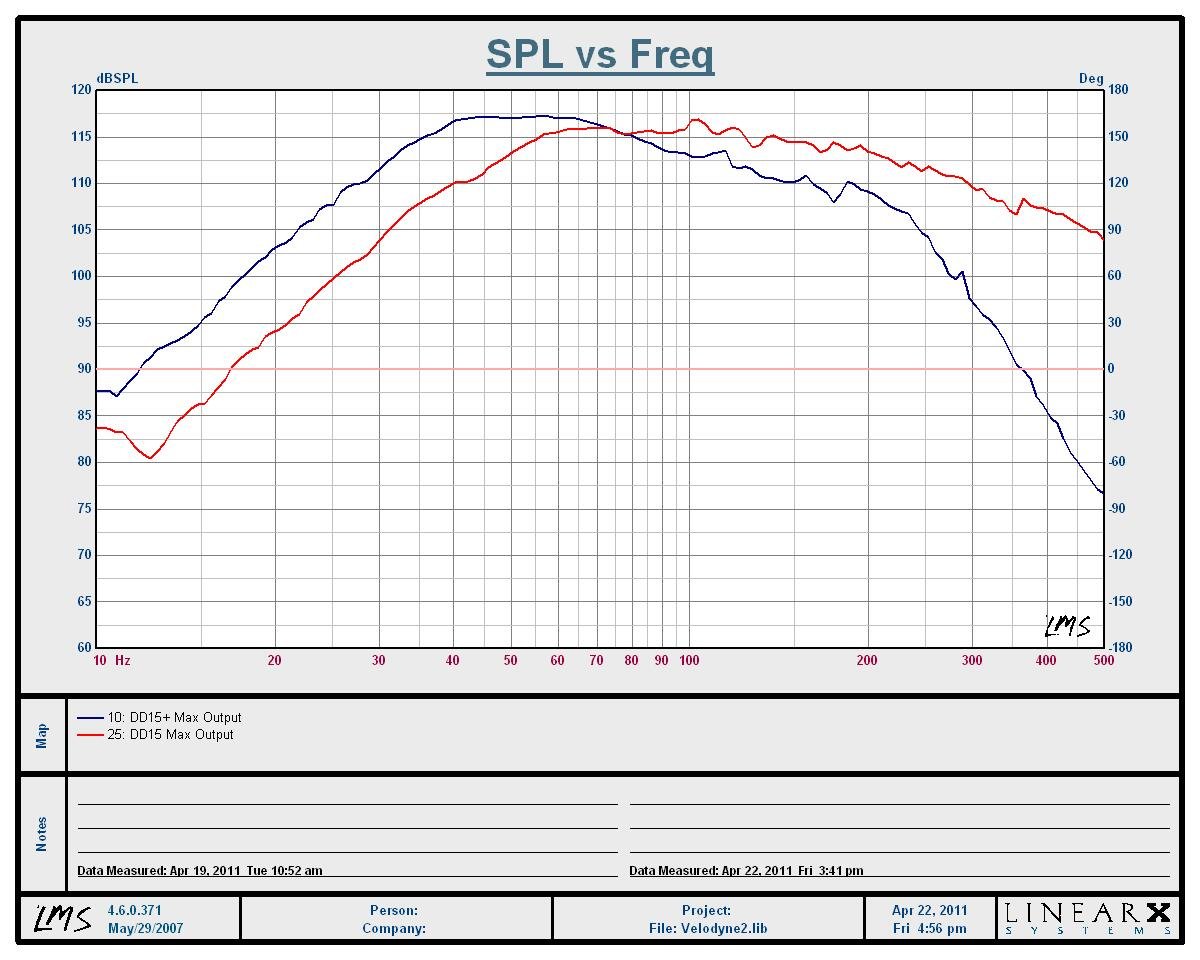
Velodyne DD-15 vs DD-15+ Max SPL vs Frequency Comparison (1 meter groundplane)
Both subs were set at their factory settings with a subsonic filter of 16Hz, 24dB/oct slope with the LPF disabled. Changing this subsonic frequency and slope settings does affect the extension of the sub which explains why higher output #'s could be achieved through other 3rd party measurement results under the same measurement test conditions.
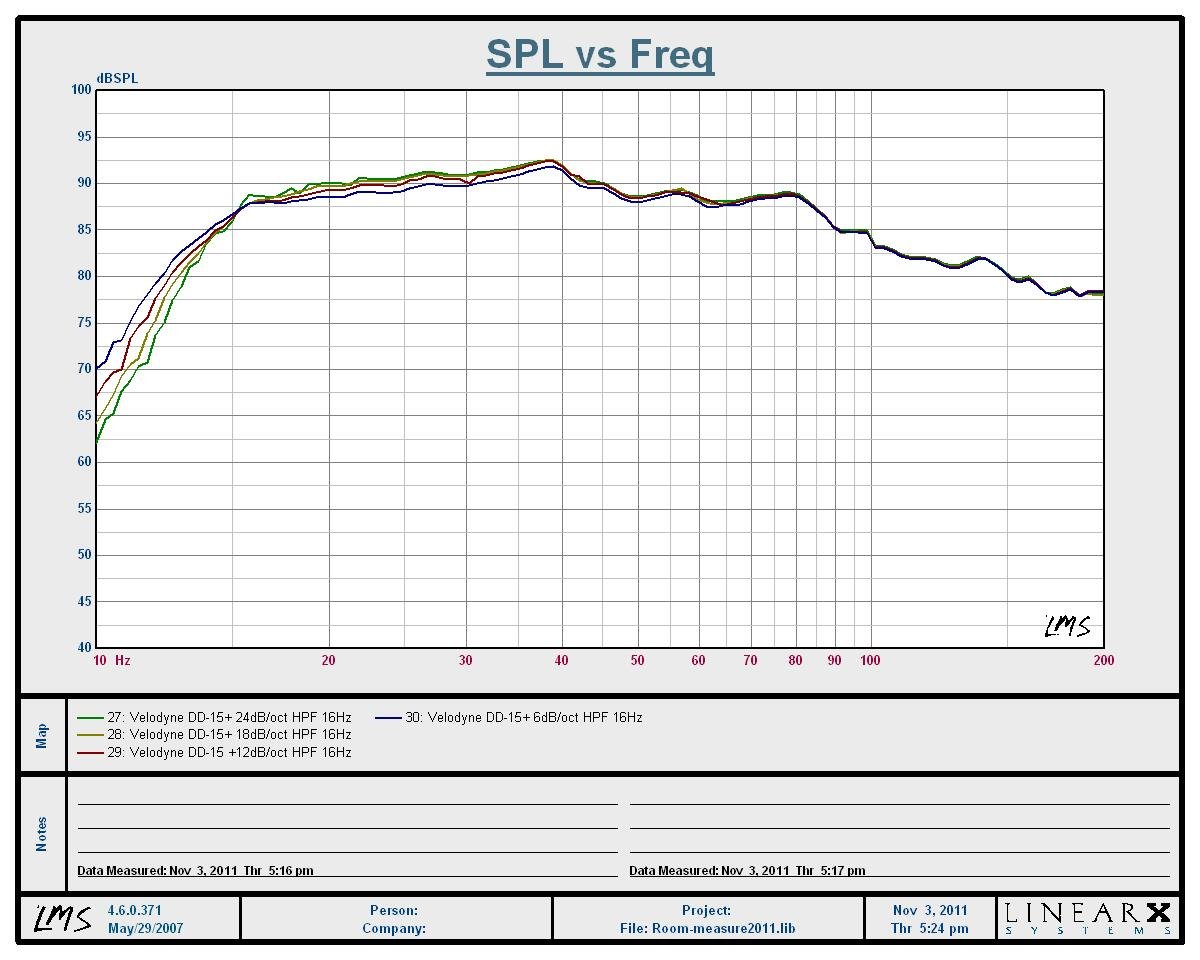
Velodyne DD-15+ In-Room Nearfield Measurement of HPF Settings
Green: 24dB/Oct, 16Hz; Yellow: 18dB/Oct, 16Hz; Red: 12dB/Oct, 16Hz; Blue: 6dB/Oct, 16Hz
Here is what you you can expect for Frequency response by varying the subsonic HPF setting of the DD-15+ from 6dB/oct (min setting) to 24dB/Oct (max setting). These measurements were taken nearfield in-room. As you can see, this sub can really dig down deep if you want it to.
| Frequency | DD-15 SPL Output | DD-15+ SPL Output | Net Difference |
| 20 Hz | 96 dB | 103 dB | +7 dB |
| 30 Hz | 104dB | 111 dB | +7 dB |
| 40 Hz | 110 dB | 117 dB | +7 dB |
| 50 Hz | 113 dB | 117 dB | + 4dB |
| 60 Hz | 116 dB | 118 dB | + 2dB |
| 70 Hz | 116 dB | 116 dB | 0 dB |
| 80 Hz | 115 dB | 114 dB | -1 dB |
| 100 Hz | 117 dB | 113 dB | -4 dB |
SPL vs Frequency Comparison of Velodyne DD-15 vs DD-15+ (1 meter groundplane)
As you can see, below 70Hz, the new DD-15+ walks all over the original DD-15 with up to 7dB output advantage at 20Hz. This most definitely exceeds Velodyne's claim of 4-5dB more output across the board. In fact, the DD15+ has about a 3dB output advantage at 20Hz to the original DD-18 we reviewed a few years back. The DD-15+ does, however, rolloff more sharply above 70Hz, which was a bit disappointing. We like to see subs flat to at least 80Hz to ensure a more seamless blend with smaller satellite speakers. The original DD-15 and DD-18 subs, for example, are ruler flat out to 100Hz. We can only suspect that the added voice coil inductance of the new DD+ driver is acting like a Low Pass Filter (LPF) making the DD-15+ -3dB down at 80Hz compared to its 40-50Hz output levels.
Editorial Note about Continuous Sweep testing vs CEA Burst Testing
Our sweep tests were conducted at a constant input level across the entire bandwidth whereas CEA burst tests are typically conducted at discrete frequencies (ie. 20Hz, 25Hz, …etc) by varying input voltage until max SPL per a fixed distortion limit is achieved at each test frequency. Our tests reveal max SPL where the subwoofers begin to compress but there is typically more output left above the compression point of each subwoofer if the subwoofer under test is not amplifier limited. For more info on this, read our 2010 Subwoofer Shootout Measurements Overview article.
The compressor circuit implemented by Velodyne worked flawlessly just like we've found on all prior Velodyne products we've reviewed in the past. In fact, one could argue that their circuit works too well in that it’s a bit too conservatively implemented sacrificing some output to ensure no audible distortion or distress of the system. You simply cannot overdrive this sub or hear any mechanical noise emanate from the box or the driver at any given time.
That being said, if one wants a very close approximation to max output of this sub per CEA burst testing method, you can simply add 3dB to all of my sweep measurements above as follows:
| Frequency | DD-15+ Peak SPL Output | RMS SPL @ 2 meters |
| 20 Hz | 106 dB | 97 dB |
| 30 Hz | 114 dB | 102 dB |
| 40 Hz | 120 dB | 109 dB |
| 50 Hz | 120 dB | 109 dB |
| 60 Hz | 121 dB | 112 dB |
| 70 Hz | 119 dB | 110 dB |
| 80 Hz | 117 dB | 108 dB to 111dB |
| 100 Hz | 116 dB | 107 dB to 110dB |
Estimated Max SPL Output for DD-15+ (1 meter groundplane)
These are pretty darn impressive numbers for a sealed subwoofer design, especially for such a modestly sized cabinet. I can think of only 1 or 2 sealed commercially available subs (JL Fathom f113 immediately comes to mind) that have a bit more output below 40Hz but don't play as cleanly as the Velodyne.
Update: 9/27/11
In order to make it easier for our readers to compare our CEA data between subwoofers tested prior to our new Subwoofer Measurement Protocol, we scaled our 1 meter data to 2 meter by subtracting 9dB for each frequency. The DD-15+ wasn't tested using CEA burst signals, but instead continuous reverse sine-wave sweeps. The sweeps tend to be more stressing on a subwoofer due to higher thermal loading so you could expect an extra dB or so more output if CEA tests were used below 60Hz and up to +3dB more output above 60Hz where the tests focus more on amp limited output vs driver excursion limited output.
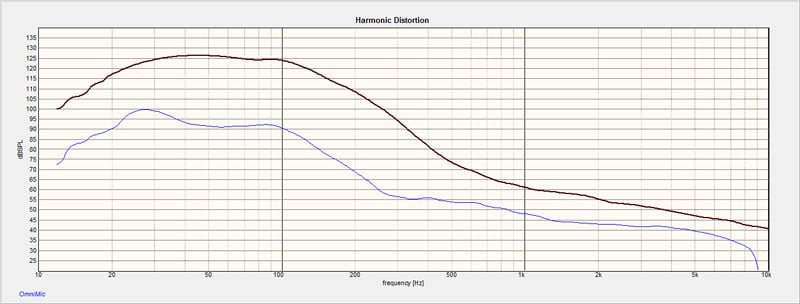
Velodyne DD-15+ Max Output vs Distortion (1 meter groundplane)
Using the new OmniMic system, I measured distortion at max output. The SPL level is not calibrated but the differential between the output signal and distortion plot below it is accurate. If you subtract the frequency response curve (brown) from the distortion curve (blue), you can calculate THD +N. using the table below.
| dB Below Test Tone | % Distortion |
| -5 dB | 56.2% |
| -10 dB | 31.6% |
| -15 dB | 17.8% |
| -20 dB | 10.0% |
| -25 dB | 5.62% |
| -30 dB | 3.16% |
| -35 dB | 1.78% |
| -40 dB | 1.00% |
| -45 dB | .562% |
| -50 dB | .316% |
| -55 dB | .178% |
| -60 dB | .100% |
Note: distortion in percentage equates to decibels down.
Comparing this to the maximum output vs distortion curve, it's clear to see the distortion never rose above 6% when the DD-15+ was driven to the limit of its compressor circuit during our testing.
Update: 09/25/11
We look our max SPL#'s above for the DD-15+ and applied them to our new Audioholics Room Size Rating Protocol and found that it met our "Large Room" rating. This is very impressive for a sub of such modest size.

Velodyne DD-15+ Conclusion
 I was a bit
disappointed in how little Velodyne's measurement software has evolved. With a PC interface, they could have really
taken it to the next level providing a powerful tool for a pro-installer to use
without having to drag around an external measurement system. This is especially important for those that take
the time to manually EQ their subs for best performance. I rarely find auto-EQ an accurate option for
calibrating any subwoofer, let alone the Velodyne's. Until Velodyne can improve upon this, I
highly recommend using inexpensive software programs like TrueRTA or Sample
Champion if you are serious about accurately measuring and calibrating the bass
response of your system.
I was a bit
disappointed in how little Velodyne's measurement software has evolved. With a PC interface, they could have really
taken it to the next level providing a powerful tool for a pro-installer to use
without having to drag around an external measurement system. This is especially important for those that take
the time to manually EQ their subs for best performance. I rarely find auto-EQ an accurate option for
calibrating any subwoofer, let alone the Velodyne's. Until Velodyne can improve upon this, I
highly recommend using inexpensive software programs like TrueRTA or Sample
Champion if you are serious about accurately measuring and calibrating the bass
response of your system.
Based on my exhaustive testing, it's clear to me that Velodyne's new Digital Drive Plus series of subs deliver as promised and even exceed some of the output claims Velodyne has made to us. It's rare to find a manufacturer over-deliver on their promises, and Velodyne is certainly a shining star in a galaxy of dim underachievers. As good as the DD-15+ subwoofer is, it still comes with a hefty price tag. The end-user must decide if they are willing to shell out almost 5000 clams to don the Velodyne name in their theater room. We always recommend at least two subwoofers in any serious theater room which in this case makes for a considerable investment. On the other hand, very few sealed subs can compete with the DD-15+ both in sheer output and pristine fidelity. Virtually no sub we know of offer such an abundance of setup options and flexibility which just adds icing on the proverbial cake.
Velodyne has built a very high quality and high caliber performance series of subs with their Digital Drive Plus, that are still physically manageable to handle. If I were their competition, I'd be worried that Velodyne has just put most of them in checkmate with this very impressive line of subs that proved to be worthy successors to the Digital Drive series. Highly recommended!
The Score Card
The scoring below is based on each piece of equipment doing the duty it is designed for. The numbers are weighed heavily with respect to the individual cost of each unit, thus giving a rating roughly equal to:
Performance × Price Factor/Value = Rating
Audioholics.com note: The ratings indicated below are based on subjective listening and objective testing of the product in question. The rating scale is based on performance/value ratio. If you notice better performing products in future reviews that have lower numbers in certain areas, be aware that the value factor is most likely the culprit. Other Audioholics reviewers may rate products solely based on performance, and each reviewer has his/her own system for ratings.
Audioholics Rating Scale
 — Excellent
- — Very Good
- — Good
- — Fair
- — Poor
| Metric | Rating |
|---|---|
| Bass Extension | |
| Bass Accuracy | |
| Build Quality | |
| EQ System | |
| Fit and Finish | |
| Ergonomics & Usability | |
| Features | |
| Performance |  |
| Value | |
Gene manages this organization, establishes relations with manufacturers and keeps Audioholics a well oiled machine. His goal is to educate about home theater and develop more standards in the industry to eliminate consumer confusion clouded by industry snake oil.
View full profile Subscribe to our newsletter