


Panamax MX5102 UPS Review
Panamax MX5102 UPS
- Product Name: MX5102 UPS
- Manufacturer: Panamax
- Performance Rating:

- Value Rating:

- Review Date: October 06, 2009 20:00
- MSRP: $ 649.95
|
General Weight : 27 lbs. Product Warranty : 3 Years Dimensions : 17”W x 13”D x 4”H AC Power Undervoltage Shutoff : 90 ± 5V Total Current Capacity : 12 A Thermal Fusing : Yes Overvoltage Shutoff, slow rise : 132 ± 5V Overvoltage Shutoff, fast rise : 150 ± 5V Line Voltage : 120V, 60Hz Energy Dissipation : 1800 Joules Catastrophic Surge Circuit : Yes EMI/RFI Noise Filtration Bank 4 EMI Filtration : 66dB Max, 100kHz-2Mz Bank 3 High Current Outlet : 40dB Max, 100kHz-2Mz Bank 2 EMI Filtration : 66dB Max, 100kHz-2Mz Bank 1 EMI Filtration : 66dB Max, 100kHz-2Mz UPS Output Voltage : 120 ± 5% Simulated Sine Wave UPS Transfer Time : < 10ms UPS Output Capacity : 600VA 360W @ 0.6 pf UPS Backup Time : 3 minutes at full load Frequency : 60 Hz ± 1%
|
DC Trigger Input Voltage and Polarity : 3 - 18V DC, bidirectional Jacks : 3.5mm (1/8”) mono mini-plug Current Requirement : 4.6 mA @ 3V, 58 mA @ 24V LAN Circuits Wires Protected : 8-Wires Jacks : RJ-45 Clamping Level : 50V Telephone Circuit Wires Protected : 2-Wires, Pins 4 & 5 Suppression Modes : Metallic & Longitudinal Jacks : RJ-11 Fuseless/Auto-Resetting : Yes Clamping Level : 270V Cable and Satellite Circuits Shielded : Yes Insertion Loss : < 0.5 dB HD 1080 i/p Ready : Yes Frequency Range : 0MHz - 2.2 GHz Connections : Female ”F”, Gold Plated Clamping Level : 75V Bidirectional : Yes
|
Pros
- IR Control
- Battery backup works flawlessly
- Fantastic aesthetics
- Easy to read display
Cons
- No detachable power cord
- Only two outlets are backed up by the battery
MX5102 Full Review
 When we decided to convert
Reference System 3 from a flat screen to a front projection system, there was
no doubt in our minds that we needed a UPS battery backup. It is a well known
fact that improper shutdown of your front (or rear) projector can seriously
affect your bulb life. We've actually experienced bulbs dying prematurely and
even heard horror stories from installers about bulbs exploding. The newer
projectors don't have a huge cool down time but that time in very important. If
you don't allow for it, you may be replacing your less than cheap projector
bulbs twice as often or more. You don't need a degree in mathematics to know
that a UPS can easily pay for itself if you live in a blackout prone area.
Since Reference System 3 is in Florida,
it easily qualifies.
When we decided to convert
Reference System 3 from a flat screen to a front projection system, there was
no doubt in our minds that we needed a UPS battery backup. It is a well known
fact that improper shutdown of your front (or rear) projector can seriously
affect your bulb life. We've actually experienced bulbs dying prematurely and
even heard horror stories from installers about bulbs exploding. The newer
projectors don't have a huge cool down time but that time in very important. If
you don't allow for it, you may be replacing your less than cheap projector
bulbs twice as often or more. You don't need a degree in mathematics to know
that a UPS can easily pay for itself if you live in a blackout prone area.
Since Reference System 3 is in Florida,
it easily qualifies.
But projector users aren't the only ones who can benefit from a UPS. How many times have you lost part of a recording because of a power flicker or temporary outage? How long does it take for your cable/satellite box to re-download all the programming guide information? A UPS can keep those devices up and running while the power rights itself. For some, small power fluctuations have created big headaches. For them, a UPS makes sense as well.
One thing we have found (and heard from a number of sources) is that the battery backups used for computer or classroom applications don't always work for home theater. We've found that projectors, in particular, won't always play nice with battery backups designed for computers. While we don't know why that would be, it has held true on a number of occasions. If you want to be sure that your projector will be protected, buying a UPS designed for the job rather than hoping the computer UPS will work is probably preferable.
Build Quality
It isn't hard to know that the Panamax MX5102 UPS is a quality piece of equipment. You just have to pick it up. At 27 pounds, its diminutive case belies its weight. With a piece of gear as heavy as the MX5102 (27 pounds), you're going to need some serious packaging and Panamax hasn't skimped here. The MX5102 comes surrounded in thick foam. The unit is also covered in plastic for protection from the elements. There are a number of cables included which are (for the most part) individually wrapped. Short coax and Ethernet jumpers are included as well as telephone cords (does anyone use these anymore?) and a pair of adapters for rack mounting. Basically, anything that you might have attached to your home theater system is included so that a surge can be arrested from any source.
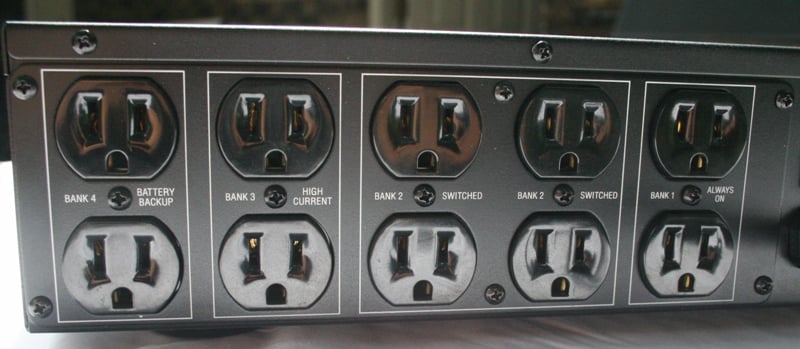
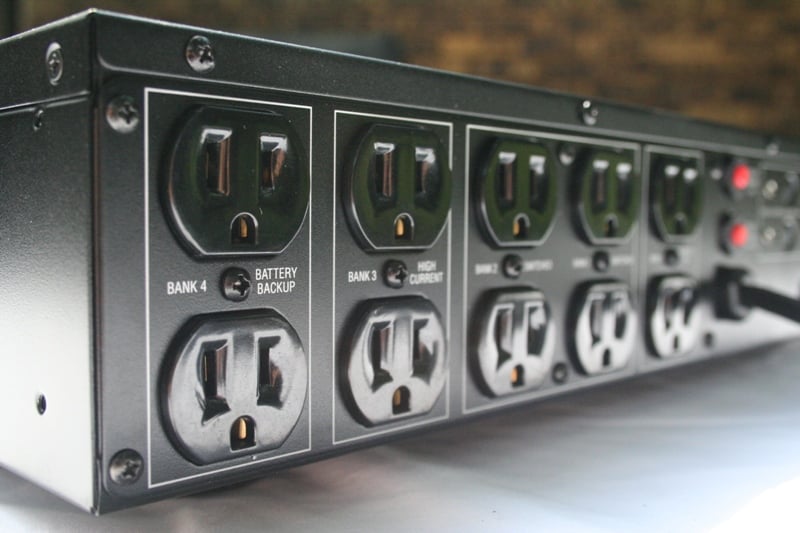 The back of the unit includes 10 outlets in
4 different banks. Each of the banks is isolated from the others so that any
noise from one component can't contaminate the power going to the other banks.
The most important in this case is Bank 4 with the 2 UPS outlets. These two outlets
receive power from the batteries (at a 10ms delay when the power goes out). Bank 1 is always on which is good for gear
that you never want to power down (aside from power outages). Bank 2 is the
switched bank that provides a shutdown delay. Bank 3 is for high current
devices like amps and subwoofers and includes a startup delay. This means that
your amps turn on last and off first. Both of these delays are designed to
reduce speaker "thumps" that occur when the amplifier amplifies
another piece of gear that is turning on.
The back of the unit includes 10 outlets in
4 different banks. Each of the banks is isolated from the others so that any
noise from one component can't contaminate the power going to the other banks.
The most important in this case is Bank 4 with the 2 UPS outlets. These two outlets
receive power from the batteries (at a 10ms delay when the power goes out). Bank 1 is always on which is good for gear
that you never want to power down (aside from power outages). Bank 2 is the
switched bank that provides a shutdown delay. Bank 3 is for high current
devices like amps and subwoofers and includes a startup delay. This means that
your amps turn on last and off first. Both of these delays are designed to
reduce speaker "thumps" that occur when the amplifier amplifies
another piece of gear that is turning on.
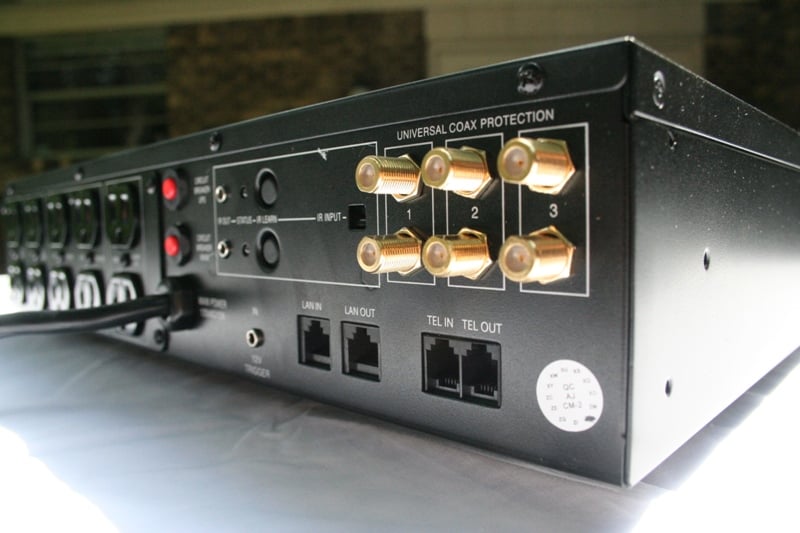 Also included on the back of the unit are 6
coax terminals (three bi-directional pairs) and a pair each LAN and telephone
jacks. There is a 12 volt trigger for receiver/preamp control, circuit breaker
reset buttons, and a pair of IR outputs. The IR outputs are for dual IR
control. If you wish the MX5102 to send an signal to a device, it can. You
merely use the IR receiver on the back (near the buttons) and the appropriate
remote. The MX5102 can learn a total of two IR command or a 2 step macro. The
IR codes are transmitted over both outputs simultaneously so you can, in
theory, control two devices at once.
Also included on the back of the unit are 6
coax terminals (three bi-directional pairs) and a pair each LAN and telephone
jacks. There is a 12 volt trigger for receiver/preamp control, circuit breaker
reset buttons, and a pair of IR outputs. The IR outputs are for dual IR
control. If you wish the MX5102 to send an signal to a device, it can. You
merely use the IR receiver on the back (near the buttons) and the appropriate
remote. The MX5102 can learn a total of two IR command or a 2 step macro. The
IR codes are transmitted over both outputs simultaneously so you can, in
theory, control two devices at once.
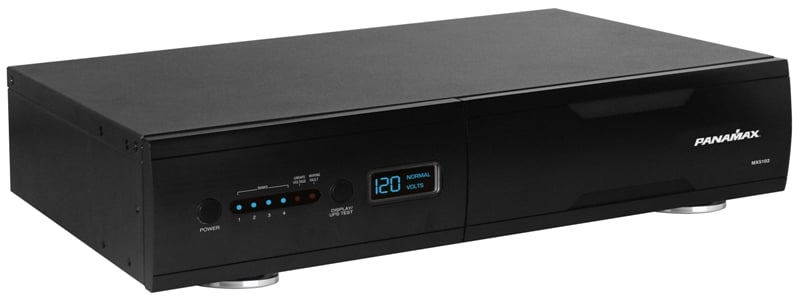
Probably one of the most disappointing things about the MX5102 was the lack of a detachable power cord. In many home theater applications, you'll find that you are constricted by aesthetics for placement. With a piece of gear as nice looking as the Panamax MX5102, you're not going to be worried about placing it front and center. It has a brushed black aluminum finish and is tastefully understated. But with a six 10foot attached power cord, you may find you have to attach an extension cord (probably not a problem but most manufacturers don't recommend it) or rethink your décor.
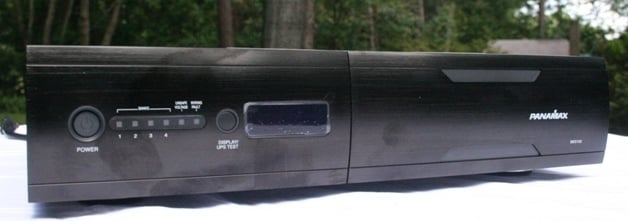
The front of the unit includes a rather large readout, two buttons, and a few lights. The button to the left is the power On/Off. The button to the right is the Meter Dimmer/UPS Test button. With a quick press, the display will cycle through various levels of brightness until you find the one you like. If you press and hold the button, the UPS will run a test cycle. Between the two buttons are a number of lights. The first four from the left indicate the different outlet banks. When those lights are illuminated, the bank is receiving power. Next is an Unsafe Voltage Indicator that will glow red when you've got a voltage problem followed by a Wiring Fault Indicator. This last light will glow red if you've got a wiring problem - you never want to see this illuminated. The large readout will let you know the incoming voltage from the wall. If the line drops below 90VAC or above 132VAC, the Unsafe Voltage LED will flash.and the unit will shut off and the batteries will kick in. To the right of all this is a removable pane for access to the batteries if you need replacement.
Now, we think it is important to be clear here what the Panamax MX5102 is and what it is not. It is a power management product with surge protection, filtration, AVM and a battery backup. It is not a voltage regulator It will not boost or cut voltage based on set criteria. It will let you know what your incoming voltage (Automatic Voltage Monitoring) is and will protect your gear from over/under loads by cutting the power (or cutting in the battery) to the connected devices and turning it back on when safe voltage returns. It doesn't claim to have voltage regulation but we think a lot of people will assume so. Don't. If you want that kind of sophistication you'll need to look at some competing products.
Setup
 Setting up the Panamax is
just about one additional step from a normal power surge device. While it is
not strictly necessary, Panamax suggests you charge the battery completely
before you attach any devices. The batteries will charge as long as the unit is
plugged in regardless if it is on. We were installing the projector the next
day, so we plugged the MX5102 in and set it in a corner to charge. By the time
the projector was installed and ready to be plugged in, the batteries were well
charged and ready to go.
Setting up the Panamax is
just about one additional step from a normal power surge device. While it is
not strictly necessary, Panamax suggests you charge the battery completely
before you attach any devices. The batteries will charge as long as the unit is
plugged in regardless if it is on. We were installing the projector the next
day, so we plugged the MX5102 in and set it in a corner to charge. By the time
the projector was installed and ready to be plugged in, the batteries were well
charged and ready to go.
Since the unit is designed to minimize initial current draw by staggering the turn on/off times of the different banks, it will behoove you to pay attention to where you plug things in. Most importantly are the high current devices. There are only two outlets in this bank so make sure you use them for your sub/amps. After that, make sure you have the gear you most care about keeping running (projectors, cable boxes, HTPCs) on your battery bank. The rest can go between the 4 switched outlets and the 2 always on outlets. The MX5102 has a total of 10 outlets for use.
Next, you'll need to make sure that anything that is entering any piece of gear in your home theater runs through the MX5102 first. This includes your cable signal through the coax inputs, LAN, and telephone. We've run into problems before with signal attenuation with surge protectors but the MX5102 does a nice job of running the signal through without noticeable degradation. What you'll find with lesser devices is that suddenly you'll lose a few channels on your cable or your VOD or digital channels won't work properly. The MX5102 integrated nicely with both our cable signal and a LAN signal that is used to connect an Xbox 360 to the router. We noticed no loss of speed on the LAN or channels on the cable after integrating the MX5102
Use
 Ironically enough, the
first test of the MX5102 came barely 30 minutes after turning it on for the
first time. We had just finished installing the projector and screen and were
taking a break after preliminary setup (locking in the picture) when the power
went out. We saw the lights go out and ran to the home theater. The Panamax
MX5102 was beeping (as it was supposed to) and the projector was still on. We
switched the projector off and noted the amount of time left on the battery.
According to the manual, the MX5102 should be able to maintain full power for 3
minutes at full load. While to the uninitiated that doesn’t sound like very
much, most of the competition is in the same camp (similar APC models can run
up to 6 minutes at full load). At the time, we had an SMS-1 plugged into the
second UPS outlet. According to the readout, we could have run the SMS for
another 60 minutes. Obviously, with most gear you're going to have plenty of
time to shut everything down before the batteries die. We've had the power go
out a number of times since then and the unit has never failed to maintain
power to our projector so that we could cool down the bulb properly.
Ironically enough, the
first test of the MX5102 came barely 30 minutes after turning it on for the
first time. We had just finished installing the projector and screen and were
taking a break after preliminary setup (locking in the picture) when the power
went out. We saw the lights go out and ran to the home theater. The Panamax
MX5102 was beeping (as it was supposed to) and the projector was still on. We
switched the projector off and noted the amount of time left on the battery.
According to the manual, the MX5102 should be able to maintain full power for 3
minutes at full load. While to the uninitiated that doesn’t sound like very
much, most of the competition is in the same camp (similar APC models can run
up to 6 minutes at full load). At the time, we had an SMS-1 plugged into the
second UPS outlet. According to the readout, we could have run the SMS for
another 60 minutes. Obviously, with most gear you're going to have plenty of
time to shut everything down before the batteries die. We've had the power go
out a number of times since then and the unit has never failed to maintain
power to our projector so that we could cool down the bulb properly.
Comparison and Recommendations
We really have only two complaints about the MX5102. We'd really like to see a removable power cord rather than a fixed one. Secondly, we feel a little confused that only two of the outlets are UPS protected. The similarly priced APC J10 UPS has 12 (rather than 10) outlets and they are all UPS protected. It also has the same four isolated banks as the MX5102. On top of that, the APC J10 does voltage regulation (rather than just monitoring) and has a much more detailed (albeit much harder to read) display. The Panamax M5102, on the other hand, has LAN protection (the APC does not) and IR control. In our application, our power rarely varied much off of 120 (as low as 116 rarely above 120) so voltage regulation was not as needed as the additional LAN protection. The fact is that if you have one unprotected inlet for a surge, your entire system is compromised. With the MX5102, we are completely protected. We really would have liked the two additional outlets and having all the outlets connected to the battery.
Conclusion
 The
Panamax MX5102 delivers exactly what it claims - battery backup and voltage
monitoring. While there are other choices out there, the Panamax has its own
feature set that may make it perfect for your application. On looks alone the
Panamax MX5102 is a winner. The black brushed aluminum case just begs to be
shown off. For a projector a UPS is a must, for everyone else it is a very nice
luxury. If you are looking for an upgrade, you could do a lot worse than a UPS.
The Panamax MX5102 is a very nice example and would make a great addition to
any home theater.
The
Panamax MX5102 delivers exactly what it claims - battery backup and voltage
monitoring. While there are other choices out there, the Panamax has its own
feature set that may make it perfect for your application. On looks alone the
Panamax MX5102 is a winner. The black brushed aluminum case just begs to be
shown off. For a projector a UPS is a must, for everyone else it is a very nice
luxury. If you are looking for an upgrade, you could do a lot worse than a UPS.
The Panamax MX5102 is a very nice example and would make a great addition to
any home theater.
Panamax MX5102 UPS
$649.95
Panamax ~ Furman
1690 Corporate Circle
Petaluma, CA.
94954
Toll Free: 800-472-5555
Phone: 707-283-5900
About Panamax ~ Furman
Panamax and Furman Sound have been
international leaders in award-winning, innovative power management products
for more than 30 years. Their products give audio/video systems the pure,
noise-free power they need for superlative performance while protecting them
from damage caused by power surges and lightning. Together as part of Panamax,
Inc., these two brands address all major electronic markets, including home
theater, professional audio and music, broadcasting, audio/video recording, OEM
and office equipment. The company is based in Petaluma, Calif.,
and sells through an international dealer network and through select retail
outlets. More information is available at www.furmansound.com and www.panamax.com. All trademarks
appearing herein are the property of their respective owners.
The Score Card
The scoring below is based on each piece of equipment doing the duty it is designed for. The numbers are weighed heavily with respect to the individual cost of each unit, thus giving a rating roughly equal to:
Performance × Price Factor/Value = Rating
Audioholics.com note: The ratings indicated below are based on subjective listening and objective testing of the product in question. The rating scale is based on performance/value ratio. If you notice better performing products in future reviews that have lower numbers in certain areas, be aware that the value factor is most likely the culprit. Other Audioholics reviewers may rate products solely based on performance, and each reviewer has his/her own system for ratings.
Audioholics Rating Scale
 — Excellent
- — Very Good
- — Good
- — Fair
- — Poor
| Metric | Rating |
|---|---|
| Build Quality | |
| Ergonomics & Usability | |
| Ease of Setup/Programming/Integration | |
| Features | |
| Fit and Finish | |
| Performance | |
| Value |  |
As Associate Editor at Audioholics, Tom promises to the best of his ability to give each review the same amount of attention, consideration, and thoughtfulness as possible and keep his writings free from undue bias and preconceptions. Any indication, either internally or from another, that bias has entered into his review will be immediately investigated. Substantiation of mistakes or bias will be immediately corrected regardless of personal stake, feelings, or ego.
View full profile Subscribe to our newsletter