


Toshiba HD-A35 HD DVD Player
Toshiba HD-A35
- Product Name: HD-A35 HD DVD Player
- Manufacturer: Toshiba
- Performance Rating:

- Value Rating:
- Review Date: February 02, 2008 19:43
- MSRP: $ 299
| Power requirement 32.0W Power supply 120V AC 60Hz Mass 3.3kg External dimension Width 430 x Height 59.5 x Depth 327mm Signal system Standard NTSC Color TV system Laser Semiconductor laser Wavelength: 405nm/650nm/780nm VIDEO output 1.0Vp-p (75Ω), Sync signal negative, Pin jack x 1 system Component output (Y, PB, PR) Y output (green), 1.0Vp-p (75Ω), Pin jack x 1 system PB, PR output (blue, red), 0.7Vp-p (75Ω), Pin jack x 1 system each |
Analog audio output 2.0V (rms), 2.2kΩ or below, pin jack (L, R) x 1 system 2.0V (rms), 2.2kΩ or below, pin jack x 6 Digital audio output (BITSTREAM/PCM jack) Optical connector x 1 system LAN port 100BASE-TX/10BASE-T x 1 Extension port 1 system HDMI output 19 pin, Type A connector Remote control Wireless remote control (SE-R0252) Operating conditions Temperature: 41°F ~ 95°F (5°C ~ 35°C) Position: Horizontal Clock accuracy Quartz (monthly deviation: approximately ±30 seconds) |
Pros
- 1080p/24 video is amazing
- Dolby TrueHD and DTS HD audio support
- Ethernet connectivity for updates and bonus features
- 6 Channel analogue output for older systems
Cons
- Slow startup times
- No backlight on the remote
- Slow response for FF/RW/Skip, etc
HD-A35 Build Quality and Setup
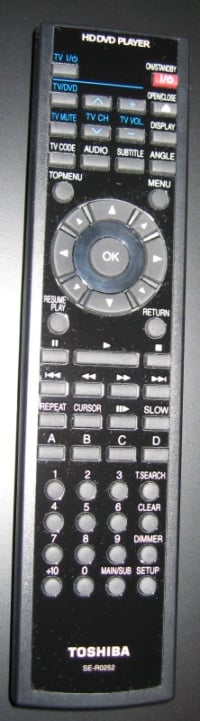 The Toshiba HD-A35 is a fairly standard looking disc
player. It is the standard 17-inch width
and has a proportional depth. It doesn't
feel too short or too tall and seems about right. The silver stripe and angled front edges do
give it a classier look than the average player. The included remote is functional and has a
decent layout. It is identical to the
remote that comes with the Toshiba HD-A2 that was reviewed a few months ago. I still have the same complaint about the
Stop and Pause buttons needing to be swapped.
Also, there still isn't a backlight on it, so memorizing the key
positions will be essential in a dark room. Many of you will just as likely turn to your universal remote controls instead. :-) The
general usage of the player is fairly normal, as well. It is slow to boot up (about 45 seconds)
and then takes another 15 to 25 seconds to start the movie, depending on if it's a
DVD or HD DVD. Fast Forward, Rewind, and
Skip are a little sluggish, too. It
seems that the new generation of HD video has too much data flowing and not
enough hardware power thrown in to make the instant transitions we are used
to. These boxes are basically mini-computers if you look inside. Nonetheless, it seems to be an
acceptable compromise for the quality of audio and video that can be had.
The Toshiba HD-A35 is a fairly standard looking disc
player. It is the standard 17-inch width
and has a proportional depth. It doesn't
feel too short or too tall and seems about right. The silver stripe and angled front edges do
give it a classier look than the average player. The included remote is functional and has a
decent layout. It is identical to the
remote that comes with the Toshiba HD-A2 that was reviewed a few months ago. I still have the same complaint about the
Stop and Pause buttons needing to be swapped.
Also, there still isn't a backlight on it, so memorizing the key
positions will be essential in a dark room. Many of you will just as likely turn to your universal remote controls instead. :-) The
general usage of the player is fairly normal, as well. It is slow to boot up (about 45 seconds)
and then takes another 15 to 25 seconds to start the movie, depending on if it's a
DVD or HD DVD. Fast Forward, Rewind, and
Skip are a little sluggish, too. It
seems that the new generation of HD video has too much data flowing and not
enough hardware power thrown in to make the instant transitions we are used
to. These boxes are basically mini-computers if you look inside. Nonetheless, it seems to be an
acceptable compromise for the quality of audio and video that can be had.
A quick examination of the backside will reveal a plethora of connections. Of course, the most important is HDMI which allows up to 1080p/24 video. The player will also output Dolby TrueHD and DTS HD audio, or it can convert the audio streams to uncompressed PCM via the HDMI port, as well. Component video is of course present for older TVs that may not have HDMI or DVI ports. According to the manual, it is possible to get 720p and 1080i video from this port while using HD DVDs, but not standard definition DVDs. The reason is because the player has the capability to diable them at will some time down the road for future software releases. Gotta love those wacky DRM restrictions, right? I didn't personally test the component video port, sticking to the dominant HDMI which a large majority of consumer will be utilizing with this player. There always seems to be a composite video port on all of the new players and it still mystifies me as to why. It just seems a little far-fetched to own an HD player and not own an HD display. Perhaps one person in 10,000 will use this port. For all I know, it only costs an extra 5 cents to slap that on there, but I digress.
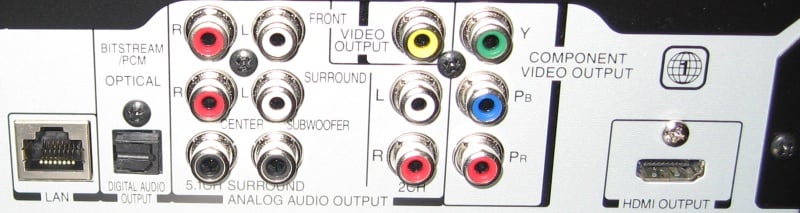 In case your receiver or processor doesn't support HDMI, the
HD-A35 has an optical port for Dolby Digital and DTS support. In addition, there is a 6-channel discrete
analogue output for full bandwidth audio.
This is a great addition if you have an older receiver but still want
the full potential of uncompressed sound.
I did give the 6-channel output a try on an older receiver and found
that it had more detail and nuance than using Dolby Digital through the optical
port. The Denon AVR-3805 receiver I used
applied sound correction on the digital inputs only, and not the analog ports. So, even though I could hear more detail with
the discrete inputs, I didn't get the same full sound I was used to. I guess there is something to be said for
room correction, at least in my particular situation. Analog audio outputs are certainly a great way to make sure that you don't have to upgrade your whole system simply to enjoy high-resolution audio.
In case your receiver or processor doesn't support HDMI, the
HD-A35 has an optical port for Dolby Digital and DTS support. In addition, there is a 6-channel discrete
analogue output for full bandwidth audio.
This is a great addition if you have an older receiver but still want
the full potential of uncompressed sound.
I did give the 6-channel output a try on an older receiver and found
that it had more detail and nuance than using Dolby Digital through the optical
port. The Denon AVR-3805 receiver I used
applied sound correction on the digital inputs only, and not the analog ports. So, even though I could hear more detail with
the discrete inputs, I didn't get the same full sound I was used to. I guess there is something to be said for
room correction, at least in my particular situation. Analog audio outputs are certainly a great way to make sure that you don't have to upgrade your whole system simply to enjoy high-resolution audio.
Setup
The setup menu is as straightforward as it gets, with only a few exceptions. The setup menu is accessed by hitting the Setup button on the remote when there is no disc in the player, or while the disc is fully stopped or ejected. There are options for video resolution / shape, audio formats, and network settings. The manual will guide the novice user through the setup with ease. Experienced audioholics will also enjoy the easy setup but still be able to configure the player in a more advanced installation.
On to the exceptions…
Be sure to set the Dynamic Range Control to Off, if you are wanting full-range audio. Some HD DVDs, Transformers for example, get confused
when this is set to Auto and don't output the sound correctly. Of course, if you want to compress the audio
for night time movie watching, then you can leave this on, but it may be easier
to access your receiver's night time mode instead. Also, the Enhanced Black Level should be Off
and the RGB Output Range should be set to Standard. Altering these settings may have the side
effect of clipping the blacks and whites and giving a more washed out look to
the video.
Yes, Jimmy, the power does flow through the ether. Well, the Ethernet, anyway… And by power, we mean the power of updated software! I was happy when the firmware update worked on the first try. I wasn't so lucky with the older HD-A2, and had to update it manually. However, the HD-A35 grabbed an IP address from my router and hopped onto the Internet just fine. It took about 30 minutes to download and update the player. Thus far, only one update has been available for this particular player, and the player will perform a version check before trying to download the same update again. If an active Internet connection isn't available, updates can be downloaded from Toshiba and burned onto a CD.
http://tacp.toshiba.com/tacpassets-images/notices/hddvd-downloadingfirmware.asp
Lastly, I'd like to talk about the video resolution. Options are available from 480i all the way up to 1080p. Not only can you select 1080p, but you can chose 1080p/24Hz. Now, this setting shouldn't be used lightly, as there are some unpleasant side effects. Basically, if the display can output in a true 24 frames per second (at 96Hz or 120Hz), then this setting can be used. The side effect is that video will ONLY play at 24fps, and will not kick back to 60i/30p when viewing 30fps material (commonly found in DVD Special Features). I personally used this player with a Panasonic OT-AE2000U projector, and in the Color1 mode, it will kick into 96Hz and play the video at a true 24fps. All of the 30fps material I tested seemed to drop frames and just looked bad, in general. The following benchmarks will detail some of the findings.
HD-A35 Benchmarks
 The benchmark testing was done using the HQV DVD and the HQV
HD DVD. Detailed explanations of all the
tests can be found at the HQV web
site. We disabled the 24p mode for these tests since HQV doesn't properly flag the disc). Some additional testing was done with the
Digital Video Essentials HD DVD to see how true 24fps video reacts.
The benchmark testing was done using the HQV DVD and the HQV
HD DVD. Detailed explanations of all the
tests can be found at the HQV web
site. We disabled the 24p mode for these tests since HQV doesn't properly flag the disc). Some additional testing was done with the
Digital Video Essentials HD DVD to see how true 24fps video reacts.
|
SD Test |
Max |
30fps |
Pass/Fail |
|
Color Bar |
10 |
10 |
Pass |
|
Jaggies #1 |
5 |
0 |
Fail |
|
Jaggies #2 |
5 |
0 |
Fail |
|
Flag |
10 |
0 |
Pass |
|
Detail |
10 |
10 |
Pass |
|
Noise |
10 |
0 |
Fail |
|
Motion adaptive Noise Reduction |
10 |
0 |
Pass |
|
Film Detail |
10 |
10 |
Pass |
|
Cadence 2:2 Video |
5 |
0 |
Pass |
|
Cadence 2:2:2:4 DV Cam |
5 |
0 |
Pass |
|
Cadence 2:3:3:2 DV Cam |
5 |
0 |
Pass |
|
Cadence 3:2:3:2:2 Vari-speed |
5 |
0 |
Pass |
|
Cadence 5:5 Animation |
5 |
0 |
Fail |
|
Cadence 6:4 Animation |
5 |
0 |
Fail |
|
Cadence 8:7 animation |
5 |
0 |
Fail |
|
Cadence 3:2 24fps film |
5 |
5 |
Pass |
|
Scrolling Horizontal |
10 |
5 |
Pass |
|
Scrolling Rolling |
10 |
10 |
Pass |
|
Total Points |
130 |
50 |
|
HD Test |
Max |
30 fps |
Pass/Fail |
|
HD Noise Reduction A & B |
25 |
15 |
Pass |
|
HD Video Resolution Loss |
20 |
20 |
Pass |
|
Jaggies A & B |
20 |
10 |
Pass |
|
Film Resolution Loss |
25 |
20 |
Fail (Type 2) |
|
Film Resolution Loss Stadium |
10 |
10 |
Pass |
|
Total Points |
100 |
75 |
Comments on testing
If this player is being used with the standard 1080p HDTV, then upconversion of DVDs works well as does HD video. The Film Resolution Loss HD test technically failed, but still seemed to handle the test well except for the very edges. This shouldn't be a concern for the average video clip, so we still gave it 20.
HD-A35 DVD and HD DVD Viewing Tests
 Transformers HD DVD

One word describes this film in full 1080p/24. Beautiful! From the detail on the cars to the texture of the actors' skin, it's just simply beautiful! I can't say just how pleased I am with how everything looks on this movie. I can say that the sound is not quite as perfect, however. I used the Denon 3808ci to decode the Dolby Digital Plus sound track, and it was lacking a little in the bass department. As mentioned earlier, setting the dynamic compression to Off helps out, as well as a configuring the crossover levels correctly. All in all, I'd say the A35 is doing its job however, and only the original disc was at fault for improper sound mixing.
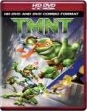 TMNT HD DVD

Computer animated movies can really show off the power of HD video, and the Teenage Mutant Ninja Turtles are no exception. The graphics in this movie have a semi-realistic feel to them, and it really draws the viewer in when displayed in full 1080p/24. Along with the nearly three dimensional video, the audio was equally exquisite. The Dolby TrueHD audio track provided very detailed sound effects and excellent localization. Even with my eyes closed, I could clearly hear where the turtles were supposed to be in their virtual landscape. The A35 was doing a great job with this film!
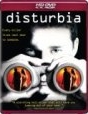 Disturbia HD DVD

This film is a mix of comedy, teen romance, drama, and thriller, all in one. Not knowing what to expect, I sat down with the wife and we were instantly transported into the film. The video detail was again virtually perfect, and the Toshiba did a great job with the 24hz frame rate. Even though the disc only had a Dolby Digital Plus audio track, it seemed very good and the voices were clear with excellent sound detail. At one point, a doorbell rang in the movie and it almost seemed like it was my doorbell upstairs, so it was very convincing. After the movie, I had to check out some of the special features, but became a little upset when "The making of Disturbia" wasn't in 24p. Once again the A35 failed to change automatically out of 24p mode, and began to drop frames. It was very frustrating to know that if I really wanted to watch the extra content properly, that I had to eject the disc, go and select 1080p, put the disc back in, wait for it to load, then find the extras again. So, I didn't. I just sat and watched it with the dropping frames. Next time, I may not even bother with the extra content. Can this be fixed in firmware? I hope so!
 Casablanca HD DVD

What's this? A black and white, 4:3 movie with a mono Dolby Digital Plus sound track? Yep, that's right! And I can honestly say that the video was very sharp, very clean, and the sound as good as possible for a film made the same year my parents were born. The video was so good, in fact, that even the smoke in various scenes seemed nearly 3D. The center channel was the only speaker active, so the audio stream that was being sent to the receiver was decoded properly. Also, there was no frame skipping of any kind, even though I was in 24p mode. I wish there was something on the display that would show me what video mode the source is encoded in. Oh well.
 Nacho Libre DVD

As a low key, gag based movie with Jack Black, it's pretty safe for the younger kids and it's fun to watch as a family. That is, unless your kids start jumping around and tacking each other when they pretend to become their favorite Lucador. In any case, this DVD was upconverted by the player, and I almost thought I was watching an HD version. Very few standard DVDs seem this clear, and I was very impressed by the player's performance here. Again, no skipping even though I was in 24p, and the sound was excellent as well. There was one drawback, however. While using the menus, on certain sub-menus, the selected item icon wouldn't move. Well, I should say that even though you couldn't see it move, the selection was still moving and could be selected. It was kind of a guessing game to select some of the extra features. I discovered that if I put the player back in normal 1080p, that the menus all worked again. Also, the extra content had frame skipping, as it wasn't in a native 24p. This was also remedied by changing the output mode in the setup. What a pain!
 Robots DVD

This was the second title I found that had a broken menu system when used in 24p mode. However, once the guessing was over, and I selected the DTS audio track and started the movie, I was as happy as the tin man after he found his heart! The video was clean and the sound very good. Again, no frame skipping on the main movie and the details and textures were very clear. I am perfectly happy with the upconversion process on the A35 as long as I am watching native 24p content.
 House of the Dead DVD

If you aren't familiar with the infamous Uwe Boll and his first big movie, then you should run out and find a copy to watch. You'll either love it or hate it! Either way, you'll have some form or entertainment. I chose this particular movie to watch as it is one of the few titles I own that has a DTS ES Discrete 6.1 audio track. Once again, the A35 didn't fail me and output this underutilized sound format perfectly. Of course, the video looked good for an upconvert, and I could even tell when they zoomed in on the video as some scenes looked digitally enlarged by the movie editor. I am not sure if that is a good or bad thing, but when they started in on the scenes that spin around the actors and the footage of the original House of the Dead video game, I forgot and just enjoyed the action. Yes, I am a video gamer, so stop making fun of me. Make fun of Uwe, if you must!
HD-A35 Conclusions
The Toshiba HD-A35 is a pretty darn good HD player. It also does a respectable job at upconversion for normal DVDs. With discrete analogue output, 12-bit Deep Color support (is there any content yet?), and 24p, it distinguishes itself from the competition. Unfortunately, the look and sound of perfect isn't quite perfect yet. With downfalls such as the incapability to switch between 30p and 24p automatically, and a few failing jaggie and cadence tests, the A35 can be improved upon. Hopefully, some of these issues can be addressed with firmware updates. It does seem that HD DVD might be on the way out, so this hope may be fleeting. In any case, if you find this player at a good price then you'll be quite pleased at the audio and video output capabilities!
The Score Card
The scoring below is based on each piece of equipment doing the duty it is designed for. The numbers are weighed heavily with respect to the individual cost of each unit, thus giving a rating roughly equal to:
Performance × Price Factor/Value = Rating
Audioholics.com note: The ratings indicated below are based on subjective listening and objective testing of the product in question. The rating scale is based on performance/value ratio. If you notice better performing products in future reviews that have lower numbers in certain areas, be aware that the value factor is most likely the culprit. Other Audioholics reviewers may rate products solely based on performance, and each reviewer has his/her own system for ratings.
Audioholics Rating Scale
 — Excellent
- — Very Good
- — Good
- — Fair
- — Poor
| Metric | Rating |
|---|---|
| High Definition Video Performance | |
| Standard Definition Video Performance | |
| High Definition Audio Performance | |
| Analogue Audio Performance | |
| Bass Management | |
| Deinterlacing & Scaling | |
| Build Quality | |
| Ergonomics & Usability | |
| Ease of Setup | |
| Features | |
| Remote Control | |
| Fit and Finish | |
| Performance | |
| Value | |
 Subscribe to our newsletter