


Toshiba HD-A2 HD DVD Player Review
Toshiba HD-A2 HD DVD Player
- Product Name: HD-A2 HD DVD Player
- Manufacturer: Toshiba
- Performance Rating:

- Value Rating:
- Review Date: October 29, 2007 11:16
- MSRP: $ 198.99
| Video HD Output 720p/1080i SD Upconversion 480p/720p/1080i Combo Format disc playback HD DVD Video DVD Video DVD VR DVD-R (Video) DVD-R DL (Video) DVD-RW (Video/VR CPRM not supported) Audio High-performance SHARC DSP CD, CD-R/-RW (CD-DA) Dolby Digital Plus 5.1ch Dolby TrueHD 5.1ch DTS 5.1ch DTS HD (core only) |
Universal remote with glow print OSD Language English/French/German/Japanese Connections HDMI Ethernet Port Component Video Output RCA Video Outputs (1) 2ch. Audio Output Digital Optical Output S-Video Output Dimensions: 16.9" W x 13.6" D x 2.6" H |
Pros
- Excellent high definition video quality
- Excellent sound clarity for HDMI-ready systems
- Very good upconversion for standard DVDs
- Built in Ethernet for updates and Internet connectivity
- Dual video stream playback
Cons
- Slow load times
- Slow video response for fast forward / rewind
- Noisy transport
- No backlight on the remote
- No 5.1 analogue audio outputs for legacy systems
- 1080i/60 max resolution (no 24p support)
Toshiba HD-A2 Build Quality and Setup
The Toshiba HD-A2 is the second generation of Toshiba’s HD DVD players. It is the entry level player and provides output of up to 720p or 1080i. It does NOT however output 1080p. This wasn’t a concern for me as I own a 720p Panasonic projector. I figured that by the time I go for a really great 1080p projector, the next best player will be available. Besides, 1080i/60 is no slouch with a good quality 1080p display anyway and no picture information or resolution is lost or missing from a 1080p/24 source. Of course, the third generation of players is only just a month away, but I have been using this unit for about 4 months now. Hey, I just couldn’t wait! There are numerous other reviews for the A2 floating around the Internet, but sometimes a new perspective is a good thing, especially when this will surely be at a great price point very soon (rumor has it at under $200 by Thanksgiving) when the new A3, A30, and A35 come out the door.
Build Quality
The
A2 seems to be a very well built player. The case is very nice
looking and certainly more sleek than its predecessor, the A1. It
has a quiet fan on the rear of the unit which isn’t noticeable over
the sound of my projector’s fan. Also on the back side, you have
HDMI, component video, optical audio, and an Ethernet port. There is
also a stereo analog output, a composite video and an S-video
connector, but who the heck cares about those old connections? It
would have been nice if they had included a full 6- or 8-channel
analog output, and even used gold plated connectors. Well, you can’t
have everything when you only buy the entry level player. Lastly,
the detachable power cord was a nice touch. I have seen nicer and
better standard DVD players, but this thing seems better built than
much of what you'll find on the shelves these days. The one thing that stood out to us was the noise associated with the transport. In one of our reference rooms it could be heard from across the room (over 20 feet away).
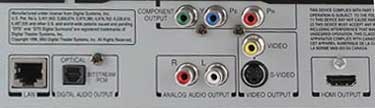
Toshiba
is network-enabled, but has no analogue 5.1 outputs
Setup
The setup on the A2 is pretty similar to all other DVD players. You set up your audio and video based on the outputs you are using and the kind of audio stream your receiver or processor can handle. You’ll also be able to able to plug this into your home network and download updates or connect to the Internet for some interactive content. This part of the setup was the most frustrating for me. Of course, when setting something like this up, you want the latest firmware so everything works right! I attempted to set the device to automatically acquire an IP address from my router, and first found that it needs to be rebooted in order to get the settings to take effect. I then went back into the Setup menu to update the firmware and let the download begin. About 20 minutes later, I received an error message saying “Cannot find sever” so I played with setting up static IPs, messed with my firewall settings on my home router, and attempted about a dozen other kinds of things. Now, I am a computer programmer, and a fairly well versed network guy, and for the life of me, every 20 minutes into the setup I would get this error.
Firmware
Updates
The
solution to all of this seemed to lie with a firmware update. I
downloaded the firmware from the Toshiba web site, burned it to a
disc, and then updated the player manually. Well, that all worked!
Now, since the manual update, I have been able to update the
firmware from the network port several times. It seems it was a bug
in the version of firmware that came loaded on the player. I am
fairly certain that I haven’t had any of those update problems
since getting version 2.0 on the unit, and I am up to 2.2 as of this
review. In any case, the actual process took me about 30 minutes to
upgrade to the latest firmware.
One last note on updates: Nearly every HD DVD we have acquired up to this point will include a note telling you that you should update your firmware. Please make sure you check the website first to see if there is an update, because it will let you update the current version over and over again, and you don’t want to blow a half hour or more every time you get a new disc. Ok, now that the hard part is over, just plug in your HDMI or component video cable, add an optical cable if needed, then set the rest of it up like anything else. Oh, and make sure you leave your “Enhanced Black Level” in the Off position so you can get the proper black levels. All in all, the setup was easy, but network troubles could prove to be a pain for some.
Firmware Link: http://www.tacpservice.toshiba.com/ConsumerProductSupport/productupdatesandnotices.asp
Audioholics/HQV Bench Testing
Summary
Perfect
SD Score is 130
Perfect
HD Score is 100
Optoma
HD80 Benchmark SD Score: 63 (you are going to get a decent picture)
Optoma
HD80 Benchmark HD Score: 70 (you are going to get excellent HD performance)
| SD Test | Max Points |
Results | Pass/Fail |
| Color Bar | 10 | 10 | Pass |
| Jaggies #1 | 5 | 3 | Pass |
| Jaggies #2 | 5 | 0 | Fail |
| Flag | 10 | 0 | Fail |
| Detail | 10 | 10 | Pass |
| Noise | 10 | 0 | Fail |
| Motion adaptive Noise Reduction | 10 | 0 | Fail |
| Film Detail | 10 | 10 | Pass |
| Cadence 2:2 Video | 5 | 0 | Fail |
| Cadence 2:2:2:4 DV Cam | 5 | 0 | Fail |
| Cadence 2:3:3:2 DV Cam | 5 | 0 | Fail |
| Cadence 3:2:3:2:2 Vari-speed | 5 | 0 | Fail |
| Cadence 5:5 Animation | 5 | 5 | Pass |
| Cadence 6:4 Animation | 5 | 0 | Fail |
| Cadence 8:7 animation | 5 | 0 | Fail |
| Cadence 3:2 24fps film | 5 | 5 | Pass |
| Scrolling Horizontal | 10 | 10 | Pass |
| Scrolling Rolling | 10 | 10 | Pass |
| Total Points | 130 | 63 |
The
HD-A2 sent upconverted 720p via HDMI to a Yamaha LPX-510
| HD Test | Max Points |
Results | Pass/Fail |
| HD Noise Reduction A & B | 25 | 0 | Fail |
| HD Video Resolution Loss | 20 | 20 | Pass |
| Jaggies A & B | 20 | 20 | Pass |
| Film Resolution Loss | 25 | 20 | Pass |
| Film Resolution Loss Stadium | 10 | 10 | Pass |
| Total Points | 100 | 70 | |
The HD-A2 sent downconverted 720p (from 1080p/24) via HDMI to a Yamaha LPX-510
Comments on HQV Testing
The Toshiba HD-A2 is a "decent" player, meaning that is not a stand-out performer, nor does it fall so short as to be problematic in most typical scenarios. The important tests such as 2-3 pulldown support pass without difficulty. For HD DVD content, the system is going to perform flawlessly, though we were unable to get a bead on noise reduction as the lack of settings made comparisons near impossible (and yielding a 'fail' mark by default). The Film resolution loss test had some flashing, but not int he critical areas of the test. What we found was that horizontal movements may bring about some concerns with fine vertical lines on displays that aren't fully 1080p-compatible (such as our reference 720p displays). This isn't a major concern for us, nor should it be for the consumer.
HD-A2 Remote Viewing Tests and Conclusion
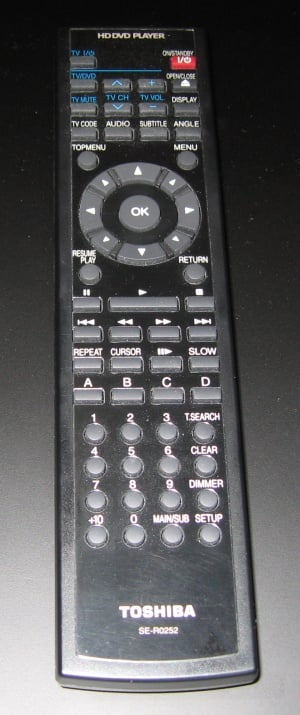 The
remote control is pretty well laid out, except for the Stop button.
I think they should have swapped it with the pause button. I found
myself hitting stop when I meant to pause. Why is this a problem?
If you hit Stop more than once, when you hit play again, the player
starts the movie/disc from the beginning instead of from where you
left off. It would have been easier to find the correct button if
the remote was backlit, but there is no lighting on it at all. You
just have to go by feel when you are in the dark, I guess.
The
remote control is pretty well laid out, except for the Stop button.
I think they should have swapped it with the pause button. I found
myself hitting stop when I meant to pause. Why is this a problem?
If you hit Stop more than once, when you hit play again, the player
starts the movie/disc from the beginning instead of from where you
left off. It would have been easier to find the correct button if
the remote was backlit, but there is no lighting on it at all. You
just have to go by feel when you are in the dark, I guess.
Subjective Viewing Tests
I have watched dozens of normal DVDs and a handful of HD DVDs in the four months I've owned this projector. I currently have it connected to my Panasonic PT-AX100U projector. This is a 720p unit, which (as of this writing) recently replaced the popular Panasonic AE-900U. My new projector seems very picky with respect to HDMI and resolution. For example, I own an older Sony DVR (Digital Video Recorder) and it always needs to have the resolution manually set to 720p while it always worked fine with the older projector via the HDMI port. In any case, the HD-A2 HD DVD player always works correctly with my new projector and I never need to reboot it or mess with settings to get the picture looking perfect. For testing in my system, I utilized a Denon AVR-3805 receiver for audio and Infinity Kappa speakers for mains, center and surrounds. An SVS PB12-Plus/2 subwoofer took care of all low end duties. So, with a fairly new projector, and some older but still very good audio gear, I moved into the testing phase.
The start up time of this player is about 40 seconds from the time you hit the On button to the time you can eject the tray and put a disc in. That's really slow. If a disc is left in the player, it will auto start it upon power-up. There is an extra 15 seconds to load a standard DVD or an extra 25 seconds to load an HD DVD. It really does seem slow, but it is tolerable for me, especially since it takes about a minute for my projector bulb to warm up and get to its full brightness. Those who are firing of macros with a universal remote control or RF-based system probably won't notice the delay.
HD
DVD: The
Last Samurai It
had been several months since I had seen this film. I own both the
HD DVD and the standard DVD and did a comparison by flipping between
the HD-A2 with the HD version and my Oppo DV-971H with the standard
DVD. To be honest, the video quality on this disc was a little
disappointing. I could tell that things were a little bit cleaner,
but it was certainly not worth the money I had paid. I have since
learned that this particular disc had a lower quality transfer then
most other discs, and it was obvious. However, I did
notice a big improvement in the sound quality of this movie. The gun
shots sounded clearer and the music was certainly better, as well. I
was actually quite surprised at how
much better the sound was. In any case, the player seemed to do its
job, even if the movie didn’t have great video.
It
had been several months since I had seen this film. I own both the
HD DVD and the standard DVD and did a comparison by flipping between
the HD-A2 with the HD version and my Oppo DV-971H with the standard
DVD. To be honest, the video quality on this disc was a little
disappointing. I could tell that things were a little bit cleaner,
but it was certainly not worth the money I had paid. I have since
learned that this particular disc had a lower quality transfer then
most other discs, and it was obvious. However, I did
notice a big improvement in the sound quality of this movie. The gun
shots sounded clearer and the music was certainly better, as well. I
was actually quite surprised at how
much better the sound was. In any case, the player seemed to do its
job, even if the movie didn’t have great video.
HD
DVD: King
Kong I
was also able to compare this HD disc with the standard DVD. I could
see a very noticeable improvement on the video during this test. The
color seemed just a bit brighter and more pleasing. The scenes in
New York with the cars and cabs were very clean and you could discern
minor details that just weren’t available on the standard DVD. One
huge difference was the quality of people’s eyes. Yes, that’s
right, you could see that they weren’t just black and blue dots for
eyes, but you could actually see some of the detail as well. This
was especially nice on closers shots of people’s faces and it just
made the whole experience seem more lifelike! Well, it was as
lifelike as it can get with a giant computer animated gorilla…
I
was also able to compare this HD disc with the standard DVD. I could
see a very noticeable improvement on the video during this test. The
color seemed just a bit brighter and more pleasing. The scenes in
New York with the cars and cabs were very clean and you could discern
minor details that just weren’t available on the standard DVD. One
huge difference was the quality of people’s eyes. Yes, that’s
right, you could see that they weren’t just black and blue dots for
eyes, but you could actually see some of the detail as well. This
was especially nice on closers shots of people’s faces and it just
made the whole experience seem more lifelike! Well, it was as
lifelike as it can get with a giant computer animated gorilla…
HD
DVD: 300 If
you have not seen this movie you probably should! The HD DVD version
of this movie seems just as good as I remember from the local
theater. Usually, my home theater is better than the local cineplex,
but I drove 50 minutes to get to the best theater in the state of
Iowa. So anyway, I’d like to stress that this movie was just as
impressive on my home theater as it was in a state of the art, all
digital, extremely well designed and equipped movie theater. You may
read reviews about and how the movie is kind of grainy or how the
color has been played with, but that’s the way they wanted it to
be. You can watch the green screen version on the HD DVD in a small
window while the main movie plays, if you like. That’ll give you a
comparison with no artificial grain or color correction. Of course,
there aren’t any background graphics, but it is very cool that the
player can play two full bandwidth video streams at the same time! I
was very impressed!
If
you have not seen this movie you probably should! The HD DVD version
of this movie seems just as good as I remember from the local
theater. Usually, my home theater is better than the local cineplex,
but I drove 50 minutes to get to the best theater in the state of
Iowa. So anyway, I’d like to stress that this movie was just as
impressive on my home theater as it was in a state of the art, all
digital, extremely well designed and equipped movie theater. You may
read reviews about and how the movie is kind of grainy or how the
color has been played with, but that’s the way they wanted it to
be. You can watch the green screen version on the HD DVD in a small
window while the main movie plays, if you like. That’ll give you a
comparison with no artificial grain or color correction. Of course,
there aren’t any background graphics, but it is very cool that the
player can play two full bandwidth video streams at the same time! I
was very impressed!
DVD:
Finding
Nemo I
watched this just a couple of days ago, and it’s a movie my whole
family enjoys. I have gotten used to the video quality on HD DVD so
taking a step back to normal DVD was a bit disappointing for me.
However, I will say that the HD-A2 did a great job at the
upconversion. The colors were good, and there was very little
blocking. Of course, the sound and video detail wasn’t as good as
a Dolby TrueHD movie, but it’s still very watchable.
I
watched this just a couple of days ago, and it’s a movie my whole
family enjoys. I have gotten used to the video quality on HD DVD so
taking a step back to normal DVD was a bit disappointing for me.
However, I will say that the HD-A2 did a great job at the
upconversion. The colors were good, and there was very little
blocking. Of course, the sound and video detail wasn’t as good as
a Dolby TrueHD movie, but it’s still very watchable.
HD
DVD: Digital
Video Essentials
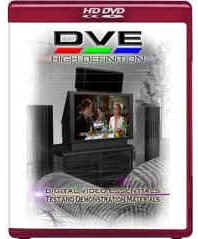 This is a pretty cool disc I recently picked up. It is a
dual-sided disc with the original DVD version on one side and the new
HD version on the other side. The HD side has a very well laid out
menu, and is much more intuitive to use than the original. In any
case, the player seemed very responsive as I flipped through the
menus, and it would even continue playing content while it overlaid
the menu system on top so you could find your next test. I was able
to tweak my projector brightness a bit with this disc, and found that
one of the default video modes was nearly perfect for color and hue.
I did, however, verify that I was unable to get the HD-A2 to pass the
blacker than black signal in my particular system.
This is a pretty cool disc I recently picked up. It is a
dual-sided disc with the original DVD version on one side and the new
HD version on the other side. The HD side has a very well laid out
menu, and is much more intuitive to use than the original. In any
case, the player seemed very responsive as I flipped through the
menus, and it would even continue playing content while it overlaid
the menu system on top so you could find your next test. I was able
to tweak my projector brightness a bit with this disc, and found that
one of the default video modes was nearly perfect for color and hue.
I did, however, verify that I was unable to get the HD-A2 to pass the
blacker than black signal in my particular system.
Conclusion
After using the HD-A2 for the past 4 months, I would certainly recommend it to any user who is looking for high definition video and audio! Even though it is a little slow to start up and slightly cumbersome to fast forward or rewind during video, it does provide a very satisfying experience for the next generation of home movie watching. Of course, its upconversion for standard DVDs is very good, as well! Lastly, if you are still using a receiver or processor that doesn’t accept HDMI audio, then this unit will downconvert the HD audio to DTS to provide the highest bandwidth stream available for better quality sound. This unit can be had for less than the $299 MSRP in many places (rumor has it going for under $200 by the 2007 holidays) and it will certainly be even less with the HD-A3 on the market, so it is a great value for HD video and audio! Remember kids, in the first years of standard DVD, the nice players stayed in the $600 plus range, and they didn’t have nearly as many features as this unit. When it’s all said and done, I’d buy this player again!
The Score Card
The scoring below is based on each piece of equipment doing the duty it is designed for. The numbers are weighed heavily with respect to the individual cost of each unit, thus giving a rating roughly equal to:
Performance × Price Factor/Value = Rating
Audioholics.com note: The ratings indicated below are based on subjective listening and objective testing of the product in question. The rating scale is based on performance/value ratio. If you notice better performing products in future reviews that have lower numbers in certain areas, be aware that the value factor is most likely the culprit. Other Audioholics reviewers may rate products solely based on performance, and each reviewer has his/her own system for ratings.
Audioholics Rating Scale
 — Excellent
- — Very Good
- — Good
- — Fair
- — Poor
| Metric | Rating |
|---|---|
| High Definition Video Performance | |
| Standard Definition Video Performance | |
| High Definition Audio Performance | |
| Analogue Audio Performance | |
| Bass Management | |
| Deinterlacing & Scaling | |
| Build Quality | |
| Ergonomics & Usability | |
| Ease of Setup | |
| Features | |
| Remote Control | |
| Fit and Finish | |
| Performance | |
| Value | |
 Subscribe to our newsletter