


Sony BDP-S300 Blu-ray Player Review
Sony BDP-S300 Blu-ray Player
- Product Name: BDP-S300
- Manufacturer: Sony
- Performance Rating:


- Value Rating:
- Review Date: November 06, 2007 09:55
- MSRP: $ 499.99
Dimensions (Approx.) - 17 x 3 1/8 x 14 7/8" (430 x 79 x 375mm)
Weight (Approx.) - 10 lb. (4.5kg)
Dimensions (Approx.) - 17 x 3 1/8 x 14 7/8" (430 x 79 x 375mm)
Limited Warranty - 1 year parts / 1 year labor
Remote Control Functions - Multi Brand TV Remote Control
Screen Saver - Yes
DVD+R Read Compatibility - Yes
DVD+RW Read Compatibility - Yes
DVD-R Read Compatibility - Yes (Video Mode Only)
DVD-RW Read Compatibility - Yes (Video Mode Only)
High Definition - Full HD 1080/24p and 60p
BD-ROM - Yes
BD-R/RE Read Compatibility - Yes (BD-MV only. Requires firmware higher than ver.1.55)
JPEG Playback - Yes (Content must be in DVD+R/+RW/-R/-RW format.)
x.v.Color™ - Yes (output without Meta Data)
Analog-to-Digital Converter - 192KHz/24bit
dts® Output - Yes
MP3 Playback - Yes (Content must be in DVD+R/+RW/-R/-RW format.)
Dolby® Digital - Decoding: Yes; HDMI™ bitstream out: Yes
Dolby® Digital plus Decoding - Yes
Dolby® TrueHD Decoding - No (Dolby® Digital Stream Only)
dts® Decoding - Yes
dts®-HD Decoding - Hi-resolution Audio: No (dts® Stream Only); Hi-resolution Audio HDMI™ bitstream out: No (dts® Stream Only); Master Audio: No (dts® Stream Only); Master Audio HDMI™ bitstream out: No (dts® Stream Only)
SA-CD Playback - No
HDMI™ Connection Output(s) - 1 (Rear)
Component Video (Y/Pb/Pr) Output(s) - 1 (Rear)
S-Video Output(s) - 1 (Rear)
Composite Video Output(s) - 1 (Rear)
Optical Audio Output(s) - 1 (Rear)
Coaxial Audio Digital Output(s) - 1 (Rear)
Analog Audio Output(s) - Analog Audio Output(s) : 5.1 ch; 1 (Rear), 2 Channel; 1 (Rear)
PCM Output(s) - Linear PCM Decoding; Linear PCM out via HDMI™ bitstream
Remote Control - Multi Brand TV Remote Control
CD - Yes CD-DA
DVD - Yes (Video)
Pros
- Price - one of the lowest on the market
- Easy setup
Cons
- NO DOLBY TrueHD OR DTS HD DECODING
- Long startup time
- Unresponsive remote and interface
- Lackluster upconversion ability
- No SACD support
BDP-S300 Build Quality and Set-up
As a reviewer, I'm not immune to the excitement and anticipation that goes hand in hand with the release of new technology. Heck, since HD DVD and Blu-ray came out, I've been licking my lips just waiting to get my hands on a player for review. Now, I don't have any illusions that these new formats will be anything other than niche products in the end but that doesn’t mean I wouldn't mind being a part of that niche.
First Impressions and Build Quality
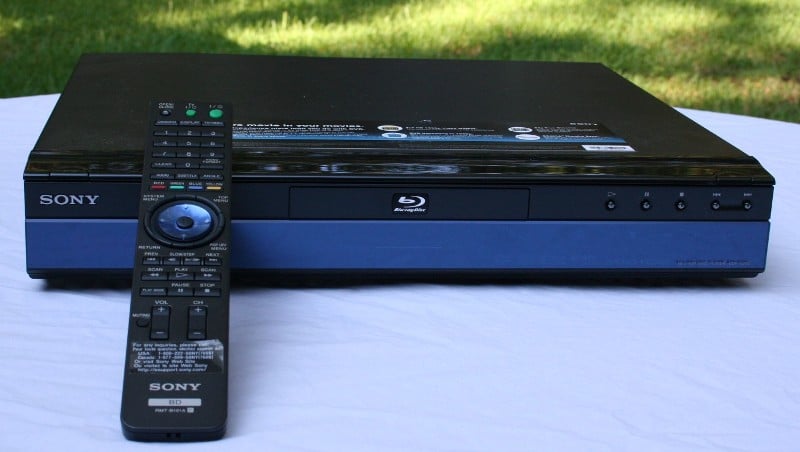 The Sony BDP-S300 is Sony's
latest entry-level Blu-ray player. Priced at $499, it is just about as low a
priced Blu-ray player as you're going to see, unless you're interested in
purchasing the exceptionally loud PS3 (which, at time of writing, is the same
price and comes bundled with movies). The unit appears to be completely black
with the bottom 2/3rds of the face dedicated to the display. The glass on the
display actually has a slightly bluish hue (apropos don't you think?) but it is
unnoticeable in anything other than direct front light (an unlikely scenario in
a home theater).
The Sony BDP-S300 is Sony's
latest entry-level Blu-ray player. Priced at $499, it is just about as low a
priced Blu-ray player as you're going to see, unless you're interested in
purchasing the exceptionally loud PS3 (which, at time of writing, is the same
price and comes bundled with movies). The unit appears to be completely black
with the bottom 2/3rds of the face dedicated to the display. The glass on the
display actually has a slightly bluish hue (apropos don't you think?) but it is
unnoticeable in anything other than direct front light (an unlikely scenario in
a home theater).
The S300 seems to be put together very well with a nice heft that you won't be used to if you've picked up a DVD player recently. The front of the unit has the normal compliment of controls including Play, Pause, Stop, and Skip Forward and Back. On the top left corner of the unit is the power button with the eject button on the top right corner. I can't tell you how much I like this placement. The top mounting of the buttons makes finding them in a dark room child's play and extremely convenient.
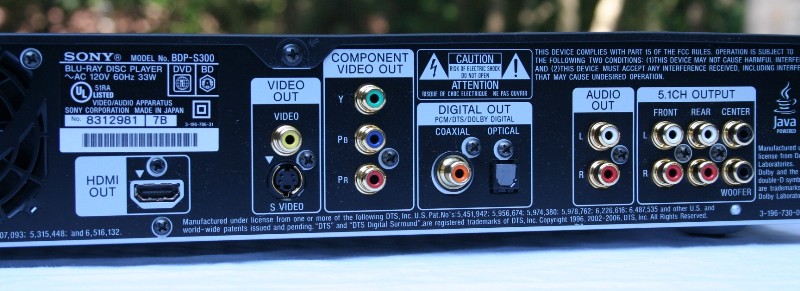 The back of the unit is like half
a Noah's Arc with a single example of each of every output. HDMI is present (of
course) as is Component, s-video, and composite for video. I'm not going to
rant on how having a composite output just encourages people to use it and
completely negate any possible benefits the high definition format offers -
just know that a scowl came across my face when I saw the little yellow connector
on the back. Audio is represented again by HDMI but also coaxial and optical
digital outputs and a set of 5.1 analogue outputs for those that want to take
advantage of the benefits of high definition audio but don't have an HDMI
capable receiver. In addition, there are a set of stereo analogue outputs for
those that still live in the dark ages of Dolby ProLogic or perhaps are
clinging to their stereo receiver.
The back of the unit is like half
a Noah's Arc with a single example of each of every output. HDMI is present (of
course) as is Component, s-video, and composite for video. I'm not going to
rant on how having a composite output just encourages people to use it and
completely negate any possible benefits the high definition format offers -
just know that a scowl came across my face when I saw the little yellow connector
on the back. Audio is represented again by HDMI but also coaxial and optical
digital outputs and a set of 5.1 analogue outputs for those that want to take
advantage of the benefits of high definition audio but don't have an HDMI
capable receiver. In addition, there are a set of stereo analogue outputs for
those that still live in the dark ages of Dolby ProLogic or perhaps are
clinging to their stereo receiver.
Player Set-Up & General Use
 Setting up
this player, for me, was a breeze. As much as we all love to hate HDMI, when it
works, it's great. I plugged in the unit and switched the HDMI cable from my
Denon DVD-3910 to the Sony and I was done. Probably the easiest setup I've ever
had to do. When you first start up, the player will take you through a number
of questions including your display type (4:3 or 16:9) and the number of
speakers you have in your system. I'm going to assume that you can answer all
those questions without my guidance. But for some the other settings this may
not be so easy. You need to know what connections you have available and what are
the capabilities of your receiver before you can know how to set it up. Let's
run through it. First for audio (in order of "best" to "least
best" method):
Setting up
this player, for me, was a breeze. As much as we all love to hate HDMI, when it
works, it's great. I plugged in the unit and switched the HDMI cable from my
Denon DVD-3910 to the Sony and I was done. Probably the easiest setup I've ever
had to do. When you first start up, the player will take you through a number
of questions including your display type (4:3 or 16:9) and the number of
speakers you have in your system. I'm going to assume that you can answer all
those questions without my guidance. But for some the other settings this may
not be so easy. You need to know what connections you have available and what are
the capabilities of your receiver before you can know how to set it up. Let's
run through it. First for audio (in order of "best" to "least
best" method):
You have an HDMI capable receiver OR you are using the 5.1 analogue outputs.
HDMI is the way to go for high resolution audio but if you don't have it, you can use the 5.1 analogue outputs to get all the same audio you would from the HDMI connection - it just takes more cables. If you are using an HDMI connection you can set Audio (HDMI) to Auto to let your receiver decode the standard DTS and Dolby Digital tracks or PCM for the player to do it. With an analogue connection, go with PCM. With this connection you will be able to utilize the internal Dolby Digital Plus decoders in the Sony BDP-S300. The S300 does NOT have the ability to decode Dolby TrueHD or any of the high resolution DTS formats (there are a few) nor can it pass them to your receiver for decoding. This is more than unfortunate; it actually makes this player targeted towards people who don't have any intention of running a high-qaulty audio system. Our guess is that Sony simply hopes no one notices as they plunk down $500 for this player.
When using the digital audio outputs.
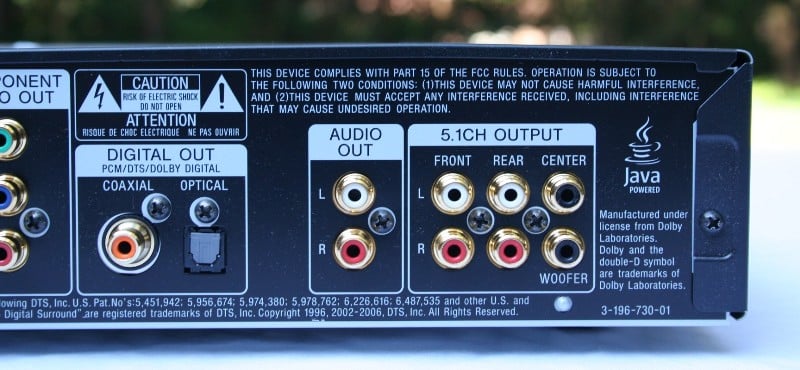 If you have a
receiver with no analogue inputs, you can connect via coax or TOSLink. This
will not only give you the normal DTS and Dolby Digital tracks, buy often the
Blu-ray versions of movies will have increased fidelity on their encoded audio
tracks. While it won't be as good as Dolby Digital Plus, it'll be better than
what you've experienced before.
If you have a
receiver with no analogue inputs, you can connect via coax or TOSLink. This
will not only give you the normal DTS and Dolby Digital tracks, buy often the
Blu-ray versions of movies will have increased fidelity on their encoded audio
tracks. While it won't be as good as Dolby Digital Plus, it'll be better than
what you've experienced before.
When using the stereo outputs.
If you have a Dolby ProLogic equipped receiver, make sure you set the DTS Downmix to Lt/Rt. This will allow your receiver to properly decode the signal for surround sound. For those using a stereo receiver, just set it to stereo.
For Video, you have a few less options. You basically want to connect your display to the unit with the connection that will give you the highest resolution. So if you have an HDMI connection, go with that. If not, use a component (red, green, blue cables) connection. If not, take the unit back and save up for a better display because you're wasting your money with an s-video or composite. If you decide that you want to change the resolution after your initial setup, hit the Video Format button until you get to the setting you'd like. The BDP-S300 will output 480i, 480p, 720p, 1080i, and 1080p over HDMI. With component it will display 480i, 480p, 720p for Blu-ray discs but only up to 480p for standard DVDs. Don't worry, if you choose a non-supported format and your screen goes blank, you just need to hit the button until you get to a supported format.
Updating the Firmware
One of the first things I did when I got the Sony BDP-S300 was to update the firmware. Because this was a review unit, it has made the rounds to a number of people before it showed up on my doorstep. So, as you might expect, it was missing a number of the supplied cables and, more importantly, the instruction manual. When I visited the website, the first thing I noticed was that there was a new firmware release so I decided to check to see if it had the most recent. It didn't.
The update procedure isn't hard, but it isn't easy either. Basically it requires that you burn a DVD (or request one from Sony) with a file on it. Once you've created or acquired your disc, you only need to insert it into the player and begin the sweating process. Oh they warn you that a number of different messages will pop up on the display and not to worry about it but you know you will. I did and I don't even own the unit. I've heard too many stories about players being "bricked" during a firmware update not to worry. They said not to touch it and I didn't but I still had a panic moment when the DVD ejected with a message displayed other than the one the directions indicated. Eventually, the message changed to the correct one but it freaked me out for a while.
S300 Menus, Remote, and Measurements
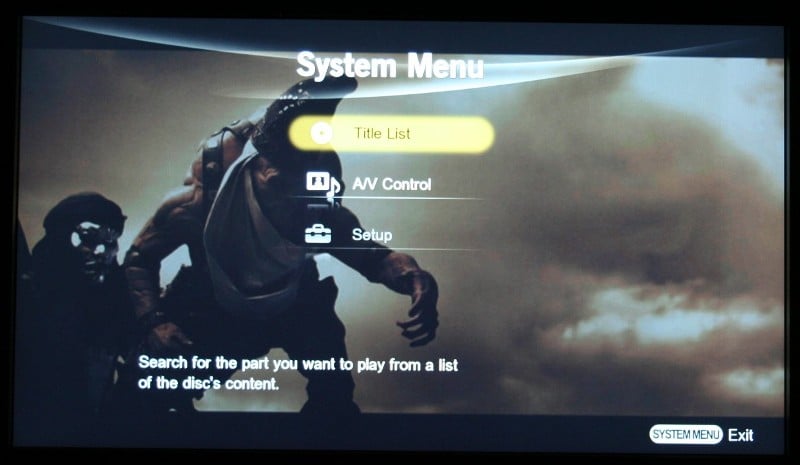
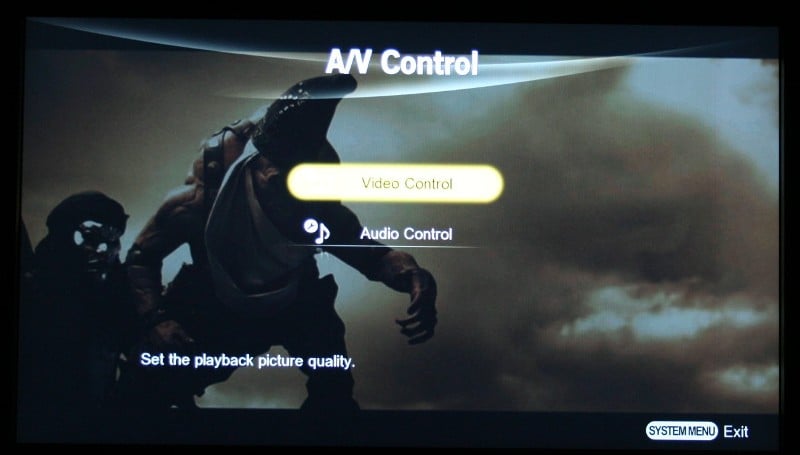 The Sony BDP-S300 menus are sort
of an enigma to me. Where I'm used to hitting the menu button and having the
menu pop up (usually you have to stop playback), with the S300, depending on
the state of the player, you get access to different menus. If you want to
change many of the settings that I've already described, you'll need to stop
playback and select the Setup menu. But if you would like to change how
the picture looks, you'll need to have a disc playing and then you can select A/V Control. Let's cover that menu
first.
The Sony BDP-S300 menus are sort
of an enigma to me. Where I'm used to hitting the menu button and having the
menu pop up (usually you have to stop playback), with the S300, depending on
the state of the player, you get access to different menus. If you want to
change many of the settings that I've already described, you'll need to stop
playback and select the Setup menu. But if you would like to change how
the picture looks, you'll need to have a disc playing and then you can select A/V Control. Let's cover that menu
first.
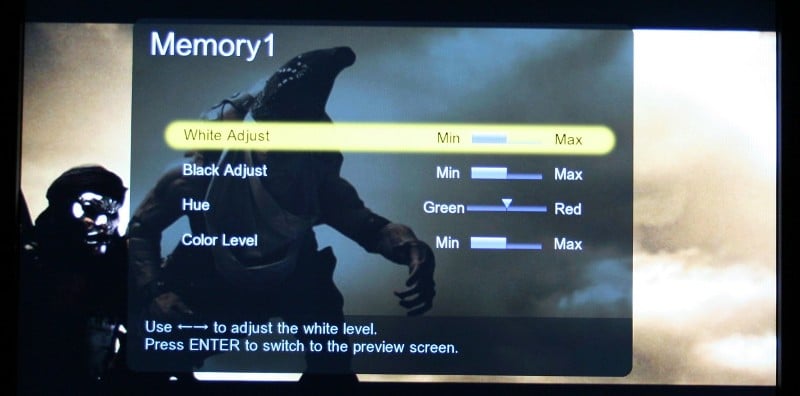 You have a choice of Video
Control and Audio Control. Under Video Control you can choose one of the
provided settings of Standard, Theater Room, and Brighter Room. Of course the
Brighter Room is the brightest setting with the Theater Room being the darkest.
You can't adjust these settings in any way. There are however three different
Memory settings which can be adjusted by the user. The available adjustments
are White Adjust (adjusts the
brightness of the white areas), Black
Adjust (adjusts the richness of the dark areas), Hue
(adjust between green and red), and Color
Level (adjusts the color saturation). The White and Black Adjust
and Color Level options each has 9
different settings with the Hue having on
5. The Audio Control menu only gives you the option of engaging the Audio DRC which is essentially a
compression codec that will equalize the volume of a Dolby Digital soundtrack.
I suggest you leave it set to Off unless you are listening to your movie at a
low volume and are having a hard time hearing some passages and can't turn it
up.
You have a choice of Video
Control and Audio Control. Under Video Control you can choose one of the
provided settings of Standard, Theater Room, and Brighter Room. Of course the
Brighter Room is the brightest setting with the Theater Room being the darkest.
You can't adjust these settings in any way. There are however three different
Memory settings which can be adjusted by the user. The available adjustments
are White Adjust (adjusts the
brightness of the white areas), Black
Adjust (adjusts the richness of the dark areas), Hue
(adjust between green and red), and Color
Level (adjusts the color saturation). The White and Black Adjust
and Color Level options each has 9
different settings with the Hue having on
5. The Audio Control menu only gives you the option of engaging the Audio DRC which is essentially a
compression codec that will equalize the volume of a Dolby Digital soundtrack.
I suggest you leave it set to Off unless you are listening to your movie at a
low volume and are having a hard time hearing some passages and can't turn it
up.
Editor's Note: We typically recommend you make all adjustments on your display and use a Setup disc such as AVIA or Digital Video Essentials to do so. In the event that your player does not allow you to get an accurate calibration (particularly when dealing with white and black levels) then the player controls should be utilized to get you the rest of the way.
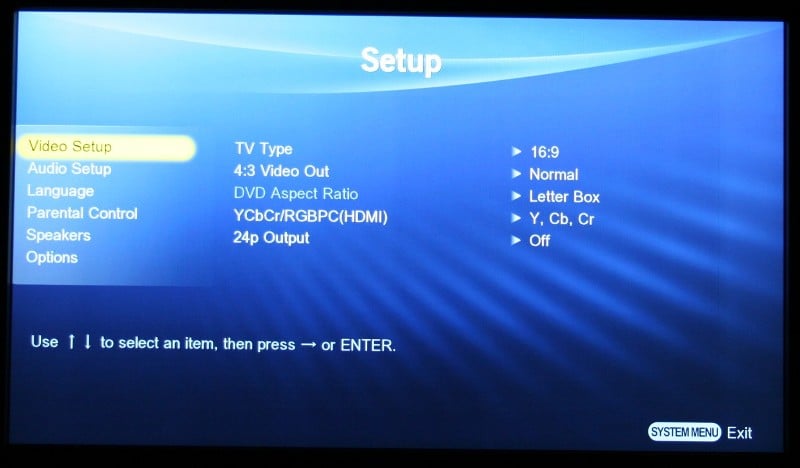 Under the Setup menu there are a number of options in the Video Setup menu that can be changed
after your initial setup. TV Type
(4:3 or 16:9), 4:3 Video Out (Full -
stretches the picture or Normal
- puts black bars on the sides), and DVD
Aspect Ratio (Letterbox or Pan and Scan) which are all pretty typical of
DVD players these days. The YCbCr/RBGPC
(HDMI) setting is a bit more confusing. Just remember if you are using an
HDMI connection to choose YCbCr. This allows the display to do the conversion to RGB which it is probably better at
doing than the Sony BD player. The studio level RGB (16-235) is typically
recommended for use with an HDCP compliant DVI connection. RGB (0-255) typically
crushes whites and blacks on many displays.
Under the Setup menu there are a number of options in the Video Setup menu that can be changed
after your initial setup. TV Type
(4:3 or 16:9), 4:3 Video Out (Full -
stretches the picture or Normal
- puts black bars on the sides), and DVD
Aspect Ratio (Letterbox or Pan and Scan) which are all pretty typical of
DVD players these days. The YCbCr/RBGPC
(HDMI) setting is a bit more confusing. Just remember if you are using an
HDMI connection to choose YCbCr. This allows the display to do the conversion to RGB which it is probably better at
doing than the Sony BD player. The studio level RGB (16-235) is typically
recommended for use with an HDCP compliant DVI connection. RGB (0-255) typically
crushes whites and blacks on many displays.
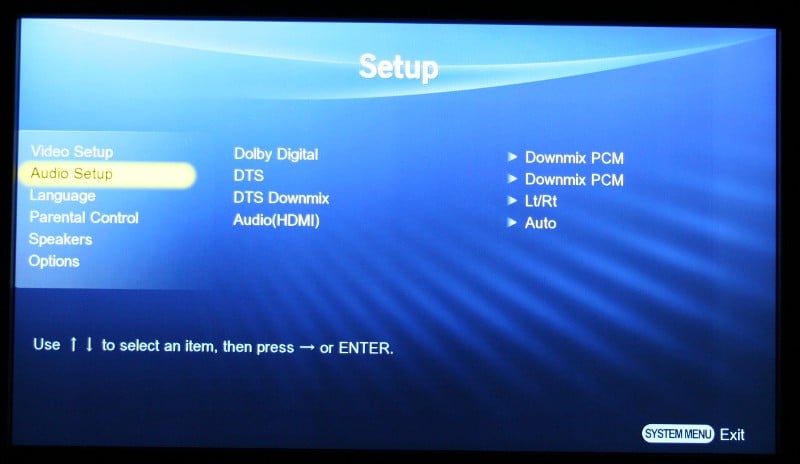 Under Audio Setup, you'll want to leave Dolby Digital and DTS where
they are unless you have a receiver so old that it won't decode Dolby Digital or
DTS and then you should set them to Downmix. If you are using a ProLogic
receiver and the stereo outputs, set DTS
Downmix to Lt/Rt and if you are using a stereo receiver, set it to Stereo.
Lastly, if you'd like the player to decode all the DTS and Dolby Digital audio
tracks for you and are connected via HDMI, then set Audio (HDMI) to PCM. If you want it only to decode the Dolby
Digital Plus soundtracks and send everything else to your receiver for
decoding, set it to Auto. There are Language,
Parental Control, and Options
screens that you mostly shouldn't have to touch but you will want to go to the
Speakers screen and make sure your Audio
Output Mode is set to 5.1 Channel if you are running a surround sound setup
and are connected via analogue outputs.
Under Audio Setup, you'll want to leave Dolby Digital and DTS where
they are unless you have a receiver so old that it won't decode Dolby Digital or
DTS and then you should set them to Downmix. If you are using a ProLogic
receiver and the stereo outputs, set DTS
Downmix to Lt/Rt and if you are using a stereo receiver, set it to Stereo.
Lastly, if you'd like the player to decode all the DTS and Dolby Digital audio
tracks for you and are connected via HDMI, then set Audio (HDMI) to PCM. If you want it only to decode the Dolby
Digital Plus soundtracks and send everything else to your receiver for
decoding, set it to Auto. There are Language,
Parental Control, and Options
screens that you mostly shouldn't have to touch but you will want to go to the
Speakers screen and make sure your Audio
Output Mode is set to 5.1 Channel if you are running a surround sound setup
and are connected via analogue outputs.
Remote Control
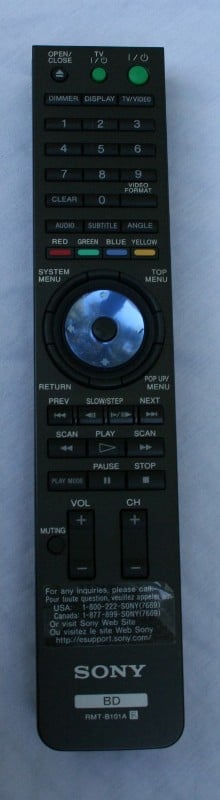 The
remote control for the Sony BDP-S300 is black, thin, and lightweight. Like far too many remotes I deal with these
days, it is not backlit and the buttons are pretty much all the same size so it
is near impossible to tell them apart in the dark. For the owner, it is going
to end up coming down to either waiting for a lighter scene in the movie or
memorizing the button locations. There is a Braille dot on the Play button
which will help, but other than that you are on your own for the most used
video control buttons. The circular control in the center works well but the
rounded buttons that surround it are sort of difficult to distinguish from each
other.
The
remote control for the Sony BDP-S300 is black, thin, and lightweight. Like far too many remotes I deal with these
days, it is not backlit and the buttons are pretty much all the same size so it
is near impossible to tell them apart in the dark. For the owner, it is going
to end up coming down to either waiting for a lighter scene in the movie or
memorizing the button locations. There is a Braille dot on the Play button
which will help, but other than that you are on your own for the most used
video control buttons. The circular control in the center works well but the
rounded buttons that surround it are sort of difficult to distinguish from each
other.
The only real problem I had with the player and control was that it took sooooo looong to do just about anything. Every time you hit a button you weren't sure if the command wasn't received or if the unit was just taking its sweet time. Powering up the unit took a good 45 seconds. I would literally press the Open button, go look for a movie, and return just as the unit was finishing powering up and the tray was extending. That's just silly. Getting to each of the menus also seems to have a delayed reaction to the remote commands. It wasn't so annoying that I threw the remote across the room but it did irk me from time to time.
Video and Audio Measurements & Testing
Since the Sony BDP-S300 player is certain to be used for upconverting standard DVDs to 1080p via HDMI, it was imperative that we explore how well the player handled the source interlaced signals coming off of standard definition DVDs. In particular, we were looking for solid deinterlacing and jaggie reduction performance, noise reduction and the ability to easily navigate unflagged 2:3 cadences. All final test scores were derived using the Sony's BDP-S300’s HDMI output in 1080p mode unless otherwise specified.
Audioholics/HQV Bench Testing Summary of Test Results
Perfect Score
is 130
Sony BDP-S300 Benchmark total
score: 50/130
|
Test |
Max |
Results |
Pass/Fail |
|
Color Bar |
10 |
5 |
Pass |
|
Jaggies #1 |
5 |
0 |
Fail |
|
Jaggies #2 |
5 |
0 |
Fail |
|
Flag |
10 |
5 |
Pass |
|
Detail |
10 |
10 |
Pass |
|
Noise |
10 |
5 |
Pass |
|
Motion adaptive Noise Reduction |
10 |
5 |
Pass |
|
Film Detail |
10 |
0 |
Fail |
|
Cadence 2:2 Video |
5 |
0 |
Fail |
|
Cadence 2:2:2:4 DV Cam |
5 |
0 |
Fail |
|
Cadence 2:3:3:2 DV Cam |
5 |
0 |
Fail |
|
Cadence 3:2:3:2:2 Vari-speed |
5 |
0 |
Fail |
|
Cadence 5:5 Animation |
5 |
0 |
Fail |
|
Cadence 6:4 Animation |
5 |
0 |
Fail |
|
Cadence 8:7 animation |
5 |
0 |
Fail |
|
Cadence 24fps film |
5 |
0 |
Fail |
|
Scrolling Horizontal |
10 |
10 |
Pass |
|
Scrolling Rolling |
10 |
10 |
Pass |
|
Total Points |
130 |
50 |
|
All tests were done with the HDMI outputs at 1080p. Any failed tests were checked in 720p as well.
|
Test |
Max |
Results |
Pass/Fail |
|
HD Noise Reduction A&B |
25 |
25 |
Pass |
|
HD Video Resolution Loss |
20 |
20 |
Pass |
|
Jaggies A&B |
20 |
20 |
Pass |
|
Film Resolution Loss |
25 |
0 |
Fail |
|
Film Resolution Loss - Stadium |
10 |
10 |
Pass |
|
Total Points |
100 |
75 |
|
Comments on Audioholics DVD Torture Tests
I was really surprised at the lackluster upconversion abilities of the Sony BDP-S300. When playing standard definition DVD's noise was apparent as were jaggies. The lack of 3:2 pulldown indicates that you should perhaps consider letting your display do the deinterlacing by sending an interlaced rather than progressive signal. For Blu-ray playback, the unit performed well despite it failing the two Resolution Loss tests.
S300 Viewing and Listening Evaluations, Conclusion
As the HQV testing suggested, the Sony BDP-S300 performed well with Blu-ray playback but fairly poorly on normal DVD playback. I viewed a number of movies during this evaluation period and feel confident that I have a good handle on how this unit will perform over the long run.
Blu-ray: 300
Wow! Can I just say
wow? This movie looked and sounded great. In a rare moment of weakness, I saw 300 at the IMAX theater when it was
first released (I usually wait for everything to come out on video). I was
worried about the choices the director made in the graininess of the film
quality. Since the entire movie (for the most part) was filmed in a warehouse
in Canada,
this was obviously an artistic choice. My fear is that the high definition
transfer would somehow accentuate the grain and make what should be a reference
quality movie useless for review purposes (and I really wanted to use this movie for review purposes).
Fortunately, I was pleasantly surprised to find that not only was the "mood" of the movie preserved but there was a great deal of detail that showed through. While many of the backgrounds (especially the sky) were a murky, grainy, mess of copper and white (giving the onboard video processors fits I'm sure), the characters in the forefront were full of stunning detail that constantly had my jaw dropping in amazement. Lines were nearly always well defined and razor sharp. The detail was at times so deep and defined that I didn't even notice the overall grain to the picture. Of course it doesn't hurt that this movie is very engaging and engrossing. But I don't have to tell you that do I?
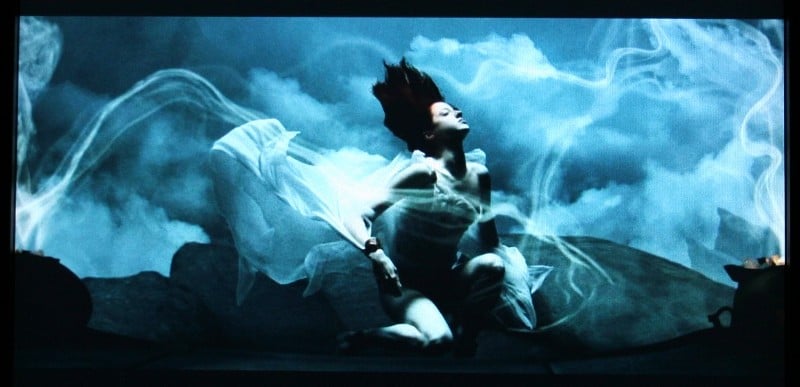


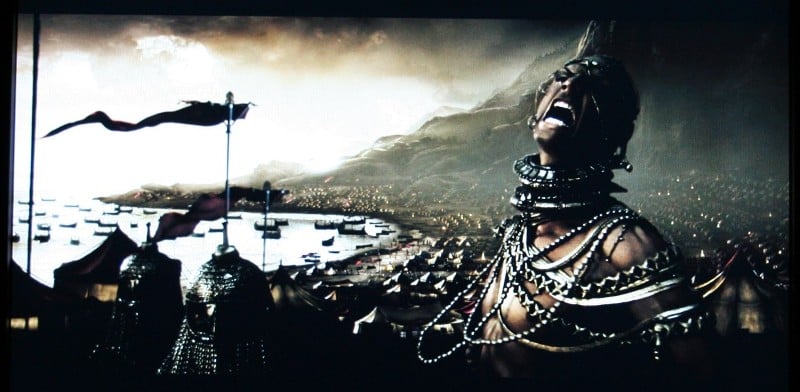
It was mighty hard to take pictures of the exact same frame of the movie on both discs but I got pretty close on the picture below. It's very easy to notice the increased definition on the musculature on the hunchbacked Ephialtes (even if it isn't the exact same frame). There were other shots that showed how there was more detail in the blacker scenes in the Blu-ray version but when I compressed the pictures so they would be manageable online, that detail was completed obfuscated. While it isn't really a surprise that the 1080p native Blu-ray transfer is better looking than the DVD version, it does give you an idea of how much you might be expected to miss by using the S300 with a standard definition DVD rather than the Blu-ray version.


Sometimes they make a movie that is so different, so revolutionary, that it creates a rush to the box office. And then they make a sucky sequel. Welcome to 28 Weeks Later the sequel to the innovative 28 Days Later. Rather than describe to you the depth of my loathing for the derivative POS, just take my word for it. Don't see it. If you're a die hard zombie fan… OK, but for the rest of the world, save your time. I wish I had. One of the nice things about outputting a 1080p native movie to a 1080p native display is the stability of the picture. There isn't really any scaling going on so many of those types of artifacts we might see just aren't there. This movie was full of dark scenes (as you might expect) and each of them was devoid of any banding, macroblocking or any other sort of visible artifact. Tons of detail was discernable especially on people's faces.

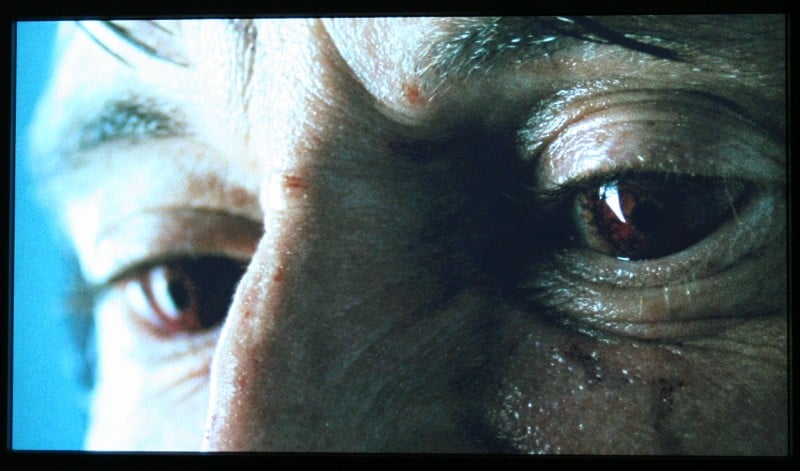


DVD: Dead
Man's Shoes
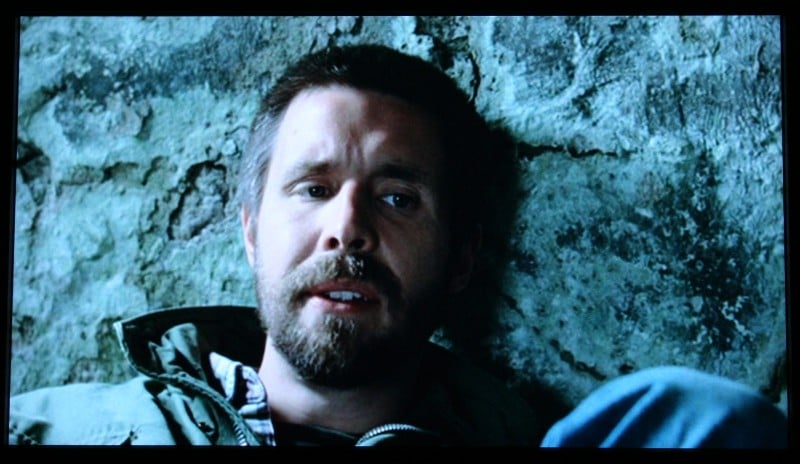
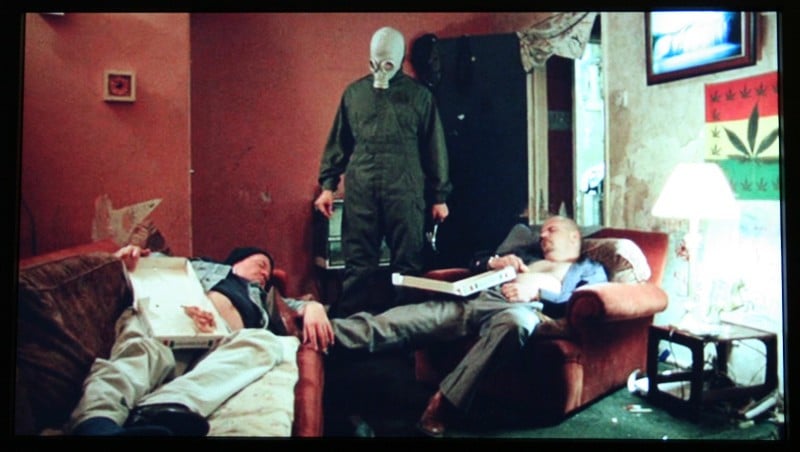
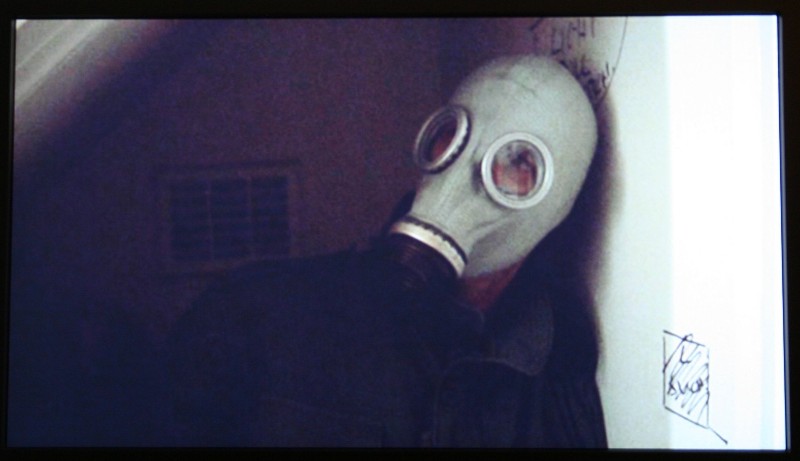
I rarely watch
previews but occasionally one slips through. Dead Man's Shoes was one of those
that did and it immediately caught my attention. While I had a hard time
understanding what was said at times because of the thick British accents, I
found this film to be very engaging and more than a little disturbing. This
movie exhibited the sort of the gritty "indie" film style that you'll
immediately recognize. The lackluster deinterlacing performance of the S300 was
evident here. If you paid attention to the dark background, macroblocking appeared
and moiré popped up occasionally during motion scenes.

DVD: Aqua
Teen Hunger Force Colon Movie Fit For
Theaters
I'm not going to tell
you what this movie is about because… well, the plot isn't really all that
relevant. If you're in it for the plot, you're watching the wrong movie. They
let you know that right from the beginning when they subtitle what is obviously
the Sphinx "New York."
If you didn't laugh at that, turn the movie off and send it back, it isn't for
you. While this is far from the pinnacle of animation, it does have a lot of
hard black lines that bounce (often unexpectedly) around the screen. The
complete lack of jaggie reduction reared its ugly head many times during this
movie almost to distraction.




Listening Evaluation
The Sony BDP-S300 does not decode Dolby TrueHD but it does do Dolby Digital Plus. Popping in the Dolby produced The Sound of High Definition demo disc (which inexplicably has a picture of Alicia Keys on the cover but nothing within by her), I listened to the three selections available. Of course they all sported high definition video, but I was also pleased to see that the output over HDMI was 7.1. If you are connected via analogue outputs (see above) you'll only have 5.1 available. Until the new formats the best we could hope for was 6.1 so this was a first for me. Overall, the music that accompanied each of the short movies was very lifelike and crystal clear. There was a ton more dynamic range than I was used to hearing as well. Taking a listen to the uncompressed PCM track on 300 seemed to be quite a bit better than the Dolby Digital track though it was recorded about 3-5dB louder (not the easiest comparison). The dynamic range was increased as was (to my ears) the fidelity. Definitely a bonus in my book.
I was especially impressed by the Dave Matthews and Tim Reynolds duet of "Lie in Our Graves." The mixing was excellent with each of the two guitars was located primarily in their own front speaker (Dave on the right, Tim on the left). The surrounds were used to convey the sense of being in a large venue (Radio City Music Hall) and all the crowd noise. This really tricked your ear into thinking that you were part of the performance. What was weird was that at first I didn't even notice the surrounds. It just sounded so natural.
I'd love to comment on the BDP-S300's SACD and DVD-A ability but these were sadly not included. While I can sort of understand DVD-A as it is a competitor to Sony's SACD format, the lack of SACD support is just baffling. Yes, I understand that most people purchasing an entry level Blu-ray player isn't really looked to purchase a bunch of SACDs but it is still a $500 machine. You can get a universal player for under $200 these days and, as far as I know, you don't have to pay royalties to yourself if you don't want to. Why not include it and give a little support to a format that you created? Baffling.
Conclusion
If you're looking for an entry level Blu-ray player and either aren't worried about deinterlacing or aren't planning on using the unit for upconverting DVDs then perhaps this is the unit for you. Without Dolby TrueHD or any of the HD DTS decoding though you're going to have to upgrade the unit if you'd like to take advantage of the increase fidelity those formats offer. With so many other units with greater capabilities on the horizon (or in the stores for just a little more money), this doesn't seem to be a very good purchase.
Sony BDP-S300
$499.99
Sony Electronics, Inc.
16530 Via Esprillo
MZ# 7180
San Diego, CA 92127
About Sony
Electronics
Sony
Electronics is the largest component of Sony Corporation of America, the U.S.
holding company for Sony's U.S.-based electronics and entertainment businesses.
Sony's principal U.S. businesses include: Sony Electronics Inc., Sony Music
Entertainment Inc.; Sony Pictures Entertainment; Sony Broadband Entertainment;
Sony Computer Entertainment America; Metreon; Sony Style and Sony Wonder
Technology Lab.
The Score Card
The scoring below is based on each piece of equipment doing the duty it is designed for. The numbers are weighed heavily with respect to the individual cost of each unit, thus giving a rating roughly equal to:
Performance × Price Factor/Value = Rating
Audioholics.com note: The ratings indicated below are based on subjective listening and objective testing of the product in question. The rating scale is based on performance/value ratio. If you notice better performing products in future reviews that have lower numbers in certain areas, be aware that the value factor is most likely the culprit. Other Audioholics reviewers may rate products solely based on performance, and each reviewer has his/her own system for ratings.
Audioholics Rating Scale
 — Excellent
- — Very Good
- — Good
- — Fair
- — Poor
| Metric | Rating |
|---|---|
| High Definition Video Performance | |
| Standard Definition Video Performance | |
| High Definition Audio Performance | |
| Analogue Audio Performance | |
| Bass Management | |
| Deinterlacing & Scaling | |
| Build Quality | |
| Ergonomics & Usability | |
| Ease of Setup | |
| Features | |
| Remote Control | |
| Fit and Finish | |
| Performance |  |
| Value | |
As Associate Editor at Audioholics, Tom promises to the best of his ability to give each review the same amount of attention, consideration, and thoughtfulness as possible and keep his writings free from undue bias and preconceptions. Any indication, either internally or from another, that bias has entered into his review will be immediately investigated. Substantiation of mistakes or bias will be immediately corrected regardless of personal stake, feelings, or ego.
View full profile Subscribe to our newsletter