


Is the PS3 and BD 2.0 for you?
PlayStation 3 Blu-ray 2.0 player
Last week, Sony released the 2.20 firmware update for the PlayStation 3. Among the list of features was BD Profile 2.0, the coveted Holy Grail of Blu-ray playback. Is BD 2.0 really that useful? Will the guys with the BD 1.0 and 1.1 players be left wanting more? Can the PS3 work well as a standalone Blu-ray player for the masses who aren't into gaming? Armed with a Nyko Blu-Wave remote and BD copies of War and Saw IV, we'll try to help you decide what's best in this new era of a single HD disc format.
The PS3 for Non-Gamers
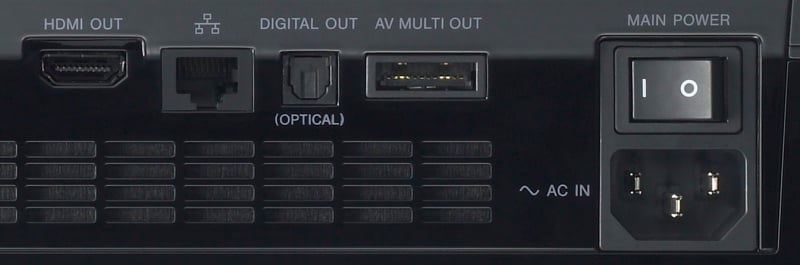 As the most capable Blu-ray player currently available, it's tempting to run out and pick one up even if you aren't a gamer. It supports video output via HDMI or from a special display port for Component video and older video output formats. An optical port is built in for Dolby Digital, DTS, and PCM stereo output. Of course, the HDMI port supports those protocols as well as Uncompressed PCM for multiple channels. The only drawback at this time is the lack of internal DTS-HD Master Audio decoding. This doesn't mean you can't play a BD movie with this format, it just means you won't get the full uncompressed version. It will still output normal DTS, as the format seems to be backwards compatible. I was able to confirm this playing Saw IV.
Editor's Note: As of April 2008 Sony has released firmware 2.30 which adds, among other things, support for dts-HD High Resolution and DTS-HD Master Audio. This means that Sony is now the most well-equipped Blu-ray player in the industry under $500, lacking only analogue multi-channel audio outputs.
There are lots of other playback options including CD, SACD, DVD, BD, network A/V streaming, and playback from removable flash or hard drive storage devices. Just look at the logos on the side of this thing! It does it all… Well, except for DVD-Audio and HD-DVD and… er… never mind.

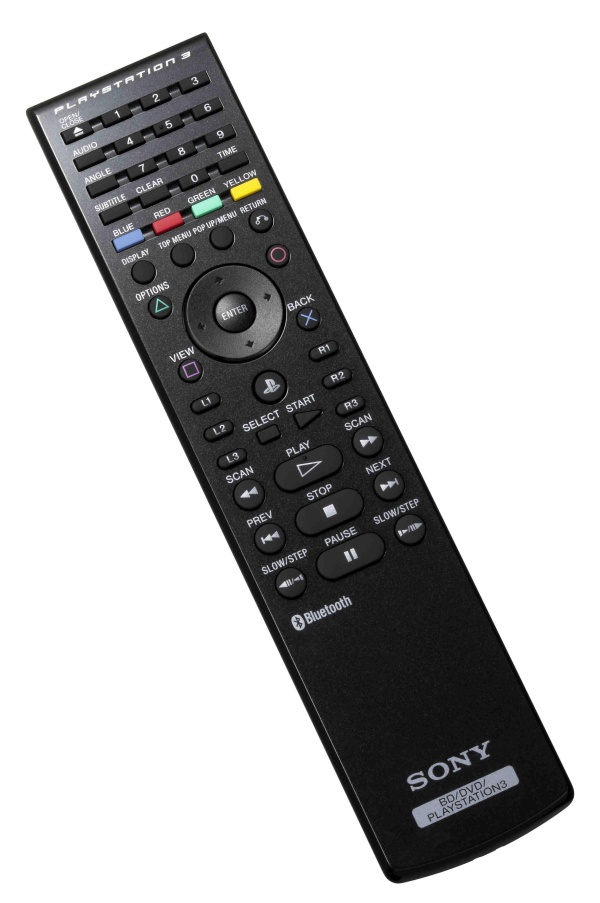 There are is another issue to consider when making the "buy" decision, as the unit doesn't come with a remote control. It comes with a game controller. Yes, for your $400 you are buying a game machine. You can control all the Blu-ray functions with it, but it's a little awkward to use. A real remote will cost you in the neighborhood of $15 to $25 extra. There are a couple of good options available for your cash, however. Sony makes a dedicated Bluetooth-based remote that is fully featured and includes the Red,Green, Blue, and Yellow buttons, as well as a number key pad and power buttons. This remote will only work with the PS3 and isn't programmable to work with any other components. This may be fine for some people, but others, like myself, will use a universal remote control for their system. This is a little bit of a problem for the PS3 as it does not include an IR receiver. What? No IR receiver? That's right, you have to buy one and plug it in to one of the 4 front USB ports. Enter the Nyko Blu-Wave remote… It includes the needed IR receiver, but has some limited functionality.
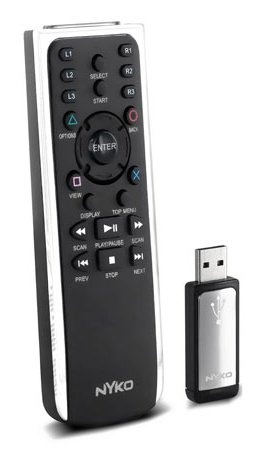
Universal remotes, like the Logitech Harmony, can be programmed with the functions included. However, there are no numbers, no colored buttons, and no power on/off options. Most of these extra functions are available by hitting the Triangle (View) button, but powering the console up and down will often have to be done manually. Also, some extra info can be accessed with the Select (Display) button. This is a good way to see which sound stream is being used, how far along the movie is, and even the bandwidth of the video stream. Please note that the PS3 can't be easily integrated into a more expensive control system like those from Crestron due to its lack of serial (RS-232C) or control ports.
One more thing to consider is physical placement and appearance. It may seem nice that the PS3 is smaller than the average component player, but the machine gets really hot. It has a fan in the side that runs faster as it heats up. So far this hasn't been much of a distraction, but a cold basement room has been helpful for me. Also, with the Bluetooth remote control it seems perfect to jam into that closed off cabinet, but it might get hot enough to cook a steak on. (YouTube Link) Ok, so that's a bit of an exaggeration but it's still good to give it some decent breathing room. As for the looks of the console? Well it's really shiny, and as such, finger prints far too easy. Oh, and it gets dusty 30 seconds after you dust it off. Yeah, nitpicky, I know, but it just bugs me somehow.
Editor's Note: We can just imagine all the people reading this going "Yeah, I was about to pull the trigger on the PS3, but it just gets so darn dusty!" - Clint DeBoer
PS3 and BD 2.0 Conclusion
Now, on to the good stuff, right? BD Profile 2.0. Ahhh, it's finally here. The promise of a complete specification has now been realized for the winner in the HD war. What's the advantage, you might ask? Internet connectivity! OK, there is some extra local storage as well, but BD Profile 1.1 provided goodies like multiple video and audio stream decoding. So, the real question: "Is any of the above really worth it?" The first two movies with full BD 2.0 support were released in January of 2008 and they will be the test subject today.
Blu-ray: Saw IV
I am not much of a horror fan, so I picked this one up as a rental. To be honest, I didn't watch the movie, I just dug into the extra features to see what BD 2.0 could offer. Other than a bunch of normal on-disc video extras, there was a MoLog option in the menu. This movie blog thing required a login and password to access. It provided an on-screen keyboard to allow sign up and log in options. After 10 mins of frustration with the slow character input, I was ready for something good. The MoLog let me view clips predefined by other users and they could add comments or some cheesy effects. The screen shot says it all folks!
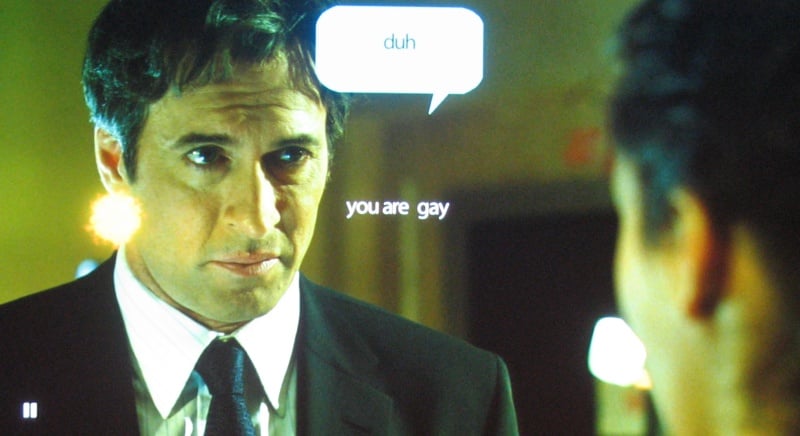
This was the first clip I played and it was rated the most popular. It's funny to some, offensive to others, but absolutely a waste of time. Oh, and that's a little explosion by the guy's ear, not a Michael Bayesian lens flare. None of the other clips were much better, so I didn't bother with wasting my time making and submitting my own clip.
Blu-ray: War
OK, so I bought this one, as I am a Jet Li and kung fu fan. Again, I haven't yet had time to watch the actual movie, but skipped directly to the features. Of course, there were the obligatory video extras, but there were some BD 1.1 video features as well. It was possible to watch multiple video streams with the director's commentary, but it was just a little window of Philip G. Atwell's face as he watched and talked. I wasn't impressed with this particular implementation, but it worked as advertised. There was another short clip of the prop guys showing how the "axes in the chest" scene worked, and that was certainly more interesting as a video overlay. Yeah, that's all well and good, but what about BD 2.0?


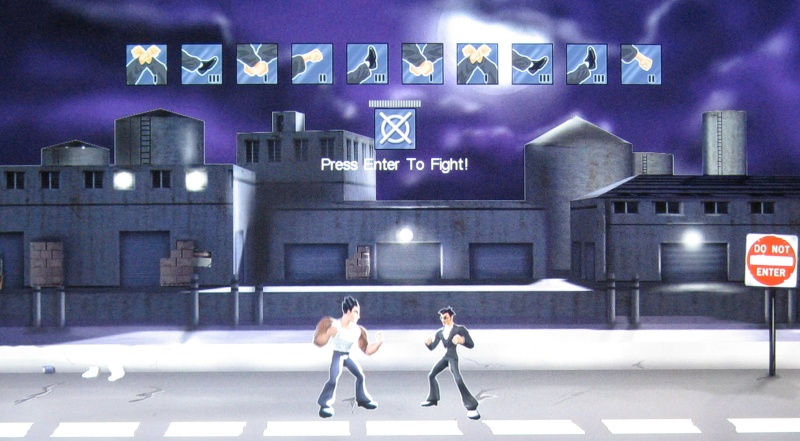 There was this little Kung Fu game where you could pick a series of
blocks and kicks with the remote, then execute the series. At the end,
no matter what I did, it said I lost. I don't like losing at games, not
even very stupid games. I was given the option to upload my score to
the online server and check the stats. Of course, I had to create a
user and password for this disc as well, and after another painful few
minutes, I sent my score away to the online tournament of champions. I
was pretty happy with my ranking of 98 out of 108. That means another
107 people wasted their time like I did, and 97 of those lost to me, so
I felt pretty good at that point... until I realized that I
probably got those numbers backwards and I only beat 10 people. In your
face, 10 losers!
There was this little Kung Fu game where you could pick a series of
blocks and kicks with the remote, then execute the series. At the end,
no matter what I did, it said I lost. I don't like losing at games, not
even very stupid games. I was given the option to upload my score to
the online server and check the stats. Of course, I had to create a
user and password for this disc as well, and after another painful few
minutes, I sent my score away to the online tournament of champions. I
was pretty happy with my ranking of 98 out of 108. That means another
107 people wasted their time like I did, and 97 of those lost to me, so
I felt pretty good at that point... until I realized that I
probably got those numbers backwards and I only beat 10 people. In your
face, 10 losers!
In any case, these discs just proved to me that BD 1.1 has some potential and that BD 2.0 has yet to be implemented in a truly compelling manner. Future movie releases may paint the picture differently, but for me, I doubt I'll be wasting my time creating user logins for the lamest content ever.
Conclusion
Is it possible to use the PS3 only for Blu-ray playback? It certainly is, as long as the remote control and other quirks are acceptable for your particular situation. Picking up the controller and playing a casual game or two might not be bad for the average guy, either. One major hurdle is that every studio wants to use Profile 2.0 features to capture your information, forcing you to log in with an email address and password in order to perform even basic interactive functions. This has got to stop or, in our opinion, Profile 2.0 will be considered anathema to most users due to the difficulties and annoyance of "typing" with a remote control.
Should a happy user owning a BD 1.0 or 1.1 player run out and buy the PS3 just to get the newest 2.0 software? Maybe. Perhaps. It all depends. But I will say that the PS3 is the cheapest Profile 2.0 player on the market - by a LONG shot. In addition, having an Internet connection and Ethernet port on your player sure will make it easy to upgrade firmware in the future - as we saw with the recent addition of dts-HD support. That's at least one of the primary advantages I can clearly see at this point. That and the ability to perhaps stream new HD movie previews to your screen instead of the same 10 that Disney/Pixar tries to force you to watch before every movie they make… Of course, I may need something like a 100Mbit connection at home that costs $5000 a month, but that's beside the point.
 Subscribe to our newsletter