


Oppo BDP-83 Universal Blu-ray Player Review
Oppo BDP-83 Blu-ray Disc Player
- Product Name: BDP-83 Blu-ray Disc Player
- Manufacturer: Oppo Digital
- Performance Rating:


- Value Rating:
- Review Date: June 03, 2009 00:25
- MSRP: $ 499
- Disc Types: BD-Video, DVD-Video, AVCHD, DVD-Audio, SACD, CD, Kodak Picture CD, CD-R/RW, DVD±R/RW, DVD±R DL, BD-R/RE
- BD Profile: Profile 2.0
- Internal Storage: 1GB (varies with system usage)
- Audio output: HDMI, 7.1ch or 5.1ch, stereo, Coaxial/Optical digital
- HDMI Audio support: (up to) 7.1ch high-resolution PCM, (up to) 5.1ch DSD, bitstream/LPCM Dolby Digital, Dolby Digital Plus, Dolby TrueHD, DTS, DTS-HD High Resolution Audio, and DTS-HD Master Audio
- Video output: Composite, Component, HDMI
- Audio response: 20Hz - 20kHz (±0.4dB)
- SNR: >110dB (A-weighted)
- Total Harmonic Distortion: < 0.001% (1kHz at 0dBFS)
- Power Consumption: 35W (0.5W Standby)
- Dimensions: (16-7/8" x 13-1/4" x 3" (430mm x 336mm x 77mm)
- Mass: 11.2 lbs (5.1kg)
Pros
- Plays all disc formats
- Inexpensive
- Superb video quality
- Embarrasses high end players
Cons
- Slow BD-Live! performance
- Expect some firmware updates
BDP-83 Build Quality, Connections, and Video Processing
Last year we reviewed the Oppo DV-983H universal DVD player which, while a couple years too late to market, was still an impressive product that redefined the price points for universal players. Now, with the only other universal Blu-ray/DVD player coming in at almost 10x the price, Oppo has finally beat the market and brings a true universal disc player to the home theater market that not only plays Blu-ray discs, but also DVD-Audio, SACD and, of course, DVD videos and CDs.
This is exciting for a number of reasons. First, a universal disc player means that you only need one piece of hardware on your shelf in order to play back anything from CDs, to DVDs to SACDs, DVD-Audio discs, and now Blu-ray discs. Those of us who have been chasing technology for years (not to mention plain old early adopters) have quite the collection of players on our shelves. Replacing these with a single device is extremely enticing and getting a top-notch Blu-ray player in the process is just the gravy on top.
Unpacking & Build Quality
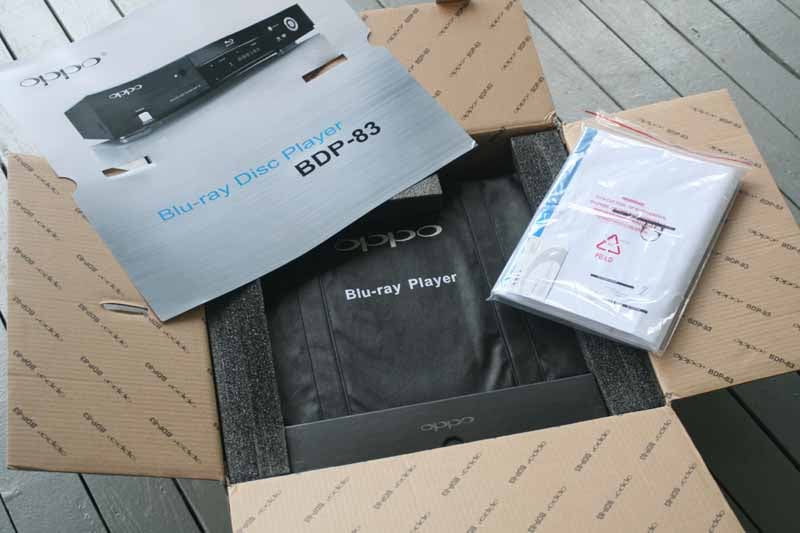 I don't normally include pictures of packaging, but the Oppo BDP-83 showed up with such flair and overly attractive packaging that I simply had to include some shots. First off, the player comes in an earth-friendly bag that is the same type they allow you to buy for your groceries in lieu of paper or plastic. The player is padded on three sides by foam and a printed box bearing the Oppo logo contains the included HDMI and analogue video cables, remote and two-prong power cable. The user manual sits on top and a 4-color graphic of the player sits atop and is the first to greet you when the box is opened. Oppo has also included the new Spears & Munsil HD Benchmark Blu-ray Edition.
The player itself looks great. The front features brushed aluminum, with the tray and display panel flanked by the IR sensor and Eject button. A four-way navigation control pad sits to the right of the front panel and there is a front USB connection for quick viewing of flash drives. The power button, which sits on the bottom left of the player glows red when power is connected and lights up blue when pressed and the player powers up. You can't power up the player any other way than activating the power button or pressing the Eject button on the player or via the the remote. Hitting Play, for example, simply won't work.
Connections
As we mentioned above, the player has front USB connections. On the back there is another USB connection for playback of movies, music or photos. The reason for both connections is to allow for more flexibility and both can actually be utilized at the same time. On the back panel you'll also find HDMI, component video, and composite video connections. For audio, Oppo has 7.1 analogue audio outputs as well as a dedicated pair of analogue stereo outputs. On the digital audio side there are both optical and coaxial digital for use with legacy systems. With a player like this I would imagine (and recommend) most users stick to using the HDMI and analogue audio outputs. The HDMI is sufficient for all modern AV receivers and processors and the analogue audio outputs are perfect for legacy systems.
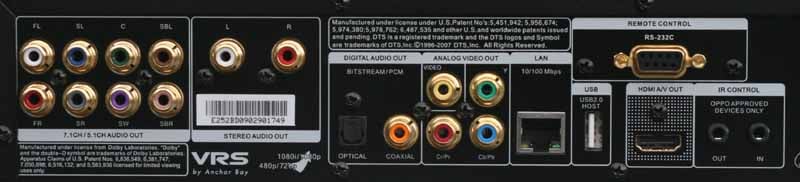
In addition to the outputs mentioned above, the Oppo BDP-83 also sports an Ethernet jack, RS-232C control port and a hardwired IR in and out jack. While our sample came with the 9-pin RS-232C port, this option is marked as ultimately being optional on the Oppo website.
Video Processing
While the DV-983H universal player uses two chipsets, the Xilinx SPARTAN chip (standard definition processing) and the ABT1018 chip (video scaling up to 1080p and HD processing), the BDP-83 uses only one - the ABT2010. Now that Silicon Optix is no longer in business, Oppo's decision to go with Anchor Bay Technologies is looking like a brilliant move. In this player it's the second generation ABT2010 chip that handles the deinterlacing and format conversion for both DVD and Blu-ray applications. Per Anchor Bay's website:
The [ABT2010] features all of the processing power of Anchor Bay's Video Reference Series™ (VRST) technologies, including Anchor Bay's proprietary Precision Deinterlacing™ that provides five-field motion adaptive and edge adaptive processing for an artifact-free viewing experience; 10-bit Precision Video Scaling II™ that can independently scale an image horizontally and vertically to achieve outstanding picture quality for today's high-definition video displays; MPEG noise reduction; picture enhancement; and Progressive Re-Processing (PReP™) technology, a breakthrough processing method that reverts the progressive video signal output from source equipment to its original interlaced format, and then converts the interlaced signal to progressive format using Precision Deinterlacing. The ABT2010 supports HDMI 1.3 with 12-bit [per channel] output resolutions.
Because the ABT2010 can apply itself to both standard and high definition (Blu-ray) content, the chip can support deinterlacing for all interlaced resolutions up to 1080i/60, five field motion adaptive deinterlacing, excellent jaggie reduction, 2:2 and 2:3 pull-down, and tons of cadence detection.
BDP-83 Product Comparison and Setup
Up until now we've been heavily recommending the Playstation 3 gaming system for use as a Blu-ray player due to its decent deinterlacing and the fact that up until this year it was one of the only Profile 2.0 players on the market. While we've backed off lately due to advances in competing products, and some advancements that surpass the capabilities of even the PS3 as a Blu-ray player, the real question remains - which is the best player for your purposes? To help you decide, we put forth this chart to lay out the differences between the PS3 and the Oppo BDP-83 player:
|
Oppo BDP-83 |
Playstation 3 |
|
MSRP: $499 |
MSRP: $399 (80GB) |
|
SACD: Yes (DSD/PCM) |
SACD: No |
|
Dolby TrueHD: Bitstream/PCM |
Dolby TrueHD: PCM |
|
dts Master Audio: Bitstream/PCM |
dts Master Audio: PCM |
|
DVD-Audio: Yes (MLP) |
DVD-Audio: No |
|
Blu-ray: Profile 2 (BD-Live!) |
Blu-ray: Profile 2 (BD-Live!) |
|
Video Processor: |
Video Processor: |
|
HQV Score: 110 |
HQV Score: 95 |
|
1080p HDMI Upconversion: Yes |
1080p HDMI Upconversion: Yes |
|
HDMI v1.3 |
HDMI v1.3 |
|
Video Outputs: HDMI, component, composite |
Video Outputs: HDMI + PS3 cable (composite, S-video, component options) |
|
Audio Outputs: HDMI, TOSLINK, coax digital, 7.1 analogue, stereo |
Audio Outputs: HDMI, TOSLINK, stereo analogue (via PS3 cable) |
|
USB: Yes (2.0) |
USB: Yes (2.0) |
|
RS-232C Control: Yes |
RS-232C Control: No |
|
Remote: IR |
Remote: Bluetooth (via controller or $20 add-on) |
In terms of universality, the PS3 can't compete. For use as a standalone Blu-ray player, it's still a contender and offers much of the same level of performance unless you need analogue audio outputs, RS-232C control or, say… IR control. Both players did mediocre on standard definition noise reduction, though I don't see this as much of an issue with Blu-ray Disc playback.
Player Set-Up & Use
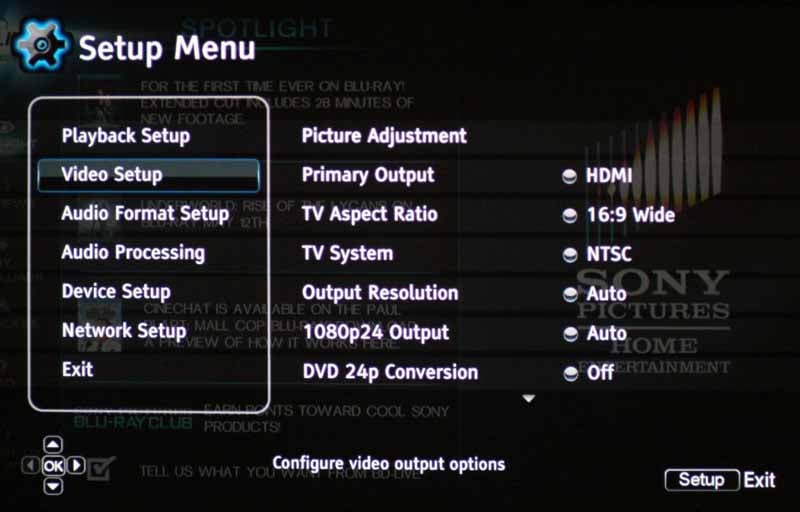 The new Oppo
BDP-83 menu system is refreshing and easy to navigate. It is broken down into 6
Setup subsections: Playback, Video, Audio Format, Audio Processing, Device, and
Network. Playback sets the priority for DVD-Audio
and SACD discs and the defaults are set correctly for most multi-channel disc users. The Video Setup menu gives you
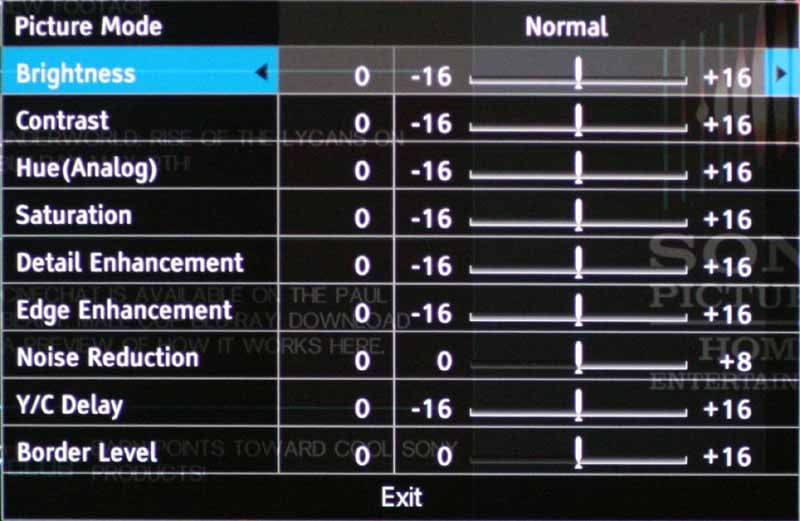
picture controls like Noise Reduction but also control 24p playback for 1080p
content as well as DVD content.
The player seems fully capable of working with 2:2 (or higher) systems that
change the playback frequency to avoid judder effects in film-sourced content.
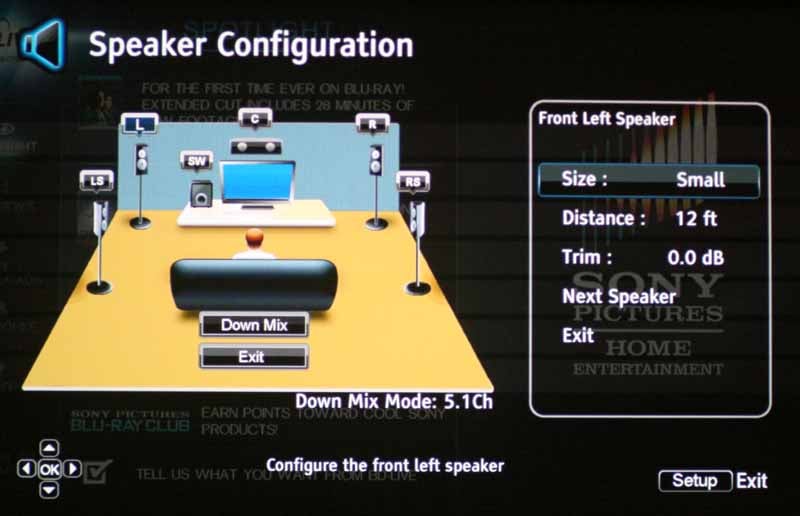
For the 7.1-channel analogue audio
outputs, Oppo has really beefed up its bass management system, providing not
only a graphical user interface, but also options for setting distance (delay),
size and level control for each channel.
This is a far cry from Oppo's earlier attempts at minimal bass management. You
can also set the downmix options, which provides 5.1 for those not using a 7.1
speaker system.
The new Oppo
BDP-83 menu system is refreshing and easy to navigate. It is broken down into 6
Setup subsections: Playback, Video, Audio Format, Audio Processing, Device, and
Network. Playback sets the priority for DVD-Audio
and SACD discs and the defaults are set correctly for most multi-channel disc users. The Video Setup menu gives you
picture controls like Noise Reduction but also control 24p playback for 1080p
content as well as DVD content.
The player seems fully capable of working with 2:2 (or higher) systems that
change the playback frequency to avoid judder effects in film-sourced content.
For the 7.1-channel analogue audio
outputs, Oppo has really beefed up its bass management system, providing not
only a graphical user interface, but also options for setting distance (delay),
size and level control for each channel.
This is a far cry from Oppo's earlier attempts at minimal bass management. You
can also set the downmix options, which provides 5.1 for those not using a 7.1
speaker system.
Let's talk load times. Hit the Eject button and the player takes 3 seconds to wake up and open the tray. 16 seconds later you are playing your disc. That is performance that exceeds any other player we've tested to-date. This is an exciting new player that, sad to say, finally takes Blu-ray back to the speed and quickness of DVD players we're all used to manhandling.
BDP-83 Video Performance and Benchmarks
For our performance tests we used several test discs including Avia Pro, Spears & Munsil, Silicon Optix HQV, as well as several real-world Blu-ray and DVD video clips. The idea is to test various performance metrics and get a good idea of how the player handles real world material in addition to more rigorous unflagged video tests.
All final test scores were derived using the Oppo BDP-83's HDMI output in 1080p/60 mode unless otherwise specified.
Audioholics/HQV Bench Testing Summary of Test Results
Perfect Score is 130
Oppo BDP-83 Benchmark total score: 110/130 (This scores as one of the top players available)
|
Test |
Max |
Results |
Pass/Fail |
|
Color Bar |
10 |
10 |
Pass |
|
Jaggies #1 |
5 |
5 |
Pass |
|
Jaggies #2 |
5 |
5 |
Pass |
|
Flag |
10 |
10 |
Pass |
|
Detail |
10 |
10 |
Pass |
|
Noise |
10 |
0 |
Fail |
|
Motion adaptive Noise Reduction |
10 |
0 |
Fail |
|
Film Detail |
10 |
10 |
Pass |
|
Cadence 2:2 Video |
5 |
5 |
Pass |
|
Cadence 2:2:2:4 DV Cam |
5 |
5 |
Pass |
|
Cadence 2:3:3:2 DV Cam |
5 |
5 |
Pass |
|
Cadence 3:2:3:2:2 Vari-speed |
5 |
5 |
Pass |
|
Cadence 5:5 Animation |
5 |
5 |
Pass |
|
Cadence 6:4 Animation |
5 |
5 |
Pass |
|
Cadence 8:7 animation |
5 |
5 |
Pass |
|
Cadence 24fps film |
5 |
5 |
Pass |
|
Scrolling Horizontal |
10 |
10 |
Pass |
|
Scrolling Rolling |
10 |
10 |
Pass |
|
Total |
130 |
110 |
|
*All tests were done with the HDMI outputs at 1080p.
Comments on DVD Benchmarks
Noise reduction was one place that the ABT chipset seemed to exhibit deficient performance. We found that there was a dramatic jump once you exceeded +6 that caused significant blurring of the overall image, including any active menu overlays. According to the HQV test we should give this player a score of zero because the Noise Reduction circuitry is set to 0 by default, causing only minimal noise reduction. We initially felt it was worth half credit, but after additional testing we found that adding anything to the noise reduction controls caused some minor stairstepping on thin lines at steeper angles.
BDP-83 Viewing Tests and Conclusion
We watched a ton of disc material to evaluate the playback quality of the Oppo Blu-ray player. We checked out various aspects, including color, deinterlacing (of mostly standard definition titles) and black level reproduction and dynamic range. In all scenarios, the Oppo seemed to really perform well and positioned itself as an excellent video playback device for both high definition and standard definition material.
Blu-ray: The Fifth Element
This movie has been one of my reference discs for some time. The revised Blu-ray edition is an excellent disc for testing color reproduction and detail. We checked several scenes, including the one where Zorg delivers weapons to the Mangalores - a scene with particularly difficult detail and a breeding ground for moiré.



The BDP-83 did exceptionally well on this movie and we noticed no artifacting, moiré or jaggie effects on any of the scenes. Colors were vibrant and black levels were rendered correctly, with lots of dynamic range.
Blu-ray: Underworld - Rise of the Lycans
This movie is about as colorful as a Tim Burton film… but we were using it to check out black level detail and look for gradations in patches of grays, determining whether or not the Oppo BDP-83 was truly capable of delivering top notch dynamic range. We really enjoyed the level of detail the player produced as well as its ability to accurately portray subtleties in the darkest scenes without crushing blacks.


Blu-ray: The Departed
While not one of my favorite films, The Departed at least delivers a decent picture quality and provided some excellent opportunities to observe facial detail. This movie also lent itself as a great way to observe scene detail and how well the BDP-83 showed off scene motion and dealt with fast pans.


Blu-ray: 300
300 is such an excellent film. While highly stylized, I just had to include it in the line-up, plus it helped me to see how well the player's BD-Live! features worked. The Oppo portrayed the fast-action and high-motion shots with ease, never failing in terms of its ability to produce smooth lines and excellent detail - even when the camera was moving at the speed of light.


BD-Live! Content
One of the things I wanted to check out was the implementation of the new BD Live! Content which seems to be one of the new features consumers demand from Blu-ray players. This is essentially a Java-based part of the disc which downloads content from the Internet in order to extend the content available to consumers beyond what was placed on the disc initially during manufacturer. This could equate to downloadable trailers, additional video tracks, behind the scene footage and more. It can also include applications that allow for real-time chatting between consumers as they watch the movie or interviews with the cast and crew. To test, we used Underworld: Rise of the Lycans, which has several BD-Live! features including instant chat and some additional downloadable content. The Oppo took almost two minutes to get from the main menu into the BD-Live! menu and nearly a minute to exit BD-Live back to the main menu (55 seconds to be precise). We measured it multiple times so as to defeat any "first-time" caching issues that may be involved in getting to a menu or content. To compare, the Sony Playstation took just forty seconds to get into BD-Live! and just 20 seconds to return to the main menu. This means that the Oppo is a bit slow when it comes to BD-Live! - possibly an indicator that their implementation of BD-J (Blu-ray Disc Java) could be improved.
Listening Evaluation
Listening tests on Blu-ray players are always difficult without performing a full blind listening test - which we were unfortunately unable to do at this time. In the near future we're hoping to follow up with a comparison of the Oppo player against a premium-priced model from another manufacturer. It will be interesting to see if there is any discernable difference in either audio or video quality - especially when it is delivered via HDMI.
SACD: Jeff Wayne's Musical Version of the War of the Worlds I returned to this classic SACD to listen to the extensive arrangement of instrumentation and vocals present in the mix. In the opening track, the overlying dialogue was thick and rich, with powerfully textured "gravel" that came through our reference RBH Sound CinemaSITE speakers with the utmost clarity and power. When the horns came in and the synthesized effects popped into the surrounds, it was a purely joyful experience. The dynamic range was extremely wide and both bass and treble content rang through clearly and with pristine detail. There's a lot to say about this disc, but vocal power, mid-bass content and excellent low frequency content pretty much sum it up. The Oppo BDP-83 seemed to portray each track as it was intended - leaving nothing out and doing nothing to disturb the quality of the digital content.
DVD-Audio: Seal IV This disc remains one of my favorite multi-channel albums in the DVD-audio format. Seal's voice is so up front and defined that it really shows off both your system's imaging (whether he's plopped dead center in your room or not) and there is a well-balanced mix of instrumentation and bass that gives this album a full sound. "Love's Divine" really pounded home the bass and Seal's raw vocal led off the track with a firm, authoritative tone. "Let Me Roll" had a punchy bass line with fast transient response. I really liked the ambient reverb that filled the room and the surrounds held a pair of background vocals (doubled Seal vocals) which enveloped the room with incredibly dense sound. The periodic downward bass sweep literally rocked the room and kept me and my kids (who like to sit in on my listening tests) groovin' to the beat.
Conclusion
Oppo has a winner on their hands with the new BDP-83. It's a well-rounded player and is priced more than competitively for one of the first universal Blu-ray players to hit the market (as soon as they release it into full production, that is). For those looking to consolidate their disc players, this is a no-brainer. The BDP-83 combines excellent video quality, advanced features and pristine audio performance into one slick package that is coming out at exactly the right time. At just $100 over their former flagship universal disc player, the BDP-83 is a steal.
Oppo BDP-83
MSRP: $499
http://www.oppodigital.com
About Oppo Digital
Based in the heart of Silicon Valley, OPPO Digital designs and markets high quality digital electronics that deliver style, performance, innovation, and value to A/V enthusiasts and savvy consumers alike. The company's attention to core product performance and strong customer focus distinguishes it from traditional consumer-electronics brands. With products that speak for themselves and relying on word-of-mouth, OPPO Digital does not have any dedicated Marketing and Sales personnel. We have spent most of all energy on product design and customer service.
The Score Card
The scoring below is based on each piece of equipment doing the duty it is designed for. The numbers are weighed heavily with respect to the individual cost of each unit, thus giving a rating roughly equal to:
Performance × Price Factor/Value = Rating
Audioholics.com note: The ratings indicated below are based on subjective listening and objective testing of the product in question. The rating scale is based on performance/value ratio. If you notice better performing products in future reviews that have lower numbers in certain areas, be aware that the value factor is most likely the culprit. Other Audioholics reviewers may rate products solely based on performance, and each reviewer has his/her own system for ratings.
Audioholics Rating Scale
 — Excellent
- — Very Good
- — Good
- — Fair
- — Poor
| Metric | Rating |
|---|---|
| High Definition Video Performance | |
| Standard Definition Video Performance | |
| High Definition Audio Performance | |
| Analogue Audio Performance | |
| Bass Management | |
| Deinterlacing & Scaling | |
| Build Quality | |
| Ergonomics & Usability | |
| Ease of Setup | |
| Features | |
| Remote Control | |
| Fit and Finish | |
| Performance |  |
| Value | |
Clint Deboer was terminated from Audioholics for misconduct on April 4th, 2014. He no longer represents Audioholics in any fashion.
View full profile Subscribe to our newsletter