


Oppo BDP-105 Blu-ray Player Review: The Universal Audiophile Dream Machine?
- Product Name: BDP-105 Universal Blu-ray Player
- Manufacturer: Oppo Digital
- Performance Rating:

- Value Rating:
- Review Date: March 06, 2015 08:00
- MSRP: $ 1199
-

| Disc Types* | BD-Video, Blu-ray 3D, DVD-Video, DVD-Audio, AVCHD, SACD, CD, HDCD, Kodak Picture CD, CD-R/RW, DVD±R/RW, DVD±R DL, BD-R/RE |
| BD Profile | BD-ROM Version 2.5 Profile 5 (also compatible with Profile 1 Version 1.0 and 1.1) |
| Internal Storage | 1GB (Actual space available for persistent storage varies due to system usage) |
| Output | Analog Audio: 7.1ch, 5.1ch, stereo. Dedicated Stereo Analog Audio: XLR balanced, RCA single-ended. Coaxial/Optical Audio: Dolby Digital, DTS, up to 2ch/192kHz PCM. HDMI Audio: Dolby Digital, Dolby Digital Plus, Dolby TrueHD, DTS, DTS-HD High Resolution, DTS-HD Master Audio, up to 7.1ch/192kHz PCM, up to 5.1ch DSD. HDMI Video: 480i/480p/576i/576p/720p/1080i/1080p/1080p24/4Kx2K, 3D frame-packing 720p/1080p24. |
| Input | HDMI Audio: Dolby Digital, Dolby Digital Plus,
DTS, AAC, up to 5.1ch/192kHz or 7.1ch/96kHz PCM. HDMI Video: 480i/480p/576i/576p/720p/1080i/1080p/1080p24/1080p25/1080p30, 3D frame-packing 720p/1080p24. MHL Audio: Dolby Digital, Dolby Digital Plus, DTS, up to 5.1ch/192kHz PCM. MHL Video: 480i/480p/576i/576p/720p/1080i/1080p24/1080p25/1080p30, 3D frame-packing 720p/1080p24. USB Audio: up to 2ch/192kHz PCM. Coaxial/Optical Audio: Dolby Digital, DTS, AAC, up to 2ch/96kHz PCM. |
| Analog Audio Characteristics** | Frequency Response: (RCA) 20Hz – 20kHz: ± 0.2dB, 20Hz – 96kHz: -1.5dB. (XLR) 20Hz – 20kHz: ± 0.3dB, 20Hz 96kHz: -1.5dB Signal-to-Noise Ratio: >130dB (A-weighted, auto-mute), >115dB (A-weighted, no auto-mute) THD+N: <0.0003% or -110dB (1kHz at 48k/24b, 0dBFS, 20kHz LPF), <0.0017% or -96dB (1kHz at 44.1k/16b, 0dBFS, 20kHz LPF) Output Level: 2.1 Vrms (RCA) or 4.2 Vrms (XLR) at 0dBFS Dynamic Range: >110dB Channel Separation: >110dB |
| Headphone Audio Characteristics** |
Frequency Response: 20Hz – 20kHz: ±0.3dB into 300 Ω Signal-to-Noise Ratio: >98dB into 300 Ω (A-weighted, no auto-mute) THD+N: <0.001% or -100dB into 300 Ω (1kHz at 48k/24b, 0dBFS, 20kHz LPF) Output Power (per channel): 17mW into 600 Ω, 34mW into 300 Ω, 63mW into 150 Ω, 77mW into 120 Ω, 120mW into 60 Ω, 187mW into 32 Ω (1kHz at 0dBFS) Dynamic Range: >110dB Channel separation: >90dB |
| General Specification | Power Supply: ~115V/230V, 50/60Hz
AC Power Consumption: 55W (Standby: 0.5W in Energy Efficient Mode) Dimensions: 16.8 x 12.2 x 4.8 inches (430mm x 311mm x 123mm) Mass: 17.3 lbs (7.9kg) |
| Operating Temperature | 41°F - 95°F 5°C - 35°C |
| Operating Humidity | 15% - 75% No condensation |
| Parts & Labor Warranty | 2 Years |
Pros
- The does everything right Blu-ray dream machine
- Benchmark audio and video performance
- Excellent build quality
- Relatively easy setup for such a complex machine
Cons
- Doesn’t make coffee
Originally Published: Feb 3, 2013
Updated: 3/6/15 added YouTube Video Review
Oppo BDP-105 Introduction
Oppo
Digital has been producing 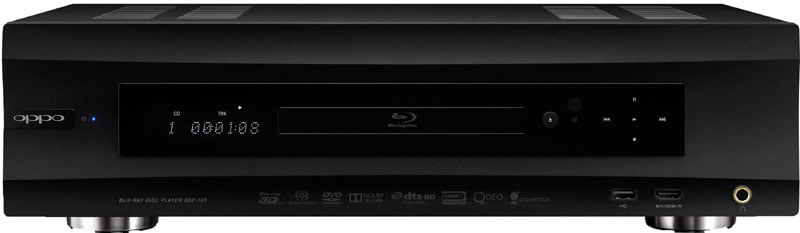 some of the best Universal Blu-ray players
for some time now. The BDP-105 is their 3rd generation “audiophile”
player.
some of the best Universal Blu-ray players
for some time now. The BDP-105 is their 3rd generation “audiophile”
player.
We found the prior Oppo BDP-83-SE and BDP-95 players really did offer upscale performance in their analog outputs while still retaining the great video prowess of their less expensive offerings (the BDP-83 and BPD-93, respectively). Like the BDP-95, the new BDP-105 has balanced analog outputs along with a host of other upgrades. These upgrades apply to both of the new models, the BDP-103 and BDP-105, respectively. Our review of the BDP-105 focuses solely on analog audio performance since the HDMI audio and video performance between the new BPD-103 and BDP-105 players are identical and have already been covered in our BDP-103 Video Review.
The BDP-105 does come with a slightly higher price tag of $1,199 than its $999 BDP-95 predecessor and is more than double the price of the new BDP-103 model. Is it worth it? Let’s take a deeper look at the analog performance of the BDP-105 so you can answer that question for yourself.
Oppo BDP-105 YouTube Blu-Ray Player Review
Design Overview
The DAC Layout
For the BDP-103, Oppo hired the designer of one of the popular BDP-93 aftermarket modifications to help them improve its analog audio performance. The new design is said to have a warmer, more open and lively sound comparing to the BDP-93. This was achieved by a novel configuration of the Cirrus CS4382A 24 bit DAC and a new analog buffer and filter stage following the DAC output.
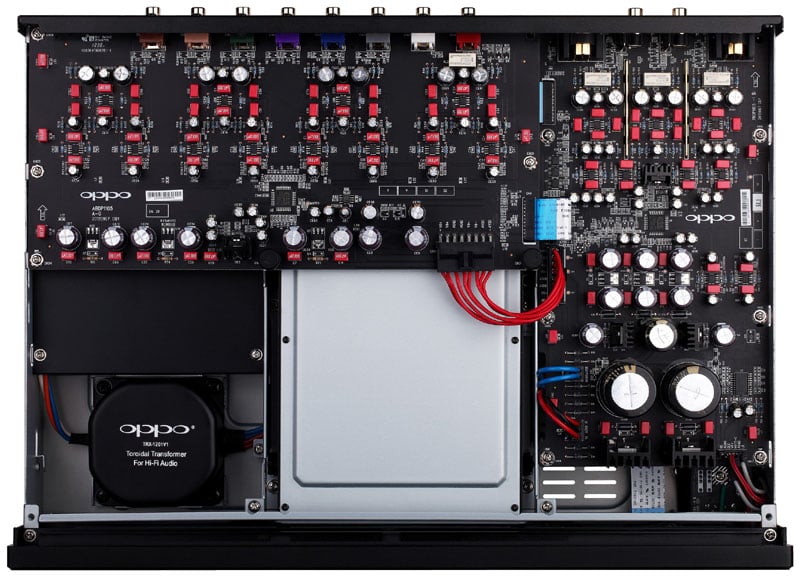
Oppo BDP-105 Internal View
The same designer also contributed to the BDP-105’s analog audio section. The BDP-105 is said to retain the BDP-95’s very detailed and accurate sound, and the performance measurements are almost identical to the BDP-95. The BDP-105 uses the same dual ES9018 Sabre32 Reference DAC chips as the BDP-95. In the BDP-95, they ganged the 4 pairs of the stereo DAC outputs to increase the current output. The higher current output enabled them to use a smaller current to voltage conversion resistor, and a smaller resistor has less thermal noise than a larger resistor. In the BDP-105, Oppo initially tried to use the same ganged DAC outputs design, but found that the performance became worse. The additional USB DAC, coaxial, optical input and headphone output made it impossible to design an optimized PCB layout if they continued to stack the DAC channels. The suboptimal layout was the cause of the degraded performance. After many attempts and revisions, Oppo decided to no longer stack the DAC channels. The new design assigns one pair of DACs for the RCA output, one pair for the XLR, and two pairs stacked for the headphone amplifier. The new configuration allowed Oppo to create a clean layout that minimized the interference and crosstalk. The downside is they lose the benefit of the lower thermal noise from the I/V resistor, but by beefing up the power supply and separating the stereo and multi-channel boards, Oppo was able to maintain the excellent bench test performance. The BDP-105’s stereo audio specification is listed to be the same as the BDP-95, and their internal test results actually show that the BDP-105 is slightly better. This design approach resulted in increased cost and manufacturing complexity, but enabled them to better route the signals, power and ground so they could ensure a high level of performance for all modes of operation.
For more information on this chipset, see:
http://www.esstech.com/PDF/sabrewp.pdf
The Chassis Cooling
Unlike the BDP-95 player that utilized a ventilation fan on the back panel, the new BDP-105 player utilizes passive cooling only. This was accomplished in two ways: reducing heat generation and improving heat dissipation. The new dual-core SoC produces less heat than the previous decoder chip thanks to its advanced semiconductor fabrication process. Oppo added a separated winding to the new Toroidal transformer so they could get +5V and +3.3V power for the analog section from low voltage drop regulators instead of from the +15V rail. The BDP-105 chassis is taller so it has more volume for air space and is slower to heat up. The ventilation grilles on the top, bottom and back of the player complete the passive cooling design by allowing cool air to come in and warm air to escape. This was a welcome improvement as I was sometimes able to hear the cooling fan turn on in the BDP-95 in my acoustically controlled theater room. Lowering and preferably eliminating all mechanical noise sources in my listening space is always of paramount importance.
Oppo BDP-105 Universal Blu-ray Player Setup & Configuration
Oppo Blu-ray players are really easy to setup. This can be attributed to their excellent OSD navigation menu and user manual, which in my opinion is second to none in the business. The remote control is also great. It’s based on the previous generation players’ remote but with some minor enhancements including hot keys to the Netflix and Vudu options and a few new added features. The remote is fully backlit with the hit of the bottom right button. I would have preferred a sidebar button but that’s a small nit to pick. The “home” button takes you to all of the streaming options including Pandora, Netflix, Vudu, etc. Access to the input source options is just one click away via the “input” button and all of the OSD functions are easily navigated via the central up/down, left/right and enter buttons.
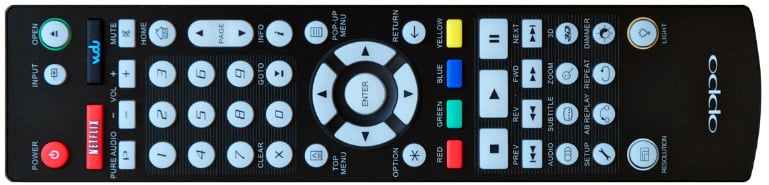
Oppo BDP-103/105 Remote Control
I configured the BDP-105 to pass bitstream HD signals via HDMI and disabled bass management for the analog outputs by setting all speakers to “large”.
The BDP-105 was connected directly to the Pass Labs X350.5 two-channel amplifier via Bluejeans balanced cables to the dedicated two-channel system in the Audioholics Showcase Home Theater system. I also tested the unbalanced outputs plugged directly into my Marantz PM-11SE Integrated Amp used in preamp mode. Kimber 8PR speaker cables were used between the amplifier and Status Acoustics 8T reference speakers.
SACD Configuration
For multi-channel usage, the BDP-105 was connected to my Denon AVP-A1HDCI A/V processor using two Sonicwave HDMI cables. The reason two HDMI cables were used was because the BDP-105 only passes SACD in its native DSD format via the HDMI2 output. This is caused by hardware limitation on both the decoder chip and the Marvell video processor. Only the HDMI1 output gives you 4K up-scaling and color, contrast and detail enhancements. As a result, I configured my A/V processor’s Blu-ray input to accept video and audio from the HDMI1 output of the BDP-105 and utilized a different HDMI input on my A/V processor connected directly to the HDMI2 output of the Oppo BDP-105 Blu-ray player when playing back SACD to preserve the native DSD format.
Consumers able to only to utilize 1 HDMI connection would be best served using the HDMI1 output and setting the BDP-105 SACD output to PCM conversion or if they prefer to keep SACD in native format, to utilize the HDMI2 output if 4k upconversion and enhancement features aren’t important for their application. Since the end user applies bass management in virtually all multi-channel installs, DSD has to be converted to PCM anyways. I ran comparative listening tests and found it to make little to no discernible difference whether the PCM conversion happened at the Blu-ray player or in my Denon AVP-A1HDCI A/V processor. When I quickly came to that realization, I disconnected the 2nd HDMI cable and shelved it. For two-channel sources, I mostly listened to SACD via the analog outputs which preserved the format in DSD so I could maintain my bragging rights to my audiophile friends that I was a purist.
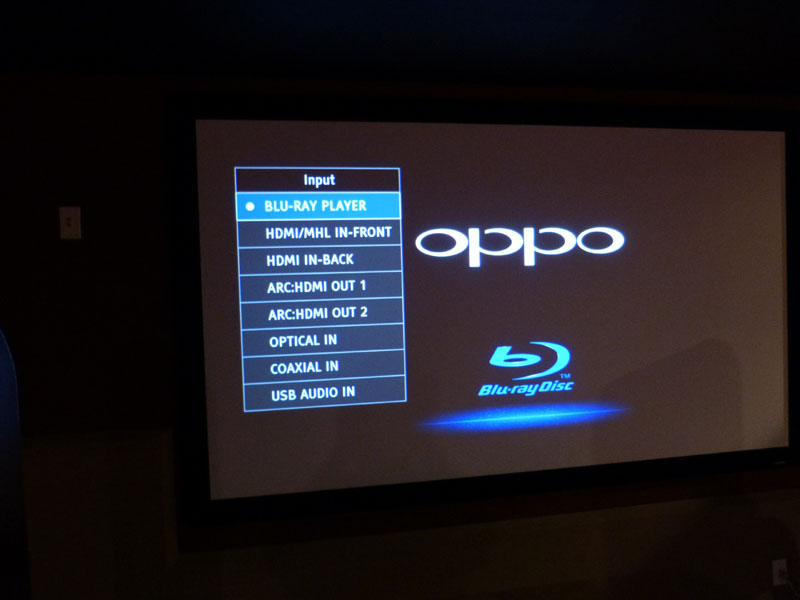
Oppo BDP-105 OSD Input Selector
The Connections
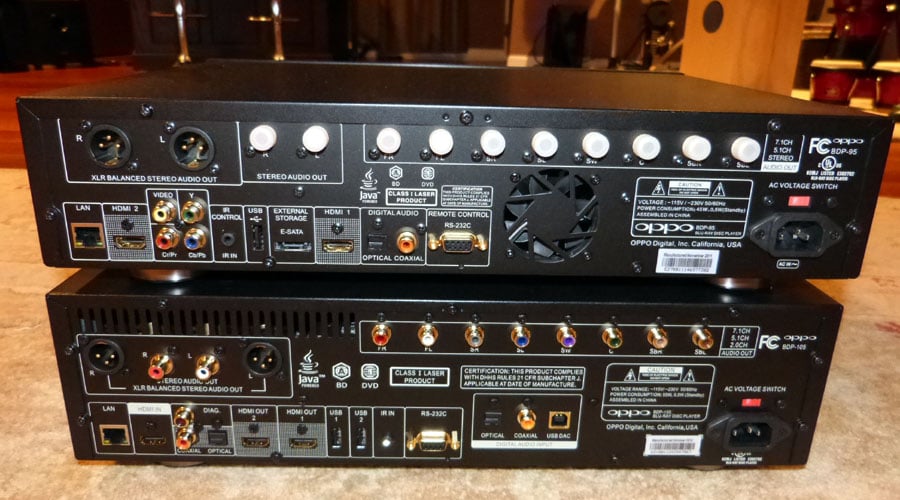
Back panel Views of Oppo BDP-95 (top) & BDP-105 (bottom)
As you can see in the above photo, the BDP-105 is slightly taller than the BDP-95. Both players measure 16.8" wide by 12.2" deep but the BDP-105 is almost 1” taller, measuring in at 4.8” high. The hefty BDP-105 weighs in at just a little over 17 lbs. Notice the absence of the fan for the BDP-105. The BDP-105 also has a thicker top cover which increases rigidity and gives it that high end look and feel.
The BDP-105 has the most extensive set of connections I’ve seen in a Blu-ray player. It carries over all of the same connections as the BDP-95 minus ALL analog video connections. The BDP-105 is the first player, other than its smaller BDP-103 sibling, to offer HDMI inputs. This allows you to use the BDP-103/105 players to switch between sources though the player itself eliminating the need for an A/V process in more modest setups. Think of the scenario where an audiophile may have a kicking good two-channel rig that they adopted for multi-channel. Since the BDP-105 has a master volume control, they could run the analog outputs directly into their multi-channel power amplifiers and the HDMI output of the BDP-105 into their display. They can also run their cable box directly into the BDP-105 via HDMI and it will decode the 5.1 Dolby Digital bitstream and send it out of the analog audio outputs while also upconverting the 1080i video signal to 1080p sent directly to the display. In a modest setup like this, one simply doesn’t need an A/V processor or receiver, especially since the BDP-105 also acts an internet media streaming device with all of the latest widgets (ie. Pandora, Netflix, Vudu, etc) and can also interface both via Ethernet and wirelessly with your computer through Windows Media Player to play music and video files.
To
si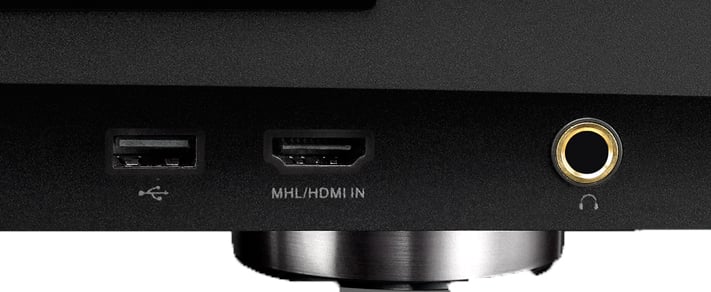 mplify connecting smartphones, tablets and other mobile devices to
your home theater system, Oppo included a dual function front panel
HDMI input on the BDP-103 and BDP-105 that also operates as an MHL
(Mobile High-Definition Link) input port. This allows one to
display high resolution pictures, 1080p video and listen to pure
digital music all while simultaneously charging the connected mobile
device.
mplify connecting smartphones, tablets and other mobile devices to
your home theater system, Oppo included a dual function front panel
HDMI input on the BDP-103 and BDP-105 that also operates as an MHL
(Mobile High-Definition Link) input port. This allows one to
display high resolution pictures, 1080p video and listen to pure
digital music all while simultaneously charging the connected mobile
device.
Netflix DD+ & 1080p Support!
A pleasant surprise I discovered was when I entered the Netflix menu and not only found a better response time than this model’s predecessor but some enhanced audio and video features too. Since the BDP-103/105 has a new improved DRM scheme, it is able to support 5.1 Dolby Digital+ and up to 1080p video stream when Netflix supports it. I tested this out on the movie Lorax and was very happy with the audio and video performance, which rivaled what I could get from Verizon FIOS. If Netflix would only improve its on-demand selection, I’d unreservedly recommend fellow BDP-103/105 owners to become a subscriber too.
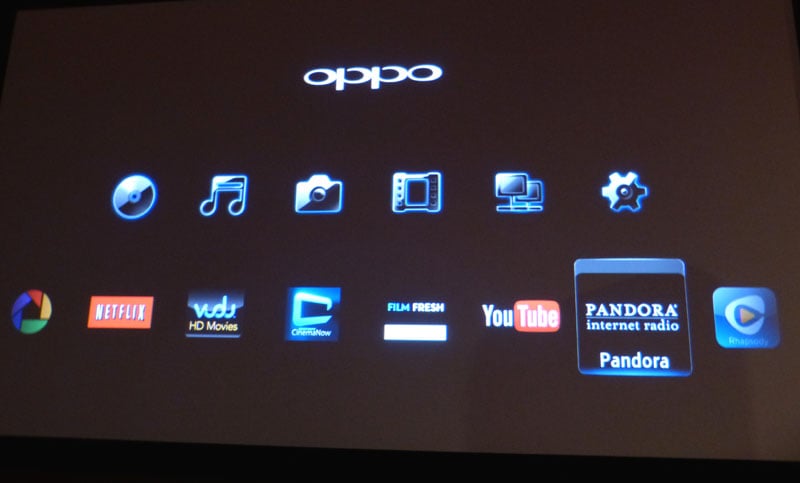
Oppo BDP-105 Home Menu
Streaming Services & Disc Info
Pandora worked just like it did with the older Oppo players. I was a bit disappointed there was still no option to alphabetize your stored stations or target selected stations for a random play. This app could use a little work. I didn’t test Vudu or Rhapsody since I do not subscribe to those services.
I did have a blast copying music off my iTunes account to a thumb drive and playing it back via the front panel USB connector of the BDP-105.
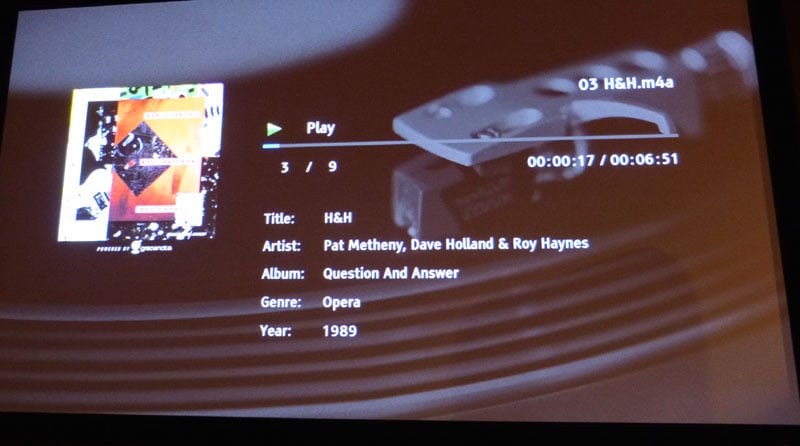
Oppo BDP-105 OSD playback from USB device
I thought it was pretty cool that I could get artist and track info along with product year for the album. I’m not sure why iTunes pulled meta data on Pat Metheny (one of the greatest jazz guitarists of all time) as Opera Genre, but at least it didn’t list him as Country Music
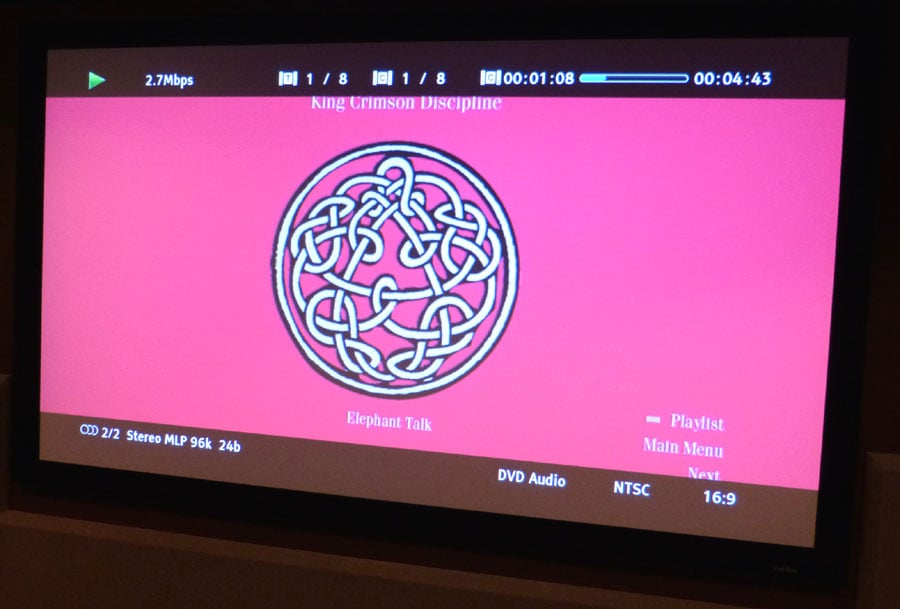
Oppo BDP-105 OSD Readout of King Crimson DVD-A Disc
The BDP-105 gives you all of the data regarding a disc being played in the machine with the hit of the info button. It was pretty cool seeing the disc data rate, type of signal, aspect ratio, etc while jamming out to Steve Wilson’s wonderfully remastered DVD-A disc of the King Crimson Discipline album.
Oppo BDP-105 Universal Blu-ray Player Listening Tests
 We
flipped around with a lot of source materials ranging from standard
CD, to SACD, DVD-A and Blu-ray discs. We focused most of the
listening tests on critical two-channel performance to really gauge
the depth of performance offered by the Oppo BDP-105.
We
flipped around with a lot of source materials ranging from standard
CD, to SACD, DVD-A and Blu-ray discs. We focused most of the
listening tests on critical two-channel performance to really gauge
the depth of performance offered by the Oppo BDP-105.
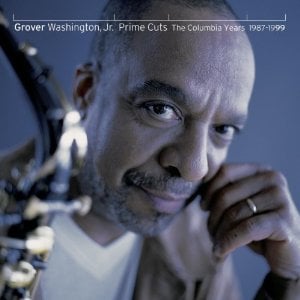
SACD: Grover Washington JR – Prime Cuts
This is truly a reference two-channel “must have” disc. Track #1 “Take Five” has a lot of stuff going on at once, including a deeply rich bass track. Grover’s saxophone came through with pristine clarity while the percussive effects popped out into a very three dimensional landscape. Track #6 “Summer Nights” bore a similar resemblance to “Pyramid” from another great album called Close Up by David Sanborn. I loved the ping pong effect of the percussion instruments between the speakers. When the BDP-105 was directly connected to the Pass Labs amp, I was hearing clean powerful sound with a nice bite to it. You could hear the triangles slowly decay instead of just abruptly fading away, which would otherwise be lost on lesser-designed gear. The noise floor was dead silent which really helped showcase the dynamic range of this excellent recording.
SACD:
Andre Geraissati - Canto
das Aquas
This is another great recording to show off the capabilities of a source device. Each instrument was individually mic’d with top-of-the-line microphones and two additional mics were used to record room ambience. Reference level electronics and recording equipment was also used, all of which was listed in the recording insert. According to the label, this SACD was recorded at the most sophisticated recording studio in Latin America. Based on the pristine sound quality I was hearing, I have no reason to doubt that claim. Track #1 “Agreste” demonstrated the BDP-105’s resolve at extracting all of the details in this recording. The acoustical guitar was anchored to the left speaker while the triangles panned the front soundstage creating a convincing phantom center image. The noise floor was dead silent and you could clearly hear the finger sliding up and down the strings before they were even strummed. The reverb from the guitars in track #2 “Frazenda” was hypnotic. I’m pretty certain that the guitarist employed the Lexicon Reverberator that the insert mentions for this recording on this track. I really cranked up track #9 “Benguela” simply because it just seemed to me the CT-2300 wanted me to do it. The nylon string guitars sounded pristine with no hint of edginess at any listening level. Again, this felt like a live performance to me.
SACD: Gloria Estefan Alma Caribena
Latin music lovers know Gloria Estefan’s music very well. I dig her vocals and love all the percussion work of her band. The bass just radiates through you in track #1 “Por Un Beso,” as the acoustic guitar serenades your soul. Because this recording is of such high resolution, the Oppo BDP-105 just loves strutting its sonic chops by oozing out all of the details of the percussion instruments. You can literally sit and focus on each instrument every time you hear this song. Gloria’s voice is so resolute that you can feel her pain in the lyrics. Track #6 “Tres Gotas De Agua Bendita” treats you to one of the widest soundfields I’ve ever heard in a two-channel recording. What an amazing experience to hear Gloria sing with Celia Cruz in such pristine fidelity. This disc is said to be a studio master recording and I have no reason to doubt it. I just couldn’t imagine hearing a better playback of this recording on any other source device.
DVD-A: King Crimson – Discipline
Steve Wilson has been a busy man. Not only is he the lead singer of Supergroup Porcupine Tree, but he also has a thriving solo career and has also been remastering the music of legendary progressive rock bands like King Crimson and ELP into high definition 5.1 surround mixes. I cued his recent remastering of King Crimson’s Discipline. I listened to the two-channel 96kHz/24bit audio mix via the BDP-105 analog outputs as well as the 5.1 DVD-A mix connected via HDMI to my Denon A/V processor. There is no doubt the 5.1 mix was superior. But I wanted to narrow the scope a bit here and really hone in on the BDP-105’s ability to captivate me with pristine two-channel analog sugar. Robert Fripp’s guitars in Track#1 “Elephant Talk” implants itself into your skull. I was simply not used to hearing old progressive rock with such high fidelity and the Oppo was showing off Steve Wilson’s great remastering work. You could hear the resonance of Bill Bruford’s drum shells in Track #6 “The Sheltering Sky”. Tony Levin’s funky Chapman Stick bass work was tactile and crisp while Fripp’s bizarre sound effects just had you coasting by in full engagement. Nothing else really mattered and that is the type of audio experience I love to be part of.

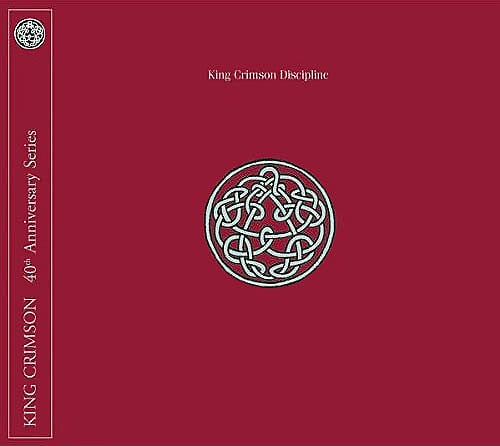
SACD: Gloria Estefan Alma Caribena (left pic); DVD-A: King Crimson – Discipline
Other Source Material
I ran a multitude of listening tests using standard CD’s and multi-channel Blu-ray and SACD’s testing the analog outputs to my dedicated two-channel rig, as well as HDMI to my multi-channel setup. Whether I was jamming out to a 5.1 SACD Genesis remaster of Wind & Wuthering (God those Mellotrons are hypnotic), or cozying up to an acoustic session of Pat Metheny, I always fully enjoyed the playback experience I got from the Oppo BDP-105. The BDP-105 sounded phenomenal connected directly to the Pass Lab’s power amp or connected through my Marantz Preamp. I subjectively felt when directly connected to the power amp, the sound was a bit more forward and edgy (in a good way), while it seemed a tad smoother or softer when connected through the preamp. I wouldn’t declare a victory either way other than to say the BDP-105 would serve very well as a dual Blu-ray player / preamp scenario.
 Headphone Listening Tests
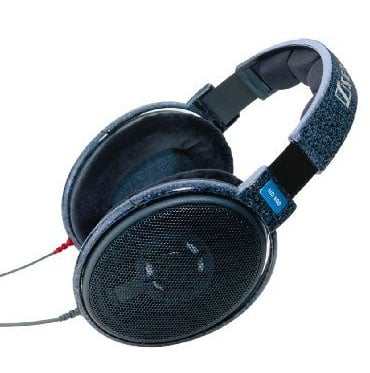
Another nice audiophile feature of the BDP-105 is the dedicated headphone amplifier which is tied directly into the ESS Sabre Reference DAC and incorporates a high quality headphone amp chip. Its published frequency response is 20Hz to 20kHz +-0.3dB into a 300 ohm load which just happens to be the impedance of my Sennheiser HD 600 reference headphones. The BDP-105 headphone amp has ample drive to handle low impedance headphones too. It is capable of delivering 34 mwatts into a 300 ohm load and 187 mwatts into a 32 ohm load. My Sennheiser headphones are speced at 97dB with 1 mwatt drive level so the Oppo has plenty of juice to pump them beyond ear damaging SPLs (112dB). Let’s see how it sounds. In one word, “GREAT”! I replayed the Gloria Estefan and Pat Metheny reference material I used in my critical two-channel listening via the BDP-105’s headphone jack connected to my HD 600 headphones. I did my best to directly compare the Oppo to my Headroom Micro Amp/Dac combo ($600 retail) and felt that the Oppo edged it out in detail and smoothness. There was no doubt in my mind of the superiority of the DAC’s in the Oppo. The Headroom amp did seem to have a bit more drive level but the Oppo was more than capable of hitting high enough SPL levels for my ears. When I cranked it to 90dB (100dB is max setting), I was measuring over 105dB SPL. That’s too loud for steady safe listening. Thankfully Oppo incorporated an independent volume control and a preset power up level for the headphone amp. I recommend setting this for 50 just to be on the safe side each time you begin a listening session.
With the type of fidelity I was hearing from the Oppo’s headphone amp, I just may have to start doing more headphone listening in my theater room. Luckily I built a bar right next to my theater rack so I wont be too far from refreshments.
Oppo BDP-105 Universal Blu-ray Player Measurements and Analysis
Using the industry's most advanced HDMI Audio Analyzer, the Audio Precision APx585, we proceeded to measure all of the various aspects of audio performance for the Oppo BDP-105.
HDMI Digital Audio Tests
Using a 192kHz / 24 bit 6CH Dolby True HD signal, I measured a ruler flat frequency response from 20Hz to 1/2 Nyquist frequency (96kHz). Next, I ran a Dolby 96kHz /24 bit 8CH signal and plotted distortion.
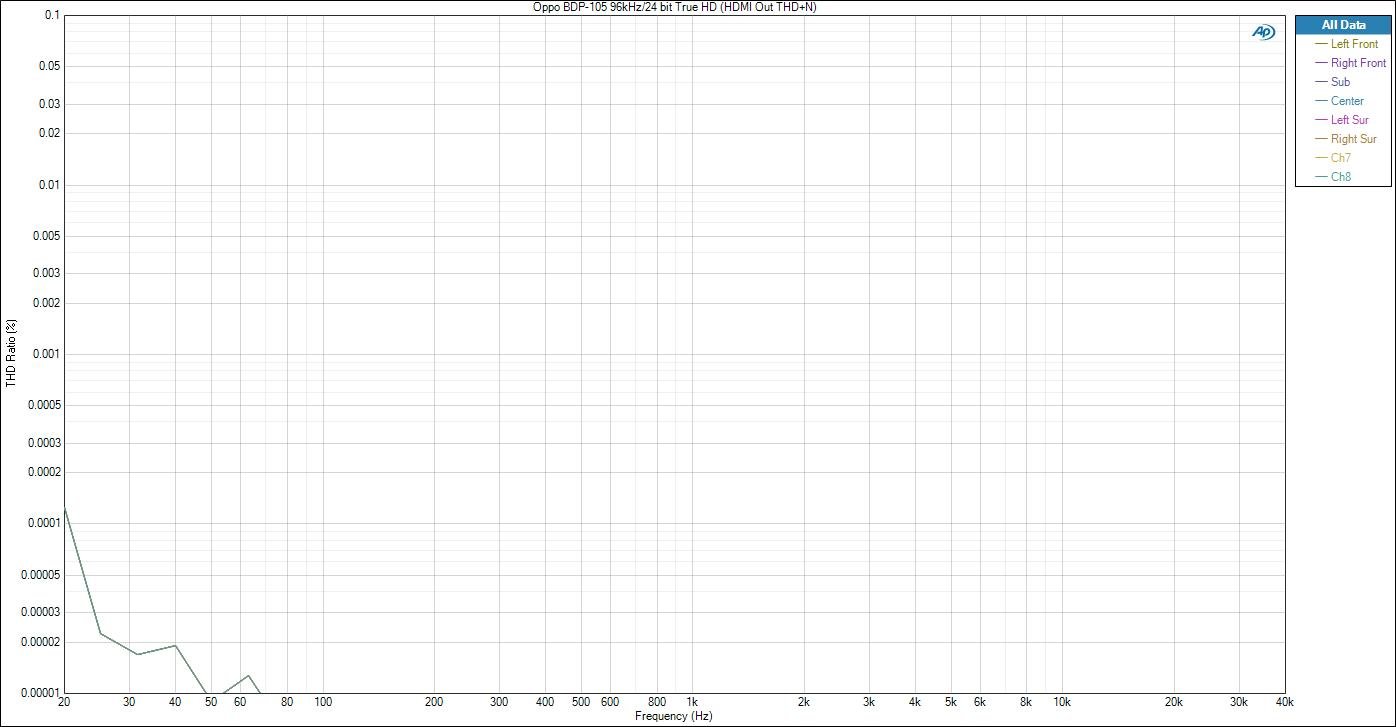
Oppo BDP-105 HDMI Frequency vs Distortion Test
As you can see the distortion level was virtually unmeasurable, approaching the limitations of my $40k Audio Precision HDMI Audio Analyzer. In fact it was roughly 10 times lower than what I measured on the BDP-95 player which in itself was excellent. You’re really splitting hairs here.
I also ran a Bit Error Rate (BER) test on the BDP-105 using Dolby TrueHD and DTS HD test signals both of which produced a 0% BER which means both players delivered audio via HDMI 100% error free. You can rest assured there are no jitter issues using the HDMI outputs for audio like early generation Blu-ray players using HDMI 1.2 used to suffer from.
Analog Output Tests
For those of you that plan on exclusively using the analog outputs of the BDP-105, I’ve run a complete battery of measurements on the player. With a player like the BDP-105, I could even envision a consumer bypassing a preamp all together and utilizing the BDP-105 as not only the Universal Blu-ray player but as the preamp itself. The BDP-105 has a global volume control and both USB and HDMI inputs to stream music and handle HDMI audio and video sources. Many folks in the high end two-channel world actually prefer using the source player as the preamp and they can easily do that with this player too.
Frequency Response
Using a -20dBFs 192kHz/24 bit True HD signal, I ran a 6CH sweep with all channels set to “large” and found the BDP-105 to be ruler flat all the way out to ½ the sampling rate, as expected. Oppo specifies this player’s -1.5dB point of 96kHz and this appeared to be accurate.
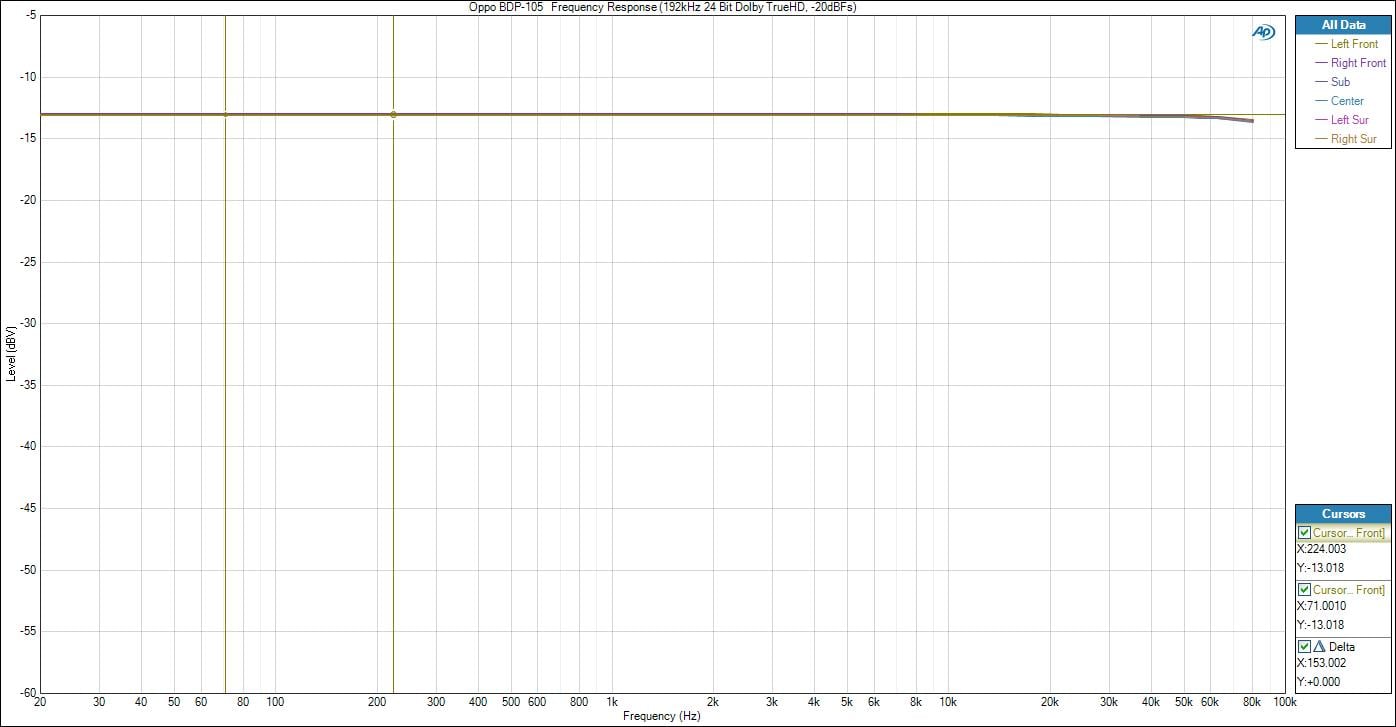
Oppo BDP-105 Analog Frequency Response (multi-channel outs)
I then proceeded to test the analog balanced outputs with a 0dBFs 2CH 192kHz/24 bit PCM signal and found similarly excellent results.
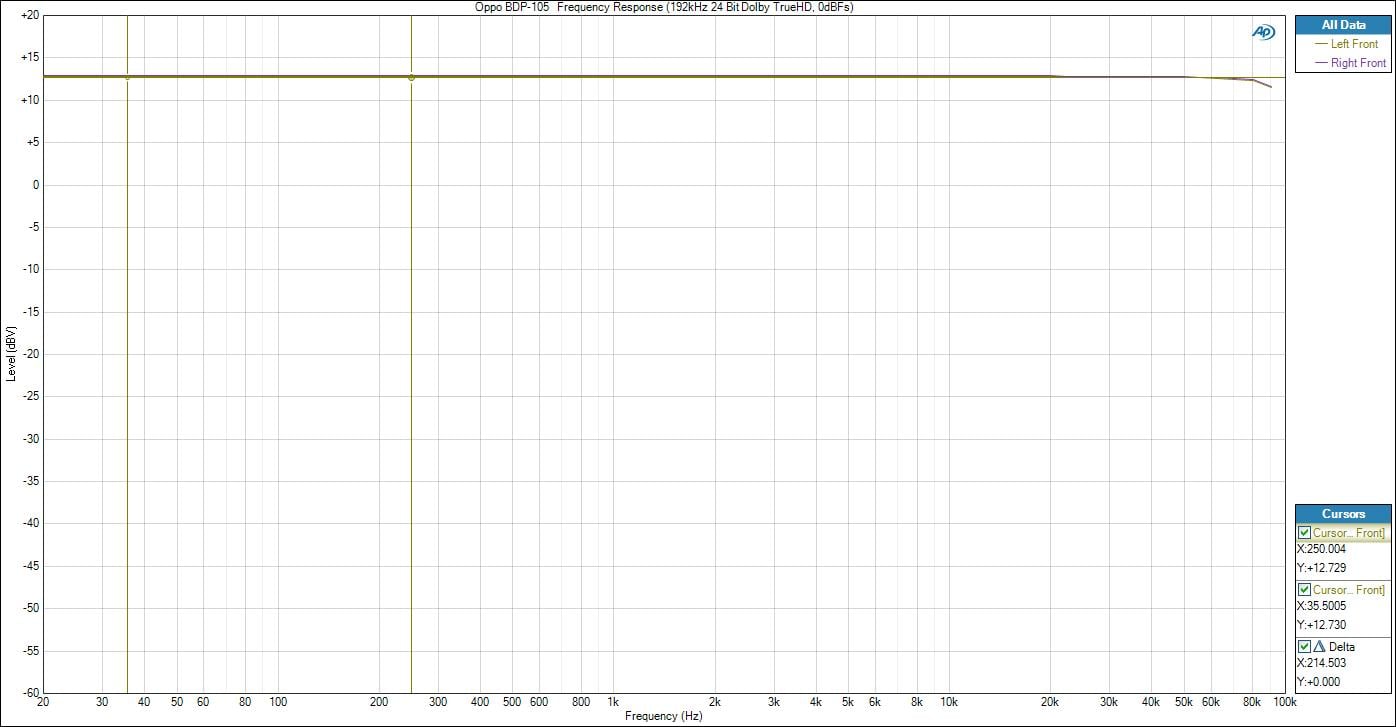
Oppo BDP-105 Analog Frequency Response (balanced outs)
Using the same test signals and player configuration, I measured THD + N in both cases.
Distortion
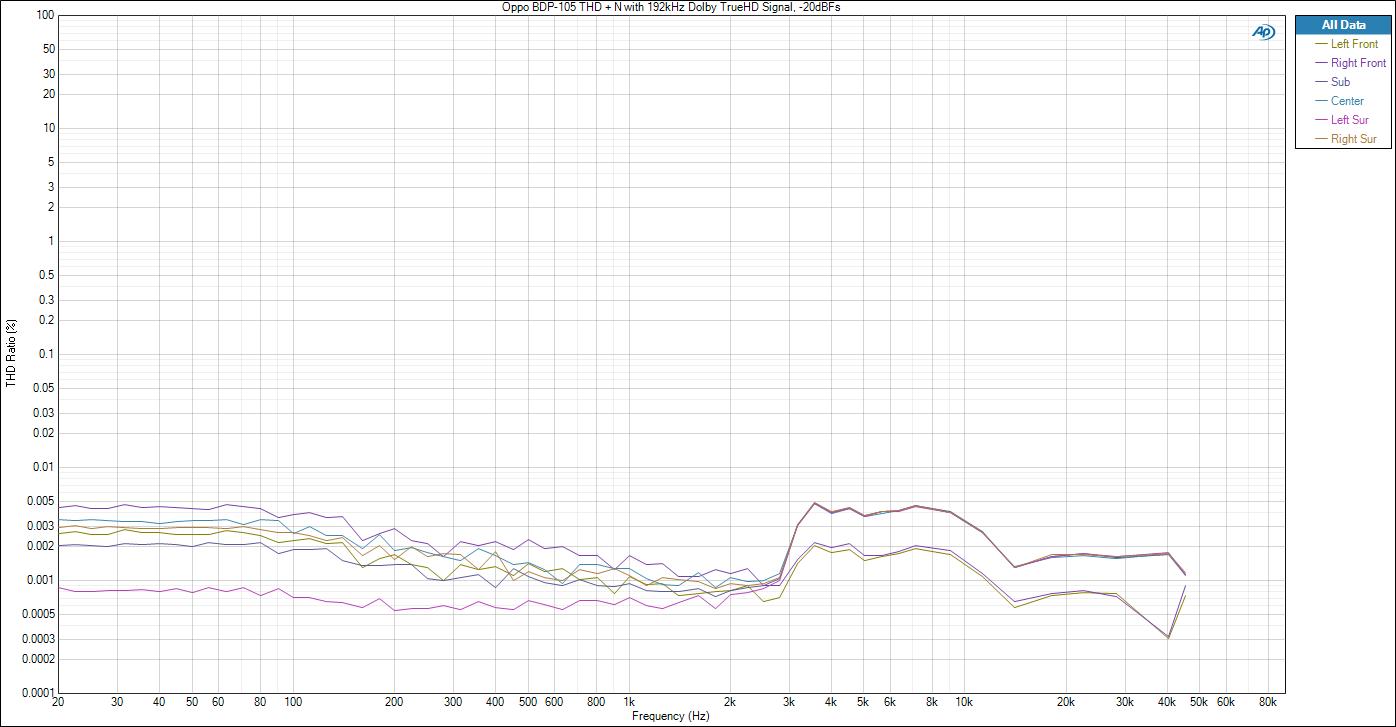
Oppo BDP-105 Distortion vs Frequency (multi-channel outputs)
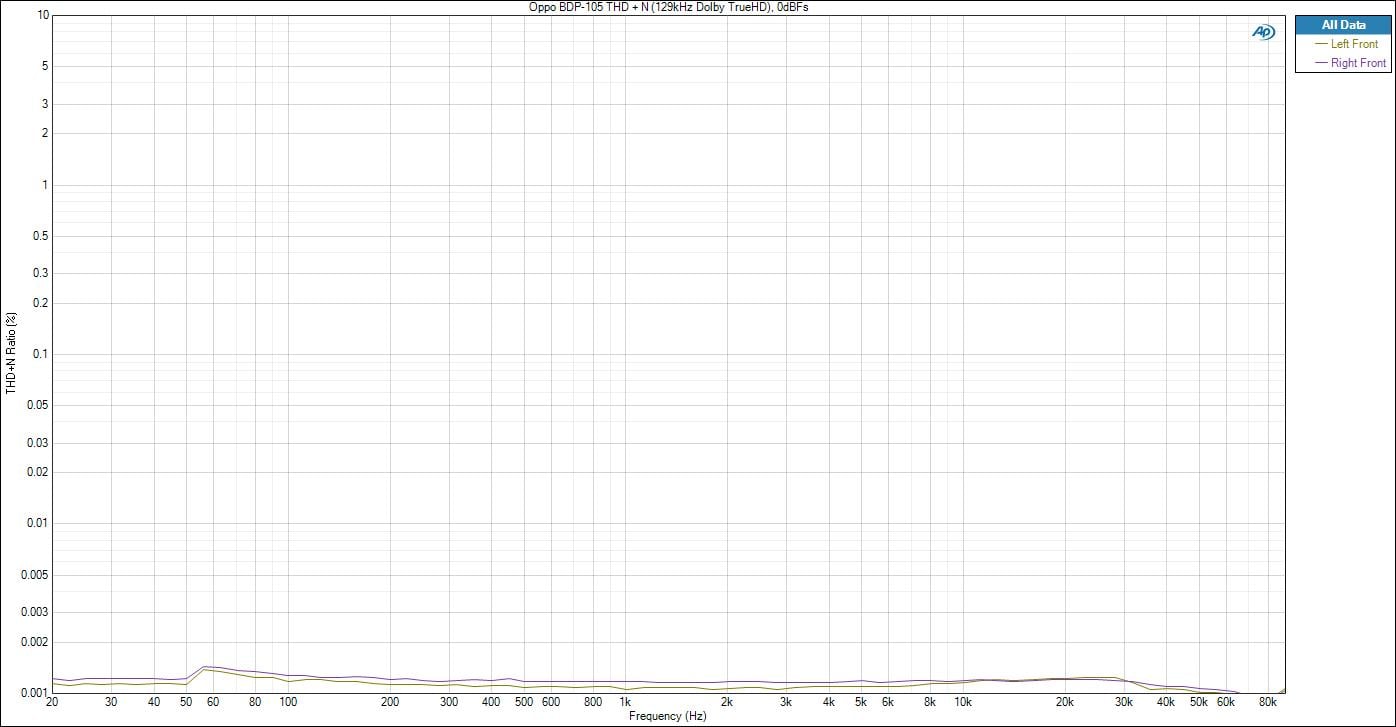
Oppo BDP-105 Distortion vs Frequency (balanced outputs)
The BDP-105 exhibited excellent distortion figures for the multi-channel analog outputs (.005% THD + N) across the entire audio bandwidth. This was similar to what I measured on the BDP-95 player.
The balanced analog outputs were just stunningly excellent (.001% THD + N) measuring almost down to the noise floor of my test gear and this was despite the fact I was driving the player at 0dBFs (digital full scale). This is just superb performance.
Oppo specifies distortion as 0.0003% THD + N using a 24 bit signal at 1kHz with a 20kHz LPF. Our measurements were done full bandwidth with no LPF which is why our figures were a bit higher. Oppo confirmed our results using the exact same test equipment, test conditions and signals .
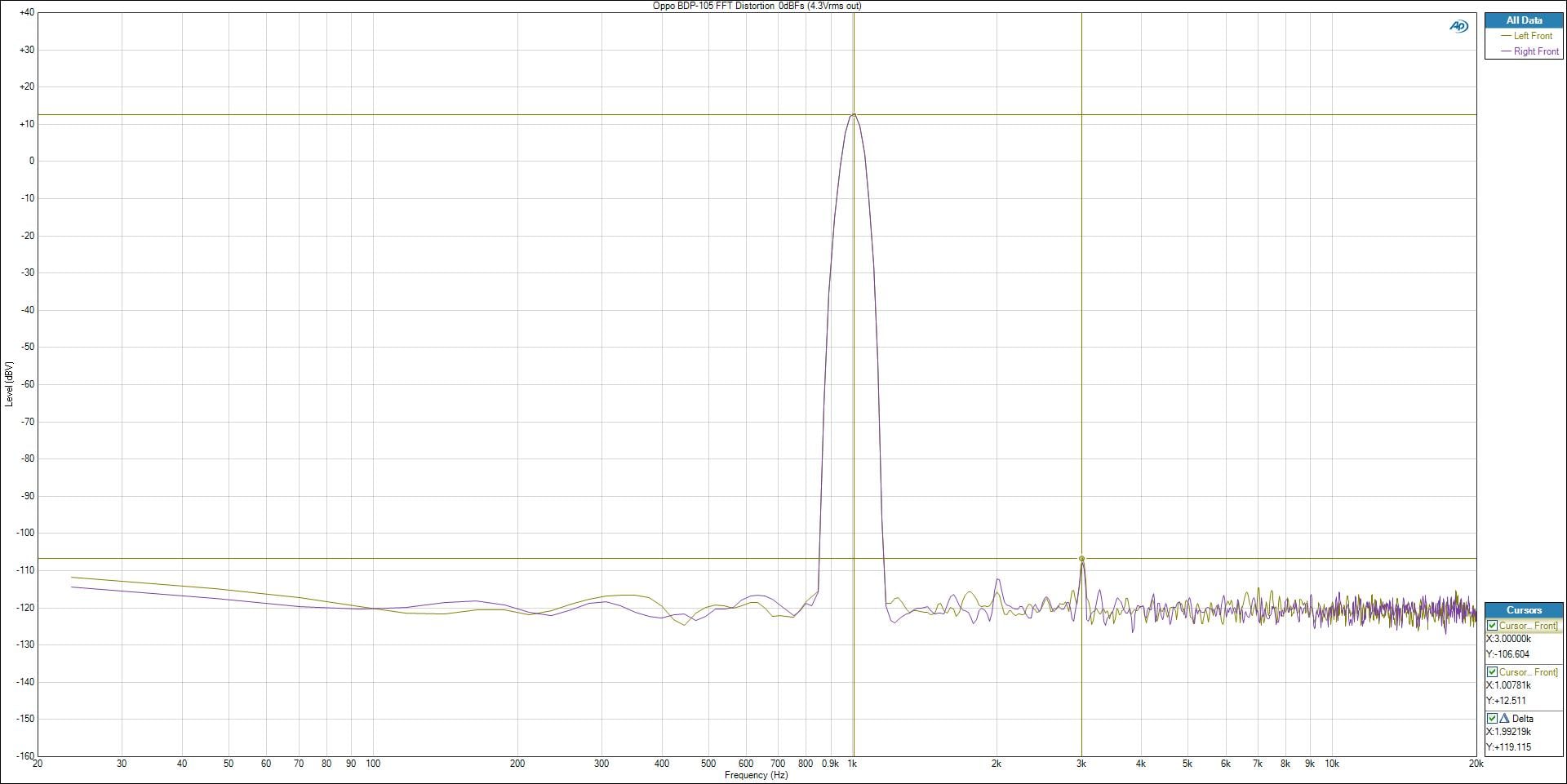
Oppo BDP-105 FFT Distortion Analysis (balanced outputs)
At 4.3Vrms output (rated max output of the player), the FFT distortion plot was crystal clean, rivaling what I’ve measured from most dedicated preamps, let alone Blu-ray players.
Crosstalk
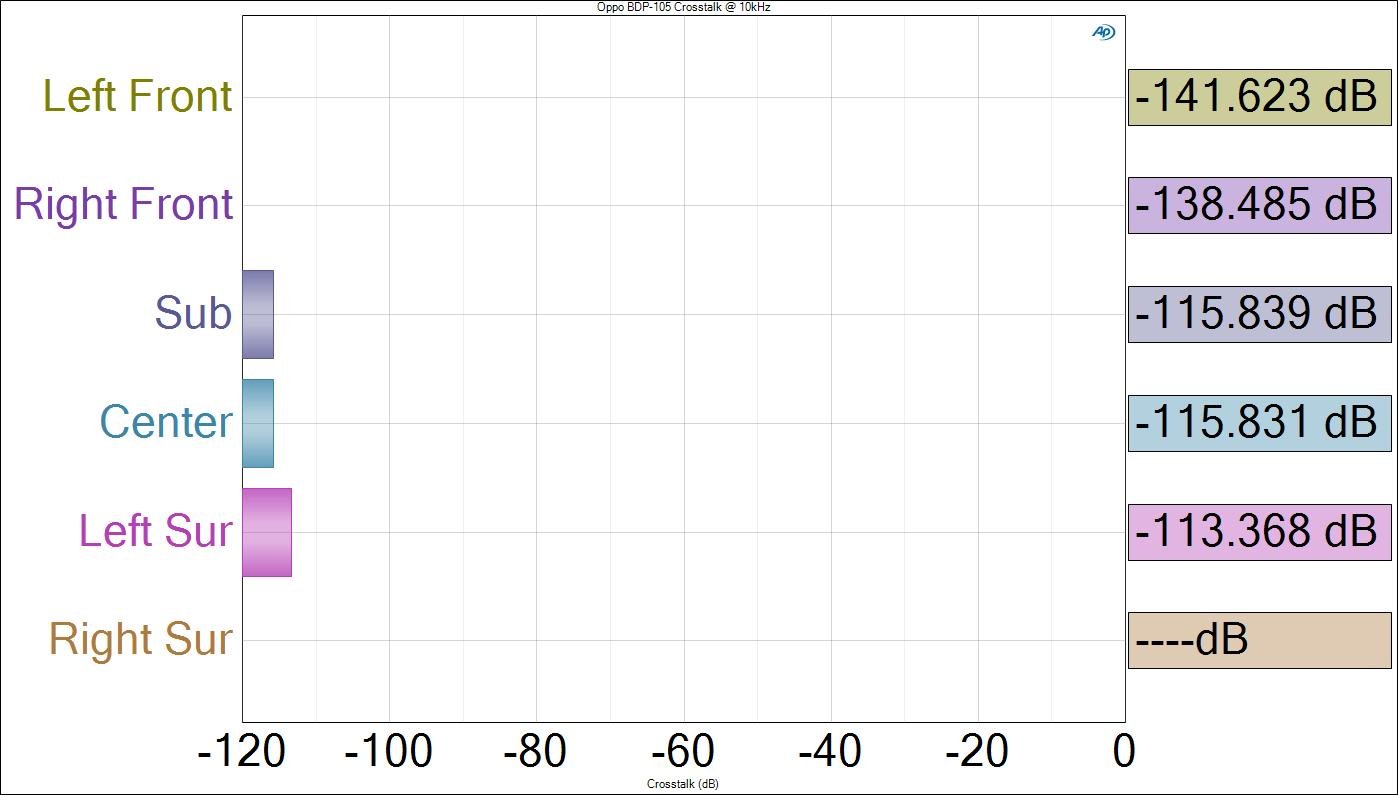
Oppo BDP-93 (left) and BDP-95 (right) Channel to Channel Crosstalk
Using a -20dBFS 192kHz / 24 bit Dolby TrueHD test signal, we measured channel-to-channel crosstalk at 10kHz with all channels set to large and 0dB. The Oppo BDP-105 produced stellar results, virtually unmeasurable via the left/right front channels and >113dB on all of the other channels. This is better than you get with most high end preamps, let alone Blu-ray players. Oppo rates crosstalk as > 110 dB but doesn’t specify frequency. Regardless, their player easily met this specified number. The BDP-105 defied all logic and produced numbers that tested the measurable limits of our laboratory gear.
Signal to Noise Ratio
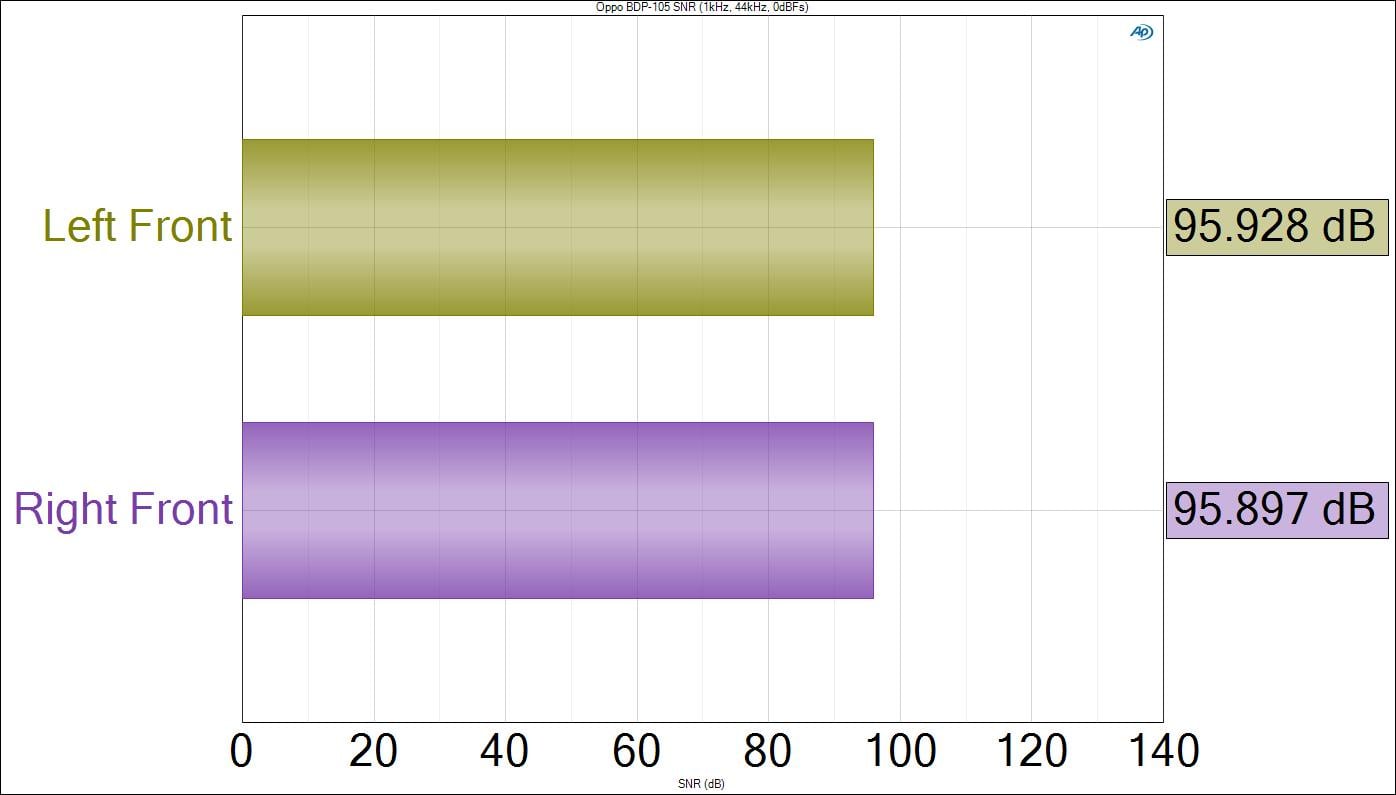
Oppo BPD-105 Signal to Noise Ratio (SNR) with 44kHz/16bit 0dBFs signal
The Oppo BDP-105 produced textbook SNR numbers reaching the 96dB theoretical noise limitation of a 16-bit signal (6dB*16). For higher bitrate signals, the BDP-105 was able to achieve the specified 130db (a-wt, auto muted and 115dB a-wt,non auto-muted). 130dB represents about a 21-bit noise floor resolution, which is as about as good as you can get since Johnson Noise (aka. thermal noise) will always restrict you from doing much lower than this for a 100kHz bandwidth signal.
Bass Management
Setting all speakers to "small" and selecting 80Hz as our choice of crossover point, we measured the analog bass management capabilities of the BDP-105. The BDP-105 does offer variable crossover settings from 40-250Hz (20Hz increments from 40Hz to 80Hz, 10Hz increments from 80Hz to 120Hz, 50Hz increments from 150Hz to 250Hz) just like this model’s predecessor.
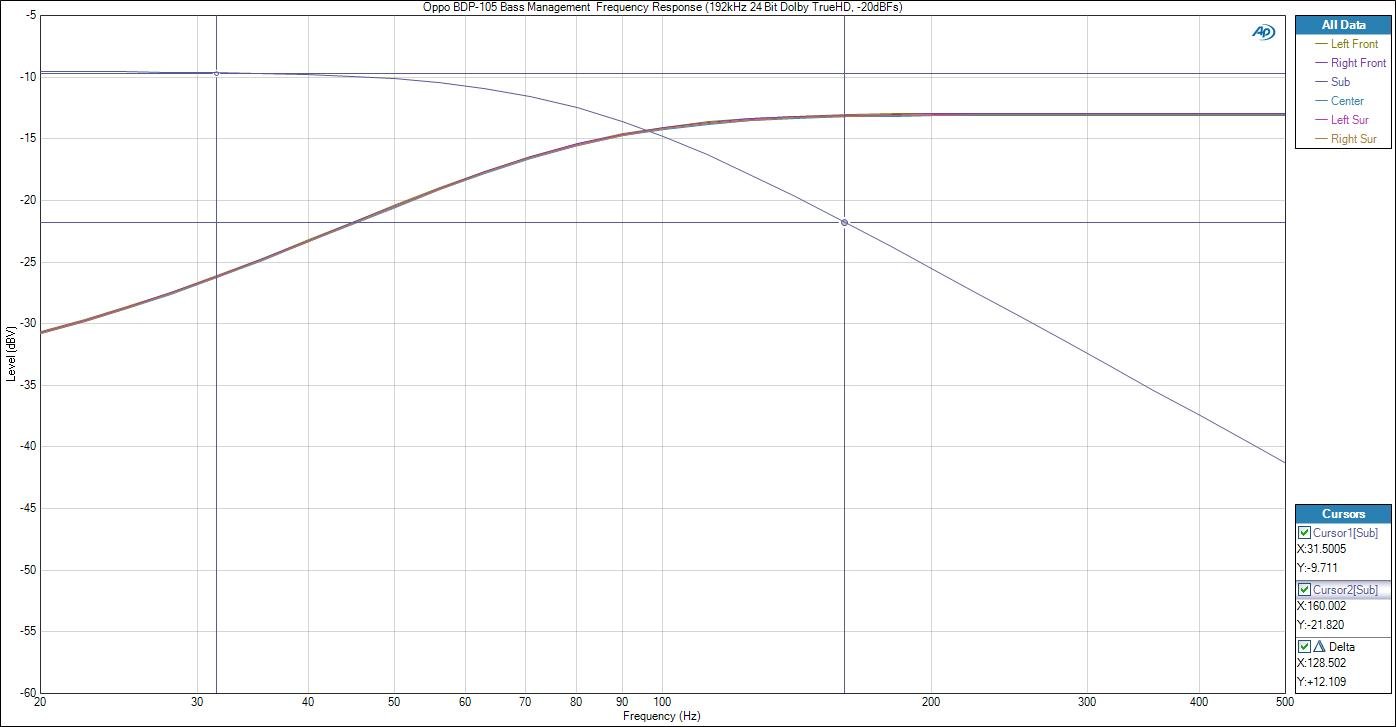
Oppo BDP-93 & BPD-95 Analog Bass Management Measurements
Note: The BDP-105 bass management only affects the analog multi-channel outputs. Balanced outputs and HDMI outputs bypass this feature.
We measured the filter slopes using a -20dBFS 96kHz / 24 bit PCM test signal. For the HPF, we measured a -3dB point of 75Hz, which was slightly lower than the 80Hz setting with a slope just shy of 12dB/octave. For the LPF, we measured a -3dB point of 80Hz with a 12dB/octave rolloff. We personally prefer to see a 24dB/octave slope for the LPF like THX recommends, but Oppo said their goal was to meet the minimum Dolby requirement of at least a 1st order filter (6dB/octave) for the HPF and at least a 2nd order filter (12dB/octave) for the LPF. Considering THX informed us they don't even test the analog outputs of Blu-ray players, we are just picking nits here.
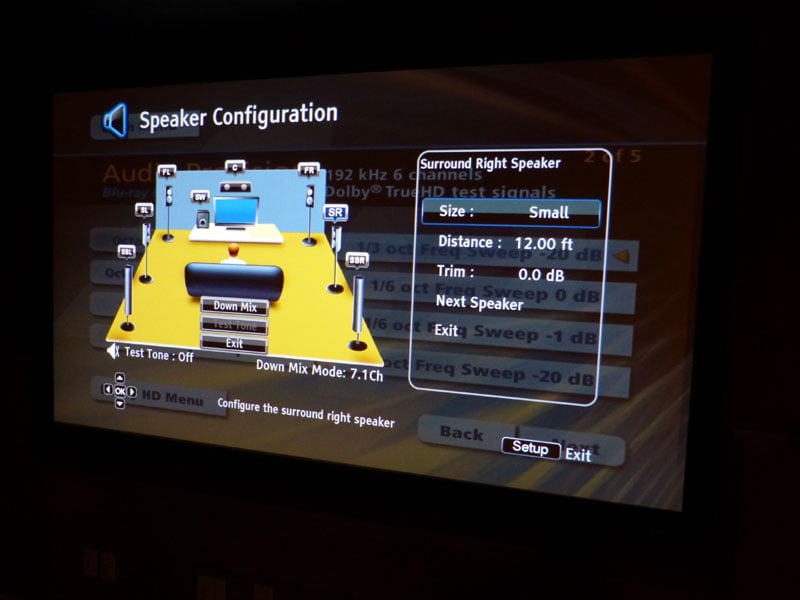
Oppo BDP-105 OSD for Speaker Configuration
Oppo still allows the end user the option to set other speaker groups to “large” even if the main front channels are set “small”. Personally I’d prefer the player to auto-default to all speakers “small” once the front channels are set to “small”.
Oppo BDP-105 Universal Blu-ray Player Conclusion
Oppo
proved that they could build the ultimate audiophile and videophile
Universal Blu-ray player for a fraction of the cost of so many so
called “high end” manufacturers. Oppo made enough minor
improvements in features and performance over the BDP-93 and BDP-95
units to justify the creation of these new models. From the
BDP-105’s impeccable benchmark performance to its excellent build
quality and usability, this player leaves you wanting nothing. The
BDP-105 not only raises your expectations of what all Blu-ray players
should be like, but it also elevates what you’d expect from a high
end transport costing thousands more. If your primary usage of this
player is for digital multi-channel audio, then I’d suggest its
cheaper sibling the BDP-103. However if you are fully intent on
building a two-channel and multi-channel system of equal measure, I
simply can’t make a higher recommendation than the super duper
BDP-105 Blu-ray dream machine. Until Oppo builds a real world Star
Trek holodeck, you will be hard pressed to better your A/V experience
with any other source device. Live long and prosper and long live
Oppo!
Oppo BDP-105 YouTube Blu-Ray Player Review
OPPO Digital
2629
Terminal Blvd.
Suite
B
Mountain
View, CA 94043
Phone:
(650) 961-1118
The Score Card
The scoring below is based on each piece of equipment doing the duty it is designed for. The numbers are weighed heavily with respect to the individual cost of each unit, thus giving a rating roughly equal to:
Performance × Price Factor/Value = Rating
Audioholics.com note: The ratings indicated below are based on subjective listening and objective testing of the product in question. The rating scale is based on performance/value ratio. If you notice better performing products in future reviews that have lower numbers in certain areas, be aware that the value factor is most likely the culprit. Other Audioholics reviewers may rate products solely based on performance, and each reviewer has his/her own system for ratings.
Audioholics Rating Scale
 — Excellent
- — Very Good
- — Good
- — Fair
- — Poor
| Metric | Rating |
|---|---|
| High Definition Video Performance | |
| Standard Definition Video Performance | |
| High Definition Audio Performance | |
| Analogue Audio Performance | |
| Bass Management | |
| Deinterlacing & Scaling | |
| Build Quality | |
| Ergonomics & Usability | |
| Ease of Setup | |
| Features | |
| Remote Control | |
| Fit and Finish | |
| Performance | |
| Value | |
Gene manages this organization, establishes relations with manufacturers and keeps Audioholics a well oiled machine. His goal is to educate about home theater and develop more standards in the industry to eliminate consumer confusion clouded by industry snake oil.
View full profile Subscribe to our newsletter