


Memorex MVBD2510 Blu-ray Player Review
Memorex MVBD2510 Blu-ray Player
- Product Name: MVBD2510 Blu-ray Player
- Manufacturer: Memorex
- Performance Rating:


- Value Rating:
- Review Date: December 31, 2008 12:14
- MSRP: $ 269
|
|
Pros
- Inexpensive street price
- USB 2.0 input
- Analogue 5.1 outputs
Cons
- No BD Live (Profile 1.1 only)
- Poor video processing
- No noise reduction
- Doesn't decode DTS-HD Master Audio (will bitstream it)
- Cannot send 480i via HDMI
MVBD2510 Build Quality, Use and Firmware
The MVBD2510 is one of the most inexpensive Blu-ray players to hit store shelves in 2008. It's an attractive player and certainly looks good in the living room. The trouble is, this player offers only mediocre playback quality of both DVDs and BD content. It will certainly play back your new high definition Blu-ray discs, but will do so with sloppy video processing that will leave you wishing you had paid a little extra for a more capable player. For those fond of comical irony, the new Memorex logo is more than a little similar to the animated "loading" icon found in the Firefox web browser - appropriate since this player will have you waiting more than a little for basic functions.
Build Quality and Use
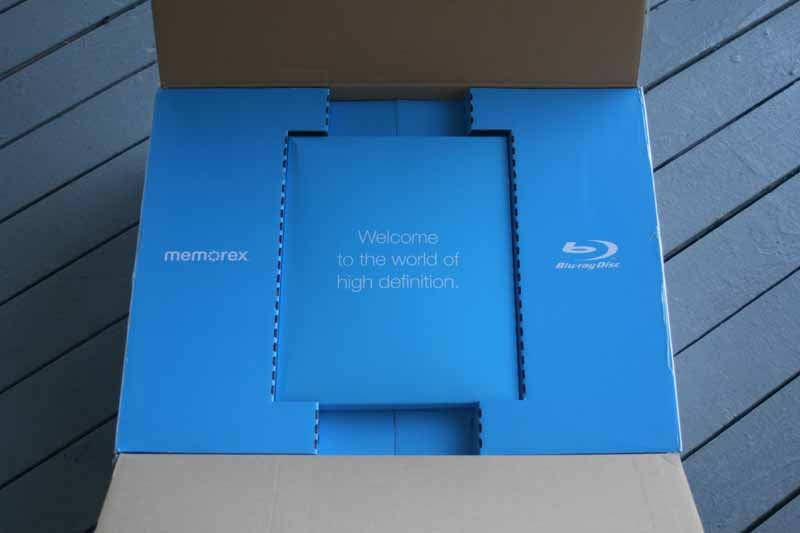 The packaging of the Memorex MVBD2510
is unique in that it gives the user an "experience" when opening up
the box. Presented to the consumer are a blue insert box with a
centrally-contained package which houses the user manual and a quick setup
guide. The setup guide is largely pictorial in nature and does a decent job of
instructing even the most novice of users in the art of making the best
possible connection (something they illustrate with a green "Best"
designation). The BD player comes with basic AV cables, a standard non-backlit
remote control and the user manual and quick start guide. The power cable isn't
removable, nor should we expect it to be at this price point.
The packaging of the Memorex MVBD2510
is unique in that it gives the user an "experience" when opening up
the box. Presented to the consumer are a blue insert box with a
centrally-contained package which houses the user manual and a quick setup
guide. The setup guide is largely pictorial in nature and does a decent job of
instructing even the most novice of users in the art of making the best
possible connection (something they illustrate with a green "Best"
designation). The BD player comes with basic AV cables, a standard non-backlit
remote control and the user manual and quick start guide. The power cable isn't
removable, nor should we expect it to be at this price point.
The front of the unit is almost bisected into two levels, with the tray and buttons located on a dark gray, brushed metal top section and the VFD display and indicators shown below in a piano black glassy finish. A USB port is included on the bottom right and is protected by a plastic door that slides down when the port is not in use. We'll cover USB later in the review, but the connector is designed for flash drives so that the MVBD2510 can play back music, videos and photos.
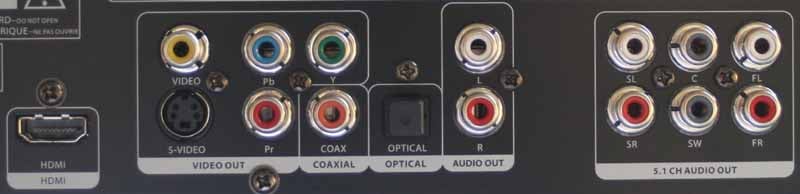
In addition to HDMI, the connections on the back of the Memorex include 5.1 analogue audio outputs (not 7.1), coaxial and optical S/PDIF digital outputs, component video, S-video and composite video outputs. There is also a separate pair of stereo left/right output outputs which always contain mixed down audio. This is good for users who do not yet have surround sound in their homes (and with how inexpensive surround sound is now, we expect those numbers to be dwindling).
We opened up the chassis and found it to be very basic, with a smallish, but adequate, power supply and a unified audio-video board. The onboard 256MB flash memory is not upgradable and wasn't in the form of a standard SD/MMC card as we've seen in some other players (unless it was hidden).
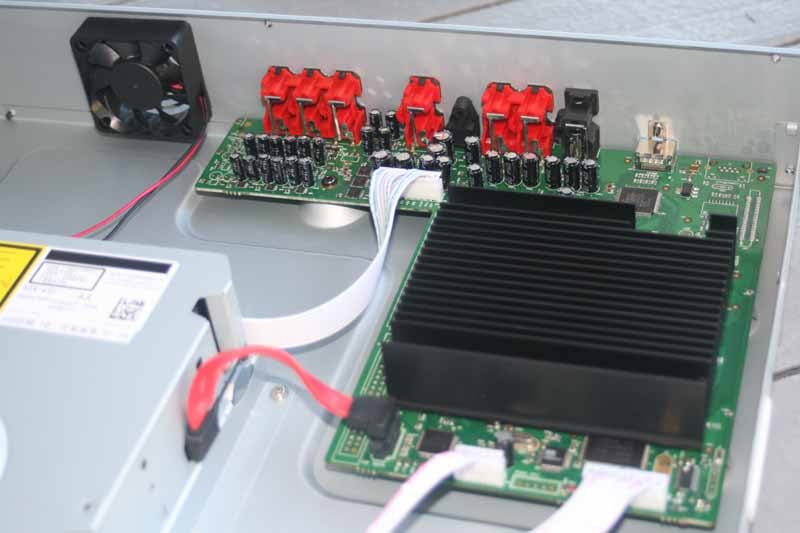
See that fan? It runs all the time.
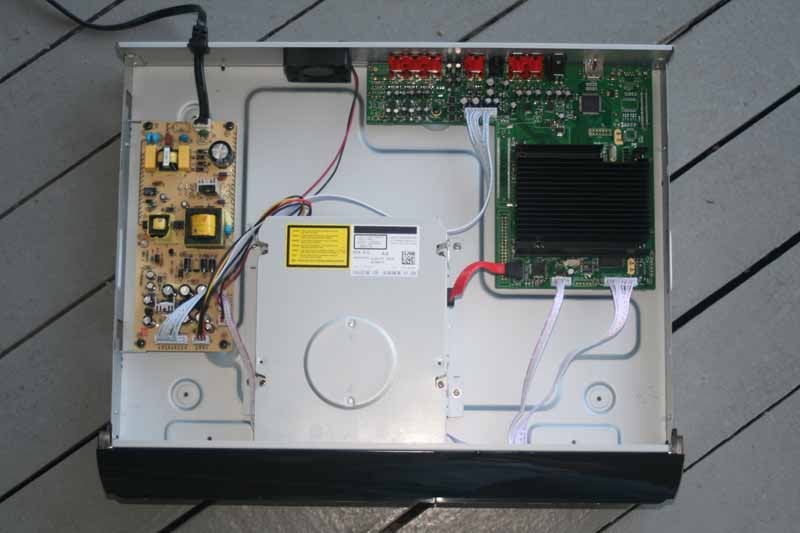
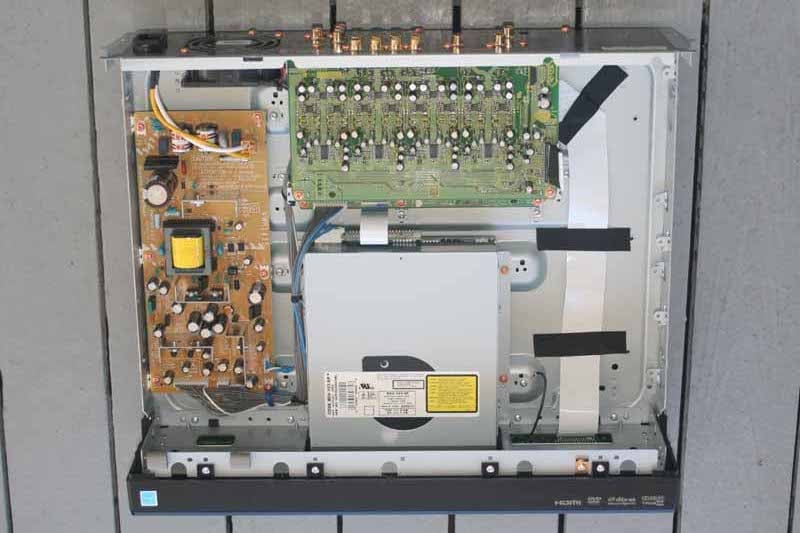
The MVBD2510 (left) has a slightly smaller power supply and a unified
audio-video circuit board as opposed to the Pioneer BDP-05FD (right)
Comparing the guts of the Memorex to the Pioneer BDP-05FD player (for considerably more money) it was readily apparent that Pioneer had a slightly larger power supply and had separated the audio and video circuit boards. The Memorex has everything on a unified board and uses a Sony KEK-410 BD drive (for those few tweakers starting a spreadsheet).
The MVBD2510 exhibits the same sluggish use pattern as most players we've experienced. It takes nearly a minute (58 seconds to be exact) to boot the system and open the tray for your first disc insertion. We'll talk about the insufferable remote control responsiveness later, but suffice it to say it's not exactly a pleasure to use this player. The player will correctly retract the tray when you hit the Power button to turn it off. It does not, however, Power up unless you hit the actual Power button (the Eject button or Play button won't bring the player online).
 We performed a Firmware update since
there was a new version available. The version that shipped with my player was
20080908-0C which I was able to update to BD100C-20081107-USA. I didn't notice
any significant difference between the two, but I'm sure they fixed some disc
incompatibilities at the very least. All of our bench testing, evaluation and
testing came after the flash updated firmware. Flashing the player was
relatively painless. You just download the new files from the Memorex website,
burn them to CD-R and then load the disc into the player (unfortunately, the
player can't use a flash drive via USB for updates). The Setup menu system has a
place under General > Update Firmware to read the content from the disc.
During the firmware update, the TV displayed the playful Memorex logo on an
aquamarine colored background (the normal background is blue). It took about 6
minutes and 30 seconds to perform the firmware update, after which it took
another minute to reboot and allow me to place a new disc into the tray.
We performed a Firmware update since
there was a new version available. The version that shipped with my player was
20080908-0C which I was able to update to BD100C-20081107-USA. I didn't notice
any significant difference between the two, but I'm sure they fixed some disc
incompatibilities at the very least. All of our bench testing, evaluation and
testing came after the flash updated firmware. Flashing the player was
relatively painless. You just download the new files from the Memorex website,
burn them to CD-R and then load the disc into the player (unfortunately, the
player can't use a flash drive via USB for updates). The Setup menu system has a
place under General > Update Firmware to read the content from the disc.
During the firmware update, the TV displayed the playful Memorex logo on an
aquamarine colored background (the normal background is blue). It took about 6
minutes and 30 seconds to perform the firmware update, after which it took
another minute to reboot and allow me to place a new disc into the tray.
MVBD2510 Bench Tests, Menu System and Remote
The Memorex MVBD2510 has a menu system that could be easily operated by a dead parrot. This is good (easy to use) and bad (not a lot of features). It's so simplistic, in fact, that it actually lacks many controls I'd like to see for DVD and BD playback. There are no video controls beyond Resolution and TV Aspect Ratio. When the Video options are less than the Language options, you have a simplistic player indeed. A couple notes about the default settings. First, the TV aspect ratio is correctly set at 16:9, which is refreshing to see in a budget player (and finally starting to become the norm). Resolution defaulted to 720p - a safe bet, but those with new 1080p displays (I was using a Mitsubishi LT-46149 LCD) will want to change this as soon as you get it booted up. The MVBD2510 also supports 1080p/24 (24Hz), but more on that later.
Reviewer's Note: The menu system is quite slow and cumbersome. There are screens, such as the Firmware Software Version, that make you select a "View" button instead of just showing you the information right there on the screen. Many times I had to press the remote buttons repeatedly to get a response (see remote section below).
The General settings, aside from Firmware updates, also allow for resetting the player to its default settings. The Audio menu sets the digital output to HDMI or S/PDIF and then allows selection of Bitstream or PCM modes for the output audio. This indicates that the player can natively decode Dolby TrueHD and DTS-HD audio. The notable exception is that the player can only bitstrem output DTS-HD Master Audio (dts' lossless format). PCM Downsampling will limit PCM output to 48kHz and disable advanced output that may not be compatible with some older AV receivers.

The Speaker menu gives basic "On/Off" controls for the 6 speaker positions and allows you to set the correct distance/delay for each (there are no distance/delay settings for the subwoofer). There are no size options, so bass management is very minimal with this player. These settings, of course, only affect the analogue audio outputs and will have no effect whatsoever on the digital S/PDIF or HDMI audio channels. Since the player only has 5.1 analogue outputs, don't look for it to be fully compatible with any 7.1 channel software. It will certainly work, but the player will need to downmix any 7.1 audio tracks to 5.1 before outputting the audio from the analogue outs.
Parental lock controls are also provided and DVD and Blu-ray each have their own settings, since the systems use different methods for determining content controls. Overall there simply isn't much in the way of settings on this player - at least not for fine tuning playback or picture quality.
USB
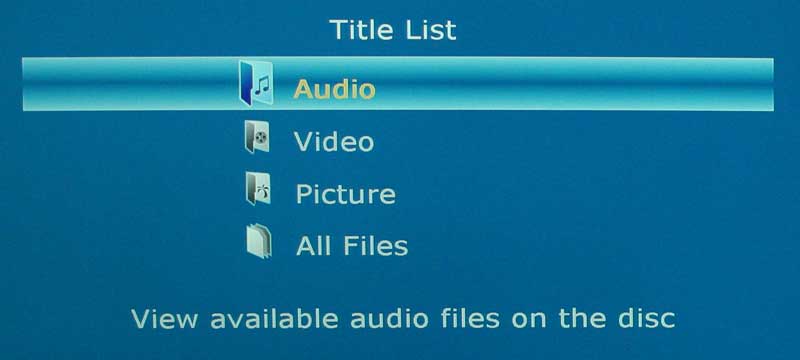
 The front USB port is designed to
allow insertion of a thumb/flash drive containing photos, videos or music. When
this drive is selected using the remote, users can listen to music, watch
videos or view photos. Navigation is via the menu system and the chapter skip
buttons allow navigation for photos. During photo use the Return button is
defeated for some reason, so the Stop button must be pressed to return to the main
Photo menu. Also, for those using the USB port, be sure to switch modes back to
DVD before pulling a USB drive out. We just yanked ours and the system locked
up completely, forcing us to power cycle to again use the Blu-ray player for
anything else.
The front USB port is designed to
allow insertion of a thumb/flash drive containing photos, videos or music. When
this drive is selected using the remote, users can listen to music, watch
videos or view photos. Navigation is via the menu system and the chapter skip
buttons allow navigation for photos. During photo use the Return button is
defeated for some reason, so the Stop button must be pressed to return to the main
Photo menu. Also, for those using the USB port, be sure to switch modes back to
DVD before pulling a USB drive out. We just yanked ours and the system locked
up completely, forcing us to power cycle to again use the Blu-ray player for
anything else.

Remote
The Memorex remote is very basic, but it has all the necessary commands. The trouble is, all the buttons are identical, save for the centrally-located navigation controls and a few thin buttons on top of the remote. This makes it difficult to use in the dark - especially so, since the navigation controls are arranged in a slightly non-standard pattern. I liked the feel of the remote in the hand, but I've seen much better designs in other, albeit more expensive players.

Audioholics/HQV Bench Testing Summary of Test Results
SD Perfect Score is 130
Memorex MVBD2510 SD Benchmark Score: 50
(not so great)
| Test | Max Points |
Score | Pass/Fail |
| Color Bar | 10 | 0 | Fail |
| Jaggies #1 | 5 | 0 | Fail |
| Jaggies #2 | 5 | 0 | Fail |
| Flag | 10 | 0 | Fail |
| Detail | 10 | 10 | Pass |
| Noise | 10 | 0 | Fail |
| Motion adaptive Noise Reduction | 10 | 0 | Fail |
| Film Detail | 10 | 10 | Pass |
| Cadence 2:2 Video | 5 | 0 | Fail |
| Cadence 2:2:2:4 DV Cam | 5 | 5 | Pass |
| Cadence 2:3:3:2 DV Cam | 5 | 0 | Fail |
| Cadence 3:2:3:2:2 Vari-speed | 5 | 0 | Fail |
| Cadence 5:5 Animation | 5 | 0 | Fail |
| Cadence 6:4 Animation | 5 | 0 | Fail |
| Cadence 8:7 animation | 5 | 0 | Fail |
| Cadence 3:2 24fps film | 5 | 5 | Pass |
| Scrolling Horizontal | 10 | 10 | Pass |
| Scrolling Rolling | 10 | 10 | Pass |
| Total Points | 130 | 50 |
|
HD Perfect Score is 100
Memorex MVBD2510 HD Benchmark Score: 18
(dismal)
| HD Tests (via Memorex MVBD2510 @ 1080i) | Max Points |
Score | Pass/Fail |
| HD Noise | 25 | 0 | Fail |
| Video Resolution Loss | 20 | 0 | Fail |
| Video Reconstruction (Jaggies) | 20 | 10 | Pass |
| Film Resolution Loss | 25 | 5 | Fail |
| Film Resolution Loss Stadium | 10 | 3 | Pass |
| Total Points | 100 | 18 |
|
Note: Tests were done at 1080p fed into a Mitsubishi LT-46149 LCD television with Smooth120Hz turned Off.
Comments on Bench Tests
All bench tests were done with the MVBD2510 outputting 1080p to a 46-inch Mitsubishi LT-46149 LCD display. As a DVD player, the MVBD2510 pretty much blows. Aside from the poor deinterlacing performance, the unit cannot force 4:3 unflagged content into widescreen mode and seems to have below-par detail for 480i sources. What's more - it wasn't able to output 480i via HDMI, meaning that this player will force its poor deinterlacing on your DVD movies whether you like it or not.
There is no noise reduction circuitry anywhere to be found and the player has a tendency to apply undefeatable edge enhancement. This produces some unnatural contrast and edge artifacts. It does pass unflagged 2:3 information, which is good, especially since the jaggies tests performed so poorly.
MVBD2510 Viewing Tests and Conclusion
Given the marks above, we wanted to match real-world viewing to the poor deinterlacing and noise reduction marks with which the unit was scored. It turned out to not be that difficult, and we quickly located issues in both BD and DVD movies that exhibited artifacts related to the unit's low scores. In particular, the MVBD2510 had issues delivering thin lines in a manner that didn’t result in flickering as they passed across the screen. Take this scene from The Fifth Element, for example:

This shirt looked like it was glimmering, as did some elements of the tunnel
and the pants worn by the stone-stealing aliens.

This scene from the Lost (Season 4) DVD demonstrates the real-world failure of
the system to correctly deinterlace for jaggie reduction. This image looked
even worse in motion.
This isn't to say that everything looked horrible. Quite the contrary, the Memorex player rendered most Blu-ray and DVD video so well that the average viewer isn't going to notice anything wrong. For those of us looking for better quality - and with an eye for detail and edge artifacts - the player simply isn't "great." Here are some shots that illustrate how effective the player will be in general:
BD: Dave Matthews and Tim Reynolds - Live at Radio City
This is just a great disc - especially for audio, but even the video is astonishing to watch. Lines are crisp and the stage colors really pop. There are a lot of shadows, mixed in with difficult edges which will quickly show up artifacts as the cameras zoom and pan across the stage.

Colors certainly popped, even while the background held
its, well, "blackness" without noticeable banding issues.

Dave Matthews looked good, even if his hand was faster than the shutter on my
camera!
BD: House of Flying Daggers
This movie is an exercise in color theory. At times the screen is awash in a heavily tinted green or orange, and at other times a full palette of colors is displayed across the viewable image.


These first two shots show off the color capability of the player - it’s not
inhibiting a thing


Here, incredible detail and shadows walk hand in hand
BD: The Chronicles of Narnia - Prince Caspian
This is a beautiful movie, with everything you'd want in evaluating a BD player. The images were stunningly detailed and, even though we noticed some areas we wished had a touch more detail or HD noise reduction:

Edmund is my favorite. He's been broken and re-emerged a
humble warrior. What more can you ask for?


So many scenes featured clean imagery and excellent color.
DVD: Lost - Season 4
Lost is a new favorite of mine. My wife and I got caught up in it a full 4 years after it debuted. It's a show that looks great, is well-written, and has some excellent and "deep" character development that is lost in many other series. Here are some shots from this show to demonstrate SD content on this player:


Room for Improvement
This player works fine as an entry level unit, but there's the problem. If someone is trying to get into Blu-ray it should be because they want a significant increase in video quality. To suffer visual anomalies on BD, and jaggies on SD video, means that users are really taking more of a potential sidestep than a step upward to something far greater than DVD. Some of the oddities and frustrations I discovered when using the player:
- Hit 'Skip' too many times and you may lose video (screen goes completely black but audio continues to play). The only way to get it back was to stop playback and restart the disc.
- The drive mechanism is extremely noisy. You can hear the drive "seeking" most prominently when you skip chapters.
- Fan noise is significant, more so than many front projectors I've used this year. It seems that Memorex used a very inexpensive PC-quality fan on the rear of the unit to pull out heat. Given how much room there is in the chassis I'm actually surprised a fan is needed to keep the unit cool enough to run effectively.
- Search maxes out at 16x, which is pretty slow compared to the 32x max of some other players we've seen.
Conclusion
The Memorex isn't very memorable. It plays Blu-ray discs, but it has some issues with non-defeatable edge enhancement and detail didn't strike me as being anything other than average for Blu-ray. Our point of reference was a Pioneer BDP-05FD which killed the Memorex in viewing comparisons. Fortunately, most BD source content is mastered at 1080/24p so there isn't much jaggie reduction or deinterlacing going on in the player. As a DVD player, the MVBD2510 blows chunks. It's not much better than your average Wal-Mart special and should be considered a very entry-level player by anyone considering it. This player will not make a good replacement for last year's higher-end DVD player, but will certainly get you into Blu-ray playback for a small amount of money (we saw it as a loss-leader on Black Friday for $129). Is it worth it to spend twice as much for a better player? That will be up to you and whether or not you feel you are able to notice the difference. We can, and would recommend holding back unless you absolutely can't stretch the budget or wait for player prices to drop even further.
Memorex MVBD2510
MSRP $269
Imation Electronics Products
(954) 660-7000
www.memorex.com
About Memorex
For nearly 40 years, Memorex has been
one of the most enduring brand names in consumer electronics. They're committed
to creating smart, simple and stylish products that are designed to help
entertain friends and family, save important memories and content, and get the
most out of technology - at home or on-the-go. Memorex products can be found
around the world wherever consumer electronics and computer accessories are
sold. From portable audio players to iPod® accessories, from flat panel TVs to
Blu-ray players, and from flash drives to CDs and DVDs, Memorex products can
also be found in every room of the home.
The Score Card
The scoring below is based on each piece of equipment doing the duty it is designed for. The numbers are weighed heavily with respect to the individual cost of each unit, thus giving a rating roughly equal to:
Performance × Price Factor/Value = Rating
Audioholics.com note: The ratings indicated below are based on subjective listening and objective testing of the product in question. The rating scale is based on performance/value ratio. If you notice better performing products in future reviews that have lower numbers in certain areas, be aware that the value factor is most likely the culprit. Other Audioholics reviewers may rate products solely based on performance, and each reviewer has his/her own system for ratings.
Audioholics Rating Scale
 — Excellent
- — Very Good
- — Good
- — Fair
- — Poor
| Metric | Rating |
|---|---|
| High Definition Video Performance | |
| Standard Definition Video Performance | |
| High Definition Audio Performance | |
| Analogue Audio Performance | |
| Bass Management | |
| Deinterlacing & Scaling | |
| Build Quality | |
| Ergonomics & Usability | |
| Ease of Setup | |
| Features | |
| Remote Control | |
| Fit and Finish | |
| Performance |  |
| Value | |
Clint Deboer was terminated from Audioholics for misconduct on April 4th, 2014. He no longer represents Audioholics in any fashion.
View full profile Subscribe to our newsletter