


LG BD390 Network Blu-ray Player with Wi-Fi Review
- Product Name: BD390 Network Blu-ray Player with Wi-Fi
- Manufacturer: LG Electronics
- Performance Rating:

- Value Rating:
- Review Date: July 29, 2009 04:00
- MSRP: $ 450
- HDMI: 1.3a w/Deep Color support
- Video output: up to 1080p/24/60 (HDMI); 1080i/720p/480p/480i (YCbCr)
- Video DACs: 148MHz/12-bit
- Audio support: Dolby TrueHD, dts-HD Master Audio, DD Plus
- Audio DACs: 192 kHz/24-bit
- 7.1 audio outputs
- SNR: 100dB
- Networking: Ethernet & Wireless b/g/n
- BD Profile: 2.0 (BD Live!) 1GB built-in memory
- USB 2.0 port
- LG SimpleLink connectivity
- Display Type/Feature: VFD
- Dimensions (WxHxD): 17.0" x 2.2" x 10.9"
- Weight 6.0 lbs
- Warranty: 1 Year Parts/90 Days Labor
Pros
- Fast response
- Netflix-enabled
- YouTube-enabled
- Wi-Fi (802.11b/g/n)
Cons
- No 480i output via HDMI
BD390 First Impressions and Build Quality
Network video and downloadable content seems to be catching on, and companies like LG Electronics are bringing it to consumers in droves through the use of BD Profile 2.0 players like the BD390. What sets this player apart, however is the integration of wireless n technology which means that users can cut the hard line and enjoy Netflix, YouTube and CinemaNow movies with simple wireless connectivity. Don't think this is a big deal? Consider that 4 out of the top 5 television manufacturers are now integrating Netflix and other streaming video technologies into their newest sets. With a product like the LG BG390, now you can bring that same functionality to your existing flat screen television while also playing back standard DVD’s and Blu-ray discs - all from one machine.
First Impressions and Build Quality
Before I go into the build quality of the LG BD390 networked Blu-ray player, I think it's important to note that this is one of the most sophisticated, fast, ergonomic Blu-ray players I've yet used. The player is fast – and by "fast" I mean that the player allows you to insert a disc just 3 seconds after hitting the Eject button from Standby. You can go from power on to your first screen in just 19 seconds. If you want to eject your disc, it will do it – no questions asked. Power down is even faster. You simply don't spend much time waiting on this player to do much of anything – a refreshing change from the first-generation players that we tested not too long ago.
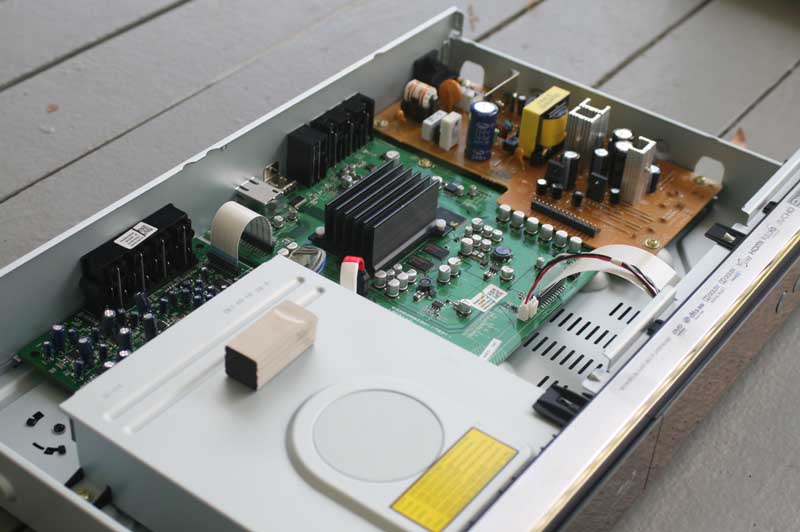 The quality of the internals of this player are nothing to write home about, but nor are they surprising or lacking in anything essential to a good networked BD player. These days everything takes place on chips. And if you're sending your audio and video over HDMI that means that the huge power supplies, endless layers of circuit boards and robust grounding plates are pretty much overkill. We won't say that we don't appreciate those extra touches, but if you're looking for a Blu-ray player that has maximum features and you aren't necessarily in need of the world's best 7.1 analogue outputs, then some of these new players may surprise you. Inside we found the power supply, audio/video board, BD drive, and a dedicated card for the bass-managed 7.1 audio outputs.
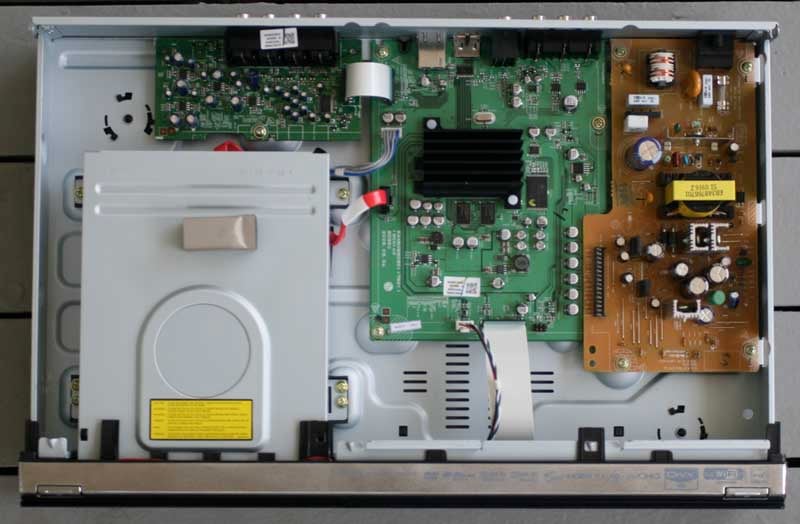
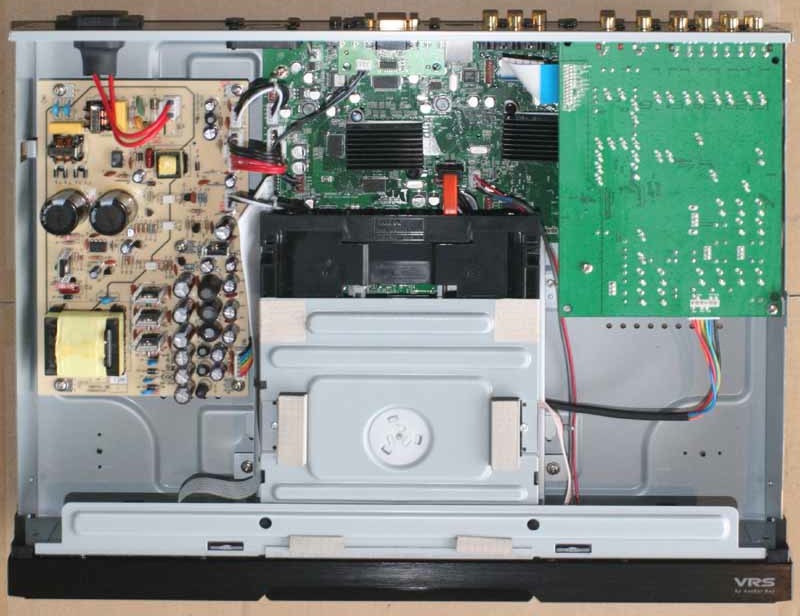
LG BD390 (left) and Oppo BDP-83 (right)
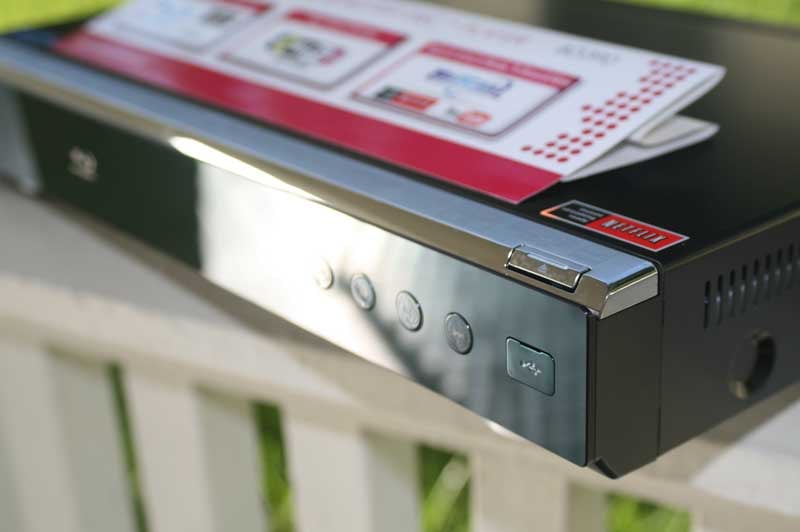 The player features a beautiful reflective high gloss black front panel that is adorned with a brushed metal trim piece that rides over top and displays the various and asundry logos which are now obligatory (but thankfully no longer on the front face) on these players. The player is very lightweight and takes up little more than a rack space in height. The VFD (Vacuum Florescent Display) delivers not only basic Playback time info, but also serves as a mini message board for what's occurring with the player. Whether play/pause functions or firmware updates, this VFD provides some useful feedback to the consumer to let them know what's happening at all times. We especially loved the backlit navigation controls which, in addition to being incredibly cool with their blue backlighting, also lighted up and down in sequence to indicate boot up and shut down. One thing we found odd was that LG placed identical looking corner controls for Eject and Power – one on the right and one on the left. Since the Power button was oriented above the drive mechanism I don't want to tell you how often I powered down the player when all I wanted was to eject the Blu-ray disc!
The back of the player sports HDMI, component and composite video outputs. We are definitely in the era of the death of the S-video output. While we like what S-video did for the quality of video in the 80s and early 90s, we never liked the poorly designed multi-pin connector and couldn't wait for it to die quickly in a post-component video era.

Video, audio, LAN and 7.1 analogue audio outputs. USB is only on the front and is thus intended for flash drive media rather than hard drives.
BD390 Menu System
Before I got too far into using the player I took a look around the Menu system. It was quite easy to use and there were only a few areas that will need attention during 99% of consumers' experience with this player. The rest are tweakers and already skipped this section anyway! The main screen delivers the options to Play a movie, browse photos, listen to music files, examine the contents of an attached USB drive, launch Netflix movie streaming, stream YouTube videos or Setup the system. After a firmware update we were also able to access the CinemaNow system and rent/purchase movies.
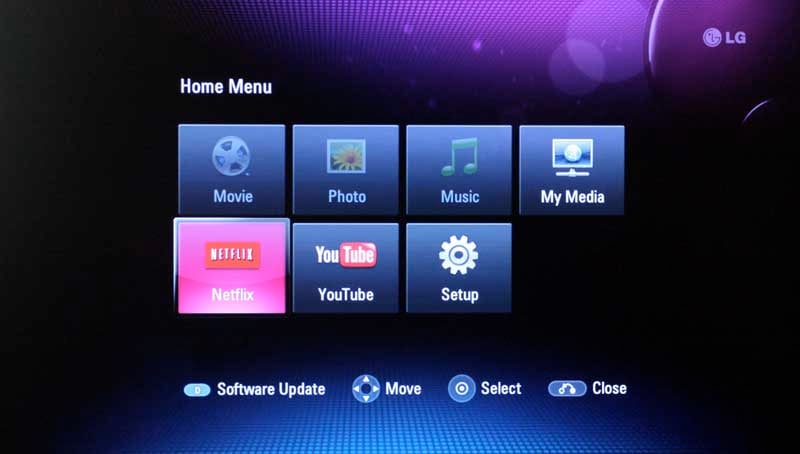
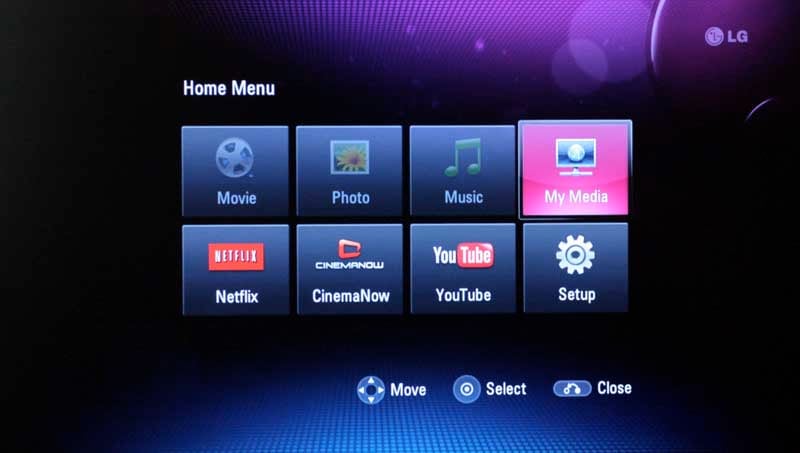
Main menu before firmware update (left) and after (right)
Display Menu
Entering the Setup menu gives you access to Display, Language, Audio, Parental, Network and Other settings & preferences. The system defaults (correctly) to a 16:9 aspect ratio. While you can use Blu-ray with a 4:3 television you are quite possibly one of these if you do. In addition to Aspect Ratio, the Display menu lets you set the 1080p refresh mode to 60Hz or 24Hz and also sets YCbCr (the correct default) or RGB color levels. Resolution can be set up to 1080p and is handy for those who want the player to output only the maximum resolution of their set. Currently, this player can output up to 1080i over component video and up to 1080p via HDMI. It cannot output 480i via HDMI – a shame since some displays will do a much better job up-converting DVDs than this player. The player can also be set to auto-negotiate display resolution via the EDID code contained and transmitted within the HDMI signal.
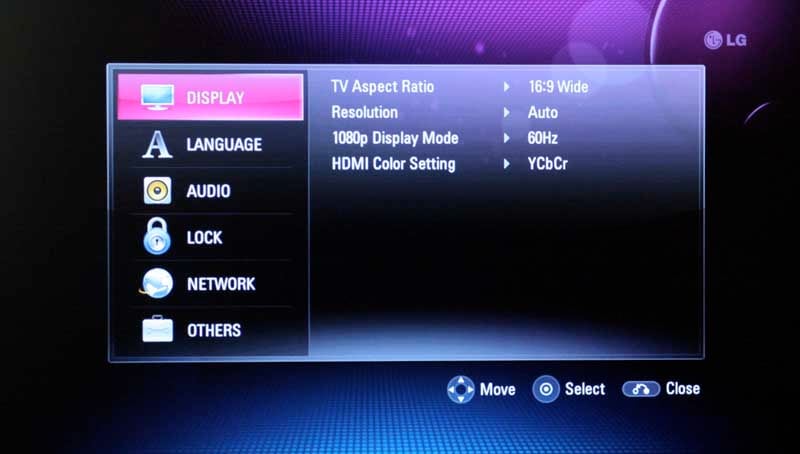
Audio Menu
The Audio menu allows you to set the preferred HDMI audio output settings. It can output PCM audio in both stereo and multi-channel mode and can output a DTS signal for compatible receivers as well as a pass-through mode that outputs (among other things) native Dolby TrueHD and DTS-HD Master Audio. You can also set the sampling frequency output of the player from 48kHz to 192kHz. Many modern receivers will be able to handle 192kHz, but legacy users can downgrade as necessary.
Bass management is also provided for the analogue 7.1 outputs. This means that you can set the speakers size to either Large or Small, and determine how the bass frequency information will be sent to each speaker or the sub. You can also set the Level for each speaker – enabling a much more accurate sound when using the analogue outputs (typically with an older AV receiver). You cannot set Distance (speaker delay), so those using this with larger rooms or unusual configurations may run into some minor issues with delay and phase coherency. If you have the rare receiver that performs bass management on analogue inputs, set all the speakers to Large and let your receiver handle the work of allocating the low frequency information and speaker delay.
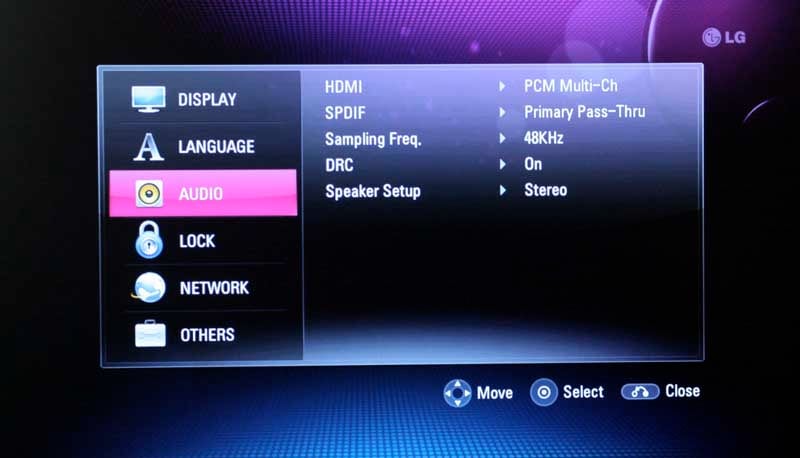
Network Menu
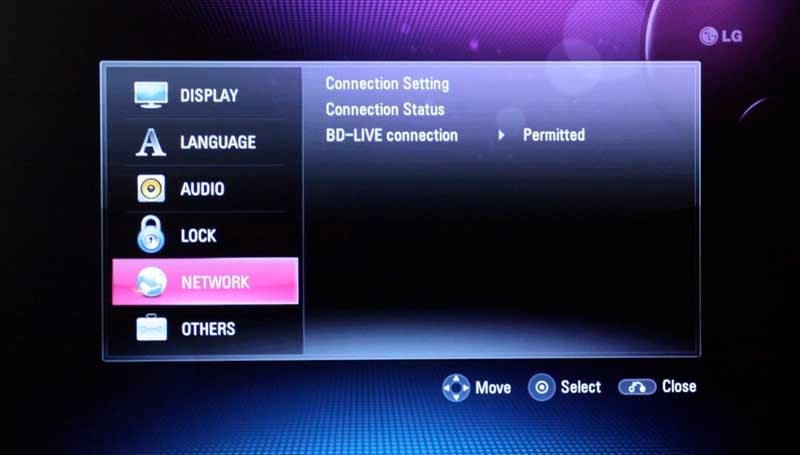 One of the unique features of the LG BD390 is that it can make a connection to a wireless 802.11b or 802.11g router. That means that even if you don't have Ethernet (Cat5x cable) run to your Blu-ray player, you can still enjoy the network features of this player. While we primarily used a 100 Mbps wired connection for this review, we did test the wireless-g functionality and found it to be adequate enough to get us maximum quality for SD Netflix content. This menu also gives users access to setting the BD-Live connection as "Permitted" (always active/allowed), "Partially permitted" (permitted for content that is certificated), and Prohibited (no BD-Live access allowed).
Others
The Others menu houses such settings as menu skin, BD Storage selection and formatting, and checking/deactivation of your Netflix account. You can also use this area to perform a software (firmware) update. The update process was very simple, flawless, and the front VFD display gave excellent feedback for each step. The download was also quite speedy and we were pleased to find that the Firmware update was sophisticated enough to be able to add CinemaNow to our main menu screen.
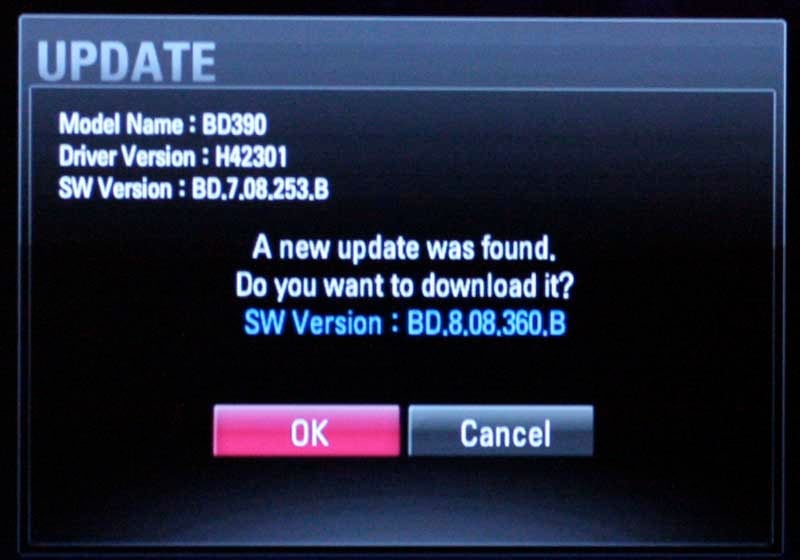
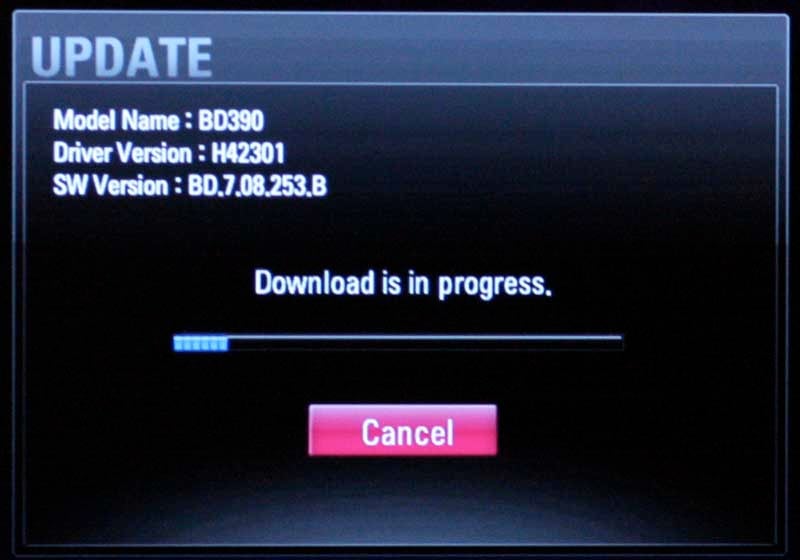
The player checks and alerts you when an update is available; Downloads didn't take long; we did one more firmware update after this and noted (with pleasure) that it didn't affect our player or Picture Adjust settings)
BD390 Setup and Network Features
As we mentioned earlier, the player is quite speedy and it took no time at all to load up a disc and begin playing our first Blu-ray movie. For our base settings we configured the system to output 1080p/24 video from the HDMI output and ignored the Speaker settings since we were using the HDMI output and connecting it to our reference Denon AVR-5308CI AV receiver. We defaulted the HDMI audio output to "Primary Pass-Thru", which sent bitstream DTS-HD and Dolby TrueHD to our receiver as well, giving us the best possible sound quality. We explained the Network settings already and indeed that was very easy to configure, even with our network password (the LG puts up a keyboard to enter in the required text password)).
Remote Control
I can't lie... this is the sexiest remote control I've ever seen with a Blu-ray or DVD player. Oh wait, that's the TV remote... The LG remote is about as bland as we've come to expect from a Blu-ray player, except that it is, at least, light in the hand and has the added benefit of a sliding cover to hide away lesser used functions like TV controls, Pic Mode and Zoom functions. Let's face it – you don't want the manufacturer spending their money on the remote control – not when you're going to use your universal remote anyway. The front and back face of the remote, when viewed up close, has an odd texture to the plastic. It's as if LG was going for a fake cracked leather look – which it pulls off with the same effectiveness Don King pulls off subtlety. Overall the remote works. The Home button is just above the directional navigation area, as you'd expect, and Disc and Pop-up menus are easy to access. The playback navigation controls are easy to use and all buttons were easy to access with the thumb. My only complaint was the lack of any detent on the back to use as a reference point to aid in sliding the remote up and down your hand when using it.
Network Features
Netflix
We'll start with the big dog. Netflix playback is exactly the same as with the Roku Netflix player. The icons, thumbnails and stream-quality display are obviously a direct port in terms of software. Registering the device with my account was simple and the system just works.
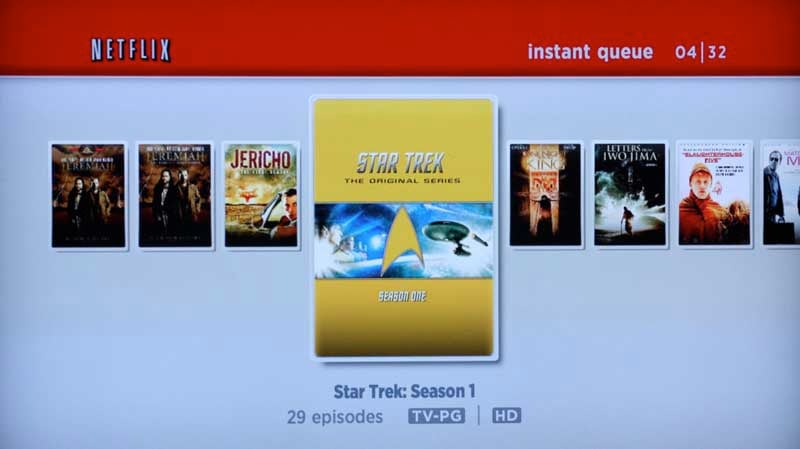
We watched several features on Netflix and they looked as good as we've ever seen it (which is to say acceptable, but not stellar since Netflix does provide a significant amount of compression to its streams. Detail was decent and at maximum quality we found the movies to be very enjoyable, even on our 47-inch flat panel television.
CinemaNow
CinemaNow is an online service where you can both rent and purchase movies for a fee. They have, for example, Inkheart, Gran Torino, and Yes Man available as a rental for $3.99. The service is nice in that you don't need a PC to set up your queue. You simply log into the system (having already set up an account online) and browse or search for movies. Whether you download or rent is up to you (and whether the movie is available for purchase).
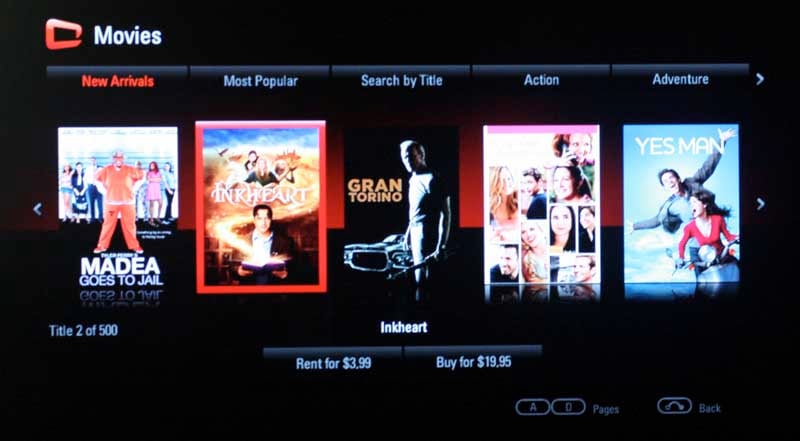
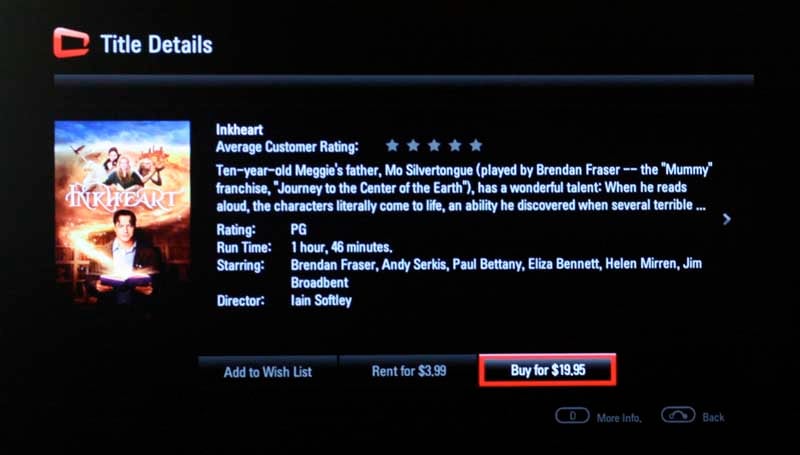
Rent or buy movies... if they have them
We loved the way the system worked, but the selection seemed only marginally more recent than Netflix – and their rentals are free with any monthly DVD rental membership of $8.99 or more. So far with all of these services, the issue seems to be one of licensing and the movie studios not being able to figure out which direction they want to head.
YouTube
I didn't think I'd care much about this, but I stumbled upon a few video gems and quickly realized how neat it is to be able to keep up with my YouTube subscriptions on an actual television for once. With widescreen, there is plenty of room for the movie and the supplemental information beside it. Plus, you can always jump to full screen, though the inherent resolution of the movies (YouTube isn't allowing "HD" streaming of movies through this system just yet) keeps that mode from being all that it can be. Even with its limitations, streaming YouTube videos to your TV is still pretty cool, especially when you store your family movies on there and want to share those movies with others who are over for a visit (or across the nation if your family also has a nifty LG television or Blu-ray player with this feature!)
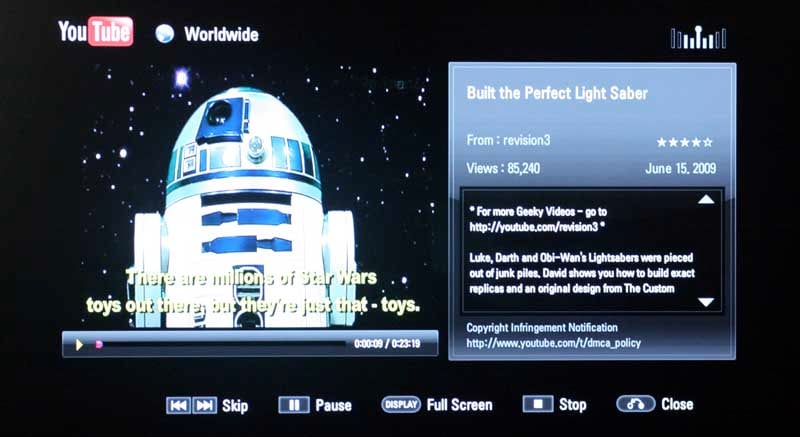
Network & USB Music, Photos, and Videos
In addition to the online streaming content, the LG390 can stream movies and music from networked drives as well as hard drives and flash drives connected to the front USB port. The port can recognize FAT16, FAT32 and NTFS-formatted drives, however you'll need to stick to FAT16 or FAT32 on any drives allocated for use with BD-Live content. We used it (accessed by simply selecting Movie, Photo, or Music from the main menu screen) and it did very well, accepting most of the current formats we'd expect, including DivX and H.264/MPEG-4. Files at up to 1080p resolution could be played back, including AVC files, but there was no mention of AVCHD support and we didn't have a file in that format to test it with.
BD390 Measurements, Testing and Evaluation
Testing the LG BD390 was simply a matter of ascertaining how well the player handled Blu-ray discs (for which we had high hopes) and DVDs (for which we hoped, at the least, that it didn't screw up the image too badly). To help in our evaluation we ran some HQV Benchmarks in addition to the new Spears & Munsil Blu-ray test disc and several real-world clips. We were actually quite impressed with the results.
Audioholics/HQV Bench Testing Summary of Test Results
Perfect Score is 130
LG BD390 Benchmark total score: 86/130 (very good for BD/DVD content)
| Test | Max Points |
Results 1080p |
Pass/Fail |
| Color Bar | 10 | 10 | Pass |
| Jaggies #1 | 5 | 3 | Pass |
| Jaggies #2 | 5 | 3 | Pass |
| Flag | 10 | 5 | Pass |
| Detail | 10 | 10 | Pass |
| Noise | 10 | 5 | Pass |
| Motion adaptive Noise Reduction | 10 | 10 | Pass |
| Film Detail | 10 | 10 | Pass |
| Cadence 2:2 Video | 5 | 5 | Pass |
| Cadence 2:2:2:4 DV Cam | 5 | 0 | Fail |
| Cadence 2:3:3:2 DV Cam | 5 | 0 | Fail |
| Cadence 3:2:3:2:2 Vari-speed | 5 | 0 | Fail |
| Cadence 5:5 Animation | 5 | 0 | Fail |
| Cadence 6:4 Animation | 5 | 0 | Fail |
| Cadence 8:7 animation | 5 | 0 | Fail |
| Cadence 24fps film | 5 | 5 | Pass |
| Scrolling Horizontal | 10 | 10 | Pass |
| Scrolling Rolling | 10 | 10 | Pass |
| Total Points | 130 | 86 |
All tests were done with the HDMI output at 1080p.
Spears & Munsil Cadence Tests
We really like the Spears and Munsil Blu-ray test disc as it provides a secondary source for testing some of the cadences and motion artifacts that we look for in video processors.
| Test | Pass/Fail |
| Cadence 2:2 | Pass |
| Cadence 2:2:2:4 | Fail |
| Cadence 2:3:2:3 PT-F | Pass |
| Cadence 2:3:2:3 | Pass |
| Cadence 2:3:3:2 | Fail |
| Cadence 3:2:3:2:2 | Fail |
| Cadence 5:5 | Fail |
| Cadence 6:4 | Fail |
| Cadence 8:7:8:7 | Fail |
| Cadence Time Adjusted | Fail |
Then we really started to play. With the Picture Mode we were able to adjust Block and Mosquito noise as well. The first thing we did was re-test some of the noise tests on the HQV Benchmark disc. It became readily apparent that the Low setting offered some minor help to reducing mosquito noise, however anything higher than that introduced massive blurring to the overall picture, especially at the edges. Truth be told, for the level of noise reduction gained, we recommend simply leaving Noise Reduction off as this player is one of the most crisp we've ever seen and it would be a shame to dampen that image quality even a little to gain some minor edge artifact noise reduction.
Consumers need to realize at this point that this is one of the most "crisp" players we've ever seen, with resolution and detail that are simply pristine.
Viewing Evaluation
Testing is the "fun" part of any product review. Who doesn't like to get out some great materials and sit back for a nice listen and look? We attacked this player with both standard definition and high-definition content and made good use of its network features and USB streaming capabilities as well. You won't find much talk as the pictures did their job in demonstrating the exceptional (and we mean that) playback quality of this player. I love high definition digital.
BD: Chris Botti in Boston
This disc featured a wonderful live presentation of Chris Botti and had a varied assortment of guest musicians who really enhanced this disc. We particularly loved seeing such a nice high definition transfer that paid attention to lighting and delivered exceptional detail on the musical instruments and the talented artists playing them.


Katharine McPhee (left) and Yo Yo Ma (right)
BD: Batman Begins
A new "classic" that will forever be one of my reference test discs, this movie showed off, practically, what having a player capable of reproducing each level of Black perfectly can look like. Put this on a plasma display or an LED-backlit television and you're going to be very very impressed. We used a Marantz VP-11S1 DLP front projector as well and it looked absolutely pristine with this player.

Did someone put in an order for incredible detail?

How about some exceptional black level reproduction?
BD: The Departed
This is my go-to movie for scene detail and checking to see that players do an excellent job at producing each pixel perfectly without smearing or blurring during noise reduction. There are so many highly detailed scenes in this movie that it's quite difficult to choose just one. For this round, we picked a couple different scenes that really stood out to us and offered a lot to look at.

The location scouter should have won an Oscar for this scene

Detail and black levels in one beautiful shot
Netflix: Jericho, Star Trek (TOS) Season 1 and Wall-E
We love to stream Netflix movies. While the system has its flaws (not a lot of HD vide and no surround sound audio) it's perfect for getting fast free movies into your living room or bedroom. Netflix is now showing up in the top 4 flat panel television manufacturers' products, so expect market penetration and added revenues to increase R&D and only improve the services they offer. We thought that at peak quality Netflix performed as well as it is able – looking almost identical to its Roku set-top box and Xbox 360 counterparts. We streamed Jericho and Wall-E as well as the "HD" Star Trek (TOS) and found all presentations to be very good, with the more recent Wall-E looking particularly crisp for a streaming video.
This player yields excellent depth and movies take on a very 3D look
Back when this aired it didn't look nearly this good. Too bad they didn't shoot it in widescreen.
Listening Evaluation
In our reference theater we have an RBH Sound CinemaSITE which features a trio of Signature Series SI-760/R in-wall speakers and a pair of 66-SE bi-pole surrounds. Subwoofer duty is handled by twin SI-1010 subwoofers that pump out incredibly tight bass all the way down to 28Hz. We popped in some DTS music as well as the aforementioned Chris Botti concert and sat back to enjoy the show. We opted to use the HDMI audio at all times, so while we can't really speak for what the player was doing especially to the music, we can say that the resulting experience was absolutely wonderful. Our room filled with music and the experience surrounded us with natural reverb and ambience. During our movie-watching sessions we were absolutely floored by the clear soundtrack and dialogue while we experienced explosions, gunfire and flying robots evening after evening.
Conclusion
The LG BD390 is an incredible player – and one that has some pretty ground-breaking features. Forget Blu-ray, this is almost a media center in that it provides extensive access to music from a myriad of sources. In terms of comparison, I'd have to say that for HD material this player is every bit as good as the Oppo we reviewed earlier this year and offers some impressive advantages in terms of functionality. If you need a truly universal player your course is clear. If, however, you have no need for SACD or DVD-Audio compatibility but appreciate features like Netflix movie streaming, YouTube video accessibility and CinemaNow movie rentals, then save yourself $50 because LG has hit one out of the park with its $450 BD390. And, on top of that, it will connect to your wireless network! This is one player that is going to make a lot of consumers very satisfied. We can't praise it enough.
MSRP: $450
http://www.lgusa.com
About LG Electronics USA
LG Electronics USA, Inc., based in Englewood Cliffs, N.J., is the North American subsidiary of LG Electronics, Inc., a global force and technology leader consumer electronics, home appliances and mobile communications. In the United States, LG Electronics sells a range of stylish and innovative home entertainment products, mobile phones, home appliances and business solutions, all under LG’s “Life’s Good” marketing theme. For more information, please visit www.LGusa.com.
The Score Card
The scoring below is based on each piece of equipment doing the duty it is designed for. The numbers are weighed heavily with respect to the individual cost of each unit, thus giving a rating roughly equal to:
Performance × Price Factor/Value = Rating
Audioholics.com note: The ratings indicated below are based on subjective listening and objective testing of the product in question. The rating scale is based on performance/value ratio. If you notice better performing products in future reviews that have lower numbers in certain areas, be aware that the value factor is most likely the culprit. Other Audioholics reviewers may rate products solely based on performance, and each reviewer has his/her own system for ratings.
Audioholics Rating Scale
 — Excellent
- — Very Good
- — Good
- — Fair
- — Poor
| Metric | Rating |
|---|---|
| High Definition Video Performance | |
| Standard Definition Video Performance | |
| High Definition Audio Performance | |
| Analogue Audio Performance | |
| Bass Management | |
| Deinterlacing & Scaling | |
| Build Quality | |
| Ergonomics & Usability | |
| Ease of Setup | |
| Features | |
| Remote Control | |
| Fit and Finish | |
| Performance | |
| Value | |
Clint Deboer was terminated from Audioholics for misconduct on April 4th, 2014. He no longer represents Audioholics in any fashion.
View full profile Subscribe to our newsletter