


SONY BDP-S780 3D Network Blu-ray Player Review
- Product Name: BDP-S780 3D Network Blu-Ray Player
- Manufacturer: Sony
- Performance Rating:

- Value Rating:
- Review Date: November 06, 2011 21:11
- MSRP: $ 249
Video
-
HD (24Hz) (24p True Cinema)
-
HD (60Hz) : 480i/480p/720p/1080i/1080p
-
HD 24Hz to 60Hz conversion
-
DVD 24p output
Network Features
-
Audio Chat
-
Content Share
-
Help Browser
-
TV dongle Camera, Normal Camera : Either (not supplied)
-
Video Chat
-
Wi-Fi Built in
Video Features
-
2D>3D
-
Preset Picture mode Cinema tuned (Theater room/Brighter room/Standard room/Film/Anime/Auto)
-
24p True Cinema™ Technology
-
3D Playback
-
BD-R/RE Read Compatibility
-
BD-ROM : Bonus View(Profile1.1); BD-Live(Profile2.0); BD-ROM (SL/DL)
-
DVD Camcorder 8cm DVD, RW/-R (+VR)
-
DVD Playback
-
DVD+-R/ +-RW Read Compatibility
-
JPEG Playback : BD/DVD/CD/USB/DLNA
-
Noise Reduction : (BNR on DVDs Only)
-
PhotoTV HD
-
Picture Parameter Adjustments : (Brightness/Contrast/Hue/Color)
-
x.v.Color™ Technology
Audio Features
-
Music : BD/DVD/CD/USB/DLNA (non secured)
-
DTS : BD/DVD/CD/USB/DLNA (non secured)
-
LPCM : BD/DVD/CD/USB/DLNA (non secured)
-
MP3 Playback : BD/DVD/CD/USB/DLNA (non secured)
-
SACD playback
Inputs and Outputs
-
HDMI Output(s) : 1 (Rear)
-
Composite Video Output(s) : 1 (Rear)
-
Component Video Output(s) : 1 (Rear)
-
Digital Audio Output(s) : 1 (Rear)
-
USB Input(s) : 2 (1 Rear/ 1 Front)
-
Ethernet Connection(s) : 1 (Rear)
-
Analog Audio 2ch Output(s) : 1 (Rear)
Weights and Measurements
-
Dimensions (Approx.) : 17" x 1.8" x 7.8" (430 x 46 x 199mm)
-
Power Consumption (in Operation) : 22W
-
Power Requirements (frequency) : 60Hz
-
Power Requirements (voltage) : 120V
Pros
- Easy Setup
- Built In Wi-Fi connectivity
- Lots of Network Apps, Including SKYPE
- 3D Upconversion
- Fast Operation
Cons
- No Dual Output for HDMI
- Relatively standard build Quality
- No Backlit Remote
SONY BDP-S780 3D Network Blu-ray Player Overview
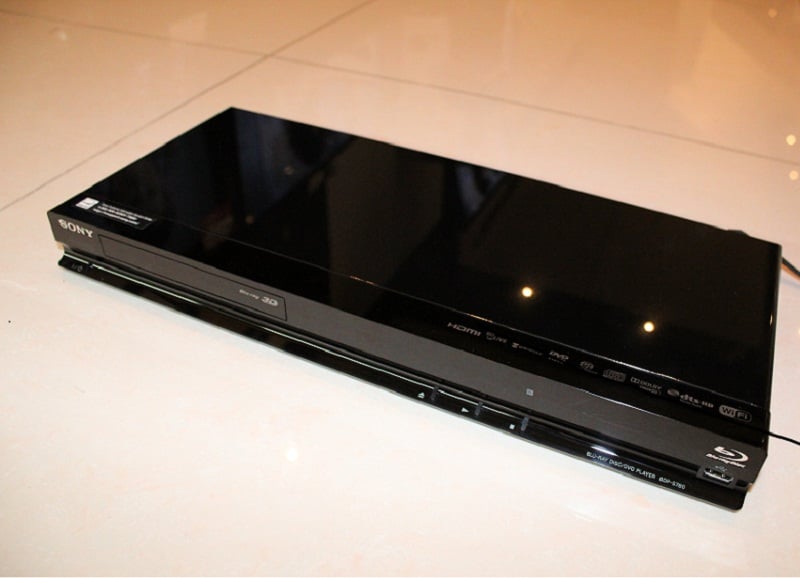 Sony offers some of the best value in
Blu-Ray players today. With five models
all offering network access and three of them being 3D capable, SONY has an
answer for everyone’s Blu-Ray needs. The
Sony BDP-S780 model is their flagship and comes packed with the most features
for their Blu-ray product line. SKYPE
video calling, 3D up-conversion, and Sony’s SBMV (Super Bit Mapping 16bit
processor) lead the feature list for the BDP-S780, and distinguish it from the
rest of the pack. Beyond these three
features the BDP-S780 retains the complete suite of Network Video and Music
options we’ve come to expect from a SONY player. Additionally this Sony unit is one of the
fastest players out there, and with the “Quick Start” power mode engaged, the
player will boot up and load the Sony Cross Media Bar Menu system (XMB) in
about three seconds, and Blu-Rays just a few seconds beyond that. Bottom line the BDP-S780 meets just about
every requirement for a great Blu-Ray player today and won’t disappoint even
the most feature hungry user.
Sony offers some of the best value in
Blu-Ray players today. With five models
all offering network access and three of them being 3D capable, SONY has an
answer for everyone’s Blu-Ray needs. The
Sony BDP-S780 model is their flagship and comes packed with the most features
for their Blu-ray product line. SKYPE
video calling, 3D up-conversion, and Sony’s SBMV (Super Bit Mapping 16bit
processor) lead the feature list for the BDP-S780, and distinguish it from the
rest of the pack. Beyond these three
features the BDP-S780 retains the complete suite of Network Video and Music
options we’ve come to expect from a SONY player. Additionally this Sony unit is one of the
fastest players out there, and with the “Quick Start” power mode engaged, the
player will boot up and load the Sony Cross Media Bar Menu system (XMB) in
about three seconds, and Blu-Rays just a few seconds beyond that. Bottom line the BDP-S780 meets just about
every requirement for a great Blu-Ray player today and won’t disappoint even
the most feature hungry user.
Networking
The network features Sony offers in the BDP-S780 is about as complete as it gets for a Blu-Ray player. Sony provides over 30 different Internet video channels in all, and features pretty much every heavy hitter that’s in the network video channel market. The BDP-S780 has you covered for Netflix, Youtube, Hulu Plus, Vudu, Amazon Video-On-Demand, and Sony’s Qriocity Video Unlimited. Additionally, Sony provides access to some other smaller Internet Video Channels such as Blip.tv, Crackle, the NHL Vault, the Michael Jackson Video Collection, and Sony’s 3D experience to name a few of the other video options available.
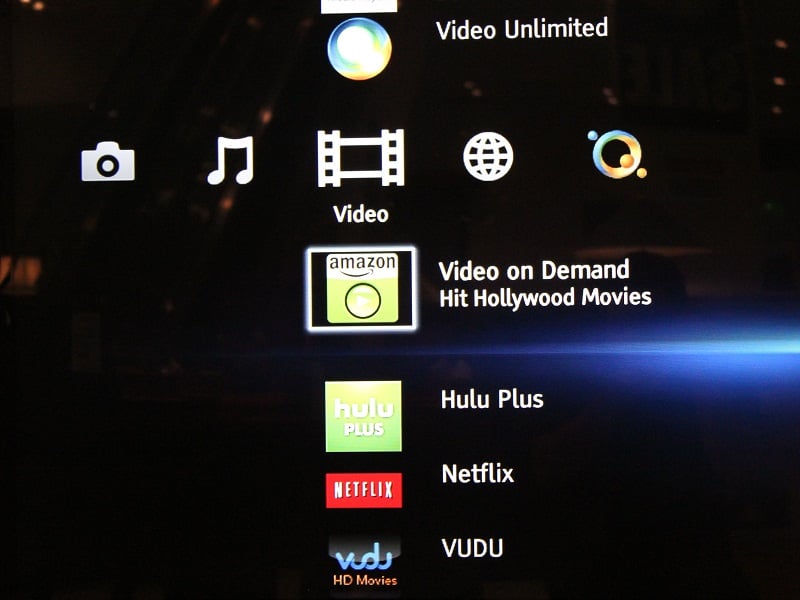
Sony BDP-S780 Supported Streaming Services
Check out the all the Major Players in Video Networking on this player in the screenshot above. For network music applications, Sony once again provides a very complete list of options for the network music enthusiast. Pandora Internet Radio…check; Slacker Radio…check; Sony Qriocity Music Unlimited…check; DLNA network file sharing…a BIG CHECK! Like the video options, the BDP-S780 contains lots of other network music options, but those apps just listed are the key ones most users will find pertinent.
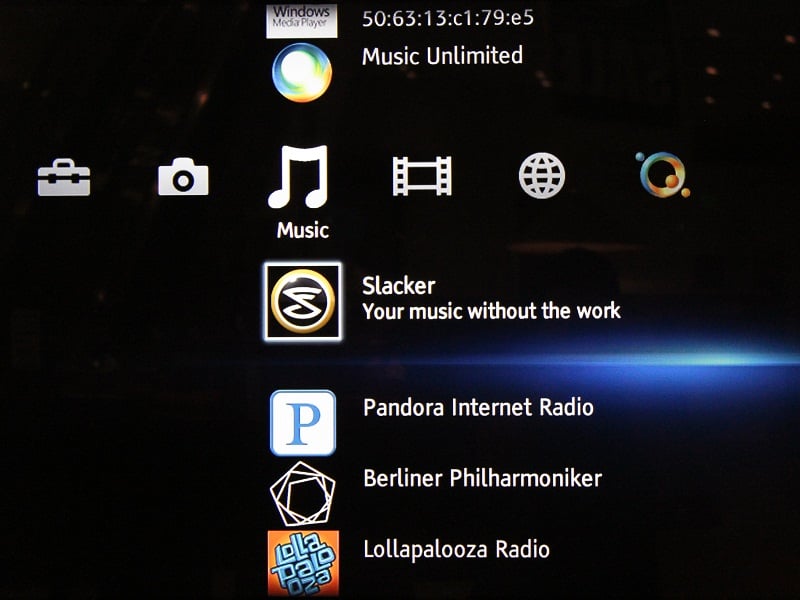
Slacker and Pandora Lead the Network Audio section for this player
Clearly the BDP-S780 has tons of Network features that we’ve all become accustom to, but what about today’s latest and greatest apps? Heck Netflix has been around since 2008, so I’d expect it in a player at this point, and Sony hears you loud and clear here. Where’s the video conferencing one might ask? Well SKYPE takes care of that and Sony even makes an exclusive SKYPE camera that plugs into one of USB ports on the player (model CMU-BR100 msrp $149.99). What about the apps the player doesn’t have? Well since the player is network updateable, new Video and Music features will find their way into the unit as fast as Sony can license them! For example, CinemaNow is already listed as “coming soon” in the video apps list, so Sony does intend to support and update the unit beyond the initial point of purchase. Also with extremely fast network file sharing, practically any music, video, or photo files you add to your home shared network, the BDP-S780 will pick up and playback on your TV. Just remember to go get an HD camcorder otherwise those old 4:3 standard def home videos might not look so hot on the new 55” LED HDTV!
Let’s talk about the player’s DLNA file sharing for a second. The player has dedicated apps for Photo, Music, and Video files that are shared across the network, which makes file sharing a breeze to configure. Set your desired folder as “shared” on your PC, and the BDP-S780 will detect that computer and folder in the XMB. Select the file and play. The speed of playback will be determined by your Wi-Fi network, but if you have the latest N network router or you hardwire the internet, you should have extremely fast access to your shared media.
There is a couple of setup points that you’ll need to know about before you get the network functions up and running. First and foremost like any Sony network device, you’ll need to start up a Sony Account to register the player for network access to Netflix. The player will prompt you with an on screen message that says, “Please visit the Sony registration website internet.sony.tv/Netflix and put in the following access code…XXXX.” This is a separate activation page from the one that accessing Netflix will ask you to go to (www.netflix.com/activate). Secondly, the player offers, “wireless protected setup” for easy network communication when initializing the unit. “Wireless Protected Setup” or WPS, is super important for those of you that don’t remember your network password. Simply choose the WPS setup option, and go press that WPS button on the front of your Internet Router, and the BDP-S780 should quickly connect to the network without the hassle of manually keying in your network password.
Setup and Configuration
Okay, so all of these network features are amazing, and everything sounds great, but if you can’t setup the player and configure it properly, this home theater all-inclusive cruise liner just turned into an antiquated DVD playing tugboat. Luckily, the setup process is pretty simple, and networking and all these special features really are accessible to even the home video networking novice.
Turn the player on for the first time, and the Sony basic startup wizard takes over and will guide you through the motions for getting the BDP-S780 up and running. Initial setup will ask you how its connected (HDMI, component, composite), and your display’s native resolution (1080p, 1080i, 720p, etc.). When choosing the resolution, know that if you select a specific number, the player will use its internal video processor to upscale and force the resolution out for all content. However if you choose AUTO, then the player will best choose the resolution for the source and the screen. This is recommended for users that are not sure about their TV’s resolution.
Other basic setup functions include the network setup featuring the WPS push button connection as stated earlier, as well as the “Quick Start Mode,” which will allow the player to boot up very quickly from a standby power position. Quick start mode will use a bit of ghost power, but will make the speed of the player much more enjoyable. Don’t expect to go make popcorn in between turning the player on and starting up the movie, because unlike older units, the BDP-S780 operates in seconds, not minutes.
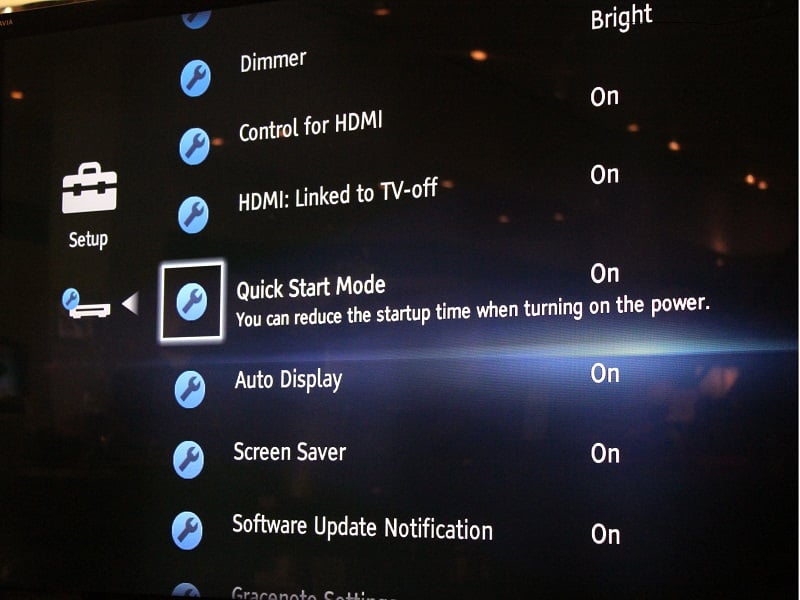
Sony BDP-S780 Quick Start Mode
SONY BDP-S780 3D Network Blu-ray Player Performance and Advanced Video Features
Sony upgrades the BDP-S780 over the rest of their line by providing 2D-3D up-conversion, as well as the Sony “SBMV - Super-bit Mapping 16 bit” video processor to help improve picture quality. All Blu-Ray content seemed to be very resolved and had an extremely clean look. Standard definition disks are watchable, but are not quite as sharp as compared to images produced by say the DENON and OPPO players, that run more than twice the price of the Sony. After performing the HQV benchmark tests, the just decent quality of the DVD picture came apparent after revealing the SBMV clearly offers no noise reduction in the chip. While noise reduction is virtually non existent, the player passed every other test on the list.
Sony Blu-ray Player BDP-S780 Benchmark total score: 110/130
| Test | Max Points |
1080p Results |
1080p AUTO |
| Color Bar | 10 | 10 | Pass |
| Jaggies #1 | 5 | 5 | Pass |
| Jaggies #2 | 5 | 5 | Pass |
| Flag | 10 | 10 | Pass |
| Detail | 10 | 10 | Pass |
| Noise | 10 | 0 | Fail |
| Motion adaptive Noise Reduction | 10 | 0 | Fail |
| Film Detail | 10 | 10 | Pass |
| Cadence 2:2 Video | 5 | 5 | Pass |
| Cadence 2:2:2:4 DV Cam | 5 | 5 | Pass |
| Cadence 2:3:3:2 DV Cam | 5 | 5 | Pass |
| Cadence 3:2:3:2:2 Vari-speed | 5 | 5 | Pass |
| Cadence 5:5 Animation | 5 | 5 | Pass |
| Cadence 6:4 Animation | 5 | 5 | Pass |
| Cadence 8:7 animation | 5 | 5 | Pass |
| Cadence 24fps film | 5 | 5 | Pass |
| Scrolling Horizontal | 10 | 10 | Pass |
| Scrolling Rolling | 10 | 10 | Pass |
| Total Points | 130 | 110 |
As standard definition DVDs becoming passé with all the internet video out there, the BDP-S780’s ability to upconvert 2D to 3D is really what sets this player above the rest of the Sony line-up and into the realm of a top tier player. I had the preconceived notion that this feature would look the same as the 2D to 3D gimmick feature that so many 3D TV manufacturers put into their displays, and I must say I was dead wrong with my preconception. 2D to 3D conversion within the player is an absolute boon for any 3D enthusiast. Since we’ve had 2D to 3D upconversion available in TVs, converted images tend to have strange foreground and background depth issues that can make images look wobbly, and could easily introduce crosstalk into the image. Now with the 2D to 3D conversion being done within the player, the TV doesn’t have to do the heavy lifting, and as a result, my eyes did not experience any of the already stated picture anomalies.
The BDP-S780’s ability to perform the 2D to 3D conversion yielded a very excellent 3D image across all material I tested. My favorite example would be the opening space battle from Star Wars Episode III: Revenge of the Sith. The scene opens up with a large federation cruiser scrolling over the screen with two Star fighters making their way into the battle, and if no one told me it wasn’t actually a 3D movie, I’d never know the difference. I also tested sections from Transformers Dark of the Moon on Blu-Ray and the DVD of Superman I, and all tests yielded a similar result, with none of the images suffering from any foreground to background mix-up.
Build Quality and Remote Control
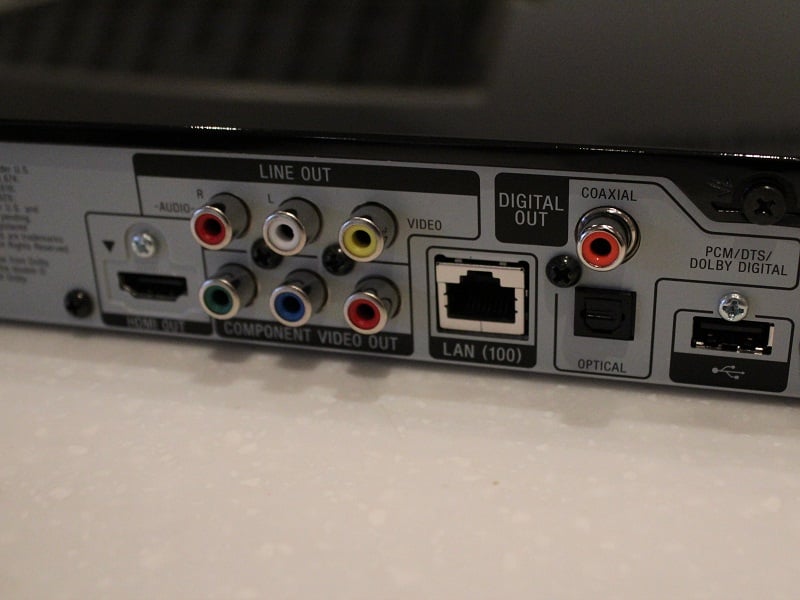
As usual with a major brand Blu-Ray player, the BDP-S780 is extremely lightweight and takes up a very small footprint. At around 8” deep, it’s probably as thin or thinner than the last DVD player you bought. The player’s outside case is finished in the same high gloss piano black finish as most HDTVs. It has a slightly nicer look than the standard cheap metal casings most Blu-Ray players have, but its definitely not a super high end unit with a massive torroidal power supply. The rear panel on the unit has all the expected connections; HDMI, Component and Composite video with analog audio, Ethernet LAN port, Digital Coax and Optical audio ports, and a USB port. On the front of the player, the BDP-S780 is outfitted with an additional USB port, presumably for quick access to pictures, music, or video files, as well as hard buttons for Power, Eject, Play and Stop.
Sony
BDP-S780 Backpanel
The Sony BDP-S780’s backpanel is about as standard as it gets for a rear panel. Legacy connections such as composite cable for video and digital optical and Coax for audio are present. One major connectivity omission was not including dual HDMI output on the back panel. Both Panasonic and Samsung offer this feature in their competing top model, and having dual HDMI output will be very useful for anyone that has a HDMI 1.3 or ealier spec’d AV Receiver, since HDMI 1.3 is not capable of passing a 3D video signal to a display. A 3D video signal sent through a receiver can only be passed to a 3D display if the receiver has the HDMI 1.4 specification, so a Blu-ray player with dual HDMI output allows for separate connections to the AV Receiver for passing Hi-Def audio, and to a 3D display to pass the 3D signal. I guess Sony’s thought is that most people who are purchasing the BDP-S780 have also recently upgraded to a new 3D HDTV, and presumably a new receiver along with the set. The funny part is that even the remote is equipped with a dedicated 3D button so one would think that Sony would be supporting all kinds of different 3D setup scenarios. Speaking of the remote lets check that out next.
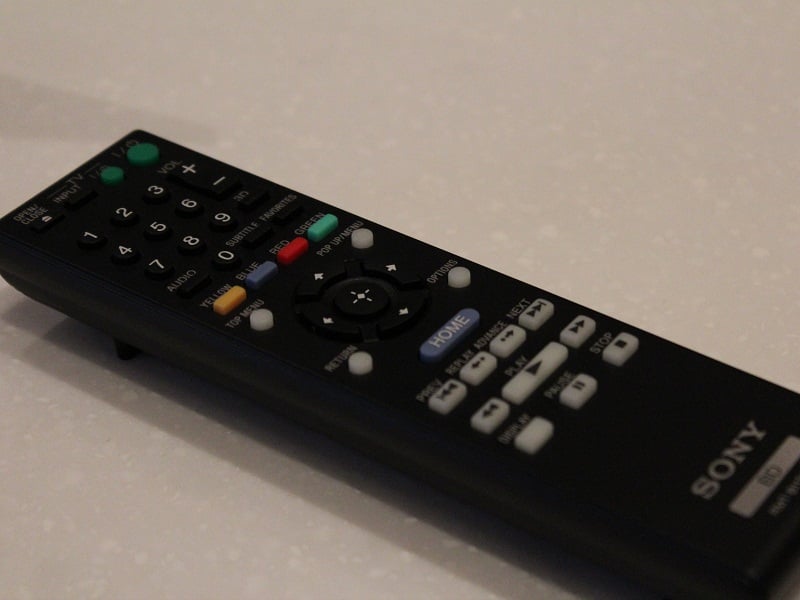
Easy to hold, easy to use, buttons that are just spaced out enough, I give the Sony BDP-S780 remote an overall score of 85/100
The BDP-S780 remote is well laid out. The button schematic and size is nearly identical to last years predecessor the BDP-S770, and that’s a good thing since that remote was very functional. As just stated above, on this year’s remote there is a button for 3D located right underneath the volume control, which switches between 2D and 3D modes for regular 2D content. Also a nice touch are the glow in the dark buttons for all regular playback functions (play, pause, stop, chapter skip, etc.), but it doesn’t compare to last years remote that was backlit!! Sony probably couldn’t pack in the backlighting with that new 3D button!
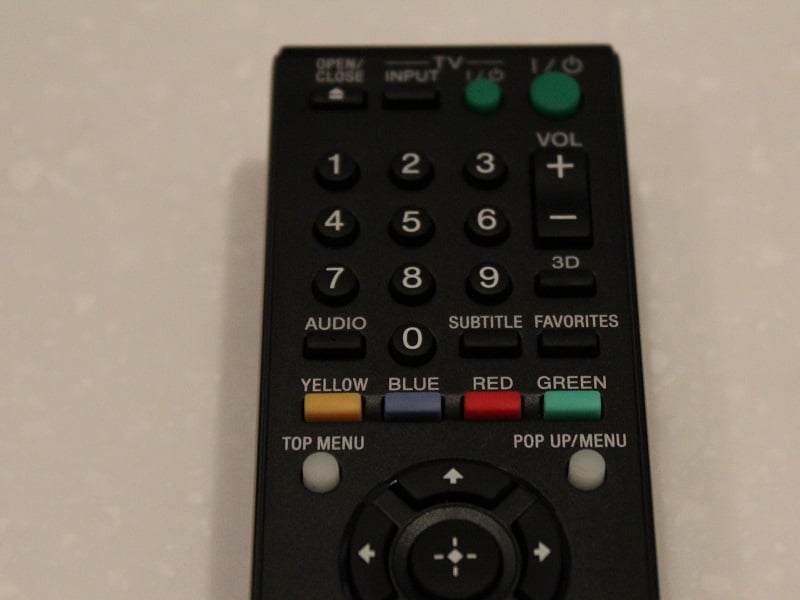
Check out that 3D button under the volume. Pretty useful instead of a menu toggle.
SONY BDP-S780 3D Network Blu-ray Player or Sony Playstation 3 (PS3)?
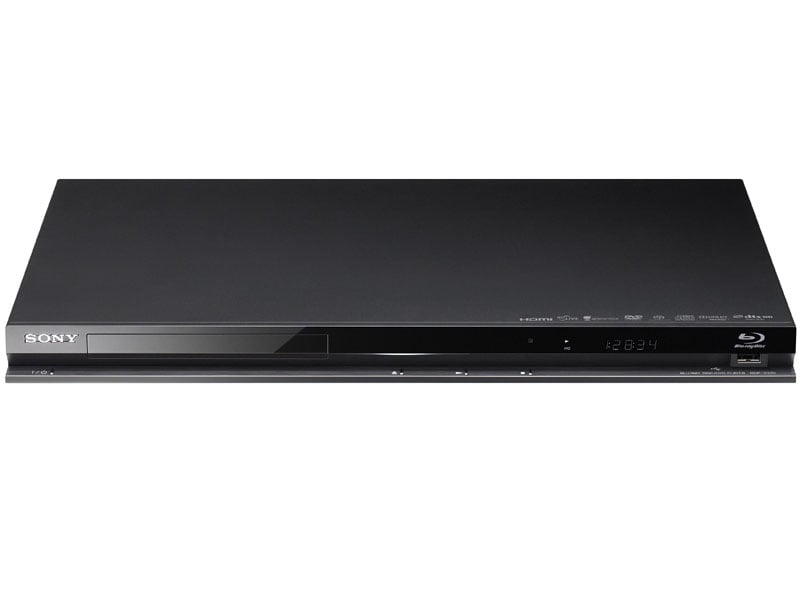 While
this new Sony player is clearly a great machine, is it better than the other
great Blu-Ray playing device Sony offers, the Playstation 3? Well let’s review and decide.
While
this new Sony player is clearly a great machine, is it better than the other
great Blu-Ray playing device Sony offers, the Playstation 3? Well let’s review and decide.
First off is price point. They’re the same. With Sony recently dropping the PS3 to $249, the BDP-S780 and PS3 are now tied from a price standpoint. So what does one do the other doesn’t? Well they both offer network video and music options, although quite a bit less with the PS3 than with the BDP-S780. The PS3 plays awesome hi-definition and 3D video games, and the BDP-S780 does not. The Blu-Ray plays SACD and even offers DSD decoding over HDMI to a compatible receiver. The latest PS3 offers no SACD playback of any type. The SKYPE video calling feature is out and ready for the BDP-S780, the PS3 may get the update…someday. The PS3 is still not very universal remote friendly with its required $30-$100 universal remote adapters, whereas the BDP-S780 has a full set of discrete IR commands for control. Finally speedwise, they are both excellent, but as a video player the BDP-S780 seems to boot up and start movies faster than the PS3.
So as a standalone Blu-Ray player, I think the BDP-S780 takes the cake over Sony’s own PS3 in nearly every category. Granted it doesn’t play games like the PS3, but I’d prefer to have a great dedicated player in my home theater rig than the jack-of-all-trades PS3.
Conclusion
After going through all the features and setup options this Blu-ray player offers and really diving into the network functions, I can say that the Sony BDP-S780 would be a great addition to any home theater or video system that is in need for an upgrade to the latest in today’s tech. Does it play video games like the PS3, NO. Does it have the audiophile quality analog output stages like disc players from OPPO and DENON, NO. What it does very well is play Blu-Ray movies without a hitch, and offers more networking options than most people will ever really know what to do with. For that alone I recommend this player wholeheartedly. Skip paying the $100 or so on a network media player and go get this BDP-S780 and you’ll be adding the HD turbo charger your system really needs.
We would like to thank Adam Liebling from the “Just One Touch” installation firm for contributing this review to our website. www.justonetouch.tv
The Score Card
The scoring below is based on each piece of equipment doing the duty it is designed for. The numbers are weighed heavily with respect to the individual cost of each unit, thus giving a rating roughly equal to:
Performance × Price Factor/Value = Rating
Audioholics.com note: The ratings indicated below are based on subjective listening and objective testing of the product in question. The rating scale is based on performance/value ratio. If you notice better performing products in future reviews that have lower numbers in certain areas, be aware that the value factor is most likely the culprit. Other Audioholics reviewers may rate products solely based on performance, and each reviewer has his/her own system for ratings.
Audioholics Rating Scale
 — Excellent
- — Very Good
- — Good
- — Fair
- — Poor
| Metric | Rating |
|---|---|
| High Definition Video Performance | |
| Standard Definition Video Performance | |
| High Definition Audio Performance | |
| Bass Management | |
| Deinterlacing & Scaling | |
| Build Quality | |
| Ergonomics & Usability | |
| Ease of Setup | |
| Features | |
| Remote Control | |
| Performance | |
| Value | |
 Subscribe to our newsletter