


Oppo DV-983H Flagship Universal DVD Player Review
Oppo DV-983H DVD Player
- Product Name: DV-983H Upconverting DVD Player
- Manufacturer: Oppo Digital
- Performance Rating:


- Value Rating:
- Review Date: June 23, 2008 07:00
- MSRP: $ 399
|
Supported media: DVD-Video, DVD-Audio, SACD, CD, HDCD, Kodak Picture CD CD-R/RW, DVD±R/RW, DVD±R DL Video Analog Video: Composite, S-Video (Y/C), Component Video (Y/Pb/Pr, 480i/480p, 720p/1080i/1080p available for non-encrypted content only) Digital Video: HDMI with HDCP (NTSC: 480p/720p/1080i/1080p, PAL 576p/720p/1080i/1080p) Composite Video Amplitude: 1.0Vp-p (75Ω) S-Video Amplitude: Y: 1.0Vp-p (75Ω), C: 0.286Vp-p (75Ω) Component Video: Y: 1.0Vp-p (75Ω), Pb/Pr: 0.7Vp-p (75Ω) Audio Analog Audio: 7.1ch, 5.1ch or stereo Digital Audio: Coaxial, Optical HDMI Audio: Stereo or up to 5.1ch high-resolution PCM Frequency: 20Hz - 20kHz (±1dB) Signal-to-Noise Ratio: >100dB Total Harmonic Distortion: < 0.01%
|
Power Supply: ~ 100V – 240V, 50/60Hz AC Power Consumption: 20W Dimensions: 16-7/8 x 10-1/2 x 2-1/8 inches (430 x 267 x 53mm) Weight: 6.1 lbs (2.8 kg) Operating Temperature: 41°F - 95°F (5°C - 35°C) Operating Humidity: 15% - 75% (No condensation) |
Pros
- Pristine video performance
- Bargain upconverting player
- Standard power cable
Cons
- Tough sell in current marketplace
- Rudimentary bass management
- Fixed crossover (when engaged)
DV-983H Build Quality and Video Processing
We waited a bit to review the Oppo DV-983H DVD player. We had it just as early as everyone else, but we wanted to get our hands on what we felt is a potential competitor: the Sony Playstation 3. DVD players are undergoing a consumer and economic shift at present. With the rapidly dropping prices of existing upconverting players and the emergence of HDMI as a digital audio and video standard, DVD players are losing most of what differentiates them from each other. Audio used to be a major issue, but now it is really becoming difficult to "screw up" HDMI. In addition, video processing is becoming "old hat" and most players are doing a significantly better job than in years past. The real competition is with the emergence of Blu-ray and the decision of whether to purchase your, perhaps final, "high-end" universal DVD player or simply just to move on to the latest HD format. We already know that Oppo's many DVD players are a fantastic deal and offer stellar quality for the price, but with the introduction of a $399 model, the budgetary question becomes a real issue. This review will attempt to evaluate the flagship Oppo player in that light.
Unpacking & Build Quality
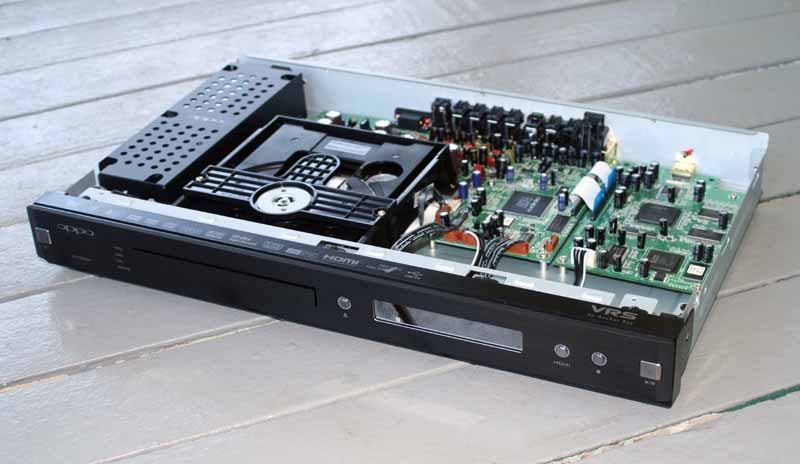 As with all Oppo
players, this one came in a nice retail package and wrapped in a cloth garment.
Unlike other Oppo players, the front face of the DV-983H is made of a piece of
thick brushed aluminum and has the look of a minimalistic high-end piece of
equipment. There are only 5 buttons on the front (Power, Eject, HDMI, Stop,
Play/Pause), each of which have a backlight and are a nice metallic contrast to
the black player. Lose the remote and you'll need to contact Oppo for a
replacement if you want to continue to fully utilize the player. When each
button on the front is pressed, the surrounding blue backlight lights up. In
the case of the Power button it goes from having a red inset light (Standby) to
Blue (On). The Play/Pause button's inset blue light only activates during use
and then winks out after a couple seconds.
As with all Oppo
players, this one came in a nice retail package and wrapped in a cloth garment.
Unlike other Oppo players, the front face of the DV-983H is made of a piece of
thick brushed aluminum and has the look of a minimalistic high-end piece of
equipment. There are only 5 buttons on the front (Power, Eject, HDMI, Stop,
Play/Pause), each of which have a backlight and are a nice metallic contrast to
the black player. Lose the remote and you'll need to contact Oppo for a
replacement if you want to continue to fully utilize the player. When each
button on the front is pressed, the surrounding blue backlight lights up. In
the case of the Power button it goes from having a red inset light (Standby) to
Blue (On). The Play/Pause button's inset blue light only activates during use
and then winks out after a couple seconds.
The player arrives with an extra-thick 14 ga. polarized power cord, HDMI cable, composite and analogue stereo RCA cables and a remote control with batteries. This is the same remote control that ships with all current Oppo DVD players. The HDMI cable is short enough to ensure that it will most assuredly work properly, but the presence of ferrite cores is not something that screams "quality".
There are four micro-LED lights which are used to indicate the HDMI output resolution (480/576/720p/1080i/1080p. If HDMI is disabled, the lights are all off. The main VFD (vacuum florescent display) screen is blue and sits back from the front panel to give the display some depth. The VFD has icons for what disc type is inserted (DVD, DVD-A, SACD, CD, HDCD, and A.Only) as well as visual cues for Mute, Track/Chapter, Title/Group, A-B Repeat and Random modes. There are also some icons which light up to show the presence of Dolby Digital, dts, EX modes, Play/Pause, Repeat (Single or All), and Angle. Oppo really crams a lot into the display, though given its size I don't think it will be used for much more than troubleshooting audio or video format issues.
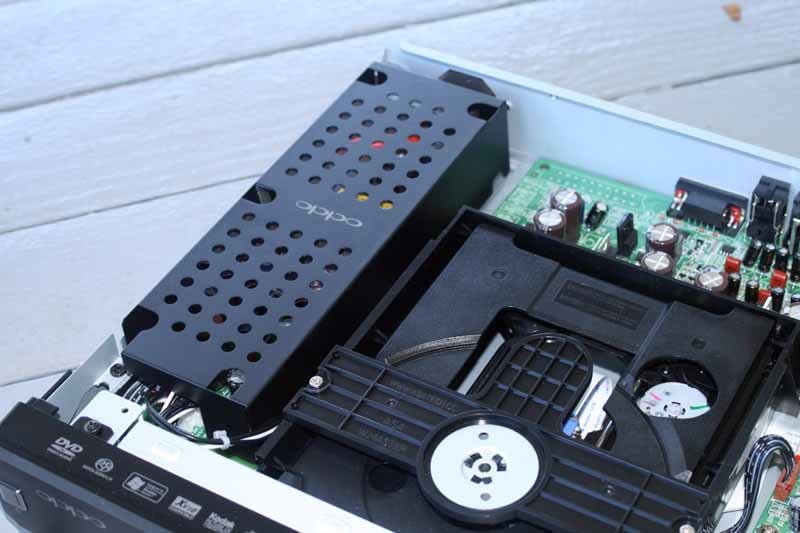 Opening up the unit (my
favorite part), I saw that Oppo had been careful to physically shield the power
supply from the rest of the components. They also located the circuit boards to
the back of the chassis, separating them as much as possible from the VFD. It
was nice to see that Oppo didn't succumb to the forces of darkness and place
its electronics into a chassis that was grossly oversized in order to make the
unit appear more "elite". They simply packaged the DV-983H into the
same sized box they have used for their other models but gave it a nicely
upgraded thick aluminum face. It's honest and it works.
Opening up the unit (my
favorite part), I saw that Oppo had been careful to physically shield the power
supply from the rest of the components. They also located the circuit boards to
the back of the chassis, separating them as much as possible from the VFD. It
was nice to see that Oppo didn't succumb to the forces of darkness and place
its electronics into a chassis that was grossly oversized in order to make the
unit appear more "elite". They simply packaged the DV-983H into the
same sized box they have used for their other models but gave it a nicely
upgraded thick aluminum face. It's honest and it works.
Video Processing
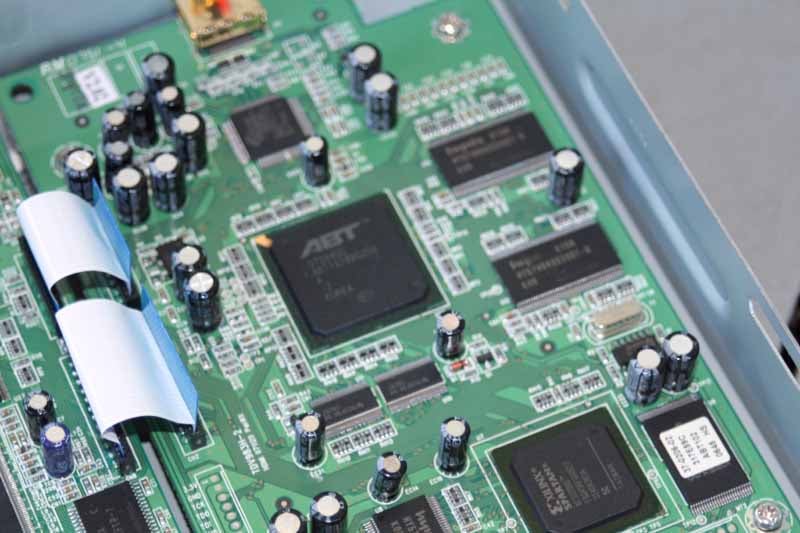 It takes two chipsets to
make up the ABT-based system Oppo
is using for the DV-983H. The Xilinx SPARTAN chip handles de-interlacing
standard definition video, removing chroma artifacts and detecting the need for
2-3 pulldown. The ABT1018 chip
handles video scaling up to 1080p, including frame rate conversion, aspect
ratio control and adding video zooming features. Oppo did not, or could not,
implement 24p output due to the methods they used to arrange the video
processing on their board. ABT has
long been highly regarded in its standard definition capabilities and is, in
fact, one of several very competent processors available today. In fact, it's
used by Denon, Yamaha, and a host of other manufacturers. For whatever reason
(more detail is given below) Oppo opted to not successfully implement ABT's renowned Mosquito Noise Reduction circuitry
in this player.
It takes two chipsets to
make up the ABT-based system Oppo
is using for the DV-983H. The Xilinx SPARTAN chip handles de-interlacing
standard definition video, removing chroma artifacts and detecting the need for
2-3 pulldown. The ABT1018 chip
handles video scaling up to 1080p, including frame rate conversion, aspect
ratio control and adding video zooming features. Oppo did not, or could not,
implement 24p output due to the methods they used to arrange the video
processing on their board. ABT has
long been highly regarded in its standard definition capabilities and is, in
fact, one of several very competent processors available today. In fact, it's
used by Denon, Yamaha, and a host of other manufacturers. For whatever reason
(more detail is given below) Oppo opted to not successfully implement ABT's renowned Mosquito Noise Reduction circuitry
in this player.
Should I Buy This Player?
We get asked this question a lot. In particular, the decision is often related to whether someone wants a solid upconverting DVD player or if they are ready to "go Blu". This decision is made difficult when the consumer looks at the $399 DV-983H, because it costs nearly as much as another nearly-universal DVD/BD player we are familiar with: Sony's Playstation 3 (80GB & 60GB models). Since these PS3 units also decode stereo and multi-channel SACD (though denying users access to DVD-Audio) it's an interesting comparison - and one we think everyone should engage in before making a final decision. We set up a short chart below to outline some of the major features of each:
| Oppo DV-983H | Playstation 3 |
| MSRP: $399 | MSRP: $499 (80GB) |
| SACD: Yes (PCM) | SACD: Yes (DSD/PCM) |
| DVD-Audio: Yes (MLP) | DVD-Audio: No |
| Blu-ray: No | Blu-ray: Yes (Profile 2.0) |
| Video Processor: Anchor Bay VRS |
Video Processor: Sony Cell Processor |
| HQV Score: 105 | HQV Score: 100 |
| 1080p HDMI Upconversion: Yes | 1080p HDMI Upconversion: Yes |
| HDMI v1.2 | HDMI v1.3 |
| Video Outputs: HDMI, component, S-video, composite | Video Outputs: HDMI + PS3 cable (composite, S-video, component options) |
| Audio Outputs: HDMI, TOSLINK, coax digital, 7.1 analogue | Audio Outputs: HDMI, TOSLINK, stereo analogue (via PS3 cable) |
| RS-232C Control: Yes | RS-232C Control: No |
| Remote: IR | Remote: Bluetooth (via controller or $20 add-on) |
It's not hard to see that DVD player reviews are changing. Whereas in the past we judged players without the presence of new Blu-ray technology, we are now forced to consider products like the PS3 which offer excellent upconversion in addition to other benefits. In the face of the PS3 the Oppo DV-983H looks less compelling, however compared to other high-end universal players it screams "value". It definitely has some very nice features and is certainly a solid dedicated player.
DV-983H Setup, USB Audio and Bass Management
Cruising through the Oppo's menu system we didn't find too many surprises. Feel free to reference our review of the OPDV971H which has a very similar menu system. Please note that if you are attempting to use the multi-channel outputs you'll want to properly configure bass management. This includes setting the proper speaker size and also configuring the delay (distance) and level settings.
Under the Video Setup page we found that the Noise Reduction feature didn't do anything visible to affect mosquito or MPEG-2 noise. Oppo claims this setting aids in reducing block noise caused by video compression, however this is far less typical than MPEG-2 noise or mosquito noise. We recommend leaving this 'Off'.
Now, on to actually using the player. It took about 28 seconds to boot and play a title on the Oppo player from Standby. This is pretty sluggish. For comparison, a Denon DVD-1930CI takes around 11 seconds. Of course, we've also seen worse, like the Denon DVD-3930CI which takes nearly 34 seconds. Overall, this isn't of great concern to most users.
One anomaly I discovered with this player was that initially I could not get multi-channel SACD to play through my receiver via HDMI. Even though the DV-983H doesn't output raw DSD audio, the player does allow SACDs to play by outputting PCM audio, meaning that SACDs will play back through HDMI on any receiver with HDMI 1.1 or higher. What I discovered is that HDMI allocates audio bandwidth as a percentage of video bandwidth (it factors in the 24-bit video format timings and maximum sampling frequencies.) Since my player was set to 480p during my audio testing, the system was locked down at 2-channel for SACD. Switching the player to 720p instantly allowed multi-channel SACD audio to be output as expected.
From the Oppo User Manual:
If you use HDMI to connect audio to an HDMI A/V receiver or audio processor, it is recommended that you choose 720p or higher HDMI output resolution when playing high resolution audio content (DVD-Audio and SACD). According to the HDMI specification, the bandwidth available for audio is proportional to the total bandwidth used by video. At 480p/576p resolution, the HDMI specification can only support 2 channels of audio with high sample rate (up to 192kHz), or 8 channels of audio with standard sample rate (up to 48kHz).
Depending on the capability of your A/V receiver or audio processor, if you play high resolution audio content at 480p/576p resolution, you may get reduced audio resolution, incomplete audio channels, or even no audio/video output at all. Choosing a high HDMI output resolution such as 720p or 1080i allows enough bandwidth for all high sample rate audio channels.
Equally odd, was my discovery that the Speaker Setup >
Down-mix menu needed to be set to '5.1 CH' or '7.1 CH' in order to hear
multi-channel DVD-Audio tracks.
When listening to a DVD-Audio
disc, I found that I was hearing 2-channel audio with the default setting of 'Stereo'.
To me, this menu really should only have to do with analogue audio mixdowns,
but Oppo also extends it to the HDMI output for all audio formats that it
converts to PCM audio (nearly everything, save DTS and Dolby Digital). Since the
AV receiver should be able to handle any required mixdowns or bass management
for digital sources via HDMI, we found this to be unusual. This also indicated
to me that I wasn't delivering native MLP
(PPCM) or DSD to my Denon AVR-5308, but LPCM-converted audio from the DVD-Audio and SACD tracks. I noticed no perceived quality
lost in the translation, but it was interesting to note.
Tech Note: Bass Management Galore
Regarding bass management, the Oppo DV-983H provides it, but only in a rudimentary level. The crossover point is fixed at 80Hz and all digital audio formats, save for DTS and Dolby Digital, are converted to LPCM when sent out via HDMI or the analogue audio outputs. This means that the Oppo is potentially ganging its bass management on top of that of your AV receiver. To avoid any unnecessary double bass management, we recommend setting all speakers to Large (regardless of what speakers you are using) in the Oppo's Speaker Setup menu unless you are using the analogue audio outputs.
According to Oppo, the reason they apply
down-mix to HDMI output is to ensure users who connect the HDMI output directly
to a TV can get properly down-mixed audio. As for applying bass
management to multi-channel PCM output over HDMI, the reason is that some older
models of HDMI A/V receivers cannot do any processing for multi-channel audio
from their HDMI input.
In checking out the USB audio and video functionality the first thing I noted was that the connection was located on the rear of the player. To me, USB connections belong on the front of the device as I'd imagine most people will be using USB thumb drives more than FAT32-formatted removable hard disks. To put the USB port in the back you are guaranteeing that few will use this for any impromptu displaying of images or playing back downloaded music unless you frequently update a portable drive and go through the trouble of connecting it to the rear of your DVD player. It's also not sophisticated enough, as an interface, to cater to larger drives packed with music.
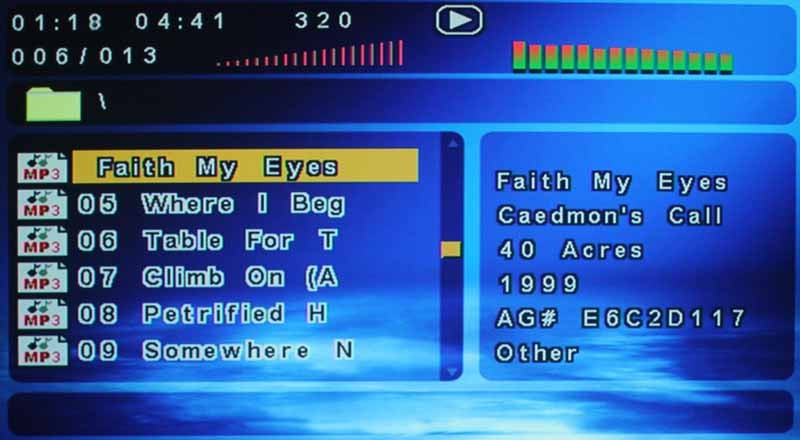 Playback of USB
content is easy. You simply hit the button at the top center of the remote and
select USB SLOT
1. At that point the USB drive is
read (pretty quickly for a 256MB thumb drive). The screen which pops up is
pretty much the same screen as is used for SACD content. It shows meta data and
allows selection of folders and subfolders to access music. When you play the
first track it continues on until the last track in a folder is played. An
eye-candy "graphical EQ" displays in the top right and you can adjust
the volume output of the player - even digitally via HDMI. The bitrate of the
current file is shown at the top and you can fast forward, pause and rewind
playback just like with a CD.
Playback of USB
content is easy. You simply hit the button at the top center of the remote and
select USB SLOT
1. At that point the USB drive is
read (pretty quickly for a 256MB thumb drive). The screen which pops up is
pretty much the same screen as is used for SACD content. It shows meta data and
allows selection of folders and subfolders to access music. When you play the
first track it continues on until the last track in a folder is played. An
eye-candy "graphical EQ" displays in the top right and you can adjust
the volume output of the player - even digitally via HDMI. The bitrate of the
current file is shown at the top and you can fast forward, pause and rewind
playback just like with a CD.
DV-983H Video Measurements and Viewing Tests
For our performance tests we used several test discs including Avia Pro, Digital Video Essentials (DVE) Pro, Silicon Optix HQV, as well as several real-world DVD clips. The idea is to test various performance metrics and get a good idea of how the player handles real world material in addition to more rigorous unflagged video tests.
All final test scores were derived using the Oppo DV-983H's HDMI output in 720p mode unless otherwise specified.
Audioholics/HQV Bench Testing Summary of Test Results
Perfect Score is 130
Oppo DV-983H Benchmark total
score: 105/130 (This scores as one of the top players available)
|
Test |
Max |
Results |
Pass/Fail |
|
Color Bar |
10 |
10 |
Pass |
|
Jaggies #1 |
5 |
5 |
Pass |
|
Jaggies #2 |
5 |
5 |
Pass |
|
Flag |
10 |
10 |
Pass |
|
Detail |
10 |
10 |
Pass |
|
Noise |
10 |
0 |
Fail |
|
Motion adaptive Noise Reduction |
10 |
0 |
Fail |
|
Film Detail |
10 |
10 |
Pass |
|
Cadence 2:2 Video |
5 |
0 |
Fail** |
|
Cadence 2:2:2:4 DV Cam |
5 |
5 |
Pass |
|
Cadence 2:3:3:2 DV Cam |
5 |
5 |
Pass |
|
Cadence 3:2:3:2:2 Vari-speed |
5 |
5 |
Pass |
|
Cadence 5:5 Animation |
5 |
5 |
Pass |
|
Cadence 6:4 Animation |
5 |
5 |
Pass |
|
Cadence 8:7 animation |
5 |
5 |
Pass |
|
Cadence 24fps film |
5 |
5 |
Pass |
|
Scrolling Horizontal |
10 |
10 |
Pass |
|
Scrolling Rolling |
10 |
10 |
Pass |
|
Total |
130 |
105 |
|
*All tests were done with the HDMI
outputs at 1080p. Any failed tests were
checked in other output resolutions as well.
** According to Oppo, they pass 2:2 on the ABT VRS Evaluation disc, however they opted not to tweak the processor to pass HQV since they believe it would interfere with some real-world cadence processing.
Comments on DVD Benchmarks
This player is clearly a top performer with respect to video performance. Anchor Bay is no slouch when it comes to video processing and Oppo's implementation of it is very good, save for their lack of configurable Noise Reduction. Layer changes took just over 0.75 seconds on average (similar to past Oppo players) and we were very impressed at the way the DV-983H snapped to attention on several unflagged and complex cadences. If there is any sort of weird anomaly on the DVD, the Oppo seems to be well equipped to handle it. The DV-983H doesn't crop any pixels from the displayed image and the Moving Zone Plate tests looked great in 2-3 pulldown. The 2-2 pulldown Moving Zone Plate even looked good initially, though it broke up quickly which mimicked the results of the HQV testing - still better than most players do with this difficult test.
Noise reduction was almost nonexistent and we did notice a touch of edge enhancement that showed up when viewing high contrast test patterns. The default Sharpness setting of 0 shows this edge enhancement, but also creates a nice contrast. If you absolutely hate any enhancement, then backing it down to -1 will help quite a bit (this is the setting I preferred as I felt it was most natural). A Sharpness setting of -2 will remove artificial edge enhancement entirely, but the image softens significantly. Note that these settings don't have anything to do with material encoded onto the disc with edge enhancement artifacts.
Viewing Evaluation
When viewing material we looked for detail, lack of banding in bright and dark areas of the picture, and practical examples that would reflect the real-world effects of our many objective tests. What we found was that the Oppo renders a beautiful picture and really brings out the best standard definition DVD has to offer.
DVD: The
Fifth Element (Superbit)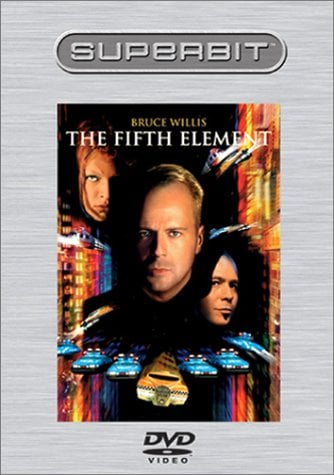 You're going to
see a lot of this movie in any display or video source component review I do.
It's simply a great title and represents some of the best picture quality in
both the DVD and Blu-ray formats.
We weren't surprised by anything we saw and found the DV-983H to put forth a
great picture with no perceivable artifacts or jaggies anywhere in the common
areas we check. Faces had all of the skin textures you could want, and the
clothing and backgrounds which abounded in this film had a very realistic look
and feel that seemed to pop off the screen if you looked closely. You know your
detail is exceptional when you begin to see things like reflections in eyes and
are able to take note and begin identifying some of the various materials used
to make the props in the film.
You're going to
see a lot of this movie in any display or video source component review I do.
It's simply a great title and represents some of the best picture quality in
both the DVD and Blu-ray formats.
We weren't surprised by anything we saw and found the DV-983H to put forth a
great picture with no perceivable artifacts or jaggies anywhere in the common
areas we check. Faces had all of the skin textures you could want, and the
clothing and backgrounds which abounded in this film had a very realistic look
and feel that seemed to pop off the screen if you looked closely. You know your
detail is exceptional when you begin to see things like reflections in eyes and
are able to take note and begin identifying some of the various materials used
to make the props in the film.


What we did find interesting was to host a quick comparison of the Oppo DV-983H against the same title, only in Blu-ray format. A lot of people don't understand the fascination with Blu-ray and its increased resolution. There's a good reason for this: it's often hard to appreciate a significant difference when you sit back and have a good DVD player at your disposal. We snapped several pictures to illustrate Blu-ray vs. DVD expecting to show a vast difference. In all honesty, there WAS a difference, but the camera (much like our eye) rendered the results extremely similar from 11 feet away.
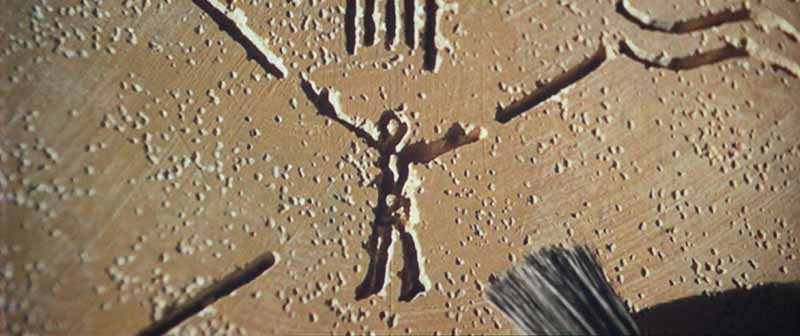
DVD Clip1 via Oppo DV-983H
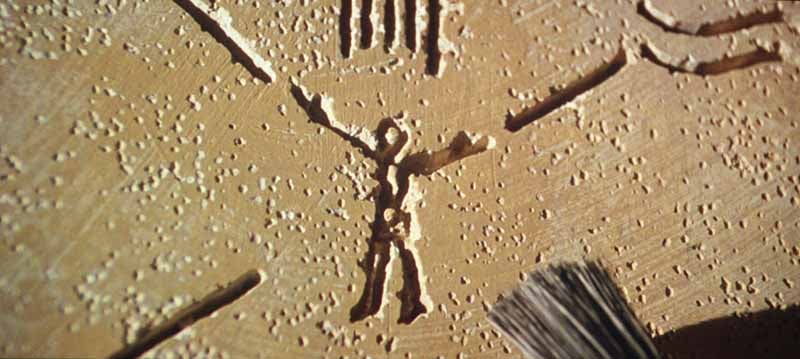
Blu-ray Clip1 via Playstation 3
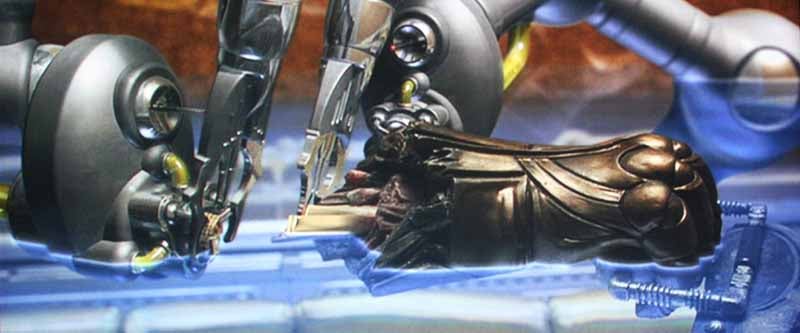
DVD Clip1 via Oppo DV-983H

Blu-ray Clip1 via Oppo DV-983H -
not much different when viewed from an appropriate distance
The next time you're in a store and marvel at the quality of Blu-ray - take about 7 or so steps back to your typical sitting distance and see if it's that much more amazing than a really good DVD player. We think it's definitely a step up in terms of quality, but we've also found that there are many things that affect whether HD is a big deal. This includes the quality of the source player, the resolution of the display, the distance you sit form the TV, and the actual movie content you are watching.
DVD: Lord
of the Rings - Return of the King This movie
continues to be an incredible film, though a tad muted in the area of color.
What it does well is present a fully dynamic picture whose histogram (black to
white levels) is incredibly rich and, assuming a worthy display, is capable of
separating the average players from the top performers. The Oppo did a really
good job of bringing to life every nuance that was in this third installment of
the Lord of the Rings trilogy. We've
seen players only barely carry through detail, so that everything appears
smoothed and washed out. Some players cannot handle the articulate detail
present in on-screen elements like chain mail or detailed crests and emblems.
During this film, which had ample of each, the DV-983H never broke into a moiré
pattern or blurred details which were present in the digital video stream. Take
a look at some of these shots:
This movie
continues to be an incredible film, though a tad muted in the area of color.
What it does well is present a fully dynamic picture whose histogram (black to
white levels) is incredibly rich and, assuming a worthy display, is capable of
separating the average players from the top performers. The Oppo did a really
good job of bringing to life every nuance that was in this third installment of
the Lord of the Rings trilogy. We've
seen players only barely carry through detail, so that everything appears
smoothed and washed out. Some players cannot handle the articulate detail
present in on-screen elements like chain mail or detailed crests and emblems.
During this film, which had ample of each, the DV-983H never broke into a moiré
pattern or blurred details which were present in the digital video stream. Take
a look at some of these shots:

Move that chain mail across the screen on a Wal-mart special and see if it holds together!

How someone so ugly can look so good is beyond me…
DVD: Band
of Brothers This epic World War II film series takes you through a roller coaster of emotion and scenery as Easy
Company travels around Europe fighting off the
Nazis. I found the various landscapes fascinating in that they captured the
full range of textures and fast-moving imagery that makes for such great
viewing material. One thing this picture isn't is "crisp". They
instead opted for a smoother, grainer "old-school" film-like picture
and so we mostly counted on the vast array of angles, granular landscaping and
rugged equipment and uniforms to challenge the player to new levels. From the
pics below, you'll see that the very natural look of the film was perfectly
displayed and preserved and the Oppo didn't artificially attempt to sharpen it
up or eliminate the natural picture noise which gave Band of Brothers its look
and feel.
This epic World War II film series takes you through a roller coaster of emotion and scenery as Easy
Company travels around Europe fighting off the
Nazis. I found the various landscapes fascinating in that they captured the
full range of textures and fast-moving imagery that makes for such great
viewing material. One thing this picture isn't is "crisp". They
instead opted for a smoother, grainer "old-school" film-like picture
and so we mostly counted on the vast array of angles, granular landscaping and
rugged equipment and uniforms to challenge the player to new levels. From the
pics below, you'll see that the very natural look of the film was perfectly
displayed and preserved and the Oppo didn't artificially attempt to sharpen it
up or eliminate the natural picture noise which gave Band of Brothers its look
and feel.


DV-983H Listening Tests and Conclusion
We began with CDs for our listening tests and popped in Marillion's Seasons End disc. I ended up cruising through half the album before I caught myself and went back for some more critical listening. This time, with more purpose. To set up the CD-based listening tests I first made two bit-accurate copies of the Seasons End CD (which I own). Using the two copies I compared the Oppo DV-983H to a Denon DVD-3930CI by feeding both into the new AVR-5308CI AV receiver and using its headphone out jack to a pair of Denon AH-D2001 reference headphones. These headphones have excellent resolution and their closed-ear design help to completely isolate the audio from the room. This test allowed me to do a real apples-to-apples comparison of the two players without having to deal with the room interaction. Later I repeated the exercise, using the same tracks, with in-room listening tests using my reference RBH Sound CinemaSITE.
The Oppo showed the exact same output level via HDMI as the Denon, so no level matching was required (I bypassed DenonLink for these tests). I did notice a pronounced lag in receiving HDMI audio from the Oppo vs. the DVD-3930CI. While the Denon would renegotiate the audio connection in a couple seconds, the Oppo took about 8 seconds before I could hear it when switching back and forth.
CD: Marillion - Seasons End In listening to "The King of Sunset Town" via
headphones the Oppo showed a smooth, pronounced low end. Detail was very
apparent on the top edge of the male vocals and even the snap of the snare. I
like to pay attention to how well vocals stay "afloat" during thick
instrumental choruses like the one in this track. I noticed no difference
between the players in my headphone or loudspeaker comparisons. In track 2, "Easter",
the guitar solo during the bridge was crystal pure in its tonality and had that
upper-mid clarity that so rarely makes its way into today's mp3-generation of
music. The staccato keys interspersed with the following verse really rang true
and there was plenty of definition when the backing chorus and drums really
kicked in. During "Uninvited Guest", a favorite track of mine, sounded
great. It's a hard-hitting song that has a lot of levels and the DV-983H rocked
out as I expected - with wide drum pans and poignant keyboard pads which gently
filled in behind the lyrics. It was an almost magical, smooth sound. Reverb was
gentle and consistent, without the hint of a truncated decay or compression. On
both headphone and speakers I paid careful attention to the width of the
soundstage and the quality of the reverb decays. I simply couldn't tell the
difference between the players.
In listening to "The King of Sunset Town" via
headphones the Oppo showed a smooth, pronounced low end. Detail was very
apparent on the top edge of the male vocals and even the snap of the snare. I
like to pay attention to how well vocals stay "afloat" during thick
instrumental choruses like the one in this track. I noticed no difference
between the players in my headphone or loudspeaker comparisons. In track 2, "Easter",
the guitar solo during the bridge was crystal pure in its tonality and had that
upper-mid clarity that so rarely makes its way into today's mp3-generation of
music. The staccato keys interspersed with the following verse really rang true
and there was plenty of definition when the backing chorus and drums really
kicked in. During "Uninvited Guest", a favorite track of mine, sounded
great. It's a hard-hitting song that has a lot of levels and the DV-983H rocked
out as I expected - with wide drum pans and poignant keyboard pads which gently
filled in behind the lyrics. It was an almost magical, smooth sound. Reverb was
gentle and consistent, without the hint of a truncated decay or compression. On
both headphone and speakers I paid careful attention to the width of the
soundstage and the quality of the reverb decays. I simply couldn't tell the
difference between the players.
SACD: Norah Jones - Come Away With Me "Don’t Know Why" always serves as a well-rounded
song for hearing the true nature of a source. Since I'm intimately familiar
with its sound, it allows me to test multiple components and know what's truly
present on the track versus what I'm hearing. The first place I listen is the
drums. With the Oppo I heard the texture of the snare head as the brushes
gently slapped the surface and slid back for the next quarter note strike. The
piano was authentically represented and pure - devoid of the quick decays
present when a track isn't allowed to breathe. With the DV-983H, everything
sounds very natural and complete.
"Don’t Know Why" always serves as a well-rounded
song for hearing the true nature of a source. Since I'm intimately familiar
with its sound, it allows me to test multiple components and know what's truly
present on the track versus what I'm hearing. The first place I listen is the
drums. With the Oppo I heard the texture of the snare head as the brushes
gently slapped the surface and slid back for the next quarter note strike. The
piano was authentically represented and pure - devoid of the quick decays
present when a track isn't allowed to breathe. With the DV-983H, everything
sounds very natural and complete.
In "Seven Years" the upright bass, while subtle, just about stole the show. That is, until I began honing in on the finger noises sliding off the rhythm guitar. Wow. The Oppo is absolutely wonderful at picking up both the obvious and the subtle, demonstrating that its SACD functionality is up to the task at hand. The Oppo didn't miss even a hint of the breathiness present in Norah's vocals. Track 10, "Painter Song", made a unique impression as it placed acoustic guitar into the surrounds and allowed the player to really demonstrate its excellent multi-channel capabilities. The track's accordion was also masterfully reproduced in all of its vibrato-laced subtleties. Again, both headphone and the RBH system yielded the same results. At times, via headphones, I felt the Denon had a slightly more fluid reverb on Norah's lead vocals, but I never felt sure enough to call it certain.
SACD: Jeff Wayne's
Musical Version of the War of the Worlds This is simply one of my favorite SACDs - masterfully
produced in surround. The disc, more than others, fully utilizes the surrounds
to an almost hyper-realistic level. As such, it's great test fodder for
reviews. The mix of "The Eve of the War" was thick, full and yet
completely 'discrete', with pronounced synthesizers which dominated the
ultra-wide soundstage. Acoustic guitars and percussion, which poked through at
moments of respite, carried tons of wonderful, audible minutia. Vocals were
"in-you-face" in that retro theatrical 70's style put forth by this
disc.
This is simply one of my favorite SACDs - masterfully
produced in surround. The disc, more than others, fully utilizes the surrounds
to an almost hyper-realistic level. As such, it's great test fodder for
reviews. The mix of "The Eve of the War" was thick, full and yet
completely 'discrete', with pronounced synthesizers which dominated the
ultra-wide soundstage. Acoustic guitars and percussion, which poked through at
moments of respite, carried tons of wonderful, audible minutia. Vocals were
"in-you-face" in that retro theatrical 70's style put forth by this
disc.
Continuing through the album to track 2, the raw bass had an edgy fingering sound that was well pronounced and accurately represented by the DV-983H. While the DVD-3930CI did an equally impressive job, I couldn't help but acknowledge the severe price difference between the players. The effect of an unscrewing cylinder wrapped around the surrounds while Richard Burton's voiceover delivered his overarching monologue. During "Forever Autumn" the Oppo released the beautiful sound of Justin Hayward's voice, both with its solid presence and gentle decay that never sounded rushed. The accompanying guitar, synths and drums really contributed to the surround track, yielding a full mix that was quite impressive to hear.
I was listening for a difference between the Oppo DV-983H and my reference Denon DVD-3930CI but I couldn't hear it. Does that mean it isn't there? No, it could easily be my room that prevents me from hearing the minutia of differences between the players. However it did confirm to me just that - the differences are extremely subtle. And that makes the Oppo a bargain.
Conclusion
One thing is for certain - if Oppo had come out with this player two years ago it would have swept the market. In fact, if we had to go back and re-rate all of our DVD players, we'd have to re-do the value scale due to this player's exceptional performance. For a universal DVD player, the DV-983H puts many other players to shame. This reviewer, however, cannot ignore products like the closely-priced PS3, which handles most of the same formats plus Blu-ray (oh, and it plays games and allows access to network music). The DV-983H certainly tests as well as many flagship universal DVD players, and actually better than some costing much more. This begs the question: Is this possibly the best value universal DVD player on the market? The answer is a resounding Yes, provided you don't mind holding off on high definition Blu-ray. As we mentioned in our intro, the decision is simply one of practicality and choice. If you're a DVD buff and you want to get the most out of your DVD collection, then the Oppo does a fantastic job and the best bargain we've seen for a top-notch universal player... ever. Those wanting to step into the future may find that the age of the non-HD universal player has already come and gone. Ultimately, you'll be the one deciding.
Oppo DV-983H
MSRP: $399
The Score Card
The scoring below is based on each piece of equipment doing the duty it is designed for. The numbers are weighed heavily with respect to the individual cost of each unit, thus giving a rating roughly equal to:
Performance × Price Factor/Value = Rating
Audioholics.com note: The ratings indicated below are based on subjective listening and objective testing of the product in question. The rating scale is based on performance/value ratio. If you notice better performing products in future reviews that have lower numbers in certain areas, be aware that the value factor is most likely the culprit. Other Audioholics reviewers may rate products solely based on performance, and each reviewer has his/her own system for ratings.
Audioholics Rating Scale
 — Excellent
- — Very Good
- — Good
- — Fair
- — Poor
| Metric | Rating |
|---|---|
| High Definition Video Performance | |
| Standard Definition Video Performance | |
| High Definition Audio Performance | |
| Analogue Audio Performance | |
| Bass Management | |
| Deinterlacing & Scaling | |
| Build Quality | |
| Ergonomics & Usability | |
| Ease of Setup | |
| Features | |
| Remote Control | |
| Fit and Finish | |
| Performance |  |
| Value | |
Clint Deboer was terminated from Audioholics for misconduct on April 4th, 2014. He no longer represents Audioholics in any fashion.
View full profile Subscribe to our newsletter