


Denon DVD-5900 DVD Player Review
Denon DVD-5900 DVD Player
- Product Name: DVD-2900 DVD Player
- Manufacturer: Denon Electronics
- Performance Rating:


- Value Rating:
- Review Date: February 28, 2004 19:00
- MSRP: $ 1999
| Video Decoding Engine: DCDi Faroudja
FLI-2310 Video Processing: Adjustable Chroma Delay and Level, White/Black Levels, CCS On/Off controls Video DACs: 4:4:4, 12 bit Video D/A Conversion Video Outputs: Wideband relay switched component video outputs, DVI-D (HDCP) with selectable 480p/720p/1080i output Audio DACs: Burr-Brown 24-bit, 192-kHz DSD-1790 Audio DACs that decode PCM and DSD signals discretely with no cross-conversion of DSD |
SACD: Sony CXD-2753 Second Generation DSD
Decoder |
Pros
- Benchmark playback performance of CD, DVD-A and SACD formats
- Bass management & digital delay compensation for DVD-A and SACD
- Benchmark video playback
- Rock solid build quality
Cons
- Doesn't retain last played DVD/CD track or settings when disc is removed and re-inserted
- Erroneous D-Link operation
- Slow navigation through DVD menus
- Difficult menu navigation and set-up
DVD-5900 Overview, Bass Management and Setup
Last year Denon dazzled us with the introduction to their first Universal DVD Player known as the DVD-2900. In a single stroke, a manufacturer was able to produce an affordable machine that obsoleted much of the hardware limitations we noted in prior technical articles we wrote regarding DVD-A and SACD.
The DVD-2900 satisfied many of our concerns, and performed admirably, especially for its asking price ($999 MSRP). As good as this player was, it did leave room for improvement thus paving the way for the DVD-5900.
You're probably wondering what the main circuitry improvements of the DVD-5900 are over the DVD-2900 which justify doubling the price. Listed below are some of the most notable advantages of the DVD-5900:
- Power Supply, Dual Video Circuitry paths for interlaced and progressive including Dual Video DACs
- Dual Melody 100 Analog Devices DSPs to handle a more flexible Bass Management for DVD-A and SACD
- Different MPEG decoder, the ESS Vibrato II, for the DVD-5900 and Mitsubishi for the DVD-2900 (Denon used the ESS decoder on their previous high end DVD-A only players the DVD-3800 and DVD-9000.)
For a more detailed look on comparative circuit and other internal differences between the DVD-2900 and DVD-5900 check out our supplemental First Look Review.
Bass Management Block Diagram for DVD-5900

This is a basic block diagram of the bass management system for the Denon DVD-5900. This illustrates how the DVD-5900 handles PCM (DVD-A, CD) and DSD (SACD) signals in the digital domain through DLink/IEEE1394, and via the analog multi-channel outputs. Note that in order to maintain SACD decoding in its native format, you must sacrifice all bass management, but thankfully not delay time or channel trims via the external analog outputs. Denon is still playing the waiting game with Sony for provisioning of SACD passage via DLink/IEEE1394. DVD-A can of course immediately be passed through via DLink, soon IEEE1394 (awaiting Denon firmware update), or through the analog outputs with full digital delay compensation and bass management. I opted for DLink for DVD-A due to the superior bass management facilities and differential DAC section of the AVR-5803 as well as convenience of controlling all settings at the receiver.
The AVR-5803 does not decode DSD in its native format which can arguably degrade fidelity. However, it is important to remember that currently all receivers/processor on the market, with perhaps the exception to Sony, handles bass management and digital delay compensation in PCM, thus at some point or another if you desire these features you will likely have to go through this conversion process. This also does not consider the fact that many SACD discs are mastered with PCM equipment. This discussion goes beyond the scope of this review and will likely be expanded upon in a future article.
Audio Set-Up


DLink Reset Anomaly
I enabled the "Bass Enhancer" feature so that I could have sub out in 2CH SACD mode, but with DLink enabled on the player, it automatically sets
- Source Direct = On
- Bass Enhancer = Off (grayed out so you cannot change it)
Thus, you have to disable DLink, then configure Source Direct "Off", followed by turning Bass Enhancer "On" to achieve subwoofer output in 2CH SACD. Aside from the inconvenience of this three step process, there is an annoying operational bug when going through this routine. It resets the Speaker Sizes to "Large", Sub crossover to 100Hz, and Delay Times to 12ft. It appears cycling DLink On/Off, resets the bass management/time delays to default settings.
Tech Note: Relax, there is a workaround for this quandary which incidentally Denon also recommends.
Step1: Hookup the standard 5.1 cable to the EXT inputs, but also use the extra stereo Front outputs to an unused analog input, say the CD input.
Step2: When you listen to 2 Ch SACDs and regular CDs use that input and Pure Direct. The AVR-580 will do analog bypass for the mains while at the same time output a sub channel through the DSPs.
For all other audio operational modes (ie. CD, DD , DTS, DVD-A) I relied on the DLink connection. This is an absolute wonder as it allowed flawless operation for all of these audio modes with a single digital cable (supplied by Denon). Once Denon gets provisioning from Sony to pass SACD over DLink, exotic cable vendors be warned :-)
As with the DVD-2900, the channel trims were accurate only to +-1dB and +-1ft delay increments. The channel trims have no boost, only cut settings referenced to 0dB. This is about on par with most low-end receivers and, unfortunately, many so-called high-end processors. I recommend that if you have an AVR-5803, do all of your audio processing inside the receiver except SACD until that rides down the DLink to an IEEE1394 digital connection.
Denon has an Audio Set-Up Tips technical paper that discusses this very issue. They went through great lengths in documenting how to properly configure the DVD-5900 for DLink and analog multi-channel operation on the AVR-5803 receiver, thus I highly recommend perusing this informational before setting up the player.
"Pure Direct" Mode (AVR-5803) For DVD-A DLink and EXT Multichannel Analog Inputs Set-Up
I initially noted some rather unusual behavior in the AVR-5803 when engaged in DLink with the DVD-5900 set for DVD-A playback. While this is a review of the DVD-5900 and not the AVR-5803, I felt it appropriate to offer set-up suggestions for owners of both pieces of hardware to avoid any potential configuration pitfalls.
|
AVR-5803 Configuration: |
DVD-5900 Configuration: |
|
DLink On |
DLink: 2nd Generation |
|
Surr Back: Off |
|
|
EXT IN: S.Back "Not Used" |
|
|
Pure Direct (see red set-up note below) |
|
While I was thoroughly enjoying DVD-A
playback via DLink connection, I accidentally hit the "Pure Direct" mode on the
AVR-5803 via the clumsy RC-8000 remote and noted some rather interesting
behavior. I was surprised that DVD-A was still playing in multi-channel
surround, even though theoretically "Pure Direct" is supposed to bypass DSP
processing to everything but the subwoofer. A quick test of a DD/DTS DVD verifies this operational certainty for that
application, but decoding DVD-A appeared to be another story. In reality the
only way to decode MLP via the Dlink is in the receiver, so it made sense that
the AVR-5803 engaged the DSP for this function. According to Denon, only the
video and front display shut off in "Pure Direct" mode on the AVR-5803 but the
primary analog signals are provided a direct path bypassing the DSP
processing.
I did notice that the balance of the rear soundfield changed when toggling between normal and "Pure Direct" mode and I scratched my head for a few minutes trying to figure out why. What I discovered was that the Back Surround speakers were now playing rear source material even though I had them disabled in what I thought to be the appropriate menu. When I disengaged "Pure Direct" I again heard the correct 5.1 mix. I consulted Denon about "Pure Direct" Mode decoding multi-channel DVD-A and also causing Surround Back Channel engagement. I also noted this operation when engaging the EXT multi-channel analog inputs for SACD in "Pure Direct" mode. What we discovered was that the AVR-5803 had independent "Surround Mode" settings for normal and "Direct" modes. This was just another shining example of the endless configuration options of the venerable AVR-5803.
Tech Note: In order to properly playback 5.1 channel music in "Pure Direct" mode while using DLink for DVD-A or the EXT multi-channel analog inputs for DVD-A/SACD you must proceed as follows:
- Step1: Engage the "Direct" mode of the AVR-5803.
- Step2: On the RC-8000, select "Surr Para".
- Step3: Disable the S.Back speakers by selecting "not used". (for more configuration details, see page 44 of the AVR-5803 user manual)
Alternatively if you feel your set-up would benefit from duplicate information being feed to the rear and surround back channels, by all means leave them on!
DVD-5900 Configuration and User Interface
Over the past couple of months I have been playing all multi-channel SACD's with the DVD-5900's bass management enabled (PCM conversion) with no ill operational or audible effects in my testing. However, the inconvenience of toggling DLink on/off in both the player and receiver was becoming rather tedious; especially since toggling the DLink reset all speaker settings. I opted to leave the player configured in DLink "2nd Generation" to test its ability to automatically pass analog multi-channel SACD to the receivers external analog inputs.
|
DVD-5900 Player Configuration |
AVR-5803 Receiver Configuration |
|
Speaker Sizes: Large, Sub Crossover: 100Hz (doesn't matter since once engaged in DLink, bass management is defeated) |
Configured per Denon's latest Audio Set-Up Tips . |
|
Channel Levels: All 0dB, except Sub Level +10dB |
Note: EXT-1 Analog Mode Bass Boost +15dB |
|
Link engaged after speaker sizes, channel trims, delay times set since these data banks reset to default if DLink toggle on/off as I indicated in the DLink anomaly. |
Digital Input: DLink, default to EXT-1 with no Digital signal. |
Playing back multi-channel SACD with the hardware configured as tabulated, and with the following conditions revealed some situations that were not very ideal during playback on one particular multi channel SACD from Norah Jones.
With DLink engaged, I now allegedly have +10dB sub boost from player, and +15dB sub boost from Receiver, = 25dB boost! When I engaged the SACD disc at reasonable listening levels (75dB SPL at listening position), the subwoofer amps did not even trigger on. Until I turned the sub channel trim to max setting +12dB, there is not enough gain to even trip my subs on in "automatic" mode. When they finally activated, they were extremely low despite the (10+15+12 = 37dB) gain boost! As a side note, using this configuration now messed up my channel trim settings when DLink was engaged for DVD-A/ DD /DTS since there was only one global channel trim setting for each external input regardless of source type. I am not convinced the +10dB sub boost in the DVD-5900 was being retained when I engaged Dlink on since it didn't seem to audibly improve my anemic subwoofer output problem in this application.
The most bizarre output I achieved from my subs via the DVD-5900 in multi-channel SACD was with DLink turned off, Source Direct On, and Bass Boost +10dB on the player. The subwoofers were now producing extremely LOUD full range signal with little bass. I am not sure what exactly I was hearing here (or what channels for that matter) since Norah Jones was blasting out through my subwoofers as clear as day. I can only speculate that the Norah Jones SACD was recorded for six full range channels and not a typical 5.1 playback system. One of the problems with DVD-A/SACD is the potential format incompatibilities it can have with a home theater system. The sixth channel for DVD-A/SACD is NOT designated as a dedicated subwoofer/LFE channel, and is more commonly known as an overhead channel intended for an ambient raised (usually center channel) speaker. This format makes little sense in a home theater system traditionally configured for five discrete channels and a dedicated subwoofer. Many recording engineers realize this and mix these high resolution discs for a 5.1 configured system. However, there are exceptions such as the Toy Matinee DVD-A disc and perhaps the Norah Jones multi-channel SACD. Unfortunately I did not have any other multi channel SACD's on hand to verify, however according to Denon's Product Manager Jeff Talmadge , he did not notice this problem on Keb Mo's multi-channel SACD indicating it could be software dependent based on the mix itself. At this point I would conclude this is a software problem that thankfully the DVD player and/or receiver can resolve with proper bass management.
Tech Note: Our recommendation for multi-channel SACD playback are as follows:
Step 1: Write down your speaker level and delay times stored in the player.
Step 2: Disable DLink during multi-channel SACD playback.
Step 3: Restore your levels in the player.
Step 4: Set all speaker to "Small" to enable bass management.
Alternatively, you may opt to leave the player as is and configure the AVR-5803's (or equivalent) EXT inputs to "DSP" to enable the receivers bass management and digital delay compensation as documented in Denon's previously mentioned Audio Set-Up Tips.
Both methods involve DSD-PCM conversion, however my method keeps everything in the digital domain for processing while Denon's method involves two additional conversion stages (A/D -> D/A). Note that despite the argument often debated on audio forums about DSD->PCM conversion hindering audio performance, I heard no such limitations in my listening tests. I wasn't even aware that the DVD-5900 was converting DSD to PCM for bass management until I took a look at the block diagrams and schematics of the player after requesting it from Denon. I noted good results with Denon's recommendation for utilizing the receivers' internal bass management, and in the long run, it was a simpler and more convenient solution than my prior four step procedure. However, if you perceive loss of resolution from the added conversion stages, you may wish use my recommendation. I will likely revisit these issues when I obtain more multi channel SACD's. This is yet another reason why I long for the day of standards resolution to allow for DVD-A and SACD passage in the digital domain through an approved transmission media such as Firewire, HDMI, or manufacturers proprietary solutions. In closing on this topic, I urge the user to apply the proper bass management in their set-up if for nothing but to avoid situations when the DVD-A/SACD discs are mixed for six full range channels in a 5.1 home theater world.
Player Interface
I found configuring the DVD-5900 to be less desirable than the DVD-2900. I was displeased at the fact that DVI configuration and enabling "Pure Direct" modes could only be done at the player. Some of the menu settings such as 0/7.5IRE were not intuitive to get to in the user menus, nor were they well documented in the user manual (which initially lead us to believe the player was plagued with a contrast bug when in fact it wasn't.) It was also interesting to note that engaging in "Pure Direct" mode did not disable the front panel display, typical with other Denon products featuring this option. While this may have no audible impact on fidelity, from a psychological standpoint, I would have preferred all Denon products operated in the same manner. There is something settling to know that all unnecessary circuits and displays are disabled when pursing the best possible playback performance. Again, this is more of a minor complaint then an actual operational or performance deterrent.
Slow Menu Navigation Anomaly
Compared to the Denon DVD-2900 and other players previously reviewed, the DVD-5900 exhibited slower than average chapter changing. Navigating through a DVD became almost painfully slow and often unbearably annoying especially when trying to quickly jump to different tracks in DVD concert videos. We reported this finding to Denon during our First Look back in October of 2003, and they claim to have a fix for this due out in the next firmware update. This update should also address other noted issues within this review.
DVD-5900 Remote Control and Video Measurements
Remote Control Interface

The remote control included with the DVD-5900 is essentially the same as the one found on Denon's lower model DVD-2900. I would have preferred having a joystick like interface rather four arrow pads and an 'Enter' button. I find a joystick to be easier to navigate and less cumbersome in operation. For a $2000 DVD Player, it would have been nice to have had a backlit joystick type remote.
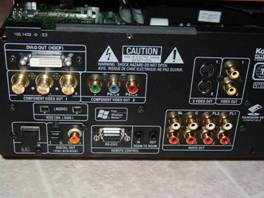 The backpanel of the
DVD-5900 is nearly as crammed as some flagship receivers with just about every
conceivable audio and video connection (except HDMI) currently on the market.
The Denon DLink is located in the lower left corner below the dual IEEE Firewire
connections (currently not active, although Denon claims they will offer a
future firmware update to remedy this). True 75ohm BNC connectors are available
for those interfacing to front projection type systems. Be advised, however,
that the only way to get 720p/1080i resolution is via the DVI-D interface
(located above the BNC connectors). In addition, once the DVI interface is
enabled, all other video outputs are defeated. This is a bit disappointing for
applications where the user would like to have more than one Display type
simultaneously playing video from the DVD player.
The backpanel of the
DVD-5900 is nearly as crammed as some flagship receivers with just about every
conceivable audio and video connection (except HDMI) currently on the market.
The Denon DLink is located in the lower left corner below the dual IEEE Firewire
connections (currently not active, although Denon claims they will offer a
future firmware update to remedy this). True 75ohm BNC connectors are available
for those interfacing to front projection type systems. Be advised, however,
that the only way to get 720p/1080i resolution is via the DVI-D interface
(located above the BNC connectors). In addition, once the DVI interface is
enabled, all other video outputs are defeated. This is a bit disappointing for
applications where the user would like to have more than one Display type
simultaneously playing video from the DVD player.
Note the DVD-5900 has provisioning for six-channel analog output of DVD-A / SACD, as well as two extra connections intended to pass two-channel SACD into a receiver such as the AVR-5803 that allows simultaneous true analog bypass and subwoofer output.
Comparative Video Measurements
In an effort to better understand the performance of the Denon DVD-5900, we implemented Milori's Color Facts Software and measured luminance with their Tricolor sensor. The set up and test was conducted on Reference System 1 which utilizes the Sony KP-51WS510 Widescreen Rear Projection Television. We calibrated the TV as best as possible using the user and service menus, but the grayscale is still tracking high with respect to blue. Masurements were taken with the Milori equipment and were dependant on several factors which can influence the readings of the Red, Blue and Green luminance.
Two key factors include:
- The Television performance and how the CRT's are set up
- The DVD player performance and how it recreates the grayscale windows from the AVIA Guide to Home Theater DVD.
For more information and details about grayscale measurements, please check out our article on Grayscale Calibration . Of course, player configuration and calibration is dependent on the actual display you are using. Our Display Technologies Guide defines all of the major differences between each display type and should be used as a reference when considering how to connect and set-up the DVD-5900.
Since we conducted our grayscale luminance measurements on two different Displays, with cables being a constant, the variations found in our measurements were most likely attributed to the DVD player's performance interaction with the particular display. This illustrates the importance of properly calibrating a Display to optimally interface with the DVD player. See our supplemental Denon DVD-5900 Measurements and Set-Up Tips for more details.
Before we discuss the measurements, we must point out the following facts. The DVD-Player was configured to the 0-IRE (Darker) setting. Note, the factory default is +7.5-IRE to conform to standard TV displays. If you have a RPTV or Front Projector, or larger even a moderinzed display such as a Sony Trinitron, then we suggest you switch the setting to 0-IRE as it wil greatly improve contrast. Measurements shown below 30-IRE should be ignored as most Tricolor sensors are not capable of measuring low light levels. Secondly, our measurements for all three players show that the blue luminance is about 150% from the optimal range of 100%. The reason is not dependant on the DVD player, but instead, the TV monitor. This blue-push is typical for most RPTV's and is usually deliberately done by the manufacturer to boost the blues in the bright gray (or white) images. Many manufacturers also boost the red in the darker gray (or black) images. Neither of these settings are related to what the industry refers to as "Red-Push" or "Blue-Push." To learn more about grayscale calibration, please read our detailed article.
What we found most interesting about the graph, is that the Denon had very flat curves (compared to other players previously reviewed) that more accurately tracked at the 6500K temperature on red and green. The DVD-5900 remained fairly constant near 100%. These results indicate that the DVD-5900 had grayscale accuracy regardless of IRE level, thus indicating black and white picture quality should remain uniform and with high contrast for all picture level dynamics. Our viewing tests seemed to correlate with these findings in that the DVD-5900 had a very pleasing, and film-like picture quality when viewed in progressive and non-progressive modes of operation. I felt the picture of the DVD-5900 was a bit sharper than that of the less expensive DVD-2900. More importantly, I didn't see the "flickering" problem (as prevalently on certain DVD's) with the DVD-5900 as I did on the DVD-2900. The DVD-2900 utilized a Silicon Image SiI504 Pure Progressive video deinterlacer for progressive scan video output. However, I am not convinced that the "chroma-bug" fix applied to the Mitsubishi MPEG decoder found on the DVD-2900 was a complete 100% elimination. When watching movies such as James Bond "Die Another Day", the snow scenes, when viewed on the DVD-2900, showed a slight "flickering." I believe this was caused by improper alternating flag detection resulting in the subtle distortion or it may be a artifacting problem which is also very common with many DVD players.. I didn't initially report this anomaly in my DVD-2900 review because I wasn't sure if it was a reprise of Sony's infamous "flickering" RPTV problem that plagued my previous RPTV (KP-51WS500) model. The flickering of this RPTV was due to problems with the CRT, not artifacting. In any event, the DVD-5900 didn't appear to exhibit this anomaly.
De-Interlacer Face Off Comparison
I ran a quick resolution check via the Avia test patterns to determine if the DVD-5900 or my Sony KP-51WS510 HDTV had the better de-interlacing technology.
|
Player Settings |
DVI |
Component |
|
480p with RPTV deinterlacer |
No jitter, 6.75MHz region slight grain |
Jitter, 6.75MHz region very noisy |
|
480p in Auto2 mode |
NA |
No jitter, 6.75MHz region slight grain |
|
720p |
No jitter, 6.75MHz region slight grain |
NA |
|
1080i |
No jitter, 6.75MHz region slight grain |
NA |
 It was interesting to note that using the
deinterlacer of my display produced very poor results with a 480i signal via
component video from the DVD-5900. However, when using DVI, the jitter and noise
were almost completely eliminated from 480p and beyond. This indicated to me
that despite that less than ideal DAC in my RPTV, establishing a direct digital
connection between the DVD player and display was advantageous. Note when the
player is engaged in DVI, it bypasses the internal Video DAC and Deinterlacer
for 1080i. Though, the player still allows user selection of interlaced and
different progressive modes for 1080i. Denon claims this is an oversight in the
software (addressable in a future firmware update) that should be grayed out
when the DVI output is enabled.
It was interesting to note that using the
deinterlacer of my display produced very poor results with a 480i signal via
component video from the DVD-5900. However, when using DVI, the jitter and noise
were almost completely eliminated from 480p and beyond. This indicated to me
that despite that less than ideal DAC in my RPTV, establishing a direct digital
connection between the DVD player and display was advantageous. Note when the
player is engaged in DVI, it bypasses the internal Video DAC and Deinterlacer
for 1080i. Though, the player still allows user selection of interlaced and
different progressive modes for 1080i. Denon claims this is an oversight in the
software (addressable in a future firmware update) that should be grayed out
when the DVI output is enabled.
Circle Hatch Test for Letterbox (4:3) Aspect Ratio
|
|
|
|
The correct 4:3 aspect ratio displayed in 480p via DVI or Component Video Output |
The incorrect stretched aspect ratio when DVI enabled for 720p / 1080i |


DVI Aspect Ratio Anomaly
I noticed that when using DVI, when I switch to 720p or 1080i, it automatically stretched the screen to a correct 16:9 wide screen aspect ratio. This can be a problem when playing back 4:3 type video and which is easily verifiable when displaying the Avia Circle Hatch Tests as illustrated above. Changing aspect ratio of DVD player makes no difference and user controls of the Display are locked out in this mode, thus you cannot select aspect ratio in 720p or 1080i modes.
Manufacturer's Note: Denon claims there is no aspect ratio adjustment via the DVI outputs on the player. Thus I suggest playing 4:3 formats in 480p when using the DVI interface to preserve the proper aspect ratio.
DVD-5900 Viewing Evaluation
I found that switching between DVI and Component Video again resulted in drastic differences between established contrast ratios with brightness/contrast controls remaining constant. Thus it is recommended to properly calibrate and store independent video settings for each mode. Even if the DVI setting in the player is configured to " Normal " the black level still doesn't go down to 0 IRE unless I recalibrate brightness/contrast settings on my display. Since there is no conversion in the player, your display is the place to make these adjustments.
For a quick reference, listed below are all of the current and foreseeable future high resolution video interfaces. The DVD-5900 supports DVI-D to be compliant with the DVD Standards Body. Denon informed me that, while the DVD-5900 is capable of passing a 1080i video output via component video, it opts out of this feature to remain compliant. This is a shame because some users would benefit from this in instances where they are interfacing this high performance DVD player with an analog CRT based RPTV or older CRT front projector.
|
|
DVI-A |
DVI-I |
DVI-D |
HDMI |
|
VIDEO OUT |
Analog (VGA) |
Analog / Digital RGB |
Digital RGB |
Digital RGB |
|
VIDEO QUALITY |
640-480 |
1600-720 (D) |
1600-720 |
1920-1080 |
|
AUDIO OUT |
None |
None |
None |
2ch PCM |
|
CONTENTS PROTECTION |
None |
None |
HDCP |
HDCP |
While everyone is jumping on the DVI bandwagon, it should be noted that in the next year or so, HDMI will likely be the de facto standard for passing high resolution video (and at least partial) audio signals. Fear not about obsolescence of your DVI equipment as there are some cable companies working on adaptors for HDMI to DVI interfaces (they are quite compatible) and there is always IEEE1394 for high resolution audio passage as an alternative. However, imagine the day when all audio and video signaling can pass through one cable, rendering the nested, antiquated mess of cabling behind your equipment a novelty left for discussion in esoteric audio forums.
Viewing Evaluation
Measurements can be rendered useless if one doesn't appreciate what impact they have on the actual performance of the product. With that I spent a great deal of time viewing quite a few movies to ensure that the measurements I made were indicative to actual real-world product performance. I used the same reference materials from my evaluation of the DVD-2900 on my visual tests of the DVD-5900.
The Eric Clapton DVD "One More Car, One More Driver " is an excellent test disc due to its stellar audio and video performance and musical content. The second track " Reptile " had stunning video performance, just like I recalled on the DVD-2900 but with perhaps a bit more sharpness to it.
Before I carefully calibrated the DVD-5900, I felt the colors were washed out and sterile. However, after properly tweaking and referencing the user manual, I obtained a color balance so naturally and realistically conveyed that it really immersed me more into the concert, getting me equally enthralled by the video and audio presentation. Star Trek Nemesis was perhaps not the best test disc due to its meager video transfer, but I just love watching the battle sequences over and over again. The DVD-5900 delivered superb picture dynamics with very good contrast and eye-pleasing color balance, making my experience of viewing these fast motion scenes the most enjoyable. Star Wars Episode II was even more impressive thanks to its inherently better video transfer.
It seemed apparent to me that, just like with the DVD-2900, the better the video source I fed the DVD-5900, the more obvious its rewards were and its ability to shine above merely average players. Let's not jump to conclusions that the differences between the DVD-2900 and DVD-5900 are night and day, because truthfully they are not. It takes a high-resolution display, careful calibration, and a sharp eye to note the visual performance differences. I think we have reached a point with the DVD technology where the hardware has exceeded the limits of MPEG-2 compression. The differences we are paying for, beyond a thousand dollars or so, seem to be for improved audio performance, features, build quality, connectivity, and a slight edge in video quality as evident when comparing the DVD-2900 to the DVD-5900. It is important to note that since my reference display is analog and CRT-based, I was unable to realize the full benefits of the video scalar of the DVD-5900 for direct bit for bit pixel mapping. DLP, Plasma, or LCD owners may find the 1080i upconversion via the DVI interface more beneficial and essential in their set-ups.
DVI vs. Component Video Output
I was hard pressed to declare a winner in my set-up between these choices for a variety of reasons. Firstly as I previously mentioned my display is an analog CRT-based system and cannot fully take advantage of a direct digital to digital transfer without a D/A conversion at the display side. Secondly, it was next to impossible to do a direct on-the-fly comparison between the two, since it involved reconfiguring the player between DVI and Component as well as changing the stored picture settings of my display for proper calibration. Subjectively, however, I had no real preference, as I felt the component output (utilizing the Video DAC of the DVD-5900) revealed a more dynamic and sharper picture, while the DVI output (720p and 1080i) offered a softer, warmer picture. I am reasonably certain that if I had further tweaked my display to be optimized for each mode, the differences may have been less notable to me. I encourage DVD-5900 owners to reserve two or three display settings to be optimized for each of the primary modes they intend to utilize on the player.
DVD-5900 Listening Evaluation and Conclusion
Perhaps the feature of the DVD-5900 that stands out the most, aside from its DVI output and 720p/1080i up conversion, is the inclusion of Denon's DLink to pass DVD-A in native PCM format to the mating AVR-5803 flagship receiver. Ever since Denon announced this digital solution, I longed for the day to experience it myself and experience the full potential of DVD-A with proper bass management and digital delay compensation.
At last I was hearing DVD-A in all of its glory with digital delay and bass management compensation done at the receiver, NOT the DVD-A player. I was stunned by the impeccable bass integration I was hearing between all of my speakers and the subwoofer. The bass impact was so enthralling that I actually got goose bumps when cranking the track "Liars Nightmare".
Next up was SACD. Patricia Barber's Modern Cool SACD is a great example of what SACD is all about. In my opinion, Premonition Records (the premier record company for Patricia Barber), makes some of the highest quality recordings I am familiar with - and this one was no exception. The song "Company" from Modern Cool contains a drum ballad unheard of in today's Smooth Jazz realm, and welcome in a world where two-chord rock and prefabricated lyrics seem so commonplace. The way that the DVD-5900 effortlessly played this disc was simply stunning. The snare drum snapped and the cymbals crashed without hint of compression or distortion. The trumpets were right in your face and the separation of instruments was unreal. Bass was hard hitting and tight making me lose control of the master volume.
What impressed me most about SACD playback was when I really sat down to listen to the Norah Jones Come Sail Away with Me multi-channel SACD. I was hearing a level of airiness in Norah's voice that, until now, I wasn't so blatantly aware of. The instruments seemed more fluid and dynamic when compared to listening to them on the DVD-2900. This was truly the most enjoyable multi-channel musical experience I have yet experienced. Considering both players share the same quality Burr Brown DSD 1790 DAC's, I can only attribute the sonic differences I was hearing to the superior discrete power supply and analog sections of the DVD-5900 and perhaps the dual Hammerhead SHARC processors responsible for allowing digital delay and channel trim adjustments of SACD. Note that when I listened to two channel SACD's, I utilized the AVR-5803 bass management to engage subwoofer in two channel "Pure Direct" mode by connecting another pair of audio interconnects to an unused analog input of the AVR-5803 as I mentioned in my set-up tips in the Dlink Reset Anomaly section of this review.
I spent most of the time listening to Redbook CD's via a digital connection directly to the fabulous AVR-5803 flagship receiver. For comparative purposes, I did A/B switching between the DACs in the DVD-5900 and those in the AVR-5803 and found it difficult to distinguish between the two since both employed superb converters with Denon's own AL24+ processing. At times I thought I preferred the AVR-5803, but usually when I knew which one I was switching to, thus corrupting my objective judgment (much like cable soothsayers when claiming magical sonic wonders of their latest cables and rejecting the validity of true DBT listening tests.)
Conclusion
The DVD-5900 is truly a benchmark player despite its few operational glitches and vices. It provides stellar high-fidelity SACD and DVD-A playback on par with the best dedicated players out there in my experience. It is also one of the first players to offer digital delay compensation and bass management via its analog outputs for both DVD-A and SACD (PCM conversion). In addition, the DVD-5900 has provision for subwoofer delay while many of today's costly high-end processors still lack this feature. Despite its rather complex set-up, requiring careful calibration attention, I was very pleased overall with the DVD-5900's video playback performance. I felt it had excellent black level contrast and color balance while also displaying a very impressive picture via its interlaced DVI outputs and de-interlaced component video outputs. I was mildly disappointed that minor macroblocking was observed on a select few DVD Video discs (Pirates of The Caribbean was most notable) but Denon claims their next firmware fix should resolve this issue. According to Denon, the player is actually amplifying artifacts from bad compression discs. Also realize that it takes a keen eye, appropriate disc, and well-calibrated display (and perhaps an almost anal-retentive compulsion!) for those problems to be evident.
While some of the anomalies I have reported on may seem a little grim, many of them have work around solutions, and much of my list will not affect most users. In fact my biggest gripe about muti channel SACD bass management appears to be software related, and Denon provides the solution with its very flexible bass management via the player or mating AVR-5803 receiver. I am confident Denon can resolve most of the other minor issues in future firmware releases and I will be in constant communication with them to report resolutions in a review addendum.
The DVD 5900 caters to the audiophile and videophile alike and should please even the most critical home theater aficionados willing to pain through all of the endless permutations of settings to squeeze out the performance limits of whatever format is being played back. This player sets the standard for all universal machines and is yet another example of Denon leading the pack in sophisticated high performance home theater equipment. If you are a diehard videophile and lucky owner of a digital display or projector that can benefit from 720p/1080i upconversion, make sure this player is on your short list. If you also happen to be an uncompromising audiophile, your short list just got even shorter!
The Score Card
The scoring below is based on each piece of equipment doing the duty it is designed for. The numbers are weighed heavily with respect to the individual cost of each unit, thus giving a rating roughly equal to:
Performance × Price Factor/Value = Rating
Audioholics.com note: The ratings indicated below are based on subjective listening and objective testing of the product in question. The rating scale is based on performance/value ratio. If you notice better performing products in future reviews that have lower numbers in certain areas, be aware that the value factor is most likely the culprit. Other Audioholics reviewers may rate products solely based on performance, and each reviewer has his/her own system for ratings.
Audioholics Rating Scale
 — Excellent
- — Very Good
- — Good
- — Fair
- — Poor
| Metric | Rating |
|---|---|
| Standard Definition Video Performance | |
| High Definition Audio Performance | |
| Analogue Audio Performance | |
| Bass Management | |
| Build Quality | |
| Ergonomics & Usability | |
| Ease of Setup | |
| Features | |
| Remote Control | |
| Performance |  |
| Value | |
Gene manages this organization, establishes relations with manufacturers and keeps Audioholics a well oiled machine. His goal is to educate about home theater and develop more standards in the industry to eliminate consumer confusion clouded by industry snake oil.
View full profile Subscribe to our newsletter