


Audiovox VBP800 Portable DVD Player in a Bag Review
Audiovox Portable DVD Player in a Bag
- Product Name: VBP800 Portable DVD Player in a Bag
- Manufacturer: Audiovox
- Performance Rating:

- Value Rating:
- Review Date: August 11, 2004 20:00
- MSRP: $ 499
|
|
Pros
- 3 hour battery life (Ni-MH)
- Flexible vehicle mounting system
- Compact and unobtrusive
- Format support for DVD/CD/MP3 (with full folder support)
- NTSC/PAL compatible
- Credit card remote control included
- Wireless FM modulator included
Cons
- Low-res pixilated screen
- Odd sticky lid close/lock system
- 90 day warranty
- More expensive than many other brands
Audiovox VBP800 Overview and Features
I'm a fairly new parent, my son being just 16 months old at the time of this review. Car trips aren't the same as they used to be and on the recommendation of some of our relatives we decided to investigate portable DVD players. Being a research hog I was determined to locate a system that would work well in the car and come with everything I needed to provide entertainment for my son on long trips from Myrtle Beach to Central Florida . This isn't as easy as it seems. While many portable DVD systems come with some of the necessary accessories, very few come with everything we were looking for. Here's the brief laundry list:
- Flexible vehicular mounting system
- Car accessory ("cigarette") power adapter
- 8" LCD screen or larger
- Remote control so the unit can be accessed from the front seat
- Rechargeable battery backup for portable use
- Dual headphone outputs
At this point it's important to note what the goal of this review is. This portable unit is being judged against other portable units in its class, not set-top DVD players like the Denon DVD-5900 or Yamaha DVD-2300 MK2 flagship players. The reason is simple: you'll probably never plug one of these into a television, and if you do it will likely not be a situation where home theater performance is expected or required. Let's be honest - what this unit aims to accomplish is mobile entertainment - primarily for kids in the back seat of an SUV or minivan. With that perspective in mind, lets continue on.
Features and Favorites
The Audiovox VBP800 met all of my previously listed conditions and then some. It came with just about every conceivable option, save wireless headphones (opting instead for FM modulation). Here are some basic features I found to be very helpful:
-
Speaker Defeat on Headphone Jack
#2
When my son gets older he'll probably get into using headphones in conjunction with a mobile DVD player system (actually, we'll probably force him to use the headphones.) Having an automatic speaker defeat on one of the jacks is a great feature to have as it allows one to enjoy a DVD without broadcasting to the rest of the vehicle. -
Screen Mode
Even though this button essentially has two modes: native and wide it is nice to be able to force 4:3 DVDs and content to fill the entire LCD screen (there's only 8" you might as well use it all.) -
Credit Card Sized Remote
Control
OK, it's a little larger than a credit card, but the fact is, this little remote control allows you to manipulate the DVD player from the front seats by simply bouncing the IR signal off of the rear window. -
Wireless Headphone (IR) Switch
Even though the Audiovox VBP800 doesn't come with wireless headphones, it does support their use. There is a switch that activates or deactivates three IR transceivers, enabling listeners to adjust volume separately on the headphone controls (the unit accepts many different models of wireless IR headphones, but Audiovox sells model # IRHSCS.) -
Locking CD/DVD Center Hub
This may sound trivial, but when you are vertically mounting a DVD/CD player in a vehicle it is nice to have a locking center hub system that will securely hold your media for easy insertion. -
Flexible DVD Player Mounting System
This may sound obvious, but Audiovox' implementation of the mounting methodology is simple, straightforward and effective.
We'll go into these in more detail on some of these features, but we wanted you to get a quick overview of what to expect form this DVD-in-a-Bag system.
Audiovox VBP800 Installation, Remote and Conclusion
 Basic Setup and Installation -
Mobile Use
Basic Setup and Installation -
Mobile Use
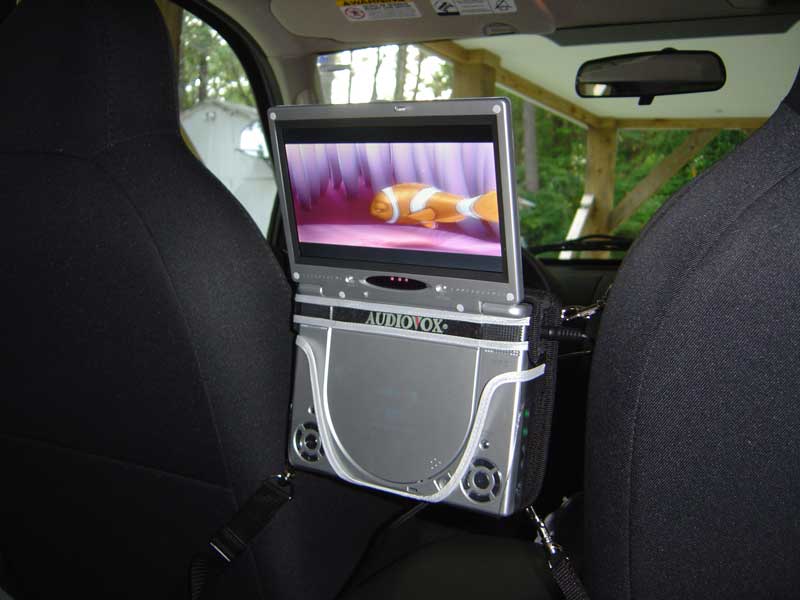
There aren't too many factors involved in setting up the Audiovox mobile DVD player, but by reading through our experiences you may be able to save yourself some potential difficulties. For installation in a vehicle, let's shoot for mounting it between the driver and passenger seats, as I did in my 2003 Jeep Liberty. Unpack the player and the portable DVD bag as well as the 4 resizable straps. Hook on the four straps to the bag's metal loops using the spring clip side of each strap. The first thing I noticed was that I didn't have headrests in my vehicle as shown in the user manual (the Liberty uses molded bucket seats). No worries, the straps are long enough to extend to the seat belt anchors - which provided more than enough stability and didn't interfere with the functionality of the belt system. Now you simply have to find a bottom anchor under the seat and apply the correct tension to align the viewing angle of the flip up LCD screen. One note on the screen - go ahead and pull it open, it won't break. Audiovox used a strange latching system that provides no button for releasing the pivoting LCD screen. The resistance is a bit disconcerting, but after looking everywhere for a catch, we realized it's just meant to be yanked open. The screen folds up to about 170-degrees - not completely vertical, so you'll need the unit to lay back just a bit to attain a clear view of the LCD. I found that I had to pull tighter on the top straps to angle the player the way I wanted.
Next, connect the "cigarette" adapter to your car's accessory outlet and plug it into the 9V DC input on the VBP800. Also connected to the adapter is a cable for the wireless FM modulator. This gets connected to the audio OUTPUT of the player. What you'll need to do to get audio is tune to an unused FM frequency band listed on the modulator. You have 4 to choose from: 88.1, 88.3, 88.5 and 88.7. If you are headed on an extended road trip, you may have to change the modulator and the radio station when signal interference pops up. The FM modulator is not strong enough to override even a moderate FM station, so make sure to pick the option farthest away from any adjacent traffic. My experience varied from acceptable to excellent in terms of the quality of reception depending upon where I was driving. Remember, you can always rely on the integrated stereo speakers, headphone jacks, or even wireless IR headphones (not included) for audio reproduction.
Loading and playing a DVD is easy, simply open up the tray and insert a disc into the locking center hub. All the menu and playback buttons are accessible even while the DVD is in the bag (as are all of the audio and video connections). In addition, as mentioned earlier, the credit card sized remote control can bounce commands off of your rear window to control the deck from the front seat.
Basic Setup and Installation - Portable Video Display/Player Use
For use as a DVD player, you'll need to connect the audio and video outputs to your television or display device. Composite video is the only choice, so you won't have progressive video output as an option. Turn down the volume on the player to avoid having "dueling audio" with the VPB800's internal stereo speakers. I found the video and audio outputs to come in quite handy when we went for a brief vacation at Amelia Island Plantation in Florida. The beach home we stayed at there had only a VHS player (gasp!). having the Audiovox portable unit handy allowed me to hook up the DC 9V adapter, plug it into the front A/V inputs of the television and we were able to watch some movies during the evening hours.

Remote Control
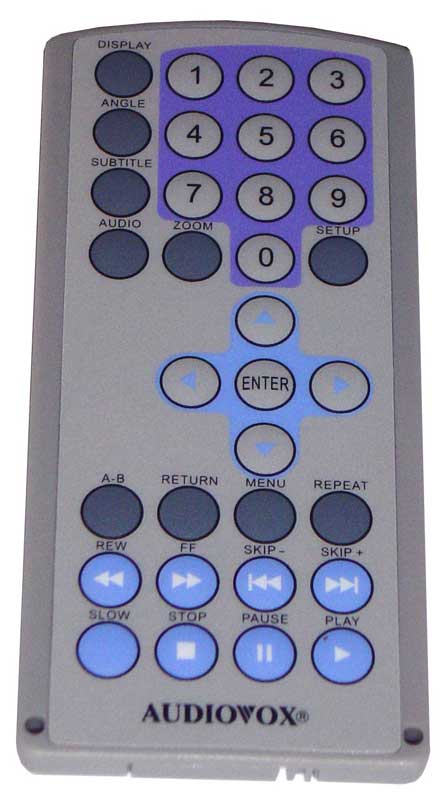
There's not much to dislike about this remote. It is the only place you will find the Setup button for the DVD player, so be sure to carry it with you if you expect to get into the DVD players system menu. The buttons are easy to depress and the tactile bubbles allow you to feel your way around it without looking should you happen to be driving the vehicle while attempting to press play for your kids. The remote is powered by a 3V battery that will most likely last for quite a long time. This remote also stores nicely in the car or in the DVD carrying case.
Advanced Setup and Configuration
The Audiovox VBP800 does allow you to set black level, white level, tint and hue so you'll be able to do a very basic setup when using the unit indoors or out. I would focus on brightness and contrast simply to allow you to eek out the maximum resolution from the 8" LCD screen. The only additional options are a handy Screen Mode button that shifts between 4:3 and 16:9 modes for the main display, external video configuration to pan & scan, letterbox or 16:9 widescreen, and parental controls. All of these are accessible from the DVD player's Setup menu.
 On the Road - Performance

Will you just look at the face on my son - that's pure enjoyment thanks to the wonders of a mobile DVD system! As I mentioned, we took the Audiovox player on the road for a good 800 mile round trip and found its performance to be excellent for its intended use. The LCD screen has fairly large pixels and is not very high resolution compared to a standard computer LCD monitor, however we felt that it was perfectly adequate for "on-the-road" use. When connecting it up to a standard definition television the quality was much improved, showing that the video processing circuitry was much better than the LCD display let on.
Conclusion
We'd love to see Audiovox put out a Cadillac version of its current system - perhaps a 10" LCD with about twice the horizontal and vertical resolution of the VBP800, but for now this is an acceptable value for under $500, though you can certainly find less expensive units. Other items for our wish list would be to include wireless headphones (2) and perhaps a second screen option that could be connected for a dual display system. The price of this type of system may be twice as much, but it would be the defacto standard for portable/mobile systems. For now, the Audiovox lives up to its name - indeed, this DVD player-in-a-bag provides everything you need in a portable and mobile solution.
MSRP: $499
(888) 342-7710
Audiovox Corporation is a publicly traded company (Nasdaq: VOXX) located in Hauppauge , New York . It was founded in 1965 in the car radio distribution business and later went public in 1987. Audiovox became a pioneer in the wireless industry, selling their first vehicle-installed wireless telephones in 1984 as a natural expansion of their automotive aftermarket business. Their extensive distribution network and long-standing industry relationships allowed them to benefit from growing market opportunities in the wireless industry and to exploit niches in the consumer electronics business.
Audiovox operates in two primary markets: Wireless Communications and Consumer Electronics. The Wireless group, a 75% owned subsidiary (25% owned by Toshiba Corporation), sells wireless handsets and accessories through domestic and international wireless carriers and their agents. The Electronics group sells mobile entertainment and security products, and consumer electronics primarily to mass merchandiser retailers, specialty retailers, distributors to new car dealers, original equipment manufacturers (OEM's), and the U.S. military.
The Score Card
The scoring below is based on each piece of equipment doing the duty it is designed for. The numbers are weighed heavily with respect to the individual cost of each unit, thus giving a rating roughly equal to:
Performance × Price Factor/Value = Rating
Audioholics.com note: The ratings indicated below are based on subjective listening and objective testing of the product in question. The rating scale is based on performance/value ratio. If you notice better performing products in future reviews that have lower numbers in certain areas, be aware that the value factor is most likely the culprit. Other Audioholics reviewers may rate products solely based on performance, and each reviewer has his/her own system for ratings.
Audioholics Rating Scale
 — Excellent
- — Very Good
- — Good
- — Fair
- — Poor
| Metric | Rating |
|---|---|
| Standard Definition Video Performance | |
| Analogue Audio Performance | |
| Build Quality | |
| Ergonomics & Usability | |
| Ease of Setup | |
| Features | |
| Remote Control | |
| Performance | |
| Value | |
Clint Deboer was terminated from Audioholics for misconduct on April 4th, 2014. He no longer represents Audioholics in any fashion.
View full profile Subscribe to our newsletter