


NeuNeo HVD2085 1080p DVD Player Review
NeuNeo (Helios) HVD2085 DVD Player
- Product Name: HVD2085
- Manufacturer: NeoDigits
- Performance Rating:

- Value Rating:
- Review Date: December 18, 2005 19:00
- MSRP: $ 245
|
|
Pros
- True 720p/1080i/1080p upconversion via component video outputs
- HVD support for true HD DVDs
Cons
- Poor deinterlacing capability
- No flag-less 2:3 error detection
- Fisher Price remote control
- Cheap aesthetics
- Soft Picture
- User manual missing key graphics in diagrams
HVD2085 Responsiveness & Build Quality
It was only a matter of time until a company released a fully "unlocked" player that upconverted DVDs to 1080p. Just think of the marketing angles: "Why wait for high definition DVD when you can have it now!" or "Who needs Blu-ray Disc when you can get 1080p from your home movie collection!" What has people so excited about the NeuNeo player (pronounced "New-Neo") is the fact that it outputs 480p/720p/1080i/ 1080p from its component and HDMI outputs (latest firmware required). How do they do it? Well, I assume they run very quickly from anyone representing the MPAA since this violates the DVD spec. In any case, feel free to get them while they're hot - if 1080p output over component is something you've secretly asked Santa for this year and you don't mind some odd quirks and questionable video performance.
Unpacking
&
Build Quality
The NeuNeo came in a standard box with styrofoam end caps and wrapped in plastic. It includes a remote control (more on that beauty later), detachable power cord, analogue A/V cables, user manual, and an "HVD" titled "Le Peuple Migrateur" which I believe is French for "Watch me follow these geese around with an HD camera as they migrate south for the winter." It's actually quite excellent footage and it should be - it's an HVD disc which is encoded at native 720p. For a myriad of reasons this disc will not play on a regular DVD player (not even the Denon DVD-5910 does HVD discs). On the NeuNeo it is quite impressive.
The face of the player reminds me of a very inexpensive thin form factor player - it is pretty eclectic in appearance. I think it's the combination of silver, white and black - it's like NeoDigits couldn't make up their minds so they decided to try and make everyone happy. My advice would be to pick a color and go for it (and if the remote was designed to match it would be a first in the industry - hint, hint). The front buttons are not backlit like some other competing players we've reviewed - this is not necessarily a bad thing as there is already too much light on the face of most components. It would have been a nice option to have the ability to dim the front panel display which, though small, is quite bright.
Responsiveness
Popping a disc into the unit is a test of patience. I timed several discs and the average time from Loading the disc to getting to the first disc program item ranged from 17 to just under 23 seconds. I also found that loading a disc by pressing play on the remote resulted in the disc loading and then stopping. Pressing Play on the front of the unit, however, correctly closed the tray, loaded the disc and then played it. When a disc is spinning inside the unit it vibrates enough to generate a steady sound which emanates from the player. It's certainly not loud enough to disturb the listeners in the room, but it's not comforting and makes me thing something is not well balanced. The sound seemed to exist regardless of what disc I placed in the unit. Layer changes took just over a second, garnering an average rating in our DVD Player Comparison Checklist .
Responsiveness was a constant problem with the NeuNeo player. For example, at times, while a disc was playing, the first time I hit the Eject button the player ignored me. Hitting it a second time successfully ejected the disc. This turned out to be intermittent and seemed to be a result of not pressing the'Eject' button firmly enough. Pressing any of the buttons (except for power) either on the remote or the player itself failed to rouse the player out of standby mode, meaning that a workaround for discrete power on/off commands for remote control macros was almost impossible (there are no discrete power on and power off buttons on the remote). I ran my standard'standby mode' test whereby I shut down the unit with the disc tray open. The NeuNeo correctly took the tray back in before entering Standby mode. Chapter skips and basic navigational functions were all a bit sluggish.
Connections
The back panel has all the usual suspects (and then some) as far as outputs are concerned. An HDCP-free HDMI output is joined by component video, coax and optical S/PDIF connections, composite, s-video, and analogue 5.1 audio outputs (great for people who have older receivers without DTS capability). An HD15/RGB output is also provided which supports VGA/SVGA/XGA/SXGA resolutions (up to 1280 x 1024). You can set this output to function in the desired resolution by selecting it in the Display > TV System setup menu. As we mentioned earlier, one of the big attractors of this unit is its ability to digitally upconvert DVDs to up to 1080p output from both the HDMI output as well as the component output.
Internal Components
I was not surprised by
the components found in this slim-profile unit. There is only so much you can fit into a chassis this
size. Weighing in at just over 5.5 pounds, the HVD2085 is no heavyweight, but its strengths aren't in
large power supplies, industrial strength transport mechanisms or expensive and robust video processors.
The HVD2085 uses an AMLogic AML3428 chip to handle MPEG-2 decoding as well as deinterlacing and scaling
for the component video outputs.
HVD2085 Menu System & Remote Control
The Setup menu on the NeuNeo player is sparse and consists of 6 main areas with submenus where needed. The Setup screens are arranged as a basic GUI and helpful descriptions are given at the bottom of each screen. It covers the basics but just the basics. You can set all of the standard fare, including TV shape, language, video output and audio options. As this player doesn't handle SACD or DVD-Audio discs, the reduced menu was expected since many of the complexities of a DVD player's menu have to do with bass management and additional settings for multiple formats. Completely missing, however, were any display options for picture control. If you are unhappy with the output levels of the NeuNeo player you're going to have to alter the display to compensate.
Sound Menu & Audio Options
Setting up the audio for the player was easy and simplistic. You could set the digital output to send Dolby Digital and/or DTS to the player's coax and optical S/PDIF outputs. If neither is checked (the default position, by the way) the system will output a straight PCM downmix. A Stereo menu option sets whether the player will be used for analogue two-channel output only, or allow configuration and use of the 5.1 multi-channel outputs. Set this to 'No' and you can then enter Speaker Setup and configure the type speakers (Large, Small or None). NeuNeo does not specify the fixed crossover frequency used, so I ran a low frequency sweep tone and determined it to be a surprising 60Hz with a steep 24dB/octave rolloff. I was expecting the other end of the scale with 120Hz or more for smaller home theater systems. Why they chose this frequency I have no idea as 80Hz would be a more popular frequency and a lot closer to the majority of home theaters in existence. Better yet would be a selectable crossover frequency that ranged from about 40Hz - 200Hz (to cover the widest range of systems possible).
Delving back into the
Sound
setup menu I found that you could also configure
loudspeaker
Distance
in 1' increments, though delay compensation is not available for
the subwoofer (again, this is all for the analogue outputs only).
Speaker output levels are adjustable in 1dB increments, allowing for
fairly accurate level setting when using the analogue outputs (we even
like to see 0.5dB increments on flagship players). The last item in the
Sound menu is the ability to set LPCM output to 48kHz or leave it at
the default 96kHz setting.
Editorial Note
By default the digital audio exiting the NeuNeo HVD2085 player will only be PCM. You must enable Dolby Digital and DTS in the Sound > Digital Output submenu. Simply check the boxes next to the two formats (or just Dolby Digital if you have an older receiver that doesn't decode DTS) and you'll be all set.If you do have an older receiver that doesn't do DTS decoding, but has 5.1 analogue inputs, you can still use the NeuNeo's analogue multi-channel outputs to send the decoded sound to your receiver. This is especially handy for DTS audio discs.
The Display setup page completes the more involve menu items and allows setting of the TV System which is really just the output resolution you would like to see coming out of the player. The options are NTSC (480i), PAL (576i), Progressive 480p, Progressive 576p, 720p, 1080i, 1080p, VGA, SVGA, XGA, and SXGA. Obviously the computer resolutions are only available from the HDMI or HD15 (VGA-style) outputs. Composite and s-video outputs will have a choice of NTSC or PAL. This player does convert frequency and formats (NTSC/PAL) so you can play just about any disc imaginable and get usable output.
Other menu items allow you to select the TV style you own (16:9, 4:3 PS (pan-and-scan) , or 4:3 Letterbox) . No matter what style of TV you have you should choose 16:9 to get the correct aspect ratio from anamorphic DVDs. You can also change the HD scan frequency from 60Hz (US default) to 50Hz (for PAL use).
The last Setup Menu items include Languages and parental Lock which is standard fare on most players. Play Mode is also included which sets whether the player will function via program play or random play modes. I don't think these will get much use and I'm guessing neither does NeoDigits as the user manual goes on for some time about playing SD and MMC cards which, of course, the HDV20885 does not do.
Remote Control
My 2-year old son loved the remote. It was big, colorful and safe for him to use in free play. None of this, however has anything to do with what makes a good DVD player remote control, which I would prefer to be small, backlit (this one isn't) and ergonomic. The first problem I had with it (and continued to have with it regardless of how long I used the remote) was the absence of a standard navigational control section. Instead of centrally locating the 'Enter' key as expected, it was located to the top left of the 4-way arrow pad. I sure hope NeoDigits doesn't go into making computer keyboards or the 'Return' key may end up on the left side next to the caps lock key! I simply didn't understand the nearly hidden 'Menu' and 'Title' buttons, separated Play, Pause, and Stop buttons, and fast forward, rewind, and skip buttons which were completely relocated to an area not even within striking distance of Play and Pause .
Some other things that were odd had to do with misnamed buttons or help systems. Frequently you would do something, such as utilize the bookmark feature, whereby the system would instruct you to select buttons named 'OK' or 'Return'. Neither exists, nor does the intuitive 'Exit' button that would be a logical substitute. Does any of this really matter? Maybe not to those who plan to utilize a universal remote control (except for the lack of discrete power on/off codes, that is.) We point out these things in the hopes that the overall experience of this player would improve with future models.
HVD2085 Benchmarks, Viewing Tests & Conclusion
Performing measurements and tests on a DVD player using tools at our disposal is somewhat objective, but still results in a certain amount of subjective decision-making in terms of scoring and evaluation. As such, we recommend that these test results be used as a guideline only. For the review of this DVD player, the performance was based on the player in conjunction with the display monitor. We used the Yamaha LPX-510 3LCD projector which was calibrated as close as possible to ISF reference standards. For the test and evaluation of the HVD2085 we used selections from Avia Pro and the Silicon Optix HQV Technology benchmark DVD test discs in addition to various test clips from popular movies.
All final test scores were derived using both the NeuNeo HVD2085's HDMI and component outputs in 720p mode unless otherwise specified.
AudioholicsHQV Bench Testing Summary of Test Results
Perfect Score is 130
NeuNeo HVD2085 Benchmark total score: 25 (This player is very bad at
reading non-flagged cadences and provides no noise reduction)
|
Test |
Max
|
Component
|
Pass/Fail |
HDMI
|
Pass/Fail |
|---|---|---|---|---|---|
|
Color Bar |
10 |
10 |
Pass |
10 |
Pass |
|
Jaggies #1 |
5 |
0 |
Fail |
0 |
Fail |
|
Jaggies #2 |
5 |
0 |
Fail |
0 |
Fail |
|
Flag |
10 |
0 |
Fail |
0 |
Fail |
|
Detail |
10 |
5 |
Pass |
5 |
Pass |
|
Noise |
10 |
0 |
Fail |
0 |
Fail |
|
Motion adaptive Noise Reduction |
10 |
0 |
Fail |
0 |
Fail |
|
Film Detail |
10 |
0 |
Fail |
0 |
Fail |
|
Cadence 2:2 Video |
5 |
0 |
Fail |
0 |
Fail |
|
Cadence 2:2:2:4 DV Cam |
5 |
0 |
Fail |
0 |
Fail |
|
Cadence 2:3:3:2 DV Cam |
5 |
0 |
Fail |
0 |
Fail |
|
Cadence 3:2:3:2:2 Vari-speed |
5 |
0 |
Fail |
0 |
Fail |
|
Cadence 5:5 Animation |
5 |
0 |
Fail |
0 |
Fail |
|
Cadence 6:4 Animation |
5 |
0 |
Fail |
0 |
Fail |
|
Cadence 8:7 animation |
5 |
0 |
Fail |
0 |
Fail |
|
Cadence 24fps film |
5 |
0 |
Fail |
0 |
Fail |
|
Scrolling Horizontal |
10 |
5 |
Pass |
5 |
Pass |
|
Scrolling Rolling |
10 |
5 |
Pass |
5 |
Pass |
Total Points |
130 |
25 |
|
25 |
*All tests were conducted with the HDMI/component outputs set to 720p.
Comments on Audioholics DVD Torture
Tests
For the full list of features and testing, please see the new DVD Player Features and Benchmark Comparisons Chart . This player has the dubious honor of achieving the lowest score of any player we have tested to date with regards to the HQV Benchmark. Keep in mind, however, that the cadence and deinterlacing tests are for the most part all unflagged. The NeuNeo player's deinterlacer is built to look for flags. If you don't have a ton of bad edits and missed flags in your source material it is likely that these results won't show up in your day-to-day viewing. I'll admit it; there is more to a DVD player than just deinterlacing and bad edit detection - especially when you get a good transfer or source on DVD.
The HDMI output of the player cropped three pixels from the right side of the picture only - which I consider to be very good. The HVD2085 cannot pass blacker than black and it also does not pass whiter than white in a manner that is consistent with what we are looking for (white was actually output at a very high level overall). There seemed to be about a pixel of Y/C delay in both the HDMI and component video outputs, though it was very subtle. It passed our macroblocking bug test with flying colors - one of the few advantages the NeuNeo gained in not going with a Faroudja chip.
Viewing Evaluation
After reading the benchmark test results you'll wonder if the HVD2085 can be considered a decent player. Well, there is a lot of material out there that isn't poorly encoded or incorrectly flagged. For these sources you trust the NeuNeo's excellent resolution and color performance to carry the day.
Viewing evaluations are always subjective, but they are a great opportunity to see the practical demonstration of the above test results. We typically select some reference DVDs as well as some content with less than stellar source material. A few examples of our experiences are included in our following viewing evaluation.
DVD: Fantastic Four
Fantastic Four was an action packed movie that had some annoying edge enhancement. It did possess enough detail however to make for some good reference material with which to evaluate the NeuNeo DVD player. One thing I really noticed on this unit was that it did not seem to bring out the detail in standard definition DVDs. On a myriad of close-ups and detail shots I consistently felt that the NeuNeo was a bit soft - an observation that gelled with my perception and rating of the HQV Detail test. Another thing that crept up was the very noticeable judder motion present in any horizontal pans across the screen. In addition, there was a tendency for the player to 'skip' and 'jump' a bit while playing scenes - not in the sense that it hit an error or broke up the audio track, but just enough to let you know you had just passed over a few frames.


HVD: Le Peuple Migrateur (720p)
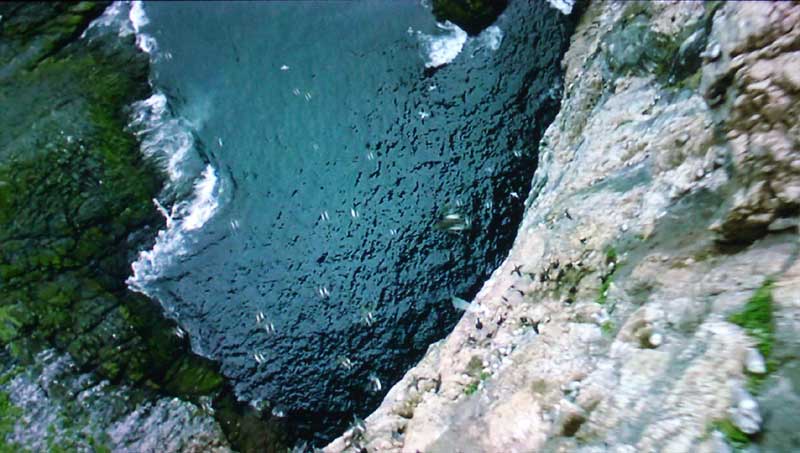
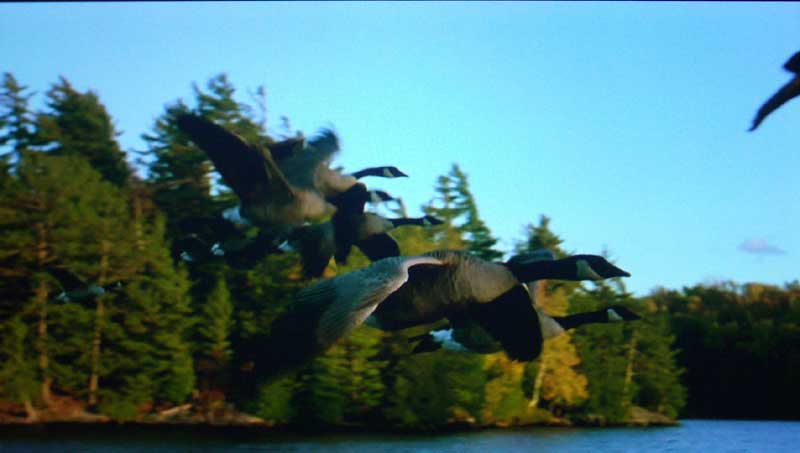
This HVD disc is mastered in 720p and is only compatible on HVD-compatible players. It was absolutely phenomenal footage and it showed off the resolution capability of the NeuNeo player magnificently. While I was not terribly impressed with the NeuNeo's handling of standard DVDs, I was absolutely captivated by its rendering of this 720p HD content. The screen captures I've provided here will show a bit of the landscape detail as well as the edge and feather detail present in the birds.
I wish all DVDs had this type of quality. I finally felt as if I had gotten a small glimpse into the future of Blu-ray Disc and HD-DVD titles. We have a lot to look forward to if the industry doesn't self destruct first.

Listening Evaluation
I noticed no audio delay or sync issues with this player. Output was commensurate with other players in this price range in that it was indiscernible via the digital outputs. At some point down the road we may do some more in depth comparisons of analogue outputs of budget players versus higher end models, but for now suffice it to say we noticed no major issues with this player.
Conclusion
We received an email from NeoDigits some time ago which prompted
this review. In it they bragged a little bit about how this player
didn't have the'macroblocking bug' because it didn't use a Faroudja chip for video
processing. While this is certainly true, the downside is that it also
failed most of the video tests we ran it through. I think I'd prefer
the macroblocking bug personally. Still, no Faroudja player I know of
outputs 720p, 1080i, or 1080p from its component video outputs.
Actually, I am not aware of any player that outputs 1080p at this point
save Denon's new $3,800 flagship DVD-5910Cxi with 1080p upgrade. The
performance of the HVD2085 is akin to many HTPCs I've seen - great
picture resolution, provided you don't ask them to do anything fancy.
If you've absolutely got to have a 1080p source or you have an older
analogue projection system that can take HD over component but not
HDMI, I suppose $249 isn't too much to ask.
NeuNeo HVD2085
MSRP: $245
http://www.neodigits.com
The Score Card
The scoring below is based on each piece of equipment doing the duty it is designed for. The numbers are weighed heavily with respect to the individual cost of each unit, thus giving a rating roughly equal to:
Performance × Price Factor/Value = Rating
Audioholics.com note: The ratings indicated below are based on subjective listening and objective testing of the product in question. The rating scale is based on performance/value ratio. If you notice better performing products in future reviews that have lower numbers in certain areas, be aware that the value factor is most likely the culprit. Other Audioholics reviewers may rate products solely based on performance, and each reviewer has his/her own system for ratings.
Audioholics Rating Scale
 — Excellent
- — Very Good
- — Good
- — Fair
- — Poor
| Metric | Rating |
|---|---|
| High Definition Video Performance | |
| Standard Definition Video Performance | |
| Bass Management | |
| Build Quality | |
| Ergonomics & Usability | |
| Ease of Setup | |
| Features | |
| Remote Control | |
| Deinterlacing & Scaling | |
| Performance | |
| Value | |
Clint Deboer was terminated from Audioholics for misconduct on April 4th, 2014. He no longer represents Audioholics in any fashion.
View full profile Subscribe to our newsletter