


Westinghouse LVM-47w1 1080p LCD Display Review
LVM-47w1 LCD Display
- Product Name: LVM-47w1 1080p LCD Display
- Manufacturer: Westinghouse
- Performance Rating:

- Value Rating:
- Review Date: October 27, 2006 20:00
- MSRP: $ 2499
|
Viewable Screen Size: 47” Diagonal Native/Optimum Resolution: 1920 x 1080 (16.7 Million colors) Compatible Modes Contrast Ratio:
1200:1 Video Processing |
Connectors Physical
Attributes Installation Options Warranty |
|
Pros
- 1080p native panel resolution and input – including HDMI and DVI-D
- Slim, attractive display
- Possibly best bang for the buck in a 47" LCD
- Incredibly detailed
Cons
- No advanced user calibration options
- Sub-par black levels
- No advanced scaling modes for SD of HD content
- Poor off-axis viewing quality
LVM-47w1 Features & Build Quality
1080p seems to be the most recent "Holy Grail" of the AV community - but how do you get it without hocking your car and taking out a second mortgage? (we don't recommend either and, in fact, if you're thinking of either of these options, please seek help immediately) Westinghouse broke all the rules when it introduced it sub-$2,000 42" LCD display in the beginning of 2006. At the time, MSRP was $2,799 and the street price quickly fell to around $1,800. The company also offers a 47-inch version of this TV, the LVM-47w1 for a (current) street price of just $2500 - you see the attraction here, no? As prices dropped gradually amongst the competing LCD and plasma panel TV markets, Westinghouse decided to simply give the competition a kick in the pants and really 'get the party started'. Since the 47-inch LVM-47w1 is simply the bigger brother to the 42-inch LVM-42w2 this review will be targeted at seeing the larger display performs exactly the same and/or overcomes any of the shortcomings of the 42-inch model.
Features
The Westinghouse LVM-47w1 has the same great features as the 42-inch model:
- True 1080p panel resolution (1920x1080)
- 1080p INPUT support via component, HDMI, and DVI-D (for real)
- Easy access to inputs via side-mounted connections for audio, video and power
- Only 5" deep and minimal "wasted" space around the LCD panel
- Built-in 10W "subwoofer"
Delivery and Build Quality
Delivery was smooth, though it arrived while I was out of town at CEDIA. Fortunately, the delivery man was kind enough to help my pregnant wife load it into the house to await my arrival. The display was double boxed with a pull-off top and plastic anchor-handles on the bottom to assist lifting the unit during transport. A thin, flexible plastic screen cover was taped to the front of the unit to protect the display against shifting items. Remote, stand, user manual and power cabling were all included in the box as expected. The unit is simply a scaled up version of the LVM-42w2 and bears no other differences in terms of its connections or basic features.
Take a look at the inputs which are identical to the LVM-42w2 and are placed on either side of the monitor:

On the left we have a DVI-D input (1080p), 2 component inputs (full 1080p), and an HD15 (VGA) input

The right side features HDMI (unstable 1080p support), a second DVI-D (full 1080p), and the standard definition inputs in addition to audio outputs.
The 47-inch Westinghouse display allows for independent video adjustments for each input - as it should.
1080p Inputs, Almost
 We
tested 1080p source input to the various connections on the LVM-47w1.
Like the 42-inch model, the HDMI input was apparently throttled down to
only (correctly) accept 720p/1080i inputs. When we fed all three
digital inputs 1080p source material one of the DVI-D
inputs didn't produce the sparkle artifacts, but the HDMI input and
other DVI-D input did. We've blown up the sparkle effects below and
though they were not present in every scene, they certainly indicate
that this display is not fully 1080p compliant on the digital inputs.
We
tested 1080p source input to the various connections on the LVM-47w1.
Like the 42-inch model, the HDMI input was apparently throttled down to
only (correctly) accept 720p/1080i inputs. When we fed all three
digital inputs 1080p source material one of the DVI-D
inputs didn't produce the sparkle artifacts, but the HDMI input and
other DVI-D input did. We've blown up the sparkle effects below and
though they were not present in every scene, they certainly indicate
that this display is not fully 1080p compliant on the digital inputs.


LVM-47w1 Menu System, Remote & Calibration
The menu system of the LVM-47w1 is very easy to understand and is identical to the 42-inch model we reviewed earlier this year (see that review for more in depth descriptions of those functions). It’s important to note that there are no RGB Gain/Cut controls for this display, meaning you will only be able to adjust Brightness, Contrast, Color and have access to the various preset Color Temperature options given by the display. You will also want to bring down the backlight control all the way to 0 for night time viewing as this delivers the best black levels possible. During the day go ahead and crank it back up to 100 to get the most light out of the unit.
Watch That Sharpness Control!
The Westinghouse’s Sharpness control is unusual in that it can actually blur the picture when set to less than “4” (the median setting). I found this out when running the HQV Color Bar test. The unit initially failed, which made no sense to me since I had noted this to be a very clear display from observations of various scenes to date. After adjusting the Sharpness control I quickly realized that if it was turned down all the way the picture was made artificially softer – something users of this display will NOT want. A setting of “4” (smack dab in the middle) seemed to be the best setting for this monitor. Since the LVM-42w2 also failed the HQV Color Bar test I went back and re-ran the test with the new settings. It passed and we’ve updated the HQV score and added a note in that review.
Remote Control
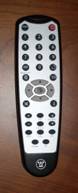 The same remote is supplied with
both the 42-inch and 47-inch models and it works well except for a rather narrow
IR beam angle (annoying to say the least) and lack of any backlighting. The
remote control again has five (YPbPr, VGA, DVI, S-Video, and AV) hard buttons
for input selection. We wish there were no toggling needed, but understand
remote control real estate issues.
The same remote is supplied with
both the 42-inch and 47-inch models and it works well except for a rather narrow
IR beam angle (annoying to say the least) and lack of any backlighting. The
remote control again has five (YPbPr, VGA, DVI, S-Video, and AV) hard buttons
for input selection. We wish there were no toggling needed, but understand
remote control real estate issues.
As this is a monitor and not a television (with tuner) this doesn’t strike me as a remote that will be getting much use and so any deficiencies are almost moot (except for the IR reception range which does seem to severely limit the effectiveness of universal remote controls.)
I would highly recommend the use of an RF remote control system which typically provides IR emitters that can go directly over the IR sensor for the monitor, eliminating any and all IR reception difficulties.
Calibrating the Television
We used Datacolor’s Colorfacts Professional 6.0 software to measure and help calibrate black and white levels on this LCD display. In general, the Westinghouse is an extremely limited display, offering almost no user controls beyond the typical Brightness, Contrast, Hue and Color controls. My opinion is that, at minimum, the user controls of a display should include RGB Gain and Offset. This is not a valid place to cut corners or attempt to up-sell consumers on a more expensive display. As there are really no user controls for RGB Cut or Gain we didn’t get much in terms of ‘before’ and ‘after’ for this display. I make it a point not to go into the service level menus in reviews; however this would be exactly where you’ll want to be in order to tweak this display a bit closer to perfection. The defaults are pretty good provided you select the correct Color Temperature.
CIE Chart – Color Reproduction & Saturation Potential
The datacolor ColorFacts 6.0 CIE Chart is used to show the range of colors the Westinghouse LVM-47w1 LCD display is able to reproduce. This appears as a white triangle overtop of a darker triangle which represents the gamut of colors in the HDTV-capable range. The full “shark fin” chart is a representation of everything we are capable of seeing with the human eye.
You can see that the 47-inch and 42-inch models produce nearly identical amounts of color. Though the greens are slightly tilted towards blue, they are still quite vibrant. Reds and Blues are almost perfectly saturated within the typical limits of HDTV.
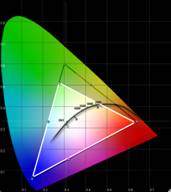
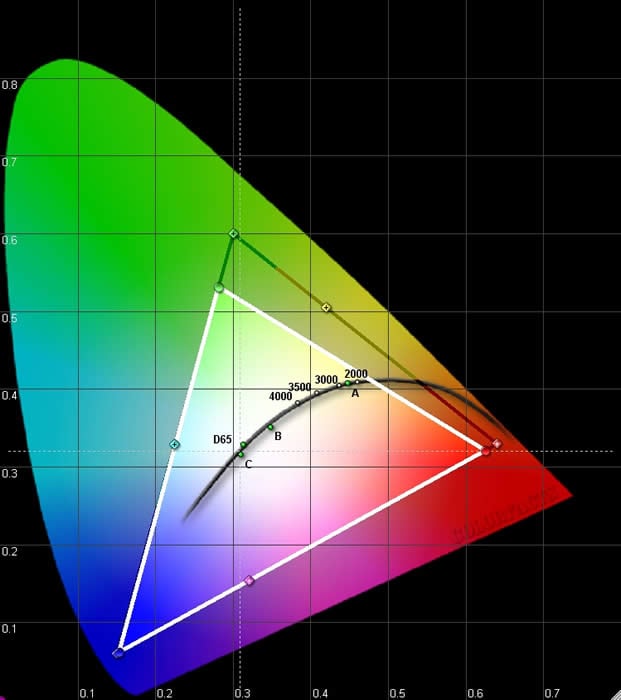
LVM-42w2
(left) and LVM-47w1 (right)
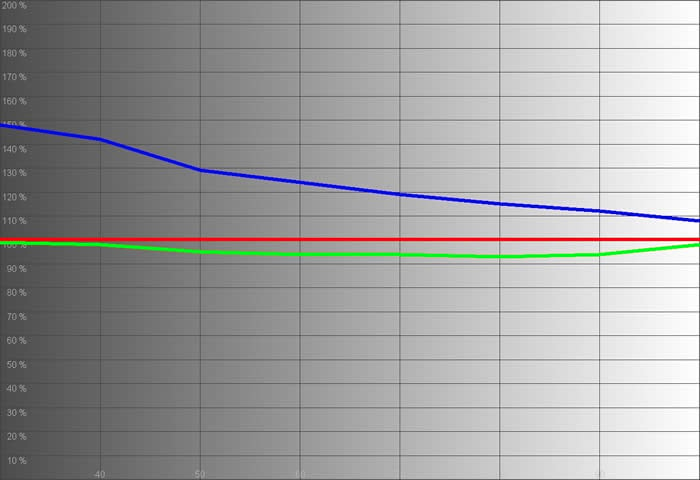
HDMI Input 1080i (Contrast and Brightness configured for night time viewing)
 |
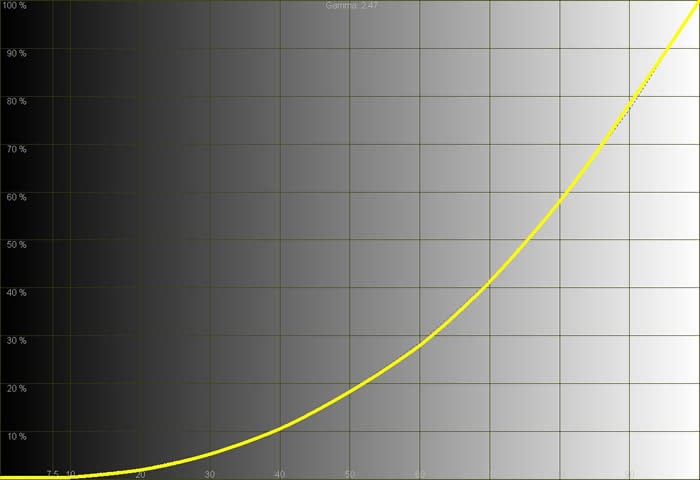 |
| While the display technically showed a cool response in the lower IRE range, the end result is a nice white picture with a very convincing grayscale tone that is absent any obvious color shifting. | The luminance histogram again showed an almost pristine curve with no crushed whites or blacks. |
 |
|
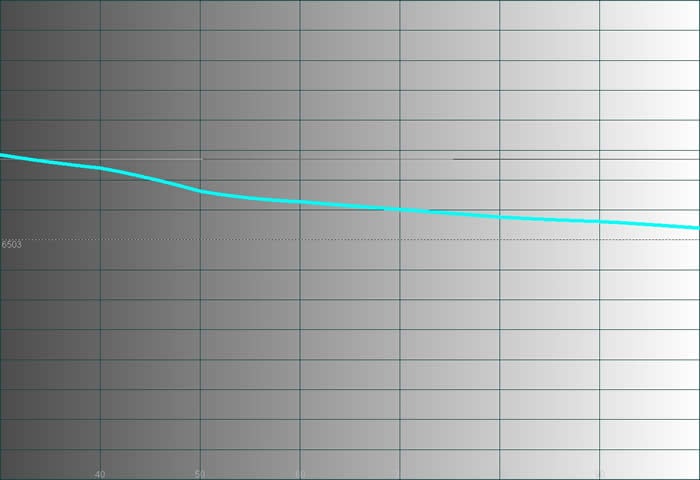
| The color temperature showed cool at lower IRE levels (see RGB response above) but averaged 6850K in “Warm” mode. “Neutral” mode yielded 9700K (a perceptually brighter white), while the ambitious “Cool” mode gave a very blue reading of 12,500K (visibly blue). | |
ANSI contrast was measured at 312:1 with Color Temp set to “Warm” and with Contrast and Brightness correctly set for night time viewing. The backlight was also set to 0 – its lowest setting. This is an acceptable real-world contrast measurement, though we’ve certainly seen higher (as well as darker black levels).
Audioholics/HQV Bench Testing Summary of Test Results
Perfect Score is 130
Westinghouse
LVM-47w1 Benchmark Score: 68 (good, but missing some of the better
implementation/features of the Genesis video processing)
| Test | Max Points |
Component 480i |
Component PassFail |
|---|---|---|---|
| Color Bar | 10 | 10 | Pass*** |
| Jaggies #1 | 5 | 3 | Pass |
| Jaggies #2 | 5 | 0 | Fail |
| Flag | 10 | 5 | Pass |
| Detail | 10 | 10 | Pass |
| Noise | 10 | 0 | Fail |
| Motion adaptive Noise Reduction | 10 | 0 | Fail |
| Film Detail | 10 | 10 | Pass |
| Cadence 2:2 Video | 5 | 5 | Pass |
| Cadence 2:2:2:4 DV Cam | 5 | 5 | Pass |
| Cadence 2:3:3:2 DV Cam | 5 | 0 | Fail |
| Cadence 3:2:3:2:2 Vari-speed | 5 | 0 | Fail |
| Cadence 5:5 Animation | 5 | 0 | Fail |
| Cadence 6:4 Animation | 5 | 0 | Fail |
| Cadence 8:7 animation | 5 | 0 | Fail |
| Cadence 3:2 24fps film | 5 | 5 | Pass |
| Scrolling Horizontal | 10 | 5 | Pass |
| Scrolling Rolling | 10 | 10 | Pass |
| Total Points | 130 | 68 |
|
*** Make sure the Sharpness setting is on “4” or the display will blur pixels resulting in a loss of resolution.
Comments on HQV Testing
Other than the surprise revelation of the Sharpness control, this display mirrors that of the LVM-42w2 in performance. The 2-3 Moving Zone plate test did excellent in horizontal movement, but failed on both vertical and diagonal movements. Component inputs showed around 5% overscan on all sides of the display which is slightly disappointing. HDMI and DVI-D inputs showed no overscan.
LVM-47w1 Viewing Evaluation & Conclusion
We watched the Westinghouse monitor with a myriad of sources and resolutions. 1080p or 1080i sources will look the best and result in the least amount of artifacts, though it did a fair job of scaling 720p material to its native resolution. For the most part we sent it 1080p upconverted material or sources from our Denon DVD-3930CI reference player at 1080p resolution.
DVD: Star
Wars - Clone Wars: Volume One
Using the DVI-D inputs of the
display we wanted to get a good idea of the color capabilities and Clone
Wars: Volume One seemed to be a good choice (OK, it’s also such a great DVD
to watch). Jumping from chapter to chapter I selected a nice grouping of photos
that I thought represented some excellent aspects of the Westinghouse
display.
Notice the color and black levels. I overexposed some of the shots to bring out the black level detail (digital cameras are difficult at best to use when photographing displays). You can really get a sense that the Westinghouse is capable of showing off a great mount of detail and saturated color.
DVD: Harry
Potter and the Goblet of Fire
Want to test black levels?
Pop in a Harry Potter movie after dialing up your settings and watch the screen.
If you don’t have decent black levels for these movies you’re liable to see a
lot of black sections on the screen without any detail. Fortunately for
Westinghouse owners, this won’t be the case. This display doesn’t sport the
tragic “s-curve” gamma pattern that makes many entry-level displays produce
banding and lose all manner of detail in darker movie scenes.
DVD: Spiderman
2
Now let’s combine the dark scenes of Harry Potter with
the colorful costuming of Spiderman 2. The results are stunning with some very
excellent source footage to challenge any entry-level display.
CG and well-filmed close-ups almost always looks good in HD resolution and this was no exception. Spiderman’s costume was superb as was the facial detail shown on the main characters throughout the film. Colors popped (even the difficult reds presented in this film) and darker scenes like those inside the warehouse where Dr. Octopus assembles and activates his device are very visible. If anything, these scenes show some of the limitations of the display in that – while detail is present – it may not be quite as dark as a reference plasma display or later generation LCD panel.
Is This an Upgrade Over the LVM-42w2 42-inch Display?
One thing I noted with the LVM-47w1 display was that it had none of the power bugs persistent with its 42-inch brother. Other than that the sets look almost identical. Some specs, such as refresh rate seem to differ, but I was unable to notice any of this in practical, even critical, use. Both sets are an amazing value (there is a firmware fix for owners of the LVM-42w2, so we still recommend that model) and it’s really just a question of budget and size. The one thing we really want to see from Westinghouse on future models is the ability to calibrate RGB Gain/Cut settings. This is simply too handy not to have and would result in the ability to perfect the display without having to worry about Service Level menus. With products available like the SpyderTV Pro from datacolor, more and more consumers are getting savvy at calibration and we look to manufacturers to make these features available.
Both displays have a singularly disruptive problem in that they quickly lose contrast and black levels when viewing from an angle. Unlike more expensive LCD displays we’ve seen, the Westinghouse displays act more like a computer monitor than a TV, a condition we’d love to see remedied with a higher-end product. If you’re trying to make sure that everyone in a wider room can enjoy the TV equally without losing black levels or decreasing contrast you will want to take this into consideration before purchasing. If you are like me, however, and the main viewing angle is narrow, then the LVM series is a bargain product.
Conclusion
The Westinghouse LVM-47w1 LCD monitor is fluent in over 8 languages – all of them video. With that many inputs, it’s no surprise that this is a popular display for anyone looking to have a lot of sources – or at least a healthy choice of which to use. All in all this is another home run for Westinghouse and there is very little competition at this price point for 1080p LCD displays (add another $1000 and you might be able to grab a 45” unit from Sharp).
The Score Card
The scoring below is based on each piece of equipment doing the duty it is designed for. The numbers are weighed heavily with respect to the individual cost of each unit, thus giving a rating roughly equal to:
Performance × Price Factor/Value = Rating
Audioholics.com note: The ratings indicated below are based on subjective listening and objective testing of the product in question. The rating scale is based on performance/value ratio. If you notice better performing products in future reviews that have lower numbers in certain areas, be aware that the value factor is most likely the culprit. Other Audioholics reviewers may rate products solely based on performance, and each reviewer has his/her own system for ratings.
Audioholics Rating Scale
 — Excellent
- — Very Good
- — Good
- — Fair
- — Poor
| Metric | Rating |
|---|---|
| Detail and Resolution | |
| Deinterlacing & Scaling | |
| Contrast and Black Levels | |
| Color Reproduction | |
| Noise Reduction | |
| Calibration Options | |
| Build Quality | |
| Ergonomics & Usability | |
| Ease of Setup | |
| Features | |
| Remote Control | |
| Performance | |
| Value | |
Clint Deboer was terminated from Audioholics for misconduct on April 4th, 2014. He no longer represents Audioholics in any fashion.
View full profile Subscribe to our newsletter