


Toshiba REGZA 46LX177 LCD Review
Toshiba REGZA 46LX177
- Product Name: REGZA 46LX177 LCD Television
- Manufacturer: Toshiba
- Performance Rating:

- Value Rating:
- Review Date: December 10, 2007 13:39
- MSRP: $ 2699
|
Viewable Screen Size: 46” Diagonal Native/Optimum Resolution: 1920 x 1080 (16.7 Million colors) Compatible Modes HD: 480i, 480p, 720p, 1080i, 1080p/24/60 Color Gamut: 90% NTSC Viewing Angle: 178° horizontal/vertical Audio 2 x 10 watt speakers, Video Processing Progressive Scan, Aspect Ratio Conversion, CCS (Cross Color Suppressor), 3D Noise Reduction, PIP, Inverse 3:2 pulldown, Freezing Picture, 3D Video Processing, 3D Comb Filter Installation Options 75mm x 75mm and 100mm x 100mm VESA 8 hole pattern wall mounts |
Connectors 3 x HDMI-HDCP(1080p/24/30/60) + audio for PC 2 x YPbPr Component Video 480i/p, 720p, 1080i 2 x composite, 1 x S-video + L/R Audio (1) 480i 15-pin D-Sub (HD15) RF (cable/ATSC antenna) input Coaxial digital audio output Fixed/variable analogue audio output RJ-45/Ethernet (THINC system) IR input/pass-through Physical Attributes Dimensions (w/o base): 44.6" W x 28" H x 5.1" D; 69.7 lbs (31.7kg) Cabinet Color: Piano Gloss Black Warranty 1 year parts & labor |
Pros
- Beautiful piano gloss finish
- Three HDMI inputs
- xvYCC/12-bit/Deep Color support
- THINC file and email networking
- Optical audio output with Dolby Digital/DTS support
- DynaLight automatic/variable backlight system
- Game mode to reduce lag time
Cons
- No User RGB calibration options
- 120Hz ClearFrame technology can cause artifacts
- Single ATSC/QAM/NTSC tuner
- No discrete source input buttons on the remote control
- No RS-232
46LX177 Features and Build Quality
Now that everyone is doing 1080p these days it seems the next big advance has to do with display “speed”. The new Toshiba REGZA LCD TVs sport 120Hz ClearFrame technology. This means that images are displayed twice as fast on the screen and flicker and display-induced motion blur is reduced. Toshiba is not the only game in town that has this technology but it is definitely promoting it well and introducing consumers to the ideas and concepts behind these faster displays.
Features
When comparing displays quality is first, but it also helps to start at the top and determine if a display has the features you want. In the case of the 46LX177, Toshiba has a healthy list of impressively-named technologies and features that will help differentiate it from the competition:
-
1080p with Deep Color and 24p support
-
3) HDMI inputs
-
120Hz ClearFrame technology
-
THINC Ethernet network system with email, photo and music support
-
DynaLight dynamic backlight control
-
ATSC, NTSC and QAM tuners (single RF input)
-
Premium gloss black cabinetry
Delivery and Build Quality
The Toshiba REGZA 46LX177 comes, as you'd expect in a large box with removable lid. The form-fitted foam corners protected the display well, but fell apart when I unboxed the system. Most people I know won't be saving the box or re-shipping the unit after it is received so I doubt this is any kind of practical issue. The first thing I noticed was that the display has a beautiful piano-gloss finish that really makes it look like a piece of fine furniture. On power up a small and unobtrusive orange light appears at the bottom right of the display. After witnessing all manner of blue LEDs and fluorescent buttons this year, it was nice to see that Toshiba didn't believe in the super-bright indicators we've seen in many other models.
There are several locations where the display's inputs are to be found:
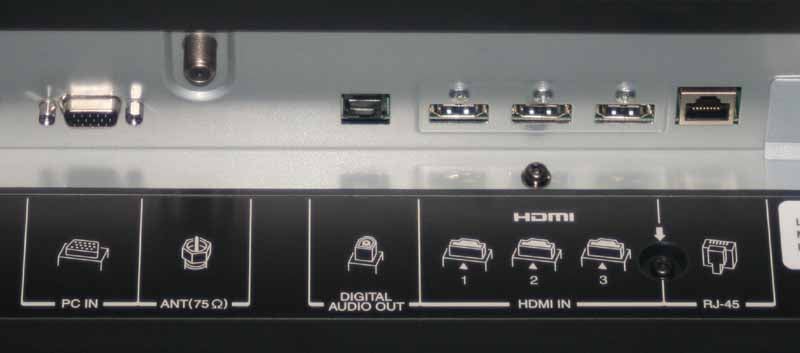
On
the rear we have bottom-facing HDMI inputs (3), an optical TOSlink
output, RF antenna input, RJ45 for THINC functionality and an HD15 PC
input.
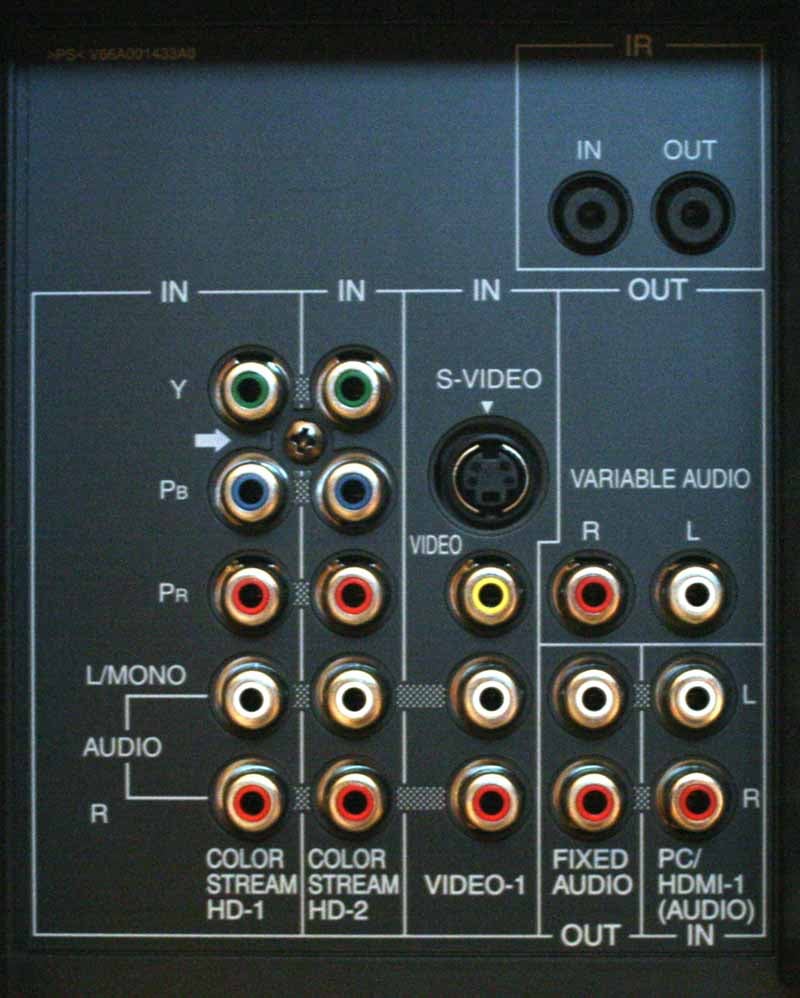
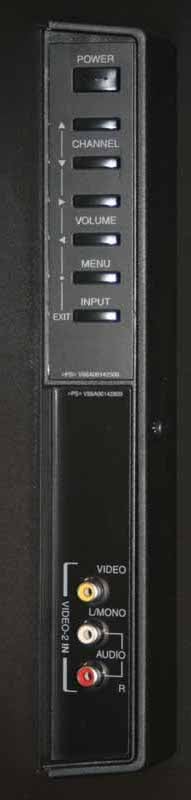
Analogue
component (2), composite (1) and S-video (1) inputs are located on
the back as are dedicated audio inputs for PC/HDMI-1 and a couple of
fixed and variable analogue audio outputs. IR in and out jacks are
also provided for use with an optional dual-want IR emitter or IR
repeater (not included). The side of the TV features some hard
buttons as well as a set of AV inputs (handy for plugging in a
camcorder or other digital camera).
The Toshiba correctly stores independent picture controls for each input (we specifically tested both component inputs and the three HDMI inputs to make sure. This means that you can calibrate each device independently. While this may have been a bit less significant in the past, the advent of multiple gaming systems and high-definition DVD players means that each video device can interact with a custom calibrated input that ensures black levels and color are accurate for all.
46LX177 Menu System
I found the menu system for the Toshiba 46LX177 to be very easy to use. It was well organized for the major functions and had direct access via the remote for commonly used features like the THINC system and Picture-in-Picture functions. There was a bit of drill-down to get to the more advanced features, but no more than you would expect to keep the upper levels from being too cluttered. I'll move through each of the major menu functions here:
Applications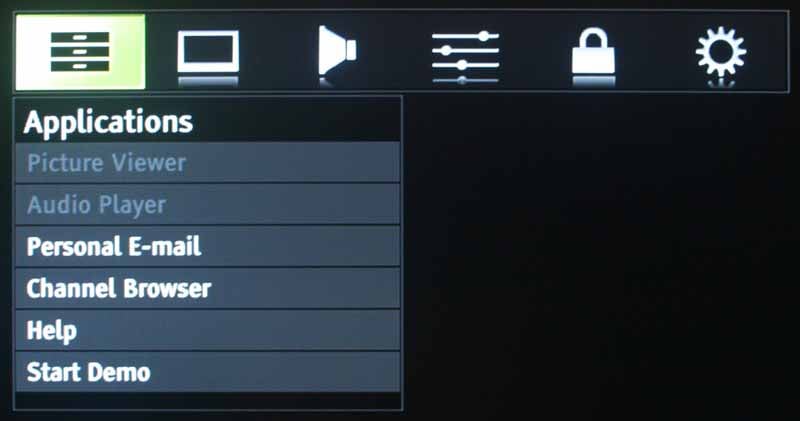 This
menu connects you to the Picture Viewer, Audio Player and Email
systems. It also allows access to the incredibly cool Channel Browser
which is sophisticated enough to allow for some very cool ways to
browse though and select channels on your television. I'll go into
more detail on this system later in the review. The Applications menu
also allows you to start up the Demo mode as well as access the
integrated Help system. The Help system is a very slick-looking
subsystem that would benefit from additional time and development.
For the most part the Help topics ranged from 'mildly useful' to 'go
fix it yourself'. Here is one of my favorite screens when selecting
help with setting up your PC for filesharing:
This
menu connects you to the Picture Viewer, Audio Player and Email
systems. It also allows access to the incredibly cool Channel Browser
which is sophisticated enough to allow for some very cool ways to
browse though and select channels on your television. I'll go into
more detail on this system later in the review. The Applications menu
also allows you to start up the Demo mode as well as access the
integrated Help system. The Help system is a very slick-looking
subsystem that would benefit from additional time and development.
For the most part the Help topics ranged from 'mildly useful' to 'go
fix it yourself'. Here is one of my favorite screens when selecting
help with setting up your PC for filesharing:
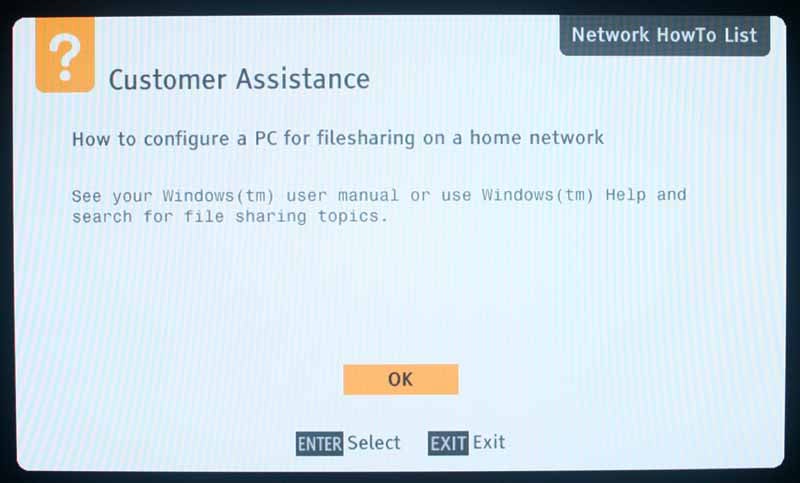
Help
says: “Go figure it out on your own!”
They made up for it with such helpful screen as this one located under a connections section:
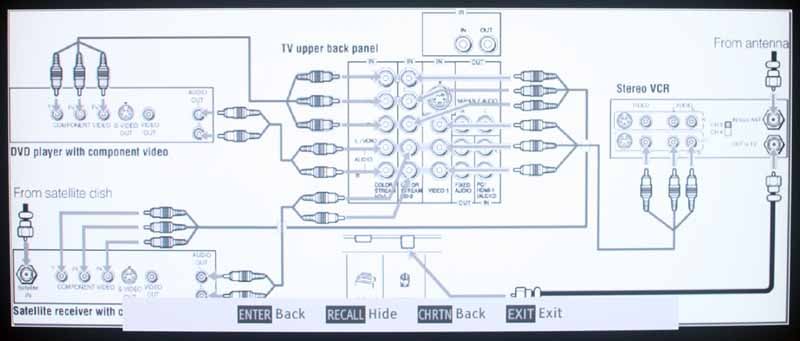
Now
that is pretty helpful!
I'd love to see more development in this area as I feel it is a trend-setting feature. An integrated Help system only makes sense with the ever-increasing complexity of our AV devices. Future versions of the Help system should not be afraid to venture into multi-page solutions. Also, running the text by someone who has English as a first language would likely help in smoothing over some of the wording to more consumer-friendly jargon (friends don't let friends use overseas engineers to write their help manuals).
Video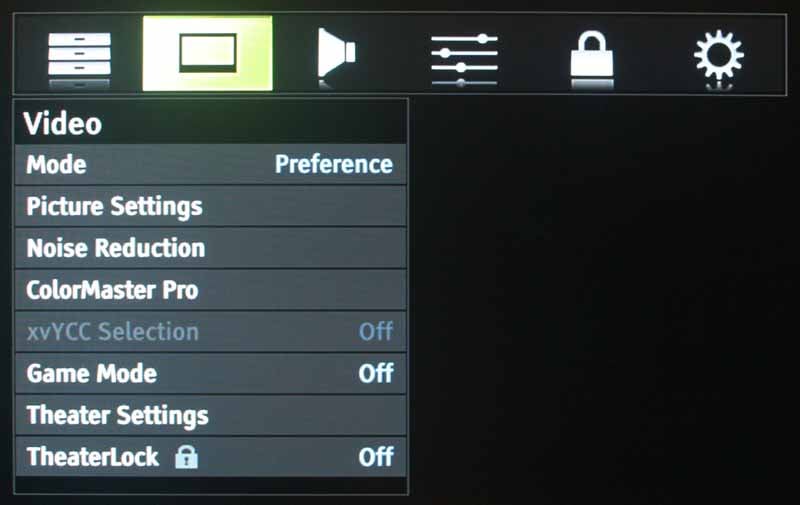 The
Video menu provides most of the settings and configuration you'll
need to get the basic tweaking done for your display. The [Picture]
Mode is located here as are the Picture Settings, Noise Reduction
modes, Game Mode, xvYCC (Deep Color), Theater Settings and aspect
ratio settings. ColorMaster Pro is a neat gimmicky color adjustment
control that is fun to play with but doesn't do anything practical
towards garnering more accurate color. The Game Mode turns off some
of the internal video processing and in exchange speeds up the
display's response time (reduces frame delays) in order to avoid lag
time from the gaming console. Gaming Mode disables ClearFrame, Cinema
Mode (2-3 pull-down) and Film Stabilization.
The
Video menu provides most of the settings and configuration you'll
need to get the basic tweaking done for your display. The [Picture]
Mode is located here as are the Picture Settings, Noise Reduction
modes, Game Mode, xvYCC (Deep Color), Theater Settings and aspect
ratio settings. ColorMaster Pro is a neat gimmicky color adjustment
control that is fun to play with but doesn't do anything practical
towards garnering more accurate color. The Game Mode turns off some
of the internal video processing and in exchange speeds up the
display's response time (reduces frame delays) in order to avoid lag
time from the gaming console. Gaming Mode disables ClearFrame, Cinema
Mode (2-3 pull-down) and Film Stabilization.
The Theater Settings sub-menu allows you to select the Picture Size (Natural, Theater Wide 1/2/3, Full, 4:3, and Native. This affects the way the picture is stretched (or not) to occupy the screen. Toshiba provides some of the more extensive scaling options I've seen to date and they add a feature I'd not seen until now, Picture Scroll, which allows you to take TheaterWide 2/3 modes and scroll the picture up and down vertically. This means you can really take advantage of the flexibility to get a truly custom position on the screen when dealing with letterboxes, closed captioning, etc.
Audio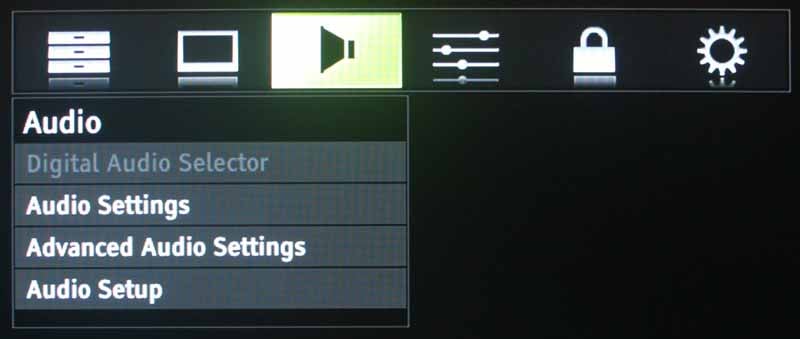 What at
first appears to be a very small menu does expand somewhat when you
go into Audio Setup (there is both an Audio Settings
and Audio Setup
sub-menu as well as an Advanced
Audio setting believe it or not). Audio Setup allows configuration of
whether the PC (HD15) input will receive audio from the analogue
audio inputs which are shared with HDMI input #1. It also sets the
MTS mode, Language and whether or not the speakers are engaged (a
nice feature if you utilize an external set of speakers.) You can
also configure Dolby Digital Dynamic Compression and change the
optical audio output from Dolby Digital (default) to PCM audio.
What at
first appears to be a very small menu does expand somewhat when you
go into Audio Setup (there is both an Audio Settings
and Audio Setup
sub-menu as well as an Advanced
Audio setting believe it or not). Audio Setup allows configuration of
whether the PC (HD15) input will receive audio from the analogue
audio inputs which are shared with HDMI input #1. It also sets the
MTS mode, Language and whether or not the speakers are engaged (a
nice feature if you utilize an external set of speakers.) You can
also configure Dolby Digital Dynamic Compression and change the
optical audio output from Dolby Digital (default) to PCM audio.
Preferences
In
Preferences you find your catch-all settings for Closed Captioning,
Menu Language and auto-input switching, but you also have access to
custom Input Labeling which is cool (though limited) and the Channel
Browser setup which lets you determine how channels and inputs will
be selected in that menu.
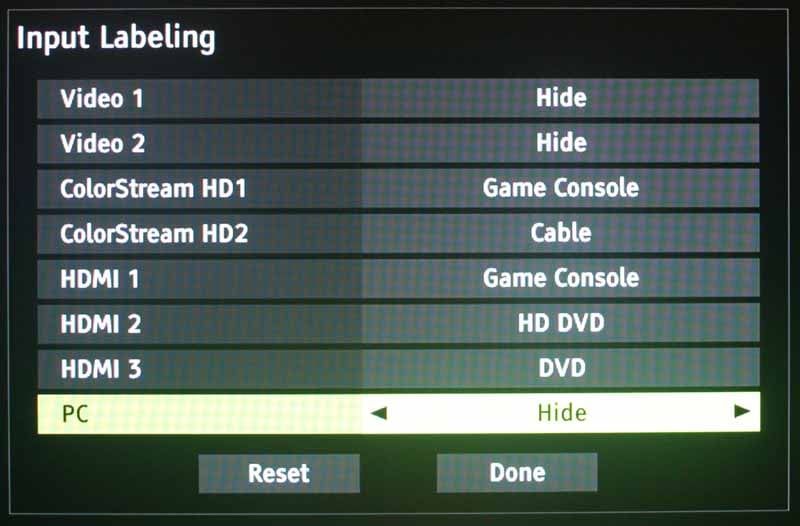
Input
Labels are cool, but they could use a few more - like Game Console 2,
3, 4... And while Toshiba included HD DVD in the available
selections, Blu-ray was conspicuously absent.
Locks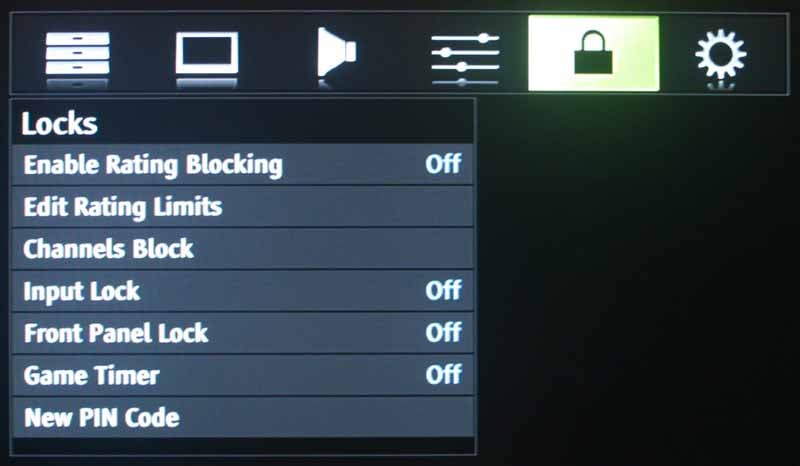 This is
the menu everyone often skips over, but it's actually very useful.
Most programming these days, as you may have noticed, carries ratings
in the form of TVY, TVY7, TVPG, MA, etc... The Toshiba's V-chip, like
most other televisions can filter out what is allowable. The 46LX177
implements these filters fully, allowing you to not only select which
rating you will allow, but also for what reason.
Don't mind TVMA as long as the content isn't sexual in nature? No
problem, you can enable a block just for that aspect. Now, I can't
vouch for how accurate these blocks work or what shows are marked
correctly, however it seems to be a very nice feature for parents to
use and the Toshiba implementation is very well thought out.
This is
the menu everyone often skips over, but it's actually very useful.
Most programming these days, as you may have noticed, carries ratings
in the form of TVY, TVY7, TVPG, MA, etc... The Toshiba's V-chip, like
most other televisions can filter out what is allowable. The 46LX177
implements these filters fully, allowing you to not only select which
rating you will allow, but also for what reason.
Don't mind TVMA as long as the content isn't sexual in nature? No
problem, you can enable a block just for that aspect. Now, I can't
vouch for how accurate these blocks work or what shows are marked
correctly, however it seems to be a very nice feature for parents to
use and the Toshiba implementation is very well thought out.
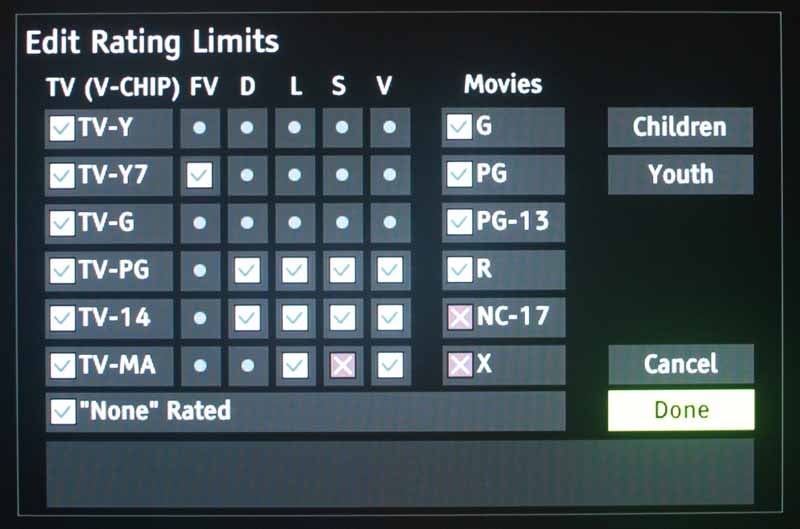
Don't
mind the violence, but don't want the sex-shows... not a problem.
Setup
Whether
it's your cable/antenna system, THINC network settings or just
whether or not you intend to use the CE-Link system, the Setup menu
is where it's at. I liked the optional
Power-Saving mode – it lets people who care about saving power feel
good about being inconvenienced while allowing more performance-based
people like me to have a quick turn-on mode and retain my Channel
Browser settings. It's also in this menu where you can configure the
Slide Show Interval for photos and also enable automatic Demo mode
which is nice for retailers.
If you're in possession of a new HD-DVD player (of either flavor) you can enable both Deep Color and xvYCC support to benefit from these new color-enhancing technologies.
Technical Note: What's the difference between Deep Color and xvYCC?
This is a good question and the two terms are often, incorrectly, used interchangably. Deep Color refers to the increasing of the bit depth per channel of RGB from 8-bits to 12-bits. This means that Deep color allows for more color resolution within the RGB or YCbCr color range. xvYCC actually expands the color range to what is essentially 1.8x the sRGB color space. Deep Color gives us more resolution (all but eliminates banding), and xvYCC gives us more colors.
46LX177 Remote and Interactive Features
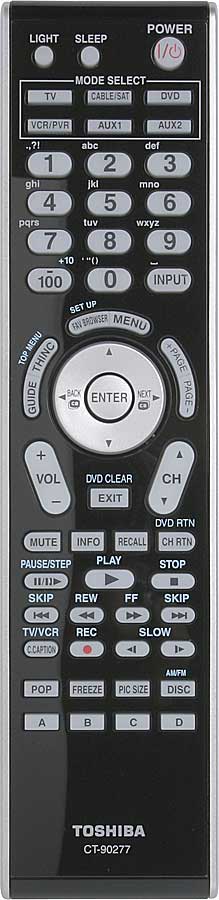 The
Toshiba remote will appeal to some. It is fully backlit, mostly in a
pleasing amber but with orange buttons for changing the device
control. It is very large, as most display remotes are. It is not a
learning remote, so don't expect it to run your entire AV system
flawlessly, though it does have enough buttons to be more than
functional. I have big hands but I found it to be less than
comfortable to use all of the controls. Typing in a direct channel,
for instance, is most easily accomplished as a two-handed gesture.
The light button is remotely located at the top left of the remote –
completely out of reach and thus inconvenient. A side switch or
option to have it go on automatically would be most welcome. The
remote lacks direct input selection – a disappointment, especially
given its ample size. Overall I'd say it was average and not
particularly bad, but certainly not a great remote.
The
Toshiba remote will appeal to some. It is fully backlit, mostly in a
pleasing amber but with orange buttons for changing the device
control. It is very large, as most display remotes are. It is not a
learning remote, so don't expect it to run your entire AV system
flawlessly, though it does have enough buttons to be more than
functional. I have big hands but I found it to be less than
comfortable to use all of the controls. Typing in a direct channel,
for instance, is most easily accomplished as a two-handed gesture.
The light button is remotely located at the top left of the remote –
completely out of reach and thus inconvenient. A side switch or
option to have it go on automatically would be most welcome. The
remote lacks direct input selection – a disappointment, especially
given its ample size. Overall I'd say it was average and not
particularly bad, but certainly not a great remote.
Using the Television's Media and Interactive Features
The Toshiba 46LX177 was fun to use. Seriously, it was fun. That is not typically a description I use when reviewing televisions. Most are boring and don't do very much. I found myself taking copious notes on the REGZA, astounded that I was actually finding new things to discuss about an LCD TV. When you first turn the unit on it goes into an Initial Setup mode and requests the following:
-
Language (English, Espanol, Francais)
-
Demo Mode (set to Off unless you are setting this up for a retail environment)
The system then dumps you into the first channel. When you activate the Setup > Installation > Terrestrial channel setup it begins first with the available analogue channels and then proceeds to the unencrypted digital channels. The 46LX177 indicated that it found 427 channels and took 5-6 minutes to complete the full scan. When it was finished there were far less listed. Presumably the secondary digital channels beyond the xxx-1 designations existed, but were not of sufficient strength to register as tunable.
The analogue NTSC tuner is of high quality. I have seen very poor tuners that show scaling, noise, interference and any many other artifacts on analogue channels. The Toshiba's rendition of even lower numeric analogue stations was quite clear, with acceptable edge detail. Tuning was quick for today's standards and I could hit about 1 channel per second. If I held down the Channel button I could continue to channel scan at that pace.
Channel
Browser
Channel
selection is easy with the Toshiba REGZA. You can either dial in a
channel directly, tune up and down with the Channel buttons or use
the Fav Browser which brings up the Favorites list in the Channel
Browser. The Channel Browser brings up your first stored favorites,
but you can scroll left and right to select from others. Scrolling up
and down gives you access to:
-
History List – Saves the last 32 channels or inputs you've viewed
-
ANT List – Cruise through or tune through your regular antenna or cableTV channels.
-
Inputs List – Select a different input/source
-
Favorites List – Browse or tune through stored Favorite channels
The Channel Browser works in two modes: Browse or Select. Browse lets you jump through the displayed selections and forces you to click to indicate your choice. Select mode will actually change the channel/input as you move through the list. Either mode can be selected from the Preferences Menu.
THINC
System with Personal Email
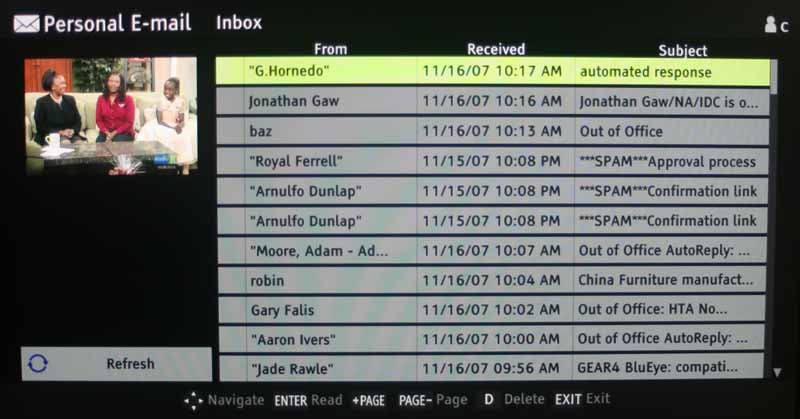
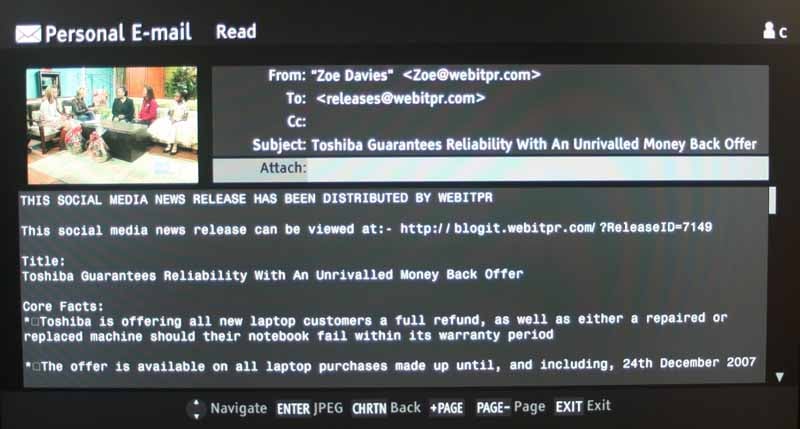
When
setting up my home network the Toshiba easily pulled my IP address
from the router. The first thing I had to try out was the email
system. I mean, jumping over to check your email during commercial?
That's like the coolest geek idea I've heard in a long time. And
what's even better than that? It works! I entered my information
including POP server and password and the system grabbed my email...
spam and all for me to see. Now if that isn't the neatest diversion
in the history of television I don't know what is.
The
only thing cooler than this would be integrated Pong or Tetris...
Audio
Player
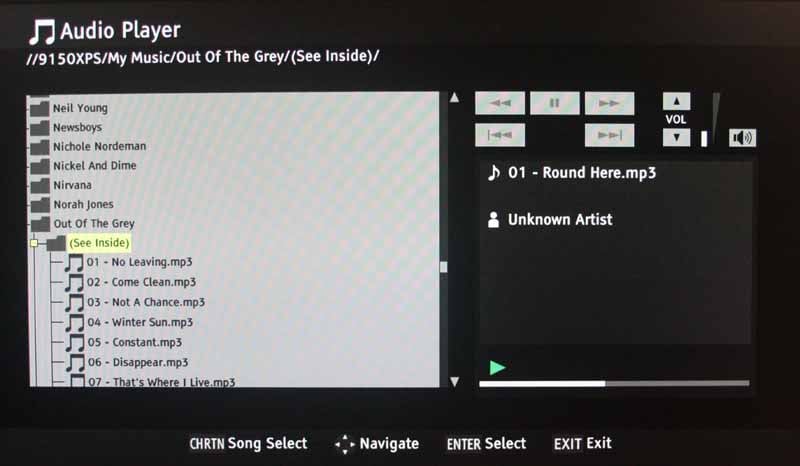
Since
the networking was a breeze, enabling the Audio Player of the Toshiba
46LX177 was quick and painless. It easily located the Shared folders
on my primary PC and I was able to quickly browse and get some tracks
playing right away. The file list can be expanded by using the left
and right navigation buttons. Up and down sends you quickly through
your music or album list.
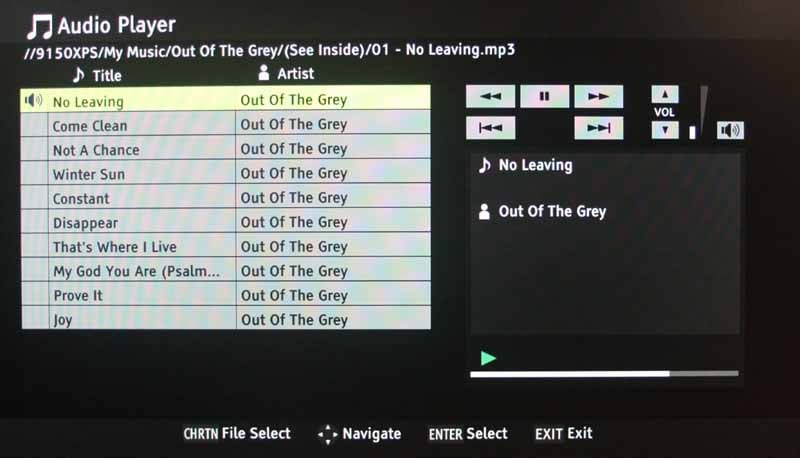
When you call up a track or album, the system scans the MP3 meta data and renames the titles and artist accordingly. There are no visualizations, but basic player controls are provided.
Picture
Viewer
Picture
viewing was good, but pulling large 3-4MB files across the network
meant a slow top-down load which, when it finally came in, almost
immediately jumped to the next photo. A slide show interval (delay)
setting is available in the Setup menu, so you can extend this period
of time beyond the default 5 seconds. The system will also load up to
6 photos at one time during the preview process – this helps speed
up the display process when evaluating which images to load.
46LX177 Calibration and Benchmark Testing
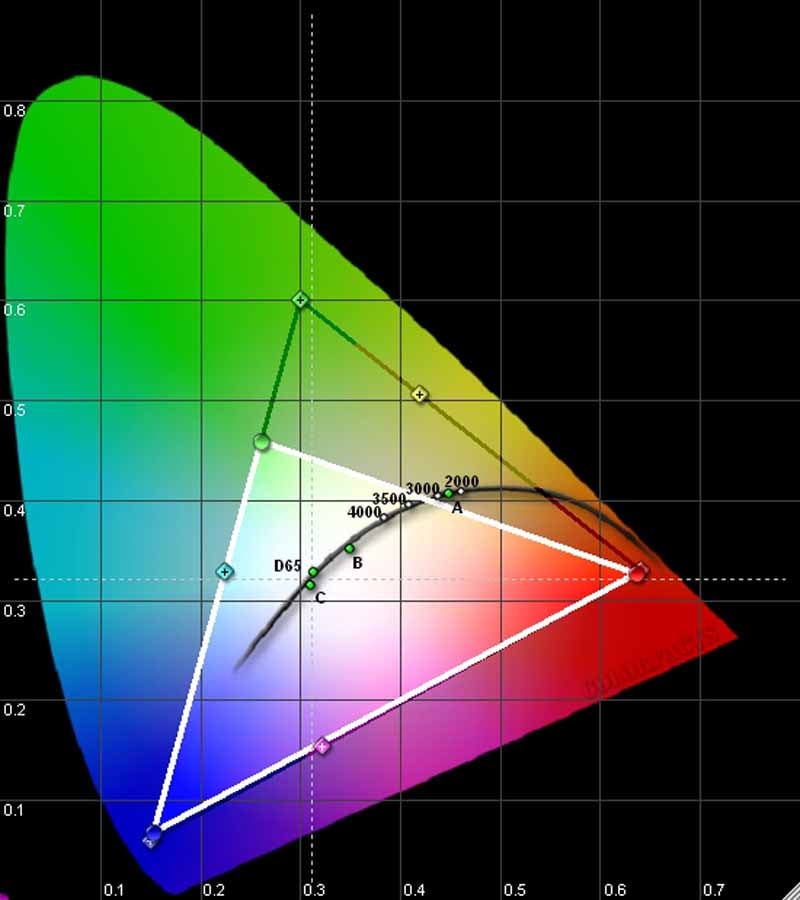 We
used Datacolor’s
Colorfacts Professional 6.0
software to measure the 46LX177's performance in various modes and
Color temperature settings. Unfortunately, there are no User
calibration controls for RGB Cut and Gain (you can adjust Blue and
Green Drive only) so we didn't include a post-calibration set of
measurements in our review (as is our policy, which encourages
manufacturers to make these controls available outside of a service
menu). Surprisingly, the Toshiba showed a dramatic deficiency in
Green. How it can do this and boast xvYCC support was beyond us,
however the tristimulus sensor has been fairly accurate to date. We
also noted a very odd gamma value of around 1.55 which is unusual and
way off our target of between 2.2 and 2.5. Blacks took off quickly
and whites got bright far too early in the grayscale as a result.
Tweak the Static Gamma setting down (like all the way) to produce a
more appealing curve. There was no perceived banding.
We
used Datacolor’s
Colorfacts Professional 6.0
software to measure the 46LX177's performance in various modes and
Color temperature settings. Unfortunately, there are no User
calibration controls for RGB Cut and Gain (you can adjust Blue and
Green Drive only) so we didn't include a post-calibration set of
measurements in our review (as is our policy, which encourages
manufacturers to make these controls available outside of a service
menu). Surprisingly, the Toshiba showed a dramatic deficiency in
Green. How it can do this and boast xvYCC support was beyond us,
however the tristimulus sensor has been fairly accurate to date. We
also noted a very odd gamma value of around 1.55 which is unusual and
way off our target of between 2.2 and 2.5. Blacks took off quickly
and whites got bright far too early in the grayscale as a result.
Tweak the Static Gamma setting down (like all the way) to produce a
more appealing curve. There was no perceived banding.
We took some ANSI contrast measurements and got the following, disappointing results:
-
192:1 – Movie Mode (backlight standard)
-
344:1 – Standard Mode
-
467:1 – Sports Mode
-
177:1 – Movie Mode (backlight all the way down)
In terms of real-world performance I like to see at least 400:1 on displays while in Theater picture modes. The results of our tests here backed up our viewing tests which showed that the Toshiba simply didn't have the ability to achieve very dark black levels.
Color temperature was pretty good. Here are what the various modes yield in their default settings:
-
14300K – Sports Mode
-
8700K – Standard Mode
-
6750K – Movie Mode (Color Temp Warm)
-
8800K – Document Mode
With these results, you'll see below how well the Movie Mode with a Warm Color Temperature setting fared (pretty well as far as grayscale was concerned.)
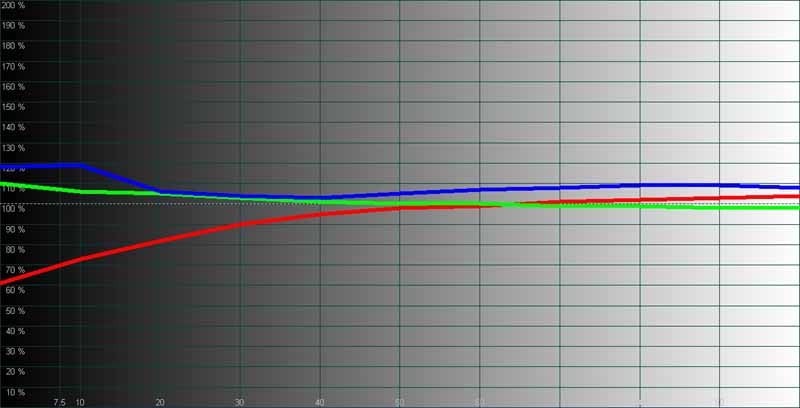
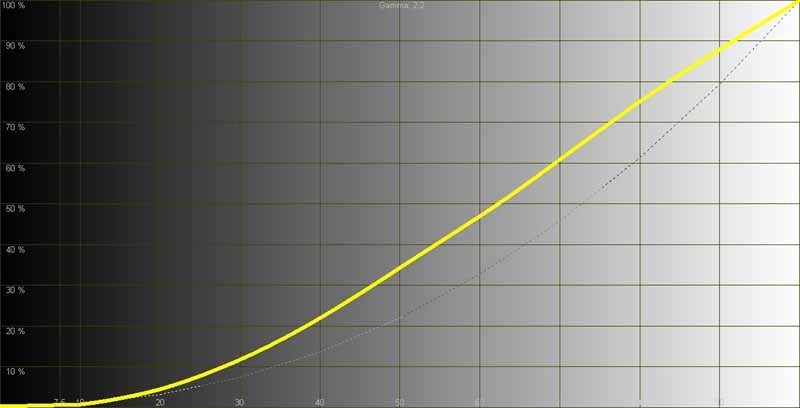
Left:
After taking a few measurements in the Movie Mode with color
temperature set to Warm we received these results. Not too shabby
from 30 to 100IRE. Right: While the curve looks smooth, the overall
gamma curve comes in close to a straight diagonal line, meaning that
the gradual slope from black to white was a bit too harsh for our
tastes. Adjusting the Static Gamma setting to -4 helped this a bit.
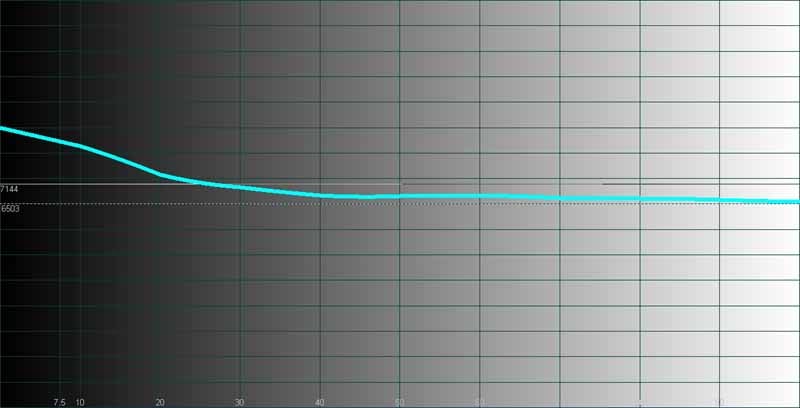
Color
temperature as pretty good from 30 to 100IRE.
The measurements of the Toshiba 46LX177 were not up to what we had been expecting, especially with all the talk of xvYCC support. We next employed the 120Hz ClearFrame processing to see how it held up in real-world testing. On movies it indeed seemed to help remove some motion blur, but this was only perceptible a very minimal manner at lower speeds. Throwing up a Rainbow & Dither test from AVIA Pro, for example, we witnessed increased meaningful clarity at speeds of up to '5'. Beyond that the system simply resulted in slightly decreasing the thickness of blurred and trailing edges as they screamed across the display. Beyond '8' and the difference was unnoticeable.
When we ran some fine detail tests on it, however, the ClearFrame mode rendered artifacts in our Moving Zone Plate test pattern:
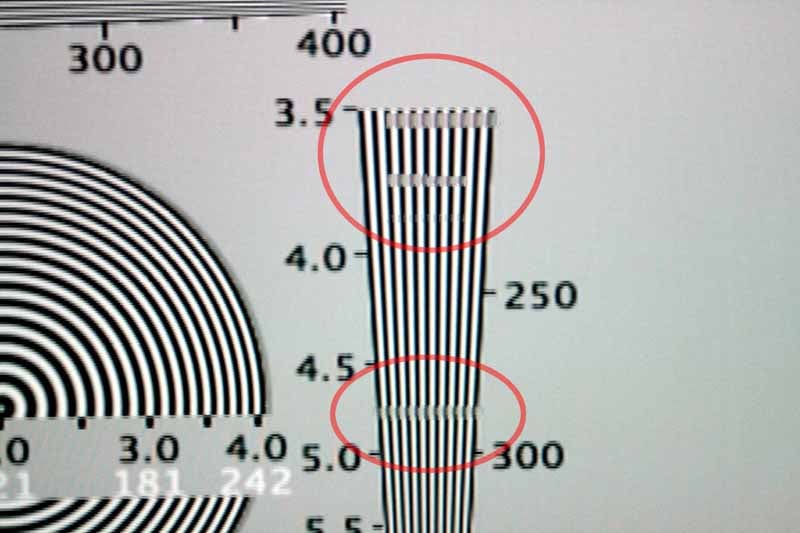
These
artifacts could be toggled on and off in real-time with the
ClearFrame setting.
While I never witnesses these artifacts in any movie viewing, the real strength of the technology seemed to be in its adaptation of 24p source material which it rendered with very little apparent judder effects.
Audioholics/HQV Bench Testing Summary of Test Results
Perfect
Score is 130
Toshiba
REGZA 46LX177 Benchmark Score: 53
(one of the worst performers we've seen this year)
| Test | Max Points |
Score | Pass/Fail |
| Color Bar | 10 | 10 | Pass |
| Jaggies #1 | 5 | 3 | Pass |
| Jaggies #2 | 5 | 0 | Fail |
| Flag | 10 | 5 | Pass |
| Detail | 10 | 10 | Pass |
| Noise | 10 | 5 | Pass |
| Motion adaptive Noise Reduction | 10 | 0 | Fail |
| Film Detail | 10 | 0 | Fail |
| Cadence 2:2 Video | 5 | 0 | Fail |
| Cadence 2:2:2:4 DV Cam | 5 | 0 | Fail |
| Cadence 2:3:3:2 DV Cam | 5 | 0 | Fail |
| Cadence 3:2:3:2:2 Vari-speed | 5 | 0 | Fail |
| Cadence 5:5 Animation | 5 | 0 | Fail |
| Cadence 6:4 Animation | 5 | 0 | Fail |
| Cadence 8:7 animation | 5 | 0 | Fail |
| Cadence 3:2 24fps film | 5 | 0 | Fail |
| Scrolling Horizontal | 10 | 10 | Pass |
| Scrolling Rolling | 10 | 10 | Pass |
| Total Points | 130 | 53 |
*We tested via HDMI at 480i resolution and confirmed via component video inputs at 480i
Comments on HQV Testing
Ouch. The Film Detail tests and 2:3 cadence tests almost never fail, however the lock-on time was extremely slow and for some reason the Toshiba never cleanly locked on to an unflagged 2:3 cadence. Feed this display a good, solid progressive scan source as the onboard video processing left us wanting for more. Let me reiterate: if you have a nice DVD or HD DVD player and a cable box that can output 1080i then you won't have a problem with this display. If you plan on feeding it a 480i source you may want to take another look at your options.
46LX177 Viewing Tests and Conclusions
We viewed a lot of material on this display and for the most part it looked very good. There was one anomaly we witnessed regarding the black level capabilities of the display. A halo effect surrounded the borders of the display whenever a dark black pattern or video was present. The edges of the backlight seemed to bleed through and kill any hope of a crisp, clean black edge. The system also failed to pass a blacker than black test pattern.
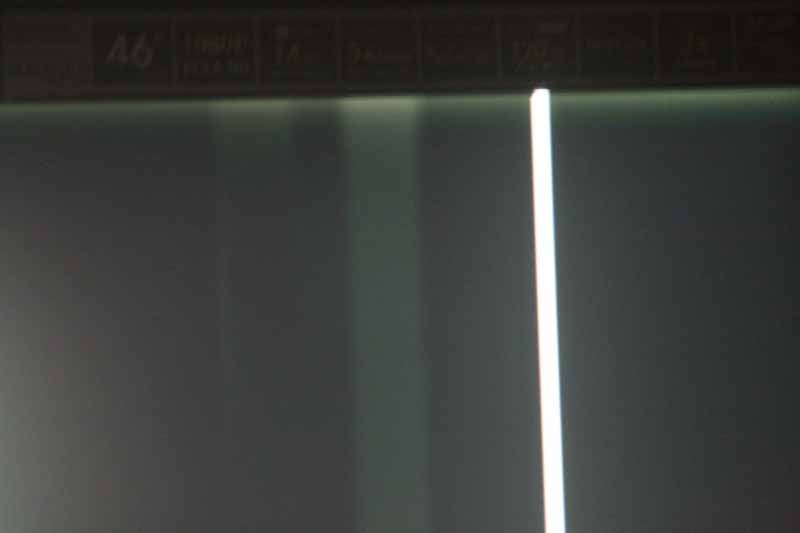
Despite our pickiness, movies and television looked excellent on this display. After all, we do watch more than just test patterns around here...
BD:
The
Fifth Element
(Revised Version)
The
revised edition of this movie sports excellent picture quality and
looked fabulous on this display. Bangalore's looked perfectly
textured and realistic with incredible detail and color, while the
skin tones of the airline stewardesses will have the woman of the
house able to guess what type and brand of lipstick and eyeshadow
they were wearing.
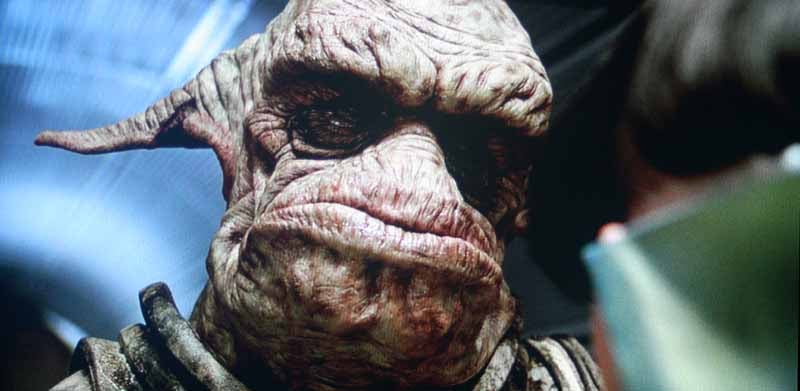
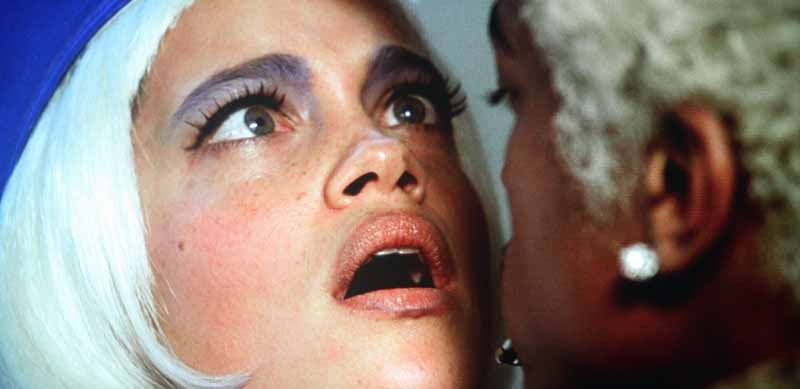
Colors absolutely popped on this display, despite the apparent green deficiency shown in the CIE chart. I flipped between 120Hz ClearFrame mode and saw a difference on the flying cars scene but not too many other places. For the most part the effects were vague as the display attempts to interpolate a hybrid cross-frame blend of two 60Hz frames. With the 24p mode engaged I wasn't really certain what was happening in terms of the combined video processing modes, and only noticed that judder was all but gone.
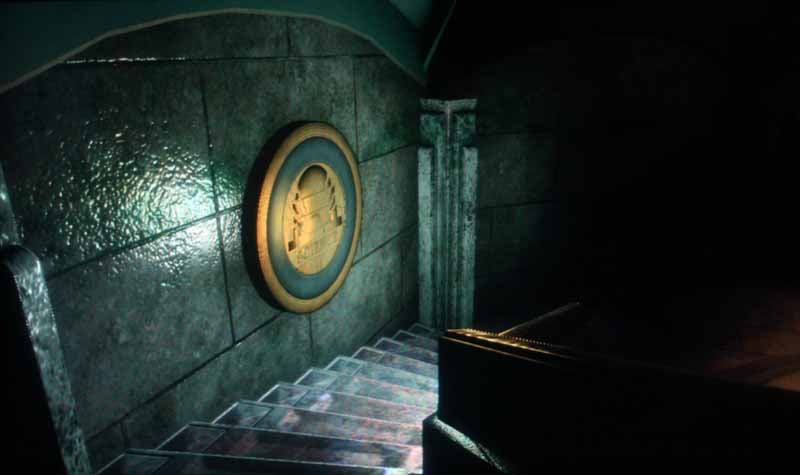
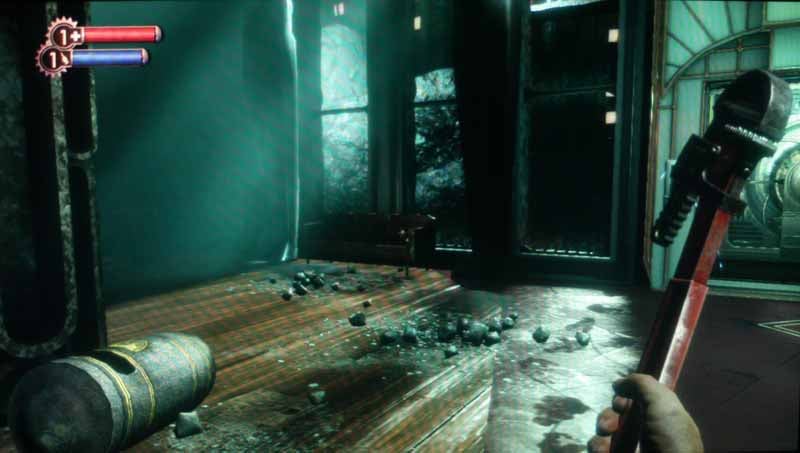
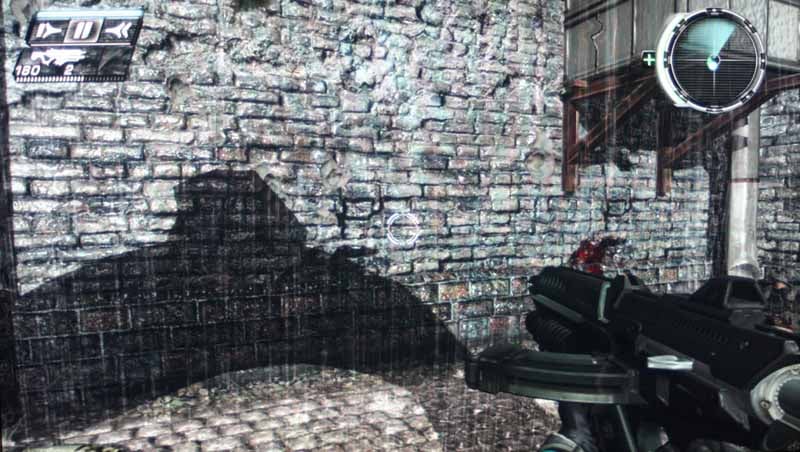
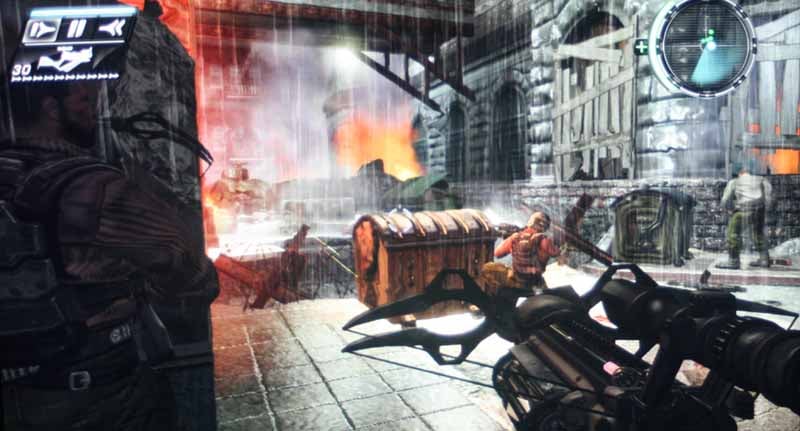
Xbox
360: Bioshock
and Timeshift
Black
levels? Check. Dark corridors with lots of detail and inky black
shadows? Check. Bioshock
has them all and was a great game to test out on the Toshiba REGZA
display. While I felt the black levels could be a tad deeper, the
range of detail was present and the system seemed capable of
providing a very detailed and pleasing picture overall. Timeshift
was equally compelling, with it's strengths being over-the-top game
detail and lots of explosions to check banding and white level
detail.
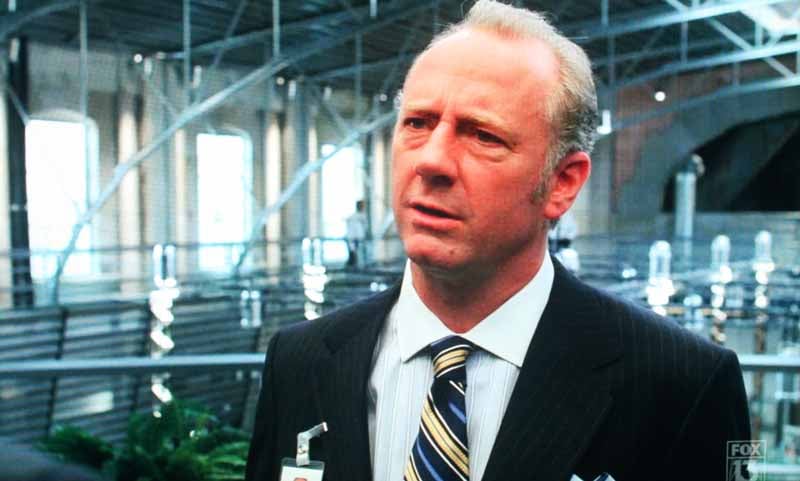
HDTV:
Bones
This
show is in its third season and I've always enjoyed the opportunity
it presents to observe good clean environment set detail as well as
outdoor scenes which tend to appear at least once or twice per
episode, often at night. I grabbed a couple of screen captures which
showed some real-world scenes which would test the 46LX177's ability
to render moire-free lines as well as posturization-free facial
texture.

HDTV: Prison Break
Who doesn't like a good show about tough smart guys wrongfully imprisoned and trying to break their way out before a corrupt government can have them killed? Mix, stir, change the season number to 3 and you have this show in a nutshell. They keep you guessing, though and the sets are designed incredibly well, with plenty of test fodder for any display reviewer to love. I especially like this year's constant juxtaposition of colorful outdoor sequences mixed with dark interior scenes.

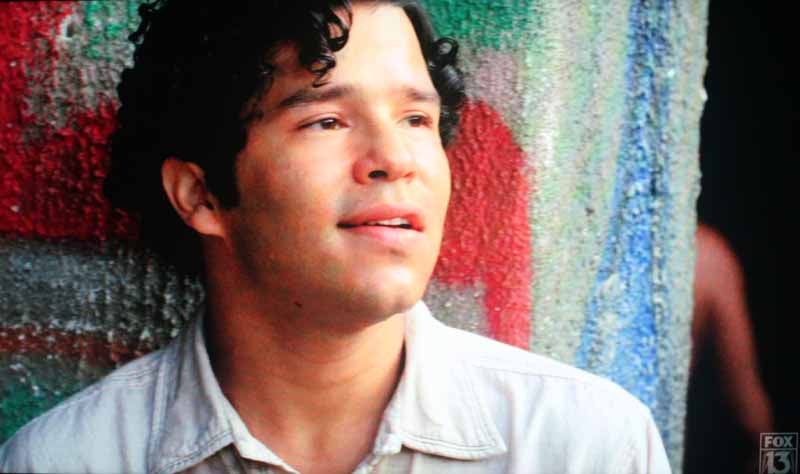
John
Leguizamo's love child? (right)
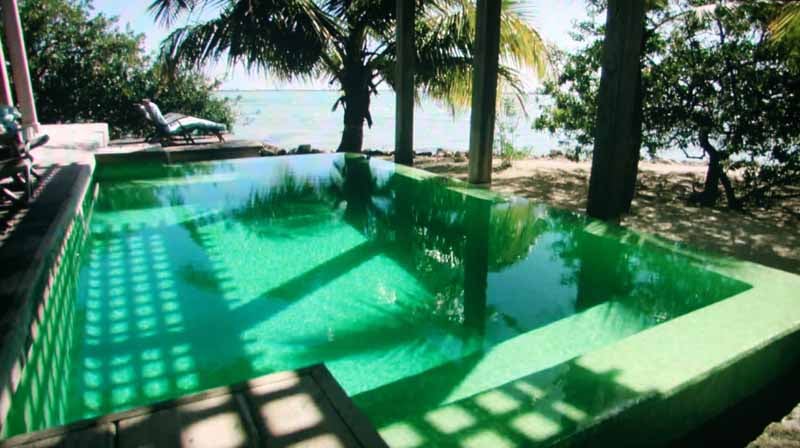
HDTV:
DiscoveryHD
I don't
even know what this show was about, but it looked cool and I snapped
off a shots. The leaves in the trees were pristine as was the subtle
texture of the water. The greens here are slightly accentuated due to
the camera setting, but the vivid colorful tone of the scene made me
reach for the camera.
Conclusion
This is a very pleasing display to look at overall. I was disappointed by the lack of standard definition video performance and I can't say that the 120Hz mode was definitive enough to make me say it's now a must-have feature in LCD TVs. It certainly seemed promising and with the right video processing seems to be the answer to a lot of challenges in the software playback arena. Black levels should be a tad better in a premier-branded LCD display and contrast ratio for this display was well below what we'd expect or look for. Overall I'd rate this a sleek-looking display with some very cool network features. If that's your bag, then fill it with this. If you can spend a little more and want better performance you will be able to find it.
Toshiba
REGZA 46LX177
Street
Price: $2699
http://www.tacp.toshiba.com/
800-631-3811
About
Toshiba Digital Electronics
Toshiba
America Consumer Products, L.L.C. is owned by Toshiba America, Inc.,
a subsidiary of Toshiba Corporation, a world leader in high
technology products with subsidiaries worldwide. Toshiba is a pioneer
in HD DVD, DVD and DVD Recorder technology and a leading manufacturer
of a full line of home entertainment products, including flat panel
TV, rear projection and direct view televisions, combination products
and portable devices. Toshiba America Consumer Products, L.L.C. is
headquartered in Wayne, New Jersey. For additional information please
visit www.tacp.toshiba.com.
The Score Card
The scoring below is based on each piece of equipment doing the duty it is designed for. The numbers are weighed heavily with respect to the individual cost of each unit, thus giving a rating roughly equal to:
Performance × Price Factor/Value = Rating
Audioholics.com note: The ratings indicated below are based on subjective listening and objective testing of the product in question. The rating scale is based on performance/value ratio. If you notice better performing products in future reviews that have lower numbers in certain areas, be aware that the value factor is most likely the culprit. Other Audioholics reviewers may rate products solely based on performance, and each reviewer has his/her own system for ratings.
Audioholics Rating Scale
 — Excellent
- — Very Good
- — Good
- — Fair
- — Poor
| Metric | Rating |
|---|---|
| Detail and Resolution | |
| Deinterlacing & Scaling | |
| Contrast and Black Levels | |
| Color Reproduction | |
| Noise Reduction | |
| Calibration Options | |
| Build Quality | |
| Ergonomics & Usability | |
| Ease of Setup | |
| Features | |
| Remote Control | |
| Fit and Finish | |
| Performance | |
| Value | |
Clint Deboer was terminated from Audioholics for misconduct on April 4th, 2014. He no longer represents Audioholics in any fashion.
View full profile Subscribe to our newsletter