


Sceptre X270BV-FHD 27" HDTV Review
Sceptre X270BV-FHD 27" HDTV
- Product Name: X270BV-FHD 27" HDTV
- Manufacturer: Sceptre
- Performance Rating:


- Value Rating:
- Review Date: February 28, 2011 01:05
- MSRP: $ 349.00
Active Screen Size: 27"
Brightness: 400 cd/m2
Contrast Ratio: 100,000:1
Resolution: 1920 x 1080
Response Time: 5 ms
Viewing Angle: 178 L/R, 178 Up/Down
Lamp Life: 50,000 hours
Video Functions: De-interlace, 3D, SRC (Scan Rate Conversion), Frame Recover, 3:2 pull down, 3D Digital Comb Filter, Digital Noise Reduction
Picture mode: Custom/ Standard/Mild/Vivid
Video Adjustment: Contrast/Brightness/Sharpness/Color Tint
Color Temp. Adjustment: Cool/Normal/Warm/User (RGB)
Picture Enhancement: APL (Dynamic Average Picture Level), Dynamic Sharpness Adjustment, Enhance Color Management
Built-in speakers: 5 watts per Channel
SPDIF Out: Optical
Audio out: Stereo
Inputs: Composite/S-video, Component, VGA, HDMI (1.3) x 3, USB
Resolution: 1080p, 1080i, 720p, 480p and 480i
Sleep Timer
Hybrid TV Tuner: NTSC, ATSC, QAM
USB 2.0 In
Headphone Out
Power: 52W
VESA Mount: 100mm x 200mm
Weight: 15.43 lbs
Dimension (w/stand): 25.44"W x 18.33"H x 9.43"D
Dimensions: 25.44"W x 16.1"H x 2.64"D
Warranty: 1 yr limited
Pros
- Vibrant colors
- Inexpensive street price
Cons
- Boxy audio
- Uneven backlight
- Fast menu timeout
Sceptre Build Quality and Menu System
Sceptre is a product we've been watching for some time. Trouble is, we've never been offered the opportunity to review one - until now. The company makes LCD TVs of both the CCFL and LED backlight variety and they seem to specialize in two types of products: straightforward, no-nonsense designs and stylistic, colorful models that are sure to satisfy any interior designer or fashion enthusiast. The model we reviewed, the X270BV-FHD, is a 27-inch model that represents one of the more basic models. Even though basic, the television includes a host of convenience features that makes it very usable and extremely well-suited for use in almost any room.

First Impressions and Build Quality
The X270BV-FHD 27” HDTV LCD comes in a stylish black gloss frame with a thin bezel that has the forward-firing speakers oriented at the bottom of the set. The 1080p television features a 100,000:1 contrast ratio and 5 ms response time. Even though the television is simplistic in its design, it still comes with 3 HDMI inputs that allow users to connect multiple audio/video sources like DVD players, personal computers, AV receivers and video game consoles without having to swap cables. In addition to the three HDMI ports, the integrated USB port allows users to conveniently view digital photos as well as listen to digital music. These ports are located in two areas, on the side of the monitor and the rear of the set, allowing both easy accessibility as well as a more permanent storage facility.
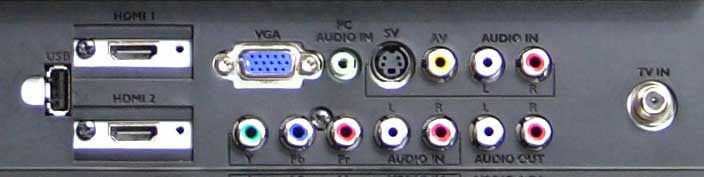
Since the unit uses a standard CCFL backlight system, it's just over 2-1/2 inches thick - hardly thin by today's standards, but still easily wall-mounted or placed just about anywhere. The set is rated for 50,000 hours of use - a good long life span to be sure - and it puts out a peak brightness of 400 cd/m2. Most of the inputs are rear-mounted, but the left side of the TV also provides access to an additional HDMI port, a headphone (labeled "earphone") jack, and a S/PDIF digital audio output. Rear inputs include 2 HDMI inputs, VGA, component, composite, S-video, coaxial cableTV and associated stereo analogue audio. There is also a USB input for streaming stored audio files.
System Use
Using this TV is as simple as can be. When observing the screen during the setting of Brightness, it was apparent that the backlight had a rather uneven appearance - with bright areas and seepage across the top of the set. Black levels were way out when we began calibrating, and any adjustments made to them seemed to drastically affect the color shift in the darker ranges. When we changed the color (temperature) mode to warm, things started to fall into shape and we noticed the color gain some consistency overall.
HDMI CEC isn’t supported and we turned it on in our Samsung BD-C6500 blu-ray player just in case it was undocumented. All this means is that you won't be able to control volume of channel via HDMI using another HDMI CEC-enabled device.
In testing audio we found that volume could be turned up about 2/3 the way before we began to hear some compression and low frequency distortion. Activating the SRS TruSurround HD took the sound, which had a bit of boxiness to it and thinned it out - a bit too much in our opinion. This isn't unusual, and to be honest, we'd much rather have a company spend its manufacturing dollars on video than better speakers. This TV will, like most, sound much better when paired with a surround bar or full AV surround system.
Setup & Menu System
 Getting everything set up is simple, and the menu system is part of what makes this an easy television to configure. There is even a Setup Wizard, that takes you through a brief process to configure Language, Date and Channel setup for the tuner. The on-screen display system includes 5 sections, which are pictorially represented as an animated series of six sphere's around the selected menu item. Yu can adjust Picture, Audio, Time, option, Lock and Channel. If you are unable to make an adjustment, it typically indicates that the current source or preset renders adjustments in this area impossible.
Picture adjustments include the expected Brightness, Contrast and Picture Modes as well as Noise Reduction and Zoom modes. These adjustments are all possible for the analogue and video inputs, save the VGA (PC) input, which eliminates Noise Reduction and Zoom modes in favor of Clock, Phase, and Position controls). Also, when viewing music and photo content via the USB connection, only basic Picture adjustments are possible (no Noise Reduction, Zoom, or Color Modes).
The Channel menu is used to select the TV source (Air of CableTV) and also to initiate an auto channel scan and Show/Hide channels. This menu also delivers a visual representation of the DTV signal level - very handy if you are pointing a digital antenna.
Audio adjustments include the Sound Mode (kind of an EQ preset), Bass, Treble, Balance and the enabling of SRS TruSurround. There is also a really great feature that allows an input to be converted to "Audio Only" - a setting that means you can use just the speakers of the TV and turn off the video display. Some of the audio settings change depending upon whether or not the TV is being sent a digital or analogue signal, but overall these differences are small and center on the presence of an MTS signal.
The Time menu controls only the Sleep timer, Time Zone and format as well as daylight savings time setting. It's a bit odd to have an entire menu dedicated to this, but given the simplicity of the menu system I suppose they had some room to split off these features. The Option menu lets you set the menu transparency, OSD timeout, language and Dynamic Contrast Ratio (DCR) settings. The Lock setting is dedicated to parental controls.
When making settings, the menu stayed up for 15 seconds before disappearing. That's a bit quick if you're in the midst of trying to adjust brightness or Contrast, but not as bad as some systems we've seen. Overall it's an easy menu to use and navigate.
Sceptre Viewing Evaluation and Conclusion
The remote control is very basic. There is no backlight and the layout is ergonomic but at the expense of not supporting any device aside form the Sceptre TV. Volume and Channel controls are simply to access as are sound and picture controls and the menu functions. Mute is up at the top right, which makes it simple to activate when you need to cut the sound. Overall, the remote just works and the neatest functionality is the Guide button, which works when the TV is receiving a DTV over-the-air input.
Viewing Evaluation
While we noticed uneven black levels when viewing a pure black image, it was less detectable with real-world viewing. Contrast was good and colors were very vibrant. We viewed several Blu-ray movies on this television and the results speak for themselves. First off was The Expendables which is a great disc for looking at skin tones - you can almost calibrate to it, it's so realistic (well, except for Sylvester Stallone's plastic surgery job).


Expendables showed excellent color and very good handling of diagonal line interpolation.
We next turned to G.I. Joe: Rise of Cobra, which had really accurate colors and an extremely wide dynamic range. The white levels present in explosions really allowed us to explore the real-world ramifications of our tweaking, and the dark scenes let us peer into the depths of the black areas to see how well the TV represented in that area. While the TV did well overall, we'd have to say that the 100,000:1 contrast ration number is largely fictional and based on some mathematical computation that simply divided the 450cd/m2 by some infinitely small number represented by "the TV is now off".

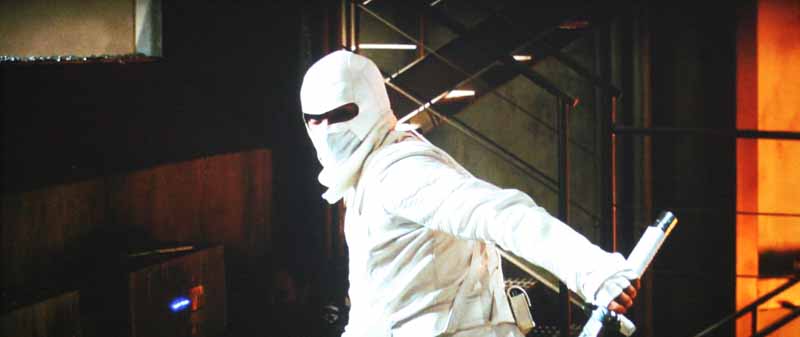
Next up was Resident Evil 4, which had an almost hyper-realistic color palette that was really fun to watch and which the Sceptre rendered with enthusiasm. This film really showed us whether the Black and White levels were set perfectly or not. This is a rich film that is a great piece of test material to have (it's also pretty great in 3D believe it or not).


Conclusion
The Sceptre X270BV-FHD is a great workhorse television. It's not fancy by any means, nor does it have the deepest blacks we've seen. The manufacturer specs are a mixture of impressive and over-stated (we're thinking in particular of the insane contrast ratio spec) but this set is an incredibly value - especially if you shop around online for a deal. If you're looking for a bedroom or dorm room television with ample inputs and a price that won't make your pocketbook hurt, this is a model you should definitely put on your short list.
Sceptre X270BV-FHD 27" LCD HDTV
$349
Sceptre
16800 E. Gale Ave
City of Industry, CA 91745
www.sceptre.com
About Sceptre
Headquartered in City of Industry, California, the hub of the computer industry, Sceptre is an internationally certified manufacturer of world class LCD flat panel monitors. Established in 1984, Sceptre is fully committed to maintaining its status as a leader in the industry by providing the latest advanced technology in LCD displays at affordable prices with tailored service programs. For more information, please visit www.sceptre.com.
The Score Card
The scoring below is based on each piece of equipment doing the duty it is designed for. The numbers are weighed heavily with respect to the individual cost of each unit, thus giving a rating roughly equal to:
Performance × Price Factor/Value = Rating
Audioholics.com note: The ratings indicated below are based on subjective listening and objective testing of the product in question. The rating scale is based on performance/value ratio. If you notice better performing products in future reviews that have lower numbers in certain areas, be aware that the value factor is most likely the culprit. Other Audioholics reviewers may rate products solely based on performance, and each reviewer has his/her own system for ratings.
Audioholics Rating Scale
 — Excellent
- — Very Good
- — Good
- — Fair
- — Poor
| Metric | Rating |
|---|---|
| Detail and Resolution | |
| Deinterlacing & Scaling | |
| Contrast and Black Levels | |
| Color Reproduction | |
| Noise Reduction | |
| Calibration Options | |
| Build Quality | |
| Ease of Setup | |
| Features | |
| Remote Control | |
| Fit and Finish | |
| Performance |  |
| Value | |
Clint Deboer was terminated from Audioholics for misconduct on April 4th, 2014. He no longer represents Audioholics in any fashion.
View full profile Subscribe to our newsletter