


Samsung PN50A760 50" Plasma Review
Samsung PN50A760
- Product Name: PN50A760
- Manufacturer: Samsung
- Performance Rating:

- Value Rating:
- Review Date: December 04, 2008 04:58
- MSRP: $ 2799.99
Video
Screen Size - 49.96"
Aspect Ratio - widescreen
Resolution - 1920 (H) x 1080 (V)
Dynamic Contrast Ratio - 1,000,000:1
Viewing Angle - 175º/175º
1080p
Audio
Sound Effect System - SRS TruSurround
Sound Output(RMS) - 15 W x 2
Input & Output
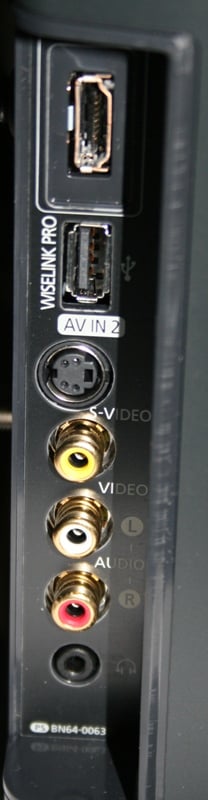
Side (1 each) - HDMI, Composite (AV), S-Video, Headphone
Back - HDMI (3), Component(Y/Pb/Pr) (2)
Features
Anynet, Infolink
Dimension
Set size (WxHxD) with stand - 48.8" x 32.9" x 12.4"
Set size (WxHxD) without stand - 48.8" x 30.5" x 3.8"
Package size (WxHxD) - 53.7" x 37.7 x 16.9"
Weight
Set weight without stand - 102.5 lbs
Package weight - 114.6 lbs
Pros
- Fantastic out of the box performance
- Great deinterlacing and scaling
- Lots of calibration options
- Great styling
- Tons of extras for you to experiment with
Cons
- Stylized edge sometimes reflects image
- Slow response to remote commands
- Random loss of picture
PN50A760 Build Quality and Setup
When I published my review of the Samsung LN52A750, I was inundated with one question over and over: How does it compare to the plasma? People choose large LCDs over plasmas usually because of lighting conditions, misconceptions about burn-in, and weight. Many of the Audioholics' crowd have enough lighting control and don't care that much about weight so that they can have a plasma and enjoy the lower cost that they offer over their LCD counterparts.
The Samsung PN50A760 has basically the same feature set as the LCD counterpart (with a few plasma/LCD specific exceptions) and changes only a few styling cues from the 750 generation. As you'd expect, the differences between the two panels (even though they are different technology) are pretty minor. I highly recommend you revisit the LN52A750 review before reading this one as I'll be referencing it often.
First Impressions and Build Quality
 The build quality of the LN52A750
is very similar to its LCD counterpart. The big difference from the 750 series LCD
is that the power button is no longer on the right side with the rest of the
controls. It is now in the center at the bottom and is highlighted by a thin horizontal
LED mounted just above the swivel base. The swivel action has just enough
resistance that the display pretty much stays put once set. The buttons on the
right are touch sensitive but again have no tactile feedback (or dimple to let
you know where they are) so you're going to need a brightly lit room with your
nose practically on the display to see the labels. The Touch of Color red
border is very subtle and only shows up in the right light.
The build quality of the LN52A750
is very similar to its LCD counterpart. The big difference from the 750 series LCD
is that the power button is no longer on the right side with the rest of the
controls. It is now in the center at the bottom and is highlighted by a thin horizontal
LED mounted just above the swivel base. The swivel action has just enough
resistance that the display pretty much stays put once set. The buttons on the
right are touch sensitive but again have no tactile feedback (or dimple to let
you know where they are) so you're going to need a brightly lit room with your
nose practically on the display to see the labels. The Touch of Color red
border is very subtle and only shows up in the right light.
There are 3 HDMI inputs on the back and one on the side along with a few extra inputs/outputs. This is exactly the same as the LCD. Again, the only problem with the side inputs is that they are very "on the side and are not meant to be a long term solution." This means that, unless you use right-angle connectors, you'll see the cables sticking out of the side of the display. While there is a little overlap with the glass frame, it isn't enough to hide most RCA terminated cables unless you are going to try and bend them severely and even then, they will probably remain visible.
Set-Up & General Use
 The big
difference between the PN50A760 and the LCD counterpart is the weight. Without
the stand, the 50" plasma is nearly 40lbs heavier than the 52" LCD.
With the stand, you are looking at over 100lbs to hang on the wall. You'll want
to take this into account when selecting a sturdy wall mount. I'm estimating
(based on the specifications of the LCD) that the stand adds around 20lbs which
should be no problem for any quality plasma stand out there (CRTs routinely
weigh in as much or more at smaller screen sizes).
The big
difference between the PN50A760 and the LCD counterpart is the weight. Without
the stand, the 50" plasma is nearly 40lbs heavier than the 52" LCD.
With the stand, you are looking at over 100lbs to hang on the wall. You'll want
to take this into account when selecting a sturdy wall mount. I'm estimating
(based on the specifications of the LCD) that the stand adds around 20lbs which
should be no problem for any quality plasma stand out there (CRTs routinely
weigh in as much or more at smaller screen sizes).
I again noted that the channel changing from Standard Definition to High Definition was very quick and accurate. With lesser quality displays, you'll see flickering or long pauses. Not so with the PN50A760. The only issue I had was the initial HDCP handshake period was quite long - at least 3-4 seconds at times. While this is in no way excessive (I've seen worse) it is long in comparison to the other functions of the display.
My only issue with the use of the PN50A760 was that it would occasionally display a black screen when on an HDMI input. I experienced this with two different HDMI inputs though never on component. An extensive Internet search revealed that I was nearly alone in this issue. This makes me think it is either a unique problem or related to an old firmware version. Either way, it is most likely nothing you need to worry about but since I experienced it, it must be noted. Essentially, the screen would go black for a second or three. All the while I could hear the audio in the background and could even change the channel successfully during the "black out." At first I thought it was an HDCP issue, but the presence of audio negates this theory.
Black levels, as you might expect with a plasma, were very good, though not as stunning as I'd thought. This may speak more to the quality of the LCD panel than to any real substantive deficiency with the plasma. Dark detail was very good and out of the box performance was stellar (once I set it in Movie mode and enabled Advanced Film Mode. I was again struck by the limited aspect ratios available on the Samsung. Given the price point and the apparent ability of these panels, it shocks me that I've only got a few modes (and none of the Zoom modes with an HD signal). Samsung should definitely take steps to rectify this situation with their next generation of panels.
Menus
Menus were nearly identical to the LN52A750 with a few minor differences. Any reference to 120Hz processing was of course omitted. The Advanced Film Mode with the LCD only had Off and Auto as options. With the PN50A760, you have Off, Auto, and Smooth. While the manual is less than helpful, I generally recommend Auto. If you set it to Off some of deinterlacing tests will fail (see below) and on at least one occasion I noted Smooth causing a distortion of one of those on-screen logos when the camera was panning. I was able to rewind and test it with a number of settings before I determined that whatever the smoothing was caused the issue. I never noticed any other issues when set to Auto. The only time I used Off was when I was playing Rock Band 2 and some interaction between the Advanced Film Mode processing and the 1080i output on the Xbox 360 caused the text for the vocal track to break up. They were so horribly mangled as to make them unreadable. The other (better) solution is to just set the Xbox for 1080p output.
Under the Picture Options menu (where the Advanced Film Mode is located) you'll find the Screen Burn Protection options. During one of my tests, I disabled all of this and played hours of Gears of War 2 and/or Rock Band 2 without any problems so I'm pretty convinced the panel is resistant to burn-in or image retention. I also let the display sit on a menu screen for more than an hour again with no problems. Remember, you need to ensure proper brightness levels (which means switching off Dynamic mode as soon as you get the panel) and Movie mode gets you 90% of the way there. Under these options, you can enable Pixel Shift which essentially moves the pixels around minutely in order to reduce the chance of an after image. You can also set the side bars to gray (for when you are displaying a 4:3 image). If you already have a retained image, you can attempt to blast it out with an all white screen or with a scrolling white bar. I didn't have any problems during my tests and I suspect with a little care during the initial setup, neither will you.
Remote Control
The remote control is identical to the LCD counterpart though I did discover one additional feature. On the bottom left of the keypad there is a hyphen. If you hold it down for a moment, it will show you a menu for audio and video test patterns. The video one is just the vertical color bars and the audio simply plays a snippet of music but in this day and age of multiple components and connections, it is sometimes hard to know where the fault lies. With this menu, you can rule out the display. I personally think this is a great tool for users plus I'm guessing it makes any tech support calls quite a bit shorter.
PN50A760 Measurements
For calibration I'm using both the Sencore ColorPro System and Colormetre HCFR software. Basically, Sencore is great for calibrating your set but doesn't give you the pretty graphs that we like to show in our reviews. That's where Colormetre comes in. From the default settings, I measured:
Dynamic - 9100k (1700:1 contrast ratio)
Standard - 8100k (1150:1 contrast ratio)
Movie - 6300k (1150:1 contrast ratio)
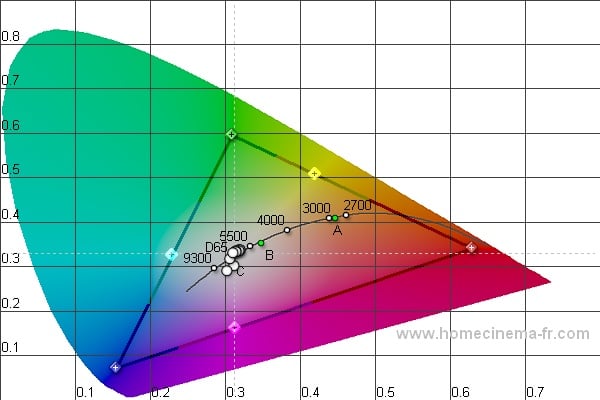
Calibration options were nearly unlimited on the PN50A760 - not that you needed them. All the standard stuff was there (Brightness, Contrast, Tint, etc) along with your gain and cut adjustments under the White Balance menu under Detailed Settings. I fiddled with these controls but in the end, I don't think you need to do much else other than turn the set on. I was able to achieve these measurements from the default Movie setting (Note: throw out any color readings below 30IRE due to limitations of the colorimeter I am using):

Color Temp
CIE

Luminance

RGB
The above measurements were taken without any calibration. The only problem area really is the Luminance which seems to be crushing blacks a bit at the bottom end. During the viewing evaluation, I didn't notice any artifacts or problems with this phenomenon. It looks as if some sort of processing is engaged but I triple checked all the settings and didn't find a problem. With a bit of tweaking I brought the RGB and Color Temp in line but I wanted to show you out of the box performance since it is very, very good. Not as good as the LCD counterpart, but close.
Audioholics/HQV Bench Testing Summary of Test Results
Perfect Score
is 130
Samsung PN50A760 Benchmark total
score: 105/130. All tests were run
through the HDMI 3 input.
|
Test |
Max |
Results |
Pass/Fail |
|
Color Bar |
10 |
10 |
Pass |
|
Jaggies #1 |
5 |
5 |
Pass |
|
Jaggies #2 |
5 |
5 |
Pass |
|
Flag |
10 |
10 |
Pass |
|
Detail |
10 |
10 |
Pass |
|
Noise |
10 |
5 |
Pass |
|
Motion adaptive Noise Reduction |
10 |
10 |
Pass |
|
Film Detail |
10 |
10 |
Pass |
|
Cadence 2:2 Video |
5 |
5 |
Pass |
|
Cadence 2:2:2:4 DV Cam |
5 |
5 |
Pass |
|
Cadence 2:3:3:2 DV Cam |
5 |
5 |
Pass |
|
Cadence 3:2:3:2:2 Vari-speed |
5 |
0 |
Fail |
|
Cadence 5:5 Animation |
5 |
0 |
Fail |
|
Cadence 6:4 Animation |
5 |
0 |
Fail |
|
Cadence 8:7 Animation |
5 |
0 |
Fail |
|
Cadence 24fps film |
5 |
5 |
Pass |
|
Scrolling Horizontal |
10 |
10 |
Pass |
|
Scrolling Rolling |
10 |
10 |
Pass |
|
Total Points |
130 |
105 |
|
Comments on Audioholics
DVD Torture Tests
The
only change I made from the default settings was to set Film Mode under Picture
Options to "Auto." I
also tried "Smooth" but it only managed to pass one other Cadence
test and I didn't feel the trade off with possible visual artifacts was worth
it. Overall, the PN50A760 did very well. The Noise reduction set to
"High" did a fairly good (but not stellar) job of reducing noise
without introducing any visual artifacting associated with motion. The Jaggie
tests were spot on and the Film Detail test was rock solid. Feel free to set
each of your components to interlaced output (except for your Xbox 360) and let
the display do the work - unless you spent a lot of money on your source (or
you have a Blu-ray player), you aren't going to do much better than this
display.
PN50A760 Viewing Evaluation and Conclusion
It is clear that the
Samsung PN50A760 provides great deinterlacing as per the HQV tests. It is also
clear that you the consumer needs to do little other than shell out the asking
price to get that fantastic performance. But the real question is, "How
does it look in real world applications?"
DVD: The Incredible Hulk
I was particularly
worried about black levels with this display considering the luminance measurements
so I tried out a few things with lots of darks. The Incredible Hulk was a prime candidate with lots of dark scenes
paired with tons of color. While there may be some crushing of blacks going on
with the PN50A760, artifacting was non-existent and detail was excellent. The
true black scenes weren't as dark as I've seen with other plasmas but the
differences were a matter of degrees, not miles. Color reproduction was
fantastic with well saturated colors and great detail.


Xbox 360: Gears of War 2
I will admit that this
review provided a thinly veiled excuse to play the game in the middle of the day.
While the first Gears was known for washed out colors and a "black and
white" feel, the second installment has much more color and lots of
outdoor environments. It isn't the vivid color experience something like a Mario game would be but it is better than
the first. You can clearly see how well the PN50A760 works with motion and with
gaming. I easily played this and Rock
Band 2 for hours at a time with no visible image retention. This would be a
great display for gaming in my opinion.


Conclusion
 The goal of my Samsung PN50A760 review
was to hold it up to the LCD counterpart and see how it stacked up. While it didn’t quite do as well as the LCD
(indicating that Samsung is a bit better with LCDs than they are with Plasmas), it was close
enough for me to call it a wash. If you are interested in one, you can probably
buy the other without a noticeable difference it picture quality and
performance. At the $2800 asking price, it is $800 less that than 52" LCD
counterpart. That's a lot of scratch for an extra 2". But even a cursory
search of the Internet will show you that you can knock at least a few hundred
dollars off that price. I feel about the PN50A760 the same as I did about the
LN52A750 - I want one. If that isn't a crowning endorsement, I don't know what
is.
The goal of my Samsung PN50A760 review
was to hold it up to the LCD counterpart and see how it stacked up. While it didn’t quite do as well as the LCD
(indicating that Samsung is a bit better with LCDs than they are with Plasmas), it was close
enough for me to call it a wash. If you are interested in one, you can probably
buy the other without a noticeable difference it picture quality and
performance. At the $2800 asking price, it is $800 less that than 52" LCD
counterpart. That's a lot of scratch for an extra 2". But even a cursory
search of the Internet will show you that you can knock at least a few hundred
dollars off that price. I feel about the PN50A760 the same as I did about the
LN52A750 - I want one. If that isn't a crowning endorsement, I don't know what
is.
Samsung PN50A760
50-inch Plasma Display
$2799
Samsung Electronics, Inc.
Samsung
105 Challenger Rd.
Ridgefield Park, NJ
07660-0511
About Samsung Electronics America, Inc.
Headquartered in Ridgefield Park, NJ, Samsung Electronics America, Inc.
(SEA), a wholly owned subsidiary of Samsung Electronics Co., Ltd., markets a
broad range of award winning, advanced digital consumer electronics and home
appliance products, including HDTVs, home theater systems, MP3 players,
refrigerators and laundry machines. A recognized innovation leader in consumer
electronics design and technology, Samsung is the HDTV market leader in the U.S.
and is the only manufacturer that produces all four major digital television
technologies.
The Score Card
The scoring below is based on each piece of equipment doing the duty it is designed for. The numbers are weighed heavily with respect to the individual cost of each unit, thus giving a rating roughly equal to:
Performance × Price Factor/Value = Rating
Audioholics.com note: The ratings indicated below are based on subjective listening and objective testing of the product in question. The rating scale is based on performance/value ratio. If you notice better performing products in future reviews that have lower numbers in certain areas, be aware that the value factor is most likely the culprit. Other Audioholics reviewers may rate products solely based on performance, and each reviewer has his/her own system for ratings.
Audioholics Rating Scale
 — Excellent
- — Very Good
- — Good
- — Fair
- — Poor
| Metric | Rating |
|---|---|
| Detail and Resolution | |
| Deinterlacing & Scaling | |
| Contrast and Black Levels | |
| Color Reproduction | |
| Noise Reduction | |
| Calibration Options | |
| Build Quality | |
| Ergonomics & Usability | |
| Ease of Setup | |
| Features | |
| Remote Control | |
| Fit and Finish | |
| Performance | |
| Value | |
As Associate Editor at Audioholics, Tom promises to the best of his ability to give each review the same amount of attention, consideration, and thoughtfulness as possible and keep his writings free from undue bias and preconceptions. Any indication, either internally or from another, that bias has entered into his review will be immediately investigated. Substantiation of mistakes or bias will be immediately corrected regardless of personal stake, feelings, or ego.
View full profile Subscribe to our newsletter