


Panasonic TH-50PF9UK 50" 1080p Plasma Display Review
Panasonic TH-50PF9UK
- Product Name: TH-50PF9UK
- Manufacturer: Panasonic
- Performance Rating:

- Value Rating:

- Review Date: February 07, 2007 10:31
- MSRP: $ 5995
Screen Size (inches): 50
Aspect Ratio: 16:9
Native Resolution: 1920 x 1080
Contrast Ratio: Up to 5000:1
Supported Video Formats: 480i, 480p, 576i, 576p, 720p, 1080i, 1080p
Supported PC Formats: VGA, SVGA, XGA, SXGA, UXGA (compressed)
Serial: RS232C-compatible
Inputs: DVI-D (1), component/RGB (BNC), VGA (HD15), (optional SLOT 1 for HDMI blade card)
Vertical Scanning Freq: 15-110kHz
Horizontal Scanning Frq: 48-120Hz
Audio Outputs: 8W + 8W built-in amplifiers (6-ohm rated)
Viewing Angle (degrees): More than 160
New Real Black Creation: Yes
Dimensions (H x W x D): 28.5'' x 47.6'' x 3.7''
Weight: 93 lbs
Pros
- 3 HD Inputs
- Pristine picture
- Number/type of inputs can be tailored to your needs
- Lots of calibration options
- 1:1 Pixel mapping ability
Cons
- No internal tuner
- Extremely limited number of inputs
- Additional inputs cost extra
Panasonic TH-50PF9UK: Build Quality
I’ve had a chance to review a number of 720p displays in recent months. They have, for the most part, all been very good. But there has always been this itch… the 1080 itch I call it. Will it look that much better? Will it be that much better? With a 50” screen, I’ve often heard people say that you can’t tell the difference. Maybe that’s true, but personally, I want to see for myself.

advertisement
Build Quality
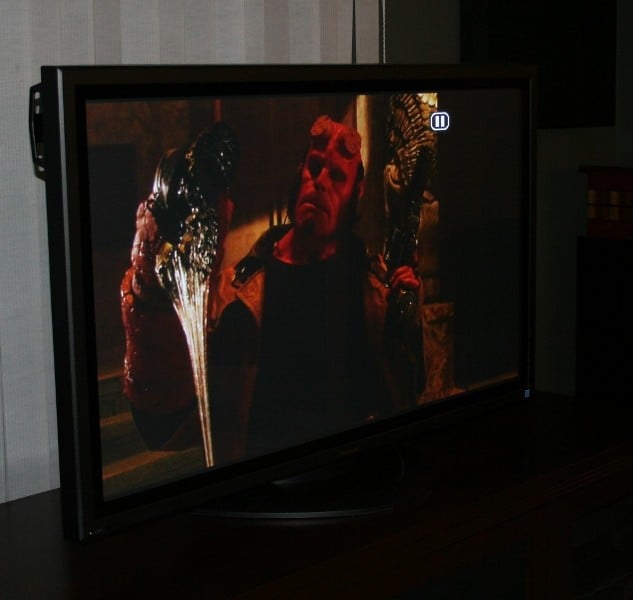 The TH-50PF9UK shares the
same chassis as the TH-50PH9UK and the TH-50PHD8UK. It is heavier than the PH9UK
but it keeps the same styling. The small frame and lack of speakers really give
this display that “window” look. The thin frame just disappears into the
background and I’ve seen applications where people have actually installed picture frames over the edges of
the display.
The TH-50PF9UK shares the
same chassis as the TH-50PH9UK and the TH-50PHD8UK. It is heavier than the PH9UK
but it keeps the same styling. The small frame and lack of speakers really give
this display that “window” look. The thin frame just disappears into the
background and I’ve seen applications where people have actually installed picture frames over the edges of
the display.
I’ve read reports of “hums” or noises associated with units in this line of Panasonics. The hum seems to be associated with the plasma screen itself while others have complained about the fan noise. Personally, I don’t see how anyone could complain about any noise from these displays. I specifically paid attention to any stray noises and noticed nothing. I sit about 8 feet away from a 50” display (far closer than I think most would). With the speakers off, and after hours of use, I could only hear noise when I place my head behind the unit. Even with my ear directly up to the screen, I heard next to nothing. If you are experiencing any stray noise, I’d first suggest you look at other sources. If you are sure it is coming from the display, consider placing some absorptive material behind the unit. It could be enhanced by reflections off the back wall.
Panasonic TH-50PF9UK: Input Configuration
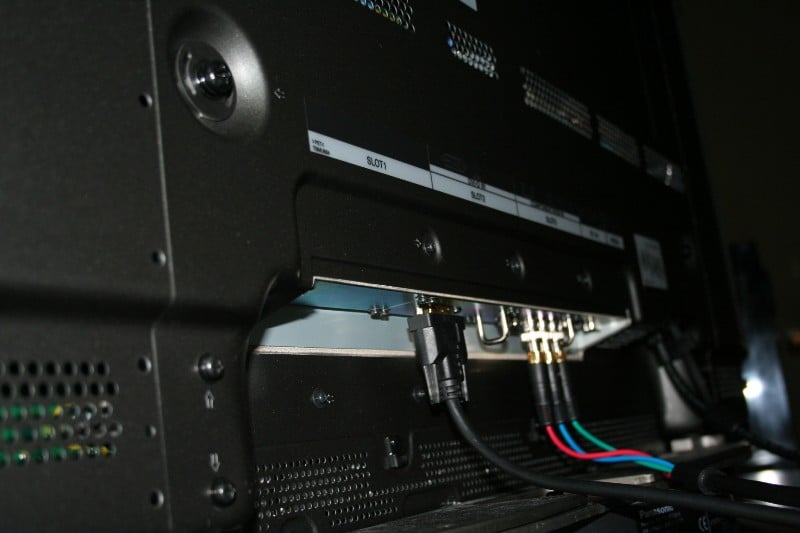
Interchangeable blades are a feature of this line of Panasonic industrial plasmas. With the 720p sets, they came standard with a component and some combination of s-video and composite inputs. If you wanted HDMI, you had to pay extra. With the TH-50PF9UK, you get a component and a DVI-D input. Now, since this display is really just a monitor – no pesky tuners or anything – trading in an s-video input for DVI-D is HUGE. For a HD display, s-video and composite are all but useless. Having two HD capable inputs will probably save many users from having to purchase a separate blade. With an HDMI to DVI cable, most any source can be used with the display – you just don’t get integrated audio.

Those of you using a computer (or HTPC) will be glad to know that you have access to a PC Input (15pinHD) that is 1080p capable. On top of this, there is an empty slot ripe to be filled with any blade you need (at an additional charge of course). While I personally would have preferred an HDMI input over the DVI-D, the display has no speakers and DVI-D has no appreciable picture quality difference from HDMI.
There have been a couple of changes to the menu system that I’d like to address:
POS. / SIZE
This menu adjusted the position and size of the image on the screen. You can stretch/compress the horizontal and vertical dimensions or reposition the image on the screen. In addition, there is a 1:1 pixel matching mode. HTPC users rejoice! 1:1 pixel mapping could really make the difference between a great picture and a mind-blowing one. Setting the exact picture size and timing will eliminate the display’s need to scale or deinterlace all the while eliminating 3:2 judder. You absolutely cannot get a better picture out of your HTPC. The 1:1 pixel mapping is only available for 1080i (component or DVI) or 1080p signals (DVI only) since it is obviously attempting to match the native scaling of the display. After you engage the 1:1 pixel mapping, you lose the ability to stretch or compress the picture, you can only adjust it horizontally and vertically. I found that this worked very well with my HTPC but with the OPPO 970HD, I experienced artifacts around the top and bottom of the screen due to the additional information in the edges of the picture (not present in PC sources).
PICTURE
 The Picture menu
houses all your standard picture adjustments. In the other Panasonic plasmas
I’ve reviewed, there were three different “Picture” menus (default settings)
that were selectable. Out of the box, it was set to Dynamic (which was
a bit too bright but probably works well under fluorescent lighting) with
Standard and Cinema modes following next in decreasing order
of brightness. The TH-50PF9UK added an additional mode called “Super Cinema”.
The manual describes “Super Cinema” as presenting a “Velvety Picture” (whatever
that means). Super Cinema seems to ape Dynamic except that the
Sharpness isn’t so high.
The Picture menu
houses all your standard picture adjustments. In the other Panasonic plasmas
I’ve reviewed, there were three different “Picture” menus (default settings)
that were selectable. Out of the box, it was set to Dynamic (which was
a bit too bright but probably works well under fluorescent lighting) with
Standard and Cinema modes following next in decreasing order
of brightness. The TH-50PF9UK added an additional mode called “Super Cinema”.
The manual describes “Super Cinema” as presenting a “Velvety Picture” (whatever
that means). Super Cinema seems to ape Dynamic except that the
Sharpness isn’t so high.
With the 720p TH-50PH9UK, Panasonic split the second input into two halves, one with s-video and the other composite. This created a headache for remote programmers because there were no discrete codes for each half of the blade. While some users may not experience any problems, custom installers were pulling their hair out trying to work around this issue. For this reason, I don’t suggest investing in the double blades unless you can confirm that a) you won’t have the need for discrete codes or that b) discrete codes are available for the blade you are looking at. In the case of the TH-50PF9UK, the double blade was replaced with the DVI-D blade so this shouldn’t be an issue.
Remote Control
Once again, the remote hasn’t changed. It is lightweight and functional. There are individual buttons for each of the inputs as well an input “scroll” button (for whatever good that would be). The lack of backlight and no individual buttons for the different aspect ratio are the only real drawbacks.
TH-50PF9UK: Calibration and Bench Testing
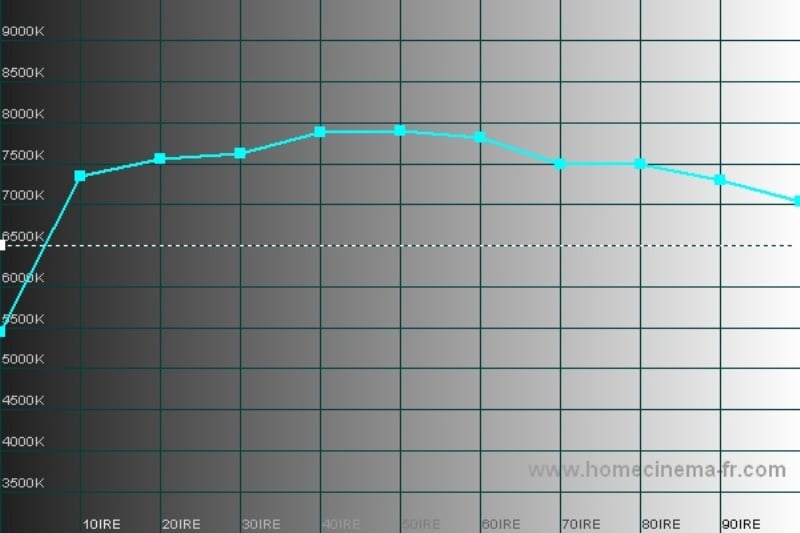
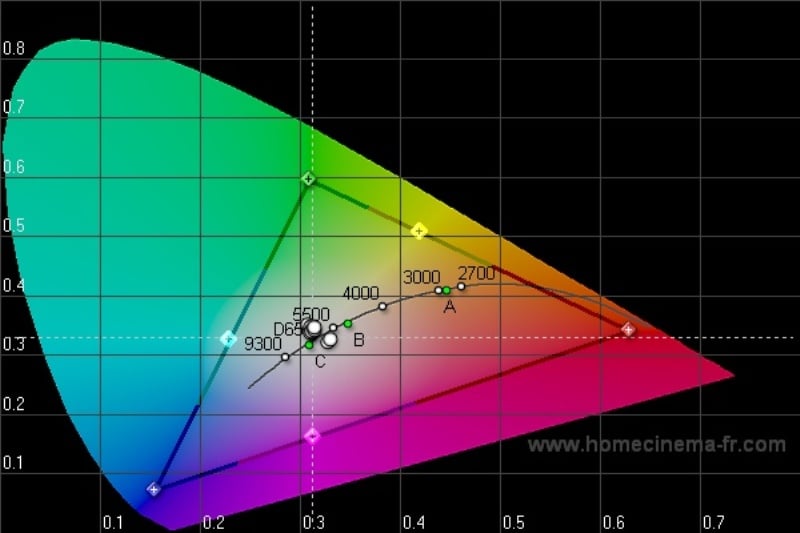 Even
though this is a 1080p display, I was surprised and the similarities in the
calibration to the 720p sets I’ve tested. Once again, blue was way too high and
to a lesser degree, red. I’ve often been asked to give my calibration settings but
honestly, that would be a bit misleading. I’ve calibrated both the inputs
(component and DVI) on multiple sources and for every source it is a bit
different. Suffice it to say that you most likely need to knock blue down a
significant amount (on some inputs, I bottomed it out) and red about half as
much. Even then, I couldn’t get the set dialed in perfectly. I used the Sencore
ColorPro 5000 to calibrate the display but used the free program HCFR Colorimeter (which Jeff Lawson recently pointed out to
us on our forums) along with the Spyder II meter from the datacolor SpyderTV PRO kit to generate the below
graphs. If anything it pointed out that the two colorimeters were still
tracking pretty closely together.
Even
though this is a 1080p display, I was surprised and the similarities in the
calibration to the 720p sets I’ve tested. Once again, blue was way too high and
to a lesser degree, red. I’ve often been asked to give my calibration settings but
honestly, that would be a bit misleading. I’ve calibrated both the inputs
(component and DVI) on multiple sources and for every source it is a bit
different. Suffice it to say that you most likely need to knock blue down a
significant amount (on some inputs, I bottomed it out) and red about half as
much. Even then, I couldn’t get the set dialed in perfectly. I used the Sencore
ColorPro 5000 to calibrate the display but used the free program HCFR Colorimeter (which Jeff Lawson recently pointed out to
us on our forums) along with the Spyder II meter from the datacolor SpyderTV PRO kit to generate the below
graphs. If anything it pointed out that the two colorimeters were still
tracking pretty closely together.
|
|
|
|
|
|
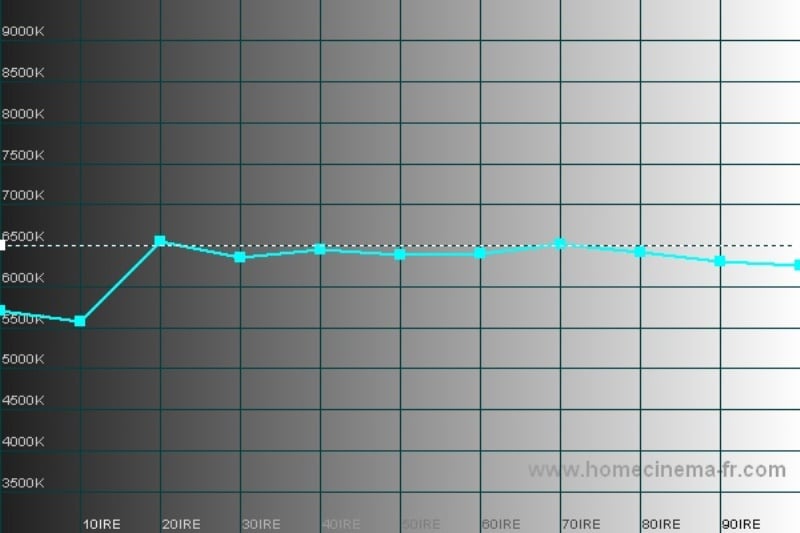
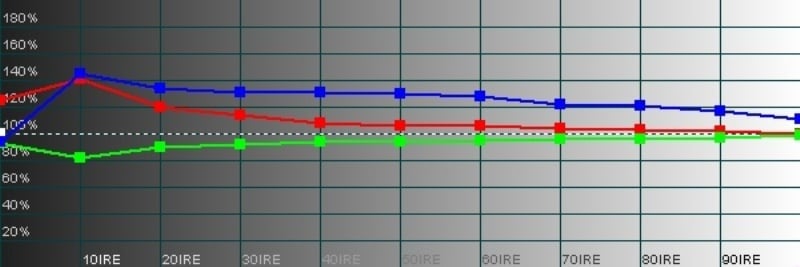
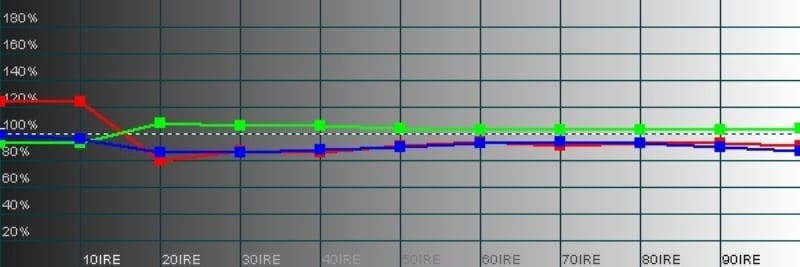
Audioholics/HQV Bench Testing Summary of Test Results
Perfect Score is 130
Panasonic TH-50PH9UK
Benchmark Score: 68
|
Test |
Max |
Component |
Component |
|
Color Bar |
10 |
10 |
Pass |
|
Jaggies #1 |
5 |
5 |
Pass |
|
Jaggies #2 |
5 |
3 |
Pass |
|
Flag |
10 |
5 |
Pass |
|
Detail |
10 |
5 |
Pass |
|
Noise |
10 |
0 |
Fail |
|
Motion Adaptive NR |
10 |
0 |
Fail |
|
Film Detail |
10 |
10 |
Pass |
|
Cadence 2:2 Video |
5 |
0 |
Fail |
|
Cadence 2:2:2:4 DV Cam |
5 |
0 |
Fail |
|
Cadence 2:3:3:2 DV Cam |
5 |
0 |
Fail |
|
Cadence 3:2:3:2:2 Vari-speed |
5 |
5 |
Pass |
|
Cadence 5:5 Animation |
5 |
0 |
Fail |
|
Cadence 6:4 Animation |
5 |
0 |
Fail |
|
Cadence 8:7 animation |
5 |
0 |
Fail |
|
Cadence 3:2 24fps film |
5 |
5 |
Pass |
|
Scrolling Horizontal |
10 |
10 |
Pass |
|
Scrolling Rolling |
10 |
10 |
Pass |
|
Total Points |
130 |
68 |
|
*Testing using 480i via component video inputs
Comments on HQV Testing
These results of the testing was much better than with the other Panasonic displays I’ve tested. Noise is still a problem but moiré seems to be a thing of the past. These Panasonic plasmas are a “no bones about it” make. They are not meant to do the heavy duty deinterterlacing and scaling you’d expect of a consumer display – and they seem to pass all the important tests. While the included deinterlacers and scalers will do and acceptable job now, the picture will only be helped by a good source. The upside is that you aren’t paying for all those high end features so you can spring for a better upconverting DVD player.
Panasonic TH-50PF9UK: Viewing Evaluation
I’ve been impressed in the past with the performance of the Panasonic plasmas. To really put this one through its paces, I viewed the set at 480i, 480p, 720p, and 1080i across component (HTPC) and 480p, 720p, and 1080i across DVI (from the OPPO 970HD). Other than increased clarity, the TH-50PH9UK performed similarly at all resolutions.
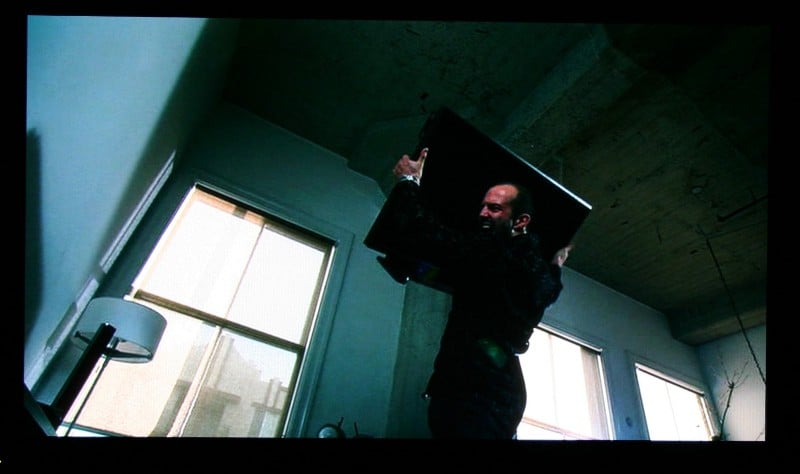
Author’s Note: The pictures of the display below do not do the display justice. There are obvious problems of taking a picture of an image on a direct-view pixel-based screen that’ simply are impossible to overcome (the reasons why images are always simulated in advertisements).
Crank
Jason Statham first crossed my path in Lock, Stock and Two Smoking Barrels. Of course he went on to star in the two Transporter movies as well. While his choice of scripts hasn’t been exactly to my liking, I have enjoyed his performances. When I saw the previews for Crank I immediately put it on my Netflix list. I was sure it would be a popcorn flick (all action, little substance), but I have a soft spot for such flicks. Hey I’m a guy.
As thin as the plot was (must have been from all the holes) the picture quality was really the most disappointing. The directors seemed to rely on MTV style Digital8 blurring action shots. I guess we’ve all got the Blair Witch Project to thank for that. The Panasonic TH-50PH9UK did the best it could with some mediocre material. The girlfriend’s dress, an impossibly colorful shirt at the end, plenty of textures… it all looked spectacular.



24: Season 6 Premiere
I couldn’t help but pick up this disc. For those of you living under a rock, 24 is arguably the best show on TV… perhaps ever. Never mind the neocon name-calling – that’s just a jealous competitor station’s way of getting some attention. Having two children (under the age of 4), I wasn’t exactly in the position to watch the 2 night, 4 hour premiere live (it started at 8pm, far too early for my young’uns). I DVR’ed it but I have standard cable. The picture quality is OK (once you get used to all the artifacts) but the sound really bites. Fox wants to make sure they give every possible person the chance to watch the hit show, so, in a marketing coup, they release the 4 hour premiere on DVD the week it was aired (TNT, USA, SciFi, and the like don’t do this, they just replay the same episodes over and over and over again for a weekend/week/ever). I was interested in the increased picture quality (of course) but mostly I wanted to enjoy 5.1 surround sound… Well, fat chance. Apparently they are saving surround sound for the official DVD release. This was in 2.1. Quite disappointed.
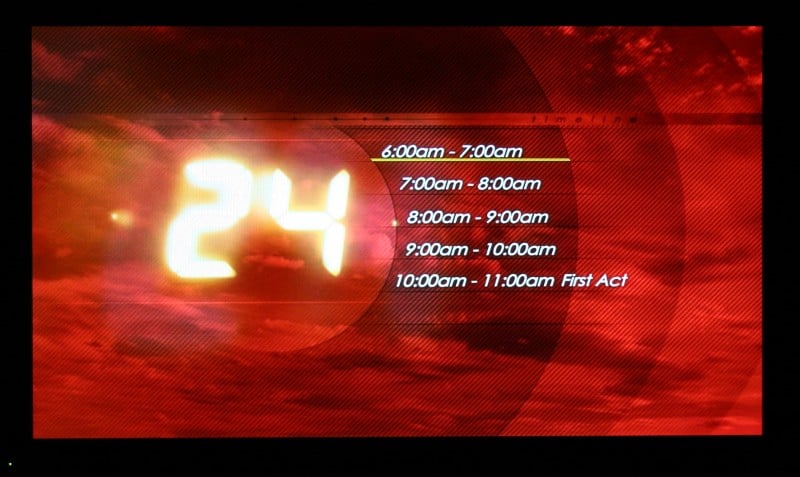


If nothing else, plasma’s do one thing well – blacks. The Panasonic TH-50PF9UK did not disappoint. 24 is full of vibrant colors, quick motion, and dark, dingy scenes. On all counts the TH-50PF9UK performed flawlessly. I so no evidence of macroblocking, banding, or other artifacts. Noise reduction is nowhere to be found, but with the right source, this will be reduced as well. I found myself transfixed by the clarity of the image. From 8 feet away, I could easily see pores, beads of sweat, and the amount of mascara they were wearing – and this from a standard definition DVD. During the outside scenes, I was particularly impressed with the color reproduction. Impossibly green grass, vibrant fabrics, and beautiful explosions kept you cognizant of this display’s abilities despite all the beiges and dark scenes. What was really funny was that I was watching the President watching his men on the same TV I was watching him on… Wait, I think I just sprained my brain.
Burn-in
I’ve said in the past that these Panasonic plasmas are fairly bulletproof. I got an Xbox 360 for Christmas so my plan was to play 6 straight hours of Halo 2 over Xbox Live. Well, that got nixed by the wife and her irrational need to use our home theater to watch TV and stuff. So it was on to my backup plan. I disabled the screensaver on the HTPC, put a menu up on the screen, and went to bed. A MCE screen that was mostly blue with bright white text dead center. If something was going to burn in, this was it. Six hours later, I’m up (I got to sleep in – yea!) and not a hint… not an iota of burn-in. Now, do I think you should do this? No. But I don’t think you should worry if you leave the weather channel on while you’re eating dinner either.
Panasonic TH-50PF9UK: Conclusion
 This is one of the first 1080p plasmas released for mass consumption. I’ve done
a cursory web search for competitors and really, I can’t find anything that can
touch it price-wise. Is it expensive? Yes. Compared to LCDs. But compared to
other 1080p plasmas, it is an absolute steal. The blacks are great, the colors
are vivid, and the picture… well, one wonders if you’ll notice a difference in a
50” set. From the distance I was sitting, yes. The overall image is sharper,
lines are crisper, and everything just looks more lifelike. Panasonic has made
me increase the severity of my burn-in tests with every new plasma I review and
they always come through without a scratch. And with burn-in being the one major
concern most people have with plasmas, I can only declare it the “dead horse”
that everyone seems to keep beating. Fantastic picture, great black and shadow
detail, impressive off axis performance… what more is there to say? Panasonic
has hit another home run with the TH-50PH9UK.
This is one of the first 1080p plasmas released for mass consumption. I’ve done
a cursory web search for competitors and really, I can’t find anything that can
touch it price-wise. Is it expensive? Yes. Compared to LCDs. But compared to
other 1080p plasmas, it is an absolute steal. The blacks are great, the colors
are vivid, and the picture… well, one wonders if you’ll notice a difference in a
50” set. From the distance I was sitting, yes. The overall image is sharper,
lines are crisper, and everything just looks more lifelike. Panasonic has made
me increase the severity of my burn-in tests with every new plasma I review and
they always come through without a scratch. And with burn-in being the one major
concern most people have with plasmas, I can only declare it the “dead horse”
that everyone seems to keep beating. Fantastic picture, great black and shadow
detail, impressive off axis performance… what more is there to say? Panasonic
has hit another home run with the TH-50PH9UK.
About Panasonic Broadcast &
Television Systems Co.
Panasonic
Broadcast & Television Systems Co. is a leading supplier of broadcast,
professional video and presentation products and systems. Panasonic Broadcast
is a unit company of Panasonic Corporation of North
America. The company
is the North American headquarters of Matsushita Electric Industrial Co., Ltd.
(NYSE: MC) of Japan, and the hub of its U.S. marketing, sales, service and
R&D operations For more information on Panasonic Broadcast products, access
the company’s web site at www.panasonic.com/broadcast.
The Score Card
The scoring below is based on each piece of equipment doing the duty it is designed for. The numbers are weighed heavily with respect to the individual cost of each unit, thus giving a rating roughly equal to:
Performance × Price Factor/Value = Rating
Audioholics.com note: The ratings indicated below are based on subjective listening and objective testing of the product in question. The rating scale is based on performance/value ratio. If you notice better performing products in future reviews that have lower numbers in certain areas, be aware that the value factor is most likely the culprit. Other Audioholics reviewers may rate products solely based on performance, and each reviewer has his/her own system for ratings.
Audioholics Rating Scale
 — Excellent
- — Very Good
- — Good
- — Fair
- — Poor
| Metric | Rating |
|---|---|
| Detail and Resolution | |
| Deinterlacing & Scaling | |
| Contrast and Black Levels | |
| Color Reproduction | |
| Noise Reduction | |
| Calibration Options | |
| Build Quality | |
| Ease of Setup | |
| Remote Control | |
| Performance | |
| Value |  |
As Associate Editor at Audioholics, Tom promises to the best of his ability to give each review the same amount of attention, consideration, and thoughtfulness as possible and keep his writings free from undue bias and preconceptions. Any indication, either internally or from another, that bias has entered into his review will be immediately investigated. Substantiation of mistakes or bias will be immediately corrected regardless of personal stake, feelings, or ego.
View full profile Subscribe to our newsletter