


Mitsubishi LT-46149 LCD TV with Sound Projector Review
Mitsubishi LT-46149 LCD w/Sound Projector
- Product Name: LT-46149 46-inch LCD w/Sound Projector
- Manufacturer: Mitsubishi
- Performance Rating:

- Value Rating:

- Review Date: December 02, 2008 00:29
- MSRP: $ 2799
|
Video
Audio
|
Inputs
Vitals
|
Pros
- Nice looking cabinet
- Surprisingly good 5.1 integrated sound projector (iSP)
- TV Guide program guide
Cons
- Very uneven backlight
- Really slow channel changes
- No direct input/source switching
- 120Hz motion causes artifacts
LT-46149 Build Quality and Setup Menu
We took a look at the Mitsubishi LT-46148 46-inch LCD back in August and felt that it was a good TV with some potential for improvement. Mitsubishi jumped back at us with the new LT-46149 and asked us to review it. While the features, video section and menus are nearly identical, the 149 series offers a brand new 16-speaker sound projector to deliver Dolby Digital 5.1 surround from just a bottom-mounted sound bar. Why do I have an inkling that this is going to make a lot of aesthetically-minded "significant others" very happy? We dialed in this television and it actually did a pretty bang-up job of sending surround sound to our ears - and all from a single thin speaker.
Build Quality and Features
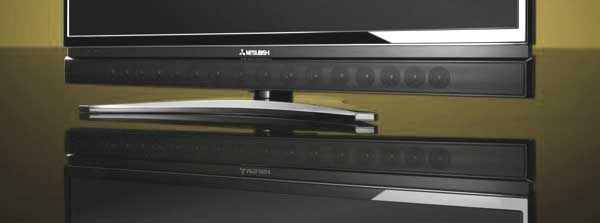
The Mitsubishi LT-46149 is a great-looking television. It's... sleek. It features a beautiful piano gloss black finish and a bezel that is a scant 7/8" thick which tapers down to just 5/8" at the screen. This is the kind of flat panel television, at just less than 5 inches thick, that begs to be hung on the wall. We semi-obliged it and mounted it to our StudioTech DP-2 flat panel TV stand. The included desktop stand (which we quickly removed) looks like it was made by the same guy who designs Batman's weapons. It's a curvy thing with legs that I'd describe as "sexy" if that didn't make me weird... oh boy. Anyway, the thing that really sets apart this television is the single row of 16 speakers that run across the soundbar positioned below the screen. When I first saw this I scratched my head and figured someone over at Mitsubishi had run into some extra drivers they wanted to get rid of. Surely, no one is selling a television to consumers with an integrated soundbar? You're supposed to sell those separately... for hundreds of dollars. I apparently hadn't done my research on this model, for Mitsubishi is attempting to provide the answer to the age-old question:
"OK,
I managed to hang my flat panel on the wall... now what am I going to do about
speakers?"
- A. J. Consumer
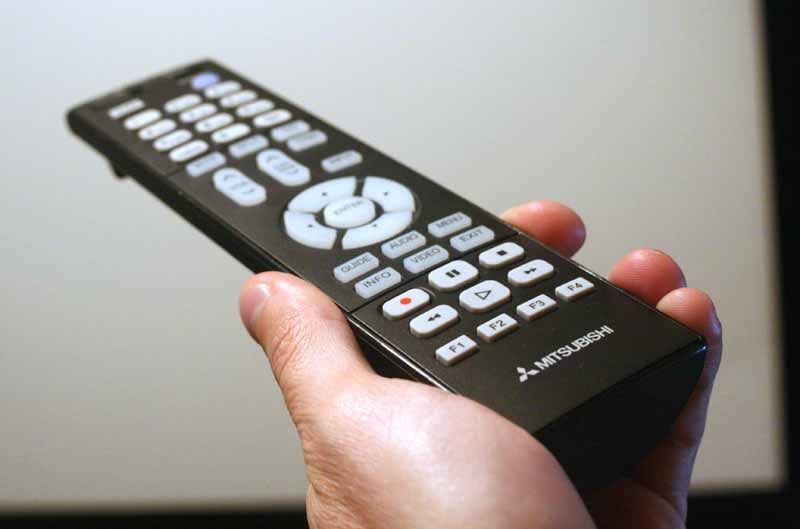 We'll save the audio evaluation for later, but let's
suffice it to say that lots of people are going to be very interested in this
display. It potentially solves lots of aesthetic speaker placement problems and
it looks good in the process. I will address the remote control, which is
partially backlit and no different than the one found with the LT-46148. It's
simplistic and our biggest gripe is a lack of direct input controls. Why on
earth anyone would want to press an Input button and then scroll to the right
device is beyond me. In a world of RF remote controls, we need each and every
manufacturer on board with discrete input selection. Anything short of that is
downright inconvenient.
We'll save the audio evaluation for later, but let's
suffice it to say that lots of people are going to be very interested in this
display. It potentially solves lots of aesthetic speaker placement problems and
it looks good in the process. I will address the remote control, which is
partially backlit and no different than the one found with the LT-46148. It's
simplistic and our biggest gripe is a lack of direct input controls. Why on
earth anyone would want to press an Input button and then scroll to the right
device is beyond me. In a world of RF remote controls, we need each and every
manufacturer on board with discrete input selection. Anything short of that is
downright inconvenient.
Setup and Menu System
We covered the Setup menu in our review of the nearly identical LT-46148 LCD television, but I felt it important to help you locate some of the more commonly-used items you'll want to adjust or at least check out. First off, the menu is set up in a quasi pictorial grid, with major items down the left and context-aware visual submenus which appear across the top. It's not particularly ergonomic but it gets the job done. One thing you'll need to get used to is that if you click up or down with the remote while in a submenu item you are changing that item. Moving left or right, or exiting via the Menu or Exit buttons are the way to save settings and/or move onward. Exit gets you out of the menu, while Menu backs you up one place.
AV Menu
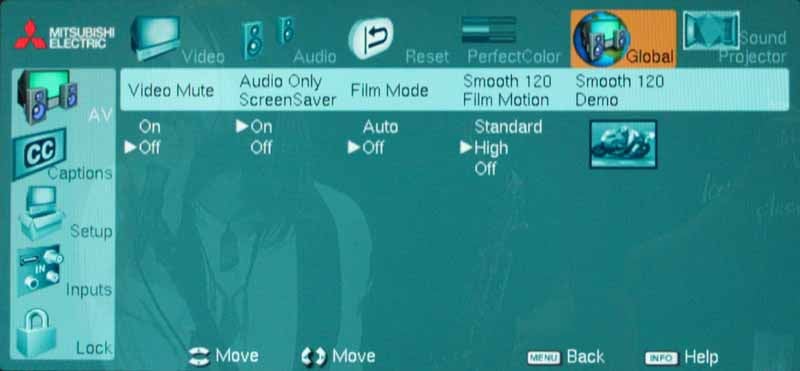
The AV Menu is a larger menu that contains not only the primary video settings like Brightness, Contrast, Color Temp and PerfectColor, but also access to the Smooth120Hz motion settings. The Smooth120Hz film motion setting, which ponderously exists under the "Global" submenu, can be set to either Standard, High, or Off. Mitsubishi claims its Smooth120Hz Motion mode not only doubles 60Hz rates and adds interpolated frames, it also reduces judder in film content.
In the audio menu, you'll have the ability to tell the Mitsubishi that you have a subwoofer. This is handy as the TV allows you to use one of the analogue RCA outputs as a subwoofer output. The menu then allows you to set the subwoofer output level. This is certainly handy and works well since the integrated sound projector is, for the most part, limited to frequencies above 100Hz. Go ahead and add a sub - you won't regret it.
PerfectColor - Still Pretty Much a Visual Toy
I didn't find any use for Mitsubishi's PerfectColor. I don't find it to be very perfect, nor does it seem to help the overall color response. To me, it seems to be a very ingrained toy put in there by some product manager who can't let go of the nice gimmicky name. Consumers should understand that Mitsubishi is the custom installer's best friend - at least the ones that do calibrations. For as long as I can remember they haven't ceded to recent trends of allowing consumers to calibrate RGB Gain/Cut levels on their TVs. Instead, Mitsubishi continues to deliberately lock these settings away in their service menus. This is great for calibrators (they can charge people money to calibrate their sets) and not-so-great for consumers (who find they can't make good use of that new SpyderTV Pro system they bought for Christmas).
Auto Input Sensing
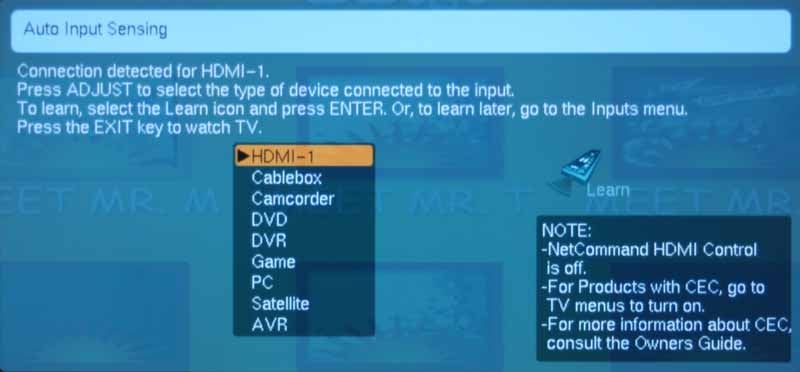
The LT-46149 has a neat feature that automatically switches to the most current input. That means that if you are watching Netflix on your Roku box and you power up the DVD player, the TV will switch away on you. It also means that when you add a new device the system will pop up a window asking you what it is and how you'd like to name it. That's actually pretty cool and it seemed to work fine for a single switch. Where it falls a bit flat is when you turn off a component. The system doesn't immediately search for the last active input. Instead it just leaves you on a blank screen.
LT-46149 iSP Sound Projector
 I
had thought the term "sound projector" was trademarked, but
apparently the trademarked term is "digital
sound projector" so Mitsubishi is safe. In either case, their Integrated
Sound Projector (iSP) is a cool technology and it's a wonder to see it
integrated right into a flat panel television. After all, this is the exact
thing most consumers I talk to ponder the most: How do I get surround in my
living room without running wires. You don't... OK, you can, but we don’t' recommend
it. Fine, buy a soundbar if you won't do anything else. And now Mitsubishi has
included it in the price of the television. From the pricing of the LT-46149
vs. the still-shipping LT-46148, they've apparently dubbed it a ~$700 premium
add-on (the only other difference we could tell from the 148 was the addition
of a CableCARD slot). I'm not sure if this sound bar is worth $700, but it's
certainly nice to see on a TV.
I
had thought the term "sound projector" was trademarked, but
apparently the trademarked term is "digital
sound projector" so Mitsubishi is safe. In either case, their Integrated
Sound Projector (iSP) is a cool technology and it's a wonder to see it
integrated right into a flat panel television. After all, this is the exact
thing most consumers I talk to ponder the most: How do I get surround in my
living room without running wires. You don't... OK, you can, but we don’t' recommend
it. Fine, buy a soundbar if you won't do anything else. And now Mitsubishi has
included it in the price of the television. From the pricing of the LT-46149
vs. the still-shipping LT-46148, they've apparently dubbed it a ~$700 premium
add-on (the only other difference we could tell from the 148 was the addition
of a CableCARD slot). I'm not sure if this sound bar is worth $700, but it's
certainly nice to see on a TV.
We tried out several of the default modes, which include various positions the television might occupy in your home. These recall preset virtual beam locations which get the sound across the front of the soundstage and also behind you as surround sound information. You even set the wall lengths and the distance to your seated position (or "sofa" as Mitsubishi labels it). What we liked best, however, was the Custom Setup mode where you could steer the beams around the room until you located just the perfect positioning for your seated position. Both the front and rear speakers need to be beamed off side or rear walls but you have plenty of leeway to help this take place. Once we were done directing the beams, we got to work setting the levels with our SPL meter and dialed in the system quite nicely. The sound projector worked well in both corner and side wall locations, but, as with other sound projectors I've tested, the side wall location worked best for a realistic surround field.
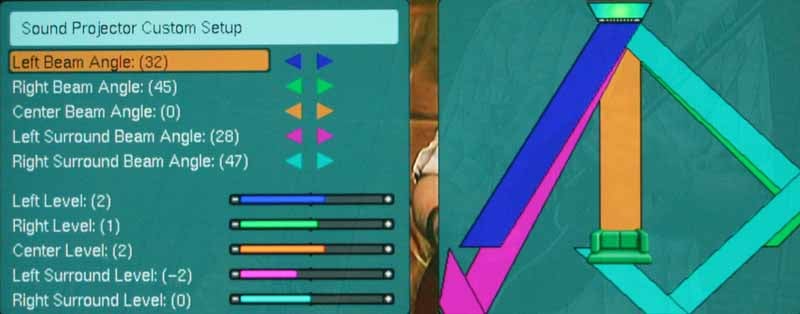
The system has 16 2W speakers for a grand total of 32 watts of sound. We're not sure how it's rated, but the bottom line was that we could get a reasonable amount of volume out of the system. It could not rock the house in party mode, but we never found ourselves straining to understand anything that was going on with the action. Explosions had lots of bite, but had absolutely zero "oomph" until we connected our subwoofer mid-way through testing. That shook things up, but our top-out volume was still low.
Dialogue was nice and clear. We never had any trouble with intelligibility. On music DVDs we quickly noticed a lack of defined midrange - however this is all relative. Compared to most television speakers I've heard, this was a premiere sound rig. We utilized a subwoofer with this setup and it really added to the experience. This is a minimum recommendation I would have with anyone looking to get the most out of these speakers.
I would have to say that this system is much more than a toy. It actually works to create a nice, full sound field. It's certainly not the best sound bar or sound projector I've heard, but it blows away most television speakers I've listened to and completely decimates the DSP-based virtual surround modes I've heard to-date. It also only adds a scant two inches to the overall height of the TV when wall-mounted. It's likely that some people will purchase this television just for this feature alone, and I can't say that's a bad thing.
LT-46149 Calibration & Bench Testing
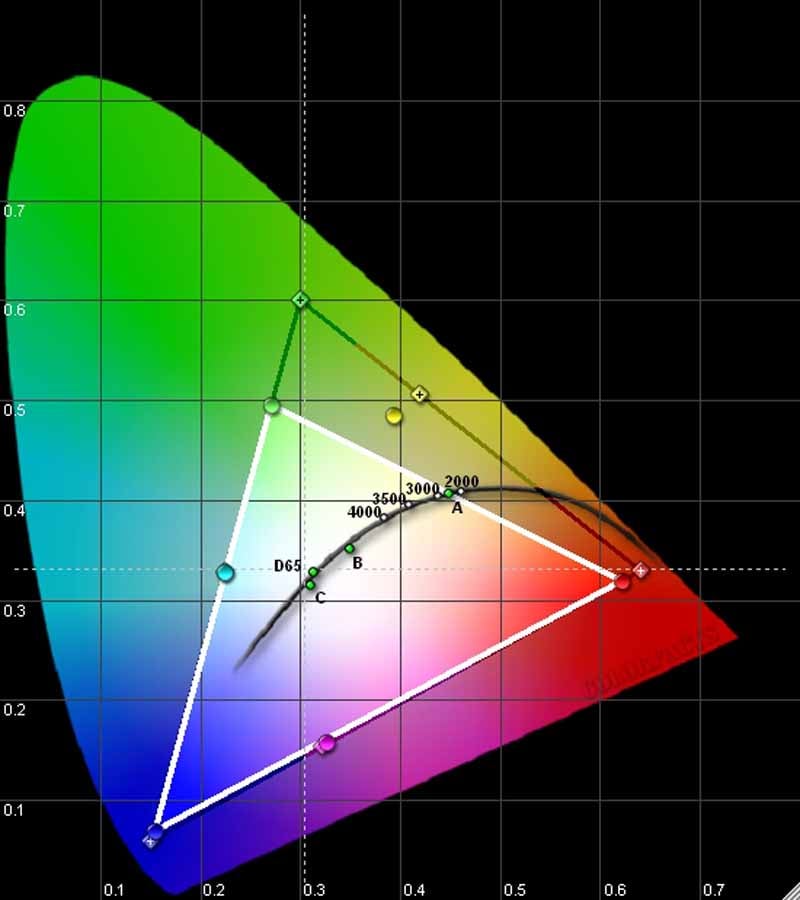 We again used our reference Datacolor’s Colorfacts
Professional software to measure the LT-46149's color and grayscale performance
in various modes and color temperature settings. In terms of color, the
LT-46149 seems to have a green deficiency, leaning more towards blue-green in
that area. Red is a tiny but low as well, but neither of these was apparent
when watching program material. The "laws" of contrast and the human
eye are a wondrous thing. White balance was skewed towards the cool side and
the set came delivered in torch mode, with the Color Mode at Brilliant and the
Color Temperature set to High. After making just two quick adjustments we saw
better color and contrast response, but the set never truly dialed itself in,
especially given it lacked user RGB Gain/Cut controls.
We again used our reference Datacolor’s Colorfacts
Professional software to measure the LT-46149's color and grayscale performance
in various modes and color temperature settings. In terms of color, the
LT-46149 seems to have a green deficiency, leaning more towards blue-green in
that area. Red is a tiny but low as well, but neither of these was apparent
when watching program material. The "laws" of contrast and the human
eye are a wondrous thing. White balance was skewed towards the cool side and
the set came delivered in torch mode, with the Color Mode at Brilliant and the
Color Temperature set to High. After making just two quick adjustments we saw
better color and contrast response, but the set never truly dialed itself in,
especially given it lacked user RGB Gain/Cut controls.
Inserting my AVIA Pro DVD, I called up an 80 IRE gray field and measured 9400K at the default settings. Ouch, that's cool. Here's how the color temp broke down in various modes:
- Natural Mode, Color Temp High - 8,950K
- Brilliant Mode, Color Temp High - 9,400K
- Bright Mode, Color Temp High - 9,200K
- Natural Mode, Color Temp Low - 6,850K
- Brilliant Mode, Color Temp Low - 9,400K
- Bright Mode, Color Temp Low - 9,200K
I found it odd that the color temp didn’t change much on the Brilliant and Bright modes, however we tested these with the backlight at a particular setting and so altering that third variable could likely deliver different results. To include all of the measurements would necessitate an encyclopedic volume of data.
We tested the contrast with the backlight at several different points and found the results promising. Since the contrast shouldn't matter much in the latter two modes, we stuck with just the Natural mode (see our LT-46148 review for additional measurements in different modes):
- Backlight at 0 = 541:1 contrast ratio
- Backlight at 31 = 1,925:1 contrast ratio
- Backlight at 63 = 2,845:1 contrast ratio
Like the LT-46148 before it, we noticed a significant amount of brightness uniformity issues with this display. It seemed that any time we had a dark screen up you could witness a very blotchy pattern of light leakage from the backlight. It was subtle and soft in nature, but the screen most certainly did not have a nice consistent level of black throughout. This is something Mitsubishi really needs to fix in future models, even if it means employing a new backlight or LCD panel technology.
The Mitsubishi LT-46149 is unable to pass blacker than black (below black) signal. We tried a number of ways to get the information to the display, but it simply wouldn’t take it (and neither did the LT-46148). It did pass whiter than white (above white) information; however we noticed that we were unable to calibrate the Contrast high enough to correctly set the white levels as we'd like. It was very close, but the Contrast ended up being maxed out to achieve the best performance, something that seemed odd to us, especially on an LCD display.
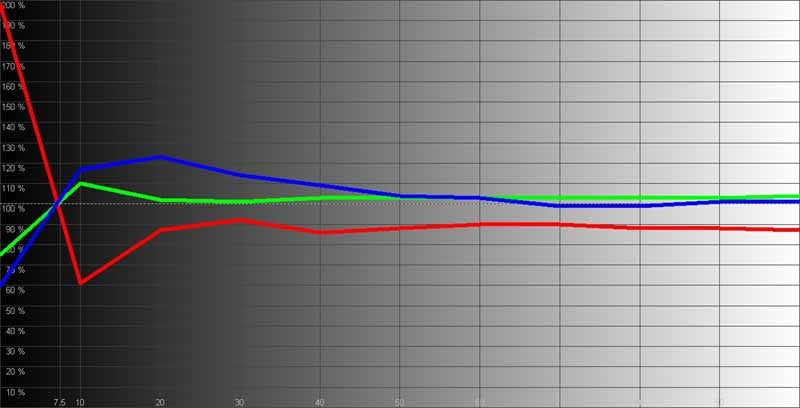
RGB grayscale measurements showed lots of Blue in the Cut range with an overall drop in Red throughout the IRE range:
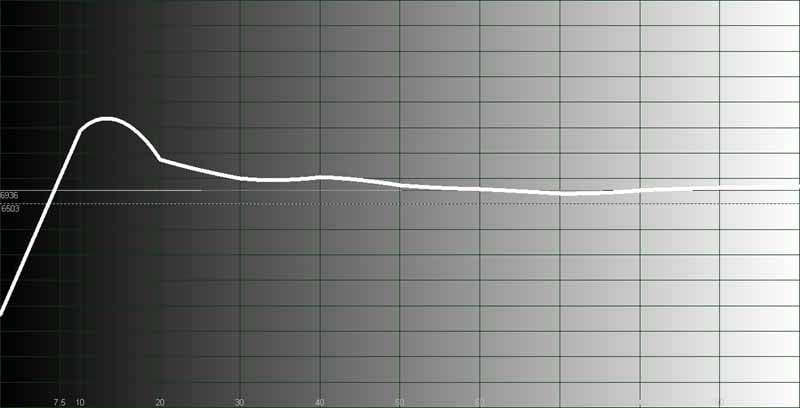
Temperature tracked with what we were seeing, showing a consistently higher temperature than our target 6500K.
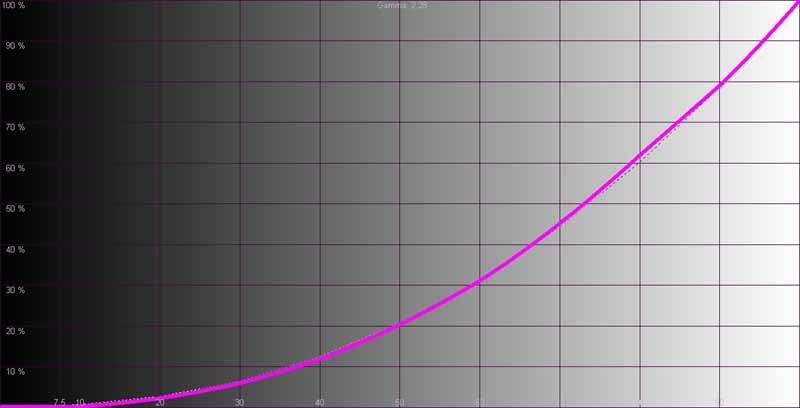
Gamma came out around 2.28 but was still smooth and had a pleasing look with real-world material. The only thing we wanted to see was more definition in the lower IRE ranges. That delicate area between 7.5 and 15 IRE was missing detail and it was sometimes visible in darker scenes where we noticed a lack of features in recesses like those found in the interior temples of Forbidden Kingdom.
Audioholics/HQV Bench Testing Summary of Test Results
SD Perfect Score is 130
Mitsubishi LT-46149 SD Benchmark Score: 69
|
Test |
Max |
Score |
Pass/Fail |
|
Color Bar |
10 |
10 |
Pass |
|
Jaggies #1 |
5 |
1 |
Pass |
|
Jaggies #2 |
5 |
3 |
Pass |
|
Flag |
10 |
5 |
Pass |
|
Detail |
10 |
10 |
Pass |
|
Noise |
10 |
5 |
Pass |
|
Motion adaptive Noise Reduction |
10 |
5 |
Pass |
|
Film Detail |
10 |
5 |
Pass |
|
Cadence 2:2 Video |
5 |
0 |
Fail |
|
Cadence 2:2:2:4 DV Cam |
5 |
0 |
Fail |
|
Cadence 2:3:3:2 DV Cam |
5 |
0 |
Fail |
|
Cadence 3:2:3:2:2 Vari-speed |
5 |
0 |
Fail |
|
Cadence 5:5 Animation |
5 |
0 |
Fail |
|
Cadence 6:4 Animation |
5 |
0 |
Fail |
|
Cadence 8:7 animation |
5 |
0 |
Fail |
|
Cadence 3:2 24fps film |
5 |
5 |
Pass |
|
Scrolling Horizontal |
10 |
10 |
Pass |
|
Scrolling Rolling |
10 |
10 |
Pass |
|
Total Points |
130 |
69 |
|
Note: Tests were done at 480i via HDMI input #1 from a Pioneer BDP-05FD. Film detail tests were passed only with Smooth120Hz mode set to "OFF".
HD Perfect Score is 100
Mitsubishi LT-46149 HD Benchmark Score: 65
|
HD Tests (via Pioneer BDP-05FD @ 1080i) |
Max |
Score |
Pass/Fail |
|
HD Noise |
25 |
15 |
Pass |
|
Video Resolution Loss |
20 |
20 |
Pass |
|
Video Reconstruction |
20 |
20 |
Pass |
|
Film Resolution Loss |
25 |
0 |
Fail |
|
Film Resolution Loss Stadium |
10 |
10 |
Pass |
|
Total Points |
100 |
65 |
|
We tested the Mitsubishi LT-46149 with a Pioneer BDP-05FD Blu-ray player as our source. One of the things we paid particular attention to was the Smooth120Hz mode. It actually gives film an HDTV look. Think of the excellent cameras of Saturday Night Live or any kind of really crisp, live stage event. It's uncanny, but also not without its share of artifacts, but they were fleeting and inconsistent.
120Hz really rocked with the Moving Zone Plate test... In fact it only showed a few telling artifacts, but the overall result would have to be an improvement, and on a very difficult pattern. At other times, when I had Smooth120Hz engaged the image seemed to suffer from jumpiness and breakup on fast pans. There was also the issue of having to disengage Film Mode when some content started juddering dramatically. It seemed to be hit or miss. I really liked the look, though it was most definitely not film-like in the least. 120Hz seems to create a "new" type of video... cleaner, but less real. It's definitely something that many will want to experiment with. I believe that the video processing still has some slight catch-up to do in terms of how fast it can correctly interpolate those extra fields into the image. It does admirably, but faster performance will yield less artifacts and netter video quality in next-generation products.
LT-46149 Viewing Tests and Conclusion
Measurements are not everything. In fact, I'd have to say that in terms of practical viewing, the Mitsubishi looked excellent. It had vivid color, good shadow detail and plenty of brightness. The real world contrast ratio of this set was more than adequate and over twice what you might get in an average movie theater. The only thing that niggled at me was the inconsistency of the black level when a large amount of black was on the screen. The light which seemed to leak through in splotchy amounts here and there really made watching really dark scenes a disappointment.
Blu-ray: The Forbidden
Kingdom
Not only did
this movie look great - it sounded pretty good as well. The many scenes of
fighting and throwing objects lent plenty of opportunity to hear the 5.1 audio
emanate from the sound projector speaker. Specifically, we really liked
watching the fight scene in the beginning between the Monkey King and the Jade Warlord.
There are tons of spears being flung around the room and the sounds literally
whipped past my head, being accurately directed to my ears form the reflected DSP-driven
speakers.

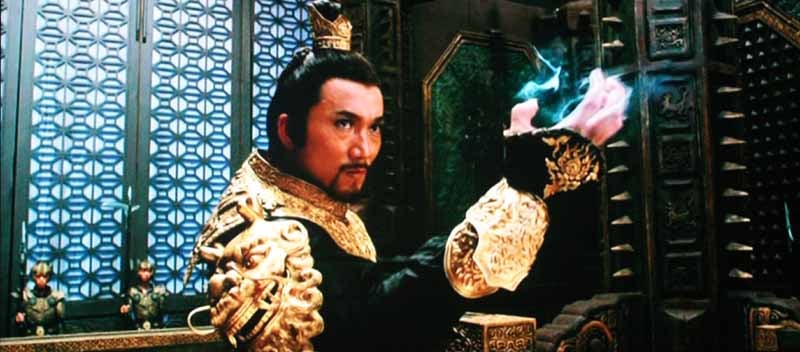


When the hero is walking through the bamboo forest (obviously lifted right off the House of Flying Daggers set) the vibrant greens contrasted well against the dark background and put away any fears I had of the CIE chart measurements leaving me with green envy. Later in the movie, Jason enters a scene where Golden Sparrow is playing an instrument and the colors are just vibrant. Green, red, cyan and yellows are all present in ample quantity and it really made for a luscious scene.
DVD: Wall-E
Wall-E was a
great movie for checking out detail (as animations often are) and black level
detail. In the beginning when Wall-E is "introducing himself" to Eve,
there are countless places, like the piles of old tires, which demonstrate
excellent shadow detail. I could still tell in some scenes that there was a
slight amount of clipping occurring, but in practical terms it was difficult to
come away with anything but a pleasant experience overall. The colors in this
movie were vibrant and it was just great to watch such a clean look on the
display, especially when we kicked in the Smooth120Hz mode and the image immediately
took on a resolution that seemed 4x the original DVD.


Conclusion
While I don't feel the video aspects of the LT-46149 are all that different from its earlier counterpart, the LT-46148, this television presents a compelling choice to consumers with its new 16-speaker sound projector technology. This isn't one of the most expensive 46-inch LCDs on the market, but it is also not the cheapest, which marks it as an average value in our travels. Some consumers will undoubtedly be surprised by the sound quality of the speaker technology, while others may simply buy this TV on reputation, looks and price alone. Those who already have a surround sound system in their homes would do well to check out the less expensive LT-46148 while they can still get it. Our hope is that people will recognize that a one-speaker surround sound solution like Mitsubishi offers is a god-send and those who never thought they could add 5.1 to their living areas will now have a reason to rejoice - and try something new.
Mitsubishi LT-46149
$2799
Mitsubishi Digital Electronics America, Inc. (MDEA)
9351 Jeronimo Rd.
Irvine, CA
92618
800. 332.2119
www.mitsubishi-tv.com
About Mitsubishi Digital Electronics America, Inc.
Mitsubishi
Digital Electronics America, Inc., an Official Sponsor of The PGA TOUR,
manufactures and markets a comprehensive line of premium quality 1080p DLP®
HDTVs and 1080p LCD HDTVs. Recognized as the world leader and innovator of
large display high-definition televisions, Mitsubishi Digital Electronics
America builds products that lead the industry in quality, performance and
ease-of-use. For additional information about MDEA, visit www.mitsubishi-tv.com.
The Score Card
The scoring below is based on each piece of equipment doing the duty it is designed for. The numbers are weighed heavily with respect to the individual cost of each unit, thus giving a rating roughly equal to:
Performance × Price Factor/Value = Rating
Audioholics.com note: The ratings indicated below are based on subjective listening and objective testing of the product in question. The rating scale is based on performance/value ratio. If you notice better performing products in future reviews that have lower numbers in certain areas, be aware that the value factor is most likely the culprit. Other Audioholics reviewers may rate products solely based on performance, and each reviewer has his/her own system for ratings.
Audioholics Rating Scale
 — Excellent
- — Very Good
- — Good
- — Fair
- — Poor
| Metric | Rating |
|---|---|
| Detail and Resolution | |
| Deinterlacing & Scaling | |
| Contrast and Black Levels | |
| Color Reproduction | |
| Noise Reduction | |
| Calibration Options | |
| Build Quality | |
| Ergonomics & Usability | |
| Ease of Setup | |
| Features | |
| Remote Control | |
| Fit and Finish | |
| Performance | |
| Value |  |
Clint Deboer was terminated from Audioholics for misconduct on April 4th, 2014. He no longer represents Audioholics in any fashion.
View full profile Subscribe to our newsletter