


JVC LT-42SL89 LCD Review
JVC LT-42SL89 LCD
- Product Name: LT-42SL89
- Manufacturer: JVC
- Performance Rating:

- Value Rating:
- Review Date: August 20, 2008 06:20
- MSRP: $ 1899
- Dynamic Contrast Ratio: 1500:1
- Response Speed: 6.5msec
- Brightness: 500cd/m2
- Viewing Angle: 178º
- VESA Compliant for wall mounting (400 mm x 200 mm)
Key Picture Detailing Features
- 3D Y/C Digital Comb Filter w/Digital & MPEG NR
- Black Level Expansion
- Smart Picture
- Natural Cinema (3-2 Pull Down)
- Color Temperature Control: Cool/Natural/Warm
- Color Management System
Sound Features
- 20 Watts Total Audio Power
- New OmniSurround with preset listening modes
- Twin Oblique Cone Speakers w/Bass Reflex
- New Equalizer presets for Speech/Jazz/Classic/Rock/User (choice)
Inputs & Outputs
- 3 HDMI w/HDCP Digital Video Inputs (60i/60p)
- 1 PC Input (D-Sub 15 Pin)
- 1 S-Video & 2 AV Inputs
- 1 Optical Digital Audio Output
- 1 Fixed Audio Output
- 1 Headphone Jack
- AV Output >Fixed Audio Output
- 1 USB Input for High Resolution Photo Viewer
Pros
- Respectable HQV performance
- Very useful aspect ratios
- Very slim display
Cons
- HDMI Connectivity Issues
- No 1080p Support for Component Input
- Limited Calibration Options
- Settings Global for Each Input Type
- Some Settings Reset
- Non-removable Power Cord
LT-42SL89 Build Quality and Use
Flat screens are getting more svelte as manufacturers are vying for the attention of consumers. JVC's line of Procision HDTVs sport one of the thinnest profiles on the market. The LT-42SL89 is the 42" model in the line and is only 3" at the thickest and 1-1/2" at the thinnest. They did this reportedly by "optimizing the light-diffusing plates and light-reflection sheets, as well as improving their overall composition." The real question is how well this super slim display performs. At a MSRP of $1899, the price seems very attractive.
First Impressions and Build Quality
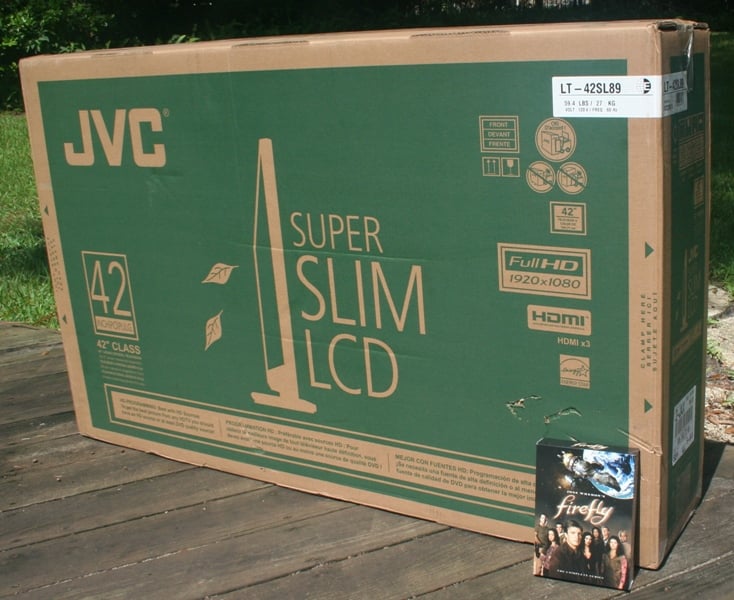 The super slim JVC LT-42SL89 arrived in the smallest box I've ever seen
on a display. It was barely bigger than the display itself. What was nice about
it was that it was easily manageable by the delivery driver. It also seemed to
be well enough braced and protected for travel. My only concern was that the
small thickness of the box would not stand up well to inertial forces around
tight corners. Of course, any driver that would just lean your new display
against the wall of their truck without securing it is just going to find a way
to break it no matter what box it is in.
The super slim JVC LT-42SL89 arrived in the smallest box I've ever seen
on a display. It was barely bigger than the display itself. What was nice about
it was that it was easily manageable by the delivery driver. It also seemed to
be well enough braced and protected for travel. My only concern was that the
small thickness of the box would not stand up well to inertial forces around
tight corners. Of course, any driver that would just lean your new display
against the wall of their truck without securing it is just going to find a way
to break it no matter what box it is in.
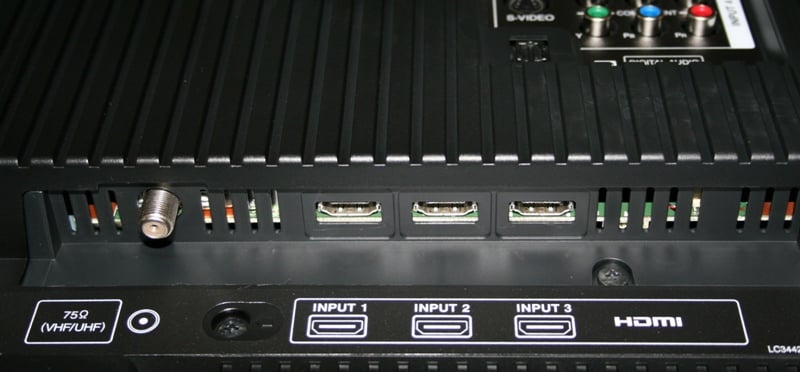
Like many displays, the base and the display were not connected. The suggested method is to lie the unit face down on a stable table (legs on the corners) on top of a soft blanket, slide the base in, and secure it with the provided screws. The base for the JVC went on easily enough. If you plan on wall mounting the unit, JVC provides some covers for the base post holes. The inputs and outputs are all on the back. The HDMI inputs are actually inset and the connections go up rather than the rest that enter straight into the unit from the back. If you are planning on wall mounting this unit, you are definitely going to want to use the HDMI connection as it will allow you to get the unit much closer to the wall. If you use a component connection, you're going to have to factor in the length of the connection and the bend in the cable (or use right angle connectors) because of the placement of the inputs. I'd much prefer to see future iterations of these slim panel displays with all the connections on the bottom.
 The
unit itself felt very solid and well constructed. The bevel around the screen
is nearly as small as some of the ones I've seen on rear projection displays at
only an inch on the top and sides. It truly is amazing how small these displays
have gotten. At just over 50lbs with the 9lbs stand attached, it is very easy
to move it about, even by yourself. Of course, you should probably get a friend
just in case but with the LT-42SL89,
that friend could be your 14 year old daughter. The bottom of the unit sports a
blue LED that illuminates when the unit is on. Luckily, you can lower the
intensity of the LED or even disable it from the menu. Even on the highest
level, it isn't all that bright which is very nice. Personally, I wouldn't mind
an option to have it illuminate only when the unit was off. I had the LT-42SL89 sitting on top of my Diamond
Case TT-400 Credenza during the review period. I was pretty shocked to find
that the power cord was permanently attached. When wall mounting a display, it
is imperative that you be able to use an aftermarket power cord. The
non-removable power cord could make wall mounting a challenge for some.
The
unit itself felt very solid and well constructed. The bevel around the screen
is nearly as small as some of the ones I've seen on rear projection displays at
only an inch on the top and sides. It truly is amazing how small these displays
have gotten. At just over 50lbs with the 9lbs stand attached, it is very easy
to move it about, even by yourself. Of course, you should probably get a friend
just in case but with the LT-42SL89,
that friend could be your 14 year old daughter. The bottom of the unit sports a
blue LED that illuminates when the unit is on. Luckily, you can lower the
intensity of the LED or even disable it from the menu. Even on the highest
level, it isn't all that bright which is very nice. Personally, I wouldn't mind
an option to have it illuminate only when the unit was off. I had the LT-42SL89 sitting on top of my Diamond
Case TT-400 Credenza during the review period. I was pretty shocked to find
that the power cord was permanently attached. When wall mounting a display, it
is imperative that you be able to use an aftermarket power cord. The
non-removable power cord could make wall mounting a challenge for some.
The first thing I (or more specifically, my kids) discovered about the base was that the display rotates on it. It was nice when my wife was in the other room and I could rotate the display up to 45 degrees toward her but not so nice when I had to readjust it every time I left my kids alone with it. I would definitely have appreciated some sort of locking mechanism on it. The silver post the display sits on is very high tech looking and sleek. The base plate is wide enough to ensure stability without being so large that it demands a large stand. The bevel and base are glossy black with a thin gray stripe across the bottom. On the right of the unit on the gray strip are the touch controls which are sensitive but discreetly labeled (i.e. the kids never found them). The only issue I had with the front controls was that while they were sensitive to the first touch, the second and subsequent touches seemed to require a moment or two delay. The solution is to hold the button down which will eventually cause it to scroll more quickly for most functions. A nice feature is that you can disable the front buttons from the Setting menu. Of course, if you press too hard the display will swivel on its base. Your best shot is just to use the remote like I did.
Set-Up & General Use
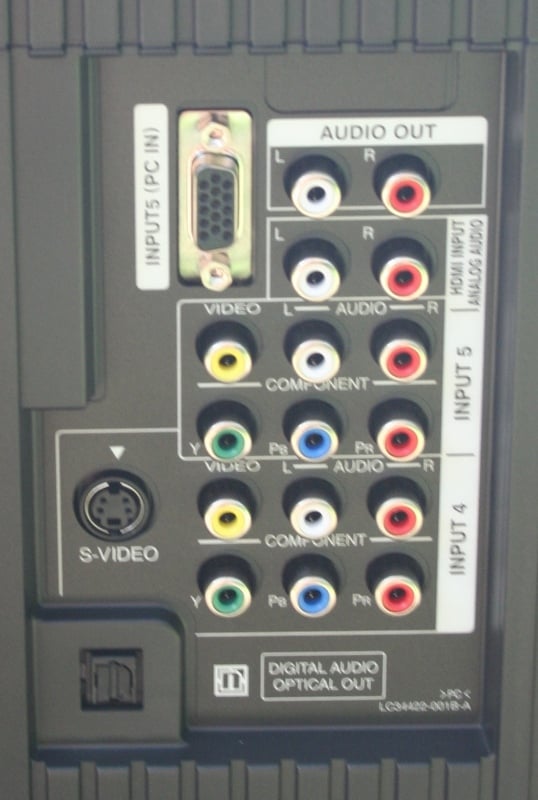 Setting
up the display is really fairly easy. Once you have the base connected (or have
it installed on your wall mount) it is just a matter of plugging the power
cable in and connecting your inputs. The LT-42SL89
sports three HDMI inputs, a PC input, and two analogue inputs that have component,
composite, and analogue audio inputs. One of the analogue inputs also has an S-video
input, plus there is one analogue audio input for all three HDMI inputs (one
for all three, not one each). There are single analogue and TOSLink audio
outputs along with a coaxial F/cable input for your cable or OTA signal. To the
side (still on the back) is a headphone output and a USB input for high
resolution picture viewing.
Setting
up the display is really fairly easy. Once you have the base connected (or have
it installed on your wall mount) it is just a matter of plugging the power
cable in and connecting your inputs. The LT-42SL89
sports three HDMI inputs, a PC input, and two analogue inputs that have component,
composite, and analogue audio inputs. One of the analogue inputs also has an S-video
input, plus there is one analogue audio input for all three HDMI inputs (one
for all three, not one each). There are single analogue and TOSLink audio
outputs along with a coaxial F/cable input for your cable or OTA signal. To the
side (still on the back) is a headphone output and a USB input for high
resolution picture viewing.
Setting up the display for me was much harder than it should have been. I have a Comcast cable Motorola box connected to a Denon AVR-2307CI via HDMI. The receiver sends the picture up to my display also using HDMI. Displays make the rounds through here from all sorts of different manufacturers. I've never encountered a problem before. JVC broke that trend with a display that wouldn't recognize the incoming video signal. When I connected directly to the display (either via HDMI or component) I got a picture. When I used the Denon to pipe up my Denon DVD-3910 or Toshiba HD-A2 (which both connect to the receiver through an Oppo HM-31 HDMI switch), I got a picture. When I simply connected devices through my AV receiver I got no picture. I called JVC tech support who said it was either the cable box or my HDMI cable (both patently not the case). In the end, I could get it to work only when I plugged the cable box into the Oppo switch and even then, only occasionally and when I turned the cable box on last. It was a problem I've never experienced before. JVC's solution of connecting directly to the display would have worked, though it would have required that I pump the audio either from the display or the cable box to the receiver separately - defeating the whole purpose of the "one cable" HDMI solution. I also noted that switching from input to input was a hit or miss proposition. When going from component to HDMI (both connected directly to the display and not through a switch or receiver), I'd sometimes find that the HDMI input wouldn't lock on and I'd have to switch around to let it try again. Usually it would sync up on the second or third try.
This issue aside, the remaining setup of the LT-42SL89 was as easy as cake. As usual, the unit was set in "torch" mode (dynamic) with the brightness cranked. The default display settings for everything but Theater are very blue - and Dynamic is the worst of the lot. It is imperative that you switch the display to "Theater" mode as soon as possible so that you don't get used to "Blue Man Group" setting. The thing that you'll notice pretty early is that your calibration for any one of the HDMI settings becomes universal to all HDMI inputs. This is true for both the component and composite inputs as well. While I'd have to admit that the only setting that looks right is Theater anyhow, one of the joys of having more than one input of a type is supposed to be that you can calibrate each separately.
I personally like the number of inputs on this display and find them more than adequate. Three HDMI and two component should be enough for anyone. For those of use that use a receiver or processor for video switching this is probably 2 HDMI and 1 component more than we need (provided there are no connectivity issues). For the rest of the world, it should be more than enough. One thing that I found a bit deficient was that the component inputs wouldn't accept a 1080p signal. When I connected my Xbox 360 via component, I found I had no picture. A little research uncovered that the components could only accept up to 1080i. The HDMI inputs, on the other hand, could accept 480i inputs which is a bonus. If you have a display that does a good job of deinterlacing, this is a must.
Where this display really excels is with the aspect ratio options. JVC offers no less than eight different aspect ratios. While this may seem like a lot, it doesn't when you are using it because some are tied to the type of incoming signal:
High Def 16:9:
- Full - Displays 95% of the aspect picture (edges cropped with a forced overscan)
- PanoramaZoom - Picture is stretched to eliminate side bars
- CinemaZoom - Zooms in on center part of picture eliminating the black surrounding bars
- Slim - Shrinks the 16:9 screen to 4:3
- FullNative: Displays 100% of the aspect picture (no overscan)
4:3:
- Panorama - Optimally stretches picture to fill the screen (top will be slightly cropped)
- Cinema - Zooms in to the 4:3 picture to fill the screen (more cropping than above)
- Regular - No modifications to the picture, black bars on the sides
- Full - Stretches picture to fill the screen (no cropping)
The most important ones are the Full Native, Cinema Zoom, and Slim for the 16:9 channels and Regular and Cinema for the 4:3. The Cinema Zoom and Cinema both eliminate the surrounding black bars on shows that are both 4:3 and letterboxed (it happens on high def stations too as any fan of the Sci Fi channel can tell you). The Full Native is nice is that you get to see every pixel of your high def show though this will sometimes introduce a line on the top or up the right side with cableTV sources. This is part of the video data stream that you aren't supposed to see. Regular is important for 4:3 shows is that it is the only way to watch the shows without any sort of distortion. Lastly, Slim is by far the best thing ever for 16:9 shows that have been unnaturally stretched by the channel to fill the screen (think TNTHD, A&EHD, etc). While it doesn't work for the channels that have used a modified stretching technique (where the sides are stretched more than the middle) but works perfectly for those that are stretched uniformly. I honestly think that this one aspect ratio should be standard on every new display that comes out and would welcome a firmware update on any and all other displays. I love it. I want to marry it.
One problem I encountered was that the 1080i aspect ratios would default to Full. As long as you were clicking around HD channels, it would maintain whatever aspect ratio you had selected but as soon as you hit a 480i signal and then switch back to 1080i, it would reset to Full. This is obviously a choice JVC made as the 480i aspect ratios remained regardless of what you did. I'm not really a fan of this.
LT-42SL89 Menus, Remote, and Measurements
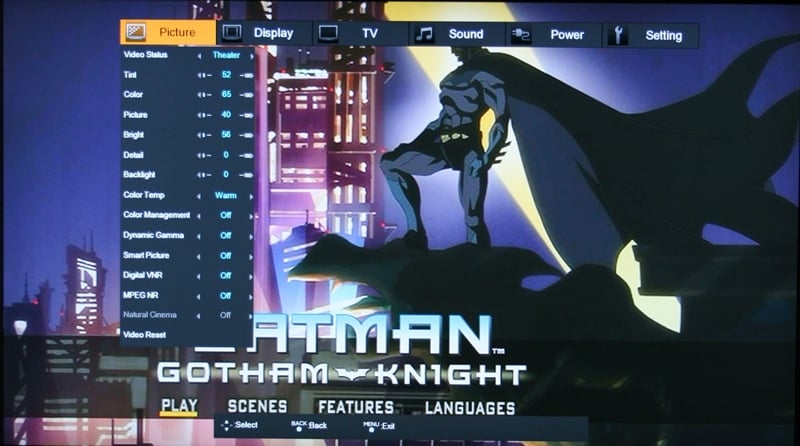 The LT-42SL89 has both ATSC and Clear QAM tuners which
should serve well all those that don't know the joys of a DVR or TiVo service. It
has guides, V-Chip, Auto Scan, and Closed Captioning as you'd expect. Nothing
here is all that different from what you'd find on every other display. The
Setting menu is nice in that it has the Front Panel Lock option (so that your
kids aren't changing things when you aren't in the room) and the Auto Shut Off
option so that it will turn off automatically after 10 minutes. The only menu
that really needs an overview is the Picture menu. Of course you will find
Tint, Color, Picture, Bright, Detail, and Backlight. Notably absent was
Contrast which I suppose is covered under "Bright." Color and Tint is
something you should probably never touch with Picture and Bright being used
for your initial calibration. Detail should be used with care (if at all) as it
will add artifacts if turned up too high. As for the rest of the settings:
The LT-42SL89 has both ATSC and Clear QAM tuners which
should serve well all those that don't know the joys of a DVR or TiVo service. It
has guides, V-Chip, Auto Scan, and Closed Captioning as you'd expect. Nothing
here is all that different from what you'd find on every other display. The
Setting menu is nice in that it has the Front Panel Lock option (so that your
kids aren't changing things when you aren't in the room) and the Auto Shut Off
option so that it will turn off automatically after 10 minutes. The only menu
that really needs an overview is the Picture menu. Of course you will find
Tint, Color, Picture, Bright, Detail, and Backlight. Notably absent was
Contrast which I suppose is covered under "Bright." Color and Tint is
something you should probably never touch with Picture and Bright being used
for your initial calibration. Detail should be used with care (if at all) as it
will add artifacts if turned up too high. As for the rest of the settings:
Video Status - Standard, Dynamic, Game, and Theater. Theater is the only one that really looks natural. You can think of Standard, Game, and Dynamic as Blue, Bluer, and Blue Man Group.
Color Temp - Cool, Natural, and Warm. Warm is really the best with Cool just adding to the blue and Natural looking a little washed out.
Color Management - Supposedly corrects for dull colors. I played with this option a bit and it did add to the lushness of the picture sometime to the point that it looked a little "glowing." I didn't like the effect myself.
Dynamic Gamma - Even though JVC says that this should be enabled for "optimal picture quality," I found it probably the most annoying feature ever. Basically, it is supposed to adjust the detail in the dark areas so to increase black definition. What it does is make every change of scene a little lighter and then adjusts it down. EVERY CHANGE. It isn't a subtle effect either - it is very visible. And annoying. If this is what it takes to have "optimal picture quality," I'm just going to have to lower my standards.
Smart Picture - Adjusts the overall brightness based on what you are watching. If this option did anything, I couldn't discern it.
Digital VNR - Digital Video Noise Reduction is used to reduce video artifacts. There are High, Low, and Off settings.
MPEG NR - This noise reduction reduces block and mosquito artifacts. This only has an On and Off setting. I found that this setting softened the detail of the picture too much even though it did reduce noise considerably. I'd suggest keeping this option set to Off.
Natural Cinema - Essentially provides 3:2 pulldown. This option only works for 480i and 1080i sources.
The only real problem I had was that Natural Cinema (necessary for 3:2 pulldown) would turn itself off every time the unit lost power (and on other occasions though I couldn't determine the cause). If you live in a place where you get power outages very rarely, maybe this isn’t such a big deal. Unfortunately, I live in Florida where power outages come 2-3 times a week on average. There is really no reason that this setting (or any for that matter) should reset and not get stored to some kind of non-volatile memory. If you own this set, you're going to have to get used to periodically checking this setting.
Remote Control
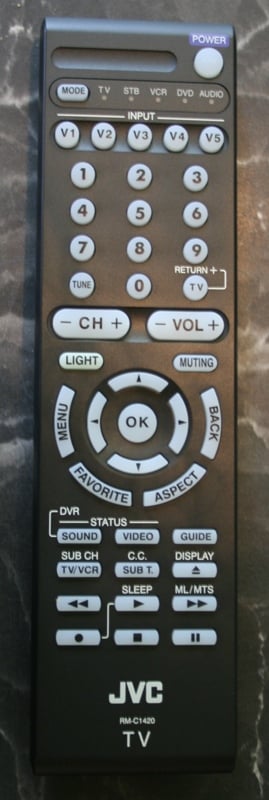 The funniest thing about the JVC remote is that it came with
Panasonic batteries. Not sure exactly what that means. Like many remotes these
days it is universal with a few pages in the manual dedicated to remote codes.
The remote is a flat black and it a bit thicker at the bottom than the top. It
is fully backlit (yeah!) but the "light" button is hidden near the
center of the remote (boo). There are individual buttons for every input
(yeah!) but only a single button that switched between the different devices
(boo - but I don't use it as a universal so I don't really care all the much).
The "Menu" and "Back" buttons are on opposite sides of the
arrow keys with the "Favorites" and "Aspect" buttons far to
close. It is remarkably easy to it the wrong button which will knock you out of
the menu completely. As remotes go, it isn't terrible but it isn't great
either. I'd call it "functional."
The funniest thing about the JVC remote is that it came with
Panasonic batteries. Not sure exactly what that means. Like many remotes these
days it is universal with a few pages in the manual dedicated to remote codes.
The remote is a flat black and it a bit thicker at the bottom than the top. It
is fully backlit (yeah!) but the "light" button is hidden near the
center of the remote (boo). There are individual buttons for every input
(yeah!) but only a single button that switched between the different devices
(boo - but I don't use it as a universal so I don't really care all the much).
The "Menu" and "Back" buttons are on opposite sides of the
arrow keys with the "Favorites" and "Aspect" buttons far to
close. It is remarkably easy to it the wrong button which will knock you out of
the menu completely. As remotes go, it isn't terrible but it isn't great
either. I'd call it "functional."
Video and Audio Measurements & Testing
For calibration I'm using both the Sencore ColorPro5000 and Colormetre HCFR software. Basically, Sencore is great for calibrating your set but doesn't give you the pretty graphs that we like to show in our reviews. That's where Colormetre comes in. From the default settings, I measured:
Dynamic - 11000k (524:1 ANSI contrast ratio)
Standard - 9500k (596:1 ANSI contrast ratio)
Game - 11000k (390:1 ANSI contrast ratio)
Theater - 7000k (338:1 ANSI contrast ratio)
There really aren't any adjustments you can make to the default settings. Sure, you can set brightness levels and such but there aren't any gain or cut scores that can be used to adjust the color temperature. From the standpoint of a subjective evaluation, Dynamic/Standard/Game are all pretty useless because they are so blue. I'm sure I could have eked out a higher contrast ratio based by adjusting the backlight but these were the measurements I got from the default setting. After switching the Video Status to Theater, I adjusted the brightness and detail using the Avia disc and got the following measurements:
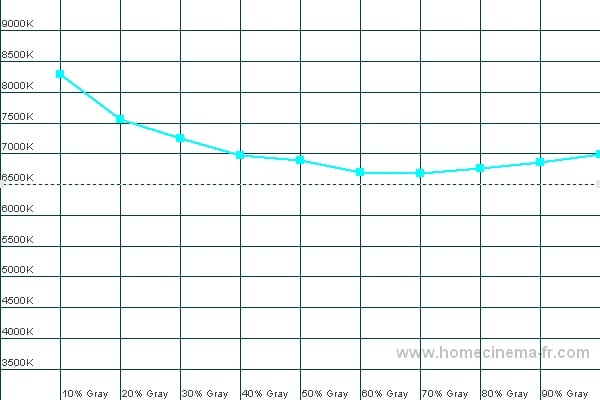
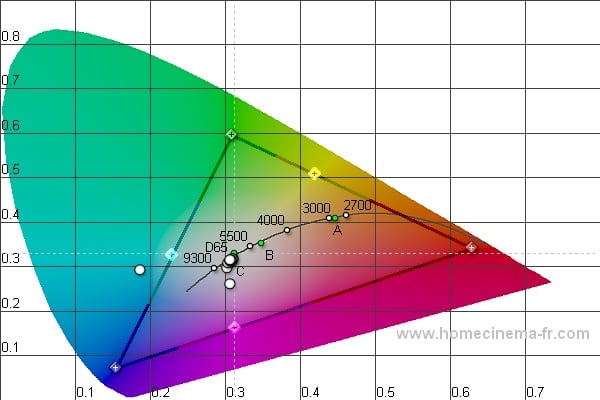
Color Temp (left); CIE (right)
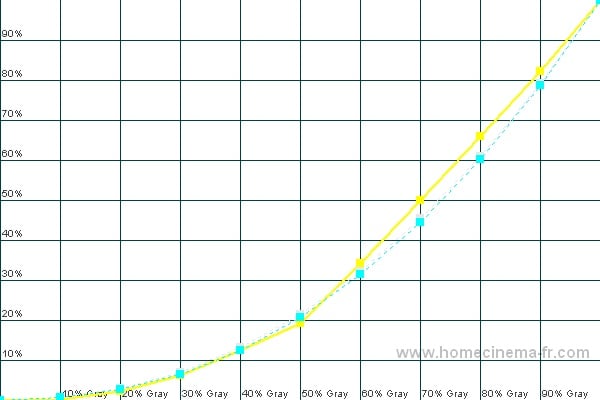
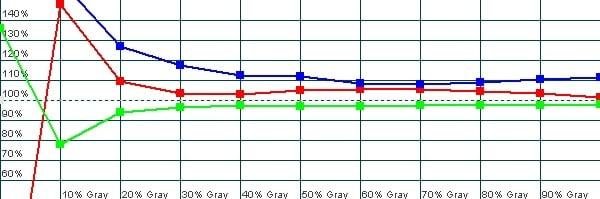
Luminance (left); RGB (right)
Audioholics/HQV Bench Testing Summary of Test Results
Perfect Score is 130
JVC LT-42SL89 Benchmark total score: 76/130 and 77/105. All tests were run through the HDMI input.
|
Test |
Max |
Results |
Pass/Fail |
|
Color Bar |
10 |
10 |
Pass |
|
Jaggies #1 |
5 |
3 |
Pass |
|
Jaggies #2 |
5 |
3 |
Pass |
|
Flag |
10 |
5 |
Pass |
|
Detail |
10 |
10 |
Pass |
|
Noise |
10 |
5 |
Pass |
|
Motion adaptive Noise Reduction |
10 |
5 |
Pass |
|
Film Detail |
10 |
10 |
Pass |
|
Cadence 2:2 Video |
5 |
0 |
Fail |
|
Cadence 2:2:2:4 DV Cam |
5 |
0 |
Fail |
|
Cadence 2:3:3:2 DV Cam |
5 |
0 |
Fail |
|
Cadence 3:2:3:2:2 Vari-speed |
5 |
0 |
Fail |
|
Cadence 5:5 Animation |
5 |
0 |
Fail |
|
Cadence 6:4 Animation |
5 |
0 |
Fail |
|
Cadence 8:7 Animation |
5 |
0 |
Fail |
|
Cadence 24fps film |
5 |
5 |
Pass |
|
Scrolling Horizontal |
10 |
10 |
Pass |
|
Scrolling Rolling |
10 |
10 |
Pass |
|
Total Points |
130 |
76 |
|
|
Test |
Max |
Results |
Pass/Fail |
|
HD Noise Reduction A&B |
25 |
7 |
Pass |
|
HD Video Resolution Loss |
25 |
25 |
Pass |
|
Jaggies A&B |
20 |
10 |
Pass |
|
Film Resolution Loss |
25 |
25 |
Pass |
|
Film Resolution Loss - Stadium |
10 |
10 |
Pass |
|
Total Points |
105 |
77 |
|
Comments on Audioholics DVD Torture Tests
In order to get these scores, the Natural Cinema option must be engaged or it will fail a number of tests on the regular and HD versions of the HQV test. Unfortunately, as I mentioned, the LT-42SL89 had an annoying habit of turning this option off so make sure you check it or you'll have to set all your sources to progressive so you won't have to worry about it. The JVC faltered a bit on the Jaggies test but the noise reduction actually worked. As we've experienced in the past, noise reduction can reduce detail. The MPEG NR was especially bad at this making the image much softer and seemingly out of focus. I suggest if you think you need the noise reduction to set the Digitial VNR to Low and leave the MPEG NR off. If you come across a severely noisy picture, experiment with the noise reduction - you may find the level of detail lost is not as bad as the noise would be. All in all, I'm very happy with how this display performed on the HQV tests.
JVC Viewing Evaluation and Ratings
The first thing I check on LCDs is viewing angle. Older models were prone to "wash out" if you were the slightest bit off axis. These days, just about everyone claims 178 degrees (including the LT-42SL89). While I would say that the off axis viewing was good, it did wash out a bit. I'd say at about 60 degrees you lost about 5-10% of the saturation. Noticeable? Only if you were walking side to side like I was. It was definitely nothing serious but not the rock steady off axis viewing I've seen on other LCDs. Of course, the other LCDs cost considerably more.
HDTV - 2008 Beijing Summer Olympic Games
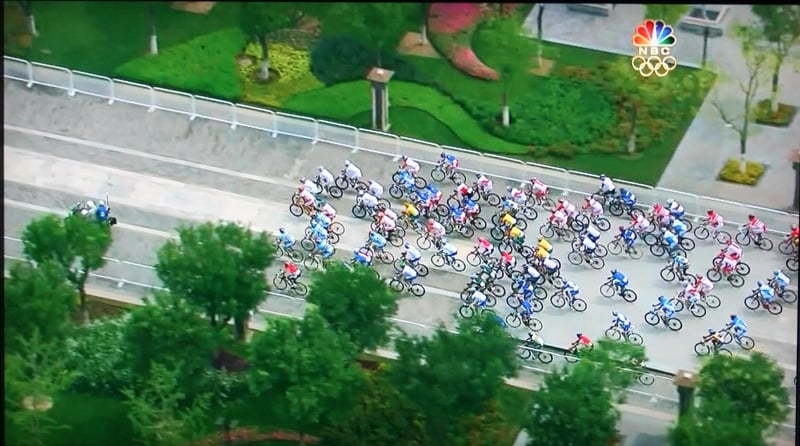
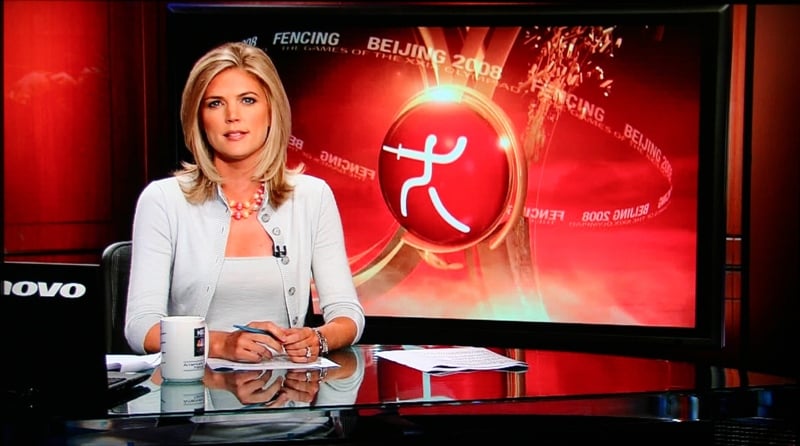
I love the Olympics, always have. Now that I have HD, I really, REALLY love it. With a good HD signal, watching the games is like sitting in the stands. It looks so real. Of course, most of these sports are fast moving which is an excellent time to gauge how the display handles fast motion. The LT-42SL89 did remarkably well with fast motion and I was very pleased to note very little motion blur. Even on the fastest scenes, the motion blur was very subdued and only by paying close attention could I even see it. None of the others that viewed the set noted it (some, even after I asked them to look for it). The images were crisp and clean and the colors well saturated. Any major (or minor for that matter) problems I noted were attributable to bad signal quality and not any problem with the display.

DVD - Batman: Gotham Knight
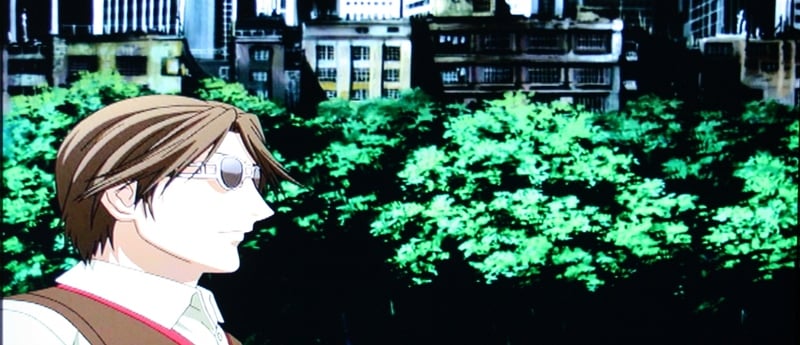
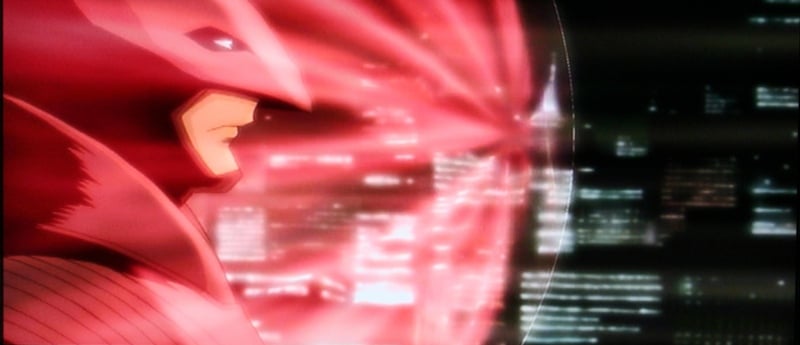
This animation DVD sports six short stories about the Dark Knight that supposedly takes place between the Batman Begins and The Dark Knight. I was very interested in this DVD as I am allergic to movie theaters (has to do with the bad sound, noisy people, and ridiculous price of popcorn) and wanted my Batman fix. You can only see so many previews for The Dark Knight before you go a little stir crazy. The animation varied between lame and just OK with most of the stories hovering somewhere between boring and "wait, did I just nod off?" I was particularly concerned about the black levels and how well the LT-42SL89 would handle them. For the most part I was pleased as I didn't note any macroblocking or visual artifacts. The blacks were just OK, however, as I noted that even after calibration they were more a dark gray than black. If I lowered the brightness enough so that the blacks were truly black, the entire picture looked a little dim. Overall, it wasn't too bad though.


HD DVD - Ocean's 13
Imagine my surprise when I found a movie on my Netflix cue that was available in HD DVD (yes, it had been there a while). Like everyone else, I had really enjoyed Ocean's 11. Ocean's 12 was sort of a bomb for me but I had heard that this one was better. It was, but it still lacked the magic of the first as far as I am concerned. The picture overall was crisp and clean and the colors really popped. There was one scene where everything was tinted red and if you had the display in anything but Theater you'd see a TON of artifacting. Even when calibrated, this scene was mighty grainy. Overall, though, the picture looked really good.


Conclusion
The LT-42SL89 was really hit or miss for me. The picture quality overall was very good, the slim size is very attractive, and compared to some of the other offerings on the market, the price is nice. Connectivity was a problem for me though it might not be for you. Calibration options are practically non-existent and even if they were, calibration is global for all inputs of a type. The Natural Cinema option resets every time the display loses power (which is a problem if you need 3:2 pulldown). The aspect ratios were a HUGE plus and are probably one of the only things that is keeping me from completely slamming this display. If "thin" is what is important to you, you may want to take a look at this display. Just make sure you purchase from a dealer with a good return policy in case you run into the same connectivity problems I did.
JVC LT-42SL89 42-inch LCD Display
$1899
JVC
Company of America
1700 Valley Road
Wayne, NJ 07470
(973) 317-5000
About JVC
Company of America
JVC Company of America,
headquartered in Wayne, New
Jersey, is a division of JVC Americas Corp., a wholly-owned
subsidiary of Victor Company of Japan Ltd., and a holding company for JVC
companies located in North and South America.
JVC distributes a complete line of video and audio equipment, including high
definition displays, camcorders, DVD players and recorders, home and portable
audio equipment, mobile entertainment products and recording media. For further
product information, visit JVC's Web site at http://www.jvc.com.
The Score Card
The scoring below is based on each piece of equipment doing the duty it is designed for. The numbers are weighed heavily with respect to the individual cost of each unit, thus giving a rating roughly equal to:
Performance × Price Factor/Value = Rating
Audioholics.com note: The ratings indicated below are based on subjective listening and objective testing of the product in question. The rating scale is based on performance/value ratio. If you notice better performing products in future reviews that have lower numbers in certain areas, be aware that the value factor is most likely the culprit. Other Audioholics reviewers may rate products solely based on performance, and each reviewer has his/her own system for ratings.
Audioholics Rating Scale
 — Excellent
- — Very Good
- — Good
- — Fair
- — Poor
| Metric | Rating |
|---|---|
| Detail and Resolution | |
| Deinterlacing & Scaling | |
| Contrast and Black Levels | |
| Color Reproduction | |
| Noise Reduction | |
| Calibration Options | |
| Build Quality | |
| Ergonomics & Usability | |
| Ease of Setup | |
| Features | |
| Remote Control | |
| Performance | |
| Value | |
As Associate Editor at Audioholics, Tom promises to the best of his ability to give each review the same amount of attention, consideration, and thoughtfulness as possible and keep his writings free from undue bias and preconceptions. Any indication, either internally or from another, that bias has entered into his review will be immediately investigated. Substantiation of mistakes or bias will be immediately corrected regardless of personal stake, feelings, or ego.
View full profile Subscribe to our newsletter