


Mirror LCD TV - ad notam 30.0
ad notam MIrror LCD TV
- Product Name: 30.0 Mirror LCD TV
- Manufacturer: ad notam
- Performance Rating:

- Value Rating:
- Review Date: March 23, 2005 19:00
- MSRP: $ 7000 (varies)
|
Display Type: TFT (thin film transistor) LCD Monitor Size: 25" x 15" (29" diagonal) Native
Resolution: 1280 x 768
pixels Supported Video Signals: NTSC, PAL, SECAM, RGB (VGA/SVGA/XGA/SXGA) |
Video Inputs: S-video, composite, HD15 (VGA), SCART, Cable TV Audio
Outputs: 2.5mm stereo,
banana jacks (L/R) Case: Aluminum, Dibond
2 |
Pros
- Unlimited design flexibility
- Seamless "LCD on glass" effect
- Flexible mounting options
- Advanced configuration options via OSD
Cons
- Color and calibration off "out of the box"
- RF remote has delayed response**
- Slow pixel response time
- Very little video processing - no 2:3 pulldown or jaggie reduction
- No progressive component input**
- Ridiculously overpriced
Mirror TV Concept and Build Quality
I had experienced my first "mirror LCD" television at the 2004 CEDIA show when I stopped by the Philips booth for a look at their new Ambilight models. If I had thought the very concept of an LCD television hidden behind front surface-reflecting mirror was fascinating, actually seeing the technology up close was even more impressive. As a product, these LCDs target the progressive consumer who wants to add either the convenience of an LCD TV in the bathroom or bedroom, or those wanting that "wow" factor of having a technology that is years ahead of mass-market adoption.
The Concept
Ad notam's implementation of LCD behind glass is really a two-part composite piece. The first part, the LCD television body, is designed as a compact chassis that can be surface mounted or flush-mounted within a wall. The display is heavy and is specially developed to be installed and fastened behind support panels or a bearing surface such as a mirror, lacquered glass, or metal (other materials, though not specified, may also be used.) This bearing surface makes up the second part of the completed unit. Ad notam sent us a completed unit attached to what they smartly refer to as a Magic Mirror 蒂 . This is a specially-formulated first-surface reflecting mirror that allows the LCD television to be mounted from behind using self adhesive metal strips which magnetically secure the display to the bearing mirror. When correctly attached, the effect is that of a smoked glass mirror without even a hint that a television is hidden just beneath the surface until the device is turned on. In addition, as a front surface mirror is used, there is no visible depth to the LCD television's surface. It appears to be at the very surface level of the mirror as opposed to hiding just below it.
Unpacking and Build
Quality
Ad notam sent me a completed unit, pre-mounted to a 36" magic mirror. It came crated and well-packed and included an RF remote control, VGA cable, 24 VDC power cable with AC adapter, and a small RF antenna. If you purchased this product through an authorized dealer or as a custom installer it would come with a mounting template, self-adhesive metal strips, additional fasters/support brackets, a cableTV cable, and a composite video cable. You could then order any size magic mirror to fit your particular application or you could select another method to utilize or mount the display. The support strength of the included magnet strips is rated at 31.9 pounds. I found that I could easily lift the entire unit via the oversized magic mirror. While this is not recommended, it does communicate the fact that you should have no trouble mounting the unit behind a larger piece of glass as part of a permanent, worry-free installation.
Mirror TV Configuration & Viewing Tests
While you can pretty much plug in the ad notam Box TV 30.0 and go; if you plan on installing this in a wall you'll want to examine all available connectivity options before making a decision. The model I received possessed an SCART connector which (in the UK ) can be used to get component video into the unit. A new model, due to be released shortly, will add component inputs. My recommendation for a good mix of installation simplicity and image quality would be to utilize the s-video input and run two shielded coax cables to the display. For this display and its intended use I do not feel that component video offers significant enough improvement over s-video to warrant the additional cable run and routing expense. Of course, if you are using it strictly as a standard definition television, then a single F cable will also suffice.
Basic Setup and Configuration - On-Screen
Display Menu
I was blown away by the amount of adjustments that were possible using the on-screen display. In addition to Input selection, Hue , Saturation, Brightness and Geometry adjustments, we discovered that each input had its own appropriate color adjustment capabilities. Gamma and color temperature controls were even available for SCART, RGB signal input.
Geometry functions allow adjustments to horizontal and vertical position as well as image flipping and various scaling options for much more flexible installations. As this unit does possess an NTSC-capable tuner, the OSD also allows for manual and automatic selection of available channels, plus "fine-tuning" of each channel.
Connections
Connection options are relatively sparse on this model, however we have been informed that currently shipping models have component video inputs which replace the SCART connector seen here.
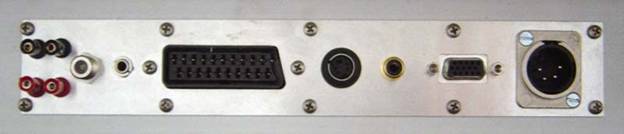
For our DVD tests we utilized the composite and s-video inputs of the set. We also ran cable TV directly into the set to check how well it performed as an NTSC standard definition television and the VGA input was tested with a PC.
Remote Control
 The remote included with the ad notam Box TV 30.0 is a radio frequency remote. As a
result it can be controlled without having direct line-of-sight or even through drywall in instances
when the television is installed into a wall or enclosure. The remote control had a tremendous lag
when pressing the buttons. It was something you could almost count off. One and a half seconds after
you hit the button, the function would occur or appear. To say this was annoying would be an
understatement, however once installed, the remote would really only be used to turn the set on and
off and perhaps change channels. I'm not sure why this particular remote was chosen or why the lag
was allowed to remain, but we're hoping future iterations of this model have fixed this problem.
(Please see the following note on ad notam's redesigned remote control.)
The remote included with the ad notam Box TV 30.0 is a radio frequency remote. As a
result it can be controlled without having direct line-of-sight or even through drywall in instances
when the television is installed into a wall or enclosure. The remote control had a tremendous lag
when pressing the buttons. It was something you could almost count off. One and a half seconds after
you hit the button, the function would occur or appear. To say this was annoying would be an
understatement, however once installed, the remote would really only be used to turn the set on and
off and perhaps change channels. I'm not sure why this particular remote was chosen or why the lag
was allowed to remain, but we're hoping future iterations of this model have fixed this problem.
(Please see the following note on ad notam's redesigned remote control.)
The eight unlabeled buttons (and one A/B/C button set selector which needs to be on 'A') have a "key" on the reverse side that describe the functions of each. The buttons are as follows: Power, Input Select, Cursor Up/+, Enter/Volume, Cursor Down/-, Menu OSD, Video Text, and Mute. Video Text is something I did not have time to go into, however the remaining buttons are arranged as well as they could be considering the given remote topology. Since there are only 8 buttons, memorization of the buttons becomes a quick process. Obviously if you want an improved remote (though I don't really see the benefit) a third-party RF remote could easily be programmed with the ad notam Box TV 30.0' codes.
Editor's Note
As of the time of publication of this review, ad notam advised us that they are now shipping a brand new remote which has easier manipulation and functionality. The delayed response is gone and the entire user interface is now easier to navigate.
Viewing Tests
As a computer monitor, the ad notam Box TV 30.0" performed well. Colors were vibrant and on-screen text and images were crystal clear. We set the desktop to the unit's native resolution of 1280 x 768 pixels and ensured scaling was set to full. This resulted in no overscan and a perfect pixel-per-pixel match to the display.
For DVD playback, we found an incredible difference between the composite and s-video inputs. We would venture to say that in our opinion the composite video inputs are unusable. They consistently blurred the image and created excessive chroma delay on the images. Here is a zoomed in side-by-side visual comparison of the two inputs (left s-video, right composite) when we placed a resolution test up on the screen:
|
|
|
|
S-Video Output |
Composite Video Output |

Notice the complete loss of resolution and focus and the chroma errors at bottom left of the image. Using the s-video inputs resulted in a much-improved image. In addition, running s-video around a home installation is one of the most economical signal transfer methods since you can use two RG6 shielded cables to carry the luminance and chrominance information.
We ran the HQV test DVD on this display just to see how well it performed and the results were less than average. The set did not have sufficient video processing to remove jaggies, correctly handle 2:3 pull down or eliminate moiré patterns that would appear in highly repetitive detailed scenes. One thing to keep in mind is that it is doubtful anyone would use a display like this as their primary display. Indeed, the Box TV 30.0 is too cool as a stylized model to really place much emphasis on its video processing capabilities. For use in a bathroom, office, den or commercial display this unit would capitalize on its strengths. In general, it performs like a decent standard definition television that has a widescreen aspect ratio. Its color is rich and well-saturated without overdoing it with excessive levels of red or blue.
Subjective Viewing: Cable TV
Cable TV performance ranged from poor on some lower channels to excellent on some of the higher channels. This behavior, however, is common to many standard definition sets and cable systems and various signal strengths are allocated across the bandwidth in varying degrees. Fox news gave a nice clear signal and really looked quite good, even when scaled to stretch across the screen, filling the entire 1280 x 768 pixel surface. As I surfed the cable channels I noticed consistently vibrant colors and excellent resolution (even exceeding that of the composite input in most cases where a channel was well-tuned and strong.) After running the auto channel setup feature, the ad notam LCD TV even gives you the option to fine tune each individual channel as needed. I attempted to dial in several grainy stations and only succeeded in making them worse - so your mileage for this feature may vary.
Subjective Viewing: DVDs
Next I popped in one of my favorite DVDs:
Farscape:
Peacekeeper Wars.
This is a new DVD from the hit SciFi Channel series that lasted four wonderful
years.
Jim H
ensen and crew worked with the
producers and directors to create one of the best shows that ever appeared on television in my
opinion. This DVD is by far the best looking of the entire series - quite possibly as it was the last
one to be produced and filmed. Before I talk about the DVD performance, I want to point out that
since this display is a mirror as well, it will look much better when the room is not brightly lit.
By this I mean that, while the display is perfectly visible in a well-lit room, reflections and
mirrored imaged will be reduced by lowering the ambient lighting in the room. Here is a visual
example of what we mean:

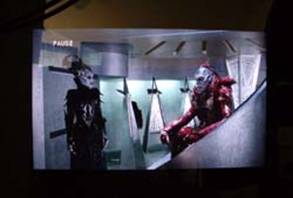
As you can see, the lower half of the picture in particular looks much better when the ambient lighting is reduced. I also did the opposite extreme and found that the ad notam LCD TV was visible in just about any kind of lighting conditions, retaining its brightness and ability to reproduce a picture.
DVDs like Farscape: Peacekeeper Wars looked very good, except when noticeable issues like jaggies or smooth horizontal motion was involved. Since this set has a very limited amount of video processing it behaved like a standard definition set that happened to be widescreen. It is only because we are now spoiled with HDTVs that this is immediately noticeable. A component input with progressive scan support would allow a DVD player or other source component to handle video processing for the ad notam Box TV 30.0 and pretty much eliminate this from the "Cons" column. We're hoping this will be an option in their next-generation models.
Mirror LCD TV Review Conclusions
The concept of a " Magic Mirror" LCD TV is still fairly new and carries with it an inherent "wow" factor. The ad notam Box TV 30.0 delivers on that with a pristine system that really impresses. When off it is truly invisible, and when it turns on the image appears to be near the very front of the mirror surface. This is a device that could use some additional features and improvements, however it also directly serves a purpose that gives it some leeway in terms of what is demanded of it. Watching cable television in the bathroom to get the morning news and weather is what I would love to use this for - not replacing my main home theater display. The most obvious flaw of this unit has got to be its retail price which, considering the current plummeting prices of 26-32" LCD TVs, we feel to be almost comically too high. We are glad ad notam is moving ahead with this progressive technology and we look forward to seeing the future, and hopefully more economical, iterations that evolve as the company enters new markets and presses onward with additional and improved products.
ad notam Box TV 30.0"
MSRP: $7000 (varies based on Mirror
size)
ad notam GmbH
http:/www.ad-notam.com
About ad notam
ad notam delivers moving images with sound on mirror and glass surfaces. The vision is to equip each and every mirror located in an environment that requires communication and information with ad notam high-tech systems. Moving images influence our life wherever we are. Monitors and screens have conquered everyday life and communication must be creative and striking in order to survive these times of stimulus satiation.
The Score Card
The scoring below is based on each piece of equipment doing the duty it is designed for. The numbers are weighed heavily with respect to the individual cost of each unit, thus giving a rating roughly equal to:
Performance × Price Factor/Value = Rating
Audioholics.com note: The ratings indicated below are based on subjective listening and objective testing of the product in question. The rating scale is based on performance/value ratio. If you notice better performing products in future reviews that have lower numbers in certain areas, be aware that the value factor is most likely the culprit. Other Audioholics reviewers may rate products solely based on performance, and each reviewer has his/her own system for ratings.
Audioholics Rating Scale
 — Excellent
- — Very Good
- — Good
- — Fair
- — Poor
| Metric | Rating |
|---|---|
| Detail and Resolution | |
| Deinterlacing & Scaling | |
| Contrast and Black Levels | |
| Color Reproduction | |
| Noise Reduction | |
| Calibration Options | |
| Build Quality | |
| Ergonomics & Usability | |
| Ease of Setup | |
| Features | |
| Remote Control | |
| Performance | |
| Value | |
Clint Deboer was terminated from Audioholics for misconduct on April 4th, 2014. He no longer represents Audioholics in any fashion.
View full profile Subscribe to our newsletter