


Velodyne DEQ-15R Subwoofer Review
Velodyne DEQ-15R Subwoofer
- Product Name: DEQ-15R
- Manufacturer: Velodyne
- Performance Rating:

- Value Rating:
- Review Date: August 06, 2009 09:10
- MSRP: $ 1099
Amplifier: (Class D):1500 watts Dynamic, 750 watts RMS Power
Woofer: 15” (38 cm) forward firing (12.7”piston diameter)
Magnet Structure: 4.4 lbs
Frequency Response:
- Overall: 14 – 240 Hz
- +/- 3 dB: 23 – 120 Hz
Voice Coil: 2.5” 4-Layer copper
Cone: Reinforced fiber
Speaker-Level Pass-Through: Fixed at 120 Hz high-pass, Low Pass Crossover: :40 Hz – 120 Hz adjustable (12 dB octave, 24 dB ultimate)
Outputs: Line-Level
Inputs: Gold plated line-level
Digital Phase: 0º, 90º, 180º, 270º
Cabinet Design: Extended Excursion Slot-loaded Bass-Reflex
Auto On/Off: Yes
Removable Grille: Yes
Video Shielding: No
LED Display: Yes
Accessories: Mic, mic stand and remote control
Dimensions (H/W/D): 21" x 18.375” x 20.75”
Shipping Weight: (approx):75 lbs. (34 kg)
Warranty: (parts/labor) Three years (electronics), Five years (drivers)
Pros
- Included EQ smoothes out response
- Smaller than expected
- Nice impact and extension
- Distortion free sub
Cons
- Grill posts too thin
- No ability to control/limit/compare EQ
- May cause uncontrollably bouts of giggles and hand-wringing while saying "Mwhahahahahaha"
Velodyne DEQ-15R Build Quality
One doesn't have to be in the Home Theater game long to hear the name Velodyne. While they haven't quite permeated as far as some Home Theater in a Box manufacturers, they are probably one of the first "real" speaker companies you were introduced to. If you are anything like me, you've got Velodyne envy. If you don't have one, you want one. Even if you have a sub you are happy with, there is always that nagging question in the back of your mind… "What would a Velodyne sound like in my room?" Well, I can't say I answered that question for myself with this review but I did get to play with a Velodyne sub. And that's almost as good.
Build Quality
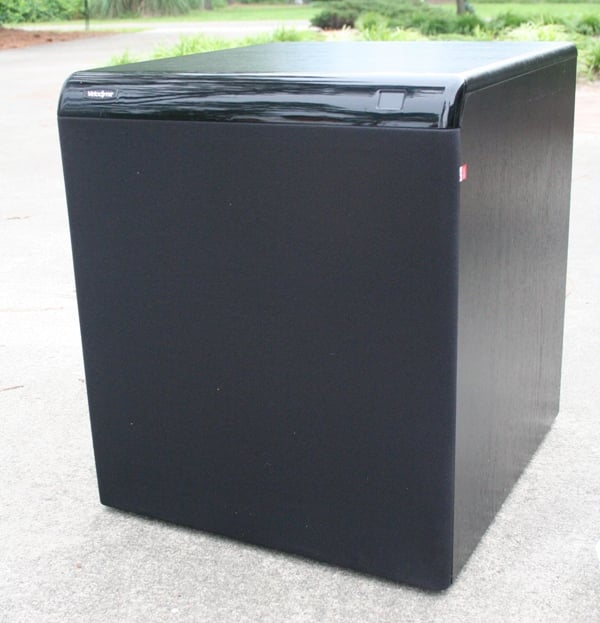 This is one of those rare reviews that doesn't involve an official
review unit from a manufacturer. In this case, my parents needed a subwoofer.
If you remember, about a year ago I did a review of The
Speaker Company NTIW25 and NTIW26 in-wall speakers. This was conducted at
my parent's home and at the conclusion of the review, I had all of about 30
minutes to do listening tests before their sub died. Well, it's a year later
and they still don't have a working sub. As I visit once a year, they decided
to buy one so that I can help install/calibrate it during my visit. So off I went
scouring the Internet for a deal on a sub that I could be proud of. In no small
way, my parent's system is a reflection of me as I'm the one that
picks/installs all their speakers. The tSc speakers have been performing well
and my parents have been thrilled with them, now I just had to find a sub up to
the task.
This is one of those rare reviews that doesn't involve an official
review unit from a manufacturer. In this case, my parents needed a subwoofer.
If you remember, about a year ago I did a review of The
Speaker Company NTIW25 and NTIW26 in-wall speakers. This was conducted at
my parent's home and at the conclusion of the review, I had all of about 30
minutes to do listening tests before their sub died. Well, it's a year later
and they still don't have a working sub. As I visit once a year, they decided
to buy one so that I can help install/calibrate it during my visit. So off I went
scouring the Internet for a deal on a sub that I could be proud of. In no small
way, my parent's system is a reflection of me as I'm the one that
picks/installs all their speakers. The tSc speakers have been performing well
and my parents have been thrilled with them, now I just had to find a sub up to
the task.
Of course, one of the first names I came up with was Velodyne. I went searching and found out that their DEQ-R series was on sale over at the Audioholics store so I did some research. While I loved the prices of the Chrysalis line (which is basically a lower cost Velodyne), I knew that my parent's room has problems. It has carpet and a fluffy couch but that is about it. The walls are at angles, there is an alcove that rings so bad that you sound like a Cylon when you talk in it, and room treatments have been vetoed. Any little bit of EQ my parents could get would help. The Chrysalis subs didn’t offer a model with an EQ so that was out.
 What immediately drew my attention was the DEQ line. With it's automatic
5-band EQ, we have a product that has all the functionality of the similarly
priced DLS-R line but without the gloss black finish. As I value an EQ over a
finish any day of the week (especially in this application as you'll see), I
was definitely interested in the DEQ. Generally speaking with subwoofers you
either need a big enclosure or a big amp. Velodyne has a few offerings that
have the latter with boxes that are barely bigger than the driver. These subs
tend to have slightly less extension than their larger counterparts. I
contacted my parents and asked if they wanted a smaller sub or one that went
lower. I also asked how much they cared about the appearance of the sub. They
had decided that the sub would go on the right side of the room and would be
obscured by the couch (which is in an L shape) so they didn't care about the
size or the looks as long as it fit in the space and wouldn't be visible (i.e.
too tall). A few quick measurements later and we quickly determined that any of
the DEQ line would work as long as their budget allowed.
What immediately drew my attention was the DEQ line. With it's automatic
5-band EQ, we have a product that has all the functionality of the similarly
priced DLS-R line but without the gloss black finish. As I value an EQ over a
finish any day of the week (especially in this application as you'll see), I
was definitely interested in the DEQ. Generally speaking with subwoofers you
either need a big enclosure or a big amp. Velodyne has a few offerings that
have the latter with boxes that are barely bigger than the driver. These subs
tend to have slightly less extension than their larger counterparts. I
contacted my parents and asked if they wanted a smaller sub or one that went
lower. I also asked how much they cared about the appearance of the sub. They
had decided that the sub would go on the right side of the room and would be
obscured by the couch (which is in an L shape) so they didn't care about the
size or the looks as long as it fit in the space and wouldn't be visible (i.e.
too tall). A few quick measurements later and we quickly determined that any of
the DEQ line would work as long as their budget allowed.
The DEQ-R line of subs has 8, 10, 12, and 15 inch woofers. The boxes of course increase in size/weight with the driver size. After a bit of discussion, we decided that either the 12" or 15" would work. The price was right for the DEQ-15R (they were on sale for $750, at the time of this writing they were going for $850) which was only about $100 more than the 12. At this price point, my parents decided to go with the "big boy" and bought the DEQ-15R. I have to say, I felt an emotion akin to the pride you feel when your son rides his two-wheel bike for the first time at the news.
 The only problem we were up against was time. The sub wasn't going to
arrive until the last day of my visit. So I had to do the measurements and
listening tests in a very short period of time. As you might predict, UPS took
their sweet time delivering the sub
which arrived after 6pm.
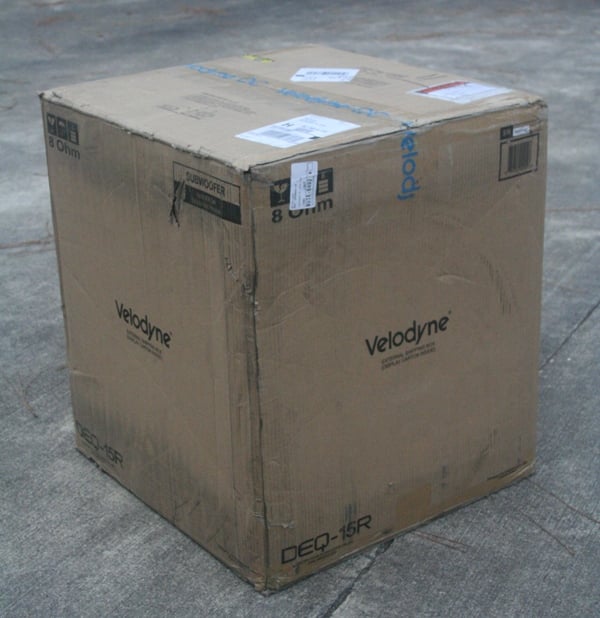
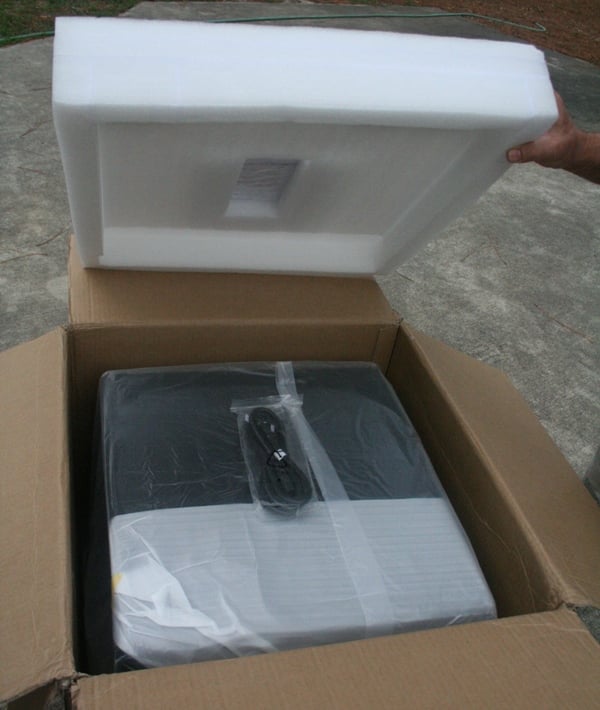
Not only that, but they had beat up the box pretty good. Velodyne packs their
subs fairly well with foam endcaps and double boxing but UPS had managed to
mishandle the boxes so badly that they had dinged up the edges and one of the corners
and even broke off one of the grills posts. I've spoken to the managers of the
Audioholics Store and they have decided (based on this experience) to reinforce
the edges of all larger subwoofers like the DEQ-15R from now on to ensure that
others don't have a similar experience. This should eliminate any such
incidents in the future. While the sub would have been covered under the UPS
insurance, anyone that has had dealings with submitting a claim knows how long
it can take. For a little extra expense on the Audioholic's store's part they
will save you that hassle.
The only problem we were up against was time. The sub wasn't going to
arrive until the last day of my visit. So I had to do the measurements and
listening tests in a very short period of time. As you might predict, UPS took
their sweet time delivering the sub
which arrived after 6pm.
Not only that, but they had beat up the box pretty good. Velodyne packs their
subs fairly well with foam endcaps and double boxing but UPS had managed to
mishandle the boxes so badly that they had dinged up the edges and one of the corners
and even broke off one of the grills posts. I've spoken to the managers of the
Audioholics Store and they have decided (based on this experience) to reinforce
the edges of all larger subwoofers like the DEQ-15R from now on to ensure that
others don't have a similar experience. This should eliminate any such
incidents in the future. While the sub would have been covered under the UPS
insurance, anyone that has had dealings with submitting a claim knows how long
it can take. For a little extra expense on the Audioholic's store's part they
will save you that hassle.

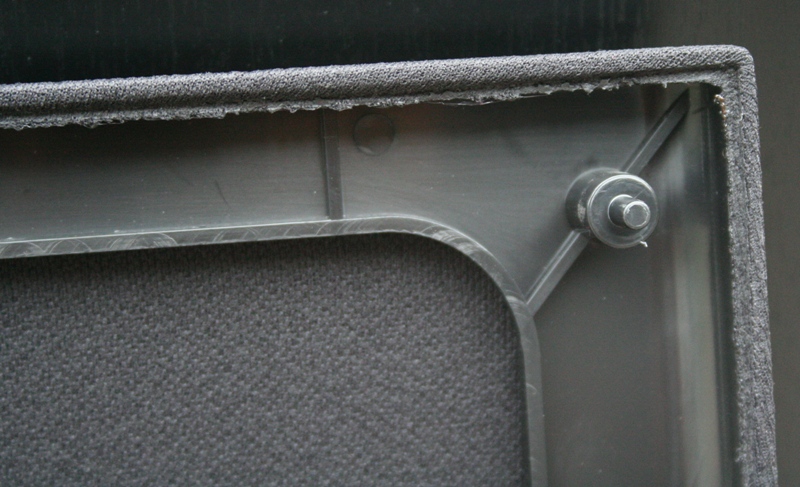 The sub itself is substantial in size but
not overly so. I actually expected something quite a bit bigger. After
experiences with online subwoofer manufacturers, I guess I'm used to seeing
subs that are the size of coffee tables or cribs. Anything smaller than that
ordered online is sort of a welcome surprise. The DEQ-15R measures 21" x
18.375” x 20.75”. The sub fit perfectly in the space provided and my parents
were very happy with the size. From the front of the sub, you see a gloss black
plate at the top with the digital readout and grill. The grill posts were
disappointingly small and, as I often find with grills of this size, it felt
flimsy. The only real workaround for this is a grill constructed out of MDF
instead of plastic but at this price point, you are really paying for the
electronics and driver.
The sub itself is substantial in size but
not overly so. I actually expected something quite a bit bigger. After
experiences with online subwoofer manufacturers, I guess I'm used to seeing
subs that are the size of coffee tables or cribs. Anything smaller than that
ordered online is sort of a welcome surprise. The DEQ-15R measures 21" x
18.375” x 20.75”. The sub fit perfectly in the space provided and my parents
were very happy with the size. From the front of the sub, you see a gloss black
plate at the top with the digital readout and grill. The grill posts were
disappointingly small and, as I often find with grills of this size, it felt
flimsy. The only real workaround for this is a grill constructed out of MDF
instead of plastic but at this price point, you are really paying for the
electronics and driver.
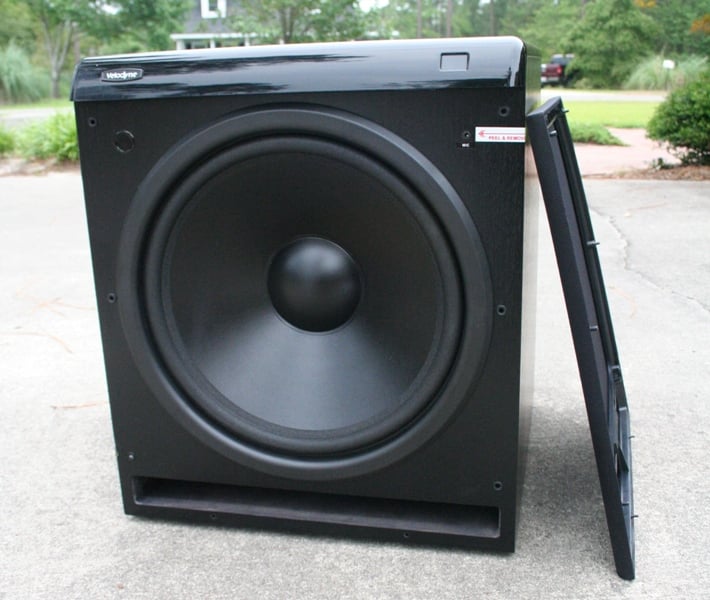
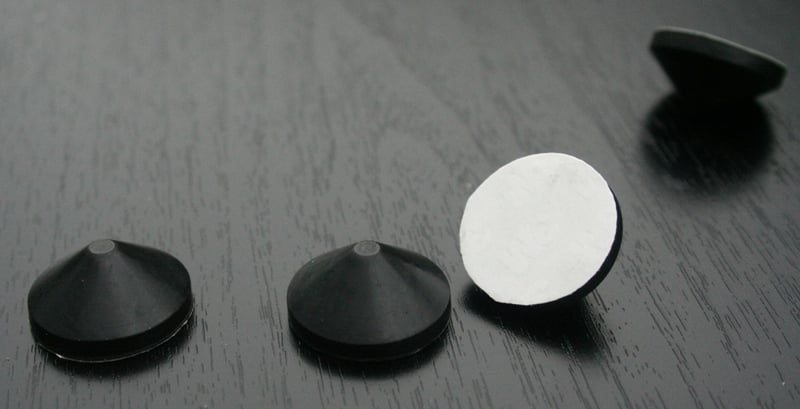 There are no
threaded inserts for feet. The provided rubber feet are conical with a sticky
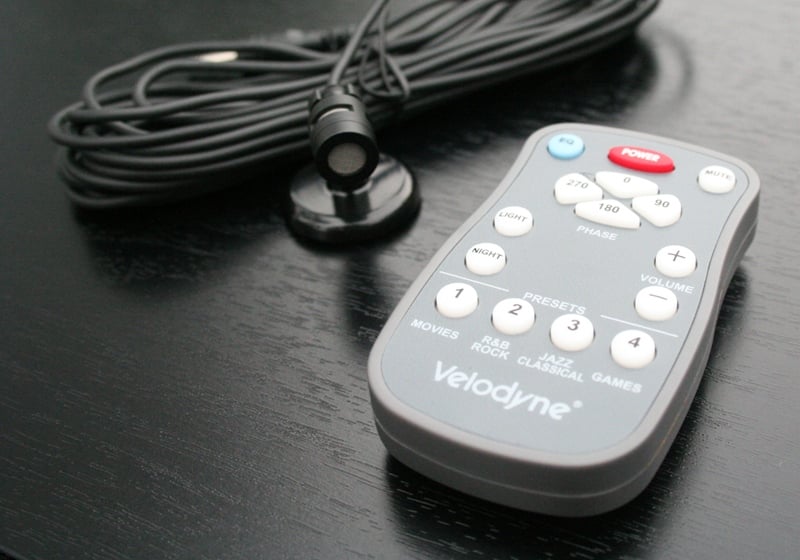
bottom. The sub comes with a remote, a power cord, a mic and a mic stand, and
directions. There is a slot-style port just below the huge 15" driver.
Behind the grill on the top left of the front baffle is an IR receiver while
the top left has a mic input. The amp sports most of the things you'd expect
including low pass crossover dial (40-120Hz), RCA inputs and outputs, and line level
inputs and outputs. Conspicuously absent is a volume dial which is replaced
with volume up and down buttons. There is no phase control on the amp backplate
as that is digitally controlled. One thing I think all subs should have is a
ground lift. While I didn't have any problems with a ground loop, subwoofers
are notorious for introducing such problems and I think that a ground lift
should be standard equipment on all subs. The DEQ doesn't have one.
There are no
threaded inserts for feet. The provided rubber feet are conical with a sticky
bottom. The sub comes with a remote, a power cord, a mic and a mic stand, and
directions. There is a slot-style port just below the huge 15" driver.
Behind the grill on the top left of the front baffle is an IR receiver while
the top left has a mic input. The amp sports most of the things you'd expect
including low pass crossover dial (40-120Hz), RCA inputs and outputs, and line level
inputs and outputs. Conspicuously absent is a volume dial which is replaced
with volume up and down buttons. There is no phase control on the amp backplate
as that is digitally controlled. One thing I think all subs should have is a
ground lift. While I didn't have any problems with a ground loop, subwoofers
are notorious for introducing such problems and I think that a ground lift
should be standard equipment on all subs. The DEQ doesn't have one.
Usually, this is the portion of the review where I post all the internal pics and tell you how well the DEQ-15R was constructed. Unfortunately, I ran into two problems. The first was that there was a plastic cover over the screws securing the driver to the enclosure. It did not give under my gentle probing and frankly I wasn't going to push it as this was my parent's sub and I didn't want to break it. While I could have probably gotten around this (removing the amp for example), I ran into my second and more serious problem - time. The sub arrived after 6pm and my kids go to bed at 8pm. When we visit my parents I sleep in the home theater room (apropos don't you think?) so I literally had less than two hours to unpack, measure, setup, and calibrate the sub. That didn't leave much time for listening tests much less taking apart the sub. Something had to give. I did do a knock test and it was about what you'd expect at this price point from a company like Velodyne - somewhat more inert than you'd imagine for its size but there definitely could be more bracing in there.
DEQ-15R Setup and Measurements
 Setting up the sub really was a breeze. The
DEQ-15R comes with a remote which is a nice feature that I wouldn't mind seeing
with more subwoofers. There is a three character digital readout on the top
right of the front of the sub that will tell you the volume or display other
messages. You can turn off the display if you like. Unlike many subs with just
a 0/180 degree phase switch, the DEQ sports a 0/90/180/270 degree digital phase
adjustment. This can really help out with how well your sub integrates with
your speakers and is something that all new users should play with. There are
four DSP settings with the default being Jazz. These settings modify the
frequency response of the sub as detailed below:
Setting up the sub really was a breeze. The
DEQ-15R comes with a remote which is a nice feature that I wouldn't mind seeing
with more subwoofers. There is a three character digital readout on the top
right of the front of the sub that will tell you the volume or display other
messages. You can turn off the display if you like. Unlike many subs with just
a 0/180 degree phase switch, the DEQ sports a 0/90/180/270 degree digital phase
adjustment. This can really help out with how well your sub integrates with
your speakers and is something that all new users should play with. There are
four DSP settings with the default being Jazz. These settings modify the
frequency response of the sub as detailed below:
|
Preset |
Subsonic Filter Frequency |
EQ Frequency |
EQ Level |
Volume Differential |
|
Movies |
25 Hz |
37 Hz |
+3 dB |
+5 dB |
|
R&B / Rock |
28 Hz |
50 Hz |
+3 dB |
+1 dB |
|
Jazz / Classical |
15 Hz |
- |
- |
- |
|
Games |
34 Hz |
60 Hz |
+3 dB |
+4 dB |
The subsonic filter essentially tells you where the sub's low end attenuation starts. The EQ frequency tells you what is getting boosting and the EQ Level tells you by how much. The Volume Differential indicates how much the volume on the sub will be increased by turning that preset on. To me, this is a perfect example of why I hate DSP modes. Why exactly is it a good idea to roll off the sub's low end response? And how does boosting any frequency help the sub to sound anything other than more like one of those cars we all love to hate? Luckily, the Jazz/Classical setting leaves everything alone. I suggest you all use that though I certainly can't stop you from experimenting with the others.
 While the sub weighs in at a hefty 71
pounds, I had little problems carrying it up the stairs myself (and I have
plenty of friends that will suggest that if I can do it, so can your wife). I
used the RCA LFE inputs from the Denon receiver and calibrated using the test
tones out of the receiver and the sub's volume control (I like to leave the
receiver control alone as much as possible). What was nice was the digital
readout of the volume on the front of the sub. Rather than marking the
calibrated output with whiteout or tape as I've often done, now I could just
record the number and know that I could get the sub back to the same
calibration with no hassle or even re-measuring.
While the sub weighs in at a hefty 71
pounds, I had little problems carrying it up the stairs myself (and I have
plenty of friends that will suggest that if I can do it, so can your wife). I
used the RCA LFE inputs from the Denon receiver and calibrated using the test
tones out of the receiver and the sub's volume control (I like to leave the
receiver control alone as much as possible). What was nice was the digital
readout of the volume on the front of the sub. Rather than marking the
calibrated output with whiteout or tape as I've often done, now I could just
record the number and know that I could get the sub back to the same
calibration with no hassle or even re-measuring.
Of course, after level matching, the only thing left to do was to set up the Auto EQ. This really is as easy as pie (microwave pie even) as all you need to do is plug in the mic into the front port, set it up at your prime listening position, the hold down the EQ button for a few seconds. The sub does a dozen 20Hz to 150Hz sweeps while displaying "AU" on the screen. Afterwards, the EQ is always engaged. There is a way to reset the sub to flat through a combination of button pushes if you like. What was especially thoughtful was that if the mic is not plugged in, the sub will cancel the EQ function after two sweeps so you don't have to worry about someone accidentally resetting your sub calibration. After I EQ'ed the sub, I re-checked the level with my SPL meter but didn't find that it needed an adjustment. I'm not sure this wasn't just luck on my part so I'd re-check your levels after you EQ your sub.
 From an ease of use standpoint, the Auto EQ function is the tops. The
little mic stand looks like it would fall over easily but it is very solid and
quite heavy in comparison to the mic. I placed it on top of a camera tripod at
the prime listening position and had no problems. The only downside is that you
have no idea what the Auto EQ is doing. None. From an Audioholic standpoint, I
find this unnerving. If nothing else, I'd like Velodyne to include in the
manual some information about the limits of the 5-band parametric EQ and some
limited control. In particular, I'd like to know or be able to limit how much
boosting the sub is doing. The official Audioholics policy is NEVER to boost problemantic
dips unless it reveals a measurably beneficial difference. Even then, boosting
should be kept to a minimum to preserve dynamic range of the system. As the
Auto EQ functions on the DEQ subs, you have no idea what it is doing. You just
have to trust that it is doing something good using your ears as the deciding
factor. Of course measuring the results with an audio analyzer is recommended
if you have the means.
From an ease of use standpoint, the Auto EQ function is the tops. The
little mic stand looks like it would fall over easily but it is very solid and
quite heavy in comparison to the mic. I placed it on top of a camera tripod at
the prime listening position and had no problems. The only downside is that you
have no idea what the Auto EQ is doing. None. From an Audioholic standpoint, I
find this unnerving. If nothing else, I'd like Velodyne to include in the
manual some information about the limits of the 5-band parametric EQ and some
limited control. In particular, I'd like to know or be able to limit how much
boosting the sub is doing. The official Audioholics policy is NEVER to boost problemantic
dips unless it reveals a measurably beneficial difference. Even then, boosting
should be kept to a minimum to preserve dynamic range of the system. As the
Auto EQ functions on the DEQ subs, you have no idea what it is doing. You just
have to trust that it is doing something good using your ears as the deciding
factor. Of course measuring the results with an audio analyzer is recommended
if you have the means.
Lastly, I'd like the ability to A/B the EQ easily. As it stands, once the EQ is setup, it is always on. While I understand that for most users, they are going to set it and forget it, for more advanced users this is likely not the case. The only way to A/B the EQ is to set it, listen for a while, enter a complex series of remote commands to reset the sub to factory, re-calibrate (just change the volume in this case), and then listen again. This is far from optimal. In order to reset the EQ, you'll have to set up the mic and all of that. Really, there is no reason to think that from setup to setup, the EQ won't be slightly (or even significantly) different. This means that if you decide that you like the EQ setup on one listen, after you check it versus the factor default, you have no guarantee that the EQ will be the same. Petty and neurotic? Yes. But we are Audioholics around here and we take this stuff seriously.
Measurements & Analysis
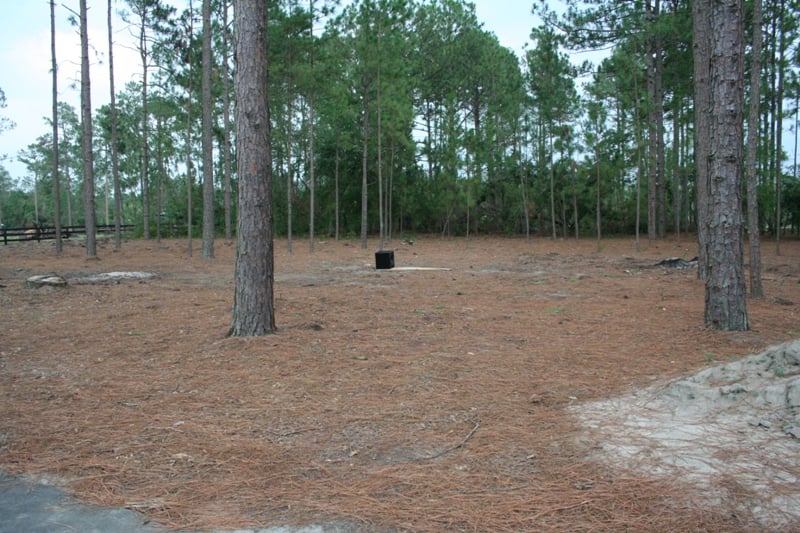 For laboratory measurements I used the Sencore SP395A FFT
Audio Analyzer plugged directly into the internal amps Velodyne DEQ-15R
subwoofer along with TrueRTA.
I took the sub outside and did a groundplane measurement at one meter and
1/24th resolution. This was conducted in the middle of a field that had been
recently devastated by a microburst. The sub was left to its default preset
(Jazz) which offers the flattest frequency response. The other presets were not
tested.
For laboratory measurements I used the Sencore SP395A FFT
Audio Analyzer plugged directly into the internal amps Velodyne DEQ-15R
subwoofer along with TrueRTA.
I took the sub outside and did a groundplane measurement at one meter and
1/24th resolution. This was conducted in the middle of a field that had been
recently devastated by a microburst. The sub was left to its default preset
(Jazz) which offers the flattest frequency response. The other presets were not
tested.
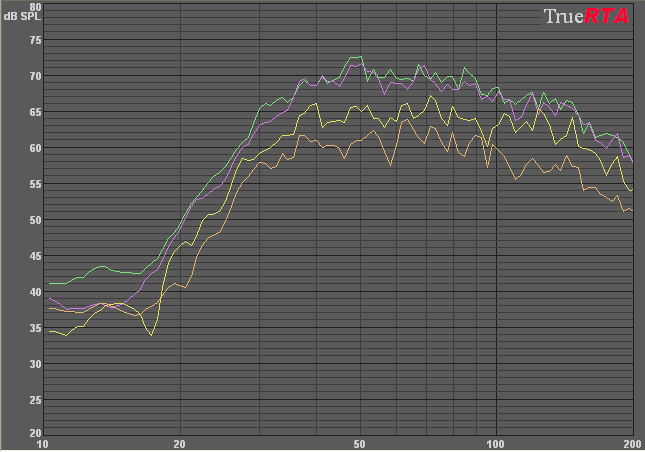
Velodyne DEQ-15R Subwoofer Groudplane Measurement 1 Meter
(no smoothing)
Note: Not the actual output levels - graph shows bandwidth linearity only
The green trace is the sub at maximum output (80), purple is at 70, yellow at 60, orange at 50. While it is obvious that the sub's volume is not increasing significantly between 70 and 80, the Distortion Limiting System is working as there seems to be no real distortion in the waveform and I could hear none during the tests. I actually kept trying to turn the sub up (in true Spinal Tap fashion) listening for distortion. While the sub is spec'ed down to 23Hz anechoic and 14Hz in room, I'm not seeing that here. The sub seems to be reaching down to about 27-30Hz fairly flatly and dropping off significantly after that. If my time wasn't limited, I might have run tests on the other presets or more importantly, taken the sub into the house, EQ'ed it, and brought it back out for more measurements. Unfortunately, that wasn't possible.
DEQ-15R Listening and Conclusion
Listening tests were conducted in a smallish theater of odd shape. It is a "bonus" room in an attic with an attached alcove on the left side. I've also had experience with a JBL sub in the same space. While I can't say I did a true A/B test with the Velodyne DEQ-15R, the 12" JBL didn't really need one. If you drove a Lamborghini after driving a Yugo, would you need to do a face to face comparison to tell the differences? While the comparison wasn't exactly fair as the JBL was placed very non-optimally and the Velodyne had my "expert-within-the-limits-of-my-mother's-tolerance" placement. That being said, the differences were such that it was remarkable. The Velodyne had so much more impact, was so much more articulate, and frankly, it shook the couch like a shiatsu massager. The differences were not night and day, they were earth and mars.
Lord of the Rings - Special
Selections
My parents have a very limited number of
movies on hand that would be considered sub testing worthy. Luckily, they are
Lord of the Rings fans and had the entire trilogy. I played the Balrog scene
from Fellowship of the Ring and the Oliphant scene from Return of the King. I
also demo'ed these scenes with my parents in the room. The couch was shaking,
my parents eyes were wide and the only difference between them was their
reaction. My Dad just said, "Wow," while my Mom asked me to turn it
down. Oh well, one convert at a time. The impact of the Velodyne DEQ-15R was
impressive. While it surely wasn't providing as much infrasonic information as
I've experienced with other subs, the experience was visceral and bone shaking.
When the Velodyne hit, there was no doubt about it. You knew it was on.
Blue Man Group - The Complex
DTS
I, of course, brought some of my own demo
material and the Blue Man Group is a staple. Here I was looking for integration
with the other speakers. The Velodyne definitely played well with the in-wall
tSc NTIW25s and NTIW26s though the placement fairly near to the listening
position (to the side of the couch about 3-4 feet away from where I was
sitting) was a hindrance in my opinion. It seemed that even with the crossover
placed at 60Hz, well below most people's ability to localize it, I could tell
where it was. This may have been partially experience mixed with a bit of
psychosomatics. My parents didn't agree with me and my mother in particular
commented that even though she knew where the sub was, the bass seemed to be
coming from the front of the room.
Star Wars Episode Two - The
Clone Wars
Not truly a Star Wars movie in my book but I
have to admit that it is convenient that the first few seconds of the movie
provides prodigious amounts of bass. The flyover of the space ship at the
beginning offers a very nice bass sweep with lots of subsonic information. The
Velodyne surprised me with its ability to be linear in a room that is
definitely not optimal and not at all treated. I credit the EQ with helping
significantly with the linearity of the sub. I know from experience that the
room can be boomy at times and I discerned no boominess or bass bloat. I wasn't
as impressed with the extension of the sub as it seemed to roll off a bit
earlier than I've heard in the past but it was still very respectable. All in
all, a very good subwoofer experience.
Conclusion
 There is no doubt that the Velodyne
DEQ-15R delivers the bass. One would expect no less from Velodyne. The real
question is whether it is worth the money compared to some of the Internet
Direct options out there. Well, at $1100, that's a bit of a tough sell. The
linearity of the DEQ-15R is great and the EQ is a huge plus in my book. The EQ
doesn't have nearly enough user control for me but I think most users wouldn't
use it even if it did. The real problem is that the specs and measurements aren't
jelling as well as I'd like. For $1100, I'd expect to get strong response at
least to the low 20's. On that one count, the Velodyne could have done better.
But with actual prices often far under $1000, the value of the sub increases
dramatically (which is not reflected in the value rating below - at the price I
paid, I have no problems bumping it up to a 4 or 4.5 value). One thing that the
DEQ-15R has going for it is size. While other ID subs might offer more
performance at the same price, you're going to need a hand truck and three
friends to move the thing. With the Velodyne, hiding it behind (or next to as
is the case here) a couch is definitely a possibility. While the Velodyne
DEQ-15R may not do everything right, it certainly has enough going for it that
I don't mind giving it a very strong recommendation. As someone that has had
the Velodyne itch for quite some time, I'm glad I've had this chance to play
with one. A word of warning to all Audioholics out there, you may not want to
"try out" a Velodyne unless you plan on keeping it. I know I was
tempted to try to convince my parents to let me take it home for "more
measurements."
There is no doubt that the Velodyne
DEQ-15R delivers the bass. One would expect no less from Velodyne. The real
question is whether it is worth the money compared to some of the Internet
Direct options out there. Well, at $1100, that's a bit of a tough sell. The
linearity of the DEQ-15R is great and the EQ is a huge plus in my book. The EQ
doesn't have nearly enough user control for me but I think most users wouldn't
use it even if it did. The real problem is that the specs and measurements aren't
jelling as well as I'd like. For $1100, I'd expect to get strong response at
least to the low 20's. On that one count, the Velodyne could have done better.
But with actual prices often far under $1000, the value of the sub increases
dramatically (which is not reflected in the value rating below - at the price I
paid, I have no problems bumping it up to a 4 or 4.5 value). One thing that the
DEQ-15R has going for it is size. While other ID subs might offer more
performance at the same price, you're going to need a hand truck and three
friends to move the thing. With the Velodyne, hiding it behind (or next to as
is the case here) a couch is definitely a possibility. While the Velodyne
DEQ-15R may not do everything right, it certainly has enough going for it that
I don't mind giving it a very strong recommendation. As someone that has had
the Velodyne itch for quite some time, I'm glad I've had this chance to play
with one. A word of warning to all Audioholics out there, you may not want to
"try out" a Velodyne unless you plan on keeping it. I know I was
tempted to try to convince my parents to let me take it home for "more
measurements."
Velodyne DEQ-15R Subwoofer
$1,099/each
Velodyne Acoustics Inc.
345 Digital Drive
Morgan Hill, CA
95037
1-800-VELODYNE (835-6396)
About Velodyne
Velodyne Acoustics, Inc., founded in 1983, is universally recognized as the
leading manufacturer of high-performance, low distortion powered subwoofers at
all price levels. Headquartered in Silicon
Valley, California,
the company's technically innovative audio products are available through a
select group of authorized dealers, custom installers, and distributors
worldwide. For more information visit www.velodyne.com.
The Score Card
The scoring below is based on each piece of equipment doing the duty it is designed for. The numbers are weighed heavily with respect to the individual cost of each unit, thus giving a rating roughly equal to:
Performance × Price Factor/Value = Rating
Audioholics.com note: The ratings indicated below are based on subjective listening and objective testing of the product in question. The rating scale is based on performance/value ratio. If you notice better performing products in future reviews that have lower numbers in certain areas, be aware that the value factor is most likely the culprit. Other Audioholics reviewers may rate products solely based on performance, and each reviewer has his/her own system for ratings.
Audioholics Rating Scale
 — Excellent
- — Very Good
- — Good
- — Fair
- — Poor
| Metric | Rating |
|---|---|
| Bass Extension | |
| Bass Accuracy | |
| Build Quality | |
| EQ System | |
| Fit and Finish | |
| Ergonomics & Usability | |
| Features | |
| Performance | |
| Value | |
As Associate Editor at Audioholics, Tom promises to the best of his ability to give each review the same amount of attention, consideration, and thoughtfulness as possible and keep his writings free from undue bias and preconceptions. Any indication, either internally or from another, that bias has entered into his review will be immediately investigated. Substantiation of mistakes or bias will be immediately corrected regardless of personal stake, feelings, or ego.
View full profile Subscribe to our newsletter