


Aperion Audio Intimus 4B Harmony SD
Aperion Audio Intimus 4B Harmony SD
- Product Name: Intimus 4B Harmony SD Speaker System
- Manufacturer: Aperion Audio
- Performance Rating:

- Value Rating:
- Review Date: October 08, 2008 05:09
- MSRP: $ 1179
|
Intimus 4B satellite
Intimus 4C center channel
|
Bravus 8D subwoofer
|
Pros
- Best satellite speaker build quality we've ever seen
- Solid, powerful bass
- Beautiful finishes in either High Gloss Black or Medium Cherry
- Sub includes single band parametric EQ
Cons
- Midrange detail a bit lacking
- Subwoofer has limited placement options
- Subwoofer controls a bit tedious
- Satellites can consume lots of amp power
Aperion Intimus 4B Build Quality
Aperion Audio's Intimus 4B Harmony SD Speaker System may be a lot to pronounce all in one breath - but it may be worth it, if that means you'll get to put them into your listening room. These speakers are incredibly well-built, and do very well in a near-field environment. They are beautiful to look at and the new Bravus dual 8-inch subwoofer leaves a good impression. For those with larger rooms, look to one of Aperion's bigger systems to give you more dynamics and a better fit.
Build Quality
Aperion ships each speaker with its own soft cloth protective sack. Aperion's packaging ranks among the best I've ever seen. The speakers were double boxed and encased in custom fitted closed-cell foam padding. If every speaker company packed their products as well the world would have far fewer UPS-trashed speakers. Not only are the speakers double-boxed, each is wrapped in a felt bag and well-protected inside the inner carton as well.
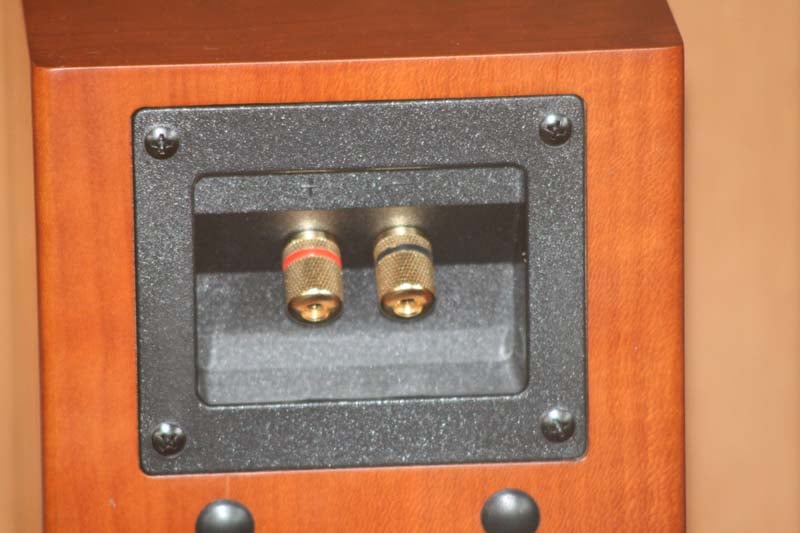 I have come to expect overbuilt
enclosures from Aperion, but had no idea they'd extend it to their satellite
boxes as well. Each Intimus 4B speaker is made of 3/4-inch HDF (high density
fiberboard) which simply laughs off our knock test. Compare this to other systems
which uses molded plastic or some other material which isn't nearly as rigid.
The 4B's are a sealed enclosure and feature a new 4-inch woven-fiberglass midrange
woofer and new 1-inch silk-dome tweeter. The enclosure features Aperion's new
curved look which provides a beautiful 1/4-inch relief along the front and rear
edges. This really makes the speaker stand out and is light years beyond any
other box we've seen at this price. If that weren't enough, the finish is
simply amazing - either one - and we wondered at how they could build this much
speaker for so little. On the back we found a nice recessed plate which held
real gold-plated 5-way binding posts, not some cheap spring clips or other
makeshift space-saving connection. Aperion looked to really take its full-sized
bookshelf speakers and simply shrink them to fit into a smaller enclosure.
I have come to expect overbuilt
enclosures from Aperion, but had no idea they'd extend it to their satellite
boxes as well. Each Intimus 4B speaker is made of 3/4-inch HDF (high density
fiberboard) which simply laughs off our knock test. Compare this to other systems
which uses molded plastic or some other material which isn't nearly as rigid.
The 4B's are a sealed enclosure and feature a new 4-inch woven-fiberglass midrange
woofer and new 1-inch silk-dome tweeter. The enclosure features Aperion's new
curved look which provides a beautiful 1/4-inch relief along the front and rear
edges. This really makes the speaker stand out and is light years beyond any
other box we've seen at this price. If that weren't enough, the finish is
simply amazing - either one - and we wondered at how they could build this much
speaker for so little. On the back we found a nice recessed plate which held
real gold-plated 5-way binding posts, not some cheap spring clips or other
makeshift space-saving connection. Aperion looked to really take its full-sized
bookshelf speakers and simply shrink them to fit into a smaller enclosure.
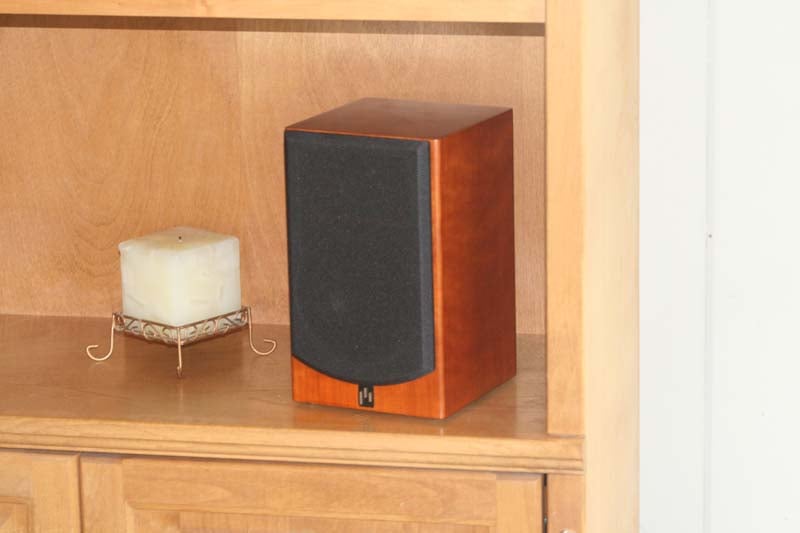 The Intimus 4B speakers only go down
to 120Hz (+/-3dB) so it's important to use a subwoofer with any system that has
these up front (we used them for the main speakers and also the surrounds,
which we mounted on Sanus
BF31 speaker stands). The size of the speaker and its subsequent response
make it perfect for near-field listening. If you try to fill a large room (more
than 1600 cubic feet) with the Intimus 4Bs you may attain volume, but you'll
find that the top end starts to break-up and the sound will quickly become
compressed. This isn't a knock on the speakers so much as a simple reminder to
use the right speakers for the right room. Aperion makes larger systems, so
don't overtax the product. After all, you don't use a screwdriver as a
chisel... What's that? You do? Well, work with me here - it’s called an analogy.
The Intimus 4B speakers only go down
to 120Hz (+/-3dB) so it's important to use a subwoofer with any system that has
these up front (we used them for the main speakers and also the surrounds,
which we mounted on Sanus
BF31 speaker stands). The size of the speaker and its subsequent response
make it perfect for near-field listening. If you try to fill a large room (more
than 1600 cubic feet) with the Intimus 4Bs you may attain volume, but you'll
find that the top end starts to break-up and the sound will quickly become
compressed. This isn't a knock on the speakers so much as a simple reminder to
use the right speakers for the right room. Aperion makes larger systems, so
don't overtax the product. After all, you don't use a screwdriver as a
chisel... What's that? You do? Well, work with me here - it’s called an analogy.
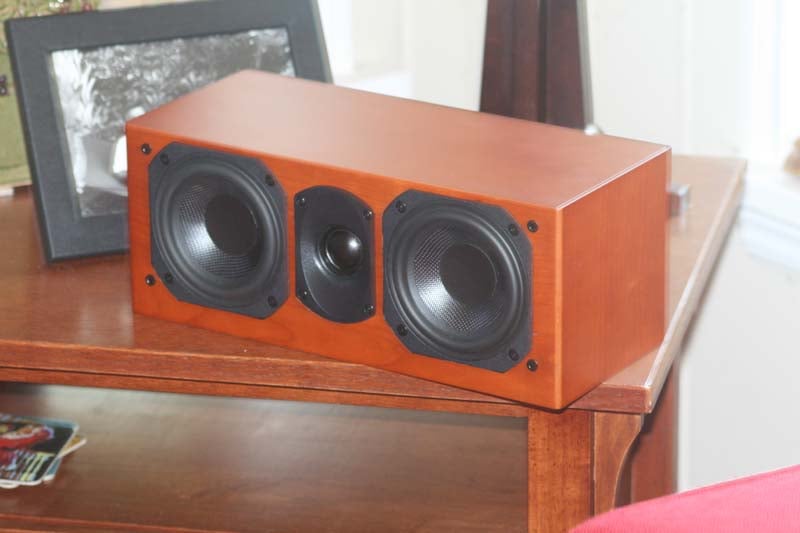 The Intimus 4C center channel is an
MTM (mid-tweeter-mid) design that is pretty much a 4B turned on its side with
an extra 4-inch passive radiator thrown in for good measure. It's an
interesting design and the additional box volume and passive 4-inch driver
allows it to dip down to 80Hz and get a bit more extension for center channel
content. Of course, if you don't have an AV receiver that has independent
crossover points then you may have some issues with the center channel having
too much bass at the crossover frequency. In terms of practical use, this
speaker, weighing only 8 pounds, can be placed on a shelf below the display or
even on top if you have a legacy (i.e. non-flat panel) model. Wherever you put
it, you'll want to tilt it downward or upward so that the tweeter fires
directly at the "ear location" of the listening position.
The Intimus 4C center channel is an
MTM (mid-tweeter-mid) design that is pretty much a 4B turned on its side with
an extra 4-inch passive radiator thrown in for good measure. It's an
interesting design and the additional box volume and passive 4-inch driver
allows it to dip down to 80Hz and get a bit more extension for center channel
content. Of course, if you don't have an AV receiver that has independent
crossover points then you may have some issues with the center channel having
too much bass at the crossover frequency. In terms of practical use, this
speaker, weighing only 8 pounds, can be placed on a shelf below the display or
even on top if you have a legacy (i.e. non-flat panel) model. Wherever you put
it, you'll want to tilt it downward or upward so that the tweeter fires
directly at the "ear location" of the listening position.
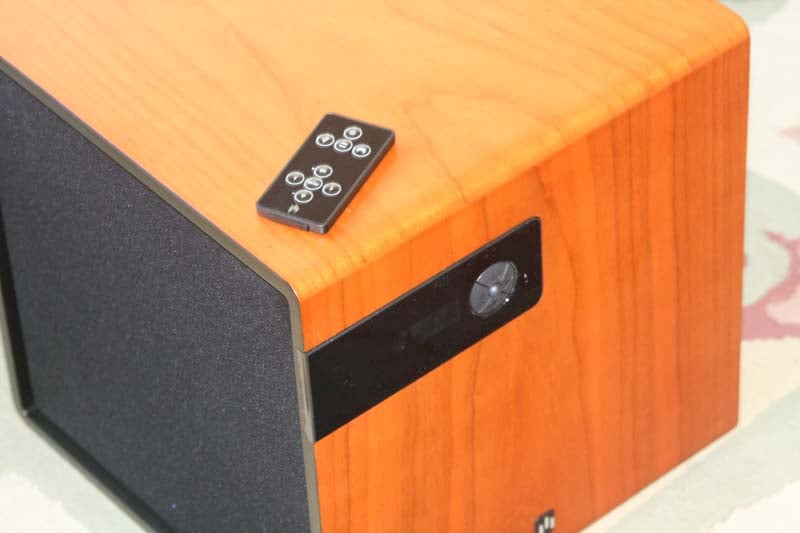 The new Bravus 8D subwoofer is an
impressive-looking subwoofer. It, too, carries the rounded/eased edge look and
comes in the same finish options. This is a completely new direction for
Aperion on a number of fronts. Check out the updated features:
The new Bravus 8D subwoofer is an
impressive-looking subwoofer. It, too, carries the rounded/eased edge look and
comes in the same finish options. This is a completely new direction for
Aperion on a number of fronts. Check out the updated features:
- Dual side-firing
8-inch woofers
The Bravus 8D has an 8-inch driver on each side, both firing in-phase. This creates a lot of pressure from a small sealed enclosure, but also makes it a little harder to place within a room. While Aperion requests at least 3-inches of space around the sub, we actually recommend you find a way to place it against the wall with both driver firing lengthwise. Cabinet placement is out of the question and positioning it into a corner gets tricky if you want it to have any breathing room.
- Remote Control
Yes, this sub comes with a remote control and a backlit monochrome LCD display that allows users to set levels, select modes, adjust phase and even adjust an on-board parametric EQ.
- Listening Modes
There are three listening modes: Movie, Music, and Game. What's more, you can adjust each to your liking so that you can have differing levels and settings for each. Want more boom during Movies - no problem. Want to drop the sub a bit when listening to music - Aperion's got you covered.
- Singe-band Parametric
EQ
Via the backlit digital LCD, users can adjust the EQ center frequency, level, and even the width (the range of frequencies affected - typically called 'Q'). This makes for a handy system to help manually lower any peaks that might be excited in the room due to room dimensions and placement limitations. Width settings are available as Narrow, Normal, or Wide
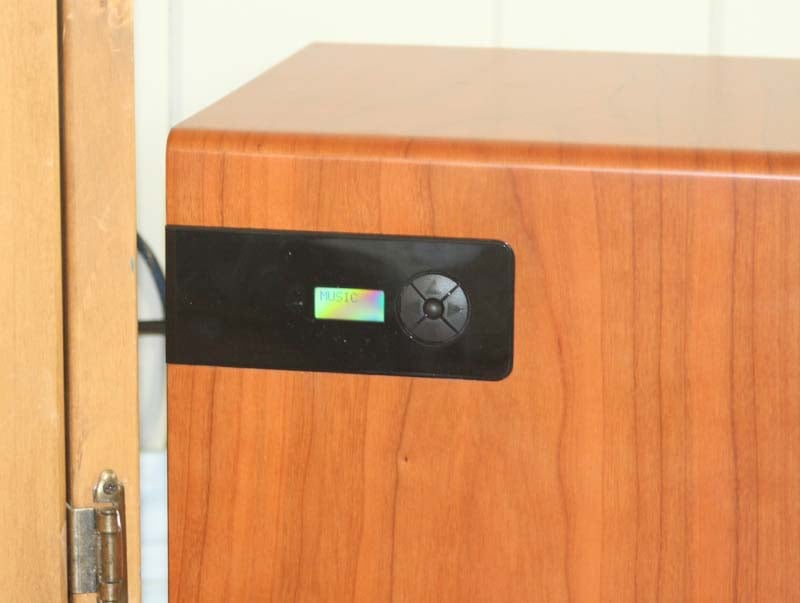 I was going to mention that the 4-way control pad on the Bravus 8D was
actually quite difficult to use, and the LCD could use a better backlighting
system. Aperion headed me off at the pass, however, and has apparently fixed both
of these issues (and I trust the company source of the info though I haven't
handled the new improvements). The remote control, which is the "credit
card" style, is a godsend and lets you sit in your chair while adjusting
the sub (though since you can't see the LCD display you may still need an
"assistant" to help get everything perfect once you move beyond
levels). Now, if only they could create a
way for the sub to move itself around the room... The remote is also used to
adjust the low pass crossover. For most, the AV receiver will take on this duty
and you should set it to Bypass.
There is also a Low Bass Adjust feature that allows you to boost or trim the
lowest frequencies the sub will play. We recommend starting with this at its
default setting and adjust it for best performance and to compensate for any
peaks or nulls you may be encountering at the lowest frequencies. A test disc
such as the Rives
Audio Test CD is a great tool for finding peaks and is pre-calibrated for
use with a Radio Shack SPL meter.
I was going to mention that the 4-way control pad on the Bravus 8D was
actually quite difficult to use, and the LCD could use a better backlighting
system. Aperion headed me off at the pass, however, and has apparently fixed both
of these issues (and I trust the company source of the info though I haven't
handled the new improvements). The remote control, which is the "credit
card" style, is a godsend and lets you sit in your chair while adjusting
the sub (though since you can't see the LCD display you may still need an
"assistant" to help get everything perfect once you move beyond
levels). Now, if only they could create a
way for the sub to move itself around the room... The remote is also used to
adjust the low pass crossover. For most, the AV receiver will take on this duty
and you should set it to Bypass.
There is also a Low Bass Adjust feature that allows you to boost or trim the
lowest frequencies the sub will play. We recommend starting with this at its
default setting and adjust it for best performance and to compensate for any
peaks or nulls you may be encountering at the lowest frequencies. A test disc
such as the Rives
Audio Test CD is a great tool for finding peaks and is pre-calibrated for
use with a Radio Shack SPL meter.
Aperion Intimus 4B Setup
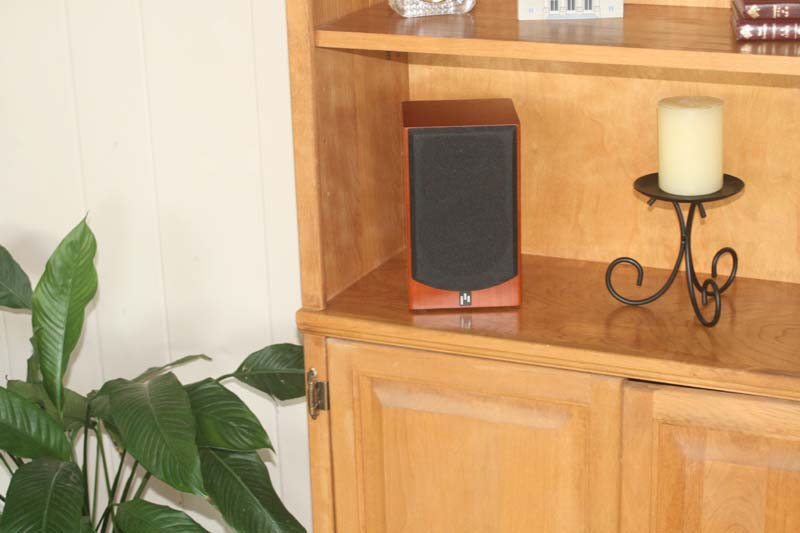 We began by placing the front
satellite speakers on shelves such that the tweeters were at ear level. This
was a mandatory "compromise" due to the aesthetic preference of the
homeowner and the presence of an existing built-in. Since the Intimus 4B
satellites are not ported, they are actually well-situated for any number of
placements. Since they only weight 6.5 pounds, you can easily mount the speakers
using a B-Tech
Pivoting wall mount, Omnimount
Omni ceiling mount or similar product. For best results I'd avoid ceiling
mounting any speakers unless absolutely necessary - it wreaks havoc on the
continuity of objects panning left-to-right in a 5.1 system and often results
in boundary gain issues from the proximity to the ceiling.
We began by placing the front
satellite speakers on shelves such that the tweeters were at ear level. This
was a mandatory "compromise" due to the aesthetic preference of the
homeowner and the presence of an existing built-in. Since the Intimus 4B
satellites are not ported, they are actually well-situated for any number of
placements. Since they only weight 6.5 pounds, you can easily mount the speakers
using a B-Tech
Pivoting wall mount, Omnimount
Omni ceiling mount or similar product. For best results I'd avoid ceiling
mounting any speakers unless absolutely necessary - it wreaks havoc on the
continuity of objects panning left-to-right in a 5.1 system and often results
in boundary gain issues from the proximity to the ceiling.
We placed the center channel just above the display, so our "left-center-right" arc wasn't too steep and the surround field would be convincingly retained. We used a simple rubber doorstop to angle the center channel downward to fire at the listening position. We wanted the tweeter perfectly lined up with our ears. We used bare Impact Acoustics CL2-rated 12/2 speaker wire to connect the speakers. That certainly blows the socks off the cabling that accompanies most all-in-one satellite speaker systems. For those who wish a more polished look, you can add banana connectors to finish it off nicely.
We placed the subwoofer about one-fifth the way into the room along the front wall. It was positioned on the right side and we gave the dual 8-inch drivers some room to breathe, ensuring that they weren't firing directly into furniture or anything that would rattle.
Editor's Note: Aperion Audio provides some exceptional advice in their user manual - especially the one for the Bravus series of subwoofers. Rather than act as if every subwoofer they manufacture is capable of sounding fantastic in every possible room and location, Aperion gives advice on placement. They even address the potential issue you may encounter with their satellite systems and the rather high crossover point, stating "Frequencies above 80Hz start becoming directional - meaning your ear can locate where they are coming from. So if your subwoofer is crossed-over above 80Hz, try to position it as close to your television as possible." That's some darn good advice.
The Bravus 8D has line level inputs (stereo and LFE) as well as speaker level inputs. Phase controls and level are all controlled digitally via the LCD and menu pad. All controls are also available to be controlled via the remote.
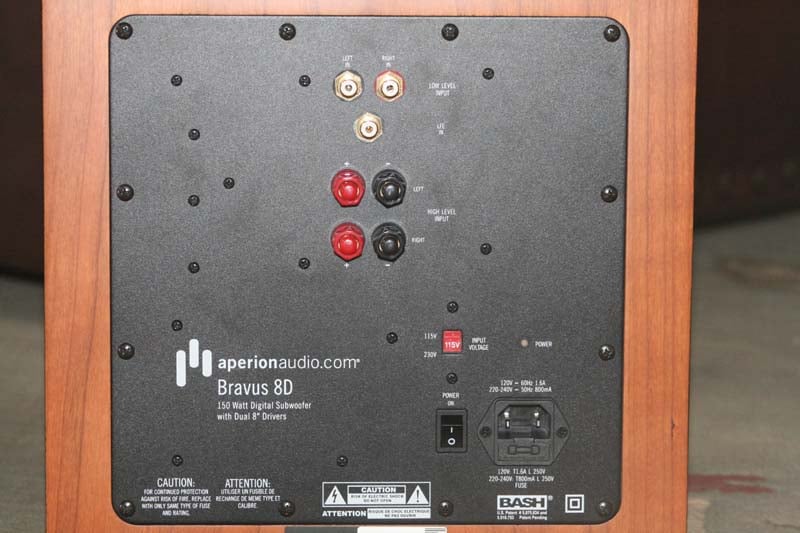
We adjusted the phase of the subwoofer a bit, but ultimately ended up leaving it at its default setting, which gave us the best bass response in the room. We kept the level fixed and used the AV receiver (a Yamaha RX-V663) to set the subwoofer level to our desired gain for movies. At this point we eased off a bit (about -3dB) using the subwoofer menu system and stored that for the Music setting. What's nice is that even though the remote control stores settings for Music, Movie and Game modes - you can use these for any three settings you like. We find that our game and movie modes are often the same, but we like a little less level when listening to multi-channel music.
Aperion Intimus 4B Listening Session and Conclusion
Suffice it to say, levels were calibrated quite easily and we soon had everything humming along splendidly. We found that toeing in the speakers a bit helped solidify the soundstage and increase imaging. The in-cabinet speaker placement wasn't as ideal as placing them out into the open. I actually pulled them out at one point and felt that the speakers did a much better job of disappearing into the mix when they had room to breathe. It's also important to remember that this system is designed for use in smaller rooms and with the listener close enough to the speakers to work within their near-field design. We sat about 10 feet away for our listening tests and kept the system at moderate levels unless otherwise noted.
We queued up some favorite tracks to give the system a thorough workout and took copious notes.
 DVD-Audio: Blue
Man Group - The Complex
DVD-Audio: Blue
Man Group - The Complex
"Time to Start" set in
immediately with a powerful lower mid-bass which simply made the Intimus 4B
speakers sound as if they had authority and power to spare. After a few moments
we felt the bass was a tad bit too boomy and settled on pulling back the
crossover from 120Hz to 110Hz which helped smooth things out a bit. It's our
guess that this had more to do with the effects of the room acoustical
properties than anything else. Typically we'd recommend starting at 120Hz for
the crossover and seeing how well that performed. The PVC drums in the Intimus
4B surrounds and center channel were unmarred by any smearing, even though they
were all rapid-firing similar frequencies into the room from all sides. The
synth guitar sound was (as expected) recessed in the mix but very intelligible.
During
the break, the powerful floor toms in the surrounds absolutely pounded into the
room from both sides. This is a very "thick" song and it's easy to
lose definition. Overall, the Intimus speakers held their own and really blew
me away - sounding very large for a set of satellite speakers. I was excited to
hear some female vocals during "Up to the Roof", so I sat
back as Tracy Bonham's voice started coming out of the Intimus 4C center
channel. At first I wasn't blown away by the detail I heard - and then realized
that the surrounds were simply too loud. Because the speakers were arranged in
a near-field placement, I had calibrated the surrounds at normal levels. Truth
be told, when any surround speaker is within six feet of your ears, it's
probably good to drop its level a few dB from normal. Again, this is up to
taste, but I've found it to be a good rule of thumb. Returning to the track I
felt vindicated - Tracy
sounded 200% better. I could now hear some of the texture in her voice, though
it still wasn't as pristine as I'd like. Indeed I might recommend considering
an upgrade of the front speakers to the 5-series if at all possible. The 5C's
addition of a dedicated mid-woofer for a true 3-way design is most
likely a giant step up in terms of performance.
"Piano Smasher" was the final track I played from The Complex. It was awesome in that the low frequency hits literally engulfed the room, while the string synths and staccato sounds laced throughout the song danced across the soundstage. It was actually a lot of fun to listen to this album on the 4B Harmony system.
 DVD-Audio: Toy
Matinee
DVD-Audio: Toy
Matinee
It had been a while since I pulled up
this oldie but goodie. "Last Plane Out" let me hear the width of the stereo
separation and cohesiveness of the Intimus 4B speakers, which turned out to be
good for a satellite system (though a far cry from some larger bookshelf
systems I'd heard - including Aperion's own 6-series). This was partially due
to the fact that we were pushing the limits of the system given our room size -
yet another plug for upsizing. "Toy Matinee" is a song I use to test
the stability and "surround bubble" effect of the system, allowing
the recorded toms to travel around the room in a clockwise rotation. The effect
was smooth and largely unbroken - and it was then that I realized what a treat
it was to be listening to four identical speakers with perfectly matched
timbres. The lead vocal, anchored to the center channel, was clean and
well-defined. The fronts supported the lead guitar and keys effectively and the
room allowed the reverb-filled track to literally transform the room into a
live studio.
"There Was a Little Boy" is my favorite track on this album and I was pleased to hear a nice lead vocal form the center with no audible distortion when I cranked it up. Continuing to raise the volume I felt that the system reached its peak quickly once levels exceeded near-field levels. If you want to use the Intimus 4Bs to drive a large room to party levels you may want to consider larger speakers. If you keep them within their design parameters, however, they play loud and tight.
"We Always Come Home" gave me an awesome peel at the high frequency response capabilities of the 4B satellites. The track features some finger slides over the acoustic guitar - which sounded perfect and authentically "live" - as did the overall guitar. Backing vocals and a strong bass line rounded out the "actually there" effect and it really invoked a "close your eyes and enjoy the experience" moment.
 DVD-Audio: Diana
Krall - Love Scenes
DVD-Audio: Diana
Krall - Love Scenes
Loves
Scenes really
pushed the Intimus 4B satellites and 4C center to their limits - and in very
good ways. I felt that the acoustic guitar, played beautifully by Russell
Malone, sounded perfect in the mix and the bass absolutely sent me on a mission
entitled "find that buzz!" The output, to put it mildly, was
powerfully strong. I quickly quieted the offending vibration (it was a door)
and proceeded to enjoy the hard hitting bass playing of Christian McBride along
with the fantastic piano sound. Diana's vocals were smooth ("like
buttah" according to my listening companion) and the natural room reverb captured in the
mix felt like it had been FedEx overnighted into my listening room - it just
melted me in my seat. It's an understatement to say that the Intimus 4B Harmony
system did a great job at recreating the jazz club feel in the room. "Peel
Me a Grape" was another wonderful experience that completely pulled Diana
into the room for a private listening session. She and I hung out for a while
as I absorbed her sultry lyrics and marveled at the finesse coming from a set
of speakers - each of which was not much larger than a box of tissues.
I
reluctantly closed out this round of listening with "Don't Stand a Ghost
of a Chance With You.". Diana's
every breath revealed more and more texture in this soft track. Aperion should
buy a ton of these discs and hand them out with every system.
 CD: John
Mellencamp - Life, Death, Love and
Freedom
CD: John
Mellencamp - Life, Death, Love and
Freedom
The opening track "Longest
Days" was a nice reflective song with Mellencamp's trademark gritty vocal
and a detailed acoustic guitar track that had tons of natural "imperfections"
and finger noises. Behind, an accordion provided a nice smooth pad and I was
really impressed at just how much layering was coming through the Intimus
speakers. "Troubled Land" was a bit harder-hitting and I really loved
the detailed snare which ducked in and out of the mix. A Hammond B3 kissed the
verses while John delivered a strong lead which issued effortlessly from the
speakers.
 DVD: Lord
of the Rings - Fellowship of the Ring
DVD: Lord
of the Rings - Fellowship of the Ring
To me, loudspeaker reviews are best
tested with music. If you can pass a listening session with multi-channel and
stereo music tracks - you're not going to have trouble with movies. You just
aren't. There is, however, an importance placed on how well the subwoofer
performs - and for that I use this disc. I only put in this disc for one reason
- to separate the men from the boys. Queuing up "The Bridge of Khazad
Dum" chapter and jumping about half way through we come to the part where
the stone bridge is collapsing. The sounds encoded here are incredibly low.
More than that, they are as far from one-notey as you can get. Some systems
ignore the sounds completely (like most home theater-in-a-box systems) and
others reproduce it in a way that lets you know the sub means business. With
the new Bravus 8D sub I expected it to do well. I wasn't disappointed - it
rendered most of the sound potential of the scene. It didn't fully capture the
tactile nature of the scene, however, and turning up the sub didn't do any
better. It just doesn't go low enough to grab everything in the scene. What I
did notice - and this is important - is that the sub also refrained from
bottoming out on what it couldn't deliver. The Bravus 8D played what it could -
and stopped where it needed to. That's a good design and one that many
customers are going to appreciate.
Conclusions
The Aperion Audio Intimus 4B Harmony SD speaker system completely redefines (or should) what a satellite system can be. To say that the bar has been raised would be to say that Lance Armstrong is raising the bar for amateur cyclists. The Intimus 4B satellites are built like mini bookshelf speakers. The 4C center is rock solid and the Bravus 8D dual-firing subwoofer performed flawlessly and without any hang-ups. This is a system consumers can take home for just over a grand. You can't find this level of quality in a big box store for this price. You just can't. Judging this system is an exercise is setting the correct expectations. If you expect to be able to hide these satellites in a 3000 cubic foot room, you're going to be sadly mistaken. You'll hide more than just the speakers - you'll not achieve good sound quality. These speakers are best listened to in a near-field configuration as we reviewed them. Do this and this might be the best system you can buy for the money.
Intimus 4B Harmony
SD Speaker System
MSRP $1179
Aperion Audio
18151 SW Boones Ferry Road
Portland, OR 97224
888-880-8992
www.aperionaudio.com
About Aperion Audio
Based in Portland,
Oregon, Aperion Audio designs and
manufactures loudspeakers and subwoofers that deliver uncompromised sound
quality and audio performance at an unmatched value. Aperion sets a new
standard for customer service and support as evidenced by their trademarked
risk-free, 30-day in-home audition™. As a direct online retailer, Aperion
embraces their customers by allowing them to test-drive their speakers before
the commitment to buy; they assume all of the risk and provide their customers
all of the enjoyment. To learn more, log on to www.aperionaudio.com.
The Score Card
The scoring below is based on each piece of equipment doing the duty it is designed for. The numbers are weighed heavily with respect to the individual cost of each unit, thus giving a rating roughly equal to:
Performance × Price Factor/Value = Rating
Audioholics.com note: The ratings indicated below are based on subjective listening and objective testing of the product in question. The rating scale is based on performance/value ratio. If you notice better performing products in future reviews that have lower numbers in certain areas, be aware that the value factor is most likely the culprit. Other Audioholics reviewers may rate products solely based on performance, and each reviewer has his/her own system for ratings.
Audioholics Rating Scale
 — Excellent
- — Very Good
- — Good
- — Fair
- — Poor
| Metric | Rating |
|---|---|
| Build Quality | |
| Treble Extension | |
| Treble Smoothness | |
| Midrange Accuracy | |
| Bass Extension | |
| Bass Accuracy | |
| Imaging | |
| Soundstage | |
| Dynamic Range | |
| Fit and Finish | |
| Performance | |
| Value | |
Clint Deboer was terminated from Audioholics for misconduct on April 4th, 2014. He no longer represents Audioholics in any fashion.
View full profile Subscribe to our newsletter