


Mondo Mint Music System Review
Mondo Minto Music System
- Product Name: Mint Music System
- Manufacturer: Mondo USA
- Performance Rating:

- Value Rating:
- Review Date: August 10, 2007 08:45
- MSRP: $ 349
|
Amplifier Color: Silver/white 2-tone Inputs: iPod dock (5 size adapters included), 1/8-inch line-in, USB 1.1 Connections: Binding posts, wireless dipole antenna Power: 70W rms 4-ohms per channel (compatible with 4-, 6-, or 8-ohm speakers) 90-265VAC, 50-60Hz, 0.6/1.0A switching mode power supply THD+N @ 1W: <0.1% @ 8-ohms, 1kHz Channel Separation: >65dB SNR: >100dB Dimensions: 6.5” W x 3.8” H x 0.95” D (165 x 97 x 24.5 mm) Weight: 2 lbs (920g) |
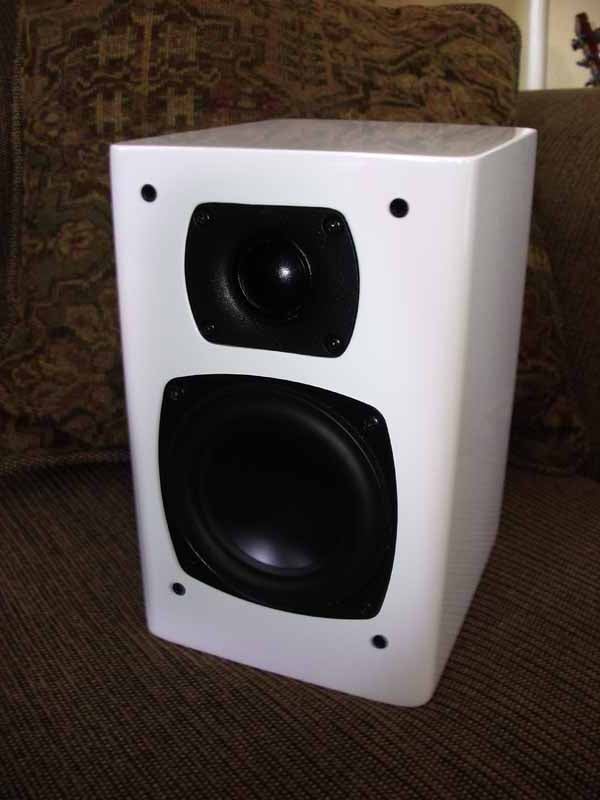
Loudspeakers Type: Two-way ported system Enclosure: Wood enclosure with glossy piano white coating and removable cloth grills Color: Piano gloss white with gray grills Drivers: 1-inch Peerless
neodymium textile tweeter; 4-inch AuraSound
aluminum cone with patented NRT magnetic structure Speaker Connections: Binding posts Nominal Impedance: 4-ohms Dimensions: 5.6” W x 7” H x 8.9” D (260 x 113 x 209.5 mm) Weight: 5.5 lbs (2.5 kg)
each |
Pros
- Small form factor
- Elegant looking
- Dual iPod docking configurations (including wireless)
- Mint Audio Control application for fine-tuning
- Woofers won't bottom out
Cons
- No digital inputs
- Weak website support (un-manned message boards)
- No subwoofer support
- Sizzly highs
Mondo Mint Configuration & Build Quality
I like twists. I like my movies with twists, my pretzels with twists, and power tools that utilize an easy twisting motion to replace blades and bits. So it was with great interest that I took a second look at the Mondo Mint system after realizing it was both a lifestyle music product AND a wireless iPod system. The wireless iPod port was what really piqued my interest. After all, it's not every system that allows you to drop your iPod into a local OR remote charging station and have either location play it through the same set of speakers. The Mondo also closely resembles a double-wide Apple Mini, with the same color motif and rounded corners. It's a nice look and the machine will fit in well with an AppleTV should you decide to go that route.
Configuration & Build Quality
Setting up the system was easy, and I found that you can use the Mint in a number of ways. After studying the parts (User Manuals are for sissies… but they do make for good bathroom reading after you make an initial go at it) I was ready to begin. Unboxing the unit (which comes well-packed and protected with custom foam packaging and a nice box for the iPod dock and accessories) I laid everything out. There are two speakers, the main amplifier unit, a remote iPod dock, credit-card style remote control, antenna and assorted cables. It's not a tough system to assemble and everything connects the way you'd expect.

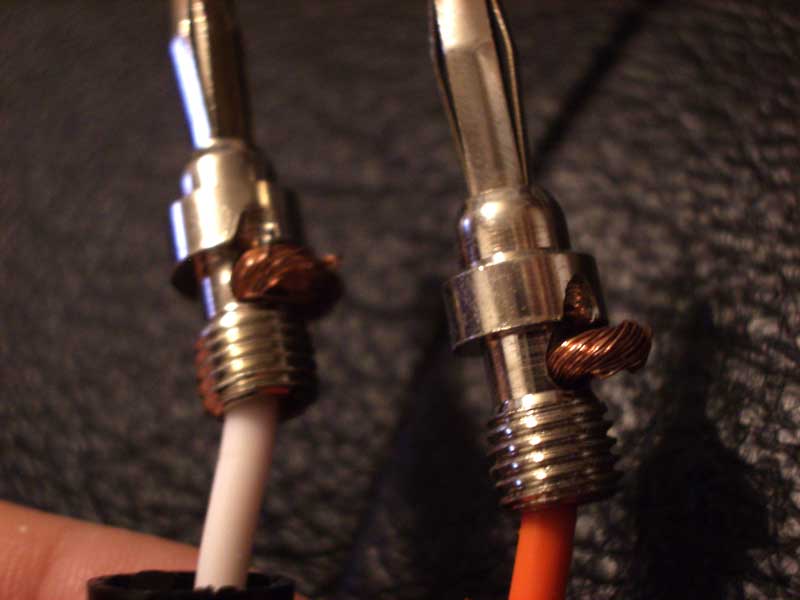 The speakers connect to
the main unit via supplied Canare cables. These cables are 16-gauge and have a
unique termination method. Apparently the cable ends go through a hole, wrap
half-way around the connector and are hidden under the screwed-on plastic
strain relief. There is no soldering and strain relief is limited to the
plastic banana jack covers. Now I'm not one to spend any time on cables, but
these seemed like they could lose connection at any time or at the very least
pull out over time if you don't handle them correctly. To be safe, be sure to
grab them from the red and black covers and not by pulling on the cables
themselves.
The speakers connect to
the main unit via supplied Canare cables. These cables are 16-gauge and have a
unique termination method. Apparently the cable ends go through a hole, wrap
half-way around the connector and are hidden under the screwed-on plastic
strain relief. There is no soldering and strain relief is limited to the
plastic banana jack covers. Now I'm not one to spend any time on cables, but
these seemed like they could lose connection at any time or at the very least
pull out over time if you don't handle them correctly. To be safe, be sure to
grab them from the red and black covers and not by pulling on the cables
themselves.
The woofers are basically NS4-255-4D drivers from Aurasound and feature a 4" high-output woofer with a neodymium ring magnet that has an unusual shape to it that contributes to its excursion ability (nearly 1" peak to peak, though I never gave it enough juice to make it throw that far). The driver was wired to the crossover via two 12-gauge soldered cables and was flush-mounted to the enclosure.

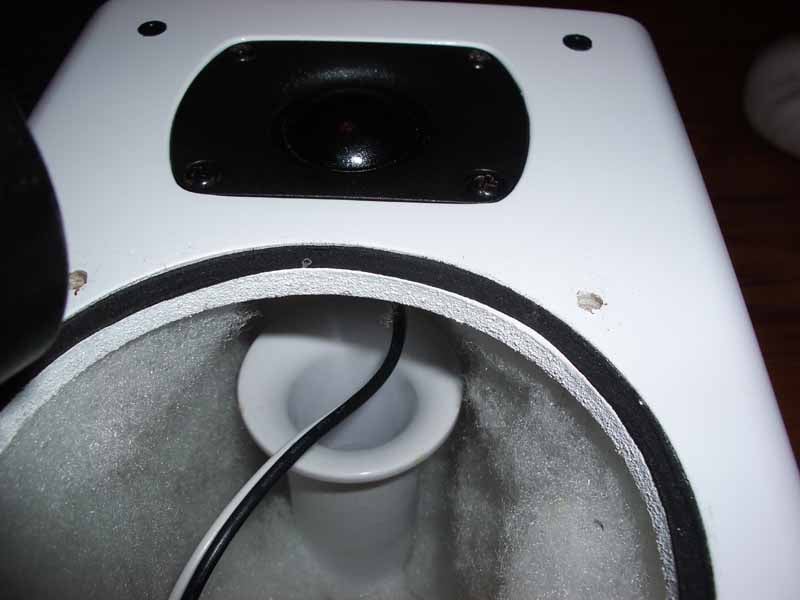
The enclosure itself is made up of 1/2-inch wood with a thick piano-gloss coating that gives each speaker a nice white sheen. The corners are rounded and build quality is impeccable for this price. The inside of the cabinet was well-damped (over-damped?) with polyester fill - and with a ported speaker this small I wonder if it actually might have changed the tuning frequency of the box.
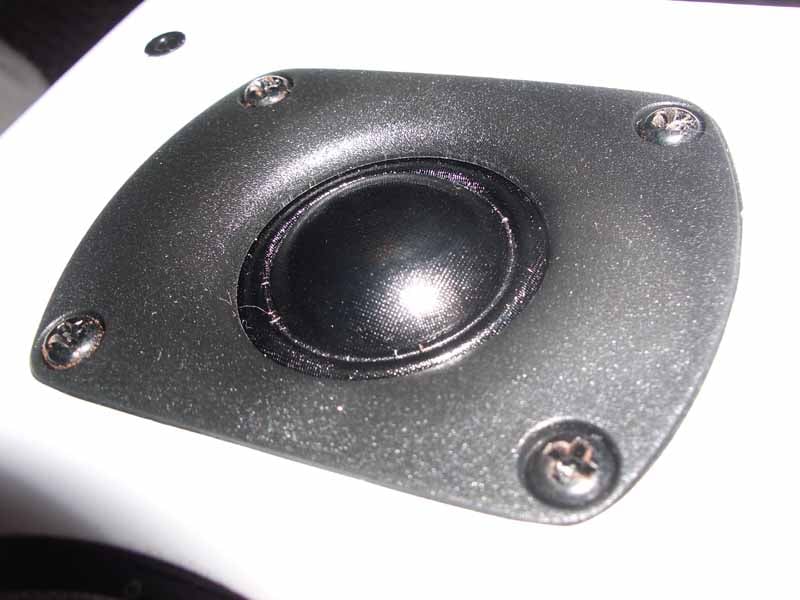 The tweeter is essentially a BC25SC55-04 which is
meant to be recess-mounted. On the back I noticed a heat sink which, in
combination with the ferrofluid in the magnet gap, helps cool the driver and
aid in handling more power output. This is a decent driver with an effective
frequency response up to 25 kHz - and we all like to play tricks with the
neighborhood dogs every now and then, don't we? The tweeter was mounted almost
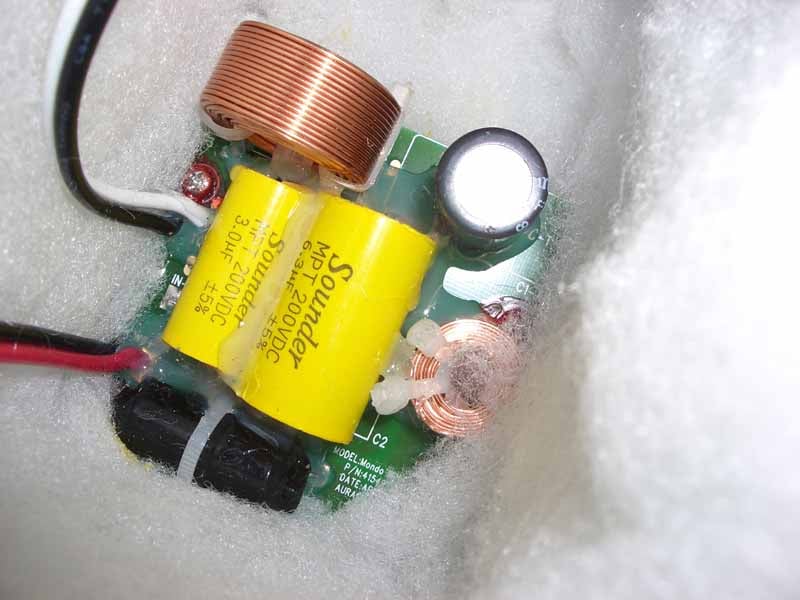
on top of the flared port which extended about 75% into the cabinet. At the
bottom was the crossover, which featured air coil inductors and polypro bypass
capacitors in parallel with a series electrolytic cap to reduce equivalent
series resistance (ESR) in what appeared
to be a 2nd order LP and HP (12dB/octave) configuration.
The tweeter is essentially a BC25SC55-04 which is
meant to be recess-mounted. On the back I noticed a heat sink which, in
combination with the ferrofluid in the magnet gap, helps cool the driver and
aid in handling more power output. This is a decent driver with an effective
frequency response up to 25 kHz - and we all like to play tricks with the
neighborhood dogs every now and then, don't we? The tweeter was mounted almost
on top of the flared port which extended about 75% into the cabinet. At the
bottom was the crossover, which featured air coil inductors and polypro bypass
capacitors in parallel with a series electrolytic cap to reduce equivalent
series resistance (ESR) in what appeared
to be a 2nd order LP and HP (12dB/octave) configuration.
Using and Customizing the Mondo Mint System
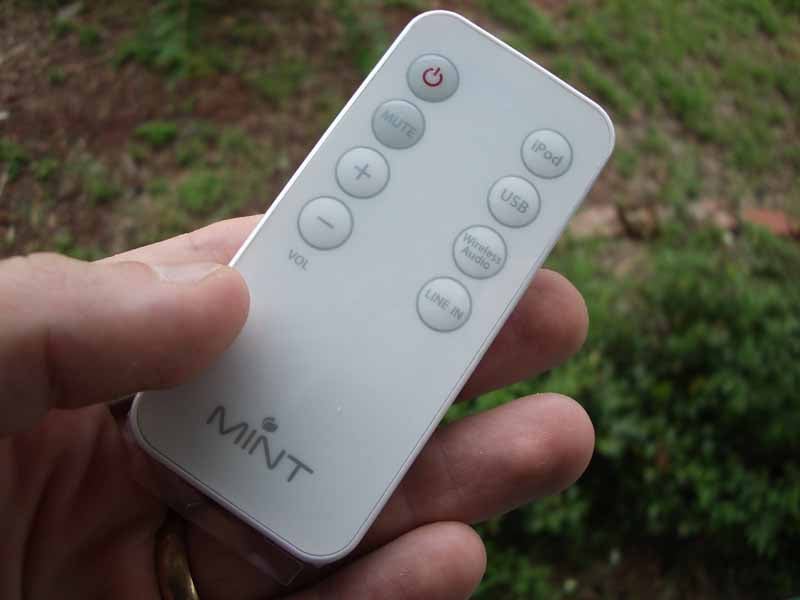 Once the system was put together, listening to music was as simple as
turning it on and selecting the proper input. Mondo has made it very easy to
get sound through the Mint System and the same eight buttons which are located
on the top of the main amplifier (power, input selection and volume/mute control)
are also accessible on the credit-card-sized remote. I put several sources
through the system, including an iPod, Creative Zen Touch MP3 player, iTunes
(via USB) and a CD player (via the 1/8-inch mini input). I found that I was
unable to get USB audio to work from my computer. I tried a few things and then
visited the website for support. The support pages of the site are part helpful
user guide, part marketing, and part spam-filled, (apparently) unmoderated
blogs. After digging around I found some helpful info on restarting the
application after switching the audio device. Of course, I also found a great place to buy male enhancement drugs. There is also
an email address and toll-free phone number you can call to get additional
help. According to the website:
Once the system was put together, listening to music was as simple as
turning it on and selecting the proper input. Mondo has made it very easy to
get sound through the Mint System and the same eight buttons which are located
on the top of the main amplifier (power, input selection and volume/mute control)
are also accessible on the credit-card-sized remote. I put several sources
through the system, including an iPod, Creative Zen Touch MP3 player, iTunes
(via USB) and a CD player (via the 1/8-inch mini input). I found that I was
unable to get USB audio to work from my computer. I tried a few things and then
visited the website for support. The support pages of the site are part helpful
user guide, part marketing, and part spam-filled, (apparently) unmoderated
blogs. After digging around I found some helpful info on restarting the
application after switching the audio device. Of course, I also found a great place to buy male enhancement drugs. There is also
an email address and toll-free phone number you can call to get additional
help. According to the website:
"Whether PC or Mac, using iTunes or Windows Media Player – it doesn’t matter. There’s no special software, drivers or configuration needed. Plug it in and It just works."
Well they were right. But I did have to select the Mondo Digital Music Station in my Sounds and Audio Devices control panel. I also had to quit and restart iTunes or Windows Media Player if it was open when I switched the audio device (which they indicated on the website). After I learned from my mistakes I would say that for the most part it's plug and play. On my laptop, for example, I didn't have to change the control panel settings, I merely restarted the audio application I was using and out came the sound.
Customizing the Sound
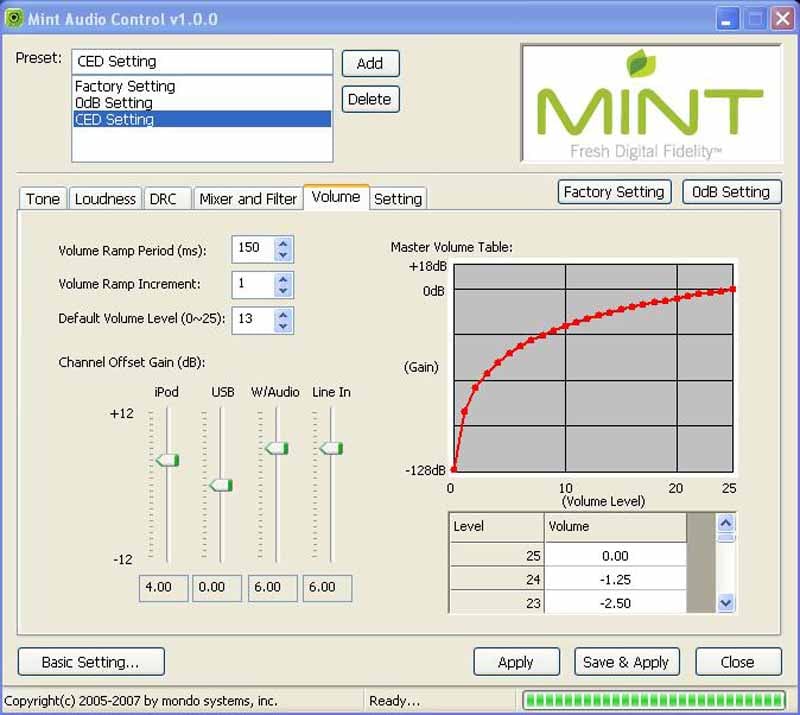 The PR person for Mondo USA
emailed me with a handy application that allows customization of the sound and
functions of the Mondo Mint. It was very much like a receiver editor that you
can, on occasion, acquire for Yamaha or Denon products. Adjustments can be made
for Tone, Loudness, Volume between inputs and default input - among others. An
Advanced Settings menu allows additional adjustments to Dynamic Range
compression (DRC) and a Mixer and Filter control for filtering high and low
frequencies through a variety of 2nd or 4th order crossover methodologies
(Butterworth, LinkwitzRiley, Bessel, etc).
The PR person for Mondo USA
emailed me with a handy application that allows customization of the sound and
functions of the Mondo Mint. It was very much like a receiver editor that you
can, on occasion, acquire for Yamaha or Denon products. Adjustments can be made
for Tone, Loudness, Volume between inputs and default input - among others. An
Advanced Settings menu allows additional adjustments to Dynamic Range
compression (DRC) and a Mixer and Filter control for filtering high and low
frequencies through a variety of 2nd or 4th order crossover methodologies
(Butterworth, LinkwitzRiley, Bessel, etc).
I quickly found that the speakers sounded most accurate at an almost flat loudness setting, however putting the gain at 1dB at 80Hz resulted in a potentially more pleasing sound given that no subwoofer existed. The default setting is 2dB and of course the amount of gain varies as the overall volume drops.
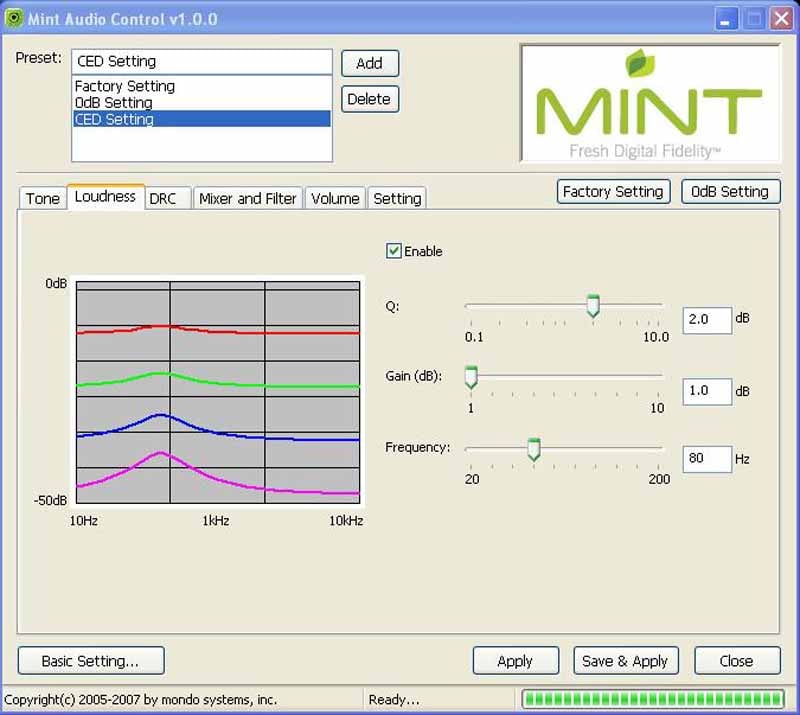
Unfortunately at the time of review I couldn't find this application listed on the Mondo website or even mentioned in any of the materials I received in the Mondo Mint packaging. Mondo claims it will post the app on their website shortly, allowing users to download it. If it is not readily available on the website by the time of this review publication, please follow up by emailing them and requesting the application be made available to users.
Wireless iPod Docking Station
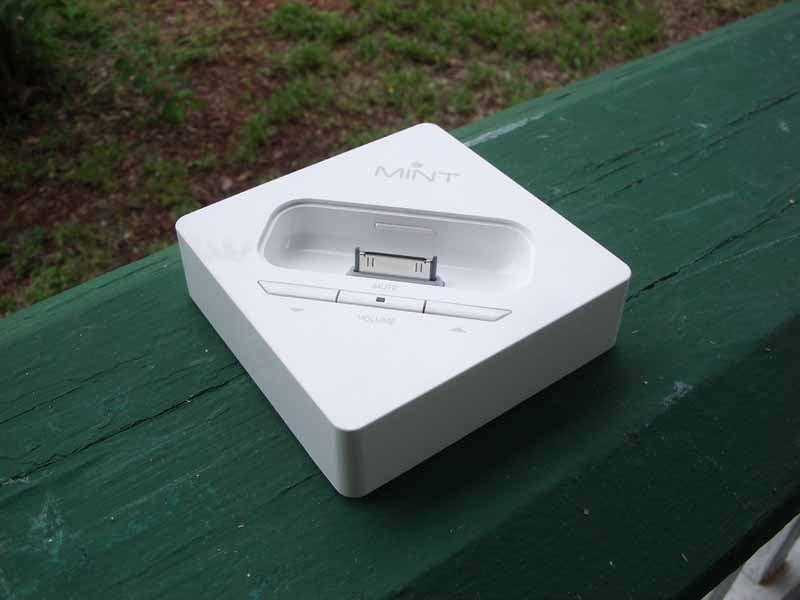 The wireless iPod dock
worked as advertised and the system recognized the dock right away. The manual
mentioned bringing the dock close to the amplifier to allow it to pair but I
didn't find this to be necessary. You can re-pair the connection if needed,
though most people won't need to do this even if you lose power to the system.
The wireless iPod dock
worked as advertised and the system recognized the dock right away. The manual
mentioned bringing the dock close to the amplifier to allow it to pair but I
didn't find this to be necessary. You can re-pair the connection if needed,
though most people won't need to do this even if you lose power to the system.
The dock comes with 5 plastic iPod adapters that snap inside the unit to make for a perfect fit for most all flavors. It accommodates:
- iPod mini
- iPod with color display 20/30G
- iPod with color display 40/60G
- iPod with video 30G
- iPod with video 60/80G
For an iPod nano you simply use the dock that came with the nano. iPod shuffles need to use the Line In connection like any other non-iPod MP3 player. That covers just about every iPod made - at least until Steve Jobs decides the next HD-iPod version requires a completely different architecture.

The Mondo Mint inputs are pretty much auto-switching, which is very cool. For example, I was on the USB Input when I docked the iPod. The Mint switched right over and picked up the iPod. When I plugged in a Line Input, the unit flipped over to that input. It's a great system and, should you run into any difficulties, those features can be disabled (individually) via the Mint Audio Control software.
Mint Listening Tests and Conclusion
I quickly found that the Mondo Mint functioned on a 'garbage in, garbage out' mode of operation. The drivers and amplifier were not bad, but since many people will be playing compressed music on this system, it's important to know that they don't make poorly compressed MP3s sound like high-resolution audio tracks. It also doesn't make them sound any worse than they would on earbuds or any other audio output device. I really enjoyed listening to CDs on the system and even MP3 tracks that were well-compressed (meaning they were done using an efficient codec that didn't destroy the fidelity). Even the Mondo website recommends good quality sources for this system. Because of this observation I utilized a CD player as a source for my listening evaluation.
 Seal – Seal 1994
I've used Seal quite a bit
to test loudspeakers. I especially like track 3 "Dreaming in
Metaphors" which has punchy bass line that has bottomed out many
loudspeakers. The Mondo system handled the low frequencies with ease and rolled
off the material that it couldn't play back. That's a good design and shows
that the speakers are properly tuned. Vocals sat nicely in the middle and I
enjoyed the smooth top end. I purposely bumped up the bass a tiny bit using the
loudness setting in the Mint Audio Control application which I felt gave the
system a more pleasing sound overall without resulting in too much artificial
"boom".
 Chrisette Michele - I Am
I actually don't like the music style of
this artist/CD, however it has some startlingly high-pitched and strong female vocals.
Chrisette's voice is pitch perfect, though fortunately she can't break wine glasses with her
sustained Alto voice. Drums were snappy and the kick firm and tight on
"Work It Out". In "Best of Me" wide panned guitars sported
dueling finger noises that were clean and realistic. Chrisette had a more
subdued vocal line which made this, for me, one of the more pleasant tracks on
the album. In "Golden" a live piano dominated the track intro and
revealed a subtle ability of the Mint to reproduce more detail-rich music. It
was nice and I could really see how one of these would make for an excellent
bedroom or office system.
Conclusions and Overall Perceptions
 The
Mondo Mint is a beautiful looking system that does what it does simplistically.
It is well-built and the sound that comes out of it is worthy of the sources
you are likely to connect to it. Whether I fed it a PC, MP3 player, iPod, or CD
the system worked very well - and remember, this is a lot like buying a music system and getting a free USB audio device thrown in for good measure. It sounded much better with higher-resolution
sources (lossless audio or a CD player for example). This is definitely a
system that should only be considered by someone that has been diligent about
their music compression and encoding, poor encoding will provide a substandard
listening experience. There is no subwoofer output or line output, making this
a strictly 2.0 system, which would be an upgrade area I'd love to see in future
products. The remote does an adequate job of controlling input source and volume,
but it doesn't interact with the PC to control iTunes or Windows Media Player.
This is just something that would make the system so much better to utilize. If
you're looking for a straightforward and uncomplicated digital speaker system
that is very iPod-friendly, or perhaps you just want to get your iPod next to
your bedside and away from a display or desk, the Mint is for you.
The
Mondo Mint is a beautiful looking system that does what it does simplistically.
It is well-built and the sound that comes out of it is worthy of the sources
you are likely to connect to it. Whether I fed it a PC, MP3 player, iPod, or CD
the system worked very well - and remember, this is a lot like buying a music system and getting a free USB audio device thrown in for good measure. It sounded much better with higher-resolution
sources (lossless audio or a CD player for example). This is definitely a
system that should only be considered by someone that has been diligent about
their music compression and encoding, poor encoding will provide a substandard
listening experience. There is no subwoofer output or line output, making this
a strictly 2.0 system, which would be an upgrade area I'd love to see in future
products. The remote does an adequate job of controlling input source and volume,
but it doesn't interact with the PC to control iTunes or Windows Media Player.
This is just something that would make the system so much better to utilize. If
you're looking for a straightforward and uncomplicated digital speaker system
that is very iPod-friendly, or perhaps you just want to get your iPod next to
your bedside and away from a display or desk, the Mint is for you.
Mondo Mint Music System
MSRP
$349
Mondo USA
1221 East Dyer Road - Suite 290
Santa
Ana, CA 92705
(866) 903-4453
www.mondo-usa.com
About Mondo USA
Mondo Systems Inc., is an all-digital entertainment company dedicated to
delivering high-performance home audio and video solutions for today’s digital
music sources and modern lifestyles. Mondo prides itself on developing products
that easily, comfortably and affordably integrate into consumers’ daily lives –
a credo the company terms “Digital Democracy.” As such, the company has
extended its product offering to include a revolutionary new family of Digital
Music Station products. The system, known as the Mondo™ Mint™, continues in the
tradition of the Mondo XL7000 all-digital home theater system, which was named
a Consumer Electronics Association “Mark of Excellence”
finalist shortly after its launch in late 2006.
The Score Card
The scoring below is based on each piece of equipment doing the duty it is designed for. The numbers are weighed heavily with respect to the individual cost of each unit, thus giving a rating roughly equal to:
Performance × Price Factor/Value = Rating
Audioholics.com note: The ratings indicated below are based on subjective listening and objective testing of the product in question. The rating scale is based on performance/value ratio. If you notice better performing products in future reviews that have lower numbers in certain areas, be aware that the value factor is most likely the culprit. Other Audioholics reviewers may rate products solely based on performance, and each reviewer has his/her own system for ratings.
Audioholics Rating Scale
 — Excellent
- — Very Good
- — Good
- — Fair
- — Poor
| Metric | Rating |
|---|---|
| Analogue Audio Performance | |
| Streaming Media Performance | |
| Wireless Performance | |
| Build Quality | |
| Ergonomics & Usability | |
| Ease of Setup | |
| Features | |
| Remote Control | |
| Fit and Finish | |
| Performance | |
| Value | |
Clint Deboer was terminated from Audioholics for misconduct on April 4th, 2014. He no longer represents Audioholics in any fashion.
View full profile Subscribe to our newsletter