


Atlantic Technology System 4200e Review
Atlantic Technology Series 4200e
- Product Name: Series 4200e
- Manufacturer: Atlantic Technology
- Performance Rating:


- Value Rating:
- Review Date: April 11, 2005 20:00
- MSRP: $ 3500 (5.1 set)
4200e LR
Type: Sealed box,
2-way, D'Appolito array
Woofer: Two 5.25"
Graphite Loaded Homoploymer
Tweeter: 1" silk
dome
Frequency Response: 80Hz - 20kHz (+/-
3dB)
Nominal Impedance:
8-ohms
Crossover: 2.5 kHz 4th order
time-aligned
Sensitivity: 90dB
Recommended
Power: 10-150 Watts RMS
Magnetic
Shielding:
Yes
Dimensions
w/Grills: 8.3" x 15" x
9.5" (211mm x 382mm x 242mm)
Weight: 15 lbs (6.8
kg)
4200e C
Type: Sealed box,
2-way, D'Appolito array
Woofer: Two 5.25"
Graphite Loaded Homoploymer
Tweeter: 1" silk
dome
Frequency Response: 80Hz - 20kHz (+/-
3dB)
Nominal Impedance:
8-ohms
Crossover: 2.5 kHz 4th order
time-aligned
Sensitivity: 90dB
Recommended
Power: 10-150 Watts RMS
Magnetic
Shielding:
Yes
Dimensions
w/Grills: 18.4" x 8.4" x
9.7" (467mm x 213mm x 246mm)
Weight: 17 lbs (7.7 kg) with
base
4200e SR
Type: Sealed box,
2-way, D'Appolito array
Woofer: Two 4. 5"
Graphite Loaded Homoploymer
Tweeter: Two 1" silk
dome
Frequency Response: 80Hz - 20kHz (+/-
3dB)
Nominal Impedance:
8-ohms
Crossover: 3 kHz 4th order
time-aligned
Sensitivity: 90dB
Recommended
Power: 10-150 Watts RMS
Magnetic
Shielding:
No
Dimensions
w/Grills: 10.9" x 12.4" x
7.5" (277mm x 315mm x 191mm)
Weight: 12 lbs (5.5
kg)
642 SB
Type: THX Select
powered subwoofer
Woofer: 12" long-throw
composite cone
Output
power: 300 Watts
RMS
Crossover:
Variable 40Hz - 140Hz
Distortion (amplifier): <
0.5%
Frequency Response: 25Hz - 300Hz (+/-
3dB)
Low Level (line): 20kohms
Peak
Output: 105dB SPL into
2000 cubic feet
Dimensions w/Panels: 19" x 21" x 18.5"
(483mm x 534mm x 470mm)
Weight: 65 lbs (29.5
kg)
Pros
- Smart looking system
- Fantastic detail and imaging
- Clean, articulate, and powerful bass
- Flexible placement and use options with boundary compensation and tweeter rolloff adjustment
Cons
- Oversized subwoofer that is difficult to hide
- Subwoofer can sound underpowered at high SPLs or in larger rooms
- Boundary Gain option showed unpredictable results when coupled with typical room acoustic conditions
4200e First Impressions
Let me start by saying that I truly love reviewing loudspeakers. I really do. However, I had just completed reviewing several loudspeaker systems over the last couple of months and the thought of one more brought mixed emotions. I 'm into new equipment as much as the next guy, but unpacking and repacking multiple boxes is not the part we relish. It was late in the evening and I was kind of worn out by the time I finally got the 4200e speakers & sub connected to my reference system. I had intended to begin my listening sessions the following day, but just to ensure everything was correct, and to allow me an early start. I decided to at least calibrate the system levels before calling it a day. Something compelled me (perhaps the call of an Audioholic) to play a track from the Blue M an Group DTS DVD just to get something other than a test tone to play through the system...
Two hours later I had to force myself to leave the room and go to bed.
4200e Build Quality & Features
Atlantic Technology's System 4200e is a well-made speaker system. The front and surrounds came boxed in pairs. All speakers, save the flush-mount surrounds are available in Gloss Black, Satin Black, Maple and Silver. The original System 4200 had removable/interchangeable side panels which the new 4200e models did away with, allowing them to gain more interior cabinet volume, and consequently more low frequency extension. In all honesty, since it's doubtful that anyone would ever change their panels, this was more of a convenience for the manufacturer than the consumer. The new cabinets look great and they are less cumbersome to setup and handle. We positioned the main speakers on a pair of 30" StudioTech speaker stands which placed the tweeters at exactly ear level at the seated listening position.
 We found the main speakers to be well constructed.
You can really feel these speakers are solid just by picking them up. We noted that there was magnetic
shielding on the drivers to prevent interference with your main display. There also appeared to be
adequate bracing to render the cabinet inert, and plenty of internal dampening material to minimize
cabinet resonance. In fact, I don't think they could have added any more foam in there if they
wanted to. It took us quite a while to remove it all and get a good look inside the cabinet. The
crossover network is a 4th-order asymmetrical Linkwitz-Reilly system that is computer-designed and
seems to do the trick quite well. The crossover components looked top notch and the internal wiring was
well laid out and efficient (there was not a lot of unnecessary extra wire.) These speakers are sealed
up tight and present an overall solid design for a two-way sealed enclosure speaker
system.
We found the main speakers to be well constructed.
You can really feel these speakers are solid just by picking them up. We noted that there was magnetic
shielding on the drivers to prevent interference with your main display. There also appeared to be
adequate bracing to render the cabinet inert, and plenty of internal dampening material to minimize
cabinet resonance. In fact, I don't think they could have added any more foam in there if they
wanted to. It took us quite a while to remove it all and get a good look inside the cabinet. The
crossover network is a 4th-order asymmetrical Linkwitz-Reilly system that is computer-designed and
seems to do the trick quite well. The crossover components looked top notch and the internal wiring was
well laid out and efficient (there was not a lot of unnecessary extra wire.) These speakers are sealed
up tight and present an overall solid design for a two-way sealed enclosure speaker
system.
 Handily available on the 4200e LRs is a boundary gain
compensation switch (unceremoniously labeled
"Boundary") which adjusts the lower frequency
output of the speaker to compensate for coupling effects that occur when it is placed in close
proximity to a wall or television, or located in or near a cabinet system. The default position is
THX/Normal. The 4200e SR speakers are designed to be flush-mounted to either side walls or as rear
channels. They have a dipole/bipole switch that alters whether the drivers fire in-phase (bipole) or
out of phase (dipole). With exception, the intended use is:
Handily available on the 4200e LRs is a boundary gain
compensation switch (unceremoniously labeled
"Boundary") which adjusts the lower frequency
output of the speaker to compensate for coupling effects that occur when it is placed in close
proximity to a wall or television, or located in or near a cabinet system. The default position is
THX/Normal. The 4200e SR speakers are designed to be flush-mounted to either side walls or as rear
channels. They have a dipole/bipole switch that alters whether the drivers fire in-phase (bipole) or
out of phase (dipole). With exception, the intended use is:
- dipole: the default setting for creating a diffuse surround field desirable for home theater use
- bipole: use for direct-radiating needs such as multi-channel music or in certain rear surround scenarios where placing the surrounds on the side wall is impossible and a less diffused sound is preferred.
The newly-redesigned 642e SB subwoofer is a monster, measuring in at 19 x 19 x 21, or roughly the size of a 19" television. In this system it has to perform well all the way up through 80Hz, the standard THX Select crossover frequency and down through 25Hz. With its robust cabinet size this simply isn't a problem. The volume control for the sub is located on the driver side (front) of the cabinet along with a green power LED which remains on when the sub is receiving signal and red when it is in standby mode. The sub has the convenient-but-expected Auto/On/Off Standby Mode switch which allows the sub to come on when fed signal from the LFE output of the receiver. In addition, it features a pair of low level outputs that can be used to daisy chain another subwoofer to the system. No speaker level inputs or outputs are provided and they certainly aren't required in this system. The subwoofer is rated to extend down to 25Hz, a good tuning frequency and plenty low for 99.9% of the low frequency energy found in most theatrical soundtracks. Some subs which get down to 16Hz at the expense of the rest of the frequency range do not represent my idea of a good subwoofer design... but we'll let you decide.

Internally, the 642e SB subwoofer is well-braced and contains plenty of dampening material. The driver, a robust 12-inch unit, is video-shielded as well and mounted snugly against a front baffle with a double-thick MDF surround for additional stability. The only problem we had with the subwoofer had to do with the connections. Using a Monster-brand subwoofer cable we could actually wobble the RCA input connector quite easily during the process of running the input to the sub. In addition, we actually pulled off an RCA input connector from the back of the sub while removing the cable for inspection of the amplifier. While this is more a testimony to the cable's bad design (it's way too tight), it also showed us that Atlantic Technology could benefit from using better quality RCAs.
 The newly-revised 642e SB subwoofer is just about a
complete redesign from the original 4200 series. The new
"e"
series includes a brand new
12" woofer with a much larger motor structure and a new cone material for better performance. The
cabinet is also much improved, indeed this sub is now locked up tighter than
Fort
Knox -
an excellent thing for a
sealed-enclosure system. Low frequency response seems to be greatly improved and the unit no longer
wavers on the lowest frequencies. The driving force behind the 642e subwoofer is the 300-watt internal
digital amplifier that incorporates Clear Filter Technology - which Atlantic Technology claims "eliminates the deleterious effects that the subwoofer's enclosure can have on the
sound."
The newly-revised 642e SB subwoofer is just about a
complete redesign from the original 4200 series. The new
"e"
series includes a brand new
12" woofer with a much larger motor structure and a new cone material for better performance. The
cabinet is also much improved, indeed this sub is now locked up tighter than
Fort
Knox -
an excellent thing for a
sealed-enclosure system. Low frequency response seems to be greatly improved and the unit no longer
wavers on the lowest frequencies. The driving force behind the 642e subwoofer is the 300-watt internal
digital amplifier that incorporates Clear Filter Technology - which Atlantic Technology claims "eliminates the deleterious effects that the subwoofer's enclosure can have on the
sound."
4200e Setup and Configuration
Working in conjunction with good room acoustics, speaker placement is always key for attaining the best possible sound in a home theater setup. To get the most out of the Atlantic Technology 4200e system we recommend toeing in the speakers towards the listening position, though not as much as is indicated in the user manual unless you are spreading them farther than 8-9 feet apart. The off-axis response of these speakers is above average. You will likely not be able to horizontally align the tweeters perfectly across the front three channels unless have an unusually high-mounted projection screen system. Do your best and at the very least be sure to angle your center channel down (or up) at the listening position using the included base.
I performed my standard distance and level setup using the Yamaha RX-V2500's YPAO system (with room correction disengaged.) I was sure to override and set the crossover point to the THX recommended 80 Hz. I also verified the finished level adjustment by using a Radio Shack SPL meter and running the test tones manually from the receiver. As usual, the Yamaha system nailed the distance and levels perfectly. If you are not fortunate enough to have YPAO, simply sit in the listening position with the Radio Shack SPL meter held directly in front of you and pointed at the ceiling. Some people use a mic stand and back away from the RS meter to set levels. This is great... if you plan on listening to your system from behind the couch. If not, then use the readings the SPL gives you as it will take into account your body in the listening position. If you are using an RS meter for setup you may want to play with the sub level after you put in some music or movies and adjust a couple dB to taste.
Setting the subwoofer will likely be an easier task in a THX Select system as opposed to a system having, for example, larger tower speakers with low frequency extension. The reason for this can be attributed to the fact that for the main channels, a THX system rolls off frequencies below 80Hz and sends them to the subwoofer, simplifying the number of problems that can result from having lower frequencies originating from both your mains and sub. If you find that you successfully place your subwoofer in half the time you expected, thank Atlantic Technology and THX for the time saved.
The 4200e SR (surround) speakers were located on the side wall of reference system 2, so we configured them as dipole for a more diffuse sound. There aren't too many cases where we'd recommend bipole operation for these speakers, except perhaps if mounted on a rear wall or if used primarily for gaming or multi-channel music playback (and this would be something to play with to get the best results). If you happen to switch them back and forth be sure to rebalance the levels as they are likely to change. We found that the nice diffuse soundfield was a good compromise and offered a convincing surround stage. You should also note that the Atlantic Technology manual shows a drawing of two possible placement options for the surround speakers, not the correct placement for a 7.1 setup. If you intend to do 7.1, we'd recommend an additional set of 4200e LRs (or perhaps 4200e SRs set in bipole mode) for use as back surrounds, placed approximately 2 feet apart.
Boundary Gain Options and Adjustments
This is a tough cookie to crack if you're on
your own, so get a patient friend to help you with this tweak. We described earlier what this function
does and, while it's a subtle change, it's very helpful to set correctly if you want to get
the best performance from your system. Obviously, you'll want to stay away from multi-channel
content when setting the boundary gain switch on the main 4200e LR and 4200e C speakers. I chose
Jam
es Taylor's Greatest Hits CD and listened to the
mid to low frequencies in the guitar, the bass guitar, and to some extent his voice. This is a quick
and easy place to listen and hear how the boundary compensation adjustments affect the output signal.
If you are hearing differences in the high end you're likely dealing with a combination of
harmonics and psychoacoustics as the adjustment only directly affects frequencies at and below ~250Hz
(see our measurement graph.)
My preference was to
leave the boundary compensation off provided the 4200e LR was at least 2-3 feet from the back and side
walls. If you are positioning it near a television or side/corner wall you will want to experiment to
see what sounds best in your room. We would also likely recommend engaging the BC switch for center
channels positioned on top of RPTVs or if enclosed in shelving or any kind of cabinetry. Honestly,
however, the difference is so subtle as to be almost indistinguishable at normal listening levels - we're talking 2-3 dB max from the center and half that for the mains. In addition, trying
to listen to boundary gain differences from the center channel while in the midst of a multi-channel
music track qualifies you for a
"golden ear"
award. You may want to disconnect the other
channels, but at the risk of creating a non-real world environment. The bottom line is: have fun with
this option and use it to match timbre and tweak your system to your own personal
taste.
4200e Listening Tests
We started out our listening tests with some THX movies. Star Wars Episode 2: Attack of the Clones and Raiders of the Lost Ark . It's interesting to watch THX movies on a THX receiver with THX DSP coming through THX Select speakers: you would expect that the movies sound very close to what the original sound mixers intended. In addition, receivers with THX certification render the same program level for both DTS and Dolby Digital soundtracks (as set by the dialnorm metadata), a nice feature for comparing soundtracks.
Star Wars Episode 2: Attack of the Clones
 Chapter 7
"Speeder Chase"
delivered a full
surround experience with swooping car-bys and excellent environment ambience. It was during this scene
that I did a lot of testing with respect to using dipole or bipole mode in a rear-mounted surround
scenario. I found the 4200e system to be profoundly enjoyable to listen to and felt it did an
exceptional job at audibly recreating the scene in my listening room. This is one of the more spatially
accurate systems I've heard at this price point, with excellent imaging and convincing front to
back pans and effects. The low end sweetening we have all come to know and love from Ben Burtt really
came through once again and had several subwoofer-taunting elements reminiscent of the throttling up
sequence from Episode One's Pod Race scene.
Chapter 7
"Speeder Chase"
delivered a full
surround experience with swooping car-bys and excellent environment ambience. It was during this scene
that I did a lot of testing with respect to using dipole or bipole mode in a rear-mounted surround
scenario. I found the 4200e system to be profoundly enjoyable to listen to and felt it did an
exceptional job at audibly recreating the scene in my listening room. This is one of the more spatially
accurate systems I've heard at this price point, with excellent imaging and convincing front to
back pans and effects. The low end sweetening we have all come to know and love from Ben Burtt really
came through once again and had several subwoofer-taunting elements reminiscent of the throttling up
sequence from Episode One's Pod Race scene.
Explosions in the battle between the Republic and droid armies are nothing short of earth-shattering (Chapter 43 "Clone War"). It lacked the boominess that so many sound designers think sounds good in explosions. What's left is bone-jarring sub-60Hz frequencies that put you smack dab in the middle of the battlefield. In addition, when John Williams' score isn't overpowering the mix, the environment is full and immersive. The only downside we noted was a tendency for the subwoofer to lose control at higher SPLs. This would also be a problem in larger home theater rooms and thus supplementing with an extra sub may do the trick.
|
|
1. Above
|

Blue Man Group DVD-Audio Disc
This was the first disc I played on the Atlantic Technology System 4200e so I felt it only fair to include it in the evaluation. What amazed me most were the absolutely clean and clear vocals and exceptional imaging and soundstage. The 642 SB blended seamlessly with the main channels to bring forth a robust, coherent, "audibly visual" picture of the Blue Man Group's sonic creativity.
Tracks 3, 5 and 6 are my stand-out favorite tracks and present comprehensive test material with which to sample the dynamic capabilities of any system. Track 6 in particular really drives the surround's and challenges them on producing a full, rich, live-room feel in which the mix unfolds. Tracks 3 and 5 possess diverse and specific instrumentation that expose the 4200e's top end (which was clear and free from noticeable distortion or over-compression) as well as reveal the ability of the 642e SB to blend in seamlessly with the mix (it did.)
|
|
1. Speak To
M
e (
1:09
)
|

Pink Floyd Dark Side of the Moon SACD
"Breathe" sounded smooth and environmentally rich on the System 4200e. The ambient effects and room-filling bass notes made a very good track all the more enjoyable in Reference System 2. Track 3 "On the Run" put forth enough transitional effects to give an exceptionally clear rendering of this system's ability to put you in the mix. The rather complex/busy elements slid from speaker to speaker - sometimes silky smooth, and other times with a more sudden leap. I 'd recommend this track to anyone looking to explore how spacious a system is and how well a soundstage can be presented within a listening environment. While the 4200e speakers didn't completely disappear into the mix, the effect was not entirely without a sense of being lifted up from the room and placed within the song itself.
The Last Samurai
 This is likely one of the most underrated movies of 2003 and definitely one of the
most underrated DVDs. Warner did a tremendous job on the transfer and there is good reason this film
was nominated for a Best Sound Oscar. Whether its Chapter 13's fight in the rain, with the
raindrops and movement filling the entire 3D listening field, or just the well-designed background
effects, this movie is great source material to see how well your speakers can disappear into the mix.
During the fantastic rescue scene in Chapter 27, arrows accurately pan across the soundstage while the
score develops into a full-frequency backdrop that exercises the entire 4200e system. The ending
conflict scenes (Chapters 33 and 34 in particular) present aggressive gunfire and explosions as the
samurai rush into battle. Sounds of steel hitting steel and an amazing amount of detailed foley effects
were clearly detailed by the 4200e C and LR speakers. Surrounds never missed a beat and filled in the
environment with the dipole setting spreading out the information enough to give a realistic presence
to the on-screen action and scenery.
This is likely one of the most underrated movies of 2003 and definitely one of the
most underrated DVDs. Warner did a tremendous job on the transfer and there is good reason this film
was nominated for a Best Sound Oscar. Whether its Chapter 13's fight in the rain, with the
raindrops and movement filling the entire 3D listening field, or just the well-designed background
effects, this movie is great source material to see how well your speakers can disappear into the mix.
During the fantastic rescue scene in Chapter 27, arrows accurately pan across the soundstage while the
score develops into a full-frequency backdrop that exercises the entire 4200e system. The ending
conflict scenes (Chapters 33 and 34 in particular) present aggressive gunfire and explosions as the
samurai rush into battle. Sounds of steel hitting steel and an amazing amount of detailed foley effects
were clearly detailed by the 4200e C and LR speakers. Surrounds never missed a beat and filled in the
environment with the dipole setting spreading out the information enough to give a realistic presence
to the on-screen action and scenery.
4200e Conclusion and Measurements
The Atlantic Technology 4200e system was a breath of fresh air that really came through our listening tests with flying colors. It performs remarkably well, especially for its $3500 retail price and seemed to really benefit from its recent THX Select overhaul. The 642e SB subwoofer receives our "most improved" award as it is a marked improvement over the 4200 system and even the slight tweaks made to the cabinet volume of the main speakers did not go unnoticed. Whether for multi-channel music or home theater, the System 4200e is a great product that will not disappoint.
Loudspeaker Measurements & Analysis
We used the Rives Pro Audio Kit to perform some in-room near-field measurements of the system and were particularly pleased with the results. All measurements were taken in the newly-redesigned Reference System 2 using a calibrated condenser microphone at 1 meter from the loudspeaker. Full range tests are shown at a 70dB - 100dB scale while low frequency tests have a 50 - 100 dB scale.
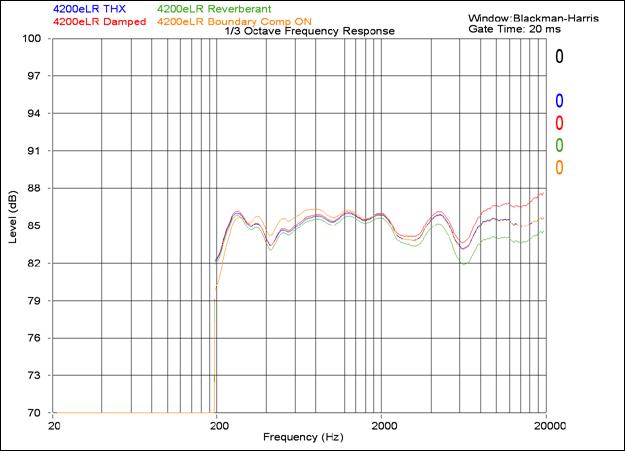
Here you can see the overall in-room frequency response of the system at 1 meter with the various "high Frequency Energy" settings available. On the main 4200e LR speakers Reverberant yields a 1.5dB drop in high frequency output, while Damped yields a 1.5dB gain. Depending upon your listening environment, this can be a great way to balance the system and yield a flatter summed response at the listening position. Boundary compensation is only partially shown on this response chart, but it effectively engages at midrange frequencies. While we did not have time to sufficiently test all possible positions, it would appear as if Boundary Compensation in this measurement also showed some gain from 280Hz through 600Hz.
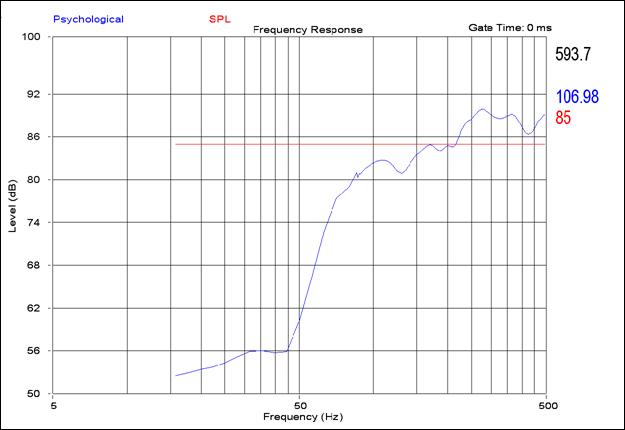
Here we see the lower rolloff of the 4200e LR speaker beginning at around 80Hz. The 4th-order crossover gives us a 24dB/octave slope which is fairly accurately represented here.
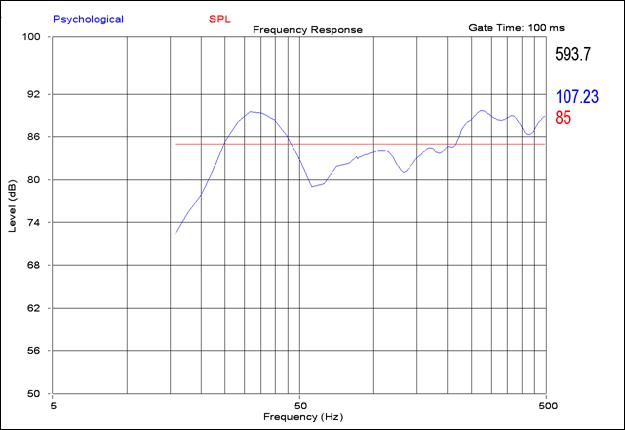
Adding the 642e SB subwoofer into the mix, we see that the system's in-room measurement shows usable frequencies down to 22.5Hz. Any anomalies in this measurement are a result of the room acoustics which are currently being treated in Reference System 2.
The Score Card
The scoring below is based on each piece of equipment doing the duty it is designed for. The numbers are weighed heavily with respect to the individual cost of each unit, thus giving a rating roughly equal to:
Performance × Price Factor/Value = Rating
Audioholics.com note: The ratings indicated below are based on subjective listening and objective testing of the product in question. The rating scale is based on performance/value ratio. If you notice better performing products in future reviews that have lower numbers in certain areas, be aware that the value factor is most likely the culprit. Other Audioholics reviewers may rate products solely based on performance, and each reviewer has his/her own system for ratings.
Audioholics Rating Scale
 — Excellent
- — Very Good
- — Good
- — Fair
- — Poor
| Metric | Rating |
|---|---|
| Build Quality | |
| Appearance | |
| Treble Extension | |
| Treble Smoothness | |
| Midrange Accuracy | |
| Bass Extension | |
| Bass Accuracy | |
| Imaging | |
| Soundstage | |
| Dynamic Range | |
| Performance |  |
| Value | |
Clint Deboer was terminated from Audioholics for misconduct on April 4th, 2014. He no longer represents Audioholics in any fashion.
View full profile Subscribe to our newsletter