


Soundcast OutCast Wireless Battery-Powered Outdoor Speaker
Soundcast OutCast Outdoor Speaker
- Product Name: OutCast Outdoor Speaker
- Manufacturer: Soundcast
- Performance Rating:

- Value Rating:
- Review Date: May 23, 2008 06:27
- MSRP: $ 699
Technical Features:
Features:
Pros
- Solid wireless connection
- Great range
- Overall very good sound quality
- Easy as pie setup
- Extremely long battery life
Cons
- Aesthetics
- Wall placement can degrade sound quality
- Expensive
OutCast Build Quality and Setup
 Wireless is all
the rage these days and more and more companies are throwing their proverbial
hat into the ring. Soundcast's OutCast system is an "all in one"
solution that seeks to give you unparalleled access to your music with a
wireless single speaker system. They aren't promising a complete two channel
experience but they are promising a speaker that can travel up to 150' in the
home and 350' outside! That's quite some range. On top of that, it interfaces
with either your iPod or any other two channel source (or even your computer). Either
getting your music anywhere in your house just got easier or you're about to
read a very scathing review.
Wireless is all
the rage these days and more and more companies are throwing their proverbial
hat into the ring. Soundcast's OutCast system is an "all in one"
solution that seeks to give you unparalleled access to your music with a
wireless single speaker system. They aren't promising a complete two channel
experience but they are promising a speaker that can travel up to 150' in the
home and 350' outside! That's quite some range. On top of that, it interfaces
with either your iPod or any other two channel source (or even your computer). Either
getting your music anywhere in your house just got easier or you're about to
read a very scathing review.
Build Quality
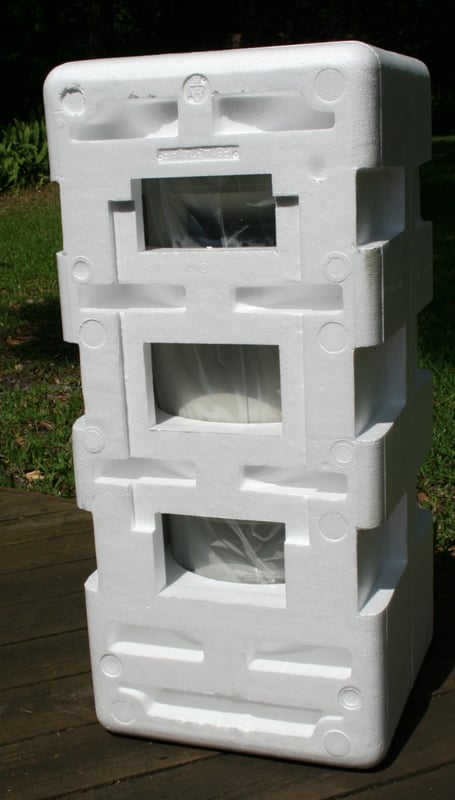
The Soundcast OutCast was well packed in a way that I'm not normally used to. I'm use to things being double boxed and with Styrofoam endcaps. What I am not used to is a Styrofoam cocoon. Contained within were the OutCast All-Weather Speaker, the iCast wireless transmitter, a power cord and a couple of connection cables. Each item had its own cubby hole in the cocoon and was held in place either by friction or tape.
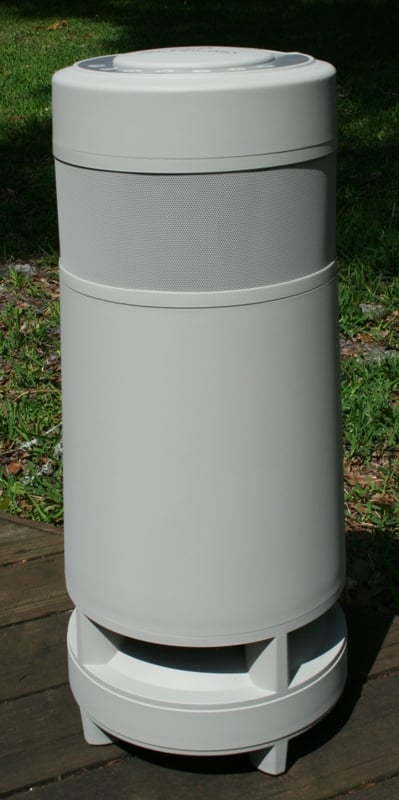
 The OutCast
looked, at first, like either an air purifier or a Diaper Genie (depending on
your frame of reference). To say that I wasn't in love with the aesthetics
would be an understatement. The stock photos make it look like a column though
it is really a bit thicker at the bottom than the top. I'd suggest that the
Soundcast group get that Dyson guy to consult on the next unit - if he can make
a sexy vacuum cleaner, he can surely make this thing a bit easier on the eyes. The
unit itself isn't terribly heavy though it does get a bit cumbersome after a
few minutes lugging it down the street (see below). There is a handle on the
top for easy transport. The unit sports a downfiring woofer that faces a convex
plate for 360 degree sound dispersion. There are four 3" drivers hidden
behind a metal grill pointing in the four cardinal directions. The unit is
constructed out of high impact plastic that is a sort of cream color. It feels
very solid and sturdy.
The OutCast
looked, at first, like either an air purifier or a Diaper Genie (depending on
your frame of reference). To say that I wasn't in love with the aesthetics
would be an understatement. The stock photos make it look like a column though
it is really a bit thicker at the bottom than the top. I'd suggest that the
Soundcast group get that Dyson guy to consult on the next unit - if he can make
a sexy vacuum cleaner, he can surely make this thing a bit easier on the eyes. The
unit itself isn't terribly heavy though it does get a bit cumbersome after a
few minutes lugging it down the street (see below). There is a handle on the
top for easy transport. The unit sports a downfiring woofer that faces a convex
plate for 360 degree sound dispersion. There are four 3" drivers hidden
behind a metal grill pointing in the four cardinal directions. The unit is
constructed out of high impact plastic that is a sort of cream color. It feels
very solid and sturdy.
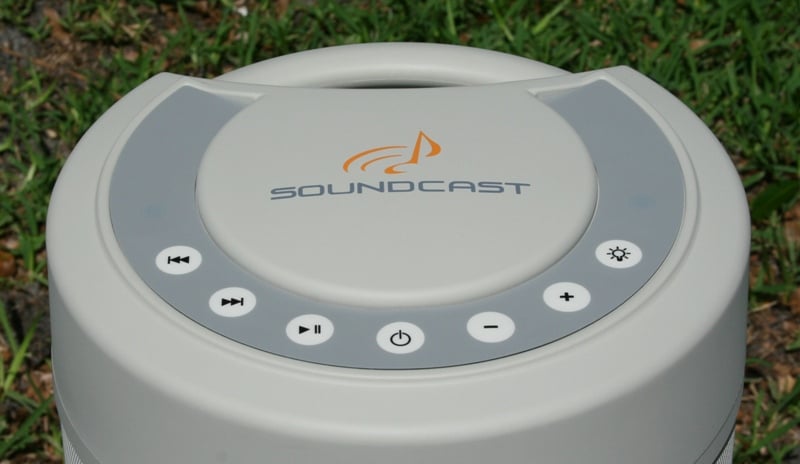
The top of the OutCast has controls for any iPod that is connected to the iCast so that you don't have to run back and forth to the iPod to skip songs. There isn't a display on it so you won't be surfing your different folders but you will be able to play, pause, and skip tracks forward and back. There is a power button, volume controls, and a light button. Oh, yeah, lights. There are two blue LED lights that will illuminate and reflect off two sides of the bottom convex plate. On the other two sides there are downfiring slot-style ports. We've been informed that there is a fine mesh grill inside of the unit to keep out debris or animals. According to Soundcast, the OutCast has been tested to IP64 standards which means that it is dust tight and can withstand "water splashing in all directions" whatever that means. The OutCast can't survive a dunking in a pool and probably shouldn't be hosed down if it gets dirty. When the unit is powered on, the top controls illuminate faintly but enough so that it makes it easy to see in a darkened room (or on a deck at night).
Editor's Note on Ported Outdoor Speakers in General
We fail to see how a speaker can truthfully be considered "all-weather" when it sports a ported design. "All-weather" includes sideways rain. Outdoor includes insects, lizards, and rodents. By definition, the driver (at least the cone) needs to be exposed for the port to have any effect. The OutCast sports polypropylene cones with rubber surrounds which should withstand the elements better than some that use paper and foam. But with the amount of humidity and condensation here in Florida, any part exposed to air is going to experience some amount of wetness. Unless all the components within the ported area are protected (unlikely), this would seriously reduce the life of the product. And while having bugs and animals take up residence in your outdoor speaker may not necessarily compromise performance, it is gross and something that we shouldn't be promoting. Since I live in Florida, I need less places for bugs to live in my life, not more.
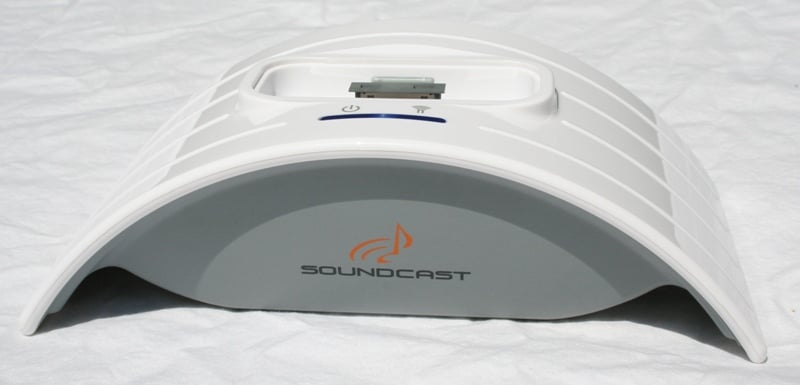
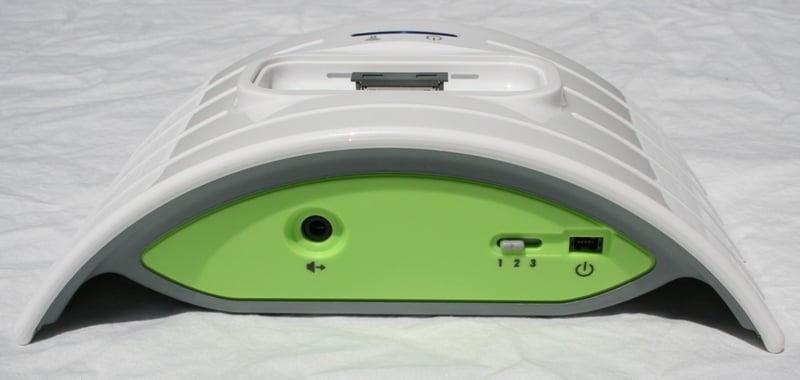
The iCast has a white semi-circle top, with an iPod dock/charger at the apex, and a gray bottom. The rear of the unit is green with a port for a power cord, a headphone jack, and a three setting channel selection switch. The iCast feels a little light for its size. While its stylized look goes well with iPods, it doesn't exactly match anything else in my system. The OutCast has a power cord port near the base and an Aux In and three setting channel selection switch near the top. All of the inputs and switches on the OutCast have rubber covers to keep them protected from the elements.
Setup
 The setup of the
OutCast and iCast is fairly simple. First, you need to install the battery into
the OutCast which is by far the hardest part of this setup. The battery
compartment is very tight and you'll need to finagle it a bit to make it fit.
This is, of course, by design. If the battery fit too loosely, it would vibrate
during heavy bass passages. The OutCast takes a few hours to completely charge
(you know it is done when the red light goes out) and uses a NiMH type battery so that charging memory isn't an issue. The manual states that it
will play for up to 10 hours on a charge which I found to be true. I left it
playing all day and found that it died out well over 12 hours later. The volume
was low most of the time but you are pretty much guaranteed that it will keep
the background music going until all but the most hardcore of your guests leave.
Once you plug in the iCast, you'll notice two lights on the top. One indicates
power and the other denotes a wireless connection has been established to the
OutCast. On the OutCast, there is a light for a wireless connection that glows
green when searching and blue when it is connected. From the time of powering
up both units, it usually took less than three seconds for a stable wireless
connection to be reached.
The setup of the
OutCast and iCast is fairly simple. First, you need to install the battery into
the OutCast which is by far the hardest part of this setup. The battery
compartment is very tight and you'll need to finagle it a bit to make it fit.
This is, of course, by design. If the battery fit too loosely, it would vibrate
during heavy bass passages. The OutCast takes a few hours to completely charge
(you know it is done when the red light goes out) and uses a NiMH type battery so that charging memory isn't an issue. The manual states that it
will play for up to 10 hours on a charge which I found to be true. I left it
playing all day and found that it died out well over 12 hours later. The volume
was low most of the time but you are pretty much guaranteed that it will keep
the background music going until all but the most hardcore of your guests leave.
Once you plug in the iCast, you'll notice two lights on the top. One indicates
power and the other denotes a wireless connection has been established to the
OutCast. On the OutCast, there is a light for a wireless connection that glows
green when searching and blue when it is connected. From the time of powering
up both units, it usually took less than three seconds for a stable wireless
connection to be reached.
The iCast and OutCast utilize the 2.4 GHz frequency for wireless connection. This is the same frequency used by your cordless phone (probably) and the same one that will experience interference from things like microwaves and wireless routers. The iCast and OutCast get around this by utilizing Frequency Hopping Spread Spectrum (FHSS) technology which is also used by the Bluetooth. This basically splits up the signal into many different channels using a pseudorandom sequence. This not only reduces (or eliminates) the effects of non-distance based interference but also allows more than one iCast/OutCast solution to be used in close proximity.
Which brings me back to the three position channel switches on both the iCast and OutCast. Basically, if you want to have two OutCast systems operating independently of each other, you can set them to different channels and each will only receive what the assigned iCast is sending. Needless to say, you can have more than one OutCast tuning in the same iCast signal. What you can't do, however, is assign left and right channels to specific OutCasts. Each OutCast receives a combined signal for the right and left channels.
 The
2.4 GHz transmission is supposed to be impervious to interference from devices
like microwaves while also not interfering with your 802.11b/g wireless
networks. I found that the former was true though the later was more in
dispute. I often take the path of least resistance when I am doing reviews. It
speeds up the review process and lowers my stress levels. I don't own an iPod
so I was looking for another device to connect to the iCast. Luckily, the
headphone jack switches to an input jack when there is no iPod present. You can
either connect this directly to a device (like a computer or MP3 player) via
3.5 mm jack (to the headphone or audio output) or to the right and left
analogue outputs of any device (like DVD/CD player) through a RCA to 3.5 mm
cable (both types of cables are supplied). The easiest analogue outputs I had
available where on the back of the recently reviewed Squeezebox Duet. The Duet
uses an 802.11g network to pull content from either the Internet or a networked
computer. Basically, I was streaming content to the Duet receiver, shooting it
over to the iCast via a cable, and then wirelessly to the OutCast speaker.
The
2.4 GHz transmission is supposed to be impervious to interference from devices
like microwaves while also not interfering with your 802.11b/g wireless
networks. I found that the former was true though the later was more in
dispute. I often take the path of least resistance when I am doing reviews. It
speeds up the review process and lowers my stress levels. I don't own an iPod
so I was looking for another device to connect to the iCast. Luckily, the
headphone jack switches to an input jack when there is no iPod present. You can
either connect this directly to a device (like a computer or MP3 player) via
3.5 mm jack (to the headphone or audio output) or to the right and left
analogue outputs of any device (like DVD/CD player) through a RCA to 3.5 mm
cable (both types of cables are supplied). The easiest analogue outputs I had
available where on the back of the recently reviewed Squeezebox Duet. The Duet
uses an 802.11g network to pull content from either the Internet or a networked
computer. Basically, I was streaming content to the Duet receiver, shooting it
over to the iCast via a cable, and then wirelessly to the OutCast speaker.
The problem I ran into was that the iCast seemed to interfere with the Duet's receiver reception and would block it if the two were too close. I had a similar problem with the Soundolier duo wireless speakers but to a greater extent. With the iCast I only had to move the unit a couple of feet away from the Duet receiver in order to eliminate the interference. With the Soundolier, the transmitter would cause reception problems at a much further distance. All and all, as long as you keep the iCast at least a few feet away from any 802.11b/g receivers/transmitters, you should be OK. If you are going to use the OutCast/iCast combo to stream directly from your iPod, this shouldn't be a problem as you can hook it up anywhere with a power outlet.
 The last thing I needed to check
out was the distance that the OutCast could be from the iCast. The manual
states that in home you should be able to travel 150 feet without audio
dropouts and outdoors (both units) it could range over 350 feet. I didn't take
the iCast outside as (again) I didn't have an easy source to take outside with
me. At the same time, I'm tempted to think that the 350+ feet estimate is based
on no line of sight obstructions, which, in my wooded neighborhood, just simply
isn't possible. Instead, I placed the iCast in my Home Theater near a window
and took the speaker outside. I must have looked quite the sight with the
OutCast over my shoulder playing select songs from the Pixies Doolittle album walking down the street.
I found that the more line-of-sight I had with that window, the further I could
go. Even with many intervening walls, trees, and fences I could make it one or
two houses down (each lot around here is about 150' wide) with a good line of
site netting me around 3 (close to that 350' mark). It seems like those
distance claims are just about right on. On my property, I was able to move
about freely without any audio dropouts. And in the end, that's all that really
mattered.
The last thing I needed to check
out was the distance that the OutCast could be from the iCast. The manual
states that in home you should be able to travel 150 feet without audio
dropouts and outdoors (both units) it could range over 350 feet. I didn't take
the iCast outside as (again) I didn't have an easy source to take outside with
me. At the same time, I'm tempted to think that the 350+ feet estimate is based
on no line of sight obstructions, which, in my wooded neighborhood, just simply
isn't possible. Instead, I placed the iCast in my Home Theater near a window
and took the speaker outside. I must have looked quite the sight with the
OutCast over my shoulder playing select songs from the Pixies Doolittle album walking down the street.
I found that the more line-of-sight I had with that window, the further I could
go. Even with many intervening walls, trees, and fences I could make it one or
two houses down (each lot around here is about 150' wide) with a good line of
site netting me around 3 (close to that 350' mark). It seems like those
distance claims are just about right on. On my property, I was able to move
about freely without any audio dropouts. And in the end, that's all that really
mattered.
OutCast Listening Tests and Conclusion
For these listening tests, I had the iCast connected via RCA to 3.5mm cable to the Squeezebox Duet. The Squeezebox is capable of streaming everything from MP3's to uncompressed WAV files flawlessly. I listened to a vast selection of Internet Radio stations and WMA Lossless files streamed from a networked computer. Overall, I experienced no audio dropouts regardless of music source distance within the confines of my property.
The Pixies - Doolittle The OutCast is obviously designed for sound reinforcement
which is evident by its driver arrangement. This is fine as long as you don't
place the unit near a wall. As I was walking around with the OutCast, I noticed
that the bass really benefited from being placed close to a wall but invariably
one of the 3" drivers would be facing the wall creating a bit of a slap
echo. It was noticeable enough that I felt that a close wall placement wasn't
really feasible. The bass response was a bit thin but respectable. You're not
going to hear any bone crushing sub frequencies, but kick drums and low bass
are represented. The starting bass line of track 13 - Hey came through convincingly and much of the pick work on the
guitar sounded realistic and detailed. Jacking up the volume, I was able to get
the OutCast to distort at the highest levels but for the most part it stayed
together really well. I wasn’t able to get super high volume levels out of it
(you won't be fueling any outdoor raves with the OutCast) but you could
certainly provide a good level of background music for an outdoor party.
The OutCast is obviously designed for sound reinforcement
which is evident by its driver arrangement. This is fine as long as you don't
place the unit near a wall. As I was walking around with the OutCast, I noticed
that the bass really benefited from being placed close to a wall but invariably
one of the 3" drivers would be facing the wall creating a bit of a slap
echo. It was noticeable enough that I felt that a close wall placement wasn't
really feasible. The bass response was a bit thin but respectable. You're not
going to hear any bone crushing sub frequencies, but kick drums and low bass
are represented. The starting bass line of track 13 - Hey came through convincingly and much of the pick work on the
guitar sounded realistic and detailed. Jacking up the volume, I was able to get
the OutCast to distort at the highest levels but for the most part it stayed
together really well. I wasn’t able to get super high volume levels out of it
(you won't be fueling any outdoor raves with the OutCast) but you could
certainly provide a good level of background music for an outdoor party.
I was definitely impressed with the audio quality of the OutCast overall. The high end sounded fairly well extended (which is a feat in and of itself with a 3" driver providing both tweeter and mid duties) and the midrange was well articulated. The bass was at times accentuated though for many albums this was a plus. The bass extension was good with the bass that was present well defined. While I was impressed with the audio quality overall of the OutCast, the dynamic range was a bit truncated. The OutCast defiantly sounded better the louder it played (to a point of course).
Marillion - Marbles If anything, this album sounded a little bass heavy through
the OutCast - especially when placed indoors. When taken outside, it sounded a
bit more natural. The OutCast had no real problems keeping up with the quality
material and only really faltered a bit when trying to reproduce the heartbeat
during the The Invisible Man. For an outdoor speaker I found the sound to be very
lifelike and quite natural. For a wireless speaker, I was very
impressed. As is the problem with these "all-in-one" solutions, it's
hard to say if any particular failing in performance is due to the driver,
crossover, amp, or wireless signal. Honestly, I found very little not to like
with the OutCast/iCast wireless solution.
If anything, this album sounded a little bass heavy through
the OutCast - especially when placed indoors. When taken outside, it sounded a
bit more natural. The OutCast had no real problems keeping up with the quality
material and only really faltered a bit when trying to reproduce the heartbeat
during the The Invisible Man. For an outdoor speaker I found the sound to be very
lifelike and quite natural. For a wireless speaker, I was very
impressed. As is the problem with these "all-in-one" solutions, it's
hard to say if any particular failing in performance is due to the driver,
crossover, amp, or wireless signal. Honestly, I found very little not to like
with the OutCast/iCast wireless solution.
I ended up jacking up the volume and taking the OutCast outside. I set it at one end of my backyard (next to the neighbor I don't like) and walked away from it. From 0 to about 7 feet it was pretty loud - too loud to hold a conversation. From 7 to about 15-25 feet it was a good volume - loud enough to hear but not so loud that you couldn't try your best pickup lines on the ladies. Beyond that I could hear the bass overtaking the treble and midranges and the vocals became harder and harder to make out. This was in a completely open area without the benefit of a bunch of bodies between me and the speaker. I would suggest that if you are going to try to cover a large area with the OutCast to make sure you place it somewhere where no one is going to be in the first five feet of it. Larger areas are going to require more than one (and in general, two would probably be best regardless of area size).
Suggestions for Improvement
While the OutCast shaped up to be a fine product there are some things that I wouldn't mind seeing in future iterations. The top control panel is great if you are using and controlling an iPod but doesn't do diddly for you if you are connected to anything else. I'd like to see either the play/pause button used to mute the incoming signal or perhaps an additional button for this function. Turning down the volume by hand is sometimes too tedious. While I didn't test the unit with an iPod, it is clear that in order to navigate to different playlists you'll need to return to the iPod and do this manually. The inclusion of a small LCD screen and a control wheel would mean that once I hooked it up, I wouldn't have to return to the iCast. For $699 they should be able to include this without raising the price of the unit. While you can hook up an iPod directly to the OutCast through the Aux In port and have it controlled locally, I still think this would be a welcome addition. As I mentioned above, a left/right/both switch would definitely be a welcome addition so that the OutCasts could be used in stereo. While it isn't always preferable (or even desirable) to use outdoor speakers in a stereo configuration, having the option would be nice. Lastly, I'd like to see the omission of the ports. Yes I know this would reduce the bass response but to be a truly "outdoor" speaker, you're either going to have to seal it, or somehow convince me that it would survive an extended outdoor stay in Florida weather.
Conclusion
Whenever I review outdoor or wireless speakers I generally have low expectations. This was completely unnecessary with the Soundcast OutCast Wireless speaker system. The audio fidelity was very good with only the lowest of frequencies noticeably absent. The iCast wireless transmitter was rock solid and had a very good range. In my neighborhood I could literally take it to my next door neighbor's house without having to move the transmitter! The OutCast may be a bit expensive but the portability and sound quality definitely justify the cost. Aesthetics aside, the OutCast is a beauty of a product. The ease of use and portability is just amazing. For those that want music in different rooms or outside (or both), this is the solution for you.
Soundcast OutCast Wireless All-Weather Speaker System
$699
Soundcast
Systems, Inc.
San
Diego , California
Toll Free: 1-800-722-1293
Phone: 1-619-591-0126
www.soundcastsystems.com
About Soundcast
Systems, Inc.
Soundcast
Systems is a privately funded wireless technology company offering
revolutionary plug and play wireless audio transmission systems that overcome
2.4GHz band interference, and empower digital music enthusiasts to listen to
music in high-quality sound throughout the home. In 2005, the company developed
a unique 2.4GHz audio transmission technology that prevents transmitted signals
from being distorted by outside interference such as cordless phones and
microwave ovens. Since then, Soundcast has developed easy to install, modestly
priced, high-performance wireless audio transmission systems that send tunes
wirelessly from an audio source (such as a digital music player) to an audio
sound system anywhere in the home.
The Score Card
The scoring below is based on each piece of equipment doing the duty it is designed for. The numbers are weighed heavily with respect to the individual cost of each unit, thus giving a rating roughly equal to:
Performance × Price Factor/Value = Rating
Audioholics.com note: The ratings indicated below are based on subjective listening and objective testing of the product in question. The rating scale is based on performance/value ratio. If you notice better performing products in future reviews that have lower numbers in certain areas, be aware that the value factor is most likely the culprit. Other Audioholics reviewers may rate products solely based on performance, and each reviewer has his/her own system for ratings.
Audioholics Rating Scale
 — Excellent
- — Very Good
- — Good
- — Fair
- — Poor
| Metric | Rating |
|---|---|
| Build Quality | |
| Appearance | |
| Treble Extension | |
| Treble Smoothness | |
| Midrange Accuracy | |
| Bass Extension | |
| Bass Accuracy | |
| Dynamic Range | |
| Ergonomics & Usability | |
| Ease of Setup | |
| Performance | |
| Value | |
As Associate Editor at Audioholics, Tom promises to the best of his ability to give each review the same amount of attention, consideration, and thoughtfulness as possible and keep his writings free from undue bias and preconceptions. Any indication, either internally or from another, that bias has entered into his review will be immediately investigated. Substantiation of mistakes or bias will be immediately corrected regardless of personal stake, feelings, or ego.
View full profile Subscribe to our newsletter