


Niles iC2 Remote Control Review
Niles iC2
- Product Name: iC2
- Manufacturer: Niles
- Performance Rating:

- Value Rating:
- Review Date: December 12, 2008 14:22
- MSRP: $ 995.95
■ RF Section: 2.4-GHz frequency ZigBee wireless mesh technology
■ Signal Range: 75 to 100 feet open air (22.86 to 30.48 meters)
■ Wiring Requirements: RG59 CL Antenna Cable (included), CAT-5 cable, 3
conductor 22-gauge cable, and 2 conductor 22-gauge cable
■ Trigger Output Voltage: Three assignable outputs at 12VDC 150mA
■ Contact Closures: Three assignable Normally Open/Normally Closed contact
closures rated to handle 12V @ 5 Amps each
■ IR Ports: 8 Routed IR Flasher Ports and 1 Routable Global IR Output Port
■ RS232 Ports: 8 Routed RS232 Output Ports
■ Component Syncs: 8 Power Status Sync ports rated to sense 12V 150mA
input signals or video voltage
■ IR Bandwidth: Compatible with virtually all brands of remotes using carrier
frequencies between 26 and 105KHz
■ Battery: Rechargeable Li-ion 3.75 volts 3500 milliamp/hours
Dimensions
■ Tabletop Control: 7.5" L x 5.2" W x 3" H (19 cm x 13.3 cm x 7.5 cm)
■ HT-MSU: 10.5" L x 6" W x 1" H (26.7 cm x 15 cm x 2.6 cm)
Warranty: Two-year limited
Shipping weight: Approximately 7 lbs (3.18 kg)
In the box:
Table Top Remote Control,
Main System Unit, Two Power
Supplies, Master Key Labels,
ZigBee® Antenna And Extension Kit
Pros
- bulletproof macros
- simple to use
- wife and babysitter friendly
- Li-ion battery
Cons
- no list button
- heavy
- requires two handed operation
Introduction & Features
Call me old-school, but I still like a hard-button remote control. Something about that tactile feedback combined with dedicated buttons still does it for me. As cool as touchscreen remotes are, you still typically have to drill down through several pages for each component in your system, and I have yet to find one that I can operate without looking at. I like a remote that has buttons I can "feel."
About 8 years ago, I bought a used Niles IntelliControl and programming module from an installer, and taught myself how to program it. I loved it. It was a big, two handed remote that you could not possibly lose in your couch cushions, and it was totally self-explanatory. I could just hand it to the babysitter or my in-laws, and they could figure out how to fire up the home theater without my help.
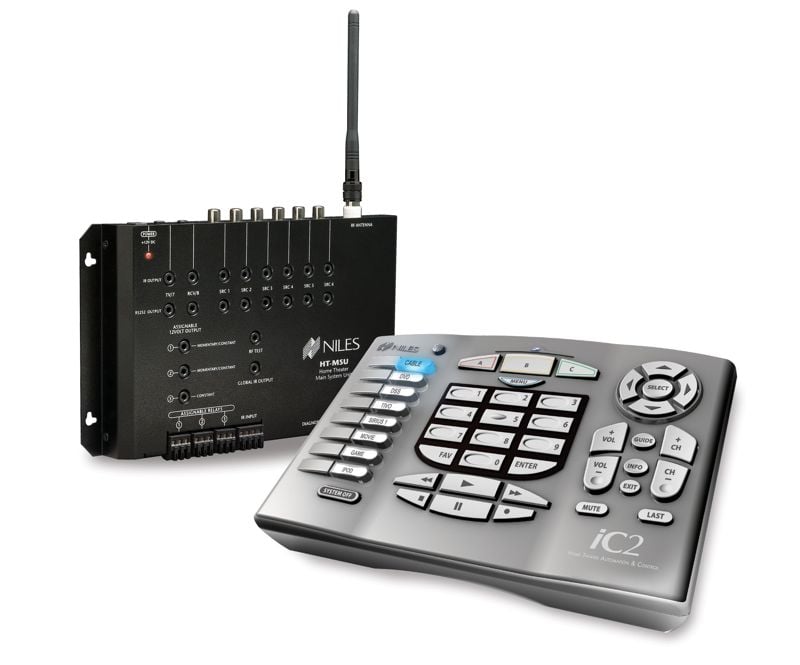 Niles introduced the original IntelliControl in 1994, expecting it to have about 5 years of life. Much to their delight, the product lasted 12 years as a result of its simple, no-nonsense approach that pleased both installers and consumers alike. Ken Johnsen has been with Niles for over 9 years, and started out as a training manager for the IntelliControl. For six years as he trained custom installers and integrators on the product, he received input. Enough input, in fact, to develop a new version of this great product. Niles wisely put Ken into place as the Product Manager, and he developed the new iC2. The challenge was to improve on a product that was already good, and make it great. A couple of the major improvements included replacing the expensive traditional alkaline D-cell batteries with a rechargeable Li-ion battery that has a 5-7 day life before needing a charge, and reducing the weight of the unit from 2.1 lbs. to 1.2 lbs. The redesigned form factor fits the hands better, too, with the user's thumbs in a natural position to accomplish most tasks.
For the redesign, one of the first issues was buttons. This was the obvious starting point for the product, as remote controls from cable and satellite boxes had outgrown the original buttons on the IntelliControl. As we discussed this, Ken said "I can never put enough buttons on this product." This is true - someone will always complain that a fixed button system is missing a control they want to have. So the concept was to create a layout that allows a user to accomplish 80% of his day-to-day tasks without any unlabeled functions. There is no power button, rather eight clearly labeled master keys that allow anyone to pick up the remote and understand it. Just press "DVD" to power up the system and have everything selected to start watching a DVD. There is a large "System Off" button that powers down your entire rig when you are done.
Not only did Niles put me in touch with Ken for this review, they actually sent him to my home to personally install the iC2 in my Audioholics Reference room. The system includes the tabletop remote and the Main System Unit, which we mounted on the wall behind my rack of gear. The concept of the system is simple - the remote communicates with the MSU via ZigBee RF wireless technology. IR flashers or RS-232 cables are wired from the MSU directly to each component in my rack, making for flawless communication with the gear. The MSU also uses video sync to determine the on/off state of components, so macros always work - the system always knows what is needed to accomplish any given task. With IR based remotes, macros can be interrupted if you walk in front of them or don't have them pointed at your gear while they are executing commands. And if your TV is already on, the sequence will probably turn it off. The iC2 system eliminates these problems.
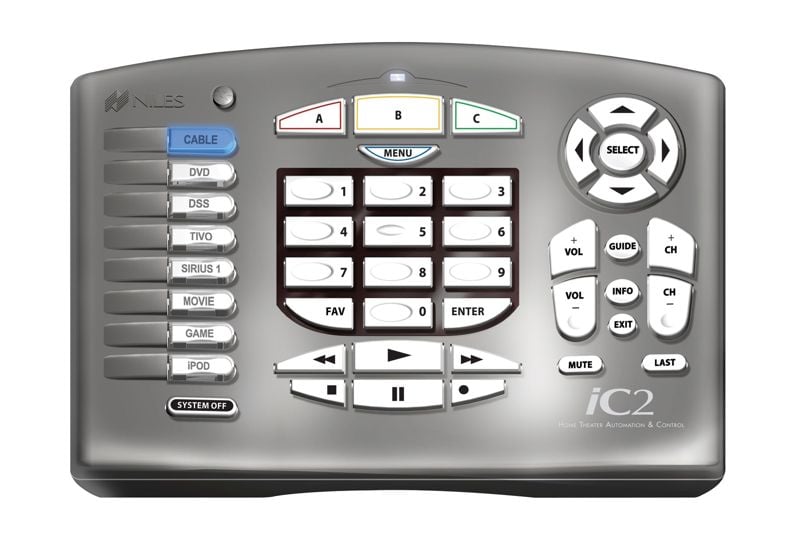 The layout of the iC2 is excellent and very intuitive. The remote consists of several clusters of function buttons. On the left, there is a column of eight Master Keys, which provide one-touch access for any home theater source (such as DVD, Satellite, Cable, Blu-ray, CD, etc.) or activity (such as GAMES, SPORTS, NEWS, LIGHTS). Underneath the Master Keys is the SYSTEM OFF button, which turns off your entire home theater system with a single touch. The center of the remote includes specialized navigation keys including "A", "B", "C", & "Menu" buttons, which double as red, yellow, green and blue buttons. These allow control of menus found in today's popular DVR, cable and digital media sources (not to mention Blu-ray and PS3 controls). Below this array are the number keys for access to channels and Master Key Favorites, as well as FAV and ENTER. Underneath the keypad are the traditional transport keys for controlling PLAY, STOP, PAUSE, FAST-FORWARD and REWIND functions of DVDs. CDs, DVRs and other sources. The right-hand side of the iC2 has menu navigation keys (up, down, left, right and SELECT) for control of source guides and on-screen displays. The volume and channel controls are ergonomically designed and positioned for frequent use. Rounding out the buttons are GUIDE, INFO, EXIT, MUTE, LAST and a button for the backlight (all buttons are backlit by a soft blue glow). The buttons have a very pleasing "click" and are large enough to be easy to use without looking. The backlighting is controlled by a proximity sensor, so it automatically illuminates when you reach for it. If you prefer, you can turn this feature off and have it light only when you press the backlight button. There is a tiny blue battery charge indicator on the top center of the iC2 that lights up when the battery is charging, and turns off when done.
The eight master keys are blank, and Niles ships a large sheet full of labels for input sources, channels, and custom functions. The clear master key buttons can be popped off so the installer can put the label inside of the clear button. All other buttons are permanently labeled. The obvious question is: "How do you deal with wanting to have more than nine customizable functions?" Let's say you want to have nine preset "favorite" channels. Maybe you are a sports nut, and you want to have all of your sports channels on buttons. Think of your car stereo. You probably have six or more presets. Within a few days of setting up those presets in your car, you know what station each (preset) number represents. With the iC2, you can have a "DirecTV" master key, and after pressing it you press FAV then "1" for ESPN or FAV then "2" for NFL, etc. Some will view this as a shortcoming of the iC2, but many will appreciate the tradeoff. On touchscreen remotes, you will typically have to drill through two or more pages to get similar functions. After a week of using the iC2, I found it very natural to get to some of my less-used functions, such as presets or changing channel guides.
The Main System Unit is a slim, wall hugging box that is completely redesigned. It includes eight routed IR ports and 1 routable global IR output port, allowing for IR routing capabilities, which is necessary for applications with multiple satellite or cable boxes, for example. There are eight combined video/voltage sensors for power status sync, and eight RS-232 output ports.
Ken described the MSU as a piece of gear that "lives and breathes based on status." Power-on deadtime is assignable, allowing for rock solid macros. Delays in the system are temporary based on status, so an initial "on" sequence might take a little time, but other moves don't have to. There are three assignable 12v trigger outputs that are completely programmable, as are the assignable relays.
Installation and Operation
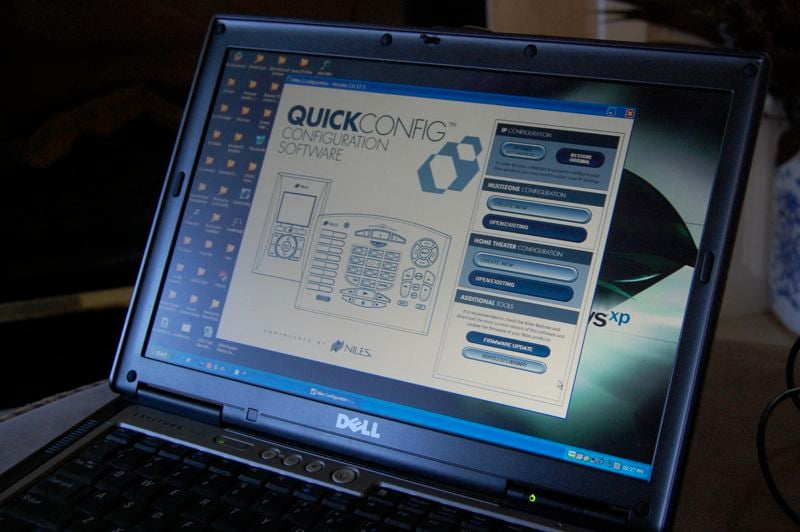
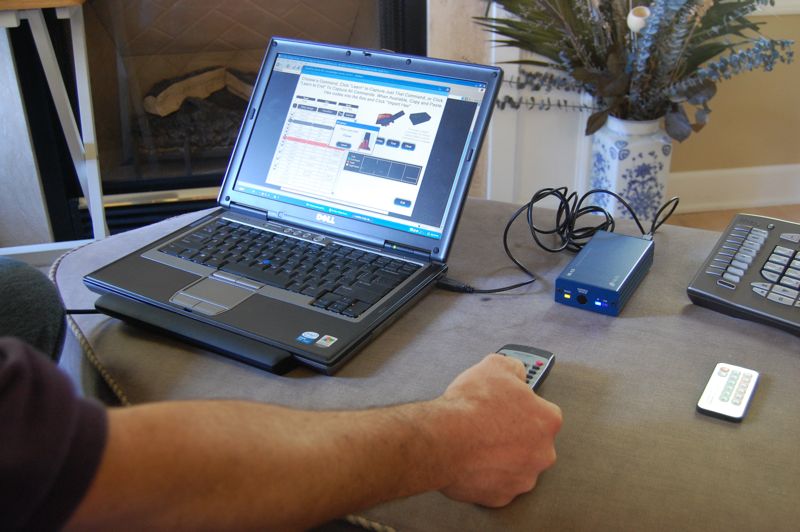 The iC2 is designed to be installed by dealers. In order to program and upload to the MSU, an IR-CS (IR Capture Station) is required. The programming interface is wizard-based, and is much simpler than the original software. It is an interview-style system that asks questions about what you want to accomplish. This cuts down on install time, saving the consumer money and the installer time. The programming software is dumbed down for the rookie installer, but is capable of taking the veteran as deep as he needs to go. Niles has an amazing library of remote codes, but the IR-CS allows for learning of any codes not in the library. As will be the case with most installers, Ken arrived with some of the programming already done, based on our earlier conversations and a list of my components that I had emailed him. We only had a couple of codes that we needed to "teach" the system once he arrived.
 We started by mounting the MSU on the wall, and then Ken began the tedious task of running IR flashers, RS-232 cables, and video sync cables to the components in my rack. We were able to use RS-232 on my Emotiva Pre/Pro, and used IR for the other components. This was probably the most time consuming part of the installation. While Ken routed the cables, I labeled the Master Keys. For my setup, I chose to label my buttons with the following: DirecTV, List (for the now playing list of the DirecTV DVR), Cable, Now Playing (for the cable DVR), DVD, HD DVD, CD, and NFL SUNDAY TICKET.
Once everything was labeled, programmed and wired up, I hit the DirecTV master key and the fun began. Everything just worked. And I had hard, clickable buttons (on one remote) to control all of my gear! After checking to make sure everything was working properly, we decided to try something a little deeper. Since I am huge NFL fan, I spend most Sunday afternoons watching NFL Sunday Ticket on DirecTV. With the Sunday Ticket package, about a dozen channels become active (on Sunday) that carry all of the NFL games. Throughout the rest of the week, these channels are not active and I don't want to have to scroll through them in my regular channel guide, so I have set up a custom guide just for these channels. So the challenge was for us to figure out a way for the iC2 to get me to the custom channel guide, then back to my normal channel guide. After much discussion and thought, Ken came up with a solution that was acceptable. We had programmed a master key (labeled NFL SUNDAY TICKET) to start up the system as per the normal DirecTV routines. But in this Master Key mode, the A and C buttons acted as macro triggers. Pressing the C button brings up the channel guide menu and selects NFL SUNDAY TICKET channel guide that I have created. Hitting the A button returns the system to my standard channel guide. So the routine works out like this: I hit the NFL SUNDAY TICKET button (turns on the the projector, pre/pro and DirecTV DVR) and then hit the C button, which changes the DVR program guide to my NFL channels. Once I am done for the day, before turning off the system I hit the A button, which changes the DVR back to my standard program guide (which does not include the NFL game channels). Then I can hit the power off button to power everything down.
 This example is a great illustration of the pros/cons of the iC2. Some will argue that it is too complicated to have to remember how to get to this macro we created. On a touchscreen, you could custom label some buttons to make it easier, but you would be drilling down into pages on your screen to get there. With the iC2, it is more like the car stereo example, of learning what a few unlabeled buttons do. It's a tradeoff I am willing to make in order to have a simple remote. For most day-to-day use, the remote is completely self-explanatory to anyone using it, which is what I like so much about it.
Conclusion
Overall, the usability of the iC2 has been very good over the past couple of months. I typically get about a weeks worth of normal use out of the battery before it needs recharging. The unit comes with a typical power block adapter similar to that of your laptop computer. I would prefer a charging dock that I could put on the top of my rack, but instead I am left with a stray wire that plugs into the back of the iC2. The buttons require a fairly solid push. There have been times where I did not press firmly enough to get a response, especially on larger buttons such as "Play." The backlighting is a cool blue that makes the labeled buttons as well as the transport buttons easy to read in the dark.
The Niles iC2 tabletop remote does not disappoint. In fact, it is the new permanent remote for the Audioholics Reference System 5. For a simple, easy to understand remote that won't get lost in your couch, it is hard to beat. The best feature of the iC2 is the same one I experienced with the original IntelliControl - you don't have to explain it to people. My wife and kids, babysitters, and even in-laws can all pick it up and figure out how to watch TV or a DVD in my theater, and that is the best feature I could ask for.
Over the years J. has constantly found himself to be an "early-adopter," spending way too much money on "new" technologies such as Compact Disc, LaserDisc, and DVD. He is one of the few people who actually purchased (and still owns) a CORE programmable remote control (bonus points if you remember this product).
View full profile Subscribe to our newsletter