


Yamaha RX-V2400 A/V Receiver Review
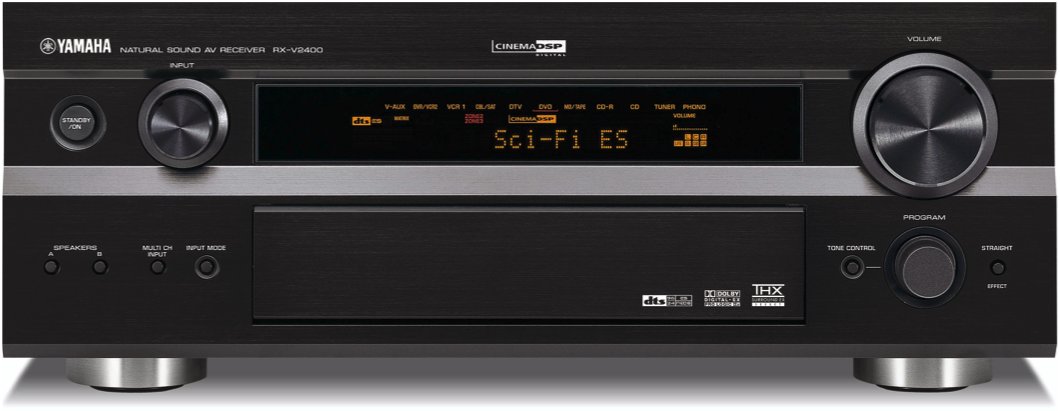
Yamaha RX-V2400
- Product Name: RX-V2400
- Manufacturer: Yamaha
- Performance Rating:


- Value Rating:
- Review Date: December 07, 2003 18:00
- MSRP: $ 999
Pros
- Excellent Sound For All Operational Modes
- Component Video Up Conversion.
- Uncommon Value
- Nifty Auto Set-Up & Room Correction
Cons
- Potentially Inaccurate Auto Set-Up
- No Sub Out In 2CH Direct Mode
Yamaha RX-V2400 Introduction
It wasn't too long ago that I got my start in home theater with a Yamaha mid line receiver known as the RXV-992. Compared to the new RX-V2400, the RXV-992 offered less power, only five channels of amplification, no DTS, no PLII, no component video switching, and no room correction or auto set-up features, yet both carried the same retail price of $999. At the time, the RXV-992 receiver was an excellent value as few, if any, in its price class packed all of its features and performance. That was then and this is now. The ever growing technological marketplace and continually increasing consumer expectations places more and more demands on manufacturers to push the envelope in development, performance, and value; at least as far as midfi goes. The high end audio industry is sometimes another story however, which we shall not expand upon in this review.
Yamaha RX-V2400 Features
THX
on a Yamaha Receiver?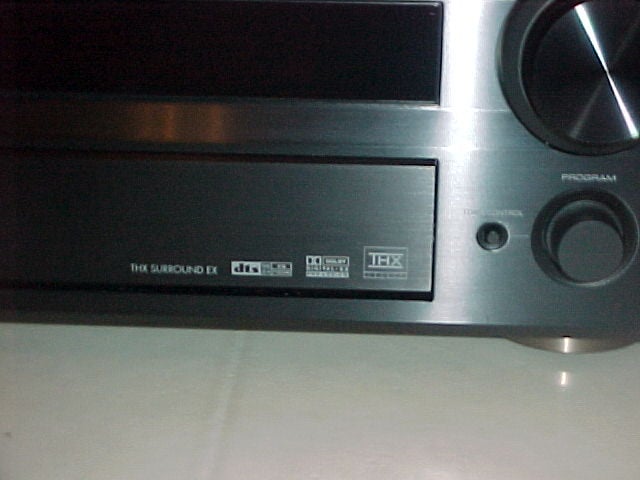 That's
right! The RX-V2400 is THX Select certified.
Many of the newer Yamaha receivers forthcoming
will be carrying the THX brand certification.
That's
right! The RX-V2400 is THX Select certified.
Many of the newer Yamaha receivers forthcoming
will be carrying the THX brand certification.
However, fear not, Yamaha still offers the option to defeat THX post processing in favor of its own infamous DSP processing modes.
Another first for Yamaha is adjustable bass management. Hurray at last!
The RX-V2400 is one feature packed receiver for its asking price. In fact, probably the most feature oriented receiver in its class currently offered.
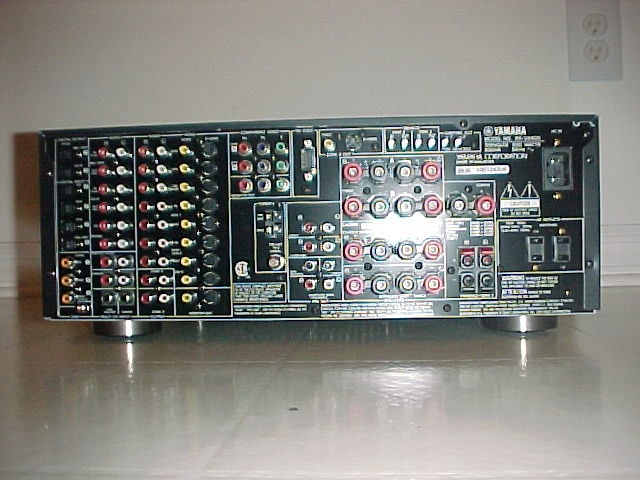 Yamaha
RX-V2400 Back
Panel
Yamaha
RX-V2400 Back
Panel
- All speaker terminal posts sport binding posts except the "presence" channels.
- Two component video inputs and one output featuring video up conversion with OSD.
- Detachable power cord and two switched outlets.
- EXT 6CH Analog Inputs, Three digital coaxial and five toslink inputs and two toslink outputs ensure all formats are covered.
The Yamaha RX-V2400 comes with all the fixings that until a couple of years ago, weren't even commonplace on any flagship offerings let alone a sub $1000 receiver. Some of these benchmark features include:
- 120 watts RMS to each of the seven channels.
- Component Video Up Conversion with OSD.
- Nine Adjustable bass management settings (40Hz to 200Hz, 10Hz step sizes from 80-120Hz).
 0.5dB channel trim
adjustments.
0.5dB channel trim
adjustments. - Subwoofer group delay adjustments.
- Independent channel trim settings for external inputs.
- Auto set up and YPAO 10-band (7 user) parametric equalizer for all channels.
To the RX-V2400's testament, there are still dedicated, so called high end processors selling for more than three times its price that don't offer five out of six of the features listed in the above bullets.
Back by popular demand the classic keypad with LCD window indicator Yamaha Universal remote debuted in the day when RX-V1 held the Flagship title. I really liked this remote because of its ease of use and flexibility and was happy to see Yamaha integrate it with their premier sub $1000 receiver.
Yamaha RX-V2400 Setup
Notes from the Above Pictures
- A massive 11.9 lbs 640VA Power supply
- 2 x 15,000uF 71V storage capacitors
- Complimentary Class AB push pull BJT's
These three attributes are responsible for the size and weight (35lbs) of the RX-V2400 and its ability to satisfy THX Select certification.
Given the size of the power supply, and the large storage banks, the RX-V2400 has potentially added headroom to better drive moderately difficult two channel loads. However, be cautioned that this receiver will NOT deliver anywhere near its rated power with all channels driven (nor is it specified too) which is not a realistic operational condition in any real world listening environment anyway.
I would venture to say based on the 640VA power supply rating and 71V caps, the RX-V2400 would easily deliver 120wpc X 2 and about:
- 80 wpc* (ref 1kHz) X 5 all channels driven
- 60 wpc* (ref 1kHz) X 7 all channels driven
*assuming line voltage held constant, 8 ohm loads
The Set-Up
The RX-V2400 was an unusual receiver to set up due to its auto set-up and YPAO integrated tools. While the auto set-up feature sounds like a cool idea, and possibly the neophytes dream feature in a receiver, there are no free lunches. I have discovered that great care must be taken in interpreting the results in any auto set-up feature for any consumer electronics device, and the RX-V2400 was certainly no exception.
Manual Set-Up
For those of you who are like me, and don't trust a computer, or machine for that matter, to automatically configure, Yamaha still entertains the old fashion way of doing things.
This is a pretty quick and nifty approach for manual set-up as it helps guide the user through to determine what size and number of speakers, as well as the room size, the RX-V2400 will be operating in. It essentially eliminates the speakers that are not connected from the test tone and calibration tests in proceeding menus. I speculate the room size has something to do with weighing the DSP parameter settings.
Impedance Selector Switch
I was pleased to find no impedance selector switch on the back panel common to all Yamaha A/V receivers I have seen in the past. However, my satisfaction quickly diminished when in revealed itself in the user menus.
I recommend the "Minimum 8 ohms" setting even for 4 ohm speakers of moderate efficiency ( > 89dB SPL). Yamaha includes a" 6 ohm" setting to satisfy UL as well as easing consumer concerns about driving low impedance loads. These switches step down voltage feed to the power sections which can limit dynamics and overall fidelity. My advice is to keep the switch set to "Minimum 8 ohms" regardless of the impedance of your speakers and ensure proper ventilation of the Receiver.
Auto Set-Up
I began as instructed in Yamaha's rather lengthy, but easier than normal to read, Users Manual. I placed the supplied microphone at the primary listening position of my home theater room and engaged the "Auto Set-Up" feature.
The auto set-up incorrect identified speakers being out of phase when they weren't as well as actual speaker sizes.
The error screens were sometimes a bit perplexing as to how to exit them and/or upon exiting, I often wondered if the tests that did pass get retained in memory?
Wiring Check
I was a bit concerned that right off the bat that the first auto test checking for wiring of my system incorrectly identified my front main channels being wired out of phase. I double checked the wiring of my speakers and audibly verified my front speakers were in deed in phase and that the RX-V2400 was in error. Interestingly enough when I moved the RX-V2400 into my bedroom system, it correctly identified the proper phase of all of my speakers. I could only speculate that somehow the more lively nature of my living room, or perhaps the more complex crossover/driver arrangement of my main reference speakers, was tricking the receivers phase test. As a side note, I checked with a colleague who recently purchased an RXV-1400 with Boston Acoustics speaker package, and he too had problems with the internal phase tester correctly identifying his systems phase. Yamaha also states in their user manual that the wiring identification check may identify some speaker systems or configurations incorrectly. I recommend interpreting the results of this test with a grain of salt. If it should report any of your speakers are out of phase, first check the wiring and then use the Avia or equivalent home theater set-up disc, to audibly confirm the proper phase of each channel. This is a good measure to practice on any home theater install regardless if the device has the built in ability to check it for you or not.
Distance Check
The auto set-up did a pretty commendable job at verifying the distance of each speaker from my listening position. In fact, Yamaha informed me that it is accurate within 1/10 th of a foot, though the user adjustments are limited to ½ ft step sizes. So, in reality its accuracy is limited to ½ ft, which is all that is needed in home theater and certainly more precise then many higher priced exotic processors. After proceeding through the entire set-up of this receiver, I did initially have problems with it correctly identifying the distance of my subwoofer. When it ran though its series of clicks and pops to determine distance, it did so with my sub at such a loud level that I feared it would blow the woofers out of the cabinet. When it did this, it claimed my subwoofer was only 0.1ft away when in fact it was more like 14 feet. In any event after I powered the RX-V2400 down and unplugged it, it again correctly identified subwoofer distance upon retest. This problem appeared to be an isolated incident and not worthy of further investigation.
Size Check
Here is another auto set-up feature that failed for my particular set-up. The RX-V2400 incorrectly identified my center and rear speakers as large despite their limited bass response. Most home theater systems have one or two active subwoofers usually connected to the sub out/LFE of the receiver/processor. Most center channel and surround speakers have limited bass extension by design, and they are usually placed above floor level further de-emphasizing their bass capabilities. Usually the best configuration for center and rear channels is to be set to small and subsequently allowing the bass to be rerouted back to the dedicated subwoofer(s). This will increase amplifier headroom since those channels set to small won't be stressed with low frequencies that the particular speaker(s) cannot reproduce well.
Yamaha RX-V2400 YPAO Automatic EQ
Another benefit would be increased dynamic capabilities of the small speakers by bandwidth limiting them to produce intended frequency range and lower driver excursions and stresses responsible for increasing non-linear distortions. Since the RX-V2400 only identified my back channels as small (which have very limited bass extension via their acoustic suspended 4" drivers), it set the crossover to 100Hz. This setting was too high for my particular set-up. I manually reconfigured the crossover setting to 60Hz which was optimal for proper bass integration of my speaker configuration in my listening room.
YPAO (Yamaha Parametric Room Acoustic Optimizer)
Perhaps the most distinguishing feature of the RX-V2400 is its inclusion of Yamaha's YPAO parametric active room correction equalizer. Unlike many of the first generation receivers implementing room correction, the Yamaha YPAO system is comprised of a ten band (seven user) parametric equalizer (not graphical) which adjusts level, frequency, and Q factor. Graphical equalizers adjust only amplitude response at fixed frequency bands, thus are not an effective tool for room correction at all in my opinion. Yamaha does offer a graphical equalizer as a programmable user option for every channel for additional fine tuning of your systems response in case you wish to forgo the YPAO system. When I selected the "Equalizing" portion of the "Auto Set-Up" feature of the receivers YPAO feature, it allowed for several equalizing options:
- Front - Applies equalization to all channels, except the mains, to attempt to achieve closest tonal response to the main channels.
- Flat - Applies equalization to all channels to attempt to achieve flat response.
- Low - Applies equalization to all channels with emphasis on low frequencies.
- Mid - Applies equalization to all channels with emphasis on mid frequencies.
- High - Applies equalization to all channels with emphasis on high frequencies.
I initially engaged the YPAO with the "Flat" setting to equalize all of the speakers in my set-up.
It was interesting to see how the YPAO altered the frequency response of even the similar speakers in my set-up, making one realize just how much of a profound impact the room acoustics have on a speakers sonic signature. It almost makes you wonder if using identical speakers for all channels for alleged perfect timber matching is really as critical as acclaimed giving how the room acoustics drastically affects speaker performance rendering identical speakers positioned at different locations to not sound so identical.
YPAO Specifics:
- Q Factor: 05 to 10.1
- Gain: -20 to +6dB (0.5dB steps)
- Frequency: 63Hz to 16kHz (1/3 octave)
Note: The RX-V2400's YPAO does not operate on the subwoofer channel, nor does it function below 63 Hz. This was a bit disappointing (but understandable) since active room correction is mostly needed in the low frequencies where simple room treatments (carpets, bookcases, furniture, acoustic paneling) have little to no effect.
Note: About the YPAO Yamaha Room Correction System
The
YPAO system uses pink noise sweeps to map the response of the room at
the listening position for each speaker. Pink noise delivers constant
power per octave and the YPAO attempts to equalize the magnitude
response accordingly. However, in attempting to achieve a "Flat"
frequency response, this can have deleterious affects on impulse
response and also reduce dynamic headroom in the amplifier if certain
frequencies are boosted as opposed to being attenuated. If for example,
the YPAO equalizes a +6dB gain centered around 3kHz, then the amplifier
would be tasked to produce up to four times the power for that
frequency band, thus reducing headroom and potentially causing
compression, and/or distortion. Additionally, if the YPAO system
attempts to compensate for a speaker deficiency by creating a boost
because of improper crossover design and/or some other speaker anomaly
or strange impedance characteristic, when coupled to an amplifier this
can actually create a dangerous effect as it can potentially drive some
amplifiers into oscillation when boosting under these circumstances.
However, if the speaker is flat in performance and the amplifier is not
taxed at the frequencies being boosted, then the this scenario is
unlikely to occur, with the only possible penalty of compensating for
the direct sound of the speakers as opposed to resolving a deficiency
in ambient or reflected energy in the room. Ideally, these mid and high
frequency issues should be dealt with at the source, namely the room
(assuming the speaker and amplifiers are designed right).
If you consider the basic relationship of sound and propagation through air given the following formula:
lambda = v / f
(where v = velocity (speed of sound =1140 ft/s STP and f = frequency (Hz) ) then we see the wavelength of sound for 63Hz = 18 ft and for 16kHz = .86 inches!
Thus altering high frequency room response will affect only a very small listening area above a couple of hundred Hertz. High frequency harmonics are generally close together, if not overlapping, and their corresponding intensities are far less than the fundamental, making them more dependent on listening position. Another issue to consider with high frequency room correction is that the measuring microphone cannot accurately measure direct to reflected sound. The goal of room correction is to correct for room anomalies, not the loudspeakers (assuming the loudspeakers are of sound design). Altering the frequency response of the loudspeakers in this fashion changes the direct sound to compensate for a deficiency in the ambient or reflected sound field caused by the room. This may in fact alter the direct to reflected sound at the listening position further deteriorating imaging of the loudspeaker and corrupting the critical first arrival of sound. Ideally active room correction would best be applied at frequencies below 200Hz where sound is more difficult for the listener to localize. Utilizing a more precise parametric equalizer may be applied to analyze room modes to construct notch filters to reduce the excessive room decay times (RT60- # of milliseconds it takes for a sound to decay by 60dB).
Alternatively, a point to consider is that some room correction systems actually do address speaker non-linearities as well as room interaction affects. The problem is that most systems are not able to distinguish between the non-linearities of the speaker versus the non-linearities induced by the room. In some cases in may not really matter. For instance, in the bass frequencies smoothing out the response may involve changing phase and gain at certain frequencies. As long as the correction is made for the listening position we probably don't care how much of the problem is speaker or room related. For that matter, I can understand why the Yamaha YPAO system does not attempt correction at very low frequencies. It would take much more reserve power than the receiver is capable of delivering. In this respect limiting the correction to a moderately low frequency is understandable and in fact quite necessary. Of course that doesn't change the fact that we would all like compensation down to the very lowest frequencies. Practically speaking Yamaha could NOT put a correction filter on the LFE output because the power necessary for correction would way overtax most subwoofers (amplifier and driver excursion). It may however behoove Yamaha to introduce their own active servo subwoofer integrating low frequency room correction with a system much like many of Velodyne's latest product offerings. A system that initially measures nearfield power response of the speaker as well as impulse response and then takes into consideration a measurement which shows room decay time would probably make for an even more accurate correction system. Now if only a manufacturer would build such a system affordably!
Yamaha RX-V2400 Level Check
The level check was the last auto test set-up feature that the RX-V2400 performed. This test absolutely required a quite room to properly perform. My ceiling fan actually caused it to give me an error message "Noisy".
After the level checker was complete, I measured each channel level using both the Yamaha internal test tones and my trusty Avia disc. I found the worst case channel balance differences between channels to be about 1.5dB off and confirmed this with both test tone suites. The good news here is that the auto set-up did configure a reasonably accurate channel balance between channels automatically, and that the internal test tones in the receiver were accurate. The not so good news is I had to manually tweak each channel trim for greater accuracy.
It's interesting to note that maxing the master volume level (+9.0dB) doesn't fill the bar completely. This is due to range limiting if any of the channel trims are set beyond 0dB. When I returned all of the channel trims to default 0dB, the master volume level maxed out at +13dB.
However, since most receivers and processors don't yet incorporate auto level calibration, I would normally have had to do this anyway, so to me it's no deal breaker. I believe the level discrepancies may have been a result of the auto level checker using short tone bursts as opposed to continuous pink noise traditionally used when manually calibrating a system using an SPL meter. The tone bursts in the auto level set-up may emphasize the direct sound from the speakers while the pink noise in manual configuration may be interpreting the ambient sound field in the room. Ideally, they'd both should be the same but that's seldom the case with real rooms and real speakers. However, given the peaky and sometime steady state in sound, I would probably choose the latter for the most accurate speaker level calibration.
The RX-V2400 refreshingly had 0.5dB trim adjustments for all channels which is still uncommon in many higher priced processors. As a side note, we have found some receivers / processors and DVD players internal test tones to be somewhat out of whack, especially when calibrating at different reference levels. The Yamaha test tones, however, identically tracked Avia's when the master volume levels were set to produce the same reference levels. In addition, I achieved accurate channel trim balances for all reference levels I tested during the set-up phase. This didn't surprise me since I have consistently found Yamaha receivers to have incredibly accurate test tones and channel tracking.
The Sound
What good is a feature packed receiver or any A/V gear for that matter if it cannot deliver the goods in sonic performance? Our viewpoint is sound first, features second. With that here is my subjective impression of the RX-V2400 for the gamut of playback modes I put it through.
Two Channel Audio
With all DSP processing and room correction features turned off ( " Pure Direct " Mode), I began my two channel critical listening tests on my reference mini monitor Status Acoustics Decimo's in my bedroom system. The Decimo's are an 8 ohm, moderately efficient load and don't require gobs of power to shine, just quality clean power. Here is where the RX-V2400 really delivered quite admirably. The noise floor (especially in "Pure Direct" mode) was commendably low (published spec of 100dBA, 250mV reference translates to over 112dB @ 1V), comparable to what I recalled from the venerable RX-V1 and RX-Z1 flagship Yamaha receivers. The DAC section in the RX-V2400 was top notch. In fact, switching back and forth between using my bedroom SACD changer DAC's for CD playback vs the internal DAC's in the RX-V2400, I preferred the latter. When the RX-V2400 served as the DAC, it sounded more open, and detailed in the high frequencies. The amp section proved to be quite dynamic, more so then my Harman Kardon integrated amplifier that currently comprises my bedroom system. I felt that RX-V2400 again had a more open and punchy presence than my integrated amp, but was a bit more analytical sounding. I definitely felt that this was the best sounding sub $1000 receiver I have yet to hear Yamaha produce. My old RXV-992 always seemed (dare I say) "bright" sounding with my speakers, and it wasn't until my eventual upgrade to the DSP-A1 that things smoothed out considerably. With the RX-V2400, I didn't feel like two channel playback was bright or stringent in this set-up. In fact, I threw a pair of Dynaudios and Von Schweikert bookshelf speakers at it and was constantly pleased by how the Yammie was delivering the sonic goods with no signs of distress or pungent sound character.
I was curious to see how the YPAO function would alter the sonic signature of my beloved Decimo's so I placed the mic at my primary listening position and let the RX-V2400 send out its series of sonar sounding bat signals to optimize the system. With the YPAO feature engaged (flat setting), my speakers had a definitively more forward tonal quality, especially in the midrange and highs and sounded louder and more dynamic upon first listening. However, over time switching back and forth, I found the YPAO seemed to focus the soundstage into a more delineated sweet spot, but at the sacrifice of imaging. My speakers no longer seemed to have their infamous disappearing sound characteristic. Instead, they sounded a bit boxier and closed in. This was particularly more noticeable on analog inputs that now had to undergo and extra A/D and D/A conversion to incorporate the DSP processing of the YPAO feature. I also gave the YPAO a crack at the Dynaudio's I currently have in my listening room. In this case, the YPAO dulled the sound of these already sonically warm speakers. Again, I preferred no room correction for these speakers. The reader must be cautioned however, that the sonic attributes noticed here were founded on speaker systems of incredibly high resolution that in a decently controlled acoustical environment really didn't require any room correction whatsoever. Some may actually prefer how the YPAO system alters their speaker systems response, especially if there are inherent deficiencies in the design and corresponding performance. Though I preferred no YPAO setting over defeat, I repeated the YPAO calibration for the other offerings (IE. Low, Mid, High) and found the best blend was achieved in the original "Flat" setting for my Decimo's and the High setting for the Dynaudio's. I recommend determining how YPAO works in your system before ruling it out as a viable option for room correction or speaker performance compensation.
For kicks I wanted to see how the RX-V2400 would perform in my living room when connected to my larger, moderately efficient 4 ohm (89dB SPL 1 watt/meter) reference speakers. It is unlikely that an end user would mate a pair of $5500 speakers with a $1000 receiver, but I figured what the heck, might as well try it. Again, I was mightily impressed with how the RX-V2400 handled itself. Though it wasn't quite as smooth or refined sounding as what I was accustomed to in a $4K+ receiver or dedicated amplifier, it certainly was no slouch by any means. If one were to use this receiver in a very high performance playback set-up with inefficient speakers in a moderately large sized living room, I would encourage preamp outing at least the front three channels to a dedicated monster sized amp. This will help reserve the power supply and amplifiers added headroom to better power the back and surround channels.
Yamaha RX-V2400 Multi-channel Audio
The remaining portion of this review was conducted in my medium sized living room environment with my moderately efficient 4 ohm RBH Sound reference speakers. Again, this was a pretty demanding load for a sub $1000 receiver to handle and certainly not representative of what most users would be doing. However, here at Audioholics .com, we enjoy pushing products to their limits and being dazzled when they deliver beyond expectations. The RX-V2400 certainly did exceed my expectations. I did not expect a sub $1000 receiver to have the ability to power my entire 7.1 reference system with such clarity and authority. Playback via the EXT multi channel inputs for sources such as DVD-A and SACD exhibited extremely low noise floors typical of Yamaha higher end receivers.
I was also pleasantly surprised to find that Yamaha reserved independent level controls via its EXT inputs, a feature not common even to many costlier separate pre/pro's. Having independent level settings for DVD-A and SACD is vital due to inherent format differences, especially for the subwoofer output which could be 10-15dB lower in SACD / DVD-A than DD /DTS in some players for example.
SACD: Norah Jones - Come Away with MeI was excited to finally purchase my first multi channel SACD. I have heard so many good things about Norah Jones and the fidelity of her recordings so it made for a sensible buying option. I started with Track#1 " Don't Know Why ", although a good song, overplayed for my tastes, thus I quickly passed it over to Track#2, " Seven Years " and was rewarded with a very enveloping guitar gracefully panning throughout the front three channels without drawing distraction to the rear channels by unnaturally over emphasizing them like I have heard on far too many DVD-A multi channel recordings.
The percussion's in this track surrounded very three dimensional and lifelike making me long for more of what this disc had to offer. TracK#5 " Come Away With Me" put me right where I needed to be with the very airy and smooth brushes of the cymbals and melodic relaxing, crystal clear vocals from Norah Jones. Track#9 " I've Got To See You Again " surrounded me with Norah's powerful vocal ballads urging me to crank the volume even higher because it just sounded so good. By now it was clear to me that the RX-V2400 was handling high resolution formats exemplary demonstrating that noise floor and distortion were not limiting factors of reproducing the musical nature of this format as I have heard in some lower priced receivers and moderately prices pre/pros.
Playing the wonderfully recorded multi channel DVD-A Graham Nash "Songs for the Survivors" gave the RX-V2400 quite a work out. After about five minutes of blasting this disc, I muted the volume and noted the RX-V2400 cooling fan was engaged and the receiver was warm to the touch. I strongly encourage users to allow for good top and back ventilation for this receiver if you plan on playing it at high sustained volume levels in medium to large sized rooms with moderately efficient speakers ( < 89dB SPL @1meter). Don't panic, the fan was very quite and only audibly noticeable when I turned down the volume and stood within a few feet from the receiver. When playing at these sustained volume levels I noted the RX-V2400 maintained good composure, but took on a slightly forward tonal nature in the midrange with a bit of edginess in the highs. However, I don't know of any receiver at the $1000 price point that would fair better under such circumstances. At slightly less than insane listening levels, the RX-V2400 always sounded well focused, and fluid. At low volume levels, all resolution was preserved, as I have been accustomed too on my reference system.
Home Theater
As I have noted in previous Yamaha receivers, home theater is truly where their RXV series excel. Yamaha has always been unequalled in their DSP processing to enhance the movie watching experience and the RX-V2400 proved to be no exception. While I found the DSP modes to be too numerous and over emphasizing in most applications, I did manage to find a few favorites and tweak them to more subtle settings that worked better in my system. I was happy to see Yamaha include their proprietary dedicated front effects channels, or in their new nomenclature "Presence" channels. However, if you opt for back channels, you are left with no "Presence" channels. I would have liked to see Yamaha offer the ability to preamp out say the front channels, and reroute those unused channels to the "Presence" channels for a full blown 9.1 channel playback system. This would be the ultimate solution for the audiophile who desires a dedicated external power amp for their main channels, but wants the ability for a 9.1 speaker configuration, basically allowing them to have their cake and eat it too. However, I suppose Yamaha is reserving this speaker configuration for their forthcoming RX-Z9 flagship receiver.
Most of my home theater evaluation of the RX-V2400 was done in the traditional 7.1 configuration (back surrounds, no presence channels). I started with the discrete DTS ES DVD of Gladiator. The opening scenes of this movie are both visually and audibly impressive. I really did enjoy having the back channels in this instance and felt it did expand the surround field and smooth out panning between channels. Switching between THX and Yamaha DSP cinema modes, I preferred the latter. The THX mode in my setup did seem to expand the rear soundfield, but at the expense of dulling out the front channels, most likely do to the REQ feature of THX. However, some listeners may prefer this in their set-ups so by all means choose what is right for you.
I found the better DSP modes in my set-up were "Spectacle and Adventure". I have always been a fan of the "Adventure" mode, but only after toning down some of the parameters. To me this soundfield really does enhance the movie watching experience, especially if you can take advantage of the dedicated front effects channels.
The RX-V2400 didn't disappoint. The bloodbath battle scenes were well conveyed with all the sense of detail and conviction I was accustomed too, only this time I had a little DSP enhancement to make things sound a bit BIGGER in scope that ordinary processing.
For the record, there are only two instances when I prefer a Yamaha DSP mode over conventional processing (ie. DD /DTS, DPLII,DTS Neo,etc):
-
Old music concert videos
-
Some action based movies
Other than that, I usually stick to the regulars, especially DPLII for older music CD's.
Yamaha RX-V2400 Conclusion and Summary
Suggestions for Improvement
It is really difficult to fault a $1000 mass market receiver that does so many things so extraordinarily well that many higher dollar exotics dare not challenge. However, being the Audioholic I am , and the very nature of this website, I do have some critiques aimed in making this product and all forwarding Yamaha products even better.
-
Parametric room correction (1/12th octave resolution or better) for low frequencies (where it is needed most) with bandwidth limiting application say 20Hz to 200Hz for all channels, including the subwoofer.
-
Ability to limit room correction amplitude increments to within a specific +/- range.
-
Manually adjustable PEQ settings.
-
Multiple equalization settings to accommodate different listening positions.
-
Subwoofer output in two channel "Direct" mode by paralleling the incoming audio signal via a relay to the DSP for processing to the subwoofer.
-
On the fly non-retained channel trim adjustment capability.
-
Independent subwoofer level and crossover settings for two channel and multi channel modes of operation.
-
Ability to reroute main channels to "Presence" channels for a 9.1 set-up with external power amps for the main channels.
This is a long laundry list, and certainly not meant to suggest the RX-V2400 is lacking for its price point.
Conclusion
 It may seem that I am being overly critical of this receiver to some
readers, but please understand I do this to set a precedent for
manufacturers future product advancements. The Yamaha RX-V2400 is an
extraordinarily good product and value, and in my opinion, fills a
marketplace that no other product in its price class currently does. It
offers a quick auto set-up for the neophyte that will at least achieve
a reasonably good sounding configuration some users ordinarily wouldn't
be able to achieve manually, and allows for user tweakable adjustments
to improve those settings. It even has a bi-directional RS-232
interface and a receiver editor feature allowing the user, or more
commonly, the custom installer to set-up, configure, and retain
programmable settings on a computer incase of the event of memory
failure or accidental user erasure/modification of settings. Two multi
zone settings (one with power amp assignability, the other passive with
triggered outputs) allows for the receiver to serve as the demarcation
point for house wide entertainment with minimal components required.
It may seem that I am being overly critical of this receiver to some
readers, but please understand I do this to set a precedent for
manufacturers future product advancements. The Yamaha RX-V2400 is an
extraordinarily good product and value, and in my opinion, fills a
marketplace that no other product in its price class currently does. It
offers a quick auto set-up for the neophyte that will at least achieve
a reasonably good sounding configuration some users ordinarily wouldn't
be able to achieve manually, and allows for user tweakable adjustments
to improve those settings. It even has a bi-directional RS-232
interface and a receiver editor feature allowing the user, or more
commonly, the custom installer to set-up, configure, and retain
programmable settings on a computer incase of the event of memory
failure or accidental user erasure/modification of settings. Two multi
zone settings (one with power amp assignability, the other passive with
triggered outputs) allows for the receiver to serve as the demarcation
point for house wide entertainment with minimal components required.
While YPAO is not perfect, it does demonstrate a step in the right direction and the manufacturers willingness to increase product performance and ease of use for the average user in the not so ideal room environment. If you abandon all of the auto set-up and room equalizing features, you are left with a 7.1 multi channel receiver that delivers solid performance and features that were uncommon in a product of this price class only one year ago.
If you go one step further and abandon the internal amp sections for the five main channels in favor of a dedicated multi channel amp, you are left with a pre/pro that rivals many costlier dedicated pre/pros in performance and function with amps to power the proprietary DSP modes in a traditional 5.1 set-up, or to power multi room / multi source applications. Any way you look at it, the Yamaha RX-V2400 is a terrific bargain and a definite trendsetter for receiver manufacturers to follow suit.
The Score Card
The scoring below is based on each piece of equipment doing the duty it is designed for. The numbers are weighed heavily with respect to the individual cost of each unit, thus giving a rating roughly equal to:
Performance × Price Factor/Value = Rating
Audioholics.com note: The ratings indicated below are based on subjective listening and objective testing of the product in question. The rating scale is based on performance/value ratio. If you notice better performing products in future reviews that have lower numbers in certain areas, be aware that the value factor is most likely the culprit. Other Audioholics reviewers may rate products solely based on performance, and each reviewer has his/her own system for ratings.
Audioholics Rating Scale
 — Excellent
- — Very Good
- — Good
- — Fair
- — Poor
| Metric | Rating |
|---|---|
| Multi-channel Audio Performance | |
| Two-channel Audio Performance | |
| Build Quality | |
| Ergonomics & Usability | |
| Ease of Setup | |
| Features | |
| Remote Control | |
| Performance |  |
| Value | |
Gene manages this organization, establishes relations with manufacturers and keeps Audioholics a well oiled machine. His goal is to educate about home theater and develop more standards in the industry to eliminate consumer confusion clouded by industry snake oil.
View full profile Subscribe to our newsletter