


Yamaha RX-Z9 A/V Receiver Review
Yamaha RX-Z9 A/V Receiver
- Product Name: RX-Z9
- Manufacturer: Yamaha
- Performance Rating:

- Value Rating:

- Review Date: July 03, 2004 19:00
- MSRP: $ 4499
|
Power: 170W x 7 + 50W x 2 (8-ohms,
20Hz-20kHz, FTC) |
Video Inputs:
6 component
video inputs, 7 composite RCA, 5 s-video |
Pros
- Excellent Sound for All Operational Modes.
- Component Video Upconversion and Digital Processing.
- Benchmark Audio Performance.
- Slick Auto Set-Up & Room Correction.
- i.Link for DVD-A / SACD.
Cons
- Potentially Inaccurate Auto Set-Up.
- No Sub Out In 2CH Direct Mode.
- Runs extremely hot to touch.
- No DVI or HDMI.
- Low Current +12V Triggers.
Yamaha RX-Z9 Introduction
About a year ago, during my review of the venerable Yamaha RX-Z1 flagship A/V receiver, I stated "Some day Yamaha is going to build a bigger, badder, and more feature packed Receiver". Well it just so happened that day was today as evident by Yamaha's new super-receiver, the RX-Z9. For the past few years Yamaha stood idly by while their competition was duking away the right to reign supreme as the flagship receiver king. The fight involved stealing business away from the separates marketplace by offering the latest in processing power, features and configurability with integrated amplifier sections powerful enough to drive large home theater systems to theatrical levels. It was no surprise to me that Yamaha eventually would join the party by introducing a revolutionary receiver that would have its competition grasping for air playing catch up in an industry where you're only as good as your most recent accomplishment.
Yamaha RX-Z9 Overview
Perhaps one of the biggest surprises on the new RX-Z9 is its THX Ultra2 certification. Can Yamaha's legendary DSP post processing and THX post processing coexist in one product? Read on to find out.
THX on a Yamaha Receiver?
 That's right! The RX-Z9 is Ultra2 certified. Many of the newer Yamaha
receivers are now carrying the THX brand certification such as the
RX-V1400 and RX-V2400. The front panel of the RX-Z9 is also endowed
with many of the latest advancements in home theater audio and video
processing such as
Faroudja's DCDi video processing, DTS 96/24 decoding, i.Link for
DVD-A/SACD playback via a single digital connection, and much more.
That's right! The RX-Z9 is Ultra2 certified. Many of the newer Yamaha
receivers are now carrying the THX brand certification such as the
RX-V1400 and RX-V2400. The front panel of the RX-Z9 is also endowed
with many of the latest advancements in home theater audio and video
processing such as
Faroudja's DCDi video processing, DTS 96/24 decoding, i.Link for
DVD-A/SACD playback via a single digital connection, and much more.
The RX-Z9 is one feature packed receiver regardless of asking price. In fact, it is definitely the most feature-oriented receiver currently in existence.
Yamaha RX-Z9 Back Panel
All speaker terminal posts sport WBT binding posts (a nice touch typically found on more expensive amplifiers). Six component video inputs and two outputs featuring digital video up conversion with OSD, along with a host of s-video and composite video connections, ensure almost all of your latest video gear is covered. However, with a back panel this well equipped, I wonder where Yamaha will find the space to accommodate a next generation product with DVI / or HDMI switching? For now you will have to directly connect your DVI enabled gear to your Display. The RX-Z9 comes with a detachable power cord and two switched outlets for your power connection needs. It supports 7CH EXT multi-channel analog Inputs, four digital coaxial (1 with RF Demodulator) and eight toslink inputs and three toslink outputs, i.Link, to ensure all the latest and future audio formats are covered. The Yamaha RX-Z9 comes with all the fixings that currently none of its Separates competitors and only a handful of super receivers offer such as:
- GUI user interface with simplified remote control operation.
- Digital processing and Component Video Upconversion with OSD.
- Nine Adjustable bass management settings (40Hz to 200Hz, 10Hz step sizes from 80-120Hz).
- Top of the line Burr Brown PCM-1792 DACs which superbly handle DVD-A and SACD.
Note: the PCM/DSD-1792 are basically identical other than slight differences in pin configurations. Both handle PCM and DSD in their native formats or in PCM for SACD if you desire bass management.
- Stereo Subwoofer/LFE outputs with independent level and group delay adjustments.
- Auto set up and YPAO parametric equalizer for all channels.
- Active i.Link for DVD-A and SACD
To the RX-Z9's testament, there are still dedicated, so-called high end processors selling for more that don't offer a majority of the features listed in the above bullets.
Yamaha RX-Z9 RAV229 and RAV17 Remote Control
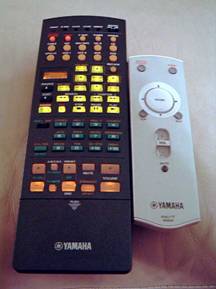 Back by popular
demand is the classic keypad universal remote control with LCD window indicator (RAV229) Yamaha debuted
in the day when RX-V1 held the Flagship title. I do like this remote, but couldn't help missing the
touch screen RAV-2000. Its graphical display and ease of programming were uncommon as far as touch
screen remotes go. However, this remote was moderately easy to program, and contained many of the
manufacturers codes. It was also a nice treat to be able to have certain buttons control different
devices even when the remote was set for operating a particular device. For example, toggling the RX-Z9
to "CD"
input allowed me to control my CD Changer with the buttons on the top half of the
remote, while I could still channel surf via the buttons on the bottom half of the remote. You can also
use the "learn"
feature to customize any button to suite your needs.
Back by popular
demand is the classic keypad universal remote control with LCD window indicator (RAV229) Yamaha debuted
in the day when RX-V1 held the Flagship title. I do like this remote, but couldn't help missing the
touch screen RAV-2000. Its graphical display and ease of programming were uncommon as far as touch
screen remotes go. However, this remote was moderately easy to program, and contained many of the
manufacturers codes. It was also a nice treat to be able to have certain buttons control different
devices even when the remote was set for operating a particular device. For example, toggling the RX-Z9
to "CD"
input allowed me to control my CD Changer with the buttons on the top half of the
remote, while I could still channel surf via the buttons on the bottom half of the remote. You can also
use the "learn"
feature to customize any button to suite your needs.
While these remotes look basic enough, their feature set and control over all things Yamaha and all things not was most impressive. The RAV17 was absolutely captivated me with its simplistic one button joystick style navigation of the RX-Z9 GUI interface. While most A/V receiver advances in technology lead them to become more complicated to operate, the RX-Z9 just became much simpler. So much so, that I suspect even the Spouse would welcome the mini remote GUI approach. The RAV17 came in really handy for quick navigation through the RX-Z9 GUI, and, in my opinion, was actually more comfortable and palatable to use than the RAV229 for this task. The RAV229 remote did prove to be essential if you wish to operate all of your accessory equipment, however, and the backlight was both useful and essential during late night operation. I found most of the codes for it to operate my equipment, but had to manually program button by button for certain devices such as my satellite box, DVR and VCR.
Inside the Yamaha RX-Z9
-
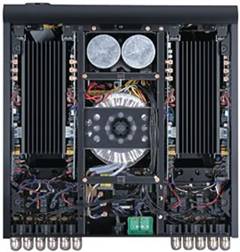
 A massive 1.2KVA toroidal transformer and two 28,000uF 80V Power Supply
Capacitors endow the Yamaha RX-Z9 with one of the largest power supplies ever conceived into an A/V
receiver. In fact, peering into the schematics, I found the rail voltages for the power amps to be
+-65V which is actually overkill for a 170wpc power amp based on determining rail voltage by the
following formula:
A massive 1.2KVA toroidal transformer and two 28,000uF 80V Power Supply
Capacitors endow the Yamaha RX-Z9 with one of the largest power supplies ever conceived into an A/V
receiver. In fact, peering into the schematics, I found the rail voltages for the power amps to be
+-65V which is actually overkill for a 170wpc power amp based on determining rail voltage by the
following formula:
Vrail = SQRT(2*P*R) where P = 170 watts and
R = 8 ohms, we get: Vrail = 52.2V + 10% overhead (good rule of thumb)
= 52.2V + 5.2V = +-57V. Yamaha has +-8V of margin on top of a normally
conservative design practice!
-
Its no wonder the RX-Z9 received THX Ultra2 certification and passed their 3.2 ohm loaded all channels driven torture test without a problem.
 Given the size of the power supply, and the large storage banks, the RX-Z9 has
potentially added headroom to better drive difficult speaker loads without missing a beat. However, be
cautioned that this receiver is not specified to deliver its rated power with all channels driven -
which is usually not a realistic operational condition in any real world listening environment anyway.
The all channels driven test represents a worst case test condition with a best case test load but it
does serve as a uniform way of determining a receiver's actual true power capabilities. Considering the
power supply rating and 80V caps, the RX-Z9 would easily deliver 170wpc X 2 as specified and mandated
by FTC regulations for manufacturers' power claims, and about 140wpc X 7 all channels driven (assuming
line voltage held constant, 8 ohm loads), perhaps a tad less at full bandwidth and unclipped.
Given the size of the power supply, and the large storage banks, the RX-Z9 has
potentially added headroom to better drive difficult speaker loads without missing a beat. However, be
cautioned that this receiver is not specified to deliver its rated power with all channels driven -
which is usually not a realistic operational condition in any real world listening environment anyway.
The all channels driven test represents a worst case test condition with a best case test load but it
does serve as a uniform way of determining a receiver's actual true power capabilities. Considering the
power supply rating and 80V caps, the RX-Z9 would easily deliver 170wpc X 2 as specified and mandated
by FTC regulations for manufacturers' power claims, and about 140wpc X 7 all channels driven (assuming
line voltage held constant, 8 ohm loads), perhaps a tad less at full bandwidth and unclipped.
I do have reservations about how Yamaha chose to arrange the heatsinks of the power amp sections on the RX-Z9. The issue of comparing heatsinks vertically mounted on the sides of a unit vs. heatsinks mounted horizontally on the top of a unit is a little complicated, but I will do my best to assess the differences here. First, a few formulas. In general, for an object being cooled by natural convection:
Delta T = Q/(h-sub-c * A) [1]
where delta T is the temperature rise, Q is power dissipated, h-sub-c is the heat transfer coefficient and A is the surface area of the object.
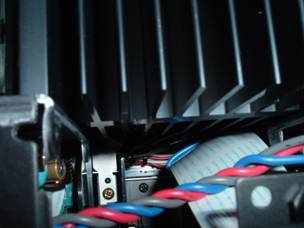
Not depicted here, there are dual fans on the bottom side of the chassis that help force convection during high power demands. In my listening tests these fans only came on after pounding the RX-Z9 amps in extremely loud multi-channel DVD-A listening sessions for extended periods of time.
When you have a plate oriented vertically (like a heat sink),
h-sub-c = 0.29 * [(delta T)/L]^0.25 [2];
where L is the length of the item in the vertical direction. So according to the first formula, the higher your heat transfer coefficient, the less your temperature rise will be. According to the second formula, the less the length of your object in the vertical direction, the higher its heat transfer coefficient will be.
But, wait! The fins on top of the RX-Z9 have a shorter length in the vertical direction than the fins of alternatively vertically side mounted heatsinks of other receivers and should therefore, be more efficient. According to the math, it is true. But you have to think about the airflow. Heat rises. So when the air rises past heat sink fins of the vertically side mounted heatsinks, the air below the fins rises to fill the void and the process continues. This is why it is called natural convection; you will get a flow of air without any mechanical effort. Now think about the horizontally top mounted heatsinks of the RX-Z9. When the warm air tries to rise off these fins, cool air can't replace it nearly as easily. Air can't rise from below to fill the voids between the fins like it can in the vertically side mounted heatsinks. It can only trickle in from the perimeter of the unit. Actually, if you ran a computer model, you would find that towards the center of the top of the RX-Z9, the fins will be contributing almost nothing. It is almost like they aren't even there because they are so starved for air. It a nutshell, that is the difference between the two. This does explain why the Yamaha RX-Z9 runs significantly hotter than any receiver I have ever had the pleasure of reviewing, even during idle. Unfortunately the heatsinking topology employed by Yamaha is externally starved for naturally-convected cooling air and I highly recommend the user and/or customer installer be cognizant of this to allow plenty of air flow and perhaps forced air cooling if necessary.
Video Processing
Yamaha offers some very unique video processing features in their latest flagship receiver as evident by the digital video upconversion and DCDi processing powered by Faroudja. The integrated digital processing in the RX-Z9 allows you to tailor picture adjustments (brightness and contrast, sharpness, saturation, 3D NR and cross color suppression to reduce picture noise from the brightest of display images). It also does video scaling and upconversion of interlaced 480i signals to 480p/576p, 720p and 1080i as well as aspect ratio control or pass-through for both PAL and NTSC Display types. Be advised however that copyrighted signals such as DVD, will not be processed above 480p via the RX-Z9 even if you select higher resolution settings. If you have a DVD player such as the Denon DVD-5900 which does video upconversion to 1080i via DVI, you may be better off going that route to your Display. In fact, I found that when the Yamaha Video Processor was enabled, the Avia resolution test was now displaying resolution limits of about 475 lines, as compared to over 500 lines of resolution when the DVD-5900 did the de-interlacing. The 6.75MHz test window was displaying no discernible vertical lines like it did when the DVD-5900 was used as the de-interlacer. What was likely happening here was roll off within the RX-Z9 processing at the resolution limits of the DVD format. Again, my advice here is to use the RX-Z9 processing features only for composite video / S-video sources, or when you utilize a non progressive scan DVD player, or a player/display with a low quality de-interlacer, that would benefit from the RX-Z9 processor/scalar over that of your Display and/or DVD player.
The RX-Z9 also upconverts all composite and S-video sources to component video, but only if you enable the digital processing engine. For non interlaced video sources such as those from progressive scan DVD players, the digital processing of the RX-Z9 is bypassed, as it should be, even if you have it set to the “On” position. This is ideal for those who want to rely on the video scaling and processing of their DVD players, while also using the RX-Z9 video processing on their composite or S-video sources. I have had mixed results with the digital processing feature of the RX-Z9, including picture flickering via my VCR with certain video software.
However, I did note a more dynamic and smoother, almost film-like picture with the Processor engaged on many of my composite video sources such as my Dish Network DVR recorder, and some video tapes. “Mars Attacks” was a great demo tape to really show off the RX-Z9's ability to transform an old VHS classic into a modern day pseudo 7.1 surround sound spectacle at near DVD picture quality style. In contrast, my daughter's tapes such as Cinderella caused the picture flickering I previously discussed. Perhaps this is why on page 78 of the RX-Z9 manual, THX recommends turning off all video processing to achieve optimal video performance. My advice here is to experiment with the Yamaha video processing engine to see how it improves composite video sources. I suspect on large displays, or even front projector systems with poor de-interlacing circuitry, the advantages of this feature set would become paramount.
Yamaha RX-Z9 Setting Up and Configuration
The RX-Z9 was an unusual receiver to configure due to the presence of Auto Set-up and YPAO integrated tools. While the Auto Set-up feature sounds like a cool idea, and possibly a neophyte's dream feature in a receiver, there are no free lunches. I have discovered during my review of the Yamaha RX-V2400 that great care must be taken in interpreting the results in any auto set-up feature for any consumer electronics device, and the RX-Z9 was certainly no exception.
Manual Set-Up
For those of you who are like me, and don't trust a computer, or machine for that matter, to function automatically, Yamaha still entertains the old fashion way of doing things. This is where I began my configuration process of the RX-Z9. I wanted to see how well I could get this receiver tweaked on my own and compare its sonics to that of the RX-Z9's Auto Set-up.
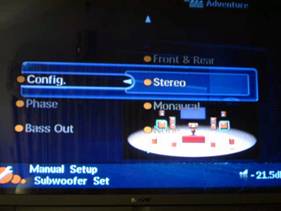 It was love at first sight for me with Yamaha's Graphical User Interface (GUI). I thought to
myself how cool it would be if every manufacturer employed these in their next-generation receivers and
processors.
It was love at first sight for me with Yamaha's Graphical User Interface (GUI). I thought to
myself how cool it would be if every manufacturer employed these in their next-generation receivers and
processors.
Yamaha really earned some brownie points with me by offering dual subwoofer outputs with your choice of mono, stereo, or front & rear. What was even more impressive was that each subwoofer output had independent channel trim, delay and phase settings. One thing I learned well from my HAA training was how critical it is to compensate for path differences between multiple subwoofer systems and the primary listening area.
More often the case than not, physically constraints force the installer to place the sub(s) within certain room locations. If they choose locations where the path differences between the two subs are ½ the wavelength of a particular frequency band within the pass band of the subwoofers, then those frequencies will cancel at the listener which can be measured by a dramatic dip in audible response within that range.
Fear not, for the RX-Z9 does allow for path difference compensation, at least laterally, helping minimize this problem in multi-subwoofer system installations. It is also important that independent level control compensation for each sub is built into the RX-Z9's bass management. Speaking of the RX-Z9's bass management, I was pleased to find a variable crossover, a Yamaha first to be incorporated into their flagship receivers.
|
RX-Z9 Variable Crossover Settings |
|---|
|
40Hz to 80Hz with 20Hz stepsizes |
|
90Hz to 120Hz with 10Hz stepsizes |
|
160Hz to 200Hz with 40Hz stepsizes |
For years I have been bugging Yamaha to offer variable crossover settings on their receivers (at least on their flagships). Ironically when they finally started doing this, I upgraded to a speaker system that works best with a high crossover setting.
The internal 1/6th octave bass test tone from 35Hz to 250Hz included in former Yamaha flagships such as the DSPA1, RX-V1, and RX-Z1 were absent this time around. It was a shame because this great feature, rarely found on most costly dedicated processors, let alone receivers, helped me to identify bass phasing problems in my early days when I lacked the test gear to measure it or was too lazy to root it out listening to music. In any event, the variable crossover setting, independent group delay and level control for the subs, and subwoofer pairing assignability more than makes up for this minor feature loss.
Manually setting the channel trims on the RX-Z9 proved to be a bit more challenging than my former experiences with other Yamaha receivers. Simply pressing the "Test Tones" button unveiled an assortment of speaker options where the pink noise would temporarily engage on each speaker before toggling to its associated grouping. You can also select for the pink noise to toggle through all of the speakers in the set-up. The problem I had initially was that the test tones only played on each particular speaker for about three seconds, thus not giving my SPL meter enough time to settle for an accurate measured response. I was later pleased to find that holding down the "enter" key for a few seconds locked the particular channel on which the pink noise was being played so you could have time to adjust with more precision.
I was a bit disappointed that the RX-Z9 had only one provisioned global channel trim setting. This was especially alarming since even the RX-V2400 and former flagship RX-Z1 incorporated independent channel trim settings for the EXT analog inputs. This is particularly important when playing high resolution formats such as DVD-A/SACD for compensating for subwoofer level output differences. However, after a bit of experimenting with the RX-Z9, I found that the EXT subwoofer analog inputs of the RX-Z9 were internally compensated (this was not documented in the user manual), but apparently only if you engage the "pure direct" mode (which one should do anyways to eliminate an extra processor conversion stage and preserve signal resolution.) I was able to balance the system reasonably well by also tweaking the channel trims in my Denon DVD-5900 Universal DVD player.
When I initially engaged the "Multi CH" input to play a DVD-A disc, I noticed my Display went blank. I was a bit perplexed by this, and assumed that the RX-Z9 did not provision video pass thru via the Multi CH input. I later found via the Input Selector of the GUI interface a "BGV" which I interpreted as "Back Ground Video" was set in the "off" position. You can choose "Off," - "Last" or actually select your choice input. I set it for "DVD" and presto, my Display was showing the menu for my DVD-A disc and I could now happily configure it before listening
i.Link / IEEE 1394 Firewire Digital Interface
In defense of the RX-Z9, not having multiple channel trim settings
quickly became somewhat of a moot point since it did have i.Link (IEEE 1394) for digital transmission
of DVD-A/SACD from i.Link compatible players. This is a tremendous feature and critical for those
serious about high resolution multi-channel audio. The advantage here is you now divert the decoding,
bass management and level controls to the receiver/processor where everything is processed in the
digital domain, and theoretically already configured during the set up for
DD
/DTS (with exception to the subwoofer level balancing to compensate for
format differences). There has been a lot of discussion on many internet chat groups about the
capabilities of Firewire as a defacto digital standard for passing high resolution DVD-A/SACD formats.
Most of this discussion seems to reside around the issue of jitter and how it affects the fidelity of
these formats.
Some Notes About i.Link / IEEE-1394 Firewire
1) Firstly, FireWire is a balanced interface. The modern "low voltage differential serial" interfaces are *all* based on the original work done to develop Firewire back in the early '90's. The low level interface is a pair ofLVDS signals (2 pair) in addition to very aggressive grounding for those systems that are not galvanically isolated (the "b" form of 1394 supports both copper and optical connections, and the copper connections can be transformer coupled if necessary).2) The amount of jitter for audio applications is arbitrarily small. The IEC 61883-6 transport method used for 1394 allows each audio source to provide its own sample clock, and the sync can follow that clock with arbitrary accuracy and stability. It's totally up to the system cost budget how stable the PLL must be. For more information on this, suggestive reading material on this topic can be found at:
http://www.1394ta.org/Press/2003Press/january/White_paper.pdf
3) The AES (audio engineering society) has been working with 1394 specs for some time, and the experts there have no problem with the quality of 1394-based transports. There are a few AES specs based on 1394 networks.
Note: IEEE-1394 / Firewire / i.Link / Lynx are all names describing various manufacturers depiction for cables belonging to the IEEE-1394 standard. IEEE-1394 is the new, extremely fast external serial bus standard that supports data transfer rates of up to 400 Mbps (400 million bits per second). It is used primarily for multimedia devices such as camcorders, computers, video cassette recorders (VCR's), digital audio recording workstations and, in this case, a digital transport for high resolution audio.
After doing some research on this topic and more importantly, listening tests, I have little reservations about the validity of this interface to carry all current audio formats for consumer audio. The benefits of having a single digital connection between the Universal DVD player and Receiver, as well as having all of the processing done at a single demarcation point, the receiver (where it should be) is invaluable. Other manufacturers' proprietary solutions such as Denon's DLink are no less valid.
 However, they do restrict you to sticking with one brand of equipment should you choose
to take advantage of their proprietary digital interface.
However, they do restrict you to sticking with one brand of equipment should you choose
to take advantage of their proprietary digital interface.
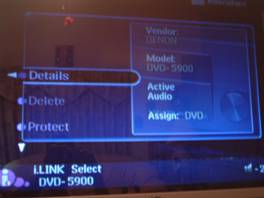
It was a cool sight seeing the Denon DVD-5900 insignia pop up on the Yamaha RX-Z9 OSD. Hooking these two devices through i.Link was as easy as pie. In the RX-Z9 OSD, I assigned i.Link to the DVD input so that I could have all of my audio sources from my Universal DVD player on the same input as my video.
The neat thing about i.Link is you can daisy chain up to 17 compliant components or up to 63 components in a branched configuration when 3 or more i.Link connectors are available.
Impedance Selector Switch
As with all Yamaha A/V receivers, the RX-Z9 has that dreaded impedance selector switch. However, they seem to get more and more clever with each generation receiver of hiding it from the consumer. With the RX-Z9, you have to hold down the "Speakers A" button while pressing the "On" button and then select either "Speaker A" or "Speaker B" to select the impedance.
Impedance Selector Switch
I recommend the "Minimum 8-ohms" setting even for 4-ohm speakers of moderate efficiency ( > 87dB SPL). Yamaha includes a "6-ohm" setting to satisfy UL as well as easing consumer concerns about driving low impedance loads. These switches typically step down voltage feed to the power sections which can limit dynamics and overall fidelity. My advice is to keep the switch set to "Minimum 8-ohms", regardless of the impedance of your speakers and ensure proper ventilation of the Receiver.
Biamping the RX-Z9
Unfortunately, the RX-Z9 cannot be bi-amped using the unused internal amplifiers on the unit. The RX-Z9 reserves the 50wpc amps for either "Presence" speakers or "Zone2". You don't want to bi-amp using the 50watt amp as you would lose headroom doing so. Since the RX-Z9 lacks power amp inputs for the surround back channels, you cannot reroute front channel signals to those amplifiers. Perhaps in the future, Yamaha would consider offering this option as a strappable feature to customers wishing to explore a 7.1 system (conventional 5.1 + Presence Speakers) with the front channels bi-amped in favor of using surround back channels.
Yamaha Receiver Editor Software Feature
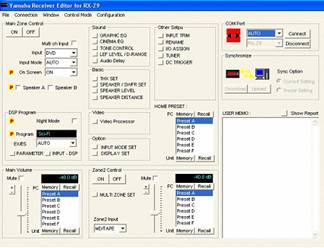
Another selling point and unique identifying feature of the RX-Z9 is its bi-directional RS-232 interface and receiver editor feature allowing the user, or more commonly, the custom installer to set-up, configure, and retain programmable settings on a computer in the event of memory failure or accidental user erasure/modification of settings. This feature is intended to be used by the custom installer, or a highly experienced user who desires to save all of the major configuration settings of the RX-Z9 (except YPAO settings) after the receiver has been fully set-up. The installer can also preconfigure the RX-Z9 with common settings prior to ever actually operating the unit, or customize bass management and level settings for different operational modes (IE. DVD-A, DD /DTS, 2CH,etc).
Yamaha RX-Z9 Auto Set-Up and YPAO Configuration
What good would Yamaha be if their latest technological achievement in receivers didn't explore the latest fashionable craze in automatic setup and room correction? Only a few years ago it was difficult to affordably acquire the processing power to take on such a feat. Today, Yamaha is implementing this on mid-fi level receivers starting at only $600. As I learned during my review of the RX-V2400 , these type of systems are far from being infallible and leave much to be desired.
However, they do have merit for users who don't want to spend hours fussing with the setup configuration and tweaking of their systems and instead opt for a quick one-button solution to give them reasonably accurate results - and more importantly sound output from all channels.
However, I caution all users of such systems to take the time, and evaluate how your system ends up being configured to determine if the results make sense for your particular set-up and listening preferences. This is especially important when considering how the PEQ or equivalent auto room equalizer tailors the response of your speakers to achieve what it believes to be the flattest or most accurate frequency response.
I began as instructed in Yamaha's rather lengthy, but easily digestible, Users Manual. I placed the supplied microphone (which appeared to be a beefed up version of the one found on the RX-V2400) at the primary listening position of my home theater room and engaged the "Auto Set-Up" feature.
Wiring Check
The RX-Z9 had no problems passing the wiring check for my system. However, I caution installers to interpret negative results with a grain of salt. Complexity of room dynamics and/or some loudspeakers unique crossover/driver arrangements, can trick this system into reporting speakers as being wired out of phase when in fact they are not. If it should report any of your speakers are out of phase, first check the wiring and then use the Avia or equivalent home theater set-up disc, to audibly confirm the proper phase of each channel. This is a good measure to practice on any home theater install regardless if the device has the built in ability to check it for you or not.
Distance Check
The auto set-up did a commendable job at setting the distances of each speaker from my listening position, except the subwoofers. Yamaha informed me that it is accurate within 1/10 th of a foot, and user adjustable is 1/10 th ft step sizes. This is more accuracy that is needed in home theater and certainly more precision than found in many higher priced exotic processors. Automatically detecting subwoofer distances is a challenge given the large wavelengths in question and the complexity of room dynamics. I recommend using the RX-Z9's distance checker to properly set all nine speakers in the system, and tweak the subwoofer distances if needed. Having this feature proved very useful in setting my speaker distances, especially those front effect channels that were out of reach for me to measure manually.
Size Check
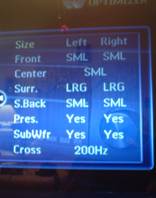 Based on my
experience with the RX-V2400, I was a bit concerned that the RX-Z9 would have the same problems
identifying the size of my speakers. However, to my surprise, the RX-Z9 correctly identified all of my
speakers as "small" the first couple of times I tested this feature. This was good news as it correctly
diverted the bass from all channels to my dedicated subwoofers for proper bass integration and
preservation of system dynamics both for the loudspeakers (avoid them trying to produce frequencies
they aren't capable of producing) and amplifier power. However, moving the microphone a few feet back
from my listening position yielded different results. By repositioning the microphone back just a few
feet from my listening position, I achieved completely different, and in my opinion, unpalatable
results. The Auto setup now identified all of my speakers as small except for my surrounds. It also set
the crossover way too high at 200Hz. I believe the microphone was being duped into thinking my rear
speakers were large because of boundary gain effects of my rear speakers due to close proximity to the
rear walls. Incidentally, after the first time the RX-Z9 identified my rear speakers as "large", it
also insisted on a 200Hz crossover setting.
I had to manually set all
speakers to "small" and adjust the crossover setting to a more appropriate one that suited my speakers
and listening preferences.
Based on my
experience with the RX-V2400, I was a bit concerned that the RX-Z9 would have the same problems
identifying the size of my speakers. However, to my surprise, the RX-Z9 correctly identified all of my
speakers as "small" the first couple of times I tested this feature. This was good news as it correctly
diverted the bass from all channels to my dedicated subwoofers for proper bass integration and
preservation of system dynamics both for the loudspeakers (avoid them trying to produce frequencies
they aren't capable of producing) and amplifier power. However, moving the microphone a few feet back
from my listening position yielded different results. By repositioning the microphone back just a few
feet from my listening position, I achieved completely different, and in my opinion, unpalatable
results. The Auto setup now identified all of my speakers as small except for my surrounds. It also set
the crossover way too high at 200Hz. I believe the microphone was being duped into thinking my rear
speakers were large because of boundary gain effects of my rear speakers due to close proximity to the
rear walls. Incidentally, after the first time the RX-Z9 identified my rear speakers as "large", it
also insisted on a 200Hz crossover setting.
I had to manually set all
speakers to "small" and adjust the crossover setting to a more appropriate one that suited my speakers
and listening preferences.
YPAO (Yamaha Parametric Room Acoustic Optimizer)
One of the distinguishing features of the RX-Z9 is its inclusion of Yamaha's YPAO automatic parametric active room correction equalizer. Unlike many of the first generation receivers implementing room correction, the Yamaha YPAO system is comprised of a ten band parametric equalize which adjusts level, frequency, and Q factor. Graphical equalizers adjust only amplitude response at fixed frequency bands, thus are not an effective tool for room correction at all in my opinion. Yamaha does offer a graphical equalizer as a programmable user option for every channel for additional fine tuning of your system's response in case you wish to forgo the YPAO system.
The YPAO "Equalizing" feature of the receiver allows for several equalizing options:
| Front |
Applies equalization to all channels, except the mains, to attempt to achieve closest tonal response to the main channels. |
|---|---|
| Flat |
Applies equalization to all channels to attempt to achieve flat response. |
| Low |
Applies equalization to all channels with emphasis on low frequencies. |
| Mid |
Applies equalization to all channels with emphasis on mid frequencies. |
| High |
Applies equalization to all channels with emphasis on high frequencies. |
Yamaha YPAO Operational Details
Operation Frequency:
63Hz - 16Hz 1/3 Octave resolution
Qfactor:
.5 - 10
Level:
-20dB to +6dB +/-.5dB
increments
Frequency Bands:
10 bands
per channel, 2 sub bands for a whopping total of 94 bands!
The RX-Z9 utilizes a total of eight (8) 32bit processors, and reserves four (4) of them for YPAO!
It is important to note that the microphone used for the RX-Z9 is specifically calibrated to work with the internal microphone preamp within the RX-Z9. It is not advisable to use an aftermarket microphone (even if of higher quality) or even the supplied microphone of another model Yamaha receiver (IE. RX-V1400/2400) with this unit .
A Note About the YPAO Yamaha Room Correction SystemNote : In order to toggle PEQ on/off in the OSD you must enter the "Basic Sound" menu and select "Graphic EQ". Yamaha claims this will be updated in future products to be more intuitive.
Not enough tone controls? You can engage PEQ, Cinema EQ and Tone Controls simultaneously!
The YPAO system uses pink noise sweeps to map the response of the room at the listening position for each speaker. Pink noise delivers constant power per octave and the YPAO attempts to equalize the magnitude response accordingly. However, in attempting to achieve a "Flat" frequency response, this can have deleterious affects on impulse response and also reduce dynamic headroom in the amplifier if certain frequencies are boosted as opposed to being attenuated. If for example, the YPAO equalizes a +6dB gain centered around 3kHz, then the amplifier would be tasked to produce up to four times the power for that frequency band, thus reducing headroom and potentially causing compression, and/or distortion. Additionally, if the YPAO system attempts to compensate for a speaker deficiency by creating a boost because of improper crossover design and/or some other speaker anomaly or strange impedance characteristic, when coupled to an amplifier this can actually create a dangerous effect as it can potentially drive some amplifiers into oscillation when boosting under these circumstances. However, if the speaker is flat in performance and the amplifier is not taxed at the frequencies being boosted, then the this scenario is unlikely to occur, with the only possible penalty of compensating for the direct sound of the speakers as opposed to resolving a deficiency in ambient or reflected energy in the room. Ideally, these mid and high frequency issues should be dealt with at the source, namely the room (assuming the speaker and amplifiers are designed correctly).
If you consider the basic relationship of sound and propagation through air given the following formula:
l = v / f (where v = velocity (speed of sound =1140 ft/s STP and f = frequency (Hz) )
then we see the wavelength of sound for 63Hz = 18 ft and for 16kHz = .86 inches!
Thus altering high frequency room response will affect only a very small listening area above a couple of hundred Hertz. High frequency harmonics are generally close together, if not overlapping, and their corresponding intensities are far less than the fundamental, making them more dependent on listening position. Another issue to consider with high frequency room correction is that the measuring microphone may not accurately measure direct to reflected sound. The goal of room correction is to correct for room anomalies, not the loudspeakers (again assuming the loudspeakers are of sound design). Altering the frequency response of the loudspeakers in this fashion changes the direct sound to compensate for a deficiency in the ambient or reflected sound field caused by the room. This may in fact alter the direct to reflected sound at the listening position further deteriorating imaging of the loudspeaker and corrupting the critical first arrival of sound. Ideally active room correction would best be applied at frequencies below 200Hz where sound is more difficult for the listener to localize and where room modes are difficult to resolve with room treatments. Utilizing a more precise parametric equalizer may be applied to analyze room modes to construct notch filters to reduce the excessive room decay times (RT60- # of milliseconds it takes for a sound to decay by 60dB).
Alternatively, a point to consider is that some room correction systems actually do address speaker non-linearities as well as room interaction affects. The problem is that most systems are not able to distinguish between the non-linearities of the speaker versus the non-linearities induced by the room. In some cases in may not really matter. For instance, in the bass frequencies smoothing out the response may involve changing phase and gain at certain frequencies. As long as the correction is made for the listening position we probably don't care how much of the problem is speaker or room related. For that matter, I can understand why the Yamaha YPAO system does not attempt correction at very low frequencies. It would take much more reserve power than the receiver is capable of delivering. In this respect limiting the correction to a moderately low frequency is understandable and in fact quite necessary. Of course that doesn't change the fact that we would all like compensation down to the very lowest frequencies. Practically speaking Yamaha could NOT put a correction filter on the LFE output because the power necessary for correction would way overtax most subwoofers (amplifier and driver excursion). It may however behoove Yamaha to introduce their own active servo subwoofer integrating low frequency room correction with a system much like many of Velodyne's Digital Series latest product offerings. A system that initially measures near field power response of the speaker as well as impulse response and then takes into consideration a measurement which showed room decay time would probably make for an even more accurate correction system. Now if only a manufacturer would build such a system affordably :-)
Yamaha RX-Z9 Auto Setup: Setting & Checking Levels
The level check was the last auto test set-up feature that the RX-Z9 performed. This test absolutely required a quite room to properly perform. My ceiling fan actually caused it to give me an error message "Noisy". After I controlled the noise floor in my room, I reran the level check portion of YPAO. Unfortunately the RX-Z9 failed this test when it got to my subwoofers.
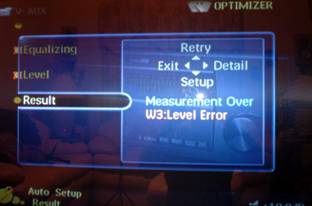 After I pondered on this for awhile, I believe I figured out the problem. My room has a
pretty nasty bass peak at around 30-40Hz. The RX-Z9 likely measured this and interpreted it as my
subwoofers being set too loud. Since it couldn't compensate for this it attempted to lower the
subwoofer levels to its limits (-10dB) via the subwoofer level trims. Apparently this was not enough
and hence the error message. In reality, if I were to take the advice of YPAO on determining my
subwoofer levels, I would have near flat bass at my room peak, and a bass void for the rest of the
audible spectrum -
a listening configuration that both myself and most listeners would loath.
After I pondered on this for awhile, I believe I figured out the problem. My room has a
pretty nasty bass peak at around 30-40Hz. The RX-Z9 likely measured this and interpreted it as my
subwoofers being set too loud. Since it couldn't compensate for this it attempted to lower the
subwoofer levels to its limits (-10dB) via the subwoofer level trims. Apparently this was not enough
and hence the error message. In reality, if I were to take the advice of YPAO on determining my
subwoofer levels, I would have near flat bass at my room peak, and a bass void for the rest of the
audible spectrum -
a listening configuration that both myself and most listeners would loath.
Since most receivers and processors don't yet incorporate auto level calibration, I would normally have had to do this anyway, so to me it's no deal breaker. No matter how hard you try there will always be some degree of manual tweaking to get a system properly tuned and calibrated. So perhaps a good compromise would be to start off with the YPAO as a reference, and tweak with a handy SPL meter and your ears accordingly.
The RX-Z9 refreshingly had 0.5dB trim adjustments for all channels which is still uncommon in some higher priced processors. As a side note, we have found some receivers / processors and DVD players internal test tones to be somewhat out of whack, especially when calibrating at different reference levels. The Yamaha test tones, however, identically tracked Avia's when the master volume levels were set to produce the same reference levels. In addition, I achieved accurate channel trim balances for all reference levels I tested during the set-up phase. This didn't surprise me since I have consistently found Yamaha receivers to have incredibly accurate test tones and channel tracking.
Sonic Results of YPAO
As with that of the RX-V2400, I had some reservations as to how YPAO affected the sound of my system. The first time I engaged YPAO I was rather surprised with the sonic results of YPAO PEQ implemented on my reference system speakers. I was expecting to hear the same nasally, overbearing sound I observed on the RX-V2400 when it performed its room correction on my system. However, what I heard this time was a much more subtle approach to room correction. The overall tonal balance seemed a bit more forward and intimate, but without sounding boxy or compressed. At times it did add a bit more sibilance to recordings than my listening tastes preferred, but overall I could certainly see consumers enjoying and benefiting from this. What I did find odd was the second time I ran the Auto PEQ setup for "Flat", the graphical printout of the results changed, as did the sonic results I was hearing. This time the overall tonal shift changed far too drastically for my liking. It was bordering abrasive, especially in the center channel speaker whose new tonal balance now became too domineering. After extensive listening tests supplemented with measurements and analysis, I found the most pleasing PEQ setting was "Low". Most of the time I used no PEQ at all, but the "Low" setting did yield decent results that I found added to my listening enjoyment in some cases. Care must be used when engaging this system, including:
-
Microphone positioning.
-
Ensuring a low noise floor in the room.
-
Running this set-up several times for consistency.
-
Interpreting the results not as a biblical source, but as a starting point or alternative to no auto- calibration.
Recommendations for YPAO
Regardless what YPAO produces for your system, the results will likely need to be adjusted and/or corrected. This is especially true for speaker size crossover setting and subwoofer(s) distance. The PEQ should be treated just like any EQ or Cinema EQ - use if only if you feel it improves the fidelity of your system. I believe the best compromise for PEQ is to set it to "Front" so that your main channels will not undergo equalization where ill effects are most noticeable. In fact, this may benefit people who choose center and rear speakers that aren't a direct match to their main channels as it does try to equalize them to match the fronts as closely as possible.
The Sound
What good is a feature packed receiver or any A/V gear for that matter if it cannot deliver the goods in sonic performance? Our viewpoint is sound first, features second. With that here is my subjective impression of the RX-Z9 for the gamut of playback modes I put it through.
Two-Channel Audio
One area Yamaha flagship receivers have always excelled in my opinion is two-channel audio. Unlike many lesser products, Yamaha never disappointed me in this regard. In my latest experience the RX-Z9 was no different. I was immediately overwhelmed by the almost limitless dynamic range I was hearing in two-channel stereo with this receiver. Its big, bold sound never lacked refinement or poise even when driven to my personal listening limits with my reference speakers and moderately large listening room (about 3000 ft^3). I was a bit disappointed that Yamaha did not provision for subwoofer output in "Pure Direct" mode (a feature necessary for my active subwoofer/satellite speaker system), thus the bulk of my two-channel listening tests were conducted in "2 CH Stereo" with all of the video processing turned off. This did not seem problematic to me since the RX-Z9 has a superb noise floor in all listening modes, partly attributed to careful circuit layout and implementation of the absolute best DAC's on the market - the Burr Brown DSD-1792s in differential configuration. As a side note, two channels of the PCM/DSD-1792's cost about twice as much as all of the lesser audio DAC's used in many costlier exotic processors. The good news is Yamaha spared no expense and implemented these DAC's on all channels , including the presence and subwoofer channels - and in balanced configuration! What my listening tests confirmed was the RX-Z9 was acting like a great sounding DAC for two-channel applications. If you have an older CD changer with an optical or coax output, I highly recommend using it as a transport and letting the RX-Z9 revitalize its fidelity.
Listening to SACD via i.Link was a real treat as this was the first time I actually heard SACD pass via a digital interface. For those worrying about the RX-Z9 passing subwoofer information in two-channel mode, fear not as the RX-Z9 does handle bass management via its i.Link interface much like it does when decoding DD /DTS. While some would argue converting DSD to PCM to do this feat, I would counter with "But can you really hear a difference?" I certainly didn't hear any ill effects and in my opinion the benefits of having bass management in this case far outweigh such concerns.
SACD: Patricia Barber - Café BlueThis remains one of my benchmark SACD's for good reason - lumpy jazz in a smooth jazz environment. You won't find repetitive and annoying saxophone scales, single stroke drumming, and simplistic guitar rifts. Instead you're showered with snappy jazz and provocative lyrics, slamming drums and memorable instrumental solos. The SACD layer of Track #2, "Morning Grace" sounded about as good as I've ever heard which in one word would best be summed up as "phenomenal". The RX-Z9 in this instance sounded quite transparent and certainly comparable to having my Denon DVD-5900 doing the SACD decoding. Making a direct comparison between the i.Link vs analog output of the DVD-5900 was next to impossible, since unfortunately an operational hiccup of the DVD-5900 causes all of the audio settings to default back to factory settings when toggling Dlink (Denon proprietary digital interface) or i.Link. I tried to reset and compare each time, but the lag time was too long for me to make an intelligent decision as to which I thought sounded better. They both sounded great by my estimation, and having one digital connection handle all of the audio formats, with proper bass management, level control and digital delay compensation allowed me to easily declare i.Link the winner.
Multi-channel Audio
DVD-Audio:
Porcupine Tree -
In Absentia
At last I finally have in my possession a DVD-A disc with enjoyable content that I can
listen to more than just one or two tracks without absolute boredom. Porcupine Tree represents a mostly
lost era art of Progressive Rock with a twist of modernization. I would categorize their sound as a
cross between King Crimson, Genesis and Pink Floyd all in one with the harder, more aggressive playing
style of Creed. As far as sound quality goes, this disc is a bit too bright and forward sounding and a
bit anemic in bass response, but the surround mix for the most part is well done, and never sounds
overbearing or forced.
Yamaha RX-Z9 Listening Tests
Another eye opener for me regarding the RX-Z9's entourage of features was its inclusion of Dolby Pro Logic IIx. When I first heard about PLIIx, I was skeptically optimistic about having yet another format to confuse consumers and justify enforcing the 7.1 speaker configuration. I was already content with the sonic results and abilities of PLII deriving 5 channels of full range information from ordinary two-channel program material, so why would I want to throw two more speakers into the mix? The answer became quite clear in my listening tests - bigger, more expansive and convincing surround fields. PLIIx Movie mode sounded very spacious and dynamic while watching the Star Trek Series V "Enterprise" show. It always irks me that my satellite provider has yet to provide the UPN channel in DD 5.1 - and I feel short changed everytime I watch one of my favorite TV shows in ordinary analog stereo, forcing me to rely on matrixed encoded processing to make the sonic results palatable. PLIIx really came as close as I have yet to hear at tricking the listener into believe they are hearing true discrete 5.1 playback of the program material. I found myself even more eager each Wednesday night to watch this show with my audio system turned on as opposed to just my Display speakers. Alas, I was enveloped on the bridge of the Enterprise and thrown right into the battles they endured while, as always, trying to save humanity and the planet Earth. "Mars Attacks" was another shining example of PLIIx Movie Modes' ability to convey pseudo 7.1 channel information out of a two-channel analog source with stunning realism.
PLIIx is definitely a worthwhile tool to add to your home theater arsenal of DSP processing and its inclusion should be highly considered when choosing a new product.
I was hit upside the head by Carlos Vives when I switched from ordinary 2CH to PLIIx Music Mode. "Déjame Entrar" is the type of song that puts you in that party and dance mode. PLIIx Music Mode, expanded the sound field so immensely that it just begged to be played louder. Ordinarily the wife would complain when things get this loud, but she went right along with it as we challenged the dynamic limits of the RX-Z9 amplifier section.
The RX-Z9 had no problems keeping up with our expectations as it belted out raw power with confidence and pride. I had to keep reminding myself a receiver shouldn't sound this good. That old stereotype is now slowly deteriorating as receiver vendors have improved the performance and value of their one-box solutions, and loudspeaker manufacturers have continued advancements in loudspeaker design to yield higher efficiency and more linear impedance and phase response.
Home Theater Listening Tests
As I have noted in previous Yamaha receiver reviews, home theater is truly where Yamaha excels. Yamaha has always been unequaled in their DSP processing to enhance the movie watching experience and the RX-Z9 proved to be no exception. While I found the DSP modes to be too numerous and over emphasizing in most applications, I did manage to find a few favorites and tweak them to more subtle settings that worked better in my system. I was happy to see Yamaha include their proprietary dedicated front effects channels, or in their new nomenclature "Presence" channels. What's really cool is you can run the back channels and "Presence" channels simultaneously. However, you have to remember to toggle the "EX" button when engaged in a Yamaha Cinema DSP mode for this to be realized.
The Last Samurai was one of those movies I was eager to see in the theater, but simply never got around to it. I knew eventually that Yamaha would be sending me an RX-Z9 for review and figured I might as well wait to experience this movie in my favorite 70mm Yamaha Cinema DSP mode "Adventure". I really enjoyed having the back and presence channels engaged in this mode and felt it did expand the surround field and smooth out panning between channels. Switching between ordinary DD 5.1 and Yamaha 9.1 DSP, I preferred the latter by a wide margin. Cinema DSP simply enveloped me into a more theatrical experience and made the grueling battlefields seem much larger and more surreal.
What was most impressive was that the Cinema DSP mode did not sacrifice dialog intelligibility during critical dialog scenes. Bass impact was also unadulterated in Cinema DSP mode.
My continued experience with the RX-Z9 was that it delivered theatrical levels of uncompressed sound during multi-channel movie and music passages in my listening room. The DSP modes for movies, simply made my experience that much more grand. I was certainly never of the mindset of wondering how much better the sound would be if I had access to a more powerful dedicated amplifier section.
Yamaha proprietary DSP modes for Jazz and Rock venues brought about new dimensions to the stellar performance of the Pat Metheny group. The soundstage of "Last Train Home" was really opened up in "Village Gate" DSP mode, without sacrificing the focus of Pat's acoustic guitar. "Roots of Coincidence" rocked my house in "Roxy Theatre" DSP mode. Cranking the volume up on this song, with Yamaha DSP and my RBH Sound T-2 system transported me back to the live event at Ruth Eckerd Hall in Clearwater Florida I so fondly remembered being a part of only a few years ago.
When playing back concert DVDs or other recordings for that matter, my advice is to experiment with variety of DSP modes and settings Yamaha offers. I personally enjoy using the Jazz and Rock modes to bring back life in ordinarily dull or compressed sounding DVD concerts and VHS tapes. I ultimately prefer using PL IIx for CD music, but this is entirely subjective and you must decide what works best for your listening preferences.
Suggestions for Improvement
It is really difficult to fault the RX-Z9 receiver given that it does so many things so extraordinarily well. However, being the Audioholic I am, and given the nature of this website, I do have some critiques aimed in making this product and all forwarding Yamaha products even better:
-
Parametric room correction (1/12 th octave resolution or better) for low frequencies (where it is needed most) with bandwidth limiting application of around 20Hz to 200Hz for all channels, including the subwoofer.
-
Ability to limit room correction amplitude increments to within a specific +/- range.
-
Manually adjustable PEQ settings.
-
Multiple equalization settings to accommodate different listening positions and/or spatial averaging.
-
Subwoofer output option in two-channel "Pure Direct" mode by paralleling the incoming audio signal via a relay to the DSP for processing to the subwoofer.
-
On the fly non-retained channel trim adjustment capability.
-
Independent channel trim settings for all modes of operation.
-
Independent subwoofer level and crossover settings for two-channel and multi-channel modes of operation.
-
Back channel power amp assignable to main channels for Bi-amping mode.
-
Higher current +12V triggered outputs to drive power centers/conditioners.
While this is a long laundry list, and certainly not meant to suggest the RX-Z9 is lacking for its price point, we feel these changes would have made the RX-Z9 an even better product with which to compete against entry level separates and other flagship receivers in the marketplace.
Yamaha RX-Z9 YPAO & PEQ Measurements and Analysis
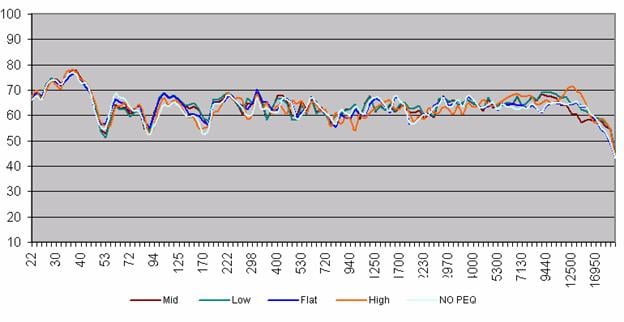
All of the following measurements were conducted using 1/12th octave FFT analysis. I measured the effectiveness of YPAO's integrated PEQ in all of its settings for the front channels at the listening position as well as how it affected bass response, and center channel to front channel tonal matching.
Mid, Low, Flat and High PEQ Settings for YPAO
Front PEQ Setting for YPAO
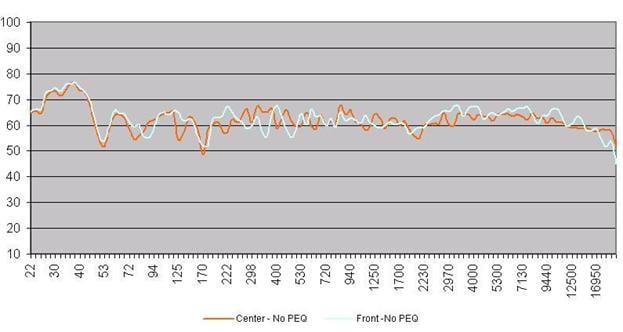
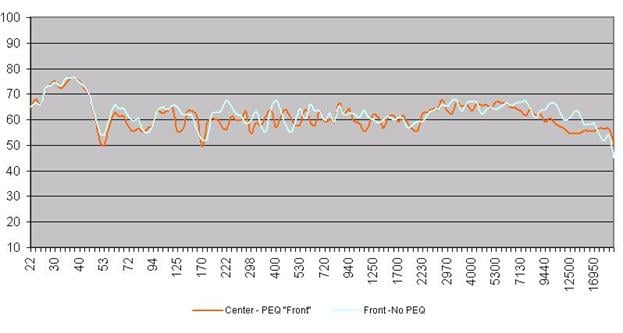
With no equalization applied, you can see that the center channel of my system (which is basically a horizontally placed version of my main system speakers (without the subwoofers), measured similarly to the summed response of my main speakers at the listening position. This measurement was taken with the RX-Z9 engaged in "Prologic IIx" mode for the center channel measurement, and "2 Channel" mode for the Front channel measurement.
Flat Setting:
Flat yielded an EQ result very similar to no PEQ at all for my set-up. It inserted a slight bump of +3dB from 100-125Hz and helped to reduce a narrow null centered around 160Hz. Aside from a +4dB bump added by the PEQ at 315Hz, most of the upper end of the frequency spectrum was unaltered. This partly explained why I was hearing a slightly fuller sound in the mid bass region.
Low Setting:
From 56Hz-80Hz PEQ reduced a bass bump by about 4dB. As with the "Flat" setting, it inserted a slight bump of +3dB from 100-125Hz and helped to reduce a narrow null centered around 160Hz. A similar +4dB bump was added by the PEQ at 315Hz. PEQ smoothed out a slight null from 1700Hz to 2100Hz by adding a +4dB boost. PEQ added an unnecessary +4dB of gain from 8kHz to 11.8kHz. PEQ did improve frequency extension by adding +3-5dB of gain from 16kHz to 20kHz, extending the 3dB point of my system from the listening position from about 18-20kHz. This was my favorite sounding setting for PEQ.
Mid Setting:
PEQ gave a rather ragged response from 265Hz-760Hz. However, it also inserted a slight bump of +3dB from 100-125Hz and helped to reduce a narrow null centered around 160Hz. PEQ squashed the lower treble by -5dB from 12kHz-17kHz. This setting was too forward sounding with too much emphasis on upper bass, yielding a very chesty sound in male vocals.
High Setting:
The high setting almost mimicked the flat setting up until about 5.6kHz. It added +5dB bump from 5.6kHz to 8kHz and 11kHz to 15kHz while also extended the 3dB point of the system as in the Low setting. This setting was too lispy, bright and almost compressed sounding.
Front Setting:
The PEQ "Front" settings purpose is to tonally match all speakers to the un-equalized front speakers. It appeared to do fairly well from about 170Hz to 2.2kHz, but caused a sharp roll off above 7kHz that was clearly measurable and audible in my listening tests. In fact, the center channel output vs the summed front speakers was now too low by almost 10dB from 9.4kHz to 12kHz.
A Note About the YPAO Measurements
It is important to note that some of the graphs in these measurements for the same PEQ settings varied slightly because they were recorded at separate sessions where the microphone position may have been slightly different, or the PEQ Auto measurement resulted in a different overall response. These measurements only illustrate frequency domain effects and are not fully representative of all of the variables attributed to the sonic differences between PEQ and no PEQ.
Low PEQ Setting On/Off Axis Comparison
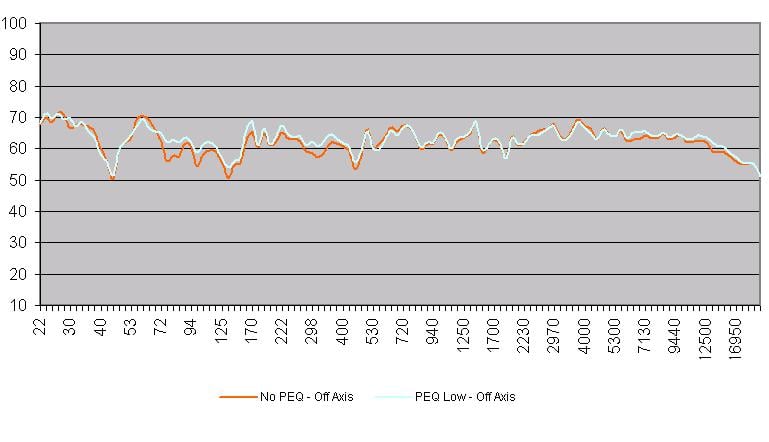
I was curious to see how my favorite PEQ setting, "Low", would
transform the sound of my front speakers when measuring their response
far off axis from where the microphone actually took the initial
measurement to derive its settings. I was pleased to find that the PEQ
did not butcher the frequency response in location measured away from
the initial calibration. In fact it did improve a bass null by +5dB in
the 70Hz to 80Hz region.
Low Frequency Comparison of Manual vs YPAO
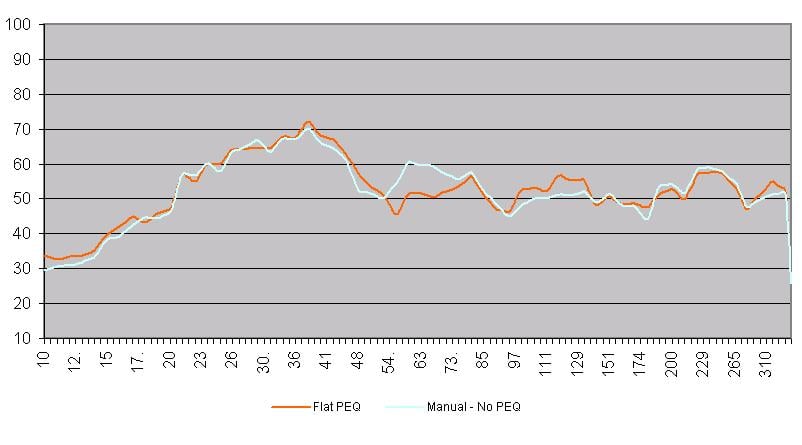
By allowing YPAO to do my entire configuration, it did not provide the smoothest transition between the huge bass bump of my primary room mode. I was able to manually tweak phase and level of my two subwoofers to add a bump from 54Hz to about 75Hz to provide a more uniform and pleasing sounding system bass response.
Yamaha RX-Z9 Conclusion and Summary
The Yamaha RX-Z9 is an exceptionally good product and value, and in my opinion, dominates a segment of the marketplace currently not filled. It offers a quick auto set-up for the neophyte that will at least achieve a reasonably good sounding configuration some users ordinarily wouldn't be able to achieve manually, and allows for user-tweakable adjustments to improve those settings. However, I still feel we are a few generations (if ever) away from having a Star Trek "voice activated" auto setup feature that will accurately determine the best settings and system configuration at the touch of a button. Ultimately the user will always have to interpret and interject to achieve a more concise set-up if they wish to achieve audio nirvana and accuracy. While YPAO is not perfect, it does demonstrate a step in the right direction and the manufacturer's willingness to increase product performance and ease of use for the average user in the not-so-ideal room environment. The RX-Z9 auto PEQ system is definitely more refined sounding, and in my opinion more accurate than that of the less expensive RX-V2400. I found myself listening with PEQ engaged more so than I had on the RX-V2400, but still usually preferred no PEQ at all in my set-up.
The RX-Z9 has just about every conceivable feature, from video processing to unlimited DSP modes, tone controls and equalizers with adjustable settings, to i.Link to handle DVD-A and SACD in the digital domain. It has time delay compensation, level control and decoding. At last, one cable to handle all audio formats and allow the receiver to provide necessary bass management! Two multi-zone settings (one with power amp assignability, the other passive with triggered outputs) allows for the receiver to serve as the demarcation point for house-wide entertainment where minimal components are required.
$4500 can certainly buy you a lot of power and flexibility via the alternate separates route or even other flagship receivers. Assuming you split your $4500 budget 60% for the processor and 40% for the seven channel power amplifier you would be hard-pressed to find a $2700 dedicated processor with near the refinement and configurability of the RX-Z9. In addition, the internal amp section of the RX-Z9 is good enough to stand toe to toe with many entry level dedicated multi-channel power amps in the $2000 price range. While it may lose some ground in sheer power output with all channels driven, it more than makes up for it with its high linearity, and low noise floor. There are certainly other excellent receivers in this price class as well, but none of them offer the video and DSP processing, highly usable GUI interface, and stereo subwoofer outputs - and only a select few actually sport an active i.Link connection for transmission of DVD-A and SACD. Now if only Yamaha would release an i.Link compatible Universal DVD player, they would have a total package solution to please all loyal Yamaha fans. I am told this is in the works, so be patient. For those contemplating integrating DVD-A and SACD into their systems, I strongly encourage a system solution that supports i.Link or an equivalent digital solution. Once you go digital, and hear the benefits of correctly implemented bass management and time alignment, you won't go back to antiquated analog and its associated mess of cabling.
For the moment, Yamaha has recaptured the receiver crown and reigns supreme. But in a competitive and steady marketplace, I don't expect this will be everlasting. You can however rest assured you are getting one heck of a bang for your buck with the Yamaha RX-Z9.
The Score Card
The scoring below is based on each piece of equipment doing the duty it is designed for. The numbers are weighed heavily with respect to the individual cost of each unit, thus giving a rating roughly equal to:
Performance × Price Factor/Value = Rating
Audioholics.com note: The ratings indicated below are based on subjective listening and objective testing of the product in question. The rating scale is based on performance/value ratio. If you notice better performing products in future reviews that have lower numbers in certain areas, be aware that the value factor is most likely the culprit. Other Audioholics reviewers may rate products solely based on performance, and each reviewer has his/her own system for ratings.
Audioholics Rating Scale
 — Excellent
- — Very Good
- — Good
- — Fair
- — Poor
| Metric | Rating |
|---|---|
| Multi-channel Audio Performance | |
| Two-channel Audio Performance | |
| Build Quality | |
| Ergonomics & Usability | |
| Features | |
| Remote Control | |
| Performance | |
| Value |  |
Gene manages this organization, establishes relations with manufacturers and keeps Audioholics a well oiled machine. His goal is to educate about home theater and develop more standards in the industry to eliminate consumer confusion clouded by industry snake oil.
View full profile Subscribe to our newsletter