


Yamaha RX-Z7 7.1 Channel Networking A/V Receiver Review
- Product Name: Yamaha RX-Z7 7.1 Channel Networking A/V Receiver
- Manufacturer: Yamaha
- Performance Rating:

- Value Rating:
- Review Date: February 08, 2009 23:10
- MSRP: $ 2699
-
140 watts x 7 into 8 ohms (20-20,000 Hz) at 0.04% THD
-
Dolby TrueHD, DTS-HD™ Master Audio, Dolby Digital Plus, DTS-HD™ High Resolution Audio, Dolby Digital EX, DTS-ES™, Pro Logic® IIx, DTS Neo:6, and SRS Circle Surround II decoding
-
1080p-compatible HDMI switching: 5 in, 2 out (including 1 front-panel input)
-
Selectable 480p/720p/1080i/1080p video upconversion for all non-HD and HDMI sources (upconverted video available through HDMI output only)
-
HDMI version 1.3a with support for Deep Color, x.v.Color, 120Hz and 24Hz refresh rates, and auto lip-sync compensation
-
Home PC networking capability with Web browser control
-
Built-in HD Radio tuner with multi-casting reception and iTunes® tagging
-
Cinema DSP 3D modes and enhanced Adaptive DSP level for fuller surround effects at low volumes
-
Enhanced Adaptive DRC (dynamic range control) for better clarity at lower listening levels
-
Anchor Bay PReP™ and VRS™ video processing
-
XM / SIRIUS Satellite Radio Ready (requires XM subscription and optional XM Mini-Tuner package)
-
iPod integration (requires optional Yamaha YDS-11)
-
Neural-THX Surround decoder for XM's HD Surround channels
-
Improved Compressed Music Enhancer for MP3s and other digital music files, including multi-channel sources
-
Four-room/four-source output: powered and line-level stereo audio output for second and third rooms, digital audio optical out for 4th room
-
Front-panel USB port for audio playback from USB flash drives and portable USB music players
-
6 audio/video inputs, including phono
-
Digital audio: 5 optical inputs (including 1 front-panel) and 2 outputs, 3 coaxial inputs
-
7.1-channel analog audio preamp input and outputs
-
Back surround speaker channels re-assignable for bi-amping front left and right speakers
-
Assignable component video output with HD pass-through and 480i to 480p conversion of composite/S-video signals for second room
-
Composite video output for second and third rooms (same source for both rooms)
-
Digital ToP-ART design with high-current, low-impedance amplifier construction
-
192kHz/24-bit Burr-Brown digital-to-analog converters for all channels
-
Pure Direct mode for better sound from stereo sources
-
Silent Cinema for simulated surround sound via standard stereo headphones
-
On-screen GUI (Graphic User Interface) with display overlay
-
Learning/multibrand remote
-
Basic remote for second or third listening room (requires remote control extender system, not included)
-
RS-232C port for automated control systems
-
Detachable power cord
-
Weight: 40.6lbs
-
Dimensions: 17-1/8"W x 7-1/8"H x 17-1/4"D
-
Warranty: 5 years
Pros
- Benchmark audio and video performance
- Unparalleled multi channel experience for music and movies
- One box solution for whole home audio and video distribution
- Excellent Network Streaming and Web Browsing functionality
Cons
- Runs hot and needs adequate ventilation
- Complex setup
- Lame secondary remote control with limited functionality
Yamaha RX-Z7 Introduction
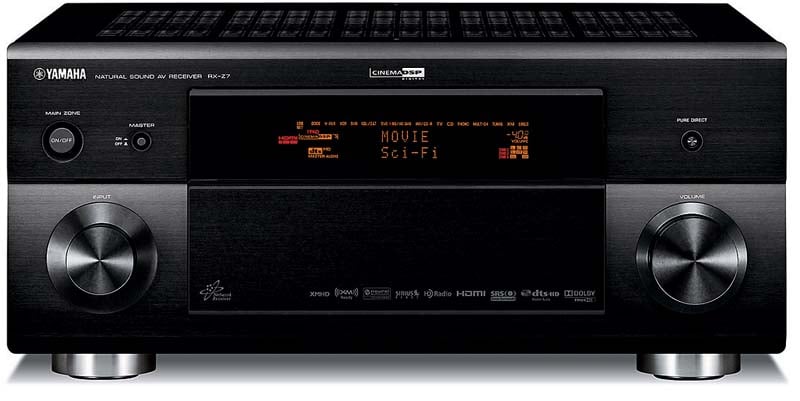 When Yamaha
announced a new RX-Z receiver was coming, I was a bit perplexed that they were
planning on replacing their current Z-11 flagship halfway into its four year
production run. To my surprise this was
not the case. Instead, Yamaha was
introducing a second model in their RX-Z line known as the RX-Z7. While it could be considered a scaled down
sibling to the RX-Z11, I actually found that not to be the case in some key
areas of performance. At nearly 30lbs
lighter, ½ the retail price of its big brother, could the RX-Z7 live up to Z
name traditionally donned by the Yamaha flagship model? For the answer you're gonna have to read my
review.
When Yamaha
announced a new RX-Z receiver was coming, I was a bit perplexed that they were
planning on replacing their current Z-11 flagship halfway into its four year
production run. To my surprise this was
not the case. Instead, Yamaha was
introducing a second model in their RX-Z line known as the RX-Z7. While it could be considered a scaled down
sibling to the RX-Z11, I actually found that not to be the case in some key
areas of performance. At nearly 30lbs
lighter, ½ the retail price of its big brother, could the RX-Z7 live up to Z
name traditionally donned by the Yamaha flagship model? For the answer you're gonna have to read my
review.
Yamaha RX-Z7 7.1 Design Overview
The common question I was seeing on the forums well before I received my sample of the RX-Z7 for review was "how does the Z7 compare to the Z11 and RX-V3900?" Tabulated below are the major feature differences among the three receivers in question.
| RX-V3900 | RX-Z7 | RX-Z11 | |
| Retail | $1,899 | $2,699 | $5,499 |
| Amplifier Channels | 7 x 140wpc | 7 x 140wpc | 7 x 140wpc, 4 x 50wpc |
| Subwoofer outputs | 1 | 1 | 2, mono/stereo with independent settings |
| THX Ultra2 | No | No | Yes |
| HDMI (I/O) | (4,2) ver 1.3a | (5,2) ver 1.3a | (5,2) ver 1.3a |
| Video | ABT 2010 chipset includes VRS technology | ABT 2010 chipset includes VRS technology | Anchor Bay Technologies ABT1010 |
| Video adjustment | none | Versatile video adjustment functions with 6 preset memories | Versatile video adjustment functions with 6 preset memories |
| Party Mode |
No | Yes (4 zone) |
Yes (4 zone) |
| Sirius / DLNA | Yes | Yes | No / DLNA Yes |
| Dimensions (W x H X D) | 17-1/8" x 7-1/8" x 17-1/4" | 17-1/8" x 7-11/16" x 17-3/8" | 17-1/8" x 8-5/16" x 18-7/16" |
| Weight | 38.4 lbs | 40.6 lbs | 73 lbs |
Although the power ratings look the same on paper, how these receivers actually deliver the power is another story. Due to the enormous power supply of the RX-Z11, it really shows its brute when driving 4 ohm loads. While the RX-V3900 and RX-Z7 seem similar in size and ratings, the RX-Z7 is 2.2lbs heavier and slightly bigger. Yamaha has been known in the past to offer slightly bigger power supplies on the more expensive of the two models with similar ratings. Make no mistake, this is the case here as well and although a modest difference, the RX-Z7 has more juice available under the hood than the less expensive RX-V3900. This can translate to improved fidelity depending on your listening habits and the type of speakers you are running.
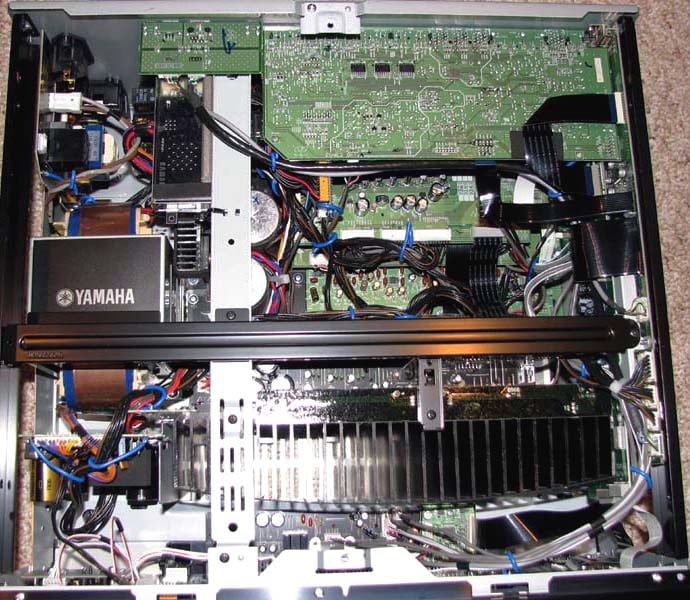 Unlike
other Yamaha flagships, this is their first Z series receiver to be
manufactured at their Malaysian facility.
Had it not been for the markings on the back panel that indicated this,
I would have never known. The chassis
seems rigid, partly thanks to the horizontal support beam underneath the hood
which took me 22 screws to get to.
Unlike
other Yamaha flagships, this is their first Z series receiver to be
manufactured at their Malaysian facility.
Had it not been for the markings on the back panel that indicated this,
I would have never known. The chassis
seems rigid, partly thanks to the horizontal support beam underneath the hood
which took me 22 screws to get to.
Inside, the RX-Z7 sports many of the attributes that defines their Z heritage, big meaty power supplies (large E-core and 2 x 18,000uF 71V capacitors), a big finned and tapered heatsink towards the front of the receiver to house all of the power devices. Past Z receivers have two rows of heatsinks but they were also rated at higher power and had additional amplifiers for presence channels. Although very compact, the layout of this receiver is clean and methodical, something I've grown accustomed to with Yamaha.
Bottoms Up
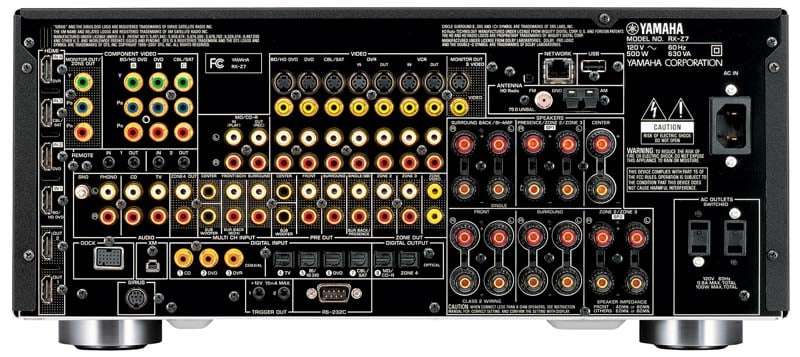
Back Panel View of the Yamaha RX-Z7
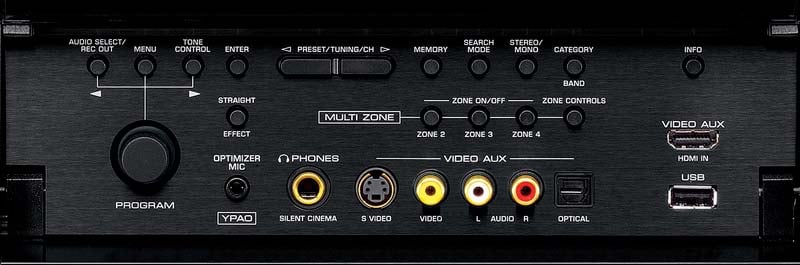
The RX-Z7 is certainly not connection deficient. The four HDMI inputs and two HDMI outputs are vertically aligned on the far left of the receiver with an additional HDMI input on the front panel. Component video connections are grouped in close proximity to the right of the HDMI with S-Video / Composite video horizontally located right of the component video connections.
There are 11 high quality WBT speaker connectors on this receiver where two pairs can be used for assigning the internal amps to other zones, or presence/back channels or bi-amplification for the main channels. iPod and Ethernet connections are available to support network and streaming functions. With six memory settings for the main zone and four for the other three zones, the sky is the limit with configurability not just for where you assign the speaker groups but how you customize and configure any parameter in the receiver. There are two switched power connections, and this receiver comes with a detachable power cord which is a real handy convenience during installation.
Yamaha RX-Z7 7.1 System Setup and Configuration
 The first
part of my review was conducted in the main Audioholics showcase theater room where I set up the RX-Z7 for 5.1
but biamped my front channels full range which consisted of RBH Sound T-30LSE
towers that dip into the 3-ohm range to really give the amplifiers a real
workout. I used the matching RBH T-1SE/R
center channel and MC-6C bookshelfs on stands for the rears and one of my
Velodyne DD-15's for the subwoofer channel.
The transports were the Denon DVD-5910,
Toshiba HD-A2 HD DVD player (yea I
know, dead format) and the Yamaha MusicCAST MCX-2000
and an Epson 1080UB LCD projector.
The first
part of my review was conducted in the main Audioholics showcase theater room where I set up the RX-Z7 for 5.1
but biamped my front channels full range which consisted of RBH Sound T-30LSE
towers that dip into the 3-ohm range to really give the amplifiers a real
workout. I used the matching RBH T-1SE/R
center channel and MC-6C bookshelfs on stands for the rears and one of my
Velodyne DD-15's for the subwoofer channel.
The transports were the Denon DVD-5910,
Toshiba HD-A2 HD DVD player (yea I
know, dead format) and the Yamaha MusicCAST MCX-2000
and an Epson 1080UB LCD projector.
 The second
part of my review was conducted in the Audioholics showcase family room which
consists of all RBH Signature SE/R speakers in a 7.1 channel configuration,
Axiom EP 500 subwoofer, Denon DVD-2930CI
DVD player and a 56" Samsung DLP RPTV.
The second
part of my review was conducted in the Audioholics showcase family room which
consists of all RBH Signature SE/R speakers in a 7.1 channel configuration,
Axiom EP 500 subwoofer, Denon DVD-2930CI
DVD player and a 56" Samsung DLP RPTV.
All of my cables were Sonicwave by Impact Acoustics / Cables to Go with the exception of my front speakers which were wired with Rivercable Starflex. In fact Impact Acoustics was kind enough to supply me with all of their models of HDMI cables (Velocity, Sonicwave and RapidRun) to test on this receiver.
Choosing the Speaker Impedance
I tested
the RX-Z7 in the "8 ohm or more" and "6 ohm" settings and as
you will see in my lab tests, power was drastically reduced in the "6 ohm"
setting. In NO circumstance do I ever
recommend using this setting regardless of your loudspeaker impedance. This switch is put there for one purpose only
– to pass UL heat dissipation requirements of driving low impedance loads. All it does is limit the output voltage to
the amplifiers so that they clip at lower power and thus under their test
condition, the receiver generates less heat.
Auto Setup Via YPAO
I've covered YPAO extensively in other Yamaha reviews, most recently my review of the RX-Z11. As a general overview however, YPAO automatically checks and calibrates the following parameters:
- Wiring
- Distance
- Size
- Equalization (manual, flat, front, natural, "through" which means bypass)
- Level
- Angle
 Like the
RX-Z11, the RX-Z7 features Yamaha's latest YPAO iteration of doing standing
wave correction via a Frisbee looking device that you place the YPAO microphone
on at each of the three legs in the primary calibration location. It would be more useful if YPAO would run
this part of the calibration right after it takes the measurements for the
primary seat so you don't have to hassle repositioning the microphone in that location
after you've run the multi point calibration suite (up to 8 locations). YPAO does some low frequency equalization
down to 32 Hz for all channels with roughly 1/6th octave resolution.
It offers a manual adjustment mode with a variable Q of .5 to 10.08 and Gain:
+6 to -20dB with up to up to 3 bands per channel.
Like the
RX-Z11, the RX-Z7 features Yamaha's latest YPAO iteration of doing standing
wave correction via a Frisbee looking device that you place the YPAO microphone
on at each of the three legs in the primary calibration location. It would be more useful if YPAO would run
this part of the calibration right after it takes the measurements for the
primary seat so you don't have to hassle repositioning the microphone in that location
after you've run the multi point calibration suite (up to 8 locations). YPAO does some low frequency equalization
down to 32 Hz for all channels with roughly 1/6th octave resolution.
It offers a manual adjustment mode with a variable Q of .5 to 10.08 and Gain:
+6 to -20dB with up to up to 3 bands per channel.
YPAO Calibration Results
Given my past experience with YPAO, I was honestly not going to test YPAO but was pleasantly surprised that the calibration results this time exceeded my expectations. Either there was perfect celestial alignment in the galaxy or Yamaha tweaked YPAO performance, or I just got lucky that YPAO nailed speaker level, distance (including the subwoofer) and size correctly. The only tweak I had to make was the center channel crossover which I lowered from 100Hz to 80Hz. I only used a 3 point calibration and kept the mic in relatively close proximity to the main listening position. I have found that keeping the sample points closely spaced towards the primary one or two seats does produce more consistent and usable results in virtually all auto calibration systems.

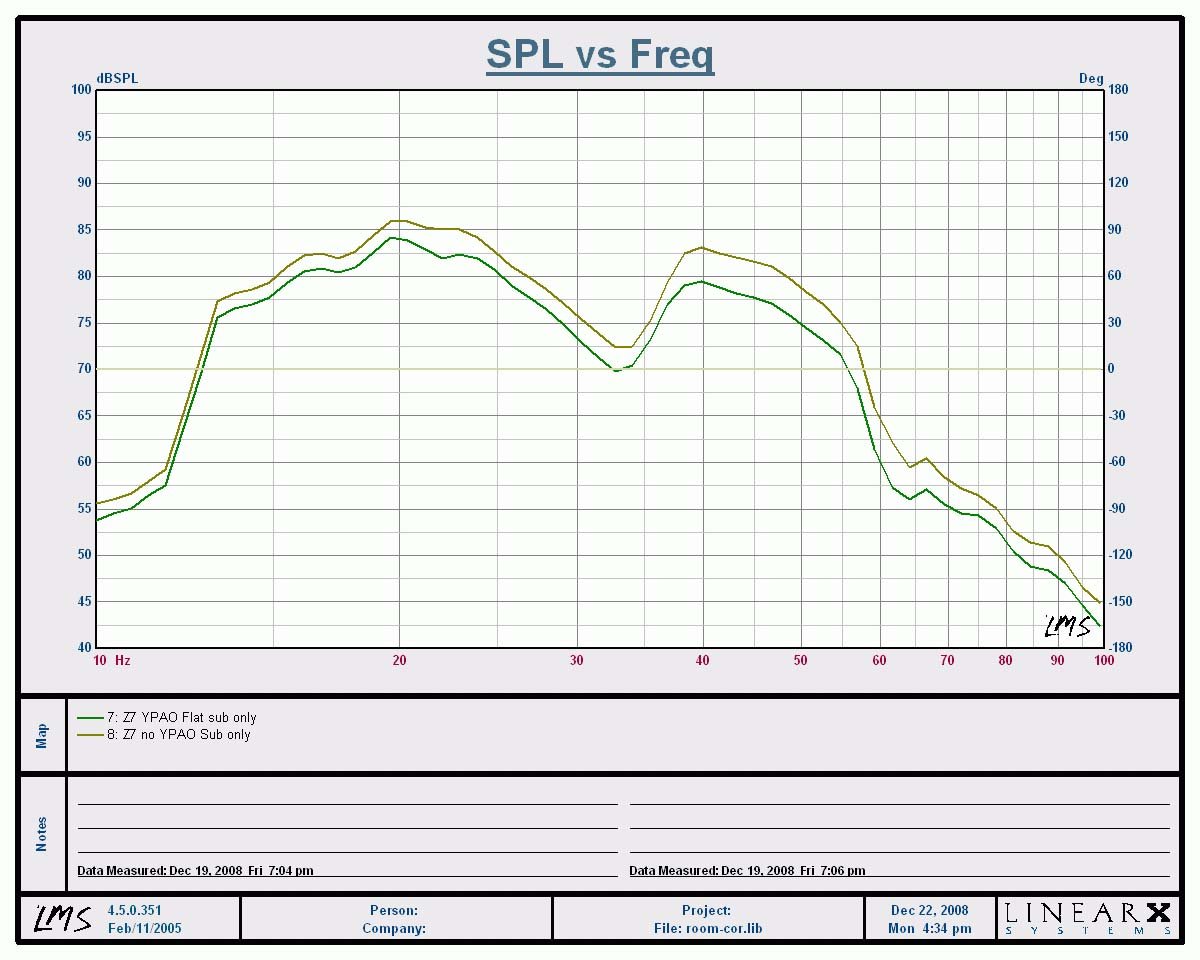
YPAO Low Frequency Calibration Results
YPAO didn't drastically change the shape of the measurement curve as much as it subtly lowered some problematic areas most notably 40-50Hz and 90-120Hz ranges. The Left graph above shows the calibration results for the mains + subwoofer with/without YPAO while the right graph shows the subwoofer channels only. YPAO lowered the subwoofer amplitude about -2dB below 38Hz and an additional 1dB from 38Hz to about 60Hz. To date the only auto correction system I've experimented with that significantly changes (not always for the better) system bass response is Audyssey.
Sonic Results of YPAO
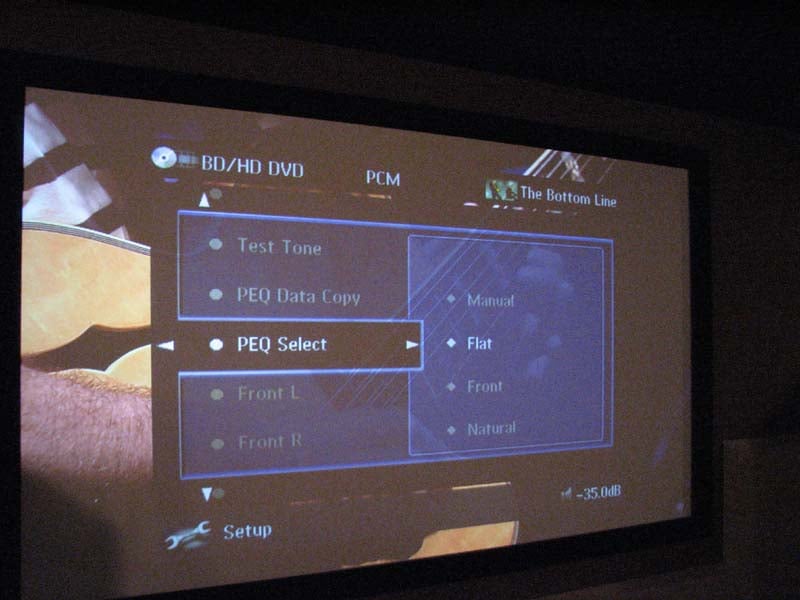 One thing I've learned about Yamaha is that if you
complain about something enough times in reviews, they eventually listen. Such is the case with this receiver and the
RX-Z11 when it comes to selecting different PEQ settings simultaneously for all
channels on the fly so you can instantaneously here the sonic results. It was a real delight to compare the
different PEQ settings which as I previously mentioned weren't offensive
sounding to me like that have been in the past.
I found "Natural" mode slightly tightened up the low end with
a slight reduction in overall impact. It
slightly dulled the top end but did a good job of preserving the soundstage
while also anchoring the vocals towards the midpoint of my main speakers. It wasn't quite as focused as the results I
got from Pioneer's MCACC system, but it also didn't drastically reduce the
soundstage like I heard with MCACC. "Flat"
mode extended the treble response, perhaps sometimes a tad too much depending
on source material but overall this was my preferred EQ setting.
One thing I've learned about Yamaha is that if you
complain about something enough times in reviews, they eventually listen. Such is the case with this receiver and the
RX-Z11 when it comes to selecting different PEQ settings simultaneously for all
channels on the fly so you can instantaneously here the sonic results. It was a real delight to compare the
different PEQ settings which as I previously mentioned weren't offensive
sounding to me like that have been in the past.
I found "Natural" mode slightly tightened up the low end with
a slight reduction in overall impact. It
slightly dulled the top end but did a good job of preserving the soundstage
while also anchoring the vocals towards the midpoint of my main speakers. It wasn't quite as focused as the results I
got from Pioneer's MCACC system, but it also didn't drastically reduce the
soundstage like I heard with MCACC. "Flat"
mode extended the treble response, perhaps sometimes a tad too much depending
on source material but overall this was my preferred EQ setting.
Manual Calibration
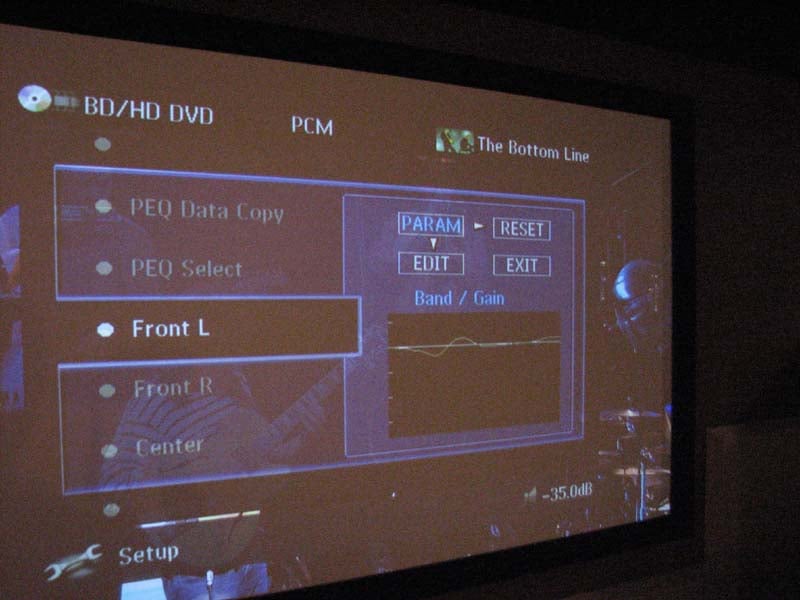 After YPAO
was completed, I did some preliminary listening tests and decided to manually
tweak trim levels (0.5dB here or there for the main channels and about 2dB
lower for the sub). I also went into the
bass management menu and engaged "Bass Out" for the main channels +
the subwoofers. The manual EQ mode is a
helpful tool to further smooth out bass response even though YPAO doesn't quite
have enough resolution. It's still good
enough to fine tune low Q problem areas such as bumps or to a minor extent
suckouts. Simply copy over the curve of
your choice to the PEQ data copy and go in to do your edits. If you don't like them, you can always
restore the original calibration results and start all over again.
After YPAO
was completed, I did some preliminary listening tests and decided to manually
tweak trim levels (0.5dB here or there for the main channels and about 2dB
lower for the sub). I also went into the
bass management menu and engaged "Bass Out" for the main channels +
the subwoofers. The manual EQ mode is a
helpful tool to further smooth out bass response even though YPAO doesn't quite
have enough resolution. It's still good
enough to fine tune low Q problem areas such as bumps or to a minor extent
suckouts. Simply copy over the curve of
your choice to the PEQ data copy and go in to do your edits. If you don't like them, you can always
restore the original calibration results and start all over again.
Editorial Note for PEQ Editing
For those inclined to do some fine tuning of your systems frequency response and an available RTA analyzer to measure before and after results, here is a quick reference on how to use the editing features of YPAO and to calculate the Q.
· Select freq/gain to choose the center frequency
· Select band/gain to set the Q and gain as needed
How to Calculating Q:
To calculate Q, use fc / BW where fc = center frequency and BW - bandwidth
Bass Management
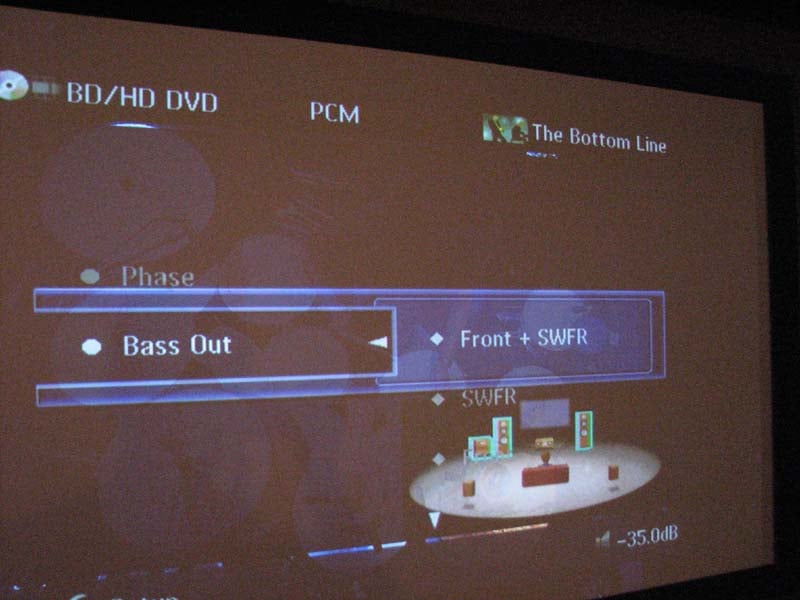 As I have
come to expect with all top end Yamaha A/V receivers since they abandoned their
abominable 90Hz fixed crossover setting, bass management of this receiver was
excellent, Yamaha offers a variable crossover point from 40Hz to 200 Hz and +-
phase adjustment for the subwoofer(s) so you can determine the best setting
without having to go behind your subwoofer(s) to change it. There is also a "both" setting for
the bass output so you can still have your subwoofer active for 2CH sources
even if your main speakers are set to large. Please note however that "Pure
Direct" and "Stereo Direct" modes bypass the bass management
altogether and will NOT send signal to the subwoofer for 2CH sources regardless
of speaker settings. In this case,
either don't use "Pure Direct" or disable the "auto"
setting for stereo direct mode in the OSD to engage the DSP and bass
management.
As I have
come to expect with all top end Yamaha A/V receivers since they abandoned their
abominable 90Hz fixed crossover setting, bass management of this receiver was
excellent, Yamaha offers a variable crossover point from 40Hz to 200 Hz and +-
phase adjustment for the subwoofer(s) so you can determine the best setting
without having to go behind your subwoofer(s) to change it. There is also a "both" setting for
the bass output so you can still have your subwoofer active for 2CH sources
even if your main speakers are set to large. Please note however that "Pure
Direct" and "Stereo Direct" modes bypass the bass management
altogether and will NOT send signal to the subwoofer for 2CH sources regardless
of speaker settings. In this case,
either don't use "Pure Direct" or disable the "auto"
setting for stereo direct mode in the OSD to engage the DSP and bass
management.
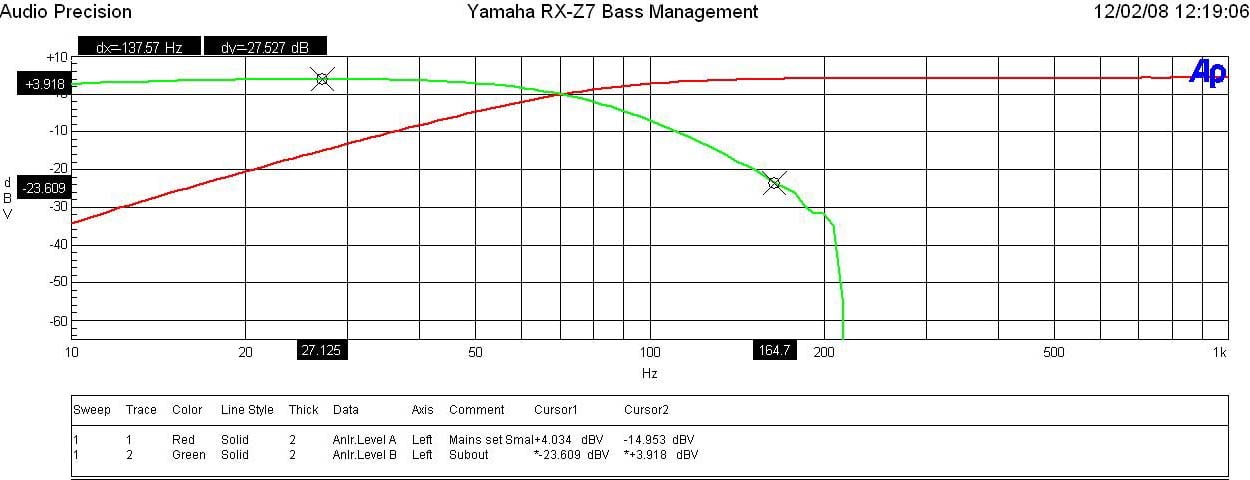 As was the case with the RX-Z11, the RX-Z7 provides
for variable crossover settings per speaker group (ie. Mains, Center, Surrounds
but doesn't give you a choice for the subwoofer crossover which I found through
my testing to be dependent on the main channel crossover setting when listening to 2CH sources in multi channel modes such as PLIIx Music or DSP programs. Thus I highly recommend you keep each speaker
groups crossover setting within 20Hz to ensure a more optimal integration with
the subwoofer during all playback modes.
As was the case with the RX-Z11, the RX-Z7 provides
for variable crossover settings per speaker group (ie. Mains, Center, Surrounds
but doesn't give you a choice for the subwoofer crossover which I found through
my testing to be dependent on the main channel crossover setting when listening to 2CH sources in multi channel modes such as PLIIx Music or DSP programs. Thus I highly recommend you keep each speaker
groups crossover setting within 20Hz to ensure a more optimal integration with
the subwoofer during all playback modes.
I also noted that if you set the main channels to "small", the RX-Z7 still allows you to set the center and surround channels to "large". I would have preferred Yamaha to automatically set all speakers to "small" if the mains were set "small". But, since they didn't, pay extra attention to this when configuring your bass management settings.
The crossovers worked as expected for a THX Ultra2 certified receiver (despite the RX-Z7 is not THX certified) as indicated by the 12dB/oct High Pass Filter (HPF) slopes on speakers set small and 24dB/oct Low Pass Filter (LPF) slopes on the subwoofer output which I measured with my Audio Precision SYS 2722 Audio Analyzer.
Yamaha RX-Z7 7.1 Video Setup and Test Results
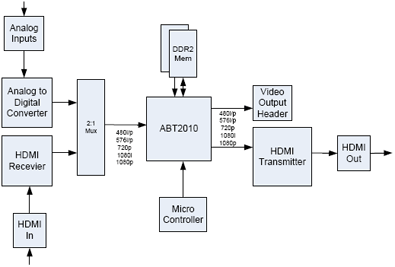 Yamaha made
some significant upgrades over the RX-Z11 with respect to video processing in
this receiver. While the RX-Z11 is powered
by Anchor Bay Technologies' ABT1018
chipset, the RX-Z7 utilizes the newer and arguably more advanced ABT2010 chipset with VRS technology. Full 1080p upscaling for all inputs with OSD is
supported on this receiver, including 1080p / 24fps. Unlike the Pioneer SC-07 A/V receiver, the
Yamaha offers video processing and video adjustments for HDMI, such as Mosquito
Noise Reduction, Block Noise Reduction, Detail Enhancement, Edge Enhancement,
and Brightness/Contrast/Saturation control for HDMI as well. In
fact, based on my performance testing, its got the most advanced video
processing capabilities I've seen in a receiver in this price class and it can
go toe to toe with the very best Denon has to offer on their flagship receivers
and pre/pros using Silicon Optix HQV.
Yamaha made
some significant upgrades over the RX-Z11 with respect to video processing in
this receiver. While the RX-Z11 is powered
by Anchor Bay Technologies' ABT1018
chipset, the RX-Z7 utilizes the newer and arguably more advanced ABT2010 chipset with VRS technology. Full 1080p upscaling for all inputs with OSD is
supported on this receiver, including 1080p / 24fps. Unlike the Pioneer SC-07 A/V receiver, the
Yamaha offers video processing and video adjustments for HDMI, such as Mosquito
Noise Reduction, Block Noise Reduction, Detail Enhancement, Edge Enhancement,
and Brightness/Contrast/Saturation control for HDMI as well. In
fact, based on my performance testing, its got the most advanced video
processing capabilities I've seen in a receiver in this price class and it can
go toe to toe with the very best Denon has to offer on their flagship receivers
and pre/pros using Silicon Optix HQV.
Unlike previous HDMI receivers from Yamaha (including the RX-Z11), the RX-Z7 has enhanced black level to accept true RGB range of 0-255. This is the default setting and you cannot toggle between RGB or YCbCr. Although the majority of DVD's and Blu-ray discs are mastered in YCbCr with a range of 16-235, its useful for people connecting PC's or other RGB type sources to their receivers without worrying about cropping blacker than black information.
For more information, read our article on HDMI Enhanced Black Levels
Component video can be assigned to either the main or secondary zone and includes 480p upconversion and OSD support. Just like every other A/V pre/pro and receiver we've tested, the RX-Z7 does not support 1080p via component video input so for those using an XBOX 360, you will either have to run it directly into your display or upgrade to their newer Blade unit that has HDMI capability.
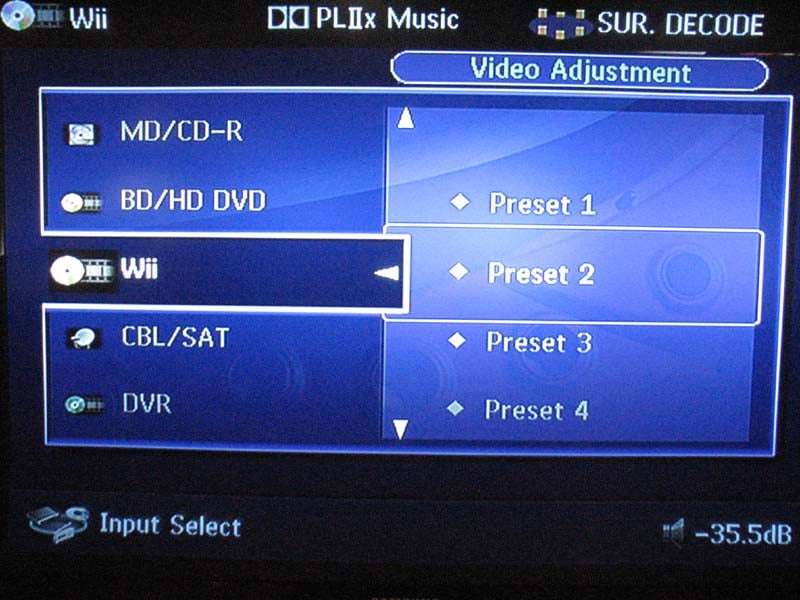

I found myself really taking advantage of the video tweaking options the RX-Z7 sports. It did a great job really sharpening the resolution of my Nintendo Wii, most notably when playing Wii Pool. With my Wii set to 480i and the RX-Z7 upscaling to 1080p, I adjusted the "noise reduction" to low and "detail" control up to about +10 which took on a lifelike appearance on my 56" Samsung DLP RPTV.
If the native video signal coming into the RX-Z7 is anything other than 4:3, the zoom features are bypassed on the receiver which prevents the user from messing up the proper aspect ratio of a 16:9 signal on an HDTV display.
Progressive re-processing features include:
- Mosquito Noise Reduction – reduces noise artifacts but can also reduce resolution if set too high
- Block Noise Reduction – reduces noise associated with errors in encoding video with too low of a bitrate. Setting this level too high tends to blur the image
- Detail Enhancement – adjusts the finesses of the image
- Edge Enhancement – adjusts sharpness of image
- Brightness – adjusts black level by adding or subtracting an offset, or bias, into the red, green, and blue signals
- Contrast – picture control that applies a scale factor (gain) to the red, green, and blue signals.
- Saturation – adjusts the color of the image
Rather than going the route of memorizing the video settings per input like Denon does on their flagship products, Yamaha offers six memory presets which encompass audio, video and other settings. Many calibrators may prefer the individual presets to calibrate based on source resolution and not necessarily input. However, with the exception of my Verizon FIOS box, all of my sources are pretty much locked onto a fixed resolution so I prefer the Denon approach of memorizing video settings per input. Thankfully, if you select any particular input on the RX-Z7, it offers you the option to store a particular memory setting as well as to what extent to recall its function. Thus I kept my audio calibrations the same for three of the six presets but customized the video settings and recalled them on their respective inputs for optimal picture settings.
The RX-Z7 has only 3 Component Video inputs and a selectable output for the main or Zone 2/3. As standard procedure, I always wire up my systems with Component Video as a backup should HDMI fail (trust me this happens more often than not). Thus I tested all of my sources via component video and they worked just fine with the RX-Z7 handling them. It's important to note however that the video upconversion features of the RX-Z7 only operate via the HDMI outputs. If you route component video for all of your sources and outputs, you will have native resolution (up to 1080p) with no video processing or enhancements.
Audioholics/HQV Bench Testing Summary of Test Results
Perfect Score is 130
Yamaha RX-Z7 Benchmark Score: 130 (a perfect score and Yamaha first!)
| Test | Max Points | RX-Z7 | Pass/Fail |
| Color Bar | 10 | 10 | Pass |
| Jaggies #1 | 5 | 5 | Pass |
| Jaggies #2 | 5 | 5 | Pass |
| Flag | 10 | 10 | Pass |
| Detail | 10 | 10 | Pass |
| Noise | 10 | 10 | Pass |
| Motion adaptive Noise Reduction | 10 | 10 | Pass |
| Film Detail | 10 | 10 | Pass |
| Cadence 2:2 Video | 5 | 5 | Pass |
| Cadence 2:2:2:4 DV Cam | 5 | 5 | Pass |
| Cadence 2:3:3:2 DV Cam | 5 | 5 | Pass |
| Cadence 3:2:3:2:2 Vari-speed | 5 | 5 | Pass |
| Cadence 5:5 Animation | 5 | 5 | Pass |
| Cadence 6:4 Animation | 5 | 5 | Pass |
| Cadence 8:7 animation | 5 | 5 | Pass |
| Cadence 3:2 24fps film | 5 | 5 | Pass |
| Scrolling Horizontal | 10 | 10 | Pass |
| Scrolling Rolling | 10 | 10 | Pass |
| Total Points | 130 | 130 |
|
*Source component was the Toshiba HD-A2 upscaled to 1080p via the RX-Z7 and fed to an Epson 1080UB LCD Projector. The HD-A2 was set to 480i and the 1080UB was set to “though” or bypass.
Not since the likes of Silicon Optix Realta based video processing found in Denon A/V receivers and DVD players have we seen a perfect score on their very own video test disc. It's obvious the Anchor Bay's chipset has been tweaked out to get a perfect score on this test and the video processing features such as detail enhancement and misquote noise reduction paid dividends in polishing the picture for enhanced quality. I do caution not to abuse any of these settings, especially the noise reduction features as a setting too high will reduce noise at the expense of reduced resolution.
HDMI Firmware Related Processing Bug
Unfortunately literally a day after I awarded this receiver the Audioholics 2008 Product of the Year for the receiver category, I discovered a major bug with the HDMI processing. I had Yamaha rush me a 2nd test sample but that unit also shared the same fate. After a 20-30 minute period of the receiver being on, blue parallel vertical lines would manifest themselves across the screen as seen in the images below.
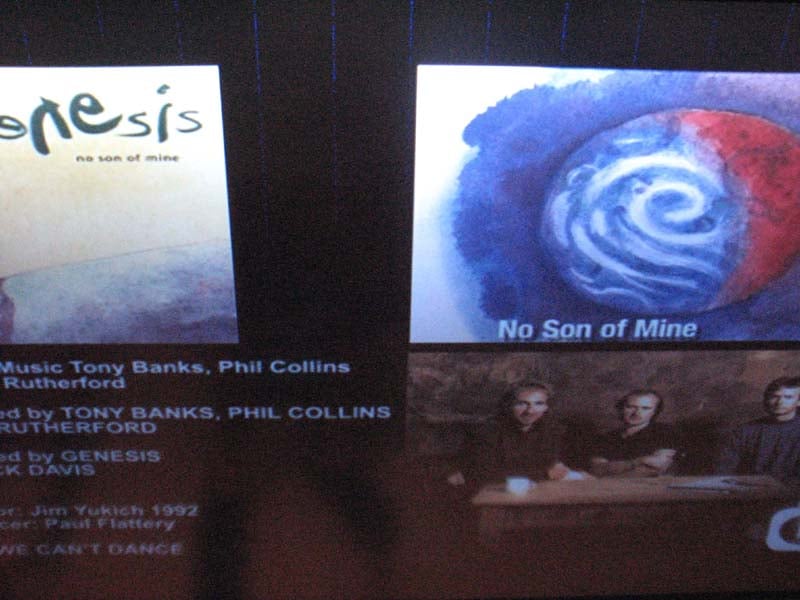
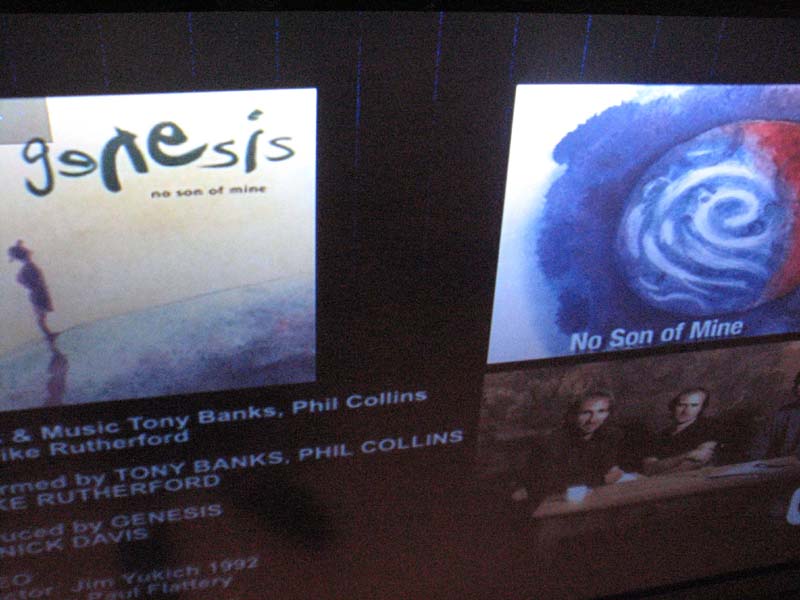
HDMI processing bug – vertical blue lines and sparkles
If I toggled the input either on the receiver or display, the lines would go away but moments later I could see little blue sparkles randomly appear on the screen. This didn’t seem to be a function of resolution or PReP settings but whether or not HDMI to HDMI processing was enabled. Analog to HDMI processing worked just fine and until Yamaha came up with a firmware fix that I beta tested for them, I had no choice but to run the unit in “through” mode for all HDMI inputs. I am proud to report the diligence of Yamaha engineering has resolved this issue as of 2/06/09 and has posted the latest firmware fix on their website which is available for download or can be obtained via your Ethernet connection on your RX-Z7.
Editorial Note: How to Update the Firmware
updated: 2/09/09To update your firmware via Ethernet, you must enter the advanced menu screen of the RX-Z7 by holding down on the “straight/effect” button and toggling on the master power switch. Once the receiver powers up, it will display “advanced setup” via the front panel display. Simply turn the mini front panel dial labeled “program” until you see the option to update firmware. At that point you can either do so via the USB interface on the front panel or select “Ethernet”. Simply hit the “menu” button, the RX-Z7 will begin updating the firmware which I found took around 10-15 minutes. When the firmware update is completed, I suggest entering the advanced setup and double checking the Firmware version has been updated to match Yamaha’s latest offering on their official RX-Z7 support page. The firmware fix for HDMI processing bug will be available at the beginning of March with other added features.
Yamaha RX-Z7 7.1 DSP Processing & Network Configuration
DSP Adjustments
As with most upper echelon Yamaha receivers, there are a multitude of advanced DSP audio processing features with virtually unlimited tweakability. There is something like 22 different DSP modes on the RX-Z7 which can transform your theater room into a Jazz club, large Cineplex or if not properly adjusted, a bathroom at Tampa Stadium.
Yamaha incorporated several adjustment controls for their DSP, including:
- DSP level – adjusts the amount of DSP applied to the source. I found kicking this parameter down a notch or two on most of the program modes really helps to make them sound more natural
- Initial delay – changes the apparent size of the soundfield by adjusting the ratio of direct vs reflected sound. I didn't have a need to mess with this much.
- Room size – adjusts the apparent size of the sound field. I either adjusted this up or down a few clicks depending on the DSP mode and how much more spaciousness I required for the program material.
- Liveness – adjusts the reflectivity of virtual walls created by the DSP mode or early reflection decay rate. I found myself adjusting this down a few steps on many of my favorite DSP modes
- Rev Time – adjusts reverb time. I typically left this setting at default.
- Rev Delay – adjusts reverberation delay between the beginning of the direct vs reflected sound. I also left this setting at default.
- Rev. Level – adjusts the volume of reverberation sound. I toned this down a click or so on some of the more lively DSP modes.
Adaptive DRC
and DSP Level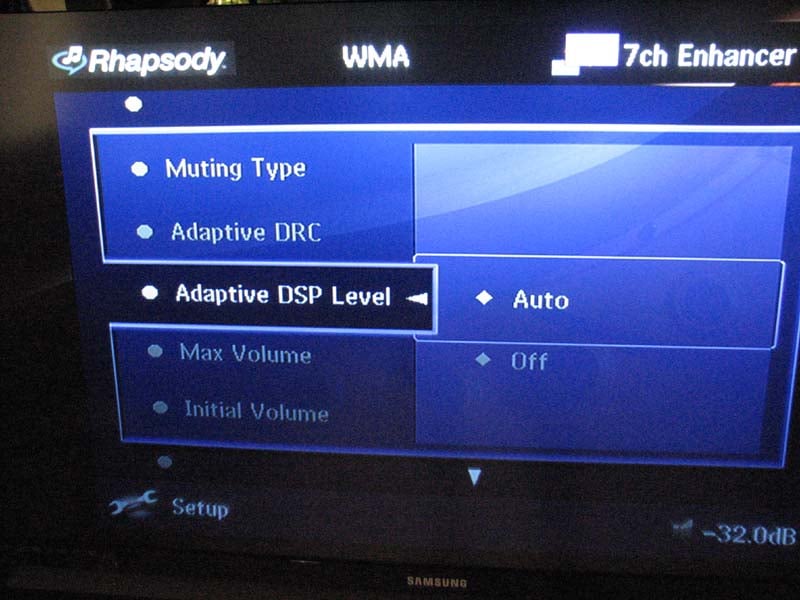 Yamaha incorporated the Adaptive Dynamic Range
Control (DRC) and Adaptive DSP
level from their RX-Z11. Adaptive DRC is essentially a fancy dynamic range limiter
that keeps the volume level more constant which is preferred for night
listening or when you're watching a highly dynamic movie and don't want to get
blown away by an explosion as you turn the volume up to hear the dialogue more
clearly during quite passages. Although
not nearly as sophisticated or as useful as Audyssey Dynamic Volume, it still
did a pretty good job of keeping the levels at check without any audible volume
pumping typically found in range limiters like these. As the volume level was turned up, Adaptive DRC essentially remained transparent when compared
to the "off" position as it should.
Yamaha incorporated the Adaptive Dynamic Range
Control (DRC) and Adaptive DSP
level from their RX-Z11. Adaptive DRC is essentially a fancy dynamic range limiter
that keeps the volume level more constant which is preferred for night
listening or when you're watching a highly dynamic movie and don't want to get
blown away by an explosion as you turn the volume up to hear the dialogue more
clearly during quite passages. Although
not nearly as sophisticated or as useful as Audyssey Dynamic Volume, it still
did a pretty good job of keeping the levels at check without any audible volume
pumping typically found in range limiters like these. As the volume level was turned up, Adaptive DRC essentially remained transparent when compared
to the "off" position as it should.
Adaptive DSP adjusts the DSP level control based on master volume level setting. I did seem to prefer this feature left on in conjunction with Adaptive DRC during low listening levels as they better maintained dialogue clarity while also improving the surround envelopment. It was a subtle difference and I encourage the end user to experiment with these settings to optimize their surround experience. This is especially true if you do a lot of late night listening at low levels and don't want to wake the children while still getting that theatrical experience typically only achieved at high listening levels.
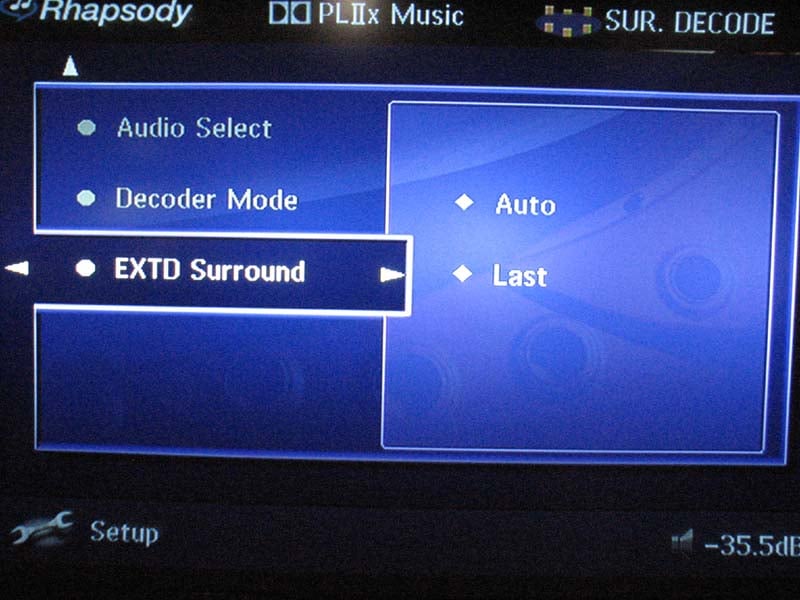 Alas, Yamaha has once again paid attention to my
continuing complaints about their past generations of receivers not remembering
to stay locked into PLIIx Music or Movie modes for discrete 5.1 sources once
you power cycle the receiver or change the DVD. This time around, Yamaha has incorporated a configurable
option called EXTD Surround which determines how to enable the back channels. "Auto" engages the back surround
channels when a DVD sends a flag
for DTS ES or DD EX while "last" retains the last setting you chose
when watching a 5.1 source on that input.
This is the option I chose for my setup.
What a relief to finally always have my back channels on without having
to frantically search for the right button to press to engage it each time I
swapped out a DVD. As a bonus with HDMI OSD overlay, you can
even see what mode you are in on your display as you toggle between PLIIx / DTS
NEO settings you have engaged by hitting the "Surr Decode" button on
the remote.
Alas, Yamaha has once again paid attention to my
continuing complaints about their past generations of receivers not remembering
to stay locked into PLIIx Music or Movie modes for discrete 5.1 sources once
you power cycle the receiver or change the DVD. This time around, Yamaha has incorporated a configurable
option called EXTD Surround which determines how to enable the back channels. "Auto" engages the back surround
channels when a DVD sends a flag
for DTS ES or DD EX while "last" retains the last setting you chose
when watching a 5.1 source on that input.
This is the option I chose for my setup.
What a relief to finally always have my back channels on without having
to frantically search for the right button to press to engage it each time I
swapped out a DVD. As a bonus with HDMI OSD overlay, you can
even see what mode you are in on your display as you toggle between PLIIx / DTS
NEO settings you have engaged by hitting the "Surr Decode" button on
the remote.
Multi-Zone / Multi-Source Audio & Power Amp Assignability
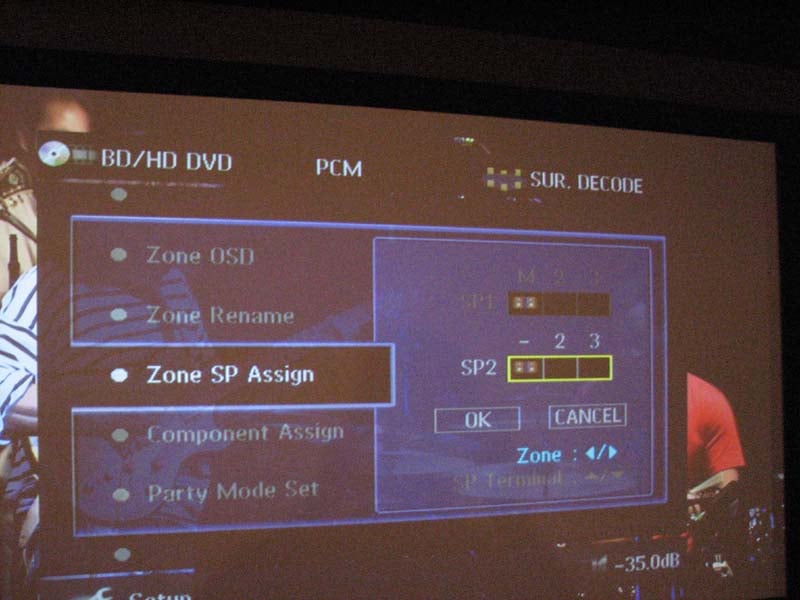 Yamaha has trickled down their very useful power amp
assignability feature of the RX-Z11 to the RX-Z7 via a "preamp mode"
which allows the 7.1 preamp outputs to be active for the main zone while you
can also reassign two pairs of internal amplifiers for zones 2 & 3 or just
leave them idle. In past receivers such
as the RX-V2700, internally assigning amplifiers to other zones killed the
outputs of their respective main channel preamp outs so if you tried to operate
the other zones simultaneously with the main zone, you would lose the surround
back or rear channels depending on which channel groups were being reassigned
for multi zone function even if you were using external amplification for the
main zone. I was happy to see Yamaha
resolve this issue with this very useful feature. Because of this, you can run a full fledged
7.1 system in the main zone while simultaneously serving music in three other
zones all powered by external amplification.
During our Christmas party I actually had Christmas music playing in the
frontyard and dining room (Zones 2,3) streamed off my MCX-2000,
workout music in my home gym (Zone 4) while the kids watched "Home Alone"
in 7.1 in our family room all at the same time with no external switchers or
control needed. The RX-Z7 was providing
power for the main 7.1 zone while my Emotiva MPS-1
was providing power to my multi zone speakers.
Very impressive.
Yamaha has trickled down their very useful power amp
assignability feature of the RX-Z11 to the RX-Z7 via a "preamp mode"
which allows the 7.1 preamp outputs to be active for the main zone while you
can also reassign two pairs of internal amplifiers for zones 2 & 3 or just
leave them idle. In past receivers such
as the RX-V2700, internally assigning amplifiers to other zones killed the
outputs of their respective main channel preamp outs so if you tried to operate
the other zones simultaneously with the main zone, you would lose the surround
back or rear channels depending on which channel groups were being reassigned
for multi zone function even if you were using external amplification for the
main zone. I was happy to see Yamaha
resolve this issue with this very useful feature. Because of this, you can run a full fledged
7.1 system in the main zone while simultaneously serving music in three other
zones all powered by external amplification.
During our Christmas party I actually had Christmas music playing in the
frontyard and dining room (Zones 2,3) streamed off my MCX-2000,
workout music in my home gym (Zone 4) while the kids watched "Home Alone"
in 7.1 in our family room all at the same time with no external switchers or
control needed. The RX-Z7 was providing
power for the main 7.1 zone while my Emotiva MPS-1
was providing power to my multi zone speakers.
Very impressive.
Just like the RX-Z11, the RX-Z7 offers a DSP "Party" mode which is a must have feature for those hosting social events. It allows you to play the same source through all of the speakers in the main zone and any or all of the other zones simultaneously with just the flick of a button. In addition, it will even downconvert HDMI audio so that you can play your HDMI audio sources in the other zones without having to connect additional analog cables. Features like this really flex the RX-Z7's custom install muscles.
The RX-Z7 offers some of the most comprehensive multi zone / multi source options in a receiver that I haven't seen the likes of since their RX-Z11 flagship. About the only complaint I have is that Zone 4 doesn't incorporate level control which I learned the hard way when I turned it on and it blasted me out of my guest room running my Axiom W-3 in-walls at full power. Luckily Axiom speakers are built to play loud and didn't blow out while I rushed to the RX-Z7 to shut down the zone. If you're gonna use all four zones, I recommending connecting up zone 4 with external volume control or just use the digital output into another A/V receiver.
For those not using multi zone or surround back channels, you can rest assured in knowing that the extra two internal amplifiers of the RX-Z7 wont go to waste. The RX-Z7 offers a bi-amp mode which takes the surround back channels and duplicates and level matches the signal from the main channels which will allow you to bi-amp or connect multiple sets of main speakers. As noted earlier, I ran bi-amp mode in my main theater room running my T-30LSE speakers and the RX-Z7 had no problems driving them to reference levels.
Advanced Trigger Options
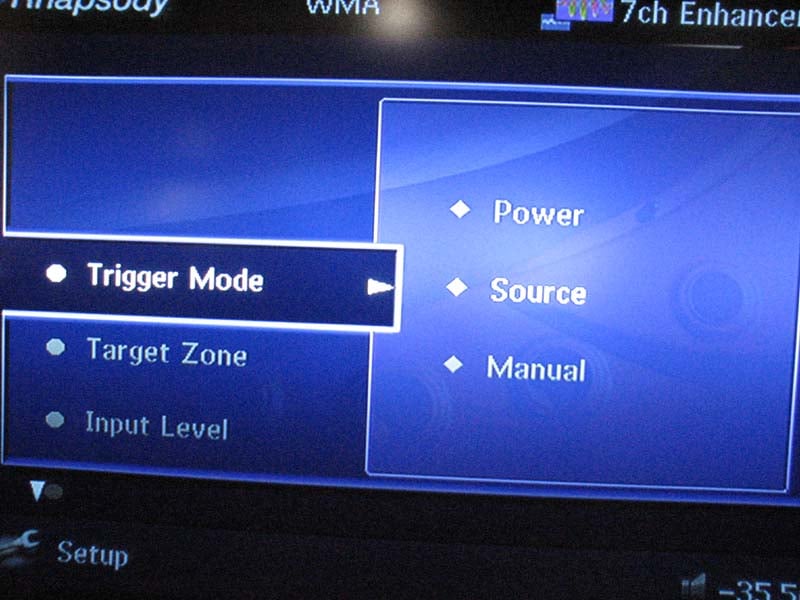 Normally I don't write about trigger options, but the
RX-Z7 is armed to the teeth with obscure but very useful features that go far
beyond conventional triggers found on most A/V receivers. The RX-Z7 is equipped with two fully configurable
12V triggers both of which are unfortunately limited to a 15mA output. Why Yamaha hasn't upgraded their trigger
outputs to 100-200mA outputs is beyond me, but in most cases, the limited
current drive on these should still suffice.
Normally I don't write about trigger options, but the
RX-Z7 is armed to the teeth with obscure but very useful features that go far
beyond conventional triggers found on most A/V receivers. The RX-Z7 is equipped with two fully configurable
12V triggers both of which are unfortunately limited to a 15mA output. Why Yamaha hasn't upgraded their trigger
outputs to 100-200mA outputs is beyond me, but in most cases, the limited
current drive on these should still suffice.
Each of the two triggers can be set to "Power" or "Source" modes. The "Power" setting is useful for triggering external devices on when one of the four zones are turned on, or any of the zones are turned on. Too bad they didn't offer the option for all zones but the main zone which would be useful for those wanting to turn on external amplifiers when any of the other zones are turned on. Using the "All" setting is the only option in this case which means the external amplifiers will turn on even if only the main zone is turned on.
 "Source"
mode lets you trigger on any or all of the sources. In my setup, I wanted to turn on my triggers
for external amplification of my other three zones so I triggered "high"
on the "USB/Net" input
as most of the times I'd be running my other zones would be when I am streaming
music from my MCX-2000 music
server. Although not documented in the
user manual, by triggering "High"
on this input, it gives you the added bonus of the trigger also activating if
any of the other zones are turned on independent of what input you have selected. This is the only input that functions this
way and I just happened on it by luck.
"Source"
mode lets you trigger on any or all of the sources. In my setup, I wanted to turn on my triggers
for external amplification of my other three zones so I triggered "high"
on the "USB/Net" input
as most of the times I'd be running my other zones would be when I am streaming
music from my MCX-2000 music
server. Although not documented in the
user manual, by triggering "High"
on this input, it gives you the added bonus of the trigger also activating if
any of the other zones are turned on independent of what input you have selected. This is the only input that functions this
way and I just happened on it by luck.
Network Streaming – The Sky's the Limit!
Yamaha has supported virtually every conceivable way one could stream music into the RX-Z7. During my review, I successfully managed to stream music off my MCX-2000 MusicCast system, my personal PC hard drive, internet radio and a USB drive. The RX-Z7 also supports XM radio with a soon to be released firmware update to support Sirius radio.
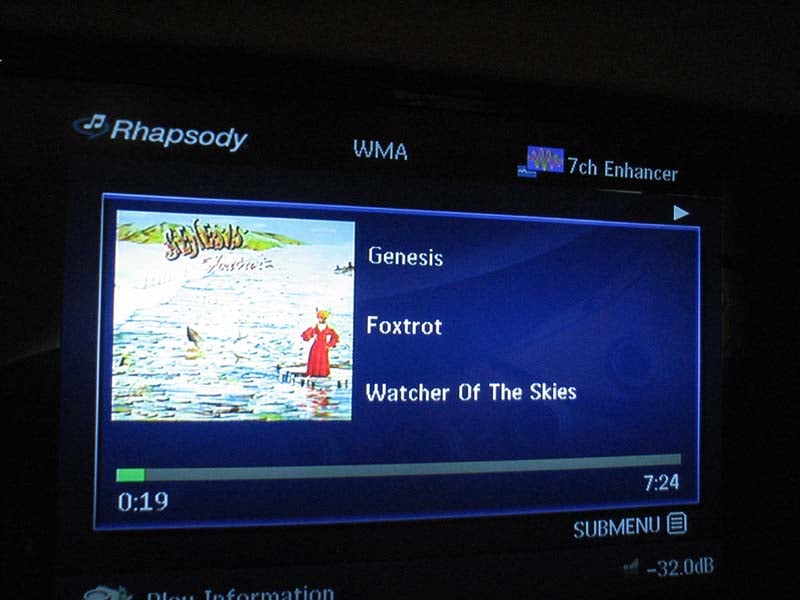 Unlike the connection difficulties I experienced when
trying to use Rhapsody on my Denon AVP-A1HDCI
pre/pro, it was a snap to get going on the RX-Z7. I was amazed by the virtually limitless
access to music and albums I found from my favorite artists. It was a pleasure getting re-acquainted with Peter Gabriel era Genesis music with album art work
and song titles. The audio quality
varied but everything I listened to was in WMA format and had much better sound
quality than what I've heard come from XM radio in the past. Yamaha has also updated their "Stereo
Enhancer" feature which improves the audio quality of compressed music
sources by attempting to restore frequency response. I did find this feature worked as claimed and
used it exclusively when listening to Net Radio and Rhapsody. Be mindful when using the network streaming
audio features simultaneously in all zones as there will be a slight audio
delay relative to the main zone which will be audible if the other zones are in
close proximity. This is something I
noticed walking from my workout room (zone 3) into my family room (main 7.1
zone) while streaming Rhapsody in both zones at the same time. Oddly when operating the receiver remotely from a web interface, this audible delay doesn't exist.
Unlike the connection difficulties I experienced when
trying to use Rhapsody on my Denon AVP-A1HDCI
pre/pro, it was a snap to get going on the RX-Z7. I was amazed by the virtually limitless
access to music and albums I found from my favorite artists. It was a pleasure getting re-acquainted with Peter Gabriel era Genesis music with album art work
and song titles. The audio quality
varied but everything I listened to was in WMA format and had much better sound
quality than what I've heard come from XM radio in the past. Yamaha has also updated their "Stereo
Enhancer" feature which improves the audio quality of compressed music
sources by attempting to restore frequency response. I did find this feature worked as claimed and
used it exclusively when listening to Net Radio and Rhapsody. Be mindful when using the network streaming
audio features simultaneously in all zones as there will be a slight audio
delay relative to the main zone which will be audible if the other zones are in
close proximity. This is something I
noticed walking from my workout room (zone 3) into my family room (main 7.1
zone) while streaming Rhapsody in both zones at the same time. Oddly when operating the receiver remotely from a web interface, this audible delay doesn't exist.
Remote Control(s)
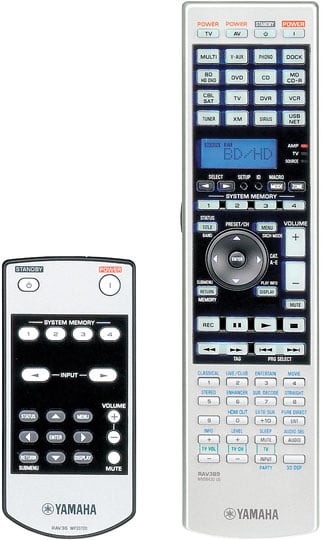 The RX-Z7
comes with two remote controls: one that operates the entire receiver
(including the other 3 zones), the (RAV389), and a mini remote that also
operates the main zone (RAV36). The RAV 389
is an improvement over the RX-Z11 remote in that virtually all of the critical
keys are blacklight with clear bright blue lightening making for quite a
stunning display and toy magnet for my 20 month old daughter. Although there are lots of buttons, it's
fairly straight forward to operate. The
only major gripe I have is the really small mode and zone buttons which I use
much of the latter and often struggle to get the remote to control the proper
zone. I would also prefer the remote
default back to the main zone after a few minutes of inactivity as I cant tell
you how many times I had it set for Zone 3 when listening to music in my workout
room only to have my wife or 8 year old daughter the next day complain they
cant turn on the receiver to watch a DVD.
The RX-Z7
comes with two remote controls: one that operates the entire receiver
(including the other 3 zones), the (RAV389), and a mini remote that also
operates the main zone (RAV36). The RAV 389
is an improvement over the RX-Z11 remote in that virtually all of the critical
keys are blacklight with clear bright blue lightening making for quite a
stunning display and toy magnet for my 20 month old daughter. Although there are lots of buttons, it's
fairly straight forward to operate. The
only major gripe I have is the really small mode and zone buttons which I use
much of the latter and often struggle to get the remote to control the proper
zone. I would also prefer the remote
default back to the main zone after a few minutes of inactivity as I cant tell
you how many times I had it set for Zone 3 when listening to music in my workout
room only to have my wife or 8 year old daughter the next day complain they
cant turn on the receiver to watch a DVD.
The little RAV36 was a disappointment in my book as it virtually the same limited secondary remote Yamaha ships with their venerable RX-Z11 receiver. Upon first glance, I thought this remote was incapable of operating the other zones until a forum member pointed me to page 123 of the user manual where it discusses configuring the remote to control other zones. To control each zone, all you need to do is hold down on the right arrow key with the corresponding zone# for a few seconds. Personally I'd prefer a little zone switch like they had on past generation mini remotes, but this seemed to get the job done while keeping the clutter down on the user panel by eliminating buttons for that purpose.
The RAV36 offers basic access to the main zone OSD, inputs, memory settings and volume control. Neither of these remotes will win any prizes for innovation in design but Yamaha and most of the other receiver brands gave up on offering flagship type remotes years ago in effort to put more of the budget into the receiver knowing that most consumers would opt for a separate remote controller system anyways. My advice here is to purchase a universal RF remote solution with range extenders to control all of your zones, including the main zone and tuck away this remote for future usage.
Yamaha Web Control Center
 If you want to bypass the mediocre secondary remote of the RX-Z7,
I suggest using their “Web Control
Center” which allows you to access
the RX-Z7 from a remote computer on the same network. To engage this feature, you must first enable
the “Network Standby” mode to the “on” position in the network setup feature of
the RX-Z7 otherwise you will have to make sure the main zone of the receiver is turned on to control
it at all times. If you don't plan on accessing your RX-Z7 remotely for extended periods of time, leave this feature off as it does significantly raise the idle power consumption of the receiver even in standby mode. I noted my review sample was warm to the touch in standby mode with the network function enabled.
If you want to bypass the mediocre secondary remote of the RX-Z7,
I suggest using their “Web Control
Center” which allows you to access
the RX-Z7 from a remote computer on the same network. To engage this feature, you must first enable
the “Network Standby” mode to the “on” position in the network setup feature of
the RX-Z7 otherwise you will have to make sure the main zone of the receiver is turned on to control
it at all times. If you don't plan on accessing your RX-Z7 remotely for extended periods of time, leave this feature off as it does significantly raise the idle power consumption of the receiver even in standby mode. I noted my review sample was warm to the touch in standby mode with the network function enabled.
Once you've enabled "Network Standby" all you do is type in the IP address of the RX-Z7 into your web browser and seconds later you are brought to a Yamaha control interface for the receiver which allows you to configure your zones, sources, sound fields and much more.
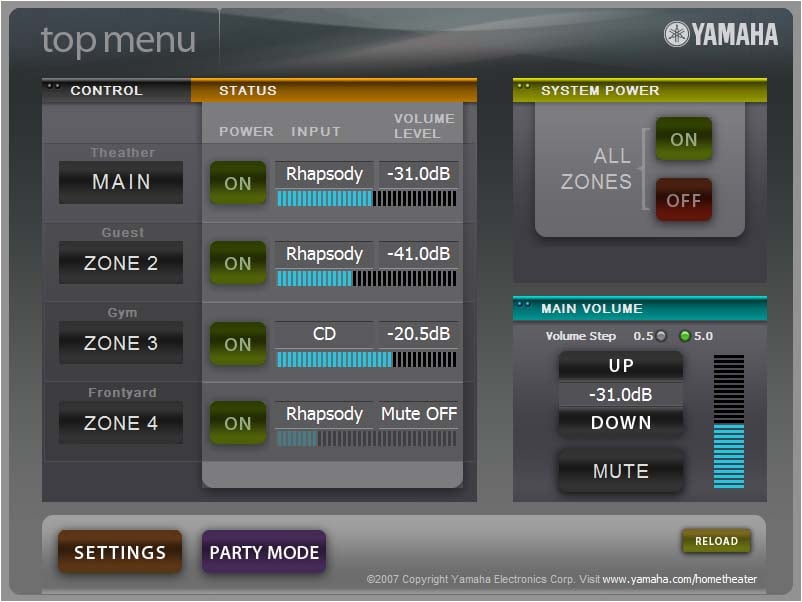 I was floored by this feature as it was so incredibly easy
to operate and very useful as well. In moments, I was streaming Frank Sinatra off Rhapsody in two of my remote zones while I was watching a DVD in the main zone without ever lifting the Yamaha remote control. The only limitation I found a bit frustrating was the inability to do searching in Rhapsody or Net Radio. I suggest setting up all of your bookmarks prior to using this feature so you can have instant access to all of your favorite music.
I was floored by this feature as it was so incredibly easy
to operate and very useful as well. In moments, I was streaming Frank Sinatra off Rhapsody in two of my remote zones while I was watching a DVD in the main zone without ever lifting the Yamaha remote control. The only limitation I found a bit frustrating was the inability to do searching in Rhapsody or Net Radio. I suggest setting up all of your bookmarks prior to using this feature so you can have instant access to all of your favorite music.
Best of all when accessing the receiver in this method, it eliminated the audible delay issue between zones when streaming music that I experienced when turning on all of the zones with the main remote control. This interface is available on the RX-Z11, and RX-V3900 as well. I look forward to seeing how this feature progresses on future Yamaha receivers as its truly a unique tool that they offer the end user at no cost.
Yamaha RX-Z7 7.1 Listening Tests
Over the years, I've come to expect top notch sound from Yamaha flagship receivers, especially those flaunting the Z designation. Although the RX-Z7 is physically a bit smaller than previous Z receivers, I was ready to find out if it could live up to the legendary performance bestowed upon their upper echelon receivers baring the Z signia.
Unless otherwise stated, all listening tests were conducted with YPAO turned Off and with my main speakers bi-amped and the receiver configured for 5.1 audio. For two-channel listening, I disabled the sub as I wanted to hear just how well the Yamaha could render complex bass passages with my speakers running full range.
Two-channel Music Listening (Bi-amp Mode)
I selected highly dynamic
and bass intensive musical content to ensure I was giving the amp section of
the RX-Z7 a good workout. I started out
with Dianne Reeves Never too Far and
worked through a collection of music on my Yamaha MusicCAST server.
CD: Dianne Reeves - Never Too Far
The bass in Track #2 "Never Too Far" will sound muddy on an improperly set up or mediocre system. With the RX-Z7 in bi-amp mode powering my T-30LSE system, I found it to sound incredibly snappy and articulate in the upper bass region. Stereo separation was excellent and Dianne's vocals were right in your face and crystal clear. At low listening levels, the noise floor on the RX-Z7 was virtually non existent. This allowed me to hear all of the subtle details in the music with great precision and clarity. As I turned the volume up on the Yamaha, it sounded effortless, particularly in the upper frequency range. I challenged the RX-Z7 to distress but it just would not falter.
CD: World's Greatest Pink Floyd Tribute
 I bought this
CD as a stocking stuffer for a friend at CVS. I had no idea what I was in store for. Not only is it musically excellent, but it's
a well recorded disc to boot. With such
notable progressive rock artists like Chris Squire from Yes, Tony Levin from
King Crimson and Tommy Shaw from Styx, it's a must have for all Pink Floyd
fans. The RX-Z7 really did a wonderful
job cranking out "Money" engaged in PLIIx Music Mode. Bass was clean and powerful while Tommy's
vocals were vibrantly energetic. The sax
solos sent a nice chill down my spine as I was surrounded by an array of
complex instruments on a very familiar tune that I was actually enjoying more
than the original. I flipped around to
various DSP settings and also enjoyed this CD on some of the Jazz DSP modes as
well. Take the time to experiment as the
DSP modes can reveal hidden treasures of sonic perfection when they work well
with the program material in your listening space.
I bought this
CD as a stocking stuffer for a friend at CVS. I had no idea what I was in store for. Not only is it musically excellent, but it's
a well recorded disc to boot. With such
notable progressive rock artists like Chris Squire from Yes, Tony Levin from
King Crimson and Tommy Shaw from Styx, it's a must have for all Pink Floyd
fans. The RX-Z7 really did a wonderful
job cranking out "Money" engaged in PLIIx Music Mode. Bass was clean and powerful while Tommy's
vocals were vibrantly energetic. The sax
solos sent a nice chill down my spine as I was surrounded by an array of
complex instruments on a very familiar tune that I was actually enjoying more
than the original. I flipped around to
various DSP settings and also enjoyed this CD on some of the Jazz DSP modes as
well. Take the time to experiment as the
DSP modes can reveal hidden treasures of sonic perfection when they work well
with the program material in your listening space.
Multi-channel Music and Home Theater
HD DVD: Pat Metheny - The Way Up
 I know HD DVD is dead, but my love of Pat Metheny isn't, so I
still use this disc and keep my obsolete Toshiba HD-A2 player on hand for this
very reason. Listening to the opening
track is very moving. Between Pat's
guitar solos and Antonio's amazing drumming, sonic heaven is achieved for the
musically literate who prefer lumps in their jazz. The RX-Z7 did a wonderful job and providing
me with the surround envelopment I am so used to hearing in my reference system
when playing this disc. The receiver was
dead quiet when it should be and loud and dynamic when called upon. While the recording levels on this disc are
much lower than the norm, I never ran found a point where I was pushing the volume
level up and it simply wouldn't go any louder.
It was obvious that the RX-Z7 not only didn't suffer the volume scaling
issue many of the newer receivers / and pre/pros are faced with today, but the
amp section had plenty of headroom to keep up and power my system with aplomb. Considering
my room is nearly 6,000 ft^3 and most of my speakers are 4-ohm rated, that
speaks volumes. Don't let anyone on the chat forums mislead you into believing
this receiver can't drive 4 ohm loads. It
can, provided you keep the impedance switch set to the high setting or "8
ohms or more".
I know HD DVD is dead, but my love of Pat Metheny isn't, so I
still use this disc and keep my obsolete Toshiba HD-A2 player on hand for this
very reason. Listening to the opening
track is very moving. Between Pat's
guitar solos and Antonio's amazing drumming, sonic heaven is achieved for the
musically literate who prefer lumps in their jazz. The RX-Z7 did a wonderful job and providing
me with the surround envelopment I am so used to hearing in my reference system
when playing this disc. The receiver was
dead quiet when it should be and loud and dynamic when called upon. While the recording levels on this disc are
much lower than the norm, I never ran found a point where I was pushing the volume
level up and it simply wouldn't go any louder.
It was obvious that the RX-Z7 not only didn't suffer the volume scaling
issue many of the newer receivers / and pre/pros are faced with today, but the
amp section had plenty of headroom to keep up and power my system with aplomb. Considering
my room is nearly 6,000 ft^3 and most of my speakers are 4-ohm rated, that
speaks volumes. Don't let anyone on the chat forums mislead you into believing
this receiver can't drive 4 ohm loads. It
can, provided you keep the impedance switch set to the high setting or "8
ohms or more".
DVD: Genesis - When in Rome In 2007, Genesis, arugably (by me at
least) the best progressive rock band of all time, got back together again for
one last tour which was captured on HD cameras and mastered in DTS audio. I've listened to this disc quite extensively
on my reference gear and other products in for review as well. The RX-Z7 didn't disappoint and I found some
of their own post processing modes to be quite engaging. The Rock DSP modes for example widened the
soundfield to the point where it portrayed a convincing live outdoor venue
perhaps as close to being in Rome
with ½ million other Genesis fans where this concert was recorded. Acoustical songs like "Ripples"
were best listened to in "Music Video" mode where dialogue
intelligibility wasn't compromised but the benefits of the expanded soundfield
when directly compared to listening in PLIIx Music Mode was realized.
In 2007, Genesis, arugably (by me at
least) the best progressive rock band of all time, got back together again for
one last tour which was captured on HD cameras and mastered in DTS audio. I've listened to this disc quite extensively
on my reference gear and other products in for review as well. The RX-Z7 didn't disappoint and I found some
of their own post processing modes to be quite engaging. The Rock DSP modes for example widened the
soundfield to the point where it portrayed a convincing live outdoor venue
perhaps as close to being in Rome
with ½ million other Genesis fans where this concert was recorded. Acoustical songs like "Ripples"
were best listened to in "Music Video" mode where dialogue
intelligibility wasn't compromised but the benefits of the expanded soundfield
when directly compared to listening in PLIIx Music Mode was realized.
For the remainder of the listening tests, the RX-Z7 was installed into my Family room system which consists of the gear notated System Setup & Configuration section of this review.
DVD: Horton Hears a Who
 This is
another instant Dr. Seuss classic headed up with the voices of comedic geniuses
Jim Carey and Steve Carell[CD1] .
Horton Hears a Who is great
family fun and engaging for all ages thanks to the brilliantly clever story line
and engaging characters. As with most
modern animated films, the video and audio quality of this film was excellent,
despite the audio soundtrack was limited to Dolby Digital 5.1. The numerous scenes where Horton was running
through the jungle either to evade Kangaroo and her minions or simply to jump
into the river had earth shattering bass with lots of surround sound effects
that planted you right into his realm.
The RX-Z7 demonstrated pristinely clean output at all listening levels
with great steering through all of the channels ensuring and excellent surround
sound experience Yamaha has been known for since they started producing A/V
multi channel receivers. DSP Adventure
mode remains one of my favorites for movie watching and I am glad to see that
Yamaha left this program in their vast variety of surround fields.
This is
another instant Dr. Seuss classic headed up with the voices of comedic geniuses
Jim Carey and Steve Carell[CD1] .
Horton Hears a Who is great
family fun and engaging for all ages thanks to the brilliantly clever story line
and engaging characters. As with most
modern animated films, the video and audio quality of this film was excellent,
despite the audio soundtrack was limited to Dolby Digital 5.1. The numerous scenes where Horton was running
through the jungle either to evade Kangaroo and her minions or simply to jump
into the river had earth shattering bass with lots of surround sound effects
that planted you right into his realm.
The RX-Z7 demonstrated pristinely clean output at all listening levels
with great steering through all of the channels ensuring and excellent surround
sound experience Yamaha has been known for since they started producing A/V
multi channel receivers. DSP Adventure
mode remains one of my favorites for movie watching and I am glad to see that
Yamaha left this program in their vast variety of surround fields.
DVD: Peter Gabriel – Secret World Live (1994)
 Arguably
Peter Gabriel's best concert tour to date, Secret
World is a must have for fans.
Instrumentally this is a masterpiece thanks to the fabulous stick work
of drummer Manu Katche, with Tony Levin (of King
Crimson) on bass and David Rhodes on guitar. Of course the lovely vocals of
Paula Cole really augment Peter's performance.
Arguably
Peter Gabriel's best concert tour to date, Secret
World is a must have for fans.
Instrumentally this is a masterpiece thanks to the fabulous stick work
of drummer Manu Katche, with Tony Levin (of King
Crimson) on bass and David Rhodes on guitar. Of course the lovely vocals of
Paula Cole really augment Peter's performance.
"In Your Eyes" is one of those songs that just sticks in your head and hearing the DTS soundtrack in full 7.1 with DSP mode "Music Video" captivates you and makes you want to fight the good fight for world peace. This is where the DSP modes of Yamaha really shine. Recorded concerts that sound a bit flat in standard DD or DTS 5.1 really open up once you apply some Yamaha DSP post processing to them. "Music Video" mode again really worked well here. Songs like "Digging in the Dirt" were a blast to listen to on the RX-Z7. The surround envelope was always engaging and when Peter strapped on that headcam, you really felt like you were him, though hopefully your have nicer teeth.
In my critical listening evaluation of two channel music, I found the RX-Z7’s amplifiers to be exceedingly dynamic and well controlled at even extreme listening levels. The sonic signature of this amplifier reminded me of the buttery smooth sound of their previous flagship receivers.
I threw on a variety of two channel material from the likes of Dave Matthews, Miles Davis, Al DiMeola and others and in most instances, the RX-Z7 provided an enhanced listening experience over conventional two channel whether I was using their DSP programs, PLiiX Music mode, or 7 channel stereo mode with the center and surrounds turned down a bit. No matter how poorly or how well the source is recorded that you are listening to, I am confident you will find the correct mode to enhance your listening enjoyment when using this receiver.
Suggestions for Improvement
The RX-Z7 is one of those few receivers that I find myself scratching my head over to decide what improvements can be made for the next generation model. In virtually every aspect it's a class leading receiver but some of my criticisms below may help ensure it remains king of the hill against the next generation receivers from its competitors:
- Ability to operate "presence" and "surround back" channels simultaneously (by adding 2CH of external amplification). Come on this is a Z series receiver Yamaha, give us our 9.1!
- Dual subwoofer outputs with independent level and delay controls
- Zone control (on/off, input, volume, etc) for secondary remote
- +10dB optional subwoofer boost on EXT analog inputs
- Improved heat management either through using a larger heat sink for the amp section, or providing more chassis airflow.
Yamaha RX-Z7 7.1 Measurements and Analysis
Preamp Section
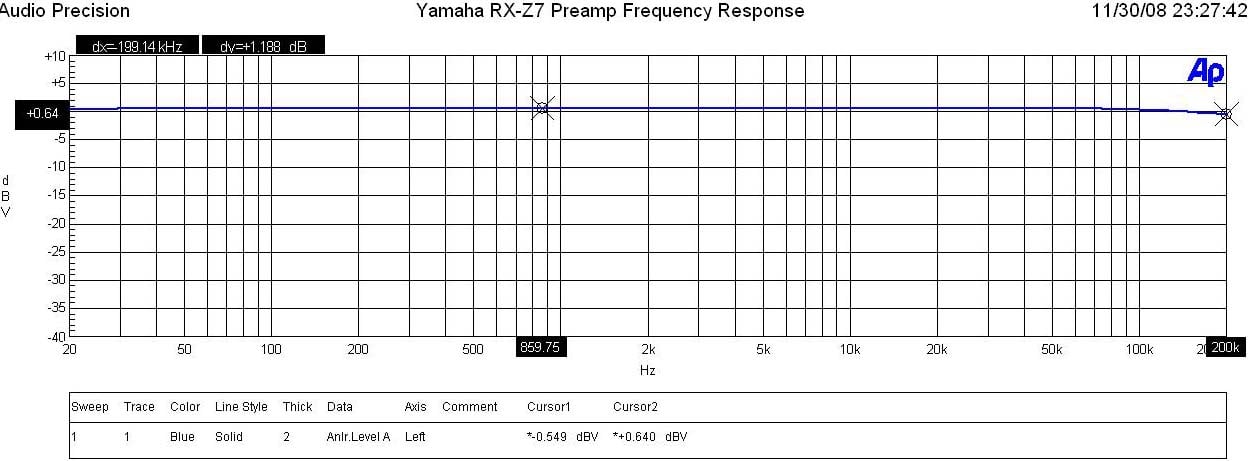
Yamaha RX-Z7 Preamp Frequency Response
I measured a ruler flat frequency response beyond the frequency response limits of my test gear (200kHz) in "Pure Direct" mode. The RX-Z7 was able to output 1.9Vrms at < 0.1% THD + N with the max limit of 3.3Vrms before turning off. The gain structure of the RX-Z7 was a bit lower than I am accustomed to (14dB), but not out of the norm. Given the ample drive of the RX-Z7 this shouldn't be much of a problem when pairing with most external amplifiers.
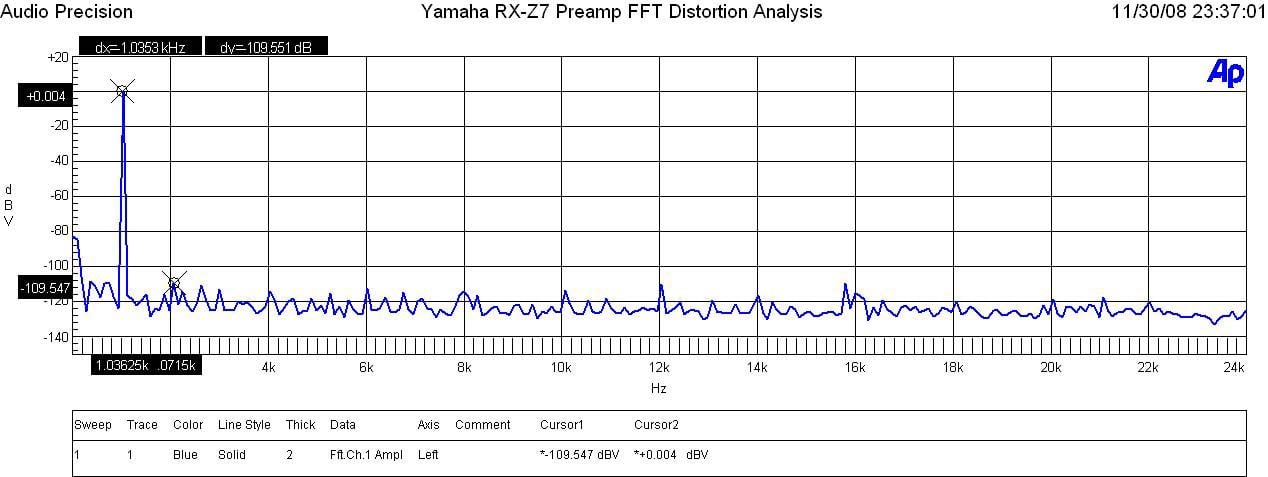
Yamaha RX-Z7 Preamp FFT Distortion Analysis
With 200mVin, I set the master volume until I reached 1Vrms out of the preamp. The output was so pristine that I couldn't measure any appreciable harmonics.
SNR
The SNR of the preamp section was excellent measuring at > 88dB (un-weighted) with 1 Vrms at the output being driven by a 200mV input from the Audio Precision. With the amplifier section in the loop, I measured around 84dB at 1 watt (un-weighted) Based on these measurements, this is solid proof that the RX-Z7 is more than capable of serving as a high quality preamplifier should you decide to run the unit in "preamp" mode.
Power Amp Section
Power Bandwidth & Distortion
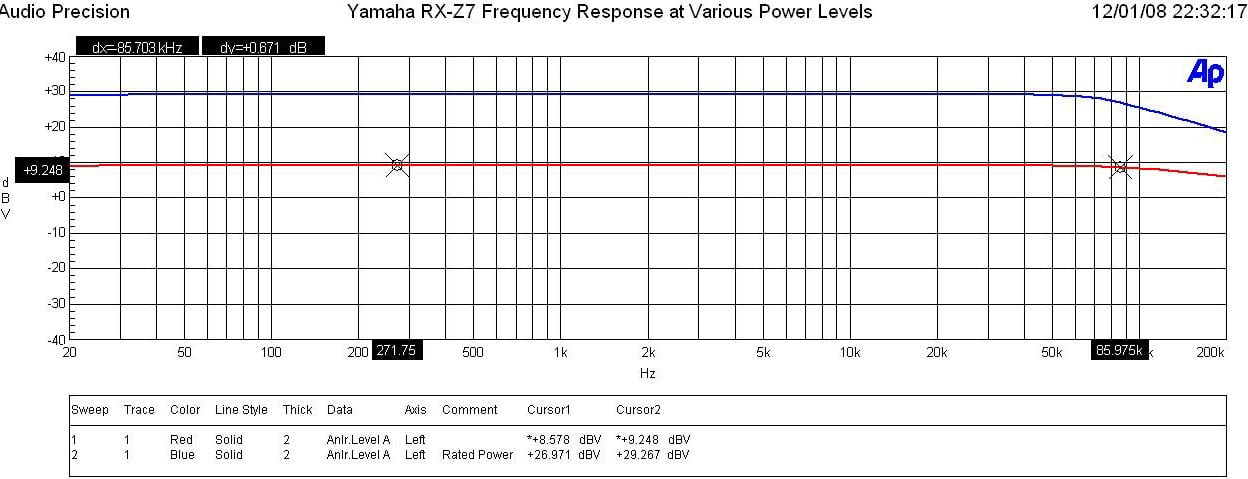
Yamaha RX-Z7 Frequency Response at 1 watt & Full Power
The RX-Z7 displayed excellent frequency response uniformity with a ruler flat response in the audio passband. The -3dB was around 180kHz at 1 watt and 85kHz at full power. The RX-Z11 frequency response in comparison didn't alter at all regardless of power level but considering the power bandwidth of the RX-Z7 exceeds the limits of our hearing by four fold, the differences by this measure are academic at best.
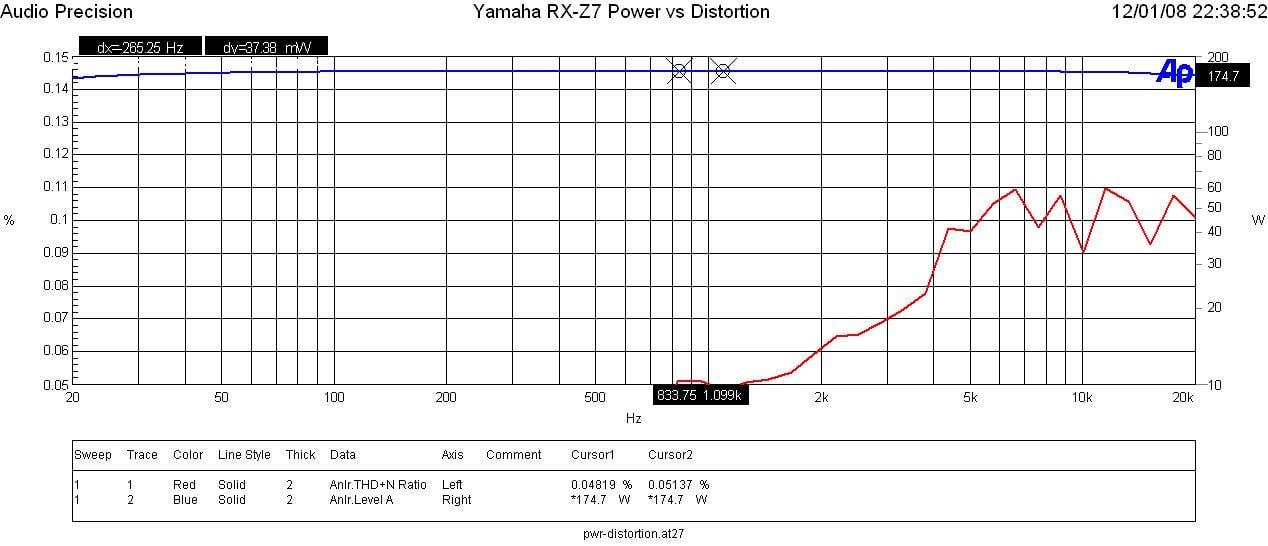
Yamaha RX-Z7 Power vs Distortion
I measured continuous power vs distortion by setting up a regulated sweep in my Audio Precision to automatically adjust input level until the maximum power output is achieved at < 0.1% THD + N. The RX-Z7 was plugged directly into an APC S-15 Power Conditioner with regulation to ensure the line never dropped below 118Vrms.
Power output: <0.1% THD + N
| Power Test | Yamaha RX-Z7 | Yamaha RX-Z11 |
| 1CH, 8 ohms | 170 wpc | 190 wpc |
| 2CH, 8 ohms | 155 wpc | 172 wpc |
| 1CH, 4 ohms | 255 wpc | 300 wpc |
| 2CH, 4 ohms | 225 wpc | 256 wpc |
Note: With the receiver set to "less than 8 ohms" power dropped to 78wpc into 8 ohms and 144wpc into 4 ohms. Don't use this setting. Keep it at "8 ohms or more" always!
Keep in mind most review publications don't do continuous power measurements and they usually publish power measurements into clipping at 1% THD + N. Our measurements are very conservative and it is clear that the 140wpc power rating of this receiver is greatly understated as Yamaha is delivering MUCH more than specified. In fact, it's only a little less powerful compared to its bigger RX-Z11 sibling which is most real world cases, would likely go unnoticed. Unlike the Pioneer SC-07 (which utilized Class D ICE amplification) I had in review at the same time, the Yamaha did NOT have any issues driving 4 ohm loads at full power and bandwidth. The Yamaha was also a bit more powerful driving 8 ohm loads (170wpc vs 150wpc of the Pioneer).
For more info on amplifier measurements, see: The All Channels Driven (ACD) Test
With two channels driven at full load, I measured about 55% efficiency which is quite good for a linear Class A/B amplifier. When the unit was idling (no video processing engaged), it consumed about 72 watts regardless if the unit was configured normally or as "preamp mode".
FFT Distortion Analysis
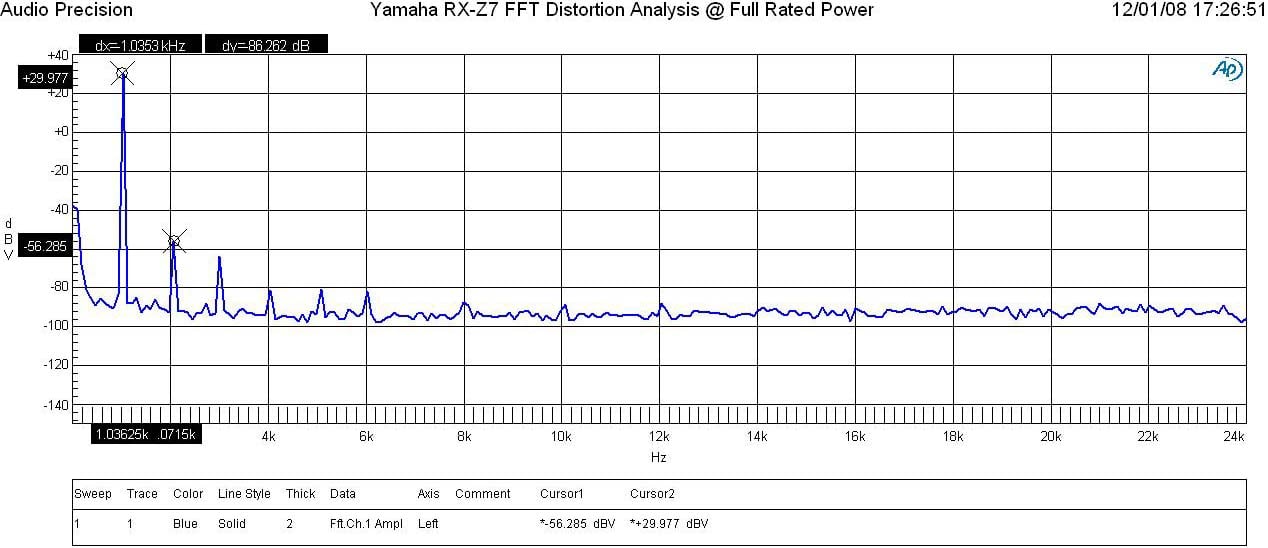
Yamaha RX-Z7 FFT Analysis @ Full Rated Power
At near full rated power, the RX-Z7 displayed an excellently clean FFT distortion profile with the magnitude of the 2nd harmonic of (+29.977 +56.285)dBv = 86.26dBv or 100*alog^-1(-86.26/20) = .005% THD + N. As you can see in the output, residual noise products are virtually nonexistent.
Amplifier Output Impedance & Damping Factor
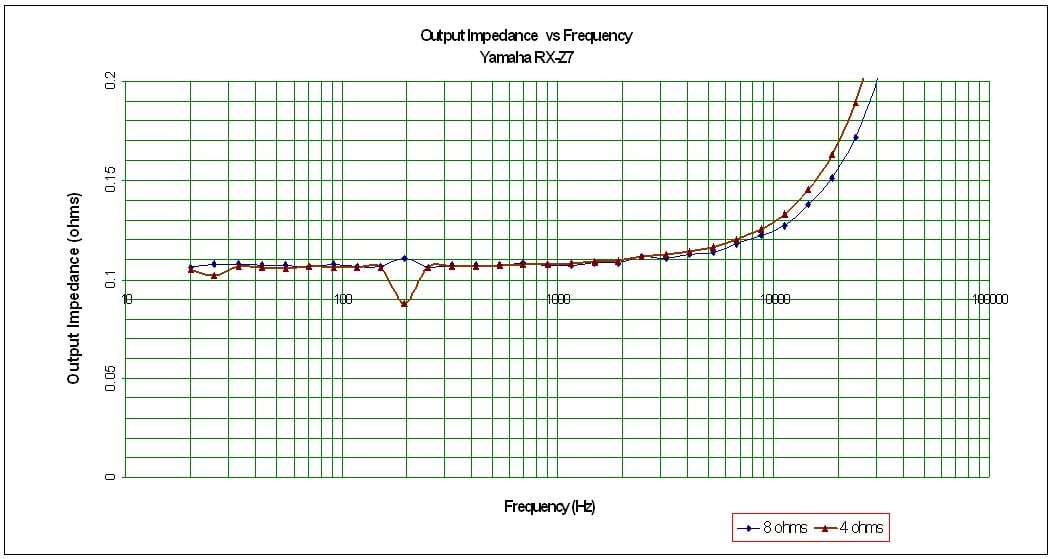
Yamaha RX-Z7 Amplifier Output Impedance
The RX-Z7 exhibited an excellently low output impedance which indicates to me they are employing a lot of negative feedback but also using quality output devices and a large enough power supply to be stable at full power into 4 ohm loads. It fell within our 100 mohm mark for the entire audible bandwidth and maintained itself even when driving at max sustained power levels into 8 ohm and 4 ohm loads. This proves that the RX-Z7 will sound consistently good no matter what loudspeaker load it is driving.

Yamaha RX-Z7 Amplifier Damping Factor under various loading conditions
The amplifier damping factor is about what I expected based on the measured output impedance. It is uniformly good across the entire audio frequency range at around the 80 mark (50 is a minimum we like to see in all amplifiers of uncompromising design) when driving an 8 ohm loads. Into 4 ohm loads the Damping factor is exactly as expected, ½ the 8 ohm value and demonstrates that the Z7 is happy to drive low impedance loads at full power without much fuss.
Crosstalk

Yamaha RX-Z7 Crosstalk Measurement at Full Rated Power vs Frequency
Running a full range frequency sweep from the preamp all the way through the power amp at full rated power (140wpc @ 8 ohms), I measured channel to channel crosstalk on two adjacent channels where one channel was the disturber and the other was the DUT. The Audio Precision plotted crosstalk of both channels over frequency by varying the Distruber/DUT channels. You can see the RX-Z7 produced great crosstalk measurements (80dB at 1kHz) with only a gradual increase up at the frequency extremes (low frequency because of magnetic coupling and high frequency because of capacitive coupling). This test really exemplifies the careful board and magnetics layout of this 7 channel receiver.
Recommendations
 The RX-Z7 offers benchmark performance in virtually every category. But, there are some caveats to this product.
Because of all the
processing power of this receiver, coupled with some very potent amplifiers
that are biased pretty heavily into Class A at low power levels, all crammed
into a smallish chassis, this receiver runs hot to the touch even when
idling. Thus I cannot recommend
installing this receiver into an enclosed rack without some sort of forced
cooling. You should allow at least 4+
inches of ventilation on the top with either an open front end or a perforated
door cover to accommodate good air flow.
Don't buy this receiver if you plan on plugging cubed speakers into
it. Give the RX-Z7 the best speaker
system you can afford and it will certainly reward you with its sonic
chops.
Conclusion
 Although not quite as effortless sounding as
my much more expensive reference separates rig when directly compared against it, not once during my evaluation
did I find the amp sections of this receiver limited or strained like I did in a
similarly priced competitor model I had on hand. The GUI, although a bit daunting at first
glance, is pretty straight forward to navigate through. Yamaha has accounted for virtually every
conceivable configuration option of all receiver parameters, included a memory
bank of 10 settings to ensure the installer has the right tools to seamlessly
slide this receiver into any system where it will serve as the center
piece.
Although not quite as effortless sounding as
my much more expensive reference separates rig when directly compared against it, not once during my evaluation
did I find the amp sections of this receiver limited or strained like I did in a
similarly priced competitor model I had on hand. The GUI, although a bit daunting at first
glance, is pretty straight forward to navigate through. Yamaha has accounted for virtually every
conceivable configuration option of all receiver parameters, included a memory
bank of 10 settings to ensure the installer has the right tools to seamlessly
slide this receiver into any system where it will serve as the center
piece.
Armed to the teeth with all of the latest audio and video processing features, along with a host of multi room and networking capabilities, the RX-Z7 leaves little to be desired for even the most sophisticated home theater installs. Its ability to transform your listening space into a concert venue or mega Cineplex is unrivaled thanks to the powerful arsenal of DSP processing and multi speaker configuration capabilities coupled with a robust well designed amplifier section. With its very clever power amp assignability and music mode distribution, the RX-Z7 proved to be the ultimate multi channel / multi zone receiver capable of whole house entertainment. The RX-Z7 proudly lives up to the "Z" heritage and in some aspects out Z's their very own flagship RX-Z11.
Yamaha
Electronics
6660 Orangethorpe
Avenue
Buena Park, CA
90620
(714) 522-9105
The Score Card
The scoring below is based on each piece of equipment doing the duty it is designed for. The numbers are weighed heavily with respect to the individual cost of each unit, thus giving a rating roughly equal to:
Performance × Price Factor/Value = Rating
Audioholics.com note: The ratings indicated below are based on subjective listening and objective testing of the product in question. The rating scale is based on performance/value ratio. If you notice better performing products in future reviews that have lower numbers in certain areas, be aware that the value factor is most likely the culprit. Other Audioholics reviewers may rate products solely based on performance, and each reviewer has his/her own system for ratings.
Audioholics Rating Scale
 — Excellent
- — Very Good
- — Good
- — Fair
- — Poor
| Metric | Rating |
|---|---|
| Frequency Response Linearity | |
| SNR | |
| Output Impedance | |
| Measured Power (8-ohms) | |
| Measured Power (4-ohms) | |
| Multi-channel Audio Performance | |
| Two-channel Audio Performance | |
| Video Processing | |
| Build Quality | |
| Fit and Finish | |
| Ergonomics & Usability | |
| Features | |
| Remote Control | |
| Performance | |
| Value | |
Gene manages this organization, establishes relations with manufacturers and keeps Audioholics a well oiled machine. His goal is to educate about home theater and develop more standards in the industry to eliminate consumer confusion clouded by industry snake oil.
View full profile Subscribe to our newsletter