


Yamaha RX-A3000 Aventage 11.2 Networking A/V Receiver Review
- Product Name: Yamaha RX-A3000 Aventage 11.2 Networking A/V Receiver
- Manufacturer: Yamaha Electronics
- Performance Rating:


- Value Rating:
- Review Date: December 24, 2010 00:10
- MSRP: $ 1799.95
|
Channels: 7.2 RMS Output Power (20Hz - 20kHz): 140W x 7 Total Power (20Hz - 20kHz): 980W Audio Dolby TrueHD Dolby Digital EX / Pro Logic IIx DTS-HD Master Audio DTS-ES Discrete 6.1 DTS 96/24 / DTS Neo:6 Pure Direct D/A Conversion: 192 kHz / 24 bit Selectable Subwoofer Crossover (9-band)
Video Time Base Corrector HDMI 3D Capable Analog Video to HDMI Upconversion (up to 1080p) HDMI Video Adjustments (Adjustable) HDMI to HDMI Upscaling HDMI Video Processing (HQV Vida) Component Video Upconversion S-Video Upconversion 5th Foot w/ Anti-Resonance Technology Low Jitter PLL Circuitry (Ultra Low) H-shape Cross Member Frame Symmetrical Power Amplifier Layout
Connections HDMI 1.4a (In/Out): 8/2 Component Video (In/Out): (4/1) A/V Inputs (S-Video): 5 Optical Inputs: 4 Coaxial inputs: 3 Optical Outputs: 1 Front A/V with Digital Input (HDMI/S-Video/Optical0) Front USB Input For Flash Memory Drives RS-232C Interface 8-Channel Decoder Inputs |
Advanced Features Four SCENE Buttons HD Radio Tuner iPod Compatibility (With Optional YDS-11/12 or YID-W10) Bluetooth Compatibility Compressed Music Enhancer Network Receiver Functions (DLNA 1.5/Win 7/Rhapsody/SIRIUS/Internet Radio) SIRIUS Satellite Radio Ready HDMI Audio Return Channel (ARC) HDMI CEC (Consumer Electronics Control) HDMI Standby-through (can change inputs) Dialogue Lift YPAO (w/Optimizer Microphone) On-Screen Display (also w/ Zone GUI) Auto Power Down Web Browser Control Learning Remote w/macro Capability DSP Programs: 17
Custom Features 12V Trigger Outputs (x 2) Assignable Power Amp Channel Expandability w/ Ext. Amp (Up to 11.2) Zone Speaker Terminals Zone 2 Output (Component / Composite) Zone 3 Output (Component / Composite) Zone 4 Output (Optical) Zone Power Switching Zone Remote Control IR Inputs/Outputs (x 2) Receiver Manager Software Pre-Out All Channels Dimensions: 17-1/8" W x 7-1/8" H x 16-7/8" D Weight: 37.5 lbs. |
Pros
- Tons of configurability options
- HDMI standby pass-through (can change inputs)
- Dual configurable subwoofer outputs
- Supports full 11.2 home theater use
- iPad and iPhone app controllable
Cons
- Over abundant configurable options can be confusing
- Not compatible with MusicCast Gen 1
- Bulky and poorly designed remote control
Yamaha RX-A3000 Introduction
AV receivers are constantly changing, constantly leap-frogging one another in features and capabilities. This year Yamaha announced its Aventage (RX-A) line and, in the process, jumped over a lot of the competition. And not a little jump, more like an Olympic gold medal long jump. Much of that jump is simply in the way of value - I mean the Aventage line in general has build quality and features that seem like it should cost a lot more than it does. The RX-A3000 takes that to the nth degree.
There are five receivers in the Aventage lineup and the RX-A3000 is the flagship. The line is a simplified high-end run at the AV receiver concept. As such, there is a very defined delineation between models, but a few specific break points define some key places where some users will seek to spend a little more and up the ante on the return for their investment. Let's take a quick look:
| RX-A3000 | RX-A2000 | RX-A1000 | RX-A800 | RX-A700 | |
| Price | $1800 | $1400 | $1000 | $750 | $600 |
| Power (RMS) | 140Wx7 | 130Wx7 | 105Wx7 | 95Wx7 | 90Wx7 |
| HDMI 1.4a (in/out) | 8/2 | 8/2 | 8/2 | 6/2 | 6/1 |
| USB audio | Yes | Yes | Yes | No | No |
| Network receiver | Yes | Yes | Yes | No | No |
| HD Radio | Yes | Yes | Yes | Yes | No |
| Sirius Internet | Yes | Yes | Yes | No | No |
| Video Processing | HQV Vida | HQV Vida | Proprietary | Proprietary | None |
| Analog to HDMI | Yes | Yes | Yes | Yes | No |
| H-shape cross member frame | Yes | Yes | No | No | No |
| Symmetrical power amp layout | Yes | Yes | Yes | No | No |
| Learning remote | Yes | Yes | No | No | No |
| HDMI standby-through | Yes | Yes | Yes | Yes | Yes |
| GUI | Yes (w/Zone) | Yes (w/Zone) | Yes | Yes | Yes |
| IPhone App Control / Web browser control | Yes | Yes | Yes | No | No |
| 12V Trigger output | 2 | 2 | 2 | 1 | 1 |
| Channel expandability | 11.2 | 9.2 | None | None | None |
| Zone 2/3 video | Yes | Yes | No | No | No |
| Zone 4 output | Optical | No | No | No | No |
| Zone remote | Yes | Yes | No | No | No |
As we see it, there is a definite line in the sand drawn after the RX-A1000 which adds a significant amount of power, HQV Vida processing and Zone 2/3 video capabilities. If you want the high-end of what Yamaha is now offering, you're going to want to get into the RX-A2000 or RX-A3000. Take a look down the line, however, and it's remarkable what the first three of the line manage to cram in at much lower price points. Economy of scale has done much to bring down the price for features you would simply not have dreamed of just a few years ago. HDMI Standby-through mode in a $600 receiver with a motion GUI interface and 12V trigger outputs? 2011 is going to be a good year for upgraders.
Now for a trip back through memory lane. Back in 2008 Yamaha released its top of the line RX-Z7 AV receiver. It had 7 channels of amplification with 140 watts each. All manner of video upscaling (analogue and digital) was included and it had a whopping 5 HDMI inputs and even two paralleled outputs. For room correction, Yamaha pulled out the stops and debuted a new proprietary YPAO-based multi point room calibration system. For multi-room applications there was support for 4 Zones of audio (including a dedicated digital audio output for Zone 4) and networking features to stream online music and even allow the receiver to be controlled by an iPod Touch or iPhone. It weighed just over 40 pounds and cost $2700. It was pretty impressive to say the least.
Then, two years later, Yamaha released the RX-A3000 Aventage receiver. It too has 7 channels of 140Watts each, the same analogue and digital upconversion. But it has 8 HDMI inputs and 2 outputs, all 3D compatible and supporting the latest features like Audio Return Channel. It also has even more impressive features, like the ability to bypass HDMI while in standby, so you can use your TV without having to turn on the receiver. It has close to the same advanced multi-zone YPAO room correction system and network features and the 4 Zones of audio. It adds another component video input, bringing the total to 4 - which is more than enough in our opinion, especially given the decline and phase-out of analogue outputs in favor of HDMI. It does remove one digital audio input and output. It also removed the two switched outlets on the back. But here's the kicker. It's nearly as hefty as the RX-Z7 and costs just $1700.
Now we're not going to say that the amplifier section is exactly the same as the RX-Z7, but given the feature set, weight and $800 cost savings, Yamaha's RX-A3000 just became the most modern "big man on campus" and it's going to take quite a bit to topple this goliath.
Here is the comparison of the RX-Z7 vs. the RX-A3000 side-by-side, check it out for yourself:
| RX-Z7 | RX-A3000 |
| 5 HDMI 1.3a Inputs, 2 Outputs | 8 HDMI 1.4a Inputs, 2 Outputs |
| 3 component video inputs, 1 output | 4 component video inputs, 1 output |
| Multi-point YPAO | Multi-point YPAO |
| 7 x 140 watts per channel | 7 x 140 watts per channel |
| 4 Zones | 4 Zones |
| 7 digital audio inputs, 2 outputs | 6 digital audio inputs, 1 output |
| 2 switched outlets | No switched outlets |
| No HDMI pass-through in Standby | HDMI pass-through in Standby |
| Dual sub outs (mono only) | Dual sub outs (stereo, mono, front/back) |
| Compatible with MusicCast Gen 1 | Not compatible with MusicCast Gen 1 |
| MSRP: $2699.95 | MSRP: $1799.95 |
Yamaha RX-A3000 Aventage Build Quality and Features
We ran a full suite of amplifier tests on this receiver below, but for now let's talk some more about features - cause there's a LOT of them. The receiver is packed with inputs and outputs. If you haven't yet gotten your head wrapped around just what this behemoth offers, we'll help you through that here. Take a look at the back of the RX-A3000 receiver:
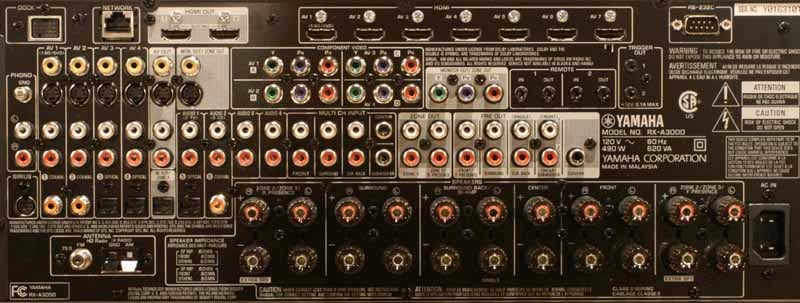
Of particular note, check out the number of
HDMI inputs. With 1 on the front, that makes 8 inputs and 2 outputs. Since the
RX-A3000 features HDMI-to-HDMI and analogue to HDMI upconversion, you're going
to be able to grab any legacy devices you have lying around (like the antiquated
480i Wii sitting on your AV shelf over there) and run it up to 1080p output
over HDMI. This is an AV receiver that's going to be able to walk with whatever
you've got and put it up in the screen. But keep looking, there's more. If
you're into whole house audio, the Yamaha RX-A3000 has four Zones for you to
utilize. With 2 Zones that support an on-screen GUI (composite or Component)
and a fourth Zone that can send optical TOSlink audio to a secondary AV
receiver or integrated amplifier, the Yamaha RX-A3000 has enough juice to cover
all but the most extravagant homes with plenty of audio. And, unlike most AV
receivers, the Yamaha can finally utilize external amplifiers to deliver up to
11.2 channels of audio, even if you're crazy enough to utilize both front and
back Presence channels in your home theater. Check out how they laid out the 11
pairs of speaker binding posts:

You can hit up the system to drive 7 to 11 channels in one room, or automatically wire it up to switch to 5.1 and power a second or even third Zone with the push of a button. But wait until we get to the menu system and you see all of the configuration options Yamaha has in store.
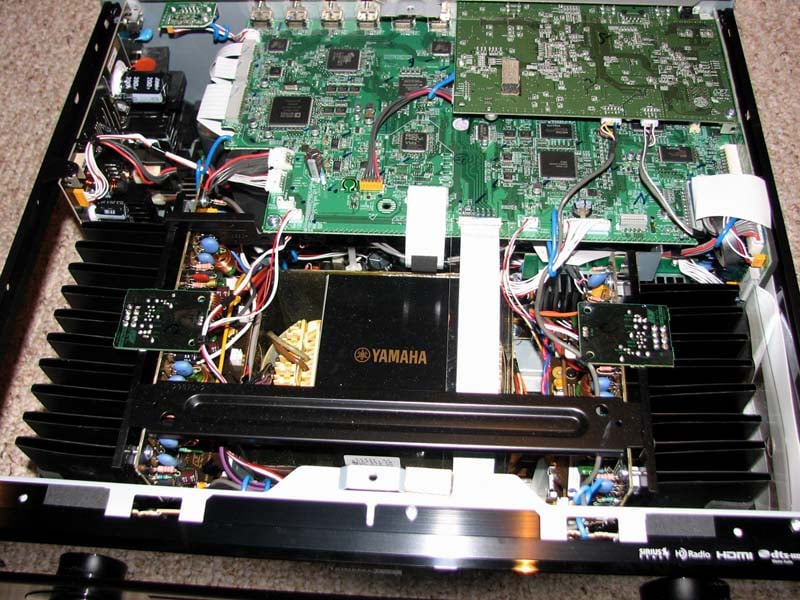
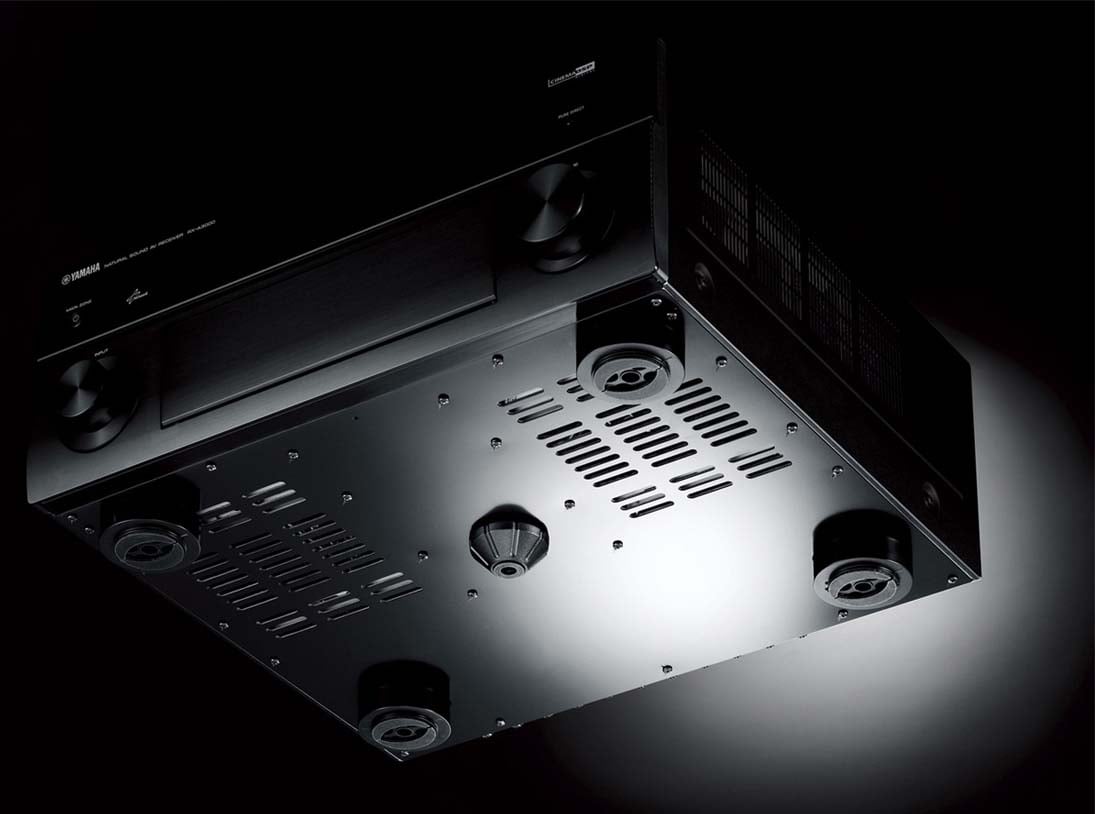
Yamaha truly lives up to their mantra of better build quality with their Aventage lineup of receivers. Pulling the top cover off the RX-A3000 revealed no wasted space and meticulous attention to detail for reducing mechanical vibrations in the product such as felt taped heatsinks, padding for every contact point to the top cover, and their alleged 5th foot mounted directly under the centralized E-Core power transformer. At first this appeared to be a marketing gimmick, but there is method to their madness as it's not a lofty design goal to eliminate mechanical vibrations in a product, especially a transformer that likes to hum. Unlike the RX-Z7's single heatsink for its power devices, the RX-A3000 splits this duty off to smaller dual heatsinks mounted on each side of the power transformer in what Yamaha calls dual symmetric power amplifier layout. At first glance, these heatsinks appear small but more careful observation reveals extra thick metal plating at the base of the heatsink mounted to a very thick bottom cover to help dissipate heat and increase chassis rigidity. Yamaha also employed brand new thermal control regulated power transistors in this baby to better manage heat. It was clear to us that Yamaha proved their masterful craftsmanship with the execution of this compact, well engineered A/V receiver.
HDMI Features
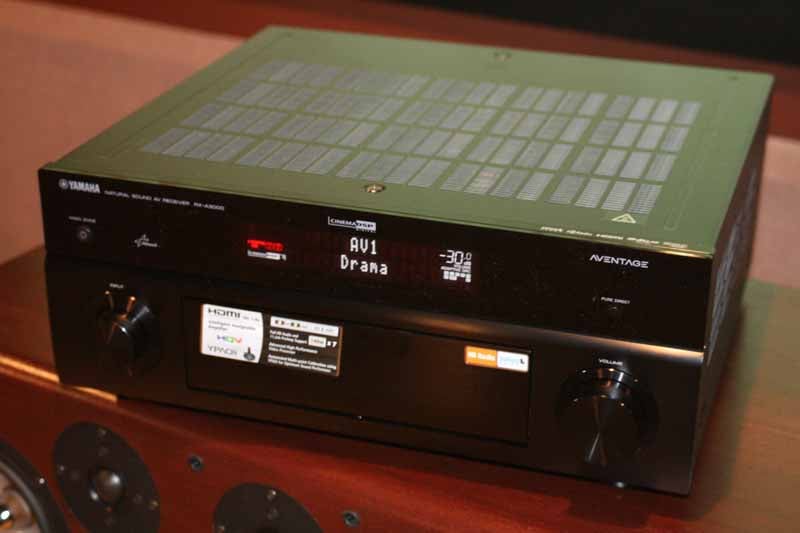 There are a lot of HDMI functions that I
want to espouse on behalf of the RX-A3000. First off, the receiver can take in
anything and output it via HDMI - we already went into that. What we didn't
talk about was the new HDMI Standby feature. Ever want to watch something on TV
without turning on your system? Me neither... but your wife or spouse probably
has. HDMI Standby means that you can pass HDMI (audio and video) through the
receiver without turning it on. So now you can watch TV with the audio coming
through the TV's integrated speakers, without turning on the receiver and
powering up your whole AV system. But there's something more - you can switch
HDMI inputs... while in Standby mode. This is very cool (and pretty necessary
when you think about it, lest you only be able to use a preselected input like
the RX-Z7). Another important feature
upgrade the RX-A3000 has over the RX-Z7 is in power management. Unlike the RX-Z7, the RX-A3000 employs a
hybrid power supply which turns off all of the analog circuits when the
receiver is powered down and engaged in HDMI Standby. This offers tremendous savings on power and
heat dissipation compared to the RX-Z7. Welcome to the new AV receiver
standard. Aside from these great features, the Yamaha RX-A3000 also supports
Audio Return Channel (ARC) and the latest audio format support. It also can
apply video processing to HDMI signals as well as standard definition sources.
We're talking HQV Vida processing with a myriad of different Noise Reduction
options, Contrast/Brightness/Saturation controls, and Detail and Edge
Enhancement options (which we recommend leaving off for best picture). Auto lip
sync and Deep color, as well as 24Hz processing modes are also available.
There are a lot of HDMI functions that I
want to espouse on behalf of the RX-A3000. First off, the receiver can take in
anything and output it via HDMI - we already went into that. What we didn't
talk about was the new HDMI Standby feature. Ever want to watch something on TV
without turning on your system? Me neither... but your wife or spouse probably
has. HDMI Standby means that you can pass HDMI (audio and video) through the
receiver without turning it on. So now you can watch TV with the audio coming
through the TV's integrated speakers, without turning on the receiver and
powering up your whole AV system. But there's something more - you can switch
HDMI inputs... while in Standby mode. This is very cool (and pretty necessary
when you think about it, lest you only be able to use a preselected input like
the RX-Z7). Another important feature
upgrade the RX-A3000 has over the RX-Z7 is in power management. Unlike the RX-Z7, the RX-A3000 employs a
hybrid power supply which turns off all of the analog circuits when the
receiver is powered down and engaged in HDMI Standby. This offers tremendous savings on power and
heat dissipation compared to the RX-Z7. Welcome to the new AV receiver
standard. Aside from these great features, the Yamaha RX-A3000 also supports
Audio Return Channel (ARC) and the latest audio format support. It also can
apply video processing to HDMI signals as well as standard definition sources.
We're talking HQV Vida processing with a myriad of different Noise Reduction
options, Contrast/Brightness/Saturation controls, and Detail and Edge
Enhancement options (which we recommend leaving off for best picture). Auto lip
sync and Deep color, as well as 24Hz processing modes are also available.
Yamaha RX-A3000 Aventage Menu System & Setup
One of the things we really like about the RX-A3000 is its new and improved GUI with snappy, animated menus that can also superimpose itself over video. Earlier menu systems were gussied up text-based interfaces - this is more like an app. Screenshots are great, video is even better, so check out our Yamaha RX-A3000 Video Preview for a sneak peak at the menus in action. Starting at the top, even the background of the menu system, the splash screen, can be configured:
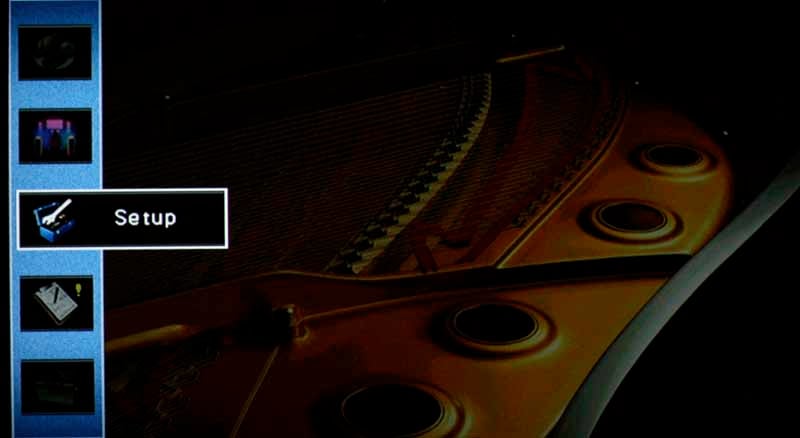
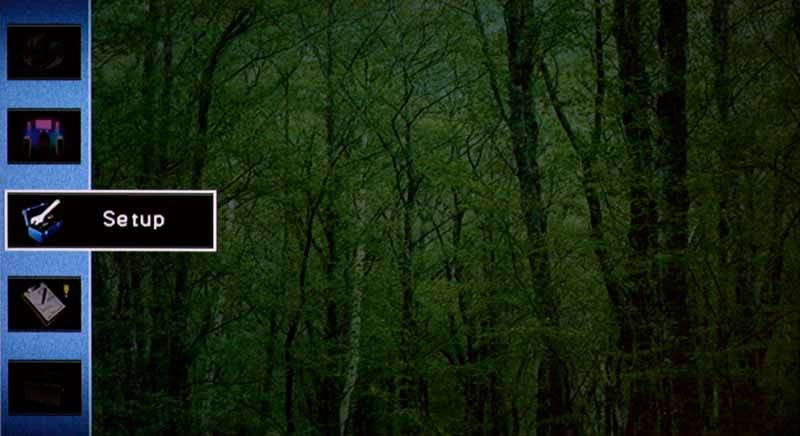
Within the system menu we found that the RX-A3000 unlocks an almost limitless amount of options for the amplifiers, inputs, HDMI and DSP. We're talking a massive amount of configurability, and the visual representation of what you are doing makes it easy to understand the settings. The Setup menu system, which slides up and down, and left to right depending upon the submenu you are in, generally allows you to edit settings on the fly while watching video in the background and is broken up into 8 main sections:
Speaker Set-Up
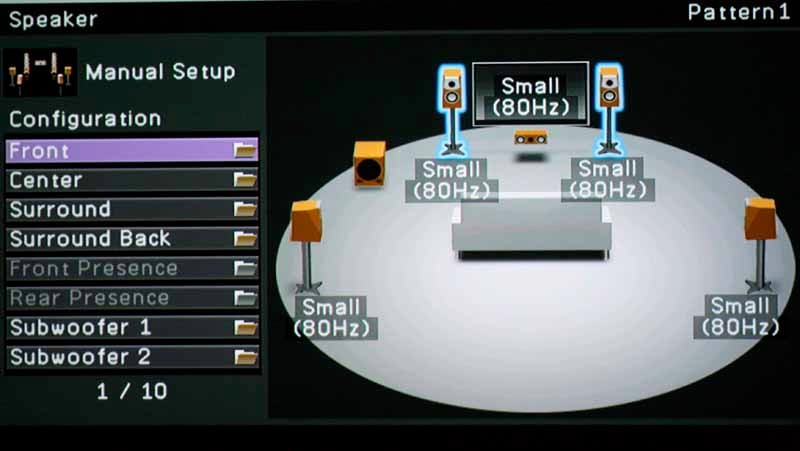
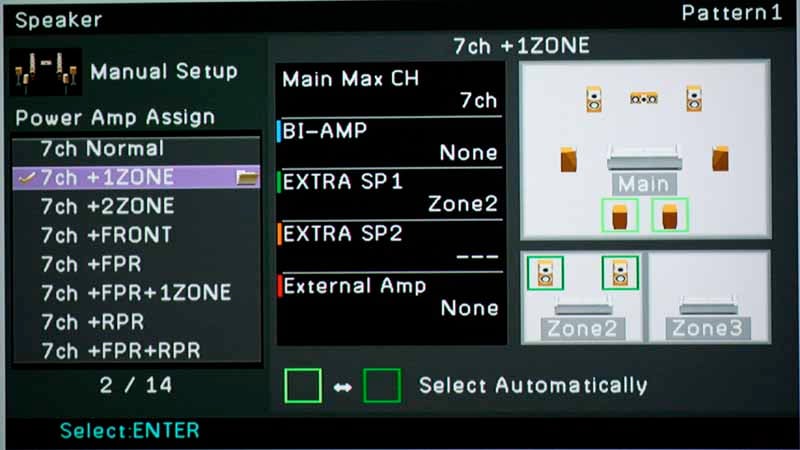
This is where you engage the Auto setup using the included multi-point microphone, and also where you configure the speakers with the manual setup function. We have beat YPAO to death in the past, so we're not going to waste valuable real estate rehashing that system here. What we are going to talk about is the new design of the manual Speaker Setup menu, which operates under a new "Select Your Speaker Configuration" methodology. In the past, Yamaha had you select how the amplifiers were going to be used, and select the way the Surround Back and Presence channels were to be allocated, often without any provision for utilizing both a second or third Zone and the Presence Channels. In short, Yamaha was severely limited in the past. With the RX-A3000, the on-screen GUI interface literally shows you what your options are, and you can pick and choose how you want to run your speakers and how you are planning to amplify them in the various situations. The amplifier assignments are automatically selected when you scroll through the configuration options - and you have only to observe the notation and graphical representation to understand what is possible. In this way, the complexity of selecting amplifier routing is removed and all possible permutations are granted simultaneously. This is the first time we've seen this in an AV receiver.
Take this scenario, for example, which is my favorite: I am operating a 7.1 system + a second Zone. In this configuration I am not bi-amping the mains, but I am using an external 2-channel amplifier to power my Zone 2 speakers. This is designated as EXTRA SP1: Zone 2. It also gives me the flexibility to select how I am using my last 2 channels of amplification - as Surround Back speakers, or in Zone 2. The beauty is, with 11 pars of binding posts, I don't have to do any fancy rewiring; everything is all set. Here is how it looks:
Now, suppose I wanted, instead to opt for pulling both the Surround as well as the Surround Back amplifiers in order to power two additional zones? No problem, Yamaha's RX-A3000 can allocate amplifiers as needed to do that as well. Here's how that particular configuration looks:
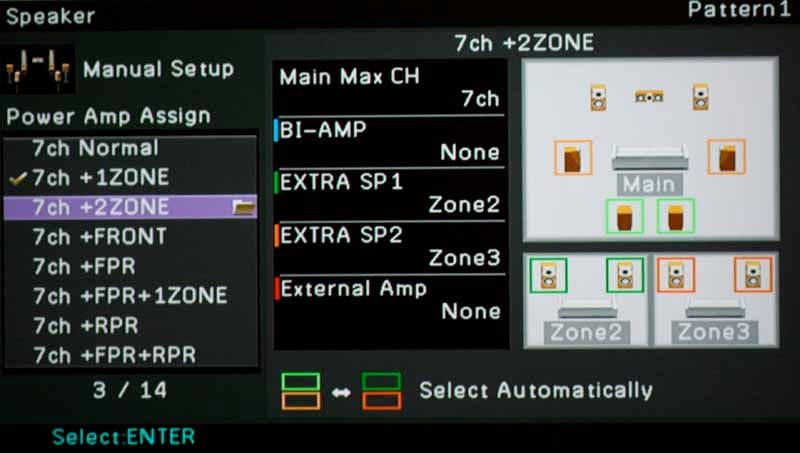
But I want to use my Presence channel speakers, you say. You know what, that's a great idea. Yamaha allows you to configure those for use with an external amplifier (they have dedicated preamp outputs) and now you can opt to allocate the internal amplifier between Surround Back channels and the optional Zone 2 you configured. This is how that scenario would look on the setup menu:
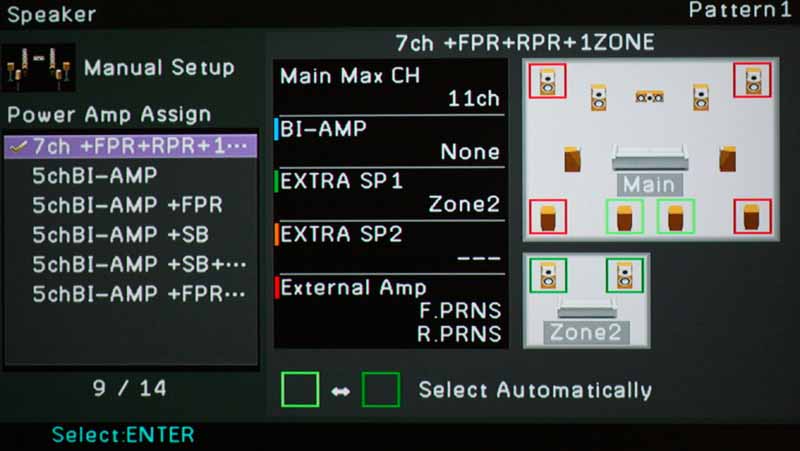
We complained (OK, whined) about that for years, and finally Yamaha seems to have taken the hint and allocated enough processing power and preamp outputs to handle even the most difficult configurations. It seems that if you can add external amplifiers, you can truly harness the power of this 11.2-channel receiver. Not since their flagship RX-Z11 selling for more than 2 ½ the price, was this possible.
OK, so that's just the speaker allocation and power amp assignments. You still have the ability to configure the speaker levels (0.5dB steps), distances (0.2 ft/.05m increments), and Extra Bass (where the receiver can send fullrange information to the front speakers and bass from the front speakers to the subwoofer). You can also, and this is a BIG deal for a receiver at this price point, connect two subwoofers with independent level and trim control and set the subwoofers for either mono, stereo (left + right), or front/rear. We typically recommend Mono, but some audiophiles may want to experiment with the stereo setting. We don’t recommend the front/back setting since it only sends LFE info to the rear sub.
For more information, read: Home Theater Multiple Subwoofer Set-Up Guide
Bass Management
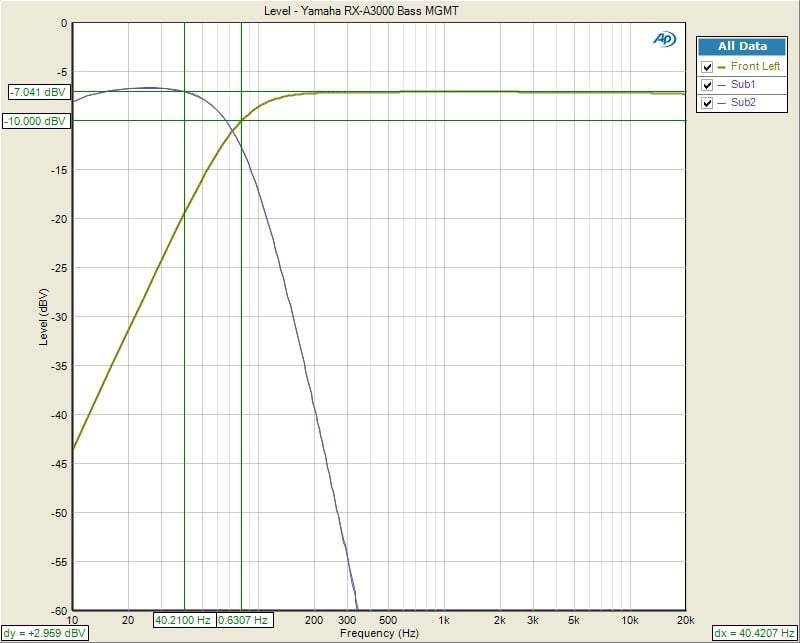
As was the case with the RX-Z7, the RX-A3000 provides for variable crossover settings per speaker group (ie. Mains, Center, Surrounds but doesn't give you a choice for the subwoofer crossover which I found through my testing to be dependent on the main channel crossover setting. Thus I highly recommend you keep each speaker group's crossover setting within 20Hz to ensure a more optimal integration with the subwoofer during all playback modes (ie. discrete 5.1 sources and 2 CH music in PLIIx Music Mode).
Yamaha still allows you to set the center and surround channels to "large" even if you select "small" for the main channels. I would have preferred Yamaha to automatically set all speakers to "small" if the mains were set "small". Pay extra attention when manually configuring speaker size groups or use one of their presets that sets all speakers to "small" if you aren't running fullrange speakers on the main channels or want all of your speakers bass managed.
The crossovers worked as expected for a THX Ultra2 certified receiver (except the RX-A3000 is not THX certified) as indicated by the 12dB/oct High Pass Filter (HPF) slopes on speakers set small and 24dB/oct Low Pass Filter (LPF) slopes on the subwoofer output which we measured with our Audio Precision APx585. The only oddity was that the subwoofer channel was down about 1.5dB at 10Hz which to us indicated a rather conservative HPF employment on this channel since this slight attention didn't show up on any of the seven main channels.
Yamaha RX-A3000 Aventage Setup (cont.)
Sound
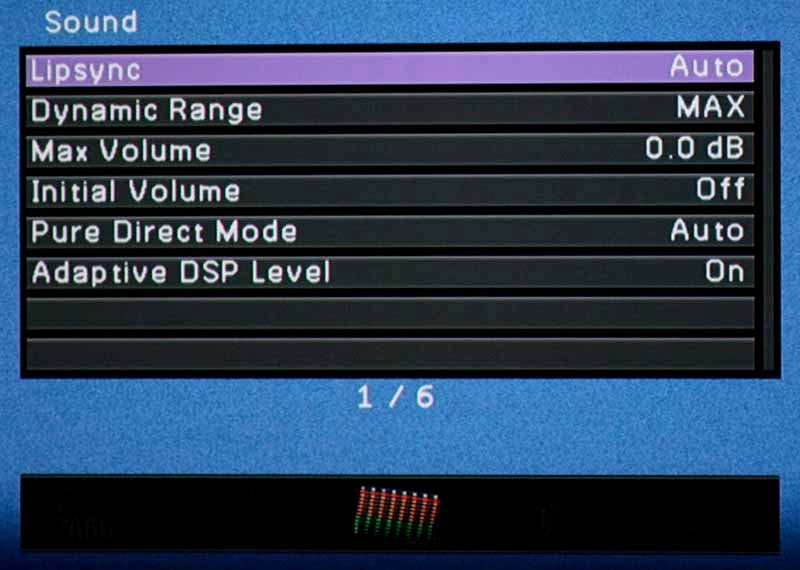
This menu isn't nearly as exciting as the Speaker menu, but it does offer access to basic functionality like Lipsync delay (HDMI auto or manual) and Dynamic range (for Dolby Digital soundtracks). If you are adjusting delay, the range is from 0 (the default) to 250 ms in 1 ms increments - now that's precise! You can also configure Max and Initial Volume settings and whether or not video outputs in Pure Direct Mode (we recommend it be off, or what's the point). Max Volume can be set anywhere from -30.0 dB to +16.5 dB (the maximum) in 5dB increments. Initial Volume is nearly identical, except that you can adjust it in 0.5dB steps to get a more precise starting point. Lastly, you can set the Adaptive DSP level (On or Off), which varies the DSP effect with the volume level of the receiver for a more realistic effect.
Video
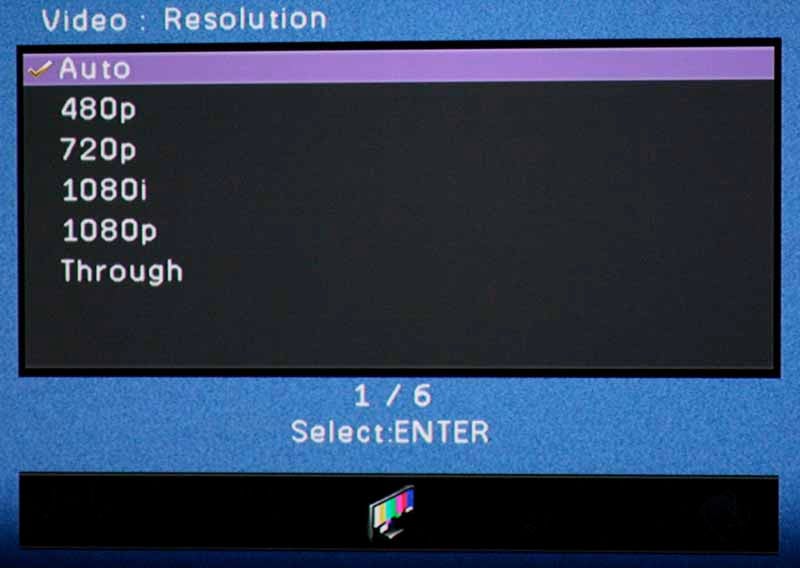
The Video setup menu has some very unique and helpful settings. In particular, we felt it was wise of Yamaha to allow users to disable analogue-to-analogue conversion. In that way you can force your expensive display to do the work and maintain the purity of your video signal (it's also an excellent way to troubleshoot analogue video compatibility problems). You can also disable the video processing features for the HDMI video - also helping you to determine exactly who is doing the video processing: the receiver, the player, or your display. If you enable it, you can set the output resolution to 480p, 720p, 1080i, 1080p or Through (same resolution as what is being input).
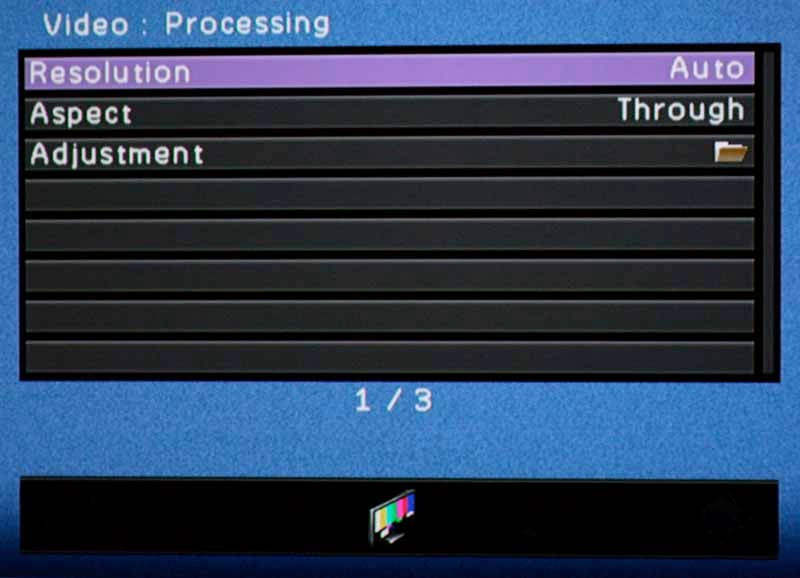
Please read: Video Processing in Blu-ray Players, Receivers and Displays
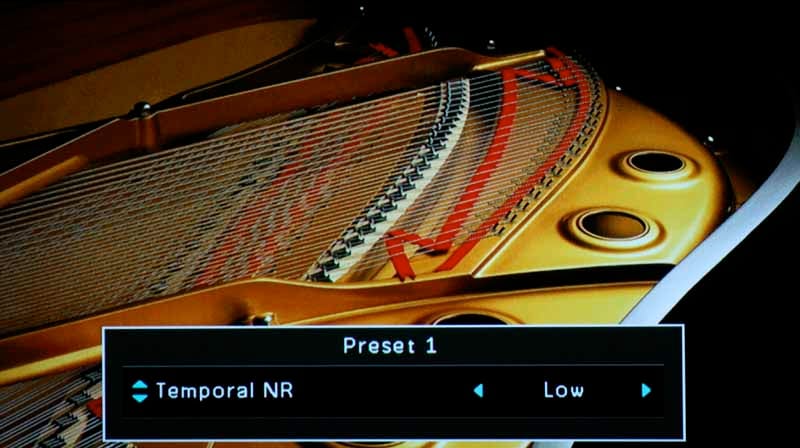
Aside from processing and conversion, this menu provides for scaling options of converted video, and picture controls such as Contrast, Brightness, and Resolution Enhancement. Unless you have a deficient source component, we recommend largely leaving these options alone with one exception. We found that the various Noise Reduction circuits were handy in reducing mosquito noise and the analogue noise found on older program material. In either case, it's a truly advanced feature with six configurable Presets which allow adjustment over:
- Contrast enhancement
- Resolution Enhancement
- Detail Enhancement
- Edge Enhancement
- Noise Reduction
- Mosquito Noise Reduction (NR)
- Block Noise Reduction (NR)
- Temporal Noise Reduction (NR)
- Brightness
- Contrast
- Saturation
That's an extensive list, driven by the new HQV Vida video processing chipset. Since you can customize and store up to six different presets, it's incredibly powerful and offers a great way to tweak the system when your display or source doesn't allow for easy application-specific customization.
HDMI
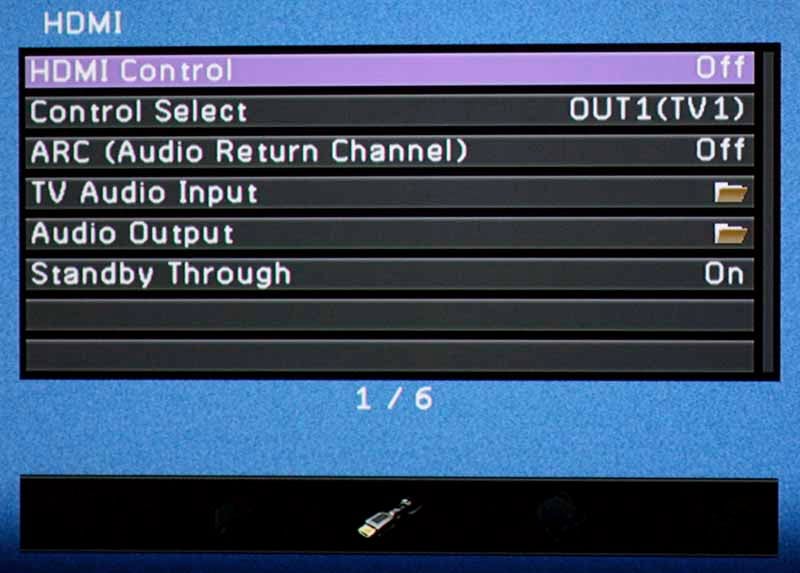
As with most receivers with dual HDMI outputs, the Yamaha RX-A3000 lets you set which output will handle CEC functions (and enable or disable the function entirely). Unfortunately, since HDMI has provided such poor implementation standards for CEC functions under the guise of "freedom for manufacturers to choose", the results are almost always unpredictable, even when you stick to products made by the same manufacturer. This menu is also where you would enable Audio Return Channel (ARC) functionality (and the Control Select function determines which HDMI output receives the audio signals from the TV). You can also select which input receives this audio.
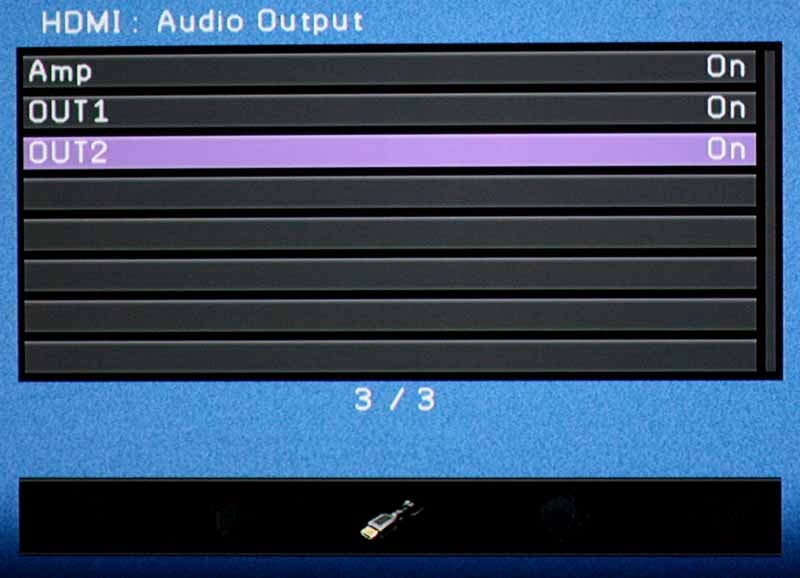
The other thing we really liked was that you could set what is output via the two HDMI output jacks - namely, whether audio and video, or just video are output. What's semi-unique about the RX-A3000 is that you can have the receiver simultaneously read audio from an HDMI input and also send that audio out through one or both HDMI outputs on the back. This means that you can do a sort of multi-cast of program material. Why is this important? At times, during our annual Super Bowl party for example, we've wanted to take audio from a source and also pass it along to another room where it can feed a television. Typically you must choose one or the other - either you are pulling audio and passing video on to a television, or you are passing all audio through the receiver without using it. With the RX-A3000, you can have your cake and eat it too. Lastly, HDMI Standby is activated here and you can select the HDMI input even when the unit is in Standby mode!
Networking
This area isn't terribly exciting and is what you'd expect to see, with basic Network configurations and DHCP control. The one surprising feature was the ability to wake up the unit through network control signals - a nice touch for custom installers to use. This is also where you'll get easy access to the receiver's IP address - handy for the initial network setup when you link the receiver to the Yamaha iPhone/iPad app for Zone and source control (more on this later). Unlike the RX-Z7, the RX-A3000 won't stream music from their own MusicCast Gen 1systems (MCX-1000/2000) via Ethernet. This is unfortunate for fellow MusicCast owners, but let's face it, those products are becoming obsolete. The RX-A3000 does stream audio via Ethernet using any Windows 7/WHS pc/server or DLNA server/NAS or MAC via Twonky. You also get the same networking features of the RX-Z7 such as internet radio, Rhapsody but oddly no Pandora support as of the time this review was written. Perhaps Yamaha will offer a future firmware upgrade for Pandora support. It seems Onkyo has Pandora cornered in the A/V receiver market for now.
Multi-zone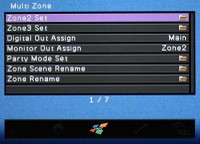
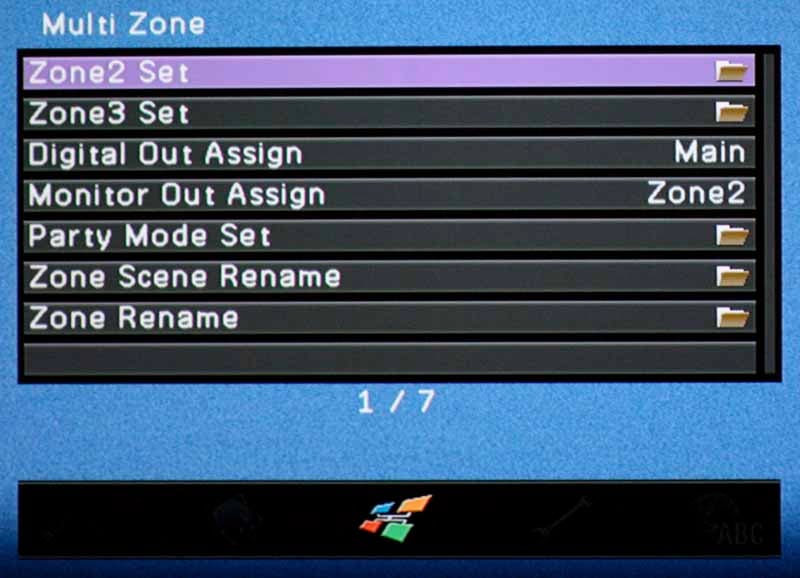
If you use this receiver for multiple zones - and you should because it's good at it - you'll spend some time here setting it up. Once you configure the speakers in the Speaker menu, what's left is to tell the receiver whether you want Fixed or Variable volume in Zones 2 and 3 and what the Max Volume needs to be set at (a life-saver if I ever saw one). Having this level of Zone audio control is extremely handy for when, as in our case, you are using a Zone for outdoor speakers and want to limit the output levels to reduce the potential for distortion or overdriving your speakers. You can even set Initial Volume and select the digital output to be assigned to Zone 4 or the main zone. A Party Mode can be configured to allow you to enable all or just some of the zones to respond with identical audio from the main zone source. In this way you can literally light up your house with whole home audio that's in sync or, if you have a separate area that requires a different sound, like an office or a children's room, you can split off that Zone from the rest of the Party Mode audio. Aside from this, you can rename Zones and even rename Zone Scenes as well as configure the monitor output between Zones 2-4 (or keep it to the Main Zone). Like the RX-Z7, the RX-A3000 Party Mode allows digital signals (HDMI & S/PDIF) (multichannel ones downmix to 2ch) to go to zone 2, 3 & 4 without the need for additional digital or analog source connections to those zones provided that the main zone is turned on and multi source is defeated. If you don't engage Party Mode, you must make analog source connections to the other zones so they can receive audio too.
Function
If there is a utility menu, this is it. Auto Power Down (really Standby mode) can be enabled for 4, 8, or 12 hours of inactivity (or disabled completely). And, instead of a dedicated digital audio/video input menu, Yamaha dumped it here - presumably figuring that once you set this up you'll leave it alone. Note that you can configure everything independently, however the naming conventions - being just numbered inputs - really make this a more difficult process for many users. While some may be able to remember they plugged the TV into the "SAT" input, you're going to need a cheat sheet when setting up the RX-A3000 unless you have a photographic memory that likes lots of arbitrary numbers. You also can't re-assign HDMI or analogue inputs - it's AV1, AV2, AV3... just put them where they need to be and forgeddabouddit.
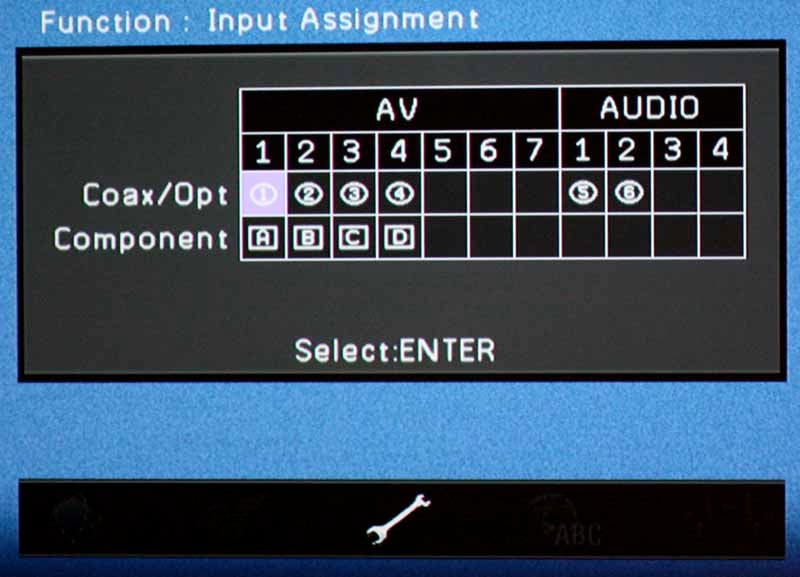
Returning back to where we started, the Function menu is what lets you set the front panel dimmer level, scrolling mode, trigger functions and the wallpaper for the menu. While Yamaha gives you 4 options for the wallpaper, none of them is custom - and odd thing since they have both USB access and networking functions as a means to grab a compatible file.
Aventage iPhone/iPad App
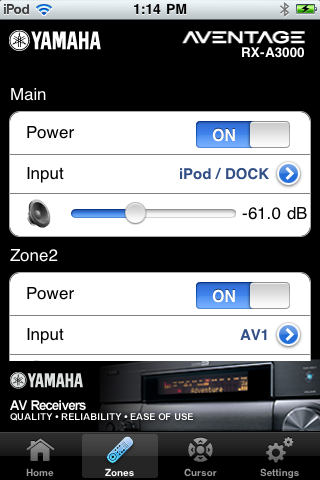
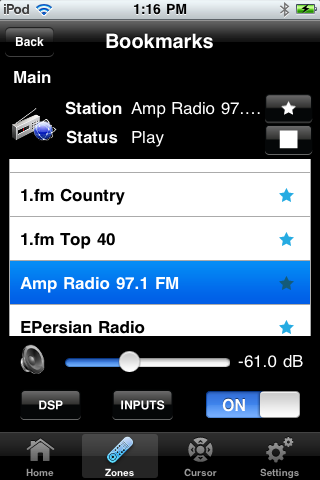
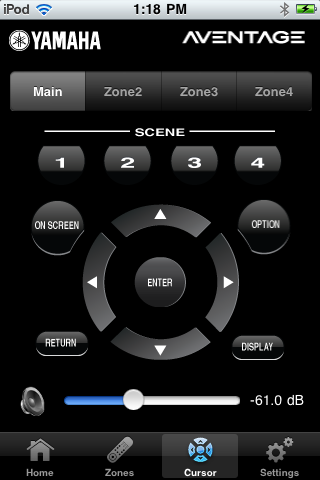
 Speaking of apps, Yamaha also released an Aventage iPhone/iPad app which allows user control over features like Zone volume and source selection. It even grants control over the tuner and Internet radio sections of the receiver. We have to be honest, the App was a bit of a dog in our testing, with slow feedback and a quirky interface, but it's a great start - and for free it's hard to complain. Particularly with respect to using multiple Zones, it's almost a life-saver. Near the end of our review Yamaha added some new functionality to the App - namely a cursor or menu control system whereby you can use your iPad or iPhone to control the GUI menu system of the RX-A3000. (It should be noted we tested ver 1.0.1 at the time of this review, and there is now a newer version 2.0.1 app which Yamaha claims to have improved interface options and speed.) We are starting to see more and more of this and, as such, it's going to be surprising if we don't eventually see the end of remote controls entirely - at least as we know them to be today. Let's face it - as receivers become more complex, our complaints about remote controls go up. You just can't sufficiently add enough functionality on the face of a remote with such limited real-estate. Add an LCD touch screen, however, and you now have the ability to configure modes and much more ergonomic control functions. The future is coming, and Yamaha brings it partially here with its App.
Yamaha RX-A3000 Aventage Video Bench Test Results
Since Yamaha touted its use of the HQV Vida chip and the RX-A3000 has such a wide variety of settings and video processing capabilities, we thought we'd give it a thorough testing and see what it did in terms of our performance benchmarks. While we typically run it through a series of practical DVD ad Blu-ray tests, the use of a few benchmark discs allows us to at least have some sort of objective baseline for comparison.
HQV Perfect Score is 130
Yamaha RX-A3000 Benchmark total score: 130/130 (perfectamundo)
| Test | Max Points |
Results 1080p |
Pass/Fail |
| Color Bar | 10 | 10 | Pass |
| Jaggies #1 | 5 | 5 | Pass |
| Jaggies #2 | 5 | 5 | Pass |
| Flag | 10 | 10 | Pass |
| Detail | 10 | 10 | Pass |
| Noise | 10 | 10 | Pass |
| Motion adaptive Noise Reduction | 10 | 10 | Pass |
| Film Detail | 10 | 10 | Pass |
| Cadence 2:2 Video | 5 | 5 | Pass |
| Cadence 2:2:2:4 DV Cam | 5 | 5 | Pass |
| Cadence 2:3:3:2 DV Cam | 5 | 5 | Pass |
| Cadence 3:2:3:2:2 Vari-speed | 5 | 5 | Pass |
| Cadence 5:5 Animation | 5 | 5 | Pass |
| Cadence 6:4 Animation | 5 | 5 | Pass |
| Cadence 8:7 Animation | 5 | 5 | Pass |
| Cadence 24fps film | 5 | 5 | Pass |
| Scrolling Horizontal | 10 | 10 | Pass |
| Scrolling Rolling | 10 | 10 | Pass |
| Total Points | 130 | 130 |
HQV HD Perfect Score is 100
Yamaha RX-A3000
Score: 100
| HD Tests | Max Points |
Score | Pass/Fail |
| HD Noise | 25 | 25 | Pass |
| Video Resolution Loss | 20 | 20 | Pass |
| Video Reconstruction | 20 | 20 | Pass |
| Film Resolution Loss | 25 | 25 | Pass |
| Film Resolution Loss Stadium | 10 | 10 | Pass |
| Total Points | 100 | 100 |
Comments on Audioholics DVD Torture Tests
Clearly the Yamaha RX-A3000 cleans house on test discs. It did equally well on the Spears & Munsil disc we used as well. In terms of real-world use, Blu-ray looks pretty darn good, so we recommend setting a configuration to disable most noise reduction and video tweaking when viewing a cleaner source. What we really liked, however, was how well the RX-A3000 cleaned up nasty television signals. It actually did a pretty good job, over our display alone, in reducing block noise and generally cleaning up the crappy standard definition feeds we occasionally fed it. I say occasionally, but actually I mean the rare non-HD cable channel and Netflix via the Xbox 360. Overall we were really impressed and think that you will be too.
Remote Control
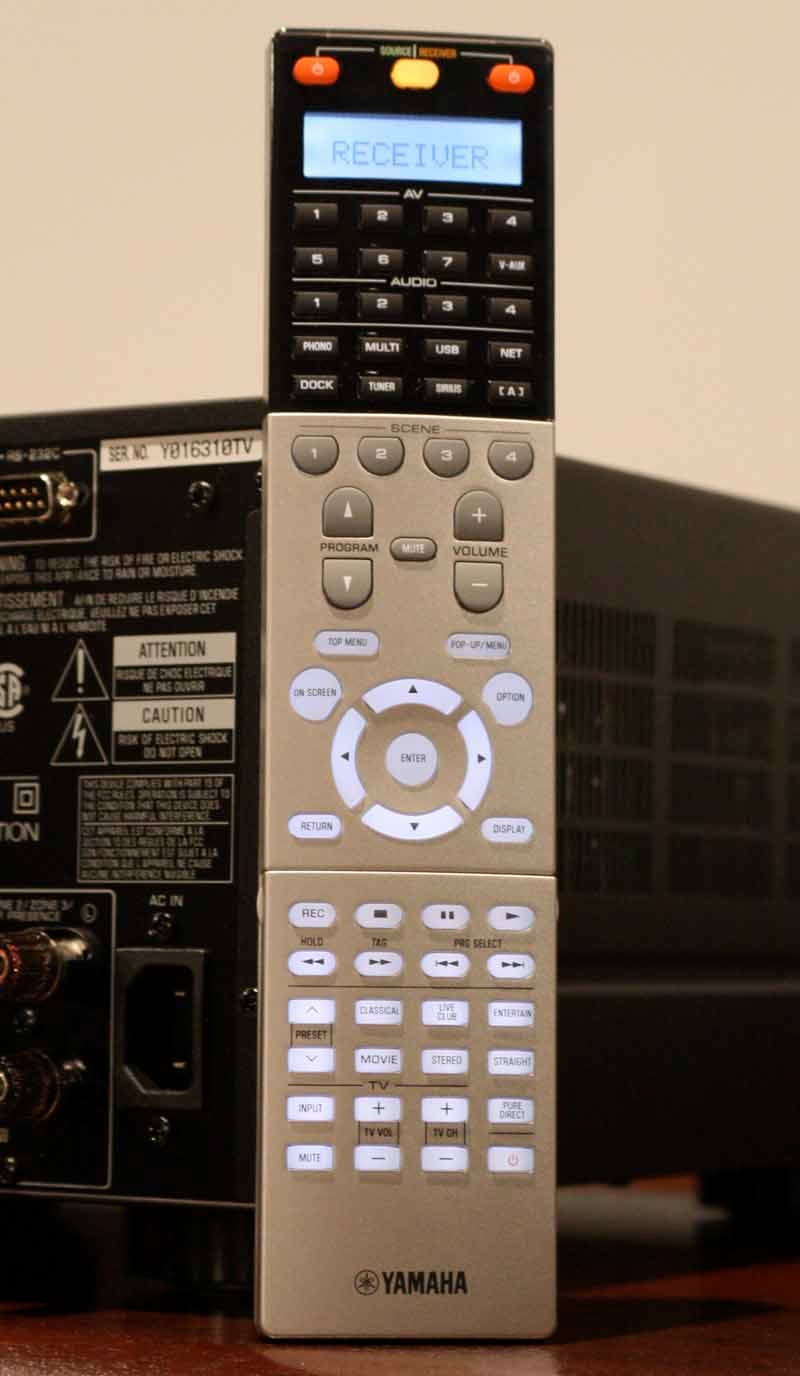 OK, on to the remote control... Look, we hate the Yamaha RX-A3000
remote. It's a standard Yamaha remote and the company seems to have a knack for
making things over-complicated and just difficult. Remember the RAV 172 remote?
These guys make an art form out of unusual interfaces. The new RX-A3000 remote
doesn't have an unusual interface, it just features a ton of buttons on the
front face and a flip up panel at bottom to allow even more functionality -
like a number pad for tuner control. Aesthetically, it looks, at first blush,
like an inversion of the x67-series remotes, but with more buttons. But the
real problem is that the Source buttons all have useless labels... like AV1,
AV2, and AV3... Um, that's descriptive. Like the unusable nomenclature on the
rear of the unit, Yamaha shoots users into oblivion with their label-free
alphanumeric designations that will be sure to drive anyone (except maybe the
person who sets up this receiver) batty in less than 60 seconds... Scratch
that, it drove us batty - and we're the ones who set it up! With a new
GUI interface, perhaps Yamaha is subconsciously drawing users to use that (and
their iPhone/iPad app). Advanced users will want to take advantage of Yamaha's Receiver Manager software integration capability which we've covered in prior reviews. This will come in handy to relabel inputs into more meaningful names.
OK, on to the remote control... Look, we hate the Yamaha RX-A3000
remote. It's a standard Yamaha remote and the company seems to have a knack for
making things over-complicated and just difficult. Remember the RAV 172 remote?
These guys make an art form out of unusual interfaces. The new RX-A3000 remote
doesn't have an unusual interface, it just features a ton of buttons on the
front face and a flip up panel at bottom to allow even more functionality -
like a number pad for tuner control. Aesthetically, it looks, at first blush,
like an inversion of the x67-series remotes, but with more buttons. But the
real problem is that the Source buttons all have useless labels... like AV1,
AV2, and AV3... Um, that's descriptive. Like the unusable nomenclature on the
rear of the unit, Yamaha shoots users into oblivion with their label-free
alphanumeric designations that will be sure to drive anyone (except maybe the
person who sets up this receiver) batty in less than 60 seconds... Scratch
that, it drove us batty - and we're the ones who set it up! With a new
GUI interface, perhaps Yamaha is subconsciously drawing users to use that (and
their iPhone/iPad app). Advanced users will want to take advantage of Yamaha's Receiver Manager software integration capability which we've covered in prior reviews. This will come in handy to relabel inputs into more meaningful names.
Yamaha needs to buy some stock in Logitech
or Universal Remote, because with flagship remotes like this they are
practically driving everyone to use a competing device to retain their sanity.
I could go into the way they broke down the remote, but you have eyes and we included
a picture - add $200 to this receiver and get yourself something you can
actually give your significant other to use. If you're single, you can make due
with this and it does allow for learning of other device codes - it just won't
support the four color buttons that are required for advanced use of Blu-ray
players and (particularly) any Samsung device.
Yamaha RX-A3000 Aventage Listening Tests
Listening Tests - Music

We did a significant amount of stereo
listening tests using the Yamaha Aventage RX-A3000 AV Receiver. I wanted to
hear it critically and determine if this was truly an audiophile product, or
suitable for just your typical dialogue-explosion movie soundtrack. Our testing
system was the RBH Sound CinemaSITE system with updated Signature Series
SI-760/R MTM mains and center. Surrounds are rendered by the 66-SE/R speakers.
The bottom end is rounded out by a pair of SI-1010P subwoofers. We have room
treatments by RPG Diffuser Systems and we find the room to be live with fairly
smooth bass response to the primary and secondary seating positions.
find the room to be live with fairly
smooth bass response to the primary and secondary seating positions.
CD: RED - End of Silence
Track two off this album is compressed, being a modern album, but it
does offer some excellent high-hat work, driving bass guitar and a male lead
vocal that's truly "in your face". "Breathe Into Me" has a
bass line that plays in lock step with the driving kick drum and its punctuated
attack was topped by a crisp snap that really came across as authentic and
live-sounding. "Let Go" was another song that we listened to for
midrange clarity given a tight mix and an almost "wall of sound"
performance. With this type of music (Alternative/Rock) it was amazing to hear
the Yamaha really fill up the theater room with punchy, driving bass a nice,
full drum kit and real heavy metal guitars that played in tandem to generate a
thick sound that had us sitting back and enjoying nearly the full album before
moving on.
CD: Switchfoot - The Beautiful Letdown
"This is Your Life" was a track I wanted to get playing in the
Yamaha since it arrived. Popping this CD into our Oppo BDP-83 we were treated
to the synthy bass and drums that punctuate a really simple intro that builds
into a robust crescendo of a chorus that sits just under the lead male vocal.
Man the deep, resonant bass just reverberated throughout the room and filled it
up nicely as the Moog-sounding keys came in and the contrasting clean electric
guitars entered in from the sides. "Dare You to Move" is a song form
this band that hit mainstream pretty hard and I liked it for the up front
vocals and the persistent percussion that pokes way out during the verses and
carries through the choruses in the form of a shaker. The bass was also driving
through this song, as was the kick, with a throaty hit that sat back in the mix
but resonated with a nice upper-mid tone.
hit that sat back in the mix
but resonated with a nice upper-mid tone.
DTS CD: Eagles - Hell Freezes
Over
Starting with my standard "New York Minute", I listened
intently for the introductory strings and piano, and found them to be
convincing - with a solid and believable midrange. I can't tell you how many
systems I've listened to that will subdue the midrange of a piano or pull back
on the true sound of Don Henley's voice. When the reverb rolled in atop the
keyboards I was in music-nirvana. It was like dry ice flowing in gently over
the soundstage and man did it sound smooth. The prominent kick drum and subtle
hi-hat lifts were next and they really impressed me - moreso tha n I remember in
a long time. At this point I was simply in - I wasn't about to stop until this
album was done. Might as well take some more notes... "Tequila Sunrise" showed off
some nice stereo separation as the guitars split and the acoustic in the middle
revealed honest playing with the sound of the strings being strummed and Glenn
Frey's beautiful voice putting out its warmth throughout the room. The Yamaha
RX-A3000 seemed to coax everything it could out of the RBH Sound Signature
Series speakers - nothing was let on the table with regard to sound.
n I remember in
a long time. At this point I was simply in - I wasn't about to stop until this
album was done. Might as well take some more notes... "Tequila Sunrise" showed off
some nice stereo separation as the guitars split and the acoustic in the middle
revealed honest playing with the sound of the strings being strummed and Glenn
Frey's beautiful voice putting out its warmth throughout the room. The Yamaha
RX-A3000 seemed to coax everything it could out of the RBH Sound Signature
Series speakers - nothing was let on the table with regard to sound.
Blu-ray: John Gorka - The Gypsy
Life (AIX Records)
"branching Out" is the first track on this Blu-ray disc (which
we listened to in Dolby TrueHD uncompressed). It's a nice 60's-style folksy
song that's heavy on vocals and guitar with ample rolling non-percussive bass.
It's also a really goofy song with lyrics like "when I grow up I wanna be
a tree..." but I like the sound. The use of a mandolin in the track really
punctuated the sound and it was rendered authentically by the Yamaha, with all
of its upper mid and top end perfectly conveyed into the listening space.
"Stranger with Your Hair" is a soft acoustic guitar song that is just
as goofy, and just as wonderfully honest and natural. I love the gentle vocal
singing and the timbre of John's voice really sounded warm through the Yamaha receiver. The lyrics may be odd, but the sound of this album is exceptional.

Listening Tests - Movies
I had an enjoyable time listening to music on the Yamaha RX-A3000, but movies were an absolute blast... sometimes literally. We watched a ton of movies on this receiver and I made a few notes on some of the more impressive titles.
Blu-ray: Prince of Persia
Right from the opening, this movie impressed with its full score and the
chase scene throughout the city. I'm a sucker for foley effects and there were
plenty that crept up through the score, such as running, sword sounds and
plenty of impacts from landings on roofs and general scuffling. In the scene
prior to the sands of time being recovered by the evil uncle, the fight scene
between the blade-wielding Hassansin whip man and Dastan was absolutely
perfect, with the chain weapon coming out of every speaker at one point of
another. The sound was extremely crisp and it had the effect of commanding your
immediate attention to the location from which the weapon originated - and all without
being distorted or compressing the peaky effect. Later, when the Seso character
fights the Hassansin, we were treated to an awesome surround sound experience
that culminated in about thirty different point source daggers making their way
around the entire theater room. The fianl fight scene is just as intense, and
the Yamaha RX-A3000 did a great job rendering the punchy bass hits and low
frequency effects that accompanied the snake-wielding assassin.
commanding your
immediate attention to the location from which the weapon originated - and all without
being distorted or compressing the peaky effect. Later, when the Seso character
fights the Hassansin, we were treated to an awesome surround sound experience
that culminated in about thirty different point source daggers making their way
around the entire theater room. The fianl fight scene is just as intense, and
the Yamaha RX-A3000 did a great job rendering the punchy bass hits and low
frequency effects that accompanied the snake-wielding assassin.
VUDU: 2012
For quite possibly the worst movie ever made, 2012 actually has some
decent sound, even with streaming it through VUDU and Dolby Digital Plus surround. VUDU is impressive in that it streams in full 1080p with few artifacts and excellent quality sound that, while not lossless, is pretty impressive and typically better than what you'll get with DVD. The scene about 45 minutes in where everything starts to fall
apart is simply amazing. The subs exploded with the San
Andreas fault collapse and the crisp sound of earth disappearing
into the abyss while the private plane lifted off was nothing short of
mind-blowing. I loved the surround effects as they flew over and through a
collapsing world, seemingly because they felt it would be boring to pull back
on the stick and climb a few hundred feet higher... no, that just wouldn't be
Hollywood - best to just fly through a building. Later, when fire reigns from
the sky, and the plane once again takes off, the sound of explosive lava and
earthy hits was awesome to behold. The final crescendo of course, is the total
collapse of the Sistine Chapel, whose fully-enveloping explosive destruction
was felt by all in the room. Movies like this just sound awesome on this receiver. It has enough power to drive the
audio to insanely loud levels and there are no gaps in its ability to provide
a convincing environment that pulls you into the film.
Yamaha RX-A3000 Aventage Measurement and Analysis
Measurements & commentary by Gene DellaSala
All measurements were conducted using our Audio Precision APx585 8 Channel HDMI Audio Analyzer. The Yamaha RX-A3000 was defaulted to high impedance mode (8 ohms or more) which is the setting we recommend using regardless of your loudspeakers impedance rating if you are concerned about achieving maximum output power and performance from this unit.
See: Setting the A/V Receiver Impedance Switch
For more information about how we measure power amplifiers, please check out:
Basic Amplifier Measurement Techniques
Yamaha RX-A3000 Preamplifier Measurements
I did some quick spot-checking on the RX-A3000 pre-amplifier gain structure to ensure it could be properly drive a wide assortment of power amplifier. My personal criteria for amplifier gain structure is that it should be able to hit full power when driven with 2Vrms. The RX-A3000 was able to deliver 3.3Vrms unclipped out of the analog multi channel outputs. Once I exceeded this output level, the auto protection circuits shut the receiver down. This is more than enough clean output voltage to drive any audio amplifier to clipping.
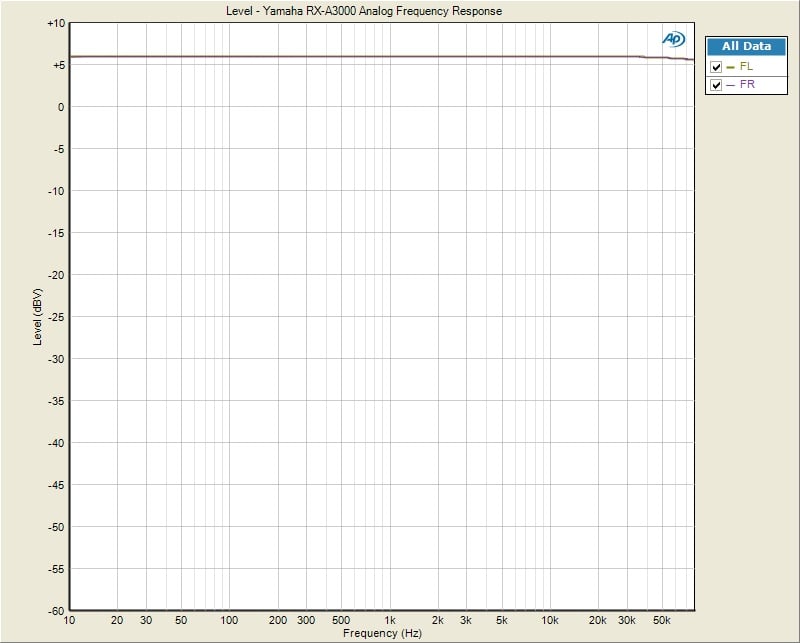
Yamaha RX-A3000 Analog Frequency Response
Frequency Response was ruler flat from 10Hz to 80kHz (the limit of the APx585 test equipment) with +-.025dB variation. The preamp gain (Av) = 13.6dB similar to what I measured on the RX-Z7.
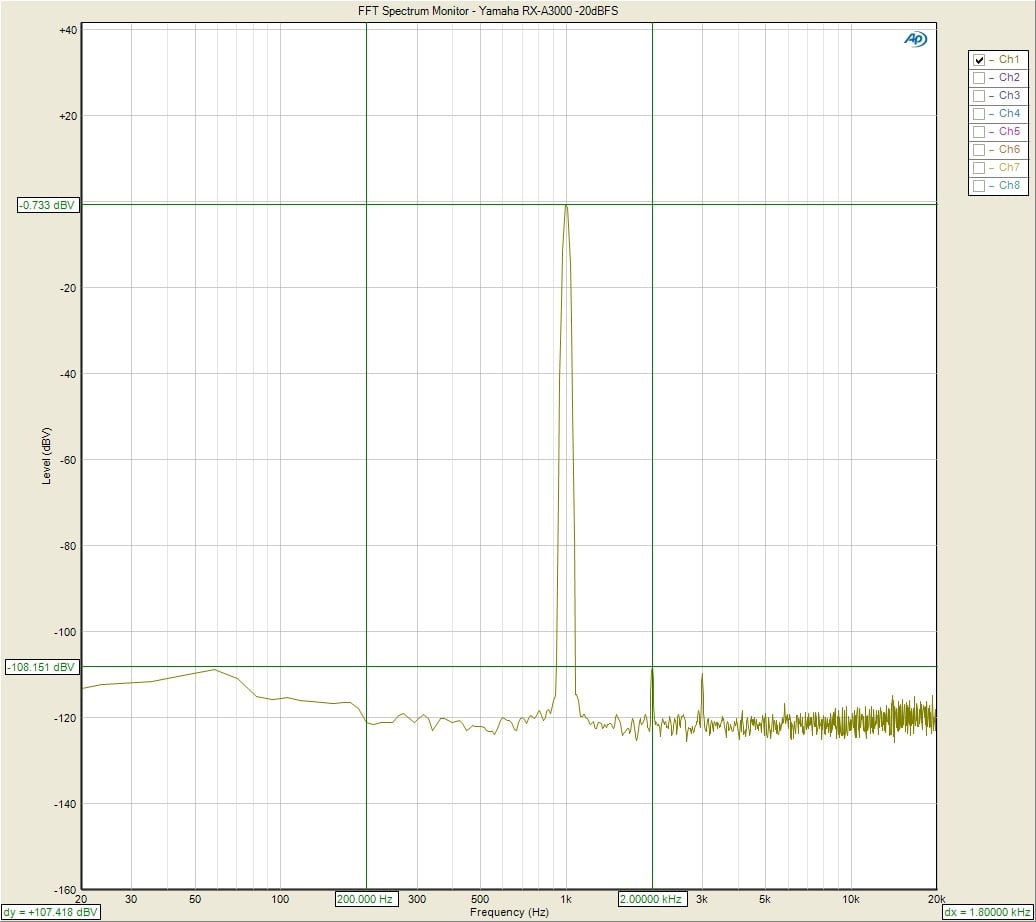
Yamaha RX-A3000 FFT Distortion (HDMI In, -20dBFS, 1Vrms out)
Driving the RX-A3000’s HDMI input with a -20dBFS signal, I adjusted the
volume control until I measured 1Vrms via the preamp outputs., The RX-A3000
displayed an excellently clean FFT distortion profile with the magnitude of the
2nd harmonic of (-.733 +108.15)dBv = 107.4dBv or
100*alog^-1(-107.4/20) = .0004% THD + N.
As you can see in the output, residual noise products are virtually
nonexistent.
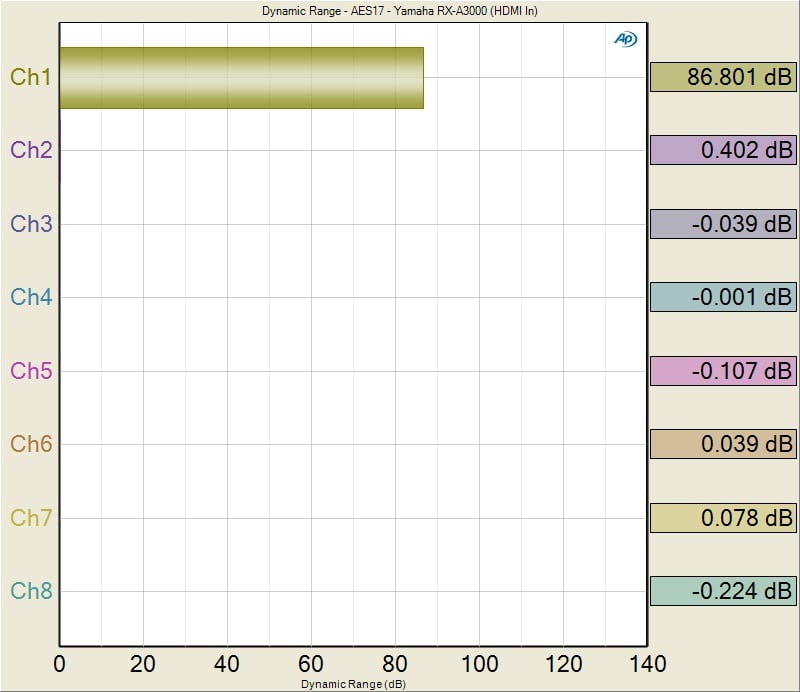
Yamaha RX-A3000 SNR (pre-amp driven via HDMI)
Using the HDMI input driven at -20dBFS with 1Vrms out of the preamp analog outputs, I measured 86dB (unweighted). This is a pretty clean measurement. I repeated this test via the analog inputs and noticed an elevated result likely due to clock noise or just digital artifacts well above the audio band corrupting the measurement. Engaging “Pure Direct” made about a 3dB improvement to this measurement coming close to the SNR performance I measured when driving the RX-A3000 via an HDMI input source.
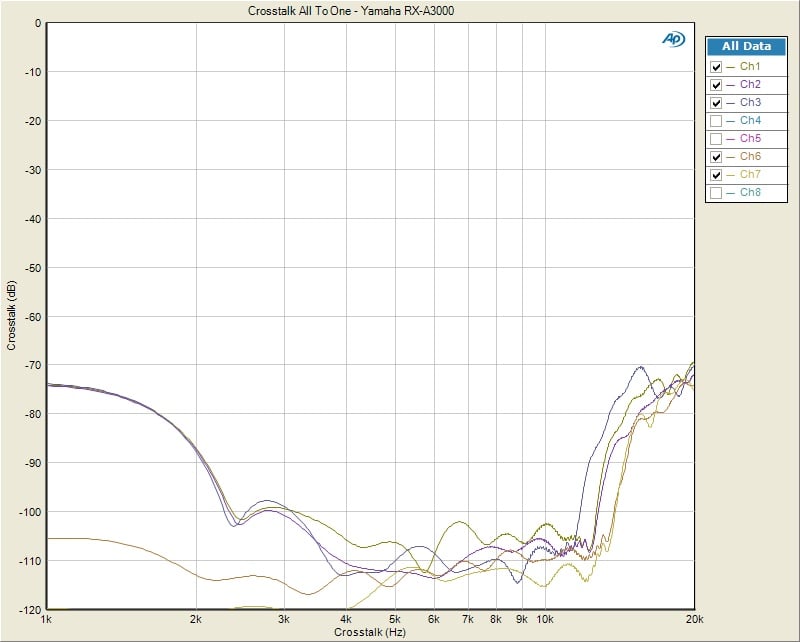
Yamaha RX-A3000 All-to-One Crosstalk (HDMI
In, Preamp Out 1Vrms)
The RX-A3000 exhibited commendable channel to channel crosstalk performance. With all channels acting as the noise source or disturber driven via the HDMI input, I measured each idle channel one at a time to determine the worst case channel to channel crosstalk. At 1kHz the RX-A3000 yielded -70dB @ 1kHz dropping lower with frequency (odd but true) and still maintaining -70dB at 20kHz for its noisiest channel. I consider anything less than -40dB @ 10kHz acceptable so the RX-A3000 met that minimum requirement with 30dB to spare! With only one channel driven at a time, channel to channel crosstalk performance was about 10dB better across the board putting it on par with what I measured on the RX-Z7 two-channel crosstalk tests.
Yamaha RX-A3000 Power Amplifier Measurements
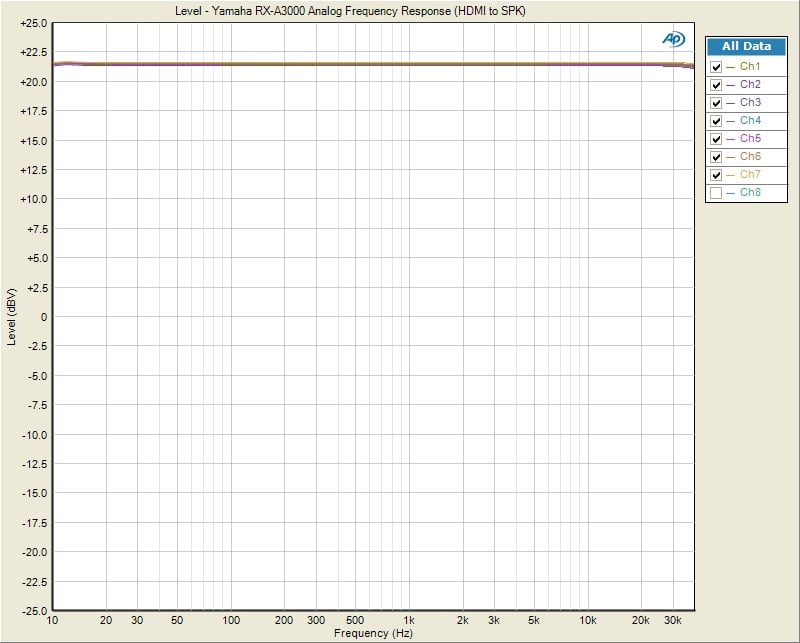
Yamaha RX-A3000 Frequency Response (HDMI In, Speaker Level Outputs)
With the RX-A3000 driven by a -20dBFS input signal via HDMI, I measured all channels driven at 8 ohms via the speaker outputs at 10 watts power level. Frequency response was again ruler flat from 20H to 80Khz (the bandwidth limit of my AP test gear) +-0.04dB variance which was incredibly linear.
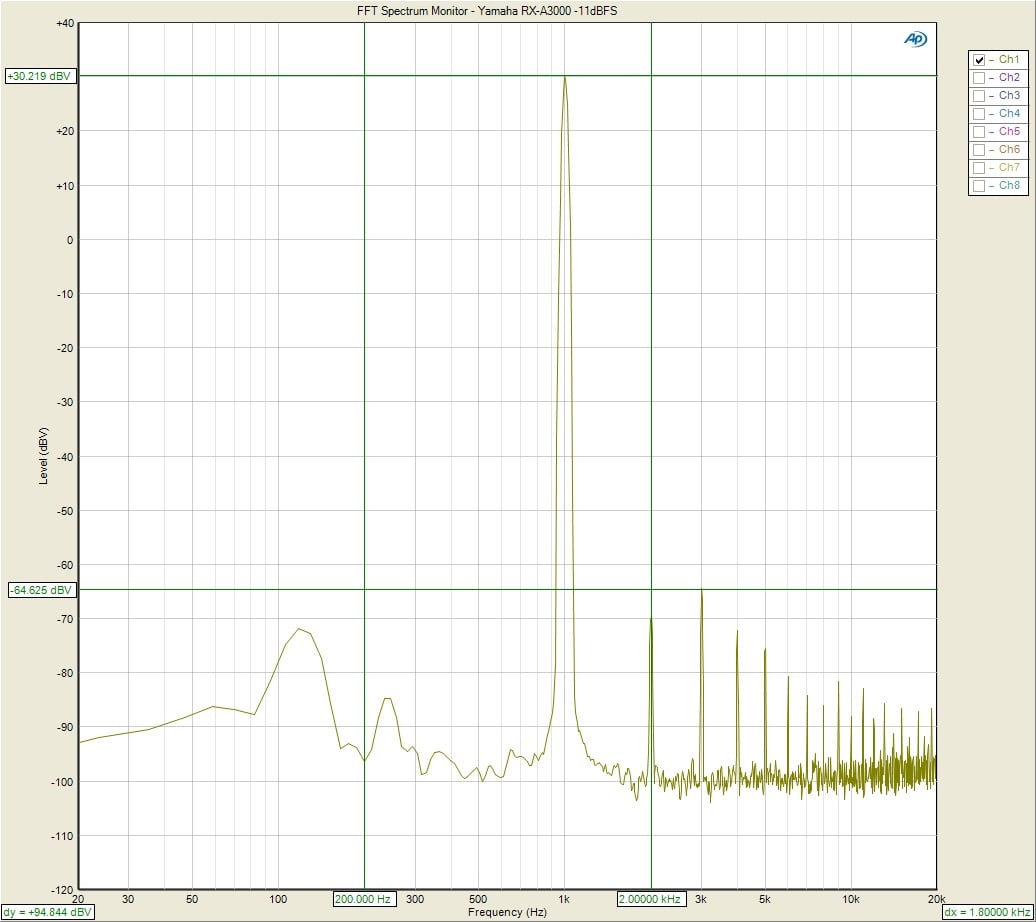
Yamaha RX-A3000 FFT Distortion Analysis at Full Rated Power
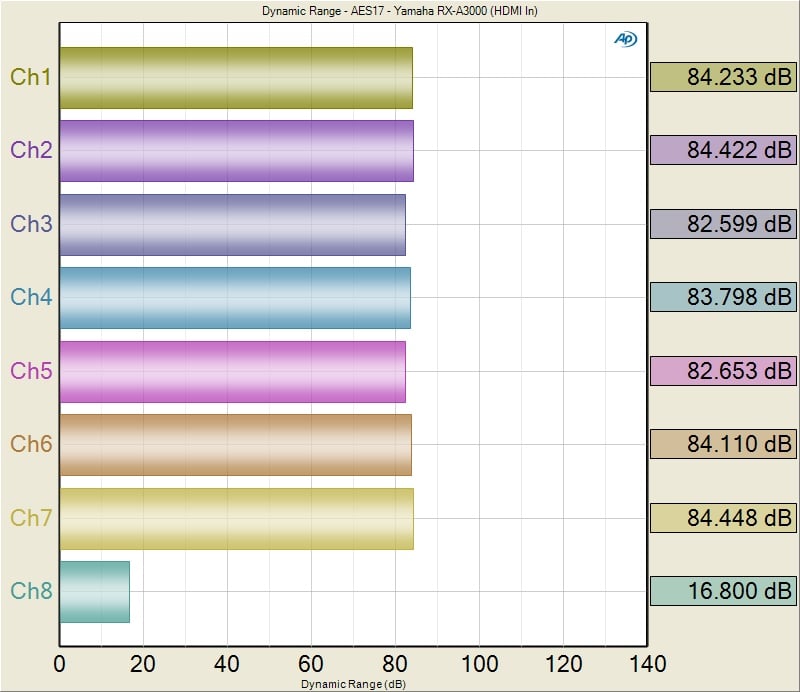
Yamaha RX-A3000 SNR (HDMI In, Speaker Level Outputs)
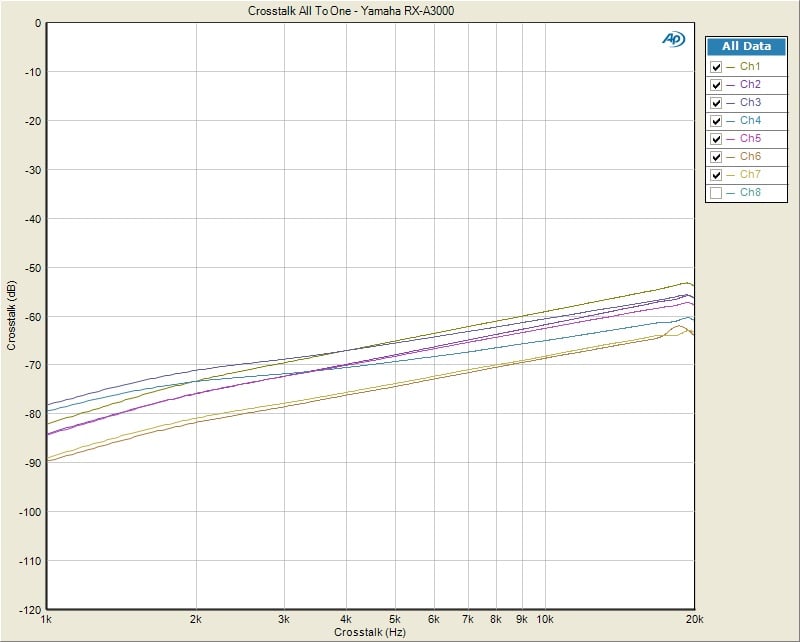
RX-A3000 All-to-One Crosstalk (HDMI In, Speaker Level Outputs 20watts)
I measured all-to-one crosstalk from the preamp input of the RX-A3000 all the way to the speaker outputs with each channel driven at 20 watts (except the channel under test). Channel to channel crosstalk was excellent (80dB @ 1kHz, 55dB @10kHz). Again this is a worst case crosstalk measurement. Simply measuring channel to channel crosstalk with only one channel acting as a disturber at a time would produce numbers 10dB or lower across the board. This is how most publications measure crosstalk but we tend to be harder on the products and test them in the worst case scenarios like these.
Yamaha RX-A3000 Aventage Measurement and Analysis (Power Tests)
Power Measurements
Using our Audio Precision APx585 8-channel HDMI analyzer, we conducted a full barrage of multi-channel amplifier tests on Yamaha RX-A3000. We tested power using three methods all of which were taken at < 0.1% THD + N:
- Continuous Full Power Bandwidth (CFP-BW) - from 20Hz to 20Khz into 8 and 4-ohm loads (up to two-channels)
- 1kHz Power Sweep vs Distortion (1kHz PSweep) - popularized by the print magazines, this is an instantaneous power vs distortion test at 1kHz. The problem with this test is it often masks slew related and or frequency response problems some amplifiers exhibit at the frequency extremes, and thus inflates the measured power results. It does provide an instant gratification # for consumers to argue over on the forums so we are now incorporating this test to please the masses.
- Dynamic PWR - 1kHz CEA-2006 Burst Method testing - this is a dynamic power measurement adopted from the car industry similar to IHF method only a bit more difficult for an amplifier and more representative of real musical content.
Keep in mind most review publications don't do continuous fullbandwidth power measurements and they usually publish power measurements into clipping at 1% THD + N or higher. Our measurements are very conservative as we use a dedicated 20A line with no Variac to regulate line voltage. We constantly monitor the line to ensure it never drops more than 2Vrms from nominal which in our case was 120Vrms.
For more info on
amplifier measurements, see: The
All Channels Driven (ACD) Test
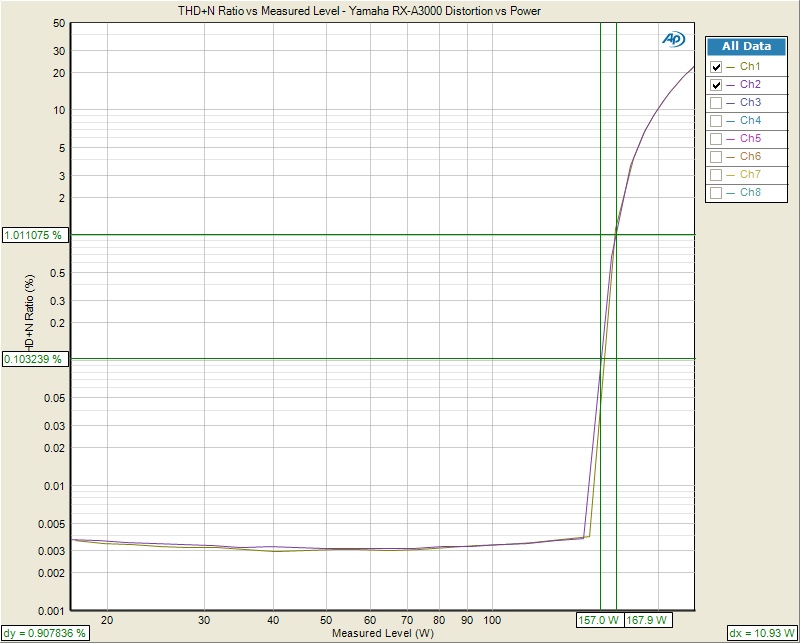
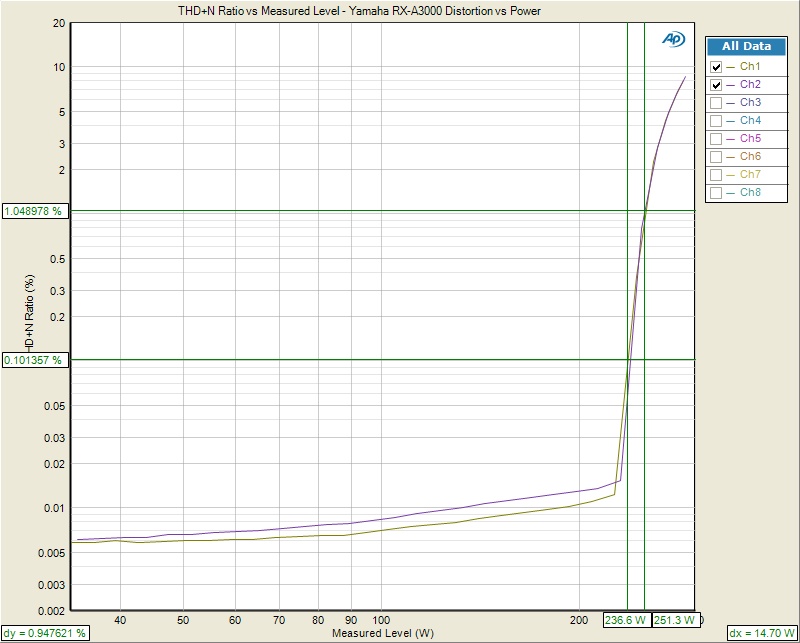
Yamaha RX-A3000
1kHz Power Test
Left Pic: ACD, 8
ohms; Right Pic: 2 Channels driven, 4
ohms
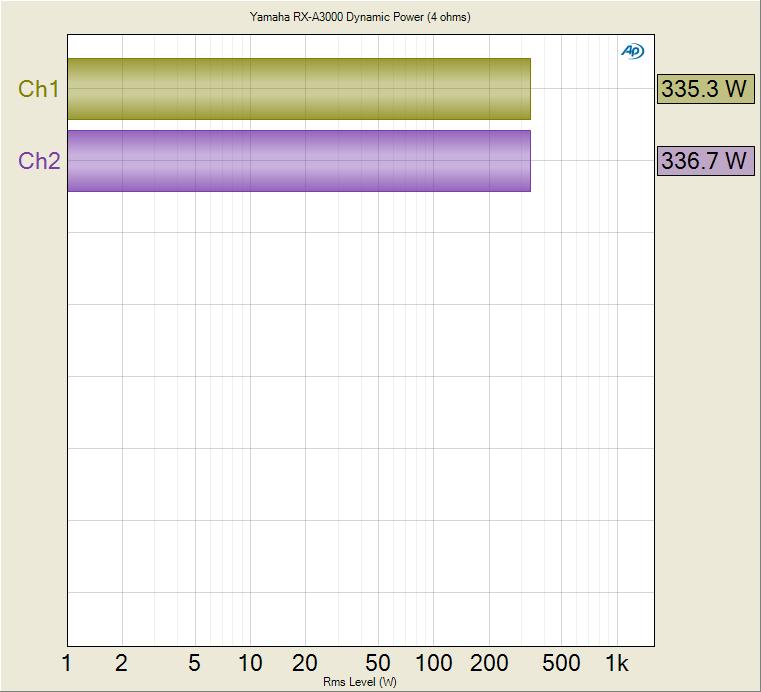
Yamaha RX-A3000 Dynamic Power Test (1kHz) 2CH Driven, 4 ohms
| # of CH | Test Type | Power | Load | THD + N |
| 2 | CFP-BW | 155wpc | 8-ohms | 0.1% |
| 2 | CFP-BW | 236wpc | 4-ohms | 0.1% |
| 2 | 1kHz Psweep | 168 wpc | 8-ohms | 1% |
| 2 | 1kHz Psweep | 251 wpc | 4-ohms | 1% |
| 7 | 1kHz Psweep | 65 wpc | 8-ohms | 1% |
| 1 | Dynamic PWR | 217wpc | 8-ohms | 1% |
| 1 | Dynamic PWR | 386wpc | 4-ohms | 1% |
| 2 | Dynamic PWR | 205wpc | 8-ohms | 1% |
| 2 | Dynamic PWR | 330wpc | 4-ohms | 1% |
| 7 | Dynamic PWR | 153 wpc | 8-ohms | 1% |
Yamaha RX-A3000 Power Measurement Table
The Yamaha RX-A3000 handedly
exceeded its 140wpc power rating continuously with two channels driven and stomped
out an impressive 236wpc both channels driven into 4 ohms; and that’s a full
power bandwidth measurement (20Hz to 20kHz at 0.1% THD + N). It proved to be every bit as powerful as
their more expensive RX-Z7 mode. You can
see the protection circuit kick on during our ACD tests, purposely limiting
power to 65wpc. In short time, there is
no doubt in my mind forum lurkers seeing this will pop up on our site or AVS
Forum bashing Yamaha, not realizing the design purpose of power limiting a
multi channel amplifier in a compact chassis, or the reality that real world
program material will never trip this limiter circuitry. Thus we conducted dynamic burst power
measurements simulating real world program content. Interestingly enough the RX-A3000 delivered
similar dynamic power output ACD into 8 ohm loads and slightly more power two
channels driven into 4 ohm loads than the Emotiva
UPA-7 dedicated multi-channel power amplifier that is designed to deliver
rated power continuously into all channels as can be seen in the comparison
table below.
| # of CH | Test Type | Power | Load | THD + N |
| 2 | CFP-BW | 140 watts | 8-ohms | 0.1% |
| 2 | CFP-BW | 238 watts | 4-ohms | 0.1% |
| 7 | 1kHz Psweep | 108 watts | 8-ohms | 0.1% |
| 7 | 1kHz Psweep | 117 watts | 8-ohms | 1% |
| 2 | 1kHz Psweep | 240 watts | 4-ohms | 0.1% |
| 2 | 1kHz Psweep | 252 watts | 4-ohms | 1% |
| 7 | Dynamic PWR | 156 watts | 8-ohms | 1% |
| 2 | Dynamic PWR | 320 watts | 4-ohms | 1% |
Emotiva UPA-7 Power Measurement Table
It's clear that the
Yamaha RX-A3000 delivers more than rated power with up to two channels driven
and tons of dynamic headroom (1.9dB for 8 ohms based on their 140wpc power
rating). Let no skeptic tell you
otherwise, the RX-A3000 has a darn respectable amplifier section not only for a
receiver but for a modestly priced seven channel power amplifier.
Yamaha RX-A3000 Aventage Conclusion
 Booyah! Yamaha has hit it out of the park with this one. The RX-A3000 proved itself to be a worthy and
most importantly less costly successor to the venerable RX-Z7 (though we do
miss Yamaha's signature orange frontpanel display). Say all you want about our ranting about the
remote - apart from that, the Yamaha RX-A3000 is a real winner that shows its
true colors a an audiophile product that has legs. It's an incredibly flexible
and powerful system that works well, measures well and looks... well, it looks
like every other black box - but that's not how we shop for these things. On
the list of surprises was the adept iPhone/iPad app. It's not perfect, but it's
a nice touch and it's free. We also liked the video processing performance and
the way you can configure this receiver to utilize all 11.2 channels as needed.
This is a keeper and we hope that it's just the beginning for a company that
seems to really get this market.
Booyah! Yamaha has hit it out of the park with this one. The RX-A3000 proved itself to be a worthy and
most importantly less costly successor to the venerable RX-Z7 (though we do
miss Yamaha's signature orange frontpanel display). Say all you want about our ranting about the
remote - apart from that, the Yamaha RX-A3000 is a real winner that shows its
true colors a an audiophile product that has legs. It's an incredibly flexible
and powerful system that works well, measures well and looks... well, it looks
like every other black box - but that's not how we shop for these things. On
the list of surprises was the adept iPhone/iPad app. It's not perfect, but it's
a nice touch and it's free. We also liked the video processing performance and
the way you can configure this receiver to utilize all 11.2 channels as needed.
This is a keeper and we hope that it's just the beginning for a company that
seems to really get this market.
Yamaha RX-A3000 Review
$1799.95
Yamaha
Electronics Corporation, USA
6660 Orangethorpe Avenue
Buena Park, CA
90620
(714) 522-9105
www.Yamaha.com/hometheater
Yamaha RX-A3000 Aventage AV Receiver Video Review from Audioholics.
About Yamaha
Yamaha Electronics Corporation (YEC),
USA, based in Buena Park, California, is a wholly owned subsidiary of Yamaha
Corporation of America.
YEC offers industry-leading home theater components and systems, featuring A/V
receivers, amplifiers, DVD/CD players, speakers, mini-systems,
home-theater-in-a-box (HTiB) pre-matched systems and the company's exclusive
Digital Sound Projectors (single component surround sound solutions), as well
as A/V & IT convergence products.
The Score Card
The scoring below is based on each piece of equipment doing the duty it is designed for. The numbers are weighed heavily with respect to the individual cost of each unit, thus giving a rating roughly equal to:
Performance × Price Factor/Value = Rating
Audioholics.com note: The ratings indicated below are based on subjective listening and objective testing of the product in question. The rating scale is based on performance/value ratio. If you notice better performing products in future reviews that have lower numbers in certain areas, be aware that the value factor is most likely the culprit. Other Audioholics reviewers may rate products solely based on performance, and each reviewer has his/her own system for ratings.
Audioholics Rating Scale
 — Excellent
- — Very Good
- — Good
- — Fair
- — Poor
| Metric | Rating |
|---|---|
| Frequency Response Linearity | |
| SNR | |
| Output Impedance | |
| Measured Power (8-ohms) | |
| Measured Power (4-ohms) | |
| Multi-channel Audio Performance | |
| Two-channel Audio Performance | |
| Video Processing | |
| Build Quality | |
| Fit and Finish | |
| Ergonomics & Usability | |
| Features | |
| Remote Control | |
| Performance |  |
| Value | |
Clint Deboer was terminated from Audioholics for misconduct on April 4th, 2014. He no longer represents Audioholics in any fashion.
View full profile Subscribe to our newsletter