


Pioneer VSX-516 Receiver Review
Pioneer VSX-516
- Product Name: VSX-516
- Manufacturer: Pioneer
- Performance Rating:

- Value Rating:

- Review Date: May 03, 2006 19:00
- MSRP: $ 199
Power
- Power Amplifier Design - Pioneer Hybrid Amplifier Design
- Surround Power - 100W per channel (8 ohms, 1kHz, 1.0% THD) (front); 100W (8 ohms, 1kHz, 1.0% THD) (center); 100W per channel (8 ohms, 1kHz, 1.0% THD) (surround);100W per channel (8 ohms, 1kHz, 1.0% THD) (surround back)
- Stereo Power - Continuous average power output of 100 watts at 8 ohms, from 20Hz to 20kHz with no more than 0.7% total harmonic distortion
Digital Decoding & Processing
- Digital Engine - New Freescale 180MIPS Processing DSP
- DSPs - Dolby(R) Digital 5.1, Dolby Digital EX, DTS(R) 5.1, DTS-ES Discrete 6.1, DTS 96/24, DTS Neo:6, Pro-Logic II, WMA9 Pro, 9 Advanced Surround Modes, 7 Channel Stereo, Virtual Surround Back, Mid-night Listening, Dialogue Enhancement, Loudness
- Calibration - Speaker Configuration, Speaker Size, Speaker Level, Speaker Distance, Acoustic Equalization
- Analog to Digital Conversion - 96kHz / 24-Bit
- Digital Analog Conversion (DAC) - 192kHz / 24-Bit
Connectivity
- Audio (Tuner Included) / Video Input - 3 Audio / 3 Audio Video
- Audio/Video Output - 1 Audio / 1 Audio Video / 1 Video
- Digital Inputs - 3 (2 Coaxical, 1 Optical)
- Optical In - 1
- Coaxial In - 2
- Multi-Channel Input - Yes
- Audio Preamp Output - Yes
- Composite Video Input - Yes
- Composite Video Output - Yes
- Component Video Input - 2
- Component Video Output - 1
- Headphone Output - 1
Conveniences
- FL Dimmer - 4 Steps
- On-Screen Display - Yes
- Remote Type - Easy-to-use SR Remote Capable of Operating Pioneer’s DVD Players and Recorders
Dimensions
- Dimensions (inches) - 16-9/16x6-1/4x13-7/8 inches (WxHxD)
- Weight - 19lbs. 13oz.
Pros
- Component Switching
- Bi-ampable/wireable
- Plenty of power
- 5.1 inputs
Cons
- Near useless automatic setup
- Can’t see volume display from a distance
Pioneer VSX-516 Introduction
Budget receivers... I remember a time not so long ago that budget was synonymous with serious deficiencies. When I bought my first receiver, budget meant the difference between analogue and digital. I was broke so I had to go analogue which meant my receiver was hopelessly outdated almost immediately. Now, budget is the difference between multiple zones and number and type of connections. Sure, amp quality and power handling is a factor as well, but for most of us, there isn't a receiver out there that can't push our 8-ohm speakers to ear bleeding levels. You may have to do with out the automatic room calibration but the majority of reports that I've read indicate that such technology isn't quite as refined as the manufacturers would have you believe. What does this boil down to? For many of us, it is possible to run around your home theater and count the number and types of connections and find a receiver that matches. Paying for additional zones and connection types (DVI, HDMI), scaling, upconverting, and other functionality may prevent premature obsolescence, but I know that for many, home theater equipment doesn't change for a very long time following a purchase.
Pioneer VSX-516 Installation and Setup
 The VSX-516 is a
solidly put together unit of sufficient heft to indicate a substantial unit but not so heavy as to be
hard to move around. Packed with the standard styrofoam end caps, the unit arrived undamaged.
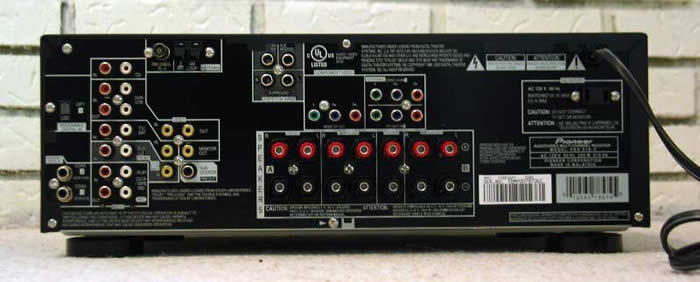
Connection types include composite video, component video (2 in, 1 out), one optical, and two coax
digital connections. The digital connections are assignable to whichever input you'd like. The
5.1 inputs are a bit confusing as you have to connect the mains over on the left with the rest of the
inputs while the rest of the speakers are connected closer to the center of the unit. This could create
a problem for people that invested in a six cable bundle as the separation might be too great.
Noticeably absent (but not missed) were the s-video inputs. DVI and HDMI were nowhere to be found (and
won't be at the price). The unit has 5.1 pre-outs if you want to use outboard amps. The unit has
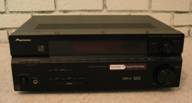
this funky valley running horizontally across the front of the unit that made everyone think it was two
components sitting on top of each other. I didn't find anyone (myself included) that really
thought it was that attractive of a unit.
The VSX-516 is a
solidly put together unit of sufficient heft to indicate a substantial unit but not so heavy as to be
hard to move around. Packed with the standard styrofoam end caps, the unit arrived undamaged.
Connection types include composite video, component video (2 in, 1 out), one optical, and two coax
digital connections. The digital connections are assignable to whichever input you'd like. The
5.1 inputs are a bit confusing as you have to connect the mains over on the left with the rest of the
inputs while the rest of the speakers are connected closer to the center of the unit. This could create
a problem for people that invested in a six cable bundle as the separation might be too great.
Noticeably absent (but not missed) were the s-video inputs. DVI and HDMI were nowhere to be found (and
won't be at the price). The unit has 5.1 pre-outs if you want to use outboard amps. The unit has
this funky valley running horizontally across the front of the unit that made everyone think it was two
components sitting on top of each other. I didn't find anyone (myself included) that really
thought it was that attractive of a unit.
 I connected my DVD player and the
Olive Symphony
through coax and the 2partsfusion
DMS-701
media server via
optical. All speakers were connected via banana plugs and the subwoofer was connected to the sub-out in
a 7.1 configuration. There is a Quickstart function that I didn't immediately notice so I
configured the unit manually at first. Really, as receivers go, this one isn't that bad to set
up. The hardest part is figuring out the "Pioneerese"
they use for their menu system. Even
as familiar as I am with receiver functions, I found myself scratching my head a few times as a
horribly abbreviated title popped up on the small screen. And therein lies the problem -
at this
price point you simply do not get an onscreen display (in the stats, they
say
they have one
but they mean on the little LCD screen of the unit). Because of the size of the screen, text either
needs to scroll or it must be abbreviated...
more often the latter. this is not a problem for the
most part except that the volume display is terminally small. There is absolutely no way to see it from
any sort of distance. When you change the volume, the text bolds but it is not enough. From seven feet
away, I couldn't tell the difference between a 1 and a 7 or a 2, 5, or 8.
I connected my DVD player and the
Olive Symphony
through coax and the 2partsfusion
DMS-701
media server via
optical. All speakers were connected via banana plugs and the subwoofer was connected to the sub-out in
a 7.1 configuration. There is a Quickstart function that I didn't immediately notice so I
configured the unit manually at first. Really, as receivers go, this one isn't that bad to set
up. The hardest part is figuring out the "Pioneerese"
they use for their menu system. Even
as familiar as I am with receiver functions, I found myself scratching my head a few times as a
horribly abbreviated title popped up on the small screen. And therein lies the problem -
at this
price point you simply do not get an onscreen display (in the stats, they
say
they have one
but they mean on the little LCD screen of the unit). Because of the size of the screen, text either
needs to scroll or it must be abbreviated...
more often the latter. this is not a problem for the
most part except that the volume display is terminally small. There is absolutely no way to see it from
any sort of distance. When you change the volume, the text bolds but it is not enough. From seven feet
away, I couldn't tell the difference between a 1 and a 7 or a 2, 5, or 8.
Pioneer VSX-516 Menu System
The menu system is accessible from either the front of the unit or the remote. The options included (I've used the original abbreviations so you get a flavor of what I was up against):
- SB.System: Set your Surround Back channels to normal, zone 2, or biamp
- SP Setup:
-
- SP Set - configure size (large or small, fronts, center, and surrounds, and surround back), number of back surrounds (0, 1, or 2) and whether or not you have a sub
- Crossover - 50, 80, 100, 150, 200hz - Defaults to 100
- CH Level - set channel levels - tones either manual or auto (cycles every 2 seconds unless you are manipulating them)
- SP Distn. - Set speaker distance in half foot increments up to 45 feet
- In Assig. - Assign digital inputs (1 optical, 2 coax) and both component video inputs
- Other
-
- DRC - Dynamic range adjustment to Dolby Digital or DTS tracks - Off, Mid, Max - Default Off
- Dualmono - How dual mono Dolby Digital track should be handled - CH1, CH2, or CH1 CH2 - Default CH1
- LFE Att - Limits the LFE to prevent speaker damage/sound distortion (most subs have limiters) 0, 10, ** - Default 0, ** turns off LFE
For the most part, this stuff was self explanatory. Once you've set up one receiver, you have probably acquired enough knowledge to set up this one. While some of the abbreviations were a little obtuse, for the most part I could navigate around and get the basics done (assign digital inputs, set speaker levels and distance, number and type of speakers, etc.) without having to reference the manual. Is that the case for everyone? Probably not. But that is what the Quickstart is for (see below). Some points to remember:
- The crossover is set globally - all speakers all inputs. Not exactly surprising at this price point.
- Don't even bother with the auto function on the channel level screen; the test tones switch way too fast. Stick with manual.
- The unit automatically resets your volume to -18 (which works out to be about 71dB at the sweet spot in my room) for the test tones. In my case, my front left speaker is very close to my receiver (where I was sitting at the moment). As I watched the volume increase from -50 (low, background music) to -18, I thought, "Huh, what's it doing?" Before I knew it, my right ear was ringing for the rest of the night.
- If you set Fronts to Small, everything else must be Small. If you set the Fronts to Large and the Surrounds to Small, the Back Surrounds must be Small. If you set the Surrounds to off, you can't have back surrounds (this is good). If you remember to set everything to Small as Audioholics suggests for most people and let your subwoofer take care of the low end, you won't have to worry about it. At this price point, I see a lot of satellite systems anyways.
- The unit remembers what setting (stereo, 7 channel stereo, Pro Logic, etc.) for each input.
- If you hit the Standard button during stereo playback, it will select stereo (or during Dolby Digital or DTS, it will select the appropriate). If you want to engage one of the Dolby Pro Logic II (5.1) or IIx (Movie, Music, or Game) or DTS Neo:6 (Cinema or music), continue to hit the Standard button until the desired processing algorithm appears. This setting will be remembered until you change it.
- If you have an inconsistent digital signal (say from a digital cable or satellite provider) you can hook up the both the analogue and digital outputs to the receiver. The unit defaults to digital but will pick up the analogue if necessary. While you can specify either one, the unit defaults to Auto which is probably your best bet
QuickStart Function
 The Quickstart function is nice in that it
makes it easy to configure the unit in a matter of moments. The unit asks you:
The Quickstart function is nice in that it
makes it easy to configure the unit in a matter of moments. The unit asks you:
- Whether or not you have a subwoofer - Y/N
- Number of speakers you are using - 2.0 to 7.1
- The size of your room - S/M/L
- Your seating position - Fwd/Mid/Back.
The first two are most important as it configures your DSP and surround modes. The second two... well, I found them of limited value. One nice yet annoying aspect is that you can only control the Quickstart from the front of the unit. Nice because you don't have to worry about sitting on the remote and switching your configuration, annoying because you have to sit in front of the unit when setting it. Once I got into the unit, I decided to see just what room size and seating position did. Using the Quickstart guide, I selected individually each of the room size and seating positions then switched to the manual channel level and speaker distance to see how the receiver configured itself. Below are the results.
Table 1: Speaker Levels
|
Speaker |
Manual |
S/Back |
S/Mid |
S/Fwd |
M/Back |
M/Mid |
M/Fwd |
L/Back |
L/Mid |
L/Fwd |
|---|---|---|---|---|---|---|---|---|---|---|
|
LF |
0.0 |
0.0 |
0.0 |
0.0 |
0.0 |
0.0 |
0.0 |
0.0 |
0.0 |
0.0 |
|
C |
-1.5 |
-2.0 |
-1.0 |
-2.0 |
-1.0 |
0.0 |
-2.0 |
-1.0 |
-1.0 |
-2.0 |
|
RF |
0.0 |
0.0 |
0.0 |
0.0 |
0.0 |
0.0 |
0.0 |
0.0 |
0.0 |
0.0 |
|
RS |
-1.0 |
-4.0 |
0.0 |
1.5 |
-4.0 |
0.0 |
2.0 |
-3.0 |
0.0 |
2.5 |
|
RR |
0.5 |
-5.0 |
0.0 |
2.5 |
-5.0 |
0.0 |
2.5 |
-5.0 |
0.0 |
3.0 |
|
LR |
0.5 |
-5.0 |
0.0 |
2.5 |
-5.0 |
0.0 |
2.5 |
-5.0 |
0.0 |
3.0 |
|
LS |
1.0 |
-4.0 |
0.0 |
1.5 |
-4.0 |
0.0 |
2.0 |
-3.0 |
0.0 |
2.5 |
|
Sub |
1.5 |
0.0 |
0.0 |
0.0 |
0.0 |
0.0 |
0.0 |
0.0 |
0.0 |
0.0 |
Table 2: Distance in feet
|
Speaker |
Manual |
S/Back |
S/Mid |
S/Fwd |
M/Back |
M/Mid |
M/Fwd |
L/Back |
L/Mid |
L/Fwd |
|---|---|---|---|---|---|---|---|---|---|---|
|
LF |
9.5 |
9.0 |
7.5 |
6.0 |
13.0 |
10.0 |
9.0 |
18.0 |
15.0 |
12.0 |
|
C |
9.5 |
7.5 |
6.5 |
5.0 |
12.0 |
10.0 |
7.5 |
16.0 |
14.0 |
10.0 |
|
RF |
9.5 |
9.0 |
7.5 |
6.0 |
13.0 |
10.0 |
9.0 |
18.0 |
15.0 |
12.0 |
|
RS |
7.5 |
6.0 |
7.5 |
7.0 |
8.5 |
10.0 |
11.0 |
13.0 |
15.0 |
16.0 |
|
RR |
7.0 |
5.0 |
7.5 |
8.0 |
7.5 |
10.0 |
12.0 |
10.0 |
15.0 |
17.0 |
|
LR |
7.0 |
5.0 |
7.5 |
8.0 |
7.5 |
10.0 |
12.0 |
10.0 |
15.0 |
17.0 |
|
LS |
7.5 |
6.0 |
7.5 |
7.0 |
8.5 |
10.0 |
11.0 |
13.0 |
15.0 |
16.0 |
|
Sub |
6.5 |
9.0 |
7.5 |
6.0 |
13.0 |
10.0 |
9.0 |
18.0 |
15.0 |
12.0 |
As you can clearly see, the definitions of small, medium, and large interact with the seating position to configure your speaker levels and distances in ways that would only be accurate by random chance. Doing a little math, you can estimate that a small room is defined by Pioneer as approximately 12 foot square, a medium room is about 20 foot square, and a large room is about 30 foot square. Well, technically, that is how far the speakers are from you but one supposes that speakers are either on or near a wall. As you can see from my manual channel levels, nothing really comes close though the small/back configuration isn't too far off for distance. The key: buy an SPL meter. There were times when I was switching through the tests that the rear speakers became the most prominent in the room while other configurations caused them to nearly shutdown completely. I could see the casual user flipping between the different configurations and picking the one that sounded the best. I can also envision them being completely and totally wrong. Buy an SPL meter, it's like $30. It is nice that you can adjust the channel levels on the fly with the remote so it is possible to make subtle adjustments to the sound without having to go into the setup menu.
 Passive Bi-amping

One interesting and unexpected feature available from this unit is the bi-ampability (I think I just made up a new word). Instead of wasting the back channels (if you just have a 5.1 system), you can use them to passively bi-amp your mains with just a few clicks on the remote. Of course, you need passively bi-ampable mains (which is questionable for a customer at this price point) but if you did, you could. I always like to see a manufacturer include something that only a small few of their customers would use but is easy for them to provide. It speaks to a kind of sensibility that gives me the warm fuzzies. Honestly, if their $200 receiver is bi-ampable, what extras did they put in their more expensive units?
DSP
DSP modes, love'em or hate'em, they are here to stay. Personally, after years of surround sound, I've grown fairly apathetic toward all the different DSP modes. If I were a sports guy, or an avid video game player, I might feel differently. Me, I'm all about the music and movies. And for music and movies, I'll take stereo, Pro Logic IIx, Dolby Digital, and DTS thank you very much. Add on an EX or ES for the back channels, and I'll be a happy camper. Every time I've ever accidentally engaged a DSP, I've found myself running to my receiver to see what is broken. Sometimes it takes me far too long to figure out. I remember once I was reviewing a unit and switched it into Cathedral mode. That was bad. Everyone sounded like they were in an echo chamber for the better part of a day and I couldn't figure out why. Aside from the normal Dolby and DTS DSP modes for converting a stereo signal to 5 or 7.1, Pioneer has included:
- Adv. Movie - For movies
- Adv. Music - For music
- TV Surr. - Provides surround for both stereo and mono sources
- Adv. Game - For games
- Expanded - For use with Dolby Pro Logic for a wider stereo surround effect
- 7-Stereo - Takes a stereo source and extends it on each side to all speakers
- Vir. Surr - Virtual surround using just the mains and the sub
- Phonesur - Surround through headphones.
-
German Bathroom -
just kidding, we made that up :)
Engaging these modes is as easy as pressing the Adv.Surr button on the remote multiple times to flip through them. With these (or any of the Dolby or DTS DSP modes) you can make some minor adjustments to the effects. Such adjustments include:
- Center Width - spreading the center information to the mains
- Dimension - Lowering and raising the volume of the surrounds
- Panorama - Pulls the information from the mains into the surrounds for a "wrap around" effect (or so they claim)
- Center Image - Same as Center Width but just for vocals.
- Effect - Sets the effect level for the currently selected Advanced Surround mode (This means you can have a little of the DSP mode vs. full force - kind of nice if you like an effect but it is a tad overbearing)
To add to the fun, when you are only using a 5.1 surround system, you can engage the VSB (Virtual Surround Back) mode. If you switch it to "On," it will always try to emulate a surround back with 5.1 material (don't know how or why you'd want that, but OK). Personally, I like the Auto setting. Setting the VSB to Auto recognizes any 6.1 (ES/EX) material and instead of losing that 6th channel, it matrixes it between the two surrounds. I'm all for DSP modes that let me hear things I'd normally miss out on.
Pioneer VSX-516 Remote Control, Listening Tests, and Conclusion
 Pioneer provides the VSX-516 with a remote
that is small, light, non back-lit, and fits well between the cushions of your favorite couch.
Square, ugly, and nearly impossible to use in the dark without memorizing locations and counting the
number of buttons as you run your thumb down the face, its one redeeming quality is that volume
control is in a different shape from everything else on the remote. This makes the one job you are
most likely to use in the dark the only one you can reliably find. Volume is controlled in 1 dB
increments, not that you can see the display, because you can't.
Pioneer provides the VSX-516 with a remote
that is small, light, non back-lit, and fits well between the cushions of your favorite couch.
Square, ugly, and nearly impossible to use in the dark without memorizing locations and counting the
number of buttons as you run your thumb down the face, its one redeeming quality is that volume
control is in a different shape from everything else on the remote. This makes the one job you are
most likely to use in the dark the only one you can reliably find. Volume is controlled in 1 dB
increments, not that you can see the display, because you can't.
Listening Tests - Music
CD: Morcheeba
Big Calm
I spent a lot of time listening to this receiver. It got plenty of
use, though much of it for TV and movies. Thankfully, Olive hadn't sent the return labels for
their Symphony product, so I could use some of their music as well. Starting with 2-channel,
I've spent a little more than my fair share of time listening to Morcheeba's
Big
Calm.
Very mellow and relaxing with enough bass to keep me interested, Skye Edwards'
sultry vocals grabbed my attention and wouldn't let go. I flipped through the all the DSP modes
deciding that "game"
mostly boosted the bass, the Neo:6 stuff did nothing for me, and
only the Dolby Pro Logic, Dolby Pro Logic Music, and 7-Channel Stereo modes were at all acceptable...
but barely. For the most part they just added volume and reverb I didn't want or need.
Many of the advanced modes actually made the music much less enjoyable. I'll take my stereo in
stereo please, thank you very much, though I recognize that DSP affects each track and disc
differently. At normal or moderate listening levels, the Pioneer performed beautifully. It was only
at higher volumes (-20 on the dial or about 94dB at the sweet spot that I noticed a bit of
attenuation of the highs. Snare drums, cymbals, and particularly high guitar notes took on a
metallic, grating quality. At that point, I was being so buffeted with bass that I didn't
notice all that much.
DVD-Audio: The Blue Man Group -
The Complex The
Blue Man Group:
The Complex
has got to be one of my all time favorite albums I've
reviewed. It has seen more airtime in my system than any other (it actually goes on vacation with
us). The 5.1 DTS 96/24 track for this album is fantastic in its ability to accurately convey the
myriad of instruments utilized. I definitely recognized much of the same clarity and presence I was
used to with my Denon AVR-3805. Getting lost in this album is easy to do, as is forgetting how late
it is and how mad your wife is going to be even though you've only been bumping up the volume 1
dB at a time (for the last hour). "Shadows Part 2"
is an excellent track to showcase your
system's ability to place instruments in a three-dimensional space as well as move sounds
around the room. In this, the Pioneer performed admirably, convincing me that the Blue Men had
somehow decided to stop by for an impromptu performance. Unfortunately, there were times that I felt
that some information was lost. Perhaps in the midrange, I can't be sure, but I know that
I've had
fuller
listening sessions in the past. Still, the effect was minor at best
and in no way diminished my enjoyment of the music.
The
Blue Man Group:
The Complex
has got to be one of my all time favorite albums I've
reviewed. It has seen more airtime in my system than any other (it actually goes on vacation with
us). The 5.1 DTS 96/24 track for this album is fantastic in its ability to accurately convey the
myriad of instruments utilized. I definitely recognized much of the same clarity and presence I was
used to with my Denon AVR-3805. Getting lost in this album is easy to do, as is forgetting how late
it is and how mad your wife is going to be even though you've only been bumping up the volume 1
dB at a time (for the last hour). "Shadows Part 2"
is an excellent track to showcase your
system's ability to place instruments in a three-dimensional space as well as move sounds
around the room. In this, the Pioneer performed admirably, convincing me that the Blue Men had
somehow decided to stop by for an impromptu performance. Unfortunately, there were times that I felt
that some information was lost. Perhaps in the midrange, I can't be sure, but I know that
I've had
fuller
listening sessions in the past. Still, the effect was minor at best
and in no way diminished my enjoyment of the music.
 DVD-Audio:
Porcupine Tree -
Deadwing
DVD-Audio:
Porcupine Tree -
Deadwing
Want to freak out
your friends, stick in Porcupine Tree:
Deadwing
and ask them to classify it for you. It
defies convention. No one song picks a style and sticks with it. They'll have to classify
everything as a "rock ballad"
because it has both fast and slow elements. It also has one
of the most amazing surround tracks I've ever heard.
It is impossible not to become involved in this music as it plays, the surround puts you in the middle of the composition. As I listened, I couldn't help but lose myself in the music.
Listening Tests -
Movies
 DVD:
Intacto
DVD:
Intacto
Intacto
is not
a new movie by any means, but it has spent it's time in the purgatory of my Netflix list long
enough so I bumped it to the top. What I found was a thoroughly enjoyable if slightly strange movie
about the nature of luck. While not a great movie for bone crushing bass or amazing surround effects,
it did showcase the unit's ability to convey voices and human interactions convincingly. The
fact that 85% of the movie is in Spanish (Max von Sydow is in it and he speaks English the whole
time) helped me concentrate on how lifelike and well placed the vocals were.
 DVD:
X-Men 2: X-Men United
DVD:
X-Men 2: X-Men United
Much to my wife's chagrin, I can't go into Target and not pass by the discount movie
aisle. I also don't rent movies at Blockbuster anymore but somehow find myself in there for
their 2 for 1 used movie specials. After a trumped up reason to visit Target, I came home with the
$7.99 version of X2. Much like Spiderman 2, X2 far surpassed the original in both story and action.
While all signs point to "suck"
on X3 (but we can hope, can't we?), I've
rarely been as pleasantly surprised as I was when I walked out of the theater after seeing X2 for the
first time. Getting it home and putting the wife and kids to bed, I immediately got into the story
and characters. The opening scene with Nightcrawler attacking the president had all the presence and
twice the bass I remember from the theater (I tend to run my sub a bit hot).
 DVD:
Mission Impossible 2
DVD:
Mission Impossible 2
The worst thing Tom
Cruise ever did was fire his publicist Pat Kingsley and hire his sister. Holy moley...
in like
three seconds flat he went from famous to infamous. I'm getting to the point where I
can't even watch his movies anymore because all I can think is "that guy's a
nutcase, seriously, who would want to work with him?"
Kind of takes me out of the movie. Well,
in preparation for
MI:3
, I borrowed
MI:2
from a friend.
MI:3
is going to
be directed by J. J. Abrams of
Alias
and
Lost
fame, meaning it will start off good
then get kind of weird and disjointed at the end. Apparently, the progression of directors from Brian
De Palma to John Woo to J. J. Abrams makes sense in the magical land of Cruise. Still, it looks
interesting and I'll probably put it on my cue unless it gets slammed. While the movie
isn't known for any particular aspect, it is an action flick and as such, the VSX-516 performed
admirably. Imaging was nice and the action sequences were delivered with aplomb and force. I was
especially impressed with some of the surround effects in this movie. I hadn't expected much
(older movies tend to disappoint) but there were times when the surrounds were used to great
effect.
Oddities and Observations
This is not to say there weren't a couple of oddities. I can't explain them and I don't think it is a problem with the unit but I felt they deserved to be mentioned. First it happened to my wife. She had just switched off the unit (was trying to read a Newsweek magazine and I left the room) and a few seconds later it switched itself back on. When she told me that, I thought she had hit it with her elbow or something. However, a few days later, I was watching a movie (or TV, I can't remember) and the unit switched itself off. Now, I was just sitting there, the remote was nowhere near me. I know I didn't hit it. Of course, I ran over there to see if the unit was hot and it was a bit warm but no where near what I'd call uncomfortable. I immediately switched the unit back on and it ran for a few more hours without a hitch before I turned it off to go to bed.
Conclusion
I used the VSX-516 for a couple of weeks, the review period was tight so I couldn't spend as much time as I would have liked, but I will say that I found this unit to be an able performer at any price point. Of course I used the "review" as justification for making my wife sit through War of the Worlds and Batman Begins (again) and watching Finding Nemo with my son suddenly became "work" (God, I love my job). At no time did I have a problem with the unit identifying the correct decoder. Does it do bass management on multi-channel music? No. Does it do upconverting? No. Does it have a million inputs and outputs? No. But does it really have to? I don't think so. At this price point, this unit provides nearly everything you need and some things you don't. All that, and the defaults of the unit are set in such a way that if you just turn it on and go through the Quickstart... 90% of your settings will be correct. For Joe Consumer, that is exactly what you want. So bottom line, if this unit has the number and type of inputs you need, I wouldn't hesitate to recommend it.
The Score Card
The scoring below is based on each piece of equipment doing the duty it is designed for. The numbers are weighed heavily with respect to the individual cost of each unit, thus giving a rating roughly equal to:
Performance × Price Factor/Value = Rating
Audioholics.com note: The ratings indicated below are based on subjective listening and objective testing of the product in question. The rating scale is based on performance/value ratio. If you notice better performing products in future reviews that have lower numbers in certain areas, be aware that the value factor is most likely the culprit. Other Audioholics reviewers may rate products solely based on performance, and each reviewer has his/her own system for ratings.
Audioholics Rating Scale
 — Excellent
- — Very Good
- — Good
- — Fair
- — Poor
| Metric | Rating |
|---|---|
| Multi-channel Audio Performance | |
| Two-channel Audio Performance | |
| Build Quality | |
| Ergonomics & Usability | |
| Ease of Setup | |
| Features | |
| Remote Control | |
| Performance | |
| Value |  |
As Associate Editor at Audioholics, Tom promises to the best of his ability to give each review the same amount of attention, consideration, and thoughtfulness as possible and keep his writings free from undue bias and preconceptions. Any indication, either internally or from another, that bias has entered into his review will be immediately investigated. Substantiation of mistakes or bias will be immediately corrected regardless of personal stake, feelings, or ego.
View full profile Subscribe to our newsletter