


Pioneer Electronics VSX-23TXH 7.1 Receiver Review
Pioneer VSX-23TXH receiver
- Product Name: VSX-23TXH 7.1 Receiver
- Manufacturer: Pioneer Electronics
- Performance Rating:

- Value Rating:

- Review Date: December 21, 2009 04:25
- MSRP: $ 1000
HD Audio Support: Dolby TrueHD, Dolby Digital Plus, dts-HD Master Audio
DSP: Digital Core
Power
Ratings: 7 x 110 watts
per channel (8 ohms, 20 Hz-20 kHz, <.09%THD)
Audio
DAC: Wolfson WM8728
192 kHz / 24-bit DAC
Audio
ADC: Burr Brown 192
kHz / 24-bit
HDMI: 1.3a with support for Deep Color, 24p and SACD/DVD-Audio support
Crossover: 50, 80, 100, 150, 200Hz
Remote: Programmable/learning remote (glow keys, not backlit)
Video Inputs: 5 x HDMI (1.3); 2 x Component Video (100MHz); 4 sets composite and S-video inputs
Video Outputs: 2 x HDMI (1.3); 100MHz Component video output, 3 composite/S-video outputs
Audio Inputs: 5.1 multi-channel inputs, 6 assignable digital inputs (4 optical, 2 coaxial), 8 analog inputs
Audio Outputs: 1 optical digital output, multi-zone stereo pre-amp level audio outputs, 7.1 preamp outputs
Additional
Connections: RS-232C
port for third party control Systems, remote I/O ports, 2 assignable
+12V triggers
Dimensions:
16.6" x 6.8" x 17"
Weight: 37.5 lbs
Pros
- THX Select2 Plus Certification
- Anchor Bay VRS processing
- 4 x HDMI 1.3a inputs
- RS-232C control & dual 12V triggers
Cons
- No Zone 2/3 Remote
- Remote control w/ only partial backlight
- No input level control
Pioneer VSX-23TXH Introduction
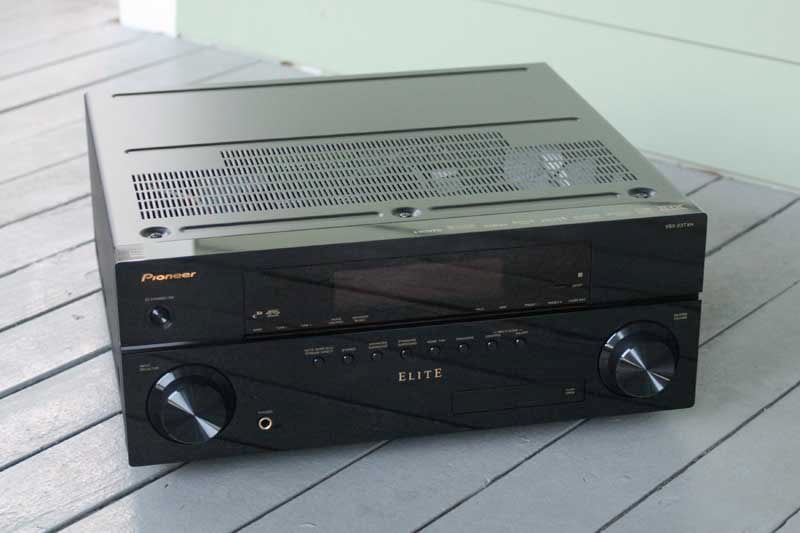 When last we looked into the Pioneer
looking glass, we reviewed their top of the line model, the
VSX-94TXH. This newest product under review from Pioneer isn't their
top of the line, but it does have some significant improvements over
even last year's top of the line VSX model. Chiefly of interest are
the increased number of HDMI inputs, including a front input suitable
for the newest camcorders and digital cameras, and the Anchor Bay VRS
video processing. The VSX-23TXH also comes certified as one of the
first THX Select2 Plus A/V receivers and supports the newest high
resolution audio formats. Don't get us wrong – there's not a whole
lot of new innovation in this product, but given the value and the
relatively low price-to-performance ratio, this A/V receiver
certainly has our rapt attention.
When last we looked into the Pioneer
looking glass, we reviewed their top of the line model, the
VSX-94TXH. This newest product under review from Pioneer isn't their
top of the line, but it does have some significant improvements over
even last year's top of the line VSX model. Chiefly of interest are
the increased number of HDMI inputs, including a front input suitable
for the newest camcorders and digital cameras, and the Anchor Bay VRS
video processing. The VSX-23TXH also comes certified as one of the
first THX Select2 Plus A/V receivers and supports the newest high
resolution audio formats. Don't get us wrong – there's not a whole
lot of new innovation in this product, but given the value and the
relatively low price-to-performance ratio, this A/V receiver
certainly has our rapt attention.
How does it rate to other models?
I like to compare products in an attempt to give a quick overview of the market and show areas of advancement or similarities. In the case of the VSX-23TXH, it holds up quite well in the marketplace, but of course there is some give and take:
|
Manufacturer |
Pioneer |
Marantz |
Denon |
Yamaha |
Onkyo |
|
Model |
VSX-23TXH |
SR5004 |
AVR-2310CI |
RX-V1065 |
TX-NR807 |
|
MSRP |
$1,000 |
$849 |
$849 |
$999 |
$1,099 |
|
Power |
110Wx7 |
90Wx7 |
105Wx7 |
105Wx7 |
135Wx7 |
|
HDMI (in/out) |
4/2 |
3/1 |
5/1 |
4/1 |
6/1 |
|
THX Certified |
Select2 Plus |
No |
No |
No |
Select2 Plus |
|
Room EQ |
MCACC |
MultEQ |
MultEQ |
YPAO |
MultEQ |
|
Video Process. |
ABT VRS |
Unspec. |
ABT 2010 |
ABT 1012 |
DCDi |
|
Networking |
No |
No |
No |
No |
Yes |
|
iPod |
Yes |
Optional |
Optional |
Optional |
Optional |
|
MultiZone |
Z2/Z3 (w/pre) |
Z2 (w/pre) |
Z2 (w/pre) |
Z2 (w/pre) |
Z2/Z3 (w/pre) |
|
Weight (lbs) |
37.5 |
28 |
24.9 |
24.5 |
39.7 |
Pioneer seems to have the edge in video processing and is near the top in terms of its power (beaten only by the Onkyo in specs). It is also the only A/V receiver in this price class to sport dual HDMI outputs, though they are simply wired in parallel and don't offer any discrete functionality (which is fine by us at this price). The VSX-23TXH also comes equipped with an iPod connector cable that handles audio and video from an iPod or iPhone – very unusual at any price point and much appreciated since it saves the cost of a $100+ accessory. For many AV receivers, we'd almost rather they include the iPod dock and forgo the setup calibration microphone, though we'd expect a lot of contention on that point. Let's face it – out of the 10 categories we selected to compare this product against its competition, Pioneer took or matched in half of them. That's not bad since most of the competition clearly won in only one or two areas, with the exception of Onkyo.
The primary features we appreciated about the Pioneer VSX-23TXH included:
-
THX Select2 Plus Certification
-
ABT VRS video processing
-
Dual (2) HDMI outputs
-
4 HDMI inputs (#4 duplicated on front panel)
-
Included iPod/iPhone USB cable adapter
-
1080p Upconversion of SD signals via HDMI
-
XM and SIRIUS Satellite Radio ready
-
RS-232C control, two 12VDC triggers
-
2nd Zone Audio/Video output; Zone 3 Audio out
Pioneer VSX-23TXH First Impressions and Build Quality
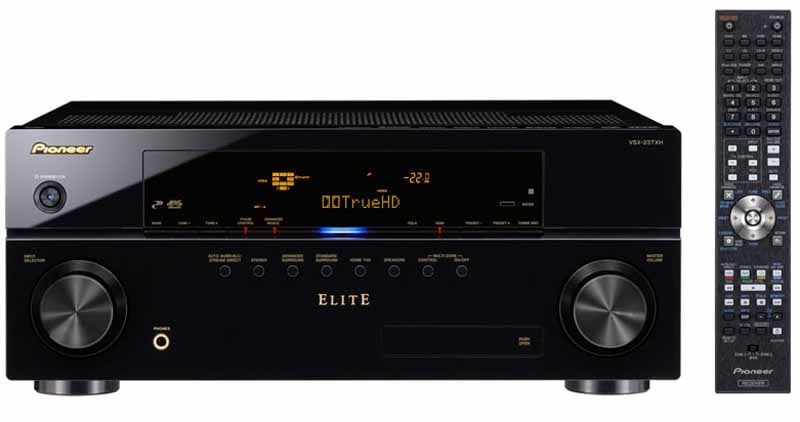 Pioneer makes a very beautiful A/V
receiver. The front sports a piano gloss black finish and there are
blue accent lights below the display panel and which indicate
powered-on status. Thankfully, and unlike most of their competition,
Pioneer also places the dozen annoying requisite technology logos on
the top of the receiver instead of decorating the front like a
tattooed prison inmate. Controls are pretty standard on the front
with the input selection knob is on the left and the rugged-feeling
volume control on the right. Unlike the last Pioneer receiver I
reviewed, the Master Volume increases in 0.5dB increments, suitable
for even the most discerning users.
Pioneer makes a very beautiful A/V
receiver. The front sports a piano gloss black finish and there are
blue accent lights below the display panel and which indicate
powered-on status. Thankfully, and unlike most of their competition,
Pioneer also places the dozen annoying requisite technology logos on
the top of the receiver instead of decorating the front like a
tattooed prison inmate. Controls are pretty standard on the front
with the input selection knob is on the left and the rugged-feeling
volume control on the right. Unlike the last Pioneer receiver I
reviewed, the Master Volume increases in 0.5dB increments, suitable
for even the most discerning users.
As with prior models, the front has a small panel that opens to allow access to some front inputs. This time, Pioneer includes an HDMI 4 input (for modern digital video cameras), iPod (via mini connector and USB control), and the MCACC setup microphone input. This front HDMI input is a duplicate of the #4 HDMI on the rear of the receiver, not a true fifth input. When you plug into the front input, the rear HDMI input is defeated. The remaining real estate on the front is devoted to radio tuning controls, surround modes, speaker selection, multi-zone controls and status indicators. The orange front display is jam-packed with information, showing the input audio format (analog/digital/HDMI/PCM) and channel info, volume levels, tuner info, source, and even the precise audio decoding format.
In the course of examining the top logos, we noticed a new icon that corresponded to a rebranded feature called Phase Control (formerly called "Full Band Phase Control"). Phase Control is a feature that, best as we can tell, uses phase correction (group delay) to help ensure that both high and low frequency information is properly aligned at the point of transmission. What we don't understand, however, is how this feature deals with the obvious group delay and phase-affecting conditions that plague most listening rooms, such as the position of the speakers, location of the subwoofer and room acoustics. All of these effects occur in the analogue domain, well after the AV receiver does anything to the signal. Pioneer strongly recommends this feature be left on (which is the default) and we couldn't hear any deleterious effects when it was engaged, so we won't buck their system.
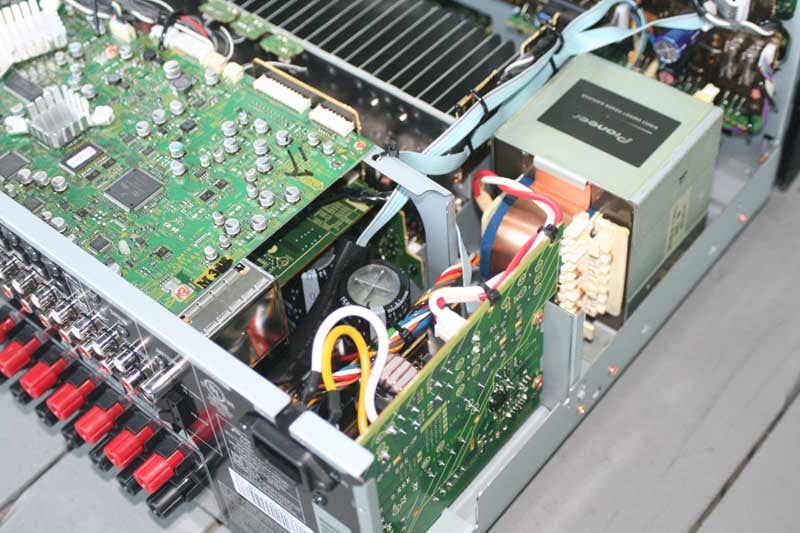 We popped open the VSX-23TXH and noted
the large EI Core transformer and dual 15,000 uF capacitors. The
power supply is ample enough to take it to its rated specs and power
all but the most inefficient of speakers to near-perfection. Pioneer
continues to use the flimsy, but sufficient thin aluminum heatsinks
that are positioned across the central area of the receiver. The
manufacturer did an excellent job of packing everything into a
relatively tight space, and we could see that the front display panel
and video features were well separated and shielded from the power
supply.
We popped open the VSX-23TXH and noted
the large EI Core transformer and dual 15,000 uF capacitors. The
power supply is ample enough to take it to its rated specs and power
all but the most inefficient of speakers to near-perfection. Pioneer
continues to use the flimsy, but sufficient thin aluminum heatsinks
that are positioned across the central area of the receiver. The
manufacturer did an excellent job of packing everything into a
relatively tight space, and we could see that the front display panel
and video features were well separated and shielded from the power
supply.
Pioneer VSX-23TXH Setup and Menu System
I like the layout of this receiver. It lends itself to easy connectivity and each of the inputs can be re-assigned as needed to facilitate your particular system. 4 HDMI inputs (1 on the front) make this an extremely flexible system, and one that will work well with any room that has a remotely located projector or television that has a single HDMI cable running to it. Of course the bonus is that, since it has another HDMI output, you could also simultaneously feed a duplicate video signal to another room. I use this feature in my own home for SuperBowl parties and for testing displays in another room while feeding both from my single equipment rack. Keep in mind that you must disable Kuro Link in order to assign HDMI.

Back Panel of the Pioneer VSX-23TXH 7.1 Home Theater Receiver
Like the VSX-94TXH before it, the VSX-23TXH lacks dedicated Zone 2 speaker connections. Since you can assign the amplifiers from Surround Back to B-speakers, Bi-amping the mains, Surround Back or Zone 2, you'll actually need to pick one use and stick to it. To switch between Zone 2 and Surround Back, for example, would entail switching cables. We've seen other manufacturers handle this better with additional dedicated 5-way binding posts. There are dedicated preamp outputs for Zone 2 as well as Zone 3, so while you can't use Zone2 without disabling your Surround Back channels, Zone 3 gives you the opportunity to do so (with an external amplifier). And check out the new detachable power cord! It took Pioneer a while to get this right but we're glad they finally came around.
The back of the VSX-23TXH sports both 7.1 preamplifier outputs as well as 5.1 multi-channel inputs, so it can support any future analogue technologies – at least, ones that don't involve adding more speakers... Oh wait, Dolby is already adding Height channels and Audyssey is pushing 10.2. There goes the 7.1 neighborhood!
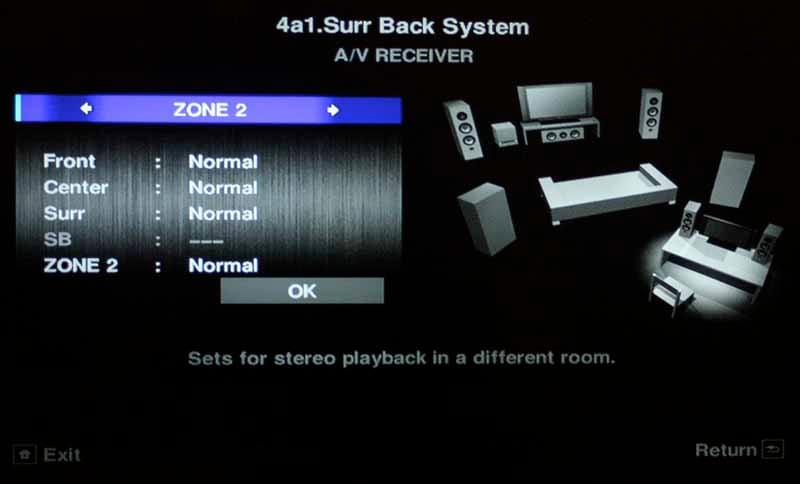 The VSX-23TXH has a new user interface
that is kind of a hybrid GUI-text interface. There are some updated
graphics which lift it out of the text-only look of days past, but
they don't compare to the advancements made by other manufacturers.
Overall it's an improvement and we want to at least thank Pioneer for
turning off the ALL CAPS mode for its menu system. The last time we
documented its Setup Menu we were accused of SHOUTING... but no
longer. The Home menu is now comprised of 4 items, with the first
three dedicated to MCACC functions and memory settings. Pioneer
really wants users to use its MCACC system. The last item is a
catch-all for manual settings, which houses all of the "self-help"
speaker settings as well as the input layout and Zone 2/3
configurations.
The VSX-23TXH has a new user interface
that is kind of a hybrid GUI-text interface. There are some updated
graphics which lift it out of the text-only look of days past, but
they don't compare to the advancements made by other manufacturers.
Overall it's an improvement and we want to at least thank Pioneer for
turning off the ALL CAPS mode for its menu system. The last time we
documented its Setup Menu we were accused of SHOUTING... but no
longer. The Home menu is now comprised of 4 items, with the first
three dedicated to MCACC functions and memory settings. Pioneer
really wants users to use its MCACC system. The last item is a
catch-all for manual settings, which houses all of the "self-help"
speaker settings as well as the input layout and Zone 2/3
configurations.
The Auto MCACC system has been adjusted to allow for easier customization of what the system will affect. The GUI shows exactly which aspects of the system will be adjusted by the system and includes the ability to calibrate Speaker Setting, Channel Level, Speaker Distance, and EQ Pro & S-Wave (Standing Wave) - or, more importantly, nearly any combination of the four. You can then store the resulting settings into one of 6 available memory positions, allowing for several configurations for watching movies vs music or just to experiment with. A (perhaps unnecessary) Full Auto MCACC removes all of the options and merely allows you to indicate the use of your Surround Back speakers.
The Manual MCACC system has close to the same menu options as before, however the EQ Professional sub-menu is considerably more sophisticated in its ability to show before and after effects of in its Reverb View. In this section you can view each channel's individual reverb characteristics, separate each channel into its separate frequencies from 63Hz to 16kHz (1/3-octave increments), or view all frequencies at once in a color line chart.

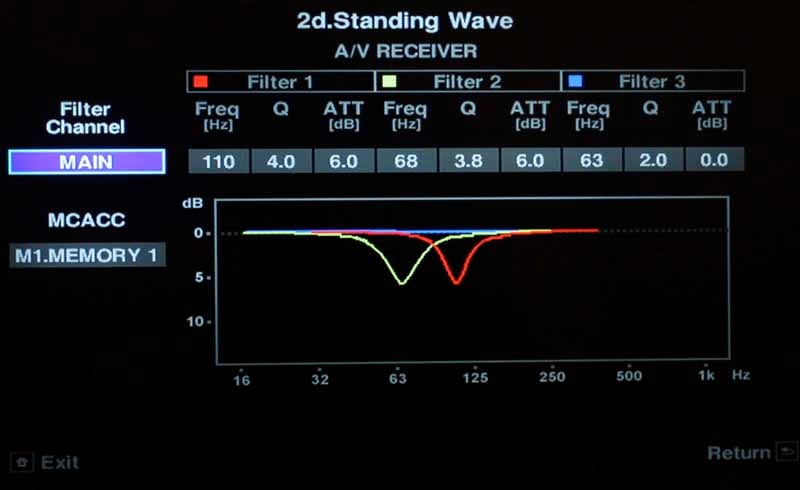
Check out the 3-band standing wave filter
 Overall, the new Pioneer menu system is
functional and a big step up from the previous Setup iteration. It lacks
polish and their structure for making adjustments is a bit unusual
(like dedicating an entire submenu to Language Selection,
while ganging a ton of setting under the all-encompassing but vague
Other Setup category. There is also a glaring omission in my
opinion, and that is the ability to configure different input volume
levels for each source. Without this feature, your DVD player might
be 10dB hotter than your cableTV set-top box (as it was in my case)
making it sound twice as loud. While some sources have an output
level control, many do not. The other thing I disliked was that when
entering the menu system, all audio and video output ceased. This was
not only annoying, but it broke the HDMI connection, causing my
laptop to revert back to its own screen when I was streaming media to
a Vizio VF551XVT LCD display.
Overall, the new Pioneer menu system is
functional and a big step up from the previous Setup iteration. It lacks
polish and their structure for making adjustments is a bit unusual
(like dedicating an entire submenu to Language Selection,
while ganging a ton of setting under the all-encompassing but vague
Other Setup category. There is also a glaring omission in my
opinion, and that is the ability to configure different input volume
levels for each source. Without this feature, your DVD player might
be 10dB hotter than your cableTV set-top box (as it was in my case)
making it sound twice as loud. While some sources have an output
level control, many do not. The other thing I disliked was that when
entering the menu system, all audio and video output ceased. This was
not only annoying, but it broke the HDMI connection, causing my
laptop to revert back to its own screen when I was streaming media to
a Vizio VF551XVT LCD display.
Pioneer VSX-23TXH Remote Control, Listening Tests and Conclusion
 The AXD7545 is a partially-backlit
remote. There is an unobtrusive 'light' button at the bottom that
illuminates the TV Control section, master Volume and Mute controls.
Other than that, you're on your own when using this remote in a dimly
lit room. The layout and controls adhere to a more standard
organization that I've seen a lot with more and more products. The
less-used number keypad and input sources are at top, with the TV and
menu controls in the middle, navigation below that, and specialized
functions at the very bottom. The remote is very usable and its main
drawback is that, without backlighting, the plethora of square and
rectangular buttons are far too similar to provide any real tactile
clues for use in the dark.
The AXD7545 is a partially-backlit
remote. There is an unobtrusive 'light' button at the bottom that
illuminates the TV Control section, master Volume and Mute controls.
Other than that, you're on your own when using this remote in a dimly
lit room. The layout and controls adhere to a more standard
organization that I've seen a lot with more and more products. The
less-used number keypad and input sources are at top, with the TV and
menu controls in the middle, navigation below that, and specialized
functions at the very bottom. The remote is very usable and its main
drawback is that, without backlighting, the plethora of square and
rectangular buttons are far too similar to provide any real tactile
clues for use in the dark.
iPod use
 Being able to connect and control an
iPod or iPhone for free is a nice bonus. During play the television
will (optionally, of course) show album art, song and artist info as
well as the track time. The front panel of the VSX-23TXH shows the
song title. If it's too long it will scroll across the display
horizontally. Navigation is rather slow, taking quite a long time to
scroll through a player that has tons of artists. Pioneer either
needs to speed up communication in this area or present a Page
Up/Down control to users so they can jump around more quickly. I
thought that perhaps the number keys would advance me to a specific
alphabet position, but as there are no alphanumeric designations on
the remote, this turned out to not be the case. While tuned to the
iPod input I found that the Setup Menu was not accessible until I
flipped to a different input. Pressing the Home button on the remote
control switches control from the remote control to the iPod and
back.
Being able to connect and control an
iPod or iPhone for free is a nice bonus. During play the television
will (optionally, of course) show album art, song and artist info as
well as the track time. The front panel of the VSX-23TXH shows the
song title. If it's too long it will scroll across the display
horizontally. Navigation is rather slow, taking quite a long time to
scroll through a player that has tons of artists. Pioneer either
needs to speed up communication in this area or present a Page
Up/Down control to users so they can jump around more quickly. I
thought that perhaps the number keys would advance me to a specific
alphabet position, but as there are no alphanumeric designations on
the remote, this turned out to not be the case. While tuned to the
iPod input I found that the Setup Menu was not accessible until I
flipped to a different input. Pressing the Home button on the remote
control switches control from the remote control to the iPod and
back.
Radio/Tuner
The radio/tuner features are still largely dumb to use. I still have to dial in 8-8-3-0 in order to get to 88.3 and 1-0-7-1-0 to get 107.1, when there is no capability to enter in hundredths for fine-tuning. I imagine this is some holdover from antiquated tuner software that was left in the receiver since many people are switching to Internet radio and streaming services like Pandora and Rhapsody (neither of which Pioneer supports as of yet). Reception was decent once we connected the included FM (coax cable) and AM (loop) antenna.
Listening Tests - Two-Channel
iPod Music
We streamed a ton of music from my iPod Touch which were ripped as AAC-encoded tracks at high quality. Here's what we queued up with some quick notes on performance:
"New York Minute" by The Eagles - We queued up this track first to see if the enabled MCACC system's EQ would destroy the low bass in this track. It did, rendering the bass from our Dali Lektor 8's almost anemic (which is hard feat, given how well they reproduce bass). We turned off the EQ and continued the remainder of our listening tests with the EQ disengaged.
"Eleanor Rigby" by The Beatles - This string-fest was excellent for hearing mid-bass texture and we were not disappointed that the Pioneer pulled every ounce of suspended power from this short, but excellent Beatles song. We loved the feel of the cellos and how the violins cut through overtop the vocals in a way that popped them dead center in the mix while the stereo separation of the vocals poured out harmonies around it.
"Foreplay - Long Time" by Boston - One of the final tracks we played for the evaluation portion of this review (there are tons of tracks that we didn't document, but just listened to over the course of a few weeks), this Boston track had it all. From the keyboard wash, to poignant guitar solos and high tenor male vocals, we enjoyed the way the VSX-23TXH kept pace with this track.
Listening Tests – Multi-Channel
We took a listen to several movies and multi-channel music discs in an attempt to ascertain just how well Pioneer's 105W/channel transformed our digital audio into packets of ear-candy for us to enjoy. We transplanted the Pioneer VSX-23TXH receiver into Reference System 2 at this point to make use of our RBH Sound Signature Series SI-760/R Reference in-wall speakers and 66-SE surrounds. For what we hope by now are obvious reasons, the music listening tests are much more significant in their ability to discern the effects of good quality amplification on a familiar signal.
DVD-Audio: R.E.M. - Automatic for the People
 R.E.M.'s sequel
to their wildly popular Out of Time album couldn't have been more
different. Instead of continuing their peppy, upbeat trend they
switched gears entirely and produced a largely morose album full of
foreboding, melancholy and deeper issues of the human nature. "Try
Not to Breathe" is a song that tackles aging and death and
presented a great male vocal by Michael Stipe and clean acoustic
guitars that resonated from the speakers with clarity. The drums are
very well mixed on this album and I always liked how simply they
support the melody until the kick or a short roll pokes through the
mix to punctuate a lyric and bring the song into the chorus. The
VSX-23TXH handled all of the open and airy vocals perfectly and the
punchy kick and edgy guitar solo were very well articulated through
this familiar RBH system.
R.E.M.'s sequel
to their wildly popular Out of Time album couldn't have been more
different. Instead of continuing their peppy, upbeat trend they
switched gears entirely and produced a largely morose album full of
foreboding, melancholy and deeper issues of the human nature. "Try
Not to Breathe" is a song that tackles aging and death and
presented a great male vocal by Michael Stipe and clean acoustic
guitars that resonated from the speakers with clarity. The drums are
very well mixed on this album and I always liked how simply they
support the melody until the kick or a short roll pokes through the
mix to punctuate a lyric and bring the song into the chorus. The
VSX-23TXH handled all of the open and airy vocals perfectly and the
punchy kick and edgy guitar solo were very well articulated through
this familiar RBH system.
SACD: Norah Jones – Come Away With Me
 Norah Jones has a knack for writing
soulful jazz with a great sound. She simply has a knack for writing
top-notch music and combining it with meaningful lyrics. Each track
on this album seems to stand on its own and each transports you to a
different space when you listen – especially on a good system in a
decent room. "Turn Me On" brought to mind an almost-empty
jazz club with Nora up front singing and pouring out her sultry,
richly-textured vocals into the microphone. Each syllable fairly
dripped out of the SI-760/R's making me wonder if they needed to be
dapped with a paper towel afterwards. The Pioneer, coupled with these
speakers, made this listening session an enjoyable one and we quickly
fired through this song and others, enjoying every minute. "I've
Got to See You Again" was another track worth mentioning, as its
piano, bass and drum track coupled with Nora's gentle reverberant
voice to reveal a level of dynamics and presence that would pin any
true audiophile to their seat for hours.
Norah Jones has a knack for writing
soulful jazz with a great sound. She simply has a knack for writing
top-notch music and combining it with meaningful lyrics. Each track
on this album seems to stand on its own and each transports you to a
different space when you listen – especially on a good system in a
decent room. "Turn Me On" brought to mind an almost-empty
jazz club with Nora up front singing and pouring out her sultry,
richly-textured vocals into the microphone. Each syllable fairly
dripped out of the SI-760/R's making me wonder if they needed to be
dapped with a paper towel afterwards. The Pioneer, coupled with these
speakers, made this listening session an enjoyable one and we quickly
fired through this song and others, enjoying every minute. "I've
Got to See You Again" was another track worth mentioning, as its
piano, bass and drum track coupled with Nora's gentle reverberant
voice to reveal a level of dynamics and presence that would pin any
true audiophile to their seat for hours.
BD: Transformers – Revenge of the Fallen
 I didn't like the first Transformers
movie. Lots of action, but almost no character development and the
robots were relegated to secondary, faceless characters. Revenge
of the Fallen certainly has more robots, more explosions, more
robots... uh, more explosions... oh, and more Megan Fox (and that's
really a mixed blessing). Fortunately, while the acting and plot
pretty much stinks, the sound designer and re-recording mixers
probably deserve an Academy Award. The Blu-ray disc has a 5.1 dts-HD
Master Audio track that "brings the rain" and really
doesn't let up much throughout the film. What's unusual about this
film vs. most is that nearly all channels are active throughout the
course of the film... non-stop. I'd attribute this to the desire for
Michael Bay to cover up the fact that this movie has no cohesive
plot, but I don't want to diminish the awesome job the designers did
on rendering missiles, gunfire, explosions, the transforming effects
and a myriad of other sounds that came at us from every direction. If
the Mains were alive with action, the Surrounds were even more
impressive as airborne vehicles flew overhead and even explosions
reverberated behind us.
I didn't like the first Transformers
movie. Lots of action, but almost no character development and the
robots were relegated to secondary, faceless characters. Revenge
of the Fallen certainly has more robots, more explosions, more
robots... uh, more explosions... oh, and more Megan Fox (and that's
really a mixed blessing). Fortunately, while the acting and plot
pretty much stinks, the sound designer and re-recording mixers
probably deserve an Academy Award. The Blu-ray disc has a 5.1 dts-HD
Master Audio track that "brings the rain" and really
doesn't let up much throughout the film. What's unusual about this
film vs. most is that nearly all channels are active throughout the
course of the film... non-stop. I'd attribute this to the desire for
Michael Bay to cover up the fact that this movie has no cohesive
plot, but I don't want to diminish the awesome job the designers did
on rendering missiles, gunfire, explosions, the transforming effects
and a myriad of other sounds that came at us from every direction. If
the Mains were alive with action, the Surrounds were even more
impressive as airborne vehicles flew overhead and even explosions
reverberated behind us.
Conclusions and Overall Perceptions
We like the Pioneer VSX-23TXH receiver. It's a solid product with plenty of amplifier power and tons of inputs. It's not, however, what you'd call fancy – no network features, a stale Setup interface, and a weak array of features diminish it from rising to the status of "Swiss Army Knife" among the competition. What it does have is stability and a focus on sound quality – a focus that we feel is well-placed and of primary importance. Pioneer's mantra continues to be: Sound first, features second. If you're looking for one of the best-sounding AV receivers in the $1000 price category, this should definitely be at the top of your shopping list.
Pioneer VSX-23TXH
MSRP $1000
Pioneer Electronics
1925 E. Dominguez St.
Long
Beach, CA 90810
Call (800) 421-1404
www.pioneerelectronics.com
About Pioneer Electronics
Pioneer’s Home Entertainment and Business Solutions Group develops high definition home theater equipment for discerning entertainment junkies. Its flat panel televisions, Blu-ray Disc players, A/V receivers and speakers bring a new level of emotion to the HD experience. The company brands include Pioneer and Elite®. When purchased from an authorized retailer, consumers receive a limited warranty for one year with Pioneer products and two years with Pioneer Elite products. More details can be located at www.pioneerelectronics.com.
The Score Card
The scoring below is based on each piece of equipment doing the duty it is designed for. The numbers are weighed heavily with respect to the individual cost of each unit, thus giving a rating roughly equal to:
Performance × Price Factor/Value = Rating
Audioholics.com note: The ratings indicated below are based on subjective listening and objective testing of the product in question. The rating scale is based on performance/value ratio. If you notice better performing products in future reviews that have lower numbers in certain areas, be aware that the value factor is most likely the culprit. Other Audioholics reviewers may rate products solely based on performance, and each reviewer has his/her own system for ratings.
Audioholics Rating Scale
 — Excellent
- — Very Good
- — Good
- — Fair
- — Poor
| Metric | Rating |
|---|---|
| Multi-channel Audio Performance | |
| Two-channel Audio Performance | |
| Network Features | |
| Video Processing | |
| Bass Management | |
| Build Quality | |
| Fit and Finish | |
| Ergonomics & Usability | |
| Features | |
| Remote Control | |
| Performance | |
| Value |  |
Clint Deboer was terminated from Audioholics for misconduct on April 4th, 2014. He no longer represents Audioholics in any fashion.
View full profile Subscribe to our newsletter