


Onkyo TX-SR601 6.1 Home Theater Receiver Review
Onkyo TX-SR601 Reciever
- Product Name: TX-SR601 6.1 Home Theater Receiver
- Manufacturer: Onkyo
- Performance Rating:

- Value Rating:
- Review Date: September 06, 2003 19:00
- MSRP: $ 500
| Power: 85W x 5 (8-ohms, 20Hz-20kHz, FTC) THD (Rated Power): 0.08% (all channels) DSP: Dolby Digital EX, DTS-ES Discreet/Matrix 6.1, Dolby Pro Logic II, DTS Neo:6, Theater-Dimensional Video Processing: Composite to S-video upconversion DACs: 192 kHz/24-bit x 2; 96 kHz/24-bit x 5 Audio Inputs: 5.1 RCA multi-channel, 7 pairs analogue RCA, 3 optical S/PDIF (including 1 front), 1 coax S/PDIF |
SNR: 100 dB (Direct mode) IHF A 0.5 V
input Video Inputs: 2 component RCA (60Mhz), 5 composite RCA, 5 s-video Video Outputs: 1 component RCA (60Mhz), 3 composite RCA (includes Zone 2 & monitor), 3 s-video (includes Zone 2 & monitor) Misc Inputs/Outputs: IR input, 12V trigger (Zone 2), Onkyo RI port Frequency Response: 10Hz - 100kHz +1/-3 dB Dimensions: 17-1/8" x 6-7/8" x 17" (435mm x 175mm x 432mm) Weight: 26.7 lbs (12.1 kg) |
Pros
- A/V input routing
- IntelliVolume input level matching
- Flexible bass management options
- HDTV-compatible component video switching
Cons
- Poorly thought-out remote control
- Only one coax digital input
Onkyo TX-SR601 Introduction
With so much competition amongst mid-fi receiver manufacturers, features and usability become almost as influential as sound quality and performance when choosing a home theater solution. Most recent $500 receivers will incorporate the following key features:
-
192 kHz/24-bit DACs
-
Dolby Digital EX, DTS-ES, Dolby Pro Logic II, DTS Neo:6
-
Digital inputs/outputs
-
Component video inputs/output (50MHz or higher)
-
Multi-channel inputs for DVD-A & SACD
-
80W - 100W per channel
What determines a receiver's staying power (other than brand loyalty, of course) is the quality of sound reproduction and features that make for a successful home theater experience. With that in mind, let's take a look at one of Onkyo's newer additions to its mid-priced line-up.
Onkyo TX-SR601 Overview
Upgrades, Upgrades, Upgrades.
For those of you familiar with the TX-SR600, Onkyo has made some very important updates to its new "01" line of receivers:
-
Added approximately 5W per channel
-
PCM 192kHz/24-bit DACs for all channels
-
DTS 96/24 support
-
Extended crossover adjustment (added 60Hz & 150Hz)
-
Additional S-video output
-
Zone 2 Line output
-
Zone 2 speaker output uses binding posts (TX-SR600 used spring-clips)
-
12V trigger output for Zone 2
-
IR input terminal
These changes show that Onkyo hasn't just been sitting around. A company's product changes are really a good reflection of its willingness to listen to its consumers, keep up with industry advances, and improve its products accordingly. The addition of PCM 192kHz/24-bit DACs to all channels and DTS 96/24 support are especially welcome additions, as are the extended crossover frequency options.
What I liked about the Onkyo receiver was the ability to tweak many different parameters to enhance and customize the unit to my particular needs. From the input routing matrix, to using the IntelliVolume feature (I can't believe every other manufacturer doesn't use this), I was able to efficiently integrate the Onkyo into my home theater system.
Onkyo TX-SR601 First Impressions and System Setup
First Impressions Are Not Always Correct
This was my first lengthy period of time with an Onkyo receiver. First impressions, as I found to my amusement, are not always correct. The more I used the Onkyo, coupled with a thorough reading of the user manual, the more I understood the available options and settings. For this review, I was able to use the Onkyo TX-SR601 for over a month. By the end of that period my familiarity with the unit enabled me to understand how to get the most out of it. Here are some examples of the early (and comically incorrect) impressions I had after just hooking up the Onkyo receiver and their corresponding solutions after I read through the manual:
- First Impression: Analogue input appeared to result in low power output, forcing me to raise the volume to levels higher than I would have anticipated.
- Second Impression: The incredibly useful IntelliVolume feature allows you to set matching input levels for all audio inputs.
- First Impression: The remote control appeared to lose connectivity to the master unit almost randomly, forcing reinsertion of the batteries.
- Second Impression: User error. Depending upon the last mode used, many receiver functions cannot be accessed (including input selection & power off) unless the RCVR button is first selected (more on this later).
Setting Up the System
Making all of the connections was very straightforward with the TX-SR601. The back panel was laid out efficiently and all of my interconnects and speaker cables fell into place nicely.
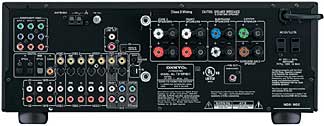
Of Particular Note:
- Addition of real binding posts for the Zone 2 speaker outputs - a definite improvement over the TX-SR600's spring clips
- Fully-routable digital inputs
- Zone 2 line level outputs.
For this review I removed my dedicated amplifier and ran the TX-SR601 as a full receiver, rather than as a preamplifier. With my 4-ohm main speakers and 6-ohm center and surrounds, this provided at least 110W per channel to all speakers (based on the FTC rating, most likely with two-channels driven).
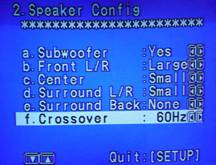
Going through the On-Screen Display (OSD) I was able to easily set up the receiver and customize the TX-SR601 to my room parameters. I configured the bass management to cross over at 60Hz and set the speaker configuration to the following:
- Subwoofer: Yes
- Front L/R: Large
- Center: Small
- Surround L/R: Small
- Surround Back: None
- Crossover: 60Hz (experiement with your own system)
 Having
the ability to choose the crossover setting will serve a wider variety of user speaker configurations.
There are currently shipping receivers in this price range that do not offer this very useful feature.
In addition, I believe it would be even more beneficial to allow for different crossover settings for
two channel and multi channel modes. I personally would like to be able to set the crossover of my
subwoofer at around 40Hz for two-channel music and around 60Hz for home theater use.
Having
the ability to choose the crossover setting will serve a wider variety of user speaker configurations.
There are currently shipping receivers in this price range that do not offer this very useful feature.
In addition, I believe it would be even more beneficial to allow for different crossover settings for
two channel and multi channel modes. I personally would like to be able to set the crossover of my
subwoofer at around 40Hz for two-channel music and around 60Hz for home theater use.
Onkyo also has a feature that allows bass output to both the subwoofer and main speakers, though it does not appear on this setup screen. It is accessed through the Audio Adjust menu (though in my opinion it would have probably made more sense to incorporate it in the speaker setup area). In order for the "Double Bass" setting to function properly, you must set your Front L/R speakers to "Large". Now a really neat feature: You can still choose whether or not you would like to have subwoofer output when playing stereo music through the use of the remote control. Selecting "STEREO" on the remote sends low frequency output to the subwoofer, while "DIRECT" bypasses all DSP and routes audio to the main channels for purer quality signal transfer from analogue sources. There is no subwoofer output in "DIRECT" mode.
One thing to pay attention do when using the "Double Bass" setting is that when the Onkyo TX-SR601 is engaged in any of its multi-channel modes, the low frequency information from the Front L/R is sent to the subwoofer, even if the mains are set to "Large" yielding a net increase of subwoofer output of up to 6dB. Most of the multi-channel software I own is in the form of movies, so having the additional bass during these times is generally acceptable with my particular system and room.
Onkyo TX-SR601 Additional Features and Remote Control
IntelliVolume and Other Neat Tidbits
Being a long-term subscriber to digital cable TV, I have always been plagued by a common problem shared by a majority of these set top boxes. The volume of the digital coax output and the analogue stereo outputs are often off by 3-6 dB. With IntelliVolume you can customize the input volume settings for all of the inputs connected to the TX-SR601. You can vary the settings +/- 12dB to achieve even levels when switching from one component to another. Wow, two years of cable TV frustration eliminated with one innovative feature!
The next incredibly useful feature I discovered on the TX-SR601 was the powered zone 2 output. Not only do the zone 2 outputs allow you to send the current source input to the second zone - they actually provide for processing separate stereo sources at the same time for each zone, or sending the same signal to both. So, for example, if I wanted to listen to my CD player in my office, while my wife listened to cable TV in the living room, we could do so using the zone 2 powered outputs. There is also a zone 2 pre-out that can be used in conjunction with an external amplifier - another nice touch, and new to the TX-SR601.
Onkyo RC-515M Universal / Learning Remote
The Onkyo RC-515M remote control has its share of ups and downs. It features two customizable macro buttons and easy to reach buttons/controls, but lacks "audio-follows-video" switching. In addition, the system has a rather finicky configuration, forcing multiple key presses for simple operations and a majority of buttons are unlit - making the remote difficult to operate at night.
Remote controls are generally hit or miss. One important thing to note is that for mid-fi receivers, you want the manufacturer to spend the majority of their money in manufacturing the receiver itself, not delivering an expensive remote control.
I haven't yet met a mid-fi receiver remote control that was perfect. With that in mind, there are some things that I believe should be included in any receiver remote that are not available in the RC-515M:
-
Audio-follows-video switching - this is an efficient way to ensure that by hitting just one button, audio and video are switched to the desired input device. As Onkyo already has a complex audio input routing matrix, this would be a wonderful and welcome change for their next-generation remote control. It also would result in reclaiming about 1/5 the remote area for other uses as the INPUT SELECTOR section would not be needed.
-
Temporary source selection for controlling devices other than the currently selected A/V input, almost necessary with audio-follows-video switching and generally accompanied by a small LCD screen or device selector switch.
-
Dedicated system power & standby buttons - similar to the dedicated volume controls, these would always affect the receiver, not just the selected device. A separate power button could be supplied for affecting power to temporary source-selected components.
All in all, the remote control enables easy control over all equipment once you understand the somewhat quirky interface. It would have been better perhaps, to not have hampered the impressive nature of this receiver itself by offering a somewhat more efficient remote. For instance, to switch from watching a DVD to cable TV, adjust the volume, and then shut off the receiver, you would need to perform the following six steps:
-
Press the RCVR mode button
-
Select V1 (where I have the cable TV inputted)
-
Select CABLE mode button
-
Tune to a channel using the channel buttons
-
Adjust the receiver volume
-
Press the RCVR mode button
-
Select the Power Off button
While this isn't a complete travesty, here are the steps I feel should be necessary:
- Press the CABLE mode button (audio and video switch simultaneously)
-
Tune to a channel using the channel buttons
-
Adjust the receiver volume
-
Select the Power Off button
Perhaps the inclusion of additional programmable macro buttons might help with this, but I believe that audio-follows-video switching would be the best solution for eliminating the number of functions which need to be engaged in order to follow typical remote control sequences. Now, even with all of this constructive criticism of the remote control, you must understand that this is really the biggest thing I could pick apart with regards to the TX-SR601. The receiver is a very good unit and doesn't easily lend itself to much criticism at its $500 price tag.
Onkyo TX-SR601 Listening Environment and DSP Music and Movie Modes
The Reference System 3 listening room is characterized by a series of natural baffles and a good combination of neutral materials. Lots of time it is necessary to hang draperies and build or purchase fancy bass traps to eliminate problems in a room. I prefer to do it naturally, and as I built my home, I was able to construct a room where the furniture and natural materials could do most of the work for me. Bookshelves serve as diffusers, and 9' flat ceilings with berber carpet produce a room that is lively, but not highly-reflective.
The central listening position is a sofa located in the center of the room, 11 feet from the front wall, and 8' from the rear wall. The M80ti(s) are 8' apart and the QS8(s) are 7' apart on the rear wall to allow for reflectivity of the quadpolar design. The EP350 is situated outside of the left M80ti with the 180 degree phase switch engaged.
Due to the impedance of the Axiom Audio speakers, the Onkyo was in for a challenge. The M80s are rated at 4-ohms each, with the remaining 3 speakers coming in at 6-ohms. The Onkyo receiver is rated at 150W per channel according to JEITA (Japan Electronics and Information Technology Industries Association), 120W per channel according to DIN (Deutsche Industrie Norm), and 110W per channel according to the FTC when connected to a 6-ohm load at 1kHz (2 channels driven), < 0.1% THD). The FTC rates the SR601 at 85W per channel into 8-ohms with < 0.08% THD (2 channels driven, 20Hz - 20kHz). When connected to the Axioms, I was pleased at how well the Onkyo could power the speakers at relatively high volumes. As the M80s can play extremely loud, cranking up the Onkyo to near its maximum yielded some audible distortion - this was not entirely surprising given the technical ratings of the equipment.
DSP Movie & Music Modes
I would not call myself a DSP purist, at least with respect to DVDs and television. In fact, I am known to watch a majority of my movies with some form of DSP or other. In the case of the TX-SR601, however, there isn't much available to choose from.
The Onkyo comes with the standard Dolby Digital (including EX), DTS (including ES and Neo:6) and Pro Logic II modes. If you are a purist, your bases are covered. Some modes are available in both 2-channel and multi-channel modes, but I will place them where I believe you'll find them more useful. I'll explain some of the non-standard modes below:
Movie Modes
- Theater Dimensional (T-D): This interesting mode is created for those who have only two speakers and still desire a surround sound experience. It essentially creates a pseudo surround experience around a fixed listening position (the characteristics of this position can also be adjusted through the receiver setup menus.)
- MonoMovie: Excellent for old black and white mono movies. Keeps the original soundtrack in the center channel where it belongs and adds some ambience into the Front L/R speakers.
- CinemaFILTER (on/off): This EQs some high frequency out of the signal, taking the edge off of speakers or movie soundtracks that are "too bright". I thought this mode eliminated a lot of detail and do not recommend it use in most applications. If your speakers sound too bright perhaps you can adjust some of the acoustical properties of your room to compensate (add a throw rug, for example) or experiment with positioning.
Television Modes
- Enhance: Selecting the enhance mode will engage your surround channels in a soft ambient manner, also placing dialogue and main action into your center channel. I found this mode to be more of a hindrance on 2-channel music, but effective when watching sports programming.
- TV Logic: This mode claims to be geared towards a studio-based television program, enhancing surround sound and adding clarity to the center channel. I found that it basically accomplished this through sending some of the Front L/R information to the surrounds and over-accenting the center channel signal just a bit.
- ALL ST (all stereo): Located on the remote, this mode produces an all-encompassing background music presence. The front, surround, and surround back (if present) channels create a large, wide, stereo image.
- DIRECT: 2-channel source audio is output to the Front L/R speakers and not the subwoofer
- STEREO: 2-channel source audio is output with bass management information sent to the subwoofer according to the crossover settings and Speaker Setup menu.
- Orchestra: In this mode the center channel is muted and the surround channels enhanced to create an artificially more expansive surround environment. This is an effective mode for opera or when attempting to simulate a large hall or theatre. Warning: Don't try this mode on regular music as your head may explode.
- Unplugged: This mode enhances the Front L/R channels giving you the impression that you are closer to the stage performance of an artist. Try this mode on just about any CD and you'll instantly get a more intimate positioning of the sound field. Warning: You may not want to get this close to certain artists!
- Studio-Mix: Having recorded and mixed numerous tracks in the studio I found this mode to be reminiscent of a rushed 4am studio monitor mix - complete with crushed vocals and a relatively flat mix. If you like recessed vocals and a more subdued mix it might be fun to play with this mode.
Onkyo TX-SR601 Listening Tests and Conclusion
In listening to several movies, the Onkyo did a great job at decoding Dolby Digital and DTS soundtracks. In addition to a month's worth of movies which my wife and I rented or purchased, I played a few of my favorite scenes through several times to gauge the spatial performance of the receiver in comparison to a model costing twice as much with additional DSP. The first test I performed was Part 7 of Band of Brothers, entitled The Breaking Point . This episode features one of the most intimidating bombing sequences I have ever seen or heard, and the Onkyo drove my speakers with authority.
There are several TV shows of which I am a fan. One of them is Farscape, a Sci-Fi Channel original series that sounds fantastic with Dolby Pro Logic II DSP. I am always amazed when I listen to two-channel or Dolby Surround source material in Dolby Pro Logic II that suddenly comes alive in a full 5.1 spectrum of sound. Dolby Pro Logic II on the TX-SR601 produced surrounds that brought forth beautiful ambience, a center channel that commanded dialogue, and front sound field that had accurate spatial positioning for effects and panning.
With regards to utilizing Dolby Pro Logic II and DTS:Neo 6 on 2-channel music, your mileage will vary. I have found some older discs like Rush Chronicles that seem to be enhanced positively with these pseudo surround modes. Other discs just seem to lose their edge, or have their stereo imaging get flattened somewhere in the DSP. One disc I simply love to listen to Dolby Pro Logic II on is Toto - Past to Present 1977-1990. Listening to Hold the Line as the guitars hit in the rear surrounds during the chorus still amazes me. The dialogue is placed solidly in the center channel and the wide reverbs are partially transferred to the rear channels without losing their anchoring presence in the mains. How the algorithms decode music in this way without losing the elements that make it so effective in the first place will be a mystery I will happily live with!
Driving 4-ohm and 6-ohm Loads
 So
far the TX-SR601 has proven to be a workhorse in my home theater
system. I expected the receiver's amplifier section to balk at the
4-ohm load of the Axiom M80ti(s), but Onkyo makes a decent amplifier
section. I noticed no audible distortion in CD music played in excess
of 100dB - far above the listening levels I use when watching movies or
listening to my CD collection - and my Axioms were grateful to be able
to exercise their bottom end throughout this test. During normal
listening sessions, the amplifier drove my system with plenty of gusto.
Highs were clear and precise, and lows were authoritative and
controlled. Essentially, music sounded the way I expected it
So
far the TX-SR601 has proven to be a workhorse in my home theater
system. I expected the receiver's amplifier section to balk at the
4-ohm load of the Axiom M80ti(s), but Onkyo makes a decent amplifier
section. I noticed no audible distortion in CD music played in excess
of 100dB - far above the listening levels I use when watching movies or
listening to my CD collection - and my Axioms were grateful to be able
to exercise their bottom end throughout this test. During normal
listening sessions, the amplifier drove my system with plenty of gusto.
Highs were clear and precise, and lows were authoritative and
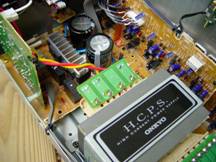
controlled. Essentially, music sounded the way I expected it 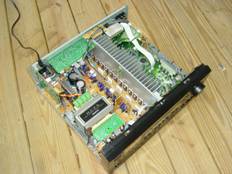 to, and at
a level that I did not expect, having come from a receiver that priced
out at twice the price, but only 20% more rated power. Onkyo credits
its amplifiers performance on its High Current Power Supply (H.C.P.S.)
transformer combined with high-capacity filter capacitors, pictured
below.
to, and at
a level that I did not expect, having come from a receiver that priced
out at twice the price, but only 20% more rated power. Onkyo credits
its amplifiers performance on its High Current Power Supply (H.C.P.S.)
transformer combined with high-capacity filter capacitors, pictured
below.
The Onkyo employs two options for volume display on the unit: Absolute and Relative. Absolute displays the volume as a minimum level of 0 and a maximum value of 100 - the default setting. The relative display option sets a designated reference point at 0, equaling an absolute setting of 82. You can then adjust the volume +18 or -81 from that reference point. It is always important to realize that all manufactures have their own way of setting and controlling the amplifier volume, resulting in different perceived minimum and maximum volume levels at which a certain expected level is reached. For example, on my current receiver a volume level of -40 would equate with an approximate setting of 60 using the TX-SR601's absolute setting. Add Onkyo's IntelliVolume input level compensation into the mix and you can see why you should really judge an amplifier solely by its ability to produce enough levels for your system without distorting - regardless of how the volume display may read.
Conclusions and Overall Perceptions
Utilizing the Onkyo TX-SR601 for the last six weeks enabled me to experience a brand I had not been familiar with before. Overall, I was quite impressed with its amplifier section, especially at a $500 retail price point. We are often asked about sub-$500 receiver options at Audioholics and I would have no problems recommending the Onkyo as a contender within that price range. Its performance for both music and movies is exceptional and it can handle efficient 6-ohm and even 4-ohm speakers with no apparent difficulties at moderate to loud listening levels in reasonably medium sized rooms (under 2500 cubic feet).
One of the things I would like to see in future iterations of this receiver would be a greater amount of DSP flexibility. While many enjoy the standard effects modes, I have experienced some incredible DSP algorithms that leave me just a little bit hungry to hear them again when I eventually get to play some of the upcoming DVD releases like The Two Towers or The Matrix Reloaded . There's something to be said about DSP that creates an extra wide soundstage for a more cinema-like experience in the home.
Onkyo receivers purchased through authorized retailers or directly from Onkyo carry a two year warranty on parts and labor, pretty standard for this level of product. We don't expect you'll need it as Onkyo is one of the more reliable receiver brands available based on our member feedback and Consumer Reports ratings.
Onkyo TX-SR601 A/V Receiver
MSRP $500
18 Park Way
Upper Saddle River, New Jersey 07458
201-785-2650
Company History
Onkyo, which means 'audio' or 'sound' in Japanese, has been producing
precision audio components for over a half-century. The company's
philosophy is to deliver products that are superbly designed and built
to a consistently outstanding standard of excellence. Today, Onkyo is
at the forefront of the home theater and digital revolutions. For more
information about this and other fine Onkyo products, visit
www.onkyousa.com or call 800-229-1687.
The Score Card
The scoring below is based on each piece of equipment doing the duty it is designed for. The numbers are weighed heavily with respect to the individual cost of each unit, thus giving a rating roughly equal to:
Performance × Price Factor/Value = Rating
Audioholics.com note: The ratings indicated below are based on subjective listening and objective testing of the product in question. The rating scale is based on performance/value ratio. If you notice better performing products in future reviews that have lower numbers in certain areas, be aware that the value factor is most likely the culprit. Other Audioholics reviewers may rate products solely based on performance, and each reviewer has his/her own system for ratings.
Audioholics Rating Scale
 — Excellent
- — Very Good
- — Good
- — Fair
- — Poor
| Metric | Rating |
|---|---|
| Multi-channel Audio Performance | |
| Two-channel Audio Performance | |
| Video Processing | |
| Bass Management | |
| Build Quality | |
| Fit and Finish | |
| Ergonomics & Usability | |
| Ease of Setup | |
| Features | |
| Remote Control | |
| Performance | |
| Value | |
Clint Deboer was terminated from Audioholics for misconduct on April 4th, 2014. He no longer represents Audioholics in any fashion.
View full profile Subscribe to our newsletter