


Marantz SR6004 7.1CH AV Receiver Review
- Product Name: Marantz SR6004 A/V Receiver
- Manufacturer: Marantz
- Performance Rating:


- Value Rating:
- Review Date: June 10, 2010 18:30
- MSRP: $ 1249
- RX101 Bluetooth/IR Receiver included
- Front USB audio input for iPod/iPhone digital connection or USB Memory
- Dolby TrueHD/Pro Logic IIz, dts-HD Master Audio Decoder
- Audyssey Dynamic EQ, Dynamic Volume and MultEQ Auto Calibration
- Sophisticated aluminum/reinforced resin front panel with Front door design for Clean Panel
- HDMI (v1.3) Repeating: Four Inputs, Two Outputs
- Graphical User Interface (GUI) for Setup
- GUI through HDMI out
- 110 watts x 7 (8 ohms)
- Analog, Digital Independent PWBs design to minimize mutual interference
- Component Video output for 2nd Zone
- Marantz Custom High Quality Block Capacitor
- Full 10-bit Video Processing
- M-DAX(Marantz Dynamic Audio eXpander)
- 2nd Zone Analog audio output (Individual source) w/discrete command
- 3rd Zone Digital audio output (for Digital input source)
- SIRIUS & XM Ready with discrete IR commands
- Bi-Amp Drive Capability for Front L/R
- RS-232C, DC Trigger out, Flasher In and Marantz D-BUS (RC-5) In/Out
- LCD Learning Backlight system remote
- Available Option Rack Mount Kit RMK6504SR
- Dimensions: 17-3/8" W x 6-3/8" H x 15-3/8" D
- Weight: 28 lbs
Pros
- Excellent sound quality
- Easy to setup and operate (main zone)
- Compact and attractive design
Cons
- Confusing multi zone operation
- Mediocre HDMI video upconversion
- No networking
Marantz SR6004 Introduction
Marantz has been going at it for over 50 years producing audio equipment. Like any company that's been bought and sold over the years, they've had their share of up and down cycles. Lately it seems Marantz is back on the up cycle, releasing a series of high performance receivers that have the critical features everyone wants while packing the punch necessary to drive a full surround system to theatrical levels. I was interested in checking out their middle-of-the-road product, the SR6004, which retails for $1,249. At this price manufacturers must choose the right balance of performance and features. My job was to see how well Marantz executed this delicate balance while holding true to their strong audio-focused heritage.
Design Overview
The SR6004 is what I call a midsized receiver. It doesn't take a forklift to move, yet it has a solid feel to it which implies a decent sized power supply to amply drive a full 5.1 or 7.1 speaker configuration. The SR6004 employs a class A/B power amplifier design and is rated for 110wpc x 7. I always pop the top off of any receiver I review prior to hooking it up as I like to know what's under the hood. The EI core transformer appeared to be quite sizable for a receiver of this price class, but those power capacitors I saw near the transformer looked puny. They were 20,000uF but only rated for 16V. The minimum voltage caps that should be used to produce the rated 110wpc should be at least 50V. At first glance I thought I found a major design error in this receiver until Marantz engineering pointed out that the actual power supply caps were hidden underneath the HDMI board and were in fact 10,000uf, 63V rated.
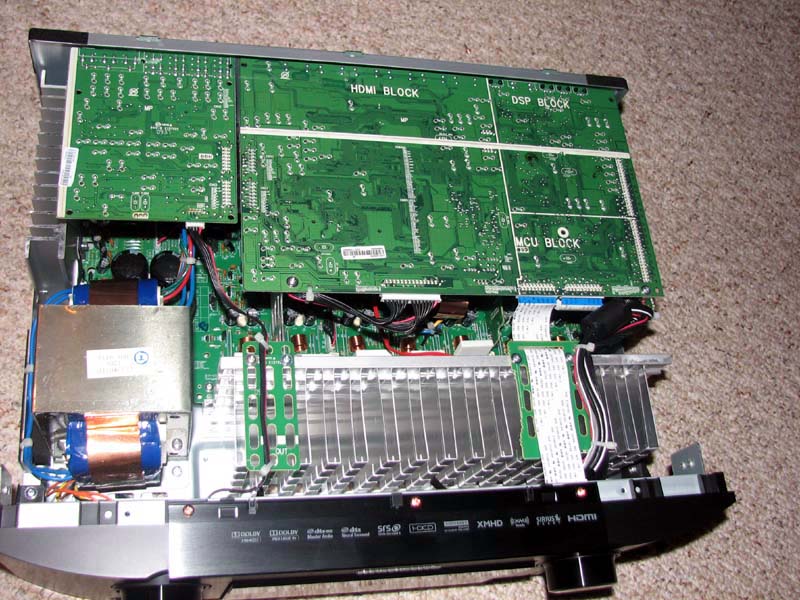
Marantz SR6004 No Cover
Marantz engineering also informed me that all of their SR series receivers (including the SR6004) were designed to maintain 70% (77wpc) power output under a 5 channel load and 50% (55wpc) power output under 7 channels driven against its two-channel driven spec. Of course I planned on validating this claim which you will see in the measurements portion of this review.
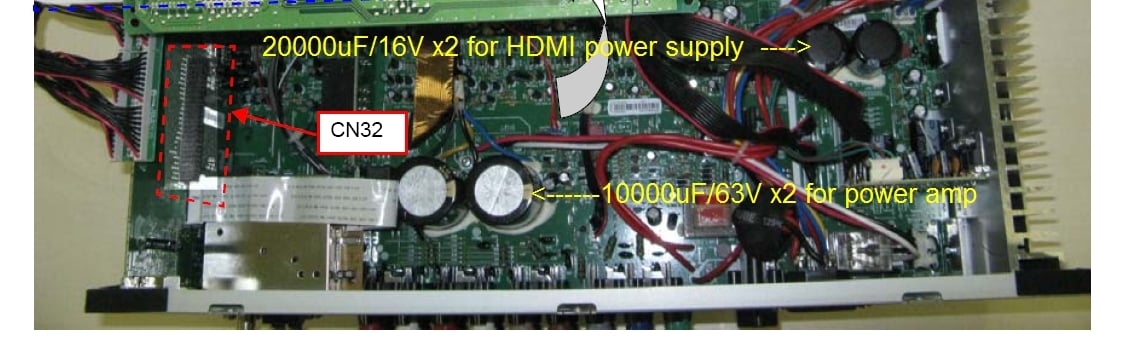
Marantz SR6004 Power Supply Capacitors
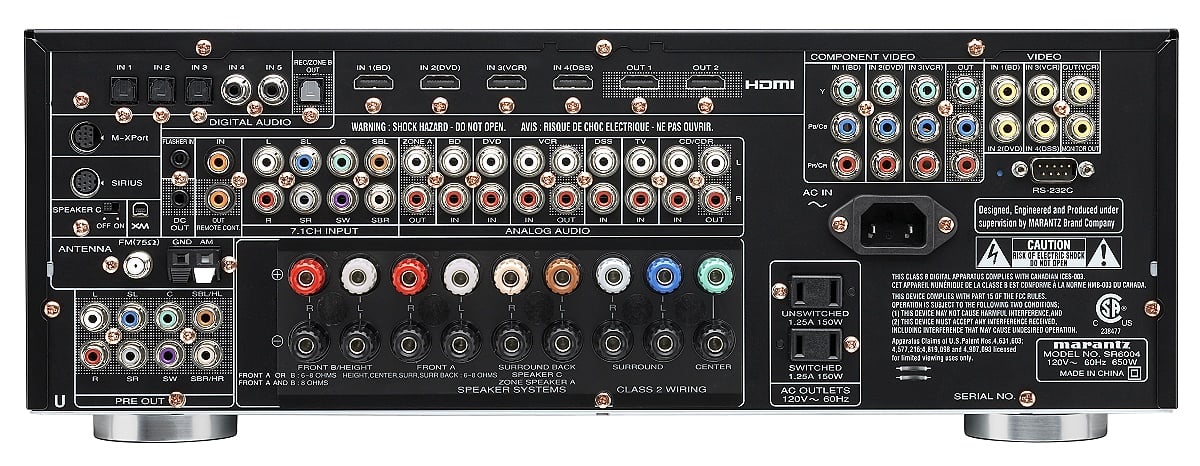
Marantz SR6004 Back panel View
The SR6004 back panel is laid out quite nicely. It's not a cluster of connections like you find on many other receivers these days partly due to the absence of S-video connections. There are binding post connections on all 9 pairs of speaker terminals, 4 HDMI inputs and dual HDMI outputs. The SR6004 has a two-prong detachable power cord, one switched and one unswitched outlet and 7.1 preamp inputs and outputs to allow for future format expansion and external amplifier, respectively.
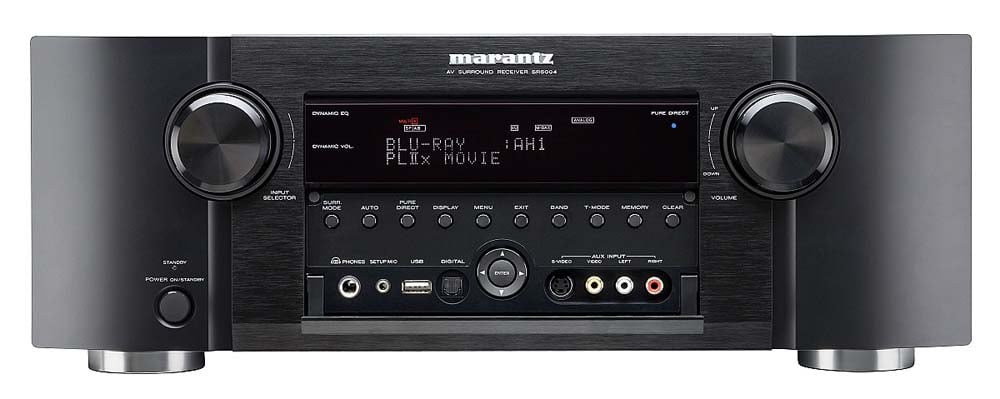
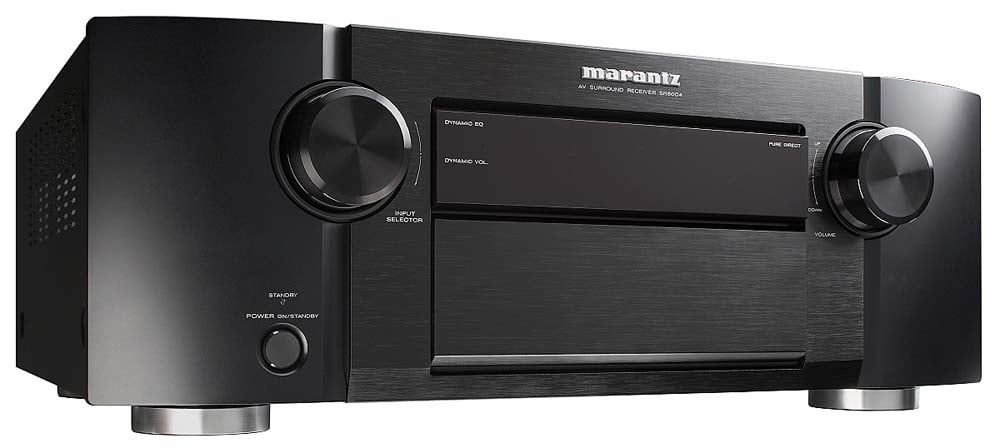
Marantz SR6004 Front panel View
The
SR6004 doesn't have the typical boxy feel you get with most receivers. Instead it sports some sexy curves given it
the feeling of a high end gear not dissimilar to their beautifully crafted
two-channel reference gear. The front
panel has an array of buttons and inputs.
Oddly, there is an S-video connection which in my opinion would have been
better to be an HDMI connector instead.
The front panel also includes a phono input, USB connector for use with
flash drives, or music streaming devices such as an iPod, analog audio and
composite video and Toslink for digital music sources.
Marantz SR6004 A/V Product Feature Comparison
The Marantz SR6004 certainly isn't the most feature driven receiver in its price class, but it has the most important ones expected in today's market such as full Dolby TrueHD / DTS HD decoding and Pro Logic IIz post processing for front height channels. Unfortunately you can't simultaneously use back channels and height channels even with external amplification for a full 9.1 setup like some of the higher end competitor models provision for. You can however bi-amp your front channels or power a second zone with two of the internal amplifiers in the SR6004 should you only be using 5.1 for the main zone.
| Product | Marantz SR-6004 |
Yamaha RX-V2065 |
Onkyo TX-NR807 |
| Retail | $1,249 | $1,399 | $1,099 |
| Amplifier Channels | 7 x 110wpc | 7 x 130wpc | 7 x 135wpc |
| THX | No | No | Select 2 Plus |
| Post Processing | 7.1 PLIIz | 7.1 PLIIz | 7.1 PLIIz and DSX |
| Networking | No | Yes | Yes |
| Bluetooth | Yes | No | No |
| HDMI (I/O) | (4,2) ver 1.3a | (5,2) ver 1.3a | (5,2) ver 1.3a |
| Multi Zone | Yes, 3 | Yes, 3 | Yes, 3 |
| Auto Room Correction | Audyssey MultEQ | YPAO | Audyssey MultEQ |
| Video Scaling & Upconversion | Yes | Yes | Yes, Faroujda DCDi Cinema |
| Dimensions (W x H X D) | 17-3/8" x 6-3/8" x 15-3/8" | 17-1/8” x 6-3/4” x 14-3/8” | 17-1/8" x 7-13/16" x 17-1/8" |
| Weight | 28 lbs | 27.4lbs | 39.7 lbs |
The Yamaha and Onkyo receivers have one huge advantage over the Marantz. Unlike the Marantz, they are both networking receivers which allows music streaming from sources such as Rhapsody and Pandora (Onkyo only). The Onkyo is also much more massive than both of the other receivers making me ponder how they could offer so much more receiver for the money, but will save that thought for a dedicated review when I acquire a sample. The Marantz does however have one unique feature. It has the ability to link up with its Bluetooth receiver to stream music from any capable Bluetooth device provided that it's within line of sight and a distance of 30ft.
Marantz SR6004 System Setup & Configuration
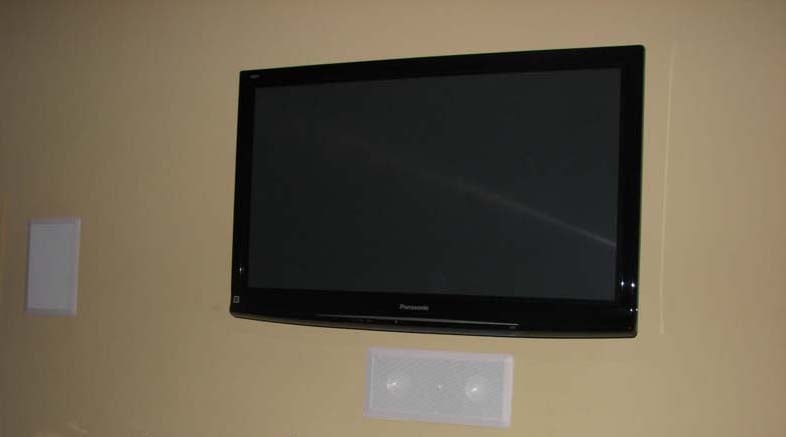 I installed this system to the
Audioholics Showcase Home Bedroom where we are running all RBH in-wall speakers
and subs consisting of 2 x MC-6's (fronts), 1 x MC-414 (center), 2 x MC-615
(rears), and 2 x SI-10 (subs). The
transports were the Denon DVD-A1UDCI Universal Blu-ray player and the Yamaha
MCX-2000 music server with the Panasonic
TC-P42G25 42" Plasma display. All
HDMI and Toslink cables were Sonicwave furnished by Impact Acoustics and the
speaker wire and interconnects were 10AWG and 1694A, respectively, by Blue
Jeans Cable.
I installed this system to the
Audioholics Showcase Home Bedroom where we are running all RBH in-wall speakers
and subs consisting of 2 x MC-6's (fronts), 1 x MC-414 (center), 2 x MC-615
(rears), and 2 x SI-10 (subs). The
transports were the Denon DVD-A1UDCI Universal Blu-ray player and the Yamaha
MCX-2000 music server with the Panasonic
TC-P42G25 42" Plasma display. All
HDMI and Toslink cables were Sonicwave furnished by Impact Acoustics and the
speaker wire and interconnects were 10AWG and 1694A, respectively, by Blue
Jeans Cable.
Although the SR6004 is fully equipped with Audyssey MultEQ , I did not test this feature since we've tested it numerous times in the past on other products. I also didn't use the auto setup and decided to manually configure and calibrate all of the channels myself. For Audyssey lovers, it's worth mentioning that the SR6004 will NOT engage Audyssey for high resolution sources such as Dolby TrueHD and DTS HD.
It's also important to note that the SR6004 is equipped with only seven internal power amplifiers. Thus, during speaker setup if you enable "Front Presence" and "Surround Back" speakers, the SR6004 will send signal to only one of those respective speaker groups depending on the post processing being selected (ei.e. PLIIz will enable the front height speakers, while PLIIx or Dolby EX will enable the surround back speakers).
 Bass
Management
Bass
Management
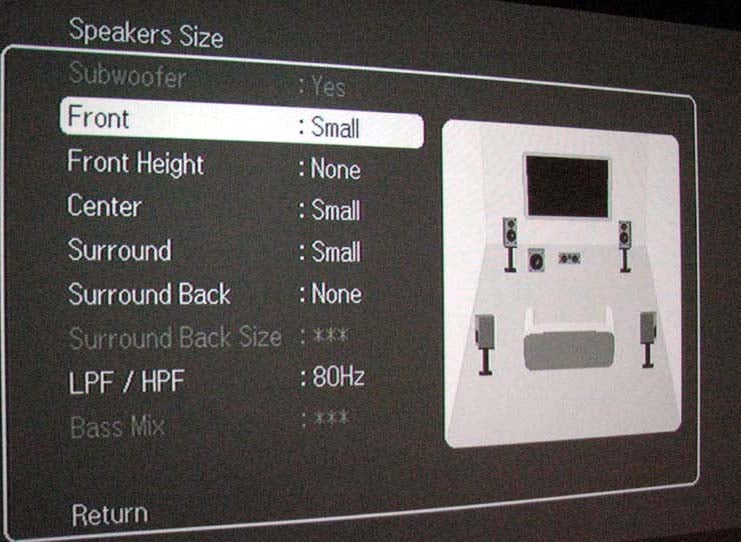
The Marantz SR6004 has very good bass management facilities. By very good, I mean it has the following provisions we've come to expect quality components to exhibit:
- 0.1ft speaker size adjustment resolution
- 0.5dB channel trim adjustments
- variable crossover (40-180Hz in 20Hz step sizes)
- 12 dB/Oct HPF for all speakers set to "small" and 24dB/oct LPF for the sub out
- ability to simultaneously produce main channel bass from main speakers + sub
 About the only option missing was
independent crossover settings per speaker groups but we've usually found
that option to be a mixed bag if not properly configured by the end user. The "Bass Mix" option was a bit
confusing. In order to get simultaneous
bass via the main channels (when set large) and the subwoofer, you have to
select "both". The
"Mix" setting only sends main channel bass to the main channels. Personally I would have preferred this option
to be called "mains" as to me "mix" implies bass output to
the main channels and sub.
About the only option missing was
independent crossover settings per speaker groups but we've usually found
that option to be a mixed bag if not properly configured by the end user. The "Bass Mix" option was a bit
confusing. In order to get simultaneous
bass via the main channels (when set large) and the subwoofer, you have to
select "both". The
"Mix" setting only sends main channel bass to the main channels. Personally I would have preferred this option
to be called "mains" as to me "mix" implies bass output to
the main channels and sub.
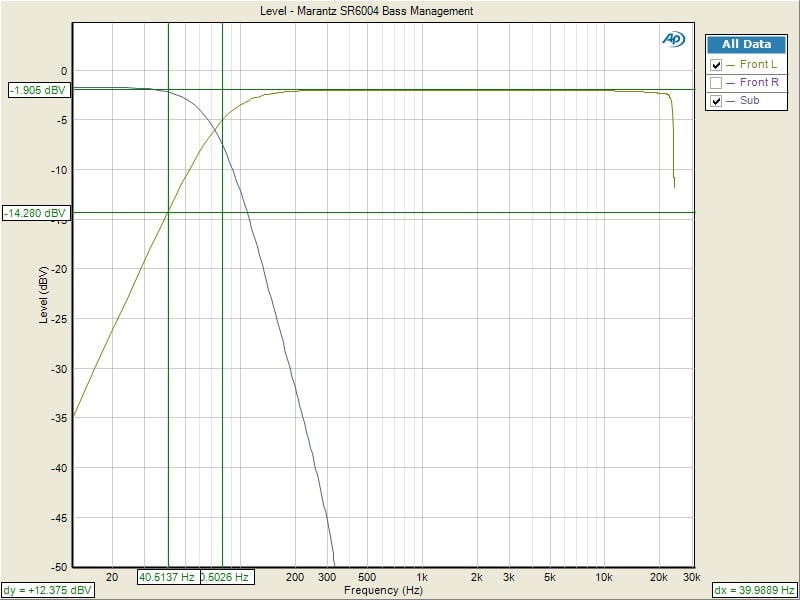
Using our Audio Precision APx585 HDMI audio analyzer, we measured the bass management circuitry to confirm the crossovers worked as expected for a THX Ultra2 certified receiver as indicated by the 12dB/oct High Pass Filter (HPF) slopes on speakers set small and 24dB/oct Low Pass Filter (LPF) slopes on the subwoofer output.
Video Set-Up & Test Results
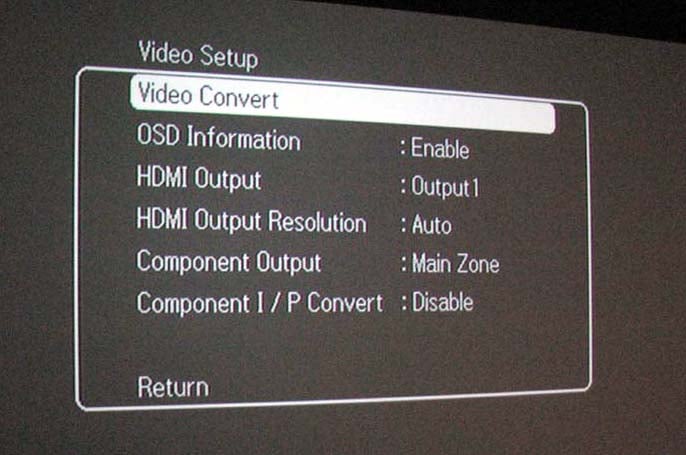 The
Marantz SR6004 offers analog i/p and component to HDMI upconversion but no
ability to adjust picture settings or noise reduction as some of its more
expensive competitors. While it's nice
to have a full set of calibration options built into the A/V receiver/processor
for each of its inputs to simplify the display hookup and switching to a single
HDMI input, the workaround utilizing a few more inputs and macros on your
remote to do the video switching isn’t all that bad either.
The
Marantz SR6004 offers analog i/p and component to HDMI upconversion but no
ability to adjust picture settings or noise reduction as some of its more
expensive competitors. While it's nice
to have a full set of calibration options built into the A/V receiver/processor
for each of its inputs to simplify the display hookup and switching to a single
HDMI input, the workaround utilizing a few more inputs and macros on your
remote to do the video switching isn’t all that bad either.
I tested the i/p conversion via component video which returned nearly a perfect score on our HQV tests (no noise reduction) but the analog to HDMI upconversion was a different story. All of the cadences and jaggies #2 failed. If you're dealing with a high quality analog source you're likely better off bypassing the upconvert features of the SR6004, or running it directly to your display.
For
more information about proper display calibration, read our article on HDMI
Enhanced Black Levels.
I disabled video convert for all of my sources and found the SR6004 passed native HDMI resolution just fine. I was also running 720p component video from my BD player to my bedroom system with over 50ft of coax and had no performance issues at all.
Multi-Zone
/ Multi-Source Audio & Power Amp Assignability
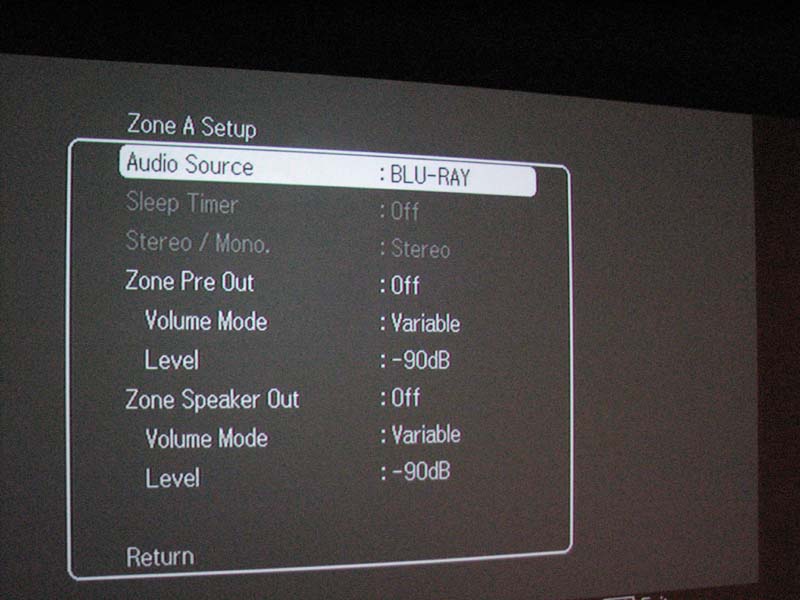
The SR6004 is equipped with 3 zones of audio. The main zone provisions for 5.1 or 7.1 which can be assigned for front height or surround back channels, zone A for secondary analog audio and A/V switching (no HDMI) and Zone B for digital audio output only. There is a single DC trigger output that is assignment to turn on for each input.
The surround back channel amplifiers are assignable as shown below:
- Zone A
- Flip
switch on back of receiver, enable SPK C to allow for biamping
Honestly, this whole Zone A/B/SPK C nomenclature is very confusing to us. It would have been more intuitive if Marantz stuck with Main/Zone2/Zone3 and used “Biamp” word on back of the receiver instead of SPK C.
Another issue of confusion to us was the "Z.spk" button on the remote. Even if the user enables Zone A audio, they will NOT get sound to their speakers if using the internal SR6004 amplifiers unless they engage the "Z.spk" button on the remote. We think it's cool that Marantz is giving the user independent level control of the Zone A preamp out and the speaker level for that zone but we suspect this won't be very intuitive for most users.
RX101 Bluetooth Wireless Receiver
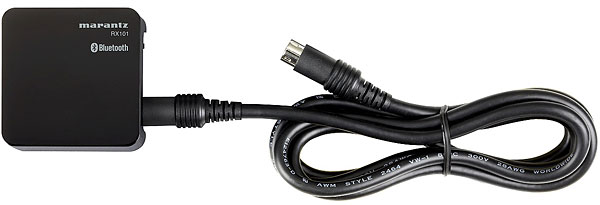 Plugging
in the RX101 was a bit trickier than I initially figured. I carelessly attempted to plug in the 9-pin
connector in the back panel without precisely lining up the arrows causing 3 of
the pins to bend. After using a paper
clip to straighten them, I proceeded more carefully and made the
connection. The RX101 LED illuminated
red and I was ready to pair it with my 32Gig Apple iTouch G2.
Plugging
in the RX101 was a bit trickier than I initially figured. I carelessly attempted to plug in the 9-pin
connector in the back panel without precisely lining up the arrows causing 3 of
the pins to bend. After using a paper
clip to straighten them, I proceeded more carefully and made the
connection. The RX101 LED illuminated
red and I was ready to pair it with my 32Gig Apple iTouch G2.
Here is how you pair
the RX101 to an iTouch / iPad device:
- Select M-Xport input on the SR6004.
- Simply hold down the "mode" button on the back of the RX101 for about 5 seconds then depress it. At this point the RX101 should flash blue / red in 0.5 second intervals.
- Now go into the "General" setting of your iTouch, select "Bluetooth".
- Enter the code "0000" into your iTouch to pair it with the RX101.
- After the connection is established, select the RX101 output option on your iTouch. This should enable audio transmission to the SR6004.
I've never been a fan of Bluetooth audio quality but I found the audio quality in this case was acceptable for casual listening. The problem I found however was that audio dropouts were far too frequent to not draw attention to themselves. I tried experimenting with positioning of the RX101 with respect to my iTouch but I found no resolve to this issue. Mileage may vary from user to user but after this experience I shelved the RX101 and decided to connect my iTouch via analog instead.
 Remote Control
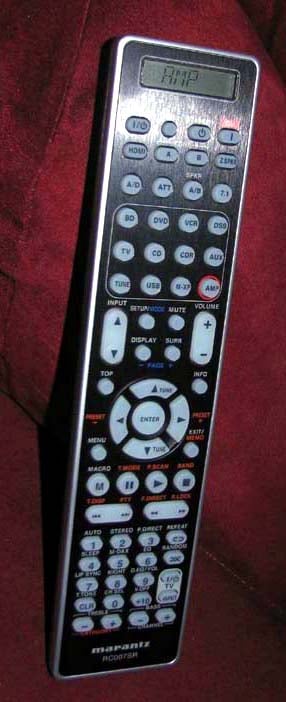
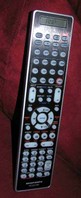
The RC007SR remote control is fully backlit by simply pressing pressing the right side button. Ergonomics are good as the remote can be controlled an operated using a single hand. There is a central circle pad of buttons allowing for easy navigation through the menus of the OSD. The source buttons are actually used to select function of the remote instead of switching inputs on the SR6004. Personally I can't stand when manufacturers do this. It took me a few minutes to realize I had to hit the "amp" button just so the remote would operate the receiver. If you want to switch inputs, your going to have to use the up/down input keys on the remote or use the front panel dial on the receiver. Personally I feel Marantz could take a lesson from Yamaha on how to do a push button remote the right way as I've found the remote from their RX-Z7 to be one of the most user friendly and intuitive fully push button remotes found on an A/V receiver.
Marantz SR6004 Sound Quality Tests
I’ve always heard positive things about Marantz audio quality which I affirmed over the years via product demos of their flagship stuff such as their venerable SR-18 A/V receiver which at the time was one of the most powerful and best sounding units on the market. I was curious to see how the SR6004 would live up to the “audio first” heritage Marantz pioneered nearly 50 years ago.
Unless otherwise stated, all listening tests were conducted with no room correction or EQ with all channels set to “small” and crossed over at 80Hz. Dual RBH Sound SI-10 in-wall subs were used at all times during the listening tests.


Porcupine Tree - The Incident (DVD-A) left pic; Avatar Blu-ray right pic
DVD-A: Porcupine Tree - The Incident
Lately I’ve been really digging
Porcupine Tree as I bought their last four albums on DVD-A. The Incident is their latest and
taking them into a somewhat new but familiar musical direction. I started out with “Blind House” and turned
the volume up to levels that would send my wife flying out of the room. Guitars had a loud dynamic hard edge to them
true to the recording. I was getting
great bass from my dual subs and the vocal clarity of Steve Wilson’s voice was
excellent. The quite parts of this song
(which were brief and rare) took on total silence only to jump you out of the
seat once the guitars kicked in again on all the channels. “Time Flies” is my favorite track on the disc
which carries strong elements of Pink Floyd “Dogs” from their Animals
album. Leave it to Porcupine Tree to
quickly morph that feeling into their own genuine sound making for a truly
enjoyable and energetic song that you simply can’t help to turn to volume 11. The SR6004 had no qualms with handling my
power requests. The sound was a bit edgy
when really cranked up but I attributed that more to the recording than
limitations in power of the SR6004.
Blu-ray: Avatar
Avatar is a reference standard Blu-ray
that any serious audio or videophile should own even if they aren't the biggest
fans of the movie. The SR6004 reproduced
the quality of the transfer with utmost pristine clarity in video and
audio. I did experience a few audio
dropouts when playing back the DTS HD soundtrack but couldn't determine if it
was the SR6004 or my BD player causing the issue. A simple power toggle of both devices
stabilized the audio. When the choppers
attacked the Na'vi's village every chilling
rocket and artillery smashing their forest radiated throughout my body. The surround field
was completely enveloping and there was plenty of output to fill my master
bedroom to theatrical levels. It was awe
inspiring to experience the full potential of Blu-ray in the comforts of my
bedroom system having the SR6004 at the helm providing the processing and power
to my RBH Sound speaker system.
Suggestions for Improvement
As nice of a receiver as the SR6004 is, it is NOT without its limitations. I have tabulated below areas of improvement I’d like to see in future models:
- OSD HDMI overlay on video and display of volume.
- Ability to simultaneously operate front height and surround back channels if using external two channel amplification.
- Ability to stream music sources such as Rhapsody, and Pandora
- Easier operation and labeling of other zones
- Ability to utilize Audyssey for Dolby TrueHD and DTS HD
The OSD function of the SR6004 is effective and simple but somewhat primitive. I am so spoiled with Yamaha and Denon receivers that give you instant info on signal data and format by the press of a button on the remote. In many instances I wanted to determine what PLII mode I was listening too but this info wouldn't display via HDMI at all or component video without "video convert" mode enabled. I also really like having the ability to see live video from a Blu-ray player while also overlaying OSD info from the receiver. Such facilities were not possible on the SR6004.
Marantz SR6004 Measurements and Analysis
Using the Audio Precision APx585 8 Channel HDMI audio analyzer, I bench tested all performance aspects of the SR6004.
Preamp Section
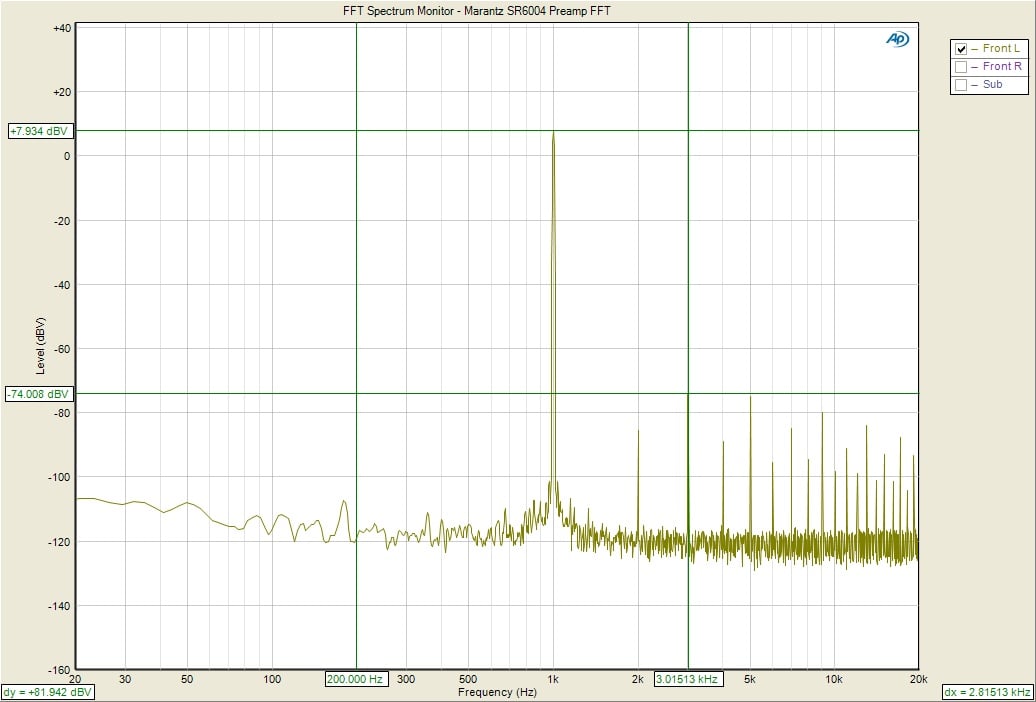
Marantz SR6004 Preamp FFT Distortion Analysis
With 0dBFS in, the SR6004 was able to output a whopping 7Vpp unclipped (<.1%THD +N) or 2.49Vrms. The 3rd order harmonic component was over 80dBv below the fundamental which was very good. Adjacent channel to channel crosstalk produced 81dB @ 1kHz, 65dB @ 10kHz which again is excellent.
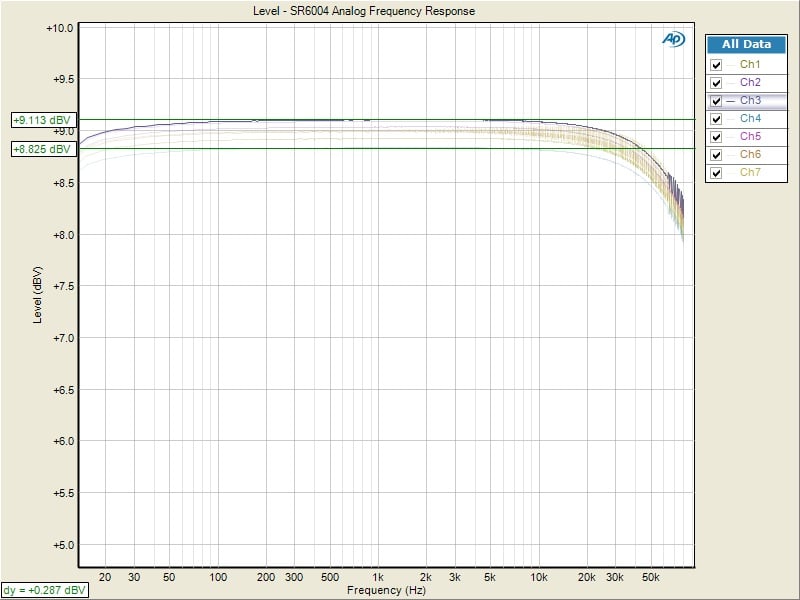
Marantz SR6004 Frequency Response
Using the HDMI input, measured frequency response was within +/- 0.25dB from 20Hz to 20kHz with -3dB of 43kHz (limit of Nyquist, 1/2 sampling rate of 96kHz). Channel to channel variation was within .5dB within the entire audio bandwidth.
Using the analog inputs produced a ruler flat frequency response beyond the bandwidth of my Audio Analyzer (80kHz). With plenty of clean output drive and excellent distortion and crosstalk figures, the Marantz SR6004 is more than capable of serving as a dedicated A/V processor in the event you wish to bypass its amplifiers for more powerful external amplification.
Power Amp Section
Power vs. Distortion
Using our Audio Precision APx585 8-channel HDMI analyzer, we conducted a full barrage of multi-channel amplifier tests on the Marantz SR6004. We tested power using three methods all of which were taken at < 0.1% THD + N:
- Continuous Full Power Bandwidth (CFP-BW) from 20Hz to 20Khz into 8 and 4 ohm loads (up to two-channels)
- 1kHz Power Sweep vs Distortion (1kHz PSweep) - popularized by the print magazines, this is an instantaneous power vs distortion test at 1kHz. The problem with this test is it often masks slew related and or frequency response problems some amplifiers exhibit at the frequency extremes, and thus inflates the measured power results. It does provide an instant gratification # for consumers to argue over on the forums so we are now incorporating this test to please the masses.
- Dynamic PWR - 1kHz CEA-2006 Burst Method testing. This is a dynamic power measurement adopted from the car industry similar to IHF method only a bit more difficult for an amplifier and more representative of real musical content.
Keep in mind most review publications don't do continuous power measurements and they usually publish power measurements into clipping at 1% THD + N. Our measurements are very conservative and it is clear that the 110wpc power rating is conservatively stated as you will see in the measured output below.
For more info on amplifier measurements, see: The All Channels Driven (ACD) Test
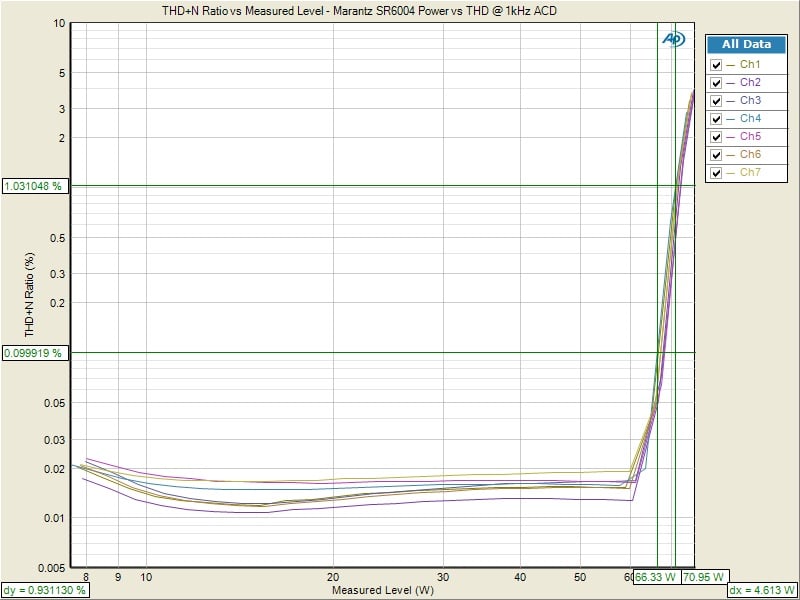
Marantz SR6004 Power vs Distortion
| # of CH | Test Type | Power | Load | THD + N |
| 1 | CFP-BW | 135 watts | 8 ohms | 0.1% |
| 1 | CFP-BW | 208 watts | 4 ohms | 0.1% |
| 2 | 1kHz Psweep | 112 watts | 8 ohms | 0.1% |
| 2 | 1kHz Psweep | 120 watts | 8 ohms | 1% |
| 7 | 1kHz Psweep | 66 watts | 8 ohms | 0.1% |
| 7 | 1kHz Psweep | 71 watts | 8 ohms | 1% |
| 1 | Dynamic PWR | 155 watts | 8 ohms | 1% |
| 1 | Dynamic PWR | 266 watts | 4 ohms | 1% |
| 7 | Dynamic PWR | 100watts | 8 ohms | 1% |
Marantz SR6004 Tabulated Power Measurements
The Marantz SR6004 power reserves were quite impressive for a receiver of its price and size. Not only did they exceed their 110wpc rating for up to two channels driven but they also exceeded their engineering spec of 50% power under 7 channels driven by outputting 66wpc at 0.1% THD +N and 71wpc at 1% THD +N.
Crosstalk
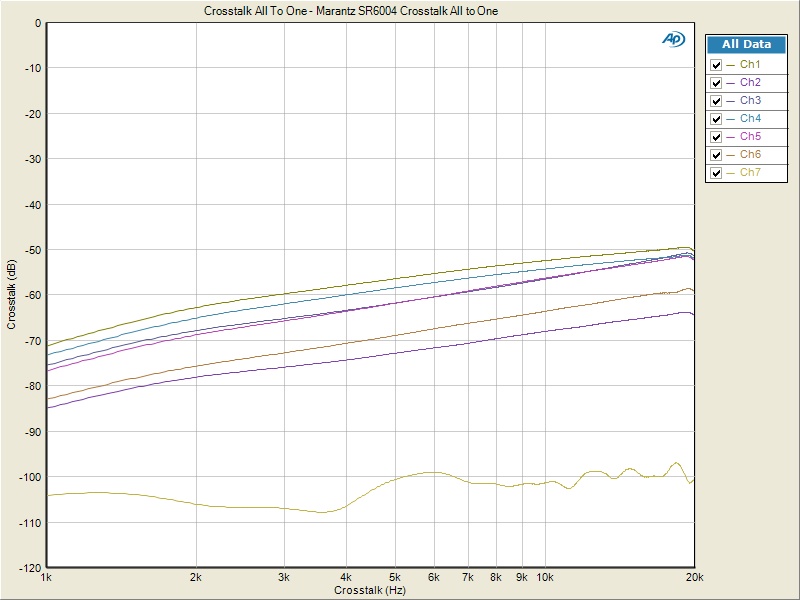
Marantz SR6004 Crosstalk Measurement at Full Rated Power vs Frequency
Running a full range frequency sweep from the preamp all the way through the power amp at full rated power (110wpc @ 8 ohms), I measured all-to-one crosstalk where all but the channel under test acted as the noise source or disturbers. This is the worst possible crosstalk test scenario. The other was the DUT. The Audio Precision plotted crosstalk for each channel under these circumstances and showed that the worst channel exhibited around 61dB at 20hz, 70dB at 1kHz with a gradual increase with frequency (50dB @ 20kHz) due to capacitive coupling. These were good measurements.
Signal to Noise Ratio (SNR)
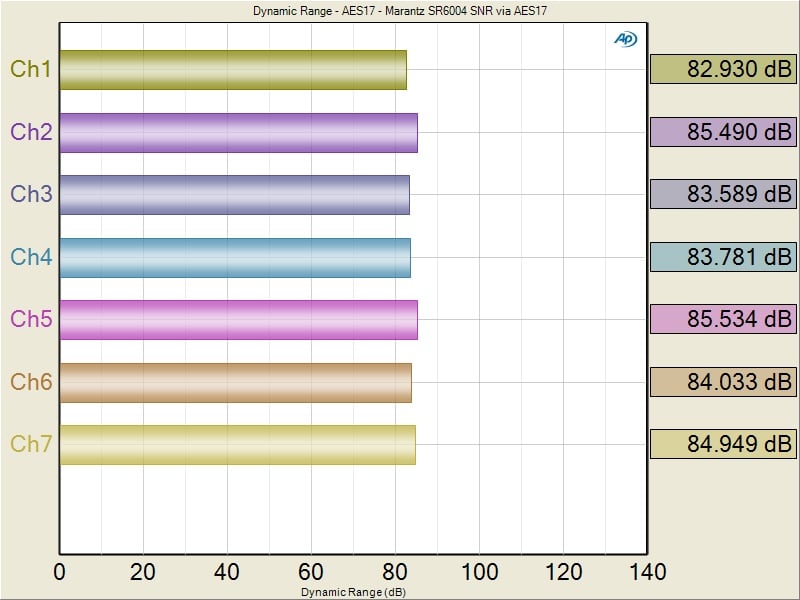
Marantz SR6004 SNR per AES17
We measured the SNR at 1 watt power using no weighting for the worst possible measurement. It's important to know how quite a product is at low power levels to ensure the noise floor of the product isn't masking sonic detail. A number greater than 60dB at 1 watt is acceptable while a measured response above 80dB is considered excellent or very quiet. The SR6004 yielded 82.9dB for the worst channel which is an excellent measurement. It's no wonder why the SR6004 sounds so clean and detailed at low power levels.
Marantz SR6004 Conclusion
 If
you're looking for a midpriced receiver with respectable power reserves and
audio performance, the Marantz SR6004 is a top contender. Although deficient in some areas noted in
this review, the SR6004 has it where it counts.
It will deliver faithful audio reproduction to all but the most
elaborate theater systems. Marantz
didn't skimp like some of their competitors in this price class using either
opamps instead of discrete power devices, or a smaller less capable power
supply that wavers into low impedance loads or with more than one channel
driven. Should you ever require more
amplification, simply use the excellent preamp facilities of the SR6004 as they
have plenty of drive and clean audio output to mate with any audio power
amplifier.
If
you're looking for a midpriced receiver with respectable power reserves and
audio performance, the Marantz SR6004 is a top contender. Although deficient in some areas noted in
this review, the SR6004 has it where it counts.
It will deliver faithful audio reproduction to all but the most
elaborate theater systems. Marantz
didn't skimp like some of their competitors in this price class using either
opamps instead of discrete power devices, or a smaller less capable power
supply that wavers into low impedance loads or with more than one channel
driven. Should you ever require more
amplification, simply use the excellent preamp facilities of the SR6004 as they
have plenty of drive and clean audio output to mate with any audio power
amplifier.
I found myself enjoying extensive music listening sessions on the SR6004 which I usually shy away from if I am not happy with the fidelity of a product under review. Based on my findings, I would say that Marantz struck a good balance with the SR6004 and lived up to its strong audio heritage. Good sound quality and looks are the two key selling points of this product which should appeal to any serious audiophile not able to commit to the expense and space constraints of full fledged separate components. Recommended!
Marantz SR6004 A/V Receiver
Marantz USA
100 Corporate Drive
Mahwah, N.J. 07430-2041
Marantz SR6004
MSRP: $1,249
About Marantz
Marantz is a renowned manufacturer of advanced home entertainment equipment, committed to upholding the tradition of technological superiority initiated by founder Saul Marantz. The three main pillars of the Marantz philosophy are superior sound quality, impeccible design aesthetics and total user convenience. Marantz is firmly committed to serving the custom-installation marketplace, offering a variety of audio and video products with features and capabilities specifically designed to give custom installers the solutions they need. Marantz has deep roots in the audio business and a legacy of creating some of the world’s most advanced audio products. Continuing to move forward and build on this impressive legacy, the company is proud to manufacture the best looking, best sounding, best featured, easiest to use and most reliable products in home entertainment. Marantz America is a wholly owned subsidiary of D&M Holdings In
The Score Card
The scoring below is based on each piece of equipment doing the duty it is designed for. The numbers are weighed heavily with respect to the individual cost of each unit, thus giving a rating roughly equal to:
Performance × Price Factor/Value = Rating
Audioholics.com note: The ratings indicated below are based on subjective listening and objective testing of the product in question. The rating scale is based on performance/value ratio. If you notice better performing products in future reviews that have lower numbers in certain areas, be aware that the value factor is most likely the culprit. Other Audioholics reviewers may rate products solely based on performance, and each reviewer has his/her own system for ratings.
Audioholics Rating Scale
 — Excellent
- — Very Good
- — Good
- — Fair
- — Poor
| Metric | Rating |
|---|---|
| Frequency Response Linearity | |
| SNR | |
| Measured Power (8-ohms) | |
| Measured Power (4-ohms) | |
| Multi-channel Audio Performance | |
| Two-channel Audio Performance | |
| Video Processing | |
| Build Quality | |
| Fit and Finish | |
| Ergonomics & Usability | |
| Features | |
| Remote Control | |
| Performance |  |
| Value | |
Gene manages this organization, establishes relations with manufacturers and keeps Audioholics a well oiled machine. His goal is to educate about home theater and develop more standards in the industry to eliminate consumer confusion clouded by industry snake oil.
View full profile Subscribe to our newsletter