


Denon AVR-5803 Home Theater Receiver Review
Denon AVR-5803
- Product Name: AVR-5803
- Manufacturer: Denon
- Performance Rating:


- Value Rating:
- Review Date: August 31, 2003 19:00
- MSRP: $ 4300
- THX Ultra2 Certified
- THX Surround EX; DTS Extended Surround Discrete 6.1; DTS ES Matrix 6.1; DTS Neo:6 Cinema & Neo:6 Music Matrix Decoding; Dolby Digital EX; Dolby Pro Logic II; Dolby Headphone; DTS
- Ultra2 7.1 Cinema and Music modes
- Lucasfilm Home THX Cinema 4.0, 5.1 and 6.1ES post-processing
- DVD-Audio decoding with Adjustable Digital Bass Management, Delay, Channel Levels and Tone Controls, through DENON Link or External Analog Inputs
- DDSC-Digital featuring New dual Analog Devices HammerHead SHARC 32-bit floating point DSP processors
- 7 Channels equal power amplifier section
- 170 watts per channel (8 ohms, 20 Hz-20 kHz, <.05%THD)
- 200 watts per channel (6 ohms, 20 Hz-20 kHz, <.05%THD)
- 24 bit, 192 kHz A/D conversion (Burr-Brown PCM-1804 x 4) on all analog inputs, including External 7.1 inputs
- 16 Burr-Brown PCM-1738E 24-bit, 192-kHz highest resolution DACs, with DSD compatibility - each audio channel operating in differential mode
- Pure Audio mode, features 4 DACs per audio channel in dual-differential mode
- ALPHA 24 Processing Plus in Stereo/Direct/Pure Direct modes (left/right channels)
- 4 24 bit,192 kHz Digital Interface Receivers
- 3 sets component video inputs, compatible with wideband (480p, 720p, 1080i)
- 8 sets composite and "S" video inputs
- Video Conversion of Composite to S-Video and/or to Component
- 1 AC-3 RF digital input for laser disc
- TWO sets of 7.1 external wide bandwidth (100 kHz) inputs for multi-channel formats with full Bass Management(defeatable)
- 11(5 Coax, 6 Opt.) assignable digital inputs
- 8 Channel Digital External Inputs
- 13 analog inputs including built-in AM/FM tuner
- Multi-Zone 1 stereo pre-amp outputs with video output
- Multi-Zone 2 outputs, pre-amp outputs or speaker outputs
- RS-232C port for external controllers
- 12 and 5 volt triggers
- DENON Link, for connection to DVD-9000
- Variable high/low pass Crossover 40/60/80/100/120
- Audio Delay adjustment Digitally regulated volume control with .5dB increment adjustments AKTIS RC-8000 LCD touchpanel remote with IR and RF transmission Dimensions: 17.1"w x 8.5"h x 19.1"d
Pros
- Benchmark performance in all modes of operation.
- Endless configurability and tweaking options.
- Excellent craftsmanship.
- Component video up conversion on all video sources with OSD
Cons
- Poorly written user manual.
- Difficult set-up for neophyte.
- Low current trigger output cannot drive many power relay boxes.
Denon AVR-5803 Introduction
In the beginning of modern audio reproduction there was mono. Consumers were complacent with listening to AM broadcasts and their phono recordings on their large floorstanding tube based radios. Life was good. Shortly after, stereo was introduced and raised the bar on fidelity and consumer expectations of their audio systems. With the advent of the computer age (thanks to the invention of a tiny device called the transistor) we soon discovered an almost limitless frontier of multi channel audio which now seems to be evolving almost as quickly. Denon's latest super receiver appears to more than satisfy the criteria of delivering the goods, perhaps more so than much of their competition both presently and dare I say for future formats and/or digital transmission standards.
Denon AVR-5803 First Impressions
The Denon AVR-5803 pushes the envelope in digital technology with its implementation of a pair of Analog Devices top DSP's (32bit Dual Hammerhead SHARC's) and sixteen of Burr Browns top audio DAC's (PCM 1738-E) fully capable of decoding DVD-A and SACD if tasked. It amazes me that so much horsepower is found in this receiver, which is uncommon in much costlier so called "high end" separates. In fact, during my evaluation of the AVR-5803 masterpiece I did a little research and found no separate pre/pro at the same price and significantly more money than the AVR-5803 which implemented quad dual differential DAC's in pure direct mode, and dual differential DAC's in multi channel modes for all channels. Most of the pre/pros and other receivers on the market simply revert to one single ended DAC per channel. While this isn't necessarily a bad thing, it is certainly not as likely to push the envelope of fidelity for the serious audiophile. With my former experience as an Analog Engineer pioneering some of the most advanced DSL modems on the market, I speak from experience regarding the merits of differential architecture for DAC implementation. Every credible Electrical Engineer knows that state of the art D/A performance can only be achieved differentially with complimentary circuit topology from input to output. In fact, if it weren't for differential DAC implementation, high speed DSL wouldn't work so well, at least on any subscriber loops over a few thousand feet. Denon goes one step further and gangs up the rear channel DAC's for two channel "Pure Direct Mode" for a true quad dual differential implementation. This is unheard of in most high end products, including those doubling the price of the AVR-5803. I was, after some intense searching, able to find another processor with dual differential DAC implementation on all channels - one from Mark Levinson - retailing for $1000's more than the Denon, and it wasn't using the top of the line Burr Brown units. There are advantages in dual differential implementation, one of which includes noise reduction resulting from a voltage gain drop of 6dB. There's further advantage in implementing quad dual differential DAC's as it potentially reduces distortion while increasing linearity.
It could be argued that the benefits of this digital architecture may not fully be realized since the entire circuit path from line level inputs to speaker level outputs are not complimentary. However, a good argument killer would be that the AVR-5803 as well as all of Denon's receivers that implement the dual differential DAC architecture, have some of the industries best Signal to Noise (SNR) ratio measurements and linearity figures as illustrated in many audio publications, and more importantly buttressed by our critical listening evaluations.
The merits of Denon's implementation of the dual 32bit Hammerhead SHARC processors was evident by its almost endless configurability. Some of this is owed to the fact that Denon, unlike many other audio hardware vendors, write their own code. Many costlier separates utilizing less capable DSP's, and prepackaged firmware, don't hold a candle to the processing power and configurability of the AVR-5803 (more on this later). It is also important to note that when the AVR-5803 was introduced almost two years ago, it was the first home theater product to offer component video high bandwidth switching (100MHz), component video up conversion, as well as On Screen Display (OSD) via the component video monitor outputs, thus simplifying the connection to a high resolution HDTV while serving as a state of the art video switcher. Until this year's most recently announced product offerings, very few other receivers and more costly preamp/processors offered this.
Before power was ever applied, or even connected to
Reference System 1, the Denon AVR-5803 bestowed a very
positive impression on me and I remember thinking to myself
"
if the audio performance is as
good as expected, I am in for a real treat
". It was nice to see that Denon had replaced the cheap
plastic cover door (previously found on the AVR-5600) with a solid metal one. This, along with a host
of other mechanical refinements, in my opinion, produced a product that had a higher-end appearance
complimenting its state of the art performance.
Denon AVR-5803 Set-Up
When I unboxed the AVR-5803 and saw its two rather lengthy manuals, I must admit I nearly gasped at the thought of the education I would have to undergo in properly setting this unit up. I suppose one drawback of an ultra-sophisticated piece of hardware is the sometimes associated complexity in setting it up and tweaking it for optimal performance. Many lesser processors tout the claim of operational simplicity, but in reality they often lack many of the key features and configuration options found on the Denon AVR-5803. With regards to the Denon user manual, what really irked me about it was the somewhat vague descriptions of operational modes. After reviewing it, I initially wrongfully concluded that the AVR-5803 had only one set of global channel trim adjustments. I was in complete disarray about this until Denon's fabulous tech support set me straight. In turned out that every mode of operation and input had the ability of independent and storable channel trim adjustments. What a refreshing and remarkable achievement! If only all vendors would follow suit.
Perhaps the most massive back panel on a receiver to date! The AVR-5803 has more than enough INs and OUTs to handle the most sophisticated home theater systems. Despite its complexity, layout was very logical, and making connections was a snap.
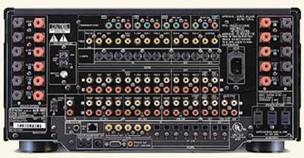
Back panel of the Denon AVR-5803
Despite its massive size and complex back panel, I had no beef about making all of my connections. I really liked the separate left and right speaker output connections located at the far end of the unit. This helped to keep my thick speaker cables away from all of my analog/digital interconnects for a more nicely dressed arrangement.
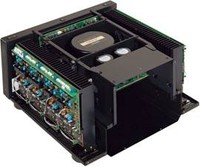 Inside the Denon AVR-5803 Receiver
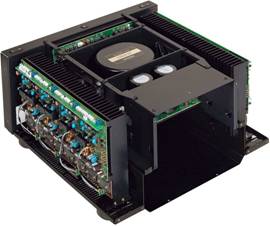
-
Notice the massive 1.2kVA Torroidal Power Transformer.
-
With over 66,000uF of power supply capacitance, the Denon AVR-5803 has enough reserves for the most needy power demands.
-
All channels employ discrete large high power complimentary BJT's. The power supply is centrally located in the chassis for the best isolation and structural stability.
-
It is easy to see that this receiver passes the 3.2 ohm all channels driven high current torture test mandated for THX Ultra2 Certification.
AKTIS RC-8000 Touch Screen Remote Control
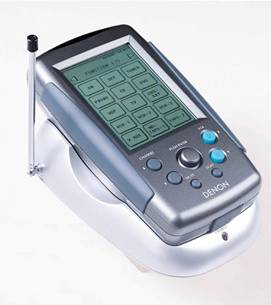 Denon's touchscreen powerhouse AKTIS-RC-8000
remote with
recharging base station and RF antenna. The AKTIS-8000 is also equipped with a USB interface for future firmware
upgrades. I was astonished by the battery efficiency of this remote.
I used it
extensively for over 3 months with conventional non rechargeable batteries and at the end of
the review they were still going strong.
Denon's touchscreen powerhouse AKTIS-RC-8000
remote with
recharging base station and RF antenna. The AKTIS-8000 is also equipped with a USB interface for future firmware
upgrades. I was astonished by the battery efficiency of this remote.
I used it
extensively for over 3 months with conventional non rechargeable batteries and at the end of
the review they were still going strong.
Learning to operate the AKTIS RC-8000 was a somewhat slow and painful process. As far as touch screen remotes go, I consider them a mixed bag. They are nice since they have graphical illustrations and usually lots of memory to store all of your hardware codes and configurations. However, they are often slow in operation when switching between operational modes, and cumbersome to handle. The RC-8000 was certainly more than a handful, and in my opinion just too darn bulky for all but the largest hands. I didn't have much of an issue with its mass as much as my wife did. She is petite, and with her small hands I could certainly understand the difficulties she had with operating it. Having previously experienced Yamaha's RAV-2000 touch screen remote, we found the AKTIS remote to be somewhat lacking and antiquated. For one, it didn't have a dedicated power on/off button. In order to power up the AVR-5803, I had to access the touch screen and make sure I was on the right page to do so. I also found many of the user codes to be incomplete while operating my non Denon devices. For example, the Sony user code didn't even include a change disc option for operating my CD player, and the pause button for Denon's own DVD-2900 Universal DVD player was not intuitively labeled. I was told by Denon however that I can upload newer codes via their website at: http://www.usa.denon.com/aktis/. I suppose if time permits, I may give it a try - that is if I have any time before I have to send this review sample back. Weep :(
Denon AVR-5803 Configuration
After a few days of thumbing through the menu screens I found myself competently operating all of my equipment. Though the slow switching of screens did irritate me at times, especially when I was trying to configure a DVD and then engage a particular surround mode of the receiver. My other pet peeve about the user interface of the AVR-5803 was not having the ability to back up to a previous menu screen. This became particularly bothersome when scrolling into the third or fourth screen of a specific function only to discover I went one too far and had to completely disengage the OSD and start over from the beginning. I also wish the backlight would have automatically illuminated when a remote button was pressed. I had to search for the light button in the dark to illuminate the remote so I could see what I was doing.
|
|
|
|
Sometimes the OSD was Blue |
Other times the OSD was Black |
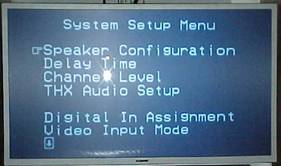
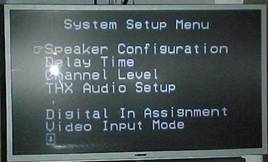
I couldn't figure out exactly why this happened, but suspect it had something to do with whether or not the DVD Player was producing an interlaced or non interlaced signal. I personally prefer a blue OSD and wish I had the ability to keep it such all the time.
Configurability - The Sky's the Limit!
Living with the Denon AVR-5803 for the past three months, it quickly became apparent to me that I was dealing with one of the most sophisticated processors on the market, regardless of price or product appeal. Some of the key features that Rocked My WorldT (which very few other receivers, let alone more costly processors have done) are:
-
Subwoofer group delay adjustment.
-
Independent channel trim adjustments for each input and mode of operation.
-
+/- 0.5dB channel trim accuracy.
-
0.1 ft accurate speaker distance compensation.
- Optional bass management and digital delay compensation via 6CH inputs.
-
Adjustable crossovers (40Hz to 160Hz)
-
Optional +15dB subwoofer gain boost via 6CH inputs for DVD-A/SACD
- Component video up-conversion for all video sources.
-
Subwoofer output in two channel analog bypass.
I could really expand this list beyond this page, but I think you get the idea. Much thought was applied to the design of this receiver to allow ultimate flexibility to all users regardless of speaker type or associated hardware being used. With that in mind, I configured all of my speakers to small, except the main channels, and set the subwoofer mode to "LFE + Mains" with 60Hz as the crossover frequency. Normally I would only dedicate the subwoofer channel for LFE and bass from all speakers set to "small". However, no thanks to the asymmetric bass loading problem inherent in my listening room, I need to have the subwoofer and the main speakers producing bass from the main channels in order to get the flattest possible room response. The subwoofer distance adjustment (which I refer to as group delay adjustment) helped tremendously to properly set-up my system for the most uniform and balanced integration between my main speakers and subwoofer. I am very disappointed when a receiver/processor doesn't offer this feature. I cannot overstate my satisfaction that the AVR-5803 did. What is even more amazing is that the AVR-5803 offers channel delay compensation in 0.1ft increments (that's no misprint!). It is rare that we find any processors, regardless of price that offer precision beyond 0.5ft of resolution. This is just another example of the thoughtfulness and sophistication behind its design.
I am nitpicking here, but I would have liked the option of setting the crossover for different frequencies between two channel and multi channel modes. I would have also liked to see 10Hz step sizes and the option of a selectable notch filter to help crush any room modes common in systems with the subwoofer placed near a corner wall. Perhaps Denon may add this to their AVR-5804? I also found myself missing the bass test tone 1/6th octave sweep mode of the Yamaha RX-Z1 and would like to suggest its inclusion, or variant, in Denon's next iteration.
Getting my speaker system to balance was a breeze thanks to the very precise 0.5dB channel trim adjustments and .1ft speaker distance calibrations! Using the Avia disc and my trusty Radio Shack SPL meter (C-weighted, slow responding) I devised my own little method of phasing my large bass capable mains with the subwoofer. For your convenience I have outlined my procedure below. Note, this procedure should only be followed after all of your channel trims (including the subwoofer) are balanced and your speaker distances are configured.
Receiver / Processor Configuration for Phasing Large Mains with a Subwoofer
-
Configure Center Channel to "none".
-
Set main channels to "Large".
- Set subwoofer to "yes" or "on".
Test Procedure
- Step #1: Seated in your listening position, configure your SPL meter to "C"-weighted, slow responding.
- Step #2: Using Ovation Software's Avia Disc, select the audio track that sweeps the center channel down from 200Hz to 20Hz.
- Step #3: Adjust the master volume level to at least a 75-80dB reference level.
- Step #4: Run the test and record any major bumps and dips vs frequency during the sweep.
- Step #5: Repeat Step #4 each time you vary the subwoofer for each permutation of group delay setting changes in the receiver/preamp and/or executing a subwoofer phase polarity change.
Note #1: You may have to repeat Step #2 several times to properly and accurately record the data.
Note #2: I recommend +/- 1ft increments for subwoofer group delay adjustments at first along with varying the phase of your subwoofer +/- 180 degrees as a starting point. Fine tuning for optimal performance in .1ft increments, if the processor has the resolution (The Denon AVR-5803 does!), should be done after a reasonable setting has been discovered. This procedure should be repeated for several listening positions to determine the best settings for average room response.
Denon AVR-5803 Bi-amping
After optimizing the system for 2CH and DD/DTS playback, it was now time to do the same for DVD-A and SACD. I used the stored channel trim settings of the AVR-5803 as a starting point and selected EXT1 6CH input to allow the DVD-2900 to decode DD/DTS signaling. Although there are level differences particularly in the subwoofer between DD/DTS and SACD/DVD-A, the basic main channel trims should still track each other. I proceeded on setting all of the channel trims in the DVD-2900 to 0dB and the subwoofer to -6dB (more on my reasons in the DVD-2900 review ), as well as setting the digital delay compensation for each channel to match my speaker placement, just like I did in the AVR-5803. I was surprised to find the DVD-2900 offered delay compensation via the subwoofer output, especially since some dedicated exotic processors on the market, let alone DVD-A players, don't offer this level of refinement. I then initiated the AVIA channel trim adjustments to calibrate each channel with the very precise .5dB incremental trim settings in the AVR-5803. Again, the AVR-5803's incredible flexibility afforded me such luxuries of having precision independent channel trim calibration adjustments for each mode of operation. After calibrating all of the channels, I then popped in a DVD-A disc and noticed the bass was lacking and I though to myself "Oh yeah, we need a good 10-15dB boost because of format differences". Just as I was about to add the gain to the subwoofer level trim in the AVR-5803, I happened to discover that the 6CH EXT Input had an optional gain boost feature (0-15dB, 5dB increments) for this very purpose. Those engineers at Denon think of everything don't they?!
What a great idea and a well thought out feature that I have yet to find on any other commercial home theater products. I ultimately selected the +15dB setting, and tweaked the sub level control by ear until I heard the ideal bass balance blossom at the subwoofer. I will comment further on the audio set-up of the Denon DVD-2900 in the specific portion of its respective review.
Bi-amping on a Receiver?
You betcha! True all of the benefits of bi-amping cannot be realized without eliminating the passive crossovers in the speaker system and actively bandwidth limiting the signals line level, but adding more clean power to a system is usually a good thing and something I happily welcome. The initial phase of my listening tests were to be conducted in 2 channel and 5.1 multi-channel surround and audio. I thought to myself, why let those two hulking 170 wpc amps that would normally power the back surround channels go to waste. I figured I could simply route the preouts of the main channels into the pre-ins of the rear back channels and boost my headroom by 3dB for the front channels and go to bed with a smile on my face that I had a receiver pumping 340 watts to each of my main speakers.
Well it didn't quite turn out that way as Denon did not provision preamp couplers for this task. A quick phone call questioning "why?" to Denon's fabulous tech support revealed that they did this for a very good reason, eliminate a path for noise. Ordinarily I would have questioned that, but the very fact that year after year, Denon products, namely their receivers and DVD players always measure some of the lowest noise floors in the industry as illustrated by their exceptional Signal to Noise (SNR) measurements in all modes of operation conducted by various audio publications.
After some thought, Denon tech support gave me the info on how to accomplish the bi-amping task. Here is how to do it. Note this will only work if you don't plan on using the amps for surround back channels or multi zone 2 applications.
Bi-Amp Configuration of Main Channels
- Step #1: Connect a pair of analog RCA cables from the preamp outs of the "Front" channels to an unused input of the AVR-5803 (In my case, I chose VDP).
- Step #2: Select the chosen input as the source for Multi Zone 2.
- Step #3: In the Multi Zone Control menu, select power amp assignment for "Multi Zone 2".
- Step #4: Using the internal test tones of the AVR-5803, position the SPL meter (slow response, C-weighted) at the listening position and increase the master volume control until each speaker reads about 75dB.
- Step #5: Disconnect the speaker level connections from the "Front" channels at the AVR-5803 and reconnect them to the appropriate "Multi Zone 2" speaker level connections.
- Step #6: Repeat Step#4 while varying the "Multi Zone 2" volume level. I found nearly unity gain correlation between the "Front" channel and "Multi Zone 2" amplifiers to be at the "Multi Zone 2" volume level setting of +2dB.
Note: It would have been nice if the channel trim for this volume level control had +/-0.5dB precision, as all of the other channel trims of this receiver had, for better precision. Better yet, it would have been even nicer if Denon had a unity gain strap for this exact application so I could have avoided the pains of this set-up. Hint Hint. During my operation of the receiver in this set-up, I was always a little concerned if the wife or my daughter were to accidentally press a few wrong buttons on the remote and screw things up. However, if I couldn't audibly notice if this problem occurred, then I probably didn't deserve to worry about it.
- Step #7: Remove the jumpers on the back of the main speakers (you would be amazed at how many people forget to do this, Yikes!)
- Step #8: Connect a set of wires from the "Front" channels of the receiver to the highs section of each of your front speakers and a set of wires from the "Multi Zone 2" channels of the receiver to the lows of your front speakers.
All of the basic audio calibrations were now complete, with a sign if relief, I was filled with anticipation to begin my subjective listening testing of two channel and 5.1 multi channel audio.
Denon AVR-5803 Listening Tests: Two Channel
The most common complaint of most audiophiles regarding receivers is the fidelity, or lack thereof, of reproducing convincing and accurate two channel audio. Some complain that receivers usually sound too bright or too limited in soundstage or dynamics when compared to dedicated and usually more costly separates solutions. To them I ask, have you heard the Denon AVR-5803? Bright, lacking in soundstage and dynamics are all terms that never popped into my head when critically listening to pure two channel audio sources on the AVR-5803. In fact, it took almost endless listening sessions to convince myself I was actually listening to a receiver, since at no time did I miss my more costly separates in my reference system. The AVR-5803 amplifier section was most impressive, regardless of it being a receiver or a dedicated multichannel amplifier, period! It did a bang up job of driving my large reference speakers before I biamped them, and did even better to my ears after bi-amping with the unused back channel amplifiers. I subjectively felt the amplifier section of the AVR-5803 had a warmer sound characteristic than I have heard from just about any receiver I had previously reviewed and/or listened to.
My critical two channel listening sessions began with a few well recorded CD's from the following artists.
 |
 |
| Dire Straits - Brothers in Arms | Pat Metheny - We Live Here |
 |
 |
| Jewel - Spirit | Special EFX - Collection |
Using the AVR-5803 as the DAC, I engaged the "Pure Direct" mode and heard a few relays click on while I watched the front panel display indicate "Pure Direct On" before disappearing as an almost hypnotic blue LED indicating the Alpha 24 processing has been engaged. Never have I listened to a DAC that had quad dual differential implementation of some of the best quality DAC's in the industry. I was excited to say the least.
I stated with track#3 "The Girls Next Door" from Pat Metheny's We Live Here CD. Immediately, I was overtaken by the tight and well-defined bass extension of this track. I was in awe that I managed to musically integrate my subwoofer with my front speakers so well - in fact, better than I have had in the past even with my own reference gear. Aside from the fluidic and well extended bass, was about the most articulate, pin pointing sounds from Pat Metheny's guitars while the air in the percussion instruments was unlike how I have heard it in the past. It sounded so darn good that I kept cranking the volume up higher causing my adrenaline to surge. I took my SPL meter out and measured over 90dB with music and over 105dB with bass peaks. How could this be? How could a receiver deliver so much raw and clean juice to my hungry 4-ohm large tower speakers without breaking a sweat? We were always conditioned to believe separates were the only way of achieving this. Did Denon somehow rewrite the rule book? I suspect they did, as I have never heard a receiver sound this musical and muscular while having the finesse to produce the lowest level of details in music such as the triangles and wind instruments from the fabulous Special EFX Collection CD. Listening to female vocals from Jewel's Spirit CD was a real treat. Never did her voice sound stringent or harsh, but instead sounded lucid and melodic while the guitar ballads in the background seemed almost limitless in their dynamics and detail. Dire Straits Brothers in Arms needs no introduction as it serves as a rock classic as well as a state-of-the-art recording of the time since it was one of the first digitally mastered CD's in the 80's era, and didn't suffer from compressive artifacts typically found on many rock/pop CD's of today. I actually listened to this whole CD one night in utter enjoyment while the Denon AVR-5803 was serving as the DAC and power amp to my reference speakers.
Moving on to "higher" resolution formats such as DVD-A and SACD were equally enthralling. I started out with SACD two channel, since in my opinion, SACD offers the best high fidelity two channel software currently available. Some of my favorites include benchmark performance SACD discs from Patricia Barber and Rebecca Pidgeon. I spent a lot of time listening to Patricia Barbers Nightclub SACD using the Denon AVR-5803 and DVD-2900 combo. Track #3 "Yesterdays" is perhaps my favorite on the disc. It starts out soft and mellow and soon explodes to a complex and well orchestrated jazz ballads unfamiliar to the typical self-proclaimed jazz listener who's only exposure to this classification of music is the "Smooth Jazz" genre spoon fed to the public on FM radio. What really struck me when listening to this disc was all of the low level details I previously didn't hear on my more costly separates system. This clearly indicated to me that the Denon gear provided a superior noise floor. For the first time in my experience, the playback and associated electronics equipment was no longer the limiting factor for faithfully reproducing high resolution formats. To me the AVR-5803 sounded transparent, dynamic, and fundamentally. right . I didn't hear any grain or brightness, nor was I welcomed with sterility. Instead, the Denon equipment persuaded me to listen, almost hypnotically. My feelings regarding the fidelity of this equipment never diminished. I found myself listening to tracks on this disc and other SACD's in my collection out of sheer sonic enjoyment that I normally disliked based on musical content.
Denon AVR-5803 Listening Tests: Multi-channel
Since I currently do not own any multi channel SACD discs, all of my proceeding high resolution multi channel audio tests were done via the DVD-A format. I was a bit concerned at first to test multi channel DVD-A on the AVR-5803 since the speakers in my reference system were all 4 ohm loads (except for the rears) and I would be taxing all 7 channels simultaneously on the AVR-5803 (remember the "Front" channels were bi-amped). However, I figured this would be a great torture test as I could finally expose the limitations of a receiver and rejoice to all regarding the wonders of separates. I started out with Graham Nash's Song for the Survivor DVD-A disc, which is an exceptionally well-recorded true multi-channel disc. Track #1 "Dirty Little Secrets" was a great way to start off this torture test since it is loaded with deep bass content and lots of musical info to the rears, and all channels for that matter, during the entire song.
Since the wife and child weren't home, I had the chance to crank the volume all the way up to "0dB" reference, which was super loud in my room, as I recorded average SPL levels of 100dB with bass peaks exceeding 120dB. This was about my listening level limit that I could handle for any length of time. In fact, after about 3 or 4 minutes, I covered my ears and pressed on. Before covering my ears, I was besieged by the almost endless dynamics that the AVR-5803 was demonstrating. I was a little distressed that Denon proved my theory wrong. This receiver had no dynamic limitations in my set-up! Instead, I heard the best multi-channel DVD-A experience since I was first introduced to the format. The AVR-5803, however, couldn't take all of the credit. Some of this audio nirvana was a result of the fabulous Denon DVD-2900 universal player's ability to decode MLP flawlessly. This was the first time I had heard DVD-A with correct digital delay compensation, and let me tell you, it made a tremendous difference. Anyone contemplating plunging into a multi-channel high-resolution player should make it a top priority that the player and/or preamp/processor or receiver incorporates digital delay compensation. The great thing about this set-up was the lack of additional D/A and A/D conversion stage present sincethe DVD-2900 handled all of the digital delay compensation in the digital domain prior to passing the audio content via its six-channel analog audio outputs. In the past, I actually used to prefer playing the DVD-A discs I had in their alternate DTS 96/24 rather than their MLP soundtrack. This was primarily because my DVD-A reference player did not feature digital delay compensation, and its DAC section wasn't nearly as good as my reference preamp/processor. However, the Denon reverses this preference. I now found the MLP track had a slight edge over the DTS 96/24 track in terms of transparency and refinement when listened to on the Denon gear.
I spent most of my evaluation of the Denon AVR-5803 in two-channel, since I was absolutely floored how well it sounded. However, when I desired to listen to some of my not so well recorded CDs on the AVR-5803, I did so in Prologic II and/or DTS Neo, whichever tickled my fancy at the time. I was happy to discover that the AVR-5803 had retainable memory settings for every input when engaging Prologic II or DTS Neo modes. All I had to do was configure the CD input to Prologic II or DTS Neo Music modes, and choose Prologic II or DTS Neo Cinema modes for the DVD input when listening to non discrete multi channel audio sources.
Track #4 "Blue Saloon" from Mike Oldfield's Tubular Bells 2 CD really had me in awe at how detailed and spacious Prologic II sounded. I actually heard the digital artifacts in the recording as a very low level crackling in the electric guitars that I previously didn't recall on other systems.
At first I though it was something in the equipment and/or connections, but I later confirmed it was the actual disc on that particular track during specific guitar riffs opening and closing. Again, noisier systems would have masked this low level detail. I suppose you could consider this a mixed blessing since the Denon AVR-5803 brought out the best and the worst in all recordings!
Pat Metheny's classic Off Ramp CD was brought to new life when played back in Prologic II music mode. In two-channel, this CD sounded a bit flat and lifeless. Hey what can one expect from an analog mastered 20+ year recording? In Prologic II and DTS Neo, it was another story. I was in utter delight being surrounded by Pat's amazing guitar riffs and Lye May's accompanying melodic keyboard ballads. I couldn't help but wonder just how much better this would have sounded as a true multi-channel SACD or DVD-A disc. However, I didn't wonder too long, I just passionately enjoyed the music.
Denon's DSP modes were another story however. While I am by no means the biggest advocate of DSP surround sound processing, I do feel if used sparingly, these modes can enhance the audio experience, particularly with concert videos. After my extensive experience with Yamaha's RX-Z1 DSP processing, I found Denon's to be quite lacking. I had to tone down pretty much all of the factory settings to make them somewhat usable. Yet, I could never achieve the realism, or enhancements I was so fond of when engaging these modes on the RX-Z1. In the end, I reverted to Dolby Prologic II or DTS Neo to enhance ordinarily dull, non-discrete, two-channel and multi-channel program material.
5.1 Home Theater
I know what people are thinking, why is anyone still evaluating 5.1 in a 7.1 channel world? Well I have two reasons:
-
Most people don't have 7.1 channel configurations implemented
-
I wanted to do a base level comparison of what myself and many other audio enthusiasts are familiar with.
With that in mind, we will focus this portion of the review on 5.1 playback and progress towards 7.1 in a later segment.
|
|
 |
|
|
|
Gladiator |
Monsters, |
Star Trek |
Terminator 2 |



Initially I engaged the AVR-5803 in normal DD/DTS 5.1 channel modes with no THX or DSP processing. I personal prefer this mode with the AVR-5803 since it sounded so pristine and pure and also because I wasn't overly impressed with any of Denon's DSP modes, especially with my fresh reference to how Yamaha's fabulous RX-Z1 receiver and proprietary DSP processing sounded in my system. To me Denon's "Widescreen" mode, much like THX post processing, seemed to soften the top end a little too much for my liking. In overly bright movies such as Terminator 2, this was actually welcomed. However, more recent and well-mastered movies such as Gladiator and Monsters, Inc sounded best to me in straight DTS and Dolby Digital, respectively. Switching between THX Ultra 2 and straight Dolby Digital on Star Trek Nemesis proved to be most interesting, however. In THX mode, the rear surrounds took on a more diffused and somewhat more spacious soundfield, but the overall frontal tonal balance of the system was slightly softened at the top end. I leave it up to the user to decide which they prefer as I was on both sides of the fence many times with regards to DSP, and I found it to be very source dependent. This was my first experience with using THX post processing for home theater applications and so far I discovered I preferred it only in certain instances, depending on the quality of the recording and the particular mix. Again, the extremely high quality processing and playback of 5.1 DD/DTS sources on the AVR-5803 was far rewarding enough for me. I next proceeded to playing my favorite DTS concert DVD from Eric Clapton's One More Car, One More Driver .
This DVD really opened my eyes, or ears I should say, at how well the AVR-5803 integrated my systems bass response, most likely attributed to the subwoofer group delay compensation and variable crossover settings from the AVR-5803's excellent bass management arsenal. The bass response in the song "Reptile" was absolutely stunning. Before listening to this track on prior gear, I always remembered it as sounding rather nice, with good solid bass extension, but perhaps a bit thick or overlaid in prior set-ups. Prior to the AVR-5803, never did I hear my system integrate so well with such tight, snappy bass response. Alas, I finally dialed in a nearly perfect set-up configuration to make all of my speakers work in unison in my listening room. One could only wonder how much better it could potentially get with active room correction. Perhaps Denon will provide that answer with a roadmap to their future products?
7.1 Home Theater and Beyond
Ok I was beginning to get tired of making excuses why I don't have a 7.1 speaker configuration in my system. Thus I pondered how I could resolve my room limitations to allow me to permanently explore this format. I was perusing the website of one of my favorite loudspeaker companies (incidentally the makers of my reference speakers) and stumbled upon a revolutionary idea. Why not take their existing Bi-Polar/Di-Polar speaker and modify it so that each woofer/tweeter section are independent to each other via two dedicated crossovers, and wired each woofer/tweeter pair to the two internal back channel amps in the AVR-5803. Essentially this speaker is two 41-SE's in a common cabinet firing slightly off angle from each other. RBH liked this idea so much that they built me a custom version and named it the 44-SEB. If you follow the THX guidelines for back channel speaker placement, they recommend placing the back channel speakers on the back wall slightly apart from each other. The RBH 44-SEB achieves this quite nicely, but manages to do so in one box. More importantly, it was easier to convince my wife of placing one back channel speaker than two. Now all that remained was to un bi-amp the front channels and connect my newfound back channel speakers.
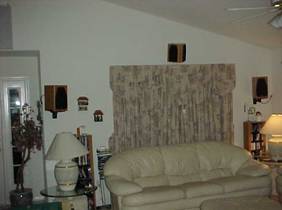
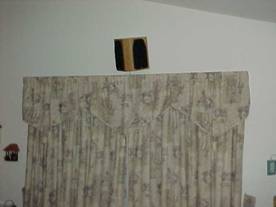
The RBH 44-SEB is a custom designed variant of their Bipole/Dipole 44-Signature SE speaker designed for Audioholics.com. It is electrically isolated and in-phase two channel speaker system in one enclosure making it easier to integrate 7.1 in a constrained room. RBH may offer this product for sale upon special request in the near future.
I have to say that adding the back channels really did enhance my surround experience in some cases, particularly when engaging Denon's own proprietary DSP modes, or when listening to DTS discrete 6.1 soundtracks such as Gladiator and Lord of the Rings: The Fellowship of the Ring . Denon's own Widescreen mode seemed to really open up the rear soundfield when engaged in 7.1 mode. The advantages of adding back channel speakers became especially apparent to me within the opening battle scenes from Gladiator when switching between the discrete 6.1 DTS 6.1 soundtrack vs the DD 5.1 alternative. The DTS discrete 6.1 soundtrack sounded more open and vivid to me, particularly behind my listening position as the panning through the rear channels seemed more fluidic and natural. However, when listening to a 5.1 DD/DTS sound track in "matrixed mode", I did at times find it somewhat distracting, especially since the rear channel speakers were firing almost directly over the primary listening position in my living room. I found that adding a tad more delay and lowering the levels about a dB or so below the other channels helped in these circumstances.
Denon AVR-5803 Additional Features and Conclusion
I had no idea that adding two extra speakers into the mix would cause a convoluted confusion of operation modes of configurability. With no real help from Denon's operators manual, I configured these modes as I perceived logical and later confirmed my findings and/or suspicions with Denon's very knowledgeable tech support group. Tabulated below are the various configuration options for 7.1 audio playback, along with their associated explanations.
|
Source |
Mode |
SB Channel |
Explanation |
|
5.1 DD/DTS |
EX/ES |
Matrixed |
Matrixed 6.1 or 7.1 from 5.1 channels |
|
5.1 DD/DTS |
EX/ES |
Non-Matrixed |
Back channels replicate surround channels |
|
6.1 DTS ES |
ES |
ES Discrete |
True 6.1 discrete in 7 channels |
|
6.1 DTS ES |
THX Cinema/Music |
ES Discrete |
True 6.1 discrete in 7 channels with THX Processing |
|
5.1 DD EX |
EX |
Matrixed |
5.1 discrete with matrixed back channels to 6.1 or 7.1. |
|
5.1 DD/DTS |
THX Cinema/Music |
------------------- |
Matrixed 7.1 from 5.1 channels with THX processing. |
|
2.0 DD or PCM |
PL II Cinema/Music |
Non Matrixed |
Derived 7.1 from 2.0 channels with back channels |
|
2.0 DD or PCM |
PL II Cinema/Music |
Normal Off/Off |
Derived 5.1 from 2.0 channels |
|
2.0 DD or PCM |
DTS Neo6 Cinema/Music |
On/Normal On |
Derived 7.1 from 2.0 channels with back channels |
|
2.0 DD or PCM |
DTS Neo6 Cinema/Music |
Off |
Derived 5.1 from 2.0 channels |
I personally preferred either "non matrixed" DD/DTS or no back channels when playing back concert DVD's or 5.1 music formats. In most cases, "matrixed" modes of DD/DTS did enhance my listening experience during movie watching, but I ultimately preferred these modes with a truly encoded DD 5.1 EX or DTS 6.1 ES source disc. I never really understood why there was a separate "EX" and "Matrixed" setting however, since both basically do the same thing whether decoding ordinary 5.1 or EX source material.
THX Ultra 2 Certification
Aside from the "Seal of Approval' for good housekeeping, THX Ultra 2 sure does pack a lot of technology into a home theater product. Many of the tools are both useful and practical, though they can yield different responses depending on room acoustics, equipment, and personal listening tastes.
Boundary Gain Compensation
For example, I was pleased that the "Boundary Gain Compensation" feature was incorporated into the THX arsenal toolbox, which could provide most useful for systems like mine where the subwoofer is placed closely to a corner wall. What it essentially does is employ a HPF at around 55Hz to reduce subwoofer output below those frequencies in attempts to counter the added room gain of such position. While this can help, I would have preferred the incorporation of a parametric EQ with adjustable Q settings for group delay compensation to help better smooth out room response. I found that the "Boundary Gain" setting did indeed help flatten out the response of my subwoofer, but at the expense of adding phasing anomalies when sweeping from 100Hz down to 20Hz in my room with the main speakers set "large". I just couldn't get my subwoofer and main speakers to blend as optimally when the mode was engaged. Of course different rooms/speakers will surely yield different results. I recommend trying this feature in your system if your sub is located near a corner wall to determine what it can do for you.
Peak Limiter
This has the potential of being a very useful tool for those with less than bone crushing subs as it helps you set a point where the subwoofer distorts to limit its dynamics beyond that to avoid excessive clipping or distortion. I personally found little use for this feature with my reference sub and listening preferences
Ultra2 Cinema and Music Modes
Part of the new THX Ultra2 specifications, include the provisioning of deriving 7.1 channels out of 5.1 discrete DD/DTS audio sources. I did discover positive sonic results for the Cinema mode, dependent on source material, in that I perceived a broader soundfield and less transitional panning between channels. However, I never came across an instance where I preferred the THX music mode over ordinary 5.1 DD/DTS. I personally felt that since my rear channel speakers imaged so well, adding the extra two back channels, especially in a matrixed fashion, only deteriorated their sonic attributes when playing back multi channel 5.1 encoded source material. As a caveat, I felt it fair to mention that my personal speaker placement set-up (mostly a result of room limitations) and speaker topologies do not fully comply with THX recommendations, thus users with THX recommended set-ups and speaker types may experience different results. I personally prefer the sound of direct radiating speakers over Dipoles for surround channels, particularly when listening to 5.1 music. I suppose the old Bugs Bunny saying " One mans meat is another mans poison. " may be applied most eloquently here.
Conclusions
Spending the past three months with the Denon AVR-5803 proved to be an eye opening experience for me. I learned to overcome the typical stereotype inbred into us audiophiles that receivers cannot be the epitome of high-end audio. I learned that a truly exceptionally engineered receiver such as the AVR-5803 can, in fact, surpass the performance and flexibility of many more costly separates and nearly all currently shipping separates and receivers in this price class. In my opinion the already two year old Denon flagship receiver still sets a benchmark to which receivers and separates solutions must be judged. Some may argue that $4300 is an awful lot of money to invest in a receiver, and that may be true. However, considering that no single receiver or separates solution at this asking price (and even a few thousand dollars more) offers this level of refinement, performance, and set-up flexibility, the AVR-5803 comes as an uncommon bargain. In fact, as a further personal endorsement to my satisfaction with this receiver, I am strongly considering the option of upgrading my reference system to incorporate the AVR-5803, where it may serve as the premier preamp/processor to replace my dated Aragon Soundstage, and the power amp for the surround channels. I don't believe I am ready to part with my old Aragon 8008 series amp for the front channels since it is such a killer amp, and I never know if I plan on testing some very inefficient difficult speaker loads in the future. However, one never knows what the future of audio will hold, and who may be releasing the next generation of gear that may knock the shelves off my entertainment center. I can assure you, however, based on their past product portfolio, and their very talented engineering staff and tech support people, that Denon will be one of those manufacturers.
The Score Card
The scoring below is based on each piece of equipment doing the duty it is designed for. The numbers are weighed heavily with respect to the individual cost of each unit, thus giving a rating roughly equal to:
Performance × Price Factor/Value = Rating
Audioholics.com note: The ratings indicated below are based on subjective listening and objective testing of the product in question. The rating scale is based on performance/value ratio. If you notice better performing products in future reviews that have lower numbers in certain areas, be aware that the value factor is most likely the culprit. Other Audioholics reviewers may rate products solely based on performance, and each reviewer has his/her own system for ratings.
Audioholics Rating Scale
 — Excellent
- — Very Good
- — Good
- — Fair
- — Poor
| Metric | Rating |
|---|---|
| Multi-channel Audio Performance | |
| Two-channel Audio Performance | |
| Build Quality | |
| Ergonomics & Usability | |
| Ease of Setup | |
| Features | |
| Remote Control | |
| Performance |  |
| Value | |
Gene manages this organization, establishes relations with manufacturers and keeps Audioholics a well oiled machine. His goal is to educate about home theater and develop more standards in the industry to eliminate consumer confusion clouded by industry snake oil.
View full profile Subscribe to our newsletter