


Denon AVR-4310CI PLIIz Networking A/V Receiver Review
Denon AVR-4310CI Receiver
- Product Name: AVR-4310CI
- Manufacturer: Denon
- Performance Rating:


- Value Rating:
- Review Date: January 03, 2010 00:00
- MSRP: $ 1999
-
130 watts per channel x 7 channels
-
Dolby TrueHD, Dolby Digital Plus, Dolby Digital Surround EX, Dolby Pro Logic IIz decoding
-
DTS-HD Master Audio, DTS-HD High Resolution, DTS ES 6.1 Discrete, DTS ES 6.1 Matrix, DTS Neo:6 decoding
-
Anchor Bay ABT-2010 advanced analog and digital video 1080p/24fps/60fps upconversion and deinterlacing with multi-cadence detection
-
Audyssey Dynamic Surround Expansion for a more enveloping soundstage with front width or height channels – World’s First with DSX
-
Audyssey MultEQ XT, Dynamic Volume, Dynamic EQ
- THX Ultra2 Certified
-
HD Radio AM/FM tuner
-
XM and Sirius satellite radio ready
-
Six HDMI inputs, dual HDMI video outputs
- Dimensions: 17.1" H x 6.7" H x 16.3" D
- Weight: 34.8lbs
Pros
- Onboard input specific video processing
- Tons of power
- All the latest decoding technologies
Cons
- No input specific calibration options - only global
- Remote only partially backlit
- Wasted Surround B outputs could be put to better use
- No multi-sub support
- Streaming control delay
Denon AVR-4310CI Introduction
 It is
sometimes hard to convince someone the importance of receiver. When
we say the receiver is the heart of your system, it really is an
understatement. It doesn't just pump the blood of your home theater
experience - the video and audio, but now can do much of the
processing, routing, and control that you needed other devices for in
the past. The receiver has become not only the heart but also the
brain of you system. Skimping on your receiver will inevitably lead
to greater expenditures of time, money, and frustration down the
road. A great receiver is like
a well maintained yard - it makes everything look and feel better. An
underpowered or underfeatured receiver is like an overgrown yard with
a dead patch that won't grow back - no matter how many coats of paint
you put on the home or what shutters you add, it still looks like
trash.
It is
sometimes hard to convince someone the importance of receiver. When
we say the receiver is the heart of your system, it really is an
understatement. It doesn't just pump the blood of your home theater
experience - the video and audio, but now can do much of the
processing, routing, and control that you needed other devices for in
the past. The receiver has become not only the heart but also the
brain of you system. Skimping on your receiver will inevitably lead
to greater expenditures of time, money, and frustration down the
road. A great receiver is like
a well maintained yard - it makes everything look and feel better. An
underpowered or underfeatured receiver is like an overgrown yard with
a dead patch that won't grow back - no matter how many coats of paint
you put on the home or what shutters you add, it still looks like
trash.
The Denon AVR-4310CI is just a few models down from the top-of-the-line offerings from the electronics giant. Let's not mince words - it's pricy. At $2k, you're looking at a serious outlay of money. But the question you should be asking yourself is - do I need all these features now or in the future. Read carefully because if the answer is "yes," you might find yourself adding a new line item to your Christmas list.
Denon AVR-4310CI Build Quality
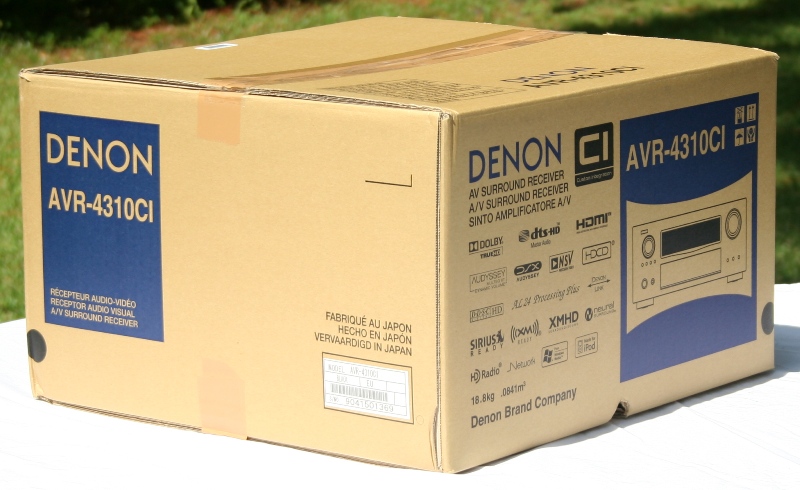
 In the
box, the Denon AVR-4310CI looks like any other Denon receiver - it is
no bigger. Out of the box, again, you're going to have a hard time at
a glance discerning any differences. Of course, we all know it is
what is under the hood that counts but we'll get to that in a second.
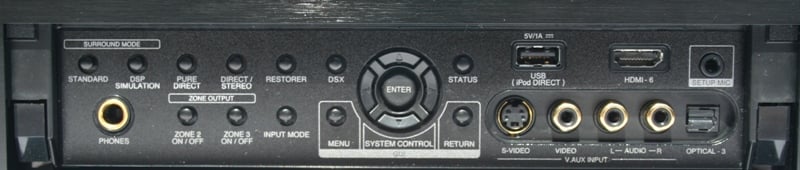
The Denon AVR-4310CI is pretty
typical for a receiver these days in that it is a large black box.
The front is fairly subdued with a few buttons and a pair of large
knobs at either side. If you look closely you'll see a fair number of
logos along the bottom of vanity plate. Underneath a retractable
cover, you'll find enough buttons to fully control the receiver in
the case of catastrophic remote lossitude (i.e. stuckindacouchitis).
Once you open that faceplate you'll know you spent a good amount on
your receiver - the "HDMI-6" label should clue you in.
There is also a USB port, optical digital and stereo analogue audio,
and a composite video input. You might be wondering why composite
video is included instead of component but with the HDMI front port,
there really isn't that much to complain about.
In the
box, the Denon AVR-4310CI looks like any other Denon receiver - it is
no bigger. Out of the box, again, you're going to have a hard time at
a glance discerning any differences. Of course, we all know it is
what is under the hood that counts but we'll get to that in a second.
The Denon AVR-4310CI is pretty
typical for a receiver these days in that it is a large black box.
The front is fairly subdued with a few buttons and a pair of large
knobs at either side. If you look closely you'll see a fair number of
logos along the bottom of vanity plate. Underneath a retractable
cover, you'll find enough buttons to fully control the receiver in
the case of catastrophic remote lossitude (i.e. stuckindacouchitis).
Once you open that faceplate you'll know you spent a good amount on
your receiver - the "HDMI-6" label should clue you in.
There is also a USB port, optical digital and stereo analogue audio,
and a composite video input. You might be wondering why composite
video is included instead of component but with the HDMI front port,
there really isn't that much to complain about.
The back of the AVR-4310CI is chock full of inputs and outputs. There are five available HDMI inputs and two outputs, three component video inputs and one output, three coaxial digital audio inputs, and two optical digital audio inputs with an optical output. This is a great feature if you are using an external DAC or recorder or perhaps to a second receiver/processor in a multizone application. Surely not something that everyone will appreciate but it is a feature that we'd expect at this price point. The number of composite/s-video/analogue RCA audio inputs is far above what you'd ever need with two sets of outputs (labeled DVR and VCR - like you'd use both) and one each for zones 2 and 3. Nine pairs of speaker outputs are available for use with the seven internal amps (more on that later). Of course, you have analogue inputs and outputs for 7.1 channels. What was missing was multi-sub support - something we'd like to see at this price point especially considering the AVR-4810CI supports three subs. Denon Link and Ethernet ports are on deck as is an XM, Sirius, and USB port. It wouldn't be a "CI" Denon receiver without an RS-232 port ("CI" stands for Custom Install which is what the RS-232 port is generally used for) so that is on hand as well.
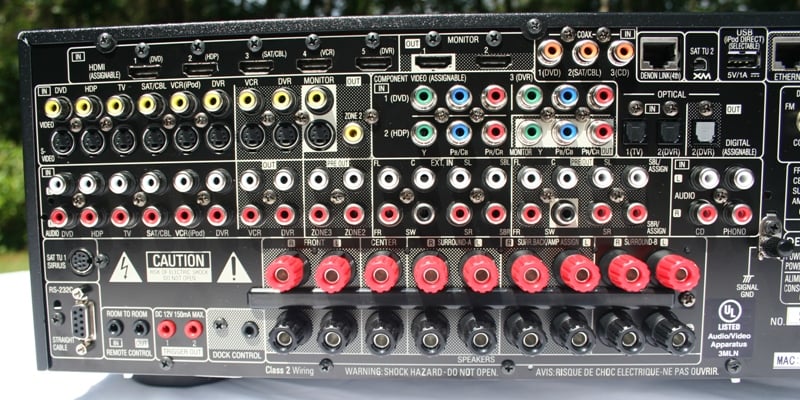
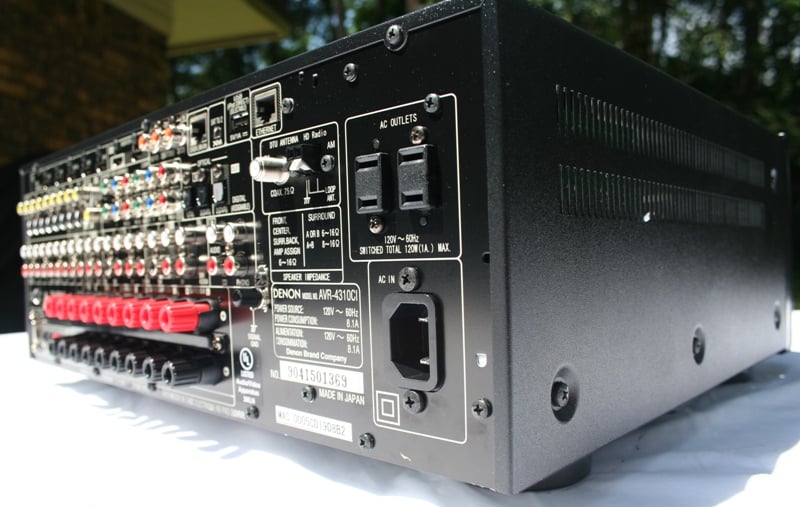
As you'd expect with a receiver this feature laden, it is heavy and well built. All the connections in back make for some very tight work and we wouldn't mind seeing a reduction in the number of composite/s-video connections to clean things up a bit. The five-way binding posts are located very close together and lend themselves to banana plugs rather than any other connection type. While we know from experience it is possible to use a bare wire connection, we higher recommend you invest in a few cheap banana plugs as this will make hooking up your receiver much MUCH easier and later changes/upgrades much less painful. Nothing is as irritating as moving your receiver to add a component just to pull loose a bare wire connection which usually snowballs into having to rewire the entire back of the unit.
Denon AVR-4310CI Setup
Setting up a receiver should be old hat to most people looking at a receiver in this price category (or the people that they are paying to set up their home theater) but we'll take you through some basics. First, understand that just about every input on a Denon receiver is assignable. You don't need to locate the DVR input if you don't want to. It will make things easier down the road as the DVR button on the remote will actually switch to the DVR rather than you having to remember that HDP=DVR and DVR=DVD and DVD=… well you get the picture. Regardless, the labels that you will see displayed on the front panel of the receiver and the onscreen display can be changed so that even if the button doesn't match the function, the onscreen label will let you know what it does control.
 You'll
want to connect up all your speakers and sources as well as the
antennas for your satellite, terrestrial, and HD radios. Also, don't
forget to connect an Ethernet run to your router. If you don't have a
dedicated Ethernet run to your home theater (and many don't) you can
use one of the PowerLine solutions that are available from a number
of companies (including the one we reviewed from Belkin).
You probably won't be streaming anything that will require full
bandwidth so these solutions should be more than enough. While you
may not ever use the Ethernet connection for streaming, it is handy
to have around for firmware updates (which the Denon AVR-4310CI will
let you know about). If you are happy with the performance and
features of the unit out of the box - well, maybe you can skip this.
But if you do, remember that you'll have to disconnect everything and
drag your receiver into your office for updates or else buy a
super-long Ethernet cable to use when you find out at a new feature
is available.
You'll
want to connect up all your speakers and sources as well as the
antennas for your satellite, terrestrial, and HD radios. Also, don't
forget to connect an Ethernet run to your router. If you don't have a
dedicated Ethernet run to your home theater (and many don't) you can
use one of the PowerLine solutions that are available from a number
of companies (including the one we reviewed from Belkin).
You probably won't be streaming anything that will require full
bandwidth so these solutions should be more than enough. While you
may not ever use the Ethernet connection for streaming, it is handy
to have around for firmware updates (which the Denon AVR-4310CI will
let you know about). If you are happy with the performance and
features of the unit out of the box - well, maybe you can skip this.
But if you do, remember that you'll have to disconnect everything and
drag your receiver into your office for updates or else buy a
super-long Ethernet cable to use when you find out at a new feature
is available.
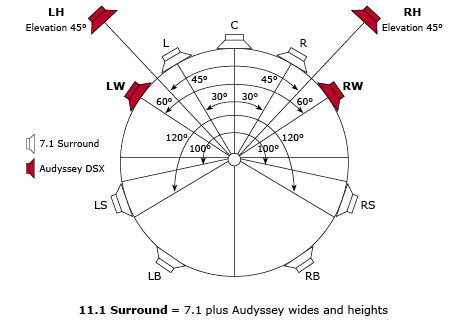 The
Denon AVR-4310CI has a full compliment of auto setup and calibration
options as well as a number of user-configurable features that need
to be addressed. Audyssey and Denon have had a long history together
and the AVR-4310CI is no different. Audyssey's MultEQ XT is the top
of the line from the company which strives to make every seat the
"best seat" for playback. We've covered this technology
before so we won't go into much detail here but understand that
Audyssey's technology is fundamentally different from the rest of the
solutions out there which used parametric EQs. On top of that, the
AVR-4310CI has the brand new DSX (stands for Dynamic Sound eXpansion)
processing which adds height or width channels to the front of the
room. These speakers are to be placed (according to Audyssey) at
about 45degrees off center and pointed down at 45 degrees to the main
listening position for height or off center 60 degrees at ear level
for width. While Audyssey DSX has the ability to do up to 11.1
surround, the AVR-4310CI has 7 internal amps
The
Denon AVR-4310CI has a full compliment of auto setup and calibration
options as well as a number of user-configurable features that need
to be addressed. Audyssey and Denon have had a long history together
and the AVR-4310CI is no different. Audyssey's MultEQ XT is the top
of the line from the company which strives to make every seat the
"best seat" for playback. We've covered this technology
before so we won't go into much detail here but understand that
Audyssey's technology is fundamentally different from the rest of the
solutions out there which used parametric EQs. On top of that, the
AVR-4310CI has the brand new DSX (stands for Dynamic Sound eXpansion)
processing which adds height or width channels to the front of the
room. These speakers are to be placed (according to Audyssey) at
about 45degrees off center and pointed down at 45 degrees to the main
listening position for height or off center 60 degrees at ear level
for width. While Audyssey DSX has the ability to do up to 11.1
surround, the AVR-4310CI has 7 internal amps and two assignable
analogue outputs for a total of 9.1. (Edit - turns out you can't assign the pre-outs separate from the internal amps so this receiver is hamstringed at a grand total of 7.1.) Since it also supports Dolby Pro
Logix IIz which also has front height channels, we recommend that if
you are going to install these extra speakers, you go with height
over width.
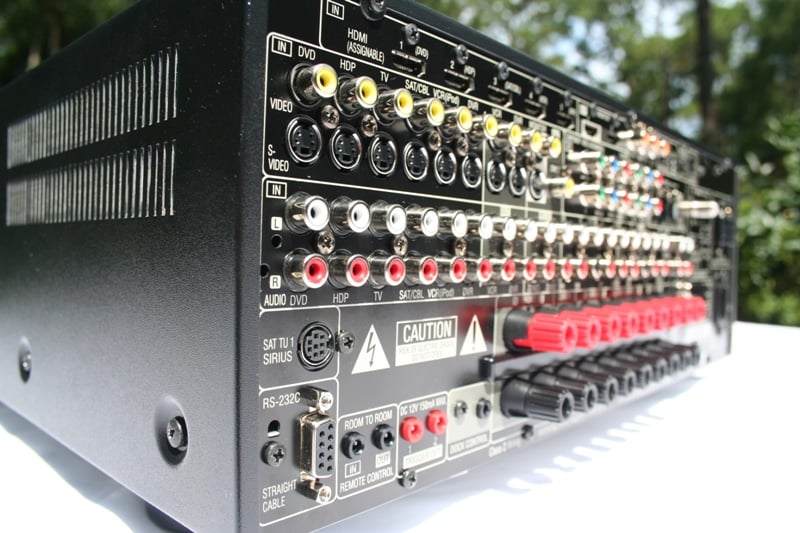 You may
have noticed the extra pair of speaker terminals labeled "Surround
Speaker B." These are essentially the same as your surround
speakers but are only used for multichannel music. The same
information is sent to each pair of terminals but the difference is
that the A terminals are meant to be utilized for speakers placed to
the sides of the listening area and elevated while the B terminals
are designed to be connected to speakers that are slightly behind the
listening position and at ear height. When you enable a music mode,
the Denon automatically switches the amps to the appropriate surround
speakers. We would have liked Denon to make these terminals
assignable as well so that the user could switch on the fly from a
7.1 configuration to a 5.1 with powered Zone 2 or 3 without having to
switch cables. The Surround Back terminals can be assigned to Back
speakers, either of the extra zones, or to Bi-amp the front speakers.
You may
have noticed the extra pair of speaker terminals labeled "Surround
Speaker B." These are essentially the same as your surround
speakers but are only used for multichannel music. The same
information is sent to each pair of terminals but the difference is
that the A terminals are meant to be utilized for speakers placed to
the sides of the listening area and elevated while the B terminals
are designed to be connected to speakers that are slightly behind the
listening position and at ear height. When you enable a music mode,
the Denon automatically switches the amps to the appropriate surround
speakers. We would have liked Denon to make these terminals
assignable as well so that the user could switch on the fly from a
7.1 configuration to a 5.1 with powered Zone 2 or 3 without having to
switch cables. The Surround Back terminals can be assigned to Back
speakers, either of the extra zones, or to Bi-amp the front speakers.
The AVR-4310CI has the much lauded Anchor Bay VRS video processing. This is an upconversion technology that essentially makes all of your video sources look as good as possible. While you won't need it for 1080p native sources like Blu-ray, DVDs, cable TV and more will all benefit. What you want to find out is the native resolution for your display. From there, you want the AVR-4310CI to convert all video signals (sans Blu-ray) to that resolution. This will mean that your display only has to, well, display. Since chances are that the Anchor Bay VRS is way better than the scaling/upconversion of any of your sources or your display, you'll want to use that. The last step is to go into the menus of each of your sources and make sure they are outputting the native resolution. For DVDs, that is 480i. It's the same for SD cable/satellite and it is 1080i (usually) for HD. Check with your manuals for each source. The idea is that the source and the display are doing NO processing. What is especially nice about the Denon AVR-4310CI is that it allows you to set the video processing on each source individually rather than one global setting. So for your Blu-ray player you can turn it off while enabling different levels of upconversion for each device.
For those that have had displays that love to jitter and stall when switching between an HD and SD channel, you're going to particularly love this feature. Since the scaling/upconversion is all happening at the receiver, all of those delays will be gone. While this might be a minor quip to those that haven't experienced it, I say it is probably the biggest thing that impressed the rest of my family. They were so used to the delays when switching from an SD to HD channel that they thought something was broken when it moved so quickly. That being said, the videophiles in the audience will appreciate the increased video clarity especially over the traditionally mediocre performance of such devices as low end DVD players and cable/satellite boxes. When we tested the same chipset in the $9k Marantz VP-15S1 projector, it scored a very respectable 95/130 on the HQV test for 480i sources (it passed all but some obscure cadence tests that you'll rarely need).
The only other point the needs to be touched on is the dual HDMI outputs. You may expect that it is too much to ask to have a receiver that can put out two different video/audio signals to two different rooms… and you'd be right. These are parallel HDMI outputs that will convey both audio and video but it is the same signal. For multi-room support, you have analogue audio outputs for both Zone 2 and Zone 3 along with a composite video output for Zone 2.
Denon AVR-4310CI Use
Your introduction into the Denon AVR-4310CI is the GUI (Graphical User Interface). While the GUI is way more intuitive and user friendly than the previous text only interface Denon employed for years, it is not without its quirks. The new OSD works from left to right. Basically, where you are is indicated on the left and your options are indicated on the right. You dive deeper into the menu by arrowing right. You back out by arrowing left. While it won't take long to get used to this, the problem is that there the indication of how deep you are into the menu system is a little hidden. It is at the top and is icon based but it is considerably smaller than everything else on the screen. I think it took me a few weeks just to realize it was there. You can actually exit the menu and then re-enter it at the same (or similar depending on how deep you were) point - a great feature for when you are trying to make changes quickly but it can be confusing when you are unfamiliar with the menu system.
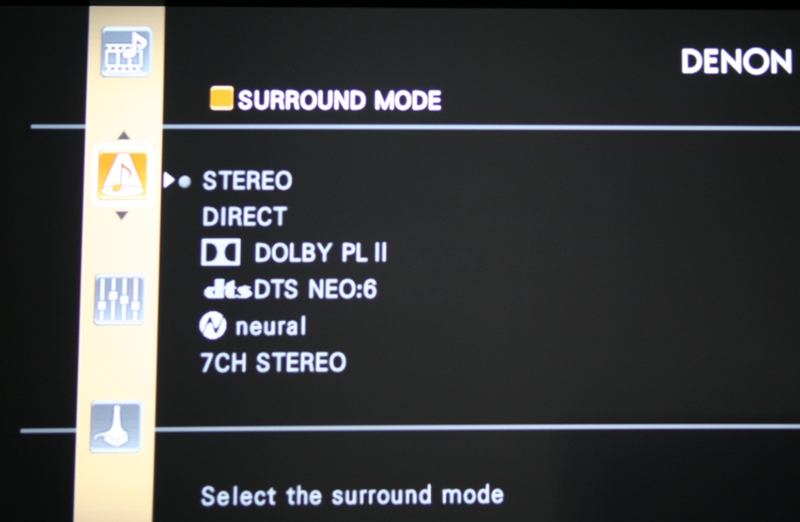 On top
of that, there are many options that are labeled… confusingly. For
example, you can adjust HDMI
settings from not only the individual sources (for upconversion and
scaling) but also from the Manual Setup menu (RBG Range, Verticla
Stretch, Lip Sync, HDMI Audio, Monitor control, and HDMI CEC). Also,
the Picture Adjust has your video calibration settings and you can
see how someone could get a little confused. This, of course, is par
for the course with Denon. Just like Windows users expect to get deal
with non-intuitive interfaces from the software giant, Denon users
are used to inexplicably complicated menu systems and manuals that
are written in engineer. Still, the GUI is at least an order of
magnitude better than anything we've ever had from Denon.
On top
of that, there are many options that are labeled… confusingly. For
example, you can adjust HDMI
settings from not only the individual sources (for upconversion and
scaling) but also from the Manual Setup menu (RBG Range, Verticla
Stretch, Lip Sync, HDMI Audio, Monitor control, and HDMI CEC). Also,
the Picture Adjust has your video calibration settings and you can
see how someone could get a little confused. This, of course, is par
for the course with Denon. Just like Windows users expect to get deal
with non-intuitive interfaces from the software giant, Denon users
are used to inexplicably complicated menu systems and manuals that
are written in engineer. Still, the GUI is at least an order of
magnitude better than anything we've ever had from Denon.
Once you get familiar with the menu system, if you are a real Audioholic you'll set up your speakers and level match with your trusty Rat Shack level meter and then you will run Audyssey. If not, you'll run Audyssey first and then look over the settings and adjust (everyone should do this especially for speaker size and crossover setting). Either way, you need to run Audyssey. Why? Well, aside from the room correction (which is easy to defeat with a single remote command) it gives you access to Audyssey Dynamic EQ and Dynamic Volume. While you may not have much use for it all the time, Dynamic EQ maintains sound quality at different volume levels while Dynamic Volume maintains similar volume over time. This is great for late night listening when you have kids or spouses or neighbors that might be disturbed. It allows you to lower the volume to a reasonable level and maintain both the volume and the sound quality. I'll venture to say that even if they won't admit it, a majority of Audioholics can and will use this feature from time to time.
After my initial setup which included connecting all the cables, turning on the unit, running Audyssey, and adjusting my settings, I looked to some of the more advanced settings. While I would love to report on Audyssey DSX, my room just wouldn't support it. Heck in my room, I run 5.1 because 7.1 is overkill. I feared that any report I might have on adding more speakers up front would be fraught with errors based on the room and be of little use to you the reader. Just know that the idea behind DSX and Pro Logic IIz is to widen and lift the front soundstage - perfect for front projector systems with speakers below the screen or just for large rooms that need a larger front soundstage.
Instead, I focused on setting up my video upconversion, network streaming, and testing Audyssey.
HDMI
Video Upconversion
As
mentioned before, the thing you'll want to remember is that you need
to match your video display's native resolution and also to set your
sources to output the content's native resolution. Provided you do
that, the next thing to remember (and this is important) is that if
your chosen resolution isn't supported by you display you will get
NOTHING. That's right - no picture. This can be a shocking experience
(I know) especially when you've run your cable in the wall and your
first thought is that your cable went inexplicably bad. This is an
EXCELLENT reason to make sure you have an analogue backup (or an
input that isn't being converted at all) so that you can get to your
menu to make adjustments later on (note - it is possible to navigate
every one of the AVR-4310CI's menus via the faceplate display but it
can be a bit confusing if you are not intimately familiar with them).
One of the nice things about the AVR-4310CI is that it has a menu
overlay across HDMI and a screensaver when no source is present so
that you can tell if you have a valid connection or not.
That being said you have many setting options for video conversion. What you choose will be determined largely by your display's capabilities. Making sure you choose the right options is based on how well you understand your display. Options include:
|
i/p scaler |
Analog ; Analog & HDMI ; Off |
|
Resolution (analog) |
Auto ; 480p/576p ; 1080i ; 1080p ; 1080p/24Hz |
|
Resolution (HDMI) |
Auto ; 480p/576p ; 1080i ; 1080p ; 1080p/24Hz |
|
Progressive Mode |
Auto ; Video 1 ; Video 2 |
|
Aspect |
Full ; Normal |
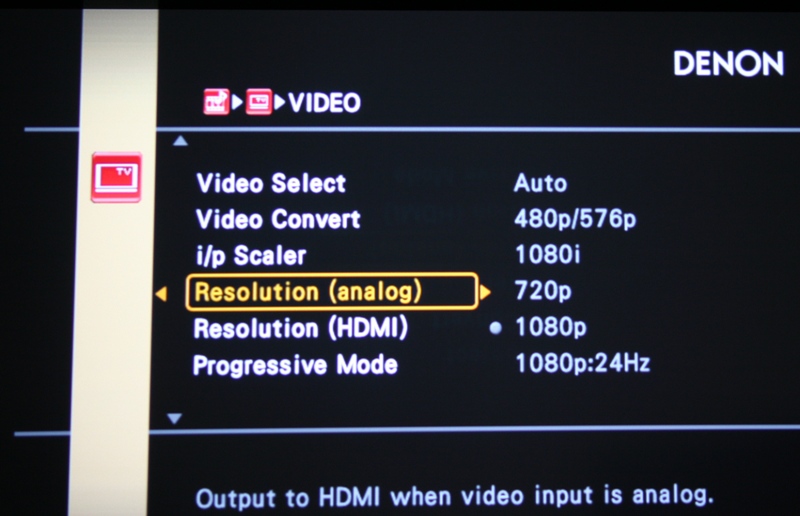 Plus you
have the ability to change the Input (audio source) and Decode modes
as well as setting the level for both analog and digital sources
manually. For most of us, Auto on most of these settings will be fine
though I recommend you set the resolution manually. In
particular, you want to stay away from the 1080p/24Hz unless you are
sure your display can handle it.
Plus you
have the ability to change the Input (audio source) and Decode modes
as well as setting the level for both analog and digital sources
manually. For most of us, Auto on most of these settings will be fine
though I recommend you set the resolution manually. In
particular, you want to stay away from the 1080p/24Hz unless you are
sure your display can handle it.
One thing I wish I would have found with the Denon AVR-4310CI is custom Picture Adjust (Contrast, Brightness, etc.) with every input. At this price point I certainly think it is warranted. This makes adjusting for each source much, much easier. As it is the Picture Adjust settings are pretty much useless as they affect each source equally.
Network
Streaming
Network
streaming with the AVR-4310CI is a good deal easier than I would have
thought. I used the AVR-4310CI with both Windows XP and 7 (I skipping
the horror that was Vista) and had similar experiences. Since the
connection is hardwired to your router, you won't have to worry much
about security or even a connection. I connected up the Denon
AVR-4310CI and completely forgot about this feature until the
receiver was turned on by the family while I was working in my office
and an icon popped up letting me know. I was able to double click on
the icon and after a few seconds of drivers installing I had complete
access to the receiver. This was kind of fun since I could change
inputs from the office and make my family think it was possessed and
therefore I should be the only one to use the remote. Everyone won as
far as I was concerned.
The network ability of the AVR-4310CI is twofold - you can stream to the receiver or control the receiver from a networked computer. When controlling the receiver you have access to all the menus you would from the GUI. This is a great way (and much preferable to using the remote and scrolling) to quickly rename any inputs. It also makes checking your settings on multiple inputs much easier. I've had no problems with access from either Windows XP or Windows 7 and have used both hard wired and wireless connections (from computer to router, not receiver to router) with equal ease. The interface is a bit slow and ugly but the convenience can't be beat.
Mostly, though, people are going to use the network connection to download updates and to stream content from either the Internet or a networked computer. While the Internet Radio worked well, I'd highly recommend that you use the computer interface to set up your channels. The menu is way too restricted in size and you'll be there forever scrolling through huge lists to find your channels. Streaming from a computer is easy if a bit frustrating. The interface has anywhere from a one to five (or more it seemed at times) second delay between button push and action. Much like the old days of DOS text games, you need to keep track of your button pushes if you don't want to find yourself careening wildly around the menu.
Denon AVR-4310CI Audyssey, Remote
Audyssey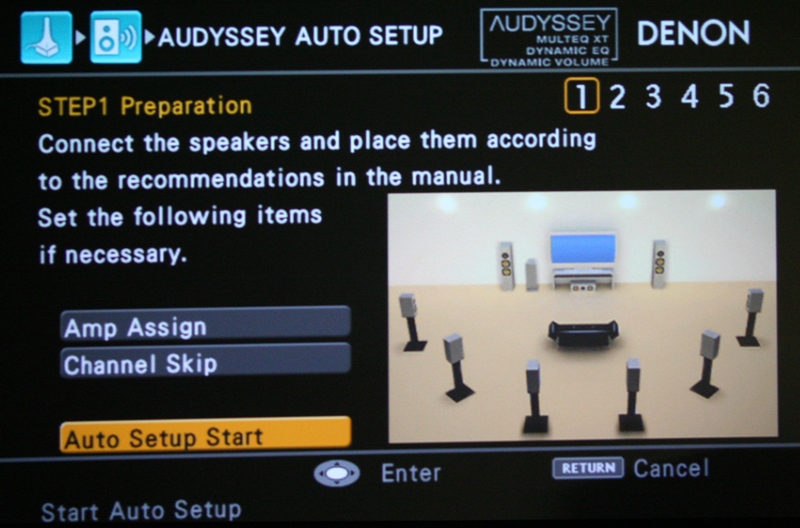 Audyssey
has been covered ad nausem on this and other sites so I won't rehash
all that here. I did think that my subjective experience with the
MultEQ XT deserved a mention. While you may never have a room as
dedicated or treated as mine, you may wonder what it would do in such
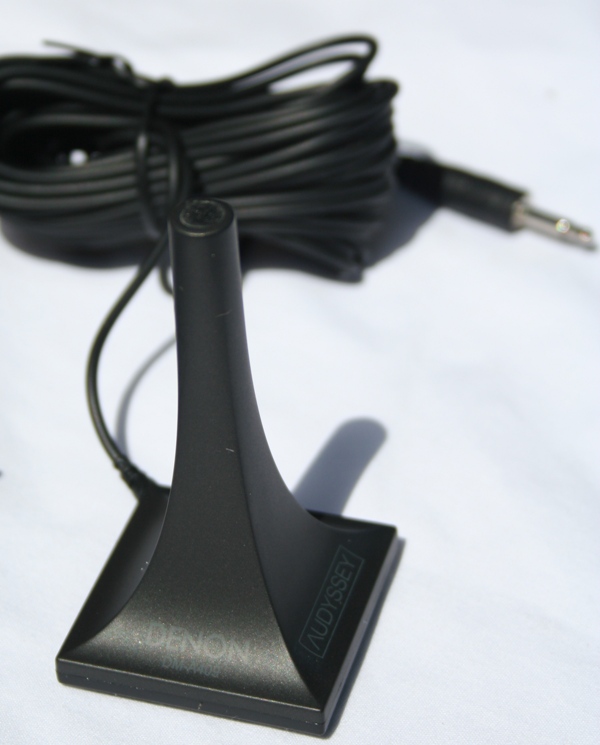
a room. The MultEQ XT allows up to 8 measurement locations. I have a
four seat couch (love seat in the center and two side seats) where
the two center seats are used probably 90% of the time. I ended up
taking a measurement at the center of the couch, one on each of the
loveseats, one in each of the side seats, and two in front of the
center seats. That adds up to 7 so I did one additional measurement
at the center of the couch again to more heavily weight that locale.
Audyssey
has been covered ad nausem on this and other sites so I won't rehash
all that here. I did think that my subjective experience with the
MultEQ XT deserved a mention. While you may never have a room as
dedicated or treated as mine, you may wonder what it would do in such
a room. The MultEQ XT allows up to 8 measurement locations. I have a
four seat couch (love seat in the center and two side seats) where
the two center seats are used probably 90% of the time. I ended up
taking a measurement at the center of the couch, one on each of the
loveseats, one in each of the side seats, and two in front of the
center seats. That adds up to 7 so I did one additional measurement
at the center of the couch again to more heavily weight that locale.
First, let me say that for once a room correction system got the size of my speakers correct. I used the AVR-4310CI with two different sets of tower front speakers and it correctly identified them as such. More importantly, it identified the rear and center speakers as Small (a more common mistake). It did incorrectly identify the distance of my sub (it would have been somewhere on my driveway) but that is also a common error. I ran Audyssey a number of times and while the rears, mains, and sub were all consistent, the center channel had a 2dB swing from measurement to measurement. While this could be due partially to mic/speaker placement, it seemed a bit out of place.
 There
are really three different Audyssey settings - Audyssey, Audyssey
with Dynamic EQ, and Audyssey with Dynamic EQ and Dynamic Volume. You
can't have Dynamic Volume without Dynamic EQ. Remember
that Dynamic EQ is designed to keep a uniform frequency response
across volumes while Dynamic Volume is designed to keep a uniform
volume over time. Dynamic Volume is really meant to keep commercials
from getting too loud or from waking the neighbors. Since I don't
care about either, I didn't really need it. Dynamic EQ, on the other
hand, sounded much more appealing to me. What happens at different
volume levels is that certain frequencies will start to drop off.
Keeping this from happening sounds like a good thing - in theory.
There
are really three different Audyssey settings - Audyssey, Audyssey
with Dynamic EQ, and Audyssey with Dynamic EQ and Dynamic Volume. You
can't have Dynamic Volume without Dynamic EQ. Remember
that Dynamic EQ is designed to keep a uniform frequency response
across volumes while Dynamic Volume is designed to keep a uniform
volume over time. Dynamic Volume is really meant to keep commercials
from getting too loud or from waking the neighbors. Since I don't
care about either, I didn't really need it. Dynamic EQ, on the other
hand, sounded much more appealing to me. What happens at different
volume levels is that certain frequencies will start to drop off.
Keeping this from happening sounds like a good thing - in theory.
In practice, however, I didn't like it. The Dynamic EQ at lower volumes (the volumes I'd use when the family was asleep or when I was watching TV with them - basically anytime I'm not watching by myself) tended to overboost the bass unnaturally. I found that I could recognize the effect even if I didn't know Dynamic EQ was on. Now, any number of factors may come to bear including the ability of my sub (the Axiom EP500 is no slouch), the flatness of my room, or just where I measured. I will note that I completely redid the measurements twice trying to keep the measurements in similar locations but most likely introducing slight differences. Dynamic EQ invariably gave me the same feeling.
With Audyssey engaged without Dynamic EQ, there was a difference in the sound. Part of this listening test was really more about how good my room is. I've had my room measured and corrected by Auralex so I know where and what my problems are. I also know that my problems are not as severe as many rooms out there. So I expected there to be a difference with Audyssey engaged but for the differences to be subtle and all for the better.
They were.
I've played with a number of different room correction systems in the past from different manufacturers and I have to say that this is the first time I've ever felt compelled to leave it engaged. Usually, I find the results to be at best non-harmful (hardly an incitement to use the system) but often I find the detrimental effects to far outweigh the benefits. With Audyssey engaged, everything sounded a bit clearer, a bit more forward, and generally more uniform. Vocals, in particular, sound more present and closer to the listening position than they do without Audyssey. But the effects were mostly subtle and they all felt like an improvement from non-Audyssey listening. I was very impressed.
Remote
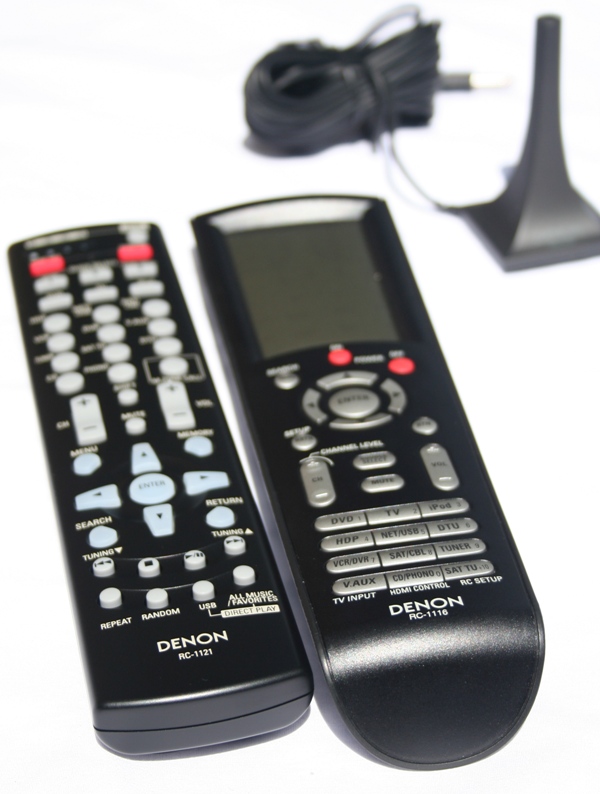 The
Denon AVR-4310CI actually has two remotes - a main remote and one for
the second zone. The second remote (RC-1121) is very typical with
buttons for each input, all your general controls, and multiple zone
(including the main zone) support. The main remote (RC-1116) is
really what you should be looking at. I rarely like remotes - I
REALLY liked this one. There are three basic areas on the remote -
the top Glow Key section, center control area, and bottom hard coded
buttons. Let's work from the bottom up. The bottom buttons are
essentially all the inputs. While some of the buttons are doubled up
(multiple presses cycles through them and the unit remembers what was
the last input you were on so you can switch back easily), most of
them are unique. This are also doubles for a numerical keypad but I
never found a need to use it as such. The center area has your
receiver power buttons, control buttons, and volume/channel/menu/etc.
buttons. The Glow Key area is where it is at for this remote. Here
you can switch which device you are controlling as well as zones.
Under the receiver, you can control such functions as surround modes,
Audyssey, DSPs, video (which is great if you want to listen to one
source while viewing another), and HDMI output (remember, the
AVR-4310CI has two HDMI outputs, you can switch between them if you
want).
The
Denon AVR-4310CI actually has two remotes - a main remote and one for
the second zone. The second remote (RC-1121) is very typical with
buttons for each input, all your general controls, and multiple zone
(including the main zone) support. The main remote (RC-1116) is
really what you should be looking at. I rarely like remotes - I
REALLY liked this one. There are three basic areas on the remote -
the top Glow Key section, center control area, and bottom hard coded
buttons. Let's work from the bottom up. The bottom buttons are
essentially all the inputs. While some of the buttons are doubled up
(multiple presses cycles through them and the unit remembers what was
the last input you were on so you can switch back easily), most of
them are unique. This are also doubles for a numerical keypad but I
never found a need to use it as such. The center area has your
receiver power buttons, control buttons, and volume/channel/menu/etc.
buttons. The Glow Key area is where it is at for this remote. Here
you can switch which device you are controlling as well as zones.
Under the receiver, you can control such functions as surround modes,
Audyssey, DSPs, video (which is great if you want to listen to one
source while viewing another), and HDMI output (remember, the
AVR-4310CI has two HDMI outputs, you can switch between them if you
want).
Now, I said I really liked this remote - and I do - but it is not without its problems. First, the only part that is backlit is the top section. While I have no problems remembering where each of the input buttons are, others in my family did. Also, when someone sees the DVD icon on the Glow Key area, they often think this will switch the inputs on the receiver - not so. It switched the remote into DVD control mode. If you have a Denon DVD player you'll be fine but if not you'll need to enter the correct remote code. Also, you switch between the zones by hitting the Main button on the Glow Key area multiple times. Not the best way to do it and it often takes a while to understand that the reason why the remote isn't responding correctly is because you've inadvertently switched to a different zone.
All that being said, I was pleased by many aspects of this remote, especially since the receiver on/off buttons were dedicated. There were plenty of dedicated receiver controls, and the Glow Key area would switch to display the controls of each individual device as you wanted to control it. This meant that the top Glow Key area became your device control with the central and lower area the control for the receiver (mostly - buttons like Channel and Menu would change function based on what source you were controlling). After experiencing the horror that was the remote for the Denon AVR-3805, this seems like a great compromise. In the future, Denon needs to focus on making the entire remote backlit and they'll have a winner on their hands.
Denon AVR-4310CI Listening and Viewing Tests
I hooked the Denon AVR-4310CI to a number of different speakers, devices, and displays. Speakers ranged from full range floorstanding speakers from Salk (SongTower QWTs, Veracity HT2-TLs), Dipoles (Emotiva ERD-1s), and bookshelves (RBH TK-515C). Displays included a Westinghouse LVM-42w2, InFocus IN3108, and Optoma HD20. Sources and other devices included Seymour AV 500w Ice Block amps, Oppo DV-970HD, APC H15, Squeezebox Duet, and both a PS3 and an Xbox 360. All digital cabling was provided by Impact Acoustics with analogue cables from Blue Jeans Cables and Ramm Electronics.
While I've already mentioned my Audyssey listening experiences, I will expand here. The Denon AVR-4310CI never lacked for power to push most of the speakers I mated it with. Audio was clear and uncluttered with no evidence of strain. Audyssey worked well with it but as we've reported before, it does tend to suck some of the volume off the top end. With Audyssey engaged, I found that my general listening volume went up from 5 to 10dB. The Denon AVR-4310CI had tons of headroom so it was never a problem but those with demanding speakers and/or a large room… well, you'll still most likely be fine.
My one caveat here is that when the Salk Veracity HT2-TLs came in for review, I ended up opting for a connection to the Seymour AV 500w Ice Block amps rather than to the Denon. While the Denon was doing fine, I felt that the 87dB sensitive, 4 ohm Salks would benefit from the additional power. The Seymour AV amps are rated at higher power levels into 4 ohm loads than the AVR-4310CI can produce but the 130 watt rating at 8ohms certainly is more than enough for most speakers on the market however.
Two Channel Listening
I listened to a number of two channel CDs with the Denon AVR-4310CI including the disc J. Clarke brought for our $1500-$2000 Loudspeaker Shootout. This CD is full of reference level materials (see the shootout for specifics) that test the full range of a speaker's ability from deep bass to highest treble. Universally the Denon AVR-4310CI provided deep, clear bass, colorless midrange, and airy treble. If you are worried about this receiver running out of power reserves or coloring your sound, you're going to need some hungry speakers. The receiver seemed to have limitless power reserves regardless of the volume.
CD:
Yello - the eye This CD
is used pretty much universally by me for setup of speakers. There is
a ton of bass information plus a lot of use of phase to move sound
around the room in using only two speakers. To
say that I'm familiar with this album is akin to saying that my six
year old is sort of looking forward to Christmas. Nary a week goes by
where this disc doesn't make a stop in my DVD player. While the
actual physical presentation of the music is really determined on the
quality of the speakers, I was listening for any audible coloration
by the AVR-4310CI. If the receiver had a top limit, it must have been
far above my limit for risking hearing damage. I kept turning up the
volume hoping to get the Denon to audibly distort but it was to no
avail. The receiver just couldn't be overdriven with the speakers I
was using (the Salk SongTowers - this was before the Veracity's had
arrived for review). With a large room, I still don't believe you're
going to have much of a problem with this receiver provided you have
moderately efficient speakers.
This CD
is used pretty much universally by me for setup of speakers. There is
a ton of bass information plus a lot of use of phase to move sound
around the room in using only two speakers. To
say that I'm familiar with this album is akin to saying that my six
year old is sort of looking forward to Christmas. Nary a week goes by
where this disc doesn't make a stop in my DVD player. While the
actual physical presentation of the music is really determined on the
quality of the speakers, I was listening for any audible coloration
by the AVR-4310CI. If the receiver had a top limit, it must have been
far above my limit for risking hearing damage. I kept turning up the
volume hoping to get the Denon to audibly distort but it was to no
avail. The receiver just couldn't be overdriven with the speakers I
was using (the Salk SongTowers - this was before the Veracity's had
arrived for review). With a large room, I still don't believe you're
going to have much of a problem with this receiver provided you have
moderately efficient speakers.
Multichannel Listening.
With a multitude of multichannel music available, the question is where is all the Blu-ray at? I have on hand two Blu-ray music offerings, one of which I'll cover here. First though, I decided to grab one of my old standards.
DVD-A:
Porcupine Tree - Deadwing DVD-A
along with SACD were the defacto standard for high definition
multichannel audio. Sure there were a few others including DTS and
Dolby that put out multichannel disc but for the most part if you
wanted high quality sound, you needed a player that could decode one
if not both of these formats. Porcupine Tree was a shiny beacon of
rock in a sea of classical and jazz that dominated both the formats.
Nearly everyone that was into multichannel audio and was below the
age of 50 picked up (or wanted to pick up) one of their discs.
Deadwing, while arguably not the best, is a very good representation
of the band's style. With a good mix of acoustic guitar and high
energy rock, you will experience a "better than in the studio"
recording that is mixed intelligently into all five channels. Again,
the Denon AVR-4310CI preformed perfectly. I played around with
Audyssey a bit and confirmed that even at higher volumes the Dynamic
EQ boosted the bass a little too much. With standard Audyssey
engaged, I found everything a bit clearer, a bit more vibrant, and
generally a bit better.
DVD-A
along with SACD were the defacto standard for high definition
multichannel audio. Sure there were a few others including DTS and
Dolby that put out multichannel disc but for the most part if you
wanted high quality sound, you needed a player that could decode one
if not both of these formats. Porcupine Tree was a shiny beacon of
rock in a sea of classical and jazz that dominated both the formats.
Nearly everyone that was into multichannel audio and was below the
age of 50 picked up (or wanted to pick up) one of their discs.
Deadwing, while arguably not the best, is a very good representation
of the band's style. With a good mix of acoustic guitar and high
energy rock, you will experience a "better than in the studio"
recording that is mixed intelligently into all five channels. Again,
the Denon AVR-4310CI preformed perfectly. I played around with
Audyssey a bit and confirmed that even at higher volumes the Dynamic
EQ boosted the bass a little too much. With standard Audyssey
engaged, I found everything a bit clearer, a bit more vibrant, and
generally a bit better.
Blu-ray:
Blue Man Group: How to be a Megastar Live! It's
hard not to get into this group especially after you have seen them
live. Two parts industrial rock, two parts performance art, one part
weird comedy with a splash of social commentary… there is something
for nearly everyone. Plus they are blue, what's not to like about
that? This particular disc has a number of advantages my favorite of
which is that the audio is available in uncompressed 5.1 PCM. While
DTS-HD and Dolby TrueHD are both considered uncompressed, linear PCM
is about as uncompressed as it gets. The fact is that this is a tough
disc to use when reviewing because you end up getting so engaged with
the music and the performance that you forget you're supposed to be
writing. The mixing of this album, with probably not up to the
standards of the Porcupine Tree offering, is very good and very deep.
Having heard them live, I can honestly stay that other than the
audience being slightly muted (a good thing), this recording sounds
remarkably similar to the live event. Of course, because of the mix,
you sound like you're standing somewhere on stage. The Denon
AVR-4310CI had no problems keeping up with the demands of this
material. I was able to basically pick a band member, watch their
movements, and pick out their sounds from the cacophony. While that's
not that hard for one of the Blue Men, when you choose one of the
myriad of percussive backup players hitting a single cymbal, that’s
a different story.
It's
hard not to get into this group especially after you have seen them
live. Two parts industrial rock, two parts performance art, one part
weird comedy with a splash of social commentary… there is something
for nearly everyone. Plus they are blue, what's not to like about
that? This particular disc has a number of advantages my favorite of
which is that the audio is available in uncompressed 5.1 PCM. While
DTS-HD and Dolby TrueHD are both considered uncompressed, linear PCM
is about as uncompressed as it gets. The fact is that this is a tough
disc to use when reviewing because you end up getting so engaged with
the music and the performance that you forget you're supposed to be
writing. The mixing of this album, with probably not up to the
standards of the Porcupine Tree offering, is very good and very deep.
Having heard them live, I can honestly stay that other than the
audience being slightly muted (a good thing), this recording sounds
remarkably similar to the live event. Of course, because of the mix,
you sound like you're standing somewhere on stage. The Denon
AVR-4310CI had no problems keeping up with the demands of this
material. I was able to basically pick a band member, watch their
movements, and pick out their sounds from the cacophony. While that's
not that hard for one of the Blue Men, when you choose one of the
myriad of percussive backup players hitting a single cymbal, that’s
a different story.
Blu-ray:
Monsters vs. Aliens
If you
think this is the only Blu-ray movie I watched during this review
period, you are seriously mistaken. It is, however, the only one I
bothered to take pictures of. While I could have done without all the
"in your face" made for 3D scenes, overall I (and my kids)
enjoyed the movie. It was funny, engaging, and overall enjoyable.
This was one of the first movies I viewed after my Audyssey
calibration and at first I didn't know I had to manually disable
Dynamic EQ. Since it was family movie night, I was playing it at near
reference level and I still recognized the bass bloat affected by
Dynamic EQ. After I switched it off and just ran straight Audyssey, I
found the presentation much more natural. The picture, as you can
see, was just amazing as was the sound. Bass was crisp and clean,
voices were well presented, and sounds moved around the room
effortlessly. I was particularly impressed with the AVR-4310CI's
ability to convincingly anchor some sounds (something that happens a
lot in this movie) while keeping others very diffuse.


Viewing
The upconversion capability of the Denon AVR4310CI was already addressed above but I wanted to include a few pictures. As you can see, with a decent display (or even a mediocre one) you'll end up with a great picture. This same projector failed a number of HQV tests on it's own but once the Denon AVR-4310CI was introduced, provided a stunning, artifact-free picture.
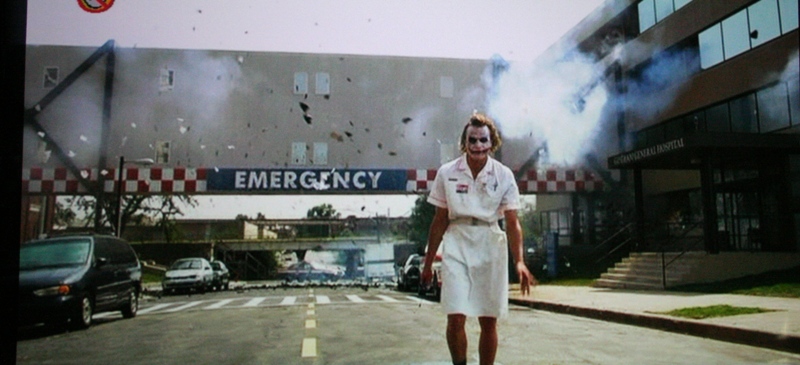

These pictures from Dark Knight are from the DVD version. While the dark detail is not something the Denon can do something about, the picture looks remarkably clear and artifact free considering it was blow up to slightly larger than 80" diagonal. These were sent out 480i via HDMI on an Oppo DV-970HD letting the Denon upconvert it to 1080p for the Optoma HD20 (all the screen shots are with this projector).
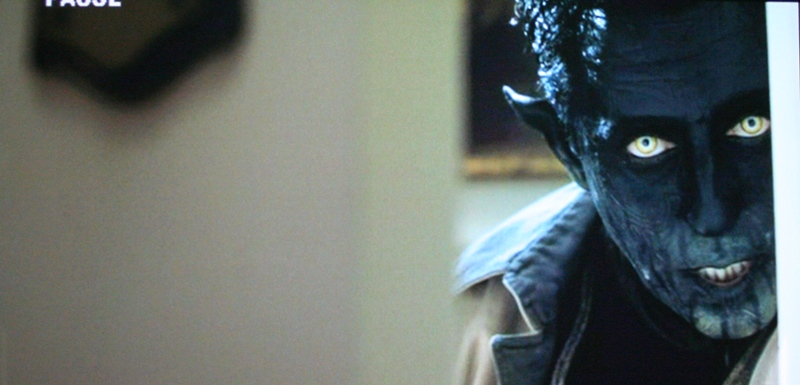

Again, this is with the Oppo and is the DVD version of Xmen 2. As you can see, even during the more explosive scenes, the Denon AVR-4310CI was able to upconvert the signal admirably. While you will see an improvement with you upgrade to the Blu-ray version, you'll probably have to point it out to your spouse.


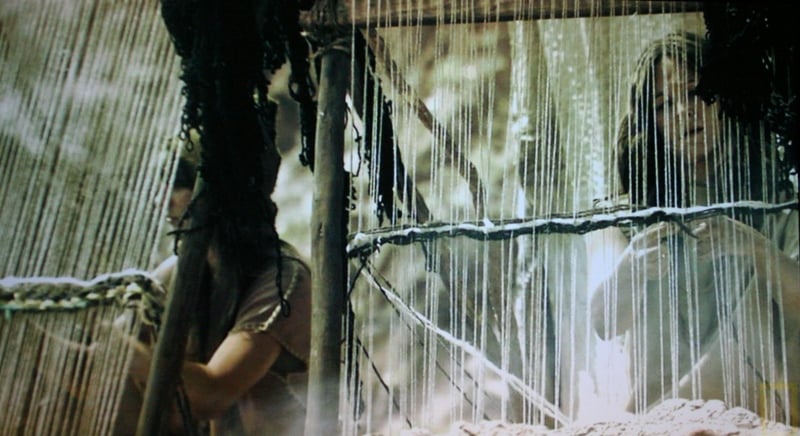
These last examples are from the notoriously bad Comcast signal. Even with vertical lines, there was no jaggies. The backgrounds all look crystal clear and artifact free. While this doesn't represent the ease of use factor as the Denon AVR-4310CI allowed for much quicker switching between channels, the pictures show how well it can do with a mediocre signal. The first is from the Pallidum channel, the second from HD Theater, and the third from Nat Geo.
Denon AVR-4310CI Measurements and Analysis
All measurements were conducted on the new Audio Precision APx585 8 Channel HDMI Audio Analyzer. No line regulation was used but the wall voltage was constantly monitored to ensure it never dropped below 116Vrms.
Keep in mind most review publications test at clipping and don’t do continuous power measurements so our power numbers are usually a lot more conservative than what you typically find from other reviewers. In addition, unless otherwise noted, our power measurements are conducted at 0.1% THD + N as opposed to a 1% or higher distortion typically seen which is audible and represents hard amplifier clipping.
For more info, see: The All Channels Driven (ACD) Test
At the time of measuring this receiver, I accidentally labeled all graphs as AVR-4810CI when in fact the product under test was the AVR-4310CI as reviewed by Tom Andry.
Preamp Level
The Denon AVR-4310CI was able to output 4Vrms at < 0.1%THD + N for full bandwidth (20Hz to 20kHz) which is more than double the voltage needed for most external amplifiers to reach maximum gain. Unlike other receivers we’ve tested in the past, you have no worries with the Denon driving virtually any external power amplification as it will serve to be an excellent preamp/processor for that duty.
Frequency Response & Power Bandwidth
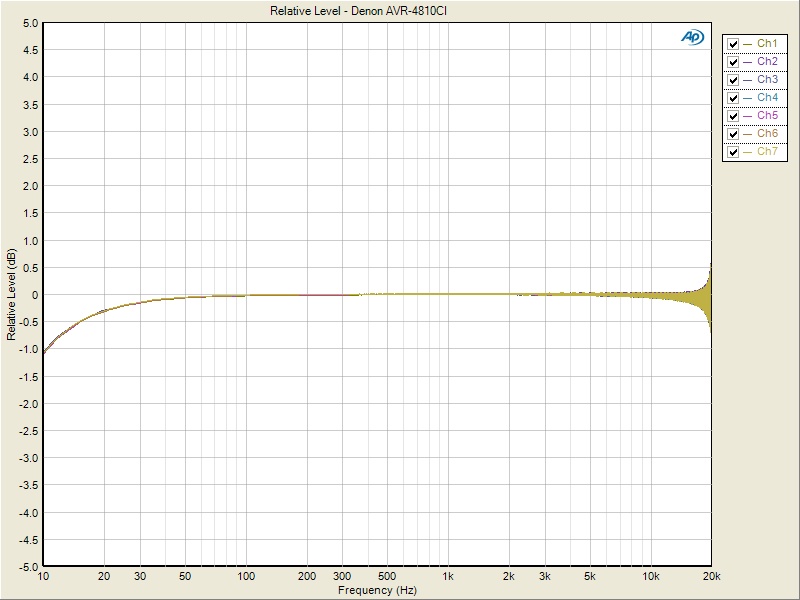
Figure 1. Denon AVR-4310CI Frequency Response Variation
With all seven channels simultaneously driven, we compared the frequency response of each driving an 8 ohm load. As you could see the frequency response variation between channels is excellent measuring -1dB at 10Hz all the way to +-0.5dB at 20kHz.
Power vs Distortion
With the new APx585, we are now able to do a full barrage of multi-channel amplifier testing. We tested power using three methods all of which were taken at < 0.1% THD + N:
-
Continuous Full Power Bandwidth (CFP-BW) from 20Hz to 20Khz into 8 and 4 ohm loads (up to two-channels)
-
1kHz Power Sweep vs Distortion (1kHz PSweep) - popularized by the print magazines, this is an instantaneous power vs distortion test at 1kHz. The problem with this test is it often masks slew related and or frequency response problems some amplifiers exhibit at the frequency extremes, and thus inflates the measured power results. It does provide an instant gratification # for consumers to argue over on the forums so we are now incorporating this test to please the masses.
-
1kHz CEA-2006 Burst Method testing. This is a dynamic power measurement adopted from the car industry similar to IHF method only a bit more difficult for an amplifier and more representative of real musical content.
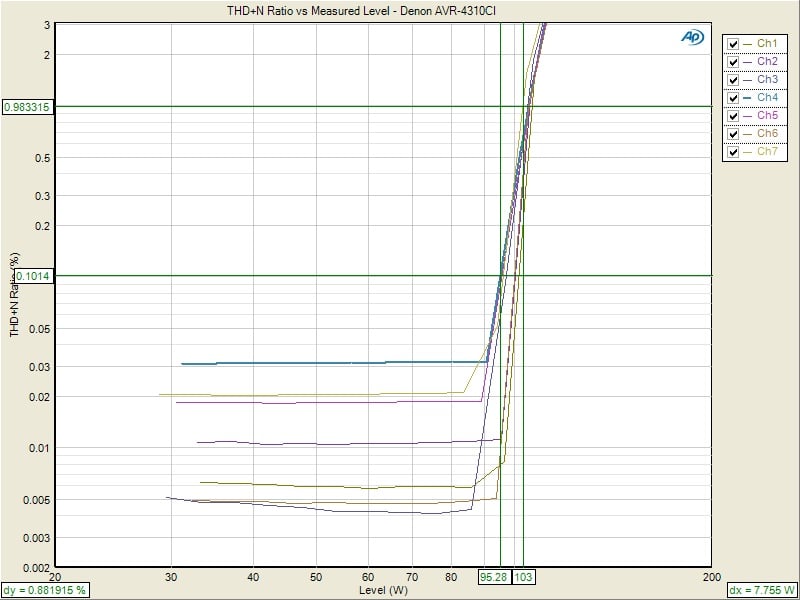
Figure 2. Denon AVR-4310CI PSweep-1kHz Power Testing
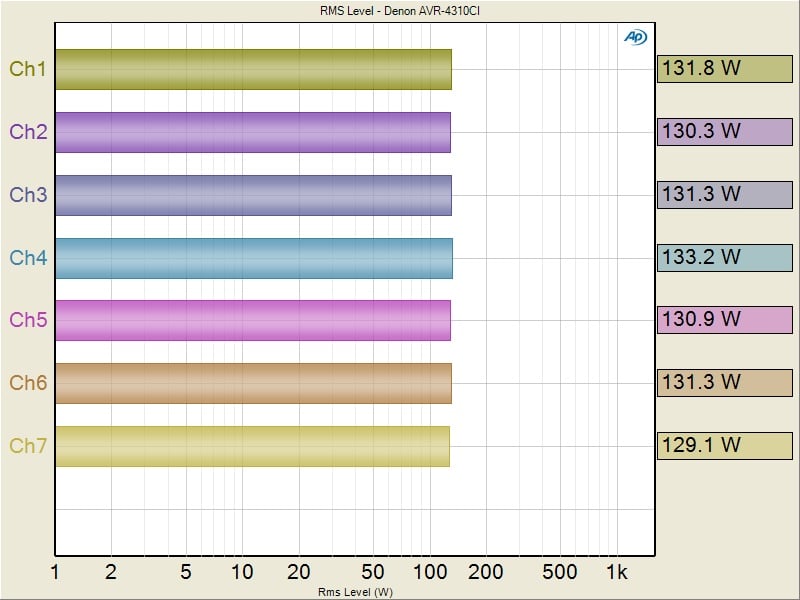
Figure 3 Denon AVR-4310CI CEA2010 Dynamic Power Testing
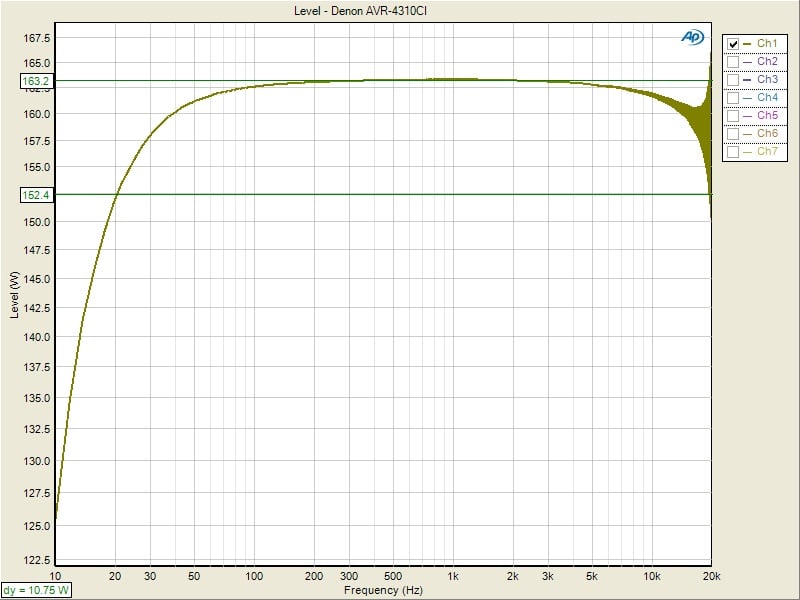
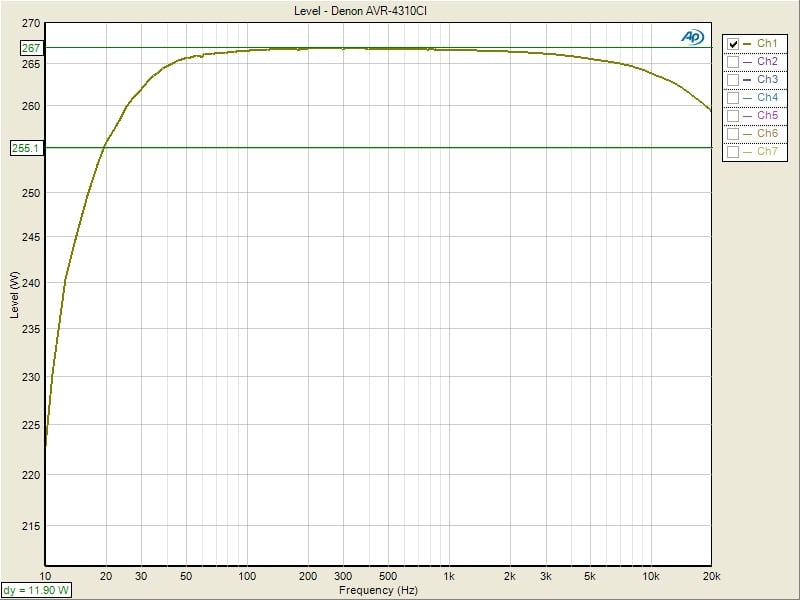
Figures 4 & 5. Denon AVR-4310CI Continuous Power vs Frequency (8 ohms left, 4 ohms, right)
|
# of CH |
Test Type |
Power |
Load |
THD + N |
|
1 |
CFP-BW |
163 watts |
8 ohms |
< 0.1% |
|
1 |
CFP-BW |
267 watts |
4 ohms |
< 0.1% |
|
1 |
1kHz Psweep |
173 watts |
8 ohms |
< 0.1% |
|
1 |
1kHz Psweep |
276 watts |
4 ohms |
< 0.1% |
|
2 |
1kHz PSweep |
152 watts |
4 ohms |
< 0.1% |
|
7 |
1kHz PSweep |
95 watts |
8 ohms |
< 0.1% |
|
7 |
1kHz CEA-2006 |
130 watts |
8 ohms |
< 0.1% |
|
1 |
1kHz CEA-2006 |
192 watts |
8 ohms |
< 0.1% |
|
1 |
1kHz CEA-2006 |
321 watts |
4 ohms |
< 0.1% |
Table 1. Denon AVR-4310CI Tabulated Output Power Under Various Test Conditions
The Denon AVR-4310CI proved to be a true powerhouse for its price class. We honestly weren’t expecting such stellar results in a sub $2k receiver that is jammed packed with features. It was able to exceed its continuous fullbandwidth per channel power rating of 130 wpc by delivering a whopping 163wpc into 8 ohms and 267 watts into 4 ohms. With the standard 1kHz ACD test, the AVR-4310CI delivered 95 wpc which again is excellent. The AVR-4310CI should be able to power most moderately efficient loudspeakers to deliver theatrical power levels in medium to large sized theater rooms.
Crosstalk
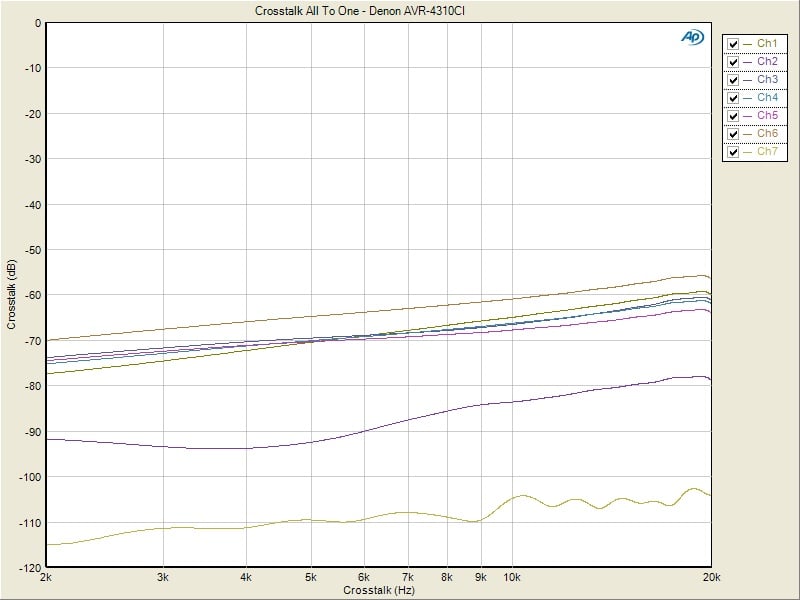
Figure 6. Denon AVR-4310CI All to One Crosstalk
Sweeping from 2kHz to 20kHz on all channels as the noise disturbers but the one under test as the noise, I measured the residual noise of each channel individually and repeated for all seven channels. This is the worst possible test scenario . The overall results were good to stellar. The good was around 60dB of isolation at 20kHz for the surround back channels while the stellar was > 90dB at 20kHz for the main channels. Anything below 60dB at the high end of the frequency spectrum is generally considered to be sufficiently inaudible so there is no cause for alarm here despite the measurable variances between the channels.
Bass Management
As with virtually all modern Denon A/V receivers, the bass management facilities on the AVR-4310CI was top notch. We measured a perfect THX type response with the crossovers set to 80Hz where the subwoofer was at -6dB at 80Hz exhibiting a 24 dB/oct rolloff while the satellites were -3dB down at 80Hz with a 12 dB/oct rolloff as can be seen in the measurement below (Figure 7).
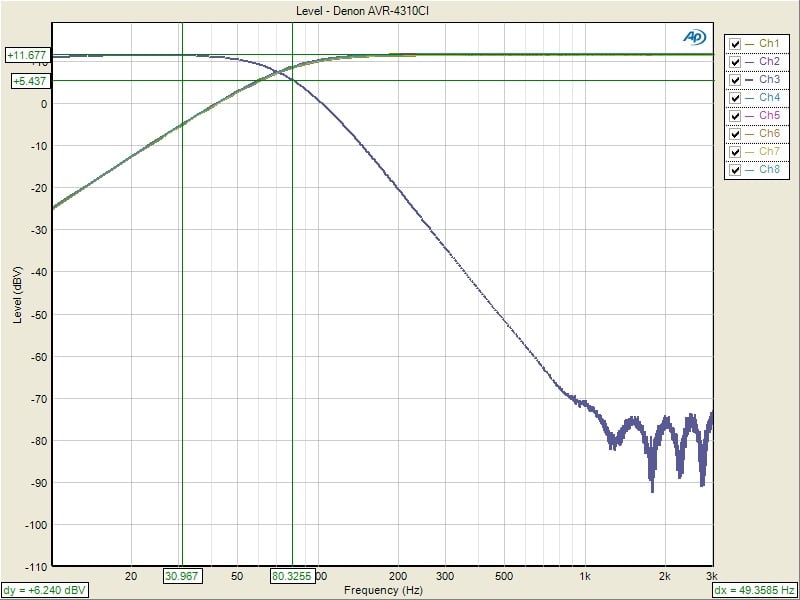
Figure 7. Denon AVR-4310CI Bass Management
Denon AVR-4310CI Conclusion and Ratings
 If
I had to sum up my thoughts, it's that the Denon AVR-4310CI is really
a beast of a receiver. The power reserves seemed nearly endless. The
functionality is so deep, so inclusive, that a review like this can
really only touch on a fraction of what it can do. In fact, I'm
willing to bet that the Denon AVR-4310CI has more functionality than
almost any one user needs at any given time. But that doesn't mean
that you won't need it eventually. The Denon AVR-4310CI has the
breadth of functionality that I'm betting you'll find yourself
searching for a device for some new configuration just to discover
that your receiver already does it. With a full compliment of all the
latest playback formats including Audyssey DSX and Dolby PLIIz plus
top of the line deinterlacing and scaling on board, the Denon has
everything you need. Add to that multiroom support, networkability,
and power reserves for all but the most demanding speakers and you're
basically buying a receiver that you'll be hard pressed to need to
replace. As long as you can live without the new HDMI 1.4 spec, you
shouldn't have to upgrade for a very, very long time.
If
I had to sum up my thoughts, it's that the Denon AVR-4310CI is really
a beast of a receiver. The power reserves seemed nearly endless. The
functionality is so deep, so inclusive, that a review like this can
really only touch on a fraction of what it can do. In fact, I'm
willing to bet that the Denon AVR-4310CI has more functionality than
almost any one user needs at any given time. But that doesn't mean
that you won't need it eventually. The Denon AVR-4310CI has the
breadth of functionality that I'm betting you'll find yourself
searching for a device for some new configuration just to discover
that your receiver already does it. With a full compliment of all the
latest playback formats including Audyssey DSX and Dolby PLIIz plus
top of the line deinterlacing and scaling on board, the Denon has
everything you need. Add to that multiroom support, networkability,
and power reserves for all but the most demanding speakers and you're
basically buying a receiver that you'll be hard pressed to need to
replace. As long as you can live without the new HDMI 1.4 spec, you
shouldn't have to upgrade for a very, very long time.
Denon AVR-4310CI
MSRP: $1999
Denon Electronics
100
Corporate Drive
Mahwah,
N.J. 07430-2041
About
Denon Electronics
Denon
is a world leader in the manufacture of the highest quality home
theater, audio and software products. Denon is recognized
internationally for innovative and groundbreaking products and has a
long history of technical innovations, including the development and
first commercialization of PCM digital audio. Denon Electronics
is owned by D&M Holdings Inc.
About
D&M Holdings Inc.
D&M
Holdings Inc. (TSE II: 6735) is based in Tokyo and owns the Denon,
Marantz, McIntosh Laboratory, Boston Acoustics, Snell, D&M
Professional, ReplayTVâ, Rioâ and Escientâ brands. Denon, Marantz,
McIntosh and D&M Professional are global industry leaders in the
specialist home theater, audio/video consumer electronics or
professional audio markets, with a strong and long-standing heritage
of manufacturing and marketing high-performance audio and video
components. Boston Acoustics, with its signature Boston Sound,™
is a leader in premium loudspeakers for home and audio markets.
Snell is a super premium speaker brand. The ReplayTV, Rio and Escient
brands represent award-winning technologies in digital home
entertainment. Additional information is available at
www.dm-holdings.com.
The Score Card
The scoring below is based on each piece of equipment doing the duty it is designed for. The numbers are weighed heavily with respect to the individual cost of each unit, thus giving a rating roughly equal to:
Performance × Price Factor/Value = Rating
Audioholics.com note: The ratings indicated below are based on subjective listening and objective testing of the product in question. The rating scale is based on performance/value ratio. If you notice better performing products in future reviews that have lower numbers in certain areas, be aware that the value factor is most likely the culprit. Other Audioholics reviewers may rate products solely based on performance, and each reviewer has his/her own system for ratings.
Audioholics Rating Scale
 — Excellent
- — Very Good
- — Good
- — Fair
- — Poor
| Metric | Rating |
|---|---|
| Frequency Response Linearity | |
| SNR | |
| Output Impedance | |
| Measured Power (8-ohms) | |
| Measured Power (4-ohms) | |
| Multi-channel Audio Performance | |
| Two-channel Audio Performance | |
| Network Features | |
| Video Processing | |
| Bass Management | |
| Build Quality | |
| Fit and Finish | |
| Ergonomics & Usability | |
| Ease of Setup | |
| Features | |
| Remote Control | |
| Performance |  |
| Value | |
As Associate Editor at Audioholics, Tom promises to the best of his ability to give each review the same amount of attention, consideration, and thoughtfulness as possible and keep his writings free from undue bias and preconceptions. Any indication, either internally or from another, that bias has entered into his review will be immediately investigated. Substantiation of mistakes or bias will be immediately corrected regardless of personal stake, feelings, or ego.
View full profile Subscribe to our newsletter