


Panasonic PT-FW300U LCD Projector Review
Panasonic PT-FW300U Projector
- Product Name: PT-FW300U LCD Projector
- Manufacturer: Panasonic
- Performance Rating:

- Value Rating:
- Review Date: February 19, 2009 00:00
- MSRP: $ 2,499
|
Resolution: WXGA (1280 x 800) |
Manual zoom: 1:1–1:1.2 Manual focus: F 1.7–2.6, f 21.6–43.0 mm Image Size: 33 - 300 inches Throw Distance: 3.6 - 58.1 feet Keystone Corr.: Vertical: 30 +/- 30 degrees Lens Shift: V: +/- 51% H: +/- 24% Dimensions: 17" x 5.06" x 12.8" (W x H x D) Unit Weight: 13.7 lbs. Power Supply: 100–240 V AC, 50/60 Hz Power Consumption: 250W Lamp: 250W Includes: Power cord, power cord secure lock, wireless remote control, batteries for remote control, Wireless Manager ME 5.5 (CD-ROM), safety wire rope Warranty: 3 years or 3000 hours parts and labor (projector); 90 days or 500 hours (bulb) |
Pros
- V&H lens shift
- High lumen output
- Daylight View 5 works well
Cons
- No noise reduction
- Poor deinterlacing
PT-FW300U Build Quality and Features
This is definitely an update for Panasonic's F-Series business/presentation line of projectors. The lumen output is the same, and though they changed their ambient light compensation feature to "Daylight View 5", we couldn't notice a difference in features or performance over version 4. What we did notice is that the F300-Series now comes with an WXGA option - that means it finally has native widescreen support. This is excellent because it means that the line can finally be integrated into hybrid presentation and theater applications. The new series also includes a new digital video input and some other goodies. The F300-Series actually comes in four flavors:
- PT-FW300NTU - 3500 lumens WXGA with wireless network features
- PT-FW300U - 3500 lumens WXGA with wired network features
- PT-F300NTU - 4000 lumens XGA with wireless network features
- PT-F300U - 4000 lumens XGA with wired network features
All four F300-Series projectors have the ability to be monitored remotely. Panasonic’s original Multi Projector Monitoring and Control software (included) allows users to control and monitor
up to 1,024 projectors via LAN. I can't imagine anyone actually controlling that many, but perhaps I just need a job at NASA or the National Weather Service to visualize the potential. The network even sends out an alarm message if a problem occurs, such as a bulb replacement warning.
The PT-FW300U ditched its Auto Rolling Filter (ARF) system, opting for a new Auto Cleaning Filter - a much more self-explanatory designation. Instead of electrostatically pulling particles out of the path of the light engine, the ACF sweeps them off the filter with brushes. Panasonic continues to design the airflow path to minimize dust and allow the lens system to remain "blob-free". The system goes for about 10,000 hours before the user-serviceable filter/brush needs to be replaced.
Everything else about this projector is about the same as the PT-F200U - at least in terms of its physical attributes. The PT-FW300U has the same lens shift, protective door, and 2x zoom which makes this one of the more user- and placement-friendly projectors on the market. Rear access to the bulb is still available, meaning you don't have to uninstall the projector to get at the lamp. This should be the standard in all business-class projectors.
Inputs
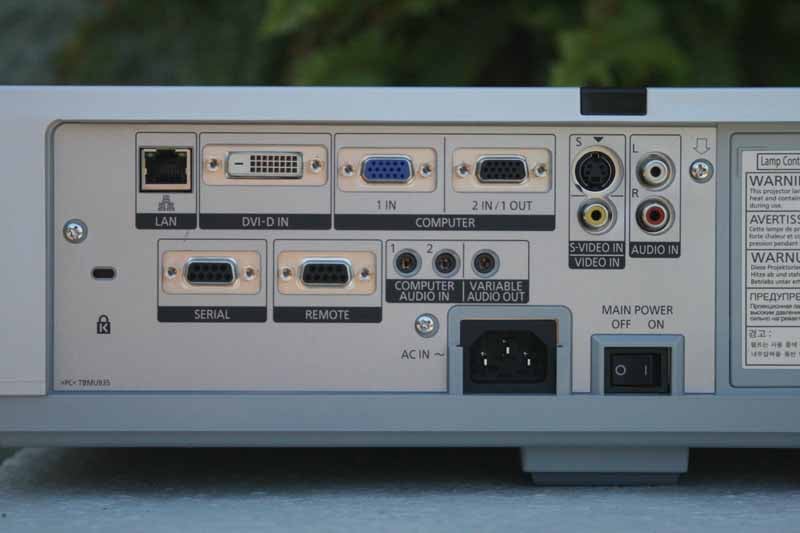
The inputs on this projector are identical to the F200-Series with the exception of a new DVI-I input and Ethernet. This is a welcome change since former models had to use component video and had no support for native digital signals - common with PCs these days (the 15-pin VGA connector will still be around for quite some time, but it is seeing less and less use each year). The DVI-I connector is compatible with HDMI - making this projector totally ready for the 21st century.
New Features
We won't go into the standard features that are the same from prior models - just check out our review of the PT-F200U for a more in-depth explanation. Users can use a standard web browser to operate a PT-F300 Series projector by remote control or monitor its status over a local area network (LAN). The projectors also can be configured to send an e-mail to notify an administrator when an error has occurred or a lamp needs to be replaced. As we alluded to above, 1,024 projectors can be monitored and controlled with Panasonic's Multi Projector Monitoring and Control software. In this configuration an alarm message is sent to the controlling/monitoring PC if an error or problem occurs.
For classroom instruction, the widescreen models (PT-FW300U and PT-FW300NTU) can display two discrete images from two sources onto a single screen. This is perfect if teachers need to, for example, show a PC on one side with a live or recorded video feed on the other. The widescreen models offer each video source a native 640x480 (VGA resolution) image.
For those interested in these things, the PT-F300 Series reflects the following
ecological considerations.
- RoHS compliance
- Lead-free solder is used to mount components to the printed circuit boards
- No halogenated flame retardants are used in the cabinet
- Lenses contain a minimal amount of lead
For wireless models (PT-F300NTU and PT-FW300NTU) software allows the use of a Signal Map (S-MAP) which graphically shows the strength of wireless connection signals. We're not sure how useful this is in practicality, though Panasonic claims you could see which projector is most apt to handle the signal the best. I don't know any situations where projector selection is that random or flexible, but it's certainly a "nifty" feature (or at least some programmer thought so at the time).
PT-FW300U Viewing Tests and Conclusion
Using the PT-F200U as a Theater Projector
Now that the PT-F300 series supports native widescreen mode and comes with a DVI input I feel it takes a step closer to being a hybrid model applicable for home theater. The biggest challenge is black levels, so we'd only recommend it for larger screen sizes where the light output can be sufficiently dispersed onto the surface. This projector still cannot "down-shift" enough to produce acceptable blacks on smaller screen sizes and shorter throw distances. For ambient light situations, however, it hits the ball out of the park.
Other features of the PT-FW300U projector:
- Anti-theft features: Security anchor, user password, control panel lock and text superimposing
- Picture mode selection (standard/dynamic/natural/cinema/blackboard)
- AV mute for image/sound muting
- Menu lock function
- Built-in closed caption decoder
Viewing Tests
For our primary viewing tests we hooked up the Panasonic PT-FW300U to an HD source (this year's Superbowl, in fact, and displayed the output onto an outdoor projector screen. The results were stunning and we found that we were able to view picture just after the sun began it's descent and the peak light of day had slightly waned. This was amazing because we were essentially watching

This is a shot with the flash. Even lit up you can still see the image on the screen with almost total clarity and significant contrast.

At night the game looked incredibly vivid, keeping the eyes on the action and away from our makeshift screen
Conclusion
We were glad we could get up-to-date on Panasonic's latest F-series projector. The PT-FW300U, while still an incremental upgrade over past models, offers some compelling new features that seem to streamline the product and offer a more refined solution to businesses needing a solid, high output presentation product. We love the addition of DVI (especially since it is a locking connector and more appropriate than HDMI for business and presentation use) and the network features are sure to come in handy for larger venue or campus installations that are pre-wired to take advantage of it. Overall, this is a bargain product and can be had at prices far lower than the MSRP listed here. Highly recommended.
Panasonic PT-FW300U LCD Projector

MSRP: $2,499 | Buy It Now from VisualApex
Panasonic Corporation of North
America
One Panasonic Way
Secaucus, NJ 07094
http://www.panasonic.com/
About
Panasonic
Best known by its
Panasonic brand name, Matsushita Electric Industrial Co., Ltd. is a worldwide
leader in the development and manufacture of electronic products for a wide
range of consumer, business, and industrial needs. Based in Osaka, Japan,
the company recorded consolidated net sales of US$81.44 billion for the year
ended March 31, 2005. The company's shares are listed on the Tokyo,
Osaka, Nagoya, New York (NYSE:MC), Euronext Amsterdam and Frankfurt stock exchanges. For more information on the
company and the Panasonic brand, visit the company's website at http://panasonic.co.jp/global/index.html.
The Score Card
The scoring below is based on each piece of equipment doing the duty it is designed for. The numbers are weighed heavily with respect to the individual cost of each unit, thus giving a rating roughly equal to:
Performance × Price Factor/Value = Rating
Audioholics.com note: The ratings indicated below are based on subjective listening and objective testing of the product in question. The rating scale is based on performance/value ratio. If you notice better performing products in future reviews that have lower numbers in certain areas, be aware that the value factor is most likely the culprit. Other Audioholics reviewers may rate products solely based on performance, and each reviewer has his/her own system for ratings.
Audioholics Rating Scale
 — Excellent
- — Very Good
- — Good
- — Fair
- — Poor
| Metric | Rating |
|---|---|
| Detail and Resolution | |
| Deinterlacing & Scaling | |
| Contrast and Black Levels | |
| Color Reproduction | |
| Noise Reduction | |
| Calibration Options | |
| Build Quality | |
| Ergonomics & Usability | |
| Ease of Setup | |
| Features | |
| Remote Control | |
| Fit and Finish | |
| Performance | |
| Value | |
Clint Deboer was terminated from Audioholics for misconduct on April 4th, 2014. He no longer represents Audioholics in any fashion.
View full profile Subscribe to our newsletter