


Panasonic PT-F100U LCD Projector Review
Panasonic PT-F100U LCD Projector Review
- Product Name: PT-F100U
- Manufacturer: Panasonic
- Performance Rating:

- Value Rating:
- Review Date: November 08, 2007 16:21
- MSRP: $ 3599
Brightness: 3200 ANSI lumens
Resolution: 1024 x 768
Aspect Ratio: 4:3 or 16:9 aspect
ratio (4:3 native)
Supported Screen Size: 33-300 inches
diagonal
LCD Panel: 3 x 0.7” polysilicon
active matrix
Optical System: Dichroic mirror
separation/prism synthesis system
Video Features: Ambient Luminance Sensor (ALS)
Scanning Formats: 480i/576i/1080i
and 480p/576p/720p (PAL equivalents supported)
Video Inputs: component, composite, S-video, and 2xPC/RGB (HD15)
Projection Lens: 2x optical zoom; f = 21.6 – 43.0 mm. F/1.7 –
2.6, manual focus & zoom
Lens
Shift: Vertical and horizontal (50% vertical, 32%
horizontal)
Keystone Correction: +/- 30 degrees
(vertical)
Lamp: 250 W UHM lamp
Mounting: ceiling, desk, front/rear
(menu configurable)
Power Supply: 100-240 volts, 50-60Hz
Power Consumption: 330 watts
(maximum), 3.5 watts (standby mode with fan stopped)
Operating Temperature: 32 – 104
degrees F (0 – 40 degrees C); 20-80% humidity (no condensation)
Audio: 3W output via onboard speaker
Projection Method: Front/rear/ceiling
mount/table-top
Remote Control: Standard (non-backlit) remote with laser
pointer, AA x 2 batteries
Standard Accessories: Power cord, Wireless remote control, batteries
for remote control, safety cable
Optional Accessories: Ceiling bracket (ET-PKF100H/ET-PKF100S), AV
cables (TY-SC10CP)
Dimensions: 17” x 4.9” x 12.5” in (432
x 125 x 319 mm)
Weight: 13.2 lbs (6.0 kg)
Pros
- Super bright
- Auto-Rolling Filter (ARF) system reduces LCD panel dust
- Easy lamp replacement
- Ambient Luminance Sensor (ALS) great for commercial use
Cons
- No deinterlacing or 2:3 pulldown
- Crushed black levels
- No 12 volt trigger
PT-F100U Build Quality and Setup
 Houses of worship are
faced with many challenges when considering projectors. Ambient light
conditions, placement, input requirements, and resolution are just some of the
things that grace the top of the list. It was with surprise that I began a
journey with the PT-F100U, discovering that many of the features I associated
with and loved about home theater projectors were present on this
commercially-targeted product. As multimedia needs advance in both the
corporate and house of worship venues, technology seems to be ready to oblige
our needs in the form of products willing to cross over and provide features
previously thought to be distinct.
Houses of worship are
faced with many challenges when considering projectors. Ambient light
conditions, placement, input requirements, and resolution are just some of the
things that grace the top of the list. It was with surprise that I began a
journey with the PT-F100U, discovering that many of the features I associated
with and loved about home theater projectors were present on this
commercially-targeted product. As multimedia needs advance in both the
corporate and house of worship venues, technology seems to be ready to oblige
our needs in the form of products willing to cross over and provide features
previously thought to be distinct.
Description and Build Quality
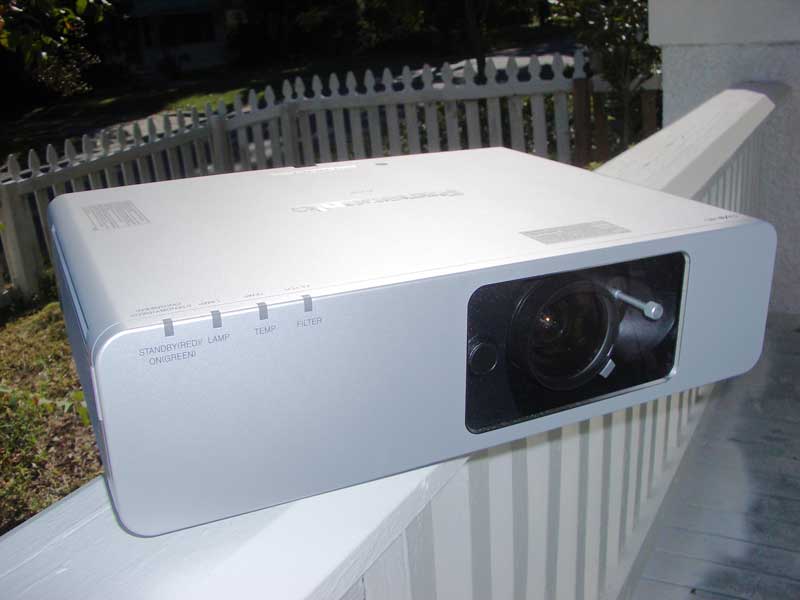
The Panasonic PT-F100U immediately impresses with its protective front panel cover that not only guards against dust and smudges on the front of the lens assembly, but also hides the functions you would not want accidentally altered such as zoom, focus, lens shift, input select and menu functions. For a commercial installation such as a church or office board room this is invaluable and, to put it simply, downright practical. Within the first few minutes, the PT-F100U had already aligned itself on a path to score a couple of 5’s on my rating checklist.
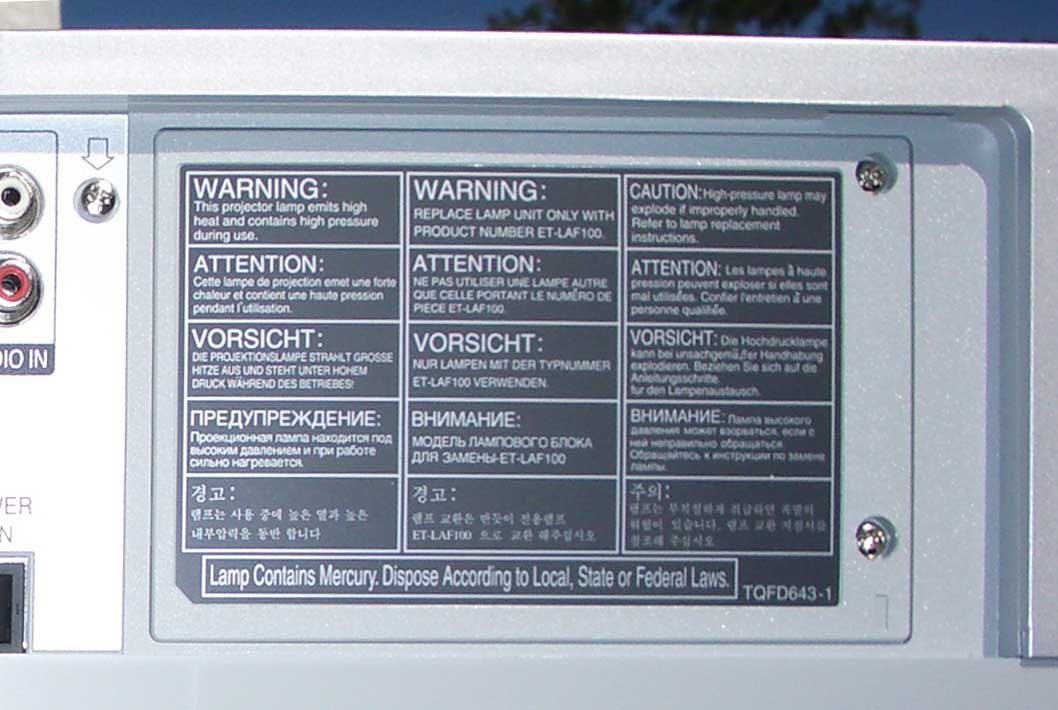 Taking a look at the
rear of the projector you will notice a few things that will stand out clearly
to anyone who has dealt with a commercially-installed projector. The lamp
replacement compartment is located at the back of the projector. This means
that there is no need to remove the system from a ceiling mount just to replace
a bulb. Any projector intended for ceiling mount would do well to take this
simple factor into consideration, especially with some of the 20-foot-plus
ceilings I’ve seen in my time.
Taking a look at the
rear of the projector you will notice a few things that will stand out clearly
to anyone who has dealt with a commercially-installed projector. The lamp
replacement compartment is located at the back of the projector. This means
that there is no need to remove the system from a ceiling mount just to replace
a bulb. Any projector intended for ceiling mount would do well to take this
simple factor into consideration, especially with some of the 20-foot-plus
ceilings I’ve seen in my time.
Inputs
The lamp unit compartment sits next to the input panel. This
projector is set up to handle all major analogue inputs types commonly utilized
in the US. While HDMI is taking over the US consumer market I do not see this
very often in strictly-commercial environments so I would not count this
against the projector in the least. The inclusion of HDMI would simply result
in increased cost due to the requirements it brings.
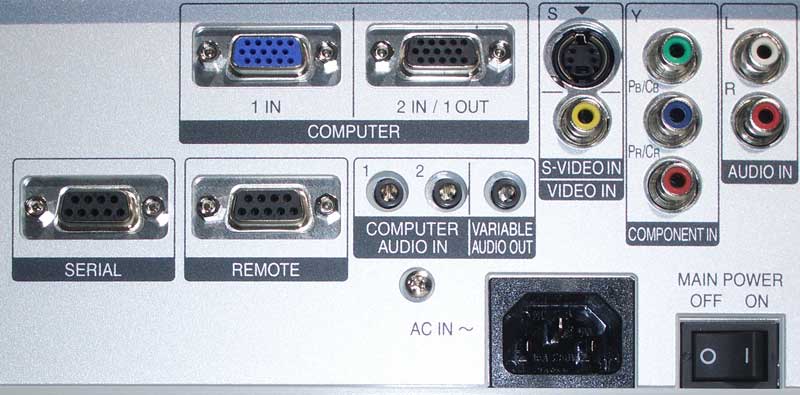
The PT-F100U has two RGB/PC (HD15) inputs, one of which can be configured, via software, to be a pass-through output. There are two audio inputs (1/8-inch mini jacks) which are permanently assigned to the HD15 inputs. A variable audio output allows the projector to control the volume level for a presentation via the remote. A component video input, S-video, and composite video is also present, along with a stereo RCA input which can be configured to either of these three analogue inputs.
Essential Features
Panasonic's PT-F100U is a robust unit that has the features required for a heavy duty installation in most environments where you want to make sure the projector is going to remain trouble-free and function uninterrupted for as long as required.
- Auto-Rolling Filter
(ARF) Technology
The ARF system looks like a small fax cartridge that is simply designed to collect dust which is generated from the heat/cooling air exchange which causes dust to naturally collect over time. The ARF system forces air intake through a single entry point. It collects the dust on the electrostatic filter and winds automatically into the casing as dust is collected. The filter life is estimated at between 3000-5000 hours and is replaceable. - RS-232 Control
Panasonic not only supplies RS-232 control for the F100U, but also puts the codes on its website for easy reference and control coding. The projector is AMX compatible and comes with a Certified Crestron Integrated Partner label. Installers should not have any trouble making this work with their custom installation, despite the lack of a 12V trigger output. - Lens Shift and 2x
Zoom
Having lens shift on a super bright projector is a great feature. Often, the commercial systems are simply not designed to be installed off-center. As I've personally found in my own church, however, this is often desired in order to avoid physical obstructions and create a cleaner line-of-sight to the screen from all positions (especially when balconies are involved). Because the PT-F100U can handle 50% vertical lens shift, it can be placed as far off-center as the top or bottom of the projection screen. Horizontally, it can vary up to 32% off-center, though both extremes cannot be utilized together. The 2x zoom lens also means that you can have near-extreme ranges of throw distance, giving you even more options for placement.
- 3200 ANSI Lumens
Take my word for it, this is bright enough for you to fill a 144-inch screen with a large amount of ambient light, provided you are smart with your images and aren't attempting to view dark, detailed backgrounds. You can vary the screen size with the amount of expected ambient light accordingly should your needs differ.
Basic Setup and Installation
Setting up the PT-F100U is a snap. This isn't the networkable model (PT-F100NTU) so you're really just dealing with the physical configuration and inputs. We utilized component video for our review, though HD15 inputs abound as do other standard definition options. I suspect that many locations will be plugging desktop PCs or laptops into this system. I won't go through the menu features entirely as they are largely similar to most other Panasonic projectors I've reviewed save for the lack of any User-level calibration options.
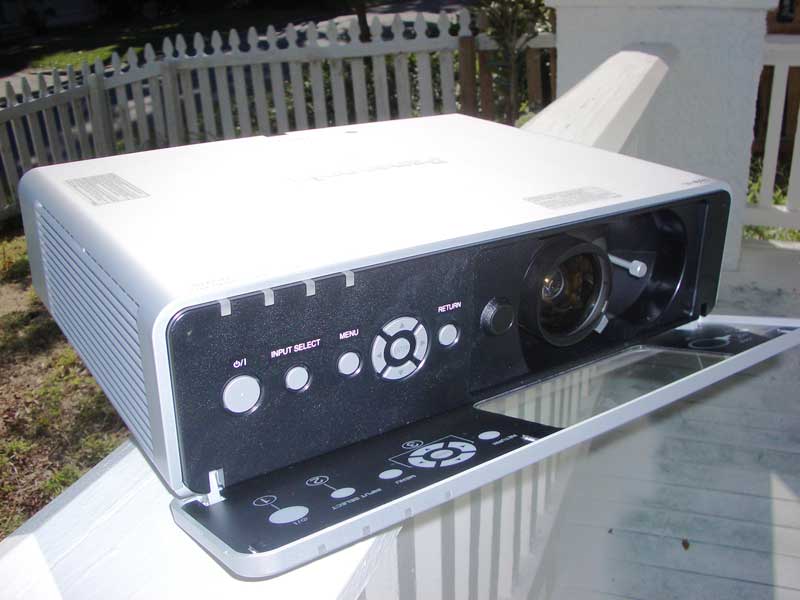 Physically-speaking,
the front panel on the projector flips down and reveals access to the lens
shift, manual zoom and focus functions as well as power and the Menu controls.
This is a nice feature as it gives the unit an extra level of security (though
the front panel doesn't have a locking feature) and keeps dust from accessing
the front of the lens. It's also a beautiful way to streamline the unit and
make it look like a very sleek box.
Physically-speaking,
the front panel on the projector flips down and reveals access to the lens
shift, manual zoom and focus functions as well as power and the Menu controls.
This is a nice feature as it gives the unit an extra level of security (though
the front panel doesn't have a locking feature) and keeps dust from accessing
the front of the lens. It's also a beautiful way to streamline the unit and
make it look like a very sleek box.
The primary setup task is making sure the correct input is assigned and deciding whether you want the projector to have Signal Search enabled, so that when another input is activated in place of the one you are using it automatically selects it. This can be a blessing or a curse depending upon your setup, but you have the option to enable/disable it. The next thing to do is select your Picture Mode. While Standard seems to be the default for a more neutral picture, Natural seemed to be my favorite choice for a light-controlled room where you want more accurate color. If you're in a commercial environment and you want to activate this torch for all it's worth then Dynamic is your friend. Don't expect blacks to be anything other than blue-gray, however.
Despite the User Manual saying otherwise (they incorrectly inverted it) you'll want to select Low color temperature for a more ISF picture, and High if you want your whites to pop out as brightly as possible. To eek out the most brightness (lumens) you'll want to simply verify that you have the correct Picture Mode (Dynamic) and that the Color Temp is set to High. There are no user-configurable lamp power settings in this projector.
I placed this projector in my church and fired it across the sanctuary at a cream-colored wall. The throw distance was at least 30 feet and the projected image size was around 200-inches. Placing the unit in Dynamic mode and with a High color temp, we were able to view animated movies like Pixar's Cars with all of the lights on. While I don't recommend leaving the sanctuary lights on during a short film clip, it was certainly nice to find that this projector has the power to handle the task.
Technical Note: The PT-F100U has a Daylight View function that reacts to ambient light as it is picked up by the projector's Ambient Luminance Sensor (ALS). When set to Auto, the system will automatically adjust the projector to handle brighter room conditions when they occur (for example when someone opens a door that floods the room with light.) This is actually a very nice commercial feature.
Throw Chart for 16:9 applications
|
Screen
Size |
Size (Inches) |
Distance (Feet) |
||
|
|
width |
height |
wide |
tele |
|
70 |
61.0 |
34.3 |
7' 6” |
15' 1” |
|
80 |
69.7 |
39.2 |
8' 6” |
17' |
|
90 |
78.4 |
44.1 |
9' 6” |
19' 4” |
|
100 |
87.2 |
49.0 |
10' 9” |
21' 3” |
|
120 |
104.6 |
58.8 |
12' 9” |
25' 11” |
|
150 |
130.7 |
73.5 |
16' |
21' 1” |
|
200 |
174 |
98 |
21' 7” |
42' 11” |
|
250 |
217 |
122 |
27' 2” |
53' 9” |
|
300 |
261 |
147 |
32' 5” |
64' 7” |
PT-F100U Remote, Viewing Evaluation, Conclusion
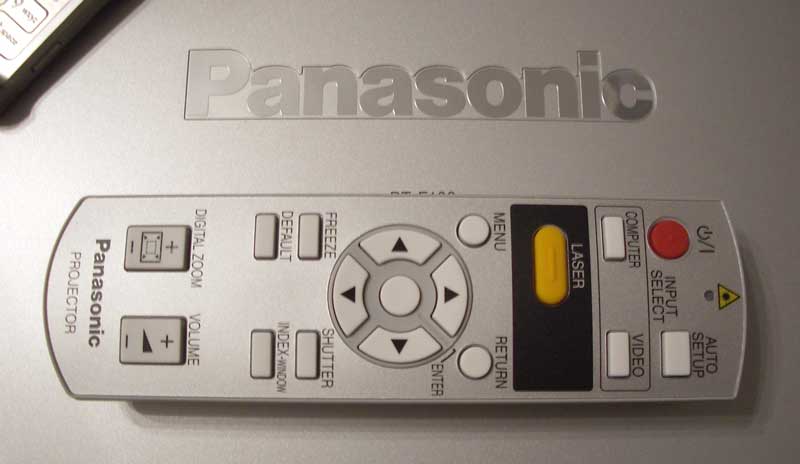 The remote is
unremarkable and performs all the functions necessary. It does not have
discrete on/off commands and is not backlit. It does, like most projectors in
this class, sport an integrated laser
pointer. You can cycle between Computer and Video inputs, and if you have the
auto-select feature enabled that should work perfectly for most installations.
Like other Panasonic projectors, there is a Freeze function which I find
incredibly useful as a reviewer (I'm not sure how much use this gets in the
“real world”). There is also a Digital Zoom function which could absolutely
find itself being very useful in a boardroom setting where you want to zoom in
on a particular area of an image for emphasis. Overall, nothing fancy, but it
certainly isn't a terrible remote.
The remote is
unremarkable and performs all the functions necessary. It does not have
discrete on/off commands and is not backlit. It does, like most projectors in
this class, sport an integrated laser
pointer. You can cycle between Computer and Video inputs, and if you have the
auto-select feature enabled that should work perfectly for most installations.
Like other Panasonic projectors, there is a Freeze function which I find
incredibly useful as a reviewer (I'm not sure how much use this gets in the
“real world”). There is also a Digital Zoom function which could absolutely
find itself being very useful in a boardroom setting where you want to zoom in
on a particular area of an image for emphasis. Overall, nothing fancy, but it
certainly isn't a terrible remote.
Advertisement
Comments on Use as a Theater Projector
Often it's neat to think that a projector can be utilized for both theater and commercial uses. After all, isn't it nice to only have to buy one unit and not two and be able to truly get a dual-use function out of a single purchase? The Panasonic PT-F100U is most certainly not a dual-use model. It won't self-destruct if you force it into 16:9 mode to play a DVD movie, but the unit is simply not equipped for it. For one, the projector has no deinterlacing ability or 2-3 pull-down to speak of, meaning that all those 24p source DVDs will produce lots of jaggies and moire when displayed on the screen. Additionally, with no lap power setting, you will have a difficult time getting blacks to look black. I could not even detect the Brightness patterns on the Avia Pro disc we utilized to set the correct black levels – the resolution is simply not there at the lower IRE levels. With this said I don't think this makes the PT-F100U any less of a product, in fact it may make it a stronger commercial venue system that doesn't compromise in order to appeal to both scenarios. After all, I don't buy an SUV for its ability to fit into a tiny parking space.
Viewing Tests
We viewed a lot of material on this projector, most of it to test it's “dual-use” functionality and capability. While the PT-F100U will absolutely delight in commercial and house-of-worship installations, it simply isn't much of a multi-purpose product. We're OK with that and wanted to show, through the use of screen captures and commentary, what to expect when putting moving images up on the screen as opposed to static presentations.

Right off the bat we see that black levels are going to be crushed. Regardless of what I configured in the Picture Settings menu there was no way to get sufficient black level detail. The upside is that there was also no banding, this projector is simply tuned to provide excellent bright images on larger screens.

If we take the above and lend it to a practical example, you'll note that darker scenes will seem to have large swaths of black with little detail or resolution. OK, so we won't be using it to show horror movies on Sunday morning or in the board room...

As soon as brighter images filled the screen we saw the upside of the projector as it came into its own and worked up its strengths.

This is about as real-world an example as you will find for why proper 2:3 pull-down and deinterlacing is important. Note the dramatic stair-stepping on the rail that Sully and friends are sailing by on (you may need to click the image to better see it).
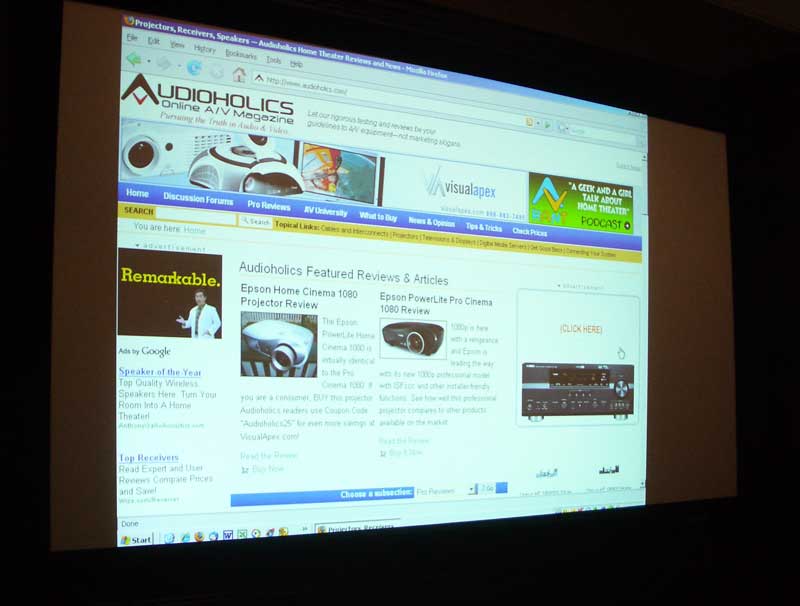 This system
absolutely excelled at PC/Data use. In fact, while I was unable to get a photo
that truly demonstrated what I witnessed in my room, the system was superbly
bright and readable with full ambient light hitting the screen. If you are
using the PT-F100U with a PC (PowerPoint presentations or worship lyrics with
an application like MediaShout)
then you will be pleased to note that dimming the lights will be more of a
creative decision than one that must be undertaken in order to allow your
projector to be visible.
This system
absolutely excelled at PC/Data use. In fact, while I was unable to get a photo
that truly demonstrated what I witnessed in my room, the system was superbly
bright and readable with full ambient light hitting the screen. If you are
using the PT-F100U with a PC (PowerPoint presentations or worship lyrics with
an application like MediaShout)
then you will be pleased to note that dimming the lights will be more of a
creative decision than one that must be undertaken in order to allow your
projector to be visible.
Conclusion
I actually got very excited about this projector. While it isn't suitable as a dual-use home theater product it absolutely excels at what it does. Lens shift, high lumen output and an automatic ambient luminance sensor means that this projector will provide solid performance in almost any house of worship or commercial installation. I found the custom installation features to be outstanding – the Auto Rolling Filter (ARF) is simply genius and will likely result in far less maintenance to clean dust from LCD panels as the system is used over extended periods. It's already well protected with the flip-down front panel, so everything else is icing on the cake. This is a nice, bright, full-featured projector that is sure to please. With a common street price of well under $2000 it's the electronics equivalent of dangling a juicy steak in front of a starving man.
Panasonic PT-F100U LCD Projector
MSRP: $3,599
Panasonic Corporation of North America
One Panasonic Way
Secaucus, NJ 07094
http://www.panasonic.com/
About Panasonic
Best known by its Panasonic brand name, Matsushita Electric Industrial Co., Ltd. is a worldwide leader in the development and manufacture of electronic products for a wide range of consumer, business, and industrial needs. Based in Osaka, Japan, the company recorded consolidated net sales of US$81.44 billion for the year ended March 31, 2005. The company's shares are listed on the Tokyo, Osaka, Nagoya, New York (NYSE:MC), Euronext Amsterdam and Frankfurt stock exchanges. For more information on the company and the Panasonic brand, visit the company's website at http://panasonic.co.jp/global/index.html.
The Score Card
The scoring below is based on each piece of equipment doing the duty it is designed for. The numbers are weighed heavily with respect to the individual cost of each unit, thus giving a rating roughly equal to:
Performance × Price Factor/Value = Rating
Audioholics.com note: The ratings indicated below are based on subjective listening and objective testing of the product in question. The rating scale is based on performance/value ratio. If you notice better performing products in future reviews that have lower numbers in certain areas, be aware that the value factor is most likely the culprit. Other Audioholics reviewers may rate products solely based on performance, and each reviewer has his/her own system for ratings.
Audioholics Rating Scale
 — Excellent
- — Very Good
- — Good
- — Fair
- — Poor
| Metric | Rating |
|---|---|
| Detail and Resolution | |
| Deinterlacing & Scaling | |
| Contrast and Black Levels | |
| Color Reproduction | |
| Noise Reduction | |
| Calibration Options | |
| Build Quality | |
| Ergonomics & Usability | |
| Ease of Setup | |
| Features | |
| Remote Control | |
| Fit and Finish | |
| Performance | |
| Value | |
Clint Deboer was terminated from Audioholics for misconduct on April 4th, 2014. He no longer represents Audioholics in any fashion.
View full profile Subscribe to our newsletter