


Panasonic PT-AX200U LCD Projector Review
Panasonic PT-AX200U LCD Projector
- Product Name: PT-AX200U LCD Projector
- Manufacturer: Panasonic
- Distributor: ProjectorPeople
- Performance Rating:

- Value Rating:
- Review Date: November 05, 2007 12:52
- MSRP: $ 1999
|
Brightness: 2000 ANSI lumens (high
power mode) |
Projection Lens: 2x optical zoom; f = 21.7 – 43.1 mm. F/1.9 – 3.1, manual focus
& zoom Uniformity Ratio: 85% (center-to-corner) Remote Control: Learning remote; 7m range on axis, 3 VDC power supply, AAA x 3
batteries |
Pros
- No screen door effect
- Excellent contrast
- Game mode for fast response and more visible shadow detail
- Great "out of the box" colors
- Backlit remote
- Light Harmonizer 2 automatic picture adjustment
- 1080p/24/60 support
Cons
- Potential HDCP compatibility issues
- Non-standard power cable
- No 12V trigger
PT-AX200U Features & Comparisons
I experienced a sense of deja vu when I opened up the PT-AX200U projector, took some photos and set it up in my theater room. The chassis and feel of the unit was nearly identical to the PT-AX100U I had reviewed last year. In fact, the only physical difference I noted immediately was the presence of an additional HDMI input on the connector panel – a welcome addition, but was there more under the hood of this LCD projector? As I knew from this year's demo at CEDIA there were indeed several new features of Panasonic's incremental but impressive projector update – not the least of which involved some tantalizing gaming-centric features.
Features and Favorites
While the Panasonic PT-AX200U isn't exactly a “from the ground up” rewrite of the prior AX100U model, there are several features worth noting, both old and new:
- Light Harmonizer 2 with Ambient Light Sensor
Instead of the “gamma jump” which occurred in the original Light Harmonizer system, the second iteration of this technology also configures Lamp Power output, Iris setting and even Sharpness to get the best possible results in ambient light conditions. - Smooth Screen Technology
Smooth Screen makes this 720p projector look very much like 1080p, especially when viewed from close distances as is the case in my room (I like a BIG screen). Image softness doesn't seem to be an issue and the technology really is impressive, given the fact that any time you think about defocusing the edges of pixels you assume there will be a downside. - Dynamic Iris
Finally, a Dynamic Iris system that doesn't sound like the final scene of the Terminator when he's reaching through the bars to get at Linda Hamilton. I can't stand noisy Iris systems and typically turn them off. Panasonic has solved this issue and they did it just for me... er, that's my story and I'm sticking to it. - Vertical and Horizontal Lens Shift
Lens shift on LCD projectors? That's old news. Yeah, tell that to DLP projectors at this price. It's cool, offers an incredible flexibility for installations and deserves to continue to be mentioned until all projection technologies incorporate it in products costing less than $2000. - Game Mode
Saving the best for last, the PT-AX200U features a special “Game” mode which adjusts the internal processing (presumably bypassing some of the unneeded video processing) to improve video response (up to 3x) and reduce lag times during game play. We think this is a real propeller-head feature, but for those of you who game more than you sleep this is likely going to be a welcome addition. Tom Taylor, or Tsquared as he's known in the Major League Gaming community, demoed this feature at CEDIA this year. Being a professional gamer, I'll take it that it's significant to people who take their Xbox very seriously. According to Tom, the lag was all but gone and the system made gaming much more enjoyable.
Using the New Features
The most stand-out feature is the addition of Game mode. Not only does it reduce game lag time, but it also alters the gamma so that darker scenes (you know the ones that are very annoying to play when you don't have your room completely blacked out) are more revealing. I tested this out with Halo3 and the Game mode became my best friend almost instantly. Suddenly, I could see where I was going, even when there was a small amount of ambient light leaking into my theater room. The other notable addition is the presence of two HDMI inputs. While I must admit that I only run a single line to my projector (who wants to pay for dual 25-foot runs of HDMI?) this may be a nice thing for anyone looking to have discrete sources and unique calibration settings for each. I left Light Harmonizer off on the PT-AX100U, simply because it was more of a gimmick with only the ability to adjust Gamma settings. With the new version I actually enjoyed using it and the feature becomes much more practical.
Comparing the Panasonic PT-AX100U and the PT-AX200U
When we first reviewed this model's predecessor we did a comparison and it only seems fair to keep up the tradition. This time around the differences are much more difficult to spot, as this really is just an incremental change. Here’s a quick overview of differences:
| PT-AX100U | PT-AX200U |
| 2000 ANSI lumens | 2000 ANSI lumens |
| 6000:1 (on/off) contrast ratio | 6000:1 (on/off) contrast ratio |
| Dynamic Iris with Light Harmonizer (Gamma) System | Dynamic Iris with Light Harmonizer 2 (Gamma + Sharpness + Lamp power + Iris) System |
| 220W UHM lamp | 220W UHM lamp |
| D-5 LCD panel | D-5 LCD panel |
| 290W power | 290W power |
| Dynamic Iris | Dynamic Iris |
| 1 HDMI input | 2 HDMI inputs |
| Backlit remote | Backlit remote |
| Full 1080p/24/60 support | Full 1080p/24/60 support |
| No Game mode | Game mode |
| 10.8lbs | 10.8lbs |
| 15.5” x 4.4” x 11.8” | 15.5” x 4.4” x 11.8” |
| Starting MSRP: $2,999 | Starting MSRP: $1,999 |
The remote controls are almost identical, except that the PT-AX200U replaces the Sleep button with a dynamic Function button that can be assigned to any number of functions, depending on your preference (I set mine to activate Game mode):
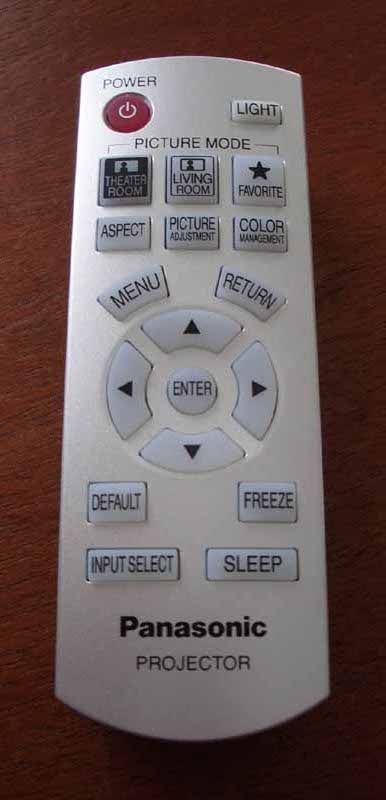
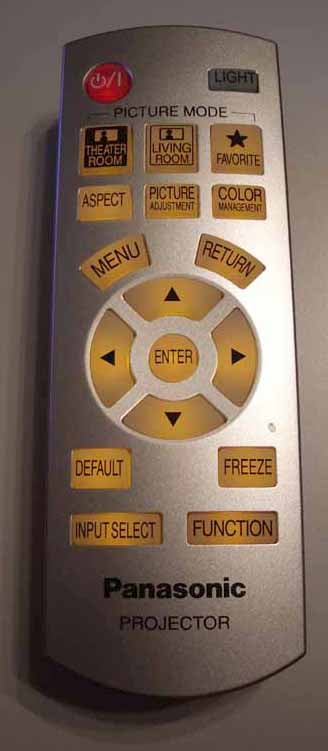
PT-AX100U
remote (left) and PT-AX200U remote (right)
PT-AX200U Basic Setup and Installation
The 2x zoom and 25% horizontal and 63% vertical lens shift means that you can place this projector at any position except the extremes of the screen boundaries. I like nice zoom lenses since they allow for both longer and shorter throws and can be used in a variety of rooms and with large variances of screen sizes. Take, for example a 120-inch screen (a common but large size). You can hit that size screen from a little as 12 feet away (smaller room) or as far as 24.5 feet away (a rather nice sized theater room.) The 16:9 throw chart (which hasn’t changed from the prior two models) looks like this:
Throw Chart for Distancing the Projector from a 16:9 Projection Screen
|
Screen Size |
Size (Inches) |
Distance (Feet) |
||
|
|
width |
height |
wide |
tele |
|
70 |
61.0 |
34.3 |
6.8 |
14.1 |
|
80 |
69.7 |
39.2 |
7.9 |
16.2 |
|
90 |
78.4 |
44.1 |
8.9 |
18.3 |
|
100 |
87.2 |
49.0 |
9.9 |
20.3 |
|
110 |
95.9 |
53.9 |
11.0 |
22.4 |
|
120 |
104.6 |
58.8 |
12.0 |
24.5 |
|
130 |
113.3 |
63.7 |
13.1 |
26.6 |
|
150 |
130.7 |
73.5 |
15.1 |
30.7 |
We did our visual evaluations, measurements and benchmark testing on a 100” Stewart Studiotek 130 screen with Luxus Deluxe screenwall system. This is a nice screen and the felt lining ensures that any overshoot is not apparent to the eye. We used datacolor ColorFacts Professional software to measure this system and with 2000 lumens you have a lot to work with in terms of screen size and ambient light use. Want to play video games during the day with the windows open? That is probably not a major problem provided you don't have the sun hitting directly on the screen. I found that only the darkest scenes created difficulty with light entering the room.
As is typical, we utilized an adjustable-height projector stand that elevated the projector to the appropriate position so that we minimized the amount of horizontal and vertical lens shift required to get a nice square image to the screen.
Connections
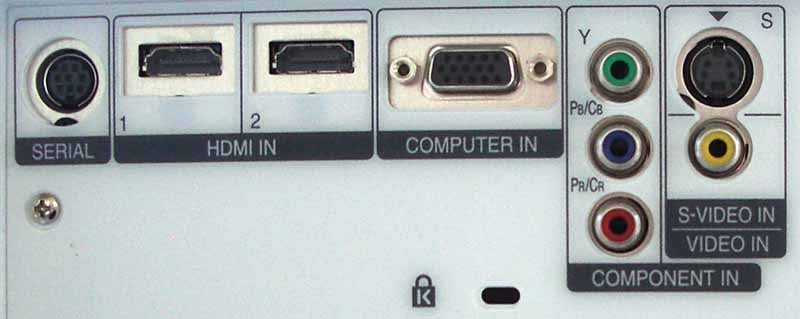
As we mentioned, the new PT-AX200U has the identical inputs as its predecessor, save for an additional HDMI input. This HDMI input has its own associated memory so you can truly store picture and calibration settings for it without interfering with the other source component. The AC plug is still proprietary (grrr) and there is no IR input or trigger output, meaning that while this projector has TS-232C control capabilities, it's not completely installer-friendly depending upon the particular situation and requirements.
HDMI Quirkiness
We utilized SHR HDMI cables (from DVIGear) for all of our testing and sent signal from our reference Denon DVD-3930CI DVD player, an Xbox 360, a Toshiba HD-XA2 HD DVD player and a Sony Playstation3 console. The HDMI connection went through a PureLink HDMI switcher and, in the case of the Xbox 360 and Toshiba HD DVD player, also passed through a Denon AVR-4306 AV receiver.
Sound confusing? Well it isn't, but since HDCP, the content protection scheme behind HDMI, was not, until recently, included in the detailed HDMI spec, there are still compatibility issues in the marketplace. Panasonic seems to suffer from some of these compatibility issues. I can say this with a reasonable amount of confidence due to the number of projectors I've had through this theater which have not, under the same setup had issues.
The “quirkiness” I ran into involved video dropping out from the HD DVR provided by my cable company (a Scientific Atlanta Explorer 8300HD) and audio dropping out of the tracks from my Denon DVD-3930CI. To help troubleshoot the situation, I replaced the switcher with another but the problem persisted. I have not encountered HDCP-related dropouts on any other projector in this system that I can recall save, coincidentally, the PT-AX100U. I had no difficulties with either the Xbox 360 (running through the receiver AND switch), PS3 (receiver AND switch) or the HD DVD player (receiver AND switch). Both the DVD player and the cable box bypassed the Denon AV receiver and simply routed through the external HDMI switch. All I can say is check your return policy and make sure you have some options for how you might want to connect the Panasonic in your system. You may have no problems at all, but it's something to note.
Initial Setup
Like its predecessor, we recommend you set the Picture Mode to Cinema1, leave Dynamic Iris On, and set Lamp Power to Low. At this point you’ll be in great shape to watch the unit in a light-controlled room. I actually enjoyed using the Light Harmonizer this time around as it controlled not only Gamma, but lamp power, Iris and image Sharpness. The effect was well-received by me and I think the system is now suitable for use in most cases. If you only intend to use this projector in a theater setting, then you can crank down the Iris, disable the Light Harmonizer and ensure the lamp stays in Low power mode. This will also extend the life of your bulb.
Sharpness was left at -2. Increasing it any further simply accentuates any poor edge enhancement or compression artifacts that may be on the screen. I also noted that the Overscan default was +7 on my unit. I pulled this back to 0 as I rarely encounter any edge artifacts on my source signals. Popping this back to even +1 will eliminate most lines that may show up on the side of various cableTV transmissions.
The all-important Brightness and Contrast were spot-on for Cinema1 mode. I found that I could tweak the Contrast to +1 however, while that satisfied my test pattern, I noticed a significant color shift towards green. I opted to leave it as it was.
The Menu System
With the exception of the Function button, where you can designate one of the many options for its use on the remote control, the Menu system is pretty much unchanged in the PT-AX200U. For a more exhaustive breakdown of the menu system you can read the review of the PT-AE900U projector, on which this system is based.
PT-AX200U Calibration and Benchmark Tests
 Like the PT-AX100U, the PT-AX200U handles
reds and blues to the maximum limits of NTSC color. Greens tend to be a bit
desaturated – though towards blue rather than yellow. Here are the Contrast
Ratios I measured in the various Picture modes:
Like the PT-AX100U, the PT-AX200U handles
reds and blues to the maximum limits of NTSC color. Greens tend to be a bit
desaturated – though towards blue rather than yellow. Here are the Contrast
Ratios I measured in the various Picture modes:
- Game (default) – 1623:1
- Cinema1 – 661:1
- Normal – 1746:1
- Dynamic – 2074:1
I also took a brief survey of the various color temperatures and confirmed that with a simple setting you could get very good ISF-type levels from this projector out of the box without too much hassle:
- Cinema1 – 7000K
- Normal – 8800K
- Game – 9000K
- Natural – 7700K
- Cinema2 – 7600K
- Dynamic – 7900K
- Vivid Cinema – 6550K
The first thing I did upon seeing the slightly increased temperature for the default Cinema1 mode, is attempt to bump down the Color Temp slider by -1 to see what would happen. The result was almost exactly 6500K. Now, be advised, some people just don't like 6500K whites. You may prefer a slightly less red white level at the default 7000K and who am I to argue with the settings put in place by Hollywood colorists? In any case, realize that bumping this setting is what yielded the results below.
Measurements
We utilized datacolor’s ColorFacts Professional 6.0 software to calibrate and measure the grayscale response of the PT-AX200U. Panasonic is again making sure that users have some very helpful default settings “out of the box”. We measured the Cinema1 mode and received the following excellent results:
|
RGB Levels |
Color Temperature |
|
|
|
|
You’re looking at the Cinema1 mode with no calibration. Red and blue only lead green slightly from 40 IRE onward. That bump at 30 could be smoothed out, but overall I felt no pressing need to calibrate this projector beyond the defaults. |
Color is all but pinned at 6500K from 40-80 IRE, dropping only slightly thereafter. The dips at 30 and below didn't really bother me too much and I was quite impressed with how well this projector fared overall. |


These are very close to exactly what I expect to see “pre-calibration”. Often I find that the variance in color response is much more erratic and rarely do we find projectors at this price which don't really demand calibration to deliver a great picture.
Audioholics/HQV Bench Testing Summary of Test Results
Perfect
Score is 130
Panasonic
PT-AX200U Benchmark Score: 90
(identical to the PT-AX100U as expected)
| Test | Max Points |
Component Results |
Component Pass/Fail |
| Color Bar | 10 | 10 | Pass |
| Jaggies #1 | 5 | 5 | Pass |
| Jaggies #2 | 5 | 5 | Pass |
| Flag | 10 | 5 | Pass |
| Detail | 10 | 10 | Pass |
| Noise | 10 | 5 | Pass |
| Motion adaptive Noise Reduction | 10 | 0 | Fail |
| Film Detail | 10 | 10 | Pass |
| Cadence 2:2 Video | 5 | 5 | Pass |
| Cadence 2:2:2:4 DV Cam | 5 | 5 | Pass |
| Cadence 2:3:3:2 DV Cam | 5 | 0 | Fail |
| Cadence 3:2:3:2:2 Vari-speed | 5 | 0 | Fail |
| Cadence 5:5 Animation | 5 | 0 | Fail |
| Cadence 6:4 Animation | 5 | 5 | Pass |
| Cadence 8:7 animation | 5 | 0 | Fail |
| Cadence 3:2 24fps film | 5 | 5 | Pass |
| Scrolling Horizontal | 10 | 10 | Pass |
| Scrolling Rolling | 10 | 10 | Pass |
| Total Points | 130 | 90 |
Comments on Benchtesting
There were no surprises here. We ran the HQV suite of tests and found identical results to the PT-AX100U. A score of 90 shows that the Panasonic has an adequate video processor for the most important processing duties. The fact that it marginally passed the flag test, however, shows that it may be a tad favorable towards the tests and not tweaked as well for real-world content.
When running the Moving Zone Plate tests, 2/3 passed while 2/2 and the Default failed. There was plenty of flickering at higher speeds, but I detected no breakup of the image in any direction.
PT-AX200U Viewing Evaluation HDTV Movies
This is where the metal meets the meat... where Panasonic shows us exactly how well this projector can handle real images with color, detail and dark scenes. I wanted to start off by testing some games and then move to HDTV and movies. At this price point the PT-AX200U is a no-brainer for gaming, but it also seems to be targeted for an all-in-one projector for all your home theater needs as well.
advertisement
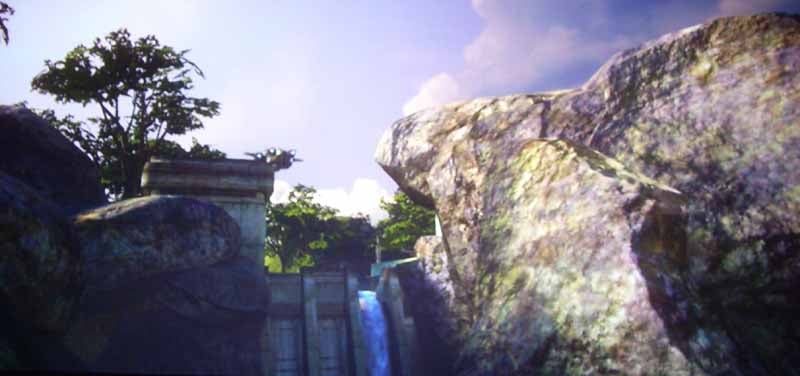
Xbox 360: Halo3 Halo3 put the Xbox back on top of the gaming war... well,
for a couple of days at least... In any case, this first person shooter is most
known for its online multi-player game play. I am always a fan of good story
lines, of which this game has a meager one. In any case, the graphics are a
giant step forward for the franchise and there is plenty of test fodder for the
new gaming mode of the PT-AX200U to try out. The cut scenes are incredible,
with many areas just thanking me for giving them a gamma mode whereby darker
areas of the action can be seen. There are a lot of details in a console
experience that get completely lost when you don't calibrate the display to the
characteristics of a typical Action or FPS game. The Panasonic seems to take
care of this for you, bringing out detail that you simply would have assumed
wasn't there. My favorite was rock and cave wall detail as well as the lower
areas of the forest where plants emerged from the bottoms of trees.
Halo3 put the Xbox back on top of the gaming war... well,
for a couple of days at least... In any case, this first person shooter is most
known for its online multi-player game play. I am always a fan of good story
lines, of which this game has a meager one. In any case, the graphics are a
giant step forward for the franchise and there is plenty of test fodder for the
new gaming mode of the PT-AX200U to try out. The cut scenes are incredible,
with many areas just thanking me for giving them a gamma mode whereby darker
areas of the action can be seen. There are a lot of details in a console
experience that get completely lost when you don't calibrate the display to the
characteristics of a typical Action or FPS game. The Panasonic seems to take
care of this for you, bringing out detail that you simply would have assumed
wasn't there. My favorite was rock and cave wall detail as well as the lower
areas of the forest where plants emerged from the bottoms of trees.



Playstation3: Warhawk
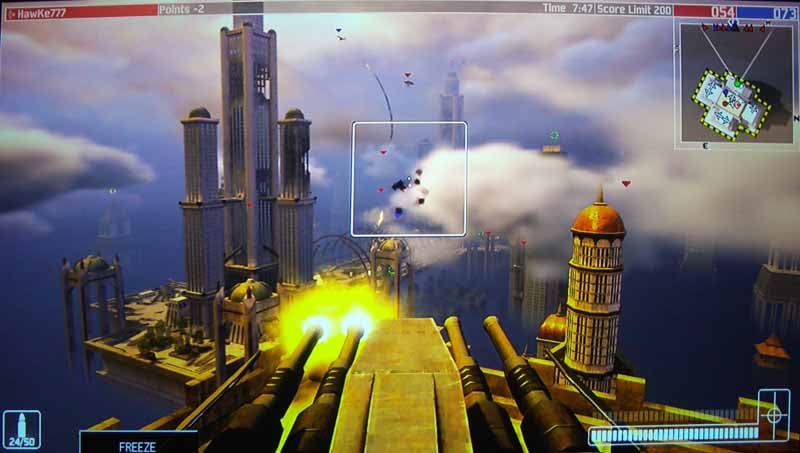
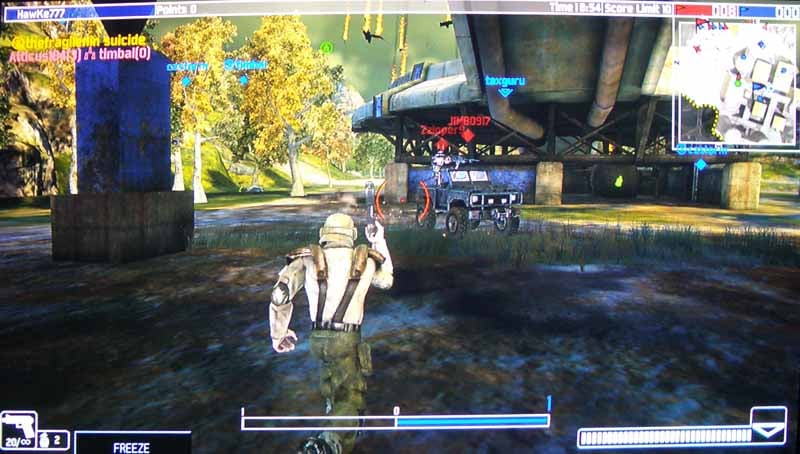
 Warhawk is a fun game that entertains, but doesn't
necessarily take advantage of the greatest photorealistic aspects of the PS3.
Textures are realistic, but something is just “wrong” with the lighting –
casting you as a player into a more surreal experience rather than pulling you
into a world where you feel as if you are part of the action. I loved the
dogfights and experiencing the beautiful reveals as distant land objects
appeared through cloud cover as I approached. Atmosphere effects were pretty
good overall and the PT-AX200U revealed everything in its power. Even way in
the distance, the projector put forth detail in the leaves of trees and
textures became more and more detailed as your character moved across the
grassy turf towards hangers filled with vehicles. I realize one big advantage
of the Panasonic is in its reduced lag time, however I simply didn't have the
gaming prowess to determine if the Game mode helped in a practical way in this
area. I spent more time appreciating the default picture settings it provided.
Warhawk is a fun game that entertains, but doesn't
necessarily take advantage of the greatest photorealistic aspects of the PS3.
Textures are realistic, but something is just “wrong” with the lighting –
casting you as a player into a more surreal experience rather than pulling you
into a world where you feel as if you are part of the action. I loved the
dogfights and experiencing the beautiful reveals as distant land objects
appeared through cloud cover as I approached. Atmosphere effects were pretty
good overall and the PT-AX200U revealed everything in its power. Even way in
the distance, the projector put forth detail in the leaves of trees and
textures became more and more detailed as your character moved across the
grassy turf towards hangers filled with vehicles. I realize one big advantage
of the Panasonic is in its reduced lag time, however I simply didn't have the
gaming prowess to determine if the Game mode helped in a practical way in this
area. I spent more time appreciating the default picture settings it provided.
HDTV: College and NFL Football (1080i)
I know the PT-AX200U is targeted
towards the gaming community, but what about real games... I'm talking
football – which is a staple down here in central Florida. If you don't have a home team, you better pick one
quick – and it better be the Gators (you Seminole and USF fans can argue all
you want). I figured I'd queue up some Gator college ball as well as some Tampa
Bay NFL action on my 100-inch screen. On the first NFL picture I show, check
out the grass and texture detail on the close-up of the football. The cable company sends a compressed HD
signal with overblown white levels, so it's often difficult to get a nice
screen capture, but the key is to look for one of the better cameras. On any
given game there will be 2-3 really good cameras with the
super-expensive lenses. Don't get me wrong, the rest of the cameras are
certainly not cheap, but there are a couple that are out of this world. When
those shots come on the screen, you just know it.


HD DVD: Eagles
Farewell I Tour:Live from Melbourne
This disc is by no means all about the video, but it does render some intense
shadow detail as well as a lot of skin, hair and clothing textures which served
as pretty good fodder for my evaluation of this projector. Glenn Fry's face
showed that even in high definition he still looks great after all these years.
Note the strings on the guitar – there were no problems when converting this
1080p 24 source signal to the native 720p/60 projector resolution. In checking
the band's lighting on stage, I saw only smooth gradations of the spots, no
banding or other artifacts seemed to be present. This projector had a very
smooth grayscale response.


Conclusion
Panasonic PT-AX200U LCD Projector
MSRP: $1,999
Panasonic Corporation of North America
One Panasonic Way
Secaucus, NJ 07094
www.panasonic.com
About Panasonic
Best
known by its Panasonic brand name, Matsushita Electric Industrial Co., Ltd. is
a worldwide leader in the development and manufacture of electronic products
for a wide range of consumer, business, and industrial needs. Based in Osaka, Japan,
the company recorded consolidated net sales of US$81.44 billion for the year
ended March 31, 2005. The company's shares are listed on the Tokyo, Osaka, Nagoya, New
York (NYSE:MC), Euronext Amsterdam and Frankfurt
stock exchanges. For more information on the company and the Panasonic brand,
visit the company's website at http://panasonic.co.jp/global/index.html.
The Score Card
The scoring below is based on each piece of equipment doing the duty it is designed for. The numbers are weighed heavily with respect to the individual cost of each unit, thus giving a rating roughly equal to:
Performance × Price Factor/Value = Rating
Audioholics.com note: The ratings indicated below are based on subjective listening and objective testing of the product in question. The rating scale is based on performance/value ratio. If you notice better performing products in future reviews that have lower numbers in certain areas, be aware that the value factor is most likely the culprit. Other Audioholics reviewers may rate products solely based on performance, and each reviewer has his/her own system for ratings.
Audioholics Rating Scale
 — Excellent
- — Very Good
- — Good
- — Fair
- — Poor
| Metric | Rating |
|---|---|
| Detail and Resolution | |
| Deinterlacing & Scaling | |
| Contrast and Black Levels | |
| Color Reproduction | |
| Noise Reduction | |
| Calibration Options | |
| Build Quality | |
| Ergonomics & Usability | |
| Ease of Setup | |
| Features | |
| Remote Control | |
| Fit and Finish | |
| Performance | |
| Value | |
Clint Deboer was terminated from Audioholics for misconduct on April 4th, 2014. He no longer represents Audioholics in any fashion.
View full profile Subscribe to our newsletter