


MAXX Products LCOS 1400 Projector Review
Maxx LCOS 1400 projector
- Product Name: LCOS 1400 Projector
- Manufacturer: MAXX Products
- Performance Rating:

- Value Rating:
- Review Date: December 17, 2006 14:33
- MSRP: $ 10995
|
Device: Three 0.7" LCOS Panels Native
Resolution: 1400 x 1050
pixels (4:3) |
Video
Inputs:
RGBHV/component (1), HD15, DVI, S-video, composite |
Pros
- Excellent color detail
- No visible pixelation even with close viewing
- Almost ISF calibrated out of the box
Cons
- A bit noisy up close
- Manual zoom
- Manual focus
- No lens shift
LCOS 1400 Features, Setup and Connections
Having been a fan of LCOS technology for some time, we were excited to receive a sample LCOS 1400 projector from MAXX Products. Running it through its paces allowed us to compare this technology up close to LCD and DLP projectors we had utilized to date. The sample we received was a heavily-used model lacking in some of the features MAXX says is present in its newest revision of this machine (such as DVI with HDCP). As the LCOS 1400 is pretty much a re-badged JVC D-ILA projector (the DLA-SX21U/E) we believe MAXX Products when they tell us that currently-shipping models include DVI w/HDCP.
Editorial Note: The Structure of LCOS
The LCOS technology that JVC has developed is based on an innovation in microchip design that permits the viewer to enjoy the full range of benefits from any high quality source whether from a video deck or a computer device. For true HDTV performance, the LCOS technology packs up to 2048 x 1536 pixels - for a total of 3.2 million pixels - on each of three 1.3" chips.
The projector's innovative CMOS design is the key to reproducing all the details in a high-definition picture. By placing the matrix addressing switches and electronics right behind (not between) the light-modulating liquid crystal layer, the LCOS chip has a "3-dimensional" layout. The result is a 93% fill factor and virtual elimination of the annoying "grid" or "screen door effect" so evident in other fixed matrix display technologies.What is the end result? Images as smooth and natural as film with impeccable reproduction of all the details and information contained in the original source. What supports this high picture quality is high brightness, high resolution, high contrast and analog gradation. High brightness and high resolution are achieved using a reflective device with a high aperture ratio and high-density pixels, providing real resolution with invisible pixels. High contrast is achieved using vertical alignment liquid crystals of normally black operation and a high-precision optical system. Analog gradation makes it possible to reproduce dark areas with high S/N (signal-to-noise ratio) because the LCOS device has an S-shape response. In combination with the high-speed response of the vertical alignment liquid crystal, LCOS technology makes it possible to reproduce smooth, noiseless motion pictures with clear, sharp high definition and film-like picture quality.
Features and Favorites
The MAXX LCOS 1400 comes with some excellent features. Here are some of our favorites:
-
Ultra High Resolution 3-Panel LCOS Display
It's easy to get used to 1280 x 720 being the highest definition display you'll ever see. Once you experience something that can handle, for instance, 1125p, you'll be absolutely blown away. The LCOS panels have all the electronics on the backside (see inset) so you're not going to see the "screen-door effect" typical in LCD display panels. Add to that the sheer resolution of LCOS and you're in for a treat.
- 1500 ANSI Brightness
1500 ANSI lumens means that you can show films or television content with some ambient light in the room, especially if you are projecting onto a 100" screen or less. That means that you can get a bit more use out of the projector for daytime sporting events and other times you'd like to invite friends over to watch a good show.
- Ample Color Controls
With a selectable color temperature control and manual adjustment of Red, Green, and Blue controls, you'll be able to dial in this projector to a pretty decent performance in terms of color. Out of the box you'll see it performed fairly well, so not much will have to be adjusted here unless you're a perfectionist.
Basic Setup and Installation
There are a couple of things you need to concern yourself with when purchasing a front projection system. First and foremost you'll need to determine the mounting position for the projector and, concurrently, what type and size of screen will be required for a good fit. For this review we utilized a Stewart StudioTek 130 screen, This is an ISF (Imaging Science Foundation) certified screen and is optimized for excellent white levels while allowing for deep, rich blacks in a light-controlled room. Focusing the MAXX LCOS 1400 was a challenge as it could only be done manually. From about 15 feet away I found myself rocking the focus back and forth until I settled in the middle where the image on the screen appeared to be in focus. A digital focus would have been much more welcome - especially with a fixed focal image that could be projected onto the screen.
The LCOS 1400 also has a manual zoom that goes from Wide to Tele. You can use this to get the sizing you need, so you'll have some play to get the exact distance to match your screen size. Other than that, you'll need to set the Aspect Ratio for the projector content and some other small details like screen type (16:9 or 4:3) and whether you want the menu to stay on for 10 seconds or until you tell it to go away (we preferred the latter.)
Throw Distance and Projection Screen Sizing
We used two screens during our viewing test, a Stewart Studiotek 130 100" and a Carada Criterion 92" screen. Both units yielded excellent results, though we were surprised at how far back we had to place the projector to get an image that fit our particular screens. Here's how the LCOS 1400's default lens sizes up against various screen sizes:
|
Screen Size (Diagonal) |
Projection Distance (Wide ~ Tele) |
|---|---|
|
40" (101.6cm) |
6.1' ~ 6.7' |
|
60" (152.4cm) |
7.8' ~ 10.2' |
|
80" (203.2cm) |
10.4' ~ 13.6' |
|
100" (254.0cm) |
13.1' ~ 17.1' |
|
120" (304.8cm) |
15.7' ~ 20.5' |
|
140" (355.6cm) |
18.4' ~ 24.0' |
As you can see, with our viewing size of 100" diagonal we were putting the projector back about 12-15' to fill our screens. This is likely not an issue for installing this projector on a ceiling - however it is something that should be noted.
One other thing you'll need to be aware of is that the MAXX LCOS 1400 lacks any lens shift capability. This means you'll need to mount the projector exactly in the correct position for your room and screen size. It does come with a fairly sophisticated digital keystone function, but that should be avoided whenever possible as it softens the image - even if used just a little bit.
Connections
The available inputs on the MAXX LCOS 1400 projector include RGBHV (also Y, Pr/Cr, Pb/Cb), HD15, DVI-D, S-video, and Composite. The labels on the unit are somewhat odd, and the manual doesn't clear it up. Apparently the newer versions of this projector include DVI-D with HDCP, allowing that input to be used with high-definition encrypted content as produced by DVD players and cable boxes. The manual, however doesn't say anything about this and only provides information about using DVI with computer sources. Since we couldn't test our unit with DVI-D input signals we have nothing really to add. We also felt that the use of PC1, PC2, PC3 and Video were somewhat odd terminology for a projector in this day and age. In future iterations of this unit, we'd love to see each input be directly selectable rather than cycled - a function that could be very helpful in custom installations.
As previously mentioned, we utilized the component video inputs for our tests. As we didn't have a ton of time with this unit, we simply sent 480p, 720p and 1080i signal from the Denon DVD-3910 to the MAXX Products projector and performed all deinterlacing functions as well as 2:3 pulldown on the DVD player. All the projector was responsible for was internally scaling the image to fit the display panel.
LCOS 1400 Remote Control & Calibration
The
MAXX LCOS 1400 remote control is about as basic as it gets. No
backlight, no direct input selection, and no frills. What it does offer
is direct access to keystone functions, menu access, volume and input
selections (two buttons for cycling through "PC" labeled inputs or
"Video" inputs. The PRESET button should really be labeled "Reset"
since that is all it does in the scheme of its functionality. There are
not multiple user presets available for color temperature or the
display settings, so do not confuse this button for anything having to
do with recalling user preset functions.
There are FOCUS buttons on the remote, but they do not function with the LCOS 1400, which has manual-only focus. A HIDE button temporarily blanks the screen and mutes audio. Overall I found the remote to be very simplistic and uninteresting. One of the first things you'll want to do is get the commands into your universal learning remote and set it to the side. For installers this is a given so typically we don't place much weight on the remote control portion of a projector review at this price point.
Advanced Setup and Calibration
The LCOS 1400 offers you the standard Contrast, Brightness, Color, Tint, and Sharpness controls available on most displays. During my calibrations I ended up dropping the Brightness (black level) to -12 in order to get Video Essentials' pluge pattern down to where I felt it needed to be. The same menu that offers you basic video controls also provides a Color temp. option whereby you can select 6500, STD, or User (where you can adjust Red/Green/Blue parameters.) I set the projector to 6500 and proceeded to run some basic calibration tests using the M ilori ColorFacts System.
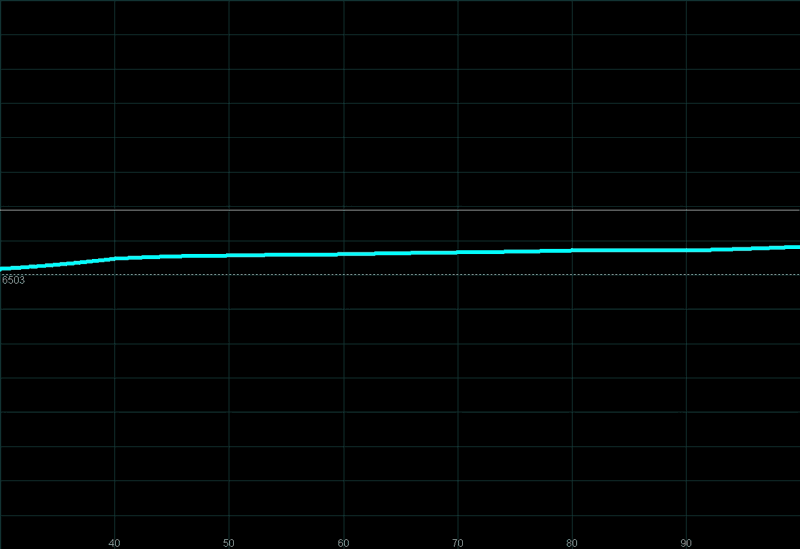
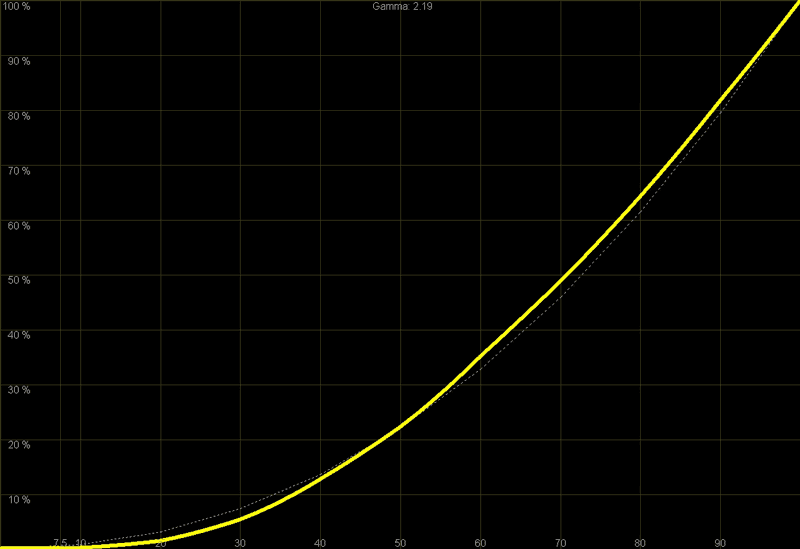
As you can see from the above results, the LCOS 1400 passed our color balance and grayscale uniformity tests without breaking too much of a sweat. The Temperature Histogram is fairly flat. The luminance Histogram shows a consistent ramp from 0 to 100 IRE. The RGB levels are not quite uniform throughout the luminance range, however they are tolerable, with red tending to dip down gradually as luminance increases. Since we were on a rushed review schedule I didn't even bother attempting to improve the performance of the projector. It would likely take going into the service menu to make further adjustments as RGB adjustments are not readily available as such in the user menu.
The CIE Chart was another good test to run so as to provide a
bird's eye view of the gamut of color reproduction capable with this display. As you can see, there is
very little the
M
AXX LCOS 1400 fails to represent
accurately. This is the science or testing behind the color comments you will hear later regarding the
performance of this projector.
The contrast ratio for this projector is said to be 900:1. We measured a solid 607:1 - which is simply an impressive ratio, though it is primarily due to the excellent light output of this unit and the conditions by which this measurement were taken. Remember, that while a CRT display may have better black level reproduction, it will also likely measure under 300:1 in terms of its overall contrast ratio. In this sense, the LCOS 1400 really has some dynamics.
If you're an old film buff, then for an advanced feature I recommend setting up the single User Color Temp setting to 5500K so that when watching black and white movies you can do it with the warmer, more natural color temperature. On occasion my wife and I will watch an older black and white film, and it simply doesn't look right at 6500K. Dropping the color temperature here will yield that soft, almost Sepia tone that makes up the true look of black and white film as it was seen originally in theaters. It might be tough to pull off without a Colorimeter, but installers can always opt for this functionality if they want to add a nice touch to the installation.
Viewing Evaluation - Where Do You Sit?
We didn't have a lot of time to view the LCOS 1400, so we dove right in and watched several movies and high-definition television programs over a period of 2-3 weeks. For our viewing we found that sitting at a distance of 1x the screen width was actually possible and presented a very satisfying "big screen" effect. While this was possible, and no interpixel spacing was noticeable, we did spend the majority of our viewing time situated at our typical viewing distance of 1.5x the screen width. Remember that there is a ratio, different for each of us, that tells us just what we consider to be "big screen." Here's the formula:
Distance from Screen / Screen Width = Desired Big Screen Effect
That's the math - Now it's up to you to determine what your preference is. I have personally found that sitting 1.5 - 2 screen-widths back from a good LCD or DLP projection screen is ideal - with the exception that I will try to get even further away when watching movies that contain lots of handheld-style camera action, or standard definition content that simply looks "better" from farther away.
With that said, I recommend anywhere from a 1.0 to 2.0 ratio for the M AXX LCOS 1400. If you have an 87" wide screen like mine, that would mean you'd want to sit about 7.25 to 14.5 feet away from the screen (see the preceding formula). This projector truly does produce nicely saturated color with a seamless look. If you want to see pixel spacing you'll actually need to get within a few feet of the screen, assuming you're projecting on less than a 110" diagonal screen.
LCOS 1400 Viewing Evaluation & Conclusion
Seeing as this was my first personal experience with an LCOS display, I wanted to view several different movie types that would really push the envelop of detail and allow me to see the difference between this format and LCD. With 1400 x 1050 pixels I thought that a nice mixture of animation, live action and HDTV would do the trick.
DVD: Lord of the Rings - Return of the King
Playing some scenes from the third and final installment of the
Lord of the
Rings
Trilogy really enabled me to see the film-like quality of this
projector. The three LCOS panels presented an incredibly seamless,
smooth, realistic picture. The depth of the scenes drew me further into
the movie than ever before. It felt as if you were no longer watching
it on a screen - the screen disappeared, leaving only the images and
story. In the scene where Frodo attempts to escape from Shelob the
amount of detail and depth is amazing. Take a look at the rock detail
and the expansive but visible depths that can still be seen in the
darkness of the cave areas. The spider is part CGI, part prop, however
in both cases the armor detail is absolutely meticulously detailed.
I
had a better appreciation for the set designers when I started seeing
more and more of the set design as revealed by the
MAXX LCOS 1400. Other things to look out for are roofing materials,
foliage and the details of the costumes which adorn the main characters
as well as the armor and faces of orcs and goblins. In the second half
of the movie, when King
Theo
den is killed by the Lord of the Nazgul take a look at the winged
creature as well as the surrounding landscape. The color and depth of
field in the scene was really brought to life by the high resolution
LCOS display.
HDTV: 24 Season Four
I'll admit it - I'm hooked and have been since Season 1. But that
doesn't stop me from using this show, broadcast in High Definition 720p by Fox, to test the limits of
fast-paced action combined with compression artifacts and the generally average HD-quality associated
with high-definition cable. I was actually quite surprised at the results. Close-ups of the
24:
Season Four
main characters came through with excellent detail and any
compression artifacts that showed up during broadcast were actually
more tolerable since they weren't compounded with any screen door
effects or poor contrast issues. I felt that the latest episode, which
contained a scene inside a well-lit hospital and some action-packed
outdoor action involving a speeding car, simply looked stunning on the
LCOS 1400. HDTV came across clean, clear and well-saturated. This is
how HDTV should be seen.
DVD: Hero
I'm not a real Quentin Terantino fan, but I felt like he kept his hands off of Hero enough for it
to be a very good movie, lacking many of Quentin's more overdone and tasteless signatures.
M
y favorite scene in terms of beauty and artistic design has
got to be the fight scene that takes place in the golden autumn forest between
M
oon and Snow. The colors were particularly vibrant and the scene made
perfect use of the extra resolution afforded by the LCOS panels.
Conclusion
The MAXX LCOS 1400 is a phenomenal projector in terms of performance, resolution and color reproduction. It is just about calibrated out of the box, giving you a "free" ISF calibration in every box. It also allows amazingly close viewing distances without fear of getting a screen door effect or suffering from rainbow effect. The downsides include a general lack of helpful features such as lens shift, electronics focus and zoom, and user presets. While high-end, this projector comes at a premium price while offering a dearth of advanced functionality. Still, if you are an installer, this is actually a plus for you as there is less chance your client will accidentally misadjust the focus or zoom. As the projector will likely be ceiling mounted, it has all the features it needs for smooth operation and accurate imaging.
MAXX LCOS 1400
MSRP: $10,995
(866) 410-9751
http://www.maxxproducts.com
About
MAXX Products
MAXX Products is redefining
the home theater experience offering cutting edge technology for Plasma TV displays, LCD TV displays,
LCOS
&
DLP Projectors, Video Processors, DVD Players and a series of high end cables. Our mission is
to provide next generation video products without the high-end cost, helping our customers build
real-world, high-end home theaters today.
M
AXX products
are backed by 25 years of manufacturing and distribution experience as a division of VPW,
LLC.
The Score Card
The scoring below is based on each piece of equipment doing the duty it is designed for. The numbers are weighed heavily with respect to the individual cost of each unit, thus giving a rating roughly equal to:
Performance × Price Factor/Value = Rating
Audioholics.com note: The ratings indicated below are based on subjective listening and objective testing of the product in question. The rating scale is based on performance/value ratio. If you notice better performing products in future reviews that have lower numbers in certain areas, be aware that the value factor is most likely the culprit. Other Audioholics reviewers may rate products solely based on performance, and each reviewer has his/her own system for ratings.
Audioholics Rating Scale
 — Excellent
- — Very Good
- — Good
- — Fair
- — Poor
| Metric | Rating |
|---|---|
| Detail and Resolution | |
| Contrast and Black Levels | |
| Color Reproduction | |
| Calibration Options | |
| Build Quality | |
| Ergonomics & Usability | |
| Ease of Setup | |
| Features | |
| Remote Control | |
| Performance | |
| Value | |
Clint Deboer was terminated from Audioholics for misconduct on April 4th, 2014. He no longer represents Audioholics in any fashion.
View full profile Subscribe to our newsletter