


InFocus Play Big IN78 Projector Review
InFocus IN78 Review
- Product Name: Play Big IN78
- Manufacturer: InFocus
- Performance Rating:

- Value Rating:

- Review Date: April 22, 2007 20:00
- MSRP: $ 3499
|
Device: DarkChip3 720p 12 degree LVDS DLP panel Color Wheel: 6-segment, 4-speed D65K color calibrated Native
Resolution: 1280 x 720
pixels (16:9) Offset: 116% image offset Throw: 1.52 – 1.92:1 (distance/width) |
Video Processing: Pixelworks DNX PW390 10-bit; 3D comb filter Accessories Included: Power cord, backlit remote with batteries, composite cable, DVI-D to HDMI adapter, User Guide Video
Inputs: (1) DVI
(w/HDCP), (1) HDMI, (1) M1, (1) Component, (1) HD15 (VESA), (1) S-video, (1)
composite Dimensions: 14.2” (W) x 4.7” (H) x 14.2” (D) Warranty: 2 years parts & labor (6 months on lamp) Weight: 9.3 lbs |
Pros
- Excellent color detail
- Nicely-designed backlit remote control
- 3 direct access source/inputs from remote
- Sleek black enclosure
- Handles 1080p/60 and 480i via HDMI (scaling to 720p)
Cons
- Tough competition at this price
- Mild rainbow effect present during high contrast action sequences
- Didn't pass blacker-than-black
- No lens shift and high fixed offset
- Awkward menu navigation
IN78 Features, Setup and Connections
Some people trade their cars in every two years. I'm more the type of person who drives a car until it's well out of warranty and about ready to start incurring some major repairs. The IN78 is an incremental update to a very popular projector line that includes the IN72, IN74 and IN76 - in fact the user manual that I downloaded from the InFocus website mentioned those three projectors (and mysteriously, not the IN78!). Incremental upgrades are nice in that they update hardware and make sure that a product line is kept up to date, but they rarely astound or dazzle with new revolutionary performance or hardware. Such is the fate of the IN78, a fact made even more difficult due to its retail pricing of $3,499 which seems a tad high given the recent introduction of lower cost 1080p displays into the market. Still, the IN78 positions itself as a capable projector that performs high-level video processing and requires no color calibration out of the box. We'll see if it lives up to that promise.
Features and Favorites
The InFocus IN78 comes with some useful features that really stood out to me. Here are some of our favorites:
- Pixelworks DNX Video Processing
The Pixelworks DNX system provides nearly everything on a single platform. Video decoding, deinterlacing, scaling, MPEG-decoding and color processing are all handled by the DNX system. This is positioned as one of the better processing solutions on the market today. - DarkChip3 Technology
A lower fill factor and higher resulting contrast ratio mark the characteristics of the DarkChip3 technology. While not exactly new, it is a marked improvement over the IN76.
Basic Setup and Installation
The only issues with setting up an InFocus IN78 projector is the 116% offset. This means that if you have an image that is 50-inches high, then the bottom of the screen must start 8 inches above the center of the lens (or below the center of the lens if ceiling mounted). For most this won't be an issue, but it could present some issues if you are trying to place the projector in a room with very short ceilings or other limitations. The projector defaulted to front projection, floor-mounting so it was easy for me to set up and start going through the menu system to fine tune. Zoom and focus are manual and the 1.3:1 Zoom lens offered enough flexibility to correctly dial in the projector to the screen. The lack of any kind of lens shift means that you will want to position the projector perfectly to avoid any keystoning effects in the image.
Throw Distance and Projection Screen Sizing
There was nothing odd about the zoom functions or ability of the IN78 to hit our 100-inch screen, except for the controls. Instead of a typical inner/outer ring control surrounding the lens, the IN78 provides a top-mounted zoom/focus concentric control for making these adjustments. The controls feel as if they have a direct 1:1 gear connection to the lens assembly and adjustments feel tight and controllable. Some projectors have unusually long throw distances but InFocus seems to have utilized a typical lens assembly that will satisfy a majority of home theater users. Pay attention to the chart below because there are no optional long- or short-throw lenses offered by InFocus.
|
Screen
Size |
Size (Inches) |
Distance (Feet) |
||
|
|
width |
height |
wide |
tele |
|
70 |
61.0 |
34.3 |
7.1 |
9.1 |
|
80 |
69.7 |
39.2 |
8.2 |
10.3 |
|
90 |
78.4 |
44.1 |
9.2 |
11.6 |
|
100 |
87.2 |
49.0 |
10.2 |
12.9 |
|
110 |
95.9 |
53.9 |
11.2 |
14.2 |
|
120 |
104.6 |
58.8 |
12.2 |
15.5 |
|
130 |
113.3 |
63.7 |
13.3 |
16.8 |
Connections
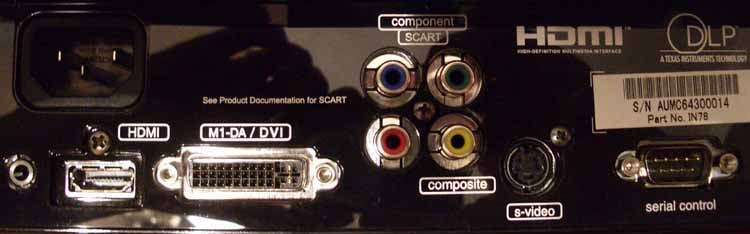
On the rear of the IN78 you will find both HDMI and DVI-D connections. Component, composite and s-video are also present. A 12VDC trigger output and an RS-232 serial connection allow custom installers to more precisely control the projector and any connected devices such as a motorized screen system. A detachable standard power cord was a welcome sight and should be standard fare on any custom install product - attached cords are anathema to installers looking to make a nice, low profile ceiling mount. Since InFocus provides a DVI-D to HDMI adapter in the box, you essentially have two HDMI inputs should you choose to utilize them. This is a nicely flexible projector with ample inputs.
IN78 Remote Control and Menu System
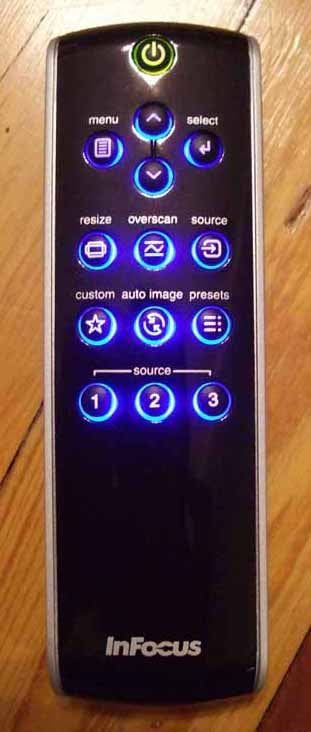 The remote control that
comes with the IN78 is the same remote that accompanied the IN76. It is very
sleek and well-designed. Instead of direct input access, the InFocus team has
opted for a selectable 3-input direct-selection method. I'm fine with this and
it makes for a cleaner remote control. The backlighting on this remote is
gorgeous and should be a model for all remotes as far as I'm concerned (it reminded
me of the remote that comes with the Logitech/Slim Devices Transporter).
The remote control that
comes with the IN78 is the same remote that accompanied the IN76. It is very
sleek and well-designed. Instead of direct input access, the InFocus team has
opted for a selectable 3-input direct-selection method. I'm fine with this and
it makes for a cleaner remote control. The backlighting on this remote is
gorgeous and should be a model for all remotes as far as I'm concerned (it reminded
me of the remote that comes with the Logitech/Slim Devices Transporter).
This remote offers menu access via a dedicated button and direct access to Resize (aspect ratio), Overscan, and Source (toggle) functions. You can also bring up a truly Custom function that can, for example, be used to activate blanking of the screen or freezing the frame on screen (we selected the latter for our screen shots). A Presets button offers toggle ability of stored Picture settings. The last cool thing is that the backlight is triggered from below with a trigger-like button. This is very ergonomic and a neat way to activate backlighting for the remote. I almost could forgive the lack of an auto-backlight option - which I feel should be standard for a device like a home theater projector (when are you NOT going to use a 1000 lumen projector in the dark?) OK, think that's cool? Press and HOLD the backlight button and you activate the LED flashlight option. I thought the LED at the top of the remote was IR until it turned on. This is pretty cool indeed, especially if you need to root around in the dark for something.
The Menu System
We told you that the IN78 was new. How new? So new that it doesn't have its own User Manual or Reference Manual yet. No, it still shares the manual for the other IN72/74/76 projectors. The problem is that the menu is slightly different with at least one item (Black Level Calibration) that isn't fully (or even partially) explained. The included CD doesn't have additional info either, and there are no inserts updating the user manuals for the IN78.
The menu system for the InFocus IN78 is simple but does extend to four levels in some areas (as indicated by the number of bullets at the top left of the menu screen). It has an almost miniscule top level menu that provides access to the main Picture controls as well as Settings and Source Info. It seems an extra step that doesn't need to be there.
 Picture Menu
The Picture menu provides access to all the usual suspects - Contrast, Brightness, and Color - as well as aspect and alignment settings like Keystone, Image Shift, Overscan and Aspect Ratio. Presets are stored and retrieved here and Gamma can be configured in a way that replaces most "Picture Settings" on other projectors (Bright Room, Film, Video, PC, etc).
Advanced Menu
This is also the starting point for
accessing the Advanced menu which
houses a lot more functionality. In the Advanced
menu you can apply flesh tone correction (don't), engage Film Mode (do), set
Sharpness levels (Standard), Color Temperature (6500 unless you have specific
needs), Color Gamut (Auto), Noise Reduction (enable at around 50%), and Color
Control (your RGB settings - more on that later). With this amount of control
you can just about set the IN78 to any use you may run into and you can
certainly calibrate it to your needs and room/screen environment. One thing I
found missing (but that can be added manually) is a 5500K color temperature
mode for watching Black and White films. I am a fan of older films and it's nice
to be able to flip the projector into a warmer color temperature for viewing
this type of programming.
 Settings Menu
Some items that stood out to me in the Settings menu included the Custom Key assignment and (user) Presets. The Custom Key assignment allows user to assign either the Blank Screen function, Freeze (frame), Source Info, Service Info or Source (input) 4 to a custom key located on the remote. I selected Freeze (frame) - and what screen-grabbing reviewer wouldn't! I also noted that the Presets menu gave access to 3 User presets, a Default setting, a Presets Off mode and also an ISF Settings function that, once unlocked, gives the user the ability to save Day and Night settings for the display. The added benefit for installers is that, once saved, users cannot delete these settings or modify them without an unlock code (and you're not going to give that to them, are you?)
IN78 Advanced Setup and Calibration
 Setting up the projector wasn't the easiest experience I've ever had,
but only because I kept looking for some hidden menu somewhere that I had
missed. It turns out that once I set White and Black levels (Contrast and
Brightness) selected Color Temperature and Gamma settings I was just about
through with my choices. Speaking of Color Temperature, I found the initial
measurements of Color to be somewhat off when the projector was in Film mode
and I took a reading at 80IRE:
Setting up the projector wasn't the easiest experience I've ever had,
but only because I kept looking for some hidden menu somewhere that I had
missed. It turns out that once I set White and Black levels (Contrast and
Brightness) selected Color Temperature and Gamma settings I was just about
through with my choices. Speaking of Color Temperature, I found the initial
measurements of Color to be somewhat off when the projector was in Film mode
and I took a reading at 80IRE:
- '6500K' setting yielded a reading of 5160K on the ColorFacts system
- '7500K' setting yielded a reading of 5940K on the ColorFacts system
- '9300K' setting yielded a reading of 7160K on the ColorFacts system
- 'Native' setting yielded a reading of 5600K on the ColorFacts system
This is odd because the literature associated with the IN78 claims that it is calibrated to D65 color standards. Either my bulb was off, or they certainly weren't referring to Film mode (or any other mode I could see for that matter). I also was unable to get the IN78 to pass blacker than black. None of the settings seemed to matter. Moving on, I went with 7500K as my default setting and began calibration. Since I had done a factory reset I have to assume this will likely be the best starting position for anyone else running this projector as well.
Note about White Peaking: I'd recommend keeping White Peaking off. While it will get you brighter whites, it does so at the expense of crushing the top end of your gamma curve. The end result is that you lose resolution in the brighter images. This is only a good setting for a day time mode in conjunction with High Power where you absolutely want the best possible output from the projector. White peaking is also odd in that it is a range from 0 to 100, however there are only 8 steps above zero: 0, 13, 25, 38, 50, 63, 75, 88, and 100.
Contrast ratio came in at 822:1 when running film mode (White Peaking off) and 941:1 when running with white peaking maxed out. You will get a third result if you turn on High Power mode, however I didn't run this test (this mode is not about contrast and more about maximum light output.)
Calibrating the InFocus Play Big IN78
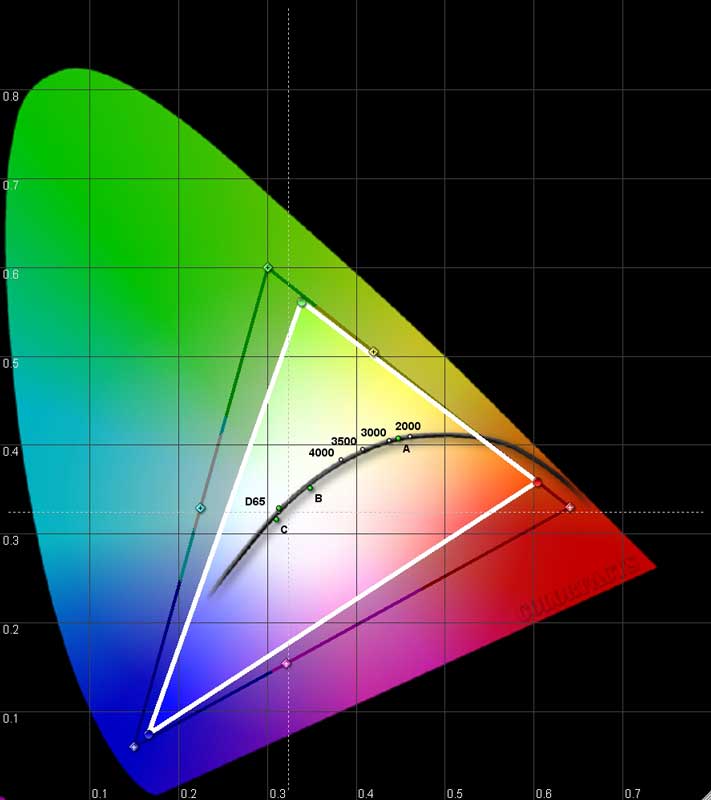
We utilized datacolor’s ColorFacts Professional 6.0 software to do our calibrations and measure the color, contrast and grayscale response of the IN78. Starting positions were a bit off what we expect to see in a high-end projector, but calibration proved successful for the most part as we quickly dialed in the HD81 to approach ISF levels. For the ‘before’ measurements, Auto Iris was engaged and the settings were configured for best film response in a light-controlled room.
|
Before Calibration |
After Calibration |
|
|
|
|
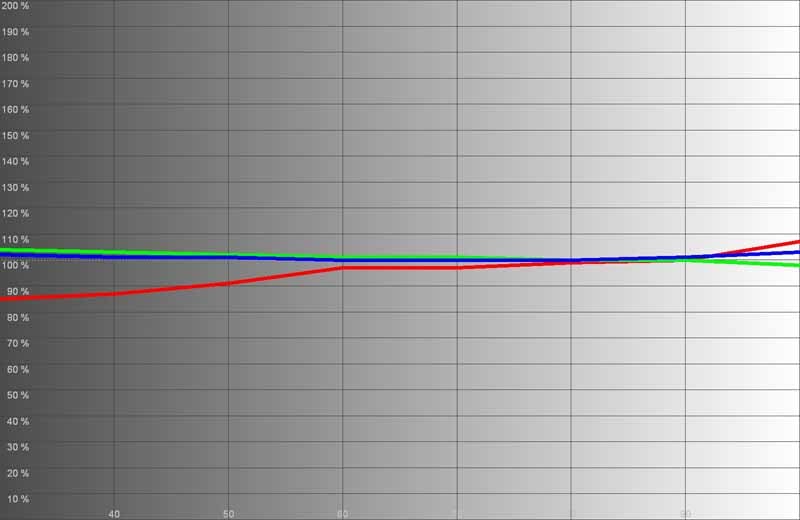
Even though we set the projector to 7500K mode to get closer to D65, we still saw quite a bit of warmth in the picture which was spelled out by our initial RGB measurement. |
After calibration we got a much tighter picture, though I was surprised by the drift found in the lower IRE spectrum. |
|
|
|
|
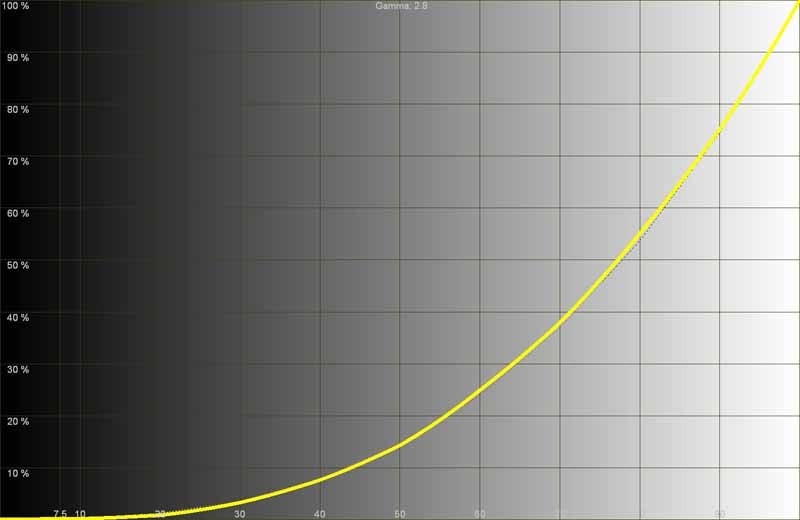
Initial gamma was 2.8 in "CRT" mode We flipped it to Film before calibrating the system. |
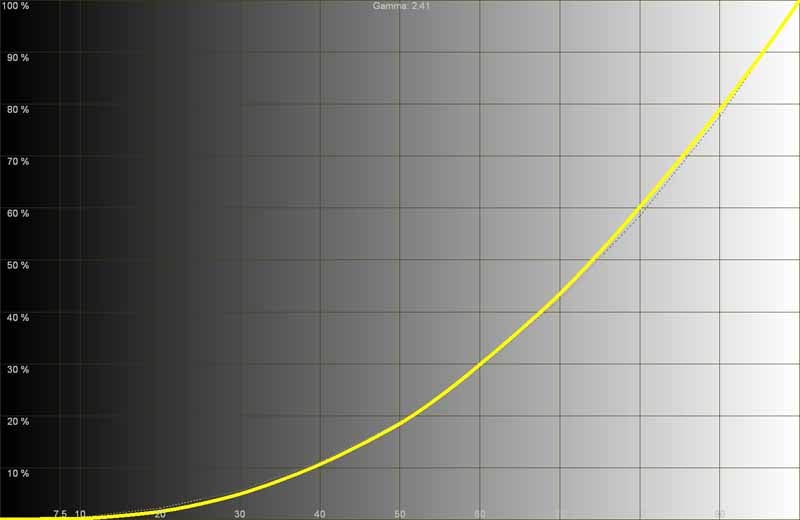
Our final measurement got gamma to 2.41. |
|
|
|
|
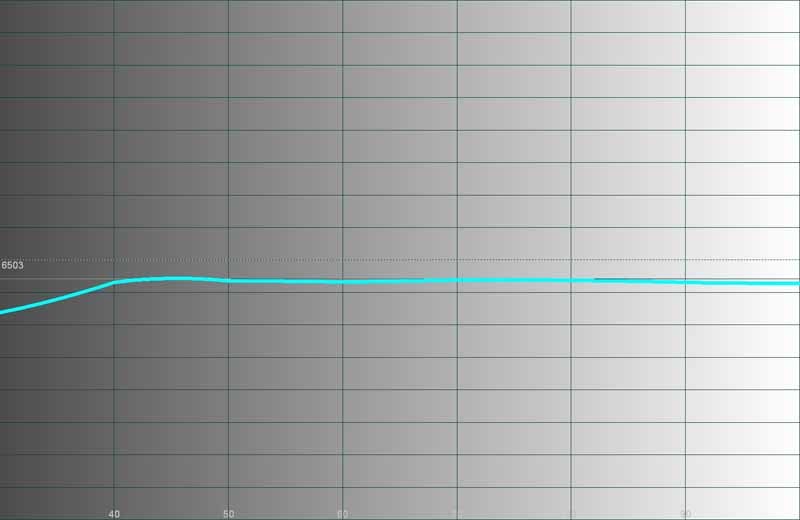
As you can see, initial color temperature was around 6000K even with the projector set to 7500K. |
After calibration, we saw a much better response, with the bottom IREs matching the apparent red boost we couldn't quite get down. |
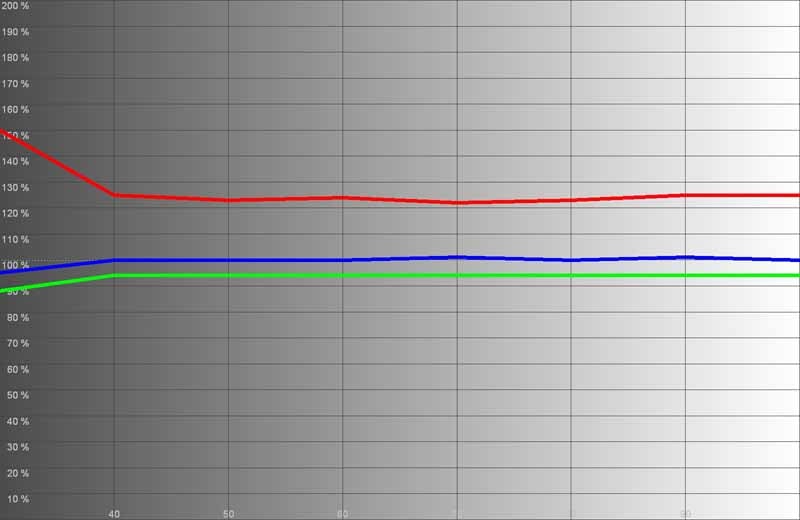
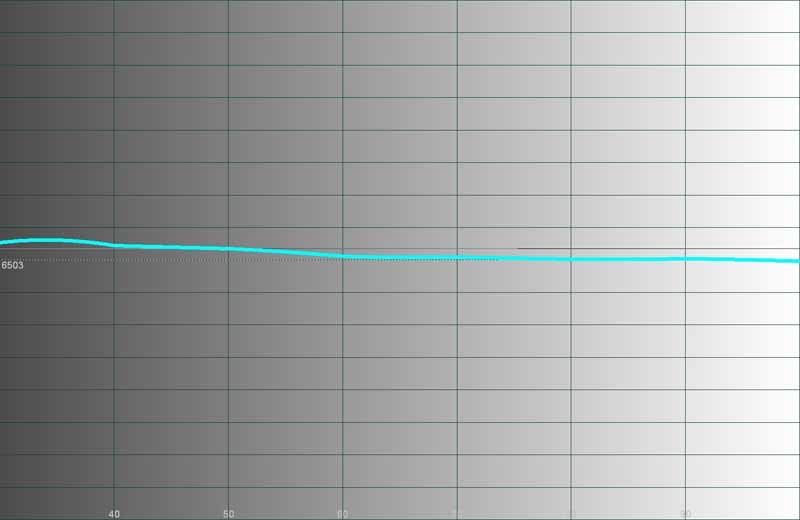
I was surprised that the initial calibration of this projector wasn't better. My review sample was not brand new and some of the effects might have been due to a replacement lamp issue (the lamp showed no hours on it according to the unit). With the premium dollar and ISF-focused settings I would like to see InFocus place more emphasis on shipping future units that are a bit more calibrated out of the box.
Audioholics/HQV Bench Testing Summary of Test Results
Perfect Score is 130
IN78 Benchmark total score: 80/100 (Excellent. Feel free to use this projector for scaling, deinterlacing and noise reduction - just ease up on the NR to avoid trails)
|
Test |
Max |
SP5000 |
SP5000 |
|
Color Bar |
10 |
10 |
Pass |
|
Jaggies #1 |
5 |
5 |
Pass |
|
Jaggies #2 |
5 |
5 |
Pass |
|
Flag |
10 |
10 |
Pass |
|
Detail |
10 |
10 |
Pass |
|
Noise |
10 |
10 |
Pass |
|
Motion adaptive Noise Reduction |
10 |
0 |
Fail |
|
Film Detail |
10 |
10 |
Pass |
|
Cadence 2:2 Video |
5 |
0 |
Fail |
|
Cadence 2:2:2:4 DV Cam |
5 |
0 |
Fail |
|
Cadence 2:3:3:2 DV Cam |
5 |
0 |
Fail |
|
Cadence 3:2:3:2:2 Vari-speed |
5 |
0 |
Fail |
|
Cadence 5:5 Animation |
5 |
0 |
Fail |
|
Cadence 6:4 Animation |
5 |
0 |
Fail |
|
Cadence 8:7 animation |
5 |
0 |
Fail |
|
Cadence 3:2 24fps film |
5 |
5 |
Pass |
|
Scrolling Horizontal |
10 |
5 |
Pass |
|
Scrolling Rolling |
10 |
10 |
Pass |
|
Total Points |
130 |
80 |
|
Comments on HQV Testing
What really impressed me about the IN78 was its scaling ability. Regardless of what Overscan or stretch mode the projector was in, the resolution pattern held its definition well and never seemed to fuzz out or blur. The next most impressive item was its noise reduction. It has fantastic noise reduction - until an item moved across the screen… but still, most projectors I review don't even bother with noise reduction or have bogus controls that don't do much of anything. The IN78 will squash noise, but be sure to keep it around 30 to avoid trails. Even at '50' trails were tolerable, though once you start to look for them you'll see them everywhere.
The Moving Zone Plate tests did as expected, with the 2-3 pattern looking good up to the maximum speed of the test. Vertical, diagonal, and circular tests did equally well. I was able to really notice trails on this projector (during high speed motion of objects with fixed edges) and I'm not sure if I was simply more aware of it this go around, or the color wheel timing played a part. The 2-2 Zone Plates nearly instantly fell to pieces as is typically the case in our testing of most projectors. This is a brutal test.
The Rainbow Dither test again showed a proclivity for trails, however the color gradients of the individual circles never experienced posturization or loss of their smoothness. The Rainbow Effect was very visible on this pattern, as any crisp white on black pattern tends to be, but I didn't notice the effect to be pronounced until the eyes darted around. Rainbows didn't appear if the action or motion on screen was followed. Deviate or jump around the screen and you are liable to see them (if you have this cursed ability).
IN78 Viewing Evaluation and Conclusion
Viewing Evaluation – HDTV
We utilized a wide variety of sources to demonstrate the excellent blacks and rich colors of the IN78. With HDTV sources we tended to check out the scaling capabilities and whether the IN78 would have difficulty taking 1080i and resizing it for 720p. As with the benchmark testing we did - it scales wonderfully with no visible artifacting or blurring of the image.
HDTV: DiscoveryHD - American Chopper & Rides
First off the block was
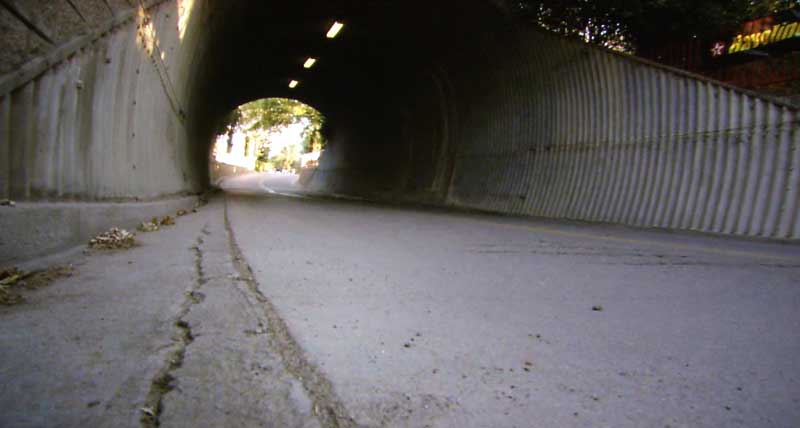
1080i HDTV featuring a favorite show of mine, American Chopper, and a new show (for me) called Rides which shows off some incredibly
hot-rodded cars. What I like about these shows are the close-ups of mechanical
parts and machinery. You'll note dramatic gradients that swing into blacks and lots
of detail - whether it's hair, metal and leather surfaces, or the lines on a
face.



HDTV: DiscoveryHD - Insectia
Did someone mention detail (oh
yeah, I did). Insectia offered some
of the most saturated and detail-rich images I'd seen in a while - even for
DiscoveryHD. I know, I know, I'll say the same thing next month when a new
series emerges. That's how it is with this HD channel, however, they constantly
strive to outdo themselves, and like National Geographic's filmmakers - they
often succeed. I was particularly drawn in by the beetles, which they showed
extremely close-up and with enough detail to make you wonder if they didn't
recreate the scene with Pixar Animation Studios. While the initial sections
were extremely vibrant and vivid, a later section also delved into the
"life and times" of underwater insects. This segment of the show had
incredible displays of dark underwater areas where the blacks showed through
rich and deep.


HDTV: House and
Bones
It's good to include
"reference" materials in a review (and indeed we did some other
titles that aren't listed here). In this case, reference refers to something I frequently watch - not necessarily
a pristine piece of footage or source material. House and Bones are two
shows me and my lovely wife frequent on the HD DVR. The Scientific Atlanta 8300HD
DVR utilizes lossless compression when storing files to the hard drive, so you
get the same nasty, compressed transmission the cable company is sending down
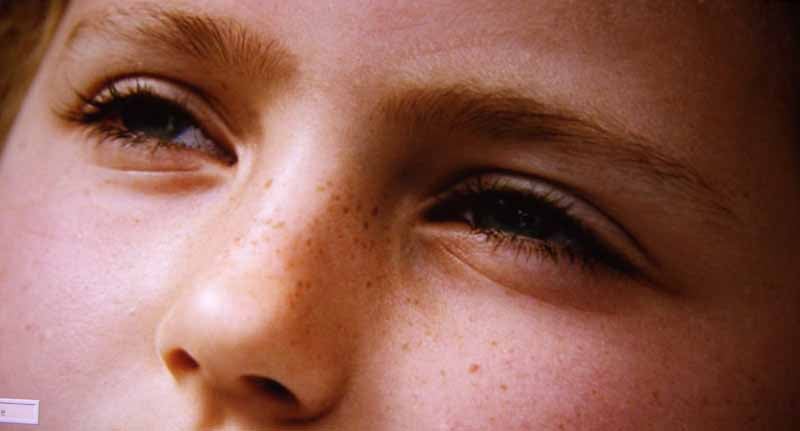
the pipe. How reassuring, right? In either case, hair and skin detail was clean
on Bones and there was no breakup in
the shadows and gradients which abound in House.
Overall I was very pleased with the performance of the IN78.


HD DVD: The
Departed
We watched this Scorsese
film as part of an HD DVD review and it looked like we couldn't have asked for
a better display for it than the IN78. The InFocus projector allowed the
vibrant, almost oversaturated color to come through and, even though the output
was scaled from 1080i to 720p by the projector, edge detail was unfettered. I
would have to say that this movie was tons better to watch than to
"watch" (I may be alone in thinking that the plot was somewhat
predictable, though it was nice to see the all-star cast interact as they did.)
In any case it was beautiful.


DVD: Zoom -
Academy for Superheroes
This movie surprised me in
that it was fun without being too stupid. But then again, Tim Allen isn't Will
Ferrell and, though his parts are a bit predictable, he led this cast in a most
enjoyable film. This was a very "average" transfer. I didn't detect a
ton of edge enhancement or other nasties, but the picture was very soft overall
(and yes, I watched it before the HD
DVD of The Departed). If anything, it
showed me what the IN78 would do with typical standard definition material. I
shot this particular movie to the projector in 720p. Since the InFocus IN78 is
priced as a higher end 720p DLP model I figured there's a good chance the owner
will also have a decent source player.

Conclusion
As expected the IN78 performed admirably. The only question is whether it is worthy of the additional $1000 over the street price of an IN76. For now, we'd have to say that IN76 users should not feel too compelled to drop the extra cash on a new projector just yet. Those starting from scratch are going to find that the IN78 offers a nice "out of box" experience with little to no calibration necessary in order to get a rich picture with deep blacks and vivid color. Installers will like the ISF lockdown modes and presence of both RS-232 and a 12VDC trigger for motorized screen mechanisms. For that kind of peace of mind it may be worth the premium price tag affixed to this 720p projector.
InFocus IN78
MSRP: $3,499
InFocus
(888) 282-PLAY
About InFocus Corporation
InFocus® Corporation, the
worldwide leader in digital projection technology and solutions, enhances
thinking, learning and creativity in boardrooms, meeting rooms and classrooms
and delivers superior home entertainment experiences by vividly projecting and
displaying larger-than-life images from multiple sources including computers,
DVD players, and PDAs.
From the smallest and lightest mobile projectors and feature-packed meeting room products to the finest home entertainment solutions, InFocus has garnered industry acclaim for design, functionality and intuitive solutions for its InFocus®, InFocus ScreenPlay®, LiteShow® and ASKProxima™ products.
The Score Card
The scoring below is based on each piece of equipment doing the duty it is designed for. The numbers are weighed heavily with respect to the individual cost of each unit, thus giving a rating roughly equal to:
Performance × Price Factor/Value = Rating
Audioholics.com note: The ratings indicated below are based on subjective listening and objective testing of the product in question. The rating scale is based on performance/value ratio. If you notice better performing products in future reviews that have lower numbers in certain areas, be aware that the value factor is most likely the culprit. Other Audioholics reviewers may rate products solely based on performance, and each reviewer has his/her own system for ratings.
Audioholics Rating Scale
 — Excellent
- — Very Good
- — Good
- — Fair
- — Poor
| Metric | Rating |
|---|---|
| Detail and Resolution | |
| Deinterlacing & Scaling | |
| Contrast and Black Levels | |
| Color Reproduction | |
| Noise Reduction | |
| Calibration Options | |
| Build Quality | |
| Ergonomics & Usability | |
| Ease of Setup | |
| Features | |
| Remote Control | |
| Fit and Finish | |
| Performance | |
| Value |  |
Clint Deboer was terminated from Audioholics for misconduct on April 4th, 2014. He no longer represents Audioholics in any fashion.
View full profile Subscribe to our newsletter