


Epson Pro Cinema 1080UB Projector Review
Epson Pro Cinema 1080UB Projector
- Product Name: PowerLite Pro Cinema 1080UB
- Manufacturer: Epson America
- Performance Rating:


- Value Rating:
- Review Date: May 08, 2008 23:22
- MSRP: $ 4999
Control: RS-232C, IR remote Warranty: 3 years
parts & labor + 90 days lamp; 3 Years Epson Road Service Program; Epson
PrivateLine Toll-Free Technical Phone Support Dimensions: 15.6” x 4.8” x 12.2”
in (396 x 124 x 310 mm)
Brightness: 1600 ANSI lumens (Dynamic mode)
Contrast: Up to 50,000:1 (full
on/off); 4,000:1 (native)
Resolution: 1920 x 1080 native HD
resolution
Aspect Ratio: Widescreen native 16:9
aspect ratio (4:3 resized)
LCD Panel: 3 x 0.74" Epson
C2Fine VAN (Vertical
Alignment Nematic) 3LCD ("D7")
Optical System: Dichroic mirror
separation and prism combine method
Iris: Auto Iris optical system with
AbsoluteBlack
Video Inputs: 2 x HDMI-HDCP (1.3), component, composite, S-video, and
PC/RGB (HD15)
Projection Lens: F/2.0 – 3.17, manual
focus & zoom
Lens Shift: Vertical and horizontal (96% vertical, 47% horizontal)
Keystone Correction: +/- 15 degrees (vertical)Lamp: 170 W UHE (Ultra-High
Efficiency) E-TORL (Epson Twin Optimized Reflection) lamp
Power Supply: 100-120 volts, 2.7A
Power Consumption: 245W (high); 200W
(low); 4W (standby)
Operating Temperature: 32 – 104
degrees F (0 – 40 degrees C); 20-80% humidity (no condensation)
Fan: 24dB operation (in low mode)
Remote Control: Backlit w/batteries included
Standard Accessories: Power
cord, Wireless remote control unit, batteries for remote control
Weight: 12.0 lbs (5.4 kg)
Pros
- ISF-certified product with custom memories
- Excellent real contrast ratio
- Excellent performance "out of the box"
- xvYCC color support
- Dual HDMI 1.3 inputs
- Quiet fan
- Extra lamp!
Cons
- No automatic focus (manual only)
- Auto-iris only has on/off
- Poor LCD panel convergence in some samples
1080UB Features, Installation and Setup
When we got our first glimpse of Epson's Pro Cinema 1080UB at the 9th Annual Audioholics State of the CE Union Event in Clearwater Beach, Florida, we knew we were in for a treat. We had already reviewed the excellent Pro Cinema 1080, and the UB - short for Ultra Black - only took a good projector and made it even better. This review is more of a comparison and evaluation of the new features than a full descriptive overview of everything about the 1080UB. If you want the full blow-by-blow, take a look at our review of the Pro Cinema 1080 and you'll find everything you need to help you evaluate the full complement of this projector's features.
New UB-centric Features
The Epson Pro Cinema 1080UB projector is about 90% identical to the Pro Cinema 1080, but the small number of differences are quite noticeable and very much a part of what makes this projector so much better than its predecessor:
- Increased Contrast Ratio
Epson's new D7 panels, with its C2 Fine (Crystal Clear Fine) system, produces a significantly higher contrast than even the well-received Pro Cinema 1080. The efficiency increase is partially due to a 20% increase in aperture ratios of these new panels vs the D6 panels of a year before. D7 panels also use 12-bit LCD drivers which boost accuracy in reproducing subtle differences in color and gradation. This means that the new D7 panels can handle 64x the amount of color - over 68 billion color shades. The new panels also quadruples the theoretical 1,024 gradation levels to 4,096 gradation levels. This certainly doesn't bear out in the real world as 4x the grayscale resolution, but it helps. - Dual HDMI 1.3 inputs and xvYCC Color
Support
The Pro Cinema 1080 supported HDMI, but the 1080UB model adds another input and also clarifies its support for the new xvYCC color space.
Pro Cinema 1080 vs. Pro Cinema 1080UB
The Epson Pro Cinema 1080UB shares nearly the same features as the 1080, with a few notable exceptions. Here are the quick specs for comparison:
| Epson Pro Cinema 1080 | Epson Pro Cinema 1080UB |
| HQV Score: 85 | HQV Score: 90 |
| 3 x 1920 x 1080 pixels | 3 x 1920 x 1080 pixels |
| 0.74-inch C2Fine D6 LCD panels |
0.74-inch C2Fine D7 LCD panels |
| Inputs: Composite S-video Component PC (HD15) 1 x HDMI SCART |
Inputs: Composite S-video Component PC (HD15) 2 x HDMI |
| Contrast Ratio: 12,000:1 | Contrast Ratio: 50,000:1 |
| 1200 ANSI lumens | 1600 ANSI lumens |
| ISFccc Certification: Yes | ISFccc Certification: Yes |
| Includes: extra lamp, ceiling mount | Includes: extra lamp, ceiling mount |
| Warranty: 3 years | Warranty: 3 years |
| MSRP: $4,999 | MSRP: $4,999 |
You'll note the increased ANSI lumen rating (which is great since the 1080p was a tad dimmer than we'd like to see in terms of its light output in Cinema Night modes). Epson also ditched the SCART input (at least in US models) and added an additional HDMI input. The D6 panels have now been upgraded to the newer D7 panels.
Basic Setup and Installation
Setup for the Epson Pro Cinema 1080UB followed the same procedure as the original, with the addition that I could now, if so desired, add a second HDMI source to the unit. Combined with the ISFccc calibration options, this could make for a truly customized experience with the ability to completely calibrate the system for two separate sources. Given the ease of Memory recall, however, this may just be a moot point in this projector.
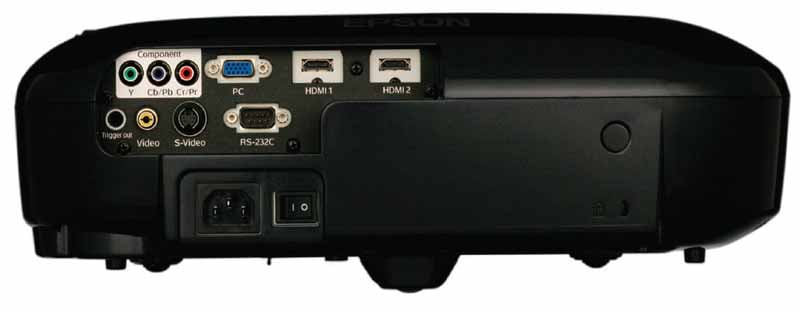
The Pro Cinema 1080UB has dual HDMI
inputs and loses the SCART input.
The Pro
Cinema 1080UB maintains use of the same efficient remote of the 1080 and it is
still as versatile as ever - allowing almost effortless control without having
to point the remote very carefully whatsoever. It also continues to come with a ceiling mount and spare lamp. The lamp alone is worth around $350 or more. We actually installed two of the Pro Cinema 1080UB units. One utilized the included Epson mount and another mounted to my Peerless PRG-UNV Precision Gear universal mount. The Peerless system kicks the tail of the included mount, but free is free.
The Epson Pro Cinema 1080UB has an almost identical menu system to the 1080, so please feel free to read that review for an exploded view of the menu system and functionality. When configuring the Epson, I found that placing it in HDMI Expanded mode allowed me to see below black information - making for an easier calibration (also be sure to leave Epson's Super White Mode 'Off').
Author's Note: For a more detailed explanation of how Below Black information is used in projector calibration and how it relates to HDMI, xvYCC and reference video levels, please review the Blacker-than-Black article we wrote on the subject.
I tried the unit with the Auto Iris system on and off. Epson's Auto Iris is not completely silent, but it is efficient in that it produces deeper blacks than if it is left off. It's unfortunate that you cannot configure it to a fixed setting or position (or that they didn't provide more intuitive controls like 'open', 'closed', and 'auto'), but overall it is one of the few iris systems I've used that made a big enough difference (and was harmless enough during use) that I'll recommend you leave it on.
1080UB Calibration and Color Temperature
Calibration isn't too difficult, though we prefer menus that remember where you were and have a way to disengage without having to "back out". Still, it didn't take long to dial in some really nice settings.
We again utilized datacolor’s ColorFacts Professional software to calibrate and measure the grayscale response of the Epson projector.
The default settings of the 1080UB were satisfactory once Black and White levels were configured properly. As mentioned above, setting the correct black and white levels required that we engage HDMI Expanded mode so that below black signals - permitted and often present on DVD masters - were shown. Of course, once we saw that below black was received, we dialed down the Brightness (-11) and brought up the Contrast (+12) until the levels were correct and the best dynamic range possible was shown. Color reproduction of the 1080 and 1080UB were similar in that the green was out - however, for whatever reason, the green leaned towards yellow on the 1080, and it leaned towards blue on the 1080UB:
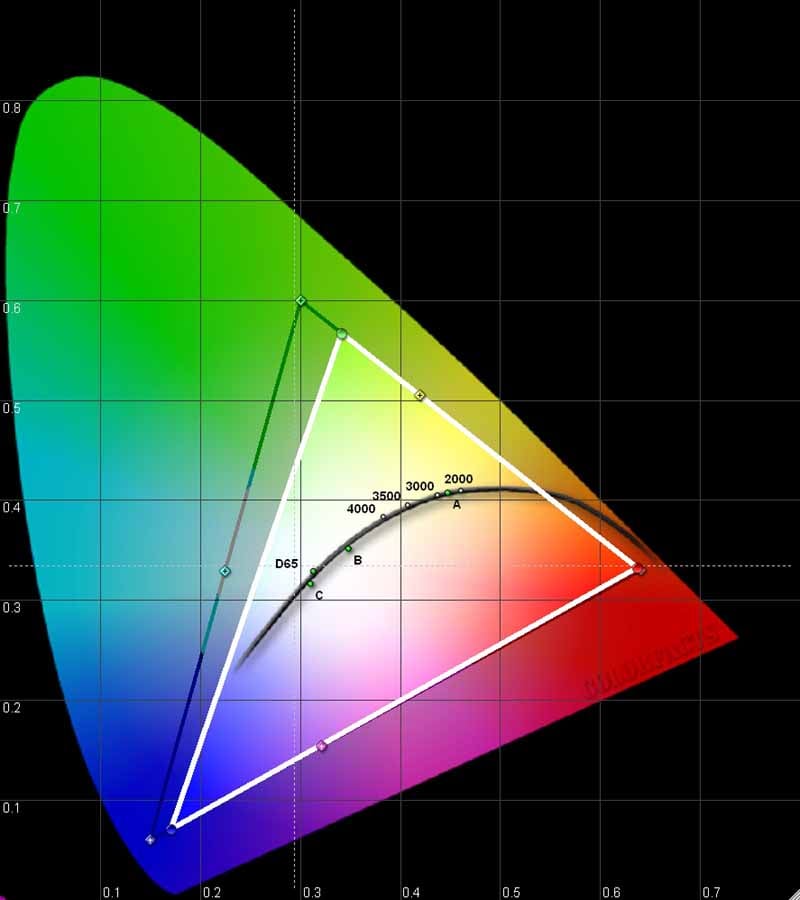
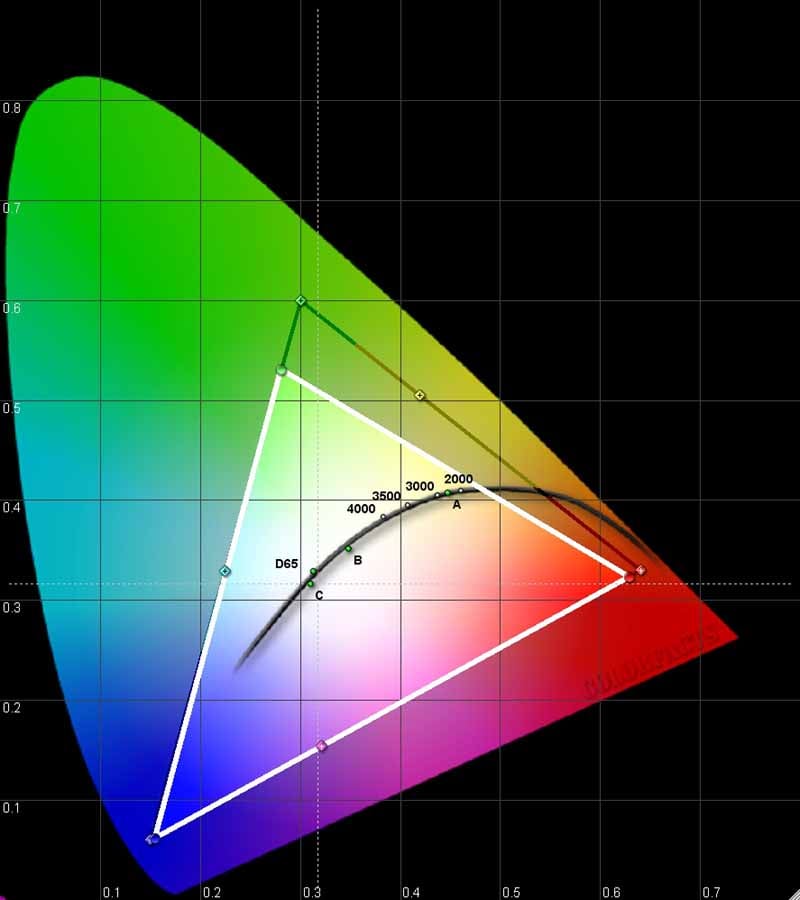
Epson Pro Cinema 1080 (left) and 1080UB
(right)
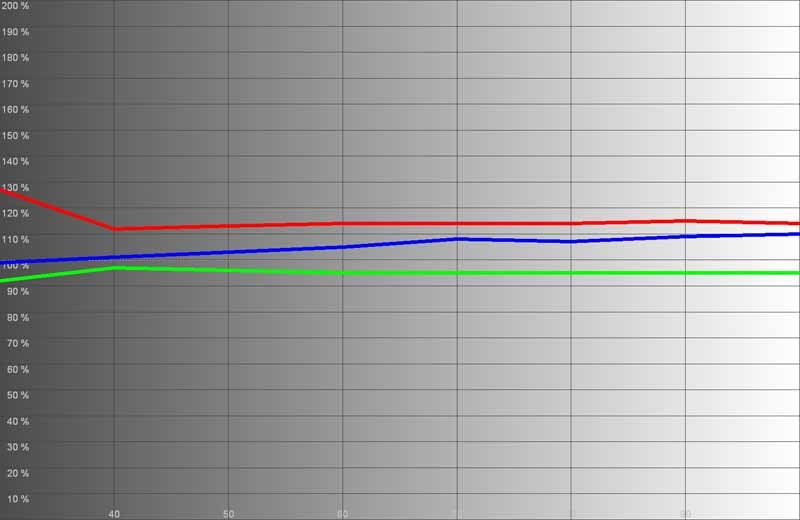
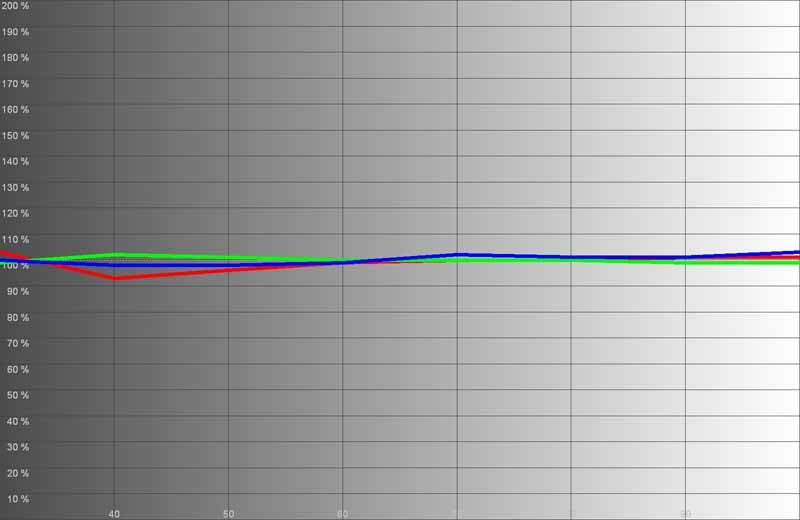
RGB levels before (left) and after
(right) calibration

Color Temperature before...

...and after calibration
Calibration was very good initially under Cinema Night mode, but we actually found that the Silver Screen mode produced the most accurate settings out of the box - at least in terms of overall color temperature and light levels. If you want to squeak out some additional light output then flip to Cinema Night mode. Here is a breakdown of 'out of the box' light levels and color temperature:
- Vivid Mode - 6800K, 58.7 fL
- Cinema Day - 7900K, 32 fL
- Natural - 7300K, 17.1 fL
- Cinema
Night - 7200K, 17.2 fL - A
great "out of the box" choice
- HD - 7400K, 12.3 fL
- Silver Screen - 6500K, 12fL - #1 choice, but only for dark rooms
As you can see, we got the Epson 1080UB up to 58.7 fL in Vivid mode (using a 100IRE pattern). Compare this to the maximum 39 fL we were able to get out of the original 1080. In addition, the 1080 only put out 8.25 fL in Cinema Night mode while the 1080UB gets that to a much more respectable 17.2 fL. All calibrations (and viewing tests) were done using a 92-inch Carada Precision screen with Masquerade Masking System. The Epson Pro Cinema 1080UB projector was throwing from a distance of 11.5 feet. I would say that the increased lumen output of the projector is a significant improvement to the line. We were also particularly surprised when Vivid mode put out a ton of light yet maintained a color temperature of 6800K.
One thing to note is that, though we recommend Silver Cinema mode out of the box, after calibration it yielded a light output of just 9 fL. This is going to be too dim for any but the most darkened of theater rooms. For those a bit hesitant to go this dark, use the Cinema Night mode as your basis for calibration.
1080UB Bench Testing and Convergence
Audioholics/HQV Bench Testing Summary of Test Results
Perfect Score is 130
Epson PowerLite Pro Cinema 1080UB Benchmark Score: 95
(an overall great performer where it counts)
|
Test |
Max |
Component |
Component |
|
Color Bar |
10 |
10 |
Pass |
|
Jaggies #1 |
5 |
5 |
Pass |
|
Jaggies #2 |
5 |
5 |
Pass |
|
Flag |
10 |
10 |
Pass |
|
Detail |
10 |
10 |
Pass |
|
Noise |
10 |
10 |
Pass |
|
Motion adaptive Noise Reduction |
10 |
10** |
Pass |
|
Film Detail |
10 |
10 |
Pass |
|
Cadence 2:2 Video |
5 |
0 |
Fail |
|
Cadence 2:2:2:4 DV Cam |
5 |
0 |
Fail |
|
Cadence 2:3:3:2 DV Cam |
5 |
0 |
Fail |
|
Cadence 3:2:3:2:2 Vari-speed |
5 |
0 |
Fail |
|
Cadence 5:5 Animation |
5 |
0 |
Fail |
|
Cadence 6:4 Animation |
5 |
0 |
Fail |
|
Cadence 8:7 animation |
5 |
0 |
Fail |
|
Cadence 3:2 24fps film |
5 |
5 |
Pass |
|
Scrolling Horizontal |
10 |
10 |
Pass |
|
Scrolling Rolling |
10 |
10 |
Pass |
|
Total Points |
130 |
95 |
|
*We fed the unit 480i HDMI output from a Denon DVD-3930CI **There was some panel blurring.
Comments on Bench Testing
The Pro Cinema 1080UB mimicked the former Pro Cinema 1080 except that it passed the Film Detail test this go-around. I noticed a tiny bit of smearing on the Motion adaptive Noise Reduction test, though after comparing to a source component I was familiar with, I chalked up a majority of the slight blurring as the fault of the LCD panel. This was the reason it didn't fail. With this projector you're going to get a great picture, even if you are feeding it interlaced standard definition.
Quality Control Issues - Convergence
You may have
heard a bit about the convergence issues associated with the 1080UB series.
What I'm not certain of is how many people would be concerned if they had never
heard about it in the first place. Nevertheless, the issue centers around the
correct alignment of the three LCD panels and how that translates into the
projectors ability to clearly produce the image pixels on the screen. In my
first sample (yes I got nailed with it as well) my projector was far enough off
that I could notice a slight reddish hue at the lower right of my screen and a
slight green tinge at the center when putting up a test pattern grid. While I
didn't notice the convergence issue on normal viewing material, it bugged me
enough that I had Epson send me a replacement - and the replacement, while not
absolutely perfect, was likely within tolerance. If DLP gets wind of this, you
can count on press releases all over the place about how single chip DLP
systems don't suffer from convergence problems…
Here's what the convergence issue looks like:

To me this was a bit too much to accept for the price. Epson has reportedly gotten a bit better in the QC department since this became a very public issue earlier this year.
And we would be lax if we didn't link to the AVS Forum thread that discusses some of the issues and provides user pics of what to look for.
1080UB Movies and Games
The Epson PowerLite Pro Cinema 1080UB was a pleasure to watch, and while I didn't include everything I watched in this review, I put forth many clips designed to show the detail evident in this revised projector.
HDTV: Las
Vegas
Las Vegas is a very "red" show, but
it also has the added benefit of putting out a ton of indoor material, varying
from sparsely-lit offices to outdoor scenes on the Vegas Strip. I was able to
capture a couple shots that showed off the deep black levels and also the rich
saturation which this projector is more than capable of providing.
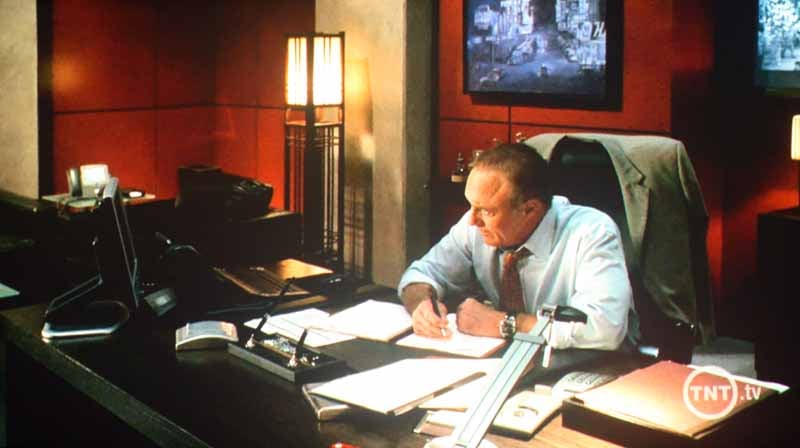
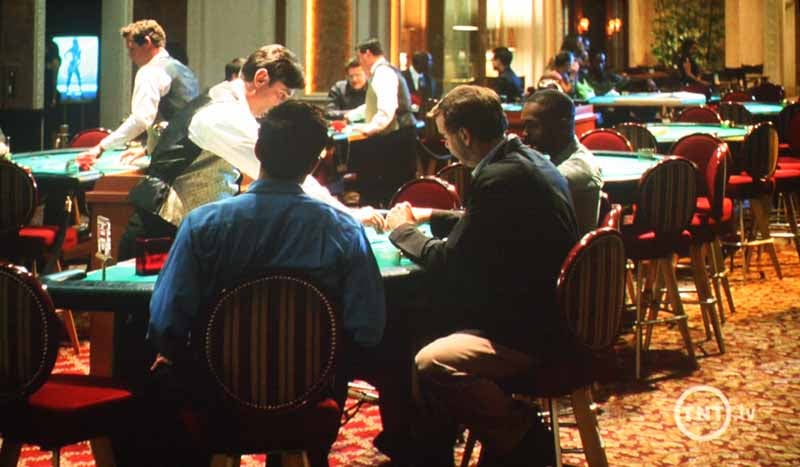
Rich colors, deep blacks make up the Las Vegas typical shots
HDTV: Rides
Rides had a unique
show where they introduced the new Corvette Z06 along with the makers of the
Corvette. Additionally, they showed off the new Corvette C6.R. This car is
insane - 505 horsepower from a small block 8-cylinder engine that holds a combination
of aluminum and titanium parts. Of course, what I liked was how awesome it
looked in HD - even close up on a supersized projector screen.


I'll take two - they're small (block).
Xbox 360: Army
of Two
Any time I
can play a video game and call it "work" I'm all over it. I decided
to put up some Army of Two action
(with my trusty sidekick Tom Andry) and see how well the Epson handled
fast-paced gaming action as well as the intensely dark scenes I knew AoT was
capable of delivering. OK, so I probably played the game for 5 hours in order
to snap a couple of cut scene shots, but it was worth it. The game looks great,
and there's simply no avoiding the excellent dynamic range which is evident any
time an explosion or shootout happens indoors. This game has plenty of content
to deliver and it will eat up your display for all its worth. In this case, the
Epson held on for the ride and came out looking pretty great.


Army of Two is butt-kick-a-liscious!
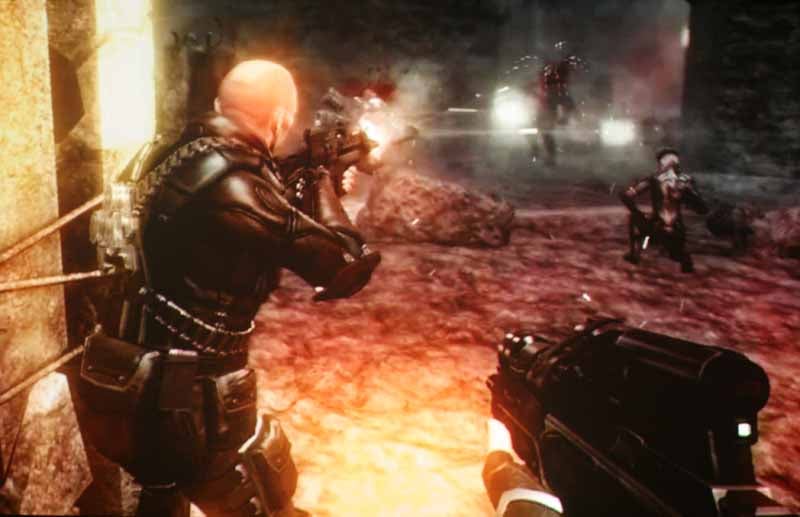
Xbox 360: Clive
Barker's Jericho
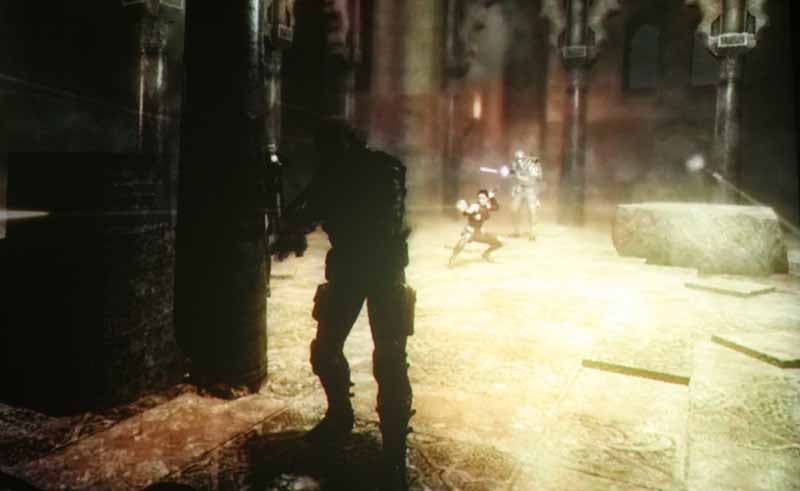
This game is
insane. It's very different from any other third person shooter I've ever
played and the environments seem like they were pulled right out of the mind of
a masterful horror story writer. Oh wait, they were. In fact, the storyline and
voice acting are so convincing, it's hard not to get your pulse racing and find
yourself looking deep into the dimmed corners in anticipation of the next
strange creature to leap out at you from the darkness. Having a projector that
can handle the deep dark areas really helps for games like this and I was
thankful that Epson had both increased the lumen output of the project while at
the same time making improvements to the LCD panels. The end result is more
dynamic range - and this game used it all up.
Xbox 360: Turok
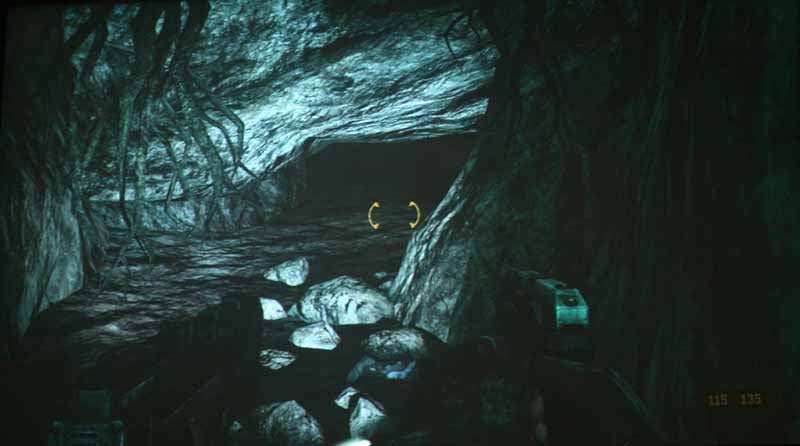
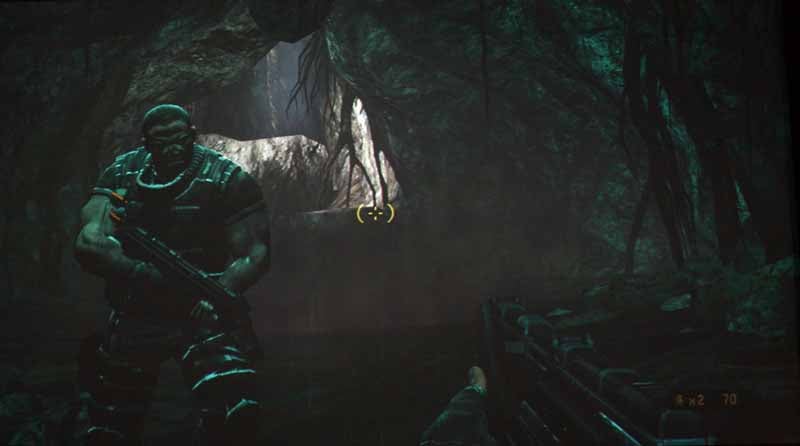
With a game
like Turok - if you play this on an older projector you'll either be looking at
a ridiculously over-bright picture where blacks are gray, or you'll see an
occasional splotch of light in an otherwise sea of black. You're basically
running around caves for the demo - trying to get out. Caves. Dark caves. With
velociraptors hunting you down. Did I mention this is a dark game? Check out
these pics:
Far
from blotchy - that's detail in those shadows!
1080UB Conclusion
Epson's former iteration of this projector was highly recommended by me last year. I can only recommend it more now that they have added more light output and updated the LCD panels to D7 technology. The reason this projector doesn't get a 5 in value is simple - Epson has cauterized its own product by not making the Pro Cinema enough different from its Home Cinema counterpart. For an extra $2000 retail (which we acknowledge often ends up far less in terms of street value) it's tough to justify the Pro Cinema as a purchase on a consumer level - even with the extra lamp and ceiling mount. For custom installers, however, the additional features are essential (and, ahem, billable) so in the end this becomes a great product for its intended audience. Epson seems to be working out the kinks in its convergence saga, and many retailers are coming up with guarantees to ensure that consumers don't get stuck with a product they won't be happy with.
Epson PowerLite Pro Cinema 1080UB LCD Projector
MSRP: $4,999
Epson
America, Inc.
One Epson Way
Secaucus, NJ 07094
www.epson.com
Get a Great Price on the Home Cinema 1080UB!
About
Epson
Epson offers an
extensive array of award-winning image capture and image output products for
the consumer, business, photography, and graphic arts markets. The company is
also a leading supplier of value-added point-of-sale (POS) printers and
transaction terminals for the retail market. Founded in 1975, Epson America,
Inc. is the U.S.
affiliate of Japan-based Seiko Epson Corporation, a global manufacturer and
supplier of high-quality technology products that meet customer demands for
increased functionality, compactness, systems integration and energy
efficiency. Epson America, Inc. is headquartered in Long Beach, Calif.
The Score Card
The scoring below is based on each piece of equipment doing the duty it is designed for. The numbers are weighed heavily with respect to the individual cost of each unit, thus giving a rating roughly equal to:
Performance × Price Factor/Value = Rating
Audioholics.com note: The ratings indicated below are based on subjective listening and objective testing of the product in question. The rating scale is based on performance/value ratio. If you notice better performing products in future reviews that have lower numbers in certain areas, be aware that the value factor is most likely the culprit. Other Audioholics reviewers may rate products solely based on performance, and each reviewer has his/her own system for ratings.
Audioholics Rating Scale
 — Excellent
- — Very Good
- — Good
- — Fair
- — Poor
| Metric | Rating |
|---|---|
| Detail and Resolution | |
| Deinterlacing & Scaling | |
| Contrast and Black Levels | |
| Color Reproduction | |
| Noise Reduction | |
| Calibration Options | |
| Build Quality | |
| Ergonomics & Usability | |
| Ease of Setup | |
| Features | |
| Remote Control | |
| Fit and Finish | |
| Performance |  |
| Value | |
Clint Deboer was terminated from Audioholics for misconduct on April 4th, 2014. He no longer represents Audioholics in any fashion.
View full profile Subscribe to our newsletter