Epson PowerLite Pro Cinema 1080 Review
Epson PowerLite Pro Cinema 1080
- Product Name: PowerLite Pro Cinema 1080
- Manufacturer: Epson
- Distributor: Visual Apex
- Performance Rating:


- Value Rating:
- Review Date: April 05, 2007 13:54
- MSRP: $ 2999
|
Brightness: 1200 ANSI lumens (vivid mode) Projection Lens: F/2.0 – 3.17, manual focus & zoom Lens Shift: Vertical and horizontal (96% vertical, 47% horizontal) Keystone Correction: +/- 15 degrees (vertical) |
Lamp: 170 W UHE (Ultra-High Efficiency) E-TORL (Epson Twin Optimized Reflection) lamp Warranty: 3 years parts & labor + 90 days lamp; 3 Years Epson Road Service Program; Epson PrivateLine Toll-Free Technical Phone Support Dimensions: 15.6” x 4.8” x 12.2” in (396 x 124 x 310 mm)Weight: 12.0 lbs (5.4 kg) |
Pros
- No screen door effect - period
- Excellent contrast & color saturation
- A plethora of calibration options
- Good performance "out of the box"
- Backlit remote
- Native 1080p/24/60 support
- HDMI 1.3
Cons
- No automatic focus (manual only)
- <12 fL output in Cinema Night mode
- Odd/inaccurate resolution information in Info menu display
Epson Pro Cinema 1080 Features and Comparison
1080p is coming to market with a vengeance. Epson is leading the way with its new 1080p LCD panels and the only question is: how well does this projector compare to other products available on the market? With pricing under $5000 and Epson's proclivity for producing very high quality projectors with excellent features, detail and color, it's bound to be a serious contender in the market.
I think labeling 1080p as "true" high definition is a bit unfair, but I do understand the desire of the industry as a whole (not to mention consumers) to get away from the dual 720p/1080i scenario and jump straight to the maximum consumer resolution currently available. You can see this is happening as new DVD players and displays come to market left ad right with support for 1080p (whether as an input format or upconversion output resolution). 1080p is not only coming - it's apparently here to stay, at least as a standard resolution.
Features and Favorites
We just (and I do mean JUST) reviewed the Epson PowerLite Pro Cinema 810 HQV projector. Many of the physical features of the Pro Cineam 1080p are identical to the 810 HQV, however there are some stand out differences as well. Here are the features of the Epson Pro Cinema 1080 that we wanted to highlight for our readers:
- C2 Fine VAN 3LCD System
Epson's new C2 Fine (Crystal Clear Fine) system produces a higher contrast and pixels that are so close together you'll have to literally be standing less than 3 feet away from the screen in order to see pixels. Any hint of screen door effect has been eliminated from the Pro Cinema 1080. - Horizontal and Vertical Lens Shift
Along with Epson's "super-zoom" , the 1080 maintains Epson's signature ~100% horizontal and ~50% vertical lens shift, allowing users to position this projector just about anywhere inside, or even outside the screen area. Keystoning is a thing of the past. Like all Epson theater projectors, the lens shift still does not have a locking function and use at both extremes is impossible. - 1080p Native Resolution
This Epson projector has support for native 1080p content without scaling or loss of resolution. That means your overpriced 1080p-mastered BD and HD DVD discs will look absolutely fantastic on this projector. - HDMI 1.3
The Pro Cinema 1080 sports HDMI 1.3 and Deep Color for the best possible image color depth.
How to Spend ~$5000: 1080p or 720p with HQV Processing?
For those with the budget - it's an interesting decision to make when comparing the Pro Cinema 1080 and its 720p counterpart the 810 with HQV option. For all intents and purposes, they are priced almost the same and depending on your needs you may swing one way or the other. Here are the quick specs for comparison:
|
Epson Pro Cinema 1080 |
Epson Pro Cinema 810 HQV |
|
HQV Score: 85 |
HQV Score: 125 |
|
3 x 1920 x 1080 pixels |
3 x 1024 x 720 pixels |
|
0.74-inch C2Fine LCD panels |
0.7-inch D5 MLA |
|
Inputs: S-video Component PC (HD15) |
Inputs: S-video Component (BNC with adapters) PC (HD15) S/PDIF audio |
|
Outputs: NA |
Outputs: |
|
Contrast Ratio: 12,000:1 |
Contrast Ratio: 10,000:1 |
|
1200 ANSI lumens |
1600 ANSI lumens |
|
Scaling Options: Zoom |
Scaling Options: |
|
1) 12V Triggers |
2) 12V Triggers |
|
RS-232C: Yes |
RS-232C: Yes with Slave |
|
Full native 1080p/24/30/60 support |
480i/480p/720p/1080i support (limited 1080p/24/30 downscaling) |
|
MSRP: $4,999 |
MSRP: $5,999 |
Epson Pro Cinema 1080 Setup, Inputs and Remote
Setting up the Pro Cinema 1080 is a very simple process. You'll select your projection type (front, rear, front ceiling, rear ceiling.) Input selection can be done easily via the remote control and the on-board video processing will take care of scaling your incoming video to the proper resolution. The Aspect button on the remote can also help you to correctly scale the picture within the frame. We recommend using the HDMI input - you will benefit from true 1080p video potential with many Blu-ray or HD DVD discs - including Deep Color support. The component video inputs can also be utilized if needed for legacy DVD players or cable TV boxes.
Throw Chart for Distancing the Projector from a 16:9 Projection Screen
The Epson's amazing zoom lens is on this model as well and allows for a very flexible placement. In our room we had the unit positioned at around 11 feet and projecting onto a Studiotek 130 screen.
|
Screen Size |
Size (Inches) |
Distance (Feet) |
||
|
|
width |
height |
wide |
tele |
|
70 |
61.0 |
34.3 |
6.2 |
14.7 |
|
80 |
69.7 |
39.2 |
7.8 |
16.7 |
|
90 |
78.4 |
44.1 |
8.3 |
19.0 |
|
100 |
87.2 |
49.0 |
9.8 |
20.9 |
|
110 |
95.9 |
53.9 |
10.4 |
23.3 |
|
120 |
104.6 |
58.8 |
11.8 |
25.1 |
|
130 |
113.3 |
63.7 |
13.1 |
26.6 |
|
150 |
130.7 |
73.5 |
14.7 |
31.4 |
|
170 |
148.2 |
83.3 |
17.2 |
34.9 |
|
200 |
174.3 |
98.1 |
20.3 |
41.1 |
*The info here is approximated due to some inaccuracies in the available distance calculators available to us.
Connections
The connections on the Pro Cinema 1080 deliver standard definition composite and s-video inputs as well as component video, HDMI (1.3) and HD15 (PC) inputs. You probably won't have any trouble connecting your devices to this projector, however the use of an external AV processor or, at the very least, an HDMI switcher is advised.
Epson Pro Cinema 1080 Remote Control
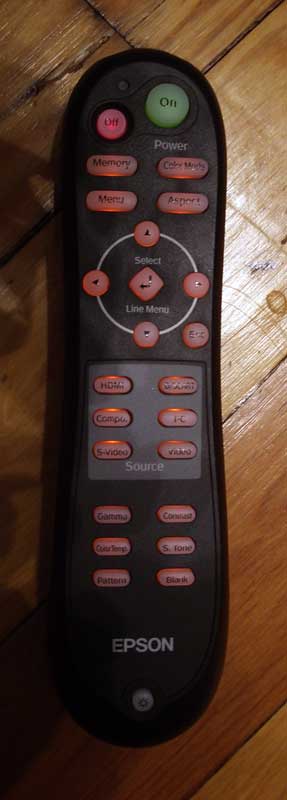 There is nothing new here. The Pro Cinema 1080 uses the exact same remote control as the Pro Cinema 810 and has the same excellent IR reception. Stand on your head, point the remote at the floor, the ceiling, the screen… it doesn't matter - the 1080 will still pick up the signal and get your commands to the projector.
Discrete on/off controls and access to direct input selection makes this a very functional remote. Physically, it's still rather bulky and the backlight feature doesn't come on automatically, but only when the press the backlight button located at the very bottom of the remote control.
Epson Pro Cinema 1080 Calibration and Bench Testing
1080-temperature-b4.jpgThe Epson Pro Cinema 1080 menu system is also nearly identical to the 810, save for the features particular to the lens system and 1080p nature of the Pro Cinema 1080. It is easy to use and navigate and allows for easy storing and retrieval of saved Memory modes. For a more complete breakdown of the Epson menu system, please see our Epson Pro Cinema 810 HQV review.
One thing to pay attention to is that you'll need to ensure the Output Scaling feature of this projector is set to 100% (not AUTO) in order to make sure that you aren't dithering the incoming signal. The default seemed to be Auto and it initially failed the resolution tests we ran until the proper setting was enabled. This even affected incoming 1080p signals via HDMI.
Calibration – Getting Those Black Levels Right!
 Calibrating the Pro Cinema 1080 was an easy process, save for the same menu system anomaly where it doesn't remember where you were last. As a result there is a lot of menu clicking in order to drill back down to the RGB settings.
We again utilized datacolor’s ColorFacts Professional software to calibrate and measure the grayscale response of the Epson projector.
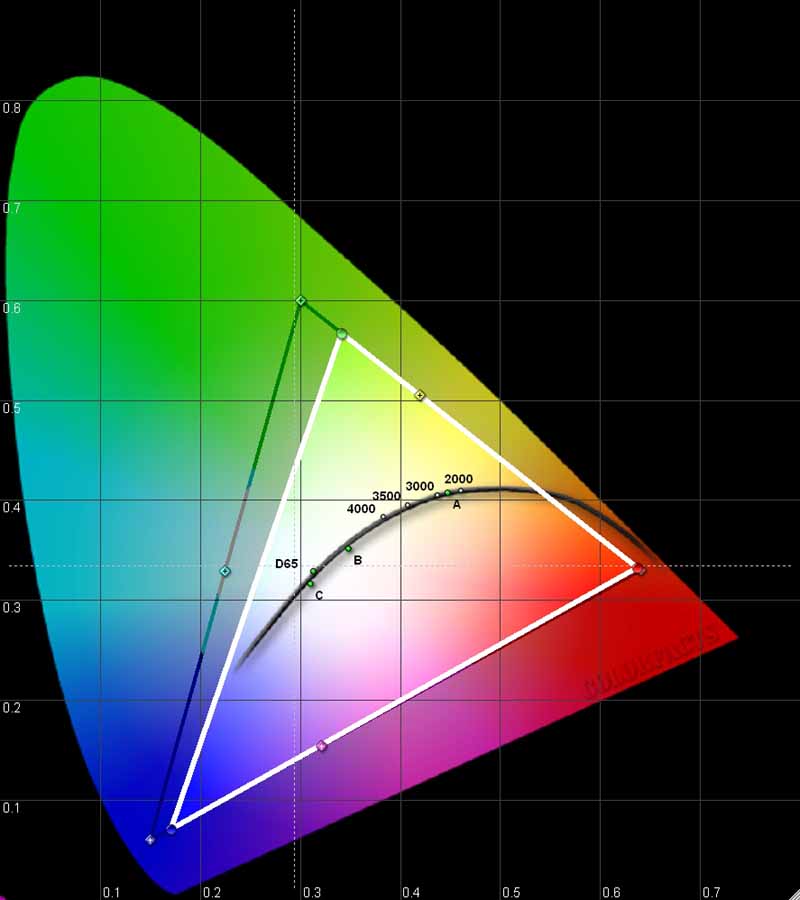
Initially, we were pleased to find that the Pro Cinema 1080 had some acceptable levels for both color and luminance. The gamma setting seemed to be a bit darker overall, with the measured gamma coming in at 2.44. A CIE chart readout of the color potential of the projector showed on a slight lack of green - very good overall. Initial grayscale and color temperature wasn't terribly off, and we found some odd behavior when attempting to calibrate the unit (more below).
|
Measured Grayscale |
Measured Color Temperature |
|
|
|
|
I've seen projectors that couldn't easily be calibrated to this level of accuracy with user RGB controls. The Epson looks very good out of the box and we didn't see any visual evidence of green emphasis during typical viewing. |
Color temperature was also pretty great, with the 1080 hovering around 6500K all the way up to 80IRE when it slowly drifted higher (making for the appearance of "brighter" whites.) |


When we calibrated the unit, we did notice some "rubber band" effects with respect to the red color. It wanted to maintain its upper value dip regardless of how we calibrated the bottom end, and the result was a smiley face that pinned 30 and 80 IRE levels but produced increased values in between. The same went for the luminance/gamma results. As such, we were unable to do much in terms of getting better grayscale, color temperature, and luminance results - though the initial settings are hardly disappointing. We suspect that with additional time and energy in the system menu you may be able to do a better job of dialing in the projector; however we make it a point to only focus on the user menu controls.
We got this Epson 1080 up to 39fL in Vivid mode (100IRE pattern), but only 8.25 fL in Cinema Night mode. Changing the Brightness Control to 'high' (default was 'low') increased this to 10.75 fL and this is where we did our testing (which possibly affected the results we mentioned above). All calibration was done from a Stewart Studiotek 130 screen and the projector was throwing from 11.5 feet away. The fact that we couldn't nail 12 fL in any of the cinema modes may be a concern for some, just be aware of this if you are attempting to reach particular levels or have a room with some ambient light.
We also measured the color temperatures in various modes (using 80IRE):
- Vivid - 7400K
- Cinema Day - 7550K
- Natural - 6000K
- Cinema Night - 6450K
- HD - 6600K
- Silver Screen - 5500K
We measured real-world contrast at 846:1 using 'low' brightness mode and 1109:1 using 'high'.
Audioholics/HQV Bench Testing Summary of Test Results
Perfect Score is 130
Epson PowerLite Pro Cinema 1080 Benchmark Score: 85 (with the stock Epson 1080 projector, you are in pretty good hands)
|
Test |
Max |
Component |
Component |
|
Color Bar |
10 |
10 |
Pass |
|
Jaggies #1 |
5 |
5 |
Pass |
|
Jaggies #2 |
5 |
5 |
Pass |
|
Flag |
10 |
10 |
Pass |
|
Detail |
10 |
10 |
Pass |
|
Noise |
10 |
10 |
Pass |
|
Motion adaptive Noise Reduction |
10 |
10 |
Pass |
|
Film Detail |
10 |
0 |
Fail |
|
Cadence 2:2 Video |
5 |
0 |
Fail |
|
Cadence 2:2:2:4 DV Cam |
5 |
0 |
Fail |
|
Cadence 2:3:3:2 DV Cam |
5 |
0 |
Fail |
|
Cadence 3:2:3:2:2 Vari-speed |
5 |
0 |
Fail |
|
Cadence 5:5 Animation |
5 |
0 |
Fail |
|
Cadence 6:4 Animation |
5 |
0 |
Fail |
|
Cadence 8:7 animation |
5 |
0 |
Fail |
|
Cadence 3:2 24fps film |
5 |
5 |
Pass |
|
Scrolling Horizontal |
10 |
10 |
Pass |
|
Scrolling Rolling |
10 |
10 |
Pass |
|
Total Points |
130 |
85 |
|
Comments on Bench Testing
Our bench testing showed an excellent projector that had it where it counted - with the obvious exception of failing the film detail test. This means that if you run into unflagged film content you may experience moiré on detailed repetitive patterns on screen. Noise reduction was excellent (rare in lower priced projectors) and we noticed excellent detail and jaggie reduction overall.
Epson 1080 Viewing Tests and Conclusion
1080p - Viva La Difference!
The difference between the D5 720p panels and the D6 1080p panels is quite impressive. Seating distances can be decreased and relative screen size can be increased. Take a look at some of these comparison shots of the pixel size and fill factor:


Epson Pro Cinema 810 HQV (left partitions); Epson Pro Cinema 1080 (right partitions)
There is no screen door effect with the Pro Cinema 1080 - unless you plan on watching a 100-inch screen from 3 feet away. The left image shows a practical difference of watching a standard DVD and observing it from 6 feet away.
Viewing Evaluation – HDTV and Movies
We watched a bunch of demo clips on the Epson PowerLite Pro Cinema 1080, including 1080i HDTV and standard DVD source material. Unfortunately, our HD DVD player didn't arrive in time for us to include those images in this review.
DVD: Contact: Special Edition
Contact is a good looking DVD with plenty of detail (not to mention a killer soundtrack!) and almost no grain to be seen. We focused on edge detail and scenes that would show off the finer aspects of what watching a scene on a 1080p projector might look like with a legacy DVD. Edges were crisp and even shadow detail was outstanding - though not a standout feature of this movie.


DVD: The Incredibles
Pixar is known for their incredible (pardon the pun) storytelling ability and excellent animation style. In this case, The Incredibles is no exception - in fact it is one of the best Pixar movies to date. My guess is they are simply getting better and better with each movie, but the bottom line is that color saturation and accuracy was excellent. Since this was a purely digital master, there was absolutely no grain or film damage which often degrades other DVD transfers (the ones that aren't pristinely done) and interferes with the quality of darker scenes. If you're going to show off a high-resolution display, this would be a good movie to pop into your player.


DVD: Monsters, Inc.
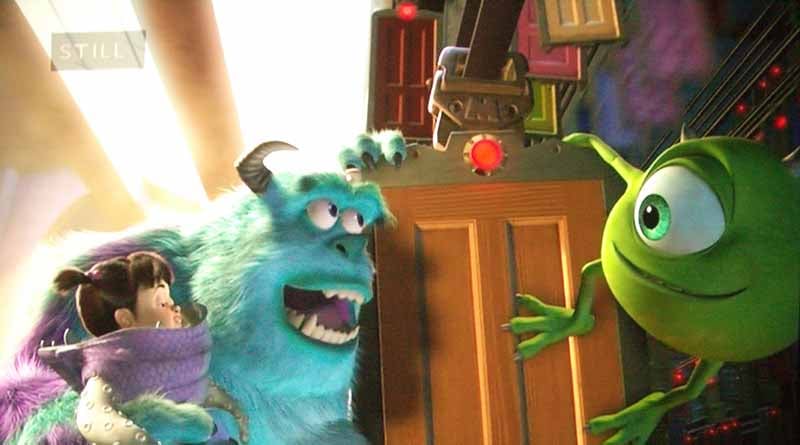
I couldn't help it - I was in an animation mood and wanted to get more of that high resolution, 3D picture that had looked so good on this display. The Epson Pro Cinema 1080 ca do no wrong with Pixar or similar picture and Monsters, Inc showed off detail to an incredible level. Fine hair on Sulley and The Abominable Snowman as well as the ability to handle both bright scenes (North Pole) and dark scenes (Randall Bogg's lab) made this one of my favorite projectors of the past year. And the COLOR - wow.

DVD: I, Robot
This movie is simply stunning, and has black levels that will tell you right away if you have your system set up correctly. The transfer is clean and free from "schmutz" that gets into some poorly transferred titles. Basically, if you want a reference DVD for black levels and checking moiré or detail - I, Robot should be in your collection.


HDTV: 24
Even though this is a darker "grainier" show than most (and broadcast in 720p) I wanted to see how the Epson would react to it. Let's face it - you're going to watch shows that aren't pristine and aren't tailored perfectly for your projector's native resolution. Plus, the film look of 24 makes it a good match for most Blu-ray Disc titles I've seen demoed on the show floor of various trade shows this year (that is, dirty and grainy). There were no aliasing artifacts and the picture looked pretty good - for what we expect from the HD broadcast of this show.


Conclusion
Epson makes very capable projectors. They pay attention to the optical system and indeed make the 3LCD panels that are utilized in most other LCD projectors on the market. They know how to do projectors. These new "D6" 1080p panels are no different and are a serious incremental step forward in technology. I have not seen a better LCD projector to-date and believe that Epson may have just set itself up to capture a serious chunk of the market given a retail price under $5000. I can't recommend this projector enough - it has no screen door effect, comes with some default settings that measure well and has excellent detail and black levels when used in the proper modes in a light-controlled room. This is going to be a hot projector for 2007.
Buy It Now from ProjectorPeople
Get the Best Price from ProjectorPeople
The Score Card
The scoring below is based on each piece of equipment doing the duty it is designed for. The numbers are weighed heavily with respect to the individual cost of each unit, thus giving a rating roughly equal to:
Performance × Price Factor/Value = Rating
Audioholics.com note: The ratings indicated below are based on subjective listening and objective testing of the product in question. The rating scale is based on performance/value ratio. If you notice better performing products in future reviews that have lower numbers in certain areas, be aware that the value factor is most likely the culprit. Other Audioholics reviewers may rate products solely based on performance, and each reviewer has his/her own system for ratings.
Audioholics Rating Scale
 — Excellent
- — Very Good
- — Good
- — Fair
- — Poor
| Metric | Rating |
|---|---|
| Detail and Resolution | |
| Deinterlacing & Scaling | |
| Contrast and Black Levels | |
| Color Reproduction | |
| Noise Reduction | |
| Calibration Options | |
| Build Quality | |
| Ergonomics & Usability | |
| Ease of Setup | |
| Features | |
| Remote Control | |
| Fit and Finish | |
| Performance |  |
| Value | |
Clint Deboer was terminated from Audioholics for misconduct on April 4th, 2014. He no longer represents Audioholics in any fashion.
View full profile Subscribe to our newsletter