


Epson Home Cinema 1080 Projector Review
Epson Home Cinema 1080 projector
- Product Name: PowerLite Home Cinema 1080
- Manufacturer: Epson
- Performance Rating:

- Value Rating:
- Review Date: May 01, 2007 03:23
- MSRP: $ 2999
|
Brightness:
1200 ANSI lumens (vivid
mode) Projection Lens: F/2.0 – 3.17, manual focus & zoom Lens Shift: Vertical and horizontal (96% vertical, 47% horizontal) Keystone Correction: +/- 15 degrees (vertical) Lamp: 170 W UHE (Ultra-High Efficiency) E-TORL (Epson Twin Optimized Reflection) lamp |
Power
Supply: 100-120 volts,
2.7A Warranty: 2 years parts & labor + 90 days lamp; 2 year Epson Home Service Program; Epson PrivateLine Toll-Free Technical Phone Support (US & Canada only) Dimensions: 15.6” x 4.8” x 12.2” in (396 x 124 x 310 mm)Weight: 12 lbs (5.4 kg) |
Pros
- Um, 1080p for under $3k!
- No screen door effect
- Excellent contrast & color saturation
- Excellent performance "out of the box"
- Backlit remote
- Native 1080p/24/60 support
- HDMI 1.3
Cons
- Didn't pass blacker than black
- No automatic focus (manual only)
- <12 fL output in Cinema Night mode
- Odd/inaccurate resolution information in Info menu display
Home Cinema 1080 Comparison and Basic Setup
I'm just going to say it - this is a tough review. The Epson PowerLite Home Cinema 1080 is virtually identical to the Pro Cinema 1080. And when I mean it is virtually identical - I mean that unless you work in a projector lab quality control department or have an interest in a projector that comes with ISF certification - they are identical. Which brings up the $2000 price difference… I'm going to do something I've never done before - I'm going to start the review with my conclusion: If you are a consumer, buy this projector. Or, if you are a custom installer that needs something with more pricing "headroom" and ISF lockdown settings, then by all means drop another $2k and pick up the Pro version. Now, if you are a consumer and decide to pick up the Pro version we'll be forced to laugh at you behind your back and call you silly names.
What are the Differences Between the Home and Pro
Versions?
In short, there are almost none. Besides
a slight difference in HQV scores, warranty duration and ISF certification and
settings were all we could come up with - and we looked very hard and long:
|
Epson Home Cinema 1080 |
Epson Pro Cinema 1080 |
|
HQV Score: 77 |
HQV Score: 85 |
|
ISF Certified: No |
ISF Certified: Yes |
|
ISF Settings: No |
ISF Settings: Yes |
|
3 x 1920 x 1080 pixels |
3 x 1920 x 1080 pixels |
|
0.74-inch C2Fine LCD panels |
0.74-inch C2Fine LCD panels |
|
Inputs: S-video Component PC (HD15) |
Inputs: S-video Component PC (HD15) |
|
Outputs: NA |
Outputs: NA |
|
Contrast Ratio: 12,000:1 |
Contrast Ratio: 12,000:1 |
|
1200 ANSI lumens (max) |
1200 ANSI lumens (max) |
|
Scaling Options: Zoom |
Scaling Options: Zoom |
|
1) 12V Triggers |
1) 12V Triggers |
|
RS-232C: Yes |
RS-232C: Yes |
|
Full native 1080p/24/30/60 support |
Full native 1080p/24/30/60 support |
|
Warranty: 2 years |
Warranty: 3 years |
|
MSRP: $2,999 |
MSRP: $4,999 |
The Pro version is a custom installer-centric product. It offers a good retail price point and has the ISF settings which means that your clients won't be able to "mess up" your settings when you leave.
Basic Setup and Installation
Installation was simple - just as with the Epson Pro Cinema 1080. With the presence of vertical and horizontal lens shift, placement of the projector is simply less of an issue - though we encourage all users to get the projector as close to "neutral" as possible. The lens and image quality looks best when they aren't significantly utilizing lens shift. We chose a "desktop" mount configuration, but I imagine most users will opt for a ceiling mount. If you are ceiling mounting your projector, make sure you buy a mount that allows for easily running the power as well as the video cabling into the attic and to your equipment rack. You can also purchase a compact power conditioner system that can work either at the projector or at the equipment rack. Furman has some very interesting products that meet these needs and we definitely recommend some sort of power protection to extend the life of the bulb.
Throw Chart for Distancing the Projector from a 16:9 Projection Screen
The Epson's amazing zoom lens is on this model as well and allows for a very flexible placement. In our room we had the unit positioned at around 11 feet and projecting onto a Studiotek 130 screen.
| Screen
Size Diagonal (inches) |
Size (Inches) | Distance (Feet) | ||
| width | height | wide | tele | |
| 70 | 61.0 | 34.3 | 6.2 | 14.7 |
| 80 | 69.7 | 39.2 | 7.8 | 16.7 |
| 90 | 78.4 | 44.1 | 8.3 | 19.0 |
| 100 | 87.2 | 49.0 | 9.8 | 20.9 |
| 110 | 95.9 | 53.9 | 10.4 | 23.3 |
| 120 | 104.6 | 58.8 | 11.8 | 25.1 |
| 130 | 113.3 | 63.7 | 13.1 | 26.6 |
| 150 | 130.7 | 73.5 | 14.7 | 31.4 |
| 170 | 148.2 | 83.3 | 17.2 | 34.9 |
| 200 | 174.3 | 98.1 | 20.3 | 41.1 |
Connections
The connections on the Home Cinema 1080 are identical to the Pro model. Users can utilize 1080 source components through the HDMI 1.3 input as well as component (according to the manual - this feature was untested). The PC DB15 input handles a signal up to 1920x1080 as well. How Epson managed to include RS-232 and the trigger out for under $3000 is a mystery. One would assume that most manufacturers would have crippled the lower-priced model.
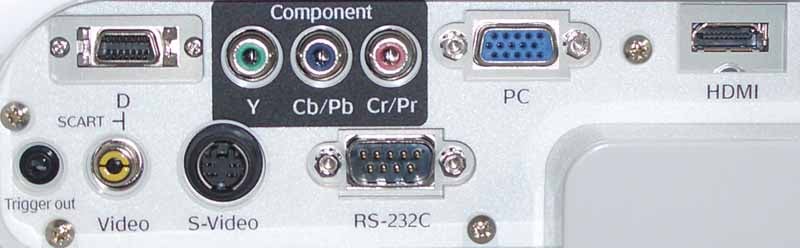
Home Cinema 1080 rear connections
Home Cinema 1080 Remote Control and Calibration
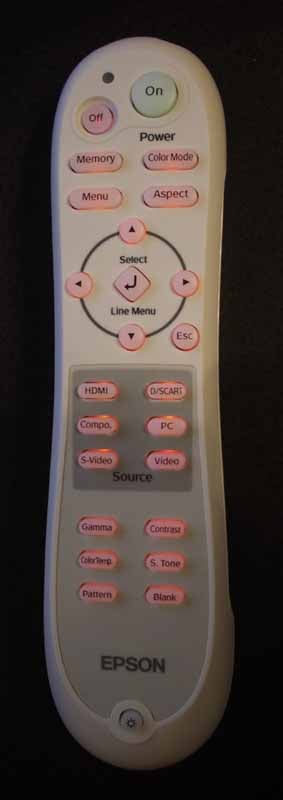 There is nothing new here.
The Home Cinema 1080 uses the exact same remote control as the Pro Cinema 1080,
except that it is white instead of black. It still has the same incredible IR
reception. I only wish all of my remote controls worked as well as the Epson's
- you would think the science of IR would have been cracked by now!
There is nothing new here.
The Home Cinema 1080 uses the exact same remote control as the Pro Cinema 1080,
except that it is white instead of black. It still has the same incredible IR
reception. I only wish all of my remote controls worked as well as the Epson's
- you would think the science of IR would have been cracked by now!
Notables include discrete On and Off buttons, direct access to Aspect, Memory and Color Modes and a very easy and intuitive Menu interface. All six inputs have dedicated direct-access buttons, something I look for on all projectors I review. The remote itself is a bit bulky and the light button is located somewhat awkwardly on the very bottom of the remote. The buttons do not automatically light up when you push a button. I think they should, since you are almost always in the dark when using a projector.
The Menu System
The Epson Home Cinema 1080 menu system doesn't differ in any meaningful way from the Pro version except for a lack of ISF features. To get more detailed info on the menu system, check out our reviews of the Pro 1080 and the 810 HQV.
Calibration – Getting Those Black Levels Right!
We calibrated the Epson Home Cinema 1080 and found that, for whatever odd reason, it calibrated more accurately than the Pro model with the exception of color saturation (CIE chart) performance. We're sure this was simply "luck of the draw" but take a look at these comparisons:
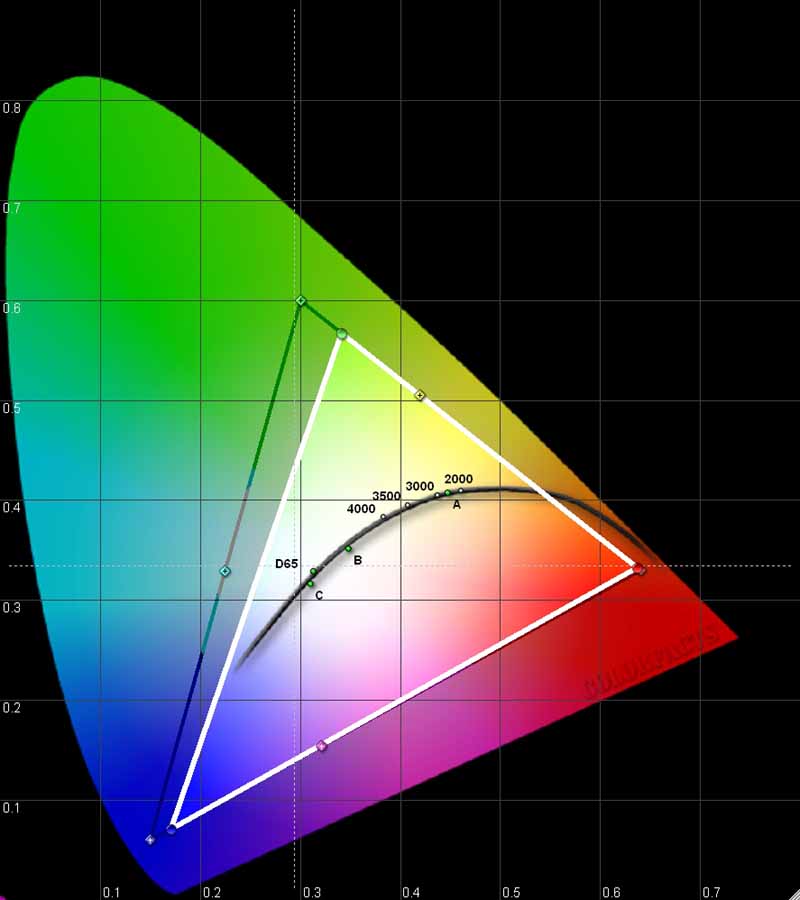
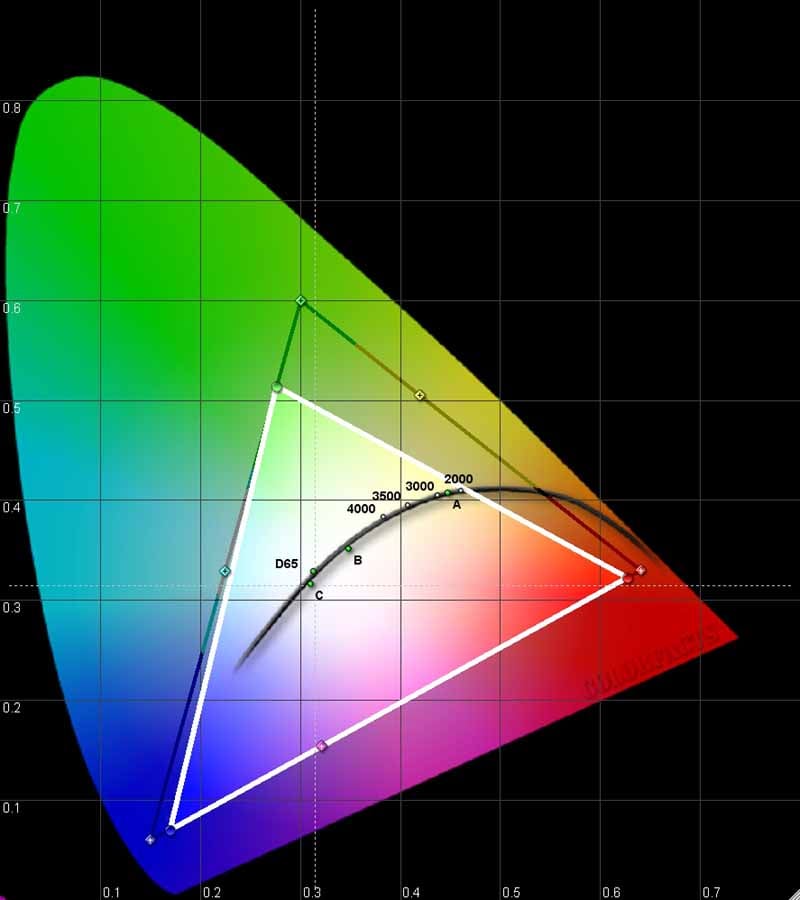
Epson Pro
Cinema 1080 (left); Home Cinema 1080 (right)
Using datacolor’s ColorFacts Professional software to calibrate and measure the grayscale response of the Epson projector, we ran it through the battery of tests and found some interesting results
Grayscale & Color temperature Before (Epson Pro Cinema 1080):
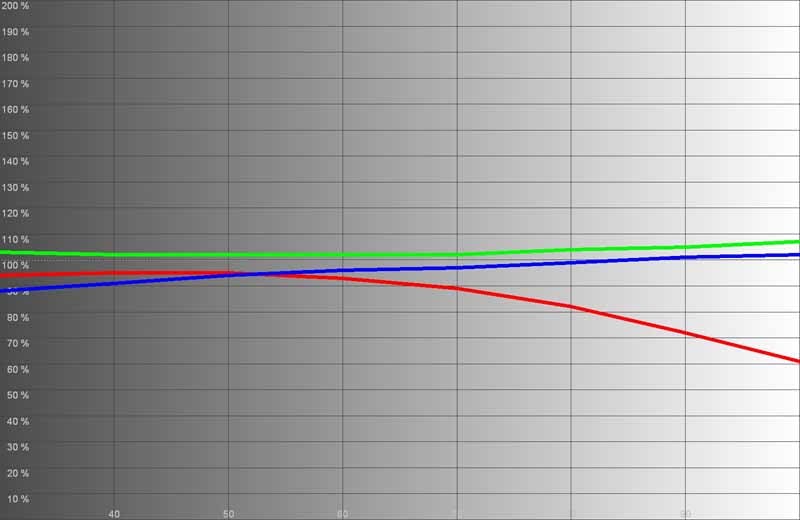
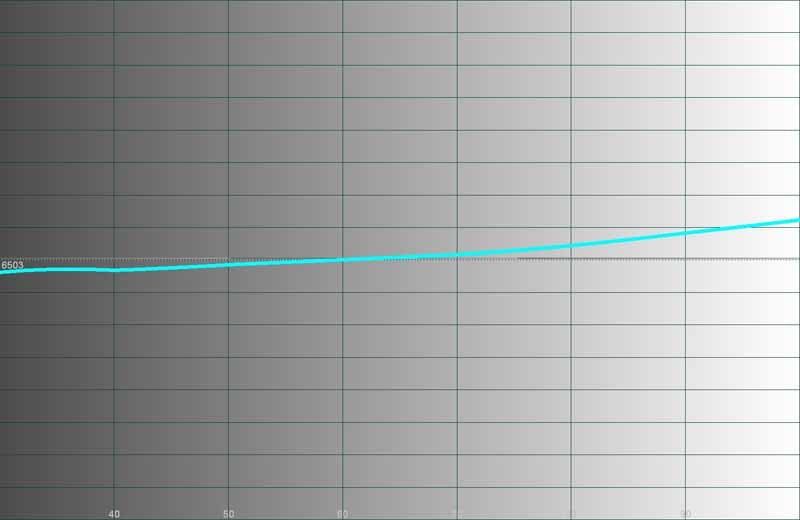
Epson Pro Cinema 1080 (left); Home Cinema 1080 (right)
While not awful, the Pro model has some very distinct issues at higher IRE levels, producing a cooler image overall and the effect of a "brighter" image.
Grayscale & Color temperature Before (Epson Home Cinema 1080):
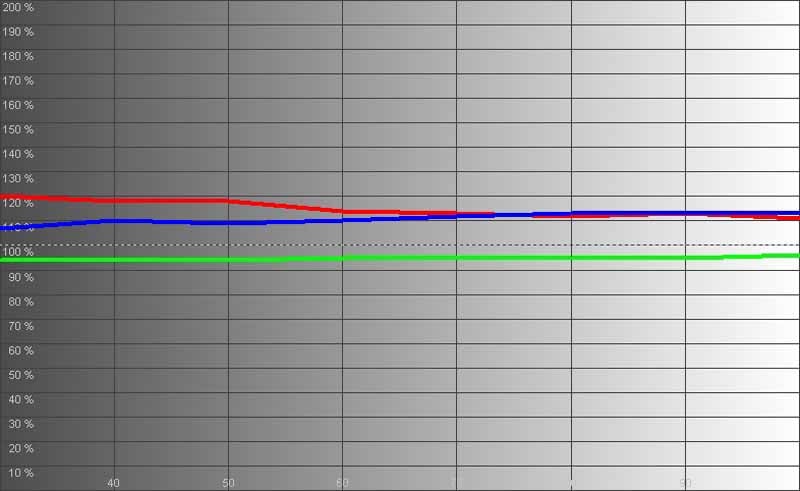
Epson Home Cinema 1080 (before)
As you can tell, the image was simply a bit warm (closer to 6000K than the preferred 6500K - at least until around 50 IRE). The interesting thing to note is that the Home 1080 model had a flatter response and actually seemed to represent a more balanced level of color. Only a full calibration would show the true nature of this projector, so we got down to it and began our work. Here are the results after a rather short calibration session:
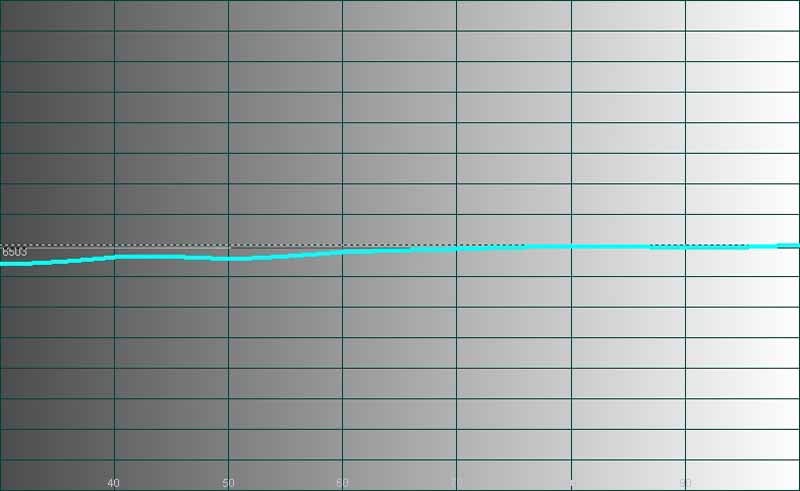
Grayscale & Color temperature AFTER (Epson Home Cinema 1080):
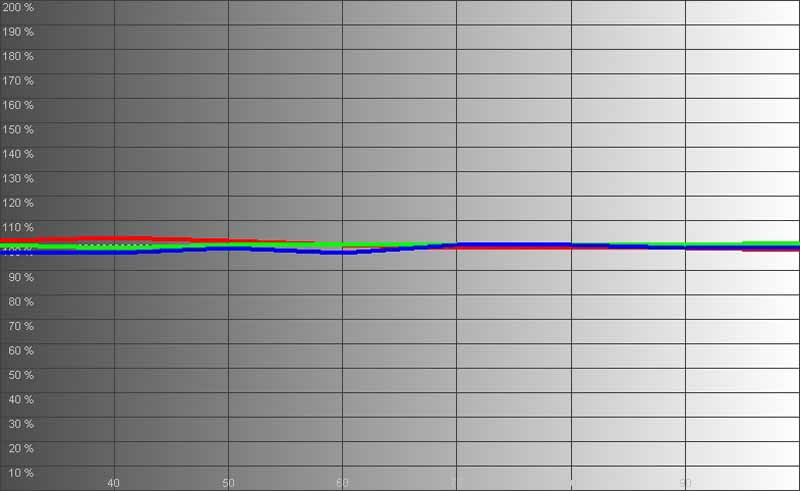
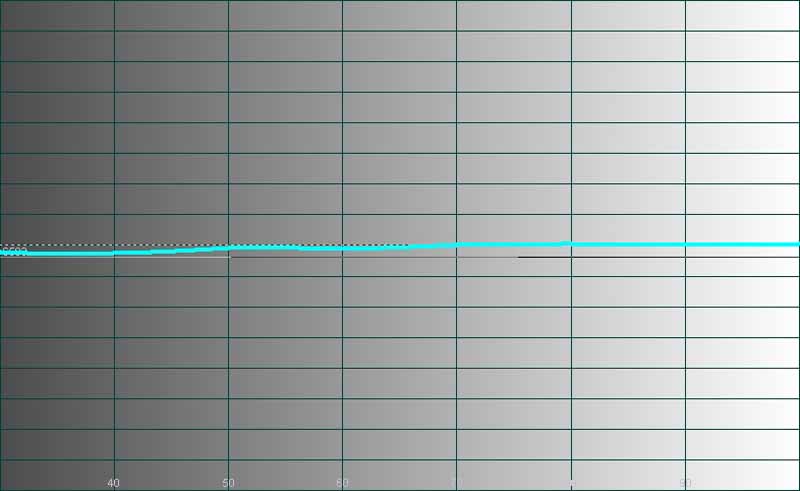
Epson Home Cinema
1080 (after)
Color just about leaped into position and our overall response was more even than most projectors I've calibrated in the last year. The color temperature matched both my observations and my calibration adjustments. What I saw mimicked my observations and the results were, while surprisingly easy to attain, expected and welcome.
Unlike the Pro Cinema 1080, the Home Cinema 1080 exhibited none of the "rubber band" effects during calibration where one color or area would "stick" and create a ridge or peak in one particular IRE level.
We cranked up the Epson to around 46.3fL in Dynamic mode. Living Room yielded 22fL and Theater Black brought forth 14.3fL. Theater Black 2, the darkest mode with the deepest blacks, brought just 9fL - so you'll need to make sure you have TOTAL light control in your room when utilizing that mode. This was all from a 100-inch Stewart Studiotek 130 screen with a gain of 1.3.
We also measured the color temperatures in various modes (using 80IRE):
- Dynamic (Vivid on Pro) - 6550K (6500K setting)
- Living Room (Cinema Day on Pro) - 7475K (8000K setting)
- Natural - 6400K (6500K setting)
- Theater Black 2 (Cinema Night on Pro) - 6026K (6000K setting)
- Theater Black 1 - 7200K (7500K setting)
- Theater - 6450K (6500K setting)
We measured real-world contrast at 333:1 using 'low' brightness in Theater Black 2 mode and 1715:1 using 'high' brightness in Dynamic mode. These numbers seem lower than the Pro model, however understand that since I cannot directly compare all modes, it's possible that the test conditions changed and I was in a different mode. In any case, the system is certainly capable of much higher contrast rations when you crank up the light output of the projector.
If you are a Brightness freak - stick with the Theater Black 1 mode or perhaps Theater. If you have a completely light-controlled theater room and can control reflections, then you can certainly opt for the Theater Black 2 mode. If you do, don't forget to set your color temperature to 6500K. In my opinion, you will get the best picture by selecting Theater Black 2, setting Brightness Control to 'High', and setting the Color Temperature to 7000K (which yielded around 6425K in our tests). The measured Contrast Ratio at this setting was 386:1. If you want more dynamics, enable the Auto Iris or go for the Theater Black 1 or Theater color modes.
Audioholics/HQV Bench Testing Summary of Test Results
Perfect Score is 130
Epson PowerLite Home Cinema 1080 Benchmark Score: 77 (with the stock Epson 1080 projector, you are going to get a decent picture)
| Test | Max Points |
Component Results |
Component Pass/Fail |
| Color Bar | 10 | 10 | Pass |
| Jaggies #1 | 5 | 1 | Pass |
| Jaggies #2 | 5 | 1 | Pass |
| Flag | 10 | 10 | Pass |
| Detail | 10 | 10 | Pass |
| Noise | 10 | 10 | Pass |
| Motion adaptive Noise Reduction | 10 | 5 | Pass |
| Film Detail | 10 | 10 | Pass |
| Cadence 2:2 Video | 5 | 0 | Fail |
| Cadence 2:2:2:4 DV Cam | 5 | 0 | Fail |
| Cadence 2:3:3:2 DV Cam | 5 | 0 | Fail |
| Cadence 3:2:3:2:2 Vari-speed | 5 | 0 | Fail |
| Cadence 5:5 Animation | 5 | 0 | Fail |
| Cadence 6:4 Animation | 5 | 0 | Fail |
| Cadence 8:7 animation | 5 | 0 | Fail |
| Cadence 3:2 24fps film | 5 | 5 | Pass |
| Scrolling Horizontal | 10 | 5 | Pass |
| Scrolling Rolling | 10 | 10 | Pass |
| Total Points | 130 | 77 |
|
We cannot explain the difference in HQV scoring from the Pro Cinema 1080, however we checked the Home Cinema 1080 twice to ensure our results were accurate. Both projectors were sent 480i via HDMI from a Denon DVD-3930CI.
Comments on Bench Testing
As mentioned in the note above, we have no idea how we got different results, but we certainly did. The Pro Cinema 1080 failed the Film Detail test, though it appeared to do better on the Jaggie tests and Mixed Media text. The Home Cinema 1080 passed Film Detail with flying colors and did substandard on the Jaggie tests… We'll chalk this up to something we cannot at this time establish, however both results are respectable and neither projector gives me pause for use as a scaler and deinterlacer.Home Cinema 1080 Viewing Tests and Conclusion
1080 looks fantastic, especially with 1080i and 1080p sources. We fed the Epson Home Cinema 1080 both and enjoyed being able to watch a 100-inch screen from only 10 feet away with NO screen door effect. We've come a long way in terms of technology, but each time I watched the Epson I couldn't believe this level of quality was finally available to consumers for under $3000. If we have it this good now - what's next in the world of display technology?
advertisement
HDTV - DiscoveryHD: Jesse James - Legend, Outlaw,
Terrorist
By now you probably know that just
about anything on DiscoveryHD is worth watching. True, fast-paced programming
will quickly show the awful MPEG-2 compression artifacts present in the signal,
but the detail is often quite impressive and a refreshing change from standard
definition television. I flipped on the "TV" this week to find a show
on Jesse James. It had some great looking shots amidst the blurry flashbacks
and retro-ized footage.


Not to be content with just a single show I found the excellent Sunrise Earth series the next day. Talk about detail - wow:


HDTV: CSI -
Miami
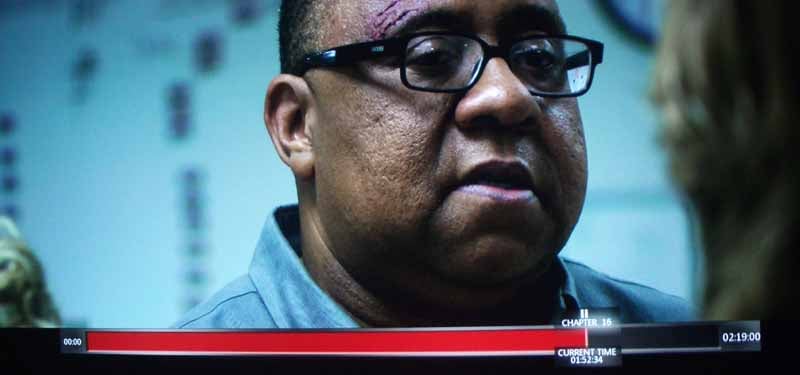
I like CSI: Miami. Despite its
colorized presentation (they color code all the CSI shows in case viewers
mistakenly forget which one they are watching. It’s a neat gimmick, but it also
makes for some boring color palettes after a while. Still, there are moments of
genius cinematography and the sets are way above par - as is the lighting. The
Epson captured skin tone as well as hair and facial detail in a way that let me
know 1080p isn't something that will be going away any time soon. The amount of
detail this projector can reveal is astounding - and the lack of any rainbow
effect or other issues makes it a dominant choice for home theater.


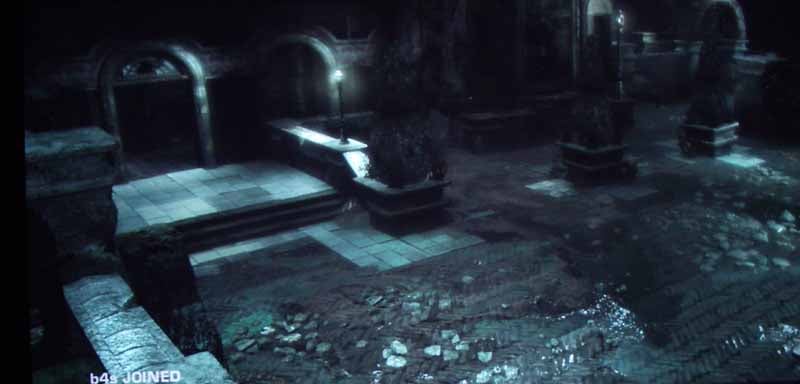
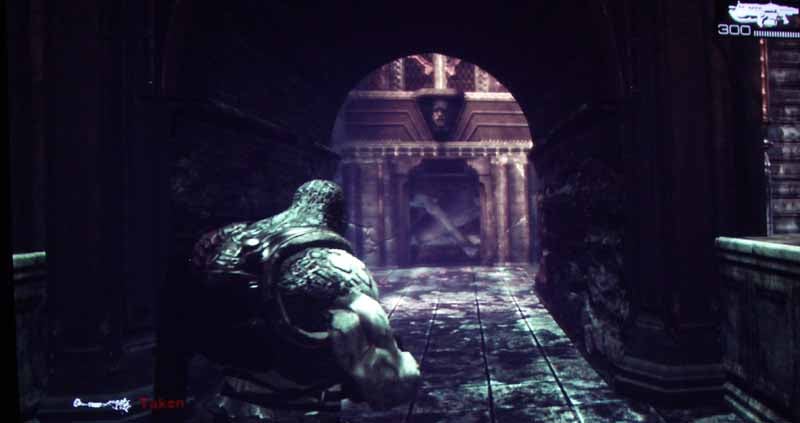
I've been hooked on Gears of War for over a month now and play it with one of our writers once or twice a week in co-op mode. Over Xbox Live, and using headphones, it makes for a very cool gaming experience and I think 3rd-person shooters are now my favorite type of game. Regarding the graphics - we would only have dreamed of these types of visuals a few years ago and here we are enjoying not only great textured and modeled characters - but enjoying them in real time! Much of the game is played underground or at night and so there is ample opportunity for noise and banding as well as crushed blacks and a loss of low luminance detail - this didn't happen while I played the game and, indeed, Gears never looked better!
HD DVD: Miami
Vice
I happened to be reviewing
this HD DVD for April and didn't realize that I had gotten my hands on to what
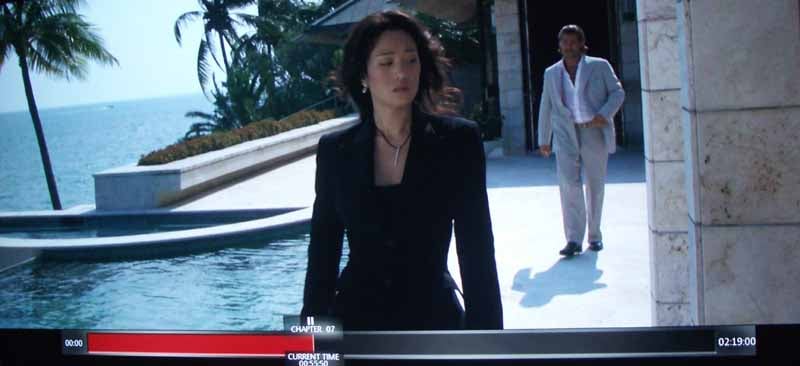
was to be a Reference quality disc. Miami
Vice is not only a beautifully-shot movie; it is also pristinely mastered
and has a menu system that utilizes almost every function built into the HD DVD
format. It's this level of detail that was put into the disc that makes it a
stand-out performer amongst its peers. Color, detail, lack of noise - you name
it - this disc is superb in just about every way and on the Epson Home Cinema
1080 we were able to see it in all of its glory.
Conclusion
We reviewed the Epson PowerLite Pro Cinema 1080 and gave it 4.5/5 stars for performance and 5/5 stars for value. The Pro Cinema product is indeed a value - for custom installers who need the ISF features to protect their clients and for a product that makes other dealer-centric products pale in comparison. The Home Cinema 1080, however, is what we consider more of a direct-to-consumer product. It is very possible that these won't touch an installer on the way to an enthusiast looking for 1080p due to its low price and incredible value. With the current market I'd give the value rating on this projector a 6 - if we had that rating. It's incredible and brings 1080p into the reach of mere mortals in a way that was never before possible. Epson should be commended for taking this dual approach to their product line - what a fortunate thing for consumers and installers alike!
The Score Card
The scoring below is based on each piece of equipment doing the duty it is designed for. The numbers are weighed heavily with respect to the individual cost of each unit, thus giving a rating roughly equal to:
Performance × Price Factor/Value = Rating
Audioholics.com note: The ratings indicated below are based on subjective listening and objective testing of the product in question. The rating scale is based on performance/value ratio. If you notice better performing products in future reviews that have lower numbers in certain areas, be aware that the value factor is most likely the culprit. Other Audioholics reviewers may rate products solely based on performance, and each reviewer has his/her own system for ratings.
Audioholics Rating Scale
 — Excellent
- — Very Good
- — Good
- — Fair
- — Poor
| Metric | Rating |
|---|---|
| Detail and Resolution | |
| Deinterlacing & Scaling | |
| Contrast and Black Levels | |
| Color Reproduction | |
| Noise Reduction | |
| Calibration Options | |
| Build Quality | |
| Ergonomics & Usability | |
| Ease of Setup | |
| Features | |
| Remote Control | |
| Fit and Finish | |
| Performance | |
| Value | |
Clint Deboer was terminated from Audioholics for misconduct on April 4th, 2014. He no longer represents Audioholics in any fashion.
View full profile Subscribe to our newsletter