


Epson 6500UB LCD Projector Review
Epson 6500UB projector
- Product Name: PowerLite 6500 UB LCD Projector
- Manufacturer: Epson America
- Performance Rating:

- Value Rating:
- Review Date: May 19, 2009 11:05
- MSRP: $ 2499 (after rebate)
|
|
Pros
- Excellent blacks
- Super low standby power consumption
- 2.1x zoom Fujinon lens
- Quiet
Cons
- Significant lag during gaming
- 120Hz FineFrame mode unstable with fast motion footage and games
- Limited digital zoom modes
6500UB Product Overview
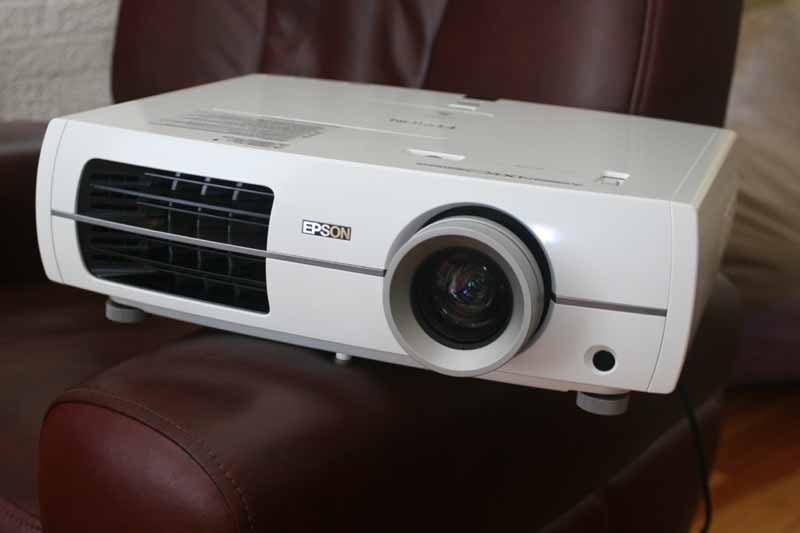 It's always surprising to me to see
new projectors hit the market with better and better performance and less and
less compromise - and at prices often identical to, or even lower than, just a
year prior. It's like going out and buying a house with an extra 500 square
feet and better upgrades than your own for 20% less than you paid a year ago.
Come to think of it, just about anyone can do that right now. In either case,
projectors aren't like amplifiers and A/V receivers, which can trade
amplifier quality for features. I'll let you in on a dirty little secret.
Projectors can be measured objectively with test instruments to measure color
accuracy within the ability of the human eye to detect, and by using test discs
to determine performance with motion footage under a variety of conditions.
While this may be subject to much debate - especially with regards to the
subjective nature of motions tests and testing material, we can at least safely
say that no manufacturer can get away with substituting poor quality parts in a
projector for long. These new products - with more features, bulb life, and
video performance seem to be the "real deal".
It's always surprising to me to see
new projectors hit the market with better and better performance and less and
less compromise - and at prices often identical to, or even lower than, just a
year prior. It's like going out and buying a house with an extra 500 square
feet and better upgrades than your own for 20% less than you paid a year ago.
Come to think of it, just about anyone can do that right now. In either case,
projectors aren't like amplifiers and A/V receivers, which can trade
amplifier quality for features. I'll let you in on a dirty little secret.
Projectors can be measured objectively with test instruments to measure color
accuracy within the ability of the human eye to detect, and by using test discs
to determine performance with motion footage under a variety of conditions.
While this may be subject to much debate - especially with regards to the
subjective nature of motions tests and testing material, we can at least safely
say that no manufacturer can get away with substituting poor quality parts in a
projector for long. These new products - with more features, bulb life, and
video performance seem to be the "real deal".
The Epson PowerLite Home Cinema 6500UB has more features, bulb life, and overall image quality than its predecessor and seems to be a real market leader in terms of performance and value. If you thought the Home Cinema 1080UB projector was a deal, then you are going to want to perk up your eyes and take a gander at the subtle, but important improvements Epson made to their flagship home model.
Upgrades… Get Your Red Hot Upgrades…
Everybody started asking us about the new Epson projectors when it was found out that we got a sneak peek of their flagship models last October. The real question on everyone's mind was how the new 6500UB was going to compare to the excellent Home Cinema 1080UB model which received a 5/5 rating from us in both value and performance. We set up a quick grid to outline the differences:
| Epson Home Cinema 6500UB | Epson Home Cinema 1080UB |
| HQV Score: 130/130 | HQV Score: 77/130 |
| 3 x 0.74-inch Epson C2Fine (D7) | 3 x 0.74-inch Epson C2Fine (D7) |
| Inputs:
2xHDMI (1.3), composite, S-video, component, PC/RGB (HD15) |
Inputs:
2xHDMI (1.3), composite, S-video, component, PC/RGB (HD15) |
| Noise: 22dB (eco) | Noise: 24dB (eco) |
| Contrast Ratio: 75,000:1 | Contrast Ratio: 50,000:1 |
| Lamp: 200W UHE E-TORL (4000 hrs) | Lamp: 170W UHE E-TORL (3000 hrs) |
| 1600 ANSI lumens (Dynamic mode) | 1600 ANSI lumens (Dynamic mode) |
| Lens shift: 96% vertical, 47% horizontal | Lens shift: 96% vertical, 47% horizontal |
| Video Processor: Silicon Optix HQV | Video Processor: Pixelworks |
| x.v. (Deep) Color support | x.v. (Deep) Color support |
| 12VDC Trigger | 12VDC Trigger |
| RS-232C: Yes | RS-232C: Yes |
| 1080p/24/30/60 support | 1080p/24/30/60 support |
| Warranty: 2 years, 90 day lamp | Warranty: 2 years, 90 day lamp |
| MSRP: $2,499 (after rebate) | MSRP: $2,999 (original) |
At first glance it's easy to shrug off the improvements the 6500UB has over its 1080UB predecessor. And I certainly wouldn't incite the masses of 1080UB owners to sell off their projectors and grab the new model. As you can see, the changes are minimal - but they are significant where it counts. The 6500UB, for example, uses a Silicon Optix HQV chipset to deliver much better video processing than the 1080UB's Pixelworks system. If you're viewing a lot of 480i source material or you don't have a great DVD player this will likely help picture quality significantly. Additionally, Epson seems to have made the projector a tad quieter. We felt that it had very low noise output even when the lamp was set to High. Best of all, the new E-TORL 200W lamp is rated to 4000 hours, regardless of which lamp mode you are using. That means you can watch 15 hours of TV each week and not have to replace the bulb for 5 years.
Editorial Note: Since bulb life is often given as the age at which light output reaches roughly 50% of its original value, users of any projector may wish to upgrade somewhat earlier than the official lamp warning point to experience the best possible output, contrast, and color accuracy. It is possible that this bulb may have a longer usable lifespan, moving its dropoff point from an average of 1200-1500 hours to somewhere around 1800-2000 hours. We'll have to get feedback from ISF and THX calibrators over time to see how this plays out.
Physically, this projector is a departure from the Home Cinema 720 or 1080UB models. Instead of the curved lines of the older form factors, the new 6100UB and 6500UB offer a larger, more squared off look. It's not unattractive, just different. It's kind of like going from a Corvette to a BMW. The design is less curvy, but still quite attractive to look at. The lamp can now be replaced without having to remove the projector from an installed location. This is a marked improvement over the Home Cinema 1080UB or 720, which both have lamps located where the mounting bracket attaches to the projector's underbelly.
Differences Between the Home Cinema 6500UB and the Pro Cinema 7500UB
Except for a very small list of differences, the Home Cinema 65000UB ($2499 after rebate) and Pro Cinema 7500UB ($3999 retail) are identical. The 6500UB is available at retailers and online, while the 7500UB can only be sold through Epson's dealer network. Differences, in addition to the body color, include the following:
- The 6500UB lacks the ISFccc picture modes which can be used by calibrators to lock down day and night settings which cannot be accessed by the client.
- The 7500UB comes with an anamorphic stretch mode that allows you to use an anamorphic lens without needing an external video processor. The 6500UB does not include Blue- and Red-only color bar test patterns which eliminate the need for filters to calibrate hue & saturation and check for color decoder inaccuracies.
- A spare lamp and a ceiling mount are included in the price of a 7500UB.
- The 6500UB has a two-year warranty and the 7500UB's extends that to three years.
6500UB Setup Installation Remote
 We mounted the Epson 65000UB to our Peerless
PRG-UNV Precision Gear universal projector mount using the four screw anchor
points located at the bottom of the unit. Once mounted, we leveled the
projector by placing a torpedo level on top and manipulating the gears to
precisely position the projector so that it is facing the screen perfectly. The
projector is much lighter than our reference
Marantz VP-15S1 DLP projector - coming in at just 16.5 pounds. As with most
models under $5000, Focus and Zoom are manual. The Fujinon 2.1:1 lens meant
that we could hit our 92-inch Carada
Masquerade masking projector screen at any distance between 9 and 19.2 feet
away. That is a tremendous amount of flexibility and coupled with the 96%
vertical/47% horizontal lens shift system, means that you will be able to hit
almost any screen from any reasonably placed installation location. Basically,
just get it close - although we don't recommend overusing lens shift or Zoom as
it will decrease clarity as well as light output.
We mounted the Epson 65000UB to our Peerless
PRG-UNV Precision Gear universal projector mount using the four screw anchor
points located at the bottom of the unit. Once mounted, we leveled the
projector by placing a torpedo level on top and manipulating the gears to
precisely position the projector so that it is facing the screen perfectly. The
projector is much lighter than our reference
Marantz VP-15S1 DLP projector - coming in at just 16.5 pounds. As with most
models under $5000, Focus and Zoom are manual. The Fujinon 2.1:1 lens meant
that we could hit our 92-inch Carada
Masquerade masking projector screen at any distance between 9 and 19.2 feet
away. That is a tremendous amount of flexibility and coupled with the 96%
vertical/47% horizontal lens shift system, means that you will be able to hit
almost any screen from any reasonably placed installation location. Basically,
just get it close - although we don't recommend overusing lens shift or Zoom as
it will decrease clarity as well as light output.
 We played around with many of the
Color modes and found most of them to be very usable. You can access the Color
Mode from the menu system or by hitting the Color Mode button on the remote
control. Overall, here are our suggestions:
We played around with many of the
Color modes and found most of them to be very usable. You can access the Color
Mode from the menu system or by hitting the Color Mode button on the remote
control. Overall, here are our suggestions:
- Dynamic - Go ahead and use this if light output is more important than color accuracy. Your image is going to be color shifted (mostly away from Red) but you will indeed get the maximum light output possible. If you're trying to use the system in a brightly lit room, this might be your best bet out of the box.
- Living Room - This is a bright mode that doesn't result in an unpleasant color shift, but rather adds more Blue as well as light output to boost the light output of the image. This is a good general Daytime mode if you are unable to calibrate one yourself.
- Natural - This is a decent general mode for rooms with little ambient light. It makes better use of the projector's "High" Brightness control in order to project a fairly realistic image, but with greater light output. Color temp is set to 6500K.
- Theatre - This is similar to Natural and is suitable for rooms with little ambient light. It also uses the projector's "High" Brightness control but sets the color temp to 7500K.
- Theatre Black 1 - This is the recommended mode for a fully light-controlled room. It sets the Brightness Control to Low and puts the color temperature to 6500K.
- Theatre Black 2 - This mode is very similar to Theatre Black 1 mode, but it drops the color temperature and lowers Saturation to provide a warmer image.
- x.v.Color - This mode locks out most color adjustment controls and opens up the color depth to the larger "Deep Color" color space.
Connections
You won't lack for inputs on this projector. The Home Cinema 6500UB has two HDMI 1.3 inputs, a component video input, PC/RGB (HD15) and composite/S-video inputs. For those using more sophisticated control systems, RS-232C is available and the projector has a 12V DC trigger output jack for use with electric screens to make them drop when the projector is powered up. One nice thing that Epson included was a pair of cable holders that can be used in conjunction with a tie-wrap to secure bulky HDMI cables and provide strain relief for this often troublesome connector.

The Epson 6500UB also featured something that I wasn’t expecting – a super low power standby mode that consumes only 0.2W when not active. This means that you’re barely powering anything on the unit in standby, but it will still wake up quickly with the remote control when you’re ready to watch something.
Remote Control
 Epson finally changed their remote,
making it shorter and wider than the previous model. Like the lost curves of
the new projector housing, the remote is also more rectangular, with a curved
indent near the top that I felt was misplaced and far from ergonomic. The
remote does what it needs to, but menu functions felt awkward. You have to hit
the Esc(ape) key to back out of many menu areas, rather than just use the left
directional arrow, which we felt was more intuitive. The remote is fully
backlit and the amber glow lights up every button sufficiently, even in a pitch
black room. You must press the backlight icon at the top right of the remote to
active the backlight as it doesn't com on automatically when you use the
remote. This saves battery life, but also seems off since most of the time
you'll be using the remote is dim or dark rooms (it is a projector, after all). The top of the remote features the
input selection and HDMI 1 and HDMI 1 are split out, making this an easy remote
to use for programming a universal control system. The central area is the
navigation/menu section which has a recessed (but not far enough) Default
button that we felt should probably not even be on the remote, though it offers
a quick user-fix should all your calibrations be made in the service menu.
Epson finally changed their remote,
making it shorter and wider than the previous model. Like the lost curves of
the new projector housing, the remote is also more rectangular, with a curved
indent near the top that I felt was misplaced and far from ergonomic. The
remote does what it needs to, but menu functions felt awkward. You have to hit
the Esc(ape) key to back out of many menu areas, rather than just use the left
directional arrow, which we felt was more intuitive. The remote is fully
backlit and the amber glow lights up every button sufficiently, even in a pitch
black room. You must press the backlight icon at the top right of the remote to
active the backlight as it doesn't com on automatically when you use the
remote. This saves battery life, but also seems off since most of the time
you'll be using the remote is dim or dark rooms (it is a projector, after all). The top of the remote features the
input selection and HDMI 1 and HDMI 1 are split out, making this an easy remote
to use for programming a universal control system. The central area is the
navigation/menu section which has a recessed (but not far enough) Default
button that we felt should probably not even be on the remote, though it offers
a quick user-fix should all your calibrations be made in the service menu.
Below that lies the 6 picture adjust buttons: Memory, Color Mode, RGBCMY, Aspect, Gamma and Sharpness. And Epson hives you access to Blank and Pattern functions for temporarily killing the projector's light output and making sure the projected image is square to the screen. This is a decent remote, but it could be better. My guess is that, like me, you won't use it all that much.
6500UB Advanced Setup and Calibration
Anyone who has used an Epson Home or Pro Cinema projector before will recognize the familiar interface. Because of that I will direct you to our review of the Epson Pro Cinema 810 review for a more thorough breakdown of the individual menu functions. That's not to say that the menu is identical. Epson has split the Picture menu into an Image and Signal menu. The Image menu handles your Brightness, Contrast, Color controls and even the lamp settings while the Signal menu deals with aspect ratio and Frame Interpolation.
Speaking of Frame Interpolation, Epson is in the same boat as everyone else I've seen implement this technology to-date - it's not ready for prime time, but it does make casual footage look like live HDTV. It will, for example, take a standard definition DVD and give it a much clearer picture (almost mimicking high definition) - solely because of the way it adds interpolated image information between the existing frames. The result is a really hyper-clear image that looks very much like live high definition television. It's so stunning, in fact, that it completely lifts you away from the film look and into uncharted territory that is still up for debate. Is it better? Is it too clear? Does it ruin the movie watching experience? Does it add more depth to the picture? These are all things you'll need to explore and decide for yourself. One thing we will tell you is that Epson's Frame Interpolation isn't able to handle fast moving video and pans. The on-screen image will artifact and the overall effect really turns me off from wanting to use this mode on a regular basis (I left it off for most of my time with the projector except to demo it to friends and family). It also completely fails with mixed media (video overlays on film footage) and produces jaggie artifacts on motion footage that won't appear when Interpolation is set to Off.
You need to know that the Epson 6500UB comes with Frame Interpolation set to Normal by default. In Normal (and Low) mode the projector uses a 60Hz playback frequency, but applies ample video processing to create a more detailed image on-screen. In High mode the projector switches to 120Hz and applies full frame interpolation to generate the cleanest image possible.
What we did find interesting was the 4:4 pull-down mode which converts the playback frequency to 96Hz, eliminating judder by taking 24fps and display each frame four times. While designed to eliminate the need for judder-inducing 2:3 pull down, the mode seems to work very well on straight up 1080p/24 content, but creates tearing on mixed media (video overlaid on film content). 4:4 is also not compatible when the projector is in the x.v.Color mode. The 4:4 mode indeed made Blu-ray movies flow better, eliminating the slight stutter induced from the natural conversion from 24 fps to 30 fps video. It was, however, debatable as to whether it made the image better… it may be that I'm just too used to judder.
Calibration and Initial Settings
There are some initial settings you'll need to know about to get the best possible performance from the Epson 6500UB. First off, the HDMI Range settings needs to be placed into Expanded mode in order to see Blacker than Black (below black) signals. Doing this will enable you to receive the maximum dynamic range from DVDs and Blu-ray sources and also calibrate Black to the perfect level. In setting Brightness we noticed that the 6500UB is subject to average picture level (APL) affecting the black level. This means you may have to go back and forth somewhat to get the best settings for you room. We ended up, in Theatre Black 1 mode, with a Brightness setting of -9 and a Contrast setting of 11.
Sharpness should remain at 0 as anything above creates edge artifacts, and anything below actually blurs the image. If you are looking to diffuse your on-screen image, perhaps to compensate for distance, we recommend using the focus on the lens rather than the Sharpness setting.
We utilized SpecraCal's CalMan software (v3.3 for anyone keeping score) and an X-Rite EyeOne Pro meter which we made sure to re-initialize every 15 minutes or so. This is a great combination for reviewing front projection LCD systems (or just about anything else for that matter). Our initial readings were revealing and showed us that the Epson Home Cinema 6500UB was a fair performer out of the box, providing you select the correct Color Mode. Our base readings looked pretty good, but we were able to make significant improvements after calibration:


RGB grayscale tracking before (left) and after (right) calibration


CIE Color Gamut before (left) and after (right)


Gamma RGB before (left) and after (right)
Overall what we saw was a pronounced Blue that was balanced out by a lower Green level that was consistent throughout the entire luminance range. This equated to a fairly accurate color temperature (6575K) but at the expense of perfect color accuracy. In evaluating the color temperatures and light output of the system out of the box, we measured the following at 80 IRE (light output was measured at 100 IRE):
- Dynamic - 6600K, 47 fL
- Living Room - 8150K, 39 fL
- Natural - 6430K, 17 fL
- Theatre - 7450K, 16 fL
- Theatre Black 1 - 6575K, 13 fL (calibrated)
- Theater Black 2 - 6450K, 15 fL
- x.v.Color - 6550K, 15 fL
I would highly recommend the use of Theater Black 1 mode for those with light-controlled rooms. In this mode we left Epson Super White to 'Off' and HDMI Video Range to Expanded. If you don't have a light-controlled room, try the Living Room mode, but dial back some of the Blue by dipping the Abs. Color Temperature control down to 7000K or 7500K. Disabling the Auto Iris allows more output and opens up the lens fully during darker scenes. After calibration we got the Delta E for grayscale down to an average of 1.5 across the board - far below the threshold of our visual acuity. As for color, we got every color (RGBCMY) below 3 (most below 1) with the exception of Blue which we could not reign in below 10. Visually, we couldn't complain about our Blue color response, but it's worth noting.


Audioholics/HQV Bench Testing Summary of Test Results
Perfect
Score is 130
Epson PowerLite Home Cinema 6500UB Benchmark Score: 105 (excellent)
| Test | Max Points | Results | Pass/Fail |
| Color Bar | 10 | 10 | Pass |
| Jaggies #1 | 5 | 5 | Pass |
| Jaggies #2 | 5 | 5 | Pass |
| Flag | 10 | 10 | Pass |
| Detail | 10 | 10 | Pass |
| Noise | 10 | 10 | Pass |
| Motion adaptive Noise Reduction | 10 | 10 | Pass |
| Film Detail | 10 | 10 | Pass |
| Cadence 2:2 Video | 5 | 5 | Pass |
| Cadence 2:2:2:4 DV Cam | 5 | 0 | Fail |
| Cadence 2:3:3:2 DV Cam | 5 | 0 | Fail |
| Cadence 3:2:3:2:2 Vari-speed | 5 | 5 | Pass |
| Cadence 5:5 Animation | 5 | 0 | Fail |
| Cadence 6:4 Animation | 5 | 0 | Fail |
| Cadence 8:7 animation | 5 | 0 | Fail |
| Cadence 3:2 24fps film | 5 | 5 | Pass |
| Scrolling Horizontal | 10 | 10 | Pass |
| Scrolling Rolling | 10 | 10 | Pass |
| Total Points | 130 | 105 |
Spears
& Munsil Cadence Tests
We really like the Spears and Munsil Blu-ray test
disc as it provides a secondary source for testing some of the cadences and
motion artifacts that we look for in video processors.
|
Test |
Pass/Fail |
|
Cadence 2:2 |
Pass |
|
Cadence 2:2:2:4 |
Pass |
|
Cadence 2:3:2:3 PT-F |
Pass |
|
Cadence 2:3:2:3 |
Pass |
|
Cadence 2:3:3:2 |
Fail |
|
Cadence 3:2:3:2:2 |
Pass |
|
Cadence 5:5 |
Fail |
|
Cadence 6:4 |
Fail |
|
Cadence 8:7:8:7 |
Fail |
|
Cadence Time Adjusted |
Pass |
*The projector was sent a 480i signal via HDMI from a Denon DVD-3930CI.
Comments on Bench Testing
The Epson Home Cinema 6500UB tested very well. It exhibited excellent contrast, above average color reproduction and very fine detail. As a high definition video processing device and scaler it is extremely adept at taking standard definition video and processing it to produce a jaggie-free image with excellent noise reduction and precise motion deinterlacing. I would heartily recommend this projector for use with pretty much any video source. While a calibration is almost always beneficial (and thus recommended), we were very pleased with its out of the box performance.
6500UB Subjective Viewing Tests
Blu-ray
- The
Fifth Element (Remastered)
I
love this disc, and even more now that it is available in Blu-ray. Edge
definition is superb, detail is plentiful, and colors literally pop off the
screen. This is quite possibly the perfect video test disc. We queued up some
of our favorite scenes which displayed facial detail, stone texture, vibrant colorful
CGI scenes and intense black levels. During the weapons display scene viewers
are treated to a full palette of visual goodies in the form of intensely darn
areas bordered by circular receding lines which instantly show off any
potential high definition jaggie and/or 2:3 pull-down issues.


Blu-ray:
Legends
of Jazz with Ramsey Lewis
The
Legends of Jazz Blu-ray disc gave us some intensely vivid high definition
footage. With 1080p source footage shot under intensely colorful lighting and
mastered to Blu-ray, this disc was as impressive in terms of video quality as
was the Dolby TrueHD audio it put forth. From Chick Corea to Dave Brubeck, I
was held captive by the exceptional video footage that issued onto the screen.


DVD:
Incredible
Hulk (2008)
This movie has a whole host of digital effects and color. While an impressive
audio feast, this movie also serves as one of my favorites for testing out the
limits of frame interpolation systems. There is so much movement in this film,
no underpowered video processor can possibly stand up to it without losing
control and introducing artifacts. We captured some imagery of the exceptional
color and detail afforded by this film:


HDTV:
Mythbusters
This show is wonderfully presented in 1080i and displays some excellent footage
for testing the resolution limits of high definition television. Every week the
topics change, but the footage is typically shot outdoors or with ample
interior lighting, so the people and subject matter are always crisp. Edges are
clean, and the active camera work ensures that any inadequacies in the video
processor are sure to be easily detected.


A Note on Gaming
The Epson Home Cinema 6500UB does have some significant lag when gaming. We played Rock Band 2 on this system, disabling all video processing in our reference AVR-5308CI receiver and fed component video from the Xbox 360 directly through to the projector. Even when disabling all available video processing in the 6500UB (including noise reduction and frame interpolation) we still incurred around 100ms of lag on average. This had the effect of delaying the video behind the audio significantly enough as to make singing in the game very very difficult. With that said, you can just imagine how much of a disadvantage the lag will be for online gaming. This is an area where Epson needs to improve and we actually felt it significant enough to reduce the overall performance score by an additional 1/2 point.
Another thing to note is that these new games, like Rock Band 2 and Guitar Hero World Tour which utilize scrolling text across the screen, will have very poor results when frame interpolation is activated. The text will tear and artifact, making it difficult to read. The best decision is to leave these modes off, despite recommendations by Epson to the contrary. For straight up action games, feel free to experiment to see which mode (if any) you prefer, but when you encounter moving text, these modes will need to be disabled.
Conclusion
We were impressed with Epson's 1080UB projector last year. With the new Home Cinema 6500UB we can only continue to be amazed. At just $2499 (after a $500 rebate) this is a projector you're going to be able to enjoy for years and have some of the latest technology at your fingertips. Its excellent color, sharp image and excellent video processing make it one of our top recommended picks.
Epson PowerLite Home
Cinema 6500UB LCD Projector
MSRP: $2,499
Epson America, Inc.
One Epson Way
Secaucus, NJ 07094
www.epson.com
About Epson
Epson offers an extensive array of award-winning image capture and image
output products for the consumer, business, photography, and graphic arts
markets. The company is also a leading supplier of value-added point-of-sale (POS) printers and transaction terminals for the
retail market. Founded in 1975, Epson America, Inc. is the U.S. affiliate
of Japan-based Seiko Epson Corporation, a global manufacturer and supplier of
high-quality technology products that meet customer demands for increased
functionality, compactness, systems integration and energy efficiency. Epson
America, Inc. is headquartered in Long Beach, Calif.
The Score Card
The scoring below is based on each piece of equipment doing the duty it is designed for. The numbers are weighed heavily with respect to the individual cost of each unit, thus giving a rating roughly equal to:
Performance × Price Factor/Value = Rating
Audioholics.com note: The ratings indicated below are based on subjective listening and objective testing of the product in question. The rating scale is based on performance/value ratio. If you notice better performing products in future reviews that have lower numbers in certain areas, be aware that the value factor is most likely the culprit. Other Audioholics reviewers may rate products solely based on performance, and each reviewer has his/her own system for ratings.
Audioholics Rating Scale
 — Excellent
- — Very Good
- — Good
- — Fair
- — Poor
| Metric | Rating |
|---|---|
| Detail and Resolution | |
| Deinterlacing & Scaling | |
| Contrast and Black Levels | |
| Color Reproduction | |
| Noise Reduction | |
| Calibration Options | |
| Build Quality | |
| Ergonomics & Usability | |
| Ease of Setup | |
| Features | |
| Remote Control | |
| Fit and Finish | |
| Performance | |
| Value | |
Clint Deboer was terminated from Audioholics for misconduct on April 4th, 2014. He no longer represents Audioholics in any fashion.
View full profile Subscribe to our newsletter