


BenQ Joybee GP2 Mini Projector Preview
BenQ Joybee GP2 LED Mini Projector
Summary
- Product Name: Joybee GP2 LED Mini Projector
- Manufacturer: BenQ
- Review Date: November 28, 2011 03:00
- MSRP: $549
- First Impression: Gotta Have It!
| Projection System | DLP |
|---|---|
| Native Resolution | WXGA (1280 x 800) |
| Brightness* | 200 ANSI lumens |
| Contrast Ratio | 2400 : 1 |
| Display Color | 1.07 Billion Colors |
| Lens | F=1.93, f=26.95mm |
| Aspect Ratio | Native 16:10 (5 aspect ratio selectable) |
| Throw Ratio | 1.13 (44” @ 1m) |
| Image Size (Diagonal) | 20”-160” |
| Zoom Ratio | Fixed |
| Lamp (Normal/Economic Mode)* | LEDx3, 20,000/30,000 hours |
| Keystone Adjustment | 1D, Vertical ± 40° |
| Projection Offset | 100%±5% |
| Resolution Support | VGA (640 x 480) to UXGA (1600 x 1200) |
| Horizontal Frequency | 31~99KHz |
| Vertical Scan Rate | 23~120Hz |
| Interface | Computer in (D-sub 15pin) x 1 (via CEA 30 pin cable) Composite Video in (RCA) x 1 (via CEA 30 pin cable) HDMI (v1.3) x 1 (mini type) Audio in (Mini Jack) x 1 Audio L/R in (RCA) x 1 (via CEA 30 pin cable) Audio out (Mini Jack) x 1 iPod/iPhone Universal Dock x 1 Speaker 2W Stereo x 2 USB (Type A) x 1 (USB Reader) USB (Type Mini B) x 1 (USB Display/File Transfer) Compatible with Win XP SP2 32 bit , Win Vista 32/64 bit , Win7 32/64 bit Card Reader x 1 (SD, SDHC up to 16GB) Internal memory 2GB (1.3 GB for user usage) |
| Dimensions(W x H x D) | 140.3 x 52.5 x 129.8 mm (without battery) 140.3 x 93.8 x 129.8 mm (with battery) |
| HDTV Compatibility | 480i, 480p, 576i, 576p, 720p, 1080i, 1080p |
| Video Compatibility | NTSC, PAL, SECAM |
| Weight | 0.56kg (1.23lbs) (without battery) 1.05kg (2.31lbs) (with battery) |
| Audible Noise | 29/24 dBA (Normal/Economic mode) |
| Power Supply | AC 100 to 240 V, 50/60 Hz |
| Power Consumption | 45W/34W ( Normal/Eco) , Standby<1W |
| On-Screen Display Languages | Arabic / Bulgarian/ Croatian/ Czech/ Danish/ Dutch/ English/ Finnish/ French/ German/ Greek/ Hungarian/ Hindi / Italian/ Indonesian/ Japanese/ Korean/ Norwegian/ Polish/ Portuguese/ Romanian/ Russian/ Simplified Chinese/Spanish/ Swedish/ Turkish/ Thai / Traditional Chinese (28 Languages) |
| Accessories (Standard) | Remote Control w/ Battery Carry Bag Adapter (by region) USB Cable Power code User Manual CD Quick Start Guide Warranty Card (by region) CEA 30 Pin Cable |
| Accessories (Optional) | Battery (1) 3 hours battery life @ 100 ANSI lumens (1 hour @ 200 ANSI lumens) (2) Battery life time : 300 cycles charging (3) Charging time : 3.5 hours in empty condition |
| Multimedia Formats Supported | Video: FLV Music: MP3, MP2, WMA, APE, ASF, FLAC, OGG, WAV Photo: JPG (.jpg/.jpeg) , BMP (.bmp) , PNG (.png) Subtitle: MKV built-in, SRT (.srt) Document: Adobe PDF 1.0~1.4 (pdf), MS PowePoint 97~2010 (ppt, pptx), MS Excel 95~2010 (xls, xlsx), MS Word 95~2010 (doc, docx), Text (txt) |
A while back we reviewed the BenQ Joybee GP1 and liked what we saw. What's not to like? For under 5 bones you get a 720p projector that will fit in the palm of your hand. Personally, I've owned a BenQ Joybee GP1 LED Mini Projector for a while. I took it with me in a backpack when I moved to Australia from the United States. I was able to enjoy an 80" picture while waiting the 3 months it took the rest of our stuff to arrive. In that time, I've had some time to really evaluate the Joybee GP1, so I was very excited to see what BenQ would do with the Joybee GP2.
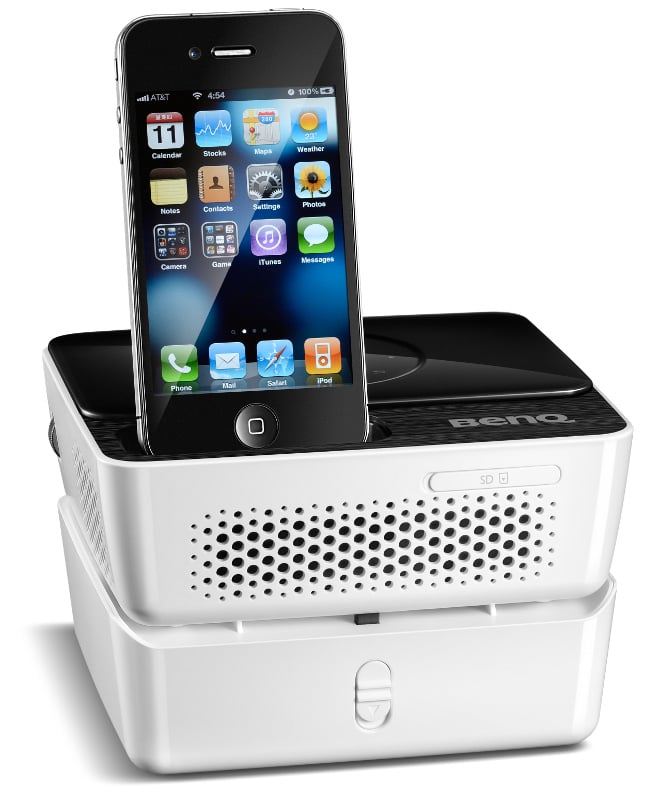
First, let's start off with the obvious. There is now an integrated iPod dock. This Made for iPod/iPhone certified dock allows you to stream your video and audio content directly from your iDevice. For students and business professionals alike, the dock will be worth the $50 premium over the original Joybee GP1. BenQ has included dedicated iPhone/iPod controls on the GP2 Projector's included remote control. There are stereo built-in 2W speakers for audio playback (if they are anything like the Joybee GP1's, they are a last resort audio solution) or you can export the audio via a dedicated 3.5mm Audio Out jack. One of our main complaints of the Joybee GP1 was that the carrying case neglected a spot for the (HUGE) external power supply. BenQ addressed that with a new carrying case that features a dedicated pocket for the power adapter.
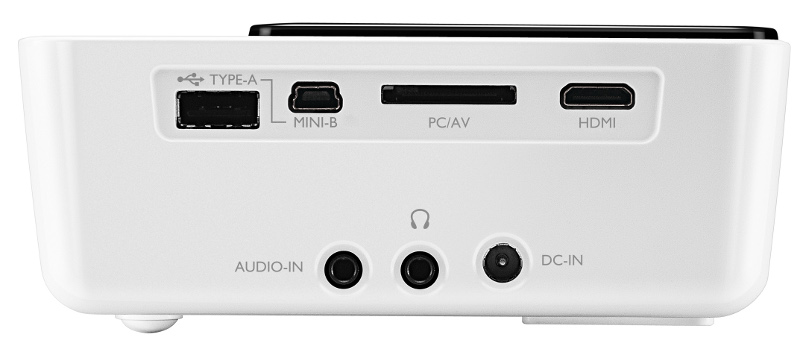
The GP1 had all the connections (such as they were) on the back. There wasn't much there except USB and a breakout cable that handled your composite/RCA audio or VGA. This meant that if you wanted to take full advantage of the 720p capabilities of the GP1, you had to connect a computer to it. No longer. The BenQ Joybee GP2 has USB, Mini-USB, the PC/AV breakout cable, 3.5mm stereo audio in, SD Card, and (most importantly) an HDMI connection. This is a massive improvement over the GP1 and will make this projector much more flexible and useful in a much wider selection of situations. In fact, the VGA input is completely obsoleted because the Joybee GP2 can be connected to your computer via USB - a smart and convenient solution.
The BenQ Joybee GP2 employs high-efficiency 3LED illumination and DLP projection technology in a compact size, measuring just 5.5" x 2" x 5.1" (140.3 x 52.5 x 129.8 mm) and weighing just 1.25 lbs (565 g). It can put out 200 ANSI lumens (double the GP1) and is rated up to 160 inches (we're betting a clear/bright picture tops out well south of that in anything but an absolutely black room). There is also an optional battery you can get for the GP2 that will provide up to 3 hours of life. For business professionals, the GP2 has 2 GB of internal memory (transferable via USB) and an integrated document viewer for Microsoft Office and PDF documents. It's like they read our reviews or something...
Conclusion
Almost every complaint we had with the BenQ Joybee GP1 was addressed with the Joybee GP2. They've greatly expanded the number and types of connections. They've included a carrying case for the power supply (and even added an optional battery). The only thing we don't know is if they've reduced the size of the power supply and if the fan noise is still an issue. With 2 GB of internal memory, an HDMI connection, Made for iPhone/iPod dock, doubling of the brightness, and so much more, it's unlikely to matter. If you thought the BenQ Joybee GP1 sounded like a good deal, for $50 more, the Joybee GP2 is an absolute steal.
For more information, please visit www.benq.com.
Unless otherwise indicated, this is a preview article for the featured product. A formal review may or may not follow in the future.
As Associate Editor at Audioholics, Tom promises to the best of his ability to give each review the same amount of attention, consideration, and thoughtfulness as possible and keep his writings free from undue bias and preconceptions. Any indication, either internally or from another, that bias has entered into his review will be immediately investigated. Substantiation of mistakes or bias will be immediately corrected regardless of personal stake, feelings, or ego.
View full profile Subscribe to our newsletter