


Emotiva UMC-200 AV Preamp / Processor Review
- Product Name: UMC-200 A/V Processor
- Manufacturer: Emotiva
- Performance Rating:

- Value Rating:
- Review Date: January 03, 2013 10:30
- MSRP: $ 599
- 4 HDMI Inputs all inputs HDMI 1.4 compliant, with 3D and CEC support
- 1 HDMI Output HDMI 1.4 compliant, with ARC support
- Analog Inputs: 4 stereo pairs and one 7.1 channel unbalanced;direct
- Digital Inputs: S/PDIF, Coax, and 2 Toslink Optical
- USB Input: Accepts Emotiva Bluetooth dongle only
- Analog Outputs: 1 7.1 channel (unbalanced), 1 subwoofer (balanced), 1 stereo pair (unbalanced), and 2 stereo pairs (Zone 2 and Zone 3).
- Antenna Inputs: 1 AM and 1 FM
- 1 Trigger Input / 2 Trigger Outputs
- 1 IR Input / 1 IR Output
- Remote Control Full function infrared remote control with CEC sub panel
- Display (on-screen) Full color OSD over live video
- Display (front panel) Two line alphanumeric High visibility blue VFD (dimmable)
- Size: unboxed: 17” W x 14” D x 3-1/4” H boxed: 21” W x 18” D x 7.5” H
- Weight: 10 lbs (16 lbs boxed)
Pros
- Decodes all of the latest HD audio formats flawlessly
- Fabulous analog preamp section
- Easy to setup and use
- Firmware updatable via USB
- Superb value
Cons
- Lacks networking features found on A/V receivers
- No legacy video support
Emotiva UMC-200 Introduction
 Emotiva
has been releasing a slew of new products every year either as entirely new
platforms or refreshes to prior successful generations of products, most
notably their power amplifies. Emotiva
fans have been awaiting the arrival of the new UMC-200 A/V processor. The
Emotiva UMC-200 is a 7.1 channel A/V processor with four HDMI inputs and one output with ARC (Audio Return Channel). It has two coaxial and two optical digital audio
inputs and four pairs of RCA style
analogue audio inputs. It has RCA
style output connectors for your external amplifier for all 7.1 channels plus
an additional XLR output for your
subwoofer.
Emotiva
has been releasing a slew of new products every year either as entirely new
platforms or refreshes to prior successful generations of products, most
notably their power amplifies. Emotiva
fans have been awaiting the arrival of the new UMC-200 A/V processor. The
Emotiva UMC-200 is a 7.1 channel A/V processor with four HDMI inputs and one output with ARC (Audio Return Channel). It has two coaxial and two optical digital audio
inputs and four pairs of RCA style
analogue audio inputs. It has RCA
style output connectors for your external amplifier for all 7.1 channels plus
an additional XLR output for your
subwoofer.
This highly anticipated product was designed to cosmetically match their Ultra series power amplifiers. The Ultra series from Emotiva enables consumers to get into a separates solution at the price range of a middle of the lineup A/V receiver. This review pairs the UMC-200 ($599) and the UPA-500 ($399) five-channel power amplifier for a combo squeezing in below the magic $1k price point. Take a tour with us in this review to better understand the features and level of performance you can expect from the brand that has built such a solid reputation for performance, customer support and reliability for nearly a decade.
Unpacking
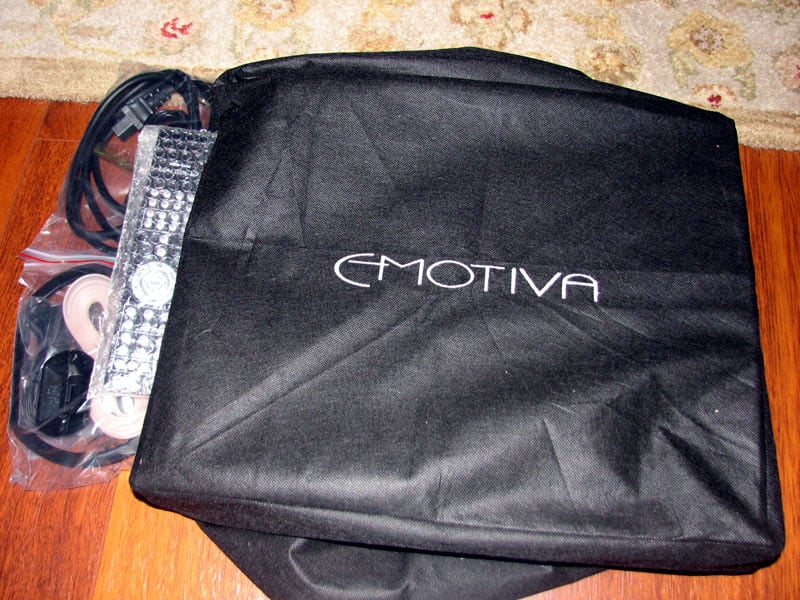
The Emotiva UMC-200 comes in small compact box with foam inserts. When I opened the box, i felt like I was unpacking an Oppo since the UMC-200 was enclosed in a bag very similar to what Oppo uses for their products. This was a very nice touch. In the box was the supplied detachable power cord, calibration mic, FM antenna and AM loop antenna. No user manual was located in my review sample but Emotiva makes their user manual readily available online for downloading.
Emotiva UMC-200 A/V Processor Design Overview
The Emotiva UMC-200 is a 7.1 channel A/V processor with four HDMI inputs and one output with ARC (Audio Return Channel). It has two coaxial and two optical digital audio inputs and four pairs of RCA style analogue audio inputs. It has RCA style output connectors for your external amplifier for all 7.1 channels plus an additional XLR output for your subwoofer.
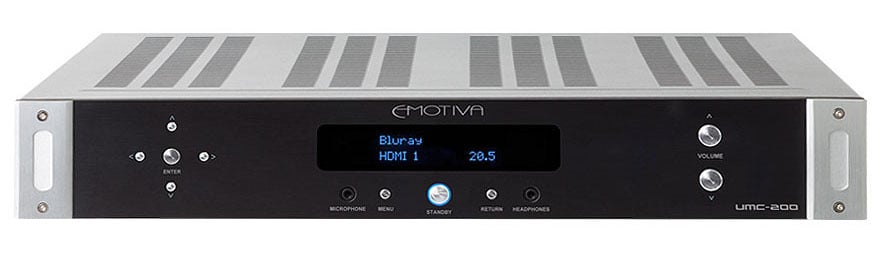
Emotiva UMC-200 Front View
The UMC-200 doesn’t have all of the bells and whistles you’ll find in a similarly priced A/V receiver. There is no video processing, no networking capabilities for streaming audio and no legacy video connectivity. That’s right, you won’t find connections for any analog video, just HDMI. Emotiva’s take on that is legacy video is quickly becoming a relic, especially with the Blu-ray Sunset rule coming in full effect in 2013 which restricts video output to HDMI only. You won’t find analog video outputs on blu-ray players this coming year, so it’s a compelling argument to nix support for analog video. Emotiva understands this and is banking on you making the switch to all HDMI or using your Display to connect you older Wii or, grasp, VHS player.
For legacy gear, Emotvia has included 7.1 channel analog audio inputs. These can also be used in conjunction with a next generation Blu-ray player should a surround format come out that the UMC-200 doesn’t support.
There is a USB input on the back but it only accepts the Emotiva Bluetooth dongle (a trade-off there, but one that would have certainly raised the price). There is one 12-volt trigger input and two outputs as well as a single IR input and output. There is also a pair of RCA outputs labeled "Mix" for combining surround sound into stereo. Zone 2 and Zone 3 RCA outputs are also available. There is no RS-232 support and if that is an important missing feature, you will have to upgrade to a higher level product for that. Lastly, there are inputs for terrestrial AM/FM radio and the front has a 3.5mm headphone jack.
The Emotiva UMC-200 supports 3D and employs an AD7326 for Xpressview switching for fast transitions between HDMI sources. It supports HDMI Pass-through allowing video and audio to be sent while in standby. All current HD surround sound formats are supported (ie. Dolby True HD, DTS HD, and even Dolby Digital ProLogic IIz) except for the new DTS Neo:X. Twin Cirrus® 32-bit dual-core fixed-point DSP’s allows the UMC-200 to handle 192kHz/24 bit signals in native format with NO down-conversion and also simultaneously applying bass management for all sampling rates. This is unusual as many budget products either truncate down to 48kHz or won’t accept a 192kHz signal at all or won’t engage bass management on any signals with higher sampling rates than 48kHz. The UMC-200 has some good horsepower for what it is. The UMC-200 also has flexible quadruple bass management with 12dB or 24dB per octave crossover filters configurable in 5Hz steps below 80Hz and 10Hz above 80Hz.
Emotiva has included their Advanced Emo-Q Gen2 automatic multi-channel room correction and loudspeaker setup with a microphone. For those who are into manual calibration and tweaking, Emotiva has included eleven user-programmable, fully parametric, equalizers per channel. There is also storage for three different configurations for advanced calibrators. You get a full color on-screen display over live video as well as the two line LED screen on the front of the unit. The UMC-200 is 17” wide by 14” deep by only 3-1/4” tall and weighs 10 pounds.
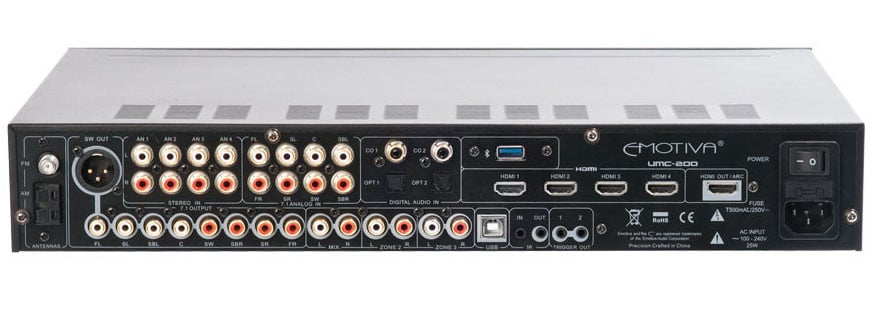
Back Panel View of the Emotiva UMC-200
Given the small footprint of the UMC-200, analog connections are a bit crammed but I had no issue other than I needed to use a flashlight to read the silkscreen to ensure I was properly connecting the UPA-500 to the proper analog outputs of the UMC-200. I appreciate the balanced subwoofer output and it just goes to show you the little extra details Emotiva throws into their products, even one of such modest cost as this one.
System Setup & Configuration
I conducted the review of the Emotiva UMC-200 in the main Audioholics showcase theater room. The UMC-200 was paired with an Emotiva UPA-500 using ½ meter Emotiva RCA cables. These cables are great in my opinion because they look nice and the fit the connectors just right without worrying of ripping off or damaging the equipment when disconnecting them, like some of the Monster Turbine cables are notorious for. I used the Andrew Jones Pioneer SP-PK52FS 5.1 speaker system and Kimber 8PR speaker cables to connect up the system. The source was the Oppo BDP-105 blu-ray player.
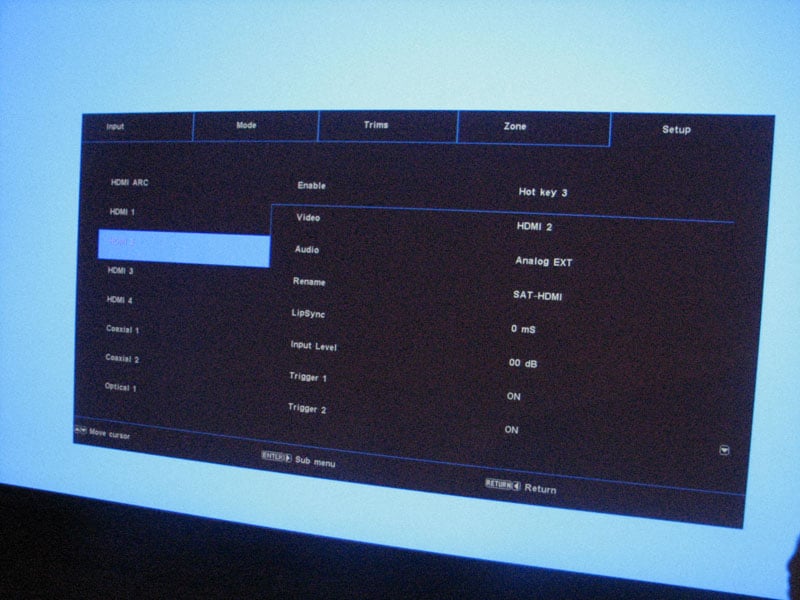
Emotiva UMC-1 Input Set-Up
Basic Configuration
Input assignments are already preset in the UMC-200, but you can alter not only the name of each input but what audio source they each play. This is a cool feature as you can conveniently listen to a CD while watching the game on your display. You can even reassign the input hot keys on the remote control. There is no ability to preset a power up volume or max volume setting for either the main zone or zones 2 & 3 but upon power up the UMC-200 flashes the numerical value of the last volume setting before it scales it up to that setting. This gives you some warning in case you were cranking your system the night before and don’t want to get blasted off your seat the next day. I would have preferred the ability to preset a power up volume level but maybe Emotiva can offer a future firmware upgrade to make this a reality.
Calibration
If yo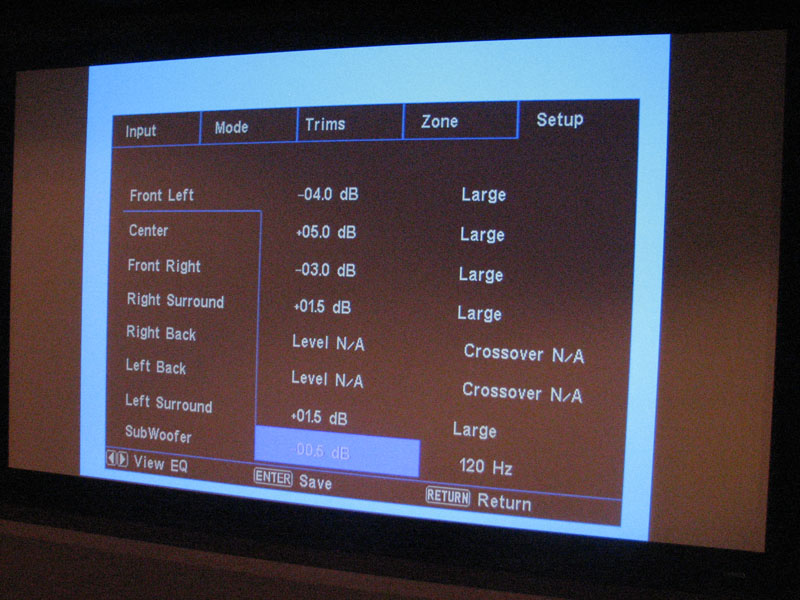 u’re old-fashioned (like me) and
decide to bypass auto setup all together, you can manually set up all of your
speaker sizes, crossover slopes, distances and levels in the setup menu of the
UMC-200. The UMC-200 has 0.5dB
resolution in level step sizes, including the master volume level. Typically you will find less precision at
this price with 1dB steps being the norm.
The distance settings are in 0.3ft increments which is better than the
typical .5ft or even 1ft increments found in most budget gear.
u’re old-fashioned (like me) and
decide to bypass auto setup all together, you can manually set up all of your
speaker sizes, crossover slopes, distances and levels in the setup menu of the
UMC-200. The UMC-200 has 0.5dB
resolution in level step sizes, including the master volume level. Typically you will find less precision at
this price with 1dB steps being the norm.
The distance settings are in 0.3ft increments which is better than the
typical .5ft or even 1ft increments found in most budget gear.
In order to manually calibrate speaker levels in the UMC-200, you have to go to the Setup > Speaker Setup > Test Tones in the units menu system. This is a bit of a problem for those wanting to calibrate speaker levels using external tone generators since the UMC-200’s internal generator isn’t defeatable in this mode of operation. However after you’ve got everything dialed in, you can further tweak levels with the separate “trim level” adjustments which act globally on all inputs to alter the levels of each speaker referenced to your original calibration done in the Test Tone mode. This gives you on-the-fly trim level adjustment capability not typically found in a product at this price point. Take note however that these settings are wiped out once you power cycle the unit. Personally I would like to see Emotiva offer the option of defeating the internal tone generator when adjusting the permanent speaker levels or making the Trim levels permanently retain their settings even after power cycling the unit.
I was a bit reluctant to use EMO-Q simply because I’m not a huge fan of any of the auto room EQ systems since they often produce less than ideal results. However, it’s always a good idea to keep all options on the table when calibrating your system especially if the product provides you the flexibility of altering the results like EMO-Q does. Also Emotiva has incorporated Gen2 of this system so I was curious to see how it worked. EMO-Q does a series of white noise bursts for each speaker to first identify the speakers, set the distance and determine phase. The second pass of test white bursts then sets level. EMO-Q only measures one mic position unlike some of the more elaborate multi-point systems such as Audyssey.
Before discussing the EMO-Q calibration results, I think it’s important to mention that ALL products I’ve ever tested employing the Cirrus Logic decoder chips have inaccurate tone generators for the subwoofer outputs. I found this to still be the case with the UMC-200. During manual calibration, the subwoofer level appeared to be set about 6-8 dB too hot when using the internal tone generator and my trusty analog SPL meter. This was verified by using external tone bursts from various Blu-ray calibration discs but could also be heard by ear. Emotiva attempts to tame this problem by padding down the subwoofer channel during the EMO-Q auto setup process.
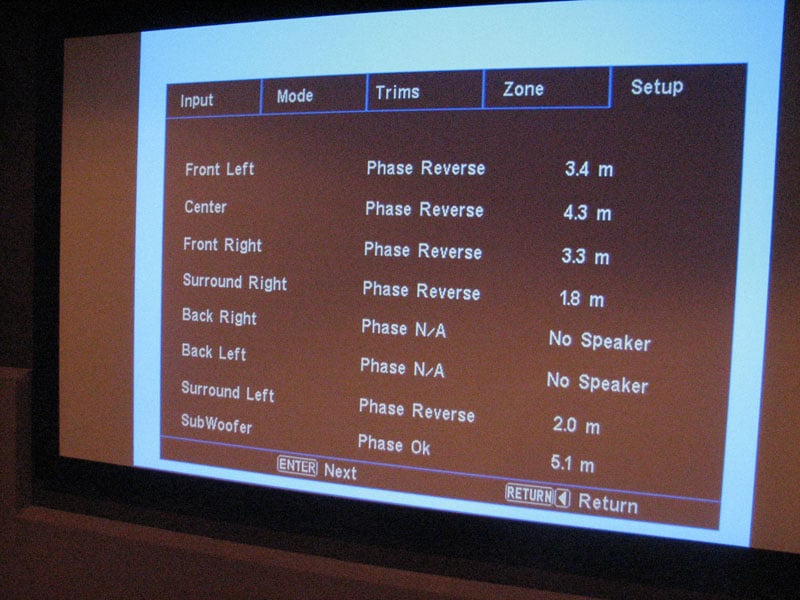
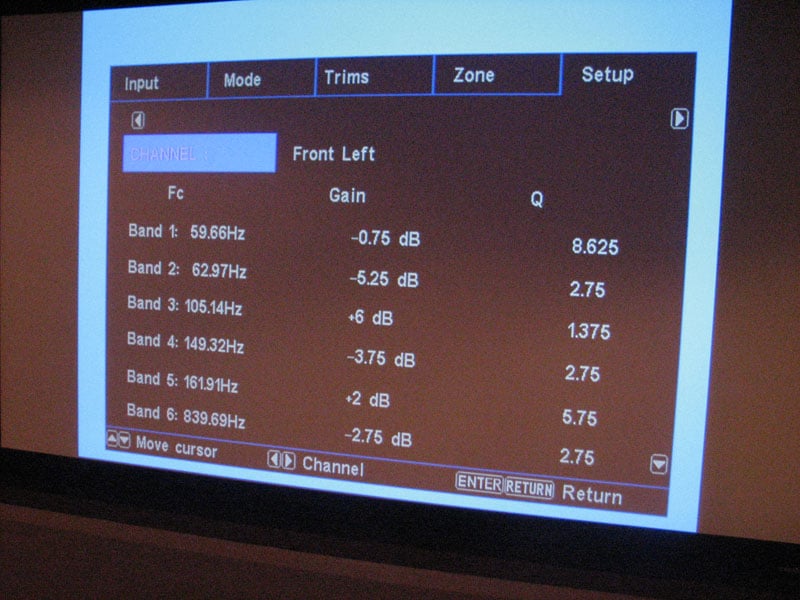
EMO-Q Calibration Results Screens
EMO-Q set the distance of my speaker system pretty accurately but it incorrectly identified reverse phase for the rear speakers. It also set all of my speakers to large with a 120Hz crossover. None of this was surprising as most auto setup systems tend to produce less than ideal calibration settings due to how the speakers interact in the room. I set all the speakers to “small” except the main channels which I left as “large” simply because I achieved a better blend between the main speakers and the output challenged Pioneer sub trying to reproduce bass in my nearly 6,000ft3 listening space. I also had to bump up the center channel and surround channels a few dB to get all of the speakers to level match.
The calibration result produced too much bass with EMO-Q off (for reasons I indicated earlier with the Cirrus tone generator issue) and too little bass with EMO-Q engaged. I had to manually tweak the levels and EQ trims to balance this out.
I was quite happy to discover that Emotiva gives you the opportunity to alter each of the 11 bands for all of the channels including the 3 band EQ for the subwoofer channel. If you prefer the sound without EMO-Q, simply select “flat” (though I wish it was called “bypass” for clarity) and use one of the three manual EQ settings to tweak till your heart’s content. The 3 band PEQ for the subwoofer channel is a very useful tool NOT found in most A/V receivers at over twice the price of the UMC-200. My advice with EMO-Q is to run the setup as a starting point and tweak as needed.
Emotiva UMC-200 A/V Processor Bass Management
The Emotiva UMC-200 has some of the most flexible bass management options I’ve seen in an A/V processor regardless of price, but this can also be its Achilles Heel. Not only are you are able to independently adjust crossover frequency for each speaker group (ie. fronts, center, surrounds) but you’re also able to select the slope (12 dB/octave or 24 dB/octave). The crossovers are adjustable in 5Hz step sizes from 40Hz to 80Hz, 10Hz step sizes from 80Hz to 150Hz and 25Hz step sizes from 150Hz to 250Hz. All of this setup flexibility is a welcomed surprise but being the propellerhead that I am, I had to bench test it to ensure it all worked correctly. I mean come on, how could all of this be type of power be packed into such a modest product and function correctly? Let’s find out.
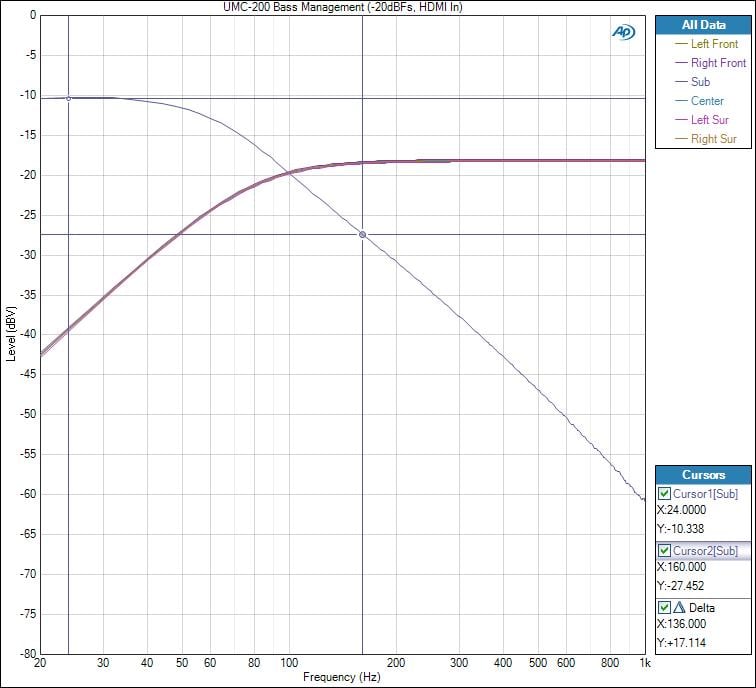
Emotiva UMC-200 Bass Management Frequency Response (HPF: 12dB/oct; LPF: 24dB/oct)
I found the HPF slopes and crossover frequencies to all measure as expected based on setting. For example an 80Hz crossover set to 12dB/octave followed a 12dB octave slope attenuating the signal 12dB at 40Hz for the speakers set to “small”. The same followed for the subwoofer output until I injected multiple simultaneous signals into all channels set to “small” with the subwoofer LPF set to 24 dB/oct. The summed response increased the subwoofer output by the sum of the six channel correlated audio source as expected, but also narrowed the slope of the response. It decreased the 24 dB/octave slope to about 17 dB/oct. With just the main channels driven, the subwoofer LPF response maintained a 22dB/oct rolloff rate.
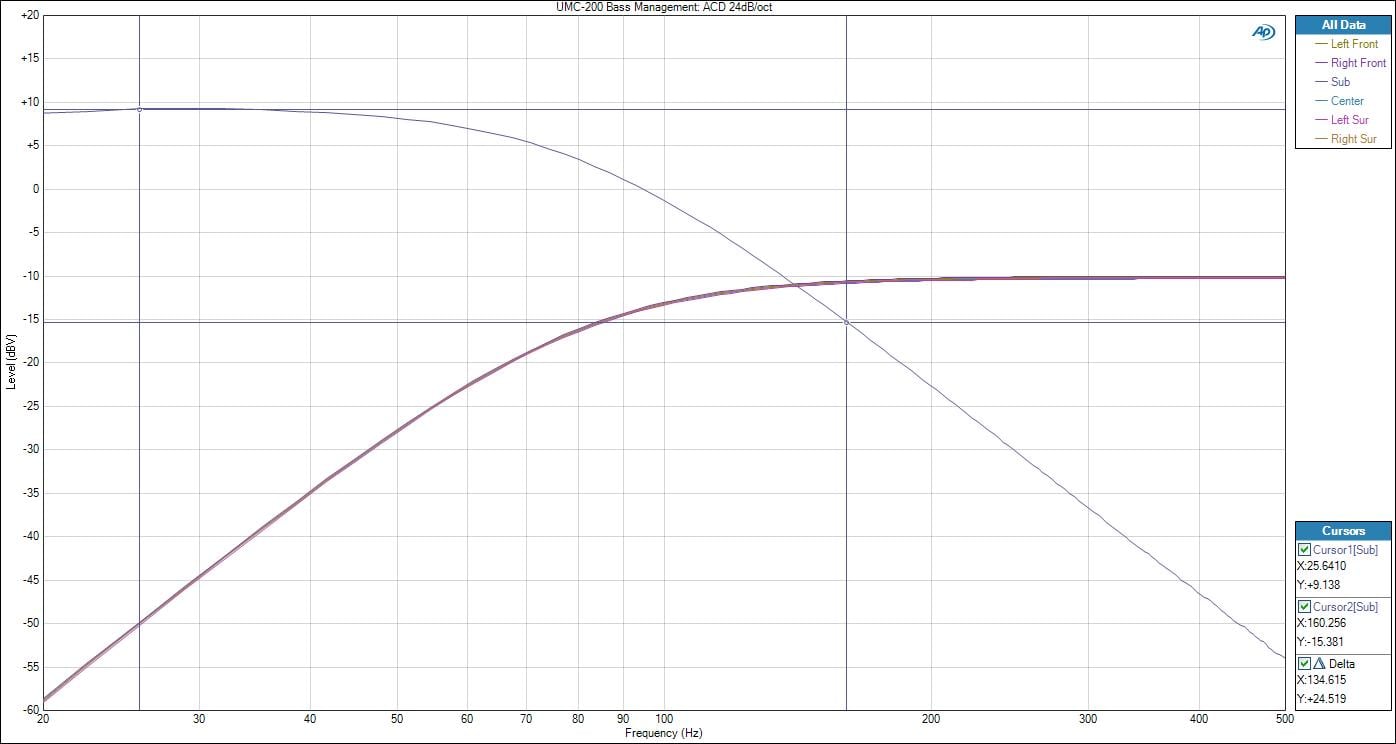
Emotiva UMC-200 Bass Management Frequency Response (HPF: 24dB/oct; LPF: 24dB/oct)
Emotiva designed their bass management to have a symmetric rolloff for the HPF and LPFs so if you want 24dB/oct slope on the subwoofer, you need to set all of the other channels HPF’s to 24dB/oct as well. In fact, I’d further recommend if you want a truly symmetric rolloff of the subwoofer’s LPF that you stick with the same crossover frequency for all speaker groups and not vary any of the channels more than 20Hz. For example, set all “small” speaker groups to 80Hz but perhaps if you have smaller surround back channel speakers which you may want to set to 100Hz. My testing confirmed you would still maintain the proper LPF slope if you follow these recommendations.
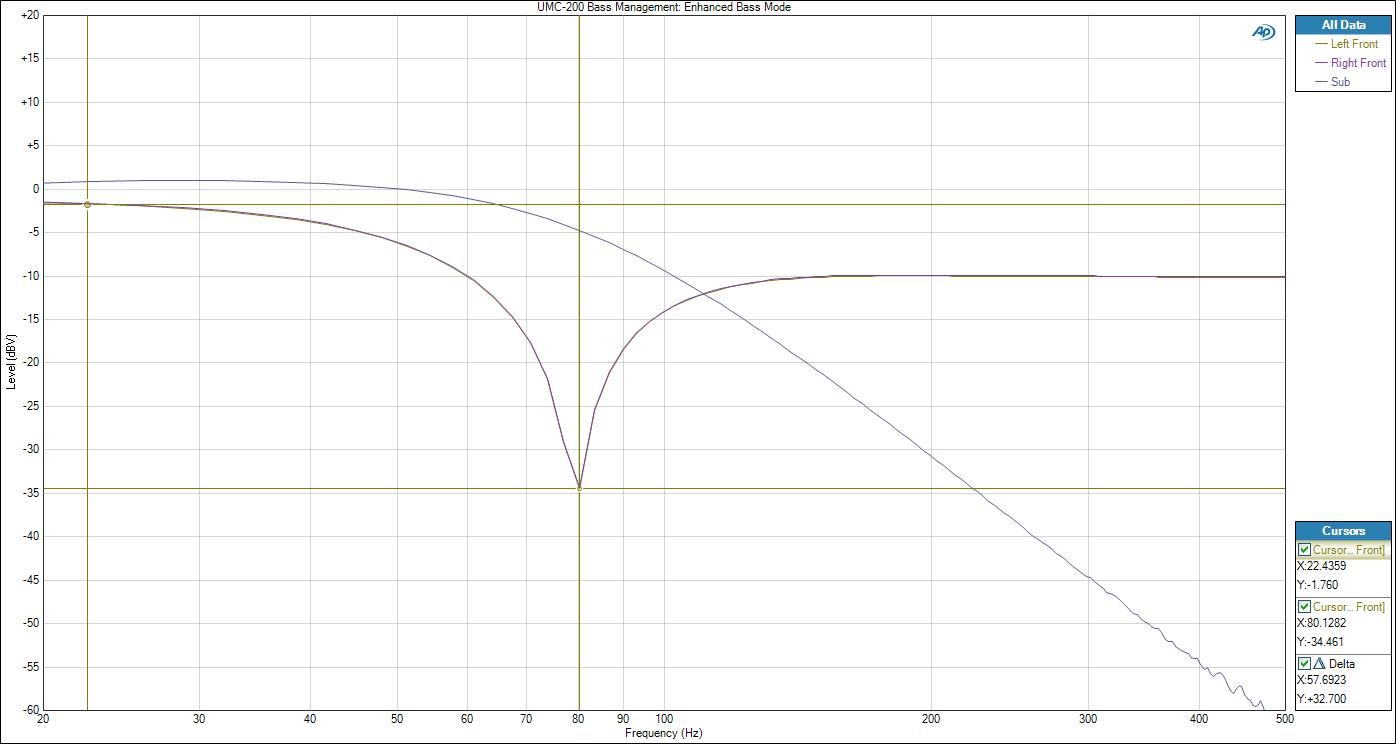
Emotiva UMC-200 Bass Management Frequency Response Enhanced Bass Mode (Front Speakers: Large)
The “enhanced bass” setting is a great option for those that want to have their subwoofers engaged while having their main front speakers set “large” listening to two-channel music. Other manufacturers often call this “double bass” or “LFE + Main”. However, in my testing, I found the UMC-200's "Enhanced bass" mode does a bit more than the typical feature found on most competitor products.
With “enhanced bass” turned on, I fed the UMC-200 an HDMI 192kHz PCM signal to the front main channels and subwoofer channel. The output produced a -32dB notch in the response of the main front channels at the crossover point followed by a slight elevation at 20Hz. The notch and elevation varied depending on the number of channels driven. With ACD, the notch was under -10dB. I was a bit surprised by this until I realized what was happening. Emotiva has given the customer something I’ve always wanted and thought would be a great idea. They allowed the end user to simultaneously send LFE info to the subwoofer channel and front main channels if they were set “large”. I didn’t think at the time there would be a downside to this provided the main speakers were capable of handling the bass but the summing of the subwoofers LPF into the main channels causes this undesirable anomaly. However if the LFE channel contains correlated audio from the main front channels, it can produce a notched response like this (though likely at a much lower amplitude) in those channels.
I informed Emotiva about my findings and they are working on a firmware update to disable the option of combining LFE signal back into the main channels with the "enhanced bass" feature turned on. In the meantime, I suggest enabling "enhanced bass" mode only for two-channel sources if your front main speakers are set to “large”. Disabling "enhanced bass" when playing back multi-channel sources containing LFE content will also prevent potentially overloading your main channels with too much bass. It’s important to note this will NOT be an issue in multi-channel if your front speakers are set “small” however.
I was happy to note if you set the main channels to "small", the UMC-200 does NOT allow you to set the center and surround channels to "large". I’ve seen so many products in the past not recognize the logic that if a user is using “small” main speakers, then the rest of the channels should also default to “small” to protect them from bass overload. Props to Emotiva for paying attention to details like this.
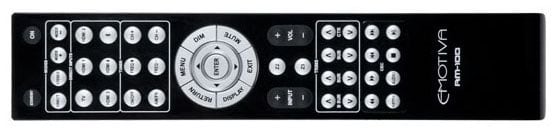
Emotiva RM-100 Remote Control
Remote Control
Emotiva is not going to win any awards with their RM-100 remote control. It has no backlighting, and no LCD screen. It’s basic but functional which is to be expected for a product of this price range. The audio modes of operation are neatly located in the top row of the remote control followed by two rows of input selectors and two rows of buttons to operate the tuner. The center of the remote contains a circle layout of OSD operational buttons with the central rotational button allowing you to navigate around the OSD. There is also a quick up/down input selector button just below the central buttons next to the volume up/down buttons. The following two rows of buttons allow you to do on the fly channel trim adjustments and the last two rows of buttons are for CEC controlled devices.
Functionality
Ope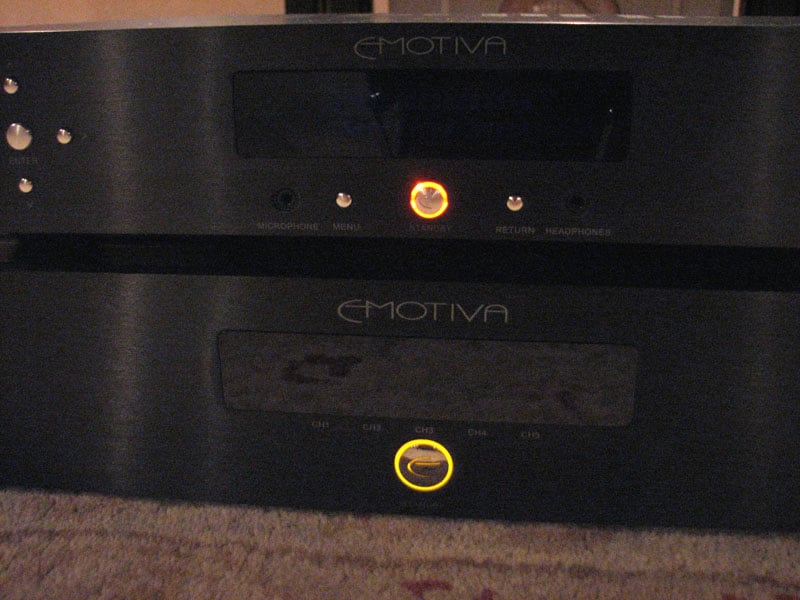 rationally the UMC-200 worked nearly flawlessly. Aside from the “enhanced bass” glitch I
found, the UMC-200 front panel display indicated “no audio” for DTS HD audio
sources despite the fact that it outputted audio just fine. Emotiva is aware of this issue and is working
on a firmware update to fix it. Luckily
you can update the UMC-200 via USB with their updater program and a laptop so
this should be an easy fix once they release it.
rationally the UMC-200 worked nearly flawlessly. Aside from the “enhanced bass” glitch I
found, the UMC-200 front panel display indicated “no audio” for DTS HD audio
sources despite the fact that it outputted audio just fine. Emotiva is aware of this issue and is working
on a firmware update to fix it. Luckily
you can update the UMC-200 via USB with their updater program and a laptop so
this should be an easy fix once they release it.
Powering up the UMC-200 connected to the UPA-500 I had on hand momentarily power cycled the UPA-500 until the trigger line stabilized after a couple of seconds. Emotiva informed me the trigger is set a bit too sensitive on their UPA series of amplifiers and this is something that will be tweaked in future production units.
The only other oddity I noted was the slight color mismatch of the off cycle LED on the Emotiva power button for the UMC-200. It has more of a shade of orange than other Emotiva products. In pinging Emotiva on this, I discovered Lonnie’s dark secret of being color blind and not seeing this during the development phase. Although the LEDs are all the same color, the transparent cover plate is a slightly different shade on the UMC-200, causing this discrepancy. This will be fixed in the next production cycle of the UMC-200. I also requested that they implement some sort of status display so you can hit a hot key on the remote and instantaneously get info on the audio signal’s sampling rate, bit depth and number of channels it’s being broadcasted in.
Emotiva UMC-200 A/V Processor Listening Tests
SACD: Gr over
Washington JR – Prime Cuts
over
Washington JR – Prime Cuts
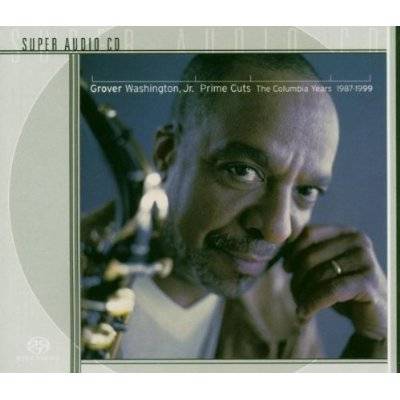
This SACD is a sonic masterpiece and a must have in your collection if you’re serious about sound and a jazz aficionado like myself. Track #1 “Take Five” has a lot of stuff going on at once, including a deeply rich bass track. Grover’s saxophone came through with excellent clarity while the percussive effects popped out into a very three dimensional landscape. When directly comparing the HDMI digital input to the analog connections using the 7.1 analog bypass, I did prefer the analog. The Oppo BDP-105 DAC portrayed greater clarity than the internal UMC-200 DAC’s. This wasn’t surprising considering the BDP-105 costs 2X the UMC-200 and utilizes some of the very best DAC’s in the industry (ESS Sabre 32 bit). Don’t get me wrong, the UMC-200 sounded just fine via HDMI but in analog bypass, it was just magical. I was hearing all of the great detail of the recording like I was listening on a high dollar separates rig. Track #6 “Summer Nights” bore a similar resemblance to “Pyramid” from another great album called Close Up by David Sanborn. I loved the ping pong effect of the percussion instruments between the speakers. The Emotiva combo was driving the Pioneer speaker system with an ease and fidelity that defies the asking price of this setup. You could hear the triangles slowly decay instead of just sharply fading away. Very nice.

Blu-ray: AIX Records Audio Calibration Disc
If you’ve never heard an AIX recording, you’re truly missing out. Although most of the music is a bit obscure or not mainstream, the artists are generally good and the fidelity is unbeatable. The UMC-200 delivered excellent clarity in Track #5, “Primavera”. The flutes were reproduced with realism. The vocals were a bit honky at loud listening levels but this was a limitation of the Pioneer center channel, NOT the Emotiva gear. Bass was well extended despite the modest driver compliment of the Pioneer speaker system. Channel separation was great and the noise floor was dead silent at all listening levels.
Blu-ray: Avengers
This was the ultimate popcorn flick of 2012 and I’m a proud owner of it on Blu-ray. The DTS HD soundtrack is rockin’ on this disc and it’s sure to test the limits of even the very best home theater systems. The UMC-200 was able to place me into the middle of the battleground of the opening scene of Avengers when Loki stole back the Tesseract causing the secret S.H.I.E.L.D. installation to implode. The little Pioneer sub was unable to handle the bass dynamics of this scene so I switched over to one of my Velodyne DD-15+ subs and presto, I was engulfed into the experience.
Emotiva UMC-200 A/V Processor Measurements and Analysis
Emotiva
UMC-200 Analog Preamp Frequency Response
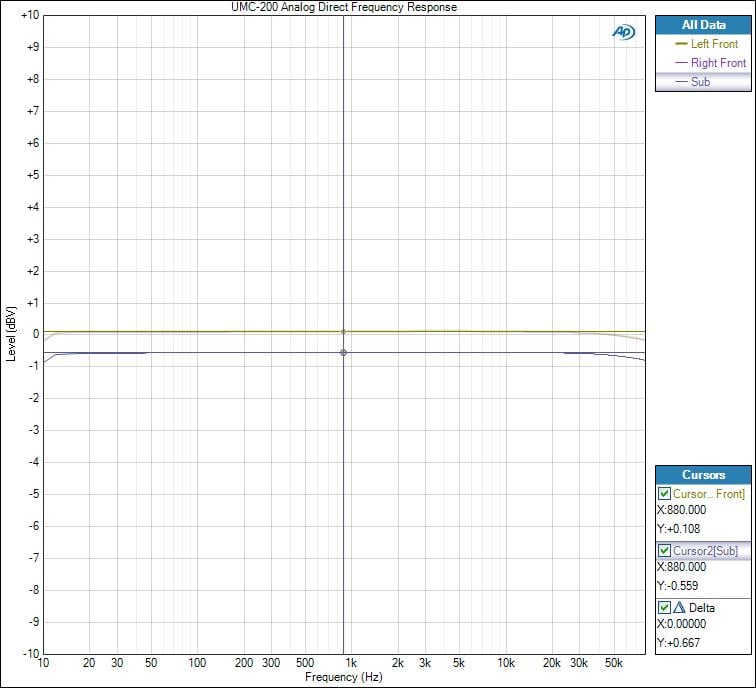
I measured a ruler flat frequency response beyond the frequency response limits of my test gear (80kHz) in "Pure Direct" mode. The UMC-200 preamplifier has a voltage gain of 14dB and was able to output 4Vrms at < 0.1% THD + N. Basically the analog preamp is like a high quality jumper between your source and power amplifier. The subwoofer output was about 0.5dB lower than the rest of the channels which is curious but not concerning.
Emotiva UMC-200 Preamp FFT Distortion Analysis
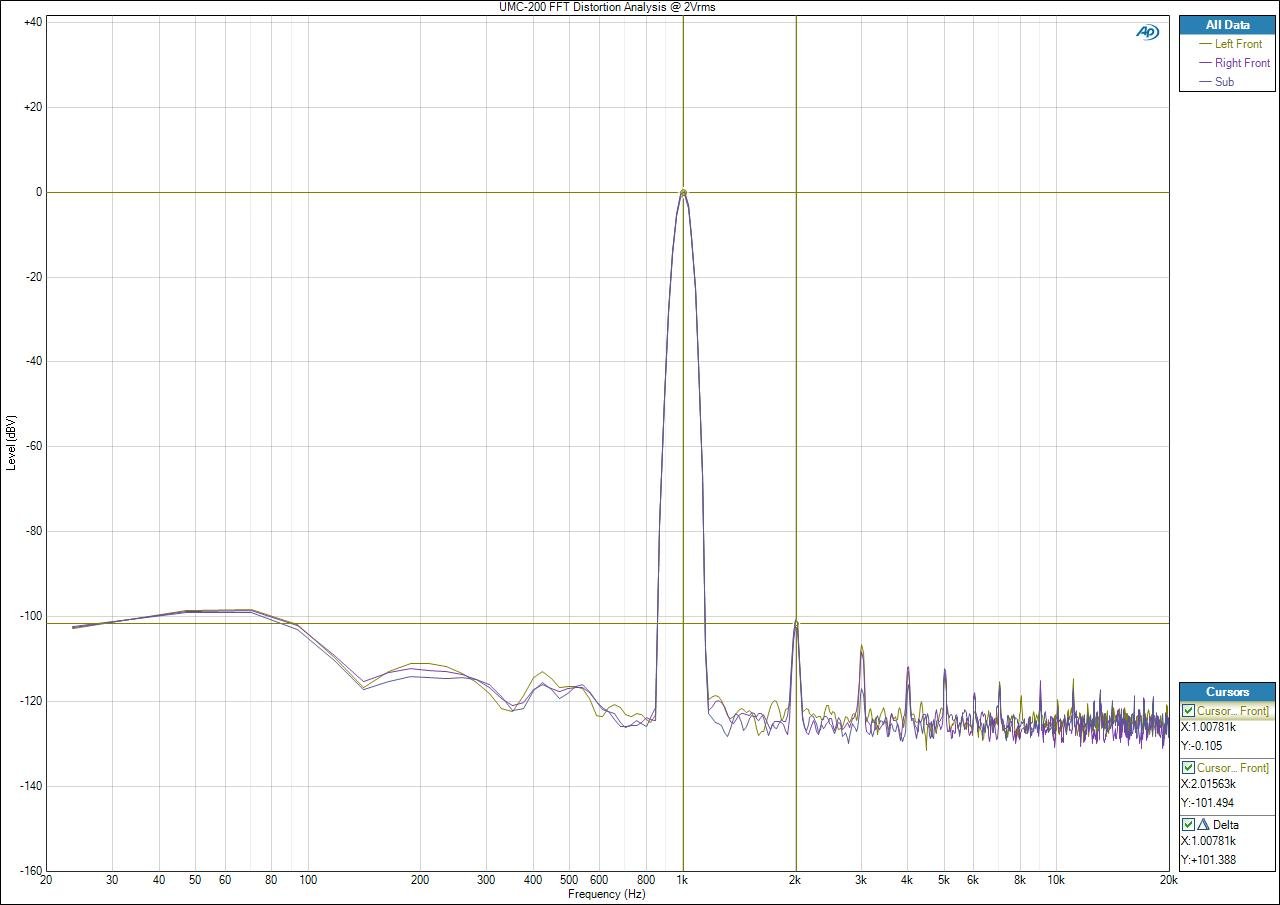
At 2Vrms output, the UMC-200 had very little residual noise. The noise floor was -120dB and the 2nd order harmonic was 101dB below the fundamental. That’s a great measurement.
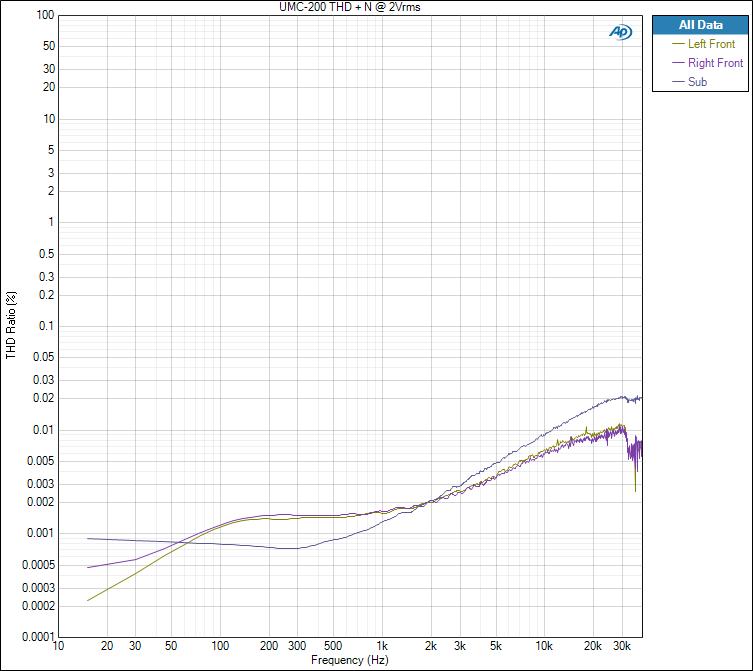
Emotiva UMC-200 Distortion vs Frequency
Running a THD+N distortion sweep from 10Hz to 40kHz at 2Vrms output revealed a very clean preamplifier section. This is textbook Amplifier Design 101.
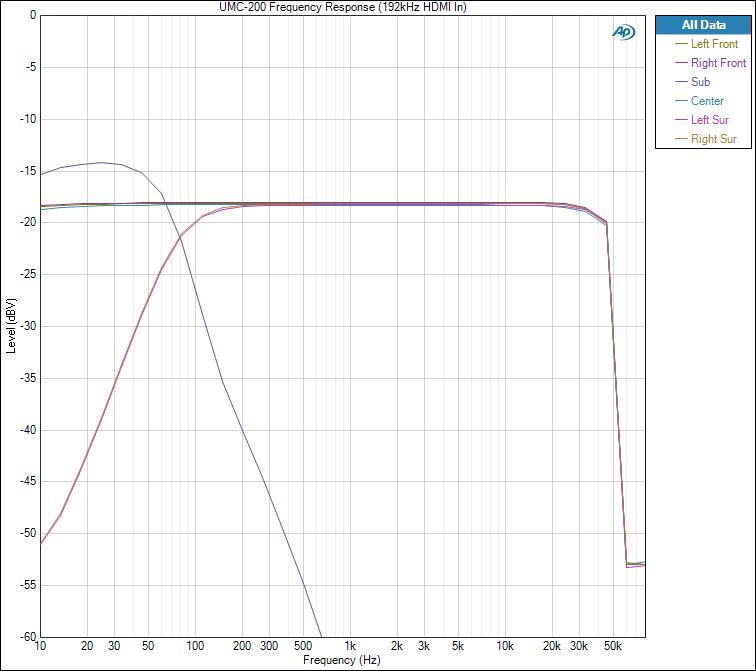
Emotiva UMC-200 Frequency Response with 192kHz Dolby TrueHD Test Signal
With all channels set to “small” crossed over at 80Hz, I measured a ruler flat response out to 48kHz. Post processing such as bass management or PLIIx surround modes from Dolby/DTS limit sampling rates to 96KHz otherwise you would have seen ruler flat response out to ½ sampling rate which in this case would be 96kHz.
SNR
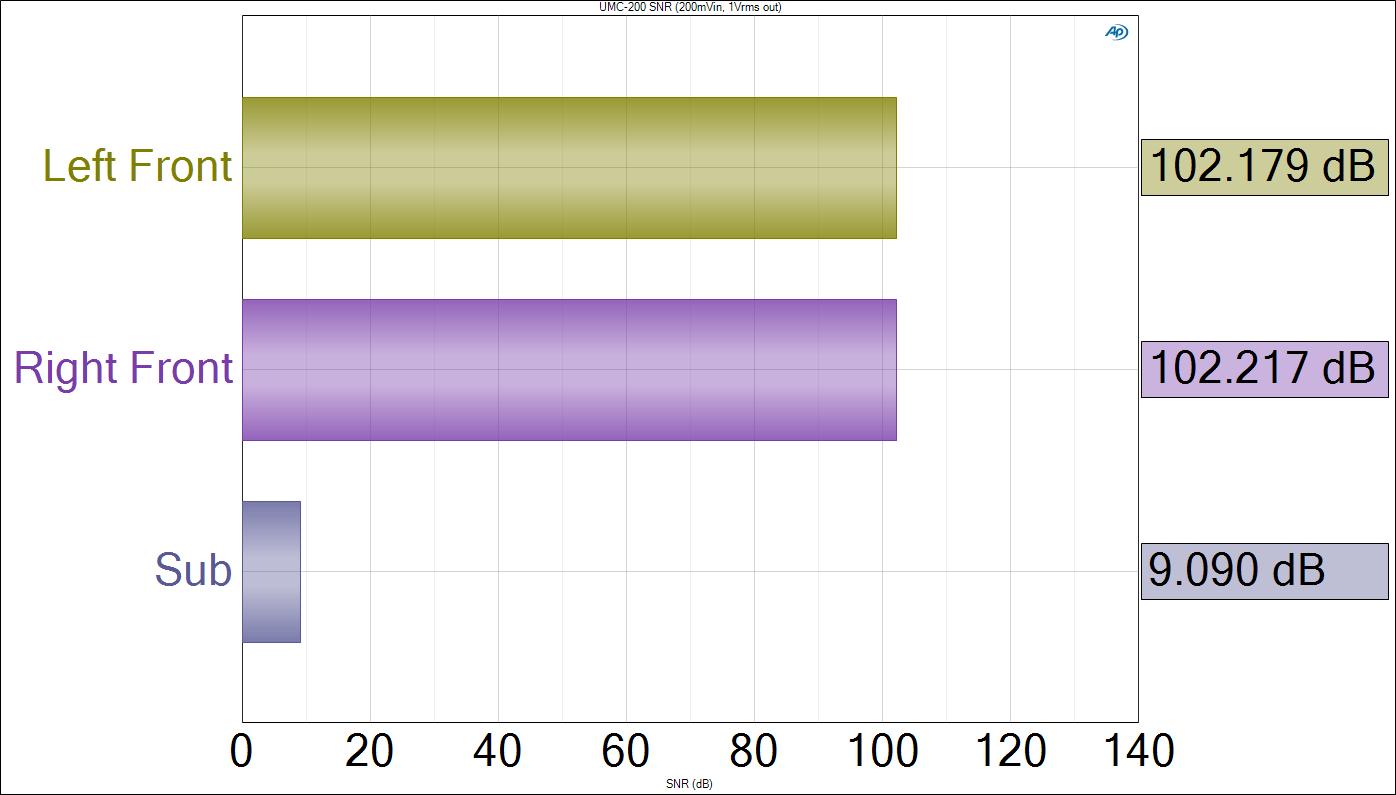
Emotiva UMC-200 Signal to Noise Ratio
The SNR of the preamp section was excellent measuring at > 102dB (a-wt) or about 90dB unweighted with 1 Vrms at the output being driven by a 200mV input from the Audio Precision APX585. I wasn’t surprised by this measurement since the UMC-200 had very low, virtually undetectable background noise in all of my listening tests.
Note: Disregard the SNR measurement for the Sub channel. I forgot to turn off the measurement probe at the time of measurement. no signal was present hence the measurement is invalid.
Crosstalk
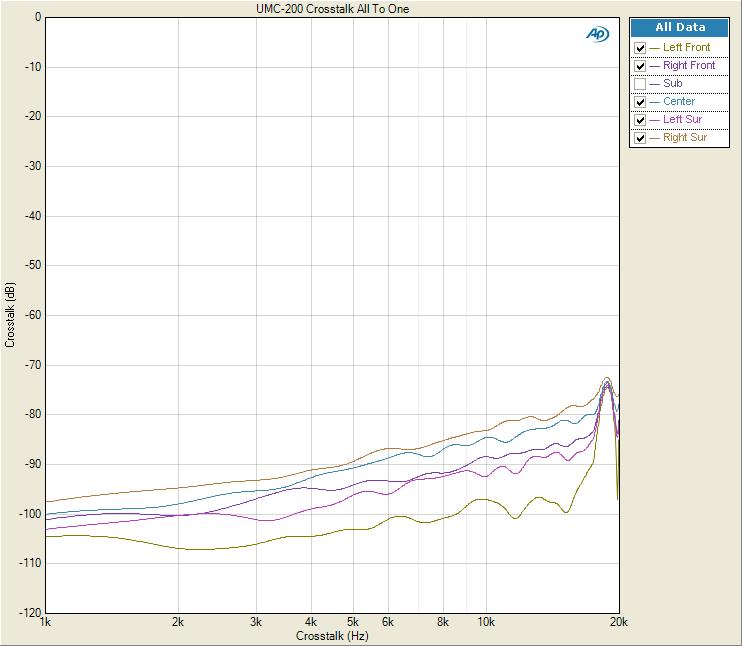
Emotiva UMC-200 Crosstalk Measurement
The Emotiva UMC-200 exhibited excellent channel to channel crosstalk performance whether being driven by a digital HDMI or analog audio source. With all channels acting as the noise source or disturber driven via the HDMI input, I measured each idle channel one at a time with all other channels being driven as the disturbers to determine the worst case channel to channel crosstalk. At 1kHz the UMC-200 yielded about -100dB and -70dB @ 20kHz for its noisiest surround channel. I consider anything less than -40dB @ 10kHz acceptable so the UMC-200 met that minimum requirement with >40dB to spare!
Emotiva UMC-200 A/V Processor Recommendations
The UMC-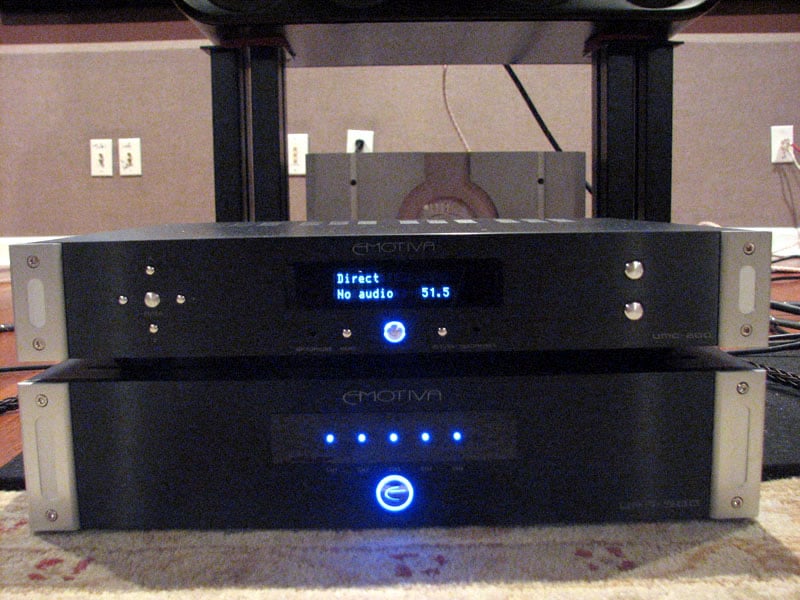 200
offers benchmark performance in virtually every category. For under $600 you get an A/V processor that
supports all of the latest HD audio formats and sampling rates, a true analog
audio path for purists, and fast HDMI switching. If you’re looking for a product with all of
the latest bells and whistles and networking features, the UMC-200 is not for
you. Your only option in this price
range would be an A/V receiver. However
if you’re looking for a top notch analog preamp that just happens to double as
a surround decoder and HDMI switcher, than the UMC-200 appears to be the best
game in town at this price point. I
would suggest choosing a blu-ray player or display that offers networking
options if you still would like to stream audio sources such as Pandora,
Rhapsody, etc.
200
offers benchmark performance in virtually every category. For under $600 you get an A/V processor that
supports all of the latest HD audio formats and sampling rates, a true analog
audio path for purists, and fast HDMI switching. If you’re looking for a product with all of
the latest bells and whistles and networking features, the UMC-200 is not for
you. Your only option in this price
range would be an A/V receiver. However
if you’re looking for a top notch analog preamp that just happens to double as
a surround decoder and HDMI switcher, than the UMC-200 appears to be the best
game in town at this price point. I
would suggest choosing a blu-ray player or display that offers networking
options if you still would like to stream audio sources such as Pandora,
Rhapsody, etc.
Some have compared the new Outlaw 975 A/V processor as a direct competitor but they are two different products in reality. The Outlaw offers legacy video support for analog video sources with analog up conversion while Emotiva simply abandoned all analog video in the UMC-200. If analog video support is essential for your application, than the 975 is the only option for your consideration as far as a budget dedicated A/V processor goes. However the Outlaw processor digitizes all of its analog audio inputs and it doesn’t have a 7.1 analog audio input. This can be a deal breaker for analog purists. The Outlaw 975 also lacks EQ other than basic tone controls and has no multi-zone support. Further, because the Outlaw 975 has only one DSP, it offers limited functionality with a Dolby TrueHD bitstream or LPCM above a 96kHz sampling rate and above 48kHz sampling rates for DTS-HD via HDMI. You will have to switch your Blu-ray player to LPCM as a workaround if you go the Outlaw route. This is NOT an issue for the Emotiva UMC-200 since it employs two Cirrus DSPs. More horsepower and more MIPS are essential to fully support the highest sampling rates offered from HD audio formats while simultaneously supporting level control, digital delay and bass management.
Conclusion
Emotiva UMC-200 A/V processor was pretty easy to set up and operate. Not once did I have to reference a user manual which in my book is a sign of a well thought out OSD and functional layout. It just worked— and worked very well indeed. I tested the UMC-200 with Dolby TrueHD and DTS 96kHz/24 bit audio, and high-resolution PCM sources and everything decoded correctly. HDMI switching was fast and glitch-free.
The real surprise of the UMC-200 was its fabulous analog preamp section. Plugged directly into a high quality DAC, you’ve got yourself a preamp that will rival any mid priced A/V receiver and give most dedicated analog preamps a run for their money. If you’re looking to break into the separates market at receiver level pricing, I can’t think of a better solution than the Emotiva UMC-200. Paired with one of their high value amplifiers such as a UPA-700, you’ve got yourself a separates solution that supports all of the latest HD audio formats along with plenty of amplifier power to drive a wider array of loudspeakers most mid priced A/V receivers simply cannot do. Highly recommended!
Emotiva Audio Corporation
135 SE Parkway Court
Franklin, TN 37064
Phone: 615.790.6754
or 1.877.EMO.TECH (1.877.366.8324)
Fax: 615.791.6287
Office hours: Monday - Friday, 8am - 7pm (Central
Standard Time)
The Score Card
The scoring below is based on each piece of equipment doing the duty it is designed for. The numbers are weighed heavily with respect to the individual cost of each unit, thus giving a rating roughly equal to:
Performance × Price Factor/Value = Rating
Audioholics.com note: The ratings indicated below are based on subjective listening and objective testing of the product in question. The rating scale is based on performance/value ratio. If you notice better performing products in future reviews that have lower numbers in certain areas, be aware that the value factor is most likely the culprit. Other Audioholics reviewers may rate products solely based on performance, and each reviewer has his/her own system for ratings.
Audioholics Rating Scale
 — Excellent
- — Very Good
- — Good
- — Fair
- — Poor
| Metric | Rating |
|---|---|
| Frequency Response Linearity | |
| SNR | |
| Multi-channel Audio Performance | |
| Two-channel Audio Performance | |
| Build Quality | |
| Fit and Finish | |
| Ergonomics & Usability | |
| Features | |
| Remote Control | |
| Performance | |
| Value | |
Gene manages this organization, establishes relations with manufacturers and keeps Audioholics a well oiled machine. His goal is to educate about home theater and develop more standards in the industry to eliminate consumer confusion clouded by industry snake oil.
View full profile Subscribe to our newsletter